


Syncro pricing at a glance
I have spent a couple of years reading how MSP buyers actually search, and "Syncro pricing" almost always means one specific question: what will this cost my shop, at my size, once the add-ons are in? So here is the whole public price list first, then the detail.
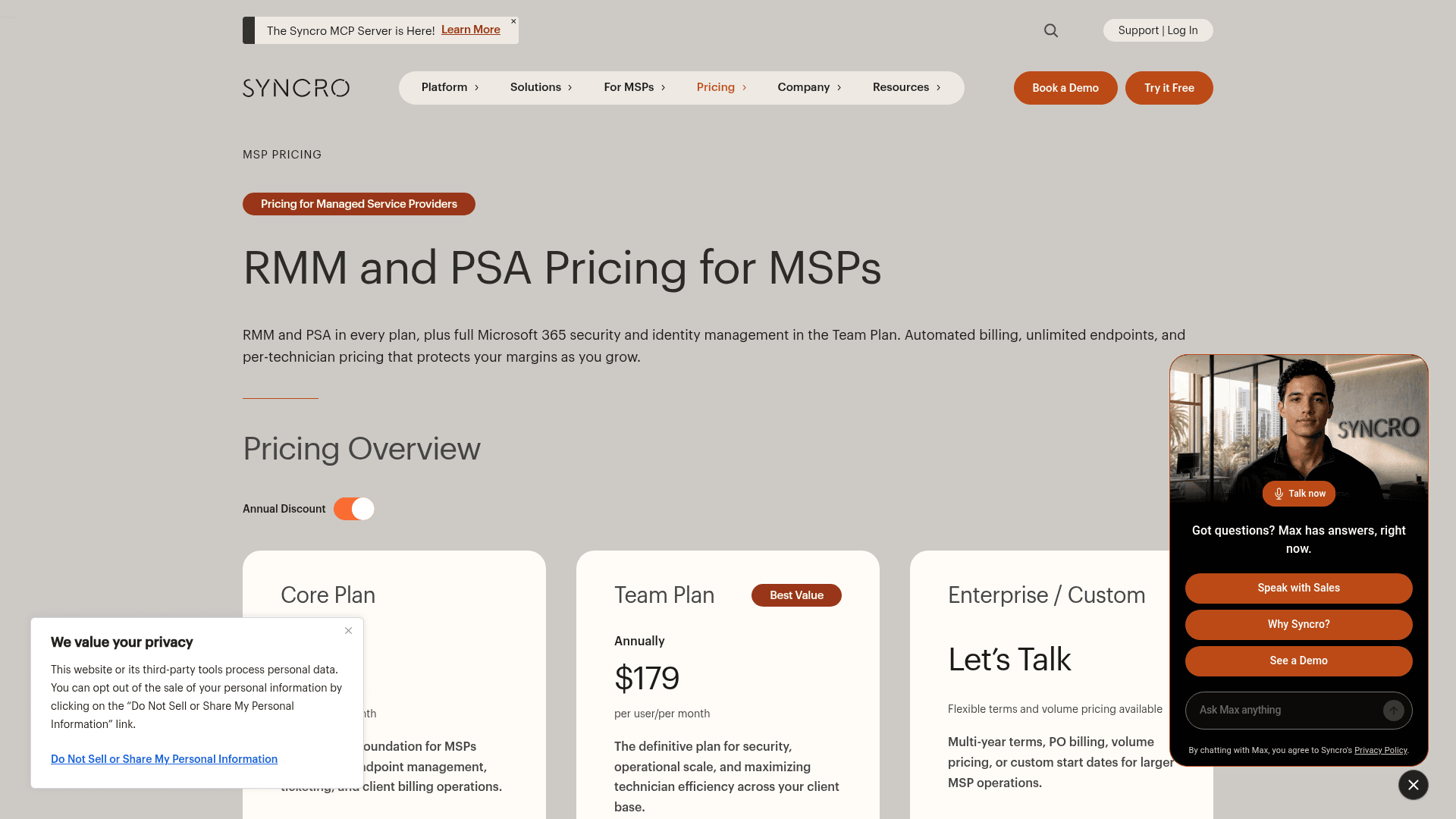
| Plan | Annual price | Monthly price | Endpoints | Best for |
|---|---|---|---|---|
| Core | $129/user/mo | $159/user/mo | Unlimited | Solo shops and small MSPs needing RMM + PSA |
| Team ("Best Value") | $179/user/mo | $209/user/mo | Unlimited | Growing MSPs building an M365 security practice |
| Enterprise / Custom | Quote | Quote | Unlimited | Larger MSPs needing multi-year terms, PO billing, volume pricing |
| M365 Cloud Backup (add-on) | $1.90/user/mo | $1.90/user/mo | Per M365 user | Anyone needing Exchange/SharePoint/OneDrive/Teams backup |
All figures are from Syncro's pricing page, current as of August 2026. Both public plans come with a 14-day free trial, no credit card, and Syncro is SOC 2 Type II certified with 24/5 live support. Now, what those numbers actually mean.
What "per technician" pricing actually means
This is the single most important thing about Syncro pricing, and it is the reason MSPs either love it or grow out of it.
You pay for each technician who logs in to work. You do not pay per device, per client, or per endpoint. Add a thousand more workstations to your fleet and your Syncro bill does not move; add a technician and it goes up by one seat. Syncro leans on this hard, and the way an operator put it on the r/msp thread about starting with Syncro(https://www.reddit.com/r/msp/comments/1pjckci/how_is_syncro_in_2025_for_a_new_msp/) is the cleanest summary I have seen:
"Since Syncro's billing is user based, it's friendlier for MSP starting out... You mention 150 is too expensive, but Syncro will cost you 129/139 (annual vs monthly). The advantage being when you get more clients/devices it's still 129."

That is the whole pitch. Your per-endpoint cost falls as you grow, because the numerator (technicians) grows much slower than the denominator (devices). It is the opposite of the per-device model used by tools like NinjaOne, where the bill tracks your device count.
The practical read: Syncro is cheapest when your device-to-technician ratio is high (one tech looking after hundreds of endpoints), and least competitive when it is low (a big team babysitting a small fleet). Before you compare it to anything, count your techs and your devices and divide. If you want the AI angle on the same stack, my roundup of AI IT support tools covers what sits on top of an RMM like this.
Core vs Team: what the extra $50 buys
Both plans are full platforms. Core is not a stripped "lite" tier: it includes RMM (unlimited endpoints, patch management, the scripting engine, policy inheritance), the full PSA (ticketing, estimates, invoicing, recurring billing, a branded client portal, inventory), Splashtop remote access, the mobile app, API access, and integrations like Pax8, Hudu, Domotz, and Zapier. A solo shop can run its entire help desk on Core.
The Team plan adds a specific cluster of features aimed at MSPs who are scaling and selling security:
- Microsoft 365 security and identity - Entra ID sync, identity actions (password/MFA reset, session revoke, user block), automated license billing, CIS-aligned security baselines, drift alerts, posture scoring, and branded, client-ready security reports.
- Automation and visibility - real-time ticket automations (routing, escalation, SLA enforcement) and a live ticket-metrics dashboard.
- Scale tooling - network discovery (find unmanaged devices), asset warranty tracking, and session recording.
Here is the honest framing a buyer needs: the $50/user gap is not padding, but the features behind it are the ones a growing MSP tends to need exactly when it starts growing. Manual M365 reconciliation across ten-plus clients, tickets that need real-time routing, unmanaged devices you cannot see - those pains show up together. So if you are past a handful of clients, plan your budget around the Team number ($179/user/mo), and treat Core as the tier for a truly small, single-operator shop. Neither is wrong; they just describe two different stages.
The add-on and the total cost
Syncro's add-on list is short, which is a point in its favor. The one paid extra most shops touch is Microsoft 365 Cloud Backup at $1.90/user/mo, covering Exchange, SharePoint, OneDrive, Teams, OneNote, and Lists/Planner with unlimited storage and regional data residency. Onboarding is guided and self-serve rather than a mandatory paid statement of work, which is a real cost difference from the enterprise stacks like ConnectWise and Kaseya where implementation is its own line item.
Syncro's own worked example: three technicians on the annual Team plan is $6,444/year, all-in ($179 x 3 x 12). That predictability is the point of per-seat pricing, and it is why Syncro suits an IT service desk that wants a bill it can forecast. For a small team, it also holds up well against the AI helpdesk for small business options on cost.
Rather than make you do the arithmetic, plug your own numbers in:
Where Syncro pricing stops making sense
Syncro is well-liked, and it earns it under about 1,000 endpoints. It sits at 4.5 out of 5 across 538 reviews on G2, and partners on the 2025-2026 r/msp thread are mostly happy:
"It's always been reliable, support is good, price is great, features are more than adequate. Syncro is a great option."
The pricing model is a genuine strength for the shops it fits. But it is worth being fair about where it stops being the cheap option, because that is a scale story, not a sticker-price one. The most-repeated version comes from an operator who left for NinjaOne:
"Its good if you're small but as soon as you pick up traction you might outgrow it. We left because lack of development around policies and the API... we onboarded it at around 1500ish endpoints and left for Ninja at around 5k."
The specific, checkable limits behind that: no auto-sorting of assets (servers, workstations, and laptops sorted by hand, with no API endpoint to do it), a low API rate limit that bans you for five minutes without warning, and reporting that some heavy users could not get to run without 503 errors. None of that is a pricing problem, but it changes the math: if you outgrow Syncro's ceiling, the "cheap per seat" advantage stops mattering, and you end up paying to migrate anyway. Under that ceiling, though, the per-technician deal is exactly as good as its fans say, and it compares well in most AI for ITSM tool comparisons. If you want the full field of where teams go next, I put together a roundup of the best Syncro alternatives.
The cost Syncro pricing does not cover: ticket volume
Here is the part no RMM-PSA plan solves, and it is where I spend most of my time thinking. Whether you are on Core, Team, or a NinjaOne bill instead, your technicians still spend their days on the same repetitive tickets: password resets, "how do I connect to the VPN," "the printer's down again." Syncro's per-seat price is predictable, but it is a price per human doing that work. The lever that actually lowers it is deflecting the repetitive tickets before a technician touches them.
That is the job eesel is built for. eesel is an AI teammate platform, and its AI helpdesk teammate plugs into your service desk, reads your help docs and past tickets, then drafts or fully resolves the repetitive requests and escalates the rest to a technician with full context attached. It is not an RMM and it is not trying to replace Syncro's monitoring or billing; it sits in front of your ticket queue and takes the boring tier-1 work off your techs.

The part that matters for anyone once burned by an over-eager bot: because we have spent years putting AI on live support queues and watched confident-sounding bots quietly give wrong answers, eesel lets you simulate a rollout against your own historical tickets before it ever answers a real one, so you see the resolution rate and exactly what it would have said. You connect your knowledge base, run the simulation, and switch it on only for the ticket types you trust. If your real cost is ticket volume rather than device count, that is where an AI-powered service desk layer earns its keep. You can try eesel for free and run the simulation against your own tickets before committing to anything.