The 7 best Syncro alternatives for MSPs in 2026

Riellvriany Indriawan

Katelin Teen
Last edited August 29, 2026

Why MSPs leave Syncro (and why they mostly stay)
I work a support queue every day, so I have a soft spot for tools that make the boring tickets disappear. Syncro is one of those tools, and it is worth being fair about it before we talk about leaving. The reputation has warmed a lot over the last couple of years. On G2 it sits at 4.5 out of 5 across 538 reviews, with 70% five-star, and the recent r/msp thread on starting with Syncro in 2025-2026 is mostly positive:
"It's always been reliable, support is good, price is great, features are more than adequate. Syncro is a great option."

The billing story is a real strength too. More than one partner in that thread singled out how clear Syncro's client invoicing is:
"I've had many great responses from clients saying it provides the most clear billing out of any MSP they've seen."
So why the search for alternatives? Because Syncro is a fantastic starter platform that a growing MSP eventually outgrows. The most common story is a team that onboards happily at a few hundred endpoints and then hits a wall as they scale. The clearest version came from an operator who left for NinjaOne:
"Its good if you're small but as soon as you pick up traction you might outgrow it. We left because lack of development around policies and the API... we onboarded it at around 1500ish endpoints and left for Ninja at around 5k."
The same operator listed the specific, checkable limits: no auto-sorting of assets (so servers, workstations, and laptops all have to be sorted by hand, with no API endpoint to do it), reporting that threw 503 errors, and a low API rate limit that bans you for five minutes without telling you how close you were. Another owner put the threshold even lower: they moved on around 800 endpoints, at "the point where we felt we were growing faster than the features we needed were being added."
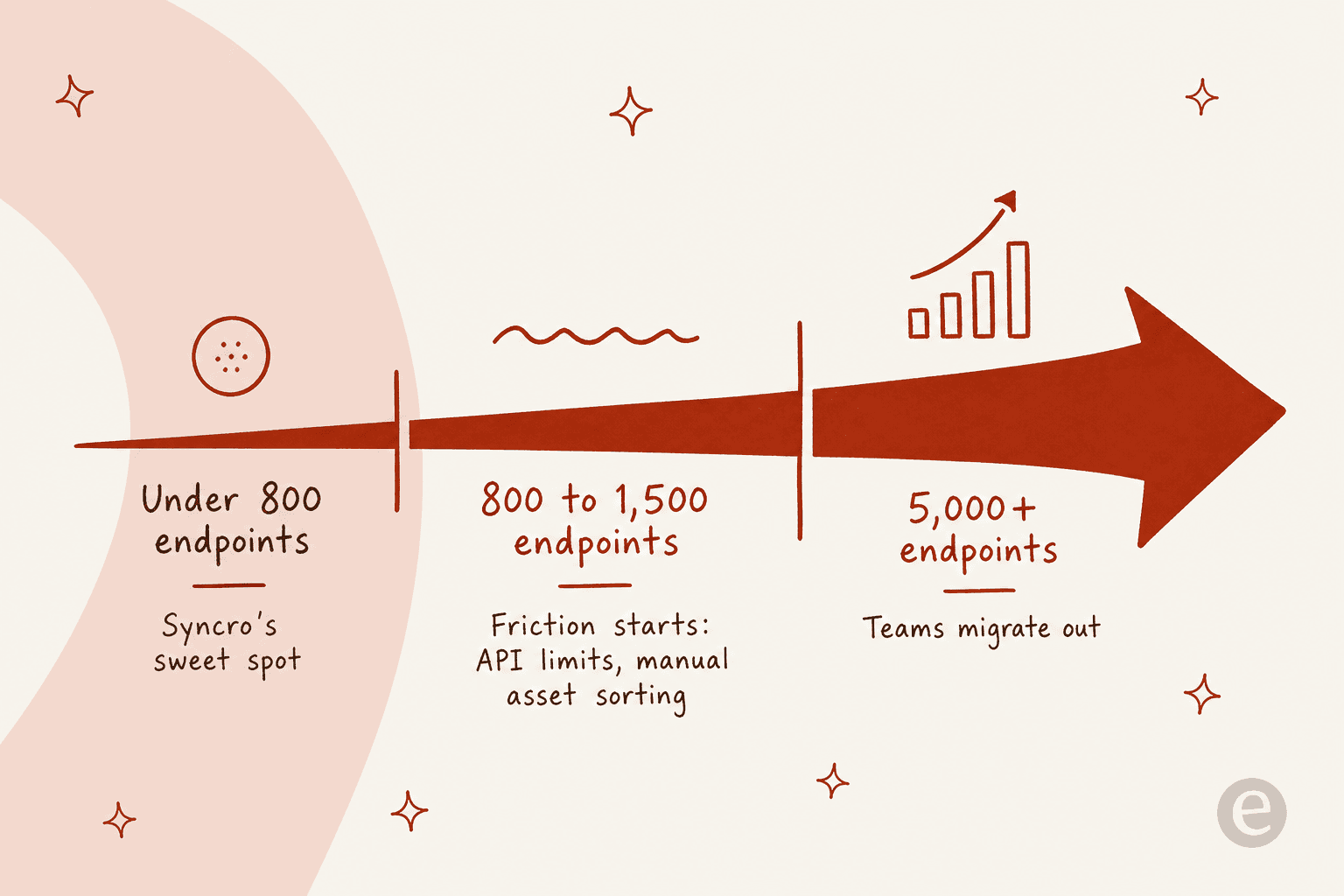
So the honest framing is: if you are under ~800 endpoints and Syncro's feature set covers you, there is often no reason to switch. If you are scaling past that, or PSA billing depth is your bottleneck, or the API is holding back your automation, the tools below are where MSPs actually go.
How I compared these Syncro alternatives
Every tool here is a real RMM, a real PSA, or both, aimed at MSPs or internal IT. I did not pad the list with generic help desks that can't manage an endpoint. For each one I looked at:
- Native RMM vs native PSA - some (Atera, SuperOps, ConnectWise, Kaseya) do both; some are RMM-first (NinjaOne, Pulseway); one is PSA-first (HaloPSA).
- Pricing model - the single biggest cost lever. Per-technician, per-endpoint, and quote-only tools scale very differently.
- Where it fits - starter shop, scaling MSP, or enterprise stack.
- AI features - what the built-in AI actually does today, not the roadmap.
The pricing model matters more than the sticker price, so it is worth seeing all seven sorted by how they bill before we get into the details:
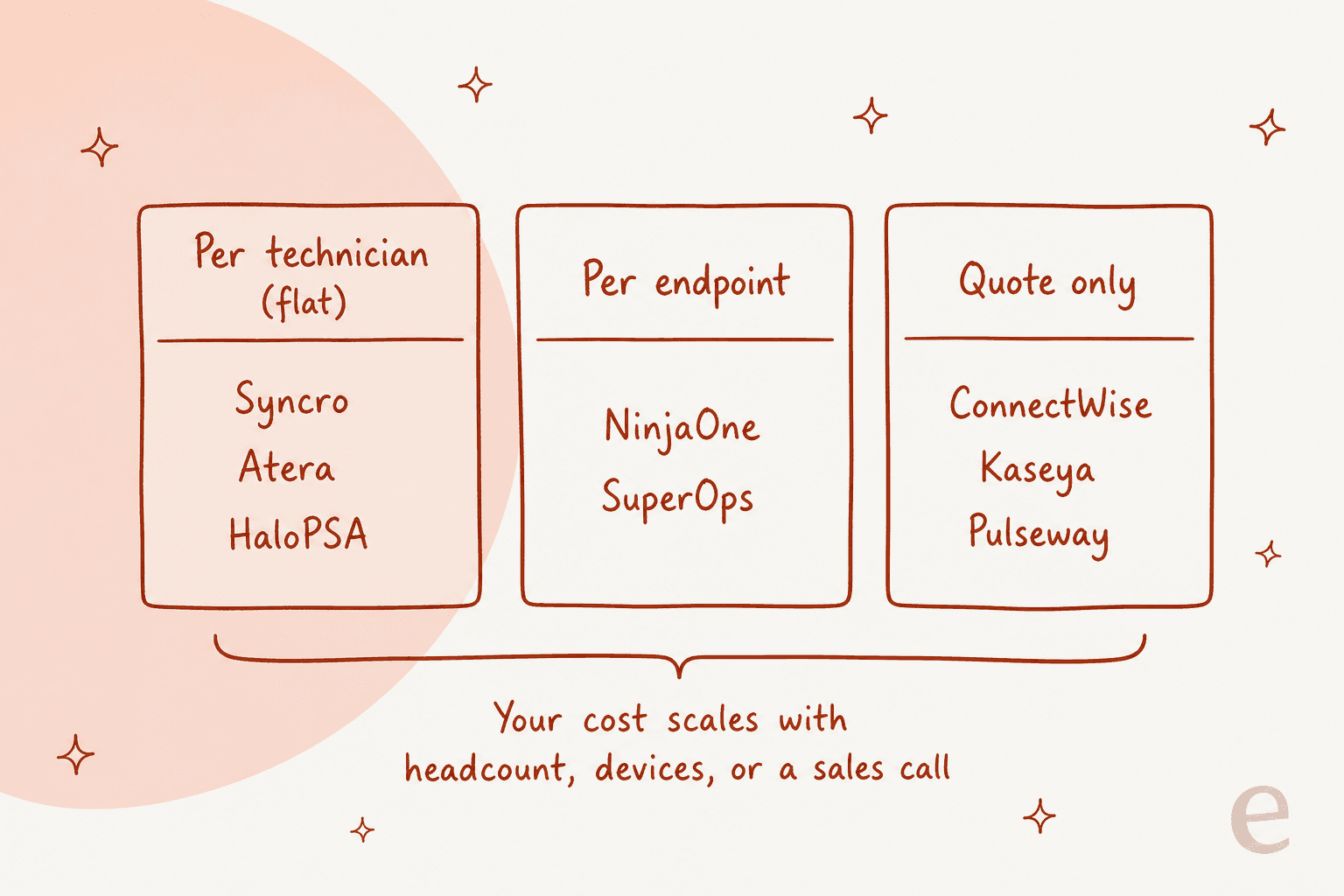
Syncro alternatives at a glance
| Tool | Best for | Pricing model | Starting price | Native PSA | Native RMM | Built-in AI | Free trial |
|---|---|---|---|---|---|---|---|
| Syncro (baseline) | Starter / sub-1,000-endpoint MSPs | Per technician | $129/user/mo | Yes | Yes | Agentic Service Delivery + MCP | 14 days |
| NinjaOne | RMM at scale | Per endpoint | ~$1.50-$3.75/device/mo | Service Desk only | Yes | Patch Intelligence AI | 14 days |
| Atera | Closest per-tech swap | Per technician | $129/tech/mo (MSP) | Yes | Yes | Copilot + Robin (add-on) | 30 days |
| SuperOps | Modern AI-native PSA-RMM | Per endpoint | $1.20-$1.50/device/mo | Yes | Yes | Monica (built-in) | 14 days |
| HaloPSA | Deep all-inclusive PSA | Per agent | ~$105/agent/mo | Yes | Via integration | Halo AI (bundled) | Free trial |
| ConnectWise | Full enterprise stack | Quote only (modular) | Quote | Yes | Yes | Sidekick / Asio AI | Yes |
| Kaseya 365 | Consolidation bundle | Quote only | Quote | Yes (Autotask) | Yes (Datto/VSA) | Kaseya Intelligence | Demo |
| Pulseway | Mobile-first, lean teams | Quote only | Quote (low-cost rep.) | Add-on PSA | Yes | Auto-remediation | Demo/trial |
Prices are current as of August 2026. HaloPSA's rate is converted from its published £69/agent/mo; verify in your region. Now the detail, roughly in the order most Syncro shops consider them.
1. NinjaOne - best RMM when you outgrow Syncro
Best for: MSPs and IT teams who have hit Syncro's RMM ceiling and want best-in-class endpoint management at scale.
If you read the Syncro threads, NinjaOne is the name that comes up again and again as the destination. It is a cloud RMM / unified endpoint management platform for both MSPs and internal IT, and it was named a Leader in the 2026 Gartner Magic Quadrant for Endpoint Management Tools. Where Syncro's asset handling frustrates people at scale, Ninja is built for exactly that: policy-driven management, autonomous patching (its Patch Intelligence AI is designed to catch bad updates before they ship), and remote control that customers describe as 30x faster than what they had before.
Features: Endpoint management, MDM, autonomous patch management, device and SaaS backup, and one-click remote access, all in a single console. It also has a native Service Desk with documentation and ticketing.
Pros: Depth and reliability at scale; strong security posture (FedRAMP Moderate, SOC 2, ISO 27001, HIPAA); free onboarding and 24/7 support with a claimed 98+ CSAT.
Cons: The Service Desk is an extension of endpoint management, not a full PSA with quoting and billing, so MSPs who need Syncro-style invoicing usually pair Ninja with a dedicated PSA. Backup, MDM, and other modules are separate per-endpoint add-ons, so the bill adds up.
Pricing: Per device, and mostly quote-driven - but Ninja does publish a range: as low as $1.50/device/mo at 10,000 endpoints, up to $3.75/device/mo at 50 or fewer. This is the big model shift from Syncro: you now pay by device, not by technician, so the math flips in your favor only if your device-to-tech ratio is low.
Our take: If Syncro's RMM and API are what's holding you back and you have the volume, NinjaOne is the safe, boring, correct answer. Just budget for a separate PSA if client billing matters, and model the per-device cost carefully, because for a small team with lots of endpoints it can cost more than Syncro's flat seat.
2. Atera - the closest per-technician swap
Best for: MSPs who liked Syncro's per-technician, unlimited-endpoints model and want the most similar tool with more AI baked in.
Atera is the most direct like-for-like on this list. Like Syncro, it is an all-in-one RMM + PSA + remote access platform priced per technician with unlimited endpoints, so your cost scales with headcount rather than device count. The pitch in 2026 leans hard on AI: an AI Copilot for technicians in every plan, and Robin, its autonomous agent that does intake, takes approved actions on devices, and closes tickets end-to-end.
Features: RMM with Splashtop and AnyDesk remote control, ticketing and a service portal, patch and software management, and built-in package managers (Chocolatey, Homebrew, WinGet).
Pros: Same friendly per-tech economics as Syncro; a useful AI Copilot included at every tier; G2 reviewers repeatedly cite saving $200+/month versus Kaseya, ConnectWise, and NinjaOne.
Cons: The autonomous AI (Robin) and advanced reporting are metered add-ons on top of the seat price, roughly $1.10 to $2.30 per endpoint plus a $29/mo per-tech add-on for some AI features. Some G2 reviewers grumble that Atera is chasing AI features while core issues wait, and the per-tech entry cost stings a one- or two-person shop.
Pricing: MSP plans run $129/tech/mo (Pro, annual) to $209 (Power), with a separate IT-department track from $149. There is a generous 30-day free trial of the full Expert plan, no card.
Our take: If you are leaving Syncro over specific limits but you liked the pricing philosophy, Atera is the least disruptive move. Just price the AI add-ons into your model before you commit, because the "included Copilot" and the "autonomous Robin" are two very different line items.
3. SuperOps - the modern, AI-native option
Best for: Small-to-mid MSPs who want a clean, modern platform built around AI from day one, rather than AI bolted onto a legacy tool.
SuperOps is the newest-feeling tool here. It markets a unified MSPSuite (PSA + RMM on one data layer) and pitches itself as "the AI-native operating system for MSPs." The differentiator is Monica, its agentic AI, which sits on that shared data layer so it has context across every device, ticket, and workflow, rather than being a chatbot glued to one module. SuperOps frames Monica as a ladder from assistance (ticket summaries, AI script generator) to AI ticket deflection to autonomous agents like an AI Patch Manager.
Features: PSA (service desk, contracts, billing, SLAs, quotes), RMM across Windows/macOS/Linux, AI-powered patch management, cross-OS MDM, network monitoring across 250+ vendors, and remote access (Splashtop + ISL Online) included.
Pros: Modern UI that reviewers like; Monica is built-in, not an add-on; remote access bundled at no extra cost; solid 4.4/5 from 201 reviews on G2.
Cons: Younger product, so the ecosystem and integration count (100+) is smaller than ConnectWise or Kaseya. Pricing moved to per-endpoint with a 100-endpoint minimum, which can be a barrier for a very small shop.
Pricing: Per endpoint, tiered by volume. The Prime plan runs $1.50/endpoint at 100 down to $1.20 above 1,000; Prime Plus (adds Apple and Android MDM) runs $2.50 down to $2.00. 14-day free trial.
Our take: SuperOps is the pick if you want to bet on AI-native and you have at least ~100 endpoints. It is arguably a more forward-looking home than Syncro, and Monica is the most integrated AI story on this list. Watch the per-endpoint minimum if you are tiny.
4. HaloPSA - when PSA depth is the real problem
Best for: MSPs whose pain is the business layer (billing, contracts, projects, SLAs), not endpoint monitoring, and who want one deep tool with no feature tiers.
Here is the important distinction: HaloPSA (now sold under the unified Halo brand) is a PSA, not an RMM. It does not monitor endpoints itself; instead it connects to an RMM like NinjaOne through its 250+ native integrations, all included. So if your Syncro complaint is really about ticketing automation, billing, and project management rather than RMM, Halo is the specialist. Its pitch is "one platform, one price": every feature, module, and integration in a single per-agent price, with no upgrade tiers. It was recognised as a Challenger in the 2026 Gartner Magic Quadrant for ITSM Platforms.
Features: Omnichannel ticketing with flexible SLAs, deep billing and finance (recurring billing, quote-to-invoice, timesheets), project management with Gantt timelines, CRM and quoting, assets/CMDB, and bundled Halo AI (auto-categorisation, suggested replies, sentiment analysis) with tenant isolation and PII redaction.
Pros: Genuinely deep and endlessly configurable via no-code builders; one all-inclusive price means no nasty "that's an upgrade" surprises; strong AI governance story for regulated clients.
Cons: The depth is also the knock, the learning curve is steep and typical time-to-live is 4 to 6 months. It is less ideal for project-management-led firms where "everything is a service ticket" feels forced. You still need to license and run a separate RMM.
Pricing: £69 per agent per month billed annually (roughly $105 depending on FX), all-inclusive, with worked examples built around 10 agents. Onboarding is a separate, bespoke cost.
Our take: If you would keep an RMM you already like and just want to escape a weak PSA, Halo is the strongest PSA on this list. Budget real time for setup, and don't underestimate the onboarding line item.
5. ConnectWise - the complete (and complex) enterprise stack
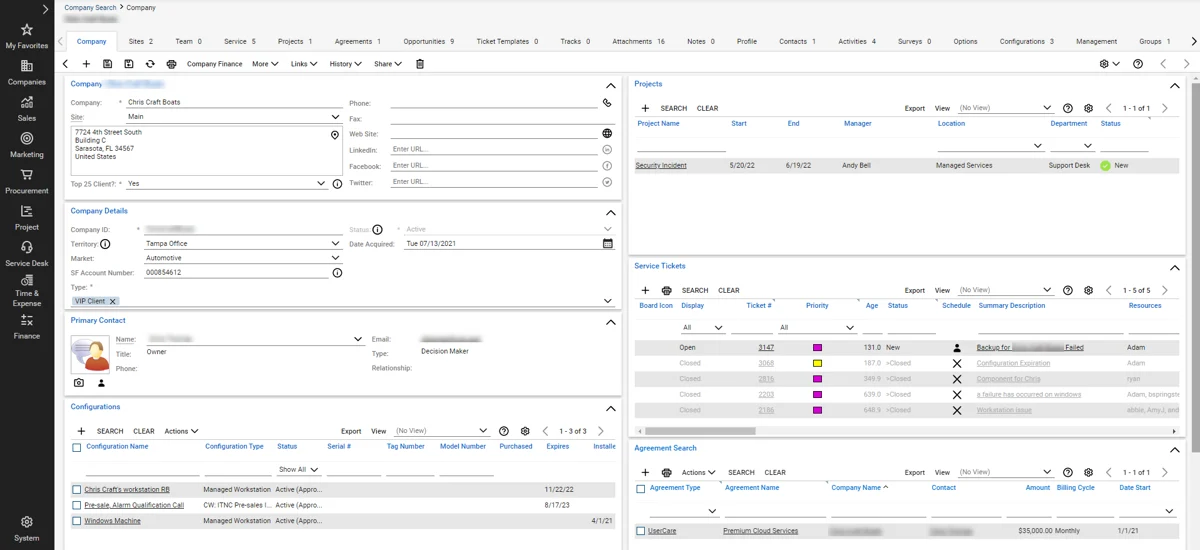
Best for: Larger, established MSPs that want one vendor covering the entire operating system - PSA, RMM, backup, security, and quoting.
ConnectWise is the grandparent of the category, with 40+ years in the space and a modular stack (now under its "Asio" AI-native platform) covering PSA, RMM, BCDR, cybersecurity, CPQ, and the widely-loved ScreenConnect remote access. It is the most complete option here, which is exactly why it is also the most complex.
Features: Everything an MSP business runs on, in one ecosystem, plus a huge integration marketplace and add-ons (Wise-Pay, Wise-Sync, SmileBack). Its PSA-facing AI assistant is Sidekick.
Pros: Unmatched breadth and depth; the "single source of truth" across service, finance, and operations that scaling MSPs need; ScreenConnect is best-in-class.
Cons: The community consensus is that ConnectWise has every feature imaginable but a dated look and a steep implementation. Expect annual contracts and a mandatory, paid onboarding via a statement of work; real rollouts of the full stack routinely run 4 to 6 months. Early users found Sidekick for PSA not yet production-ready for ticket handling. This is a big step up in cost and complexity from Syncro.
Pricing: Quote-only and modular - each product is licensed separately. Only ScreenConnect has a public price list. Budget for onboarding fees and a 1-year commitment.
Our take: ConnectWise is for MSPs who have outgrown "simple" entirely and want one throat to choke across the whole business. If you are leaving Syncro because it is too basic and you have the ops maturity to survive a long implementation, it fits. If you liked Syncro because it was easy, this is the opposite of that.
6. Kaseya 365 - the consolidation bundle
Best for: MSPs who want to consolidate RMM, backup, security, and PSA into one bundled subscription and are comfortable with a sales-led relationship.
Kaseya owns a huge portfolio, Datto RMM, the original VSA RMM, Autotask PSA, IT Glue, and Datto BCDR, and packages them into the Kaseya 365 bundle sold per endpoint or per user. The whole pitch is "changing the unit economics of IT" by replacing point tools with one subscription. It claims real scale: 40,000 customers and 17M+ endpoints.
Features: RMM (Datto/VSA), Autotask PSA for ticketing and billing, backup and disaster recovery, layered security, IT documentation via IT Glue, and Kaseya Intelligence AI across the stack.
Pros: Genuine breadth and the tightest RMM-to-backup-to-PSA integration if you buy into the whole bundle; consolidation can lower total spend versus buying each tool separately.
Cons: This is the one to go in with eyes open on. Pricing is quote-only, and the most-discussed concern in the MSP community is multi-year contracts that auto-renew. A 2026 change means month-to-month Datto arrangements auto-renew into a one-year term as of August 1, 2026. Kaseya's stated mitigation is its "Partner First Pledge" promising flexible contracts and price protection. Read the contract carefully.
Pricing: Quote-only, per endpoint or per user, on annual/multi-year committed terms. No public starting figure.
Our take: Kaseya 365 makes sense if consolidation and a single bill actually lower your costs and you are okay with a committed-term relationship. Get every fee and the renewal terms in writing before you sign - that is not a dig, it is the single most common thing MSPs say they wish they had done.
7. Pulseway - mobile-first RMM for lean teams
Best for: Small MSPs and lean internal IT teams who want to monitor and fix things from a phone, at a low price point.
Pulseway (now a Kaseya company) is the RMM built around one idea: manage IT from anywhere, specifically from your phone. Its mobile app is independently singled out as best-in-class among RMMs, and it advertises 13,000+ customers over 15+ years, with logos like Dell and Siemens.
Features: Real-time monitoring and alerting across Windows/Mac/Linux and network devices, remote control (including from mobile), automated patch management, and scripting with auto-remediation workflows. Add-ons extend it into security, backup, and a Pulseway PSA / ticketing module.
Pros: The mobile experience is the best here for a solo admin or on-call tech; the community reputation is that it is cheap and reasonable relative to NinjaOne and Syncro; fast network-discovery-and-deploy.
Cons: It is RMM-first, so the PSA/ticketing is an add-on rather than a core strength like Syncro's. Pricing is now quote-only behind a "spec up your requirements" form with no public price table, and its move under Kaseya means the sales-led model applies.
Pricing: Quote-only ("spec up your requirements for an instant price"); the market read is that it is a low-cost RMM, though exact figures are not public. A self-serve trial exists.
Our take: Pulseway is a narrower pick than Syncro - it is an RMM you can run from your pocket, not a full business platform. For a lean team whose main need is monitoring and quick remote fixes, it is a cheap, capable, mobile-first option. If you need Syncro's billing depth, it is not a full replacement on its own.
Which Syncro alternative should you pick?
The decision usually comes down to two questions: how many endpoints are you managing, and is your pain in the RMM or the PSA? This little decision tool walks you through it.
Try eesel: the AI layer that sits on top of any of these
Here is the thing none of the tools above fully solve. Whether you land on NinjaOne, Atera, or Syncro itself, your technicians still spend their days on the same repetitive tickets: password resets, "how do I connect to the VPN," "printer's down again." Swapping RMM-PSA platforms changes what you pay and how you monitor, but it does not make that tier-1 volume disappear.
That is the job eesel is built for. eesel is an AI teammate platform, and its AI helpdesk teammate plugs into your service desk, reads your help docs and past tickets, and then drafts or fully resolves the repetitive requests, escalating the rest to a technician with full context attached. It is not an RMM and it is not trying to replace Syncro's monitoring - it sits in front of your ticket queue and takes the boring work off your techs.
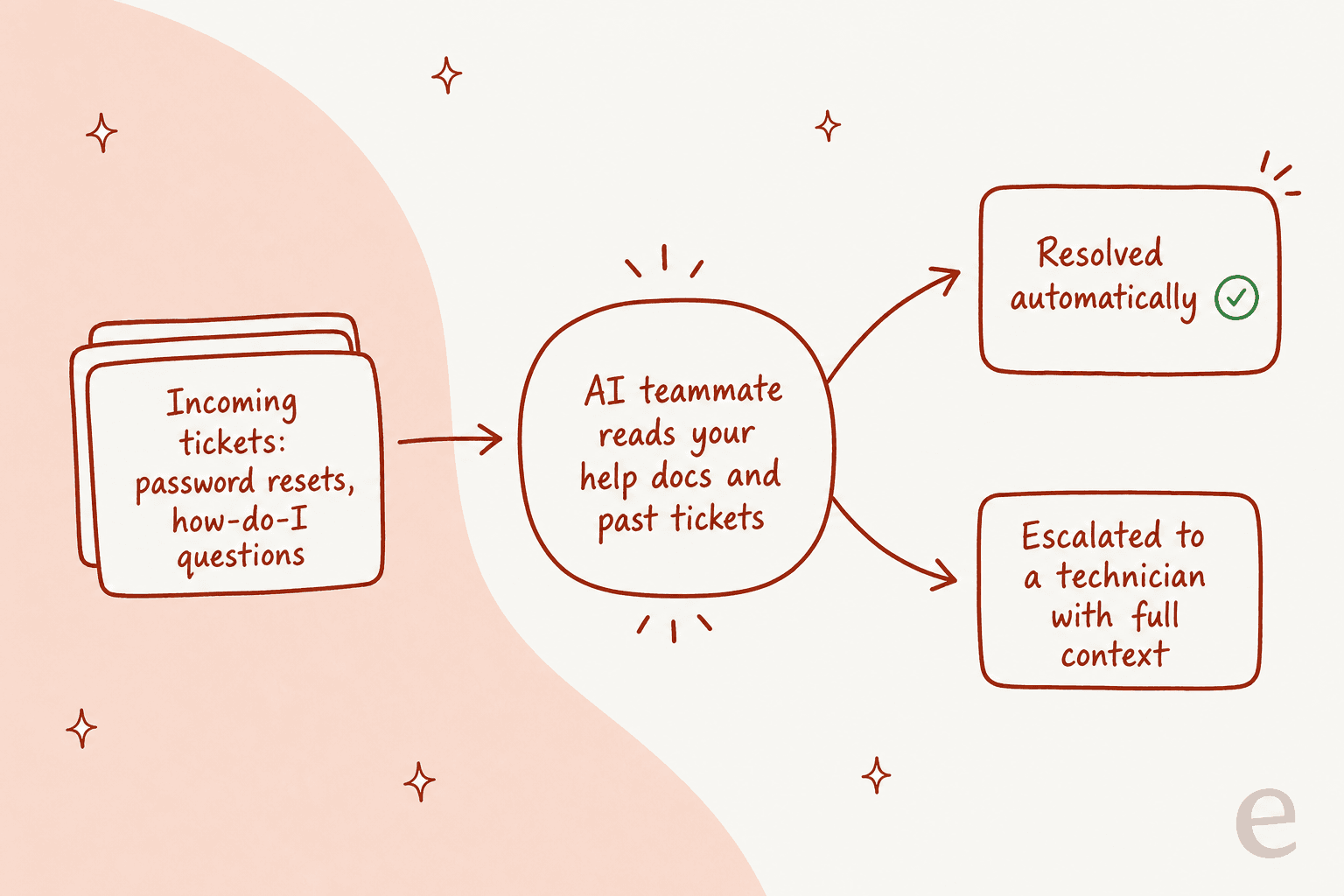
The part MSPs tend to care about most: because we have spent years putting AI on live support queues and watched confident-sounding bots quietly give wrong answers, eesel lets you simulate a rollout against your own historical tickets before it ever talks to a customer, so you can see the resolution rate and exactly what it would have said. You connect your knowledge base, run the simulation, and turn it on for the ticket types you trust.

If your real bottleneck is ticket volume rather than device management, that is where an AI-powered service desk layer earns its keep. You can try eesel for free and run the simulation against your own tickets before committing to anything.