The 8 best SuperOps alternatives for MSPs in 2026

Rama Adi

Katelin Teen
Last edited August 29, 2026
Why MSPs look for a SuperOps alternative
Let me say the fair thing first, because it matters: SuperOps is a genuinely good product. It was built AI-first, it puts PSA and RMM under one login, the UI is clean and modern, and support is fast. It sits at 4.4/5 on G2 across 201 reviews, and the reviews that praise it tend to say the same things: easy to deploy, affordable, reliable. If you are starting fresh, it deserves a spot on your shortlist.
But I have spent years building and running AI on live support and service queues, and I read a lot of MSP threads. The reasons people go looking for something else are consistent, and they are worth naming honestly.
The PSA is younger than the RMM. This is the most repeated one. The monitoring and patching side is well-liked, but the ticketing, reporting, and customization side gets called out as still maturing.
"SuperOps is good, there's limitations on customisation, the RMM works, i wish reporting was a little better.. The PSA side needs more maturing."

Everyday work can feel click-heavy. A tool your techs live in all day gets judged on friction, and a few teams flag that basic actions take too many steps.
"The workflow and UI is not great. It was bad when we onboarded, too many clicks to do simple things such as find tickets and add time to them."
Per-endpoint pricing scales with your device count. SuperOps bills per endpoint (its Prime plan runs roughly $1.20-$1.50 per endpoint per month with a 100-endpoint minimum, Prime Plus more). That is fine at 300 devices and a real line item at 3,000, and community threads regularly mention price-increase worries. If your device-to-technician ratio is high, a flat per-tech tool can undercut it.
None of that makes SuperOps a bad choice. It makes it a specific choice. The rest of this post is about the tools that are a better fit when one of those three things is your deal-breaker, plus the one category all of them leave on the table.
How to choose (and how these tools actually differ)
Before the list, three questions decide almost everything:
- Do you need PSA, RMM, or both? RMM monitors, patches, and remotes into endpoints. PSA runs your service desk, contracts, and billing. Some tools do both natively; some do one brilliantly and integrate the other. Buying an "all-in-one" you only half-use is the classic MSP overspend.
- How do they bill? Per endpoint, per technician, or per agent. This is the single biggest cost lever, and it is easy to miss because every vendor quotes a different unit.
- How much setup are you willing to eat? The deepest tools (HaloPSA, ConnectWise) are also the ones with real onboarding time and cost. The lightest (Action1, Pulseway) get you live in an afternoon.
That first split, PSA depth versus RMM depth, is the clearest way to see where each tool actually lives:
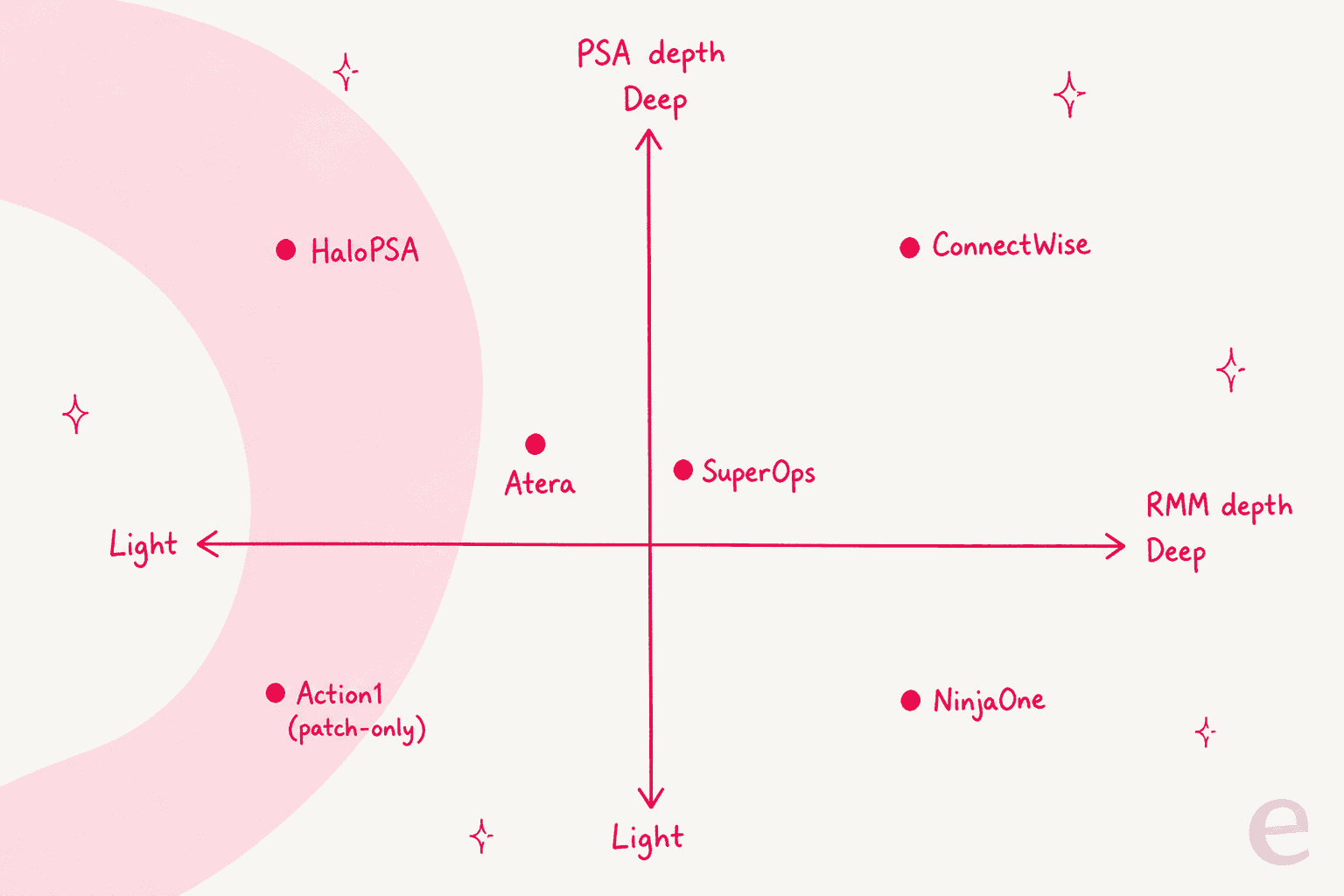
Keep those three questions in mind as you read. Now the list.
The 8 best SuperOps alternatives at a glance
| Tool | Best for | Type | Pricing model | Starting price | Native PSA | Native RMM | Free option | G2 |
|---|---|---|---|---|---|---|---|---|
| Atera | AI-forward all-in-one value | PSA + RMM | Per technician | $129/tech/mo (MSP, annual) | Yes | Yes | 30-day trial | 4.6/5 |
| NinjaOne | RMM polish and reliability | RMM (+ ticketing) | Per device (quote) | ~$1.50-$3.75/device/mo | Ticketing only | Yes | 14-day trial | 4.7/5 |
| Syncro | Small MSPs, flat billing | PSA + RMM | Per technician | $129/user/mo (annual) | Yes | Yes | 14-day trial | 4.5/5 |
| HaloPSA | Deepest PSA / service desk | PSA | Per agent | Yes | Via integration | 30-day trial | 4.6/5 | |
| ConnectWise | Large MSPs, most complete stack | PSA + RMM (modular) | Quote, per module | Quote only | Yes | Yes | Demo | 4.0/5 |
| Kaseya 365 | One vendor for everything | PSA + RMM (bundle) | Quote, per endpoint/user | Quote only | Yes (Autotask) | Yes (Datto) | Demo | 4.0/5 |
| Pulseway | Managing IT from your phone | RMM | Quote | Quote only | Add-on | Yes | Free trial | 4.5/5 |
| Action1 | Patch-first IT teams | Patch + light RMM | Per endpoint | Free to 200, then quote | No | Partial | 200 endpoints free | 4.9/5 |
A quick note on that table before anyone screenshots it: the "starting price" column is not apples to apples on purpose, because the billing unit changes underneath it. A $129/tech tool and a $1.50/endpoint tool can land in completely different places depending on your fleet. More on that next.
How MSP tools actually bill (the part that decides your cost)
This is the detail buyers miss most, so it gets its own section. Three billing models are in play across these tools, and each one wins in a different shape of business.
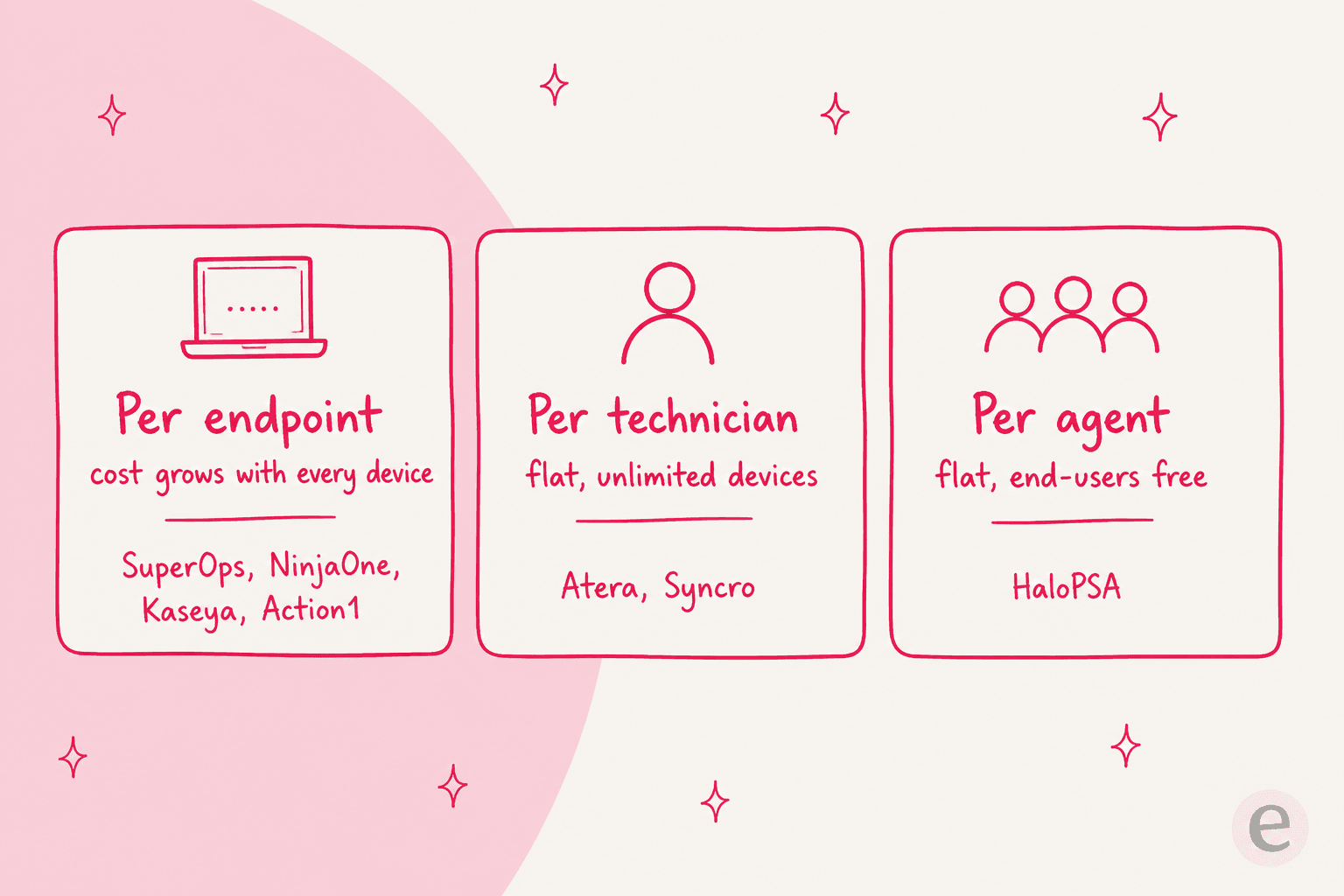
- Per endpoint (SuperOps, NinjaOne, Kaseya, Action1): you pay for every device you manage. Predictable, and great when you have few devices per client. It grows every time you onboard hardware.
- Per technician (Atera, Syncro): you pay per seat and manage unlimited devices. This is the model that undercuts per-endpoint once your fleet gets dense.
- Per agent (HaloPSA): like per-technician, but your end-users and customer portal are free, which matters for high-ticket-volume service desks.
Here is a worked example. Say you are a 5-technician MSP managing 1,000 endpoints:
- Syncro (per tech): 5 × $129 = $645/mo, devices unlimited.
- Atera (per tech, MSP Pro): 5 × $129 = $645/mo, devices unlimited.
- SuperOps (per endpoint, ~$1.30): 1,000 × $1.30 ≈ $1,300/mo.
- NinjaOne (per device, ~$2.50): 1,000 × $2.50 ≈ $2,500/mo (you are paying for polish and scale).
Now flip it: a 5-tech shop managing only 250 endpoints. SuperOps at ~$1.30/endpoint is ~$325/mo, cheaper than the flat per-tech tools. The device-to-technician ratio is the whole game. Count your endpoints per tech before you fall in love with a sticker price.
1. Atera - the closest AI-forward all-in-one
Best for: MSPs and internal IT teams that want SuperOps' "everything in one tool" pitch with a flat per-tech bill and a strong AI story.
Atera is the alternative that maps most directly onto SuperOps: RMM, PSA, ticketing, and remote access in a single platform, but priced per technician with unlimited devices. It is a favorite among the AI IT-support tools built for service desks. It is also leaning hard into AI, which makes it a natural comparison for anyone who chose SuperOps partly for Monica.
Features. Full RMM (monitoring, patching, automation, scripting), a built-in helpdesk and ticketing PSA, remote access, and network discovery. On the AI side, Atera ships an AI Copilot for technicians in every plan, plus Robin, its autonomous agent that can resolve incidents end-to-end with identity verification and approval flows. Atera claims Robin cuts up to 40% of workload for the teams that lean on it.
Pros. The per-tech-unlimited-devices model is genuinely simple to forecast. The AI features are more built-out than most tools this size. A 30-day free trial with no card lets you actually test it.
Cons. Robin's autonomous tier is quote-only and sales-led, so the headline AI is not priced on the page. Very large or highly custom MSPs sometimes find the PSA less configurable than HaloPSA or ConnectWise, and internal IT teams may want to compare it against dedicated ITSM software for small businesses.
Pricing. Per technician, billed annually. MSP plans: Pro $129/tech/mo, Growth $159, Power $209, Superpower custom. IT-department plans run Professional $149 through Master $219. Devices are unlimited on every tier.
Verdict: If the thing you liked about SuperOps was "one tool, modern AI," Atera is the first alternative to try, and the flat per-tech pricing is the reason to switch if your endpoint count is high.
2. NinjaOne - the RMM everyone benchmarks against
Best for: teams where the RMM is the product, and reliability and UX matter more than an all-in-one bundle.
NinjaOne is the RMM that shows up in almost every "what did you switch to" thread. It is a Gartner Magic Quadrant Leader for endpoint management, and it carries a 4.7/5 on G2 across more than 5,000 reviews, the highest-volume strong rating in this list. People move to it for the polish.
Features. Cloud RMM with autonomous patching, endpoint monitoring, remote access, backup, and mobile device management. It also has a native Service Desk (an IT ticketing system plus IT documentation and a self-service portal). Worth being precise here: that is IT help-desk ticketing, not a full billing-and-quoting PSA like Autotask or ConnectWise Manage.
Pros. Consistently praised for a clean UI, rock-solid reliability, and fast patching. Scales cleanly from small IT teams to large MSPs.
Cons. It is the premium option, and the community says so plainly, often "about double" cheaper competitors. Pricing is quote-only and per device, so you cannot self-serve a number. If you need true PSA billing, you will pair it with a separate tool (many MSPs run NinjaOne + HaloPSA).
Pricing. Per device, quote-based. The one public anchor is NinjaOne's own pricing FAQ range: roughly $1.50/device/mo at 10,000 endpoints up to $3.75 at 50 or fewer. A 14-day trial is available; there is no permanent free tier.
Verdict: If SuperOps' RMM was fine but you want the category's best endpoint experience and you can stomach premium per-device pricing, NinjaOne is the upgrade. Just pair it with a real PSA if billing matters.
3. Syncro - flat pricing built for smaller MSPs
Best for: small-to-mid MSPs who want RMM, PSA, and billing under one flat per-tech price.
Syncro (the site now redirects to syncrosecure.com) is the other true per-technician all-in-one, and it is a favorite of smaller shops for exactly that reason: RMM, PSA ticketing, Splashtop remote access, and automated invoicing, all in, no per-device fees. It sits at 4.5/5 across 538 G2 reviews.
Features. Unlimited-endpoint RMM per tech, a PSA with ticketing and contract billing, integrated remote access, and a Microsoft 365 security suite on the higher tier. In 2026 Syncro added Agentic Service Delivery (AI triage, summarize, and resolve) and a Syncro MCP Server that wires live data into Claude, ChatGPT, and Copilot.
Pros. Excellent value and dead-simple billing for small MSPs. The integrated invoicing is a real differentiator at this price. Reliable core RMM.
Cons. The r/msp consensus is that Syncro's ticket automation is still maturing and its API rate limits are low, and that there is a scale ceiling (teams often mention moving to NinjaOne somewhere north of ~1,000 endpoints). Fair, and worth testing against your own volume.
Pricing. Per technician: Core $129/user/mo and Team $179/user/mo (annual; $159 and $209 monthly), plus custom Enterprise. Endpoints are unlimited per tech. 14-day trial, no card.
Verdict: For a lean MSP that wants one bill and unlimited devices, Syncro is the value pick. If you are already scaling past a thousand endpoints, pressure-test the automation and API limits before you commit.
4. HaloPSA - the deepest pure PSA
Best for: MSPs whose bottleneck is the service desk and billing, not endpoint monitoring.
If SuperOps' PSA felt thin, HaloPSA is the direct answer. It is a deep, highly configurable PSA that consolidates ticketing, SLAs, contracts, billing, CRM, and project management into one all-inclusive price, and it was named a Challenger in the 2026 Gartner Magic Quadrant for ITSM (see our ITSM best-practices guide for what that category is really measuring). It is the tool MSPs most often name when they leave ConnectWise or Autotask.
Features. Omnichannel ticketing with smart routing and flexible SLAs, full billing and finance (recurring billing, quote-to-invoice, timesheets), CRM, project management, assets/CMDB, and a self-service portal. Halo AI (auto-triage, suggested replies, sentiment) is bundled, not a paid add-on. RMM is not native, it connects to your RMM (NinjaOne, Datto, and 250+ integrations) rather than replacing it.
Pros. Genuinely the most capable PSA here, with a modern UI and no-code configuration. Everything is one price with no feature tiers, and end-users/portal customers are free.
Cons. Depth cuts both ways: onboarding is real (Halo quotes 4-6 months for most MSPs), documentation is thin in spots, and project management is ticket-centric. It is a PSA, so you still need an RMM alongside it.
Pricing. Per agent, all-inclusive: about £69 (~$89) per agent per month billed annually, published across 10 currencies. Onboarding is a separate, scoped cost. 30-day trial, no card. (There is also a headline-grabbing Enterprise Package: unlimited licenses and funded implementation for a fixed $1M/year.)
Verdict: If the service desk is where your business lives, HaloPSA plus a dedicated RMM beats a jack-of-all-trades every time. Budget for the setup, and it pays off.
5. ConnectWise - the most complete (and most complex) stack
Best for: larger, established MSPs that need every module under one roof and have the ops maturity to run it.
ConnectWise is the incumbent SuperOps was partly built to be simpler than. Its Asio platform is a modular "system of action": PSA (ex-Manage), RMM (ex-Automate), BCDR, cybersecurity, ScreenConnect remote access, and CPQ, each bought and priced separately. It is the most complete stack in this list, and the 4.0/5 across 583 G2 reviews reflects the tradeoff: enormous capability, real complexity.
Features. Effectively every MSP function exists somewhere in the Asio catalog, tightly integrated across PSA and RMM, with a large partner ecosystem and mature automation. Its AI, "Sidekick," is still early by user accounts.
Pros. Nothing else matches the breadth. For a mature MSP running complex contracts, projects, and security services, ConnectWise can be the only tool that does all of it. ScreenConnect in particular is near-universally liked.
Cons. This is the honest part. The UI is dated, onboarding is heavy (community reports of 4-8 month implementations against a quoted ~14 weeks), everything is a separate line item, and users flag hidden fees. It is powerful, but it asks a lot of you.
Pricing. Quote-only, per module, on annual contracts plus a paid, SOW-scoped implementation. Only ScreenConnect lists public prices. Expect to talk to sales for anything else.
Verdict: ConnectWise is for the MSP that has outgrown "simple" and needs everything in one system, with the team to run it. If you picked SuperOps to avoid that weight, this is the opposite direction, on purpose.
6. Kaseya 365 - the widest portfolio, on the tightest contracts
Best for: MSPs that want one vendor for RMM, PSA, backup, and documentation at a bundled price, and will read the contract carefully.
Kaseya sells the broadest consolidated stack in the MSP world: Datto RMM, Autotask PSA, VSA, and IT Glue, bundled under the per-endpoint/per-user Kaseya 365 subscription, across 40,000 customers and 17M+ endpoints. The tooling itself is well-regarded.
"We use it with Datto, and they work great in combination, it's the most powerful PSA + RMM I've tried without continuous issues."
Features. Datto RMM (cloud monitoring, patching, ransomware detection, native M365 module) plus Autotask PSA (AI-assisted service desk, ticketing, billing) with tight RMM integration, and the option to add backup and IT documentation, all under one subscription.
Pros. If you want a single vendor for genuinely everything, this is the widest one. The Datto RMM + Autotask combination is respected for power and integration depth.
Cons. The recurring, well-documented complaint is commercial, not technical: multi-year contracts, auto-renewal, and minimum seat counts.
"They have predatory contracts that lock you in for years, auto renew without your consent, and then no help from your accounts team."
As of August 1, 2026, Datto agreements auto-renew into a one-year term, so read the renewal language before you sign. Kaseya points to its "Partner First Pledge" as its response.
Pricing. Quote-only, per endpoint/user, on annual or multi-year committed contracts. No public list prices.
Verdict: Powerful tooling, but the buying experience is the thing to go in eyes-open about. If you want everything from one vendor and you negotiate the contract terms hard, Kaseya 365 delivers the breadth.
7. Pulseway - RMM you run from your phone
Best for: lean IT teams and small MSPs who need to monitor and fix things on the move.
Pulseway (now a Kaseya company) built its reputation on one thing done really well: a mobile-first RMM. Its phone app lets you monitor, remote-control, and remediate endpoints from anywhere, and that app is consistently rated better than the competition's. It carries 4.5/5 across 125 G2 reviews.
Features. Real-time monitoring, automated remediation, patch management, and remote control, all fully usable from iOS and Android, with a PSA available as an add-on.
Pros. The mobile experience is the genuine differentiator, one Reddit thread flat-out prefers it over NinjaOne's app. Great fit for a one-person IT shop or an on-call rotation. Market reputation is "very reasonable" on price.
Cons. Pricing is now quote-only (the pricing page is a demo funnel), so there is no public number to anchor on, and I could not confirm a current free tier on the live site. Its built-in remote access is reported as occasionally laggy.
Pricing. Quote-only. A self-serve trial exists, but no public price table is published today.
Verdict: If "manage IT from my pocket" is the feature you actually want, Pulseway is the one built around it. Get a quote and confirm the current trial terms directly, since the pricing details are no longer public.
8. Action1 - free where patching is the whole job
Best for: IT teams and MSPs whose priority is patching and vulnerability remediation, especially at small scale, where it also fits alongside the small-business help desk software.
Action1 is not a full PSA/RMM suite, and it does not pretend to be. It is a cloud-native, agent-based patch management and vulnerability remediation tool with light remote-access features, and it has the strongest rating in this entire list: 4.9/5 across 1,189 G2 reviews. Its hook is the free tier.
Features. Cross-OS and third-party patching, vulnerability detection and remediation, update rings, peer-to-peer distribution, remote access, RBAC, SSO, and a REST API. No native mobile MDM, and it is patch-first rather than a service desk.
Pros. The free tier is the real thing: first 200 endpoints free forever, no feature limits, not a trial. For a small IT team or an MSP standing up patching for a new client, that is close to unbeatable. Strong security posture (SOC 2 Type II, ISO 27001).
Cons. It is not a PSA and only a partial RMM, so it complements rather than replaces a SuperOps-style suite. Remote access is reported as slow, and the third-party app catalog has historically been narrower than dedicated RMMs.
Pricing. First 200 endpoints free, forever. Beyond that, quote-based per-endpoint pricing that steps down with volume; Action1 does not publish a per-endpoint dollar figure.
Verdict: If patching is your actual pain and you are under a few hundred endpoints, start on Action1's free tier today. Pair it with a PSA when you need ticketing and billing.
The gap every tool on this list leaves: the ticket queue
Here is the thing worth stepping back for. Every tool above manages endpoints, runs billing, or both. What none of them fundamentally change is that tier-1 tickets still land on a person. Your PSA routes the ticket, tags it, maybe summarizes it, and then a technician reads it, looks up the answer, and types a reply, hundreds of times a week.
The AI baked into MSP PSAs mostly helps at the edges: ticket triage and categorization, a suggested reply a human still has to approve. That is useful, but it is not the same as actually resolving the ticket. This is exactly the layer we build at eesel, and it is a different job from RMM or PSA.
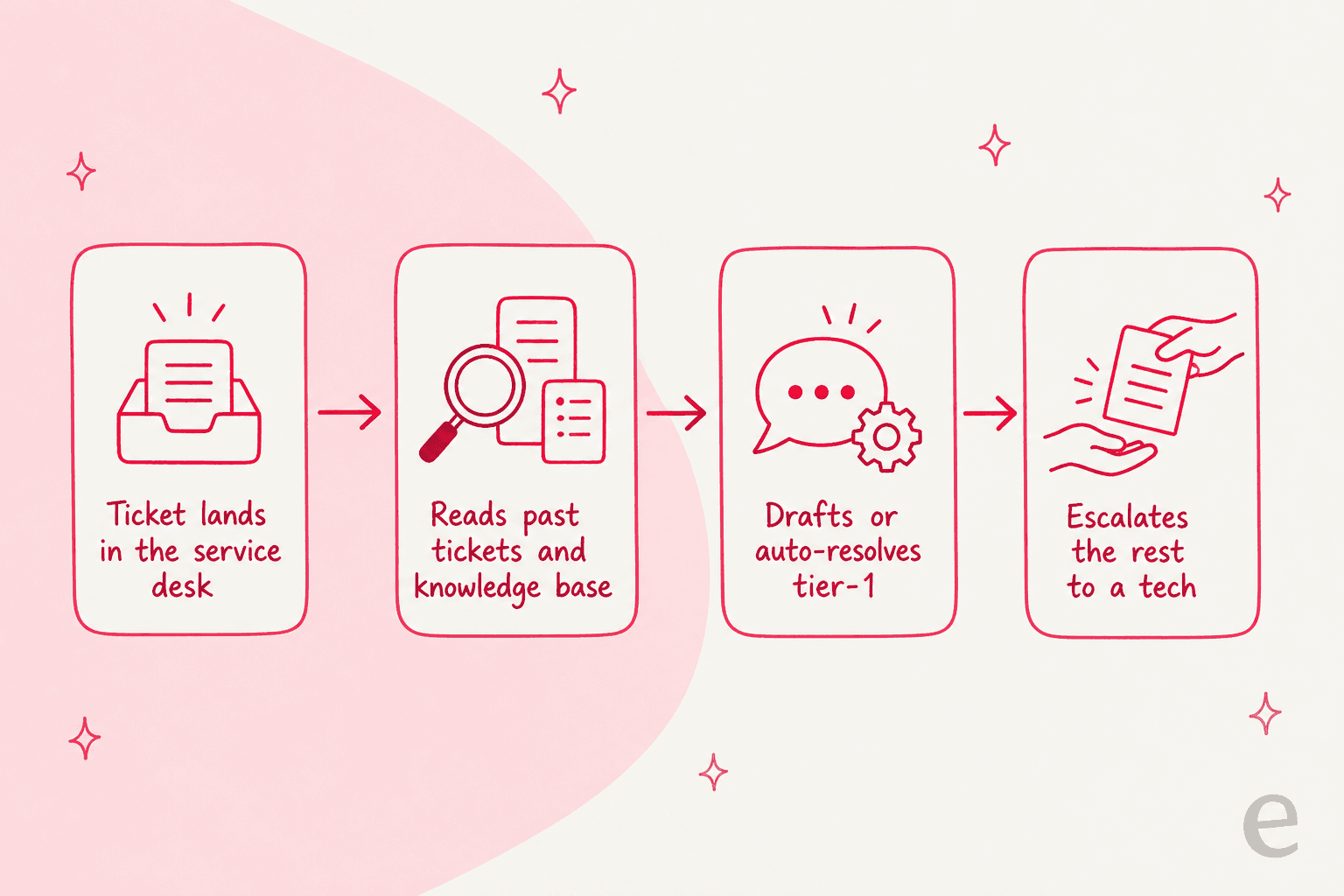
eesel AI is an AI teammate you hire for the helpdesk. It plugs into the service desk you already run, learns from your past tickets, macros, and knowledge base, and then drafts or fully resolves the front-line tickets, escalating the rest to a human with context attached. It is not an RMM and it is not trying to replace your PSA. It sits on top of whichever one you pick and takes the repetitive ticket work off your techs.
Two things we learned the hard way that shape how it works: a confident-sounding bot that quietly gives wrong answers is worse than no bot, which is why every eesel rollout is simulated against your historical tickets first, so you see the resolution rate and the answers before it ever touches a live customer. And it goes live fast, most teams have their first agent running within about 30 minutes, no long implementation project. Gridwise had 73% of its tier-1 tickets resolved in the first month doing exactly this.
If your reason for shopping SuperOps alternatives was "my techs spend too long on repetitive tickets," the fix might not be a different PSA at all. It might be an AI teammate on the queue you already have.
Try eesel AI on your own service desk

Whichever RMM or PSA you land on from this list, the ticket queue is still where your technicians lose hours. eesel AI is the AI helpdesk teammate that clears the tier-1 layer of that queue for you. It connects to the service desk and tools you already use, learns your history on day one, and, because you can simulate on your past tickets before going live, you know its resolution rate before you trust it with a customer. It is free to try and live in minutes, no rip-and-replace of the stack you just chose.
Which SuperOps alternative should you pick?
If you skimmed to here, the short guidance:
- Want SuperOps but flatter pricing? Atera or Syncro (per-tech, unlimited devices).
- Want the best RMM, period? NinjaOne, paired with a PSA if you bill clients.
- PSA is your real need? HaloPSA, with a separate RMM.
- Need everything, and can run it? ConnectWise or Kaseya 365, contracts read carefully.
- Mobile-first or patch-first? Pulseway or Action1 respectively.
- Techs drowning in tier-1 tickets? Add an AI helpdesk teammate like eesel AI on top of whatever you choose.
There is no single "best" here, only the best fit for your device-to-tech ratio, your PSA depth needs, and how much setup you will tolerate. Figure out those three things first, and the shortlist above picks itself.