9 best Apps 365 alternatives in 2026 (Helpdesk 365 compared)

Rama Adi

Katelin Teen
Last edited August 24, 2026
Why teams start looking for Apps 365 alternatives
I build integrations at eesel, which means I spend a lot of my week inside other people's helpdesks, wiring up ticket APIs and OAuth scopes and working out what a vendor's "AI" is actually made of. Helpdesk 365 was an interesting one to take apart, because the answer is not what the marketing page suggests, and it is all sitting there in the vendor's own documentation.
Let me start with the honest case for staying, because plenty of teams should. If you are still deciding whether you even need a separate tool, our piece on help desk vs service desk is the better starting point.
What Apps 365 gets right
Helpdesk 365 installs into your tenant and leaves the data there. From the vendor's own FAQ, asked where the helpdesk stores data: "It stores in SharePoint lists of clients' tenants and can be viewed or accessible by the only client." The Microsoft 365 certification record backs that up, answering No to whether the app stores Microsoft customer data.
That is not a small thing. I sit in enough procurement calls to know it is often the whole thing. One buyer I sat with, a B2B telematics firm where a security review was a hard gate before any trial, spent most of the call on exactly one question: does ticket data with card numbers and passwords stay inside our environment? A product that can answer "it never leaves your tenant" skips a two-month review, which is why SharePoint keeps showing up as a helpdesk substrate at all.
The Teams experience is also better than a bolted-on connector, and the reviews say so:
"One of the biggest advantages for our organizations is the deep Microsoft Teams integration. Our employees can create, update, comment on, and track tickets directly within Teams without opening another application."

Apps 365 is a real company with a real install base too. It is the current brand of Cubic Logics, whose EULA names the affiliated brands directly, and the homepage claims 12,100+ deployments across 172 countries. It holds 4.7 out of 5 across 246 G2 reviews. Worth knowing that many of the recent five-star entries are tagged Source: In-app, meaning they were prompted from inside the product, so I would weight the critical band more heavily than the average. But nothing here is vapour.
Reason one: the AI is on one tier, and it is the top one
Here is the ladder, drawn from the live pricing page:
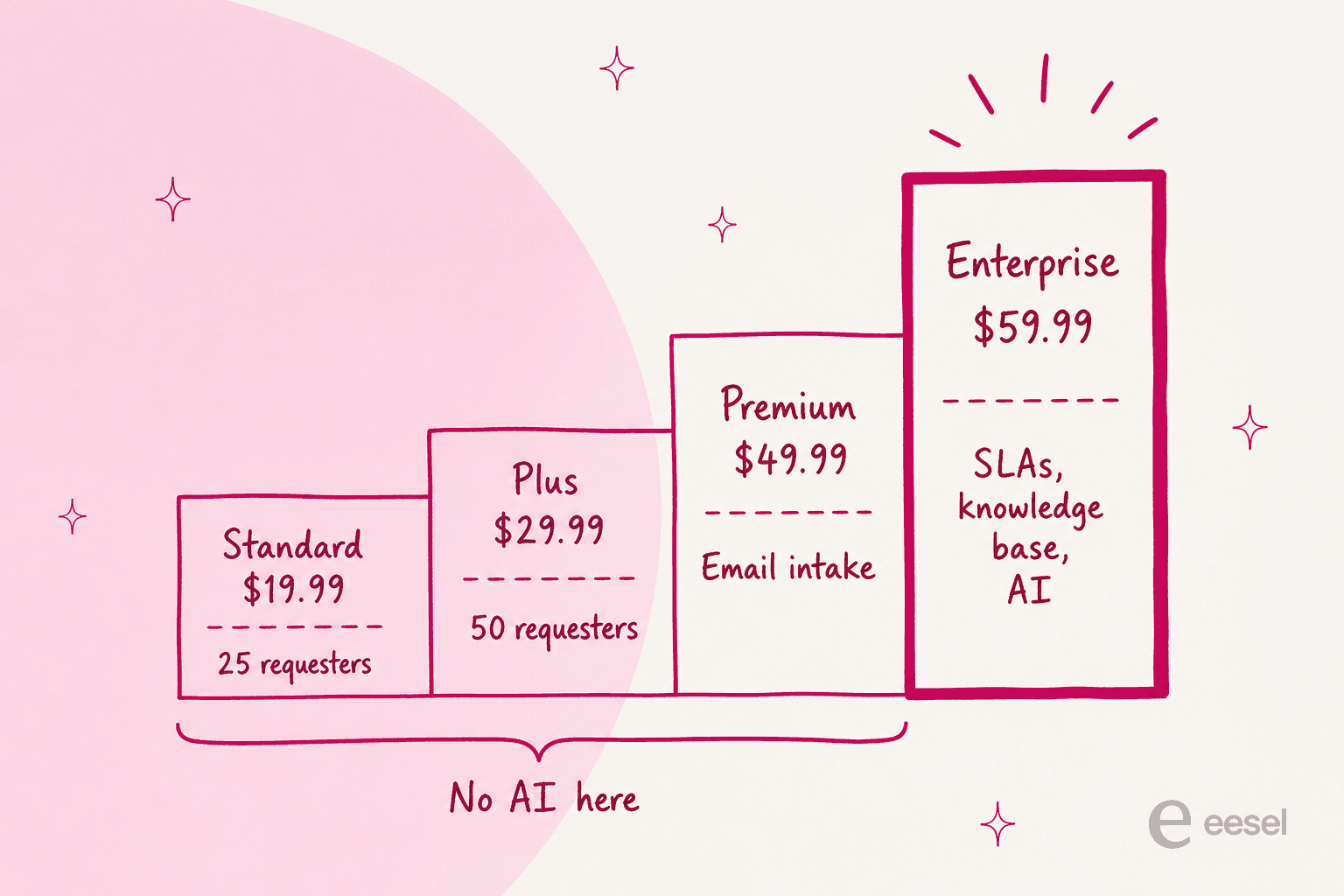
The page headline is "AI-powered helpdesk that fits every budget." What it actually gates behind Enterprise is: Copilot Integration, AI Ticket Summary, AI Agents, Native MS Copilot Integration, AI Knowledgebase responses, plus knowledge base, multiple SLA choices, approval workflows, rules and automation, API connectivity, escalation levels, the ticket aging report, and Power BI. Standard, Plus and Premium list no AI row of any kind.
Every one of the things a buyer assumes is table stakes in a service desk lives on the same step as the AI. That is not a criticism of the features, which are fine. It is a pricing-architecture observation, and it changes the comparison you should be running: Helpdesk 365 with AI is a $59.99-per-agent product, not a $19.99 one, which puts it in the same bracket as Freshservice Growth and above Desk365 Premium. Worth reading our AI service desk overview alongside that, since the feature list at that price is what you should be comparing.
Reason two: the tier is decided by your headcount, not your team size
This is the detail I would most want to know before signing, and it is easy to skim past.
"Ticket requesters" is a separate meter from agents. Its tooltip on the pricing page is explicit: "Number of users who can raise and track tickets (not a ticket limit)." So it counts named people who are allowed to file, not tickets. Standard caps it at 25, Plus at 50, and unlimited requesters first appears at Premium.
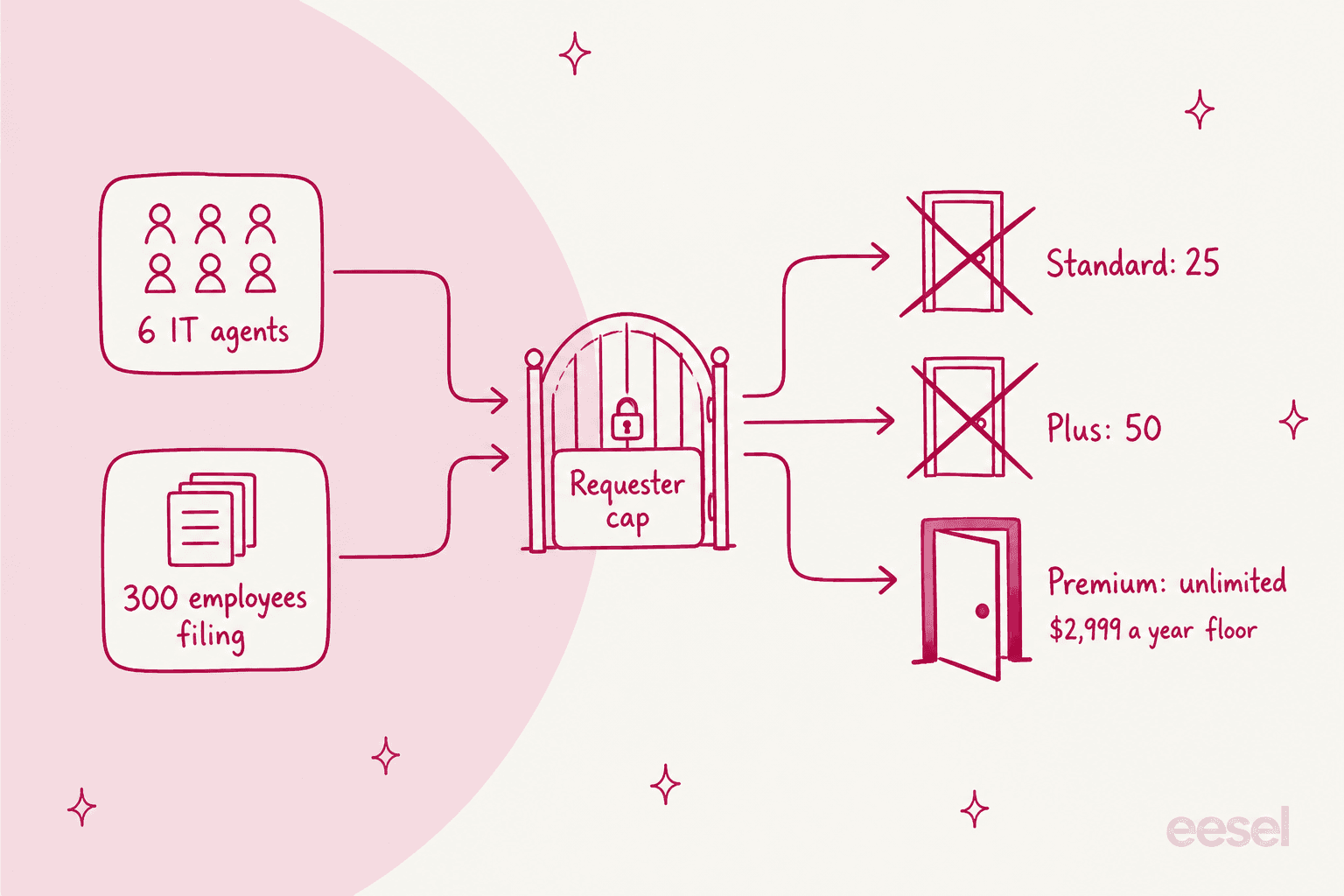
A six-person IT team supporting 300 employees cannot buy Standard or Plus at any seat count. They are pushed to Premium, whose floor at the five-agent minimum is $2,999.40 a year, before any AI. The rate card is really a five-to-fifty-agent card, since organizations over 50 users route to a "Contact us for special price" popup. If your requester count is the thing pushing you up the ladder, an employee self-service portal is usually the cheaper lever.
Have a play with the combinations. The numbers are all annual, computed from the published per-agent rate:
Which Helpdesk 365 tier are you actually forced onto?
Annual totals, computed from the published per-agent rate on a yearly commitment. Every tier carries a five-agent minimum.
Standard
$19.99 per agent / month, billed yearly
| Agents | Per year |
|---|---|
| 5 (the minimum) | $1,199.40 |
| 10 | $2,398.80 |
| 25 | $5,997.00 |
No knowledge base, no SLAs, no rules engine, no email-to-ticket, no API. Standard is also the only tier whose button reads "Request License" rather than "Add To Cart".
Plus
$29.99 per agent / month, billed yearly
| Agents | Per year |
|---|---|
| 5 (the minimum) | $1,799.40 |
| 10 | $3,598.80 |
| 25 | $8,997.00 |
Adds canned responses, private notes, custom statuses and ticket splitting. Email-to-ticket still starts one tier up.
Premium
$49.99 per agent / month, billed yearly
| Agents | Per year |
|---|---|
| 5 (the minimum) | $2,999.40 |
| 10 | $5,998.80 |
| 25 | $14,997.00 |
The first tier with unlimited requesters, email-to-ticket, auto-assign and auto-close. Still no knowledge base, SLAs or AI.
Enterprise
$59.99 per agent / month on promo, $69.99 list, billed yearly
| Agents | Per year (promo) |
|---|---|
| 5 (the minimum) | $3,599.40 |
| 10 | $7,198.80 |
| 25 | $17,997.00 |
The only tier with AI, and also the only one with a knowledge base, SLAs, approvals, rules and API access. Your Azure OpenAI or Copilot Studio bill sits on top of this, paid to Microsoft.
Two footnotes on the Enterprise number, because the page contradicts itself. The card grid shows $74.99 struck through and $59.99 live under a "20% off, limited time" badge, while a second block further down the same page reads $69.99 with the AI rows missing entirely. The Microsoft Marketplace listing settles it at $839.88 per user per year, which is $69.99 a month. So the real discount is closer to 14% than 20%.
Reason three: the AI ships without a model
This is the one that changed how I read the whole product.
The pricing page sells "AI Agents" and "AI Knowledgebase responses." The integration settings documentation shows what you actually configure: an Azure AI Endpoint, an Azure AI API Key, and an Azure AI Deployment Name. The Configure Azure AI guide is a walkthrough of provisioning the resource in your own Azure subscription, creating a deployment, and copying the key back in. The inference tokens are billed to you by Microsoft, entirely off the Apps 365 rate card.
The Copilot route is heavier still. The Copilot Integration Configuration Guide lists as prerequisites a published Copilot Studio agent, Azure portal access to create an app registration, and the CopilotStudio.Copilots.Invoke permission, plus a Premium Power Automate licence and an imported HTTP-triggered flow.
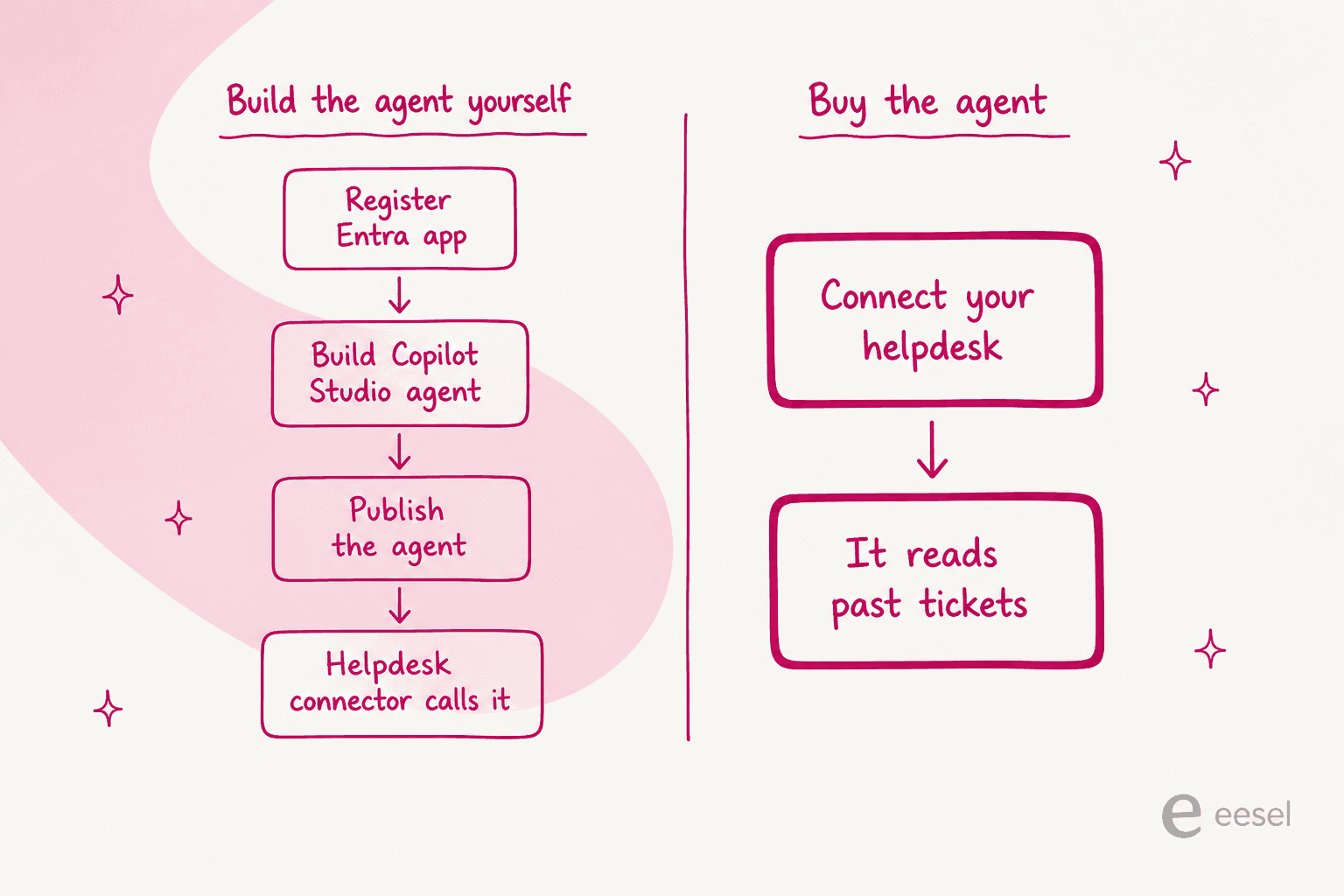
I have written this kind of connector code. It works, and there is nothing dishonest about shipping one. But it means the $59.99 seat buys the plumbing, and the model, the grounding, the prompt and the evaluation are your project. Worth reading against the product FAQ's claim that "no additional Microsoft licensing is required," which the Copilot route does require, since Copilot Studio is licensed separately.
Two related gaps worth naming plainly. There is no simulation, dry run, sandbox or backtest documented anywhere across the AI pages and the knowledge base, so the rollout path is paste key, flip toggle, pick teams, live on real tickets. That is exactly the setup that produces the failure mode behind AI hallucination in a live queue. And there is no published ingestion or indexing step either. The marketing copy says the agent will "learn from past interactions," and the documentation has no configuration surface behind that claim. For contrast, see what a real AI knowledge base ingestion step looks like.
Reason four: the ceilings you meet later
Three specifics, all from the vendor's own docs or from practitioners:
- Roughly 2,000 API calls per 24 hours, all operations included. That limit sits in a note under the mailbox toggle in the documentation, and auto-close, reopen-on-reply, outbound email, MS Forms intake and Copilot all draw from the same budget.
- SharePoint's own thresholds. A list view stops behaving past 5,000 items and Power Apps delegation caps at 2,000, which is why r/sharepoint threads about ticket archives read the way they do.
- Integrations are Microsoft-only, plus Azure DevOps as a one-directional connector with PAT auth. No Slack, no Jira, no webhooks, no public REST API in the docs, which rules out most of the patterns in our automated IT ticketing guide.
The community view of SharePoint-native ticketing generally is worth reading before you renew:
"So sure, people have put together some great little help desk tools with SP, but in practice most people who I have seen do so do end up hitting a brick wall limitation and moving to something else in the long run."

And the specific gripes in the Helpdesk 365 review band are consistent rather than dramatic. G2's own tallied cons are Slow Performance (5), Complex Setup (4), Performance Issues (4), Poor Performance (4) and Bugs (3). Here is the flavour:
"It's a little hard to get used to when you first install it, so there's definitely a learning curve. That said, the support is fantastic, so I don't have any worries."
How I picked these nine
Four filters, applied in this order.
- It has to work for an internal desk. Helpdesk 365's intake is email and Teams. Anything here has to serve IT, HR or ops answering employees, not just a customer-facing inbox.
- The rate card has to be published. I would not put a tool on this list whose price you can only learn on a call. Where a vendor withholds one specific meter, I say so rather than skipping it.
- Microsoft 365 has to be a first-class citizen, or the tool has to be worth the switch anyway. Entra SSO at minimum, Teams natively where the vendor claims it.
- I checked what the AI is grounded in. Not whether the page says "AI-powered", but what the documentation says the model can read. This is the axis most roundups skip and it is the one that decides whether ticket deflection ever happens.
A note on my own bias, since it is relevant: I work at eesel, and eesel is number one below. I have tried to write every other entry the way I would want someone to write about eesel, with the real numbers and the real limits. Where a competitor is better than eesel at something, I have said so.
Apps 365 alternatives at a glance
| Tool | Best for | Entry price | Free tier | AI meter | AI trains on past tickets | Teams native | Data in your tenant | Dry run before go-live | Seat minimum |
|---|---|---|---|---|---|---|---|---|---|
| eesel AI | Adding AI to the desk you already run | From $299/mo (500 credits) | 100 free credits, no card | 1 credit per ticket or chat | Yes | Yes | No | Yes, scored replay | None |
| Desk365 | Closest like-for-like Teams swap | $12/agent/mo | Free, 50 tickets/mo | $50 per 1,000 credits | No | Yes, all paid plans | No | Sandbox chat only | None |
| Freshservice | Real ITIL with asset management | $19/agent/mo | No, 14-day trial | Session, overage unpublished | No | ServiceBot on Starter | No | Routing backtest only | None |
| Jira Service Management | Teams already living in Jira | $0 for 3 agents | Yes, 3 agents | $1/resolution | No | Chat on every plan | No | No | None |
| ManageEngine SDP | ITIL modules with on-prem option | $0 up to 5 techs | Yes, 5 techs | None, Zia bundled | Not published | Not published | On-prem option | Not published | None |
| InvGate | Fixed annual floor, ITAM bundled | $1,499/yr flat | Not published | None, bundled | Via Knowledge Discovery | Pro tier only | No | No | 5 agents |
| Atera | Device management plus ticketing | $129/tech/mo | No, 30-day trial | Per active contact, unpublished | No | Via Robin only | No | No | None |
| Siit | Chat-first internal ops | $23/admin/mo | No, 14-day trial | None, bundled at $89 | No | Teams bot on entry tier | No | Yes, shadow mode | None |
| Spiceworks | A 1-5 person desk with no budget | Free | Yes, hard 5-seat cap | No AI | N/A | Not published | No | N/A | None |
1. eesel AI
Best for: teams whose problem is the answering layer, not the queue, and who would rather keep the helpdesk they have.
What it does
eesel is not a ticketing system, which is the first thing to say, because it means the comparison is different from the other eight. It is an AI teammate that plugs into the helpdesk and the chat tool you already run, reads your knowledge, and handles the work. If you like Helpdesk 365's tenant story and just want AI that works, this is the option that does not make you migrate.
The Microsoft Teams agent answers in channels, group chats and DMs. The SharePoint connector reads your sites and document libraries, alongside Confluence, Notion, Google Drive and your helpdesk. And the sources are not walled off per integration, so a single answer can pull from your intranet, your wiki and your ticket archive at once.
The differentiator that matters against everything else on this list is where the grounding comes from. eesel's helpdesk agent learns from your actual solved tickets, not just your help center. Every other tool here indexes documentation and stops.
The dry run nobody else offers
I mentioned that Helpdesk 365 has no way to test the AI before it touches live traffic. That is not unusual: of the eight ticketing tools here, only Siit ships a named dry run for its answering agent, and it tests a playbook you wrote rather than your ticket history.
eesel's Simulation skill replays your past tickets in sandbox mode and scores each answer against what your team actually sent, then suggests instruction changes. The benchmark is your own agents' replies. That is what a rollout plan looks like when you have watched confident bots give wrong answers, which is a thing I have watched more than once.

Pros
- From $299 a month for 500 credits, no seats and no platform fee. 1 credit covers one ticket or chat, however long, and only tickets the AI actually works on count. Route 200 of your 1,000 monthly tickets to it and the 500-credit plan covers it with room to spare.
- Trains on your ticket history, which is the whole gap in this category.
- Scored simulation before go-live, plus confidence-based routing so a low-confidence answer becomes a draft rather than a live reply.
- 80+ languages out of the box, proven by Smava running 100,000+ German tickets a month, which is the kind of load that breaks a SharePoint list.
- No migration. It reads from and writes back to the helpdesk you have, so there is no new data pipeline.
Cons
- It is not a ticketing system. If you are leaving Apps 365 because you need a queue with SLAs and approvals, eesel does not replace that; it sits on one.
- SOC 2 Type II is underway, not certified. eesel is GDPR and CCPA compliant with EU data residency and a live Vanta trust centre, and the full report is available under NDA on completion. If your review needs a certificate today, that is a real blocker and I would rather you knew now.
- HIPAA is a talk-to-us add-on, not something you switch on from a self-serve plan. Other add-ons such as SSO and data residency are priced separately.
- Data does not stay in your tenant the way Helpdesk 365's does, though customer data is never used to train models and PII redaction runs at ingestion.
Pricing
| Item | Price | Unit |
|---|---|---|
| Free start | 100 free credits | no card |
| Teammate, 500 credits | $299/mo | 1 credit per ticket or chat, not per reply |
| Teammate, 1,000 credits | $499/mo | monthly batch |
| Teammate, 2,500 credits | $999/mo | monthly batch |
| Teammate, 5,000 credits | $1,899/mo | above 5,000, talk to us |
| Blog post draft | $4.00 | per blog post |
| Pay a year upfront | Two months free | prepaid year |
| Add-ons | Priority support, SSO, data residency | priced separately |
My take: pick eesel if the sentence "our ticket tool is fine, the AI isn't" describes your situation. At 500 tickets a month the 500-credit plan is $299 a month ($3,588 a year), about the same as the $3,599.40 a year minimum for the Helpdesk 365 tier that has AI, and you skip building a Copilot Studio agent. Skip it if what you actually need is a new queue with approval workflows, in which case buy one of the ITSM tools below and put eesel on top later.
2. Desk365
Best for: the closest like-for-like swap, if you want to stay Teams-first and keep a real ticketing product.
What it does
Desk365 is built by Kani Technologies and positioned for teams "who've outgrown basic ticketing but don't need the complexity of Zendesk or ServiceNow", with 7,000+ businesses across 65+ countries. Teams is a native channel on all three paid plans, alongside email, a support portal, web forms and a widget. Entra ID SSO is on every plan.
It is the alternative I would look at first if you liked Helpdesk 365's shape. The trade you make is tenant residency: Desk365 hosts your data, though you pick a US or EU data centre on any plan.
Pros
- No seat minimum and a real free plan at $0 for 50 tickets a month, forever.
- AI Copilot is bundled on Plus and Premium at no extra charge, outside the credit meter.
- The AI rate is published, at $50 per 1,000 credits, which is more than most of this list manages.
- Teams on every paid tier, plus a native Power Automate and Microsoft 365 Copilot plugin.
Cons
- The AI Agent is not in Teams yet. The setup guide says "Soon, you'll also be able to deploy your AI Agent directly inside Microsoft Teams." Today it is the chat widget and portal only, which is an odd gap on a Teams-first product.
- The credit meter is per AI message, not per resolution, at a maximum of 5 credits per message. That caps a single reply at $0.25 and a six-turn chat around $1.50, whether or not it resolved anything.
- Standard's API runs at 100 requests an hour against 50 a minute on Plus and Premium, and the Jira and Power BI integrations both route through it.
- The AI does not read your tickets. The training repository is exactly four sources: knowledge base, website crawl, uploaded files and Q&A pairs.
Pricing
| Plan | Billed yearly | Billed monthly |
|---|---|---|
| Free | $0, 50 tickets/month | $0 |
| Standard | $12/agent/mo | $16 |
| Plus | $22/agent/mo | $28 |
| Premium | $32/agent/mo | $39 |
| AI Agent credits | $50 per 1,000 | $50 |
My take: the best straight replacement here. Ten agents on Plus is $2,640 a year against $3,598.80 for Helpdesk 365 Plus, and you get email, portal, widget and Teams instead of email and Teams. Skip it if the AI agent in Teams is the reason you are moving, because that specific thing has not shipped. Our full Desk365 pricing breakdown has the credit-expiry terms, and Desk365 alternatives covers the rest of that bracket.
3. Freshservice
Best for: an IT department that has outgrown a ticket list and wants proper change, problem and release management.
What it does
Freshservice is Freshworks' cloud ITSM product: incident, problem, change and release management, plus IT asset and operations management, with Freddy AI layered on as add-ons. Its Teams ServiceBot is a Starter-tier inclusion, which is unusually generous.
This is the move if the reason you are leaving Apps 365 is that a SharePoint list is not a service desk. You get the ITIL practices Helpdesk 365 gates behind Enterprise, one tier lower and with a proper CMDB.
Pros
- $19/agent/month entry with no seat minimum and a 14-day unrestricted trial.
- Teams and Slack ServiceBot from Starter, not from the top tier, and the Freshservice Teams integration is documented properly.
- Skillsets does a real historical review, triggering a pass over 180 days of tickets on publish. That is a genuine dry run, for routing rather than for answers.
- Day passes from $3 for occasional agents, which is a fair way to handle a part-time helper.
Cons
- The conversational AI agent is Enterprise-only, and Enterprise is quote-only. You can compute your 1,200 included sessions exactly and cannot compute the cost of exceeding them without a call.
- A session is a 24-hour window per user, not a resolution, so a user who asks three unrelated things in a day burns one session and a user who returns tomorrow burns another.
- No free tier, and no published uptime SLA figure on any tier.
- The Teams ServiceBot asks for a broad SharePoint scope, which has stopped admins cold:
"it requires 'Read files in all site collections' on an Application level to function, Which essentially give it the ability to read everything in our company Sharepoint as far as i'm aware... And does anyone know exactly why such a broad permission scope is required for this?"
Pricing
| Plan | Price | Unit |
|---|---|---|
| Starter | $19 | per agent/month, annual |
| Growth | $49 | per agent/month, annual |
| Pro | $99 | per agent/month, annual |
| Enterprise | Custom | quote only |
| Freddy AI Copilot | $29 annual / $35 monthly | per agent/month |
| Orchestration pack | $250 per 1,000 | expires each cycle |
My take: the strongest pure ITSM upgrade path on this list, and the one I would shortlist if change management is the missing piece. Do the AI arithmetic before you fall in love: Pro at $99 plus the $29 Copilot add-on is $128 an agent, and the conversational agent still is not included. Our Freshservice AI pricing piece unpicks the four Freddy products, and Freshservice AI limitations covers what Freddy will not do.
4. Jira Service Management
Best for: a company already running Jira and Confluence, where the service desk should sit next to the engineering backlog.
What it does
Jira Service Management is now sold as the Service Collection bundle, with a Slack and Teams front end called chat, running through a bot named Atlassian Assist. Employees raise requests without leaving the channel and the ticket lands next to your dev work, which is one of the better Microsoft Teams support patterns going.
Notably, chat is included on the Free plan, so a three-agent team can run Teams-based intake for nothing. Only agents are licensed; customers are free.
Pros
- Free for 3 agents with unlimited customers, forever.
- The AI rate is published to the cent: $1 per resolution for Rovo Customer Service, and assisted conversations from $0.30 with 1,000 a month included.
- Progressive volume pricing rather than a flat seat rate, dropping from USD 25 at 1-15 agents to USD 8.60 at 251-500.
- Teams and Slack chat on every plan, including Free.
Cons
- The virtual service agent is Premium and up, and it is Teams or Slack, never both. Each Jira site connects to one Teams tenant.
- An abandoned conversation counts as resolved in the assisted-conversation meter, and an escalated one still bills.
- Rovo Service is not HIPAA compliant, and Atlassian says outright not to use it for projects handling protected health information.
- Admin complexity is the most repeated review theme:
"For me, the biggest drawback is the administrative complexity. Jira Service Management is highly flexible, but configuring and maintaining it often takes more effort than expected. Simple changes can require multiple configuration steps, making it less approachable for smaller teams."
Pricing
| Plan | Rate | Unit |
|---|---|---|
| Free | $0 | 3 agents, unlimited customers |
| Standard, 1-15 agents | USD 25 | per agent/month |
| Standard, 16-100 agents | USD 18.75 | per agent/month |
| Premium, 1-15 agents | USD 57.30 | per agent/month |
| Premium, 16-100 agents | USD 49.95 | per agent/month |
| Enterprise | Contact sales | annual only |
My take: if you already pay Atlassian, this is close to a free upgrade over Helpdesk 365 for a small team, and the published per-resolution rate makes AI budgeting honest in a way most of this list does not. Skip it if nobody on your team wants to own Jira administration, because that cost is real and it is paid in someone's afternoons. See our Jira Service Management pricing breakdown and our review of its AI.
5. ManageEngine ServiceDesk Plus
Best for: an IT team that wants full ITIL modules, an on-premises option, and AI without a second meter attached.
What it does
ServiceDesk Plus is ManageEngine's ITSM suite, sold in Cloud and On-Premises flavours off the same rate card, and named a Challenger in the 2026 Gartner Magic Quadrant for ITSM Platforms. Standard is free up to five technicians, permanently, which makes it the most generous free ITSM tier here.
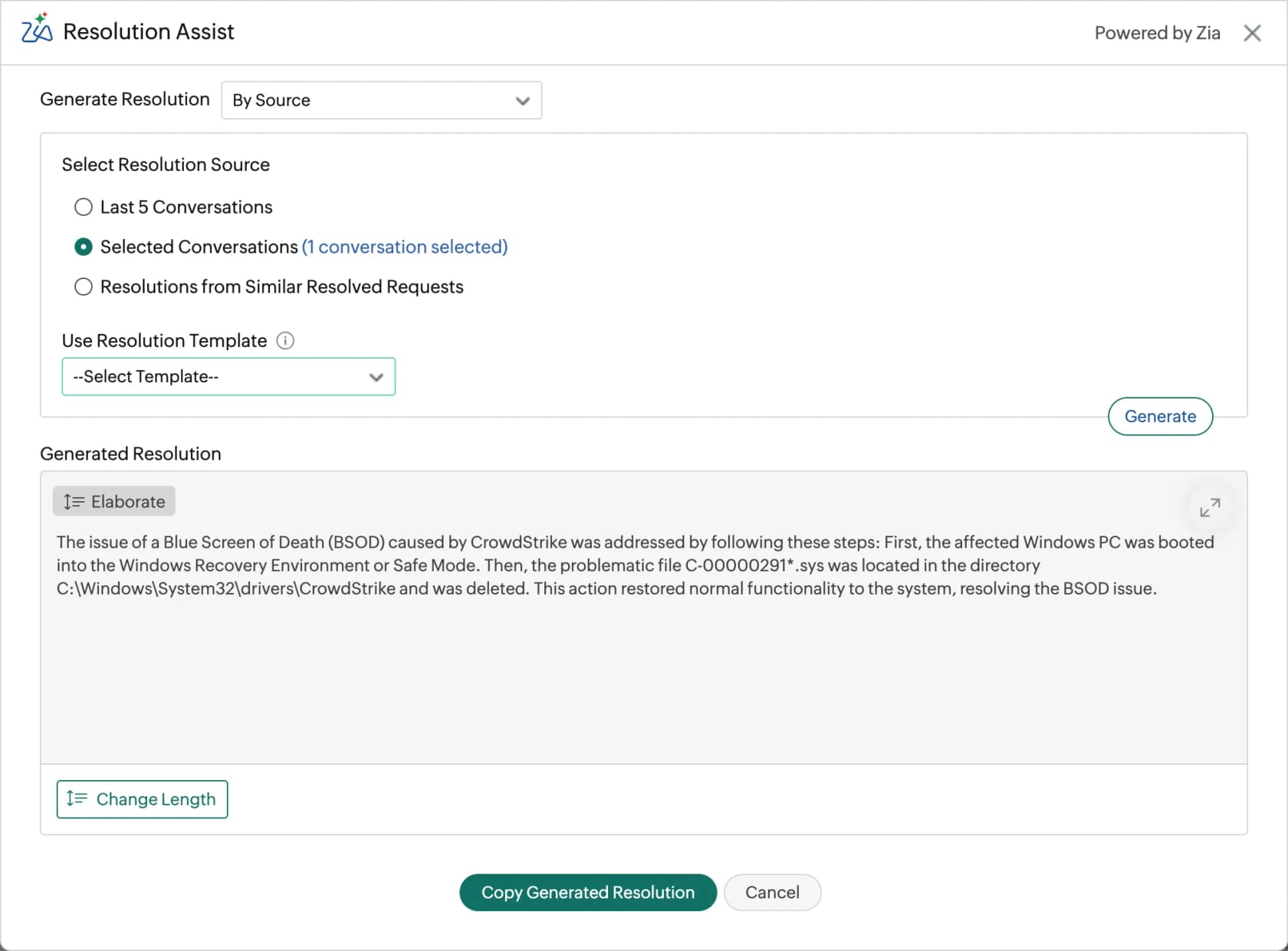
The AI story is refreshingly simple. the AI page says it directly: "Zia's native AI capabilities are available in ServiceDesk Plus at no additional cost." No credits, no per-resolution rate, no add-on line.
Pros
- Free up to 5 technicians, permanently, with unmetered end users.
- Zia is bundled with no meter: Ask Zia, summarisation, categorisation, priority estimation, sentiment analysis, problem clustering, change risk prediction.
- You choose the model. Native Zia LLM in ManageEngine's data centres, ChatGPT, Azure OpenAI or Google AI Studio, bringing your own key.
- On-premises is a real option, which very few tools on this list offer and almost none of the best AI for ITSM contenders do.
Cons
- The service catalog, and therefore approval workflows, is a paid add-on on Standard and Professional at US$ 1,595 a year, bundled only in Enterprise.
- CMDB cannot be bought on Standard at all and is another $1,595 on Professional.
- The pricing page publishes two add-on tables with different prices for the same modules, one at $1,595 and one at $1,195, with no explanation of which governs.
- The interface reads dated to reviewers:
"The UI could be much better; it feels like very old web apps and is not very user-friendly. Also, the API documentation is incomplete and doesn't have many of the endpoints documented."
Pricing
| Technicians | Standard | Professional | Enterprise |
|---|---|---|---|
| 5 tech | US$ 0 | US$ 1,545 | US$ 3,895 |
| 10 tech | US$ 1,545 | US$ 2,945 | US$ 7,795 |
| 20 tech | US$ 3,145 | US$ 5,945 | US$ 14,095 |
| 50 tech | US$ 6,245 | US$ 13,945 | US$ 27,995 |
All figures are annual totals, not per-seat.
My take: the value pick, and the answer if a five-person desk wants ITSM for nothing. Ten technicians on Standard is $1,545 a year against $2,398.80 for Helpdesk 365 Standard, with Zia included. Skip it if approval workflows are non-negotiable and you cannot stretch to Enterprise, because the add-on maths gets expensive fast. Compare against the field in our ITSM automation tools roundup.
6. InvGate Service Management
Best for: a mid-size IT team that wants a fixed annual floor instead of a per-seat one, with asset management bundled.
What it does
InvGate Service Management is an ITIL-aligned ITSM platform with a companion asset management product bundled into every service-management tier. The pricing shape is unusual and worth noticing: Starter is a flat $1,499 a year for five agents, not a per-seat rate.
Its Knowledge Discovery feature is the closest anything here comes to using ticket history for AI, turning closed tickets into governed knowledge snippets that then power AI responses. That is history converted into articles rather than an agent trained on the archive, but it is a real mechanism and it is on every tier.
Pros
- 20+ AI capabilities on all three tiers, including the $1,499 Starter, with no separate AI billing unit.
- Asset management is bundled, not a second meter, which is a genuine cost difference against ManageEngine.
- On-premises deployment is available on Enterprise.
- Unlimited end users and approvers on every tier, with SSO, Entra ID, Okta and LDAP included from Starter, plus an ITSM self-service portal out of the box.
Cons
- The Virtual Service Agent, the workflow builder, the API, Microsoft Teams and a custom domain are all Pro, from $500 per agent per year. Starter is a capable desk without any of them.
- Teams is not on the entry tier, which matters a lot if you are coming from a Teams-native product.
- No free tier or published trial terms that I could find.
- The pricing page publishes no security certifications, so that is a question for the call rather than a fact you can check.
Pricing
| Plan | Price | Agents | Adds |
|---|---|---|---|
| Starter | $1,499/year fixed | 5 | SSO, AI Hub, Knowledge Discovery, ITAM |
| Pro | $500/agent/year, from $2,500 | 5 to 50 | Workflow builder, Virtual Service Agent, MS Teams, API, change management |
| Enterprise | Custom, from $12,000/year | Any | On-premise, multiple SAML, Analytics API |
My take: the flat Starter price is the most interesting thing here. $1,499 a year for five agents costs $300 more than Helpdesk 365 Standard's $1,199.40, and buys a knowledge base, SLAs, AI and asset management that Standard has none of. Skip Starter if you need Teams, and price Pro at $41.67 an agent a month before assuming it stays cheap.
7. Atera
Best for: an internal IT department or MSP doing device management and ticketing, where the machines badly outnumber the technicians.
What it does
Atera is an all-in-one IT management platform: remote monitoring and management, PSA and ticketing, and remote access, all priced per technician with unlimited endpoints. It is the most expensive entry point on this list by a distance, and that is because the seat buys RMM as well as a helpdesk.
Its AI splits cleanly in two. AI Copilot, the technician-side assistant, is now included in every plan at no extra cost with "no usage caps, no token limits, no feature gating" per the Copilot page. Robin, the autonomous agent, is a separate paid product.
Pros
- Unlimited endpoints per technician seat, which is the whole pitch and it is a good one if you manage a lot of machines.
- AI Copilot is bundled everywhere and the previous add-on charge was automatically removed at transition.
- Robin does Teams, Slack, email and portal intake, verifying users against Okta, Entra ID or Google.
- 30-day free trial of the full Expert plan, no credit card.
Cons
- Robin's price is the one thing Atera withholds. Network Discovery prints $29 a technician and Work from Home prints $5 an end user on the same page block; Robin shows "Request a demo". The unit is the active contact, trued up quarterly.
- There is no trial, sandbox or dry run for Robin documented anywhere, and the Atera AI FAQ says Robin "cannot self-learn beyond curated actions and KB inputs".
- SSO, the HIPAA BAA and the 99.9% uptime SLA all sit on the quote-only top tier.
- The 2026 price increase shipped with no old-versus-new comparison, only "we've made every effort to keep this increase to a minimum" in the pricing update FAQ.
Pricing
| Track | Plan | Billed annually | Billed monthly |
|---|---|---|---|
| IT Department | Professional | $149/mo | $169/mo |
| IT Department | Expert | $189/mo | $229/mo |
| IT Department | Master | $219/mo | $269/mo |
| MSP | Pro | $129/mo | $139/mo |
| Add-on | Robin | No price published | per active contact, annual |
All rates are per technician per month with unlimited endpoints.
My take: worth it only if you need RMM. Three technicians on IT Department Professional is $5,364 a year, which buys a lot of Helpdesk 365 if ticketing is all you want. Where Atera wins outright is the small IT team managing 400 laptops, because per-technician with unlimited endpoints is a very different curve from per-device. Full numbers in our Atera pricing breakdown.
8. Siit
Best for: a chat-first internal ops team where employees already ask in Teams or Slack and nobody wants a portal.
What it does
Siit is an internal help desk that lives inside Slack and Microsoft Teams. Employees ask in chat, admins work a web dashboard, and on the top tier AI agents actually execute changes in Okta, Google, JumpCloud or Jamf rather than just answering about them. It is explicitly not for external customers, which makes it a straight internal helpdesk software play.
The action list is published rather than gestured at, which I appreciate: /okta reset multi-factor, /okta reset password, /okta add to group, /okta add applications, each marked "(Approval available)" in the IT Agent doc.
Pros
- The Teams bot is on the $23 entry tier, with its own documentation and Triage Agent support in channels, and Entra ID as a native IAM connector.
- SSO and RBAC on the entry tier, which is unusual in this category.
- Shadow mode lets you simulate a playbook and log what would have happened without making changes. The only named dry run among the eight non-eesel tools here.
- Unlimited employees at no extra cost: the meter is the admin, and headcount never raises the bill.
Cons
- There are effectively two Siits. Below $89 there is no AI at all, and the $23 tier does not include the integration row, so the HRIS, MDM and IAM connectors behind the "unified employee context" pitch actually start at $45.
- SLA management is bundled with the AI tier, so a team that wants SLAs and no AI still pays the AI price.
- Wiki coverage is three products: Notion, Confluence and Slab only, refreshed on a schedule rather than live. SharePoint is not on the list, which is a real gap coming from Apps 365.
- No HIPAA or ISO 27001 claim appears anywhere, though SOC 2 Type II and GDPR are checked on every plan.
Pricing
| Plan | Price | Unit |
|---|---|---|
| Essentials | $23/admin | per month, billed annually |
| Standard | $45/admin | per month, billed annually |
| Pro | $89/admin | per month, billed annually |
| Custom | Get in touch | quote only |
My take: the one to look at if Teams is where the work happens and a portal feels like a step backwards. Price the comparison at $89, not $23, because that is where the AI is. A reviewer put the Teams case better than I can:
"Most of our company lives in Teams not Slack and finding a help desk tool that actually treats Teams as a first class citizen was harder than expected. Siit isn't a Slack tool with a Teams skin. Forms render properly inside the chat and approvals happen right in the thread. Nobody gets kicked out to a portal. We're 500 people across 3 countries and adoption was almost instant."
Her stated downside in the same review, for balance: "The mobile experience in Teams is rough. Forms collapse weirdly on iOS and notifications sometimes show up twice."
9. Spiceworks Cloud Help Desk
Best for: a one-to-five-person IT team with no budget that needs email-to-ticket and a portal, today.
What it does
Spiceworks Cloud Help Desk has been running since 2006 and is very much alive, with a release note dated 27 July 2026. It is free, ad-supported, and honest about it: the Premium FAQ calls Core "a robust, ad-supported ticketing solution at no cost", and ad removal is the first listed benefit of upgrading.
You get email-to-ticket on an @your-org.on.spiceworks.com address, a customisable end-user portal, ticket rules, custom queues, canned responses, a private knowledge base, and native iOS and Android apps.

Pros
- Free, with unlimited end users and a real portal.
- $5 per seat per month billed annually to go unlimited and ad-free, which is the cheapest paid tier here by a distance.
- Native mobile apps on both platforms.
- Downgrading back to Core keeps your data intact.
Cons
- The 5-seat cap is a hard lockout, not a nag. Past five active seats, admins can reach only Billing and Employee Administration, Tech and Manager roles lose account access, end users cannot submit tickets, and the support email goes inactive.
- You must upgrade before adding a sixth user, not after.
- No AI of any kind, so if deflection is why you are shopping, this is not the tool.
- Data is not encrypted at rest, and Spiceworks says so plainly, recommending you do not store financial, HIPAA or personally identifying information in it. There is no HIPAA BAA.
Pricing
| Plan | Price | Seats |
|---|---|---|
| Core | Free | 1 to 5, ad-supported |
| Premium | $5/seat/mo annually, $6 monthly | Unlimited, ad-free |
My take: an honest, capable free desk, and a fine landing spot if the Helpdesk 365 renewal quote made you wince and you have four technicians. Read the at-rest encryption note before you put anything sensitive in it, and be clear-eyed that you are trading Apps 365's tenant residency for a vendor cloud with a weaker posture. Our Spiceworks alternatives post covers the upgrade paths, and Spiceworks ticketing covers what the free tier actually does.
What this actually costs at 10 agents
Sticker prices lie, so here is the same team priced across the list: ten agents, 300 employees who file tickets, annual billing, and the plan I would actually point that team at from each entry above.
| Tool | Plan needed | Annual cost | Includes AI? |
|---|---|---|---|
| Apps 365 Helpdesk 365 | Enterprise | $7,198.80 (promo) | Yes, with your own Azure or Copilot bill on top |
| Desk365 | Premium | $3,840 | Copilot yes, AI Agent metered |
| Freshservice | Pro | $11,880 | No, conversational agent is Enterprise |
| Jira Service Management | Standard, 1-15 band | $3,000 | No, virtual agent is Premium |
| ManageEngine SDP | Enterprise, 10 tech | $7,795 | Yes, Zia bundled |
| InvGate | Pro, 10 agents | $5,000 | Yes, Virtual Service Agent |
| Atera | IT Dept Professional | $17,880 | Copilot yes, Robin unpriced |
| Siit | Pro | $10,680 | Yes |
| Spiceworks | Premium | $600 | No AI exists |
| eesel AI on top of any of them | Teammate, 500 credits | $3,588 at 500 tickets/month | Yes, trained on your tickets |
A few things fall out of that table that the individual pages never say.
Jira Service Management Standard is cheaper than Helpdesk 365 Standard once you have ten agents, and it comes with a knowledge base and SLAs that Helpdesk 365 Standard does not have. ManageEngine Enterprise costs roughly the same as Helpdesk 365 Enterprise and bundles the AI model rather than asking you to bring one. And Spiceworks Premium at $600 is a tenth of everything else, if you can live without AI and without encryption at rest.
The last row is the one I would actually think hardest about. You can keep the ticketing system you already have and buy only the answering layer. That is not a rhetorical trick; it is what a lot of teams end up doing after the second migration goes badly. Our guide to AI support agent cost walks the same arithmetic across more vendors.
Try eesel for your Microsoft 365 helpdesk
If you got this far, your real question is probably not "which of these is cheapest." It is "which of these will actually deflect tickets."
That is the axis where this whole category is thin. Eight ticketing tools, and not one of their agents reads the archive where your team already wrote the right answer four hundred times.
eesel AI reads that archive, plus your SharePoint sites, Confluence, Notion and help center. It answers in Microsoft Teams channels and DMs where your employees already ask, and handles triage, routing and escalation along the way. Setup runs about thirty minutes and there is nothing to migrate, because it plugs into the desk you already run.
Before it touches a live ticket, run the Simulation: it replays your past tickets and scores its answers against what your team actually sent, then tells you which instructions to change. That is the dry run Helpdesk 365 does not have, and it is the difference between a rollout and a gamble.
Pricing is one fixed monthly price, from $299 a month for 500 credits (1 credit per ticket), with no seats, no platform fee, and 100 free credits to start. If the AI handles 500 tickets next month, the 500-credit plan covers it. Spam and tickets it is told to skip do not count.
Start free, or book a 30-minute demo and I will run a simulation against your own tickets on the call.
Frequently Asked Questions
What are the best Apps 365 alternatives in 2026?
How much does Apps 365 Helpdesk 365 actually cost?
Is there a free Apps 365 alternative for a small IT team?
Does Helpdesk 365 include AI, or do I bring my own model?
What is the best Microsoft Teams ticketing system if I leave Apps 365?
Can any of these Apps 365 alternatives train their AI on my past tickets?
Is my ticket data safer inside my own Microsoft 365 tenant?



Article by
Rama Adi
Rama is a software engineer at eesel AI with two years of experience writing about B2B SaaS, AI tools, and customer support technology. Based in Bali, Indonesia, he brings a developer's perspective to product comparisons — cutting through marketing copy to what the integrations and APIs actually do.