Desk365 alternatives in 2026: 10 picks and the Teams AI gap

Riellvriany Indriawan

Katelin Teen
Last edited August 19, 2026

Why teams start looking for Desk365 alternatives
Fair to Desk365 first. Most of the switching stories out in the wild run toward it, not away from it. It carries a 4.9 on G2 across 32 reviews, 7,000+ businesses in 65+ countries, and the Teams experience people buy it for does land:
"As a heavy user of Microsoft Teams, I find that the integration with the application is truly fantastic. Our users and agents can stay directly in Teams to submit and process tickets as they come in, without having to switch tools."

I work eesel's own support queue every day, and I read that quote the way anyone on a queue reads it: not switching tools is most of the job. The reasons people go shopping anyway are narrower than "it's bad". Four of them, and none is the thing most help desk automation roundups lead with.
1. The AI agent cannot deploy to Teams yet
This is the big one, and it is not an inference. Desk365's AI Agent setup guide walks you through a Build → Train → Test → Deploy flow. The Deploy screen carries three toggles. Two of them are live. The third one is not.
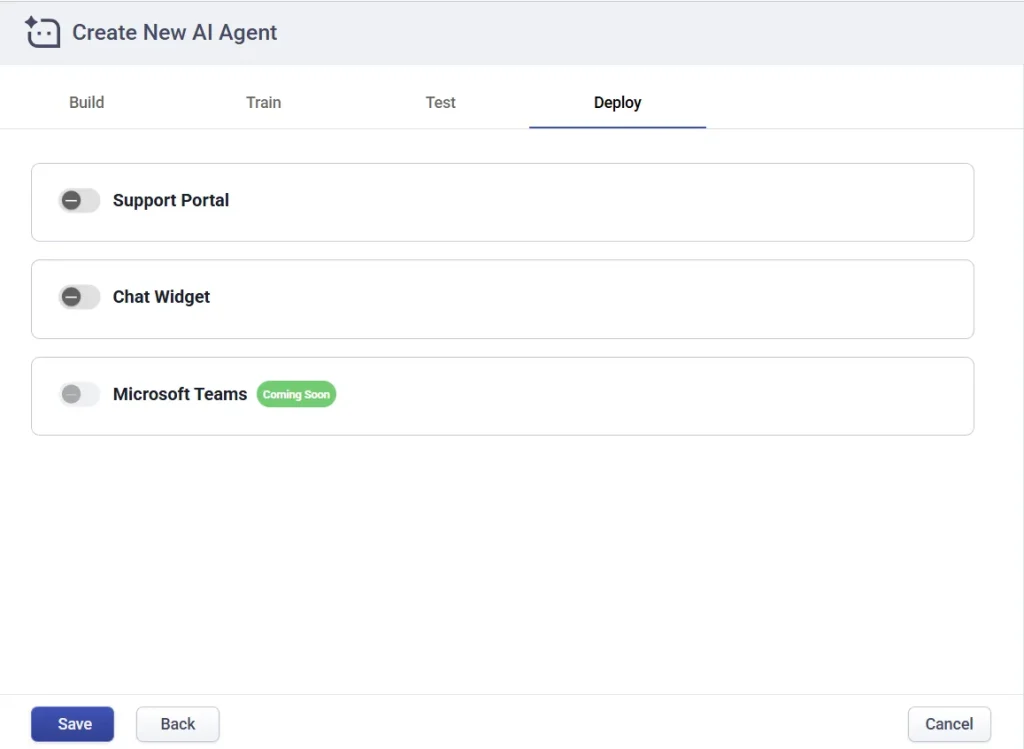
That same "Soon" wording turns up again in the AI Agent product FAQ, where knowledge base answers, ticket creation and real-time updates inside Teams are all promised for once it ships. Today none of it is live.
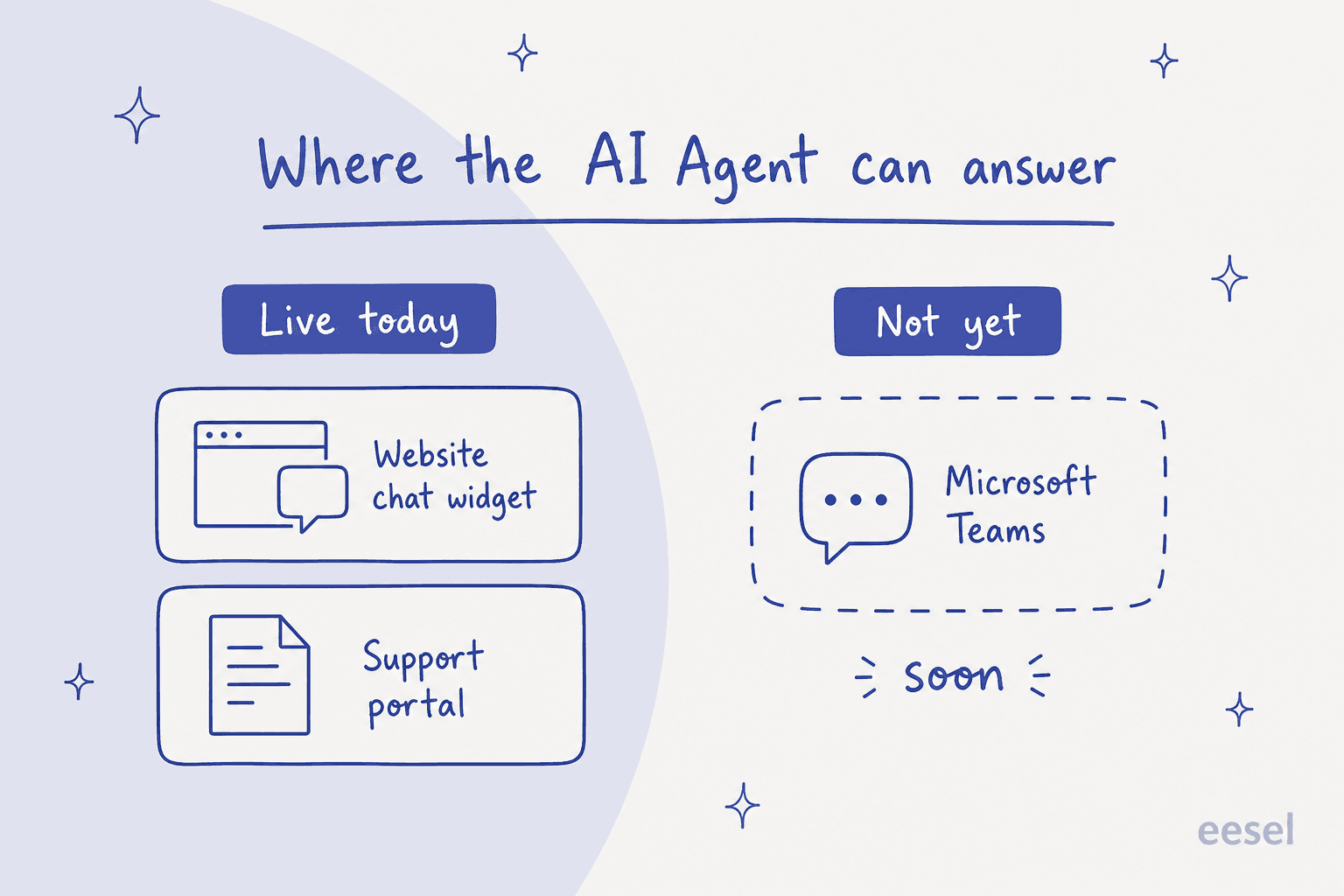
Human ticketing in Teams is untouched by any of this and works well. The gap only bites if you bought a Microsoft Teams IT support bot on the assumption the AI would sit in the same window. Before you assume every vendor solved it, read how AI in Microsoft Teams is actually deployed elsewhere.
2. The AI meter is per message, and the definition is thin
The AI Agent itself is a paid add-on at $50 per 1,000 credits, which is $0.05 a credit. Plus ships with 100 free credits a month and Premium gets 200. Neither pool rolls over.
What actually burns a credit gets one sentence in the whole of the setup guide: "Credits are consumed based on AI responses, with a maximum of 5 credits per message." The billable event is an AI message. Not a conversation, not a resolution. One reply tops out at $0.25.
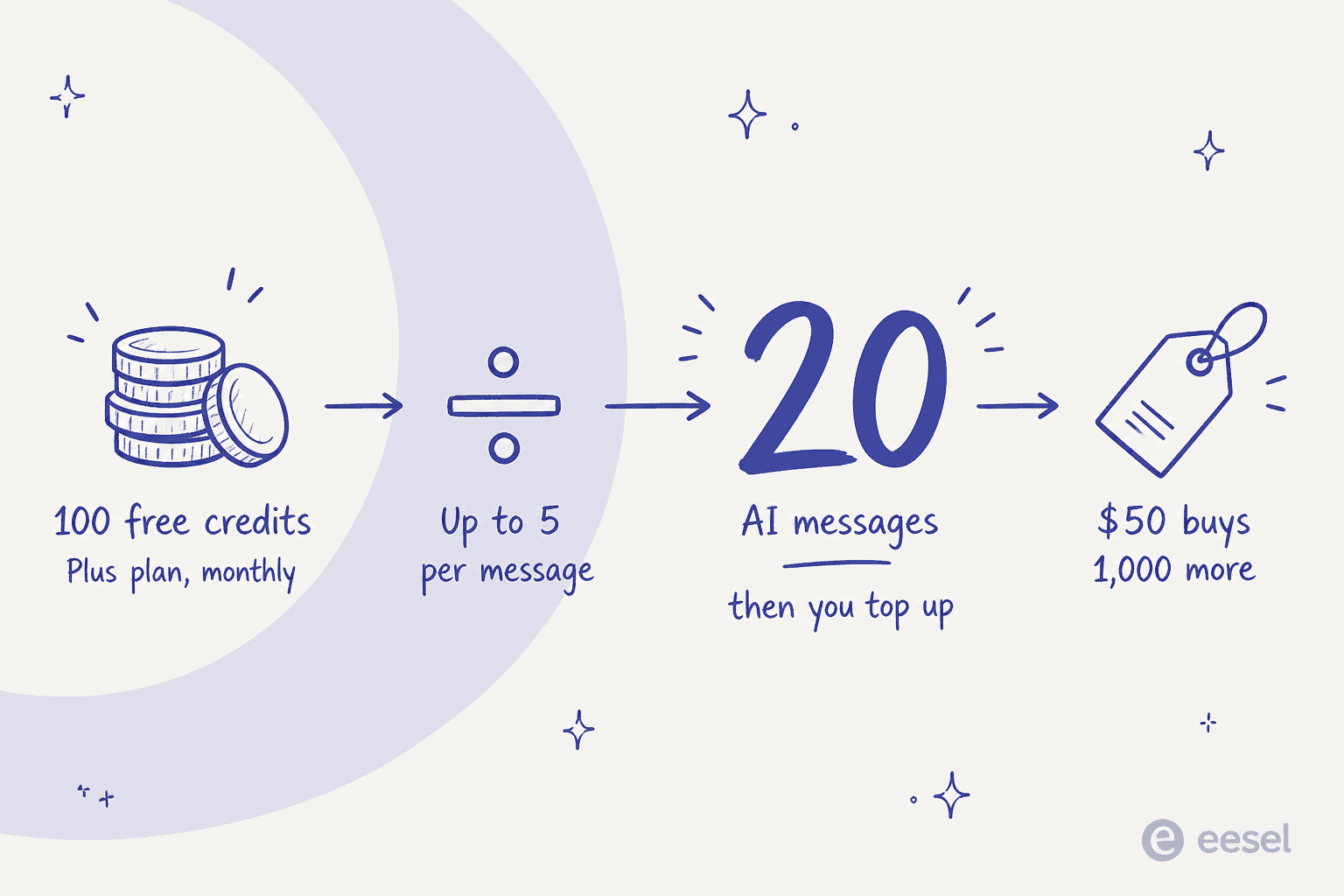
In practice you land under the ceiling. Desk365's own Credits & Usage screenshot has individual chats burning between 0.60 and 2.96 credits, which puts a realistic Plus allowance nearer 40 to 60 chats a month than 20 messages.
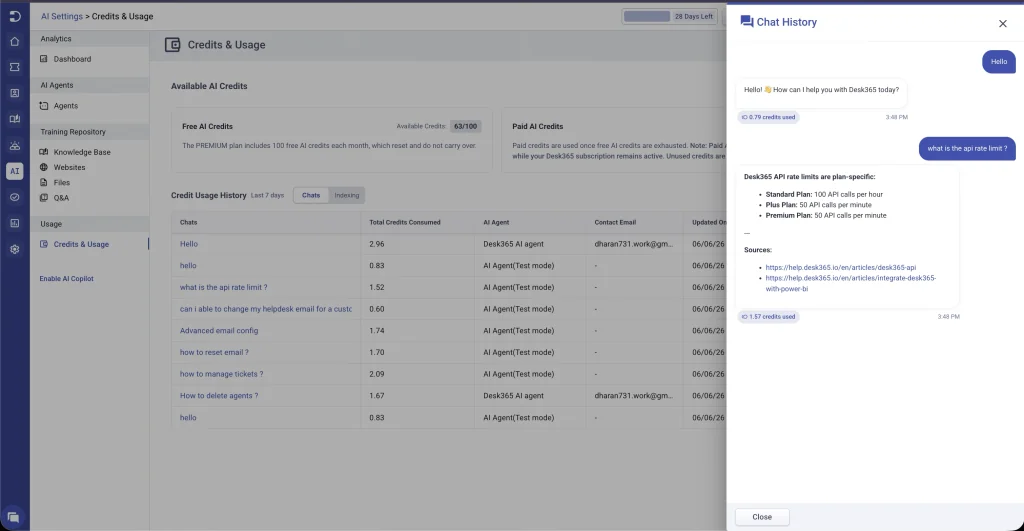
Either way that is a demo budget, not an operating one. The AI add-on terms say plainly that consumption moves with input length, response complexity and the features you turn on, and no formula is published. What I could not find documented anywhere is what happens when you hit zero. Does the agent hard-stop, does it drop back to a ticket form, does it bill an overage? There is no published overage rate at all.
One clause is worth reading before you prepay for a block. Per §3.5, the credits you bought survive for as long as you stay on Plus or Premium. Downgrade, cancel or miss a payment and the unused paid ones "expire and become unusable effective immediately", while §3.7 makes them non-refundable on top.
3. "Resolved" is a confidence score, not an outcome
Worth understanding whichever vendor you land on, because nearly everyone measures deflection this way. Desk365's analytics docs define a resolved message as a response where the AI was highly confident, meaning a confidence score above 0.4. Anything at or below that counts as unresolved-but-non-escalated.
Run the arithmetic on their own sample dashboard and you can watch what that does to a headline number.
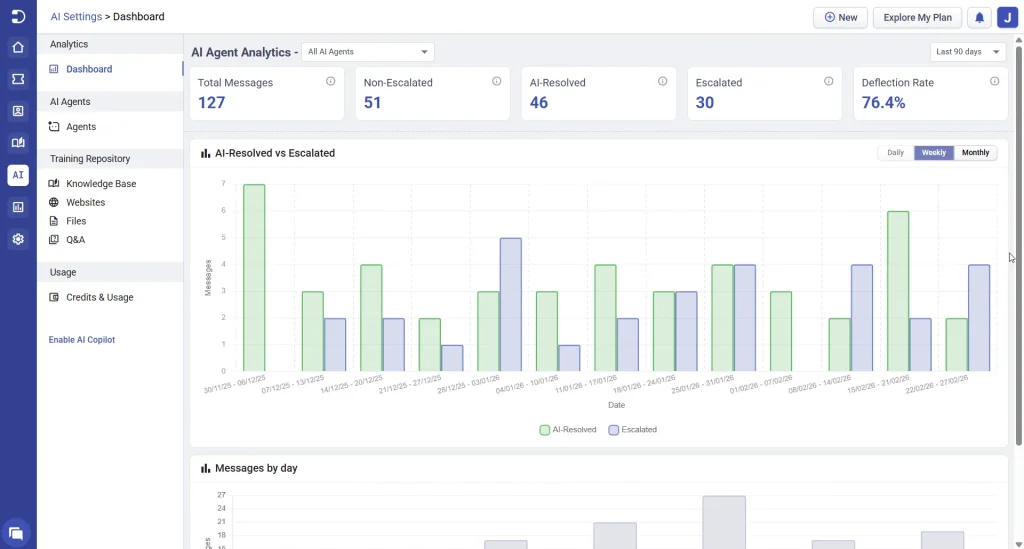
127 total messages. 46 AI-resolved, 51 non-escalated, 30 escalated, and a 76.4% deflection rate. Add 46 to 51 and you land on 97, which is exactly 76.4% of 127. So the headline figure is counting the 51 messages the model itself scored below its own confidence bar, on the grounds that nobody escalated them. Confident answers on their own come to 36%.
That is a category habit more than a Desk365 flaw, and it is the single most useful thing to check when a vendor quotes you a deflection rate. I wrote up the honest version of that math in the guide to tier-1 support deflection. Then compare it against Tikit, whose bot configuration docs put the default gate at 65% before the bot will answer anything at all.
4. Reporting depth, the one complaint that repeats
The same gripe surfaces on G2 and on Capterra, independently of each other:
"I wish the reporting was more robust, both metrics on the desk tickets themselves as well as reporting round Knowledge Base views."
"The Reporting of desk 365 is very basically and could use a little more dynamic components"

Worth calibrating those ratings while you are here. The 4.9 comes off 32 G2 reviews with no rating below four stars, and the 12 Capterra reviews all date from between September 2022 and February 2024, and 10 of the 12 are labelled vendor-referred with an incentive offered. Small, friendly sample. Not a large one.
The two roads out, and why most lists only show you one
Almost every "Desk365 alternatives" list starts from the assumption that you are migrating. It is one answer to the question. Often it is the expensive one.
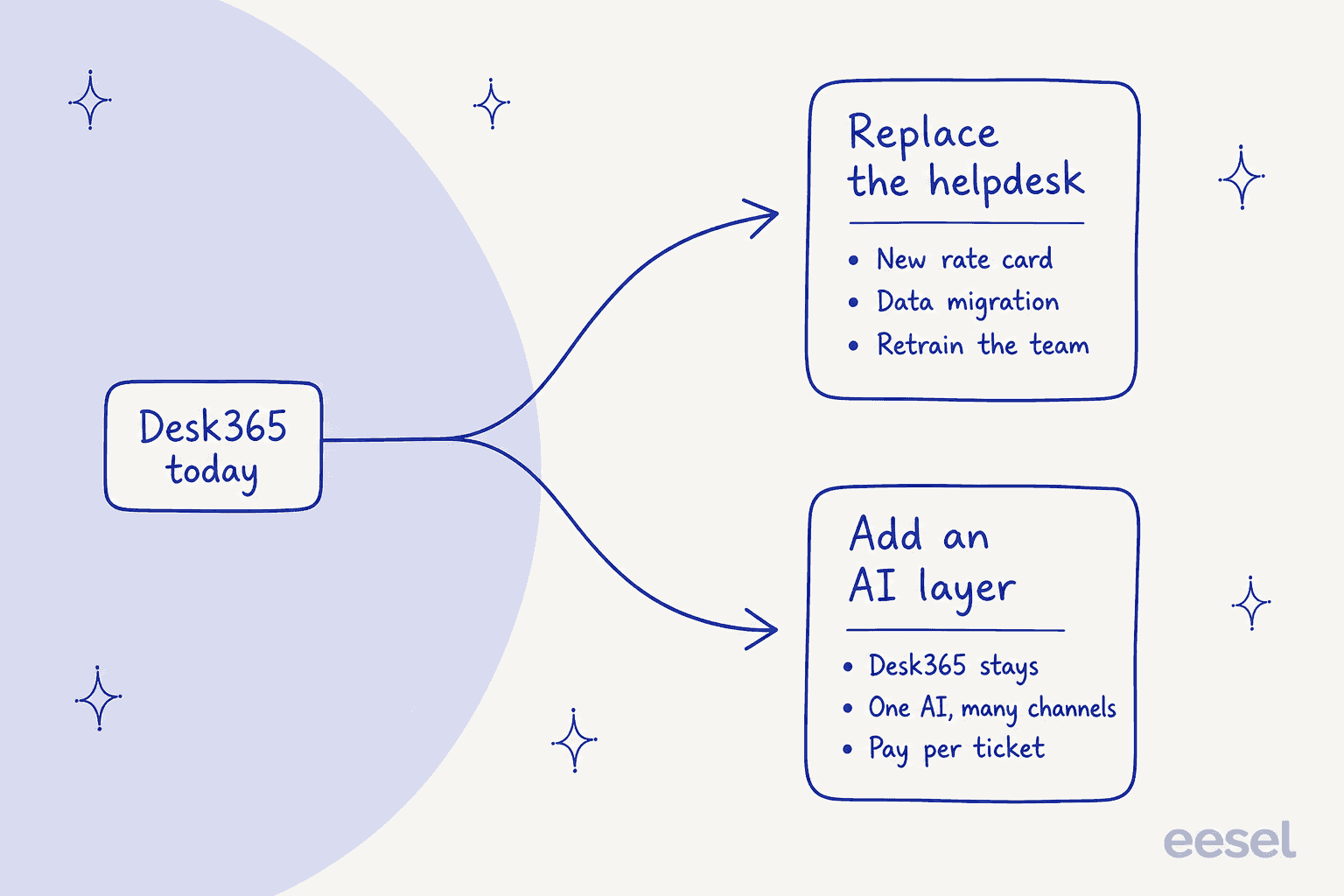
Replace the helpdesk when the desk itself is the problem. You have outgrown the reporting, or you need real asset management with a CMDB behind it, or several unrelated departments run through one queue, or the queue is customer-facing instead of internal. That is items 2 through 7 and item 10 below.
Add an AI layer when the desk is fine and the AI is the only hole. Desk365 stays at $12 to $32 a seat, the migration never happens, and a separate usage meter charges you only for the tickets the AI actually handles. Items 1, 8 and 9.
I would try the second road first, and not for vendor reasons. Migrating a helpdesk costs weeks of configuration plus a month of your team relearning muscle memory, and at the end of all that you still have to prove the AI ticketing system works. Testing an AI layer costs an afternoon.
How I compared them
Vendors' own pages, their docs, their marketplace listings, and reviews on G2, Capterra and Reddit. That is the whole source list. Where a rate card was quote-only I say so instead of lifting a number off an aggregator. Several of the sharpest numbers here never appear on a pricing page: Desk365's monthly rates sit in an inline script on that page, ClearFeed's 200-tickets-per-agent cap is buried in a docs FAQ, and Tikit's Azure infrastructure floor turns up only in its knowledge base.
Four things I weighted, in this order:
- Does the AI actually run in Microsoft Teams today, in GA, with no beta flag and no Slack relay in the way.
- What the AI meter is, and whether a failed answer still costs you money. Units across this category do not compare cleanly, which my breakdown of AI ticketing systems keeps running into.
- Whether you can dry-run it over your own history before it talks to a real person.
- Real published prices, monthly and annual, at the seat count a Desk365 buyer actually runs.
Desk365 alternatives compared
| Tool | Best for | Entry price (annual) | AI meter | AI in Teams today | Free tier | Asset management | Dry run on past tickets |
|---|---|---|---|---|---|---|---|
| eesel AI | Adding AI to the desk you have | From $299/mo (500 credits), no seats | Per handled ticket or chat (1 credit) | Yes, sales-assisted setup | 100 free credits | Via your existing desk | Yes, on your own history |
| Tikit by Cireson | A true Teams-native swap | $26/agent/mo | Your own Azure tokens | Yes, all tiers | No, 14-day trial | Power Apps module | No |
| Atomicwork | AI in Teams on day one | From $25,000/yr | Credits, 1 to 100 each | Yes, GA | No | Intune, Jamf, Kandji, CMDB | No |
| Freshservice | Full ITSM depth | $19/agent/mo | Add-on and promo tiers | Chat yes, agent Enterprise | No, 14-day trial | ITAM, quote-only beyond 100 AUs | No |
| Jira Service Management | Existing Atlassian shops | Free, then $25/agent/mo | $0.30 per assisted conversation | Slack or Teams, not both | 3 agents | Assets included | No |
| Zoho Desk | The cheapest full desk | $7/user/mo | Tokens, 30M free then $1/M | No native Teams AI | 3 users | No | No |
| Zendesk | External customers at scale | $19/agent/mo | $1.50 committed, $2.00 as you go | No native Teams AI | No, 14-day trial | No | No |
| ClearFeed | Chat-first without migrating | $24/agent/mo | $0.20 per AI attempt | Partial, relays into Slack | No, 14-day trial | No | No |
| Ravenna | Slack-first internal IT | From $50/agent/mo | Not published | Early access flag | No | Device lookup only | No |
| Help Scout | Small teams, external inbox | $25/user/mo | $0.75 per resolution | No native Teams AI | 5 users | No | No |
Prices are per agent or per user per month on annual billing unless noted. Captured 20 August 2026.
Work out what the AI actually costs you
Those meters do not compare on their face. One vendor charges per message. The next one per resolution, the one after that per attempt, another per seat, and one bills you for Azure infrastructure you host yourself. Plug your own numbers in and the ranking moves more than you would expect.
One pattern falls out of it every time: seats dominate at low volume, usage dominates at high volume, and the seat-plus-usage vendors are the ones punishing you at both ends.
1. eesel AI
Best for: leaving Desk365 exactly where it is and putting AI over the top.
Plainly: I work at eesel. Read this section with that in mind and check the links. It leads the list for a structural reason rather than a promotional one, which is that it is the only option here that does not ask you to move your tickets.
eesel is an AI helpdesk agent that plugs into the tools you already run. It learns from your help center, your past tickets and your internal docs, then answers in the channels your people are already sitting in. Same shape I describe in the guide to the AI service desk.
On the Microsoft stack, Microsoft Teams is where your employees ask. Knowledge comes out of your help center and whatever authenticated stores hold your runbooks, SharePoint included.
The ticket gets written back into whichever desk you already run, Jira Service Management through to Zendesk. Your reporting keeps pointing at the same place it pointed yesterday.
What it does well. The simulation mode is the piece I would not give up. It replays your real past tickets in a sandbox, scores what the agent would have said against what your team actually sent, and hands back a gap report telling you which instructions to change. Nobody else in this roundup does it. After three-plus years of watching confident bots quietly give wrong answers, a dry run over your own history is what separates a launch from an incident.
The pricing shape is the other difference. It is one fixed monthly price sized to your volume, from $299 a month for 500 credits. One credit is one support ticket or one chat session however many replies it takes, and questions asked in the dashboard are mostly free. No seats, no platform fee. A ticket that runs six turns costs the same as one that runs two, which is the reverse of how a per-message credit meter behaves.
Where it falls short. Three honest limits. Microsoft Teams setup is not self-serve today, and the product docs say so: Teams support runs through sales instead of a one-click install, with Slack suggested as the equivalent in the meantime. The integrations list covers Freshdesk and not Freshservice, and there is no Zoho Desk connector either, so if either of those is where you are migrating, eesel is not your layer. And credits are used regardless of outcome, so a ticket the AI works on and then hands off still uses a credit. That is a real trade against the outcome-priced vendors, though it sits on the pricing page rather than buried somewhere.
SOC 2 Type II is in progress, not complete. HIPAA is available as an add-on, talk to eesel.
Pricing.
| Line | Cost |
|---|---|
| Free plan | 100 credits, no card |
| 500 credits (1 credit = 1 ticket or chat) | $299/mo |
| 1,000 credits | $499/mo |
| 2,500 credits | $999/mo |
| 5,000 credits | $1,899/mo |
| Seats and platform fee | None |
| Extra credits (optional overage, with a cap you set) | $0.80 each |
| Annual prepay | Two months free |
My take. Pick this when Desk365's ticketing is doing its job and the one hole is AI answering in chat. Skip it if the desk is going anyway, because at that point you are choosing an ITSM platform and not a layer. The deciding factor: whether a migration fits in this quarter.
2. Tikit by Cireson
Best for: the closest thing to a true Teams-native swap, with prices you can read.
A naming mess to clear up first. Several roundups file this under "Rezolve.ai – Tikit", which welds two unrelated vendors together. Tikit is built by Cireson, a Microsoft partner since 2011. Rezolve.ai is a different company, covered further down.
Tikit's premise: it extends an M365 E3 or E5 licence instead of sitting beside one. You create a ticket by right-clicking a Teams message, and the Tikit Virtual Agent runs inside Teams on every tier, the $26 entry plan included.
What it does well. The answer path is unusually disciplined. Knowledge base first, then generative AI if you turned it on, then a ticket, and the default confidence threshold sits at 65% before the bot will say anything at all. Far more conservative a bar than the 0.4 score Desk365 counts as resolved, and it buys you fewer confidently wrong replies in front of staff.
Licensing runs per agent with unlimited end users, the right shape for an internal IT helpdesk where headcount dwarfs the support team by an order of magnitude. Knowledge lives in SharePoint, so SharePoint is effectively part of what you are buying.
Where it falls short. The generative half runs on your Azure tenant rather than Cireson's. Their Azure AI setup doc is upfront about it: the three required resources "total approximately $76 per month", and "OpenAI tokens are not included in this estimate", with token costs worked out separately. So the real bill is three meters deep. Seat licence, an Azure infrastructure floor, then consumption on top of both. Neither of the last two appears on the pricing page.
Billing is annual upfront, with no month-to-month option. A volume discount is claimed but the curve is nowhere published. Knowledge sources are manual upload or SharePoint sync rather than a broad connector set. And there is no way to dry-run any of it against your ticket history.
Pricing.
| Plan | Per agent/month, billed annually | What it adds |
|---|---|---|
| Microsoft Teams Ticketing | $26 | Virtual Agent in Teams, ticket from chat, mobile, SSO, capped at 1 Team |
| Microsoft 365 Service Desk | $39 | Portals, email tickets, KB deflection, SLAs, Intune, Power BI, unlimited Teams |
| Microsoft 365 ITSM | $49 | Service catalog, lifecycles, Power Automate, asset management app, dedicated CSM |
| Microsoft 365 ITSM Pro | Not published | Appears in the comparison table with no price or feature deltas |
| Azure infrastructure | ~$76/month | Azure OpenAI, AI Search and Blob Storage, on your own bill |
| Free trial | 14 days |
My take. Pick Tikit when Teams is non-negotiable, Azure is already yours, and you want the AI answering today instead of next quarter. Skip it if you expect inference inside the seat price, or you need month-to-month billing. The deciding factor: whether owning your own Azure OpenAI deployment reads to you as control or as homework.
3. Atomicwork
Best for: teams where the AI has to be live in Microsoft Teams on day one, with real asset management behind it.
The heaviest option on this list, and the most credible answer if what you want is to buy the Teams experience Desk365 is still building. Atomicwork is generally available in Teams across public channels and DMs, it is permissions-aware, and the assistant learns from public Teams conversations instead of documents alone.
What it does well. Asset management runs deeper than Desk365 Premium by a distance: native real-time sync to Intune, Jamf, Kandji and Azure Resource Manager, Lansweeper discovery, a procurement-to-retirement lifecycle, one-click restart, lock and wipe, plus a separate modern CMDB. That matters if what you are shopping for is ITSM automation tools and not a helpdesk, and it puts Atomicwork in the same bracket as the platforms in my best AI for ITSM roundup.
The compliance shelf is the deepest here too: ISO 42001, SOC 2 Type 1 and 2, ISO 27001, 27017, 27018 and 27701, HIPAA, GDPR, CCPA and CSA STAR Level 1. It is Microsoft Marketplace listed as well, so the spend can draw down an Azure commitment you already made.
Where it falls short. For most Desk365 buyers the floor is the whole problem. Professional starts at $25,000 a year, covering 25,000 credits, 2 AI coworkers, 250 end users and 500 devices, and extra coworkers run $499 each per month. Nobody paying $22 a seat clears a $25,000 annual minimum casually.
The credit meter is documented honestly, and it is wide. Atomicwork publishes the six cost drivers plus worked examples running from 1 credit for rule-based routing up to 100 for AI workforce runs. No overage rate is published. That spread is the buyer's risk to carry. There is no self-serve trial either, so evaluation goes through a demo.
Pricing.
| Model | Rate |
|---|---|
| Professional (usage) | From $25,000/year, 25,000 credits, 2 coworkers, 250 end users, 500 devices |
| Extra AI coworker | $499/worker/month |
| Business and Enterprise | Quote only |
| Outcome: knowledge | $1 per outcome, 25,000/year minimum |
| Outcome: access | $2 per outcome, 12,000 minimum |
| Outcome: service resolution | From $3, 8,000 minimum |
| Run on your ServiceNow or JSM | No platform fee |
| Free trial | None, demo-gated |
My take. Pick Atomicwork when you are a 500-plus-employee Microsoft shop replacing the whole service desk with five figures to spend. Skip it if you are the two-person IT team Desk365 was built for. Headcount decides this one, not features.
4. Freshservice
Best for: the widest ITSM module set, if you can work out the Freddy gating.
Freshservice is the natural upgrade path once Desk365's reporting stops keeping up. A proper ITSM platform: problem, change, release and major incident management, with a Microsoft Teams integration for raising and tracking tickets in chat, and it handles automated IT ticketing properly instead of as a bolt-on.
What it does well. Depth, mostly. Employee journeys, on-call management, cloud management, workload management and a real service catalog all ship in the box once you are on the right tier. Orchestration transactions come included at 1,000 to 20,000 a month depending on plan, so basic automation does not turn into a second bill straight away.
Where it falls short. The AI gating is confusing, and it does not match Freshdesk's, so drop any assumptions you carried over. Three separate Freddy products exist. Freddy AI Agent (Classic) is the end-user conversational agent, Enterprise only, metered at 1,200 sessions per licence per year, where one session means one user interacting inside a 24-hour window. No overage rate is published; you get routed to an account manager instead. Freddy AI Agent Studio reaches Growth and up, but as a promotional free service through 30 September 2026, and post-promo pricing is explicitly deferred. Freddy AI Copilot is its own seat at $29 per agent per month annually, on Pro and Enterprise. Enterprise itself is quote-only.
Asset management repeats the pattern. 100 ITAM asset units are bundled and everything past that is quote-only, on weighted consumption where one server counts as 4 units and a mainframe as 400. Read my notes on Freshservice AI pricing before you budget. eesel does not integrate with Freshservice, so this is a replace-the-desk move, never a layer.
Pricing.
| Plan | Annual, per agent/month | Monthly | AI included |
|---|---|---|---|
| Starter | $19 | $29 | None |
| Growth | $49 | $59 | Agent Studio, free promo to 30 Sep 2026 |
| Pro | $99 | $119 | Copilot as paid add-on |
| Enterprise | Quote only | Quote only | Freddy AI Agent (Classic), 1,200 sessions/licence/year |
| Freddy AI Copilot | $29/agent/month | $35 | Pro and Enterprise only |
| Business agent licence | $49/agent/month on Pro and Enterprise | ||
| Extra orchestration | $250 per 1,000 transactions |
My take. Pick Freshservice when you need ITSM process depth and can live on Growth or Pro without the conversational agent. Skip it when conversational AI is the entire reason you went shopping, because that one sits behind a quote. The deciding factor: are you buying process, or buying deflection.
5. Jira Service Management
Best for: teams already paying Atlassian, especially if engineering lives in Jira.
A fact that trips people up first: Halp is gone. Atlassian stopped selling it in May 2023, cut existing customers off in June 2024, and the old URL redirects now. What it became is Atlassian Assist, a bot for Slack and Microsoft Teams, and that is included on every plan including Free.
What it does well. A free chat layer is unusual, and it is more useful than it sounds. A three-person IT team can run Jira Service Management at $0, take requests out of a Teams channel, and keep the record in Jira next to engineering work. For a small shop that is a real alternative to the best ticketing system shortlist. Assets come included instead of as a separate SKU.
Where it falls short. Two things. The AI is gated higher than the chat is: the virtual service agent is Premium and Enterprise only, and it works with Slack or Teams, never both at once. Then the headline prices are not what a small team pays. Those $20 Standard and $51.42 Premium figures on the pricing page are blended rates at a 75-agent default; at 1 to 15 agents the real rates are $25 and $57.30.
The AI meter has a sharp edge on it. Premium includes 1,000 assisted conversations a month, overage starts at $0.30, and an abandoned conversation counts as an AI resolution and bills you for it. Testing means typing by hand into your live queue, where it creates real issues, and past tickets are not a knowledge source. My Jira Service Management AI review covers the rest. JSM is also no longer sold on its own, only inside the Service Collection bundle.
Pricing.
| Plan | 1 to 15 agents, annual | Chat in Teams | Virtual service agent |
|---|---|---|---|
| Free | $0, 3 agents | Yes | No |
| Standard | $25/agent/month | Yes | No |
| Premium | $57.30/agent/month | Yes | Yes, 1,000 conversations included |
| Enterprise | Not published | Yes | Yes |
| Assisted conversation overage | From $0.30 each |
My take. Pick JSM when you already pay Atlassian and want a free chat front door in Teams today. Skip it when you need the AI, because Premium at $57.30 a seat is more than double Desk365 Premium before one conversation gets billed. The deciding factor: is Jira already your system of record.
6. Zoho Desk
Best for: the cheapest full-featured desk on the list, if your queue is customer-facing.
Desk365's own pricing page benchmarks itself against Zoho Desk at 10 agents, and the gap is thinner than you would guess: $220 a month against $230. Both sit in the same band as the tools in my cheapest AI helpdesk apps roundup. Zoho runs a five-edition ladder now, Free up to Enterprise.
What it does well. The floor is very low. Express runs $7 per user per month annually and Free covers three users. Entry tiers get an unusually generous AI story as well: Zia Agent Studio and the Agent Store show up from Express upward, with up to 30 million free tokens a month plus a bring-your-own-key option for OpenAI or DeepSeek.
Where it falls short. The AI meters in tokens instead of resolutions or conversations, so forecasting is harder than it would be against a per-ticket rate. Past the 30 million free tokens you pay $1.00 per million on Zoho's standard-tier models, or $3.00 per million on the pro tier after a smaller 20 million allowance, and 1 USD converts to 1,000 AI credits. To work out what a ticket costs you have to estimate tokens per conversation first.
The good stuff is gated high, too. Native Zia generative AI starts at Professional. The pre-built Desk AI agents and the customer-facing answer bot inside the ASAP widget are Enterprise only, and only in the US and India data centres. Zoho's own pricing page and its comparison table also contradict each other on where the 5-user cap and light agents sit.
There is no native Microsoft Teams AI experience here, which is the thing you came for. eesel does not integrate with Zoho Desk either.
Pricing.
| Edition | Annual, per user/month | Monthly | Users |
|---|---|---|---|
| Free | $0 | $0 | 3 |
| Express | $7 | $9 | 5 |
| Standard | $14 | $20 | Unlimited |
| Professional | $23 | $35 | Unlimited, light agents $6 |
| Enterprise | $40 | $50 | Unlimited, 50 free light users |
My take. Pick Zoho Desk when your tickets come from customers instead of colleagues and the budget is tight. Skip it when the whole point was Teams. Who raises the ticket decides it.
7. Zendesk
Best for: external customer support at a scale Desk365 was not built for.
If your Desk365 instance drifted out of internal IT into customer support and started creaking, Zendesk is the obvious heavyweight. It is also the most expensive per seat on this page by a wide margin, which is why it keeps turning up in help desk software comparisons as the option people rule out on price.
What it does well. Zendesk is one of very few vendors publishing a real per-outcome AI price instead of a credit abstraction. automated resolutions cost $1.50 committed or $2.00 pay-as-you-go, identical on Support Team, Suite Team and Suite Professional, with 5 to 10 included per agent per month. You know what an outcome costs before you sign.
The definition got tightened in your favour as well. Since 18 May 2026, assisted escalations and contained resolutions no longer draw down the allowance, and only an LLM-verified resolution after a 72-hour window bills. Counting a low-confidence answer as a win is exactly what that stops, and it is a fair benchmark to hold the others to.
Where it falls short. Price, mainly. Suite Team runs $55 a seat annually against Desk365 Plus at $22, and Suite Professional is $115. Copilot for agents adds another $50 per agent per month. Suite Enterprise is quote-only, and Zendesk's own docs reference plan names (Suite Growth, Enterprise Plus) that never show up on the public page. Sandbox testing does exist. The sandbox itself is an Enterprise feature.
There is no native Teams AI agent, so what this solves is scale. The channel gap stays open.
Pricing.
| Plan | Annual, per agent/month | Monthly |
|---|---|---|
| Support Team | $19 | $25 |
| Suite Team | $55 | $69 |
| Suite Professional | $115 | $149 |
| Suite Enterprise | Quote only | Quote only |
| Automated resolution, committed | $1.50 each | |
| Automated resolution, pay as you go | $2.00 each | |
| Included resolutions | 5 to 10 per agent/month, capped at 10,000/year | |
| Copilot add-on | $50/agent/month |
My take. Pick Zendesk when you have outgrown a Teams-shaped tool and your customers are external. Skip it when the whole ticket volume is internal IT, because then you are paying enterprise CX prices for a service desk. The deciding factor: does the person raising the ticket have a login or an invoice.
8. ClearFeed
Best for: chat-first support without a helpdesk migration, if your company runs on Slack.
ClearFeed turns chat channels into a tracked queue. Same instinct Desk365 had about Teams, pointed at Slack instead. It is the closest thing on this page to ITSM inside a chat tool.
What it does well. The shared-channel model, which it handles very well. Internal requests and external customer channels both become tickets with SLAs, and on the Pro tier it mirrors the record into Zendesk, Freshservice or Salesforce rather than trapping it. Entry pricing at $24 a seat lands close to Desk365 territory.
Where it falls short. Three things, and nobody sees the first one coming. ClearFeed's docs FAQ states that "each agent license can only cater to a maximum of 200 tickets/month", and that going past the pooled quota means "you will get billed for additional agents". The seat plan is really a volume plan, then, and that sentence appears nowhere on the pricing page. A few hundred words later the same docs page describes the agent plan as having "a very high limit on tickets per agent", so the two halves disagree with each other.
Second, the AI meter bills the attempt and not the answer. ClearFeed says plainly that failed answers "DO count towards billing", overage runs $0.20 per invocation on every tier, and dropping the AI pack deletes your indexed knowledge sources.
Third, Teams is not at parity. ClearFeed's docs describe Teams messages routing into Slack triage channels with the agents replying from Slack, and Teams supporting automatic virtual-agent responses only: no agent assistant, no emoji triggers, no interactive agent mode. It is a Professional-tier feature too, at roughly double the Starter seat price.
Pricing.
| Line | Rate |
|---|---|
| Helpdesk Starter | $24/agent/month, 1 to 15 agents |
| Helpdesk Professional | $49/agent/month, 1 to 15 agents |
| Usage-based helpdesk | $40 to $600/month Starter, $80 to $1,200 Professional |
| AI Agents standalone | $50 at 20 Slack channels up to $550 at 200, 250 credits/month |
| AI overage | $0.20 per invocation |
| Ticket cap | 200 per agent licence per month, pooled |
| Free trial | 14 days, Professional features |
My take. Pick ClearFeed when your company lives in Slack and you want conversations tracked without a desk migration. Skip it when you are a Microsoft shop, because the Teams path routes back through Slack anyway. The deciding factor: which chat tool your employees actually open.
9. Ravenna
Best for: Slack-first internal IT teams who want an AI service desk rather than a ticket form.
Ravenna takes the same problem AI-first. Employees ask in chat, the AI answers out of your knowledge, and only the remainder turns into a ticket.
What it does well. The Slack experience is complete instead of bolted on: slash commands, shortcuts, per-channel settings, DMs to the bot. It reads across the tools an IT team already runs and pulls answers from an internal knowledge base, and device visibility comes through Intune, Jamf, Kandji and Fleet lookups.
Where it falls short. Teams is early access behind a feature flag, and to Ravenna's credit the beta limitations are published honestly. No slash commands or shortcuts. One-to-one DMs to the bot get ignored. No per-channel settings interface, one Microsoft 365 tenant per organisation, and Entra groups do not sync. Slack has all of it today. For a Desk365 buyer that is close to disqualifying on its own.
There is also no pricing page. The one published number I could find sits on their comparison page against Foqal, where it "starts at $50 per agent per month". Everything above that is a conversation. AI metering is not published anywhere. The Slack Marketplace listing notes you need a paid Slack plan to reach the AI agent in the Slack app container, and there is no HIPAA, no SAML, no listed SOC 2.
Pricing.
| Line | Detail |
|---|---|
| Published entry rate | From $50 per agent per month, on a comparison page rather than a pricing page |
| Everything above that | Quote only |
| AI metering | Not published |
| Prerequisite | Paid Slack plan for the AI agent in the Slack app container |
| Free trial | Not published |
My take. Pick Ravenna when you are a Slack company and want AI answering internal IT questions in the place they get asked. Skip it when you are a Microsoft shop, which most Desk365 buyers are. Slack versus Teams decides it, and for this audience it usually points away.
10. Help Scout
Best for: a small team with an external customer inbox and no appetite for ITSM.
If Desk365 always felt like more machinery than you needed, Help Scout runs the other way: a shared inbox, a docs site, and very little else to configure. It sits exactly on the line my help desk versus service desk piece draws. Land here and still want AI on top, and there is a Help Scout connector.
What it does well. Simplicity and a clean AI price, plus the best free testing story in this roundup. AI Answers costs $0.75 per resolution, which is per outcome and not per attempt or per token, and the Test tab's conversations do not count toward billing at all. A generous default, given most vendors here charge you to find out whether the bot works.
The free plan covers five users, one inbox and one docs site. Light users come included on Plus and Pro, so collaborators are not eating full seats.
Where it falls short. It is not an IT service desk. No asset management, no change management, no service catalog, no native Microsoft Teams AI agent. Billing is per seat instead of per contact, so at $25 to $75 a user it costs more per head than Desk365 while doing less on the ITSM side. Standard caps at 25 users. Pro carries a 10-user minimum and a demo-only signup, and the free plan has no AI whatsoever. AI Answers ships no included allowance and bills in arrears, which on an annual plan draws your prepayment down faster than twelve months of usage would suggest. The Test tab also learns from public URLs and your docs site, not from your ticket history.
Pricing.
| Plan | Annual, per user/month | Monthly | Included |
|---|---|---|---|
| Free | $0 | $0 | 5 users, 1 inbox, 1 docs site, 100 contacts/month, no AI |
| Standard | $25 | $30 | Up to 25 users, 2 inboxes, live chat, basic workflows |
| Plus | $45 | $54 | Light users, more inboxes and docs sites |
| Pro | $75 | $90 | 10-user minimum, demo-only signup |
| AI Answers | $0.75 per resolution | No included allowance, billed in arrears |
My take. Pick Help Scout when your queue is customer email and your team is under ten people. Skip it when you have assets to track or approvals to run. The deciding factor: does "service desk" describe your job, or only your tooling.
The Teams claim is thinner than the marketing across this whole category
The thing that surprised me most while researching this is also the reason I would not switch on the strength of a homepage headline. Almost everyone in this space sells AI inside Microsoft Teams. Very few of them ship it.
| Vendor | What "AI in Teams" means today |
|---|---|
| Desk365 | Deploy screen shows Microsoft Teams badged "Coming Soon" |
| ClearFeed | Teams messages relay into Slack channels, agents reply from Slack, Professional tier only |
| Ravenna | Early access behind a feature flag, with published beta limitations |
| Jira Service Management | Assist chat on every plan, but the virtual service agent is Slack or Teams, not both |
| Freshservice | Teams integration for tickets, conversational Freddy agent is Enterprise |
| Tikit | Virtual Agent runs in Teams on every tier |
| Atomicwork | Generally available in Teams, public channels and DMs |
Two of the seven ship the AI in Teams with no asterisk attached, and both cost more than Desk365. Worth knowing, because the honest read is less "Desk365 is behind" and more "this is hard, and the market is mostly still shipping it."
It also explains why an AI layer deserves a look before a migration does. Move desks specifically to get AI in Teams, land on a vendor whose Teams support turns out to be a relay or a beta flag, and you have paid the migration cost for a feature you did not get.
How I would decide, in three questions
Is the desk the problem, or just the AI? Reporting, assets and multi-department structure all fine? Then do not migrate. Layer AI over what you have and hold the $12 to $32 seat price. If reporting is the blocker, and it is the complaint that repeats most in Desk365's own reviews, a migration to Freshservice or Jira Service Management is the honest answer, and my AI IT help desk roundup covers the rest of that field.
Where do your people actually ask? A Teams channel, and the shortlist is short: Tikit, Atomicwork, or an AI layer that reaches Teams. A website widget or a support portal, and Desk365's own AI Agent already covers you, so there may be no reason to shop at all.
What happens when the AI is wrong? The question buyers skip, then regret skipping. Ask every vendor how you test before launch. The answers differ far more than the marketing does. Desk365 gives you a sandbox chat with canned scenarios. Freshservice will generate up to 50 test queries out of your knowledge sources. Help Scout has that free Test tab whose conversations never hit your bill, the most generous of the lot. Jira Service Management's test mode creates real issues in your live queue. Tikit and ClearFeed hand you a live confidence dial instead of a dry run.
Every one of those tests a question you thought to ask. None replays the questions your customers actually asked. Want to see what the AI would have said across your last thousand real tickets, scored against what your team replied at the time? That narrows the field to one.
Try eesel
If Desk365's ticketing works and the only gap is AI answering where your people ask, nothing has to move. eesel connects to the desk and the AI knowledge base you already have, drafts or fully answers tickets, and hands over the ones it should not be touching.
The part I would use first is simulation. Replay your real ticket history, see exactly what the agent would have replied, read the scored gap report, all of it before anything goes live. It runs during the free trial, so the case gets proven before you spend. Pricing is from $299 a month for 500 credits, one credit per ticket or chat, no seats and no platform fee, and the free plan hands you 100 credits without a card.
Two caveats so you can plan around them. Microsoft Teams setup runs through our team today rather than a self-serve install. And there is no Freshservice or Zoho Desk connector, so if either of those is where you are migrating, this is not the right layer for you.
Try eesel, or go see how the Microsoft Teams integration works.
Frequently Asked Questions
What are the best Desk365 alternatives in 2026?
How much does Desk365 cost per agent?
Does the Desk365 AI agent work inside Microsoft Teams?
What is a Desk365 AI credit worth?
Is there a free Desk365 alternative for a small IT team?
Can I keep Desk365 and add AI on top instead of migrating?
What do Desk365 users actually complain about?



Article by
Riellvriany Indriawan
Riell is a designer and writer at eesel AI with about two years of experience researching CX platforms, AI chatbots, and helpdesk software. She combines her design background with a sharp eye for how these tools actually look and feel in practice — making her comparisons unusually visual and user-focused.