Alloy Software alternatives: 8 ITSM and ITAM picks for 2026

Rama Adi

Katelin Teen
Last edited August 24, 2026

Why people start looking past Alloy Software
Let me start with what Alloy gets right, because the switching case only makes sense against it.
I build integrations for a living, so my first instinct with any ITSM vendor is to open the docs and see what is real underneath the marketing page. Alloy holds up better than most. It is one of a shrinking number of vendors that will still sell you a perpetual license, run on your own servers, and offer named or concurrent licensing, all three listed on the edition comparison. Requesters are unlimited on every tier, which is the right way to price an ITSM ticketing system. Its agentless network audit is very good, and its customer list runs to Xerox, Chevron, UNICEF, Lockheed Martin and Johnson & Johnson, per the Alloy homepage.
The review data backs that up. On G2 Alloy Navigator holds 4.8 out of 5 from 119 reviews, with 106 of those at five stars and exactly one below four. That is not a company in trouble. So the reasons to look elsewhere are specific, not general.
Reason one: the sticker price is one of three meters
Alloy's pricing page is headlined "Simple and Transparent Pricing" and lists $19, $49 and $89 per technician per month, billed annually. Those are real numbers and they are low for this category.
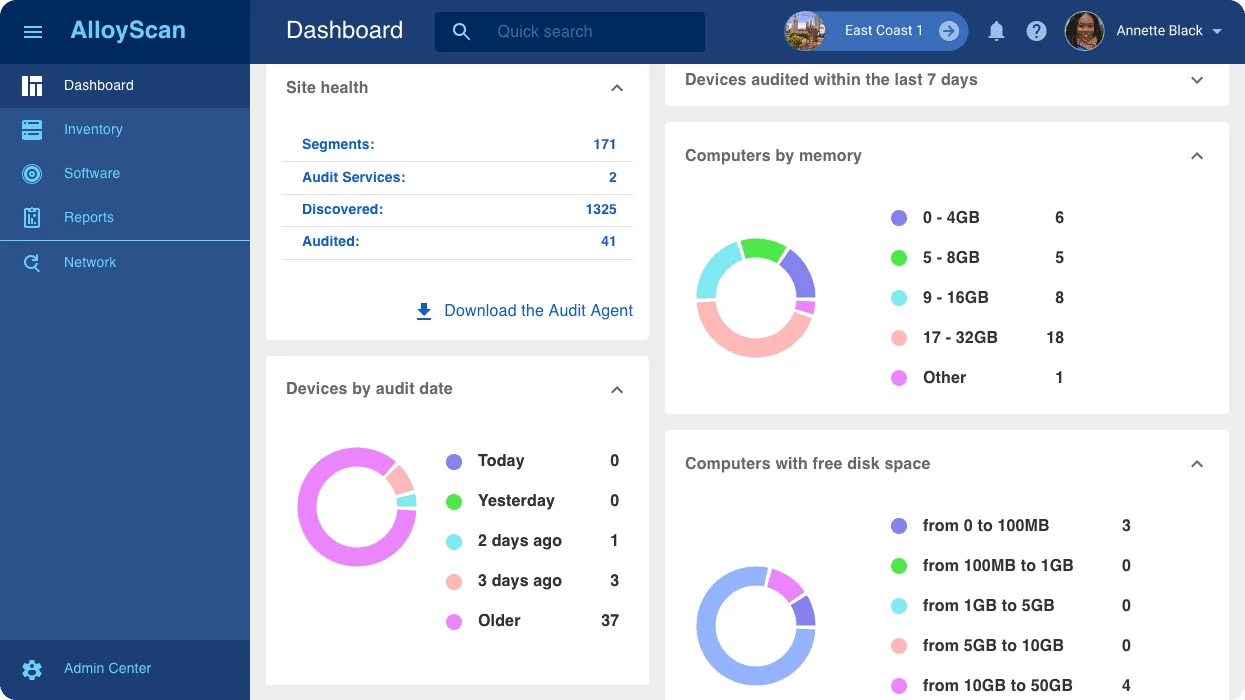
Then there are two more lines. The page's own footnote says cloud hosting "is subject to additional fees that are not included in the base product price", and varies with the compute capacity of the VM and the SQL Server edition you pick. Separately, an audit license is required for every auto-discovered physical or virtual computer. Manually created or imported assets are free, so the meter only starts when discovery does its job.
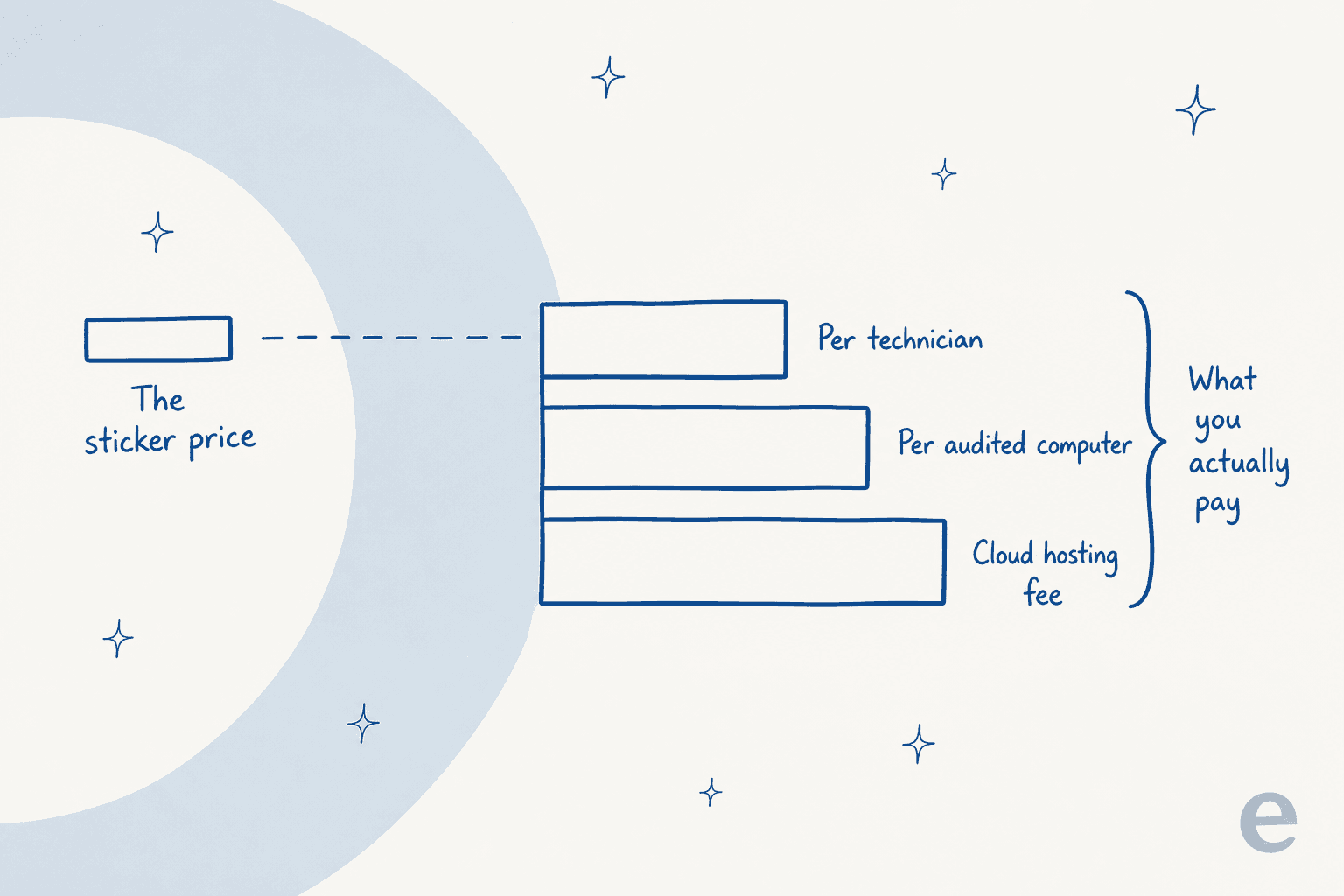
None of this is unique to Alloy. It is close to standard in IT asset management, where ManageEngine meters assets too and SysAid says outright that the cost depends on users and assets. But it does mean the $19 headline is not comparable to a flat per-agent price from another vendor, and Alloy's own FAQ is honest about it: "You pay based on Technician accounts and audited computers. There's a nominal cloud setup set and training is an extra cost."
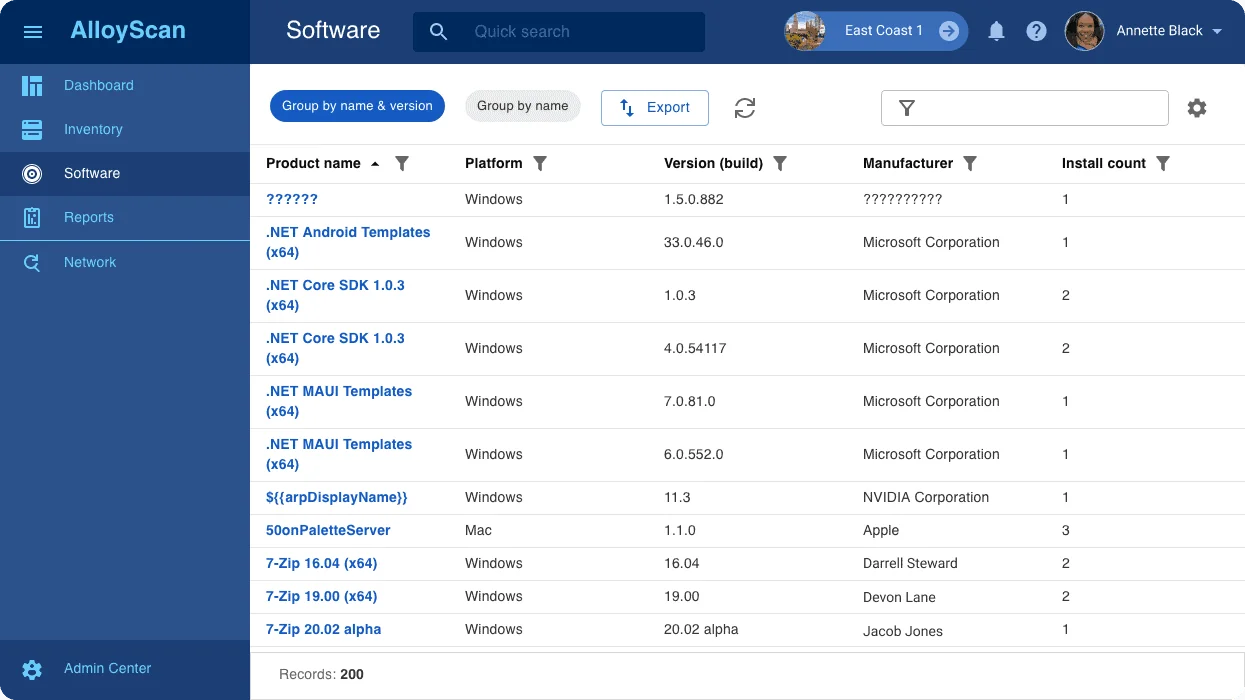
Here is what that looks like in the product. Discovery finds a lot more than you audit, and audited is the billable number:
Reason two: depth has a cost, and it lands on setup
The single most common criticism in Alloy's own review pool is not price or features. G2's tally of the 119 reviews lists Learning Curve (13), Complex Setup (12), Setup Difficulty (11) and Limited Customization (11) as the top cons, and G2's user-reported average implementation time is one month.
"Some of the more advanced features do take time to get comfortable with. There's a lot in the platform, and even after using it for about a year, we're still turning on parts of it that we hadn't used much before."

"The learning curve during the rollout was real, especially for staff who weren't familiar with ITSM tools."
Read those next to the pros and the pattern is not subtle: people who invest the month love it, and people who wanted a desk running by Friday find the ramp steep. If you are a three-person IT team at a growing company, that ramp is the whole decision, and it is why ITSM for SMB is a different shopping exercise from enterprise ITSM.
Reason three, and the real one: what the AI actually touches
Alloy's homepage calls it "the AI-powered ITSM and ITAM solution", and that is fair. AI first landed in Alloy Navigator in 2024, and the Fall 2025 release shipped a self-service portal AI Assistant that answers routine requester questions from internal knowledge, searches only authorized resources, and speaks the user's language. That is a real self-service portal deflection surface and it is live now.
What is not live is the piece most people mean when they say "AI service desk". Alloy's own AI article, updated 21 August 2026, says the AI Assistant for IT teams is "Coming in Fall 2026", and the AI features page marks ITAM-aware AI as Upcoming. The article then lists what is explicitly not available out of the box yet, in its own words: dynamic knowledge creation, automatic multi-language translation by requester, AI ticket assignment, SLA breach prediction, and asset lifecycle analysis. Two of those, assignment and prediction, are the load-bearing parts of most service desk automation projects I see.
There is one more detail from that page worth knowing before you budget for it. Alloy's AI Control workflow element is where retrieval gets wired in, and Alloy says plainly that context depends on the workflow conditions you configure: "If no specific context is provided, AI falls back to general knowledge without access to internal data." Grounding is something you build per step, not a default you inherit. That is a defensible design, and it is also work.
Put all that together and Alloy's shipped AI sits, almost entirely, on the right-hand side of the ticket:
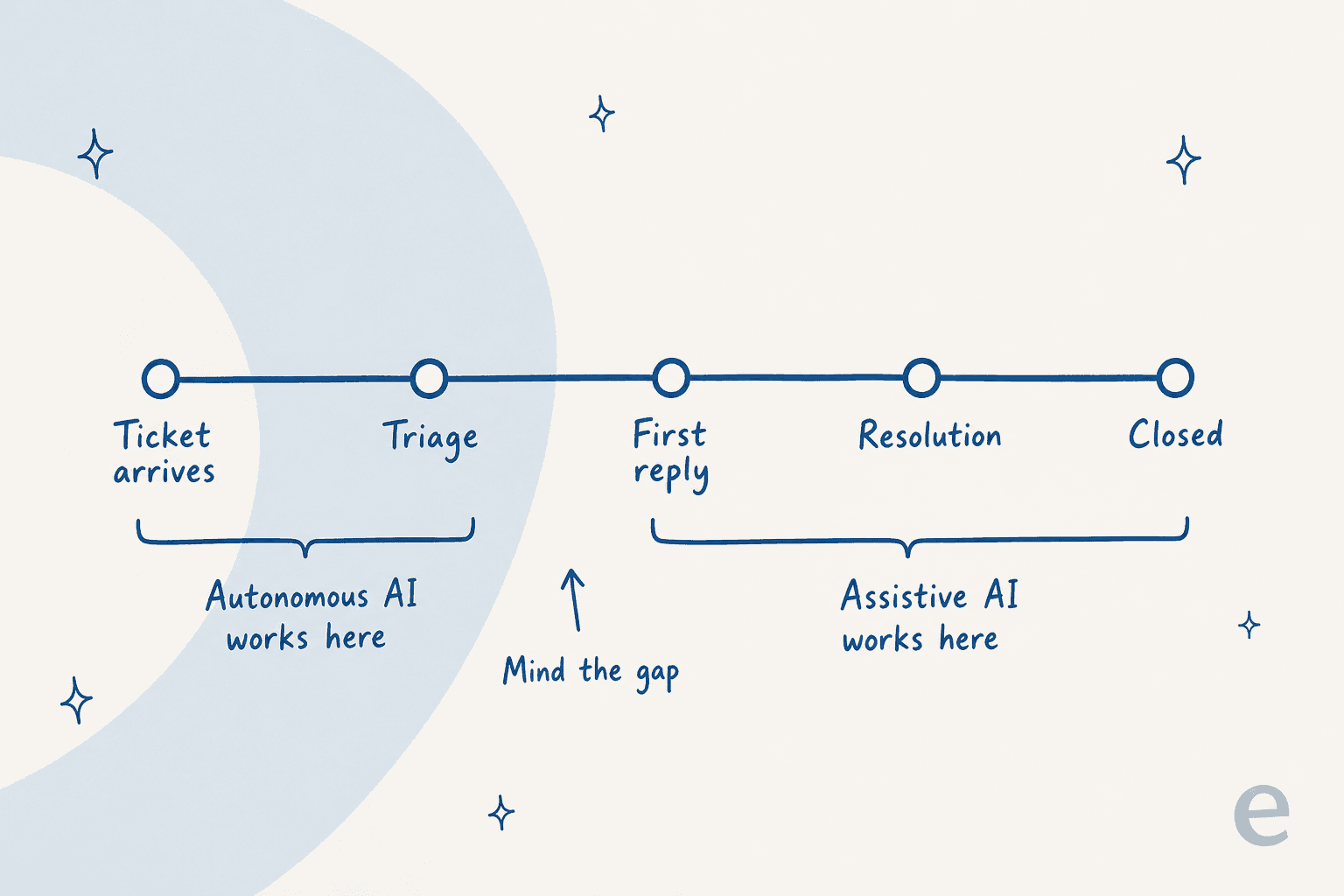
I have watched this exact realisation happen on sales calls for years. One that stuck with me: an ops lead at a direct-to-consumer brand running about 7,000 tickets a month came in asking for a copilot for their agents, walked through the numbers on the call, and left the conversation saying they actually needed something autonomous enough to handle at least half of inbound email. The copilot was not wrong, it was just aimed at the wrong half of the problem. A summarize button makes a ticket 90 seconds cheaper. It does not make the ticket disappear. That distinction is the whole argument in AI agent vs traditional chatbot, and it shows up again in the cost per ticket maths.
The other version I hear, and it lands harder in IT than anywhere else: a French IT services firm running an ERP support desk for public-sector clients at roughly 3,000 tickets a month told us their two most senior engineers were leaving that year, and they wanted their knowledge captured into AI before they walked out the door. Alloy's own writing gets at the same idea, describing its suggest-solution action as "expertise that used to live only in someone's head". That is really an AI knowledge management problem wearing a ticketing hat, and the question is whether the AI needs a human to summon it.
How I picked these eight
I applied four filters, in this order:
- It has to do IT service management, not just customer support. Incident, request, and ideally change and CMDB. A general helpdesk is not a replacement for Alloy Navigator, and the help desk vs service desk distinction matters here more than it does in most categories.
- Asset management has to be real, or the tool has to be honest that it is not. Alloy's ITAM is the sticky part. Anything that quietly drops it is a downgrade, and I say so where that applies.
- The pricing has to be checkable. I only quote numbers a vendor publishes on its own pages. Where a tier is quote-only, I say quote-only rather than guessing.
- The AI claim has to be pinned to a billing unit and a plan. "AI-powered" is not a feature. Which plan, what it does, and what it costs per unit are. I applied the same test in my wider AI for ITSM tools comparison.
One conflict of interest declared up front: eesel is my employer and it is item one. I have put it first because for the specific reader who wants AI without a migration it is the shortest path, and I have been explicit below about the case where it is the wrong answer.
The 8 best Alloy Software alternatives at a glance
| Tool | Best for | Entry price (published) | Seat meter | Second meter | AI billing unit | On-prem published | ITAM included | Free tier or trial | Security published |
|---|---|---|---|---|---|---|---|---|---|
| eesel | Keeping your desk, replacing the first reply | From $299/mo (500 credits) | None | None | Credits, 1 per ticket or chat | No | No, sits on top of yours | 100 free credits, no card | SOC 2 in progress, SOC 2 processors, EU residency, DPAs |
| InvGate | The closest like-for-like swap | $1,499/yr flat (5 agents) | Per agent from Pro | None published | Bundled in Pro seat | Yes, Enterprise only | Yes, via InvGate Asset Management | Free trial | Not published on pricing page |
| Freshservice | Mid-market teams wanting polish | $19/agent/mo | Per agent | Asset Units, packs of 500 | 1,200 Freddy sessions/yr | No | Yes, from Growth | 14-day trial, no free tier | GDPR, SOC 2, custom SSL, all tiers |
| ManageEngine SDP | On-prem buyers who want a free floor | $0 for 5 techs | Per technician | Per IT asset | Not separately published | Yes | Yes, from Professional | Free Standard to 5 techs, 30-day trial | Not published on pricing page |
| SysAid | Agentic AI without a rebuild | $89/agent/mo | Per agent | Managed assets over 250 | Bundled, agent count gated | No, private AWS on Enterprise | Yes, 250 assets on Professional | Free trial, no card | SOC 2 Type II, ISO 27001/27017/27018, GDPR, CCPA |
| Jira Service Management | Teams already living in Atlassian | $0 for 3 agents | Per agent, banded | None | $1/resolution, $0.30/conversation | Data Center offered separately | Assets on Premium and up | Free forever, 3 agents | Not captured this pass |
| Atera | Small IT teams sick of device meters | $149/tech/mo | Per technician | None, unlimited endpoints | Copilot bundled | No | Yes, RMM-led | Free trial | Not captured this pass |
| ServiceNow ITSM | Enterprises buying a platform | Quote only | Per user, quote | Assist consumption | Per assist, public rate card | Cloud | Yes, CMDB core | Demo only | Enterprise programme, quote-gated |
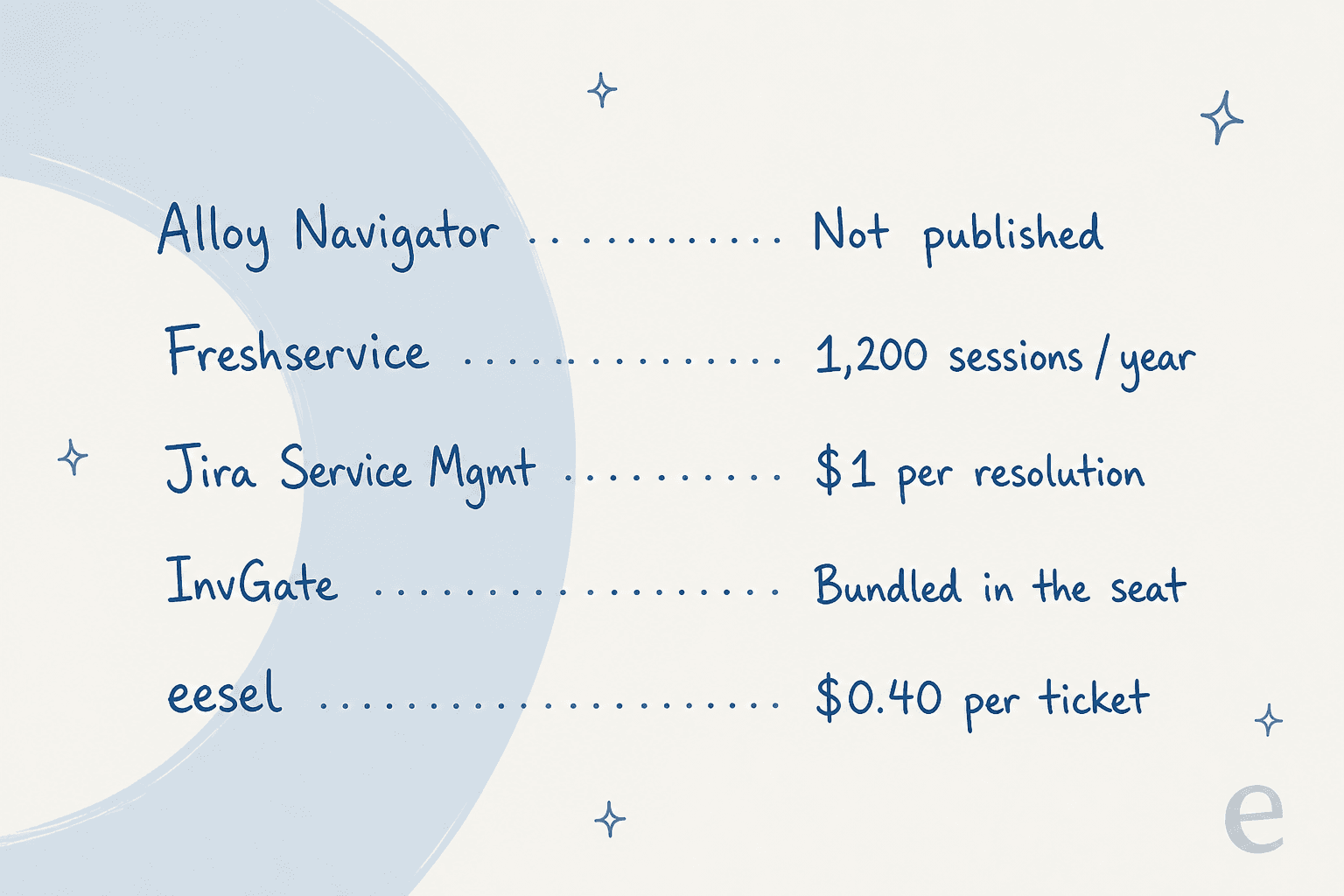
Two notes on reading that table. First, the meters matter more than the rates. A $19 seat with a per-device meter can land above a $149 seat with unlimited endpoints once you have a few hundred machines. Second, the AI column is not comparable across rows, which is the point of the next diagram.
Which one fits your situation
Two questions decide most of this. Pick an answer to each and the shortlist collapses.
1. Where does it have to run?
2. What do you want the AI to do?
ManageEngine ServiceDesk Plus, or stay put
On-prem plus assistive AI is the one combination where Alloy is already competitive, and switching buys you little. ManageEngine is the credible move if you want a free floor for five technicians and a bigger module catalogue. Budget for the per-module on-prem add-ons: change and release alone is $3,195 a year.
InvGate Enterprise
On-prem plus a real conversational agent is the narrowest slot on this list. InvGate is the only tool here that publishes both, and its Virtual Service Agent comes with the Pro feature set. On-premise hosting sits on Enterprise, which starts at $12,000 a year, so price it early.
Freshservice or SysAid
Cloud plus agent-side assistance is the most crowded slot, so pick on packaging. Freshservice puts Copilot at $29 per agent per month on top of a $99 Pro seat. SysAid folds agent Copilot into a $89 seat but includes only 250 managed assets. Freshservice wins on polish, SysAid on bundled scope.
eesel on top of the desk you already run
If you want tickets resolved before a technician opens them, buying a new desk is the long way round. Put an AI agent in front of your existing queue, simulate it on your ticket history, and keep your CMDB exactly where it is. From $299 a month for 500 credits, no seats. If your desk is Jira Service Management, this is a same-week change.
1. eesel
Best for: teams who want tickets resolved before a technician opens them, without migrating the desk.
What it does well
eesel is not a service desk. It is an AI helpdesk agent that joins the desk you already run and works the queue as a teammate would: reads the request, drafts and sends replies, adds internal notes, updates fields, sets priority and SLA, and routes to a team. On Jira Service Management it publishes 85%+ tier-1 request resolution out of the box in a week and under 30 minutes to connect.
Two things make this a different shape of purchase from everything else on the list. First, it trains on your past tickets, not just your internal knowledge base, which is exactly the tribal-knowledge problem that keeps coming up in IT. Second, before it touches anything live it will replay your ticket history and show you per-theme coverage plus the gaps, so you find out what it does not know from a report rather than from a requester.
The named results are on eesel's own pages: Gridwise reports 73% of tier-1 requests resolved in the first month, and Design.com runs over 50,000 requests a month through Jira Service Management. On the internal-IT side, InDebted's Head of IT, Jason Loyola, puts it plainly:
"We use it to be the first responder to our Helpdesk tickets in Jira. It essentially acts just like an agent would."
Jason Loyola, Head of IT, InDebted, via the eesel homepage
Where it stops
I should be straight about this: there is no eesel integration for Alloy Navigator. If you intend to stay on Alloy, eesel is not your answer today. It also does not do IT asset management, discovery or CMDB at all, so it is a layer, never a replacement for the ITAM half of what Alloy sells you. And SOC 2 is listed as in progress rather than certified, with HIPAA available as an add-on (talk to us).
Pricing
| Line | Price | Unit |
|---|---|---|
| Free plan | 100 credits | No card required |
| 500 credits | $299/month | 1 credit per ticket or chat, not per reply |
| 1,000 credits | $499/month | Fixed monthly price |
| 2,500 credits | $999/month | Fixed monthly price |
| 5,000 credits | $1,899/month | Above 5,000, talk to us |
| Blog post draft | $4 each | Separate from support credits |
| Pay a year upfront | Two months free | Annual billing |
| SSO and MFA | From $199/month | Add-on |
Only tickets the agent actually works on count, so spam and auto-replies do not use credits. You choose which tickets to route to it, so a partial rollout fits a smaller plan.
My take: pick eesel when the desk is fine and the queue is the problem. If you are on Jira Service Management, Freshservice, Zendesk or Slack, this is the cheapest way to get from assistive AI to an automated ticket resolution path without a migration project. Skip it if you need one vendor to own ITSM and ITAM together.
2. InvGate Service Management
Best for: the closest like-for-like Alloy swap, especially if on-prem is non-negotiable.
What it does well
InvGate is the tool on this list that most resembles what Alloy is trying to be: ITSM and ITAM from one vendor, ITIL-aligned, with a no-code workflow builder and an asset management product that is included across all three tiers. Its pricing page is unusually complete for this category, listing every ITIL practice against every tier rather than making you request a matrix.
On AI it is further along than Alloy. InvGate ships a Virtual Service Agent for human-like conversations across channels on the Pro tier, plus Knowledge Discovery, which turns closed tickets into governed knowledge snippets that feed AI responses "without writing a single article". That is the tribal-knowledge capture problem, solved at the product level rather than promised for a future release, and it is the mechanism behind most credible AI ticket deflection claims. It also lists 20+ AI capabilities on every tier including the entry one.
Customer logos on the pricing page include PwC, NASA, Motorola and Allianz, and the page carries a Gartner Peer Insights Customers' Choice 2025 badge.
Where it stops
The entry tier is thinner than the price suggests. Starter has no workflow builder, no Virtual Service Agent, no API, no Microsoft Teams and no custom domain. Those all arrive at Pro. On-premise hosting, concurrent seats and multiple SAML providers are Enterprise-only, and the data warehouse and BI connector is a paid add-on even there. If you are leaving Alloy specifically to keep on-prem, you are shopping the Enterprise tier from day one.
Pricing
| Plan | Price | Agents | Notable inclusions |
|---|---|---|---|
| Starter | $1,499/year flat | 5 | AI Hub, SSO, ITAM integration, Knowledge Discovery |
| Pro | $500/agent/year, from $2,500/year | 5 to 50 | Workflow builder, Virtual Service Agent, Teams, WhatsApp, API, change and release management |
| Enterprise | Custom, from $12,000/year | Any | On-premise, concurrent seats, multiple SAML, Analytics OLAP API |
Pro works out to about $41.67 per agent per month, which undercuts Alloy Navigator Enterprise at $89 while including a conversational agent Alloy has not shipped for technicians yet.
My take: the strongest straight swap here, and the one I would trial first if I were leaving Alloy for another suite. The catch is the tier ladder, not the price. Price the Pro tier, assume you need it, and treat Starter as an evaluation sandbox rather than a plan.
3. Freshservice
Best for: mid-market IT teams who want the most polished cloud desk and will pay for it.
What it does well
Freshservice is the easiest tool here to get running, which is the exact axis Alloy loses on. Freshworks claims 74,000+ businesses, and the pricing page publishes GDPR, SOC 2 and custom SSL on all four tiers, with data centre location choice and 24/7 email support even at $19. ITAM arrives from Growth with 100 Asset Units bundled, and the service catalog and SLA management land there too.
It is also the best-documented product on this list, which matters when you are the one wiring it up. The Freshservice API is properly specified and rate-limited per tier, from 100 calls a minute on Starter up to 500 on Enterprise.
Where it stops
AI packaging is where Freshservice gets expensive, and the wording is worth reading twice. Freddy AI Agent (Classic) is gated to Enterprise, which is quote-only. Its allowance is 1,200 sessions per year per license, and Freshworks defines a session as any interaction a unique user has with an AI agent inside a 24-hour window. No per-session overage rate is published anywhere on the pricing page or the linked support article, so you cannot model what going over costs.
Separately, Freddy AI Copilot is a $29 per agent per month add-on on Pro and Enterprise. On a Pro seat that is $128 per agent per month before assets. Orchestration transactions are a third meter: 5,000 a month on Pro, then $250 per additional pack of 1,000, expiring at the end of the cycle.
Pricing
| Plan | Price (annual) | Key gate |
|---|---|---|
| Starter | $19/agent/mo | No service catalog, no SLA management |
| Growth | $49/agent/mo | Adds catalog, SLA, on-call, MSP mode, ITAM |
| Pro | $99/agent/mo | Adds problem, change, release, Analytics Pro |
| Enterprise | Custom | Only tier with Freddy AI Agent (Classic) |
| Freddy AI Copilot | +$29/agent/mo | Add-on, Pro and Enterprise only |
There is a 14-day trial and no free-forever tier. If you want the full picture, I broke the tiers down in more detail in my Freshservice pricing writeup, and covered the AI gating in Freshservice AI limitations.
My take: the right answer if speed of rollout is the thing Alloy cost you and budget is not tight. It is the wrong answer if you came for the AI, because the conversational agent sits behind a quote-only tier with an unpublished overage rate. Worth reading alongside my Freshservice alternatives list before committing.
4. ManageEngine ServiceDesk Plus
Best for: on-premises buyers who want a real free starting point.
What it does well
ManageEngine is the closest structural match to Alloy's commercial model: technicians plus IT assets as two meters, cloud or on-premises as a real choice at purchase, and a module catalogue deep enough to cover incident, problem, change, release, CMDB, project management, purchase and software license management. It was named a Challenger in the 2026 Gartner Magic Quadrant for IT Service Management Platforms.
The free tier is the headline. The Standard edition is $0 for up to five technicians, permanently, not as a trial. For a small internal IT team running a basic help desk, that is a real zero, and it beats every free tier in my best AI for IT helpdesk roundup on price alone. Enterprise service management lets you run up to 15 separate service desk instances, though only one of them can use the free technician allotment.
Where it stops
The on-premises add-on list is where the bill grows, and it prices per module rather than per seat. From the pricing page: CMDB $1,595 a year, service catalog $1,595, project management $1,595, problem management $1,595, and change and release management $3,195 a year. Live chat is $65 per technician per year and remote control is $315 per concurrent session per year. Those add up fast if you assemble the tier yourself instead of buying Enterprise outright.
There is no separately published AI billing unit, which puts it in the same position as Alloy: you can read what the AI does, but not what exceeding it costs.
Pricing
Cloud, from the published rate card:
| Team size | Standard | Professional | Enterprise |
|---|---|---|---|
| 2 techs, 250 assets | $0 | $645/yr | $1,595/yr |
| 5 techs, 500 assets | $0 | $1,545/yr | $3,895/yr |
| 10 techs, 500 assets | $1,545/yr | $2,945/yr | $7,795/yr |
| 20 techs, 500 assets | $3,145/yr | $5,945/yr | $14,095/yr |
| 50 techs, 1,000 assets | $6,245/yr | $13,945/yr | $27,995/yr |
Per-technician entry rates are $13, $27 and $67 a month. Technical support is included at 24x5 with no extra charge, and each instance gets a 30-day trial.
My take: the best value on this list if you need on-prem and can live with assistive AI. At 10 technicians and 500 assets, Professional runs $2,945 a year against $5,880 for Alloy Express before audit licenses, with a bigger module catalogue behind it. Buy the packaged Enterprise edition rather than bolting modules onto Standard, or the add-on maths turns against you.
5. SysAid
Best for: teams who want agentic AI folded into the seat price rather than sold as an add-on.
What it does well
SysAid has rebuilt itself around what it calls agentic AI, and unlike most vendors it did not carve the result into a separate SKU. SysAid Copilot covers both sides of the desk: on the agent side, validated issue resolution drawn from past tickets and prior resolutions, ticket summarization, intelligent categorization, SLA-risk escalation, reply drafting and in-chat asset lookup. On the requester side, a conversational chatbot in the portal and in Microsoft Teams, one-click ticket creation, image analysis so a user can upload a screenshot of an error, and an AI Emailbot that turns a plain email into a ticket and can answer it directly.
Two of those, SLA-risk escalation and automatic categorization, are on Alloy's own "not yet available out of the box" list. If AI ticket classification is the feature driving your search, SysAid ships it today. It also publishes a strong compliance sheet: SOC 2 Type II, ISO 27001, 27017 and 27018, GDPR, CCPA, MFA and SSO, and multi-region data residency, with 36 languages and 30 verified integrations. Named customers include Xerox, University of Michigan, Honda and Motorola Solutions.
Where it stops
The buy path is quote-gated even at the published price. The pricing page lists Professional at $89 per agent per month but the button says "Get a quote", not "Buy", and SysAid's FAQ describes a consultant-led evaluation. Enterprise carries no public figure and starts at 20 agents.
Coming from Alloy, the asset meter is the thing to watch. Professional includes 250 managed assets, and beyond that they are a paid add-on. If Alloy's discovery is finding four figures of devices for you, that allowance will not stretch. Tailor-made AI agents are Enterprise-only (three of them), sandbox is a paid add-on on Professional, storage retention is two years rather than seven, and there is no on-premises option published, only a private AWS instance on Enterprise.
Pricing
| Plan | Price | Assets | Notable gates |
|---|---|---|---|
| Professional | $89/agent/mo | 250 included | No tailor-made AI agents, sandbox is an add-on, 2-year retention, 3-hour P1 |
| Enterprise | Custom, from 20 agents | Custom | 3 tailor-made AI agents, sandbox included, 7-year retention, 1-hour P1, private AWS |
Support hours are 24/6 on both tiers. The free trial needs no credit card.
My take: the best fit if you want an AI service desk that behaves agentically without buying a separate AI product, and if your device count is modest. At $89 per agent it is priced identically to Alloy Navigator Enterprise, so the comparison is clean: same seat cost, more shipped AI, less asset headroom, no on-prem.
6. Jira Service Management
Best for: organisations already standardised on Atlassian.
What it does well
If your engineering org lives in Jira and Confluence, JSM removes a whole class of handoff friction, and the free tier is real: $0 forever for three agents, with customers unlimited and unlicensed on every plan. Volume pricing is properly progressive rather than a single list rate, so large teams pay meaningfully less per seat: $18.75 a month per agent on Standard in the 16 to 100 band, dropping to $12.55 from 101 agents. Assets, Atlassian's CMDB, bundles into Premium and Enterprise.
Where it stops
The AI is priced across three separate meters, and the definitions matter more than the rates do. The virtual service agent requires Premium, includes 1,000 assisted conversations a month, and charges from $0.30 per assisted conversation beyond that. Atlassian's own definition of that unit is broader than a resolution: a conversation counts if it was matched to an intent "regardless of whether the virtual service agent resolves the issue or escalates it", and an abandoned conversation counts as AI-resolved. Separately, Rovo Customer Service bills $1 per resolution from Standard up, with no included allowance stated. Rovo search and agents run on a third credit-based meter.
The other cost is conceptual. JSM is a project-tracking platform wearing a service desk hat, and teams coming from a purpose-built ITAM suite like Alloy usually find the asset side thinner than they expected. My Jira Service Management AI writeup goes through what the virtual agent handles well and where it hands back.
Pricing
| Plan | Rate | Notes |
|---|---|---|
| Free | $0 | 3 agents, unlimited customers |
| Standard | $25/agent/mo at 1-15, $18.75 at 16-100 | Rovo Customer Service at $1/resolution |
| Premium | $57.30/agent/mo at 1-15, $49.95 at 16-100 | Adds virtual service agent and Assets |
| Enterprise | Quote only, annual billing |
I went deeper on the meters in my Jira Service Management pricing breakdown, and on the AI specifically in my JSM review.
My take: the obvious pick if Atlassian is already your platform of record, and a strange one if it is not. It is also the alternative where the layered approach works best, since eesel plugs directly into JSM and covers tier-1 without you having to reach Premium for the virtual agent.
7. Atera
Best for: small IT teams who are tired of paying per device.
What it does well
Atera does the one thing that goes straight at Alloy's second meter. It charges per technician, with unlimited endpoints. If discovery is finding you 1,300 devices and 41 of them are the ones you actually pay for today, Atera's model removes that arithmetic entirely. It bundles RMM, patching, remote access and ticketing in one console, and as of the 2026 pricing change AI Copilot is included in every Essential Suite plan rather than sold separately.
Where it stops
The per-technician rate is the highest on this list by a wide margin, and Atera is honest that it went up in 2026 without publishing an old-versus-new comparison anywhere on its own properties. Its FAQ says only "We've made every effort to keep this increase to a minimum," and routes account-specific numbers to live chat.
The bigger gap for an Alloy refugee is scope. Atera is RMM-first, so ITIL process depth is not the point: if you are using Alloy for change management, a CMDB and a service catalog, Atera is a step sideways rather than forward. It is a poor fit against most ITSM best practices checklists, and there is no on-premises option.
Pricing
| IT department plan | Annual | Monthly |
|---|---|---|
| Professional | $149/tech/mo | $169/tech/mo |
| Expert | $189/tech/mo | $229/tech/mo |
| Master | $219/tech/mo | $269/tech/mo |
| Enterprise | Contact sales | Contact sales |
MSPs get a parallel ladder: Pro $129, Growth $159, Power $209 annually. My full Atera pricing breakdown has the per-plan detail.
My take: worth the premium only if endpoints, not tickets, are your cost problem. At five technicians, Professional runs $8,940 a year against roughly $2,940 for Alloy Express before audit licenses, so the device meter has to be really painful for the swap to pay. It very often is.
8. ServiceNow ITSM
Best for: enterprises who have decided to buy a platform rather than a tool.
What it does well
ServiceNow is the ceiling of this category, and everybody already knows it. Its three current packages are framed as an autonomy ladder rather than a feature ladder: Foundation for task-based always-on support, Advanced for agentic workflows working alongside your team, and Prime for AI Specialists that independently manage IT workflows. Prime includes an L1 Service Desk AI Specialist, which is the closest thing on this list to "the AI owns tier one". Its virtual agent has been in market long enough to have real deployment patterns behind it.
One good development: ServiceNow now publishes a public assist rate card, a legal PDF effective 23 July 2026 that lists the assist cost of every skill, action by action. That is more transparency on AI consumption than most vendors here offer, Alloy included.
Where it stops
No dollar figure appears anywhere on any ServiceNow ITSM page. Every tier is "Get Custom Quote", there is no free trial, and the legacy Standard through Enterprise Plus SKUs went end of sale on 1 July 2026, so Foundation, Advanced and Prime is all a new buyer sees. Implementation is a project with a partner, not a signup. If Alloy's one-month ramp felt long, this is a different order of magnitude.
There is also a tell in the June 2026 release: ServiceNow shipped AI guardrail properties including kill switches, trigger throttling and assist-spike alerts. Those exist because agentic assist consumption is hard to predict, which is worth knowing before you sign a consumption-based contract.
Pricing
Quote-only across all three tiers. The only quantitative values in the comparison matrix are two capacity limits, and neither is money. My ServiceNow pricing writeup covers what can actually be pinned down.
My take: the right answer for a handful of readers and the wrong answer for most people leaving Alloy Software. If you are a five-person IT team who found Alloy hard to configure, ServiceNow will not fix that. If you are a 5,000-person enterprise that outgrew Alloy's ceiling, it is the destination and you already suspected it.
What this actually costs at 10 technicians
Feature grids hide money. So here is one team, priced across the whole shortlist. Assumptions: 10 technicians, 500 managed devices, cloud where available, annual billing, roughly 800 tickets a month. Every figure comes from the vendor's own published rate card, and where a vendor does not publish one I say so rather than guess.
| Tool | Seats per year | Device or asset meter | AI cost | Published annual total |
|---|---|---|---|---|
| Alloy Navigator Express | $5,880 | Audit licenses, per discovered computer | Not published | $5,880 plus audit plus hosting |
| ManageEngine Professional | $2,945 (includes 500 assets) | Bundled at this size | Not separately published | $2,945 |
| InvGate Pro | $5,000 | Bundled | Virtual Service Agent bundled | $5,000 |
| Freshservice Pro | $11,880 | Asset Units in packs of 500 | Copilot +$3,480 | $15,360 plus asset packs |
| SysAid Professional | $10,680 | 250 assets included, 250 more as add-on | Bundled | $10,680 plus asset add-on |
| JSM Premium | $6,876 | Assets bundled | $0.30/conversation over 1,000/mo | $6,876 plus AI overage |
| Atera Professional | $17,880 | None, unlimited endpoints | Copilot bundled | $17,880 |
| eesel on your existing desk | $0 | None | $3,840 at 800 tickets/mo | $3,840 on top of your current desk |
Three things fall straight out of that table.
First, ManageEngine and InvGate both come in under Alloy once you add Alloy's audit licenses and hosting, which is not the result most people expect from a "cheap incumbent" story. Second, Freshservice is the most expensive way to get a conversational agent here, because the agent itself is quote-only on Enterprise while Copilot is a per-seat add-on on Pro. Third, the layered option is the only row where the number does not scale with headcount, which matters if you are hiring technicians faster than you are deflecting tickets.
The caveat on that last row is the honest one: it is additive. You are still paying for whatever desk you are on. It only wins if your desk is fine and your queue is not, which is the same test I apply to AI on IT tickets and in my automated IT ticketing guide.
Try eesel for your IT queue
If you got this far and your conclusion was "the desk is fine, I just want fewer tickets reaching a human", that is the case eesel was built for. It joins your existing service desk as an agent, learns from the requests and articles you already have rather than a knowledge base you have to write first, and answers tier-1 before a technician opens the ticket. That is a different job from employee support AI that only surfaces articles, and a different job again from triage that only routes.
The part that matters most for an IT team with change control is the dry run. eesel will replay your historical requests and show you, per theme, what it would have answered and where the gaps are, so you decide from evidence rather than from a vendor's deflection claim. On Jira Service Management that setup takes under 30 minutes, and teams see 85%+ tier-1 resolution out of the box in a week.
Pricing is a fixed monthly plan from $299 for 500 credits (1 credit per ticket or chat), with no seats and no platform fee, and you start with 100 free credits and no card. If you only route 200 of your 800 monthly tickets to it, the 500-credit plan covers that with room to spare. Try eesel, or book a demo if you would rather see it run against your own ticket history first.
One caveat I would rather you hear from me: if you are staying on Alloy Navigator, there is no eesel integration for it today. In that case the honest advice is to wait for Alloy's Fall 2026 AI Assistant, or move the desk first and layer second.
Frequently Asked Questions
What are the best Alloy Software alternatives in 2026?
How much does Alloy Software cost?
Does Alloy Software have AI, and is it worth waiting for?
Which Alloy Software alternatives still run on-premises?
Can I keep my IT asset management and only replace the AI?


Article by
Rama Adi
Rama is a software engineer at eesel AI with two years of experience writing about B2B SaaS, AI tools, and customer support technology. Based in Bali, Indonesia, he brings a developer's perspective to product comparisons — cutting through marketing copy to what the integrations and APIs actually do.