Atera pricing 2026: every plan, add-on, and the AI meter

Rama Adi

Katelin Teen
Last edited August 18, 2026

The short answer on Atera pricing
I build integrations at eesel, so a good part of my week goes on other people's rate cards, working out what the meter is really counting. Atera's is one of the more interesting ones. The model it advertises and the model it bills are not quite the same shape.
Three years of watching AI agents go live on real support queues is also the lens I read the Robin section through. One eesel customer, Jason Loyola, Head of IT at InDebted, put his use case plainly: "We use it to be the first responder to our Helpdesk tickets in Jira. It essentially acts just like an agent would." His team sits at 15% deflection today, heading for a 55% target. They got there by measuring first and switching on second. Hold that thought. It is the exact thing Atera's AI packaging does not let you do.
The thing that trips up most people pricing Atera comes first. There are two cards, not one.
MSP pricing lives on one page. The IT department card is a separate page entirely, with its own plan names and its own numbers. And the plain /pricing/ URL resolves to the IT department card, which is why Googling "Atera pricing" shows you the more expensive of the two. Tier for tier the internal-IT card sits above the MSP one. $20 more at entry ($149 against $129). $30 more in the middle ($189 against $159). At the top self-serve tier the gap narrows to $10 ($219 against $209).
Both cards are per technician, and on what that buys Atera is unambiguous. The model is technician-based, so adding devices does not move the cost. Unlimited endpoints on every tier, with no asterisk on that specific claim.
The MSP rate card
Four tiers. Three of them have a published price.
| Plan | Annual (per tech/mo) | Monthly (per tech/mo) | You move up here for |
|---|---|---|---|
| Pro | $129 | $139 | Windows-only agents, 2 Splashtop sessions, file view only |
| Growth | $159 | $189 | Mac and Linux, unlimited Splashtop, 15GB file transfer |
| Power | $209 | $249 | 10 custom reports, 50GB transfer, data recovery |
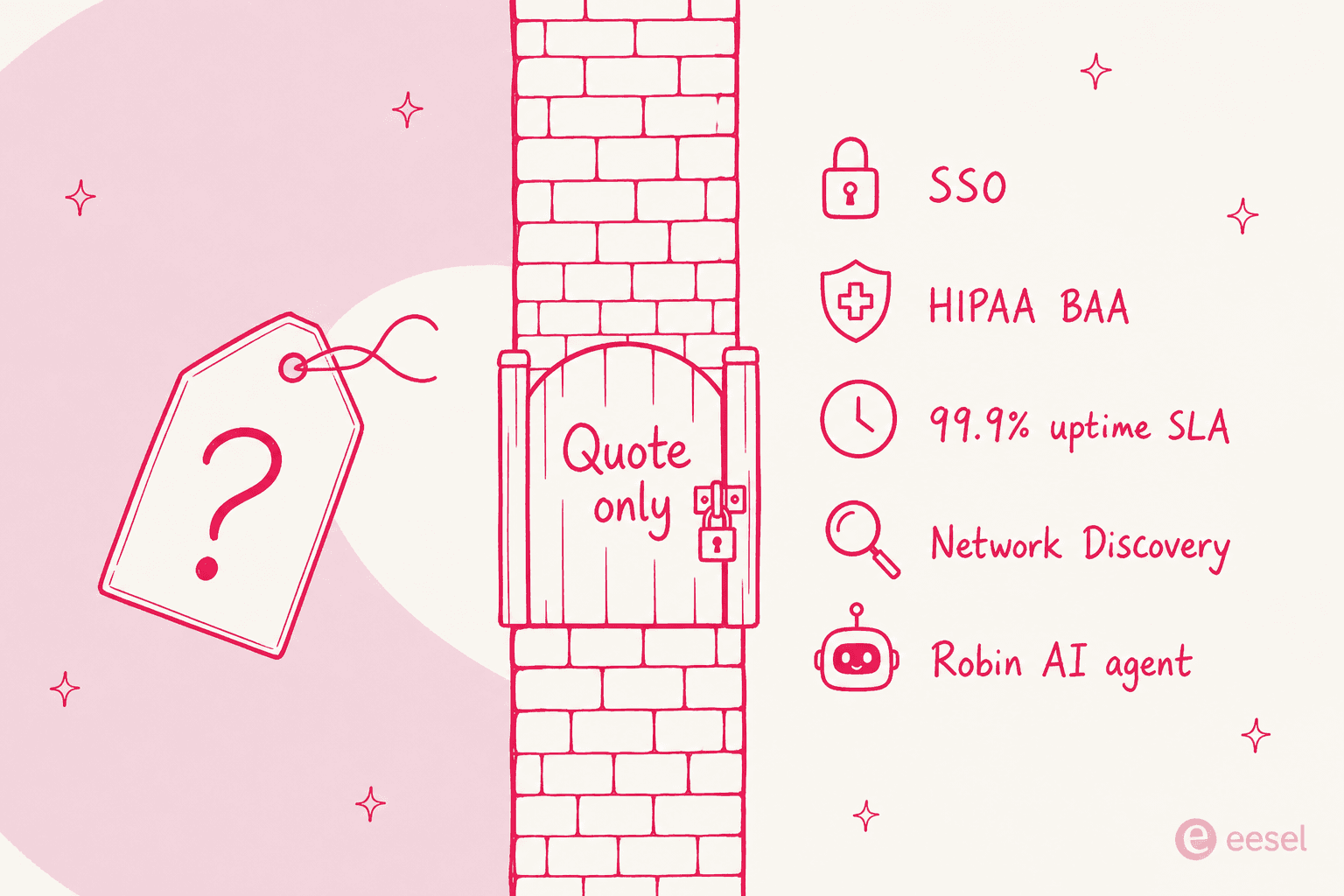
| Superpower | Quote only | Quote only | SSO, HIPAA BAA, 99.9% SLA, Network Discovery bundled |
Two lines in that table deserve more than a row. MSP Pro is Windows-only, so Mac and Linux agents start at Growth. Pro also gives you file view and not file transfer, which starts at Growth as well, capped at 15GB a month. One Mac in the fleet, and the real entry price is $159 rather than the $129 on the badge.
Audit log retention ladders up: 1 month on Pro, 6 months on Growth, 12 on Power, then 7 years on Superpower. A compliance requirement expressed in years puts you in a sales conversation, full stop. The 99.9% uptime SLA sits up there too, which matters if you owe your own clients one, and our guide to SLA management covers how those cascade.
Every tier includes ticketing and the service portal. That is part of why Atera gets recommended as a combined RMM and PSA instead of a pure monitoring tool. If the ticketing half is the part you are really shopping for, price it against a dedicated MSP ticketing system before you call the bundle a saving.
The IT department rate card
Same platform. Different labels, and a higher entry price.
| Plan | Annual (per tech/mo) | Monthly (per tech/mo) | You move up here for |
|---|---|---|---|
| Professional | $149 | $169 | Windows, Mac and Linux included, 15GB transfer |
| Expert | $189 | $229 | Unlimited Splashtop, AnyDesk, ticket auto-tagging |
| Master | $219 | $269 | 10 custom analytics reports, 80GB transfer |
| Enterprise | Quote only | Quote only | SSO, HIPAA BAA, 99.9% SLA, 7-year audit logs |
There is one place the internal-IT card is better value. Windows, Mac and Linux agents all land on Professional, where the MSP card gates them behind Growth. File transfer starts at Professional too, instead of arriving view-only.
Worth flagging that the file transfer ladders differ between the two cards. It is the kind of detail nobody reads until the month it matters a lot. MSP runs view-only, then 15GB, 50GB, 100GB. IT department runs 15GB, 50GB, 80GB, 100GB.
Cross-shopping this against a conventional service desk? Our breakdown of Freshservice pricing uses the same structure. So does the ServiceNow pricing one, at the other end of the market entirely.
Smaller teams should start from ITSM for SMB instead. And if the per-technician model appeals while the RMM does not, take a look at Jitbit helpdesk pricing.
Work out your actual number
Plan rates are the easy part. What I actually want to know is what fraction of the bill is the seat, and what fraction is everything bolted onto it. So here is a calculator with the real published rates loaded in.
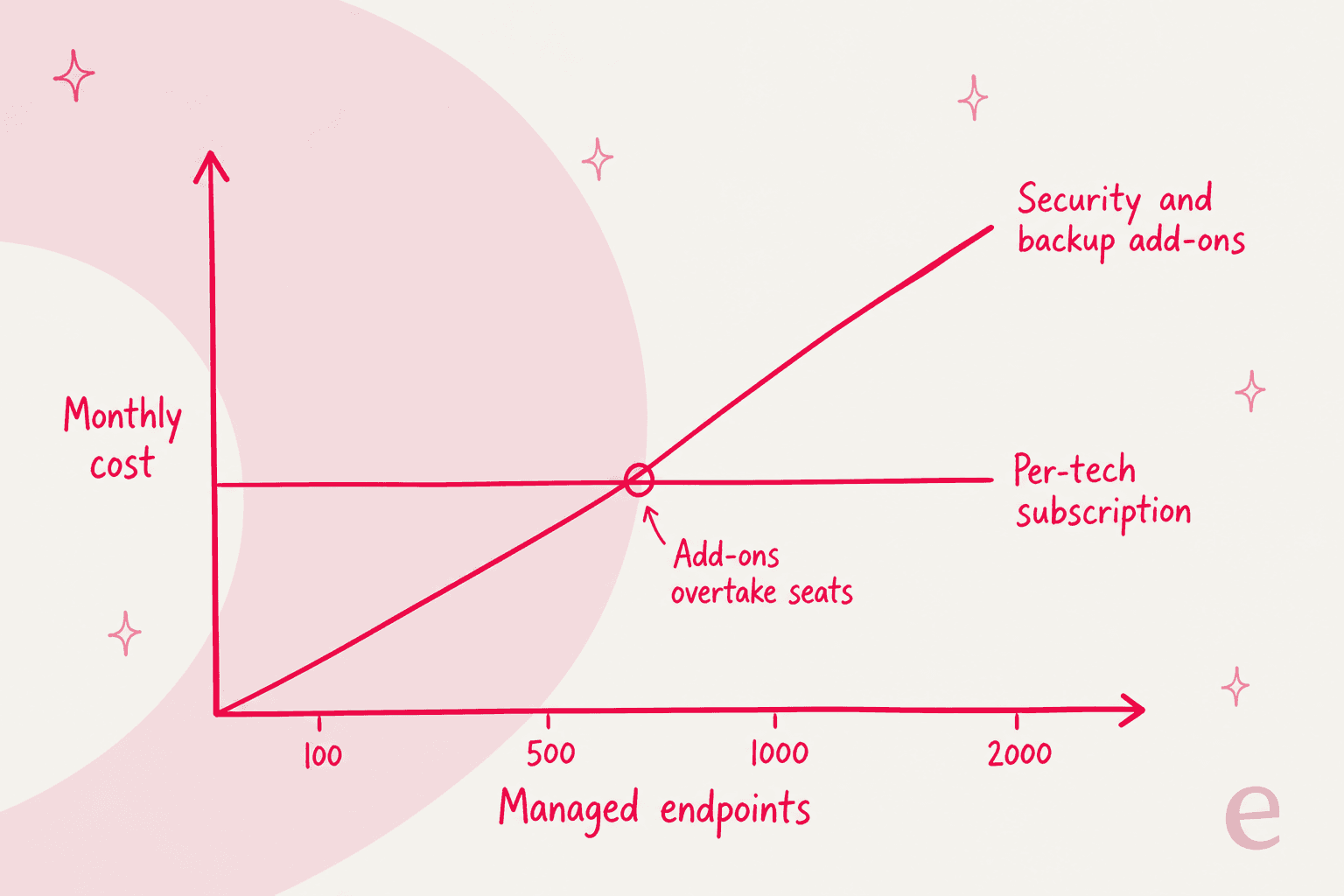
Push the endpoint slider around for a minute and the shape of the thing gets obvious. Three technicians, 250 endpoints, Bitdefender attached, and the seat is still the bigger number. Take it to 2,000 endpoints and it is not close.
Three meters, one invoice
As someone who builds billing integrations, this is the part I find most interesting. Atera's marketing has one denominator. The invoice has three.
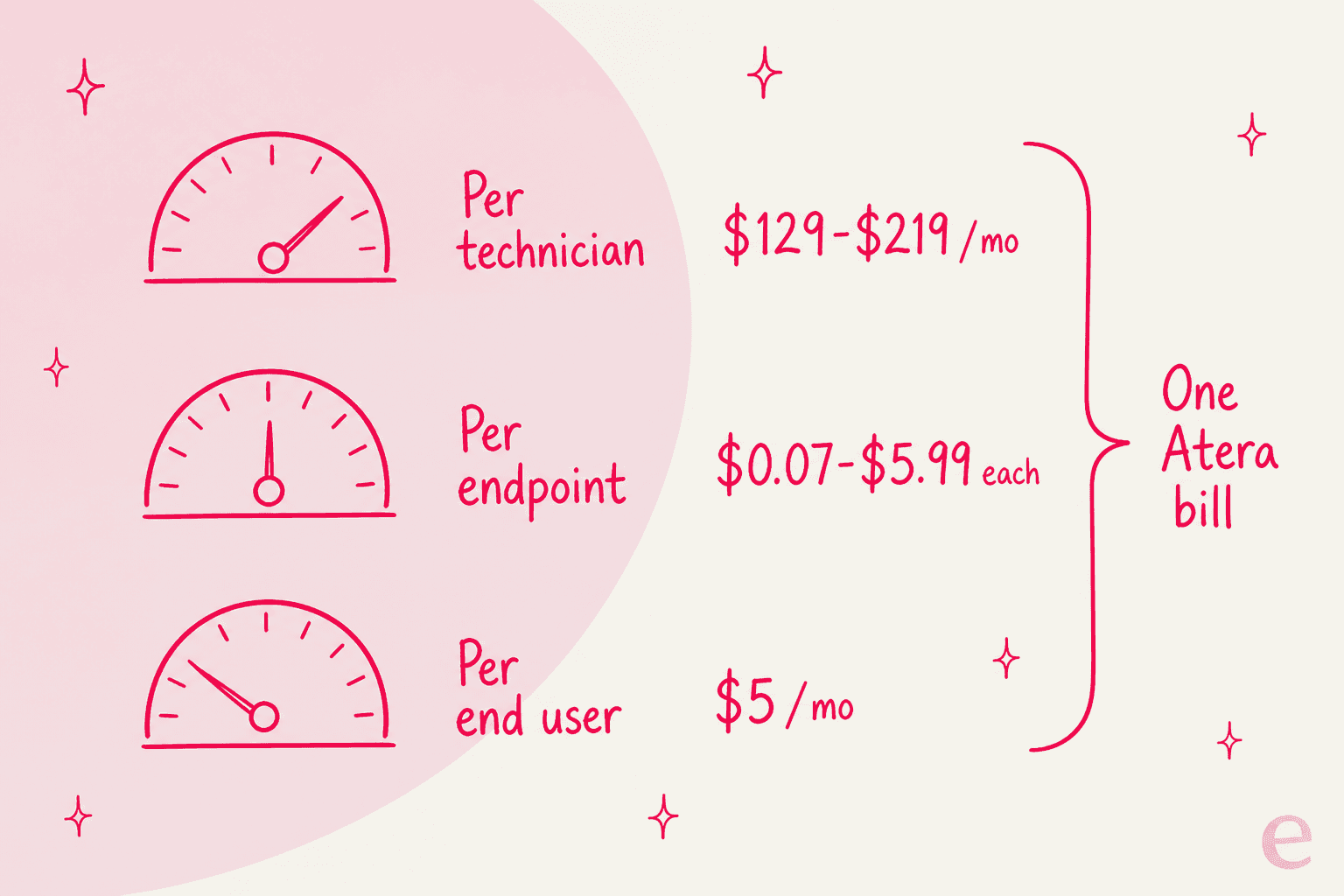
The seat itself is per technician. Network Discovery, at $29 per month per technician, tracks that same seat. Work from Home is $5 per end user per month, which tracks your company headcount instead. Then the whole App Center security and backup layer gets billed per endpoint or per device.
The middle one is the easy one to miss. Take a 500-person company: $5 per end user puts Work from Home alone at $2,500 a month, more than most teams spend on technician seats. For what it does, the price is reasonable. It is still a headcount meter sitting on a product sold as headcount-independent, and it belongs in the same mental bucket as an employee self-service portal rather than in the RMM budget. Closer to how that spend usually gets justified is the HR helpdesk AI comparison.
The same add-on block appears on both pricing pages, noting that free trials exist though terms vary by add-on.
| Add-on | Price | Unit |
|---|---|---|
| Network Discovery | $29/mo | per technician (bundled on Superpower / Enterprise) |
| Work from Home | $5/mo | per end user |
| Acronis | $0.07 | per GB |
| Emsisoft | $1.10 | per endpoint |
| Webroot / Bitdefender | $1.20 | per endpoint |
| ESET / ThreatDown | $1.25 | per device / endpoint |
| Domotz | $1.50 | per device |
| Axcient | $1.56 | per endpoint |
| Miradore | $2.30 | per device |
| Keeper | $3.40 | per user |
| Cynet | $5.99 | per device |
| Splashtop Premium | $8 | per licence |
| Zomentum | $135 | per licence |
To be completely fair to Atera, none of this is hidden. It is printed on the pricing page, and their own FAQ says plainly that third-party integrations carry an additional cost. The company also states there are no hidden fees and no setup fees, plus no separate charge for remote access or patch management. Both of those hold up.
My point is narrower than "Atera is expensive." It is that the per-technician model only controls the part of your bill that is the seat. For most real deployments, the seat is not the whole bill.
Two smaller edges sit on the unlimited-endpoint claim, and both come from reviewers who like the product. The first: read-only access for a client needs its own licence. A 5/5 reviewer at Mindiro noted that sharing the control panel requires an extra login:
"If you want to share the control panel with a customer so that he/she can also monitor the entire it-environment requires an additional (login) license. It would be helpfull that you could set-up a client access account at a lower price"

The second: Work from Home supports one user per device only, so a shared machine cannot be split across two billable users.
Robin: the one add-on with no price
Evaluating Atera in 2026, I would read this section first. Robin is what the whole "built around AI" positioning rests on, and it is also the least legible line on the rate card.
Start with the split. The two AI products are billed in opposite directions. AI Copilot assists a technician and comes included in every plan with, in Atera's words, "no usage caps, no token limits, no feature gating." Robin talks to your employees and resolves tickets end to end. That one is a separate purchase.
That distinction decides your bill. It is also the same line that separates a helper from a true AI helpdesk agent in every other product in this category. Copilot makes a technician faster, so Atera prices it like a tool. Robin takes the technician out of the loop, so it gets priced like an outcome. If you are working out which of the two you are actually being sold, our explainer on AI agents vs rule-based chatbots is the background to read.
Neither pricing page carries the rate. Robin gets a block on both cards with a "Request a demo" button and no number, while the two add-ons sitting directly above it print theirs. The meter is documented though, in Atera's own help center. From the Atera AI FAQ:
"Robin is a paid add-on billed per user/month on an annual basis. Usage is measured quarterly (max daily active users vs. purchased licenses). Any difference is billed pro-rata for the remaining contract term."
That is one sentence with four commercial facts packed into it, and each one matters:
- The unit is an end user, not a technician. The Subscription FAQ defines it as Contacts: an end user assigned to a customer or site, marked Active. Which means the account sold on unlimited endpoints acquires a headcount meter the moment you add Robin.
- Annual only. Robin shows up in the AI FAQ's billing row as annual, per end-user per month, and "Not connected to Atera plan." No monthly option is documented anywhere, and no tier bundles it, not even the quote-only top tiers where Network Discovery is included.
- It trues up rather than caps. Go over your licence count and Robin keeps working, it just generates a back-charge.
- The back-charge is amortised. A spike caught in one quarter gets billed pro-rata across the remainder of the term, rather than only the quarter where it happened.
One network engineer at a company under 50 people rated Atera 4.5/5 and praised the per-technician model in the same review. He also ran into the packaging floor:
"ROBIN AI is a strong feature, but it would be better if smaller teams could buy it too. If it is only available starting at 100 users, that makes it harder for small MSPs or IT departments to use it."
His "if" is doing real work there, and I want to be careful with it. That is his understanding of the minimum, not a figure Atera publishes anywhere. It does line up with an r/atera commenter who had used Copilot heavily and liked it:
"Everything looked great until I saw the price of $20 per endpoint per month. 100 users = 24k per year. I can't imagine large corporations with 500+ end points. Like hiring a full time tech."

He writes "per endpoint," and yet his own arithmetic is per person. 100 users at $20 a month gives the $24,000 a year he quotes. That matches the per-end-user meter in the docs and not a per-device one, so I read it as loose wording for the same unit.
Two independent readings landing near the same place is suggestive. It is not conclusive. Atera's own representative in that thread declined to give a number publicly and moved the conversation into a DM. So treat $20 per user as a community datapoint until you have a quote in writing.
There is no way to try Robin first
This is the bit that made me sit up. Atera documents free trials for almost everything else: per Atera's subscription information, Network Discovery 14 days, Work from Home 7 days, Splashtop Premium 7 days, Bitdefender 45 days, Acronis and Axcient 30 days. Robin is in none of those lists.
The 30-day platform trial does not cover it either. Atera's FAQ says the trial includes most features "including AI Copilot," which names Copilot and not Robin. And the Subscription FAQ lists "the full AI ticketing experience" among the things withheld until you pay.
What you can do instead is roll Robin out to a subset of live sites. The AI Center settings doc covers activating it for specific sites one at a time, with exclusions by support address. A controlled production rollout is a real and useful thing. It is not a dry run, though, and it is not free. Nothing in the docs offers a replay of how Robin would have handled the tickets you already closed.
Once it is live, Robin does learn from your history, and Atera is clear about that. The product page says it detects patterns from existing tickets and suggests new knowledge base articles, scripts and playbooks. Real strength, and the same loop that makes an AI knowledge base compound over time. The gap here is purely about sequence. Learning after purchase is not the same as measuring before it, and on an annual commitment priced per employee, the order matters. As for what to measure, resolution rate is the number that decides whether any of this pays for itself. Triage accuracy is what decides whether your team trusts it.
One more thing worth flagging, gently, since it affects how you read the ROI case. Atera's published claims for Robin do not reconcile across its own pages. The pricing pages headline 92% of technical issues resolved autonomously. The AI hub cites AI agents cutting IT workload by up to 40%. The docs reference 80% of tier-1 load. Three different denominators, and no explanation of any of them.
The Robin savings calculator has no field for what Robin costs, either, so what it returns is gross savings and not net ROI. Its own disclaimer says results are "for informational purposes and are not a guarantee of savings."
What the June 2026 reprice did
Existing Atera customers reading this: the reprice is probably why. Atera did two things in the same moment. It moved legacy-priced accounts onto published rates, and it made AI Copilot free. Understandably, that got read as one thing.
Atera's own statement posted to r/atera put it this way: "Starting with your next renewal, AI Copilot is included in every Atera Essential Suite plan as a standard part of your subscription. No additional cost. If you were already paying for it as a separate add-on, that charge is removed at renewal." Legacy clients, the post said, would "see a price increase that brings their cost structure in line with our published rates." For what it is worth, "Essential Suite" is not some new tier. It is Atera's phrase for the core subscription as distinct from the add-ons. No plan was renamed, and no published rate moved.
The dates are precise, and worth getting right, since they decide whether this hits you this year or next. Atera announced the change on April 28 2026. New rates then took effect June 1 2026 for monthly plans and new business, July 28 2026 for annual plans, per Atera's pricing update FAQ. The help center adds a detail the landing page skips: an annual legacy account whose renewal falls before July 28 2026 stays on legacy pricing until its 2027 renewal. Nothing got repriced mid-contract. Monthly legacy customers could also lock current rates for a year by switching to annual billing before June 1. A real hedge, that one, though a one-way one.
Notice periods split by tier, which is worth knowing in advance. Enterprise, SuperPower and Custom contracts get a 90-day CSM notice ahead of renewal. Self-serve monthly customers got the April 28 announcement for a June 1 change, so about 34 days, and no page commits to a standing notice policy.
Two gaps in Atera's own material are worth naming. The first: Atera publishes no old-versus-new comparison anywhere. No delta table, no percentage, not a dollar figure. Just one line in the pricing update FAQ, "we've made every effort to keep this increase to a minimum", and a pointer to the current rate card. Atera's announcement post does say "the net effect may be a reduction in your overall spend" for some setups, which is plausible if you had been paying for Copilot separately. But the old Copilot add-on rate is not published either, so nobody outside Atera can size that offset.
Second, and more practically annoying, the two pages disagree on who is affected. The FAQ landing page says the update applies to plans signed before May 1 2024, or on legacy pricing since July 2022. The help center says, twice, in both the Subscription FAQ and the general FAQ, that joining or renewing after May 2025 puts you on current pricing already. Those cut-offs sit a year apart and Atera never reconciles them, which leaves an account signed inside that gap unable to tell from the published material which side it falls on. Atera's answer in both places is to check app.atera.com/settings/subscription, and that page does show your current and upcoming rate side by side. Reliable move.
For customers sitting on legacy rates, the size of that step was substantial. One 10-year customer posted the email verbatim:
"I am reaching out because your Growth plan price is being updated to $189 per tech per month. (1 Tech = $2,268 per year) on the 1st of June 2026. I wanted to offer you an opportunity to lock in annual legacy pricing of $129 per tech per month (1 Tech = $1,548 per year)."
The cleanest read of the spread came from another operator on monthly billing:
"I mean, mine was going from $149.99/mo to $189.99/mo. I was on a monthly plan and not annual. Annual I think locked in at $129.99/mo billed a year at a time."
The objection that came up most often was not the amount at all. It was the sequencing. Here is a customer since January 2018, back when the rate was $79 per technician:
"Looking back at our billing history, they seem to only increase every few years but when they do it's fairly sizeable. This one grates a bit more as it's been sold as not really an increase but including a feature which no one seems to want."
There was also a compliance objection I had not anticipated, and I think it is legitimate:
"Why give us a regulatory nightmare by forcing the AI features on all agents? It's just simpler to say 'there's no AI being used' to auditors than explain how it fits in their rules."
That one sat at 24 upvotes on Atera's own post, among the most-upvoted replies in the thread. Worth knowing if you work in a regulated vertical and your answer to an auditor is currently "no AI touches this queue."
On that specific question I checked the docs rather than guess, since it is answerable. There is no documented plan-level way to turn AI Copilot off. The only opt-out Atera's AI FAQ describes covers a single feature: "Most Copilot features are on-demand and built-in. You can opt out of sentiment analysis if preferred." Copilot gets framed as embedded rather than provisioned, "always available in the bottom-right corner" throughout the app per Atera's own Copilot doc, and no page offers a lower rate for not using it. If a hard no-AI posture is a compliance requirement where you work, take that fact into the renewal conversation.
Billing mechanics to read before you sign annual
On these, Atera's help center is unusually clear, and they are where the real money hides. Six worth knowing:
- Adding a seat is immediate and prorated. You get billed the difference for the remainder of the cycle, then the full rate the cycle after. The 2026 pricing update FAQ puts it as "Adding seats mid-cycle is prorated at your current rate."
- Removing a seat is not. Reductions land at your next renewal, which on an annual plan can mean waiting most of a year. No mid-term refund.
- Seat changes lock 60 days out. On annual subscriptions, changing technician counts or downgrading or cancelling all have to happen more than 60 days before renewal. Inside that window, "renewal cannot be stopped for that cycle."
- Replacing a technician can double-bill you. Add the new person before deactivating the old one inside the same cycle and you pay for both. Atera documents the fix clearly: deactivate first, then add. Worth noting that deactivating also deletes that technician's personal advanced reports.
- Annual to monthly is a one-way door. Switching monthly to annual works any time. The reverse "is not available."
- Coming back means current rates. "Returning customers are subject to the current pricing in effect at the time of reactivation. Legacy pricing is not available for returning accounts."
On the good side, there is no documented minimum technician count anywhere in the help center or on either pricing page. Both cards price from a single seat. And the 30-day trial needs no credit card, running on the Expert plan. For a one-person shop, that is about as low-friction as an entry point gets.
Does per-technician actually save you money?
Operators who have run both models give the same honest answer, and they are unusually specific about it: it depends on one ratio. Here is an MSP that moved to NinjaOne:
"For our use case the pricing worked out much better as we were able to add an account for all our techs. Atera's pricing is hard to beat if you only have 1-2 techs who need access."
From the other direction, someone running both products at once:
"I have and use both and I think Ninja is the better product but it'll be more expensive if you have a lot of endpoints vs a lot of techs."
An Australian MSP ran a 60-day bake-off across six platforms and put the same trade-off into a pros-and-cons table. The pro was "unlimited devices (paid per tech)". The con was the price becoming prohibitive "if you have multiple techs but few endpoints":
"Unlimited devices (paid per tech) | Price becomes prohibitive if you have multiple techs but few endpoints"
The rule of thumb is boring, and useful. Few technicians, many endpoints: Atera wins on price. Many technicians, few endpoints, and it does not, so price a per-endpoint competitor before you renew.
The other recurring theme is the add-on structure itself. The sharpest version of it ties straight back to the reprice:
"I would use the Network Discovery & possibly Advanced Reports. However those are an additional cost. Why is that? So it's fair to say those two features did not drive the price increase?"
A 1/5 G2 reviewer made the same point about tiering rather than add-ons. Atera's team replied publicly to that review, which is worth crediting:
"I pay for your product, why am I getting ads in it to buy addons?
Speaking of upgrades, they nickel and dime you over everything
Need better reporting? That's an upgrade
Need more asset types? Thats an upgrade!"
One methodological note on all of this, since it changed how I read the review sites. Across G2 and Capterra both, almost every positive Atera review I found carried an incentivized or seller-invited label, while almost every critical one was organic. That does not make the positive reviews false. Several are detailed and clearly first-hand. What it does mean is that the ratio of praise to criticism on those pages is not a fair sample, so the specific criticisms deserve more weight than their volume suggests.
Three worked examples
Sticker prices compare easily and mean little in isolation. So here are three shapes with the meters applied to them. All annual billing, Bitdefender at $1.20 per endpoint, Network Discovery switched on.
| Solo MSP | Growing MSP | Internal IT team | |
|---|---|---|---|
| Technicians | 1 | 6 | 4 |
| Endpoints | 150 | 900 | 600 |
| Plan | Growth $159 | Growth $159 | Expert $189 |
| Seats | $159 | $954 | $756 |
| Network Discovery | $29 | $174 | $116 |
| Security per endpoint | $180 | $1,080 | $720 |
| Total per month | $368 | $2,208 | $1,592 |
| Seat share of bill | 43% | 43% | 47% |
| Per year | $4,416 | $26,496 | $19,104 |
In every column, less than half the bill is the number on the pricing page. None of these include Robin either. On the community-reported figure of $20 per end user, Robin would add $12,000 a year to the internal team supporting 50 people, or $2,000 a month at 100.
Some context on where those totals land against the field. $4,416 a year for a solo MSP is competitive with almost any ticketing system for small teams, once you count the RMM you would otherwise buy separately. At the other end, $26,496 for six technicians reaches the range where ServiceNow licence costs become a fair comparison instead of a different weight class. The same arithmetic from the other side sits in our Freshservice ROI write-up.
That is the shape of the decision. Need RMM, patching and remote access in one subscription, with a small team looking after a lot of machines? Atera at $129 to $189 is a strong deal, and the 30-day trial makes it cheap to find out. Small shops should still look at AI helpdesk tools for small teams before assuming the bundle is the cheapest route. But if the AI is what you actually came for, what you are buying is an annual, headcount-metered, unpriced commitment that you cannot test first. Different purchase, different risks.
Try eesel
If you got here because you are being repriced for AI you did not choose, the useful reframe is this: the AI does not have to come from your RMM. Atera bills Robin per active employee, annual contract, no published rate, no dry run. eesel goes the other way on all of it. It sits on top of the helpdesk you already run. It is a fixed monthly price from $299 (1 credit per ticket it actually handles) instead of a meter per person on your payroll. And before it answers anything live, it replays your closed tickets so you see the resolution rate and the wording it would have used.

That simulation step exists because I have watched a confident-sounding bot answer wrongly on a live queue. The only reliable defence is measuring it against tickets whose answers you already know. Concretely, it is also how the InDebted IT team reached 15% deflection on their Jira service desk, target 55%, rather than guessing at it.
Run an internal ticketing system on Jira Service Management, Freshservice, Zendesk or Slack? Connect it and you can see your own numbers in an afternoon.
Whatever documentation you already have becomes its internal knowledge base, so no content project has to finish first. And when your employees ask for help in chat rather than a portal, it works as an internal support chatbot in the same place they already ask. Free to try. No annual commitment to find out.
To be straight about the fit, because it cuts both ways: eesel is not an RMM, and it will not replace Atera. No patching machines, no monitoring endpoints, no remote sessions. If device management is your problem, keep the RMM. What does not have to come from the same vendor, on the same annual terms, metered by how many people you employ, is the ticket-answering layer sitting on top.
Mid-evaluation, the thing to read next is our roundup of AI IT support tools for service desks. The companion guide to IT helpdesk AI covers the same ground with less vendor detail in it.
When your queue arrives over chat rather than email, a Teams IT support bot is closer to how most internal teams get asked for help these days. ITSM in Slack covers the Slack equivalent.
For the wider category, the broadest survey on this blog is best AI helpdesk software. And ITSM best practices is the process side of the same problem.
On the money question specifically, AI vs human agent cost is the closest thing to a straight answer. The two mechanisms that actually move deflection get covered separately: self-service portals for the volume that never needs a human, then AI ticket classification for routing the volume that does.
Frequently Asked Questions
How much does Atera cost per technician?
Why does Atera have two different pricing pages?
Is Atera's AI included in the price?
How much does Robin by Atera cost?
What add-ons cost extra on top of Atera pricing?
Can I cancel an Atera annual plan mid-term?
Is Atera cheaper than NinjaOne?
Does Atera have a free trial?


Article by
Rama Adi
Rama is a software engineer at eesel AI with two years of experience writing about B2B SaaS, AI tools, and customer support technology. Based in Bali, Indonesia, he brings a developer's perspective to product comparisons — cutting through marketing copy to what the integrations and APIs actually do.