DeskDay alternatives in 2026: 8 PSA and AI options compared

Rama Adi

Katelin Teen
Last edited August 25, 2026
Why MSPs start looking past DeskDay
I build integrations at eesel, which in practice means most of my days go on reading other people's API docs and finding out what the marketing page left out of them. We have had AI sitting on live support queues for years now, across thousands of real tickets, so a fairly specific reflex kicks in whenever a vendor says "AI-native". I go looking for what ships today against what is only on a slide. DeskDay makes a good test case for that, because the answer is unusually clear if you read its own pages with a bit of care.
Start with what is good here, because plenty of it is. DeskDay's chat-based service desk lets an end user raise a ticket in three clicks from a Teams support bot, web, mobile or desktop, then the tech chats back inside that same ticket rather than trading emails around. Time tracking runs automatic across the touchpoints. Data migration costs nothing. And the price is a real price, not a starting-from: $59 per tech per month annual, $79 monthly, set against Syncro at $129 and Atera at $149.
The founder was refreshingly blunt about fit when the product came up on r/msp:
"DeskDay is still in the early stages of our PSA journey... Currently, DeskDay is best suited for MSPs with 1-5 techs, offering an easy-to-use platform for ticketing and billing without the complexity and overhead of enterprise PSAs."
Jobin Johny, CEO and founder of DeskDay, r/msp

That was March 2025 and the product has moved on since then, sure, but the shape of the fit has not shifted much, and community feedback through 2026 still lands more or less in the same place. Here is the switching story I found most useful of all, mostly because it is specific enough that you can check it:
"Used it for a year. The product feels and operates like a beta product. A lot of third party hooks are not there yet... Main problem I had was recurring invoices: you can set it up, but it would be a separate invoice from the regular invoices, no way to combine the two. So I cancelled and got HaloPSA instead."
That is the honest version of the DeskDay complaint. The tool is not bad. Its billing depth just runs out earlier than an MSP with real contract complexity does. A second comment in the same thread names the other constraint, which is the knowledge base. DeskDay gives you one shared KB and not a separate one per client, so the workaround MSPs land on is a Teams channel per client, holding that client's SOPs.
Worth balancing, because the picture is genuinely mixed. Other MSPs in the same thread are happy:
"Its good and pretty easy to use, we tried it and still using it with Ninja. we got a DeskDay plan for $49/tech, its was a serious choice, since we are tight on budget and size."
Worth to note the $49 figure there, which sits under the $59 list price. Small MSPs are clearly negotiating. One more data point on how young this product still is: DeskDay carries 4.7 out of 5 on G2, off three reviews. A good score, and a very thin sample, and you should be weighting it accordingly.
The AI gap, stated precisely
This is the part most roundups get wrong, in terms of what they actually claim, so let me be exact about what DeskDay's own pages say.
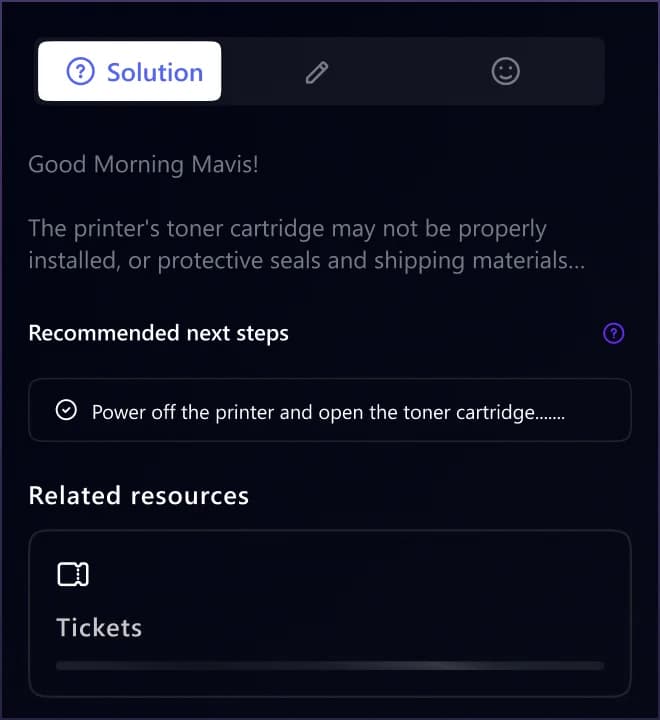
Helena, the copilot, is live. It does root cause analysis, it surfaces past resolutions, drafts the replies and scores sentiment, and DeskDay describes it as working "beside your technicians inside every ticket and waits for approval before anything happens." A real product, that one, and the UI is not vapourware.
The AI agent workforce is a different story. Triage and Dispatch is marked "Waitlist Open". The L1 Tech agent, the one that would handle password resets and MFA fixes, is "Coming soon". So is the Office 365 Admin agent. QA, Billing and Voice are "on roadmap". The page's only button is "Join waitlist". And the pricing FAQ closes the loop: "AI agents are coming soon, and once available, they will be charged separately."
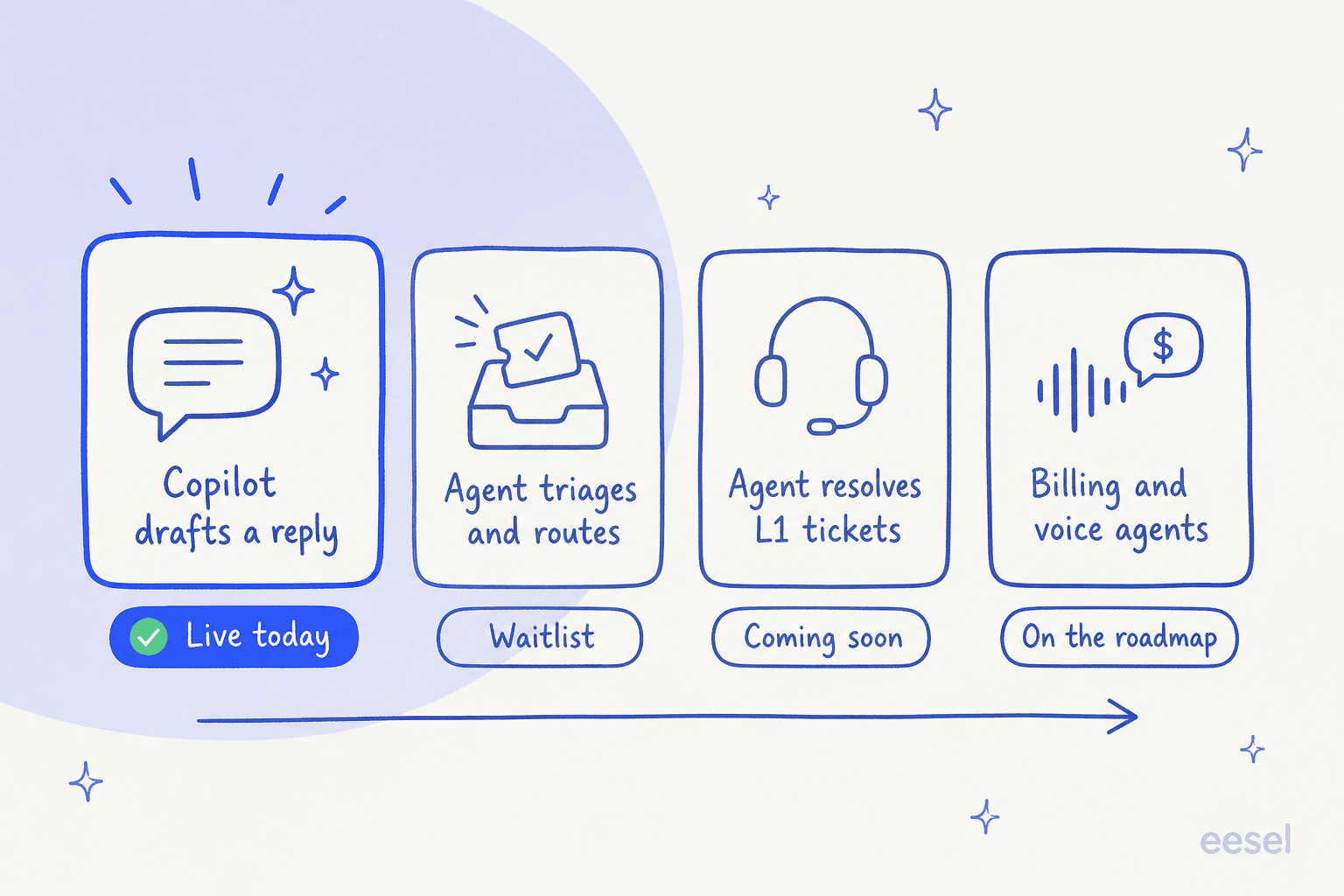
None of this is a criticism of DeskDay's engineering, to be clear. Shipping autonomous agents into a billing-critical MSP workflow is hard, and taking it carefully is the right call to make. It is a scheduling fact, that is all, and you need it for your own planning. If the reason you started looking around is that L1 tickets are eating your margin this quarter, DeskDay's answer on that arrives later and it costs extra.
The question that decides your shortlist
Before you look at a single competitor, answer this: is your complaint about the PSA, or about the queue?
The two feel like one complaint when you are annoyed, and they lead to purchases that have nothing in common. Invoices wrong, reports useless, no way to give each client their own knowledge base? PSA problem, and you need a different PSA. But techs drowning under the same twenty questions, and you sitting there costing out a hire, that is a ticket deflection problem instead, and swapping PSAs will not touch it. Six weeks of migration and you land in the same queue.
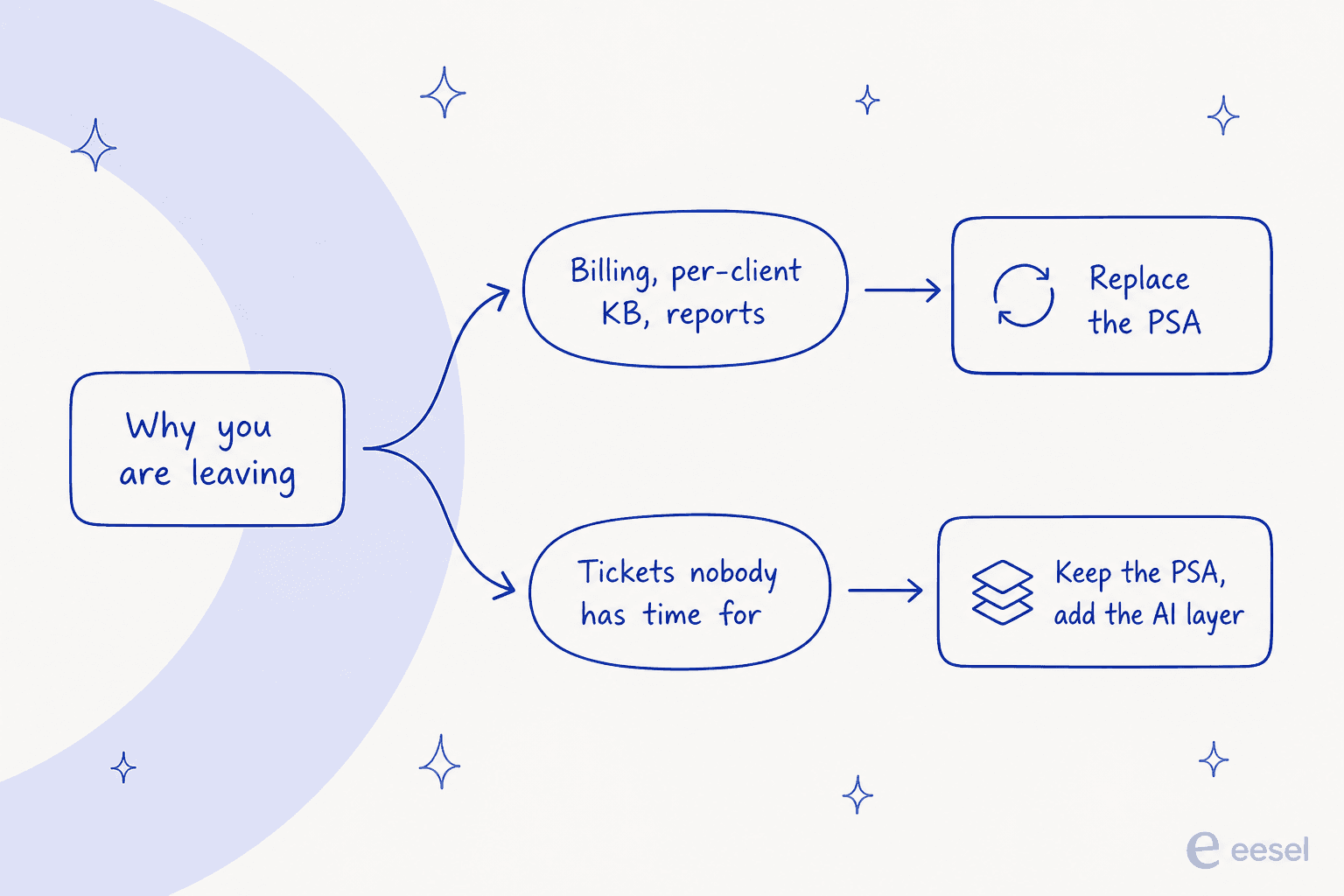
The reason this matters more in 2026 than it did two years back is that the AI layer became separable. Before, the only AI you could get was whatever your PSA vendor happened to ship, so "better AI" did honestly mean "new PSA". Now the resolution layer plugs into a helpdesk over an API, which means the depressing migration and the thing you actually wanted have come apart from each other. Use the picker below to work out which half you are buying.
Which half are you actually buying?
Pick the sentence closest to why you opened this page.
Replace the PSA. This is the one complaint that genuinely justifies a migration, and it is the exact reason the MSP quoted above left DeskDay for HaloPSA.
Look at Halo first, because everything including AI sits in one per-agent price with no tiers or add-ons. ConnectWise PSA is the heavier answer if you have real procurement and project complexity, but you will not see a price until you talk to someone.
Replace the PSA, and pick a bundle. DeskDay is PSA only, so you are pairing it with NinjaOne, N-central or Level and paying twice.
Syncro puts RMM and PSA in every plan at $129 per user per month annually with unlimited endpoints. Atera does the same shape at $149 per technician. SuperOps prices per endpoint instead, from $1.50 a month with a 100-endpoint minimum, which flips the maths if you are device-heavy and tech-light.
Do not migrate. Add a layer. A new PSA will not answer a single password reset for you, and DeskDay's own L1 agent is still on the waitlist.
Put an AI agent over the helpdesk you already run and get one fixed monthly price. eesel starts at $299 a month for 500 credits (1 credit per ticket or chat) with no seats and no platform fee, and you can simulate it on your ticket history first. Check the connector list before you plan around it, though, since there is no DeskDay integration today.
You want ITSM, not PSA. PSAs exist to bill other companies, and if you have one employer, you are paying for multi-tenant machinery you will never use.
Freshservice from $19 per agent per month is the obvious starting point, and Desk365 from $12 is the cheaper option if Microsoft Teams is where your staff already ask for help.
How I picked these eight
Three rules, applied to every tool below.
Real prices, or a clear note that there are none. Every figure here came off the vendor's own pricing page in August 2026, and not off a comparison chart written by one of their competitors. Where a vendor publishes nothing at all, I say that, rather than repeating a rival's estimate of their price.
The billing unit stated explicitly. Per tech, per agent, per endpoint, per ticket, these are four different things, and a $59 tool and a $1.50 tool can end up costing the same. Every entry below names its unit.
Whether autonomous resolution ships today. Not "has AI", which every vendor now claims. Whether an agent can close a ticket end to end without a human clicking approve, right now, on a plan you can buy.
Anything I could not verify off a primary source is left out, and I skipped a couple of tools whose only public pricing was sitting on a marketplace listing.
The 8 best DeskDay alternatives at a glance
| Tool | Best for | Replaces | Starting price | Billing unit | Free trial | Autonomous AI resolution shipped | RMM included | Public pricing | Multi-tenant |
|---|---|---|---|---|---|---|---|---|---|
| eesel AI | Killing L1 volume without a migration | The AI layer only | From $299/mo (500 credits), 100 free credits | Ticket or chat (1 credit) | Yes, 100 free credits, no card | Yes, live | No | Yes | Via your helpdesk |
| Halo | MSPs who outgrew DeskDay's billing | Full PSA + CRM + ITSM | £69/agent/mo annual | Agent seat | Yes | Copilot-led, AI included in price | No | Yes, regional | Yes |
| Syncro | One bill for RMM and PSA | PSA + RMM | $129/user/mo annual | User seat | 14 days, no card | No | Yes, unlimited endpoints | Yes | Yes |
| Atera | Device-heavy shops, unlimited endpoints | PSA + RMM | $149/technician/mo annual | Technician | 30 days | Robin agent, tiered | Yes, unlimited devices | Yes | Yes |
| ConnectWise PSA | Larger MSPs needing shipped AI agents | Full PSA suite | Not published | Not published | No | Yes, four named agents | Separate product | No | Yes |
| SuperOps | Endpoint-priced unified platform | PSA + RMM + endpoint mgmt | $1.50/endpoint/mo, 100 min | Endpoint | Yes, free start | Monica AI, assistive | Yes | Yes | Yes |
| Freshservice | Internal IT, not MSPs | ITSM suite | $19/agent/mo annual | Agent seat | Yes | Freddy agent, Enterprise or add-on | Discovery only | Yes | Limited |
| Desk365 | Cheapest Teams-native ticketing | Ticketing only | $12/agent/mo annual | Agent seat | Yes | Add-on, credit-metered | No | Yes | Limited |
Two things fall straight out of that table. Only three of these eight will sell you an agent that resolves a ticket end to end today. And only one of the eight is charging you for the work rather than for the chair.
1. eesel AI
Best for: MSPs and IT teams whose actual problem is ticket volume, not PSA features.

I work on this one, so read what follows with that in your mind, and hold me to the same evidence standard as everyone else below.
eesel is not a PSA and it will never invoice your clients. It is the resolution layer. You connect it onto your existing helpdesk, it reads the past tickets, help centre, macros, the wiki, then it starts answering. The design point that matters for an MSP is this one: knowledge sources are not walled off per integration. An agent with Zendesk, Confluence and your website connected will search all three at once, so a single reply can draw on a client's help centre and on your internal runbook together.
The number I would put in front of a sceptical service manager is not even ours. Kim Simpson at Gridwise reported that in the first month, eesel resolved 73% of tier-1 requests, and the results showed up inside a seven-day trial. Then for the internal-IT shape of this same problem, Jason Loyola, Head of IT at InDebted, put it plainly enough: "We use it to be the first responder to our Helpdesk tickets in Jira. It essentially acts just like an agent would."
Features
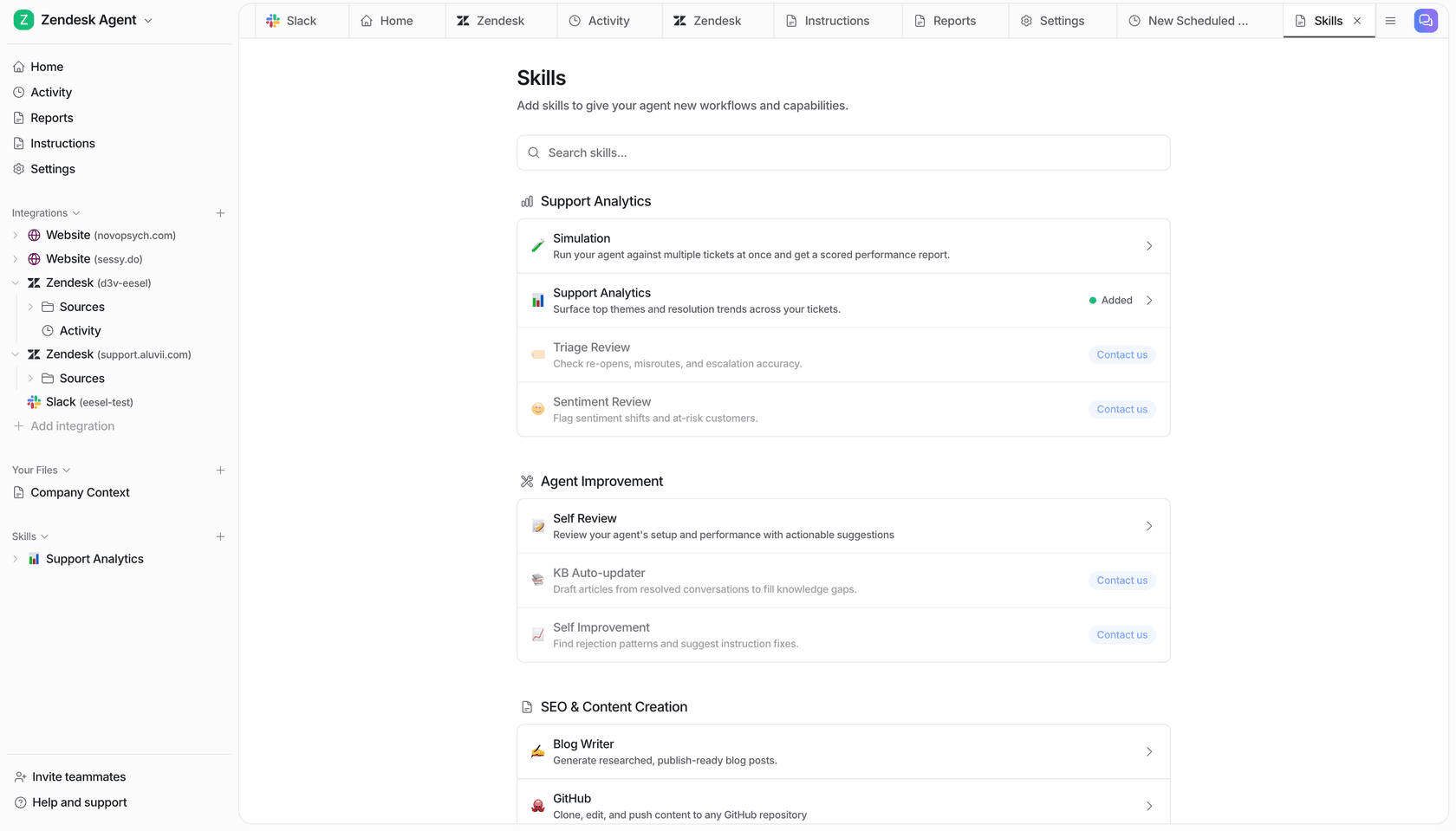
- Simulation before go-live. eesel ships a Simulation skill that runs the agent against your historical tickets so you can see what it would have said before it says anything to a real person. We built that because we have watched confident-sounding bots quietly give wrong answers, and a dry run is the only thing that catches it early.
- Confidence-based routing. Low confidence produces a draft for review rather than a live reply, which is how you keep containment quality honest. If it does not know, it says so or escalates, which is the behaviour you want on a client-facing queue.
- Skills that act, not just report. Twelve ship out of the box, including one that finds the questions your help centre does not answer and drafts the missing articles, and one that analyses ticket trends. They run on demand, on a schedule, or off an event, including automated triage.
- Knowledge-gap detection, which for an MSP is how you turn a month of tickets into documentation you can actually reuse across clients.
Pricing
| Plan | Price | What it covers |
|---|---|---|
| Free | 100 credits, no card | Every feature unlocked |
| 500 credits | $299/mo | 1 credit = 1 ticket or chat, however many replies |
| 1,000 credits | $499/mo | Same, sized to volume |
| 2,500 credits | $999/mo | Same, sized to volume |
| 5,000 credits | $1,899/mo | More than 5,000: talk to eesel |
| Blog post | $4 each | Blog post draft |
| Annual | Two months free | Pay a year upfront |
Every integration, channel and seat is included, and only tickets the agent actually works on use a credit. Extra credits are optional overage at $0.80 each, with a monthly cap you set, which makes a gradual rollout predictable by construction.
Pros
- One fixed monthly price with no seats, so adding techs costs nothing.
- Autonomous resolution is live today, not a waitlist.
- Simulation on real ticket history before anything goes out.
- No migration, since it sits on the helpdesk you already run.
Cons
- No DeskDay connector. If you are staying on DeskDay, this is not available to you today, and I would rather say that than let you find out on a call.
- Not a PSA. No contracts, no invoicing, no time tracking, no RMM, so read our IT helpdesk roundup if you need both halves.
- SOC 2 is in progress rather than certified, with SOC 2 Type II compliant sub-processors. HIPAA is available as an add-on, so talk to eesel.
Verdict: Pick eesel when the honest answer to "what would fix this?" is "fewer tickets reaching a human", and when your tickets are living in Zendesk, Freshdesk, Jira Service Management, Front, Gorgias, Help Scout, Kustomer or Slack. Skip it when the billing side is what needs fixing, because it does not do that at all.
2. Halo
Best for: MSPs who hit DeskDay's billing ceiling and want everything in one price.
Halo, which used to be split across HaloPSA, HaloITSM and HaloCRM, is one platform now at usehalo.com, and it is the tool MSPs actually name out loud when they leave DeskDay. It was the destination in that switching quote above, and it keeps turning up in r/msp threads about pairing a PSA with NinjaOne.
The pricing model is the interesting part of it, and the cleanest one in this roundup. Halo is priced per agent, with every feature and module and integration sitting inside that one price. Its own FAQ says it explicit: "No. Halo has no tiers, editions or add-ons. All current and future capabilities like automation, AI, CMDB, project management and reporting are included as standard for every agent." End users and portal customers are always free, and it never charges by the tickets or by data volume.
Halo was named a Challenger in the 2026 Gartner Magic Quadrant for ITSM Platforms, which is the kind of third-party signal none of the newer tools here have yet.
Features
- One per-agent licence covering ITSM, CSM, CRM, ESM and managed services, with no module upsell.
- Named and concurrent licences at the same price, which matters for shift-based or 24/7 teams.
- CMDB, project management, SLA management and reporting included as standard.
- Strong ITSM automation alongside the MSP tooling, which is why it also shows up in Halo versus Freshservice comparisons.
- Deep configurability, which is also the complaint people have about it.
Pricing
| Plan | Price | Notes |
|---|---|---|
| Standard, UK pricing | £69 per agent per month | Billed annually, all modules included |
| Enterprise Package | Fixed annual fee | Unlimited licences, funded implementation |
| Charities and NFPs | 15% discount | For the life of the contract |
Regional pricing is selectable right on the page for US, EMEA, APAC, Brazil, South Africa and India. Halo also runs compounding licence discounts as the company hits its own revenue milestones.
Pros
- No feature gating whatsoever, which removes the whole "which tier has the thing I need" problem.
- Genuinely deep billing and contract handling, which is exactly what DeskDay leavers cite.
- Published per-agent price, unlike ConnectWise.
Cons
- It is heavy. One MSP in the DeskDay thread said plainly that "Halo has too much stuff we don't need", and DeskDay's own comparison page leans hard on the learning curve.
- Onboarding support is capped at eight free hours per DeskDay's comparison, with extra training charged per day, so budget for setup time.
- Price is higher than DeskDay at small headcounts, which is why one r/msp poster moved the other way.
Verdict: The default answer for any MSP whose complaint is depth. You left DeskDay because invoicing or per-client structure broke on you, Halo is where you land. You left because it felt slow to set up, then understand Halo is the heavier lift here, not a lighter one.
3. Syncro
Best for: MSPs who want to stop paying two vendors for RMM and PSA.
DeskDay is PSA only, so running it means you are also paying NinjaOne or N-central or Level on the side. Syncro collapses all that into one line item. RMM and PSA in every plan, unlimited managed endpoints per technician, automated billing sitting on top. It is the bundle named most often in MSP ticketing system threads.
The unlimited-endpoint model is the real pitch here. Windows, Mac, servers, network devices, none of them carry a per-device charge and there is no ceiling, so your bill tracks headcount and not client growth. For an MSP that adds devices faster than it adds techs, that is a materially different curve from any per-endpoint tool.
Features
- RMM and PSA bundled at every tier, no separate module purchase.
- Unlimited managed endpoints per technician, across Windows, Mac, servers and network devices.
- Automated Windows patch management with enforced patch cycles.
- Custom alert profiles per client, device group or policy.
- The Team plan adds the full Microsoft 365 security and identity management suite.
Pricing
| Plan | Annual | Monthly | What it is for |
|---|---|---|---|
| Core | $129 per user/month | $159 | Endpoint management, ticketing, client billing |
| Team | $179 per user/month | $209 | Adds M365 security and identity, advanced automation, real-time metrics |
| Enterprise | Quote | Quote | Multi-year terms, PO billing, volume pricing |
14-day free trial with no credit card, and Syncro is SOC 2 Type II certified with 24/5 live support.
Pros
- One vendor, one bill, one support number for the whole stack.
- Unlimited endpoints removes the "do I onboard this client's 200 devices" arithmetic.
- SOC 2 Type II certified, which several tools on this list are not.
Cons
- No AI at any tier. DeskDay's own comparison page makes this point and, having read Syncro's plan pages, it holds up. You are buying a solid platform, not an AI one.
- At $129 per user annually it is more than double DeskDay per seat, though you are getting RMM in that.
- You pay for the RMM whether or not you already like the one you have.
Verdict: The right call when you are currently paying for DeskDay plus an RMM and would sooner have the one invoice. The wrong call when AI was any part of why you started shopping at all, because Syncro is the least AI-forward tool on this page by a distance.
4. Atera
Best for: Device-heavy shops that want per-technician pricing and unlimited devices.
Atera has the same core shape as Syncro, per-technician pricing with unlimited devices, but it is further along on AI and it publishes a fuller ladder of tiers. It reports 13,000+ customers, and its AI agent product is called Robin, which puts it ahead of Syncro on the IT support tooling axis.
Worth to flag one piece of community sentiment I ran into, because it is honest signal and not a product flaw. An Australian MSP in the DeskDay thread said they had been "getting hammered with ads for both DeskDay and Atera recently, but the prevalent use of AI in their advertising (including copywriting) is entirely offputting." A real reaction to how this whole category markets itself, and worth knowing that some of your peers are pattern-matching on it.
Features
- Unlimited devices per technician across the whole plan ladder.
- Patch management and remote access included rather than sold separately.
- Robin, Atera's AI agent, layered across the tiers.
- An add-on marketplace with per-device and per-user pricing for third-party tools.
- 30-day free trial with full access to the Expert plan.
Pricing
| Plan | Annual, per technician | Monthly | Notes |
|---|---|---|---|
| Professional | $149/month | $169 | Core platform |
| Expert | $189/month | $229 | The magnitude of Professional, plus more |
| Master | $219/month | $269 | The power of Expert, plus more |
| Enterprise | Quote | Quote | The vastness of Master, plus more |
Add-ons are priced separately, for example Network Discovery at $29 a month per technician and Work from Home at $5. Marketplace items are per device or per user, from $1.10 per endpoint upward.
Pros
- The clearest AI story of the three RMM-plus-PSA bundles here.
- 30-day trial is the longest on this list, and it hands you the Expert tier rather than a stripped one.
- Unlimited devices, same benefit as Syncro.
Cons
- $149 per technician is the highest entry price in the roundup, and the useful tier is often $189.
- The add-on marketplace means the sticker is not the bill, so price your actual stack before comparing.
- Per-technician pricing punishes a tech-heavy, device-light shop, which is the inverse of SuperOps.
Verdict: Pick Atera over Syncro when AI matters to you and per-technician pricing suits how you are shaped. Our fuller breakdown of Atera pricing walks the tiers if the decision is between Professional and Expert.
5. ConnectWise PSA
Best for: Larger MSPs who need AI agents that actually execute, and can absorb an enterprise sales cycle.
ConnectWise PSA is the incumbent that DeskDay defines itself against, and it is the heaviest tool on this page. Sales pipeline, procurement, service, projects, invoicing, asset management, all in the one system. It is also, going on the evidence of its own pages, the most serious of anyone here about shipped AI agents.
Its AI Agents page draws the exact distinction this article is about: "Unlike AI copilots that only recommend next steps, ConnectWise AI Agents are designed for closed-loop execution across the ticket lifecycle." Which is precisely the line between what DeskDay ships today and what it holds on a waitlist. ConnectWise sits on the far side of it.
Four agents get named there: Service Desk, Triage, Data Analyst, Oversight. ConnectWise reports 80%+ reduction in escalations, 30+ hours of manual configuration eliminated, plus a 25% increase in first-touch resolution. Vendor figures, those, unattributed to any named customer, so weigh them as such.
Features
- Full-suite PSA covering quote-to-cash, not just ticket-to-invoice.
- Four named AI agents built for closed-loop execution rather than suggestion.
- ITIL and ITSM capability for MSPs whose clients demand process maturity, including a formal escalation process.
- Very large integration ecosystem, which is the honest reason many MSPs stay.
Pricing
ConnectWise does not publish a price. No pricing page, and no figure anywhere on the PSA product page either. DeskDay's comparison page characterises it as roughly $25 to $65 per tech per month on a quote basis, with $3,000 to $5,000+ onboarding fees and a two-to-five seat minimum, but that is a competitor's estimate of a rival's price and I would not be planning a budget on it. Get a quote.
Pros
- The only tool here with a full slate of agents built for execution rather than suggestion.
- Depth that no tool on this list matches, particularly in procurement and projects.
- Integration ecosystem that most MSP tooling already speaks to.
Cons
- No published pricing at all, so you cannot compare it on cost without entering a sales process.
- Heavy to implement, and the reputation for that is well earned.
- Overkill for a shop DeskDay actually fit, which is most of the people reading this.
Verdict: The right destination when you have grown past a lightweight PSA and you want agents doing ticket triage and resolution inside the PSA itself. The wrong destination when you left DeskDay because what you wanted was less software, not more of it.
6. SuperOps
Best for: Shops with far more endpoints than technicians.
SuperOps is the one tool here that changes the shape of the bill instead of the number sitting on it. Everyone else charges you per human. SuperOps charges per endpoint, and the volume tiers get cheaper as you scale up.
That inversion is the whole reason to look at it at all. Running a lean team that manages a lot of devices? Per-technician pricing is punishing you, and per-endpoint pricing rewards you. Lots of techs against a modest fleet, and it goes the other way entirely, so you should be looking at Syncro or at Atera instead.
Features
- Unified endpoint management across Windows, Mac and Linux.
- Integrated ticketing and asset management in the base plan.
- Automated patch management and compliance.
- Network monitoring and alerting.
- Prime Plus adds MDM for Apple and Android devices.
- Monica, SuperOps' AI, handles routing and resolution assistance.
Pricing
| Plan | Entry rate | Volume tiers | Minimum |
|---|---|---|---|
| Prime | $1.50 per endpoint/month | $1.40 at 101-500, $1.30 at 501-1,000, $1.20 above 1,000 | 100 endpoints |
| Prime Plus | $2.50 per endpoint/month, early-bird from $3.00 | $2.30 at 151-500, $2.10 at 501-1,000, $2.00 above 1,000 | 150 endpoints |
These are the rates published on the "SuperOps for IT" view of that pricing page, and an annual term saves 15%. The MSP view sits behind a toggle on the same page. A 100-device account works out at $150 a month, which the page's own calculator confirms.
Pros
- Per-endpoint pricing is the right model for device-heavy, tech-light shops, and nobody else here offers it.
- Volume discounting is published rather than negotiated.
- No technician limit, so growing the team does not grow the bill, which suits ITSM for smaller teams.
Cons
- The 100-endpoint minimum makes it a non-starter for a very small MSP, exactly the segment DeskDay targets.
- Two views of pricing on one page behind a toggle is friction when you are comparing, and the MSP rates are less discoverable than the IT ones.
- Monica is assistive rather than an autonomous resolver, so it does not solve the gap that pushed you off DeskDay's AI.
Verdict: Run the arithmetic before you dismiss it. At 500 endpoints and three techs, SuperOps Prime lands around $700 a month against roughly $450 for Atera Professional. At 2,000 endpoints with the same three techs, SuperOps is around $2,400 and Atera has not moved. Per-endpoint pricing is a bet on your ratio, so go check what yours is.
7. Freshservice
Best for: Internal IT departments who were never really MSPs in the first place.
A decent share of the people searching for DeskDay alternatives are not MSPs at all. They are an internal IT team who bought a PSA because it looked like a good ticketing system, then discovered they were paying for contract billing machinery they will never invoice anybody with. If that is you, then Freshservice is the natural home for it, and it starts at under a third of DeskDay's price.
Worth knowing that one real MSP in the r/msp thread which inspired this list had tried the opposite move. They were running MSP mode in Freshservice and could not get support to make the multi-tenant mode work, and that is what sent them off looking at DeskDay. Freshservice is strong for a single organisation, weaker across many of them.
Features
- Full ITSM: incident, problem, change and release management on the higher tiers.
- Employee self-service portal and service catalogue, which is where most internal deflection actually comes from.
- Freddy AI Copilot for agents, and the Freddy AI Agent on Enterprise.
- Microsoft Teams and Slack surfaces so staff never leave chat to raise a ticket.
Pricing
| Plan | Price per agent/month, annual | What it adds |
|---|---|---|
| Starter | $19 | Solid foundations |
| Growth | $49 | Powerful capabilities and automations |
| Pro | $99 | Problem management, unified ITSM with AI |
| Enterprise | Quote | Freddy AI Agent (Classic) and Freddy AI Insights included |
| Freddy AI Copilot | $29 per agent/month | Add-on across lower tiers |
| Enterprise Service Management | $49 per agent/month | Multi-department autonomy and data privacy |
Read that Freddy line carefully. On Starter, adding the copilot costs $29 on top of a $19 seat, so it more than doubles the price of the plan.
Pros
- $19 entry price is the lowest full-ITSM option on this list.
- Purpose-built for internal IT rather than adapted from MSP tooling.
- Mature product with a real self-service story and a wide internal helpdesk feature set.
Cons
- Multi-tenancy is the weak spot, and the r/msp experience above is a live example.
- AI economics get awkward fast: the copilot add-on can cost more than the seat it sits on.
- No RMM, so an MSP would still be buying a second tool.
Verdict: One employer and a help desk, and this beats every PSA on the list. Just price the AI honestly first, and read Freshservice AI pricing before assuming Freddy comes included.
8. Desk365
Best for: Teams who want Microsoft Teams ticketing at the lowest possible per-agent price.
Desk365 is the smallest-scope tool here and it is deliberate about being that. A helpdesk, not a PSA, built around Microsoft Teams, and it undercuts everything else on this list at $12 per agent per month. Its own headline reads "AI-powered helpdesk at an unbelievable price", which for once is a fair description of the positioning.
The relevant overlap with DeskDay is the Teams channel. DeskDay's IT-Connect app is one of its better features, and if that was the part you liked, Desk365 does the same job at a fraction of the seat price. What you lose is the whole PSA side: no contracts, no invoicing, no RMM integration.
Features
- Teams-native ticketing with a support bot, plus email, web and widget channels, and a documented path to automate Teams support.
- AI Copilot for draft replies and ticket summaries on the Plus tier.
- Automation and productivity rules, a knowledge base, and productivity reports.
- Product inventory on the Premium tier.
Pricing
| Plan | Price per agent/month, annual | Notes |
|---|---|---|
| Standard | $12 | Core ticketing, automation, knowledge base |
| Plus | $22 | Adds AI Copilot, draft replies, ticket summaries |
| Premium | $32 | Adds product inventory |
| AI Agent add-on | $50 per 1,000 credits | Limited free credits on Plus and Premium |
The AI Agent is credit-metered and not seat-priced, so the cost of it scales with how much you actually use. A more honest model than a flat per-seat AI fee, that, though it does mean you cannot know your bill ahead of time.
Pros
- Cheapest per-agent seat in this roundup by a wide margin.
- Genuinely good Teams experience if that is where your users live.
- AI agent priced on usage rather than headcount.
Cons
- Not a PSA. No contracts, no client billing, no time-to-invoice flow.
- Credit-metered AI makes budgeting harder than a flat rate.
- Multi-tenant client separation is limited compared to a real MSP tool.
Verdict: The right answer only when you are downgrading scope on purpose. If it turns out you were using DeskDay as a Teams ticketing system and ignoring the PSA half of it, this saves you $47 a seat a month. Our Desk365 alternatives piece has the wider comparison, and Desk365 pricing carries the tier-by-tier detail.
What you'll actually pay
Here is the part that comparison tables hide from you. These eight tools do not bill on the same unit, so their prices are not comparable numbers in the first place.
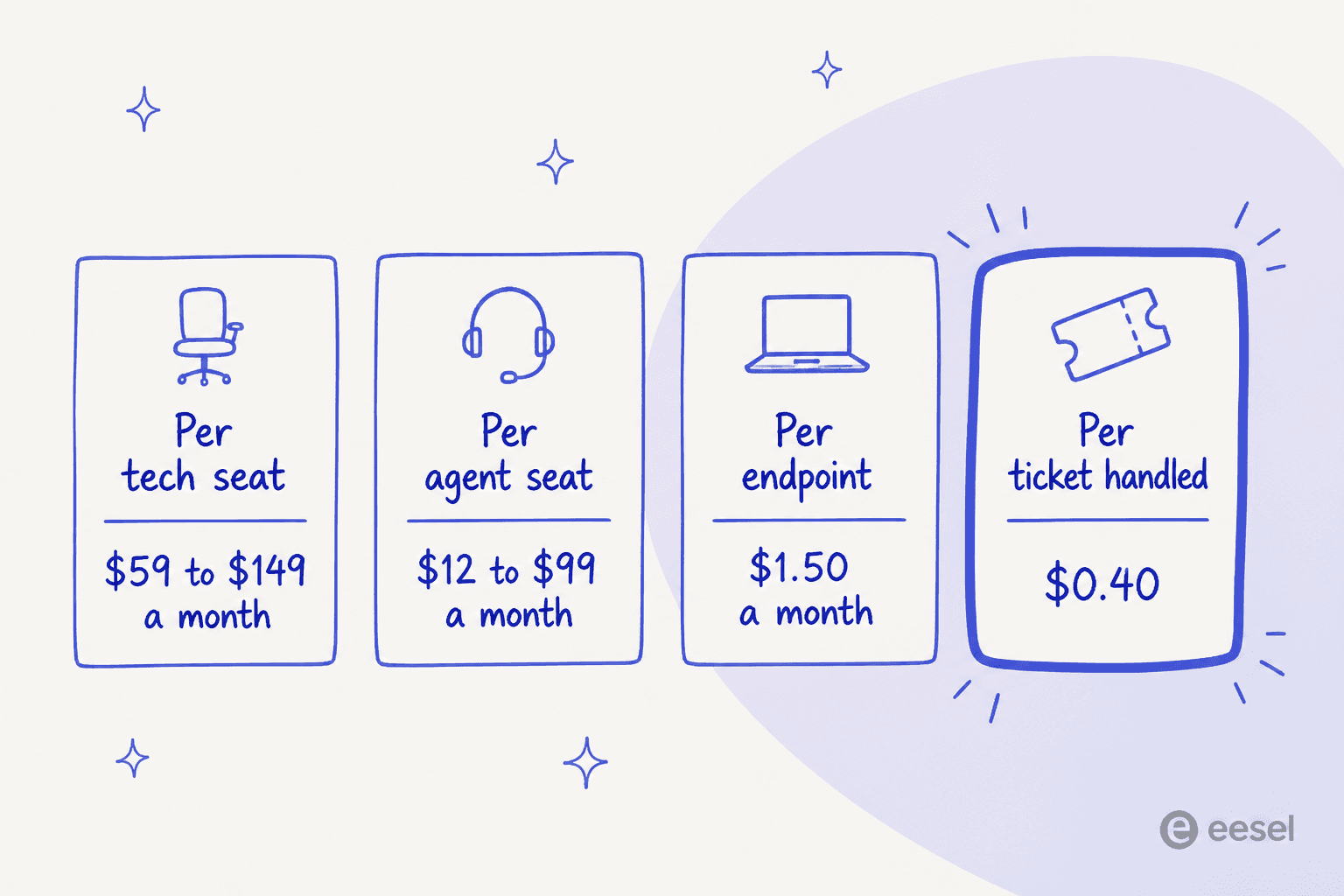
Run one concrete shop through it. Say five techs, 400 endpoints, 600 tickets in a month, currently on DeskDay plus NinjaOne.
DeskDay at $59 annual across the five techs is $295 a month, and your RMM sits on top of that. Syncro Core replaces both at $129 across five users, so $645, and the RMM bill drops to zero. Atera Professional at $149 across five comes to $745 on that same basis. SuperOps Prime at 400 endpoints on the $1.40 tier lands around $560, and it does not care at all that you added a sixth tech. Halo at £69 across five agents is £345, roughly $440 at time of writing, and no RMM in it.
Now the other half of it. Keep DeskDay at $295, route 300 of those 600 tickets to an AI layer on eesel's 500-credit plan at $299 a month, with the layer costing nothing extra on the day your sixth tech starts. So the comparison that matters is not $295 against $645. It is "$299 to remove half the queue" against "$350 more a month to move the queue somewhere else".
None of which is an argument that nobody should migrate. Invoices wrong, then migrate, and Halo is sitting there waiting. It is an argument that "the AI is not good enough yet" and "the PSA is not good enough yet" are two separate sentences carrying two separate price tags, and most people conflate the two. If you want that arithmetic in isolation, we did it in AI agent versus human cost and in our guide on automated IT ticketing.
One last thing on the total cost, and it is easy to miss. DeskDay's pricing page lists an $800 onboarding fee on the Standard plan, waived on annual billing where you have a minimum of two licences, and 10 hours of expert onboarding valid for 90 days. DeskDay's own HaloPSA comparison page still describes onboarding as a "fully personalized onboarding experience free of charge", which is the older framing of it. Data migration itself is free either way, and it covers tickets, customers and users.
Try eesel for the half a new PSA won't fix
If you got this far down and your honest answer to "what would fix this?" is still "fewer tickets reaching a human", then the migration is not your project at all. The layer is.
eesel reads your solved tickets, the help centre, the wiki and your macros, then it answers the repetitive ones directly inside Zendesk, Freshdesk, Jira Service Management, Front, Gorgias, Help Scout, Kustomer or Slack. Before it replies to anybody, you run it in simulation against your own ticket history and see exactly what it would have said. That step got added after watching too many confident bots get things quietly wrong. Low-confidence tickets come back as drafts and not as live replies, and escalation stays under your own rules. From $299 a month for 500 credits, no seats, no platform fee, and you start on 100 free credits with no card.

The one thing I will not pretend about: there is no DeskDay connector today. So if you are committed to DeskDay, your AI answer is DeskDay's own waitlist, and our best AI service desk roundup is the wider view on it. But if your tickets sit anywhere on that list above, you can have this running before the end of the day. Try eesel and point it at last quarter's queue first.
Frequently Asked Questions
What are the best DeskDay alternatives for a small MSP?
How much does DeskDay cost compared to other PSAs?
Does DeskDay have AI agents that resolve tickets on their own?
Can I keep DeskDay and add AI on top of it?
Which DeskDay alternative is best for internal IT rather than an MSP?
Does DeskDay support a separate knowledge base per client?
Is switching PSA worth it just to get better AI?


Article by
Rama Adi
Rama is a software engineer at eesel AI with two years of experience writing about B2B SaaS, AI tools, and customer support technology. Based in Bali, Indonesia, he brings a developer's perspective to product comparisons — cutting through marketing copy to what the integrations and APIs actually do.