Desk365 pricing 2026: every plan and what the AI really costs

Kurnia Kharisma

Katelin Teen
Last edited August 20, 2026
Work out what Desk365 will actually cost you
Desk365's page shows you a per-agent number, nothing more. Your bill is that number times seats, times twelve, plus a credit pack you can't size until you know how chatty your customers actually are. Plug your own figures in.
The plan barely moves the number. What actually shifts it is the credits-per-reply dropdown, and Desk365 only publishes its ceiling.
The full rate card, every plan and every cycle
Desk365 is built by Kani Technologies, Inc., a company incorporated in California with offices in Union City. It claims 7,000 businesses across 65 countries.
The product is a Microsoft Teams helpdesk, and that's the frame for everything below. It's priced against Zoho Desk rather than a contact centre suite.
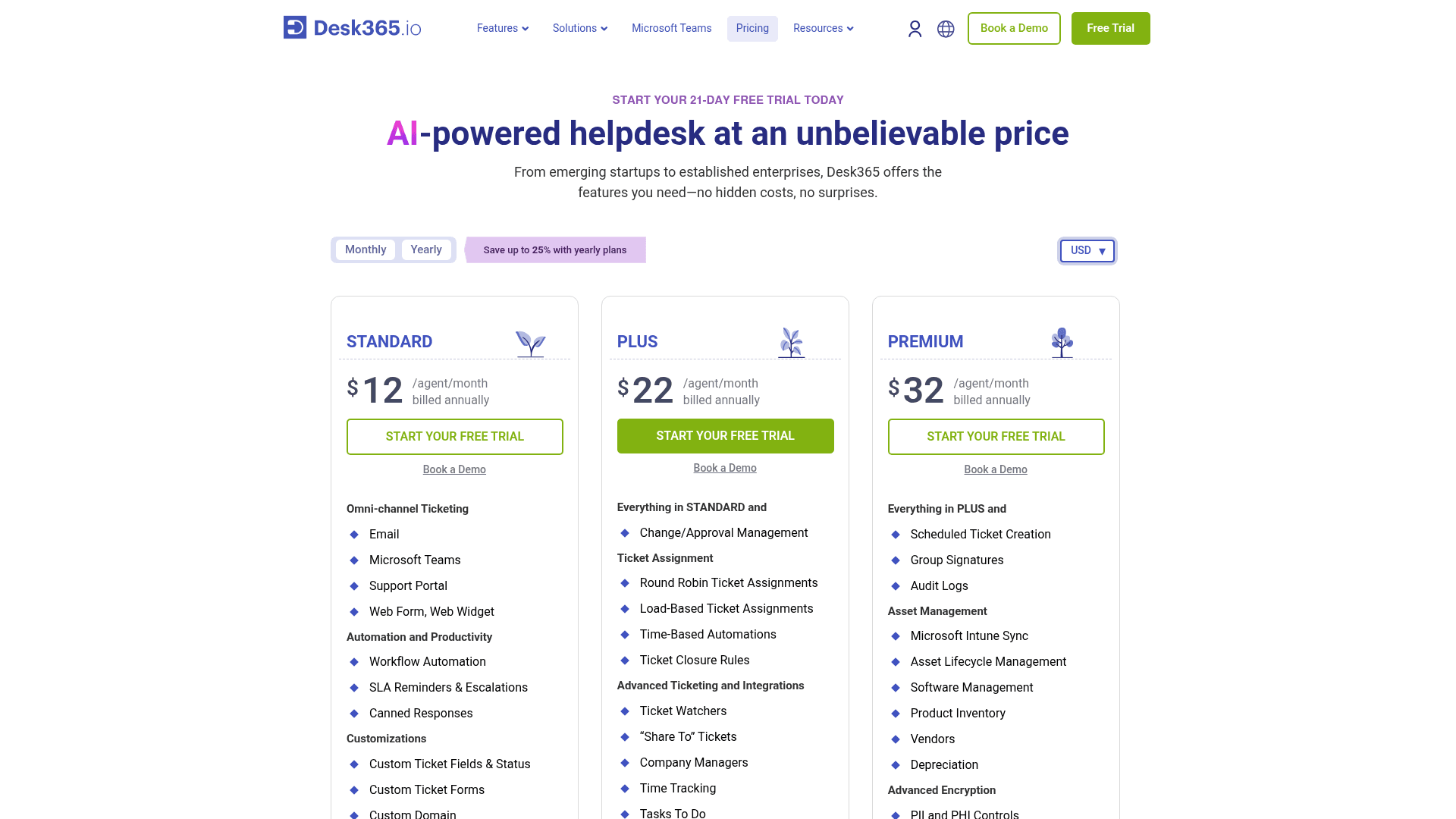
Per agent, per month, in all four currencies Desk365 sells in:
| Plan | USD yearly | USD monthly | EUR yearly | EUR monthly | GBP yearly | GBP monthly | AUD yearly | AUD monthly |
|---|---|---|---|---|---|---|---|---|
| Free | $0 | $0 | €0 | €0 | £0 | £0 | A$0 | A$0 |
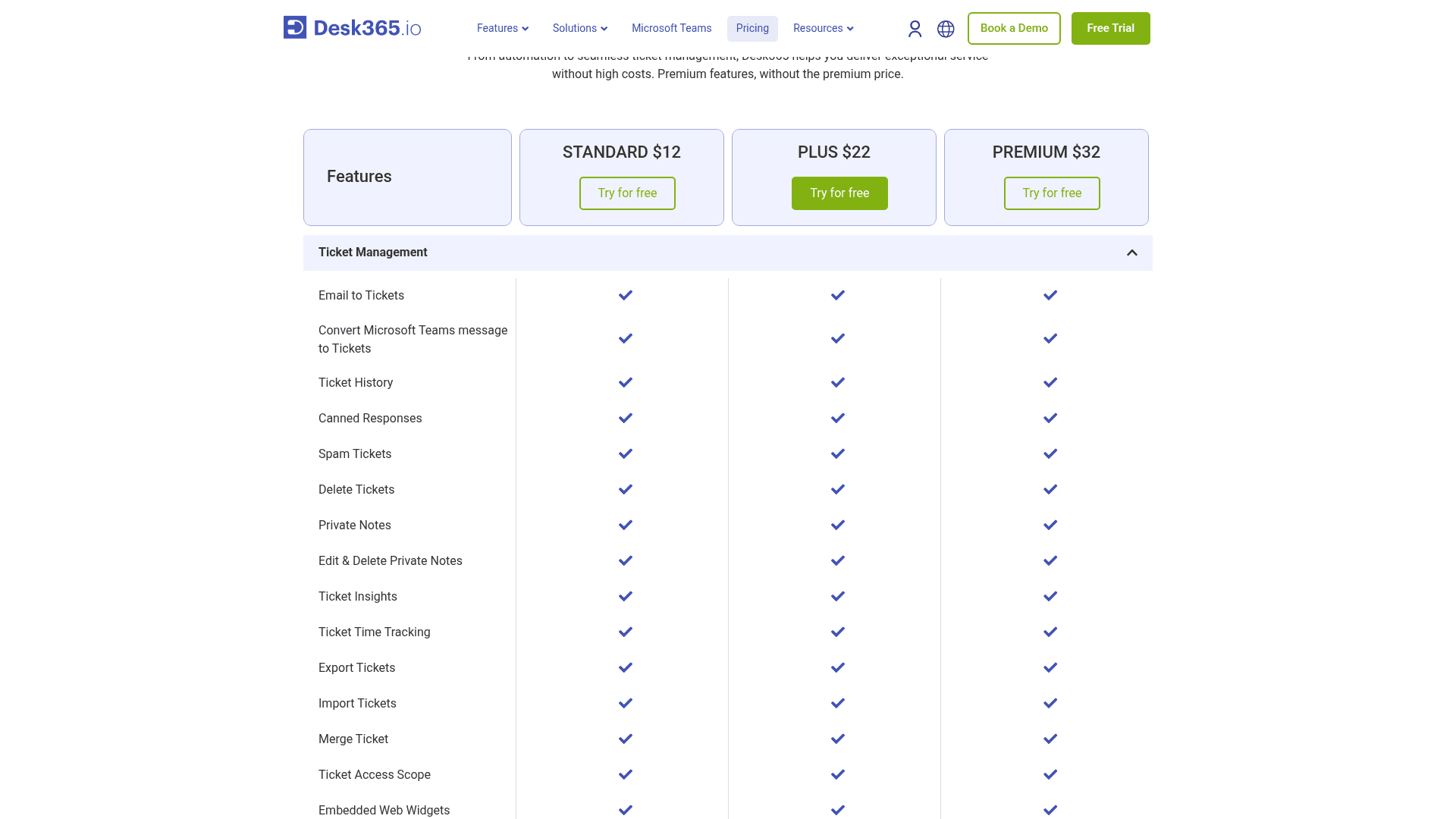
| Standard | $12 | $16 | €12 | €16 | £11 | £14 | A$19 | A$26 |
| Plus | $22 | $28 | €20 | €25 | £18 | £22 | A$33 | A$42 |
| Premium | $32 | $39 | €30 | €36 | £26 | £32 | A$48 | A$58 |
| AI credits (per 1,000) | $50 | $50 | €45 | €45 | £40 | £40 | A$75 | A$75 |
Every figure in that table comes from the same place, the price object inside the Desk365 pricing page that the Monthly and Yearly toggle reads from. The server sends you the annual rates by default. The monthly rates only exist after a click, worth knowing if you ever try to verify them from a plain page fetch or a cached copy.
Note the last row. The credit pack is the same price on either billing cycle. There's no annual discount on AI at all, since credit value sits entirely outside the yearly and monthly split.
The yearly discount shrinks as you climb
The banner over the toggle reads "Save up to 25% with yearly plans." The "up to" is doing real work.
| Plan | Monthly | Yearly | Saved per agent | Real discount |
|---|---|---|---|---|
| Standard | $16 | $12 | $4 | 25.0% |
| Plus | $28 | $22 | $6 | 21.4% |
| Premium | $39 | $32 | $7 | 17.9% |
The plan most likely to sign a year, Premium, gets the smallest percentage back for doing it. It's not a scandal. It does run opposite to how most buyers assume tiering works, though, and that's worth a line in a procurement note. At ten agents, the annual commitment saves $480 on Standard, $720 on Plus and $840 on Premium.
| Plan, 10 agents | Annual billing | Monthly billing | Cost of staying flexible |
|---|---|---|---|
| Standard | $1,440/yr | $1,920/yr | $480 |
| Plus | $2,640/yr | $3,360/yr | $720 |
| Premium | $3,840/yr | $4,680/yr | $840 |
Desk365's own comparison bar on the same page uses Plus at ten agents as its reference: $220 against $230 for Zoho Desk, $590 for Freshdesk, and $1,150 for Zendesk, footnoted as "comparing the prices of the most popular plan." That holds up, on seats. But it's a seat comparison only. Every product in it meters AI separately, so read it next to the live Zendesk pricing card rather than as a total-cost claim. Same caveat for Freshdesk.
The tier you pick is an AI licence, not a feature ladder
This is the part of Desk365's pricing I'd want flagged before any purchase order went out.
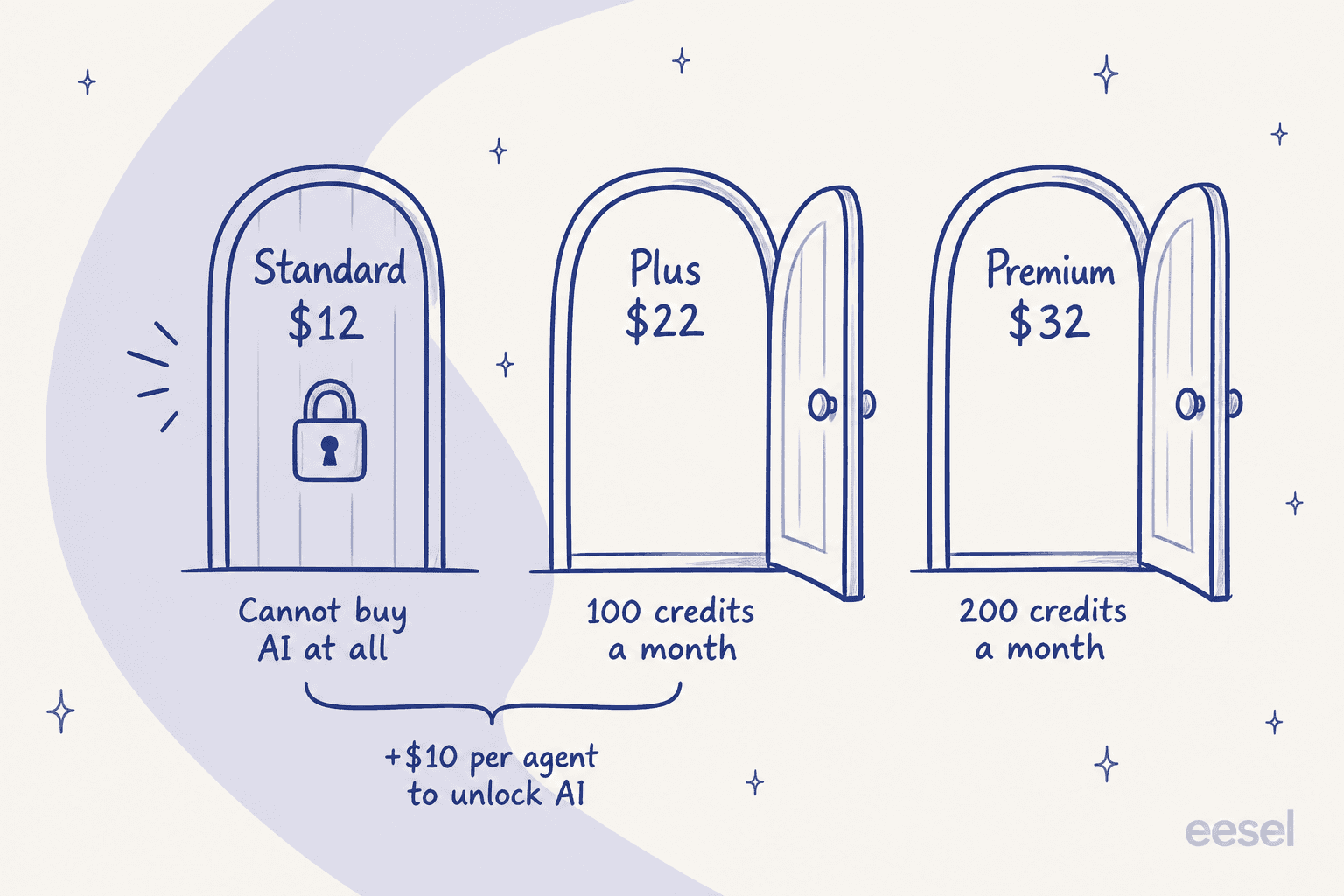
Desk365 actually ships two different AI products under two different commercial models, and the gate falls in a different place for each one.
AI Copilot is the agent-facing set: draft a reply, rephrase it, translate it, summarize a thread, generate a knowledge base article from a ticket. It comes bundled into Plus and Premium at no extra charge, and burns no credits. Standard gets none of it at all.
AI Agent is the customer-facing bot, the AI agent rather than the assistant, and it's an add-on metered in credits. Section 1 of the AI add-on terms states it's available "only to accounts subscribed to Desk365 Plus or Premium" and "not available on other plans unless Desk365 expressly enables it in writing." Standard cannot buy it. Not at a higher rate, not as an overage, not at all.
One AI-adjacent row does appear on Standard though: the Microsoft 365 Copilot plugin, which is Microsoft's Copilot reaching into Desk365 rather than Desk365 writing anything for you. A buyer skimming the comparison table and spotting "Copilot" in their column is looking at a connector, not an assistant.
The honest way to price Desk365's AI isn't "$50 per 1,000 credits" on its own. Really it's $10 per agent per month, plus $50 per 1,000 credits, and at ten agents that's $1,200 a year of seat upgrade before the first credit gets spent. That's why the calculator above refuses to price AI on Standard. If your ticketing is fine and the only gap is the bot, that arithmetic argues for putting an AI helpdesk agent on top of what you already run, instead of moving everyone up a tier.
What one AI credit actually buys
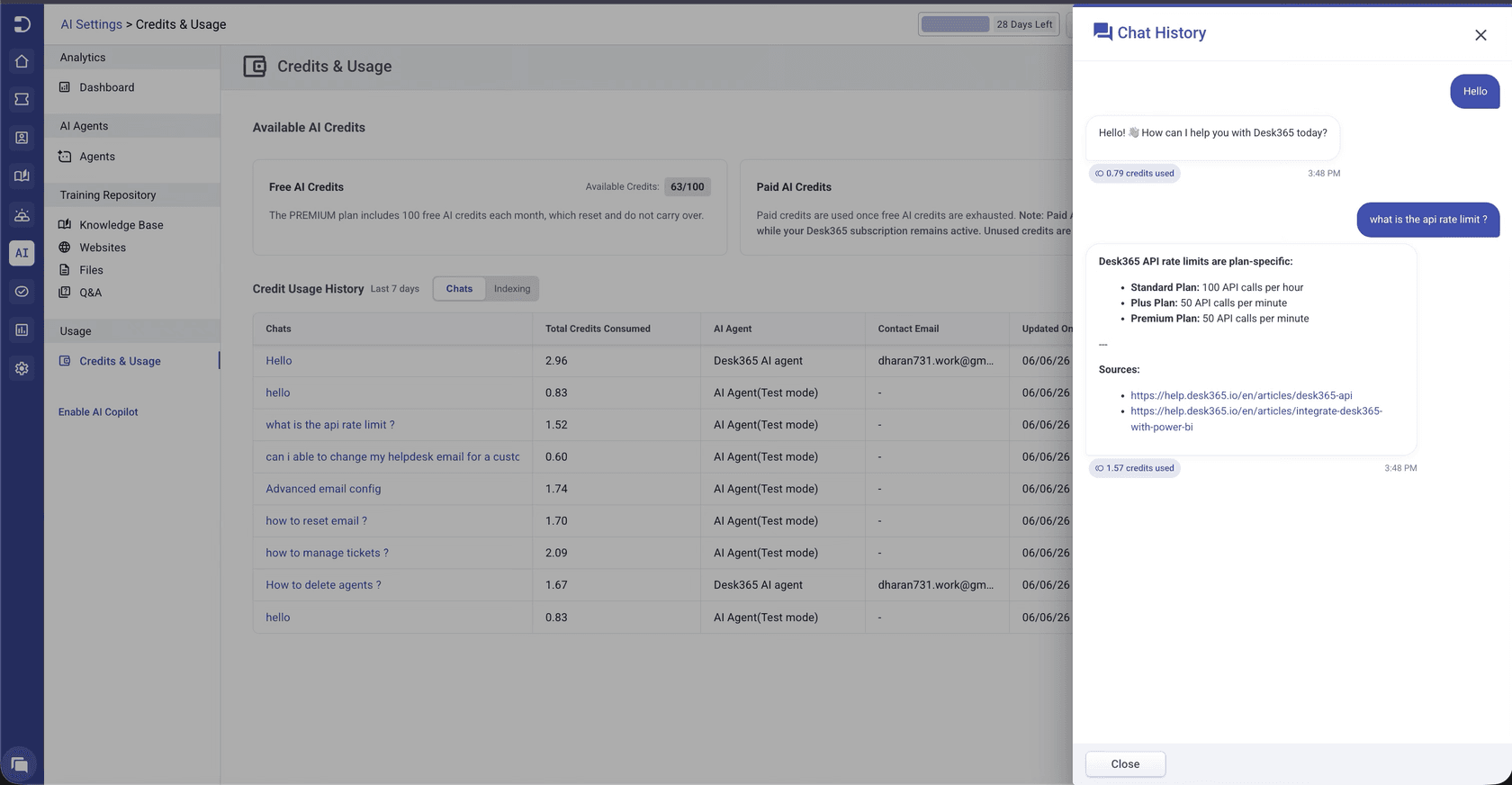
A credit costs $0.05 at $50 per 1,000. The number that actually matters is the burn rate, and Desk365 gives it to you in exactly one sentence, in the AI Agent setup guide: credits are consumed based on AI responses, "with a maximum of 5 credits per message."
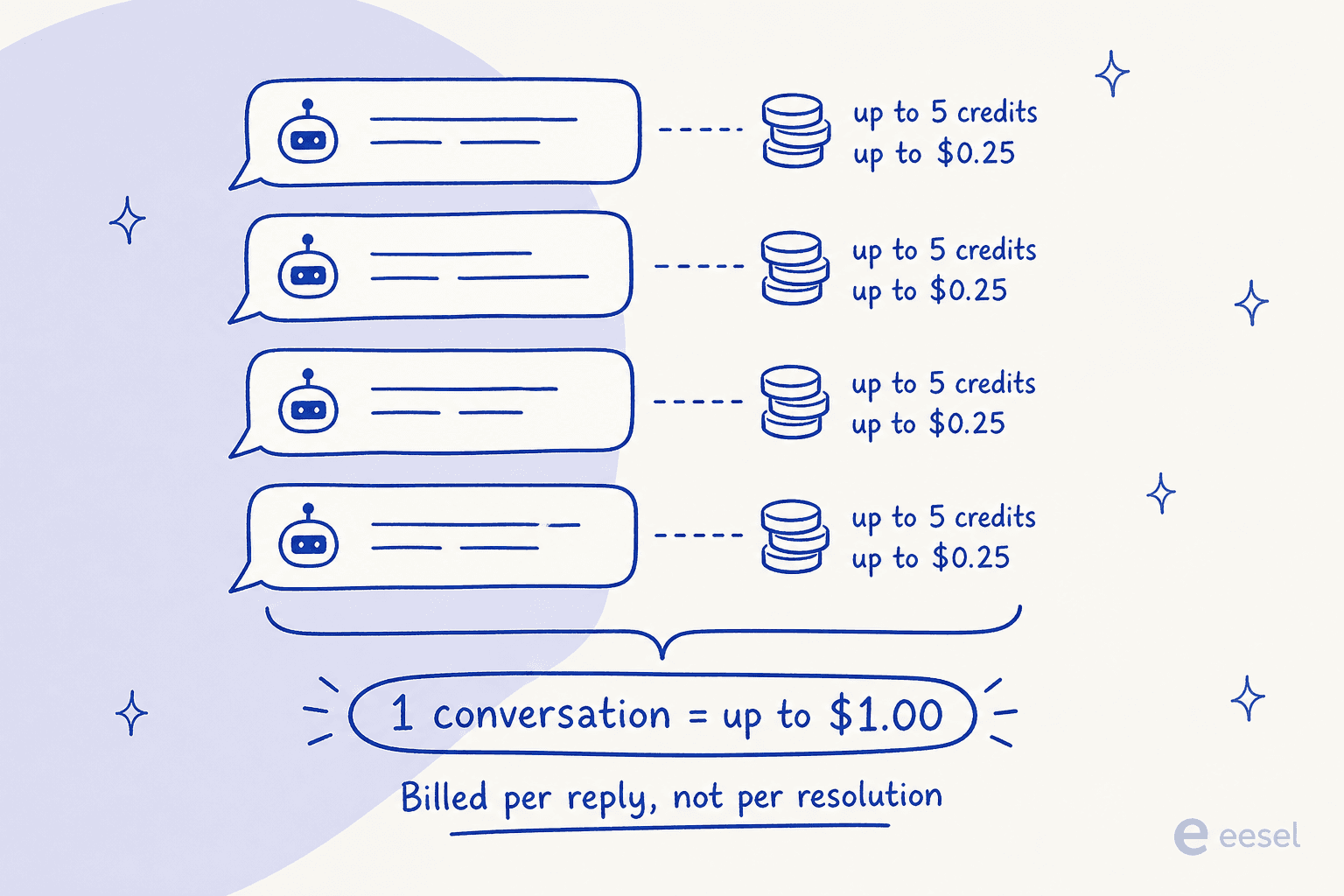
Three consequences fall out of that one sentence.
The billable event is a message, and resolution never enters into it. A chat that goes back and forth four times, then escalates to a human, still bills for all four AI replies. That's the shape the fintech ops lead in the TL;DR was pricing against, and why his 3,000-interaction allowance evaporated in a day and a half on paper. Most ticket deflection pricing bills the outcome. This bills the attempt. For a tier-1 queue where two-thirds of chats are one question, that difference is the whole business case.
The ceiling is the only published number. Section 3.4 of the AI terms says consumption "varies based on the number and complexity of conversations, including factors such as the length of inputs, the length and complexity of the AI's responses, and which AI features are used." It closes with the line that actually matters for planning: "Desk365's usage and metering systems determine Credit consumption." No formula means a buyer can bound the bill, not compute it. One AI reply costs $0.25 at the ceiling.
The included allowances are demo-sized. Plus ships 100 free credits a month, Premium ships 200. At five credits a message, that's 20 AI replies a month on Plus and 40 on Premium. Three separate Desk365 pages agree on those numbers, unusually consistent for them, but agreement doesn't make the numbers any bigger. For any real volume, the $50 packs are the real price of the AI.
Training the AI Agent draws on your knowledge base, a website crawl and uploaded files up to 50 MB, plus Q&A pairs. Past ticket history isn't one of the listed inputs, a real gap if you were hoping to ground answers in how your team has actually replied before. A Credits and Usage screen shows per-conversation credit spend, though only for the last seven days.
The clauses to read before you prepay
Buying a big block of credits looks like the obvious way to get ahead of the meter. Two clauses argue for small blocks instead.
Section 3.2 is straightforward: free credits arrive at the start of each month and expire at the end of it, with no rollover.
Section 3.5 is the one worth reading twice. Purchased credits don't expire while you hold an AI-eligible plan. But lose eligibility for any reason, a downgrade to Standard, a cancellation, a non-renewal, a missed payment, and unused paid credits "expire and become unusable effective immediately." Section 3.7 adds they're non-refundable, including for unused credits; section 3.6, that they carry no cash value and can't be transferred.
So a team that prepays $500 for 10,000 credits and later drops to Standard loses whatever is left, the same day. Buy in the smallest block that covers a quarter.
Two related things simply aren't documented anywhere, and I'd rather say so than guess. There is no published overage rate, and nothing describes what the AI Agent does at zero credits. Hard stop, error, silent fallback to a ticket form, a prompt to buy more, all plausible, none stated. Section 4 also reserves the right to enforce rate limits, section 5 the right to change how credits are consumed with reasonable notice. The five-credit ceiling is a current-state number, not a contractual one.
Who counts as a billed agent
The seat model is refreshingly binary, with no light-agent tier to reason about.
| Role | Billed | What it is |
|---|---|---|
| Agent | Yes, one seat | Desk365 defines it as "every support team member who interacts with customers, contacts, or end-users" |
| End user / contact | No | Unlimited on every plan, at no cost |
| Company manager | No | A contact flag granting visibility of every ticket under that company. Plus and up |
| Department manager | No | Same, scoped to granted departments. Premium only |
| Ticket watcher | No | Follows a ticket without owning it. Plus and up |
The manager flags are the closest thing to a free light seat, and honestly the detail I'd actually use. An IT lead or a department head can see every ticket their team raised, across departments, including tickets from before they were promoted, all through the support portal and without occupying a paid seat. It's portal visibility rather than agent-portal access, gated to Plus and above. For a company running internal IT support with a handful of real technicians and a long list of stakeholders who just want read access, that gate is worth more than most of the feature rows around it.
There is no published agent minimum. I checked the pricing page, the FAQ, the terms of service, the billing help articles, none of them state a floor, or state that there isn't one. What the plan management guide describes instead is a dial you set yourself, in Settings, Account, Plan and Billing.
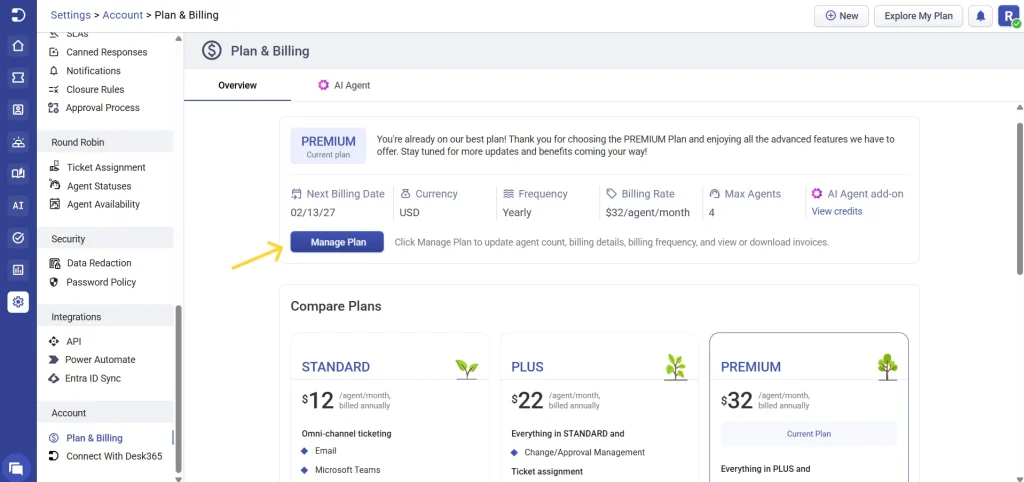
The asymmetry is the thing to actually plan around. Added seats activate immediately; removed seats only take effect after the current cycle ends, showing up as a scheduled change you can still cancel before it lands. Switching from yearly to monthly waits for renewal too, and cancellation runs to the end of the paid period rather than cutting access outright. Staff up for a seasonal peak, and you're carrying those seats to the end of the cycle.
Free plan, trial, and what happens in between
| Item | Detail |
|---|---|
| Free plan | $0, no expiry, 50 tickets a month |
| Free plan agents | Not stated on the pricing page. Three, per Desk365's own blog |
| Trial | 21 days, all features of the chosen plan |
| Card required | No |
| Trial AI credits | 100 |
| At trial end | Drops to the Free plan rather than locking you out |
| Setup fees | None, and migration assistance is on all plans |
The Free plan's agent cap looks like a genuine documentation gap rather than a trick. Both the pricing page and the FAQ state only the 50-ticket limit, and the three-agent figure lives in a marketing blog post instead. If three seats is load-bearing for your decision, get it in writing.
The trial deserves credit for how it lands you, though. Twenty-one days, no card, and an expiry that demotes you to a working free tier instead of a wall, that's a better shape than most of the best ticketing system field offers. The 100 trial credits match the same demo-sized allowance as Plus, so a genuine AI evaluation inside the trial still means buying a pack.
What the higher tiers actually gate
Two clusters are Premium-only in their entirety, and both are the kind of thing that decides a purchase rather than sweetening it.
Compliance. HIPAA compliance, encrypted PII and PHI fields, encrypted field logs and visibility control, sensitive data redaction, audit logs, all of that is Premium. SOC 2 Type II, GDPR, Microsoft Entra ID single sign-on, MFA and custom password policies sit on every paid plan, as does your choice of a US or EU data centre. If you're in a regulated vertical, Premium isn't really optional. It's the only plan that qualifies.
One contradiction worth flagging, this is Desk365 against itself: their free ticketing systems post lists "GDPR & HIPAA compliance, available in every plan — including Free" as a Desk365 advantage, while the pricing table and the FAQ both put HIPAA controls on Premium alone. Treat the pricing table as authoritative here. Desk365's blog carries stale copies of its own numbers more generally: their Front pricing post still quotes Plus at $20 against the live $22.
Asset management. All ten rows are Premium: Microsoft Intune sync, IT and software asset management, vendor and location management, depreciation, asset-to-ticket association, imports, product inventory and custom asset fields. That makes Premium the ITSM tier in practice, putting Desk365 in the same conversation as Jira Service Management rather than a plain shared inbox.
Whether you need that at all is really the help desk versus service desk question. If assets are the reason you're looking, my AI asset management roundup is the better place to start.
Everything Standard misses at the Plus step adds up to a long list. The operationally important ones are CSAT surveys and the CSAT dashboard, scheduled reports and exports, multiple dashboards, time-based automation, round-robin and load-based assignment, change and approval management, and a multilingual helpdesk. Most of what people mean by help desk automation starts at Plus, and anyone who cares about CSAT or wants automated escalation needs to be there too.
Three quantified limits move rather than switch:
| Limit | Standard | Plus | Premium |
|---|---|---|---|
| Attachment storage | 200 GB | 500 GB | 1 TB |
| REST API rate | 100 per hour | 50 per minute | 50 per minute |
| Business hours and holidays | Single | Multiple | Multiple |
That API row is the sharpest thing hiding in the comparison table. 100 requests an hour works out to 1.67 a minute, so Standard's API runs roughly 30 times slower than Plus and Premium, and the table states that only as a change of unit, easy to skim right past. Desk365 routes both its Jira and Power BI integrations "using API," so a Standard team building either is working against a ceiling nobody mentioned. Everything else in the integration list is identical across plans: Power Automate, Microsoft 365 Copilot and Teams native, Asana, Planner and Azure DevOps going through Power Automate. Only Entra ID sync is gated.
What the reviews say the price does not
Desk365 rates 4.9 across 32 G2 reviews, with no rating below four stars. It's also 4.9 on Capterra, across 12 reviews. That Capterra figure needs a caveat though: ten of the twelve are labelled vendor-referred with an incentive offered, and all twelve date from 2022 to 2024. The G2 corpus is smaller but current, and it's consistent about what people like and what they don't.
The praise is almost always the same thing, and it is the thing the price is buying:
"As a heavy user of Microsoft Teams, I find that the integration with the application is truly fantastic. Our users and agents can stay directly in Teams to submit and process tickets as they come in, without having to switch tools."

"It offers extensive customization, AI-generated KB articles, and a solid Teams integration. Pricing feels best-in-class, and onboarding was pretty easy compared to other solutions I've tried."
The complaint is also almost always the same thing, and it lands on a feature the tiers do not fix:
"I would like more reporting though. This would be helpful to pull and extract report data to show our Executive Management Team."
"The Reporting of desk 365 is very basically and could use a little more dynamic components"

Reporting depth is the most-repeated criticism on both platforms independently, and Premium does not add a reporting engine, it adds audit logs and asset management instead. Scheduled reports and multiple dashboards arrive at Plus, and that's the whole ladder. If board-level reporting is why you're shopping, no Desk365 tier solves it, and the money's better spent elsewhere.
Try eesel
If you landed on this Desk365 pricing page because you want AI answering inside Microsoft Teams, there's a cheaper road than moving every seat up to Plus. eesel plugs into your existing helpdesk and directly into Teams, learns from your help centre and your past tickets rather than a website crawl, and costs one fixed monthly price from $299 for 500 credits, no seats to upgrade. However many turns a conversation takes, it's one credit.
The part I'd actually sell you on is the dry run. Before anything goes live, you replay the agent over your own historical tickets and see what it would have answered, what it would have escalated, on your real volume, with a forecast attached. I built that because I've watched confident-sounding bots quietly give wrong answers, and a per-message meter is an expensive place to find that out.

Free to try with 100 credits and no card, and the simulation runs before you pay anything.
The verdict on Desk365's pricing
The cheap seat is real. $12 per agent for a Teams-native helpdesk with unlimited contacts, SOC 2, a choice of data centre and free migration, that's a good deal. The never-expiring Free tier and 21-day cardless trial are honest on-ramps too. For a small team that just wants automated IT ticketing inside Teams, Standard does the job fine. On seats alone, Desk365 undercuts most of the help desk software field, and its own comparison against Zoho Desk and Freshdesk holds up.
Two things to price properly before you sign. First, the AI is two meters, not one: the $10 per agent jump to Plus, then $50 per 1,000 credits, billed per reply rather than per resolution, with no published overage and no documented behaviour at zero. Second, the plan ladder gates compliance and assets entirely to Premium, so if you're regulated or you manage hardware, the honest price of Desk365 is $32, not $12.
Where it stops short is reporting, and no amount of money fixes that. If you need depth there, look at ITSM automation tools, or pair a cheap Desk365 tier with an AI service desk layer that brings its own analytics. And if you're still deciding between staying and switching, my Desk365 alternatives roundup runs the same arithmetic across ten products.
Frequently Asked Questions
How much does Desk365 cost per agent?
What is Desk365 pricing for a small team of 5 agents?
Does Desk365 have a free plan?
How much is the Desk365 AI Agent add-on?
Is the Desk365 AI included in the Standard plan?
Is Desk365 cheaper than Zendesk or Freshdesk?
Do Desk365 AI credits expire?
Is there a minimum number of agents on Desk365?



Article by
Kurnia Kharisma
Kurnia is a software engineer and writer at eesel AI with two years of SEO experience, writing about AI tools, helpdesk software, and customer support. He pairs a developer's understanding of how these products are built with search-driven research into what actually ranks and resonates with the people searching for them.