Apps 365 pricing in 2026: what Helpdesk 365 really costs

Rama Adi

Katelin Teen
Last edited August 24, 2026
Why I read the prerequisites before the price
I build integrations at eesel, which means I spend more time in prerequisite blocks and API docs than on pricing pages. Three years of putting AI agents on live support queues has taught me one habit: the number on the pricing page is almost never the number on the invoice, and the difference is usually hiding in a setup guide nobody reads before signing.
Apps 365 is a clean example. The rate card is public, itemised, and looks cheap. The knowledge base is public too, and it quietly redefines the thing the rate card is charging for. Both are the vendor's own words, both are still live, and they do not agree.
For contrast on what a support number should look like when it is real: Kim Simpson at Gridwise told us that in the first month eesel was resolving 73% of their tier 1 requests, with results visible during a 7-day trial. That is a figure with a name, a timeframe and a way to check it. Keep that bar in mind for the "auto-resolves approximately 40% of routine tickets" claim we will get to later.
What Apps 365 actually sells
Apps 365 is a catalogue of Microsoft 365 add-ons rather than a single product. The homepage shows twelve apps split across business and HR use cases, and claims "Trusted by 12,100+ deployments from 172 countries". Helpdesk 365 is the support one, and the closest thing here to a conventional AI IT help desk. Asset Management 365, Task Management 365, Timesheet 365, Expense 365, Time off Manager 365 and LMS 365 are separate purchases.
There is no suite bundle price anywhere on the site. Every app carries its own /pricing/ page, and buying two means two subscriptions. If you have been reading about the SharePoint AI limitations, this is the commercial layer that sits on top of them.
The brand history matters for a price comparison, because the same product sells under two storefronts. The Apps 365 homepage copy still describes its own apps as "HR365", the hr365.us store serves images from apps365.com, both domains share one ImageKit CDN account, and the Microsoft publisher slug is hr365bizapps365. G2 lists the seller as CubicLogics while two of its reviews are titled "HR365 Review". One product lineage, several names, and as we will see, several different prices.
Here is the odd part, and it is a real pricing quirk rather than a nitpick. Across the other six apps I checked, Apps 365 charges a flat per-tenant monthly fee with a bundled user allowance: Task Management 365 Plus is $74.99 a month for up to 30 users, and Asset Management 365 tops out at $312.49 a month. Helpdesk 365 is the exception. It is the only one priced per user.
| App | Cheapest paid plan | Price | Unit |
|---|---|---|---|
| Helpdesk 365 | Standard | $19.99 | per user / month |
| Task Management 365 | Plus | $74.99 | flat / month |
| Expense 365 | Plus | $74.99 | flat / month |
| Timesheet 365 | Plus | $74.99 | flat / month |
| Time off Manager 365 | Plus | $79.00 | flat / month |
| LMS 365 | Plus | $79.99 | flat / month |
| Asset Management 365 | Enterprise | $312.49 | flat / month |
Worth knowing before you scroll those pages: every one of the six non-helpdesk pricing pages appends an orphaned per-user rate card at the bottom whose bullets mention "ticket requesters". That is Helpdesk 365's card, pasted where it does not belong, and it makes the whole suite look per-seat when only the helpdesk is.
Apps 365 pricing for Helpdesk 365, tier by tier
Every plan on the Helpdesk 365 pricing page reads "per user / month, billed yearly". There is no monthly-billing toggle and no published month-to-month rate, so these are annual-commitment prices shown monthly. All figures are USD, which the page states twice.
| Standard | Plus | Premium | Enterprise | |
|---|---|---|---|---|
| Per user / month | $19.99 | $29.99 | $49.99 | $59.99 promo ($74.99 list) |
| Minimum users | 5 | 5 | 5 | 5 |
| Annual cost at the 5-user floor | $1,199.40 | $1,799.40 | $2,999.40 | $3,599.40 |
| Ticket requesters | 25 | 50 | Unlimited | Unlimited |
| Vendor support | 2 tickets / year | Unlimited tickets | Unlimited | Unlimited + account manager |
| Dashboard, canned responses | No | Yes | Yes | Yes |
| Email to ticket | No | No | Yes | Yes |
| Auto-assign, auto-close | No | No | Yes | Yes |
| CSAT surveys | No | No | Yes | Yes |
| Knowledge base | No | No | No | Yes |
| SLAs and escalation | No | No | No | Yes |
| Rules and automation | No | No | No | Yes |
| Approval workflows | No | No | No | Yes |
| API, Power BI, Power Automate | No | No | No | Yes |
| Every AI feature | No | No | No | Yes |
| Buy button | "Request License" | Add To Cart | Add To Cart | Add To Cart |
Three details in that table do more work than the headline rate.
The five-user minimum makes $19.99 a $1,199.40 decision. The FAQ confirms it: "each plan has a minimum of 5 users". So the cheapest real invoice is $1,199.40 a year, and the cheapest AI-capable invoice is $3,599.40. For a four-person team that is a meaningful premium over most options in the ticketing for small teams bracket.
The 25-requester cap on Standard is a headcount test, not a volume test. The tooltip is explicit that a requester is a "Number of users who can raise and track tickets (not a ticket limit)". That means Standard only fits an organisation where 25 or fewer named people ever raise a ticket. A 60-person company is on Plus at best, and a 200-person company needs Premium purely to get unlimited requesters, before considering features. That is the opposite of how most helpdesk software for small business is priced. The $19.99 tier is not a small-budget tier so much as a small-audience tier.
Standard is the only plan you cannot buy with a card. Its CTA is "Request License" while the other three say "Add To Cart".
Two more numbers sit off the card entirely. Organisations above 50 users get "special pricing" through a contact form, and non-profits and government-funded educational institutes get "exclusive rates" through another one. Neither rate is published, so the visible card is effectively a five-to-fifty-user card. If you are a non-profit pricing this, our roundup of helpdesk software for nonprofits is worth a look before you start that conversation.
The Enterprise tier also includes "One Free Customization", and the footnote prices it: "Includes one free customization (up to 4 hours, worth $400)". That implies a $100/hour customisation rate, though no standalone rate card is published.
Work out your own number
The gap between the two readings of "user" is not a rounding error, so it is worth plugging your own headcount in rather than trusting a headline. This calculator applies the published rates, enforces the five-user minimum, and flags when your requester count pushes you off a tier.
The billable unit is not settled, and that is the whole story
Here is the finding that changed how I read this rate card.
The pricing page attaches a tooltip to the "Minimum 5 users" line on all four plans. It reads, verbatim:
"These are your helpdesk agents (Admins, Supervisors, Agents). Pricing is based on how many agents manage tickets."
Clear enough. You pay for the support team. Then the Helpdesk 365 knowledge base FAQ, answering "How does the user's license number count?", says:
"In the Helpdesk, it counts all sum of admins, agents, supervisors, and users who requests the ticket."
Those are two different bills. Under the first, a company with eight agents pays for eight users. Under the second, a company with eight agents and sixty employees pays for sixty-eight.
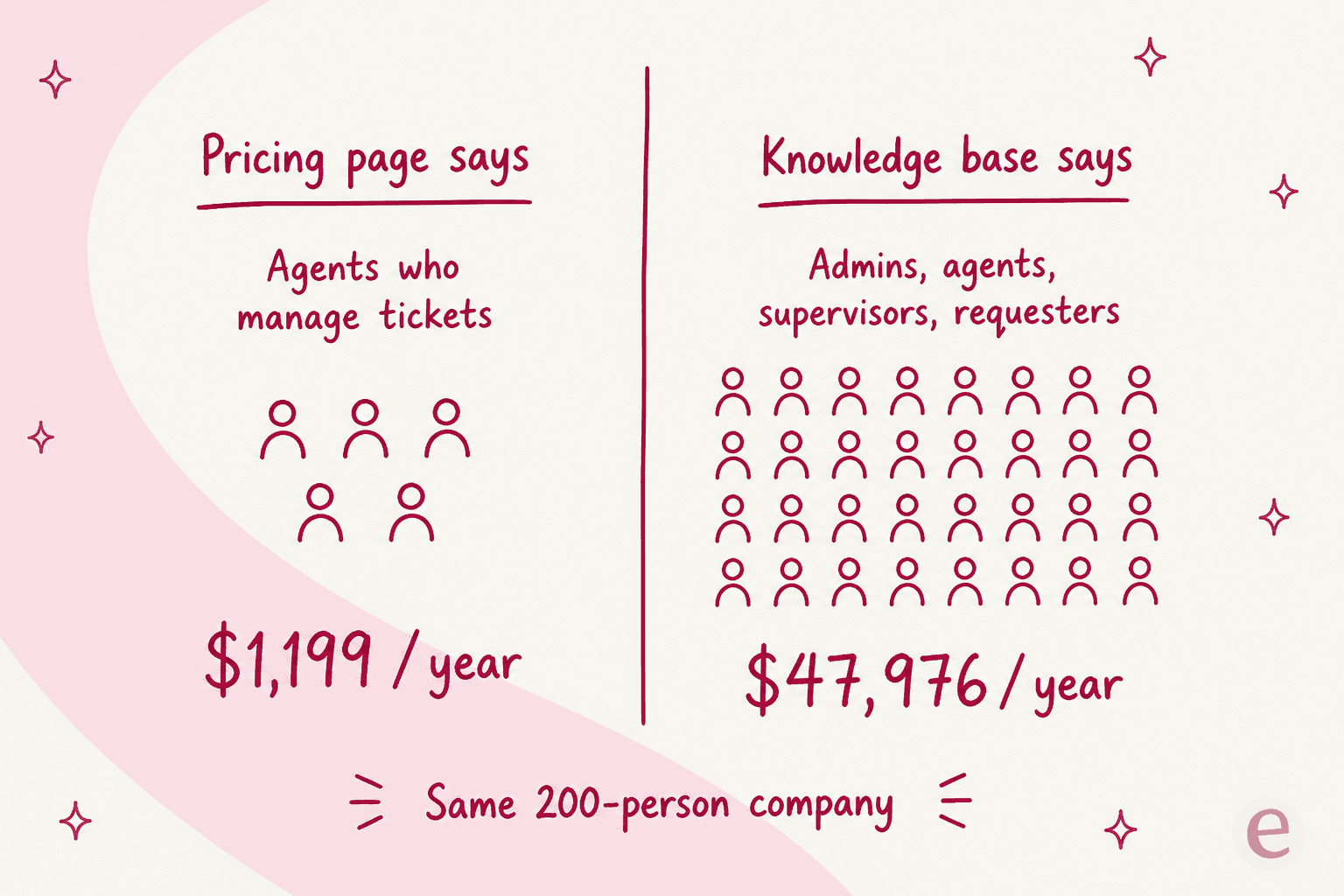
The chart above isolates the counting question by holding the rate constant at Standard's $19.99, which is why both figures use that rate. In practice the tier caps interact, so here is the real arithmetic on two shapes of team.
An eight-agent IT desk, sixty employees raising tickets, wants the AI. AI means Enterprise. Under the pricing-page reading, that is 8 users at $59.99, or $5,759.04 a year. Under the knowledge-base reading, it is 68 users, or $48,951.84 a year. Same product, same team, same page of the same website.
A 200-person company running an internal desk with five agents. Standard's 25-requester cap rules it out immediately, and Plus caps at 50, so Premium is the floor just to get unlimited requesters. Under the pricing-page reading, 5 users at $49.99 is $2,999.40 a year. Under the knowledge-base reading, 205 users is $122,975.40 a year.
I want to be precise about what this is and is not. It is not evidence that Apps 365 charges the higher number. Every G2 reviewer I read describes a small billed team, and the tooltip is the more prominent of the two statements, so the agent reading is probably the operative one. What it is, is an unresolved contradiction in the vendor's own published material about the single most expensive variable in the contract. Get the definition in the order form in writing, with your requester count named, before you sign anything. This is exactly the ambiguity that makes per-seat licensing hard to budget for an internal helpdesk or an HR helpdesk, where the requester population is the whole company by definition, and where most AI for internal support teams has moved away from seats entirely.
What $19.99 does not include
The pricing page headline calls Helpdesk 365 an "AI-powered helpdesk that fits every budget". The tier gates tell a narrower story. Plans are strictly cumulative, and the things most buyers assume are table stakes are stacked at the top.
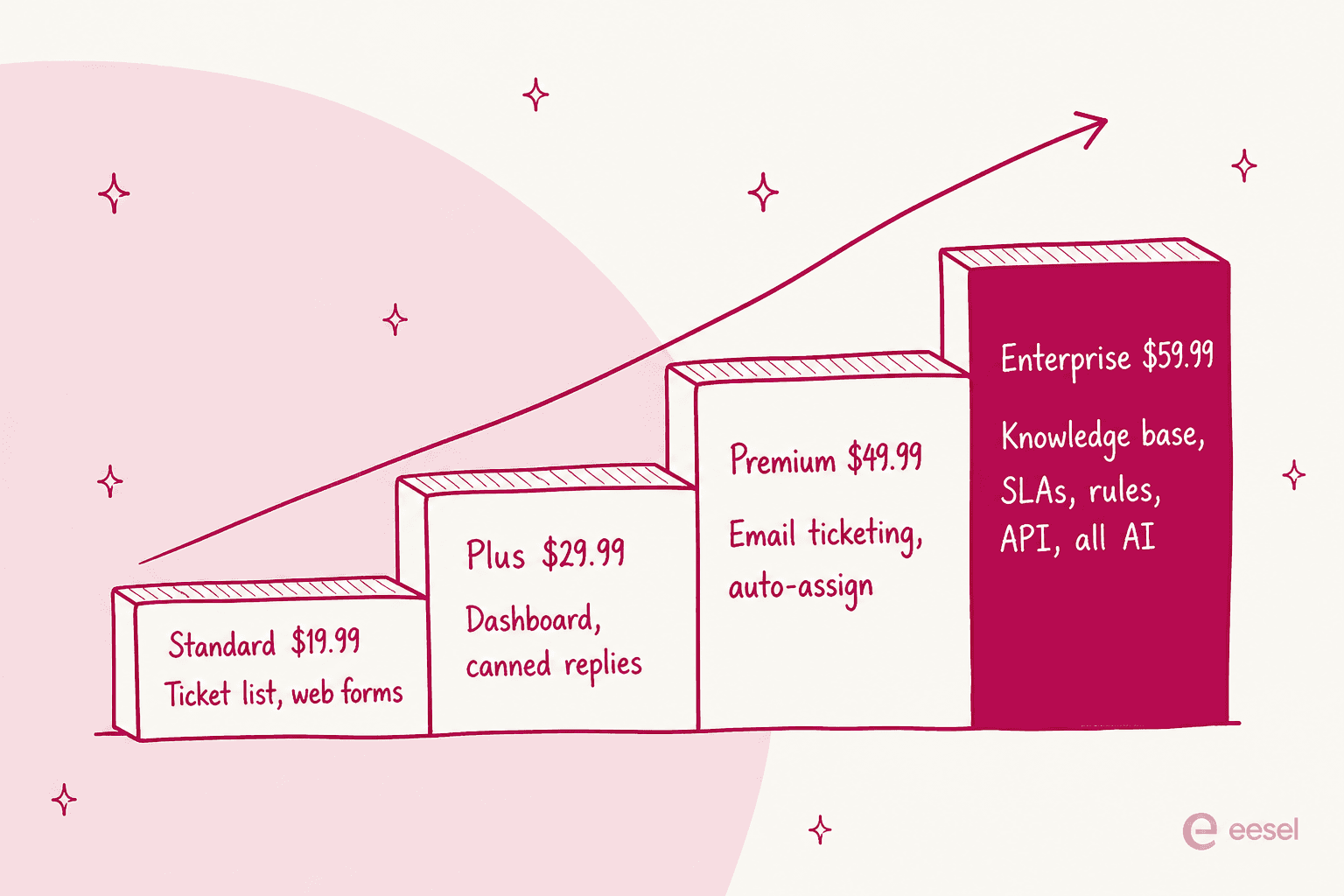
Standard gets you custom request types, self-service web forms, smart notifications, department groups and a mobile-responsive view. That is a structured ticket list living in SharePoint, and for some teams that is all the desk they need.
What it does not get you is email. "Create & update ticket from emails" and "Auto capture email attachments" first appear on Premium at $49.99, and department-wise multiple mailboxes only on Enterprise. For most desks, email-to-ticket is the product, so the effective starting tier is $2,999.40 a year rather than $1,199.40.
Then Enterprise absorbs the rest: knowledge base, "Multiple SLA choices", auto-escalation with Level 1 and Level 2, approval workflows, rules and automation, archive, ticket aging report, API connectivity, Power BI and Power Automate connectivity, and all five AI line items. If you have priced a service desk before, that list is roughly the definition of one, which makes the help desk versus service desk distinction a pricing decision here rather than a semantic one. Worth reading our survey of IT service desk tools alongside the Enterprise quote.
One line deserves separate mention because it is easy to misread. Standard lists "2 Support tickets per year". Read in context against Plus's "Unlimited support tickets", that is vendor support incidents you can open with Apps 365, not a cap on your own ticket volume. It still means the cheapest tier buys you two conversations with the vendor a year, which is thin for a product that several reviewers say needed vendor help to set up.
Four rate cards, one product
While reconciling numbers I found the same Enterprise tier priced four different ways across surfaces the vendor controls or supplies.
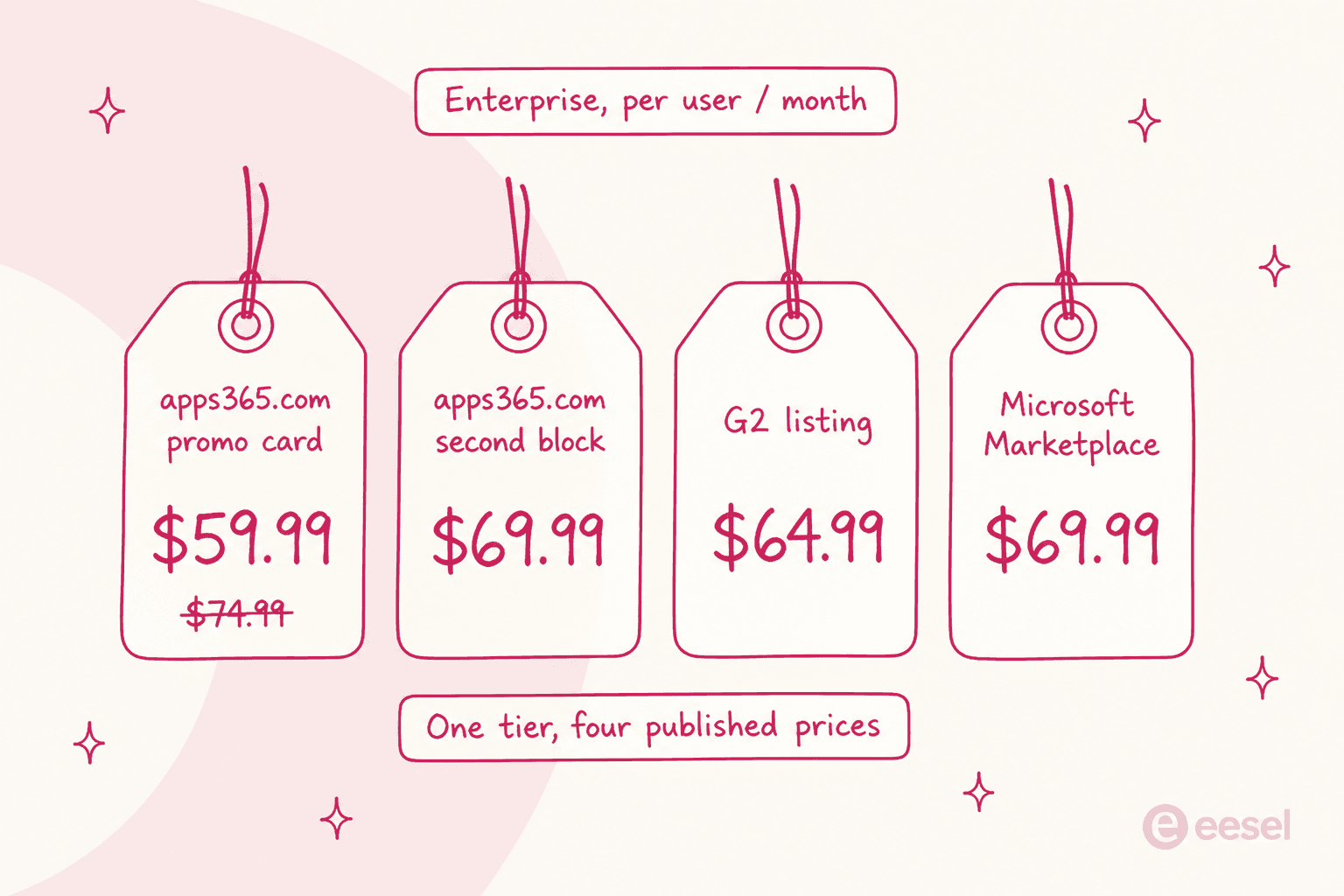
The pricing page renders its plan set twice. The prominent card grid badges Enterprise "Promo - 20% off" at $59.99, struck through from $74.99. A second, stripped-down block further down the same page shows $69.99 with no promo badge and a shorter feature list that omits every AI feature, which reads like a copy that predates the AI additions.
The Microsoft Marketplace SaaS listing is the tiebreaker, and it sides with $69.99: Enterprise is listed at $839.88 per user per year, which is $69.99 a month, with a promo SKU at $719.88 ($59.99 a month) and Premium at $599.88 ($49.99 a month). That makes the advertised "20% off" a discount from a list price Microsoft never publishes. Measured against the Marketplace rate, the real saving is 14.3%.
Two more wrinkles from that listing. Standard and Plus are absent from Marketplace entirely, so buying through Azure sets your floor at $599.88 per user per year, two and a half times the vendor's cheapest plan. And the listing carries a free-forever line the newer add-in listing drops: "Helpdesk 365 is free for up to 1 users forever". One user is a demo seat, not a desk.
The hr365.us storefront is the fourth surface, and it reconciles to the cent with the website: Standard $1,199.40, Plus $1,799.40, Premium $2,999.40 for "5 users, one year subscription". Divide $1,199.40 by five users and twelve months and you get exactly $19.99, so there is no annual discount hiding in the annual commitment. Enterprise there is $4,199.40, which is $69.99 a month again, meaning checkout costs $600 a year more for five seats than the promoted rate.
The review directories add two more numbers. G2 lists Standard at $11.98 and Enterprise at $64.99. Capterra lists Standard at $19.99 and Enterprise at $59.99, with Premium at $44.99 rather than $49.99. Both claim to be vendor-provided.
And a note on the promo, because it is contractual rather than cosmetic. The footnote reads: "This is a limited-time promo and can be withdrawn at any time without notice". We hear that concern constantly. One budget-conscious B2B hardware support team, running around 250 tickets a month, had watched a previous vendor's price more than double and specifically asked for contractual price locks before committing. A promo with a withdrawal clause and no published renewal rate is the shape of thing that request exists for.
The Microsoft bill nobody prices
This is where being the person who ships integrations pays off, because the architecture tells you the cost even when the pricing page will not.
Helpdesk 365 installs into your own tenant. Ticket data lives in SharePoint lists you own, which the FAQ states plainly ("It stores in SharePoint lists of clients' tenants") and which Marketplace frames as a "Zero Trust Security Model". That is a real advantage for a regulated team, and it is the product's best argument.
It also means Apps 365 sells you the app package and the licence key, and Microsoft sells you everything that makes it run.
| What the app needs | Who bills you | Priced by Apps 365? |
|---|---|---|
| Microsoft 365 with SharePoint Online (2016 or later) | Microsoft | No |
| Global Admin or SharePoint Admin to install | You, in labour | No |
| Nine tenant-wide Microsoft Graph scopes, admin-approved | Microsoft consent flow | No |
| Exchange shared mailbox with Send As delegation | Microsoft | No |
| Power Automate solution import, for email-to-ticket | Microsoft | No |
| Your own Azure OpenAI resource, for the AI | Microsoft, per token | No |
| Or a published Copilot Studio agent plus an Entra app registration | Microsoft | No |
The Graph list is worth reading in full, because it is a broad tenant-wide consent grant: Presence.Read.All, User.Read.All, MailboxSettings.Read, Calendars.Read, Group.Read.All, Chat.ReadWrite, Chat.Create, Mail.Read.Shared. The install guide is blunt that ticket notifications do not work until an admin approves each one. Worth noting alongside that: the vendor's Microsoft 365 app certification record states "This application does not use Microsoft Graph", which does not match the install docs.
The AI path is the clearest unpriced dependency. The Configure Azure AI guide walks you through provisioning the resource yourself: open portal.azure.com, create the Azure OpenAI service, create a deployment, then paste the endpoint, key and deployment name into Helpdesk 365. Inference is billed by Azure to you. The alternative path needs a published Copilot Studio agent, an Entra app registration with the CopilotStudio.Copilots.Invoke permission, and an Agents SDK connection string.
Set against that, the product FAQ states that "No additional Microsoft licensing is required". Copilot Studio is separately licensed by Microsoft, so those two statements are hard to hold together. If the AI is why you are buying, price the Copilot side of the bill and the SharePoint side before you commit, and read our take on Microsoft Copilot alternatives if the licence maths stops working.
Three published limits belong in the same budget conversation:
- Around 2,000 API calls per 24 hours, all operations included. That number sits in a note under a settings toggle rather than in any limits table, and it is the hardest ceiling in the doc set. It is also the kind of number that surprises people late: an email-security company on Freshdesk, scaling toward roughly 20,000 tickets a year, burned through 200 API calls in a single test day and immediately started worrying about costs at volume.
- One Power Automate flow per team. Running four support inboxes means importing and hand-editing the same flow four times, each with its own mailbox ID and team code. There is no bulk path.
- A 14-day trial that collapses to one user. The FAQ is direct: "Once the trial gets expired only 1 users can use the application."
One more thing to check yourself rather than take from me. The Helpdesk 365 product page claims SOC 2 Type II, while the Microsoft certification record answers No to SOC 2, ISO 27001, HIPAA, FedRAMP and CSA Star, and No to holding GDPR or CCPA obligations. If compliance is why SharePoint-resident data appealed to you, ask for the actual report.
What the AI actually is, and what it is gated behind
The marketing names four capabilities: Smart Ticket Intelligence, AI Agentic Tickets, Intelligent Summaries and AI Copilot. The pricing rows name five different ones: Copilot Integration, AI Ticket Summary, AI Agents, Native MS Copilot Integration and AI Knowledgebase responses. The two sets do not map one to one, which makes it hard to tell from published material exactly what you are buying.
What the docs do state clearly is what it reads from. The AI trains on past and historical tickets, on the knowledge base, and on the conversation context of the ticket in front of it. No website crawl and no file upload appear on any page I read, and no ingestion limits are published. Notably, the knowledge base it reads from is itself Enterprise-gated, so the AI and its source of truth unlock together.
There is no usage meter. No per-resolution, per-conversation, per-ticket or per-token AI charge appears anywhere, which is unusual, and better for the buyer than the ticket automation tools. AI is a seat entitlement on Enterprise, full stop.
Two things I would want resolved before switching an internal queue onto it. First, the product FAQ says the AI "auto-resolves approximately 40% of routine tickets" and makes the desk "up to 60%" faster, with no methodology, sample or date attached, while the feature page describes strict human-in-the-loop review. Those pull in opposite directions. Second, and more practically, there is no dry-run, simulation, sandbox or shadow mode published anywhere. The routes to confidence are a 14-day trial and a booked demo.
That second gap is the one I would not accept, and I say that as someone who has watched a confident-sounding bot give wrong answers to real customers. It is why every eesel rollout replays historical tickets first and scores the answers against what the team actually sent, before anything reaches a live queue. If you are evaluating AI ticket triage, test-before-live should be a hard requirement rather than a nice-to-have. The same goes for anything doing ticket classification, where a wrong label is quieter than a wrong reply and therefore harder to catch.
What users actually report
The headline numbers are 4.7/5 from 246 reviews on G2 and 5.0/5 from exactly one review on Capterra, which is itself flagged as incentivized. There is no Trustpilot profile, so there is no third point to triangulate with. Read the G2 figure with the mix in mind: 86% five-star, and most of the recent five-star entries are tagged as prompted from inside the product, with "what do you dislike" fields answered as feature requests.
The positive case is consistent and easy to believe:
"One of the biggest advantages for our organizations is the deep Microsoft Teams integration. Our employees can create, update, comment on, and track tickets directly within Teams without opening another application."

The critical reviews cluster tightly around setup and performance:
"Lot of configuration has to be done manually and partially described in the documentation"
"The UI can at times behave unexpectedly, either freezing or breaking until the page is reloaded. I haven't been able to find any reports showing info like who creates the most tickets, or which agents are closing tickets."
And one directly on the billing terms, which is relevant given there is no monthly option:
"The annual subscription for the first year. This should be reduced to quarterly if the customer asks for it."
Outside the review sites, the picture is quieter than 246 reviews would suggest. Two separate Reddit threads asked about this product by name and vendor URL, in 2021 and 2024, and neither drew a reply from an actual user. Every response named a different tool. The wider r/sysadmin and r/sharepoint consensus on SharePoint-native ticketing is worth hearing before you commit architecture to it:
"My opinion, formulated from years of first hand experience with SharePoint, is to avoid tightly coupled integrations or SharePoint specific vertical solutions (I.e a ticketing system that is built for SharePoint). The reason is that when you do that you immediately introduce an upgrade dependency. In order for you to go to vNext you have to wait for the vendor of the solution to support it."

The Teams experience really is the draw, and it is the same reason AI in Microsoft Teams has become its own buying category. But that critique is aimed at the category, not at Apps 365 specifically, and it is the fairest summary of the trade you are making. You get data residency and a Teams-native experience. You take on a dependency on one vendor's release calendar sitting on top of Microsoft's.
Where Apps 365 is the right call
I would not talk anyone out of this if their situation matches it. Helpdesk 365 makes real sense when your organisation is all-in on Microsoft 365, your ticket data must stay inside your own tenant for policy reasons, your requester population is small and countable, and your requirements stop at a structured queue with forms and notifications. In that shape, $1,199.40 to $2,999.40 a year with SharePoint-resident data is a reasonable deal, and the Teams experience is the part reviewers like most.
I would look elsewhere in three cases.
If you need SLAs, escalation, a knowledge base, rules or reporting, you are on Enterprise and comparing against full service desks anyway. Run the numbers against Freshservice pricing first. Then check the Jira Service Management alternatives, since the Atlassian route has a similar tenant-adjacent feel and a published rate card you can hold to.
If your requester count is your headcount, get the billing definition nailed down before anything else. Nothing else in the contract moves the total as much.
And if AI resolution is the actual goal, you are buying a seat entitlement plus your own Azure inference bill with no way to test it first. That is a different purchase from what an AI helpdesk agent usually means today, and the roundup of AI helpdesk software shows how far the category has moved.
One build-versus-buy note, since a SharePoint app sits awkwardly between the two. A customer at GENERAL BYTES put the calculus better than I could:
"We could try to write our own LLM application but we didn't want to invest our time into that. We wanted something that we would not have to maintain."
Karel, GENERAL BYTES
A packaged SharePoint app is not a build, but the nine Graph scopes, the per-team flow imports, the admin-driven version upgrades and the self-provisioned Azure OpenAI resource mean it is not a hands-off buy either.
Try eesel for the internal queue
If the reason you are pricing Apps 365 is that you want AI answering an internal queue and you live in Microsoft, here is the honest comparison.
eesel is not a Helpdesk 365 add-on, and I would rather say that plainly than sell you a connector that does not exist. eesel connects to Zendesk, Freshdesk, Gorgias, Front, Help Scout, HubSpot, Salesforce and Jira Service Management, and it answers directly in Microsoft Teams and Slack. So this is a decision about where the queue lives, not a bolt-on. If you would rather compare the whole field first, our roundup of AI for Microsoft Teams support covers the alternatives.
What it changes about the numbers above: eesel is one fixed monthly price from $299 for 500 credits (1 credit per ticket or chat), with no per-seat fee and no requester counting, so the "what is a user" question that makes this entire post necessary simply does not arise. Questions asked in the eesel dashboard are mostly free, overage is optional with a cap you set, and paying a year upfront gets you two months free. And on the gap I would not accept: eesel's simulation replays hundreds of your past tickets and scores the answers against what your team actually sent, before it touches a live one. The free plan is 100 credits with no card.
If your data must stay in your own SharePoint tenant, Apps 365 has an argument eesel cannot match, and you should take it seriously. If what you want is an AI teammate that you can test against your own history first, try eesel and see what it does with a real ticket before you commit a budget line to either.
Frequently Asked Questions
How much does Apps 365 Helpdesk 365 cost?
Is there a free version of Helpdesk 365?
Does Apps 365 pricing count ticket requesters as billable users?
Which Helpdesk 365 plan includes the AI features?
What else do I have to pay Microsoft for to run Helpdesk 365?



Article by
Rama Adi
Rama is a software engineer at eesel AI with two years of experience writing about B2B SaaS, AI tools, and customer support technology. Based in Bali, Indonesia, he brings a developer's perspective to product comparisons — cutting through marketing copy to what the integrations and APIs actually do.