


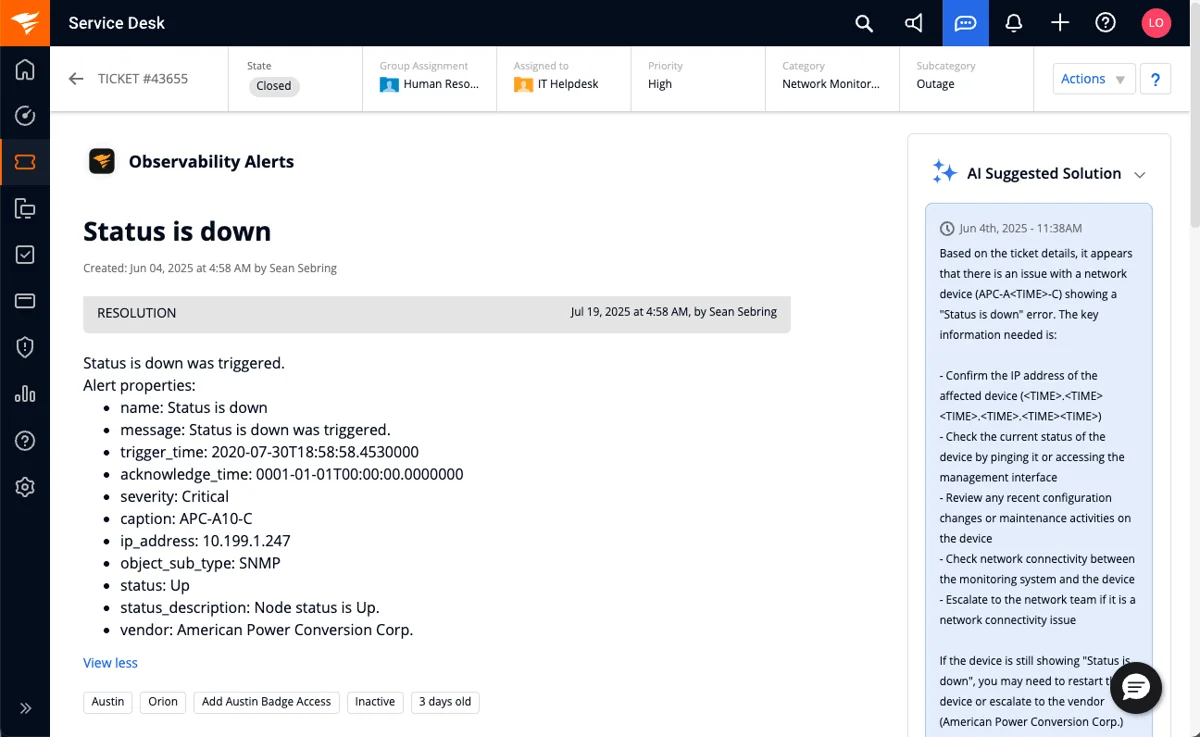
The seat price is not the price. Every IT ticketing system in this roundup meters its AI on a different unit, and that unit decides your invoice: Jira Service Management charges $1 per resolution plus $0.30 per assisted conversation, Freshservice bundles 1,200 AI agent sessions per licence per year, SolarWinds caps AI summaries at 250 a month per account (not per agent), and Spiceworks ships no AI at all.
For a small internal IT team with no budget, Spiceworks Cloud Help Desk is still free and still real, as long as you never grow past five technicians. If your engineers already live in Jira, Service Collection at $25 per agent is the obvious pick. If you want ITIL depth without hiring a platform team, Freshservice Pro or SysAid sit in the sweet spot. ServiceNow is excellent and will cost you ten full-time people to run properly.
And if your ticketing system is fine and the queue is the problem, do not migrate. I have spent the last few years putting AI agents onto live support and IT queues at eesel, including the ugly parts: we have watched a customer's bot invent a solar-subscription policy and send it to real people, which is exactly why every rollout now gets simulated against thousands of historical tickets before it touches a live one. A layer on top of the desk you already run resolved 73% of tier-1 requests in month one at Gridwise, with no migration at all.
How I picked these, and what I actually checked
I did not score these on feature-checklist parity, because every tool here has incident, request, and knowledge management, and the checklist stopped being a differentiator around 2018. If you want the wider category view rather than the IT-specific one, our roundup of top helpdesk software covers it. I checked four things instead.
The real list price for a small team. Vendor pricing pages have gotten sneaky about this. The Jira Service Management pricing page loads a calculator defaulted to 75 agents, so the "$20 per agent" headline is a blended progressive rate. A 12-person IT team actually pays $25 on Standard and $57.30 on Premium, per Atlassian's own licensing tables. That is a 25% gap between the number on the page and the number on your invoice.
The AI billing unit. Not "does it have AI", but what one unit of AI costs and what counts as one unit. These are wildly inconsistent across vendors, so I made a map of it.
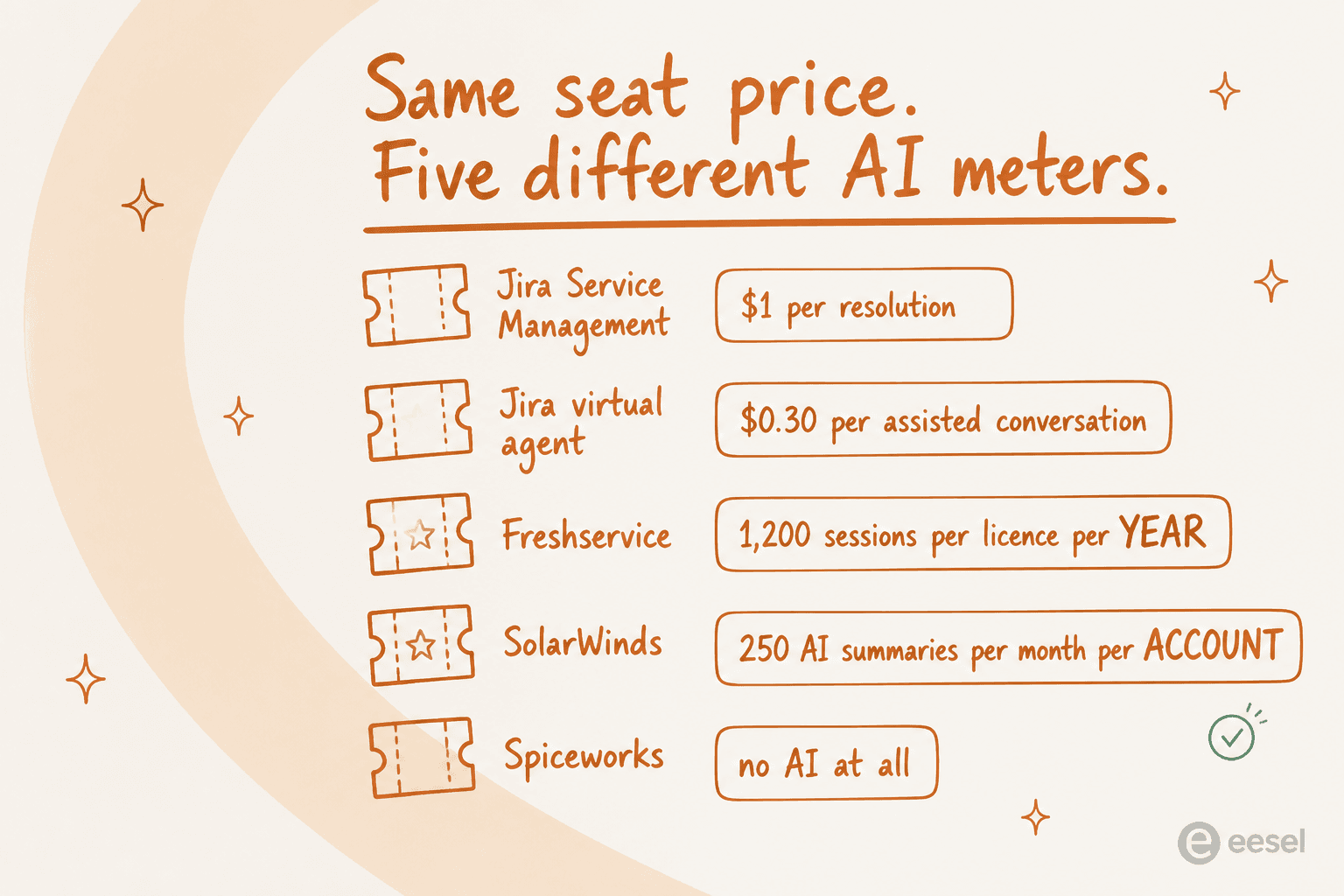
What the free tier or entry tier actually caps. Free plans here are gated on technician seats, not tickets, and one of them locks you out of the whole product the moment you add a sixth admin.
Whether the AI resolves anything. This is where I hold vendors to a hard number, and I am borrowing the test from someone outside eesel who put it better than I would have.
The one question to ask every vendor
Before you look at a single demo, know what you are going to ask. The best framing of this I have read in 2026 came from Jeff Orr on LinkedIn:
"AI is showing up in every ITSM vendor pitch deck. Most of what they're calling 'AI-augmented service management' is a conversational interface bolted onto a legacy workflow engine. That's not transformation. It's a thin layer on top of the same friction."

His test: what percentage of ticket volume can the system resolve without human assignment? Not deflect to a knowledge article, resolve. He puts a mature deployment at 25 to 40 percent, and anything below 10 percent at "that's a chatbot."
That distinction matters because deflection is a self-certifying metric, and the sharpest description of the problem is a sysadmin's, not a vendor's:
"The scary part is how easy it is for these products to bullshit metrics for the executives.
Like, put a chatbot in front of the support portal? Wow, it handled 5000 issues this month! 5000 tickets that didn't hit our EXPENSIVE human help desk staff!
Now, only 1 of those interactions was useful and the other 4999 times people had to circumvent the bot to open a ticket, or just gave up and fucked off, but hard to track that, eh?"

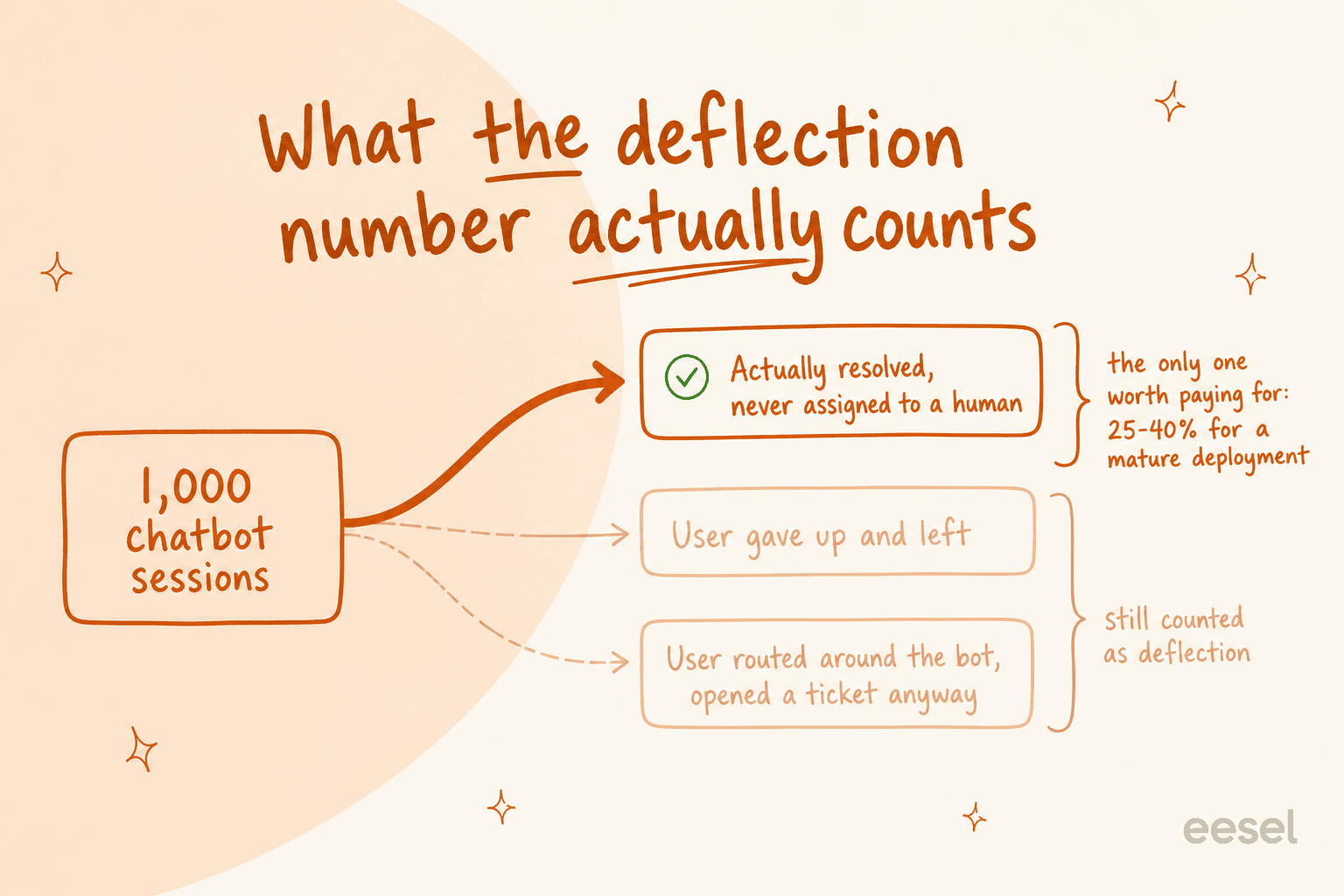
An ITIL practitioner named Naresh Selvarasu landed on the same conclusion with a better name for it: "If a user gives up because your bot is frustrating, that is not 'deflection.' That is Service Denial." His fix is to measure user effort and first contact resolution instead. I would add one more: ask the vendor to run their AI against your last 3,000 real tickets and show you the per-category breakdown before you sign. If they cannot, that tells you something.
For the honest counterweight, here is what a real number looks like from someone running this in production rather than selling it:
"We're using one for password resets and basic account stuff. Works fine for that, cuts tickets by maybe 20%.
Triage and routing is still hit or miss. It's good at obvious stuff but anything nuanced still needs a human to sort it out."
That is the bar. Twenty percent on the boring stuff, honestly measured, beats a 60% deflection slide every time. We went deeper on how to measure it in AI resolution rate, and on the difference between AI agents and chatbots.
The 10 best IT ticketing systems in 2026, compared
| # | Tool | Best for | Entry price (per agent/mo) | Top tier | AI billing unit | Free tier | Assets / CMDB | On-prem | Compliance |
|---|---|---|---|---|---|---|---|---|---|
| 1 | eesel AI | Keeping your desk, fixing the queue | From $299/mo (500 credits), no seats | 5,000 credits $1,899/mo | 1 credit per ticket or chat | 100 free credits | Via your desk | No | SOC 2, HIPAA (talk to us) |
| 2 | Jira Service Management | Teams already on Atlassian | $25 Standard | $57.30 Premium | $1/resolution, $0.30/assisted conversation | 3 agents | 5,000 objects, then $0.02 each | Data Center | SOC 2, ISO 27001 |
| 3 | Freshservice | ITIL depth without a platform team | $19 Starter | $99 Pro + $29 AI add-on | 1,200 sessions/licence/year | None, 14-day trial | Asset Units, packs of 500 | No | SOC 2, ISO 27001, GDPR |
| 4 | ServiceNow | Large multi-department enterprises | Quote only (~$100 cited) | Quote only | Now Assist uplift, quote only | None | Full CMDB + discovery | No | FedRAMP, SOC 2, ISO |
| 5 | SolarWinds Service Desk | Asset-heavy IT shops | $39 Essentials | $124 Premier | 250 summaries/mo per account | None, 30-day trial | Separate purchase | No | SOC 2, ISO 27001, HIPAA BAA on Advanced |
| 6 | ManageEngine ServiceDesk Plus | On-prem or hybrid IT | See pricing below | Enterprise | Zia, edition-gated | Free edition | Bundled by edition | Yes | ISO 27001, GDPR |
| 7 | SysAid | Agentic automation, prebuilt | $89 Professional | Enterprise, quote only | Bundled, asset-metered | None, free trial | 250 assets included | Yes | SOC 2 II, ISO 27001/27017/27018 |
| 8 | HaloITSM | Leaving ServiceNow on price | See pricing below | See pricing below | Bundled by tier | None | Bundled | Yes | ISO 27001 |
| 9 | Spiceworks Cloud Help Desk | 1 to 5 technicians, zero budget | Free | $5 Premium | None, no AI at all | Yes, 5 seats | Separate free tool | No | No HIPAA, not encrypted at rest |
| 10 | Zendesk | Shared IT and CX desk | $19 Support Team | $115 Suite Pro | Per automated resolution | None | Light | No | SOC 2, ISO 27001, HIPAA |
Pick your hard constraint
Which IT ticketing system actually fits?
Every one of these tools is somebody's right answer. The constraint you cannot move decides which one is yours.
Spiceworks Cloud Help Desk, Core plan
Free forever, unlimited end users, ad-supported. It is a real ticketing system and it has been one since 2006.
- The wall: 5 admin/tech seats. At 6, techs lose access and end users stop being able to file tickets.
- The trade: zero AI features, no SLA reporting, no CSAT, tickets not encrypted at rest, no HIPAA BAA.
- Next step up: Premium at $5 per seat/month, billed on every active employee seat, not just the ones past five.
Jira Service Management (Service Collection)
If your engineers already work in Jira, the request-to-issue handoff is worth more than any feature checklist.
- Real list price: $25/agent/month Standard, $57.30 Premium, for 1–15 agents. The $20 on the pricing page is a blended rate for 75 seats.
- Three AI meters: Rovo credits per user, $0.30 per assisted conversation above 1,000/month, and $1 per Rovo Customer Service resolution.
- Free tier: 3 agents, unlimited customers, no virtual agent.
Freshservice Pro, or SysAid Professional
Both give you incident, problem, change and a real CMDB without a platform team. Pick on where the AI sits.
- Freshservice Pro: $99/agent/month annually. Freddy Copilot is a $29/agent add-on on top; the autonomous agent is Enterprise-only.
- SysAid Professional: $89/agent/month, 250 managed assets included, AI agents in the box but the buy path still runs through sales.
- Watch: both meter assets separately from seats. Ask for the asset line on the quote.
ServiceNow, if you can staff it
Nothing else models a 40,000-person org this well. The licence is not the expensive part.
- Staffing tax: practitioners describe ten full-time people across three teams to run a good implementation.
- Implementation: partner costs reported at up to 2.5× the licence spend.
- If that sounds like too much: you are the mid-market, and every tool above this row was built for you.
Keep the ticketing system. Add an AI layer.
The most common real situation: the tool is fine, the queue is the problem, and migrating costs six months you do not have.
- What changes: tier-1 requests get resolved inside the desk you already run, rather than in a separate chatbot inbox.
- What to test first: run it against your last few thousand real requests before it touches a live one.
- The number that matters: percent resolved without human assignment, not deflection.
Each item below follows the same shape: what it is, pricing, what the AI actually does, where it falls down, and a verdict naming who should buy it.
1. eesel AI: best for keeping your ticketing system and fixing the queue
I build this one, so read the verdict with that in mind. I have kept it first because it answers a situation the other nine cannot: your IT ticketing system is fine, your backlog is not, and a migration costs you six months you do not have.

What it does
eesel is an AI agent that joins the desk you already run rather than replacing it. On the Jira Service Management integration it works as a real agent inside the service desk: it reads requests, drafts and sends replies, adds internal notes, sets request type and priority, and routes to teams. There is no separate chatbot inbox. The same thing exists for Zendesk, Freshdesk, and Slack, which is where most internal IT requests actually start.
It trains itself on your past requests, your knowledge base, and your request types, so there is no labelling project. If your internal knowledge base is thin, it also pulls from Confluence, Notion, and Google Docs.
The part I care most about
Before it touches a live request, you run it against your historical ones. The simulation shows per-theme coverage and flags the gaps in plain language, like "23 tickets last week asked about pro-rated refunds, but your docs only cover full cancellations." We built that because of a failure, not a roadmap: a paying customer's bot, a Danish solar-energy provider, fabricated subscription claims and sent them to real people when its knowledge base had no matching answer. Another got "Oxygen (periodic table)" as an answer to a support question. Every rollout gets simulated now because we shipped the version that did not. If you want the longer version of that lesson, we wrote it up in preventing AI hallucinations.
Pricing
One fixed monthly price, no seats. Plans start from $299/month for 500 credits, where 1 credit is one ticket or chat, and one multi-message ticket counts once, not per reply. Bigger batches run 1,000 for $499, 2,500 for $999 and 5,000 for $1,899. There is no platform fee and no per-seat charge, so hiring a new technician does not change your bill. You can route 200 of 1,000 tickets to AI and use only 200 credits. SSO and MFA are add-ons from $199/month, and HIPAA is available on request. Free to start with 100 credits and no credit card.
Where it falls down
It is not an ITSM platform. There is no CMDB, no change advisory board, no asset discovery, and no ITIL certification to point at in a procurement review. If you do not already have a ticketing system, you need one of the nine below first, and our explainer on AI help desks is the better starting point. It also cannot fix a knowledge base that does not exist, which is the constraint a sysadmin put better than our marketing does:
"This is the part of lot of the higher ups miss. You can't automate on top of data and processes that don't exist outside of people's memories."
Verdict: buy it if you have a working desk and a queue problem, and you want the resolution number to move this quarter rather than after a migration. Skip it if you are shopping for your first ticketing system, or if you need a CMDB in the same product.
2. Jira Service Management: best if your engineers already live in Jira
If your developers already work in Jira, this is the default and I would not fight it. A service request that turns into an engineering issue without leaving the platform is worth more than most feature comparisons.

Pricing, minus the calculator trick
As of 2026, Jira Service Management is no longer sold on its own, per Atlassian's Service Collection licensing. It is packaged as Service Collection, which bundles JSM, Customer Service Management, Assets, and Rovo into one SKU that cannot be split.
| Plan | 1 to 15 agents (per agent/mo) | Annual, 6 to 10 agents | Annual, 51 to 100 agents |
|---|---|---|---|
| Free | $0, capped at 3 agents | $0 | n/a |
| Standard | $25 | $2,500 | $19,700 |
| Premium | $57.30 | $5,750 | $51,000 |
| Enterprise | Not published, annual only | Quote | Quote |
The "$20 per agent" you see on the pricing page is a blended rate at 75 seats, not a list price. Monthly billing is progressive: the first 15 seats are $25 each on Standard, seats 16 to 100 are $18.75. Monthly plans also use maximum-quantity billing, so removing seats mid-cycle does not reduce that cycle's bill.
The AI, and its three separate meters
This is the most fragmented AI pricing in the roundup, and it is worth reading twice.
- Rovo credits come with the seat: 25 per user per month on Standard, 70 on Premium, 150 on Enterprise. Overage is disabled by default.
- Virtual service agent is Premium and up, with 1,000 assisted conversations a month included, then $0.30 per assisted conversation. An assisted conversation counts if it was matched to an intent, even when it escalates to a human.
- Rovo Customer Service is included on all paid plans at a flat $1 per resolution.
Assets is metered per object: 5,000 included on Standard, then $0.02 per object per month. We covered the wider feature set in our guide to Jira Service Management AI, and there is a setup walkthrough for enabling AI in Jira.
Where it falls down
Three billing units for one product is a genuine planning problem, and none of them map to "a ticket." The free tier's 3-agent cap is tight for anything but a two-person IT team, and the virtual agent is absent from Free and Standard entirely. If you are weighing it against the obvious alternative, we compared Zendesk and Jira Service Management directly.
Verdict: buy it if Atlassian is already your system of record. Model the $1-per-resolution line at your real ticket volume before you sign, because at 2,000 automated resolutions a month that is $2,000 sitting on top of your seats. If you want the AI without the meter, an AI agent for Jira on a fixed monthly plan is the cheaper shape.
3. Freshservice: best mid-market ITSM if you can live with the AI gating
Freshservice is the tool I would hand a 20-person IT team that needs real ITIL process and does not want to hire someone to administer it. Incident, problem, change, release, a service catalogue, and a CMDB, all reachable without a consultant.
Pricing
| Plan | Annual (per agent/mo) | Monthly (per agent/mo) | What unlocks |
|---|---|---|---|
| Starter | $19 | $29 | Incident, knowledge, portal, ServiceBot on Teams and Slack |
| Growth | $49 | $59 | SLA management, service catalogue, MSP mode |
| Pro | $99 | $119 | Problem, change, release, intelligent routing |
| Enterprise | Custom | Custom | XLAs, sandbox, audit logs, Freddy AI Agent |
There is no free tier, only a 14-day trial. Assets are billed in "Asset Units" sold in packs of 500, and Freshworks does not publish the pack price or the per-plan allowance.
The AI story, which is the real catch
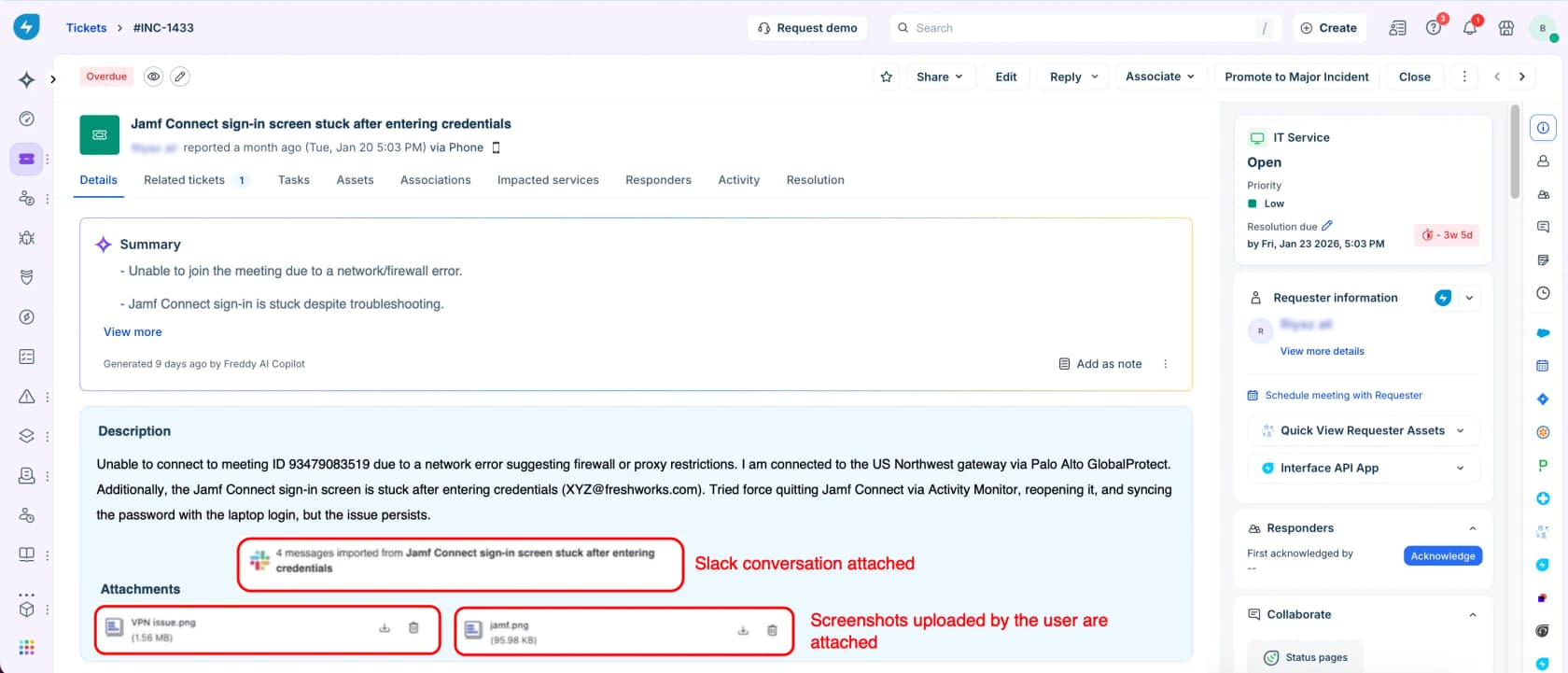
Freddy AI Copilot is a paid add-on at $29 per agent per month on top of Pro, and the autonomous Freddy AI Agent is Enterprise-only, bundled at 1,200 sessions per licence per year where a session is one user's interactions inside a rolling 24-hour window. The overage rate past 1,200 is not published anywhere.
So a Pro seat with copilot is $128 per agent per month, and the agent that actually resolves things is not on that plan at all. Even the five-star reviewers say it:
"The main drawback is how some of the coolest features—especially the advanced Freddy AI capabilities—are gated behind the higher-tier enterprise plans or require paid add-ons. When you are on a budget, seeing those features locked can be a bit frustrating."

We went deeper on the gaps in Freshservice AI limitations and on setup in Freshservice AI agent setup. If you are choosing between the two Freshworks products, Freshservice vs Freshdesk is the shorter answer.
Where it falls down
Mid-contract module price rises come up repeatedly in reviews, including from an otherwise glowing enterprise G2 reviewer whose only complaint was "how the price increase for asset management was handled." And the resolution-field behaviour irritates experienced admins: one reviewer on r/ITManagers with 15 years across five ITSM tools points out that what you type in the resolution field never reaches the requester, so you type it twice.
Verdict: buy Pro if you want ITIL depth on a mid-market budget and you are comfortable adding an AI layer separately rather than paying for Enterprise. Skip it if the AI agent is the reason you are buying, because that lives two tiers above where the value sits. Our Freddy AI review has the full breakdown.
4. ServiceNow: best for enterprises that can staff a platform team
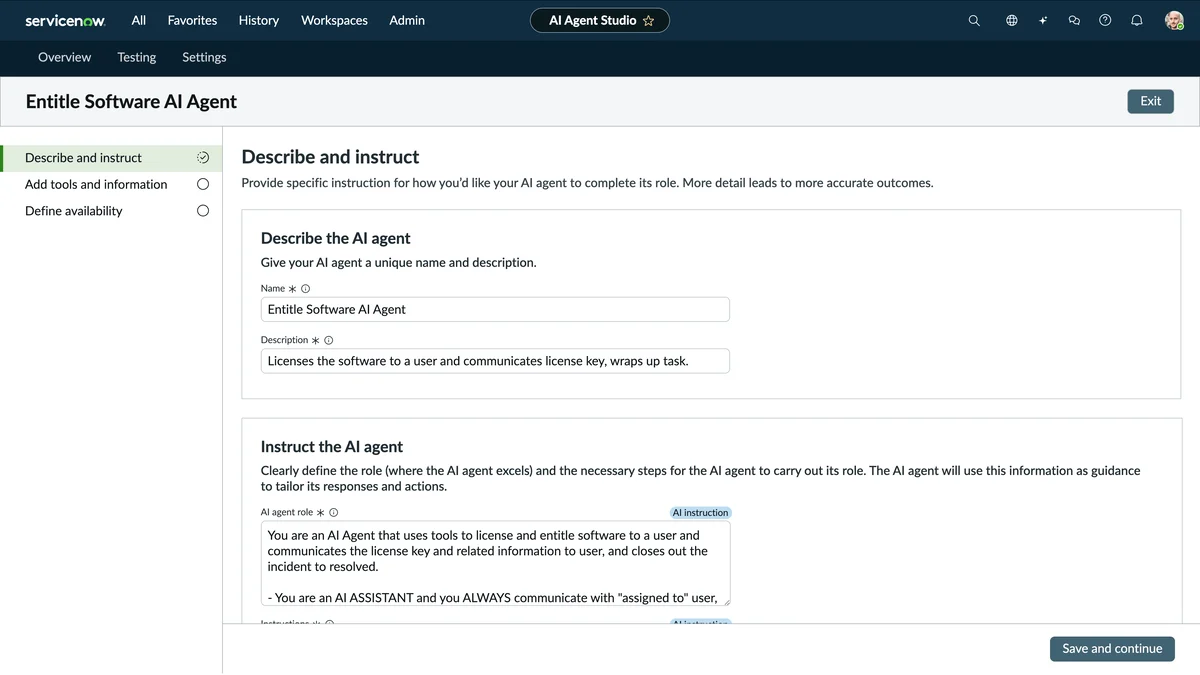
ServiceNow is genuinely the most capable platform in this list. It models a 40,000-person organisation, its workflow engine outclasses everything here, and the people who run it well are not wrong to defend it. The problem is what "running it well" costs, and the most useful testimony comes from its own defenders.
"For reference, the company I work at has an honestly fantastic SNOW implementation that is great to use. […] We have no less than ten people whose full time job revolves around managing it. Three separate teams (cmdb, change management, snow core). It has taken us years to get the cmdb to a useful state. […] If you don't have at least one person whose full time job is managing snow, I imagine it would be completely useless."
That is the best pro-ServiceNow comment in the thread, and it is also the strongest argument against it for anyone under about a thousand employees.
Pricing
Entirely quote-gated. ServiceNow publishes no list price for ITSM, so every figure in circulation comes from practitioners. A self-identified six-year platform owner puts that floor at "at least a million a year in licensing alone" for the full stack, and community estimates for base fulfiller licences cluster around $100 per user per month, with the Now Assist AI layer adding a 25 to 60 percent uplift.
Implementation is the line people underestimate. A commenter in r/servicenow describes partner costs that "double or amplify the spend by up to 2.5 times", and adds that the platform "is not optimized for the mid market."
Where it falls down
Renewal leverage. Because everything routes through the platform, switching costs are enormous, and u/Bonobo77 names the mechanic directly: "Renewal pricing can increase significantly year over year, and customers often have limited leverage to negotiate because of the platform dependency." Even well-staffed teams become the bottleneck; one commenter describes a five-person ServiceNow team with a two-year backlog of 200 enhancement requests.
Verdict: buy it if you are enterprise, multi-department, and can fund at least one full-time platform owner. If you cannot, you are the mid-market and this will become expensive shelfware, and the head-to-head in Freshservice vs ServiceNow is the comparison to read next. We have a fuller take in our ServiceNow review and in is ServiceNow AI good, plus a look at AI agent governance if that is the procurement question.
5. SolarWinds Service Desk: best for teams that want assets and tickets in one place
SolarWinds Service Desk is the cloud ITSM product (not the older Web Help Desk, which is a different, on-prem thing with its own support cliff). It is sold per technician with unlimited requesters, which suits IT teams supporting a large employee base with a small desk.
Pricing
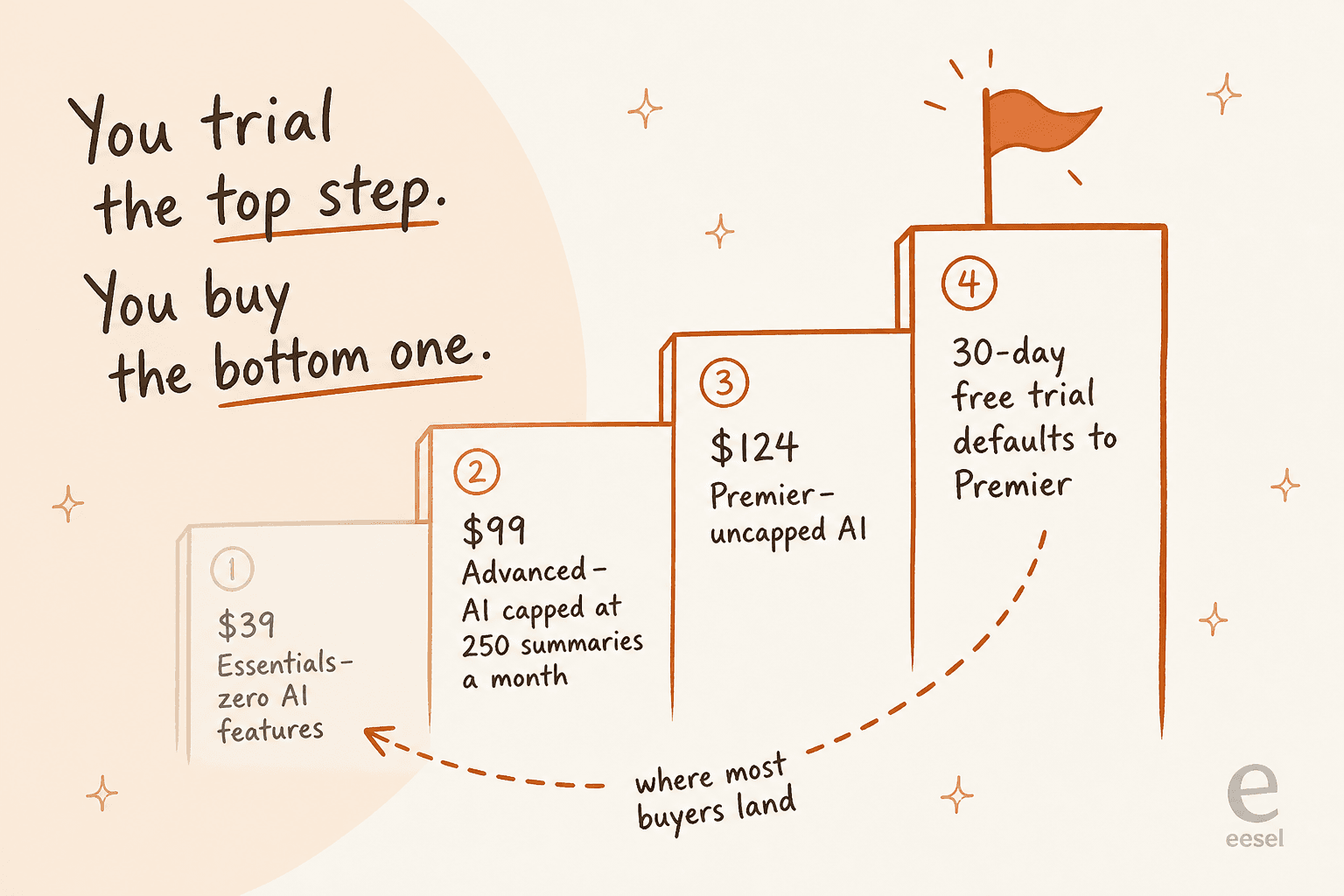
| Plan | Price (per technician/mo, billed annually) | AI included |
|---|---|---|
| Essentials | $39 | None at all |
| Advanced | $99 | Category recommendations, smart suggestions, sentiment, virtual agent, 250 summaries/mo per account |
| Premier | $124 | Everything above plus guided solutions, incident summarisation, generated responses and runbooks, all uncapped |
IT asset management is a separate purchase at every tier, and there is no published per-device price. Every plan card says "asset pricing available upon request."
The trial trap
The 30-day free trial defaults to Premier, the $124 tier. So you evaluate uncapped AI, then most teams buy Essentials at $39 and discover every AI feature they tested is gone. The middle tier is metered on a number that surprises people: 250 AI resolution summaries a month per account, not per agent. On a 20-technician desk, that is 12 summaries per technician per month.
Runbooks are capped at 3 per account on Advanced too, and the virtual agent is portal-only until Premier, where it gains Teams and Slack.
Where it falls down
You cannot buy it online. Purchase runs through a sales rep by email or phone, and volume, academic, and government discounts are all quote-gated. HIPAA BAA does not exist below Advanced, which rules Essentials out for healthcare IT.
Verdict: buy Advanced if assets and tickets living in one system is the point, and you have checked 250 summaries a month is enough. Buy Premier if the AI is load-bearing. Do not buy Essentials expecting anything you saw in the trial. Our guide to AI for IT service management covers what to expect from this category generally.
6. ManageEngine ServiceDesk Plus: best value if you want on-prem without a perpetual licence fight
ManageEngine does the thing almost nobody else in ITSM does in 2026: it publishes the whole price ladder, sells self-serve, and still offers a real on-premises deployment. If your constraint is data residency or a finance team that hates quotes, start here.
Pricing
These are total annual prices in USD, on cloud, English-only, billed yearly, from the ServiceDesk Plus pricing page.
| Technicians | Standard (help desk) | Professional (+ assets) | Enterprise (+ change, projects) |
|---|---|---|---|
| 5 | $0 | $1,545 | $3,895 |
| 10 | $1,545 | $2,945 | $7,795 |
| 50 | $6,245 | $13,945 | $27,995 |
| 200 | $19,545 | $42,845 | $59,795 |
Headline rates are $13, $27, and $67 per technician per month, and the ladder discounts as you scale: 200 technicians on Standard works out at $8.14 each, about 37% off the headline. Standard is free forever for up to 5 technicians, with unlimited end users, though free-edition support costs $35 per technician per year on top.
The trap is the add-on column. Change and release management is $3,195 a year on Standard or Professional, problem management and the service catalogue are $1,595 each, and live chat is $65 per technician per year on every tier including Enterprise. Stack a few of those on Professional and you have quietly rebuilt the Enterprise price.
The AI, and the deployment gate
Zia is included at no extra cost in all three editions, which is genuinely the friendliest AI pricing in this roundup. There is no credit pool and no per-request charge.
The catch is not the edition, it is where you host. Agent Studio, the multi-agent orchestrator, Ask Zia's LLM interface, sentiment analysis, ticket-field prediction, and the native Zia LLM are all cloud-only, per ManageEngine's own cloud versus on-premises comparison. Buying on-prem for compliance reasons means buying a much older AI product. And if you point Zia at ChatGPT or Azure OpenAI instead of the native model, you pay that provider directly for tokens.
There is also no autonomous agent here in the sense the category now uses the word. Ask Zia acts when prompted (assign, update, close) rather than working a queue on its own.
Where it falls down
The UI shows its age, and reviewers say so plainly:
"The UI could be much better; it feels like very old web apps and is not very user-friendly. Also, the API documentation is incomplete and doesn't have many of the endpoints documented."
Feature velocity is the other recurring theme: a solutions architect on G2 calls it "a good product, but it improves slower than its competitors". It sits at 4.2/5 on G2 across 249 reviews and 4.4/5 on Capterra across 234. Tellingly, almost none of those reviewers mention Zia at all, which suggests the AI-first positioning has not yet reached the people using it daily.
Verdict: buy it if you want published prices, self-serve purchase, and an on-prem option, and you are willing to trade interface polish for it. It also slots in well next to the rest of a ManageEngine stack if you already run IT automation software from them. Skip it if the modern AI features are the reason you are buying and you need on-premises, because those two requirements are mutually exclusive here.
7. SysAid: best for agentic automation out of the box
SysAid rebuilt itself around what it calls agentic AI, and unlike most vendors making that claim it will tell you which models it runs, per its security and governance page: GPT-5 for the chatbot, and Claude Opus 4.6 for code generation in its agent builder. That kind of specificity is rare and I respect it.

Pricing
| Plan | Price | Notes |
|---|---|---|
| Professional | $89 per agent/month | 250 managed assets included, "Get a quote" rather than checkout |
| Enterprise | Custom, no public figure | Starts at 20 agents, adds 3 tailor-made AI agents and a private AWS instance |
The published figure is real, but the final number moves with assets, not just seats. SysAid says cost depends on the number of users and assets managed, and asset packs beyond 250 are a separate purchase. Advanced discovery (Lansweeper), patch management (GFI), and remote support (Splashtop) are all add-ons.
What the AI does
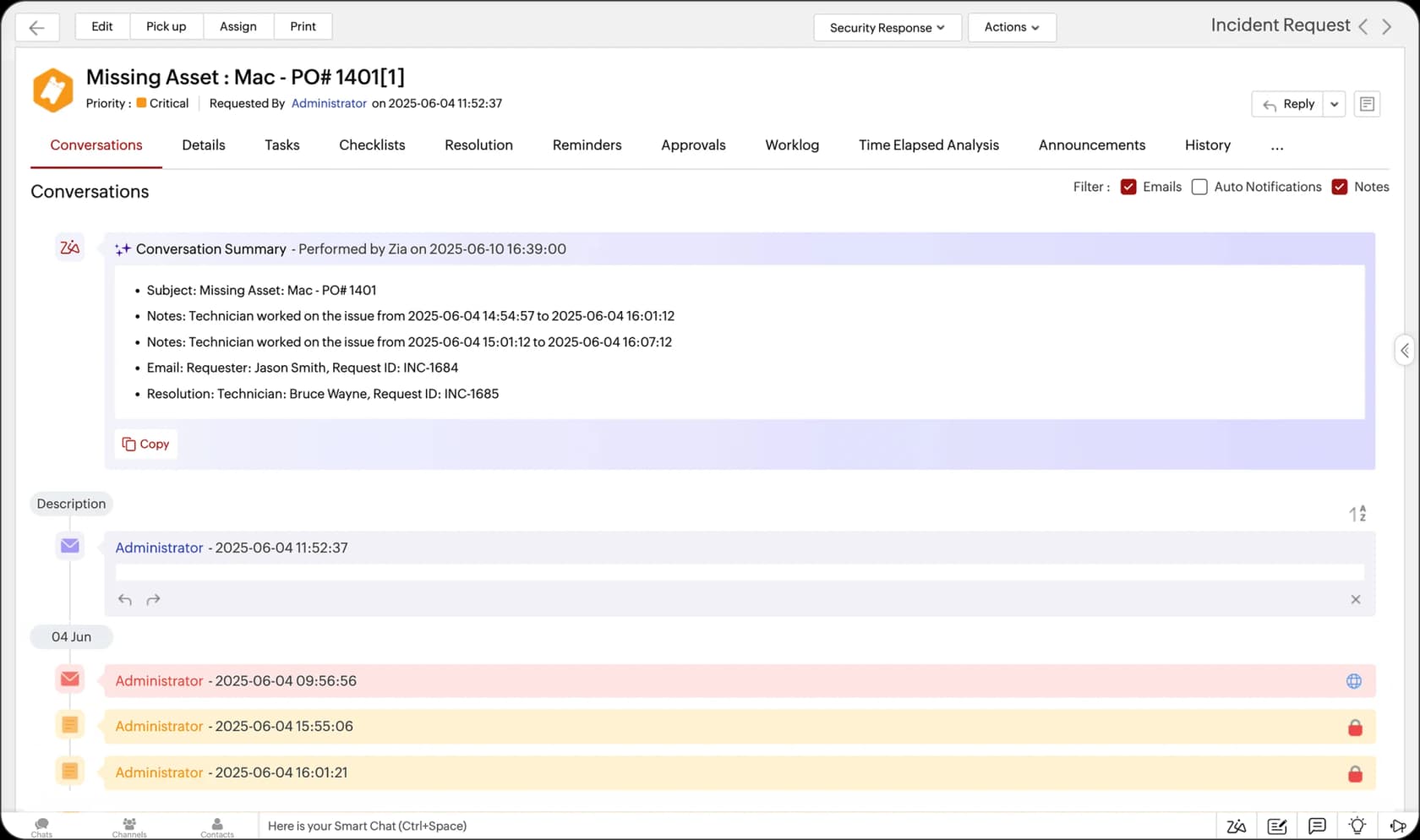
The AI Agents catalogue is the strongest part: 100+ prebuilt agents that take real actions, not just answer questions. Azure AD password resets and account unlocks, Microsoft 365 licence assignment, Intune device reboot and wipe, duplicate ticket detection, SLA-risk scanning, and warranty expiry checks. Those map neatly onto the two request types that dominate an internal queue, access requests and hardware requests. Agents can run on a schedule, and every new one built in the AI Agent Builder must be tested and approved by an AI admin before deployment.
The number SysAid publishes that nobody else does
SysAid runs its own research, and the State of Service Management 2026 survey of 718 IT professionals is the most useful thing in this entire category. It found 61% of IT organisations now use AI in service management, but only 3.3% have reached full autonomous execution. It also found 33% of teams using AI-powered self-service are not measuring ticket reduction at all.
A vendor publishing a number that undercuts its own category's hype is a good sign. It is also the context for every deflection claim you will hear this year.
Where it falls down
On-premises exists but is not equivalent: SysAid's own support FAQ says cloud "offers some additional features that currently don't exist on our On-Prem environment like the AI Service Desk", and on-prem gets one or two releases a quarter against fortnightly cloud updates. There is also no self-serve checkout, so even the $89 tier means a sales call.
Verdict: buy it if you want prebuilt agents that do things (reset the account, wipe the device) rather than a chatbot that describes how to do them. Skip it if you need on-premises with modern AI, or if a sales-gated buy path is a dealbreaker.
8. Halo (HaloITSM): best ServiceNow alternative on price
Halo is the one that keeps showing up in threads where people are leaving ServiceNow. Note the 2026 rebrand: HaloITSM, HaloPSA, HaloCRM and HaloCSM have collapsed into a single platform, and haloitsm.com now redirects to usehalo.com. Any comparison post quoting a Halo tier list is out of date.
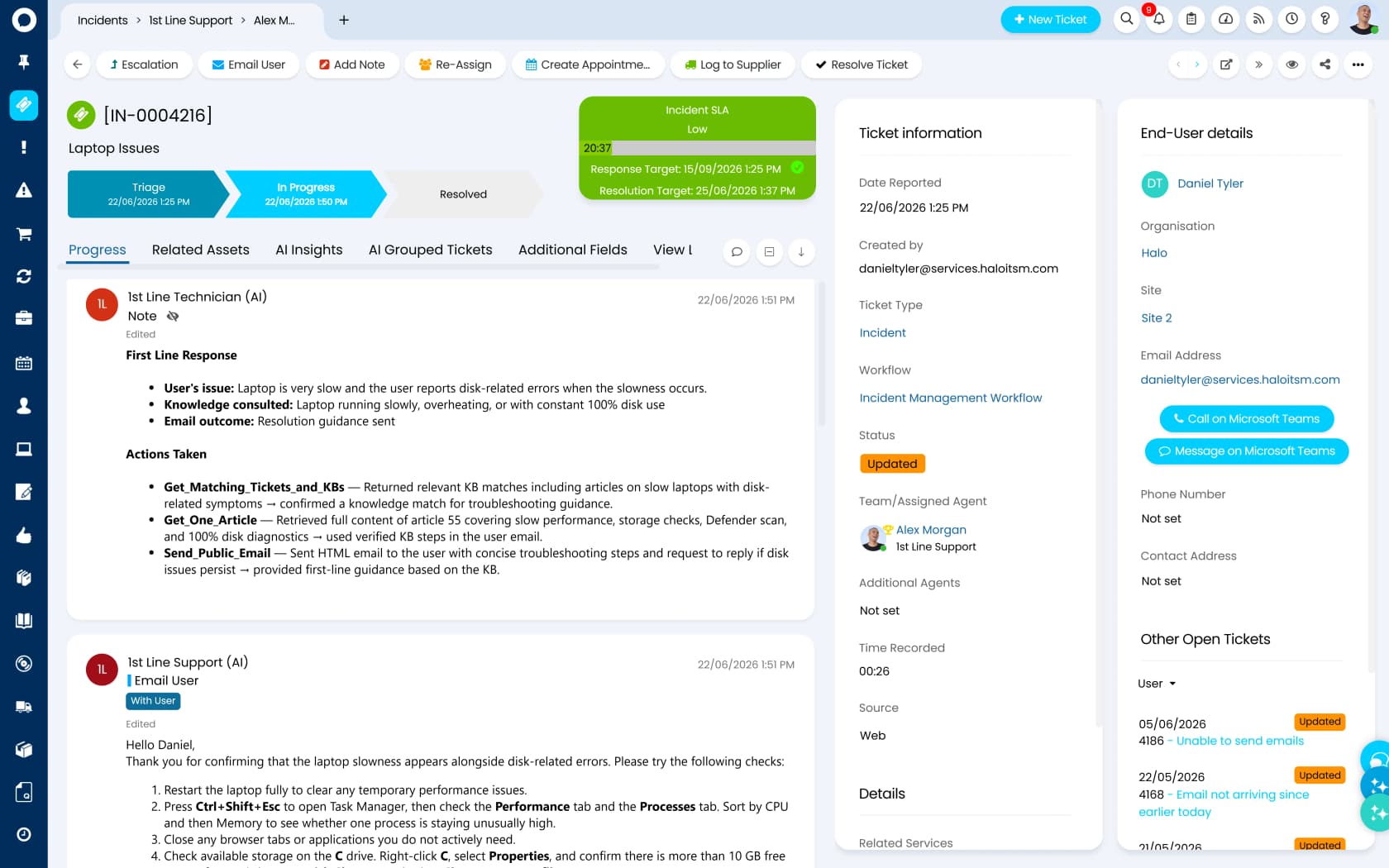
That screenshot is worth pausing on, because it is the clearest picture in this roundup of what an AI agent inside a ticket actually looks like: a named AI technician posting its tool calls and the reply it sent, in the ticket history, where a human can audit it.
Pricing
There are no tiers. One plan, headed "One platform, one price, no surprises": £69 per agent per month, billed annually, which is £8,280 a year for 10 agents. Everything ships inside it. CMDB, asset discovery, change management, project management, billing, and the full ITIL module set are all included rather than sold as packs, which is the exact opposite of the ManageEngine model above.
Because everything is bundled, extending the same licence to HR or facilities costs nothing extra, which makes it a cheap route into HR support automation as well as IT. Two details I have not seen elsewhere. Halo offers named and concurrent licences at the same price, so a 24/7 shift desk can buy a pool instead of a seat per person. And its ARR milestones page commits to cutting list prices by 5%, compounded, at each revenue milestone, with existing customers exempt from inflation rises. A published, ratcheting price decrease is not something I expected to write in an ITSM roundup.
Only the UK rate renders as a fixed figure on the page, so treat £69 as the published reference rate rather than a global price. And the honest caveat: onboarding is mandatory and quoted per scope, so £69 is not your year-one cost.
The AI story
Halo AI is included in the base licence with no consumption pricing, no credit pool, and no per-resolution charge, which makes it the sharpest contrast in this list against Jira's $1 per resolution. The Halo AI page is explicit that there is "no separate AI licence." You can bring your own model key, in which case the LLM bill is yours, and throughput limits are not published.
Where it falls down
It is a smaller vendor and the review base shows it: 4.8/5 on G2 but from only 22 reviews, and 4.7/5 on Capterra from 44. Compare that to the thousands behind Zendesk or Freshservice. An enterprise administrator names the risk directly:
"They're still a relatively young company, so we don't have many customers who have used them long enough to work through all the kinks or fully identify the opportunities."
The most useful negative is about reporting. Halo advertises a no-code query builder, but a security support analyst on G2 reports that "creating advanced custom reports often requires SQL knowledge". And the migration story is not a fairy tale either. Someone who left ServiceNow for Halo puts it as plainly as anyone could:
"Pretty much the price exclusively.
Company is going for HaloITSM and HaloCRM instead. We're almost deployed and it's... just OK. Automation is nowhere as capable or easy to program as ServiceNow."
Verdict: buy it if you are leaving an enterprise platform on price and you want unmetered AI in the licence. Go in knowing you trade automation depth for that saving, and budget for the onboarding engagement. Gartner placed Halo as a Challenger rather than a Leader in 2026, which is roughly where I would put it too.
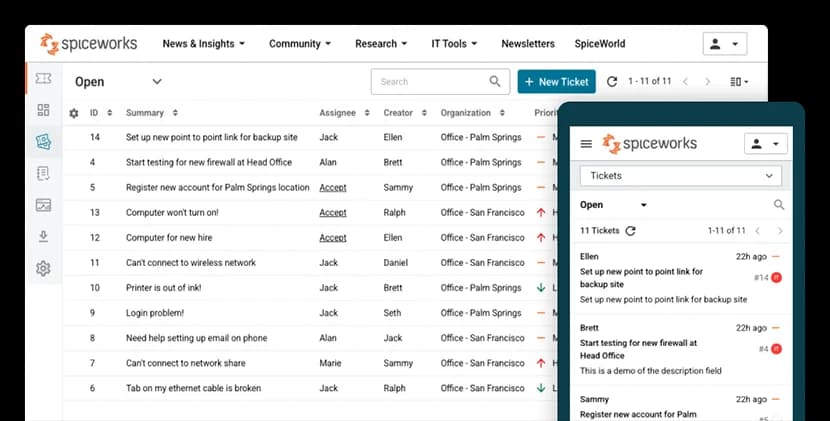
9. Spiceworks Cloud Help Desk: best genuinely free option, up to five technicians
Every "Spiceworks is dead" post you have read is about the wrong product. The 2018 end-of-life was the on-prem Spiceworks Desktop. Cloud Help Desk is alive, shipping release notes as recently as July 2026, and still free.
Pricing, and the wall
| Plan | Price | Technician seats |
|---|---|---|
| Core | Free, ad-supported | 1 to 5, hard cap |
| Premium | $5 per seat/month annually, $6 monthly | Unlimited |
Since May 2025 the free plan caps at five admin or technician seats, and hitting six is not a nag screen. Per the Premium plan FAQ, admins can then reach only the billing and employee administration pages, tech and manager roles lose account access entirely, and end users can no longer submit tickets by portal or email. You also have to upgrade before adding the sixth person, not after.
One more billing detail people miss: Premium is priced on every active employee seat, not just the ones past five.
Where it falls down
There is no AI in this product. Not one feature. The plan comparison has no AI row, and the entire January to July 2026 release run covers regex in ticket rules, canned responses, advanced search, and bug fixes. Users are still filing feature requests for plain rule-based automation.
Reporting is thin (the escape hatch is a Power BI connector, which also bypasses MFA), there is no CSAT or SLA reporting, and the security posture rules out regulated work: tickets are not encrypted at rest, Spiceworks staff can see ticket contents, and there is no HIPAA business associate agreement.
Verdict: buy it, or rather take it, if you are one to five technicians with no budget and no compliance requirements. It is a real ticketing system and free is a genuine feature. Plan your exit before you hire technician number six, because the wall arrives that same day.
10. Zendesk: best if IT and customer support share one desk
Zendesk is a customer support platform first, but plenty of mid-size companies run internal IT on it because the company already owns it. That is a legitimate reason, and employee service pricing is now its own product line.

Pricing
Support Team starts at $19 per agent per month billed yearly, Suite Team is $55, and Suite Professional is $115. Copilot is a $50 per agent add-on on top. Full detail is in our Zendesk pricing breakdown.
The thing to model is the AI meter. Zendesk bills automated resolutions, and the complaint I see most is not the rate, it is what counts as one:
"Complete trash lol, stuff I used to get free now counts as an AR. Most of the ARs are abandoned chats. There's no dispute resolution process."
That is the same structural issue as Jira's assisted conversations: a unit that fires on engagement rather than on outcome. Ask for the definition in writing. The agent-side tooling is a separate purchase again, which we covered in helpdesk copilots.
Where it falls down
Reporting is the recurring pain, and not only for beginners. A support lead on r/Zendesk who had built dashboards in a real BI tool could not get basic numbers out of Explore. For internal IT specifically, you also give up the ITSM furniture: no CMDB, no change advisory board, no asset discovery.
Verdict: buy it if IT and customer support genuinely share a queue and you value one platform over ITIL depth. If you only need internal IT, the tools above give you more for the money. Our Zendesk AI alternatives piece covers the AI side if that is the sticking point.
What I would check before signing anything
Five checks, in the order I would run them. None of them appear on a feature matrix.
1. Ask for the AI billing unit in writing, with an example invoice. "Per resolution" and "per assisted conversation" and "per session" are three different bills at the same ticket volume. Get the vendor to price your actual monthly volume.
2. Export your ticket history before you commit, and open the file. This is where migrations quietly die:
"I have exported my historical tickets to XML but not going to work. First my tickets are a mess. They are not properly organized, tagged, or anything. Lot of the info chatGPT would need to understand is in custom fields which are not labeled in any export."
Unlabelled custom fields are also why AI training on past tickets stalls later, and why training AI on a knowledge base is easier than training it on a messy archive. Fix the labels while you still have leverage.
3. Decide who sets priority before you configure anything. Letting requesters do it has a well-documented ending:
"Dealt with this decades ago. It was scrapped quickly because as you might imagine it was abused to death. […] When people got mad because we were missing SLAs we just replied there was nothing we could do now that all tickets were priority."
Our guide to AI ticket classification covers doing this without a priority field war, and SLA management covers what to measure after.
4. Audit your statuses, not just your ticket count. A sysadmin on r/helpdesk found 90 of 200 "open" tickets were waiting on a customer who never replied. If your backlog number is inflated with those, you will buy capacity you do not need. Start with clearing the backlog and a realistic view of ticket reduction instead.
5. Make the AI prove itself on your history. Ask any vendor to run their agent against your last few thousand tickets and show you the per-category result before go-live. This is the single check I would not skip, and I say that as someone whose team learned it the hard way. Our notes on AI agent handoff and escalation cover what to do with everything the AI should not touch.
One customer said the quiet part better than any of our marketing has:
"The AI will never be able to answer 100% of the questions, but if it tries and just answers 'sorry I don't know this,' I cannot go and check all my 7,000 tickets to see if the AI actually made a good answer. I need an AI who is only handling the tickets that it's confident to handle and all the other ones, leave them alone."
A CX lead at a supplements brand running about 7,000 tickets a month, from eesel's customer interview notes
We did not win that deal at the time. Confidence-based routing is now the default behaviour, because they were right.
Try eesel on the IT ticketing system you already have
If you got this far and your honest conclusion is "our tool is fine, our queue is not," you do not need a migration. eesel joins Jira Service Management, Zendesk, Freshdesk, or Slack as an AI agent inside the desk your team already uses, learns from your past requests and knowledge base without a training project, and starts by drafting replies for review rather than sending them.

The part I would judge us on: you can simulate it against thousands of your historical tickets before it answers a live one, so the resolution rate you are promised is measured on your own traffic rather than a vendor benchmark. Billing is a fixed monthly plan from $299 for 500 credits (1 credit per ticket or chat), with no seat fees, so adding technicians never raises the price. It is free to start with 100 credits and no card.
Try eesel, or book a demo if you would rather see it run against your own queue first.