


If you searched "web help desk" looking for SolarWinds Web Help Desk, here is the state of it as of July 30, 2026: it is still sold, still on-prem only, and now costs $533 per technician per year at the smallest tier, because perpetual licences ended on August 1, 2025. Version 2026.1 from January is the newest thing you can install, since 2026.2 shipped on June 2 and was then pulled from the download portal. Everything from 12.4 to 12.8 passed end-of-engineering on July 4, and loses technical support on November 30, 2026.
If you meant "web help desk" generically, a help desk you use in a browser, that question stopped being a question years ago. Every help desk is a web help desk now. The two things that actually differ are who patches the server and what the AI layer charges you per ticket.
And if you are here because someone asked you to put AI on your IT queue, note that Web Help Desk has none shipping. I build integrations at eesel, and the honest version is that you do not need to migrate your help desk to get an AI layer on it. eesel is one fixed monthly price (from $299/month for 500 credits, 1 credit per ticket handled) with no seat fee, and you can point it at a slice of your queue first.
What "web help desk" means now
Two different people type this phrase into Google.
The first is looking for a product: SolarWinds Web Help Desk, the Java-based on-prem ticketing and asset tool that has been a fixture in K-12 districts and mid-market IT since roughly forever. That person usually has a renewal quote in front of them.
The second means it literally. A help desk you open in a browser instead of installing a fat client. That distinction was load-bearing in about 2011. It is dead now, because the browser won. Every tool in our top helpdesk software roundup runs in a browser, so "is it web-based" no longer separates anything.
What does separate tools in 2026 is duller and more expensive: who runs the server, and what the AI meter counts. Self-hosted means you own the operating system, the database, the runtime and every CVE that lands in it. Cloud means the vendor owns that and charges you for the privilege. Then a second meter sits on top of either one, and its unit varies wildly between vendors, which is the part most buyers get wrong. I dug into that layer split in more detail when writing about what a help desk system actually consists of.
I spend my days shipping the connectors that sit between AI and tools like these, so my read on any help desk starts one level below the marketing page: what does it actually connect to, and what does the API let me do. That is where Web Help Desk gets interesting, and not in a flattering way. Its integration list is SolarWinds products, NPM, NCM, SAM and Dameware, per its own product page. No Slack. No Teams. No Jira. Its API guide is published as a PDF.
Where SolarWinds Web Help Desk actually stands
This is the classic Web Help Desk ticket queue, from SolarWinds' own product page. Look at the dates in the demo data.
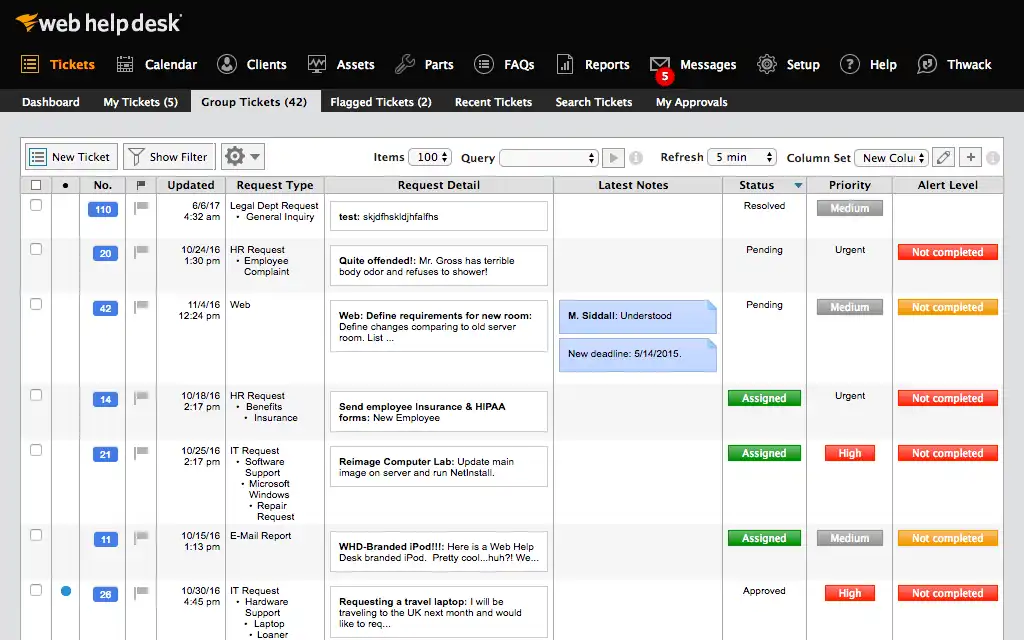
Those sample tickets are stamped 10/24/16, 11/4/16 and 6/6/17. A vendor still marketing a product with nine-year-old demo data is telling you something without meaning to.
SolarWinds did rebuild it, though, and I want to be fair about that. Version 2026.1 shipped on January 28, 2026 with a new framework and a new interface, and the 2026.1 release notes are candid about why: six SolarWinds CVEs were fixed in that release, four of them rated 9.8 Critical, including two unauthenticated remote code execution bugs found by Horizon3.ai and watchTowr researchers. That rewrite was not a roadmap item. It was a response.
Then the release train came off the rails.
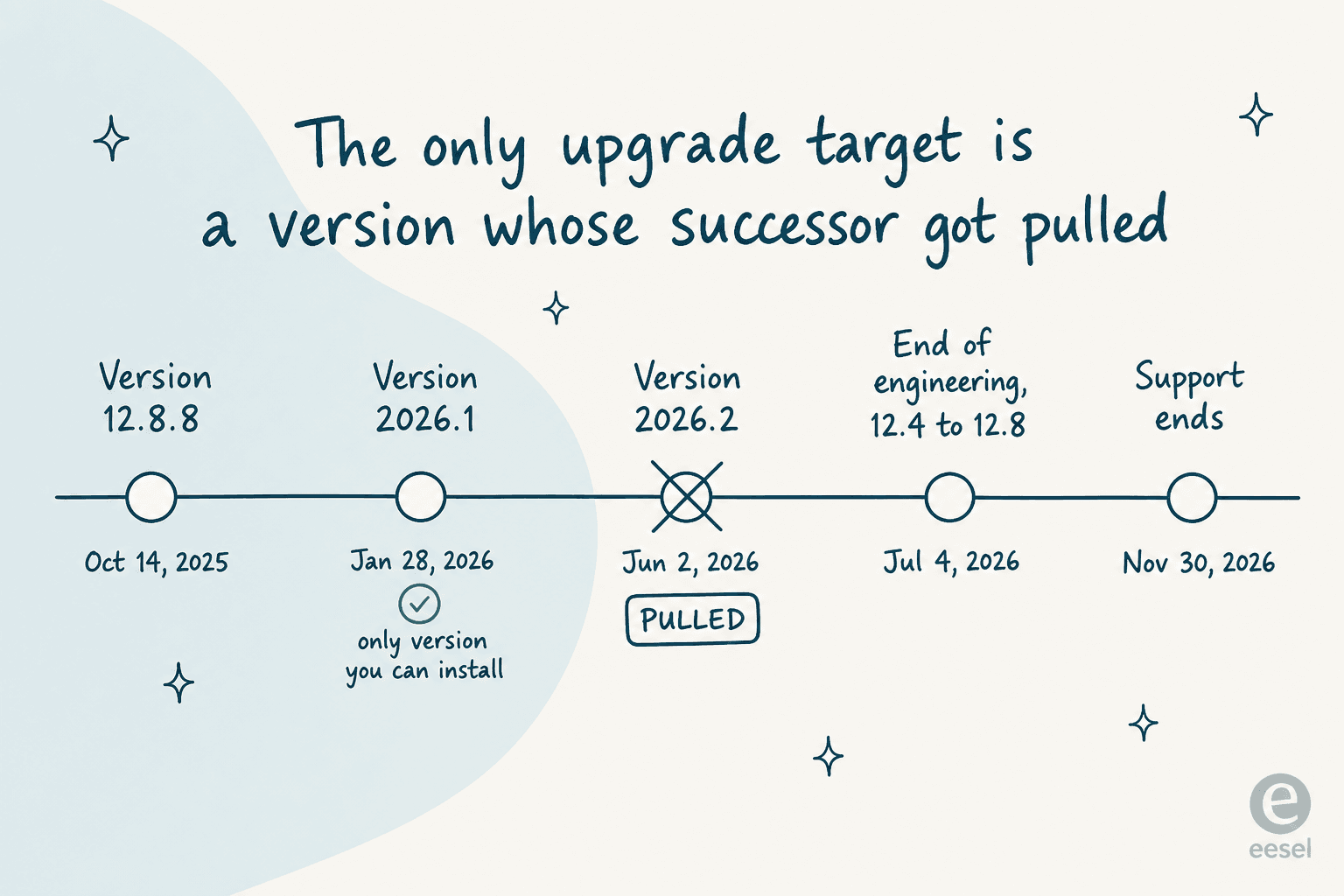
Version 2026.2 went generally available on June 2, 2026. Its release-notes page now says only that SolarWinds has removed "Web Help Desk 2026.2 from the release portal while we complete additional quality work. To get the latest WHD features, install WHD 2026.1." Its system-requirements page returns a 404.
The upgrade thread on SolarWinds' own THWACK community explains why, and these are customers posting on the vendor's property:
"We attempted to upgrade from 2026.1.21465 to 2026.2.0.77—twice—and both attempts ended in complete failure, forcing us to roll back each time. Even with support involved and additional changes implemented, the outcome didn't improve in the slightest. The upgrade doesn't just introduce minor issues; it fundamentally breaks core functionality, either severing the database connection or outright corrupting it."
A CTO in the same thread hit a subtler wall: the installer needed a SQL function that only exists in SQL Server 2017 or newer, while the published requirements still claim SQL Server 2014 support. In his own words on THWACK, that "just puts this on the shelf until a hotfix or version re-release."
Here is the squeeze. The release history shows every version from 12.4 to 12.8 got its end-of-life announcement on June 2, 2026, the exact day 2026.2 went GA. All five hit end-of-engineering on July 4, 2026, which has passed. All five lose technical support on November 30, 2026.
| Version | EoL announced | End of engineering | Support ends |
|---|---|---|---|
| 12.8 | June 2, 2026 | July 4, 2026 | November 30, 2026 |
| 12.7 | June 2, 2026 | July 4, 2026 | November 30, 2026 |
| 12.6 | June 2, 2026 | July 4, 2026 | November 30, 2026 |
| 12.5 | June 2, 2026 | July 4, 2026 | November 30, 2026 |
| 12.4 | June 2, 2026 | July 4, 2026 | November 30, 2026 |
So if you are on 12.x today, you are past end-of-engineering, your support clock runs out in four months, and the only version you are allowed to upgrade to is the one whose successor got withdrawn. That is not a sunset, and I want to be precise: SolarWinds has published no end-of-life date for the product line itself. But every documentation page now carries a banner reading "Thinking of upgrading to the cloud? Learn more about migrating from Web Help Desk to Service Desk," backed by a five-phase migration guide and a free migration tool.
What Web Help Desk costs in 2026
The full rate card lives on a pricing page that the main product page does not link to. Every tier, annual, per technician, end users unlimited:
| Technicians | Price per technician per year | Annual total at the top of the tier |
|---|---|---|
| 1-5 | $533 | $2,665 |
| 6-10 | $524 | $5,240 |
| 11-20 | $517 | $10,340 |
| 21-30 | $507 | $15,210 |
| 31-40 | $492 | $19,680 |
| 41-50 | $473 | $23,650 |
| 51-75 | $444 | $33,300 |
| 76-100 | $417 | $41,700 |
| 101-250 | $389 | $97,250 |
| 251-500 | $357 | $178,500 |
| 501+ | $320 | varies |
The licensing model, in SolarWinds' own words on the same page: Web Help Desk "is sold exclusively as an annual subscription. Prices are per technician, per year." Asset discovery, hardware-to-ticket linking and software licence management are included at no extra cost, which is the best thing about the deal.
The problem is what that sentence replaced. Until August 1, 2025, this was a perpetual-licence product, and that was the entire reason a lot of people bought it:
"We chose WHD because it was simple, on-prem, and didn't hit us with recurring costs every year. But now, with the switch to subscriptions, the long-term costs are significantly higher, and the timing couldn't be worse, with budget season already behind us and the new school year around the corner."

Eight months later, a second K-12 district posted the same thing: ~1400 users, 85 agents, 100 to 150 tickets a day, evaluating alternatives over rising costs. That is the churn pattern, and it is still running.
Since nobody publishes a tier calculator for this, here is one. Put your technician count and monthly ticket volume in and see which band you land in, then compare it against what the same year costs when the meter is the ticket rather than the seat:
The two columns are not equivalent, and I would rather say so than let the widget imply it. A licence buys you a queue; a per-resolution rate buys you automation on top of one. The point of putting them next to each other is that the unit swings the bill more than the rate does, and a seat meter and a ticket meter answer completely different questions about your team.
What Web Help Desk is good at
Fairness matters here, because plenty of people run this thing happily. The single best summary I found came from a 10-year user in June 2026:
"In a large zoo environment where IT supports everything from traditional office systems to specialist operational infrastructure, reliability and ease of use are critical, and Web Help Desk consistently delivered on both. While there are more modern alternatives available today, it remains a solid solution for organisations looking for straightforward, cost-effective help desk and ticket management capabilities."

It sits at 3.9/5 across 60 reviews on G2 and 4.1/5 across 124 on Capterra, which is a respectable score for a tool people mostly describe as dated.
The feature everyone names first is asset management welded to the ticket. Not bolted alongside it: the asset record carries model, location, department, assigned client, service contract and warranty, and it links straight to ticket history.
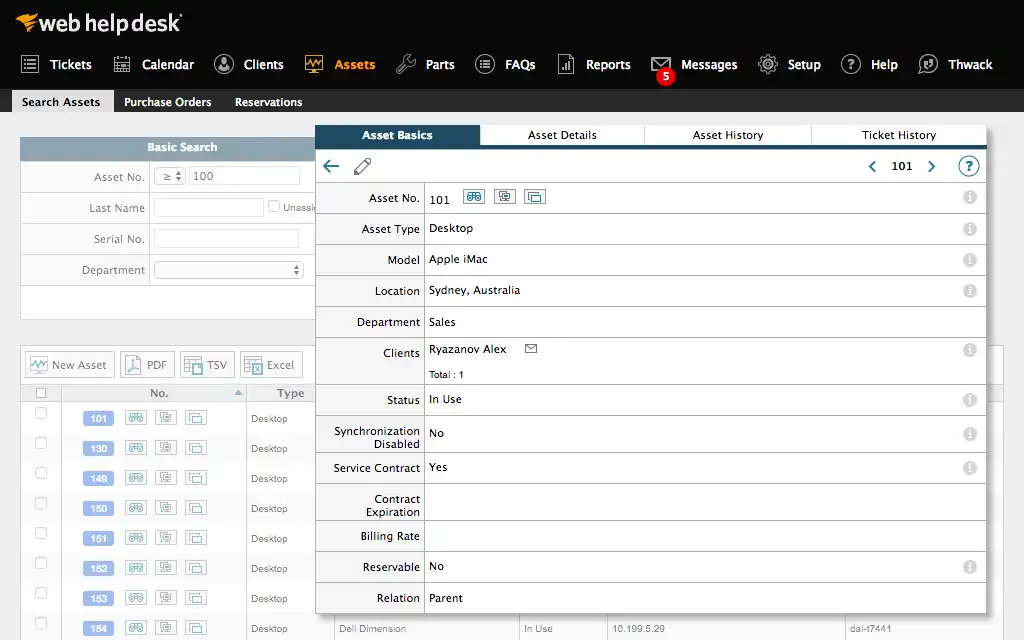
That is the whole reason it held on in schools and mid-market IT, and it is included in the licence rather than sold as a module. If asset tracking is why you are here, our notes on AI for asset management and hardware requests cover what that layer looks like with automation added.
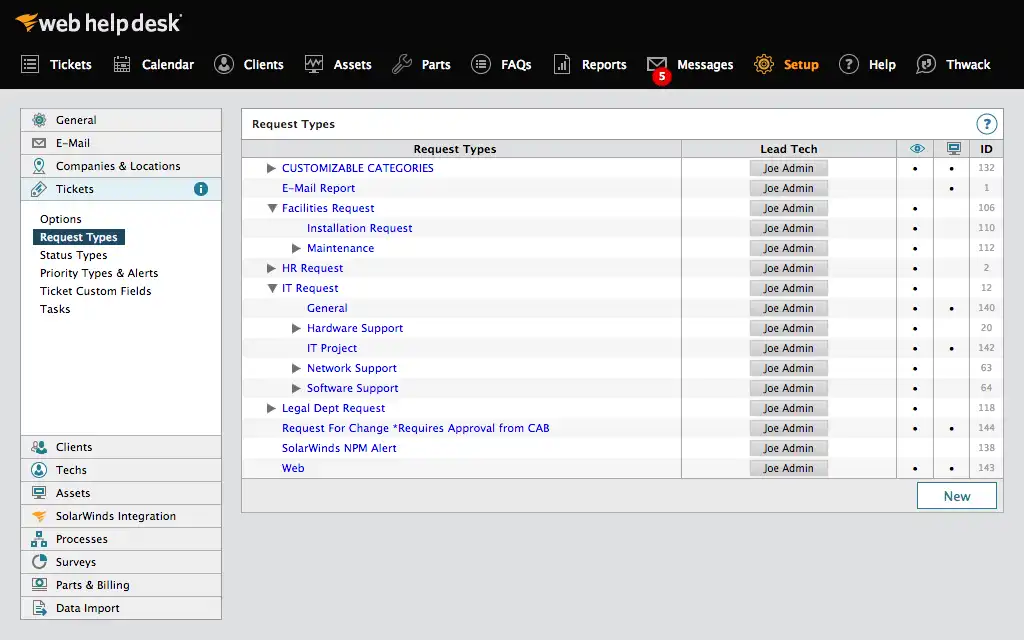
Configurability is the second real strength. Request types nest into a tree, each with its own lead tech, which is how routing gets built.
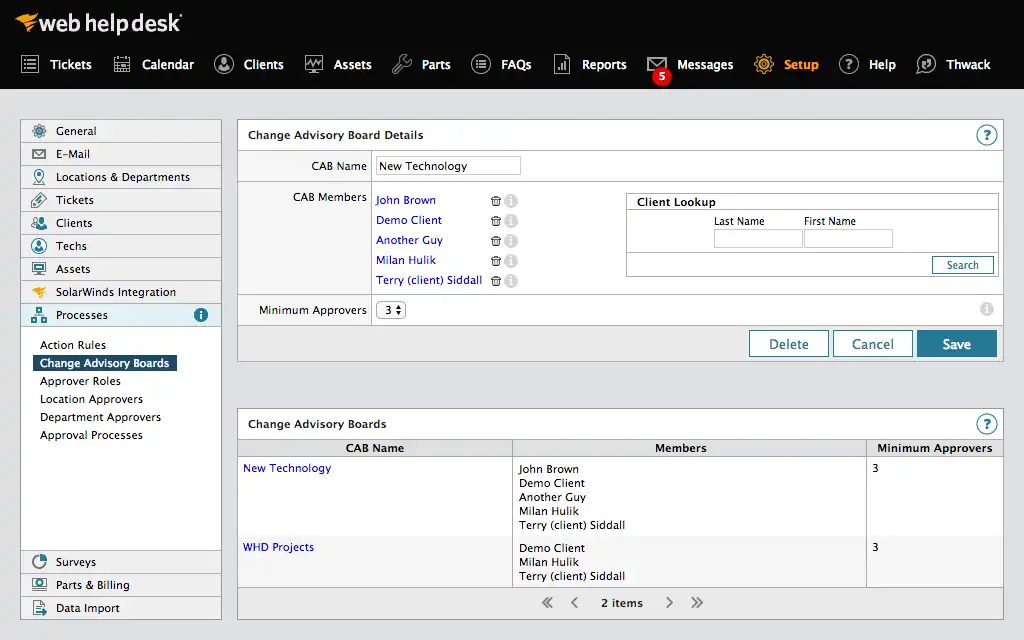
There is also a real change-management story, which surprised me: dual Change Advisory Board processes with configurable minimum approvers, plus location and department approver roles. Most tools at this price point do not have that at all, and one G2 reviewer's claim that WHD lacks change management is simply out of date.
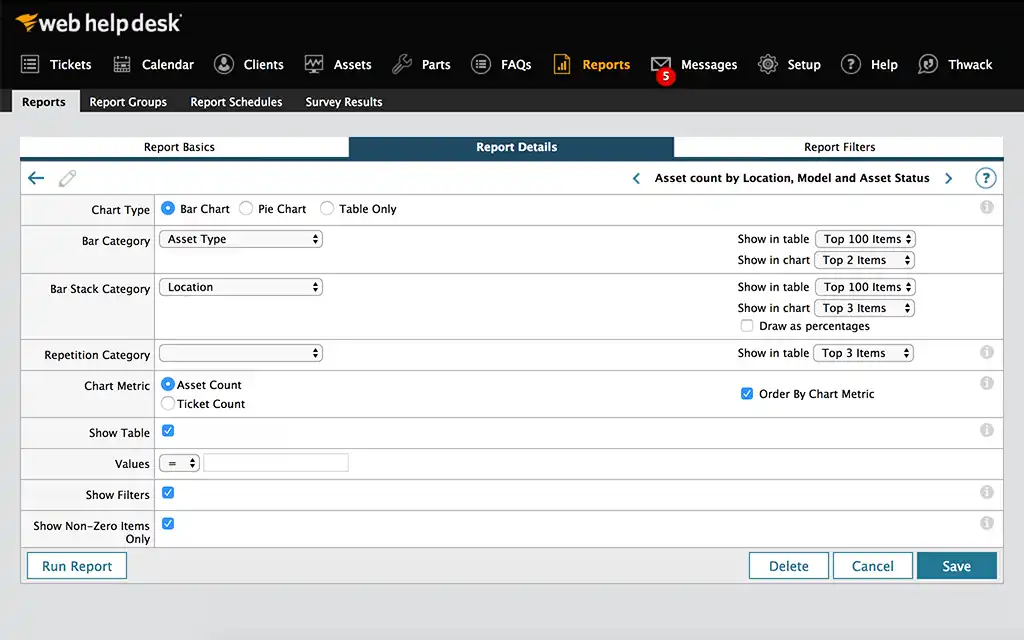
Reporting is the third. A company president reviewing it on Capterra called reporting "phenomenal when compared to other packages," and the report builder does let you pivot asset and ticket counts across location, model and status without leaving the tool, which is more than several cloud products manage. Two caveats from other reviewers: advanced or custom reports take real effort, and custom columns slow the interface down. If you have wrestled with reporting layers before, our piece on customer service tracking covers the questions worth asking before you buy.
The self-hosting bill that isn't on the price list
Self-hosting is the reason people chose this tool. It is also the reason they leave. Both halves are real, and the honest framing is that on-prem bought them cost control and charged them maintenance.
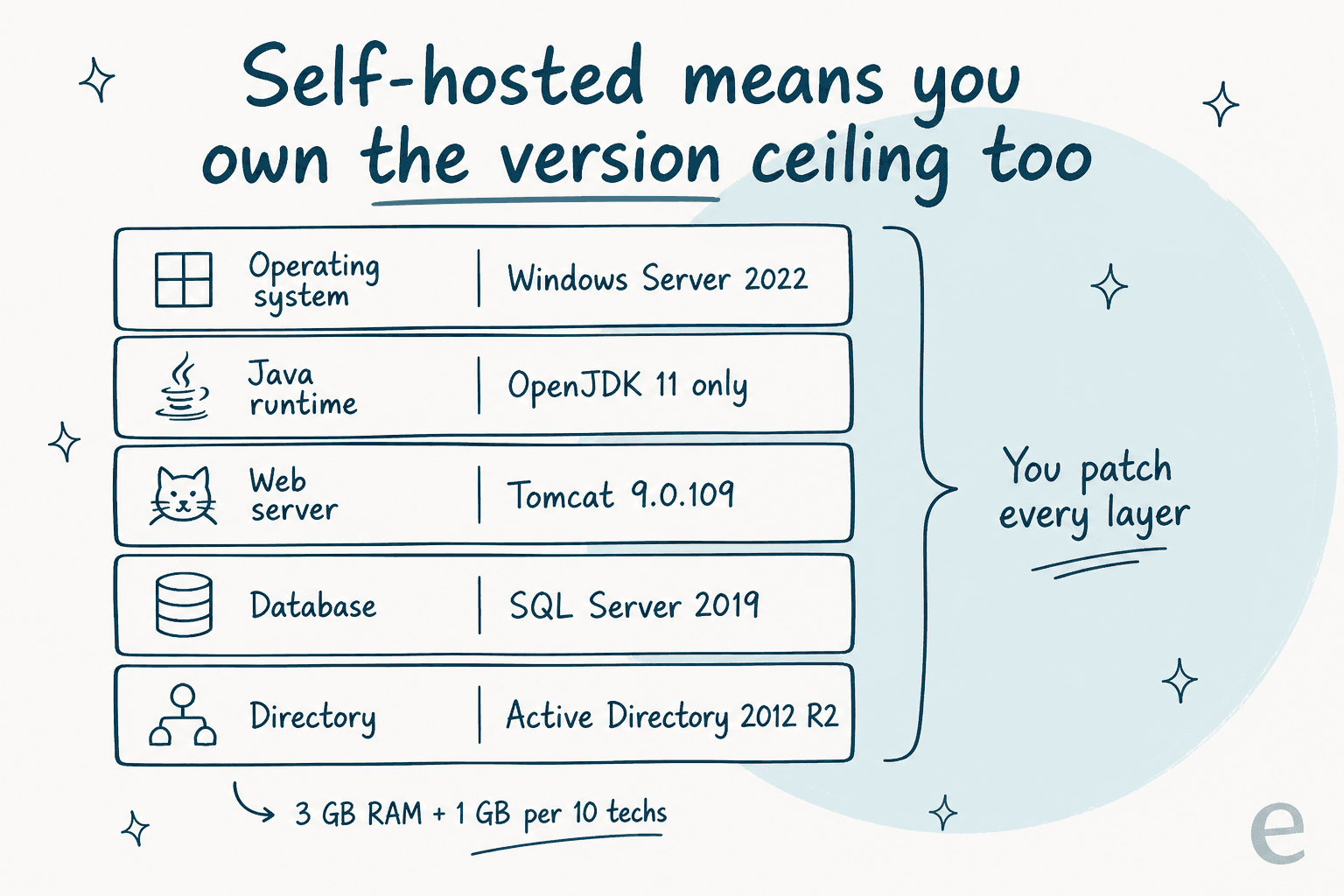
The 2026.1 system requirements are the part I would print out before renewing. The newest Java it accepts is OpenJDK 11.0.28. The newest SQL Server is 2019, so anyone on 2022 is outside the matrix. The newest Active Directory is 2012 R2. The newest macOS is Monterey. RAM is 3 GB plus 1 GB per additional 10 technicians, tuned by editing whd.conf rather than a setting screen, and RHEL 8 or 9 cannot use the bundled PostgreSQL at all, so a current-RHEL install needs a second database server.
Then the ports. Beyond 8443 and 8080 there are roughly 25 more across email, LDAP and asset discovery, and WMI discovery "uses port 135 and then chooses a random port for further communication." That is not a setup task, it is a permanent firewall conversation.
The security record is the part that pushed people out, and the best statement of it came from a sysadmin who did not want to leave:
"We are just not okay with the continuous stream of CVEs coming out of Web Help Desk lately, some for things as dumb as hardcoded credentials which have been there all along, and which tend to be public before patches exist, requiring us to remove remote users' access to the helpdesk without VPN (make it not web facing) until patched, and then when the patches are released, the first iteration of them breaks a lot of things, rinse and repeat. And they charge a substantial amount for this "maintenance"."
Worth stating the counterargument, because sysadmins in that same thread made it: you are not supposed to publish this to the internet, and several teams run it behind a zero-trust tunnel instead. Fine. But when CVE-2025-40551 landed, one internet-wide scan counted 19.2k exposed instances, so plenty of people do expose it. It was later added to CISA's known-exploited list.
Upgrade pain is the quieter tax. The PostgreSQL version jumps between releases, which strands the backup restore path: one admin posting in r/Solarwinds found that "when i upgrade i lose pgsql9 folder and get pgsql13" and could not restore the original database.
And the most recent critical review on G2, a 2.5/5 from a CTO in April 2026, lists the top three problems as the UI, "installation/upgrade/maintenance," and a lack of integrations with external systems. That review post-dates the rewrite, which is the clearest evidence available that 2026.1 did not fix this half.
One more thing worth knowing before you lean on it: the new interface in 2026.1 is Windows-only, opt-in via a batch file, on a separate login URL, and it drops SAML authentication, Linux, macOS, FIPS instances, and CAB, location and department approvals. If you use SAML, you stay on the old UI.
The AI layer is a roadmap item, not a feature
If someone has asked you to put AI on this queue, this is the section that matters.
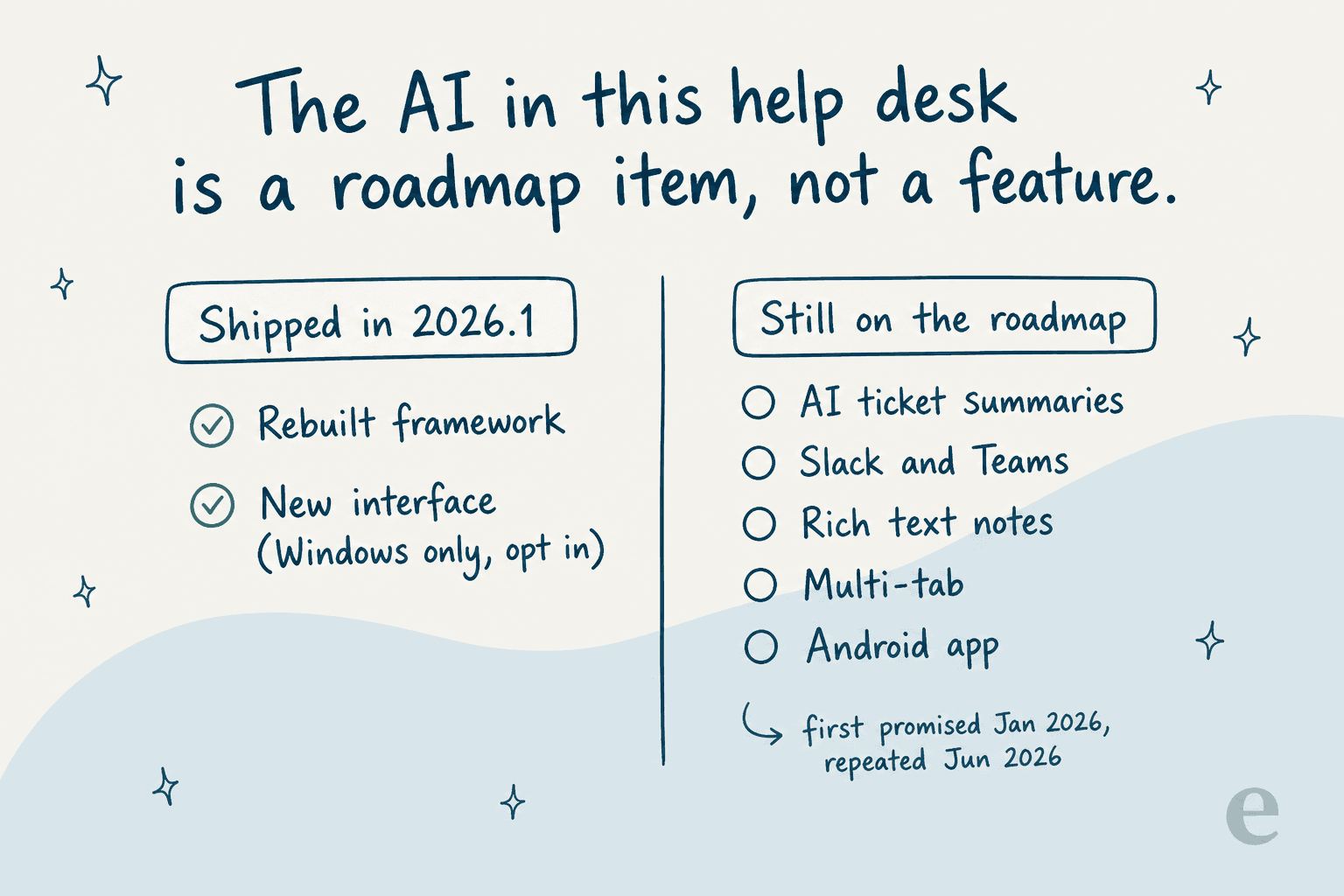
There is no AI in any shipping version of Web Help Desk. The 2026.1 release notes list exactly two features, a rebuilt framework and the new interface. AI-generated ticket summaries appear in the January 2026 launch post under "Looking Ahead Long-Term," wrapped in a forward-looking-statements disclaimer, then reappear in the June 2026 post as something the new stack "unlocks." Four months apart, both times in the future tense. Slack and Teams integrations, rich text notes, multi-tab and an Android app are on the same list. SolarWinds AI is a Service Desk capability, not a Web Help Desk one.
What actually ships is classic rules automation, and it is decent: email-to-ticket over IMAP, POP and Exchange, routing rules by department, parent-child incident-to-problem linking that auto-closes children when the problem closes, SLA escalation with configurable reminder intervals, and knowledge-base article suggestion. If you want to see how far that gets you before AI enters the picture, our guides to automated workflows and SLA management are the practical version.
Here is the part I would want someone to tell me. You do not have to migrate your help desk to get an AI layer on it. That is the mistake I watch teams make: they treat "we want AI" as a reason to run a nine-month platform migration, when the AI is a layer and the queue is a layer, and they are separable.
I say that from a specific place. We have spent years running AI agents on live support queues at eesel, and the numbers we publish include the unflattering half. On one real-traffic trial for a German online jewellery retailer running about 1,000 tickets a month on Zendesk and Shopify, our agent hit 93% triage accuracy and 100% spam detection across 284 chats with zero false positives, and in the same run only 12% of its drafts went out as-is, with a 7% factual error rate. That second pair of numbers is why every rollout gets simulated against historical tickets before it touches a customer.
We learned that the hard way. Paying customers of ours, including a Danish solar-energy provider, had a bot fabricate answers and send them to real customers when its knowledge base had no match for the question. That is where the hard confidence threshold and the decline-to-answer fallback came from, and it is the reason I am suspicious of any deflection number quoted without one. Our write-up on AI hallucinations in support is the longer version.
When it goes right, it looks like this, from a permissioned customer review:
"In the first month, eesel is resolving 73% of our tier 1 requests. eesel offers easy Zendesk implementation and setup. Our team implemented and achieved results quickly during our 7-day trial. Responses are simple to fix and adjust. The platform even includes automations for ticket tagging, assignment, and status updates!"
The other half of the AI question is what the meter counts, which nobody warns you about. One Zendesk customer put it bluntly when the definition of a billable resolution changed:
"Complete trash lol, stuff I used to get free now counts as an AR. Most of the ARs are abandoned chats. There's no dispute resolution process."
The grievance there was the unit, not the price. Our breakdown of AI resolution rate and how to improve it covers what to hold a vendor to.
Where Web Help Desk teams are actually going
The March 2026 alternatives thread on r/sysadmin is the most current map available, and the destinations split cleanly by whether the team still wants to run servers.
| Destination | Shape | Who said so |
|---|---|---|
| GLPI | Self-hosted, strong asset inventory | "We migrated from WHD to GLPI almost exactly two years ago" (u/wallguy22) |
| Zammad | Self-hosted, cleaner interface | Named repeatedly on the self-hosted shortlist |
| osTicket | Self-hosted, minimal | Named on the same shortlist |
| Jira Service Management | Cloud ITSM | A district switched to it (u/gwig9) |
| Jitbit | Cloud, ticketing plus assets | "JitBit is full cloud, easy to setup" (u/Electrical_Arm7411) |
| NinjaOne | Cloud, endpoint-led | "We moved to NinjaOne and combined Kace, BeyondTrust, and Jamf" (u/HellzillaQ) |
| Incident IQ | K-12 specific | "For K-12, look into Incident IQ" (u/GillWordon) |
| SolarWinds Service Desk | Staying in-family, cloud | "Has solarwinds offered to move you to Service Desk?" (u/K_herm) |
If you are weighing the cloud ITSM options against each other, our Freshservice vs ServiceNow comparison covers the enterprise end and our Jira Service Management write-up covers the Atlassian route.
For the AI angle specifically, start with best AI for IT helpdesk, then the head-to-head on Zendesk vs JSM.
One warning that applies to every row in that table. Your ticket history will not come with you cleanly:
"We gave up on trying to export and port tickets from WHD to JIRA SM. Too many different fields that would have required A LOT of manual work to match up. There are paid services that we could have used but our budget is already thin so... Just ended up exporting all the tickets from WHD into PDFs and storing them on our file server if we ever need to search them."
A district exported its entire ticket archive to PDFs on a file server. That is what a migration budget looks like when nobody costed the data. And it matters more than it used to, because historical tickets are the training material for any AI layer you add later. That is the same reason our notes on clearing a ticket backlog start with the archive rather than the queue.
Also worth knowing: some customers just refused to move. One shop kept its perpetual licences, cancelled support, and declined the upgrade while searching for a replacement. That is a legitimate play if your instance is internal-only and patched, and a bad one if it is internet-facing.
What I'd check before signing another year
Five questions, in the order I would ask them:
- What version are you on? If it is 12.x, your support ends November 30, 2026, and your only upgrade target is 2026.1. Confirm that before anything else.
- Is it internet-facing? Given the CVE history and the CISA listing, this decides how urgent the rest of the list is.
- What is the real licence number? Count technicians, not end users, and check which tier you land in. Adding a sixth technician moves you a band.
- Can you actually stay on the supported matrix? Java 11, SQL Server 2019, Active Directory 2012 R2. If your infrastructure team is moving past any of those, you have a conflict, not a renewal.
- Do you need to replace the queue, or add a layer to it? These are different projects with different budgets, and the second one is usually the one people actually want. Our guide to the AI help desk is the honest scoping version, and ticket deflection covers what to expect from the numbers.
For the record, my own take: if your instance is internal-only, your asset inventory is the reason you're there, and your technician count is small, renewing 2026.1 for one more year while you plan properly is defensible. If it is internet-facing, or you are past 30 technicians, or your infrastructure team has already moved to SQL Server 2022, the November 30 date is your deadline and I would start the evaluation this quarter.
Try eesel on the queue you already run
If the thing pushing this decision is "we need AI on IT support," you can test that without touching your help desk. eesel is an AI layer that plugs into the queue you already have, learns from your past tickets and your existing documentation, and starts by drafting rather than sending, so you see what it would have answered before it answers anyone.

Two things make it fit this particular decision. First, it simulates against your historical tickets before go-live, so the resolution number you plan around is measured on your own traffic rather than borrowed from a vendor benchmark. Second, eesel pricing is one fixed monthly price with no per-seat fee, and you can route a slice of the queue to it, so a pilot is the free plan's 100 credits, then $299/month for 500 credits, rather than a platform migration.
On the connector side, it plugs into Jira Service Management, Microsoft Teams and Slack, which covers both the ticket queue and the two places IT requests actually arrive.
Worth being straight about the fit: there is no Web Help Desk integration, so this is a layer for wherever you go next, or for the Teams and Slack requests hitting your team today. If your problem is asset inventory rather than answering questions, an AI layer is not what you need.