


"IT help desk services" means three different purchases, and the search results blend them together. You can buy software (a licence, priced per technician), labour (humans answering tickets, priced per user or per ticket), or automation (an AI agent on the queue, priced per resolution or per monthly credit batch). Mixing them up is how teams end up paying for two and getting one.
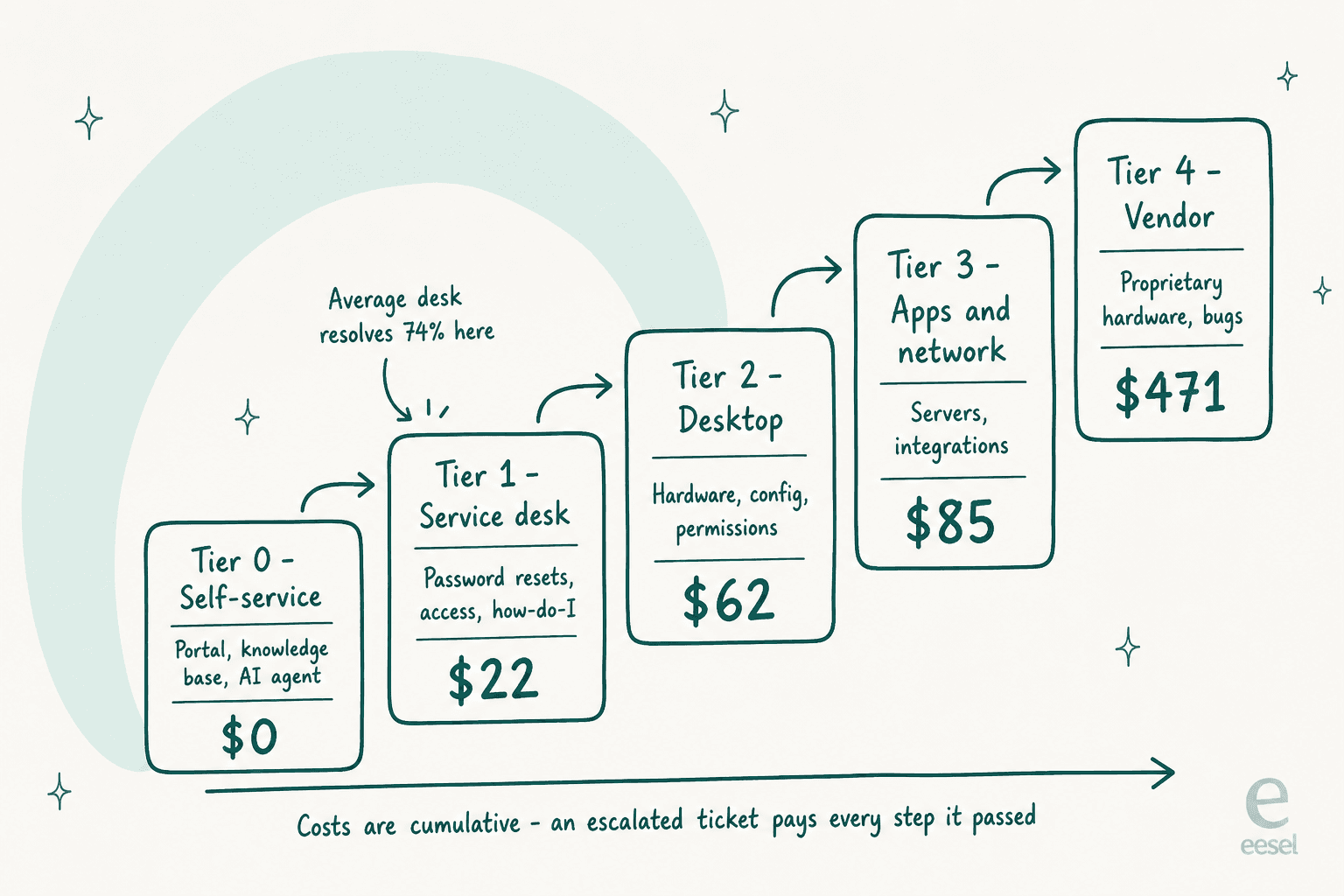
The number that should drive the decision is the escalation ladder. MetricNet's benchmark, published through HDI, puts a level-1 ticket at $22, desktop support at $62, apps and network at $85, and vendor support at $471, and those costs stack: a ticket that starts at level 1 and gets escalated pays for every step it passed through. The average desk resolves about 74% of what it could at level 1, which means the median IT team is escalating roughly a quarter of tickets it had the ability to close.
On price, almost nobody publishes one. Ntiva lists $98 to $118 per user per month; 31West publishes $10 to $25 per resolved ticket. NinjaOne, ConnectWise, Kaseya, CMIT and TeamLogic all gate it. The pattern is consistent: licences get a public price, labour gets a form.
If you already have a help desk and the problem is volume rather than platform, the cheapest move is usually neither hiring nor outsourcing. eesel sits on Jira Service Management, Freshdesk or Slack as the first responder, learns from requests you already closed, and runs on a fixed monthly plan from $299/month for 500 credits (1 credit per ticket or chat), with no seat fee. InDebted's Head of IT runs exactly that setup on Jira.
What you are actually buying
I spend a lot of my time on how search intent maps to a buying question, and this keyword is a good example of the two coming apart. Somebody typing "IT help desk services" might want an outsourcing contract, a ticketing tool, or an explanation of what a help desk does. The results page serves all three without labelling which is which, so the first useful thing I can do is separate them.
Start with the vocabulary, because vendors do not agree on it either. IBM's own definition is the cleanest: "IT service desks are a superset of the standard help desk. The main focus of an IT help desk is on fixing issues, while a service desk is more broadly focused on delivering services to users." Atlassian says the same thing at more length, quoting ITIL, and then admits the labels do not survive contact with reality: citing HDI research, it notes that 41% of help desks and service desks are called something else entirely.
So the taxonomy fight is partly theatre. The useful version is the scope of work, which is remarkably consistent across every vendor's own description of it.
| What the desk handles | Typical share of a tier-1 queue | Automatable today |
|---|---|---|
| Password resets and MFA lockouts | High | Yes, fully |
| Account access and app provisioning | High | Yes, with approval routing |
| "How do I" and policy questions | High | Yes, if the docs exist |
| VPN and connectivity troubleshooting | Medium | Partly, triage and first steps |
| Software installs and licence requests | Medium | Yes, with a service catalogue |
| Onboarding and offboarding runs | Medium | Partly, the checklist not the physical kit |
| Hardware faults and device swaps | Medium | No |
| Asset and CMDB upkeep | Low, background | Partly |
That table is the reason the delivery-model question matters. The top half of it is repetitive, documented, and high volume. The bottom half needs a human with hands. Any service contract or tool that prices the whole queue as one undifferentiated thing is charging you the same for both halves.
It also explains why the same request arrives through five doors. Employees raise these in a portal, over email, in Slack, in Microsoft Teams, or by walking over. A service that only covers the portal is covering the smallest of those, which is worth checking before you compare rates.
If you are still designing the intake side, our IT helpdesk template and the self-service portal guide both cover the shape.
Atlassian classifies the request types cleanly, and it is worth borrowing: a service request is "I need a new Macbook", an incident is "the website is down", a problem is the recurring cause behind repeated incidents, and a change is a planned modification. Most of what an IT help desk service handles day to day is the first two, and the split matters for cost, which is where this gets interesting.
The escalation ladder is the whole cost model
Here is the number I would put at the top of any evaluation. In MetricNet's first level resolution paper, published through HDI, average cost per ticket in North America breaks down by the level that resolves it.
| Level | Who resolves it | Average cost per ticket |
|---|---|---|
| Tier 0 | The employee, via portal or knowledge base | Effectively $0 |
| Tier 1 | Service desk | $22 |
| Tier 2 | Desktop support | $62 |
| Tier 3 | Applications, networking, data centre | $85 |
| Field support | On-site technician | $196 |
| Vendor support | The manufacturer or software vendor | $471 |
Two caveats before anyone screenshots that. The paper is a 2011 publication, so treat the ratios as durable and the absolute dollars as dated. And these are averages across a benchmark population, not your desk.
The part that survives inflation is the mechanic, in Jeff Rumburg's words: "these costs are cumulative. If a ticket is logged at level 1 and then escalated to level 2 (desktop support) for resolution, the average cost of resolution is not just $62, but $62 plus $22, for a total of $84." Every escalation pays for the step it just left as well as the one it arrived at.
Which makes first level resolution the metric that actually moves your bill. The same benchmark puts average net FLR at 74.3%, with a median of 74.9%, a floor of 37.6% and a ceiling of 97.8%, and notes that only 1.4% of service desks clear 95%. The desks at the bottom are described as "log-and-dispatch" operations that resolve password resets and forward everything else.
There is one definitional trap here that most writing on this topic falls into, and MetricNet is explicit about it: "first contact resolution is a quality metric that strongly affects customer satisfaction, while first level resolution is a cost metric that strongly influences total cost of ownership." They are not the same. An analyst who researches a problem and calls back an hour later has not achieved first contact resolution, but has achieved first level resolution. If a provider quotes you one, ask which one, because only the second one predicts what you will pay.
Cost per ticket also moves more with your request mix than with your team's efficiency. MetricNet's cost per ticket paper puts desktop support incidents at $48 and service requests at $113, roughly 2.4 times as much. A desk drowning in new-starter provisioning has a structurally more expensive queue than one handling password resets, and no amount of agent coaching closes that gap.
Automating the request side is what closes it, which is the argument for a real self-service portal before it is an argument for headcount. It is also why ITSM automation tends to pay back faster than a hiring round, and why an employee support layer sitting in front of the queue is usually the cheapest tier you will ever run.
The four ways teams actually run it
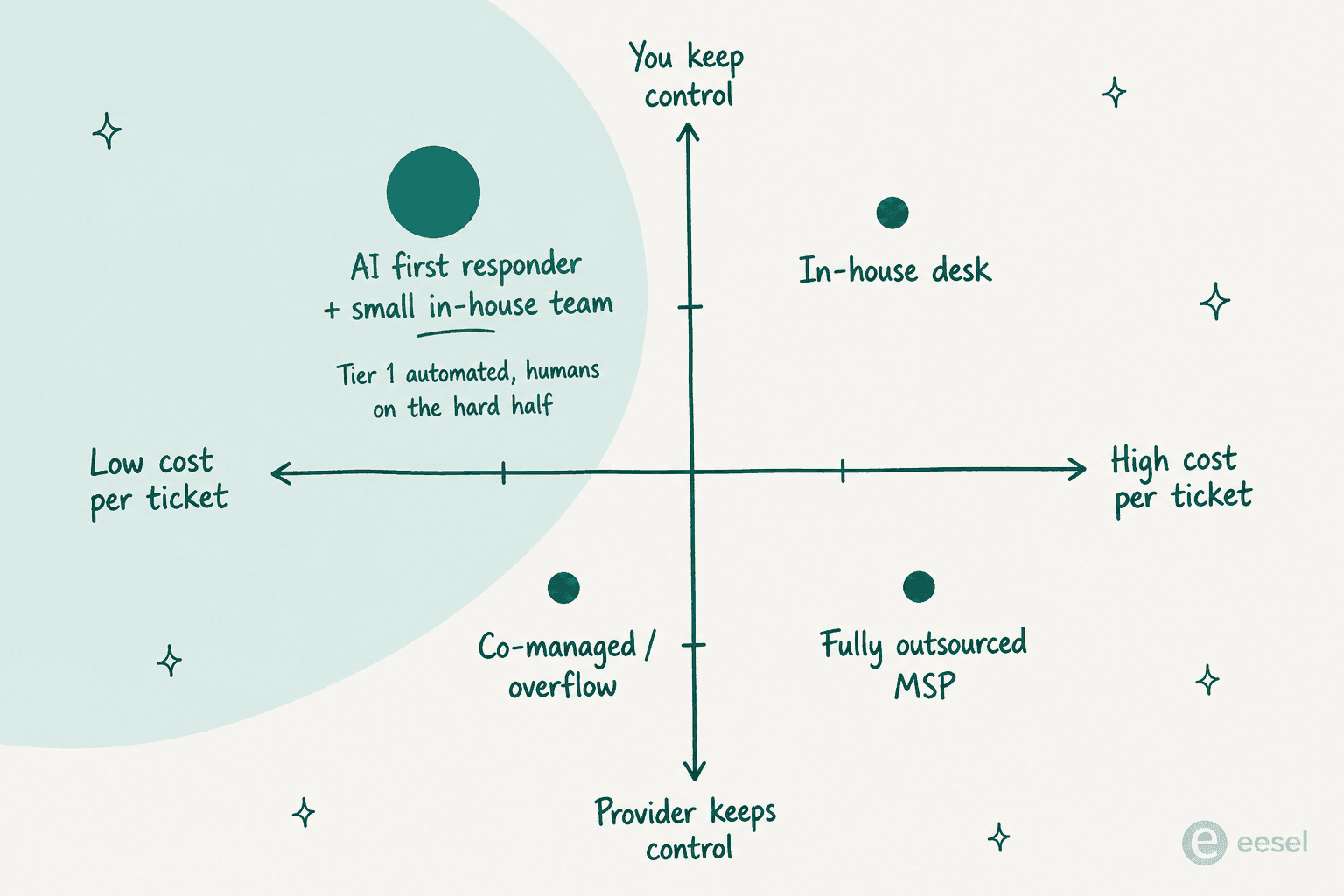
Every IT help desk I have looked at is some mix of four models. The labels vary, the economics do not.
| Model | What you pay for | Best when | The failure mode |
|---|---|---|---|
| In-house desk | Salaries, tooling, management overhead | Under a few hundred employees, or a queue full of physical work | Fixed cost that steps up a whole analyst at a time |
| Fully outsourced | A per-user or per-ticket contract with a provider | 24/7 or multi-timezone coverage you cannot staff | Tier 1 that escalates everything back to you |
| Co-managed | The provider covers overflow, after-hours, or a named tier | You have a good small team and bad coverage gaps | Nobody owns the ticket, so both sides assume the other did |
| AI first responder | Resolutions, usually metered per ticket | A documented, repetitive tier-1 queue | Nothing to train on, so it deflects instead of resolving |
The in-house case is the default and it is often right. It is also the one whose cost people underestimate, because it does not scale smoothly. You do not buy 0.3 of an analyst. The moment your queue crosses what one person can close in a month, your cost steps up by a full salary, and it stays there through the quiet quarter. Smaller teams usually get further with ITSM for SMBs and a bit of ticketing automation than with a second hire.
Outsourcing is where the sharpest opinions live, and I want to give you both sides properly, because the internet only gives you one.
The best case for it I have read is from a 2026 r/msp thread, and it is an argument about coverage rather than cost:
"It's very difficult to do a true 24x7 with fewer than 5 trained staff. (Math: 168 hours in a week requires four if you're limited to a 40 hour week. On top of that you still need a way to cover absences, making a fifth staffer attractive.) With a high enough volume of calls and revenue to support that staffing level, no problem. With a low enough volume of calls to handle it as on-call wakeups, small problem. But there's a significant gap between the two activity volumes, where staffing up is infeasibly expensive and on-call coverage is not sustainable. That gap is where an outsourced level one team makes sense."

That is the whole case, stated fairly. Outsourcing buys coverage hours far more reliably than it buys cost savings. If you are shopping for the second one, the arithmetic in the next section is worth doing first.
Against it, the strongest evidence is not that any one vendor was bad. It is from a CTO who ran the experiment six times:
"The owner of the company I am the CTO for has tried it with five or six different firms. None worked out. We learned the hard way. We tried overseas, we tried American. We tried Canadian. We tried every permutation. We have EXCELLENT documentation, and techs were empowered to call us for pointers 24/7. Doesn't matter."
Six firms, three geographies, good documentation. That is a result you cannot explain away as vendor selection, and it is the reason I would treat a services contract as a coverage decision rather than a savings one.
The mechanic behind most failures is a cost transfer rather than a cost saving, and a sysadmin in a 2026 thread named it precisely:
"If you have a metric of ticket assignment to resolution time prior to the change, compared to the same ticket assignment to resolution time now, that may show management that while they're saving money on the L1/L2 support, they're going to be spending more on the more expensive L3 and above technicians/administrators having to essentially re-do the work that the L1/L2 are supposed to be doing."
Look back at the escalation ladder and that quote is just the $22 and $62 rows rearranging themselves. You did not remove the tier-1 cost, you moved it onto people who cost three times as much. There is a simple diagnostic for it, from an MSP who inherited one of these accounts: if the same simple tickets keep arriving, the desk is not learning.
Paying customers report a milder version of the same thing. From a G2 review of a managed IT provider:
"Sometimes response time can take more than a day, and you get varying levels of service depending on your representative."

Consistency by representative is the recurring complaint, and it is what a well-documented AI first responder is structurally good at, since it answers the same way at 3am as at 3pm.
Co-managed is the quietly popular answer and rarely the advertised one. In a January 2026 r/msp thread about a 500-workstation non-profit quoted at $225 per device, which works out to $112,500 a month, the top reply argues that linear per-device pricing "breaks down completely" at that scale and pushes toward a flat fee for stack and infrastructure with staffing billed separately. The inverse shape is worth considering too: keep tier 1 in house and outsource the escalation, which is closer to how most durable arrangements end up working in practice and sits comfortably alongside ITSM best practice.
What IT help desk services really cost
I went looking for published rates. The finding worth leading with is how few exist.
| Provider | What you get | Unit | Published price |
|---|---|---|---|
| Ntiva | Managed IT with unlimited remote service desk | Per user / month | $98 Core, $118 Comprehensive, at 100 users |
| 31West | Outsourced tier-1 desk | Per resolved ticket | $10 to $25 |
| 31West | Same, stable client bases | Per user / month | $50 to $100 |
| 31West | Dedicated tier-1 engineer | Per engineer / month | $1,999 to $2,499 |
| Atera | Software licence, unlimited endpoints | Per technician / month | $149 / $189 / $219 annual |
| Electric | SaaS and device management software | Per user / month | Free / $10 / $25 |
| ScreenConnect | Remote access software | Per concurrent tech / month | $30 / $45 / $55 |
| eesel | AI first responder on your existing desk | Monthly credits (1 per ticket) | From $299/mo for 500 credits, no seat fee |
Read the "what you get" column carefully, because that is the whole trick. Only the first four rows buy you a person or a resolution. The middle rows buy you a tool that a person still has to sit behind. Electric is the cleanest illustration: it markets as IT support, its published plans are a per-user software licence for device and SaaS management, there is no help desk tier, and no response-time commitment appears anywhere on the pricing page.
Platform licences sit underneath all of this and are a separate line item again. Jira Service Management, Freshservice and ServiceNow each price their AI on a different unit, so a services quote that bundles "the tool" is worth unbundling before you compare it to anything.
Now the gaps. NinjaOne's pricing page is a lead form. ConnectWise publishes nothing but ScreenConnect. Kaseya's /pricing returns a 404, as do the pricing pages for CMIT Solutions and TeamLogic IT. Even 31West, which publishes a genuine rate card on its service pages, puts a quote form on the page actually named Pricing. The pattern is clean enough to be a rule: the closer a provider gets to selling labour, the more likely the price is hidden.
The real rates surface in the trade. On T1 help desk pricing, MSPs report $80 to $100 an hour billed in fifteen-minute increments, with $90 the most common figure and one operator quoting $200. On per-user rates, $150 per user per month is described as the sustainable point, with $200-plus seen but considered hard to sell.
The clearest explanation of why outsourced tier 1 exists at all came from a provider doing the unit economics out loud:
"Lets say your effective rate for an L1 on a day time (normal) agreement is ~135 an hour, and that your average L1 is paid between 45k and 55k and is at least 70% billable (utilized). Assuming a 1.2x burden rate, you're losing money on that agreement every time an L1 touches a ticket, because they have to produce 168-198 (3x loaded w2) for you to break even on their work."
That is a provider explaining that human tier 1 is structurally hard to make money on. It is worth holding on to when a quote lands, because it tells you where the pressure in the contract will come from.
Run your own numbers
Plug in your headcount rather than trusting anybody's average, including mine. The default assumptions are visible and editable, which is the point.
One result worth noticing before you scale it up. On the defaults above, in-house stays cheapest only while the whole queue fits inside one analyst, which is roughly 265 employees. Cross that line and you are buying a second full salary for a fraction of a person's work, which is the exact point where the AI-first column pulls ahead. Below the line you do not have a delivery-model problem yet, you have a normal help desk.
The other thing the widget makes obvious is that outsourcing is priced on your headcount while your cost is driven by your tickets. Those two numbers move independently. A company with quiet, well-trained users pays the same per-seat rate as one whose queue is on fire, which is great for the provider and worth arguing about in negotiation.
The contract questions that decide whether it works
This is the part I would spend the most time on, because it is where a good-looking quote turns into a bad year.
Ask whether response times are counted in business hours or clock hours. Atlassian's own support offerings show the tell perfectly: on Standard, a severity-one target is 2 business hours and a severity-four target is 2 business days. On Enterprise, the same rows read 30 minutes and 24 hours. The headline numbers changed, but so did the unit, and the unit is the actual product being sold.
Ask what "24/7" covers. In most real support contracts it means the top severity only. Atlassian's 24x5 tier gives around-the-clock coverage for severity-one issues Monday to Friday, with everything else in business hours. A provider offering follow-the-sun should be able to name the regions handing off to each other, the way Atlassian's Premier Support names Australia, Brazil, India, the Netherlands and the USA.
This is the single most common dispute in the category, and an MSP described exactly how it plays out:
"Had this happen where client bought the 24/7 package support. The thing is anything after hours and weekends are skeleton crew who just gather information for the 9-5 crew, and client was disappointed in service and expected premium service. Both got into argument, and both had different expectations of 24/7 package."
A useful middle ground that comes up repeatedly is 12x7 rather than 24x7, which covers the hours people actually work and is far easier to staff.
Ask for first level resolution, broken out net of carve-outs. Gross FLR flatters a provider who is only sent easy tickets. Net FLR measures what they resolved against what they could have resolved, which is the number that maps to your bill.
Ask what happens on escalation, in writing. The complaint I hear most about outsourced tier 1 is not that it is bad at answering, it is that it turns into a routing layer that hands the same tickets back to your internal team with an extra hour on the clock. If the contract does not define what tier 1 owns end to end, you have bought a queue, not a resolution, and the escalation path is where the money leaks.
The most useful correction to that complaint came from a sysadmin pushing back on his own colleagues, and it has stayed with me:
"You're assuming that your management didn't sign a contract that simply said "take level 0 phone calls and escalate all else". Perhaps they were never meant to do the things you're expecting of them. This IMO is not a problem of the out source agency but a problem with your management."
A lot of what gets blamed on a bad provider is a scope document nobody read. Write the list of ticket types tier 1 must close without escalating, put it in the agreement, and report against it monthly.
Ask who holds the credentials. This is under-covered in every vendor deck I have seen. An outsourced desk needs access to your systems to resolve anything, and the honest question is how that access is scoped. One MSP owner walked away over exactly this, describing providers who could only offer pooled access and shared one-time-password codes. Ask for named accounts, individual audit trails, and a documented offboarding process for their staff, not yours.
Ask what they will actually publish. Very few providers commit to numbers. 31West is the exception here and it is worth using as a yardstick: its outsourcing page publishes phone answered under 5 rings, email under 15 minutes, chat under 60 seconds, an average 10-minute response and average tier-1 resolution under 2 hours. You do not have to believe every figure to use it as the benchmark you hold other quotes against.
If you are writing this into a document, our SLA best practices guide covers the structure and escalation management covers the handoff clauses specifically.
Where AI actually changes the arithmetic
Now the part every vendor deck opens with, which is why I have put it last.
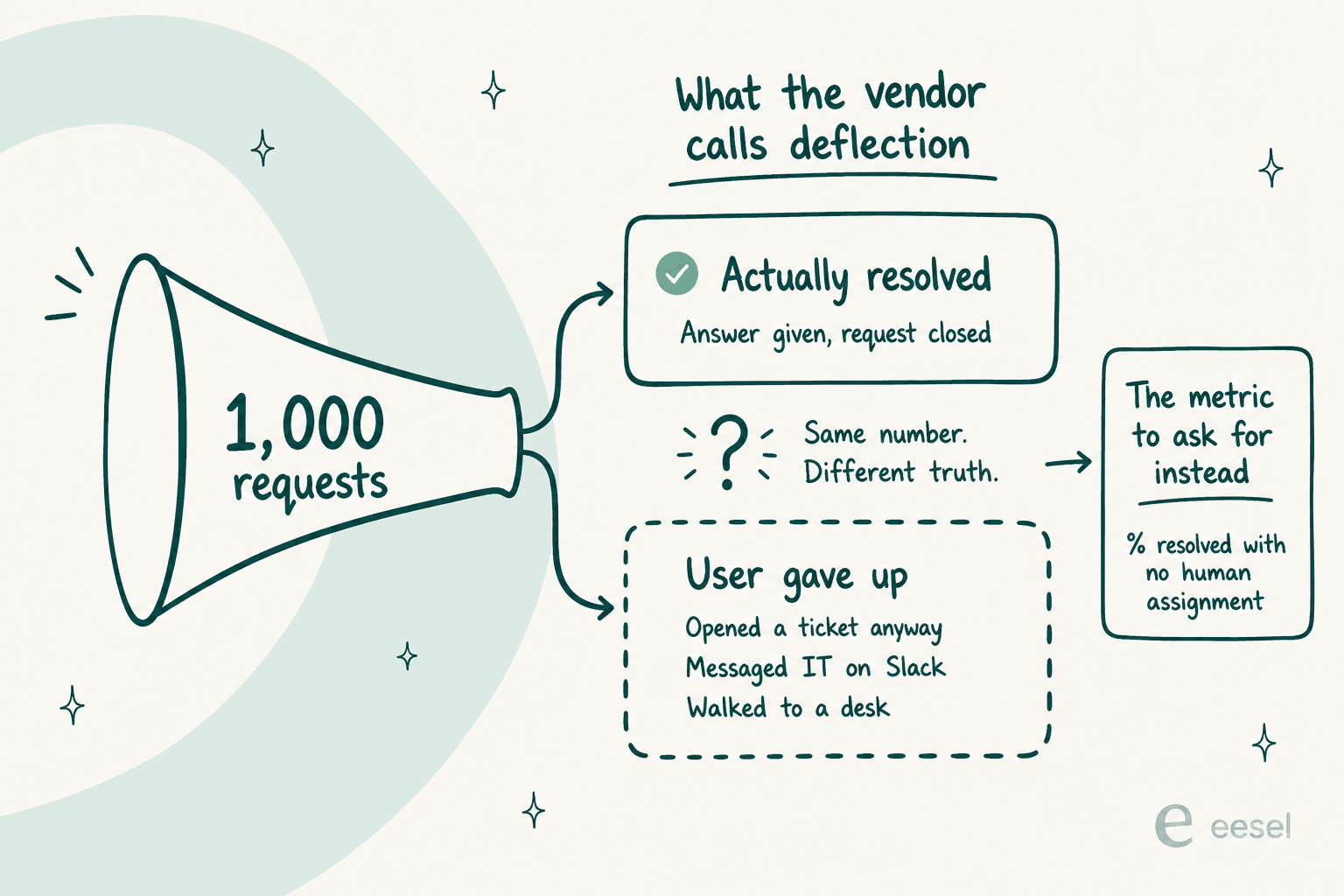
Deflection and resolution are different numbers and only one of them is worth paying for. Deflection counts tickets that were never filed, which includes the employee who got a good answer and the employee who fought a bot, gave up, and messaged you on Slack instead. The metric reports both as a win.
The most usable buyer's test I have found came from Jeff Orr on LinkedIn, and I would put it in an RFP verbatim: what percentage of ticket volume can the system resolve without human assignment? Not deflect to a knowledge article, actually resolve. His benchmark for mature deployments is 25 to 40 percent, and below 10 percent, he says, it is a chatbot.
Hold that against real deployments rather than demos. InDebted runs AI as the first responder on its internal Jira Service Management desk and reports 15% deflection while targeting 55%. Jason Loyola, their Head of IT, described the setup plainly:
"We use it to be the first responder to our Helpdesk tickets in Jira. It essentially acts just like an agent would."
That is the honest shape of it: a real number, mid-climb, on a live IT queue. Not 90%, and not on day one.
The two most useful numbers I found from sysadmins running this in production sit a long way apart, and the gap between them is instructive. One team that lost a staffer and chose not to backfill reported that "our need for intervention has declined by 73%" after pointing an AI at their own documentation, though they were careful to note the figure came off the vendor's dashboard. Another was blunter:
"We're using one for password resets and basic account stuff. Works fine for that, cuts tickets by maybe 20%. Triage and routing is still hit or miss. It's good at obvious stuff but anything nuanced still needs a human to sort it out."
Plan for the 20% and be pleased by anything above it. The difference between those two numbers is mostly documentation quality, not model quality.
It is also worth knowing that AI has not yet displaced this decision at scale. Relaying the Service Leadership compensation report, Dave Sobel notes on LinkedIn that labour has historically been 75 to 80% of service delivery cost, and that only 16% of MSPs report having functional digital employees at level 1 or 2 in production. So if you are evaluating this in 2026, you are early rather than late, and the providers quoting you are still paying humans for almost all of it.
There is also a ceiling nobody markets. A dead laptop, a cable swap, a new-starter kit: no AI closes those, and in most IT queues they are a real share of volume. If a vendor promises 80% end-to-end resolution on an internal desk, they are either counting deflection or they have not looked at your ticket mix. This is also the practical difference between an AI agent and a chatbot: one takes an action in your systems, the other returns an article.
The failure most teams hit comes before the AI does, and it is a documentation problem rather than a model problem. If your runbooks live in people's heads, an agent has nothing to resolve from, and it will deflect because that is all it can do. Fixing the internal knowledge base is the unglamorous prerequisite, and it pays off whichever delivery model you land on.
This is why I keep pushing teams to simulate against their own request history first. It tells you where your knowledge base is thin before you have paid for a year of anything, and it is the same discipline behind avoiding hallucinations and designing a sane handoff.
Then measure it honestly. Track what the agent actually did, which tools it called, and where a human overrode it.

Worth knowing where the category actually is. SysAid's survey of 718 IT professionals found 61% adoption of AI but only 3.3% running at full autonomous execution, and a third not measuring ticket reduction at all. The gap between the demo and the deployment is the entire game, which is why honest resolution rate beats celebrating ticket reduction you cannot attribute.
Try eesel on your IT queue

If you got this far comparing outsourcing quotes, here is the option that usually is not on the shortlist. Most IT teams shopping for help desk services do not have a coverage problem or a platform problem, they have a repetition problem, and those need different purchases.
eesel joins the desk you already run as an AI first responder, so there is no migration and nobody learns a new tool. It sits on Jira Service Management, Freshdesk or Slack, trains on requests you have already resolved plus whatever you keep in Confluence, Notion or SharePoint, drafts and sends replies, sets priority and SLAs, and routes what it should not touch.
Before any of it goes near a live ticket you simulate it against your own request history, which tells you the resolution rate you would actually get rather than the one on a slide. It runs on a fixed monthly plan from $299/month for 500 credits (1 credit per ticket or chat) with no seat fee, so the bill follows ticket volume instead of headcount, and setup is closer to half an hour than a quarter.
That is the setup InDebted's Head of IT put on Jira: first responder on the helpdesk queue, working like an agent would. Start free with 100 free credits and no card, or book a demo if you would rather have someone look at your ticket mix with you first.
If you are earlier in the process, AI for ITSM is the broader map, internal help desk software covers the platform side, and IT help desk software is the tool-by-tool comparison this post deliberately skipped.