


If you're on an IT or operations team, you get it: the constant stream of tickets for password resets, software access, and hardware issues. It’s the kind of repetitive work that drains your best agents and leaves employees stuck waiting. While your team is busy answering the same questions for the tenth time, the really tricky problems just keep piling up.
This is where a solid template for your IT helpdesk can make a world of difference. It's a simple idea, but it's a powerful way to standardize responses, save a ton of time, and bring some order to the chaos. In this guide, we'll walk through what these templates are, which ones you actually need, and how to set up a system that can grow with you. We'll also look at how modern AI is going way beyond static templates to build a genuinely smart support workflow.
What is a template IT helpdesk?
An IT helpdesk template is just a pre-written response or form for handling all those common, everyday support requests. Think of it as a blueprint for your messages. Instead of typing a new reply from scratch every time someone forgets their password, your team can grab a template and send a consistent, pre-approved answer in seconds.
These templates come in a few common flavors, as this graphic shows:
-
Canned responses or macros: These are short text snippets that agents can manually drop into tickets. As Zendesk explains, macros can do more than just add text; they can also update ticket properties, add comments, and change assignees, saving agents from a lot of repetitive clicking and typing.
-
Ticket forms and trackers: These are structured forms that prompt employees to provide all the necessary information right from the start. This cuts way down on all the back-and-forth emails asking for more details. For instance, Notion offers templates like an IT Service Request Form to make sure every submission is standardized.
-
Full site templates: Some teams build out entire internal sites to act as a central hub for FAQs, ticket submissions, and asset tracking. A good example is the IT help desk SharePoint site template, which uses Microsoft Lists to manage incoming requests.
At the end of the day, all these templates are trying to fix the same problem: making internal support more efficient and consistent. But as we'll get into, new AI tools can now generate these responses on the fly, giving you the consistency of a template with the personal touch of a real human.
Why every IT team needs a template IT helpdesk library
Building a library of templates might seem like extra work upfront, but the payoff is huge. It’s one of the best things an IT team can do to improve its workflow and the quality of service it offers.
Here’s why a good template system is basically essential for any modern IT team:
-
It slashes response and resolution times. This one is pretty obvious. When agents don't have to type out every single reply, they can answer and close tickets much faster. Templates give precious time back to both your agents and the employees who need help.
-
It guarantees consistent and accurate support. Without templates, the quality of support can be a bit of a lottery depending on which agent gets the ticket. A template library makes sure every employee gets the same correct, pre-approved information every single time, which seriously reduces the risk of human error.
-
It frees up your team for more interesting work. Your best agents shouldn't spend their days dealing with password resets. By standardizing the simple stuff, you let your team focus their energy on the critical, high-impact issues that actually require their expertise.
-
It makes onboarding new agents easier. Getting new hires up to speed is so much simpler when they have a library of approved responses to learn from. They can start helping out confidently from day one, knowing their answers are accurate and follow company policy.
While static templates are a great start, they still rely on agents finding and using the right one. The next step is to bring in an AI teammate that drafts personalized responses automatically, giving you all the benefits of a template with the full context of a live conversation.
The most common template IT helpdesk examples
You don't need to boil the ocean and create hundreds of templates to get started. Just focusing on a handful of the most common situations can resolve a huge percentage of your ticket volume. Here are some of the must-have templates for any IT helpdesk, broken down by category.
Ticket lifecycle communications
These templates are all about keeping employees in the loop while their ticket is being worked on.
-
Ticket acknowledgment: A simple "we got it" confirmation. This helps manage expectations and lets the user know their issue is officially in the system. Example: "Hi [Name], thanks for reaching out. We've received your request (Ticket #[Ticket ID]) and our team will get back to you within [Response Time]. You can track its status here: [Link]."
-
Request for more information: You’ll use this one a lot when the first request is missing key details. Example: "Hi [Name], to help us figure this out, could you please send a screenshot of the error message you're seeing and let us know what operating system you're on?"
-
Ticket escalation notice: This lets the user know their problem needs a specialist to take a look. Example: "Hi [Name], thanks for your patience. Your issue is a bit more complex than usual, so we've passed it along to our [Specialist Team Name]. They'll reach out to you shortly."
-
Issue resolved confirmation: This closes the loop and confirms that you've pushed out a fix. Example: "Hi [Name], great news! We've resolved your issue with [Issue Description]. Please let us know if everything is working on your end. We're now closing this ticket."
Common issue resolution
These templates give step-by-step solutions for your most frequent requests.
-
Password reset request: The all-time classic. This should be one of the very first templates you make. Example: "Hi [Name], we've received your password reset request. You can reset it by following this link: [Reset Link]. For security reasons, the link will expire in 60 minutes."
-
Software or hardware access request: This template guides users through the process of getting access to new tools or systems. Example: "Hi [Name], we've updated your permissions, so you can now access [System/File Name] here: [Link]. Just let us know if you have any trouble."
Proactive notifications
These templates are for sending important updates to the rest of the company.
- Scheduled downtime/maintenance: Gives everyone a heads-up before you take systems offline for a bit. Example: "Hello team, just a heads-up that [System Name] will be down for scheduled maintenance on [Date] from [Start Time] to [End Time]. We appreciate your patience."
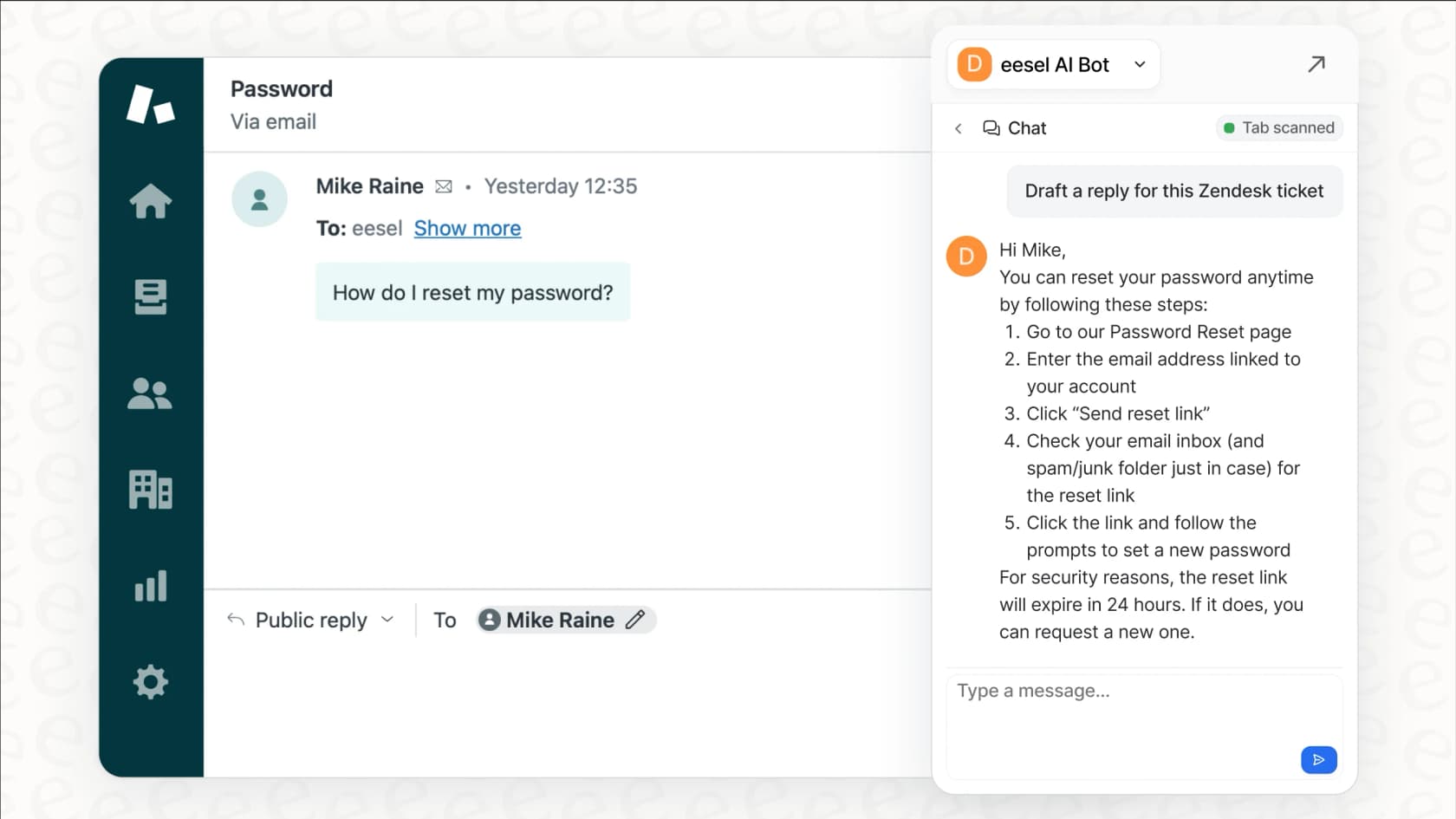
The biggest headache with all these templates? They’re static. They can get outdated fast, and agents still have to search for the right one for each situation. This is where a tool like eesel AI’s AI Copilot completely changes things. It doesn't just store templates; it reads the ticket's context and instantly drafts a perfect, personalized reply using info from past tickets, your help center, and other internal docs.
How to build your template IT helpdesk system
Once you know which templates you need, the next step is building a system to manage and use them. You can stick with the traditional route using tools you probably already have, or you can jump straight to a more modern, AI-powered approach.
The traditional way: Using a SharePoint or Notion template IT helpdesk
A common starting point is using a platform like SharePoint or Notion to build an internal helpdesk portal. The SharePoint IT help desk template, for example, has pre-built pages for submitting tickets, tracking devices, and a knowledge base for FAQs. You can store all your canned responses there for agents to copy and paste. Notion also offers templates like an IT Support Center tracker for keeping requests in one place.
This approach is better than nothing, but it has some clear drawbacks:
-
It's manual and clunky. Agents have to leave their helpdesk (like Zendesk or Jira), find the portal, track down the right template, and then copy it back into the ticket. All that context-switching adds friction and slows things down.
-
Content gets old, fast. A knowledge base is only useful if it's kept up to date. Maintaining dozens of templates and articles is a chore that easily falls to the bottom of the to-do list.
-
It doesn't learn or get better. A SharePoint site can't tell you which templates are working or spot gaps in your knowledge. It’s just a digital filing cabinet, not an active part of your workflow.
The modern template IT helpdesk approach: An AI teammate that writes for you
Instead of building a static library of templates, what if you had an AI teammate that could generate the perfect response on the spot? That's the idea behind eesel AI. It’s not another tool to manage; it's an AI agent you invite to join your team, just like a new hire.
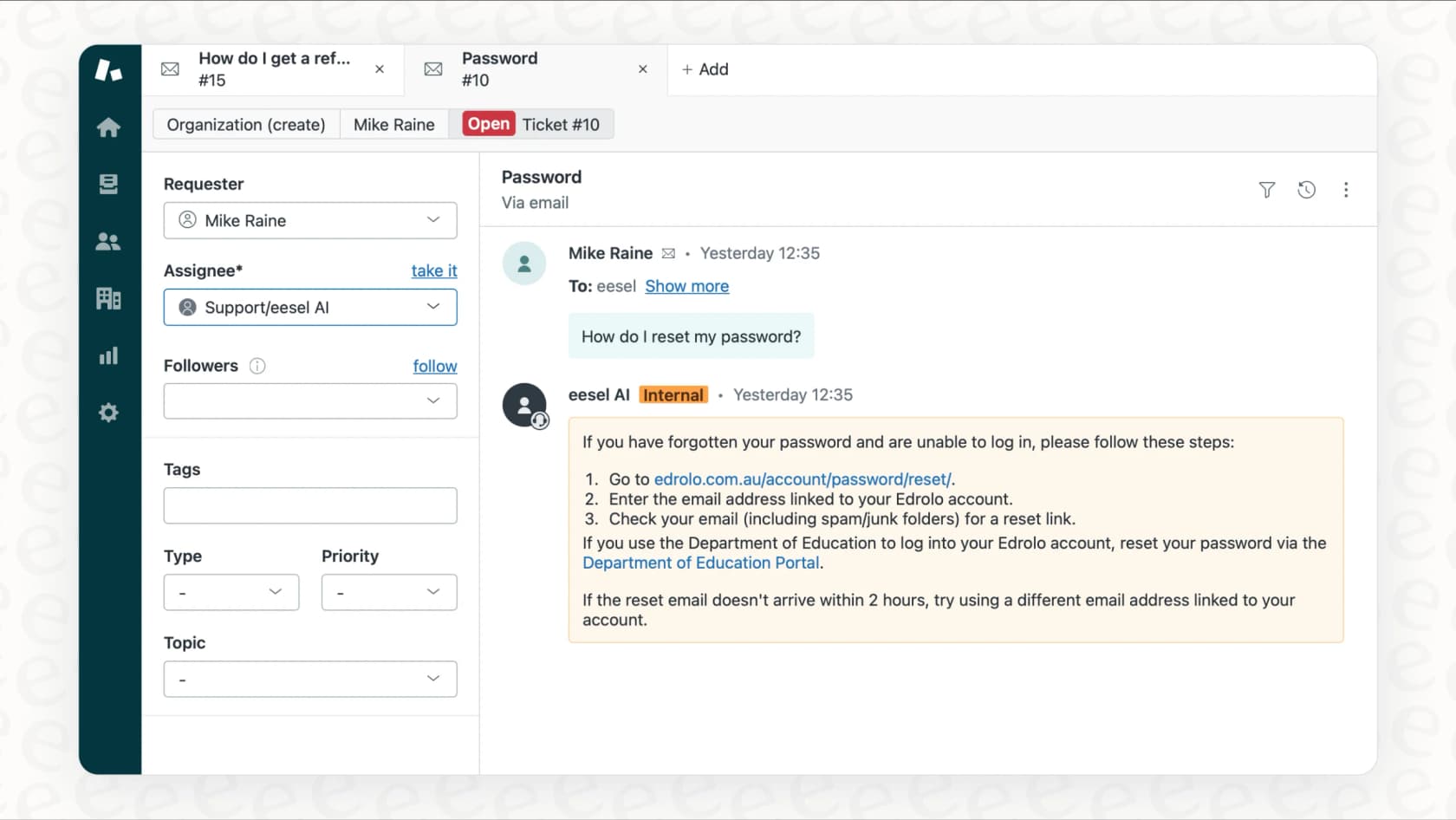
Here’s how it fixes all the problems of traditional templates:
-
It works inside your existing tools. You don’t have to change your setup. eesel AI plugs into helpdesks like Zendesk, Freshdesk, and Jira. Your agents don't have to constantly jump between tabs. The AI drafts a reply right in the ticket interface where they already work.
-
It learns from all your company knowledge, automatically. Instead of you writing out templates, eesel learns from your past ticket resolutions, help center articles, macros, and even all that knowledge scattered in Google Docs or Confluence. It shows up on day one already understanding your company’s unique issues and tone.
-
It's always current. Because it’s always learning from new tickets and documents, its responses evolve with your business. When a process changes, you don't need to go back and manually update 20 different templates. The AI just learns from the new information and adapts.
-
You're always in control. A common worry with AI is losing control, which is completely understandable. eesel is designed for a gradual, human-in-the-loop rollout. You can start with the AI Copilot drafting replies that your agents review and approve. Once you trust its performance, you can "promote" it to an AI Agent to handle certain types of tickets all by itself. You're not just flipping a switch and hoping for the best; you're promoting a teammate who has earned your trust.
This approach turns templates from a static, manual chore into a dynamic, smart system that actively helps your team work faster and better.
For those interested in the practical steps of setting up a helpdesk system from scratch, this video offers a detailed walkthrough using a free template. It's a great resource for understanding the foundational elements that an AI system can later enhance and automate.
From a static template IT helpdesk to an intelligent teammate
A system that uses a template for an IT helpdesk is a foundational tool for any support team trying to bring order, speed, and consistency to their work. By standardizing your responses to common issues, you can free your agents from those mind-numbing repetitive tasks and let them tackle more interesting, high-value problems.
But static templates are really just the start. The real leap forward happens when you move from a passive library of text snippets to an active AI teammate that learns, adapts, and works right alongside your team. This is where IT support is heading, a future where automation doesn't just do the boring stuff but actively makes your whole operation smarter.
Instead of spending weeks building a template library that will be outdated in a month, consider inviting an AI teammate that's ready to help from day one.
See how eesel AI can join your team and start drafting personalized, accurate replies instantly.
Frequently asked questions
What are the essential components of a good template IT helpdesk?
A good template should include placeholders for personalization (like user names), clear instructions or answers, and links to relevant resources or ticket tracking systems. The goal is to provide a complete response that minimizes back-and-forth.
How can I measure the success of implementing a template IT helpdesk system?
You can track metrics like first-response time, ticket resolution time, and agent satisfaction scores. A successful implementation should show improvements in these areas as agents handle tickets more efficiently.
Can a template IT helpdesk be fully automated?
While traditional templates require manual selection, modern AI-powered systems can fully automate the process. Tools like eesel AI can draft and even send responses for common issues without any human intervention, acting as a fully automated agent.
What's the biggest mistake teams make when creating a template IT helpdesk?
The biggest mistake is creating templates that are too rigid or generic, which forces agents to spend extra time customizing them. Another common issue is failing to maintain the templates, leading to outdated information being sent to employees.
How often should I update my template IT helpdesk content?
You should review your templates quarterly or whenever a major process or system changes. Regularly analyzing ticket data can also highlight which templates are used most and which ones might need updating or retiring.
Can AI replace the need for a traditional template IT helpdesk?
Yes, in many ways. AI generates dynamic responses; it learns from your entire knowledge base to generate dynamic, personalized responses on the fly, offering the consistency of a template with far greater flexibility and accuracy.