

Help desk support is the function that turns a broken thing into a closed ticket. Most teams grade it on response time and CSAT. Both are easy to game. Neither tells you what the desk costs.
The number that does is first level resolution. MetricNet's published averages put a level 1 ticket at $22, level 2 at $62, level 3 at $85, field at $196 and vendor at $471, and those costs are cumulative, so a ticket that escapes tier 1 costs $84 rather than $62. Average net first level resolution across benchmarked service desks is 74.3%, which means the typical desk pushes about a quarter of its solvable work up a level and pays four times over for it.
The two standard fixes both get graded by the party that benefits. A self-service portal deflects 10.4% on average according to the industry body, while vendors advertise 30% to 95%. I work eesel's own support queue, and I've watched both sides of this up close: the AI that quietly cut our repeat load, and the confident bot that handed a wrong answer to a real customer. The difference was never the model. It was whether anyone tested the thing against real historical tickets before letting it talk to a customer. eesel runs that simulation first, sits inside the helpdesk you already have, and is one fixed monthly price from $299 for 500 credits, with no per-seat fee.
What help desk support actually covers
Strip away the vocabulary fight and a help desk does two jobs: it answers questions about your product, and it fixes things that broke. IBM's definition is exactly that narrow, and deliberately so, because a service desk is the wider ITIL container that also handles service requests, asset management and change. If the taxonomy matters where you work, I went through it properly in help desk vs service desk.
Probably it matters less than you'd think. Atlassian, citing HDI research, notes that 41% of support centres are called something other than a help desk or a service desk. The work is the same either way.
What the work looks like in practice is a queue: password resets, access requests, VPN and network trouble, hardware, software installs, onboarding and offboarding, plus whatever your product generates. Those categories come straight from ServiceNow and Atlassian's own pages, not from a survey.
The same shape holds whether the desk faces customers or staff, which is why an HR help desk and an IT help desk end up with near-identical queues and very different vocabularies.

One distinction that does earn its keep: incidents versus service requests. MetricNet's benchmark data shows a service request takes three to five times the work time of an incident in every industry measured, with incidents averaging 12 to 22 minutes and service requests 35 to 96. So "we get 2,000 tickets a month" tells you almost nothing about staffing until you know the split. This is also why ticket classification and tagging pay for themselves faster than most teams expect.
The queue is mostly the same ten questions
Anyone who's worked a desk knows this already. Here it is from someone who posted it two days ago:
"I'm part of our internal IT team and it feels like we answer the same questions every single day.
Password resets, VPN setup, printer connections you name it. We already have documentation but most people don't seem to read it before opening a support ticket."

The top reply, at 66 upvotes, was a shrug: "that's the life of IT support - this will never change." That fatalism is the thing any argument about fixing tier 1 has to get past first.
The proportion is real. Someone working the volume side of telco support put it at 80% of call volume still being solved by turning it off and on again. And when the queue outruns the agent, the repeat question stops being a diagnosis and starts being a coping mechanism:
"I'm super guilty of this, but at a helpdesk level when I've got entirely too many tickets on my plate and I'm stressed out, I'm just resetting the freaking password. You don't want band-aid fixes? Hire enough techs or don't expect the helpdesk to solve every issue in minutes."
That's where the burnout comes from, and the numbers back up the feeling. MetricNet's benchmarking puts average agent utilization at 48% with a stated ceiling: past 60 to 70%, desks start losing people to burnout. Salesforce's own State of Service research found 77% of agents reporting heavier and more complex workloads year on year, with over half reporting burnout. If the queue is already past the point where anyone can dig out, clearing the backlog has to come before hiring.
Escalation is where the money goes
Here's the arithmetic almost nobody puts in front of a support budget.
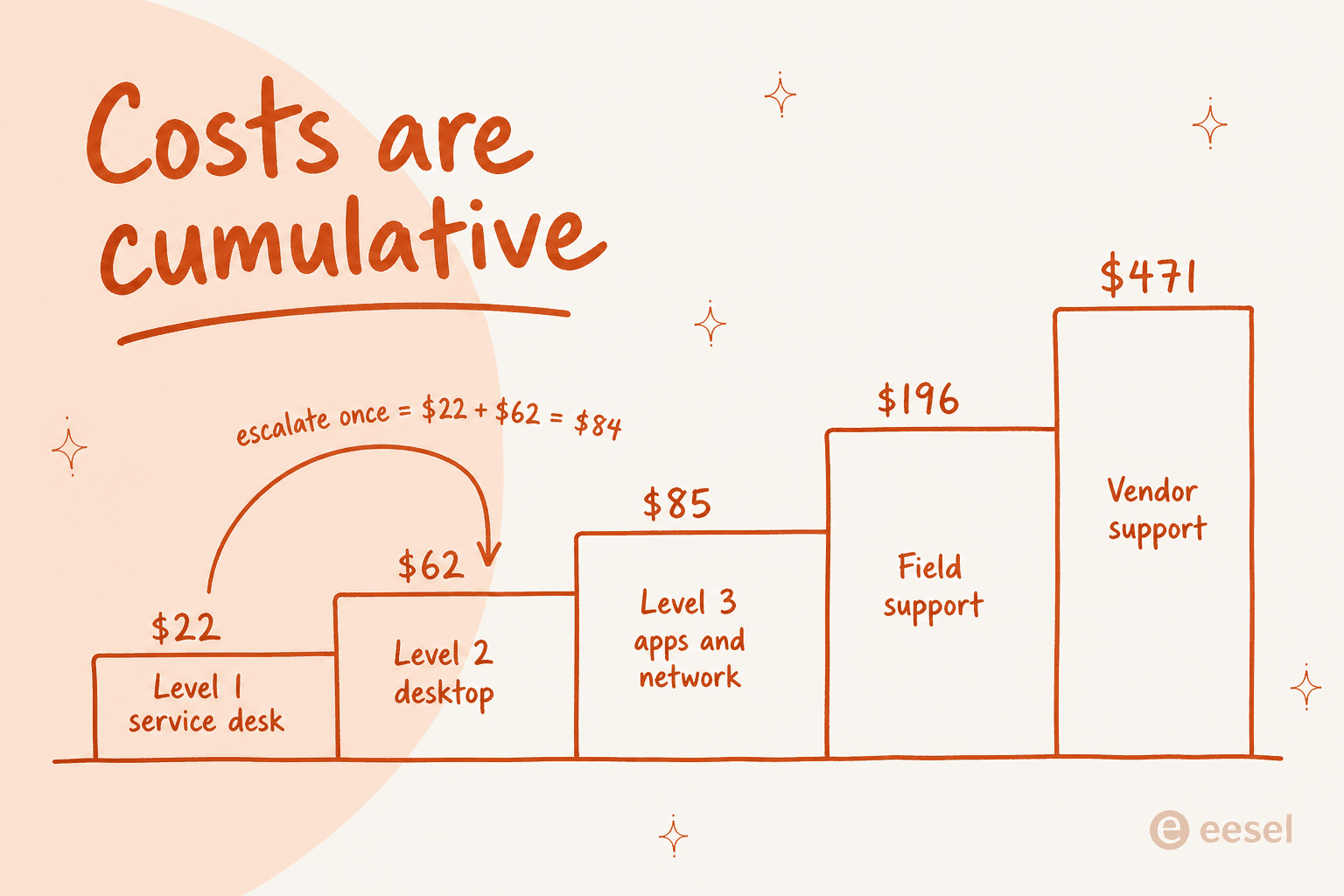
Those are MetricNet's North American averages, published through HDI by cofounder Jeff Rumburg, and the load-bearing line is his: "these costs are cumulative". A ticket logged at level 1 and escalated to level 2 does not cost $62. It costs $84, because you paid for the level 1 handling too. Escalate twice and you have paid three times for one answer.
Two caveats before you quote this at your CFO. The paper is from 2011, so the absolute dollars are dated and the ratios between levels are the part that travels. And the desk's own cost base is overwhelmingly people: agent salaries and benefits alone are more than half a service desk's total spend, and roughly two thirds once you count supervisors, QA and trainers.
Plug your own queue into the ladder:
The uncomfortable part: escalation is often not a capability problem at all. It's a queue-clearing tactic.
"Our lvl 2 is degraded to do lvl 1 work and we route unqualified stuff to L3 well knowing it wont be solved just to have it away. Usually you have way more L1 than L2 guys."
And when tier 1 gets rebuilt around a ten-minute cutoff, resolution quietly stops being its job at all. One agent's description: "less IT, more reception, ticket routing." Getting routing and prioritization right is cheap. Rebuilding tier 1 into a switchboard is expensive, and you only see the bill on the escalation line.
The resolution metric everyone measures is the wrong one
Two numbers, almost the same name, measuring opposite things.
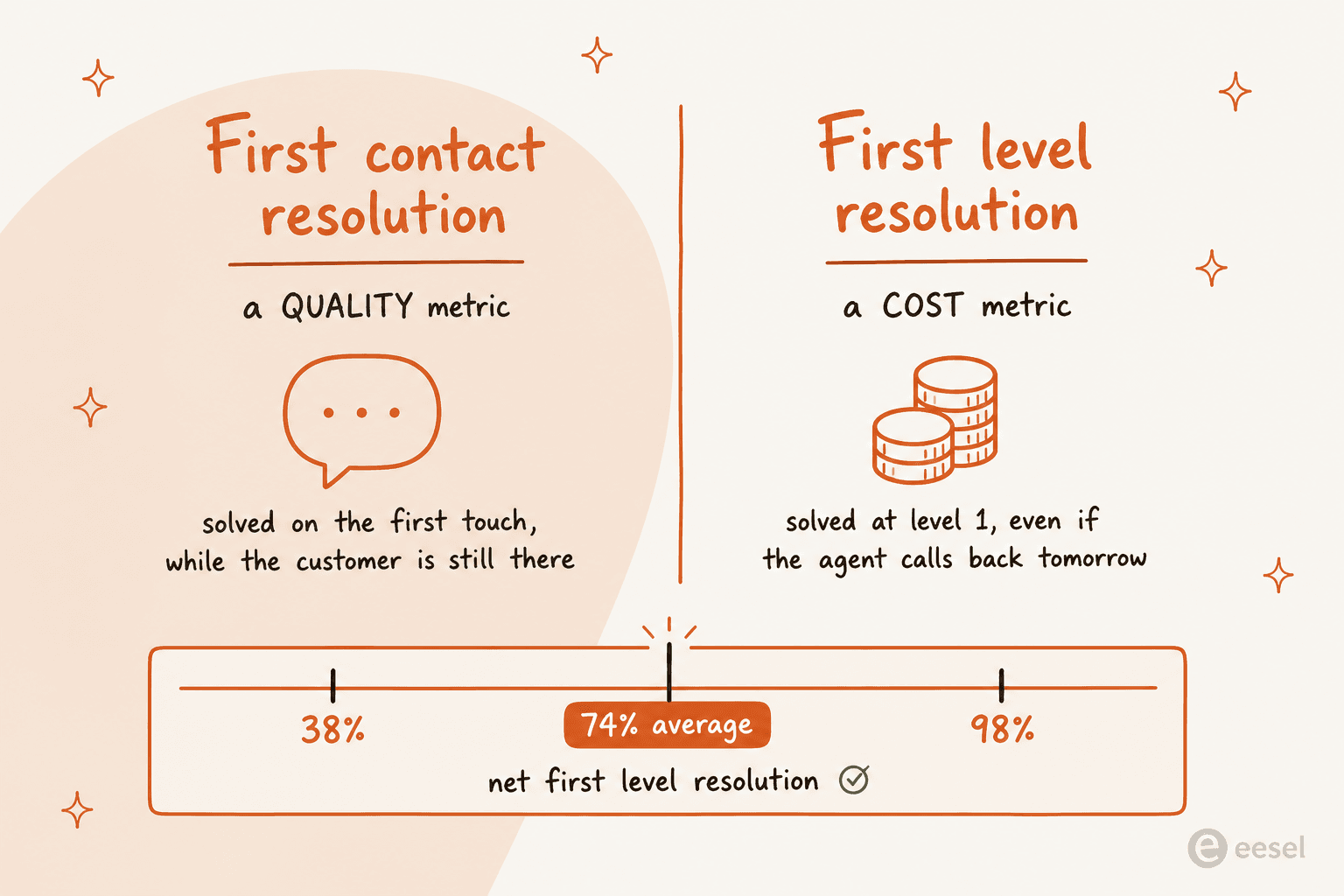
MetricNet is explicit about it: first contact resolution is "a quality metric that strongly affects customer satisfaction, while first level resolution is a cost metric that strongly influences total cost of ownership". A ticket your tier 1 agent researches overnight and calls back on is not first contact resolution. It is first level resolution, and it saved you $62.
The benchmark numbers are worth memorising. Average net first level resolution is 74.3%, median 74.9%, with a floor of 37.6% and a ceiling of 97.8%, and only 1.4% of service desks clear 95%. The low end, in MetricNet's words, is "predominantly log-and-dispatch service desks." The high end has agents with knowledge management and remote diagnostic tools in front of them.
Also note the word net. Gross first level resolution counts everything logged at level 1. Net excludes the tickets tier 1 could never have solved, and MetricNet calls net "by far the more important of the two." If you're reporting gross, you're grading yourself on a curve you drew.
Which brings me to the honest problem with every support metric: they get gamed, immediately and universally.
"Perverse incentives:
The incentive is close tickets, not fix problems. [...] The more simple, reoccurring problems that continue to exist, the better your stats are. Permanently fixing problems hurts you."
Grab the easiest ticketsDo not assist colleaguesDo not escalate tickets to more capable staffUse quick one-off/temporary fixesu/awarre, "Tickets as performance metric?", Reddit
The shortest version of the same point came from a tech who got dressed down for closing 75 tickets when the top closer was at 150: "I asked for the reopen rate." Management declined to discuss it. CSAT fares no better; on a scale where anything below a 5 counts as a fail, you are not measuring service, you are measuring how well agents beg.
If you want the metrics that survive contact with a real queue, customer service KPIs and support QA are the places I would start, and CSAT specifically needs its own treatment.
Self-service works less than you think
Every deflection strategy starts with a help centre. Here's the number the vendor decks leave out.
MetricNet's benchmarking database puts the self-service completion rate at 10.4% on average, ranging from 0% for desks with no self-service to 55% at the top. An earlier pass of the same metric had it at 8.9%. Both add the same caveat: most of what does get self-resolved is password resets.
Now compare that with what the platforms publish about their own customers.
| Source | Claimed self-service or automation rate | What it measures |
|---|---|---|
| HDI / MetricNet benchmark | 10.4% average, 0% to 55% range | tickets a user completed without an agent |
| Zendesk (Squarespace) | 95% self-service success rate | vendor-published customer outcome |
| Zendesk (TeamSystem) | 80% automation rate | vendor-published customer outcome |
| Freshdesk (Hobbycraft) | 30% of queries handled by AI | vendor-published customer outcome |
| Help Scout | "Drop email volume 30%" | vendor product claim |
| Salesforce | "deflect 30% of cases" | vendor product claim |
I'm not calling the vendor numbers fake. They are real customers with real results, and eesel publishes numbers in the same genre. The point is that they are not the same measurement, they are not audited, and using them to set a target for your own desk is how a project gets funded and then quietly dies.
Two mechanics from the same HDI research that nobody budgets for. First, deflection raises your cost per remaining ticket, because the easy stuff leaves the queue and the average complexity of what stays goes up. Second, there is a time ceiling: a user past ten minutes in a self-help portal is costing you more in lost productivity than the deflection saved.
And then there is the actual failure mode, which is not content quality:
"I wouldn't say our KB is useless but it depends heavily on the customers issue- our customer-facing KB is useless though as our customers don't even bother to use it despite some good stuff being in there for them (adding printers, self service PW resets, etc)."
A good knowledge base nobody opens is a discovery problem wearing a content problem's clothes. Which is exactly why FAQ deflection works better at the moment of ticket creation than on a portal page, and why the help desk portal is a distribution decision as much as a design one.
"24/7 support" almost never means 24/7
Worth knowing before you buy this, or sell it.
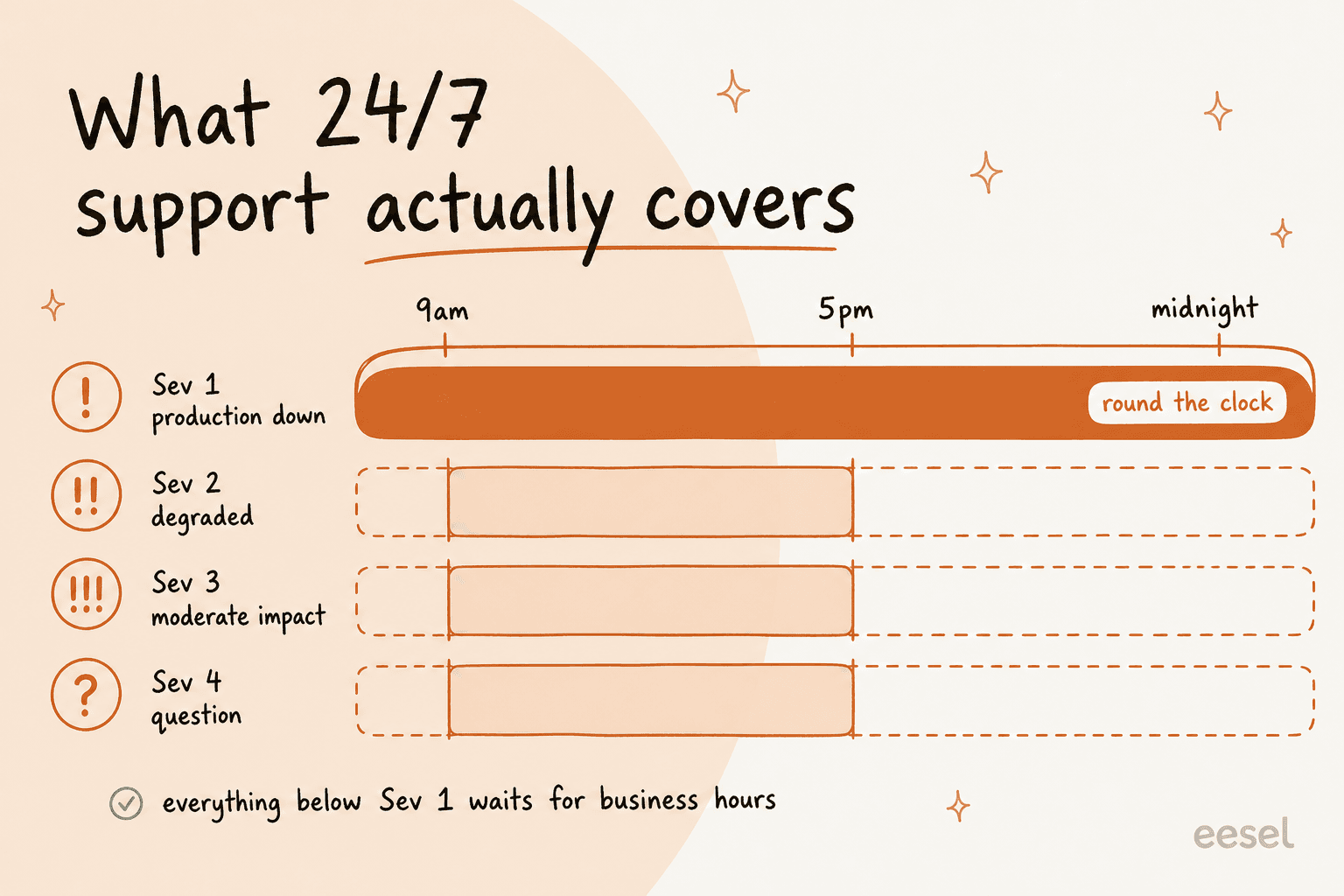
Atlassian is the one major vendor that publishes its coverage in enough detail to check. Its support offerings documentation defines 24x5 as around-the-clock L1 coverage Monday to Friday, with L2 through L4 handled in business hours. Full round-the-clock cover across all issue types is reserved for the highest offering. The response targets tell the same story: Standard and Premium count in business hours and business days, Enterprise counts in clock hours. That unit change is the actual product being sold.
The practitioner version is blunter. An MSP operator, answering on Reddit when another MSP asked what he could get away with: "Alot of 24/7 is really just someone on call overnight."
And here's the argument that actually decides it. The overnight queue is made of the same tier 0 tickets as the daytime queue:
"Password is expired at 4 AM, and can't figure out how to change it? Call on-call IT. Can't find a paper jam at 2:30 AM, and you're too 'busy' to mess with it (even though there is only one patient on the unit), call on-call IT. [...] Those are all real examples."
Meanwhile 74% of consumers now expect round-the-clock availability, per Zendesk CX Trends 2026 and its survey of 6,182 consumers, specifically because AI made it plausible. Staffing a rota to answer 4am password questions is the most expensive possible response to that expectation. Automating the tier 0 slice of the overnight queue and paging a human for everything else is the cheap one, and it is the concrete case for an AI help desk that most posts talk around.
In practice that usually means a service desk chatbot covering the after-hours window, plus ticket reduction work on the daytime queue, not a second rota.
What a help desk support platform gives you in 2026
The category has converged. Whatever you buy, you're buying six primitives.
| Capability | Zendesk | Freshdesk | Help Scout | Jira Service Management |
|---|---|---|---|---|
| Omnichannel inbox | Email, messaging, phone, social, chat in one workspace | Shared inbox, threads, tasks, multilingual | Email, chat, phone, social under one roof | Queues pulling email, chat and service desk |
| Macros / saved replies | Macros applied in one click | Ticket templates with pre-filled fields | Saved Replies | Not surfaced as a named feature |
| SLA policies | Alerts for unattended tickets, manager escalation | Multiple policies per customer, product and shift | Views filtered on "Waiting over 24 hours" | Unlimited policies with escalation rules |
| Routing | Omnichannel routing to the best-qualified agent | Round-robin, load-balanced, skill-based | Automatic or one-click assignment | Queue triage with ML grouping |
| Knowledge base | Unified graph over help centre, Confluence, Drive | Multilingual, versioned, approval workflow | Docs, no-code help centre | Article recommendations at request time |
| AI layer | AI agents with built-in QA | Freddy Agent, Copilot, Insights | AI Drafts, AI Summarize | Virtual service agent inside Slack |
Every cell above comes from the vendor's own product pages: Zendesk ticketing and Freshdesk features.
The other two are Help Scout features and the Jira Service Management ITSM detail page.
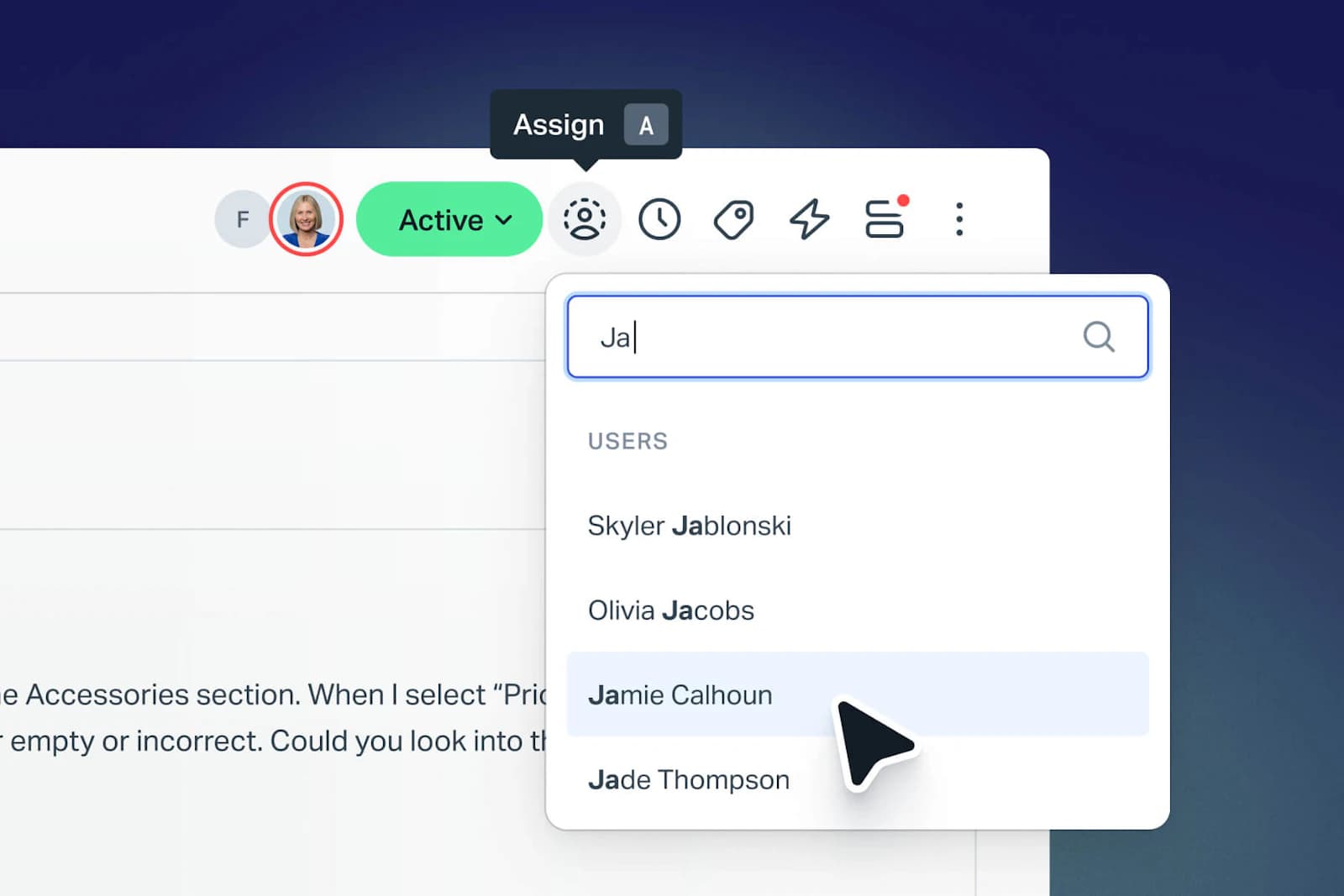
The centres of gravity differ more than the feature lists. Help Scout is the shared-inbox end and says so, promising you can learn it in under an hour. Jira Service Management is ITSM-shaped, organised around seven ITIL practices rather than an inbox. Zendesk is the widest, with 1,800+ marketplace apps behind it. Freshdesk publishes the fullest feature taxonomy of the four.
There is also a real design disagreement in the category worth knowing about. Atlassian argues against rigid tiering on its own site: "we recommend a more collaborative approach to service request management." Zendesk, Freshdesk and Help Scout all ship escalation and skill-based routing as core primitives. Neither camp is wrong. But that choice quietly decides whether your escalation line ends up looking like the ladder above.
Two things worth budgeting for that are not in any comparison table. One, macros and multi-channel coverage only pay off once someone owns them; an unmaintained macro library is a slow way to send wrong answers at scale.
Two, pricing has drifted from seats to usage across the whole category, so any Zendesk pricing comparison built on seat counts alone will miss most of the bill.
What frontline teams actually say about AI on tier 1
I want to give both sides properly here, because the gap between how buyers talk about support AI and how operators talk about it is enormous.
The most-upvoted opinion in the biggest recent thread on the subject was flatly against:
"Nobody actually wants AI service desks. Not us, not the users. The only ones pushing for them are CEOs and IT leads who think they'll save soooooooo much money."
And in the same thread, a sysadmin running it in production since February:
"We rolled it out in February of this year and so far according to the dashboard, our need for intervention has declined by 73%. The people know they're being answered by AI but they don't care because the AI responds instantly and for the most part its cut back on turnaround time."
Both are true. The difference between them isn't the model. Two people in the same conversation described the same technology with opposite outcomes based purely on where it sat. One built a bot that surfaces docs during ticket creation and asks whether that solved it; it works. The other, in the same thread, got "a little chat window that people ignore on their way to get the help desk phone number."
The single best framing I found came from an IT lead running AI routing and replies:
"It speeds up resolution time, so people do want it. What they don't want is to be blocked from accessing a human for help, which ultimately adds to their frustration.
It's a service desk, which implies service."
"It's a service desk, which implies service" is the whole design brief. When the human path gets removed, the same bot that worked stops working, which one commenter described in before-and-after terms: it "worked great as it had an option to connect to a human," and once that option went, even words like "lawyer" just routed people in circles through articles they could not access.
Two more failure modes worth naming, because they are the ones that actually kill deployments. The first is knowledge quality. Someone whose CIO bought a tier 1 automation platform put it plainly: unless documentation and service catalogue are dialled in, "more than half the AI answers will be bad or generic." The one-line version, from the same corner of Reddit: "My internal knowledge base doesn't have information from my internal knowledge base."
The second is fabrication, and it is the one I take most seriously:
"When I investigated I found that none of this had been done. It was because the LLM they use for ticket notes had totally fabricated all of the remediation steps, which the agent added into the ticket without bothering to check their own work. The same is happening on other tickets too"
I take it seriously because I've watched it happen on our side of the fence. eesel has had customers whose bots invented answers when knowledge retrieval came back empty, including one that confidently answered a customer question with an element from the periodic table. That is the single strongest argument for the hallucination controls that most vendors treat as an afterthought.
And on the deflection number your executive is about to be shown, the sharpest warning in the whole sweep:
"Like, put a chatbot in front of the support portal? Wow, it handled 5000 issues this month! [...] Now, only 1 of those interactions was useful and the other 4999 times people had to circumvent the bot to open a ticket, or just gave up and fucked off, but hard to track that, eh?"
How to put AI on the desk without breaking it
I've been on the eesel support queue while we rolled our own AI onto it, and I've sat in on the calls where customers explain why the last one failed. This is the order that works.
1. Simulate against your own historical tickets before it talks to anyone. Not a demo. Not a sample question set. Run it over your real closed tickets and read what it would have said. This is the step that catches the fabrication problem above, and it is the reason eesel builds simulation into onboarding rather than selling it as a professional service. One customer's stated goal within two days of signing up was simply to train the bot on their Zendesk ticket history, which tells you how obvious this is once you have been burned.
2. Start on drafts, not on send. Copilot mode leaves the reply as an internal note for an agent to approve. You get the throughput benefit and the accuracy audit at the same time. On one real-traffic trial we measured 93% triage accuracy and 88% draft directional accuracy before anything went out unsupervised.

3. Scope it by confidence, not by channel. The most common thing I hear on calls is not "will it work," it is "I need it to only touch what it is sure about." One CX lead running about 7,000 tickets a month put it exactly this way: they needed an AI that only handles the tickets it is confident to handle and leaves the rest alone, because nobody has time to audit 7,000 tickets to check the ones it guessed at. That's a product requirement, not a preference, and it is what separates handoff design from a deflection wall.
4. Measure resolution, not deflection. Deflection counts the people who went away. Resolution rate counts the ones who got an answer. Watch reopen rate alongside it, because a bot closing tickets nobody agreed were solved is the same failure as a human doing it, just faster.

5. Fix the knowledge before you scale the automation. If your documentation only exists in three people's heads, no model saves you. This is unglamorous work: training on your knowledge base and on past tickets, then tagging so you can see which categories the AI is safe in. It is also the part that pays off whether or not the AI project survives.
If your team lives in chat rather than a portal, automating Slack support is usually the fastest place to prove it. Plain help desk automation rules can absorb the mechanical half before any model is involved.
One last thing on the executive conversation, because it's happening in a lot of teams right now. When leadership says they want 100% of tier 1 automated, they are usually anchoring. A mid-level director in that thread said it out loud: the real goal is 30 to 70%, and the outlandish target is a negotiating position. Come back with the escalation-cost arithmetic instead. Moving first level resolution ten points is a defensible, measurable, achievable target. Replacing tier 1 is not.
Try eesel on the help desk you already run
If you've read this far, your problem probably isn't "we need a help desk." You have one. The problem is that a quarter of what your team touches did not need a human, and the escalation line is where that shows up on the invoice.
eesel is an AI teammate that plugs into the helpdesk you already use, learns from your existing help centre and your closed tickets, and starts drafting replies as internal notes on day one. It handles the repeat questions and hands the rest straight to a person, with confidence-based scoping so it leaves alone what it should. Setup is measured in minutes, not a quarter. Gridwise, a gig-economy analytics app, wrote in a G2 review that eesel resolved 73% of its tier-1 requests in the first month, after a seven-day trial. An internal IT team running it as first responder on Jira tickets went from 15% deflection toward a 55% target, on a queue backed by Confluence and Slack.

Pricing is one fixed monthly price from $299 for 500 credits (1 credit per ticket or chat), with no platform fee and no per-seat charge, and you get 100 free credits without a credit card. Set against a $22 level 1 ticket, the arithmetic isn't subtle. Try eesel, run it against your own ticket history first, and judge it on the reopen rate.