

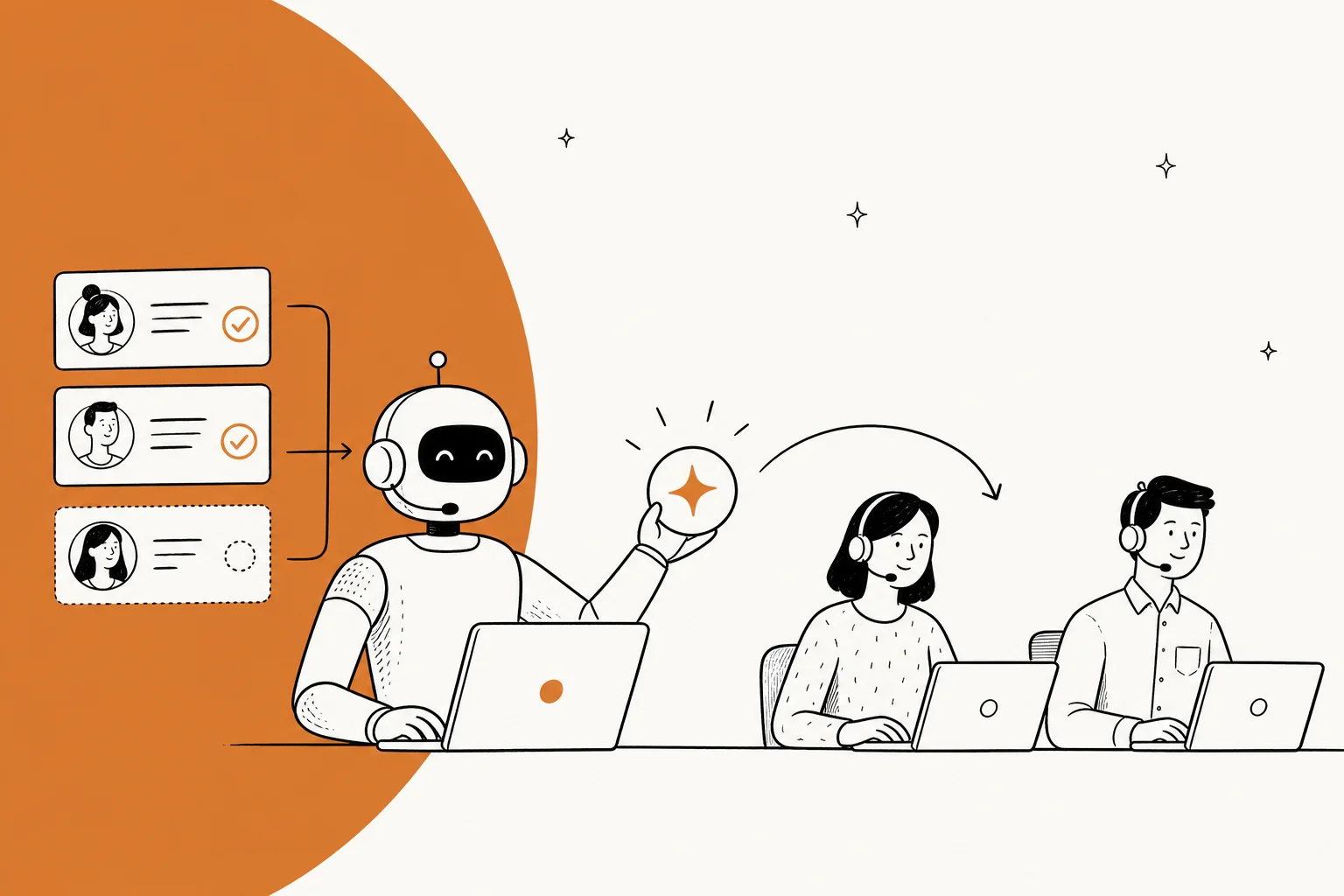
Nearly every article about AI-powered customer service quotes a containment rate. Containment is the wrong number. A bot that "handles" a ticket without actually fixing anything splits one contact into two, and Gartner's own figure, quoted in an April 2026 Berkeley review paper, is that only 14% of customer service issues are fully resolved in self-service.
I sit on eesel's support side, and the teams who get this right all do the same unglamorous thing: they let the AI answer only the tickets it is actually sure about, and leave every other ticket completely untouched. That is how Smava runs 100,000+ German Zendesk tickets a month through an AI agent, and how Design.com does 50,000+ on Freshdesk.
So the practical version: pick ticket types that have one correct answer, run the agent against your real ticket history before it talks to anyone, set a confidence gate, and measure resolved-and-not-reopened instead of deflected. eesel prices this as one fixed monthly plan with no seat fees, and a free plan with 100 credits, which means a cautious rollout can start small (from $299/month for 500 credits) rather than with a full platform contract.
What AI-powered customer service actually means now
The phrase covers two things that get blended together constantly, and the difference decides your entire business case.
AI-assisted means a human agent still sends the message. The AI drafts the reply, summarises the thread, suggests a knowledge base article, or scores the sentiment. The agent stays in the loop and the ticket still costs you agent time, just less of it.
AI-resolved means nobody on your team touched it. The agent read the question, looked up the order, issued the store credit, wrote back, and closed the conversation. That is the only version that removes cost rather than shaving it.
Both are legitimate. They're just not the same product. A vendor quoting "AI handled 70% of conversations" is almost always counting the first kind, so when you're comparing tools, ask which of the two numbers you're looking at. Here's what sits under the umbrella in practice:
| Capability | What it does | Assisted or resolved |
|---|---|---|
| AI agent | Reads intent, calls your systems, replies and closes | Resolved |
| Copilot / drafting | Writes a suggested reply for a human to send | Assisted |
| Intelligent triage | Classifies, tags and routes on arrival | Assisted |
| Sentiment analysis | Flags frustration for faster escalation | Assisted |
| Self-service search | Answers from the help centre without a ticket | Resolved, if the answer lands |
| QA scoring | Grades every conversation instead of a 3% sample | Neither, it's oversight |
The market has clearly moved toward the resolved column. G2's 2026 data puts the AI customer support agents category at 4.53 out of 5 across 1,733 reviews, with 52% of buyers reporting payback in under six months, per G2's AI statistics. That's the fastest payback of any AI software category they track, which is why the AI support tools shortlist has doubled in a year. The catch is that fast payback is measured by the people who bought it, not by the customers on the other end.
The number the industry quotes, and the number that matters
Containment rate is how many conversations ended without reaching a human. It sounds like a resolution metric. It isn't. It counts the customer who gave up, the customer who rage-quit to email, and the customer who really did get what they needed, all in the same bucket.
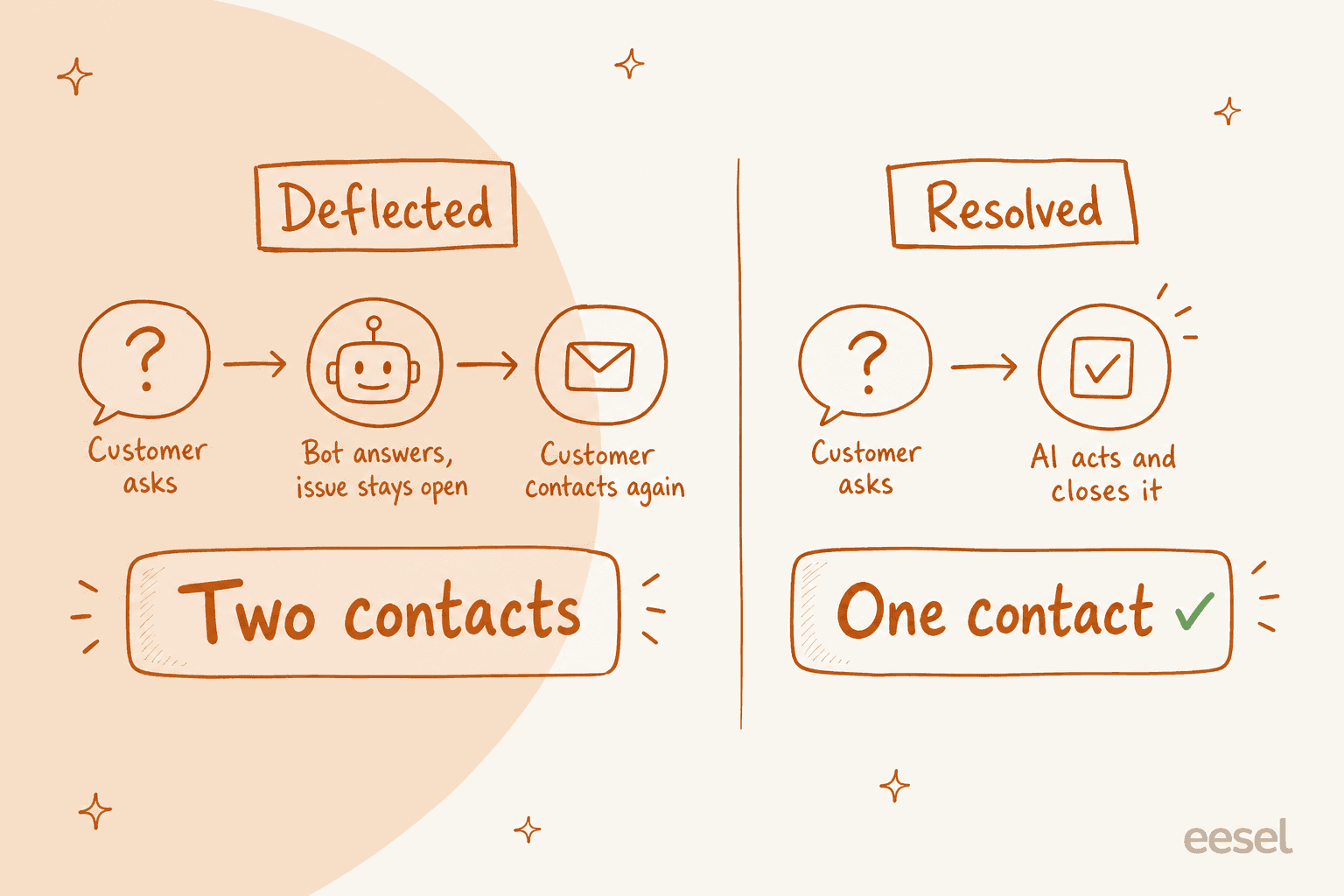
This is the two-contact problem. A deflected-but-unresolved ticket doesn't disappear, it comes back as a second contact, usually angrier and usually on a more expensive channel. You paid for the bot interaction and the agent interaction, and you've spent some brand goodwill on top. That gap is where every honest ticket deflection guide has to start.
The consumer data on this is blunt. AnswerConnect surveyed 6,000 adults through OnePoll and found 83% want a human when they call a business, with 29% hanging up immediately when they hit AI. One in three called talking to a bot the single most frustrating part of contacting a company. The breakdown of why is the useful part: 51% said the AI struggled to understand them, 48% said it couldn't resolve the problem, 35% said it gave inaccurate information.
Notice that only one of those four complaints is about tone. Three are about competence.
A CX lead I spoke with, running about 7,000 Gorgias tickets a month at a DTC supplements brand, put the constraint better than any vendor deck has:
"The AI will never be able to answer 100% of the questions, but if it tries and just answers 'sorry I don't know this,' I cannot go and check all my 7,000 tickets to see if the AI actually made a good answer. Then the point is a little bit gone. I need an AI who is only handling the tickets that it's confident to handle and all the other ones, leave them alone."
That's the whole design brief right there. Answer what you're sure about. Be invisible on everything else.
Work out what your own numbers look like
Containment and resolution diverge fastest when your reopen rate is high, and most teams have never actually put a dollar figure on that gap. Plug in your own volumes:
The break-even point moves around, but the shape never does: below roughly half your routed volume being properly resolved, you are paying twice for the same conversation. That is the entire reason a narrow, confident rollout beats a broad, ambitious one.
How an AI agent actually handles a ticket
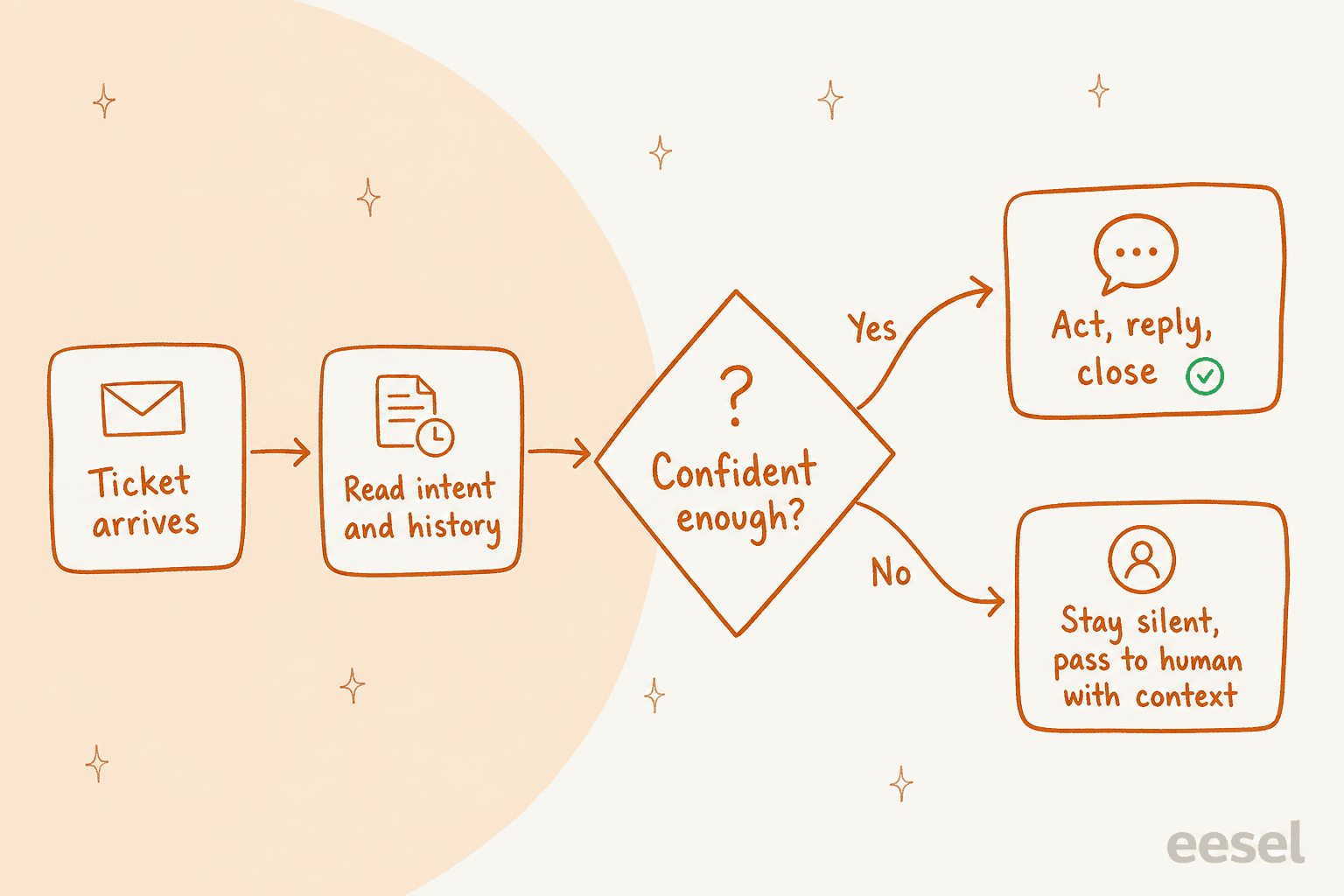
Under the marketing, the mechanism inside an AI help desk is fairly plain. There are six steps, and one of them does most of the work.
- Knowledge grounding. Before anything else, the agent needs a source of truth: past tickets, help centre articles, macros, internal docs in Confluence or Notion. This is where quality is won or lost, and I'll come back to it.
- Intent and entity extraction. The model works out what the customer wants and pulls the specifics out of the message: order number, plan name, date, product.
- Context lookup. It queries the systems that hold the answer. Shopify for the order, the CRM for the account, the billing system for the invoice. This step is what separates an AI agent from a chatbot.
- The confidence gate. The agent scores how sure it is. Above threshold, it proceeds. Below, it stops and hands over, ideally without saying anything to the customer at all.
- Action and reply. For a real agent this includes doing the thing, not just describing it: applying the credit, updating the address, re-sending the tracking link. Then writing back in your tone.
- Handoff with context. When it escalates, the human gets the summary, the customer history, and what the AI already checked, so the customer doesn't repeat themselves, which is the point of good escalation management.
Step four is the product. Everything else is plumbing that most vendors do comparably well. A tool that answers everything at 70% accuracy is worse than a tool that answers 40% of tickets at 97% accuracy, because the first one puts wrong answers in front of customers and you find out from a review.
The rules around that gate should be yours to set, in plain language rather than a decision tree. A support lead saying "anything over $500 in refunds, loop me in first" should be enough to change the behaviour, which is roughly how eesel's helpdesk agent is briefed. If your tool needs an implementation consultant to change an escalation rule, that rule will not get tuned, and untuned rules are how escalation quietly breaks.

The knowledge base is the actual bottleneck
Every practitioner arrives at the same conclusion eventually, and it is never the model's fault.
Rob Dwyer, who runs Fortune 500 virtual agent deployments at Level AI, puts "test your knowledge" as step three of his rollout framework: dig into every relevant knowledge base resource and make sure it's current, internally consistent, and written in your brand's voice, because the agent can only be as good as what it reads. G2's own vendor survey found that accuracy concerns and internal expertise, not cost, are the top blockers to scaling AI support.
One pattern I see repeatedly on demo calls: the knowledge base was written for administrators, and the tickets come from end users. One support manager I worked with had exactly that mismatch, an entire help centre aimed at admins while riders wrote in with rider questions. No model fixes that. You either rewrite for the actual audience or you point the agent at past resolved tickets instead, which is usually the better-written corpus anyway.
If your help centre is thin, fix that before you buy anything. A well-maintained internal knowledge base raises the ceiling on every tool you'll ever evaluate, and it's the difference between a workable resolution rate and a frustrating one.
What AI should own, and what it should stay away from
Whether a ticket can be automated is a property of the ticket, not of the AI. Sort your queue on that and the roadmap more or less writes itself.
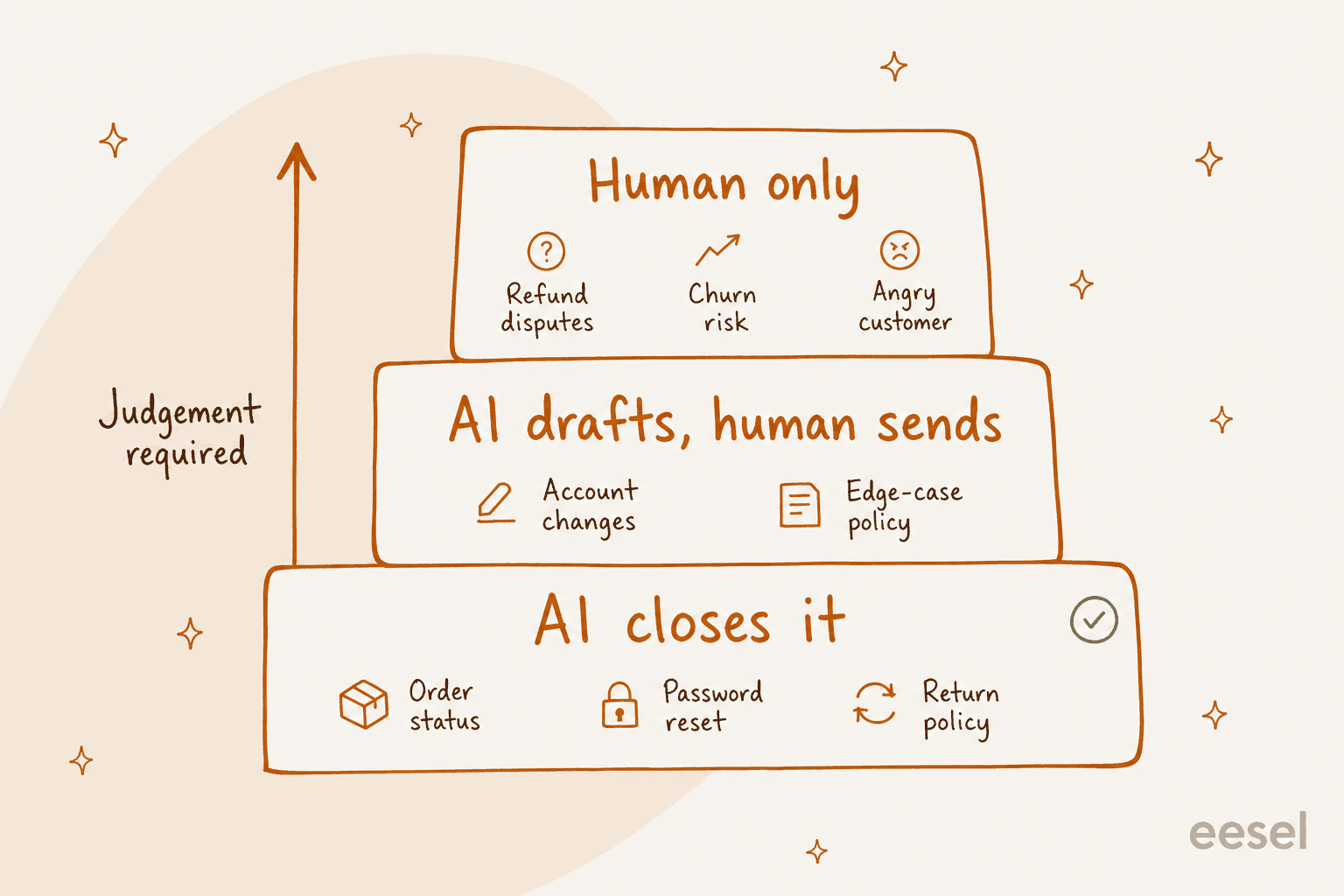
| Ticket type | Who should own it | Why |
|---|---|---|
| Where is my order | AI, end to end | One lookup, one correct answer. See AI order tracking |
| Password / access reset | AI, end to end | Deterministic, no judgement involved |
| Return and shipping policy | AI, end to end | Answer already exists in writing |
| Plan or address change | AI, end to end with a rule | Needs an action, but the action is bounded |
| Refund inside policy | AI up to a threshold | Set a dollar ceiling, escalate above it. See AI refund requests |
| Bug report | AI drafts and triages | Needs engineering context to close |
| Billing dispute | Human, AI summarises | Money plus emotion is the worst combination to automate |
| Cancellation or churn risk | Human | The conversation is a retention conversation |
| Anything already escalated once | Human | The customer has spent their patience |
The middle rows are where teams get impatient and lose trust. It is tempting to give the agent refund authority on day one because refunds are high volume. Don't. Give it a ceiling, watch what it does under the ceiling for a month, then raise it. The same logic applies to automating refunds and to routing in ecommerce.
Worth saying plainly, because it cuts against my own interest: if your ticket mix is mostly the bottom half of that table, dense, technical, judgement-heavy work, AI-powered customer service will make your agents faster and it will not shrink your team. That's a real outcome, it just isn't the one the category is sold on. Teams in that position get more from copilot-style drafting and QA automation than from an autonomous agent.
What customers and practitioners actually say
The honest summary is that sentiment is split, and it splits along competence lines rather than principle. People don't hate AI support. They hate AI support that can't do anything, and the customer service chatbot category earned that reputation fairly.
"The real issue isn't AI capability, it's implementation. When we started building Intelswift, we realized that 90% of customer frustration comes from AI that can identify problems but can't solve them."

The most cited irritant is not accuracy at all, it's being trapped. The Berkeley paper describes customers who found workarounds to break out of bot loops by repeating "speak to a human" or, memorably, "chicken nuggets" until something gave, then sharing the trick on Reddit.
"Some sources have identified 'no easy path to a human' as the single biggest irritant in customer service automation."
There is a real positive signal too, and it has grown noticeably in the last year:
"Idk if it's just me but customer support bots have gotten way better lately. Used to be they'd just loop through the same useless responses until I rage-typed my way to a human."
On the operator side, the framing that keeps coming up is augmentation with a guaranteed exit:
"What I've witnessed when we deployed Virtual Agents are real results that weren't based on 'let's cut headcount' motives, but instead were based on 'how do we support customers better?' motives. Those Virtual Agents always have a built-in handoff mechanism to a real human."

And a fair note from the review sites, because it's the reason the confidence gate exists:
"Even though it is a great tool, it's not the same as having an actual online conversation with a real person. Because it is AI, it may not have the desired answer for all inquiries."

Headcount reality, from G2's 2026 vendor survey: three of five vendors reported reductions of 1 to 25% after adopting AI, none reported growth, and two of five actually reported higher cost per ticket once tooling and oversight were counted. The shift is reallocation more than elimination, and the savings are not automatic.
What AI-powered customer service costs
Three pricing shapes dominate, and they behave very differently as you scale.
| Model | How it's billed | Where it bites |
|---|---|---|
| Per seat | Monthly fee per agent licence | You pay for humans even as AI takes the volume |
| Per resolution | Fee each time the AI "resolves" something | The vendor defines resolution, and definitions drift |
| Per ticket | Fee per conversation handled, regardless of replies | Predictable, but check whether follow-ups re-bill |
| Bundled into a helpdesk tier | AI unlocked on a higher plan | Forces a platform upgrade for one feature |
That last row is the common trap, and it's why a customer service automation platform often costs more than its price page implies. Native helpdesk AI usually sits behind an upgrade, which is why teams evaluating Zendesk AI or Freshdesk bots often find the AI itself is the cheap part and the plan jump is the expensive part.
eesel sells one fixed monthly plan sized to volume. From the pricing page: from $299/month for 500 credits, no platform fee, no per-seat fee, and one credit covers one ticket or chat no matter how many replies it takes.
| Tickets automated per month | Monthly cost |
|---|---|
| Up to 100 | Free plan (100 credits) |
| 500 | $299 |
| 1,000 | $499 |
| 2,500 | $999 |
| 5,000 | $1,899 |
Partial rollouts stay small. A team fielding 1,000 tickets a month that routes only 200 to the AI fits the 500-credit plan at $299, and only tickets the agent actually works on count, so spam and tickets it is told to skip use no credits. The free plan is 100 credits, no card required. If you run out, agents pause until credits reset, or you can turn on overage at $0.80 per extra credit with a monthly cap you set. Pay a year upfront and you get two months free. Everything is included (every integration, channel and seat), with optional add-ons such as SSO and MFA from $199/month and data residency at $500/month.
Blog posts are $4 each, in case you're also looking at the content side.
How to roll it out without burning customer trust
This is the sequence I'd follow, and roughly the one the customers who stick with it actually followed.
- Pull your last 90 days of tickets and cluster them. You are looking for the five intents that make up the biggest share of volume. Most teams find the top three cover 40 to 60% of everything. If your queue is internal rather than customer-facing, the same exercise works for an IT help desk.
- Simulate before you deploy. Run the agent over historical tickets and read what it would have said. This is the step people skip, and it's the one that catches a confidently wrong answer before a customer sees it. I build it into every rollout because I've watched a polished-sounding bot get policy details wrong in a way nobody noticed for two weeks.
- Start in draft mode. The agent writes, a human sends. You get accuracy data with zero customer risk, and your agents get a feel for where it's strong. Switch to auto-respond per intent, not all at once.
- Set the confidence gate deliberately. Start it high. Silence is a better failure mode than a wrong answer. Widen once the reopen rate holds.
- Make the human exit obvious. One clear route to a person, available at any point in the conversation, no menu maze. This is the single biggest driver of whether customers describe the experience as helpful or hostile, per the handoff rules I've written up separately.
- Measure resolution, not containment. Resolved-and-not-reopened within seven days, plus CSAT filtered to AI-handled conversations only. If your dashboard only shows deflection, you don't have a quality signal, you have a vanity signal.
- Coach it weekly at first. Every wrong answer is a knowledge gap or a rule gap. Coaching the agent is ongoing work, roughly an hour a week early on, then much less.
Speed here is real, for what it's worth. G2 found 63% of AI support deployments go live in under a month, and most eesel teams have a first agent running within about 30 minutes because the knowledge already exists in the helpdesk.
Try eesel for AI-powered customer service
If you're weighing this up for a real queue rather than in the abstract, the thing that separates eesel from native helpdesk AI is that it runs across whatever you already use instead of locking you to one platform. It reads your existing help centre, past tickets, macros, and internal docs, then works inside Zendesk, Freshdesk, Gorgias, Front, or Slack.
Language is handled the same way. The agent replies in whatever language the customer wrote in, so multilingual chat needs no extra routing rules. Smava runs its entire German queue this way at over 100,000 tickets a month.
The part that matters most for the argument in this post: you can simulate the agent on your real ticket history before it replies to a single customer, run it in draft mode after that, and set the confidence threshold and escalation rules yourself in plain language. Then you pay one fixed monthly price (from $299 for 500 credits, 1 credit per ticket) for the ones it actually handles.
Try eesel with 100 free credits, no card. Or book a demo and bring your messiest ticket type, that's the interesting one to test.