

What a multi-channel help desk actually is
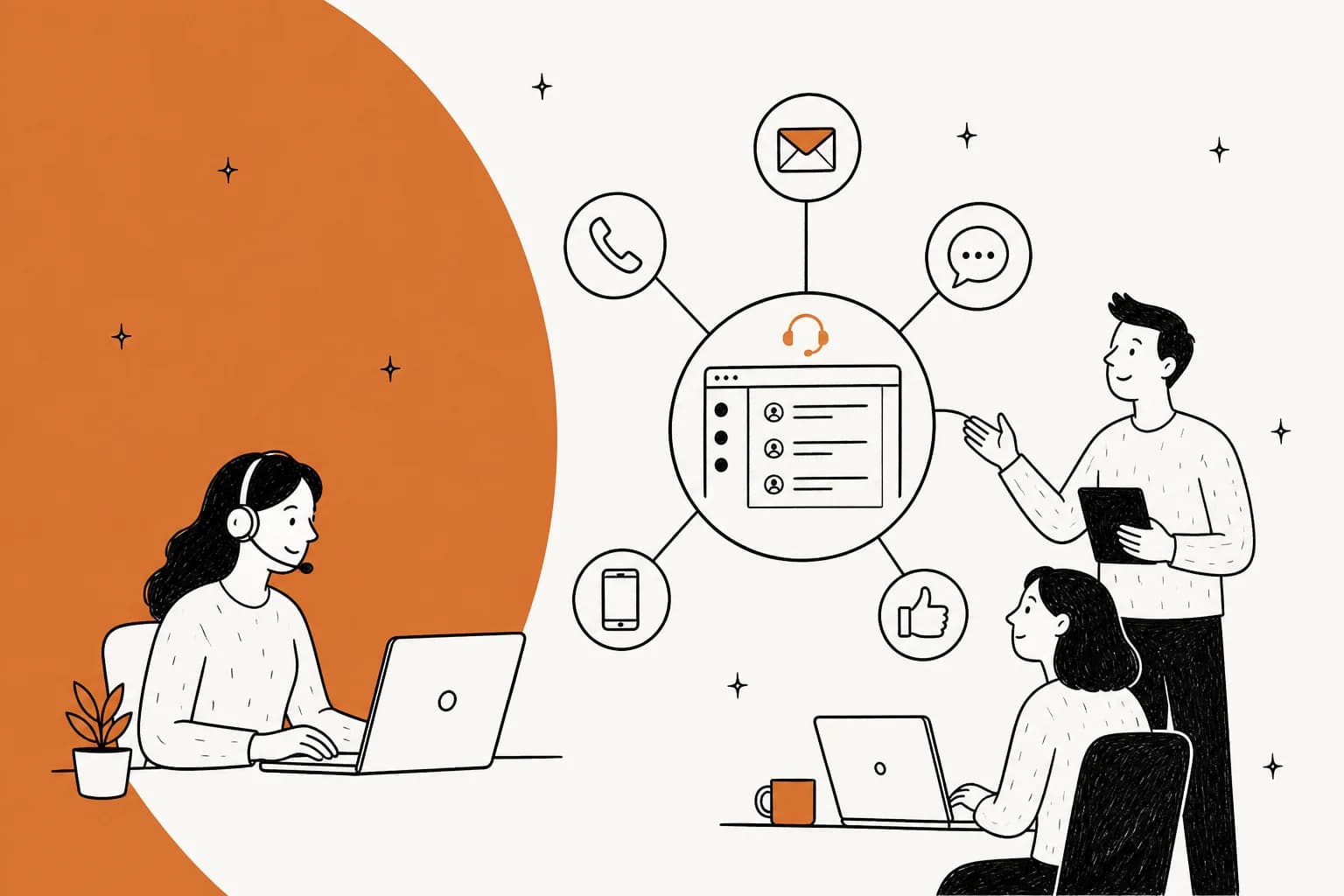
Strip away the marketing and a multi-channel help desk is one promise: your customers can reach you in more than one place, and your agents can answer all of it without living in six browser tabs. Email, a live chat widget, WhatsApp, a social inbox, a phone line, maybe SMS - every one of those becomes a queue inside a single tool.
That is worth having. Before help desks, "multi-channel support" meant a shared Gmail account, a separate chat tool, and someone manually checking Instagram DMs. Consolidating that into one ticketing surface is a real upgrade: one place to look, one place to report from, one place to assign work.
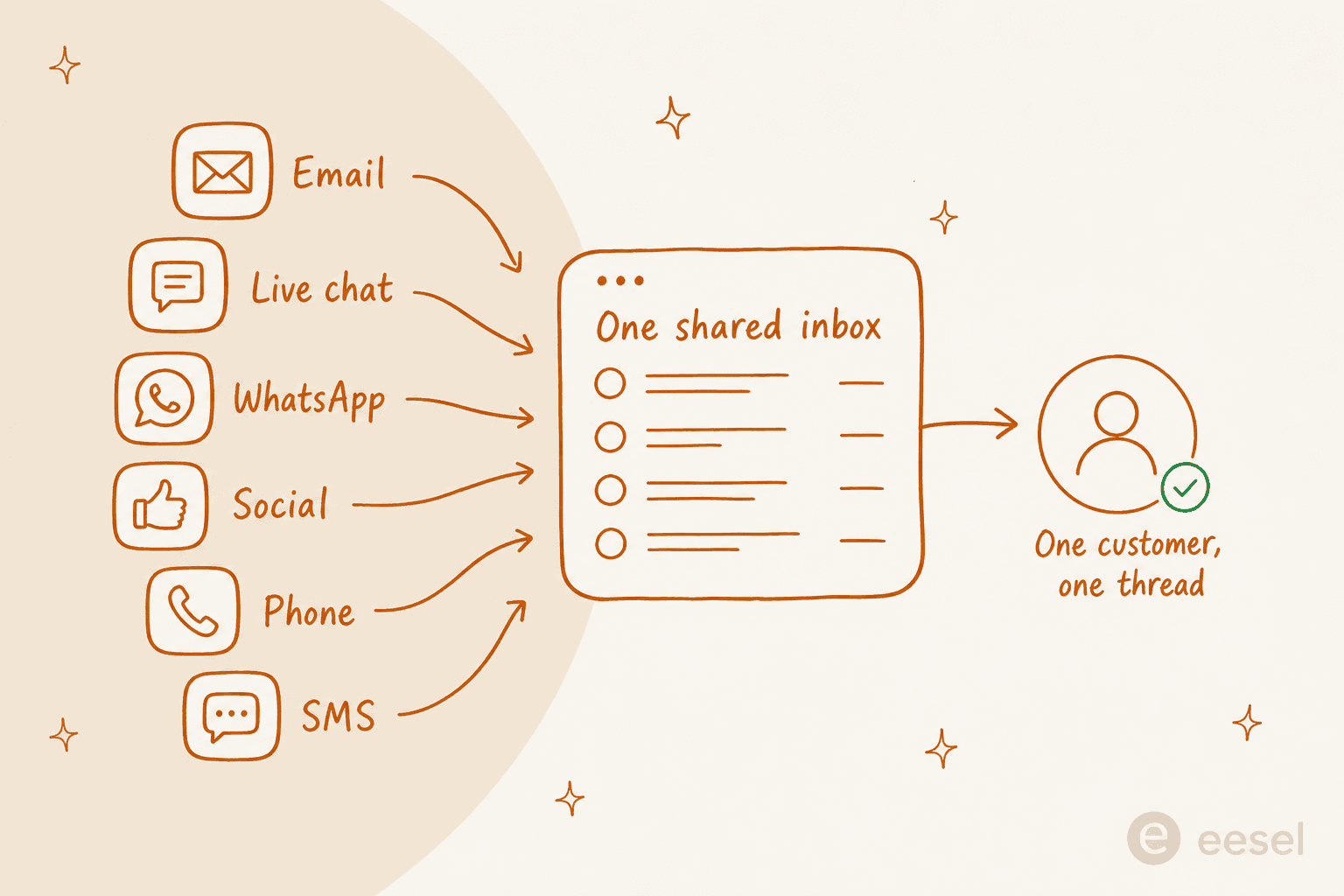
The catch is what the word "multi-channel" quietly leaves out. Having the channels in one tool is not the same as those channels talking to each other. In a lot of setups, the email view and the chat view are just two tabs in the same app, each with its own history. The customer is still the only thing carrying context between them, re-explaining their order number every time they switch. That is the exact gap between multichannel and omnichannel, and it is where most of the disappointment with these tools comes from.
Presence versus memory: the distinction that decides everything
If you take one idea into a buying decision, make it this one. Every multi-channel help desk gives you presence. Very few give you memory.
Presence is the number of channels you show up on. Memory is whether a fact learned on one channel is available on the next. A customer messages on Instagram, gets told to email support, sends the email, then calls two days later. In a presence-only setup, that is three cold starts - three agents (or three bots) meeting the customer for the first time. In a memory setup, it is one continuous thread, and the phone agent already knows what the Instagram message said.
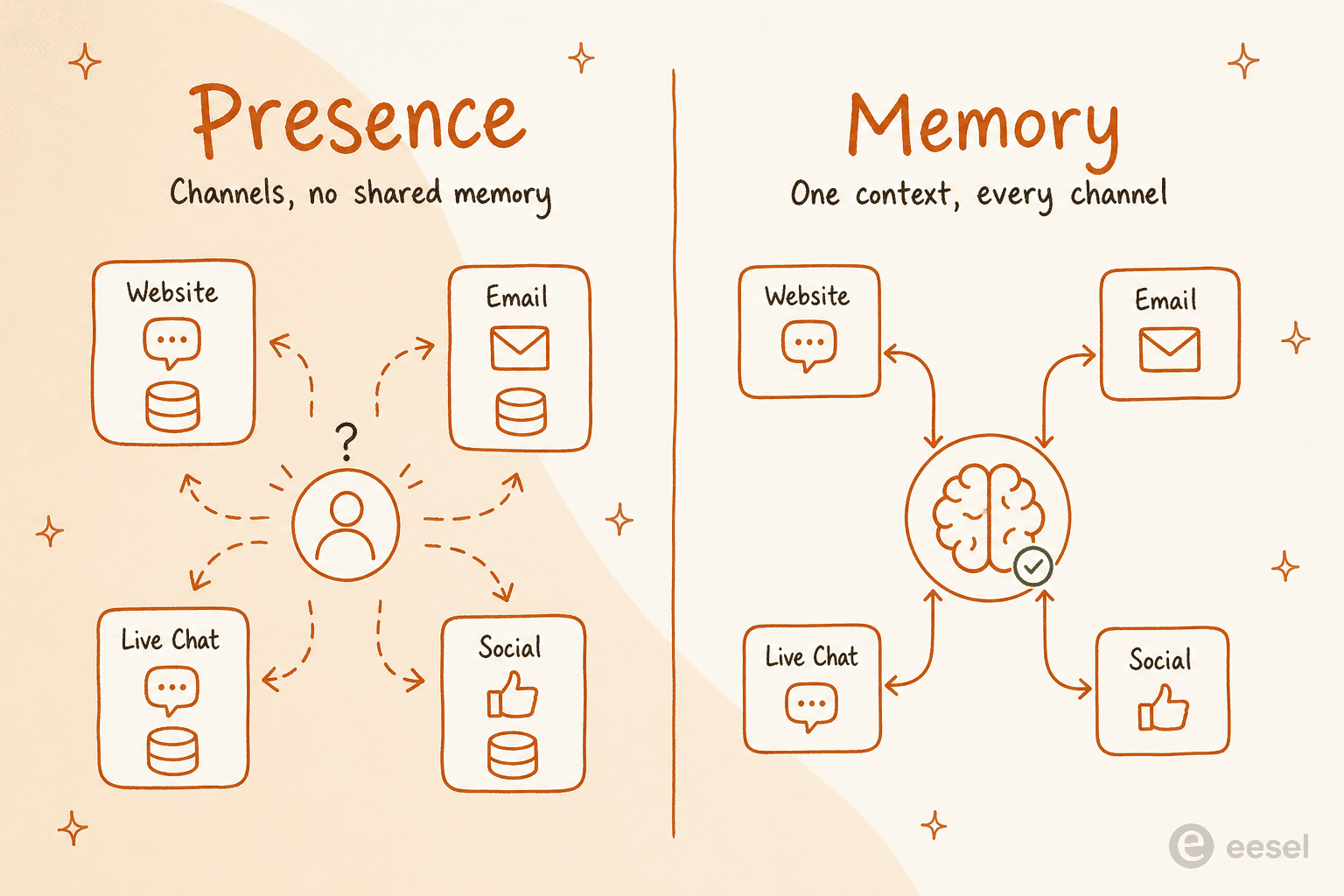
The reason this matters more than channel count: adding a channel is a procurement decision you can make in an afternoon, but sharing memory across channels is an architecture decision that most legacy suites bolt on awkwardly years after the fact. It is also the thing customers actually feel. Nobody churns because you lack an SMS channel. They churn because they explained the same problem four times.
This is also why I push back when a team tells me they need to "go omnichannel." Usually they do not need ten channels. They need the three they already have to stop forgetting things.
What to look for in a multi-channel help desk
Once you are evaluating on memory, not just channel count, the feature checklist reorders itself. Here is what I actually weigh, roughly in priority order.
| What to check | Why it matters | The tell to watch for |
|---|---|---|
| Shared context across channels | This is the memory point. Context should follow the customer, not the channel. | Ask for a live demo of a customer moving chat → email. If history does not follow, it is presence-only. |
| One shared knowledge base | Every channel should answer from the same source of truth, so replies match. | Separate "chat macros" and "email templates" that drift apart over time. |
| AI that spans every channel | A 2026 help desk should auto-resolve the repetitive questions on all channels, not one. | "AI" that only works in the chat widget and nowhere else. |
| Routing and automation | Tickets should reach the right person or bot without manual triage. | Rules that only fire per channel instead of across the whole queue. |
| Reporting across channels | You need one view of volume, resolution, and CSAT, not six exports. | Per-channel dashboards that never roll up into one number. |
| Pricing model | Per-seat pricing punishes you for growing the team; usage pricing tracks the work. | A quote that jumps every time you add an agent or a channel add-on. |
| Setup and migration cost | Moving ticket history between tools is where projects stall. | A "simple migration" that turns into a two-quarter services engagement. |
The knowledge base row is the one teams under-rate. If chat answers from one set of canned replies and email answers from another, you have not unified anything - you have just moved two silos into the same login. The single most reliable predictor of whether a multi-channel help desk feels unified is whether every channel reads from one place.
The channels that actually matter in 2026
You do not need every channel. You need the ones your customers use, staffed properly, over a long tail of channels nobody watches. A quick read on where each earns its place:
- Email - still the backbone for most B2B and considered purchases. Slow, asynchronous, and where the detailed problems land.
- Live chat - the highest-intent channel; someone chatting is usually mid-purchase or mid-problem. Worth an in-app widget if you have a product surface.
- WhatsApp and SMS - dominant for e-commerce and international audiences, and increasingly the default for order questions.
- Social (Instagram, Facebook, X) - public, so the stakes are higher; a missed DM is a visible miss.
- Phone - lower volume, higher emotion. The channel people reach for when the others failed them.
The mistake I see is teams switching on a channel because a competitor has it, then staffing it with nobody. An unwatched channel is worse than no channel, because it sets an expectation you then miss. Turn on what you can actually answer, and let automation carry the repetitive load on the busy ones. That is also the honest case for multilingual coverage: it only helps if every language gets a real answer, not a slower one.
The main multi-channel help desks, compared
Most of the market clusters into a handful of tools. I have written detailed breakdowns of each, so this is the fast orientation, not the full teardown - follow the links for pricing and the fine print.
| Tool | Best for | Channel breadth | Pricing shape |
|---|---|---|---|
| Zendesk | Larger teams that want everything and will pay for it | Very broad (all channels + marketplace) | Per-agent, climbs fast with add-ons |
| Freshdesk | Mid-market teams wanting breadth at a lower entry price | Broad | Per-agent, cheaper tiers than Zendesk |
| Gorgias | Shopify and e-commerce stores | Strong on chat, email, social, WhatsApp | Tiered by ticket volume |
| Front | Teams that live in email and want a shared-inbox feel | Email-led, plus chat and social | Per-seat |
| Help Scout | Small teams wanting simple, human-feeling support | Email, chat, docs | Per-seat, simple tiers |
| HubSpot Service Hub | Teams already on HubSpot CRM | Broad, tied to the CRM | Per-seat, steep at scale |
None of these are bad tools. The pattern to notice is that they all price per agent, and they all treat AI as a feature you switch on inside their walls rather than a layer that spans whatever you already run. That is fine if you are starting from scratch. It is a harder sell if you already have a help desk you mostly like and just want the channels to stop forgetting things. For a wider field, our roundup of help desk software reviews goes deeper on each.
The faster path: an AI layer over the channels you already run
Here is the reframe I promised in the TL;DR. If your real problem is memory, not presence, you do not have to buy a new suite and migrate everything to get it. You can put an AI layer across your existing help desk and channels, point it at one knowledge base, and let it answer consistently everywhere.
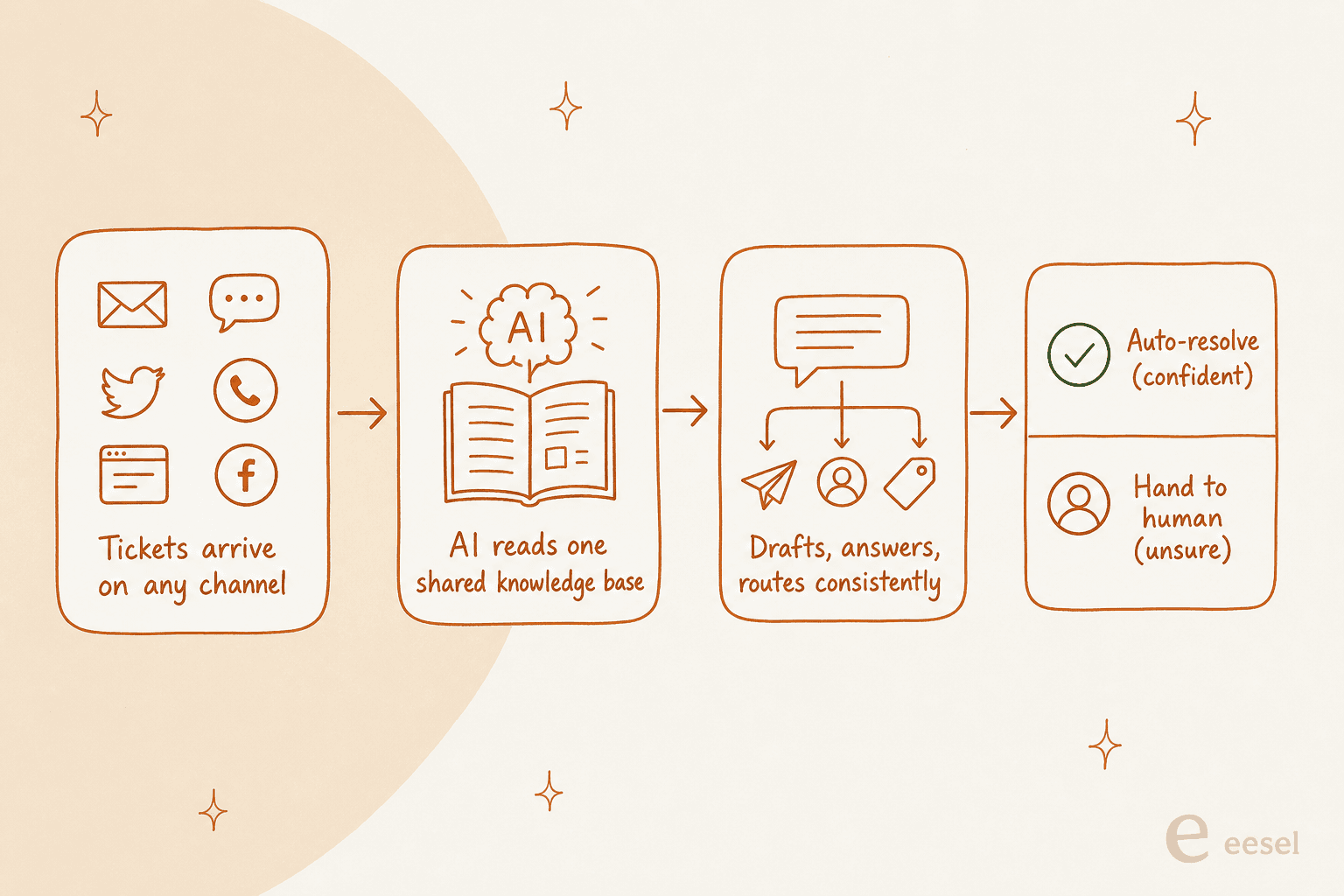
This is the approach eesel takes, and it is worth explaining why the "layer, not replatform" model wins for most teams. It plugs into the tools you already use - Zendesk, Freshdesk, Gorgias, Front, Help Scout, Slack, email, and chat - and works from one shared source of truth, so a WhatsApp reply and an email reply say the same thing. You are not throwing away the help desk your team already knows; you are giving every channel one brain.

The scale is real, not a demo: across active accounts, eesel has handled north of 183,000 support interactions, which is the kind of volume that surfaces the ugly edge cases a slide deck never shows.
There is a control point that matters here, because it is the objection I hear most. Teams are right to be nervous about letting AI auto-reply to everything. One CX lead I spoke to put the whole philosophy in one line:
The AI will never be able to answer 100% of the questions. I need an AI that only handles the tickets it's confident to handle, and all the other ones, leave them alone.
A DTC supplements CX lead
That is exactly the right instinct, and it is why the useful version of this is not "flip AI on for every channel and hope." It is confidence-based routing: the AI resolves what it is sure about across all your channels, and cleanly hands the rest to a human with the full context attached. The scars are what taught us that - I have watched a confident-sounding bot quietly give a wrong answer, which is why every eesel rollout gets simulated against your historical tickets before it ever talks to a customer. You see the projected resolution rate on real past conversations first, then decide what to automate.
The economics tend to decide it. Legacy suites charge per agent per month, so the bill grows with your team even if ticket volume is flat. eesel has one fixed monthly price sized to volume, from $299/month for 500 credits with no per-seat fee, so the cost tracks the work being done, not the number of people logged in. For a growing team, that difference compounds.
Try eesel for multi-channel support
If your channels are already spread across email, chat, WhatsApp, and social but none of them share a memory, eesel is the layer that ties them together without a replatform. It plugs into your existing help desk, answers from one knowledge base across every channel, and you can simulate it on your own past tickets to see the resolution rate before a single customer talks to it.

The team that wants this most is the one that already spent a year building out channels and is now stuck re-explaining the same order to the same customer on three of them. You do not need a bigger help desk. You need the one you have to stop forgetting. That is the whole pitch, and you can try it for free.