


What "in-app" actually means (it's not your website widget)
The phrase gets used loosely, so it's worth pinning down. In-app live chat is a chat surface that lives inside the authenticated product a user is already using, not on the public marketing site. A website widget talks to a prospect; in-app chat talks to a logged-in user, mid-task, inside the thing they're already paying for or evaluating.
Zendesk draws the same line on its own messaging page, positioning "your website" and "your mobile app" as two separate channels a company deploys to, not one extended surface. Crisp goes further and markets its SDK line explicitly as infrastructure "to empower mobile and web app companies," a different product from its plain web widget. The distinction isn't cosmetic: a website widget is typically JavaScript-only, no login required, aimed at lead capture. In-app chat is reached through a native SDK, carries the user's session and account state, and (per Zendesk's own SDK docs) usually supports JWT authentication so a returning user's history follows them across visits.
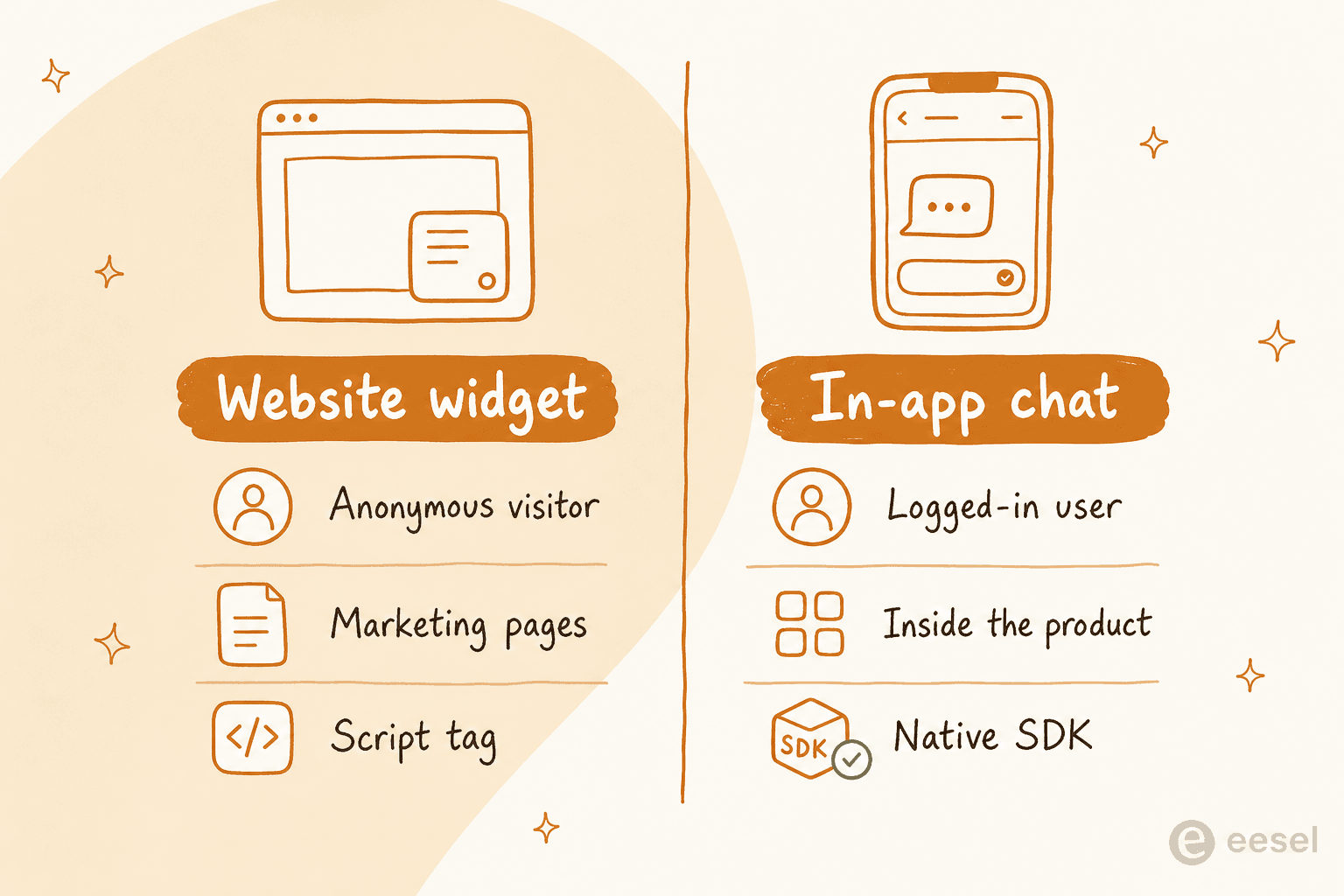
That's why "add live chat to my app" and "add a chat widget to my website" are two different projects, even though most vendors sell both from the same dashboard.
Why teams put chat inside the product itself
There's a real gap driving this, not just a nice-to-have. Zendesk cites its own research showing 84% of CX leaders rate their response speed as excellent, but only 39% of customers agree, and frames in-app messaging as closing that perception gap by keeping support "just a click away" inside the app itself, not a tab switch away (Zendesk Messaging).
A few concrete reasons this keeps coming up:
- In-context support. The user is already mid-task, checking out, hitting an error, configuring a setting, so support can see (or be told) the exact screen and account state instead of starting from "what page are you on?"
- Reduced context-switching. Without in-app chat, a user who hits a snag inside a mobile app has to back out, find a browser, locate the right support page, and re-explain themselves. Tidio's own mobile SDK pitch leads with exactly this: "instant, intelligent responses without ever leaving your app."
- Continuity across channels. A user who starts on mobile and later opens the web app expects the thread to still be there. Freshchat's mobile SDK docs describe passing the same user identifier so a conversation "seamlessly picks up... from any supported platforms, Android, iOS, and Web."
- A more native feel, which shows up in retention. Crisp ties this directly to product metrics, describing its SDK as helping "enhance user engagement and retention" precisely because the chat reads as part of the app, not a foreign plugin (Crisp Chat SDK).
The build-it-yourself path: SDKs, and where they actually strain
If you go the traditional route, every major live chat vendor ships a dedicated mobile or in-app SDK, separate from their website widget:
| Vendor | In-app SDK | Platforms | Notable detail |
|---|---|---|---|
| Crisp | Chat SDK family | JS (web), iOS, Android, React Native, Flutter | iOS SDK targets iOS 13+, "roughly 96% of iPhone devices"; supports pushing session events like signup tied to the logged-in user |
| Tidio | Mobile SDK | iOS, Android | Embeds its Lyro AI Agent directly in the SDK; access is gated behind a "Request Mobile SDK" form rather than self-serve |
| Zendesk | Chat SDK v2 (legacy) + Messaging SDK | iOS, Android, Flutter wrapper | JWT authentication carries identity across sessions; push notifications are a separately documented setup step |
| Freshchat (Freshworks) | Mobile SDK | Android (4.1+), iOS (11.0+), React Native, Flutter | Inherits the web widget's configuration automatically, one setup drives both channels |
Drift is the cautionary case worth naming here. Its own live-chat page now redirects to Salesloft's newer AI chat-agent product, and one G2 reviewer described the fallout directly:
"Once Salesloft acquired Drift the customer service went down significantly. They also had a major data breach that impacted the service for 10 days in August... We tried to cancel the renewal, but people from Salesloft kept calling me for payment."

That's the risk that's easy to underweight: once a chat SDK is wired into your live product as infrastructure, an acquisition or an outage at the vendor isn't a minor inconvenience, it's a support channel going dark with nowhere for the volume to go. And even without a vendor crisis, the in-app leg of these tools tends to lag the web dashboard. A long-tenured Crisp user put it bluntly:
"For many years the experience with the Crisp app, if it even worked, was just not great. Today, it's better, but it still lacks almost all new features Crisp has shipped the last two years: no way to trigger Hugo conversations, there's no AI implemented in the app at all."
A Freshchat reviewer flagged the same pattern from a different vendor: "the mobile app experience isn't as smooth or consistent as the desktop version, and occasional notification delays can lead to missed messages" (Siddharth O., G2 review). If AI features are the reason you're adding chat in the first place, it's worth checking whether the vendor's mobile SDK actually ships them, not just the web widget.
The lighter path: an AI chat layer instead of a raw SDK
I've spent years watching support teams wire chat SDKs together and then bolt an AI layer on top as a second project, which is exactly the seam where the mobile app ends up "not great" months after the web widget shipped. eesel skips that seam by shipping the AI agent and the embed surface as one thing, in three flavors depending on where you want it to live:
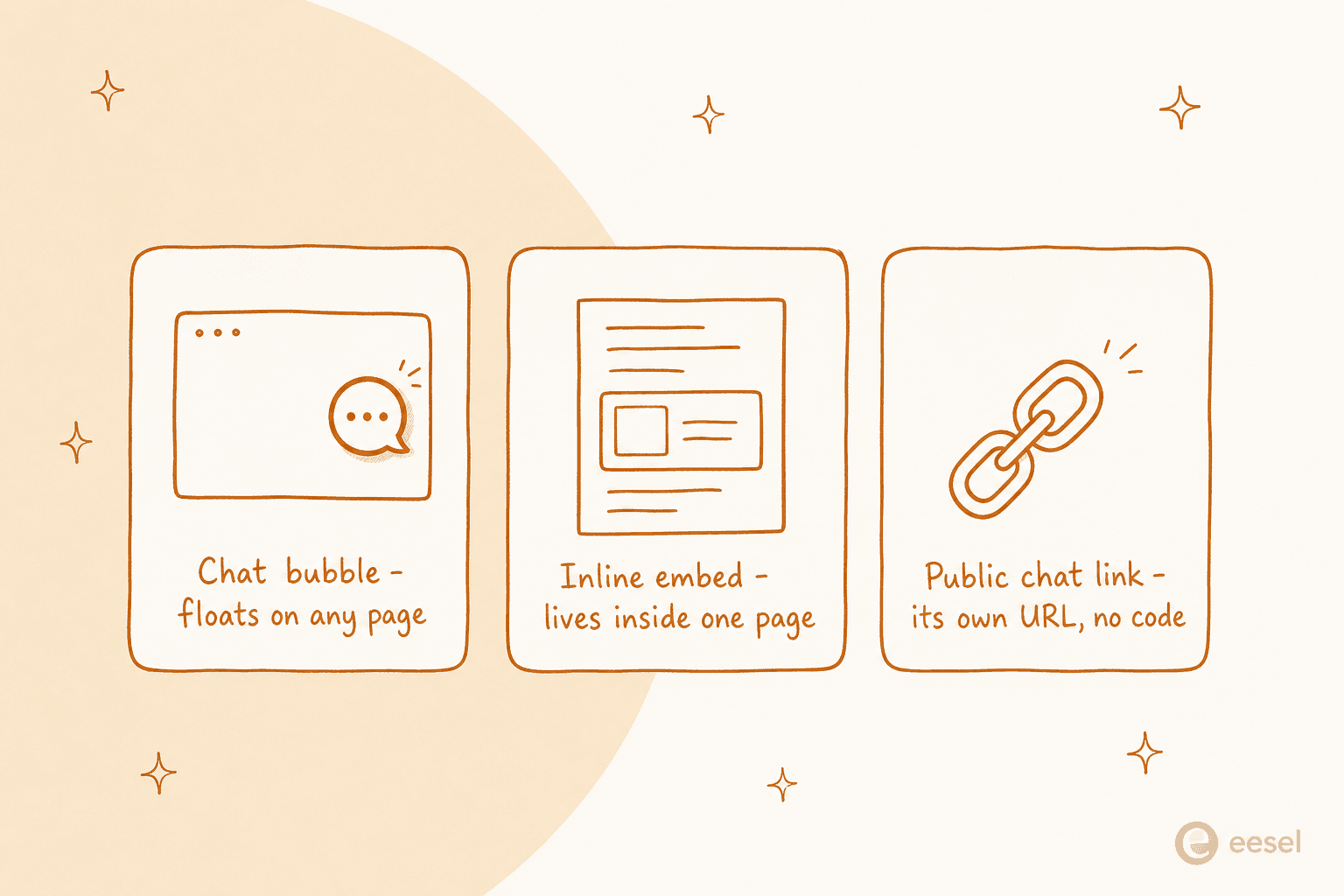
Chat bubble is the floating corner icon, added with one script tag, that can go on any page you control, including pages inside a logged-in app. eesel's own docs note that "many teams deploy the eesel AI Chat Bubble internally, on an intranet, internal portal, or employee-facing site," which is the same in-app pattern this post is about, just applied to internal tools instead of a customer-facing product.
Inline embed is the one that maps most directly onto "put chat inside my app." Instead of floating over every page, it's a component placed at a specific spot, the top of a docs page, inside a product onboarding flow, on a developer portal, via one HTML snippet. eesel's own FAQ draws the line cleanly: "A chat bubble floats in the corner of every page. The inline embed is placed at a specific spot inside a specific page... It feels more native and works best for documentation and help centers." That's the mechanism I'd reach for if the goal is an AI agent living inside a product screen rather than hovering over it.
Public chat link skips embedding altogether: a shareable, brandable URL you send via email, Slack, or a support ticket, no code touched at all. It's the option when you don't have (or don't want) access to the app's codebase, and end users never need an eesel account to use it.
All three run on the same knowledge base (help center, Notion, Confluence, Zendesk tickets, your website), answer in 80+ languages, and escalate to a human by confidence or topic. None of that changes across surfaces, only where the chat physically sits.
How to actually set it up
Whether you go the SDK route or the embed route, the setup shape is roughly the same four steps:
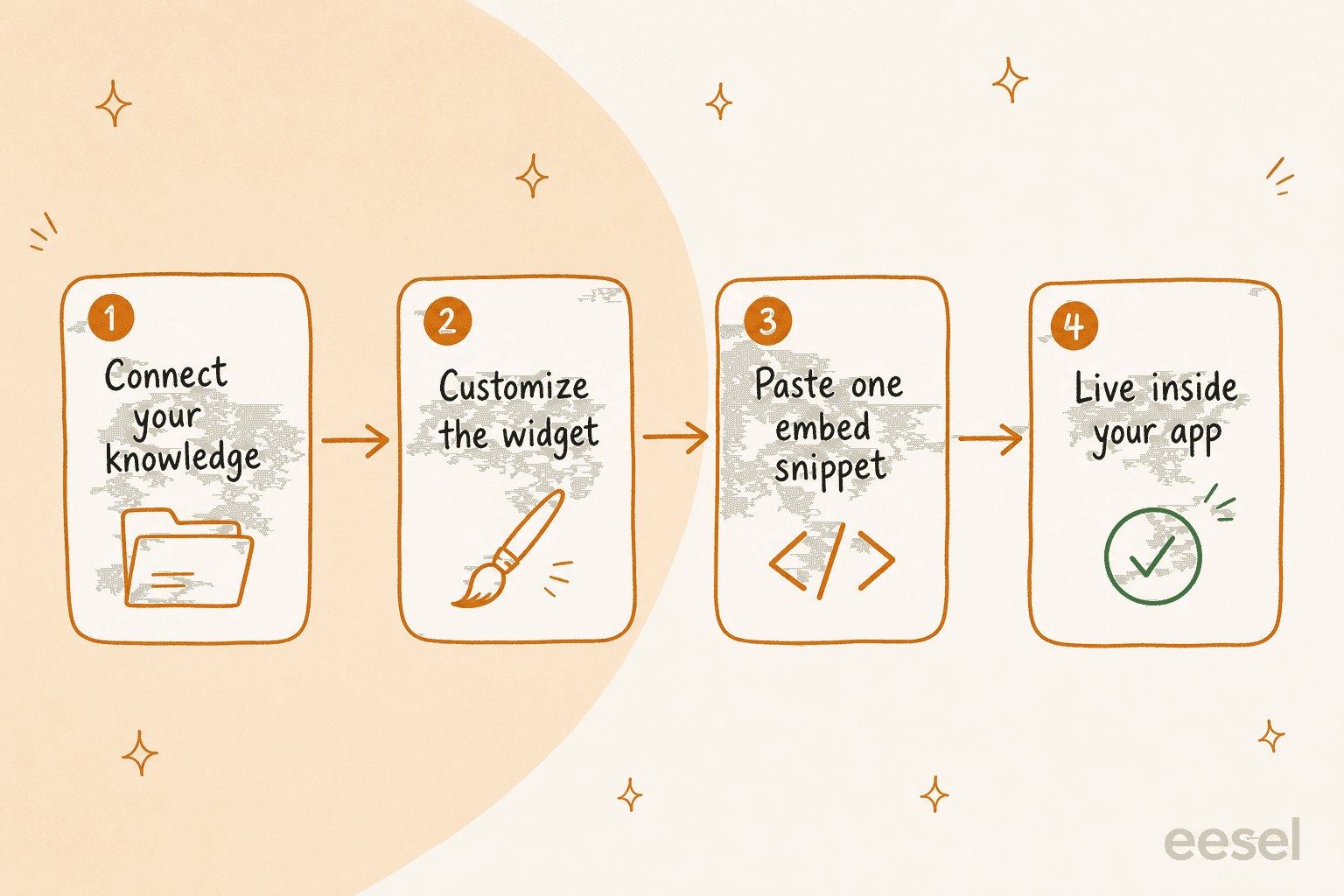
- Connect your knowledge sources. Help center, docs, Google Drive, Notion, Confluence, your website, or an existing helpdesk, imported and kept in sync automatically rather than hand-fed line by line.
- Customize the widget. Name, avatar, colors, and position, described in plain language rather than dug out of a settings panel, then tested with real questions before it's live.
- Paste one snippet. A
<script>tag for a chat bubble, an HTML snippet for an inline embed, or nothing at all for a public chat link. - It's live inside your app. No native binary to ship, no app-store review to wait on if you're using an embed rather than a true mobile SDK.
If your product actually needs a native iOS/Android SDK, because you need OS-level push notifications waking the app or deep native UI hooks, that's when a vendor like Crisp's iOS SDK or Freshchat's Android SDK earns its place, and you'd layer eesel's AI on top of the ticket data those SDKs feed into a connected helpdesk. For a web app, a browser extension, or an internal portal, an embed skips that whole native-build step.
Pricing: what this actually costs
Traditional live chat vendors bundle in-app SDK access into a wider seat-based plan. Crisp and Tidio's mobile SDKs are add-ons to their standard tiers (see Crisp pricing and Tidio pricing), and Tidio in particular gates its SDK behind a contact form rather than a listed price.
eesel prices the opposite way: one fixed monthly price, no seat fees, no platform fee.
| Item | Price |
|---|---|
| Free plan | 100 credits, no credit card |
| 500 credits a month (1 credit = 1 chat session, any number of messages) | $299/month |
| 1,000 credits a month | $499/month |
| 2,500 credits a month | $999/month |
| Blog post draft (unrelated to chat, listed for context) | $4.00 |
| Annual | Pay a year upfront, get two months free |
| Add-ons | SSO and MFA from $199/month, priority support from $299/month |
A worked example: 500 chat sessions a month fits the $299/month plan, with no extra charge for message volume inside a session, and conversations a human agent handles instead do not use credits (eesel pricing). That's a materially different bill than a per-seat SaaS live chat plan once more than one or two people need dashboard access.
Common mistakes to avoid
- Treating the mobile leg as an afterthought. The G2 quotes above are a pattern, not an outlier: AI features and new capabilities routinely ship to the web widget first and the native app months later, if at all. Ask a vendor directly what's missing from their mobile SDK before you commit.
- Skipping the vendor-risk question. An acquisition, an outage, or a pricing change hits harder once chat is infrastructure inside your product rather than a swappable website widget. Check how a vendor has handled the last two years before wiring it deep into your app.
- Building the AI layer as a second project. Stitching a raw chat SDK to a separate bot framework doubles the maintenance surface. An agent trained on your own docs from day one, dropped straight into a chat bubble or inline embed, skips that step entirely.
- Forgetting escalation. Whatever you embed, confirm low-confidence answers route to a human, by topic, confidence score, or explicit request, rather than letting the AI guess when it shouldn't.
Add an AI chat layer inside your own product with eesel
I've watched enough teams wire a chat SDK into their app and then spend a second project trying to make it smart to know the two-step version is the harder path. eesel's inline embed drops an AI agent, already trained on your help docs, past tickets, and product data, directly into a page inside your own app, whether that's an onboarding flow, a docs page, or a support panel, without a native SDK to maintain or a second vendor to integrate. It escalates to a human when it isn't confident, runs in 80+ languages, and runs on a fixed monthly price from $299/month with no platform or seat fee. If you're deciding whether to build this yourself or embed it, try eesel on your own docs before you write a line of SDK code.