

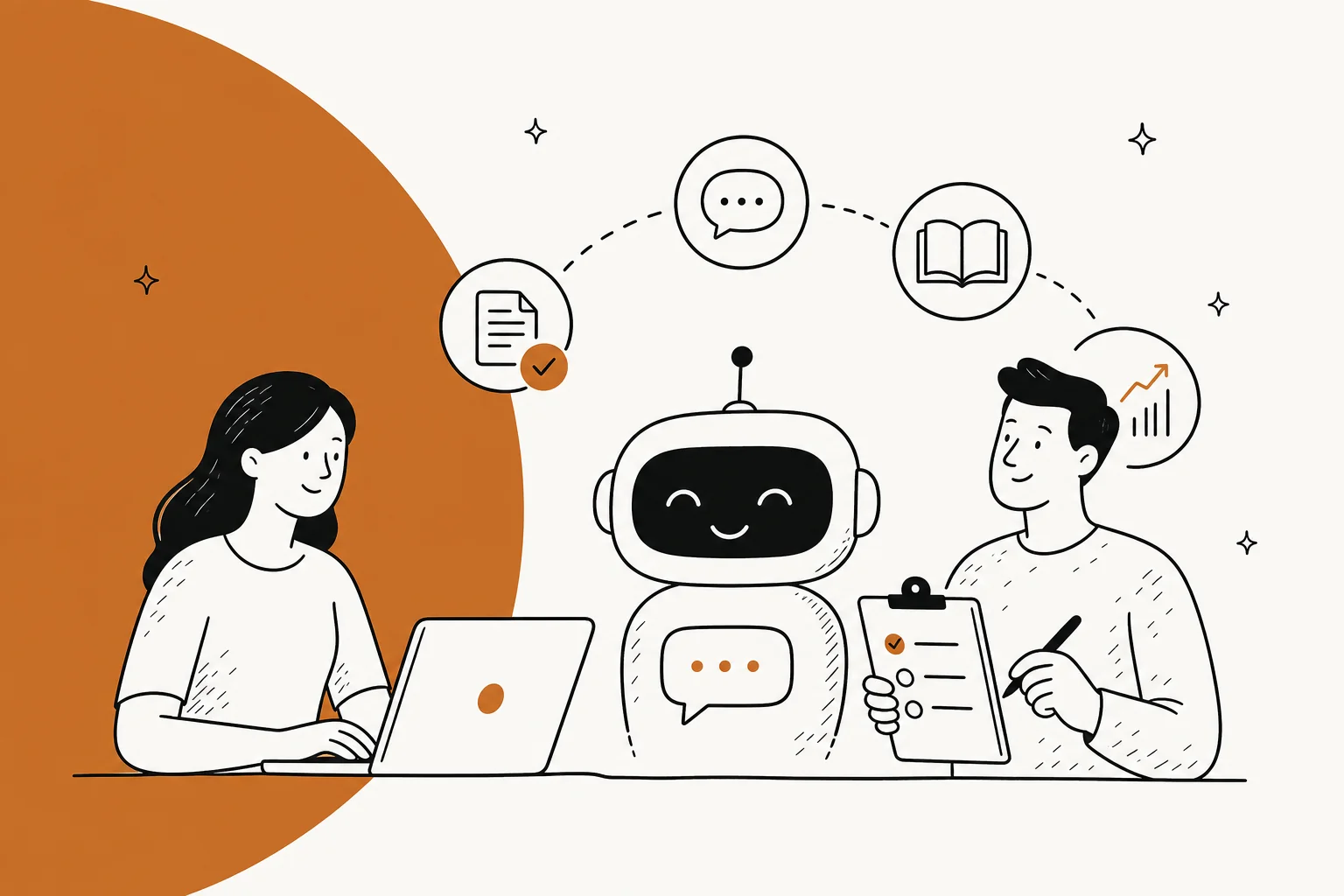
Training a bot isn't a data dump, it's an onboarding process
Most teams approach "training" a support bot the way they'd approach training a spam filter: dump in data, hope patterns emerge. That's the wrong mental model for how a modern AI helpdesk agent actually works, and it's why so many rollouts underperform.
There's no separate model-training step most teams ever touch. The underlying language model is already trained. What you're actually doing is closer to onboarding a new hire: you brief them on the company, you connect them to the tools and information they need, you watch them work for a while, and you correct them when they get something wrong. eesel's own documentation frames it exactly this way, describing the process as feeding the agent instructions and integrations "to learn, manage, and act, like a teammate would," with setup possible in under five minutes. That read-act-correct cycle is what people mean by an AI agent loop, and it's the main thing separating a genuine AI agent from a scripted chatbot.
The reason this framing matters: it changes what "more training" even means. It's not more examples fed into a model, it's better instructions, better-curated knowledge, and a tighter feedback loop. That's a very different skill set from prompt engineering a single query, and a much cheaper one than fine-tuning a model from scratch.
What a well-trained support bot actually runs on
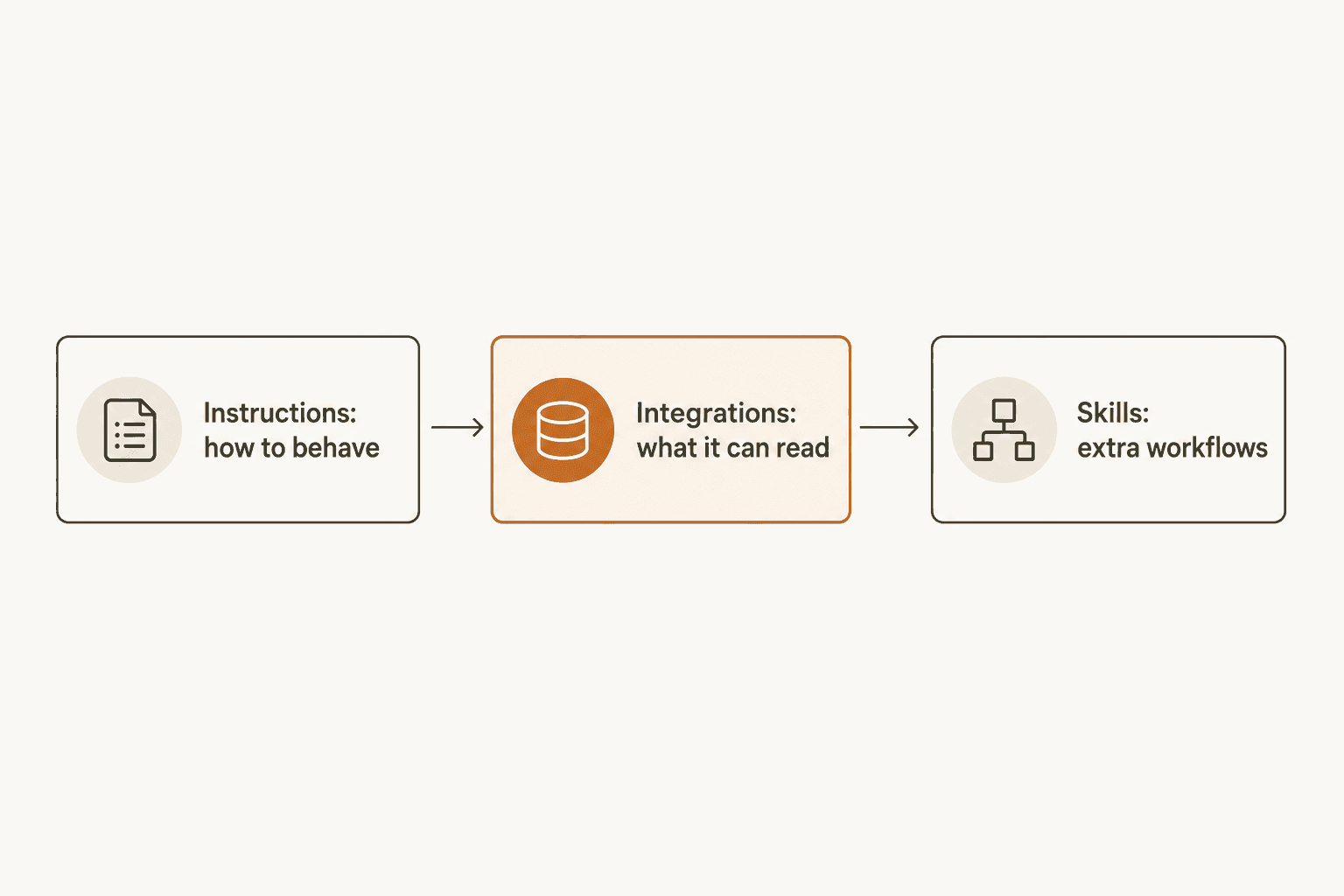
Strip away the marketing and a trained agent needs exactly three ingredients: something to read, something to know how to behave, and a way to prove it's ready. Get any one of these wrong and the bot's answers will show it.
Feed it solved tickets, not just your help center
This is the single biggest lever, and the one most teams skip. A knowledge base tells a bot what the product officially does. Solved ticket history tells it what actually happens when a real customer hits a real edge case, and how a human on your team actually resolved it. eesel's docs describe this directly: "Native AI tools usually only read from your help center or website. eesel AI agents learn from your actual solved tickets, and across any of your platforms with auto sync."
Community threads back this up from the other direction. One Zendesk admin summed up the ceiling this way:
"The Co-Pilot stuff is decent, but we found its effectiveness really depends on having a perfectly curated Zendesk knowledge base, which... ours isn't, lol."

A help-center-only bot is only ever as good as a help center most teams admit isn't clean enough to begin with. A Freshdesk buyer on Capterra described the downstream effect on customers directly:
"I get tired of having to repeat myself, go through scenarios that have nothing to do with my issue and having agents regurgitate Freddy AI solutions that don't resolve my issue"

That's the tell of a bot trained on docs alone: technically-correct, contextually-useless answers. Widening the training surface, uploaded PDFs, internal knowledge bases, Notion pages, Slack history, closes that gap. eesel supports uploading files directly (PDF, DOCX, CSV, and more, up to 50MB each) alongside live syncs from tools like Zendesk, Freshdesk, HubSpot, and Salesforce, precisely so ticket history counts as training data, not just static docs.
Write instructions like an onboarding doc, not a prompt
The second ingredient is behavior, and it's written, not trained-in through examples. eesel's Key Concepts documentation frames good instructions as covering four things: identity and role, response style, how to handle specific situations (billing, cancellations, bug reports), and explicit escalation rules, e.g. "never attempt to handle refunds over $100, assign to a manager."
This is where a lot of teams under-invest. "Be helpful" is not an instruction a language model can act on consistently; "keep answers to 2-3 short paragraphs, use bullet points for steps" is. The docs' own advice: start simple, add rules as you find gaps through testing, and don't try to write every edge case on day one. Response style is also where brand voice lives, so a badly-briefed bot doesn't just get facts wrong, it can sound like nobody who actually works at your company.
The training process, step by step
Once the two ingredients above exist, training becomes a sequence, not a single event.
1. Connect one source and ask it something
The fastest way to see whether a bot is even in the right ballpark is to connect a single source, a Zendesk instance, a help center URL, a PDF, and ask it a real question in a chat panel before it ever touches a live ticket. This is the step most AI helpdesk chatbot tools get right; it's also the step that gives the false impression training is "done."
2. Brief it like a new hire
Write (or, in eesel's case, talk through conversationally to draft) the instructions doc covering tone, escalation, and edge cases described above. This is where an AI agent starts to diverge from a rigid, rule-based chatbot: instructions describe intent and judgment calls, not a decision tree of exact phrases to match.
3. Simulate before a customer ever sees it
This is the step almost every horror story on Reddit and Hacker News traces back to skipping. Before an agent goes live, run it against historical tickets and compare its answers to what a human actually sent. eesel formalizes this as a Simulation skill: "Pulls old conversations, generates AI responses, compares against human replies, scores accuracy, produces a gap report."
Why this step matters more than any other: the same failure mode, a bot that sounds certain while being wrong, shows up whether the stakes are a support ticket or a subscription. In the widely discussed Cursor support-bot incident, an AI agent hallucinated an account-lockout policy that never existed and told paying customers it was expected behavior, triggering real cancellations. One commenter on the thread put the danger plainly:
"They always sound like an intelligent person who knows what they are talking about, even when spewing absolute garbage."

Another added the practical conclusion:
"You can't trust it to do anything correctly without human feedback/review and human quality control."
A simulation run against your own ticket history is how you catch that before it reaches a customer, not after, which is the core idea behind most hallucination prevention advice for support bots. eesel's homepage shows this loop in practice: the agent surfaces a gap ("23 tickets last week asked about pro-rated refunds, but your docs only cover full cancellations"), a team member uploads the missing policy, and a re-run reports the fix ("Refund coverage now 91%").
4. Put it on a leash: draft mode before autonomy
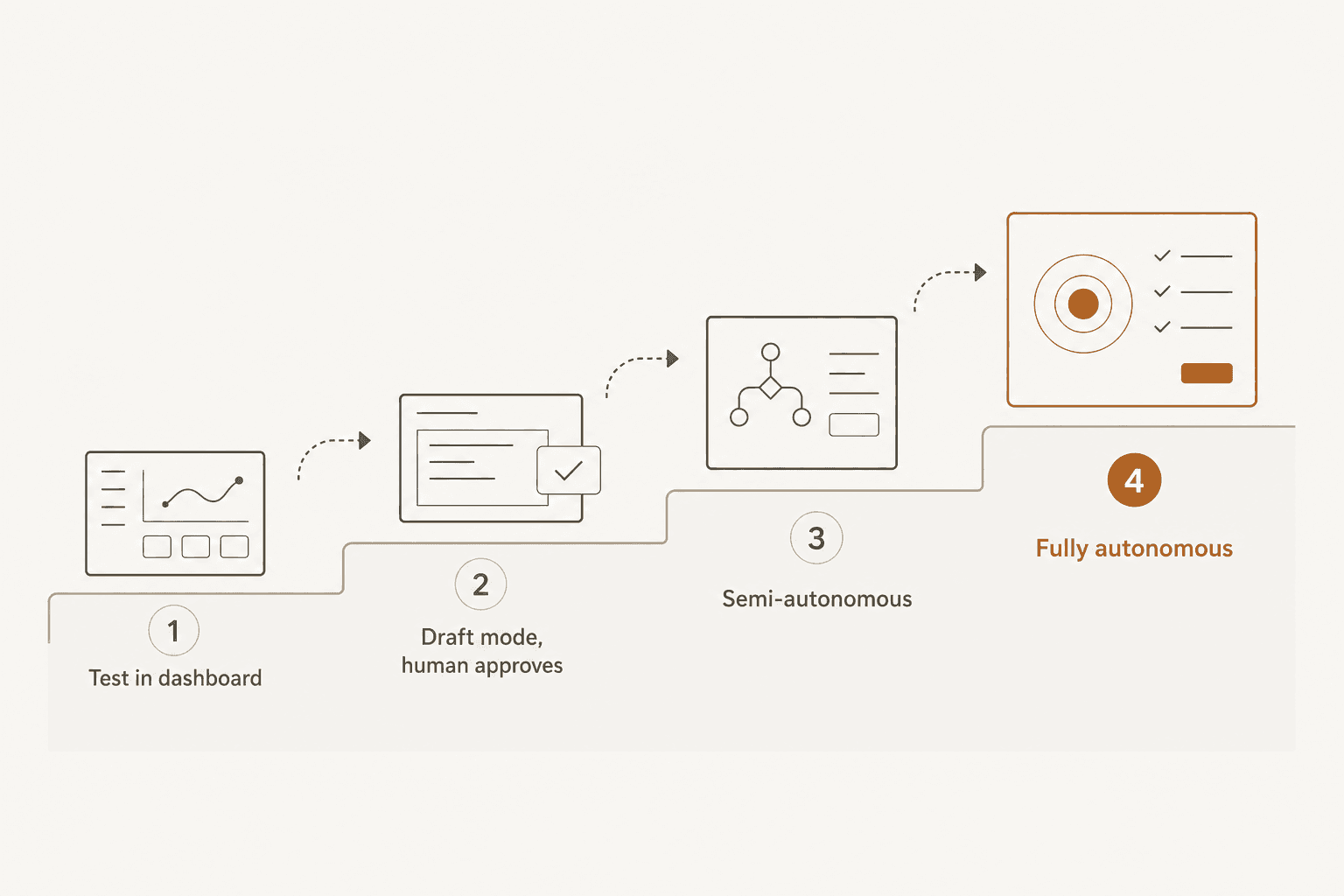
Even a bot that simulates well shouldn't go straight to unsupervised replies. eesel's docs formalize a four-stage trust progression: test in the dashboard with no customer impact, run in draft mode where every reply needs human approval, move to semi-autonomous once a track record exists (docs' benchmark: "approved 94% without edits this week"), then fully autonomous with humans monitoring via recaps and exception alerts.
The community version of this advice shows up in the same threads that describe bots going wrong. One team's fix, after their automation attempt started creating more cleanup work than it saved on complex tickets, was to pull back from full auto-reply into an assist role:
"Auto-replies sounded great in theory, but once real tickets came in, it started giving confident but wrong answers. CSAT dipped quick. What worked better for us was using it as an agent assist, draft replies, summaries, tagging, not full auto mode."
That's the trust ladder in practice, arrived at the hard way instead of built in from the start. eesel's own escalation rules, handoff practices, and human-in-the-loop approvals exist so a team doesn't have to relearn this lesson on live customers, and a clear escalation policy written into the instructions is what makes that possible.
5. Let corrections make it smarter
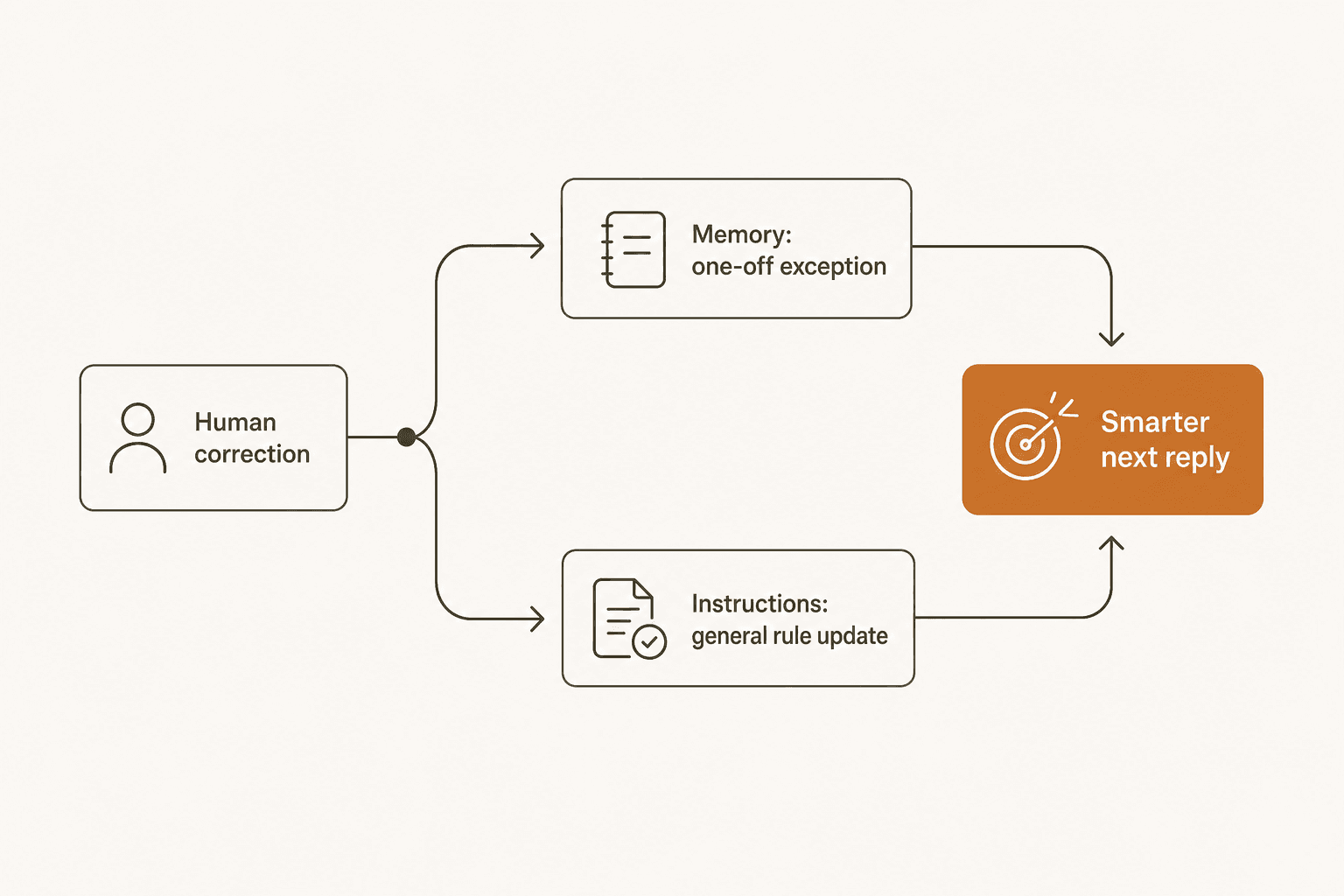
Training doesn't stop at launch. eesel's FAQ states the mechanism plainly: "Every edit and correction improves future responses. It learns your tone, your policies, and your preferences." Under the hood, this splits into two paths, a one-off exception ("for damage claims under $50, don't ask for photo") gets saved to an agent memory file, while a pattern worth generalizing gets proposed back as a diff to the written instructions for a human to accept or reject.
Without a real loop here, bots stall. A CX practitioner described the plateau directly on LinkedIn:
"Most AI customer service tools get plugged into Zendesk, automate ~40% of tickets, and then just...stop improving. They plateau. Forever. [...] When edge cases come up, your team handles them in Zendesk. But there's no feedback loop, so the AI doesn't learn. [...] Edge cases become training data, not just problems to solve."

That plateau is a training failure, not an AI limitation. A bot with no path for corrections to become permanent behavior change will always cap out at whatever it got right on day one.
Common training mistakes that quietly wreck accuracy
| Mistake | What it looks like | The fix |
|---|---|---|
| Help-center-only training | Generic, technically-correct answers that don't resolve the actual issue | Add solved ticket history, not just docs |
| Skipping simulation | Bot goes live day one; first bad answer is a live customer's | Run a gap-report simulation against past tickets first |
| Vague instructions | "Be helpful and professional" with no situation-specific rules | Write per-category rules for billing, cancellations, bugs |
| No escalation ceiling | Bot attempts refunds, cancellations, or account changes unsupervised | Set explicit confidence thresholds and dollar limits via escalation management |
| Treating training as one-time | Accuracy looks fine at launch, then quietly degrades as products change | Keep a live correction loop; review instructions on a schedule |
Some of these mistakes are more forgivable than others depending on what the bot is actually doing. A support-ops lead's take on Freshdesk's native Freddy AI is a useful data point on scope: "it covers the basics, auto assignment, suggested replies, FAQ deflection. It's reliable and affordable, nothing crazy," per a post in r/AgentsOfAI. Narrow, well-trained scope beats broad, undertrained scope every time; the mistake is asking an FAQ-trained bot to also handle billing disputes before deciding how much AI should replace versus assist.
How much training data do you actually need?
Less than the "we need thousands of examples" instinct suggests. Because a modern support agent retrieves relevant knowledge at answer time rather than baking it into model weights, a single well-curated source (a help center, a batch of a few hundred solved tickets) is enough to start, whether that's a SaaS knowledge base or a year of helpdesk tickets. The simulation step is what actually tells you whether that's enough, by reporting exactly which ticket themes it's still missing, which is the clearest signal for whether your AI support is working.
A useful gut check: eesel customer Gridwise resolved 73% of tier-1 requests in the first month running against real ticket history, with meaningful results inside a seven-day trial, no month-long data-collection phase required first. Design.com runs a multi-agent setup across 50,000+ monthly Freshdesk tickets with just over 1,000 help articles behind it. The volume that matters is "enough to run one honest simulation," not "enough to feel exhaustive."
Train eesel on your own tickets, not just your help center
If you're training a support bot from scratch, the choice that matters most is what it learns from. Most tools, and most of the community complaints above, trace back to a bot that only ever read a help center. eesel is built the other way: it indexes your actual solved tickets across Zendesk, Freshdesk, HubSpot, Gorgias, Front, and 100+ other tools with auto-sync, then runs a full simulation against your history before you ever flip it to autonomous.
If you're still weighing whether a support agent is worth it for a small business at all, the honest answer is that the training process above is the real cost, not the software.
eesel's own no-code setup and simulation reporting exist specifically to make that process something a support lead can run without an engineer, and to improve resolution rates without guessing at what changed.
Setup starts free (100 credits, no card required), and once you're through the free plan, paid plans start at $299/month for 500 credits (1 credit per ticket or chat) per eesel's pricing, with no seat fees and no platform fee, so a partial rollout while you're still building trust only uses the credits for the tickets you route to it. If the training process in this guide sounds like more rigor than your current setup has, that's usually the actual gap, not the model underneath it.
Frequently Asked Questions
What does it actually mean to "train" an AI support bot?
For a modern AI helpdesk agent, training isn't a machine-learning process you run yourself. There's no separate model-training step. It means connecting your knowledge (past tickets, help docs), writing plain-language instructions for tone and escalation, testing the result, and correcting it as real tickets come in, the same four moves you'd use to onboard a new hire.
How much data do I need to train a support chatbot?
Less than most teams assume. A single knowledge source, like a help center or a batch of past tickets, is enough to get a bot answering questions. What actually determines quality is the kind of data: solved ticket history teaches specific fixes, while a knowledge base alone tends to produce generic, half-right answers.
How long does it take to train an AI agent for customer support?
Initial setup can take minutes, not weeks, connect a source, ask it a test question, and it's already answering. Getting it trustworthy enough to run unsupervised takes longer: most teams spend one to two weeks running it in draft mode and simulating against historical tickets before letting it reply on its own.
Can an AI chatbot actually learn from its mistakes?
Yes, but only if the tool is built for it. The strongest setups split corrections into two paths: a one-off exception gets saved as a quick memory note, and a pattern of mistakes gets proposed back as an edit to the bot's written instructions. Without that loop, most bots plateau, as CX practitioners have pointed out after watching bolt-on tools stall at the same automation rate for months.
What's the difference between training a chatbot and fine-tuning an LLM?
Fine-tuning retrains a model's weights on a custom dataset, which is expensive, slow, and rarely what a support team needs. Training a support bot in practice means retrieval, feeding the existing model your live knowledge and instructions at answer time, plus a testing and feedback loop on top. It's closer to configuring an employee than training a model.