What customer communication software actually is
Strip away the marketing and every tool in this category does the same core job: it takes conversations that arrive across a dozen scattered channels and lands them in one place a human (or an AI) can work from. That's the shared inbox. On top of it sit tickets, tags, routing rules, a knowledge base, reporting, and now AI agents.
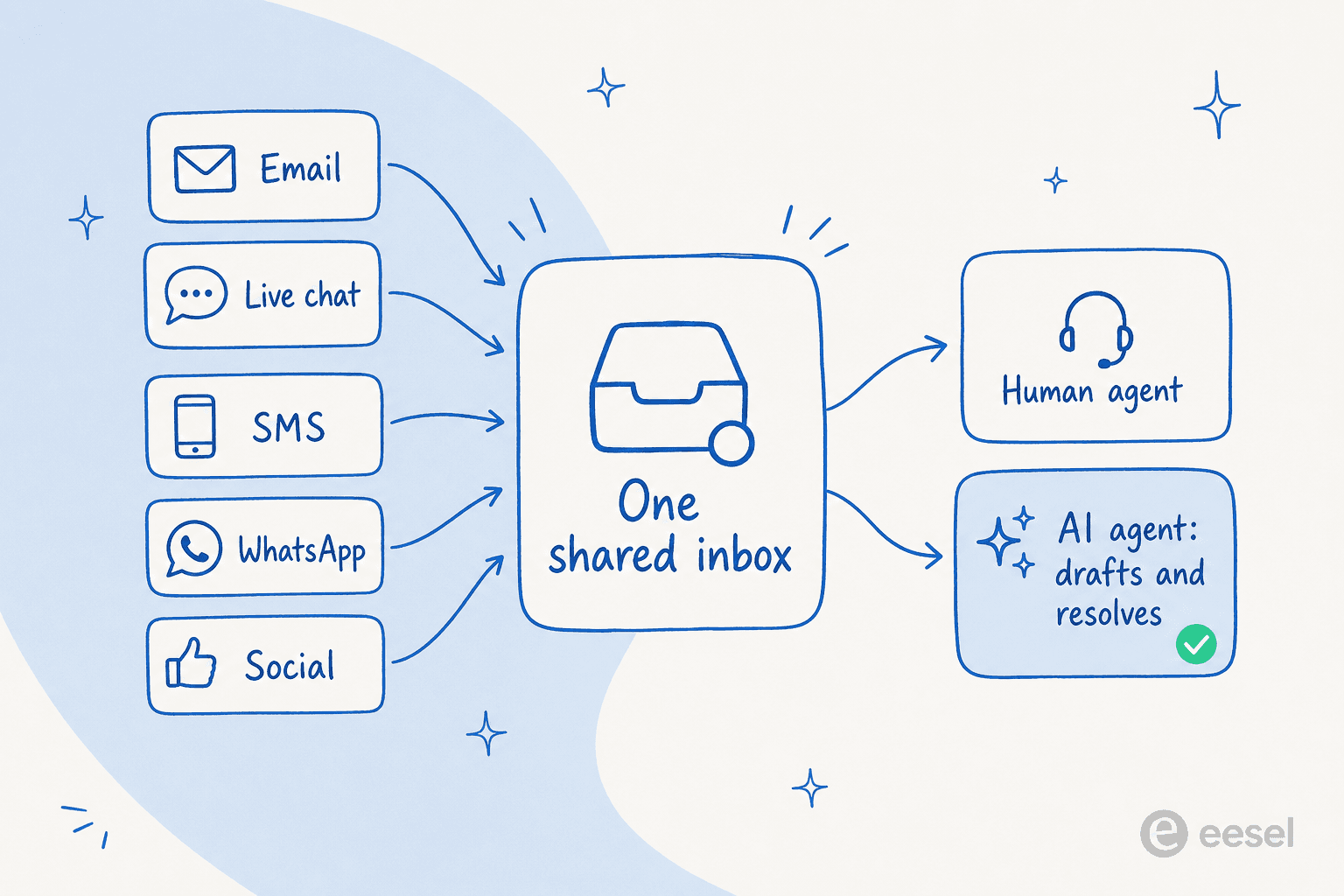
The reason the category has fragmented into so many products is that "one inbox" means different things to different teams. A DTC brand on Shopify wants order data inside every ticket. A logistics ops team wants email that feels like email but routes across departments. An IT team wants ticketing with SLAs. So you get help desks, shared inboxes, live chat tools, and contact-center suites all calling themselves "customer communication software." They mostly overlap; the differences are in emphasis and price.
How I compared them, and what to actually look for
I went through each tool's own pricing and product pages rather than a spec-sheet rewrite, and I weighted four things a buyer feels within the first month:
- The billing unit. This matters more than the sticker price. Per-seat pricing scales with your headcount, per-ticket scales with your contact volume, and per-resolution only scales when the AI actually solves something. Same $500 bill, very different behavior as you grow.
- What AI really costs. Almost every platform now bundles an "AI agent," but it's a separate meter. Read the resolution price, not the seat price.
- Channel breadth vs. the tier that unlocks it. The cheap plan is often email-only; omnichannel and AI live two tiers up.
- Time to first resolution. How fast can it learn your business and start deflecting real tickets, safely.
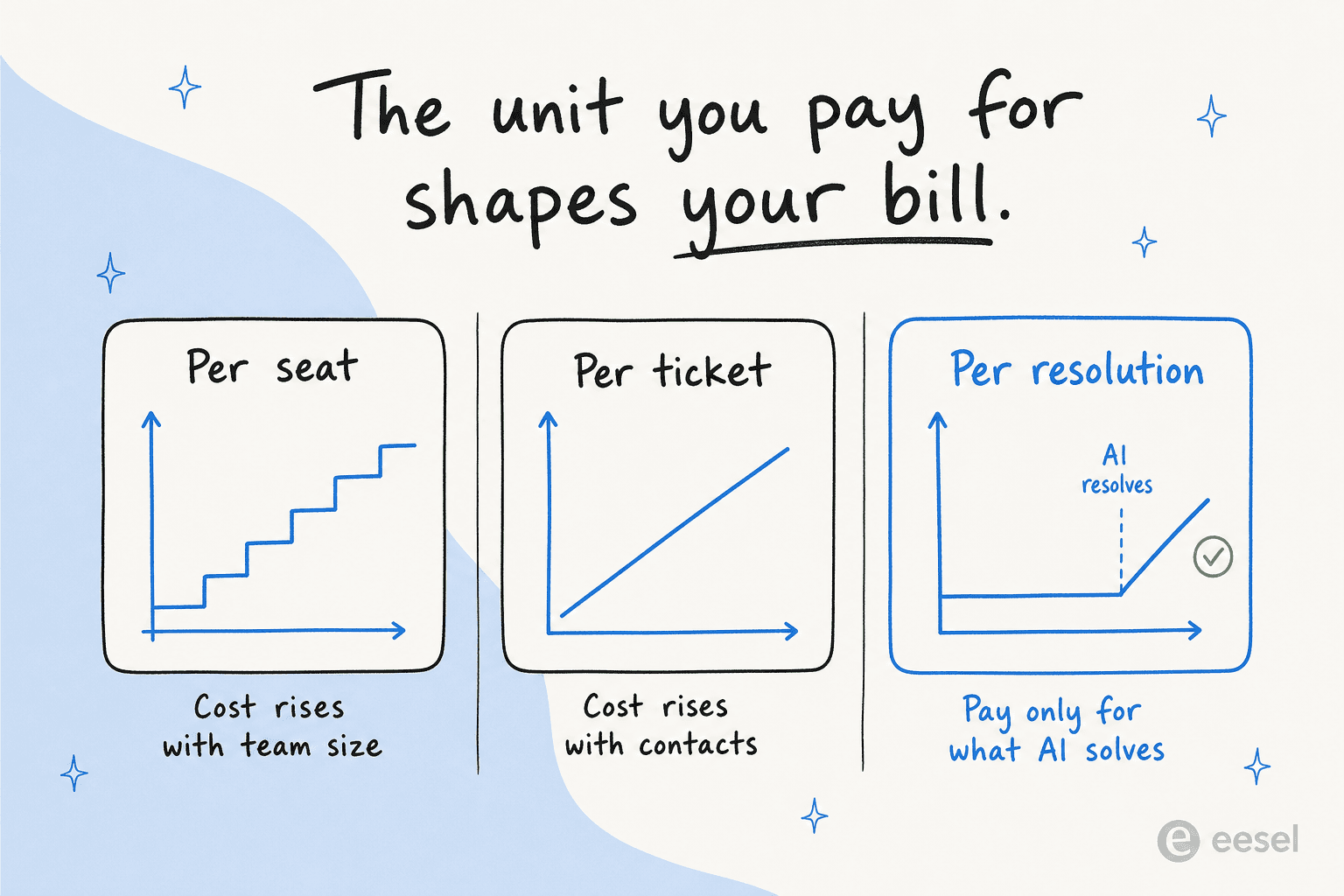
That billing-unit point is the one most comparison posts skip, and it's the one that bites. A team of 15 on a $115/agent plan is paying $1,725/month before a single AI resolution. The same team routing 2,000 tickets a month through a per-resolution layer pays for the 2,000, not the 15 chairs.
The 8 best customer communication software tools in 2026 at a glance
| Tool | Best for | Billing unit | Starts at | AI pricing | Free tier |
|---|---|---|---|---|---|
| Zendesk | Mid-market/enterprise omnichannel | Per agent | $19 (Support), $55 (AI) | Per automated resolution | 14-day trial |
| Freshdesk | Scaling teams wanting a free start | Per agent | $0, then $19 | $49 / 100 Freddy sessions | Free (1-2 agents) |
| Front | Cross-department, email-native ops | Per seat | $25 | $0.05 / conversation | 14-day trial |
| Help Scout | Small teams who want a clean inbox | Per user | $25 | $0.75 / resolution | Free (100 contacts) |
| Gorgias | Shopify and ecommerce brands | Per ticket | $10 | $1.50 / interaction | Trial |
| Zoho Desk | Budget, Zoho-ecosystem teams | Per user | $0, then $7 | Enterprise / own key | Free (3 users) |
| HubSpot Service Hub | Teams already on HubSpot CRM | Per seat | $0, then $20 | 50 credits / resolution | Free (2 users) |
| eesel | AI on top of your existing help desk | Per ticket | 40¢ / ticket | Included in the ticket price | $50 free usage |
A quick note on who's missing: I've left out a couple of well-known names that a lot of roundups pad with, and I kept this to tools you can actually buy and stand up quickly. Now the detail.
1. Zendesk
Zendesk is the category's 800-pound gorilla, a mature omnichannel platform that unifies email, messaging, live chat, voice, and social into one agent workspace, with a knowledge base, reporting, and workforce tooling on top. It was named a Leader in the 2025 Gartner Magic Quadrant for the CRM Customer Engagement Center, and it shows in the depth.
Best for: mid-market and enterprise teams that want a do-everything platform and can absorb the cost.
The catch is the pricing psychology. The $19 Support tier is email-only, a bit of a decoy; AI agents, messaging, and voice start at Suite Team ($55/agent/month), and the "most popular" Suite Professional is $115/agent/month, before add-ons like Copilot ($50) or Contact Center ($83). A fully loaded seat can clear $200/month.
Pricing:
| Plan | Price (per agent/mo, billed yearly) |
|---|---|
| Support Team | $19 |
| Suite Team | $55 |
| Suite Professional | $115 |
| Suite Enterprise | Custom |
On top of that, Zendesk's AI agents are billed per successful automated resolution, so your total cost is per-seat plus usage and genuinely hard to forecast.
Verdict: the safe, powerful, expensive pick. If you're a large team that needs voice, WFM, and QA in one suite, it earns its keep. If you mostly want tickets resolved, you'll pay for a lot of platform you don't touch. It's telling that a healthy chunk of our own customers run eesel on top of Zendesk rather than pay Zendesk's per-resolution AI rate.
2. Freshdesk
Freshdesk is Freshworks' cloud help desk, and it's the most approachable of the big platforms. It's built around a shared inbox, omnichannel ticketing, self-service, and the "Freddy AI" suite, and it's used by 74,000+ businesses. Crucially, it has a genuinely free tier for 1-2 agents (first 6 months), which makes it a common first help desk.
Best for: small-to-mid teams that want a per-agent inbox with a real free start and an AI upgrade path.
Pricing:
| Plan | Price (per agent/mo, billed annually) |
|---|---|
| Free | $0 (1-2 agents) |
| Growth | $19 |
| Pro | $55 |
| Enterprise | $89 |
Freddy AI is a separate meter. Pro and Enterprise include 500 AI Agent sessions once, then it's $49 per 100 sessions on top of the seat price. Freshworks self-reports up to 80% resolution and 60% agent productivity gains, so treat those as vendor numbers, not independent ones.
Verdict: a strong middle-of-the-road choice, especially if you're price-sensitive early. The main friction is product sprawl (Freshdesk vs. Omni vs. Freshchat vs. Freshcaller) and AI that stacks cost fast at volume. If Freddy isn't cutting it, plenty of teams keep the inbox and swap the AI, which is exactly what our Freshdesk alternatives breakdown digs into.
3. Front
Front is the one that feels least like a ticketing tool. It's a shared inbox that keeps the feel of a personal email client while adding helpdesk structure, workflow automation, and deep CRM/tooling integrations. It positions itself as a "customer operations" platform, and it's genuinely the best fit for teams routing high-context work across departments. 9,300+ companies use it.
Best for: support, ops, and logistics teams handling complex, cross-functional conversations across many channels.
Pricing:
| Plan | Price (per seat/mo, billed annually) |
|---|---|
| Starter | $25 (single channel) |
| Professional | $65 |
| Enterprise | $105 |
Starter is single-channel only, so omnichannel means Professional or higher. Front's AI is add-on shaped: Autopilot starts at $0.05/conversation, and Copilot, Smart QA, and Smart CSAT are $10-20/seat each unless you're on Enterprise. Worth flagging: Front notes its AI may use your data to further train your model.
Verdict: the nicest inbox on this list to actually live in, and the deep integrations are real. It gets pricey per seat, and the best AI is gated to Enterprise or metered on top. If you love the Front inbox but want stronger automation, an AI layer for Front is a cleaner path than climbing the tiers.
4. Help Scout
Help Scout has built its whole identity around being the un-ticketing tool: a clean, email-style shared inbox with a bundled knowledge base (Docs), an embeddable widget (Beacon), and an AI layer woven through. If your team recoils at the complexity of enterprise suites, this is the antidote.
Best for: small-to-mid teams that want a tidy, email-native inbox without ticketing overhead.
Pricing:
| Plan | Price (per user/mo, billed annually) |
|---|---|
| Free | $0 (100 contacts/mo) |
| Standard | $25 |
| Plus | $45 |
| Pro | $75 |
Contacts are unlimited on all paid tiers (the "contact" cap only bites on Free), so the live model is per-seat plus usage-based AI. AI Answers, the autonomous resolution agent, is $0.75 per resolution as an add-on, with a claimed ~73% resolution rate.
Verdict: the friendliest inbox for a lean team, and the pricing is honest. It scales per seat like the rest ($75/user on Pro, 10-seat minimum), and SSO/HIPAA are gated to the top tier. If you want a head-to-head, our Freshdesk vs Help Scout piece lines them up. And because AI Answers is pay-per-resolution, it's one of the more sensible native AI stories here.
5. Gorgias
Gorgias is the ecommerce specialist. It pairs a unified helpdesk (email, chat, SMS, WhatsApp, Instagram, Facebook) with an AI Agent trained on your brand data, and it lives natively inside Shopify: orders, customers, and products sit in every ticket. It claims to power 40% of Shopify brands. Its pitch is revenue, not just deflection.
Best for: Shopify and ecommerce brands that treat support as a sales channel.
Gorgias is one of the few here that bills per billable ticket, not per seat, so users are unlimited on every plan.
Pricing:
| Plan | Price/mo | Included tickets |
|---|---|---|
| Starter | $10 | 50 |
| Basic | $50 | 300 |
| Pro | $300 | 2,000 |
| Advanced | $750 | 5,000 |
Two meters to watch: helpdesk overage is $0.40 per ticket over your cap, and AI Agent interactions are metered separately at $1.50 each (and unavailable on Starter).
Verdict: if you're on Shopify, it's the most commerce-aware option going, and the ticket-based pricing is refreshing. The two-meter model (tickets + AI interactions) can get unpredictable at scale, and the value is tightly bound to Shopify. Non-commerce teams should look elsewhere; our Gorgias alternatives roundup covers the options.
6. Zoho Desk
Zoho Desk is the value pick, and the feature density for the price is genuinely hard to beat. It unifies email, social, live chat, messaging, and telephony into one contextual workspace, layers Zoho's Zia AI on top, and starts at $7/user/month. If you already live in the Zoho ecosystem, it's close to a no-brainer.
Best for: budget-conscious and existing-Zoho teams that want a lot of help desk for a little money.
Pricing:
| Plan | Price (per user/mo, billed annually) |
|---|---|
| Free | $0 (3 users) |
| Express | $7 |
| Standard | $14 |
| Professional | $23 |
| Enterprise | $40 |
The AI story is the compromise. Generative AI on the Standard plan requires bringing your own OpenAI API key, and the strongest AI (the Answer Bot and AI support assistant) plus live chat are gated to the $40 Enterprise tier.
Verdict: unbeatable on price-per-feature, and a legitimate omnichannel inbox at a fraction of Zendesk's cost. The AI is the weak link, splintered across tiers and partly BYO-key. If Zoho's native Zia isn't enough, our best AI for Zoho Desk guide and the Zendesk vs Zoho Desk comparison are good next reads.
7. HubSpot Service Hub
HubSpot Service Hub is support built on top of HubSpot's Smart CRM, which is both its biggest strength and the reason to buy it. If your marketing and sales already live in HubSpot, service data joins the same customer record, and the retention workflows are excellent. The Breeze Customer Agent handles email and live chat, with HubSpot claiming 70%+ auto-resolution.
Best for: teams already committed to HubSpot who want service tied to the CRM.
Pricing:
| Plan | Price (per seat/mo, annual) |
|---|---|
| Free | $0 (2 users) |
| Starter | $20 (promo $7-10) |
| Professional | $90 |
| Enterprise | $150 |
Two things to budget for. The AI agent, help desk workspace, and knowledge base only unlock at Professional ($90/seat), which also carries a mandatory one-time onboarding fee ($1,500 Pro, $3,500 Enterprise). And AI is double-metered: you pay per seat and burn HubSpot Credits (50 credits per resolved Breeze conversation, credits at $9/1,000).
Verdict: buy it for the CRM gravity, not the standalone support value. Outside the HubSpot ecosystem it's expensive for what you get, and the seat-plus-credits math adds up. If you're weighing whether the native AI is worth it, we went deep on the HubSpot Service Hub AI question and its Service Hub AI alternatives.
8. eesel, the AI layer that sits on top

The other seven tools are inboxes you move into. eesel is different by design: it's an AI teammate that plugs into the help desk you already run (Zendesk, Freshdesk, Front, Gorgias, Help Scout, and 100+ others), learns from your past tickets and help docs on day one, and starts drafting and resolving inside your existing inbox. So it's not really competing to be your inbox; it's competing with the AI add-on every tool above is trying to sell you.
Best for: teams that like their current help desk but want AI resolution without ripping anything out or paying per seat.
The reason I lead with it: I've watched a confident-sounding bot quietly give wrong answers, which is why every eesel rollout is simulated against your historical tickets first, so you see the coverage and the answers before a customer ever does. One customer, Gridwise, saw eesel resolve 73% of tier-1 requests in the first month, with results landing during the 7-day trial.
Pricing: pure usage. 40¢ per ticket handled, no per-seat fee, no platform fee, no minimum. Route only 200 of your 1,000 monthly tickets and you pay for 200.
| Tickets/month | Monthly cost |
|---|---|
| 100 | $40 |
| 500 | $200 |
| 1,000 | $400 |
Verdict: if what you actually want from "customer communication software" is fewer tickets touching a human, adding a per-resolution layer to your current stack is almost always cheaper and faster than upgrading to the platform's own AI tier. If you're replatforming anyway, keep one of the seven above and put eesel on top.
So which one should you pick?
The honest answer depends on two axes: how complex your channel mix is, and whether you'd rather pay per seat or per outcome. Here's roughly where each tool lands.
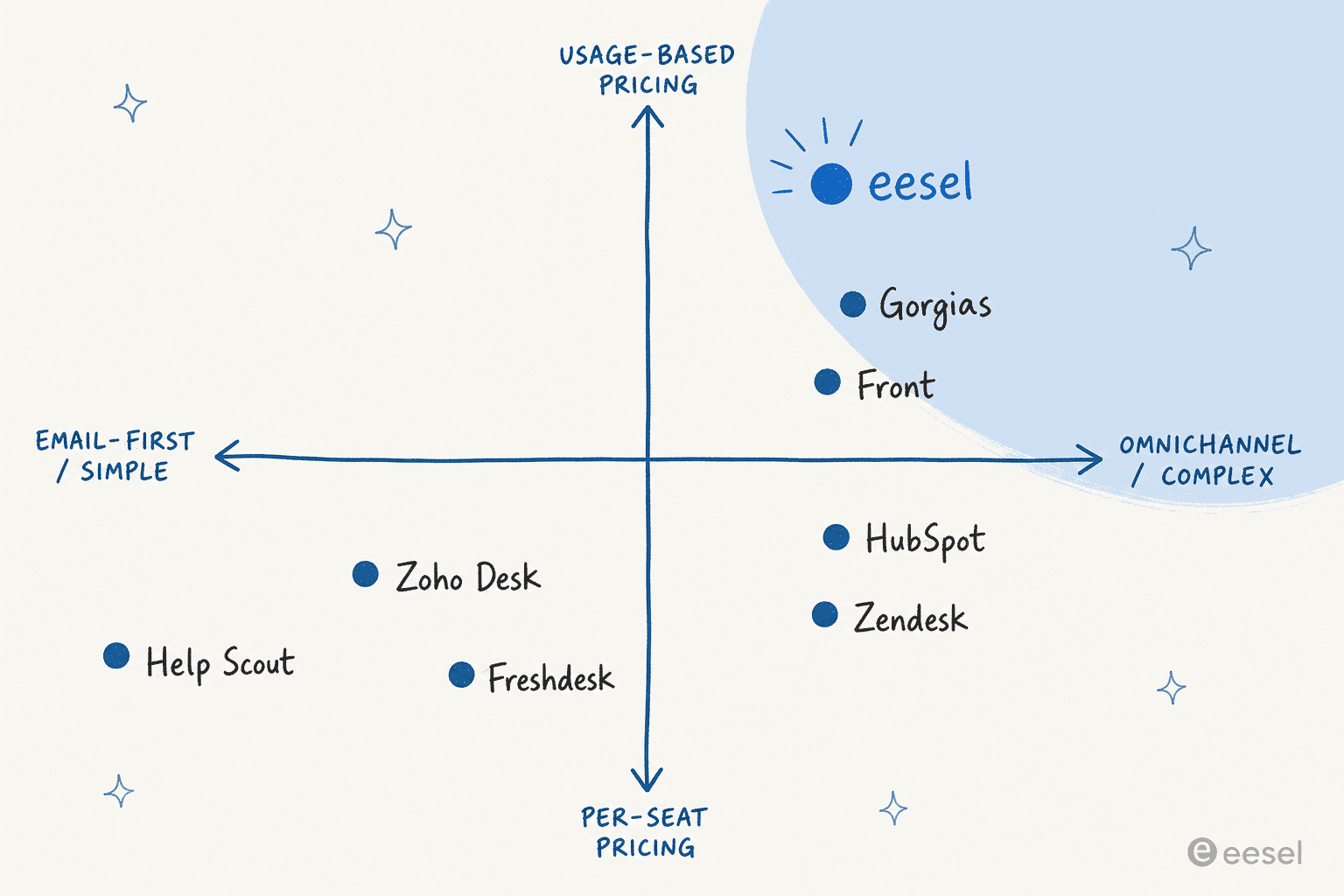
If you want to skip the map and just get a recommendation, walk the quick picker below.
The pattern underneath all six answers is the same: the inbox is close to a solved problem, and the money and the differentiation have moved to AI resolution. That's why I'd anchor the decision on the AI economics, not the inbox chrome.
Try eesel on the help desk you already have
If you've read this far, you probably don't need another inbox, you need the AI agent part to actually work without a migration or a per-seat surcharge. That's the whole idea behind eesel: it connects to Zendesk, Freshdesk, Front, Gorgias, Help Scout, Slack, and 100+ tools in minutes, learns from your past tickets and knowledge base, and lets you simulate the whole thing against real historical tickets before it replies to a single customer.

You keep your current customer communication software and your ticket history; eesel just handles the tier-1 volume at 40¢ a ticket, no seats, no platform fee. There's $50 of free usage to start, no credit card, so you can point it at your own tickets and see the coverage before you commit. Try eesel.
Frequently Asked Questions
What is customer communication software?
How much does customer communication software cost?
Which customer communication software is best for small teams?
What is the best AI customer communication software?
Do I need to switch help desks to add AI to my customer communication software?


Article by
Kurnia Kharisma
Kurnia is a software engineer and writer at eesel AI with two years of SEO experience, writing about AI tools, helpdesk software, and customer support. He pairs a developer's understanding of how these products are built with search-driven research into what actually ranks and resonates with the people searching for them.