Why AI support replies end up sounding nothing like your brand
Here's the thing most tool demos won't tell you: the default voice of almost every AI support agent is the same flat, over-formal register. It's the voice of a legal department that's been asked to sound helpful. And customers clock it instantly.
This isn't a hypothetical. It's the single most common complaint when real shop owners try these tools. One asked the question directly on Reddit:
"If you are using Ai for small busines, tell me can AI actually match a brands tone or if it just ends up spitting out generic replies. I run a small shop and tried a couple tools, some were fine but nothing amazing."
- u/Upstairs-Holiday3012, r/ecommerce
Another was blunter about the business cost:
"Every AI chatbot I've tried sounds so corporate and generic. Like 'I'd be happy to assist you with that today' type responses that make it super obvious you're talking to a bot... Customers bounce as soon as they realize they're not talking to a real person."
- u/From_Earth_616_, r/shopify
That "customers bounce" line is the whole stakes. An off-brand reply isn't a cosmetic miss, it reads as a downgrade in service, and some people will cancel over it:
"it makes it worse. I never hesitate to cancel services if I have to communicate with an A.I. or a person overseas who sounds like they are an A.I."
- u/Brief-Mastodon7706, r/customerexperience
I've watched the same pattern from the operator side for years. eesel has been running AI on live support queues since well before it was fashionable, and the failure that always shows up first in a sloppy rollout isn't a wrong answer, it's a right answer delivered in a voice that isn't yours. The fix is treating brand voice as something you configure on purpose, not something you hope the model gets right.
What "brand voice" actually means for an AI agent
When people say they want the AI to "sound like us," they usually mean a fuzzy vibe. To actually configure it, you have to break that vibe into the concrete dials a tool exposes. There are five that matter.
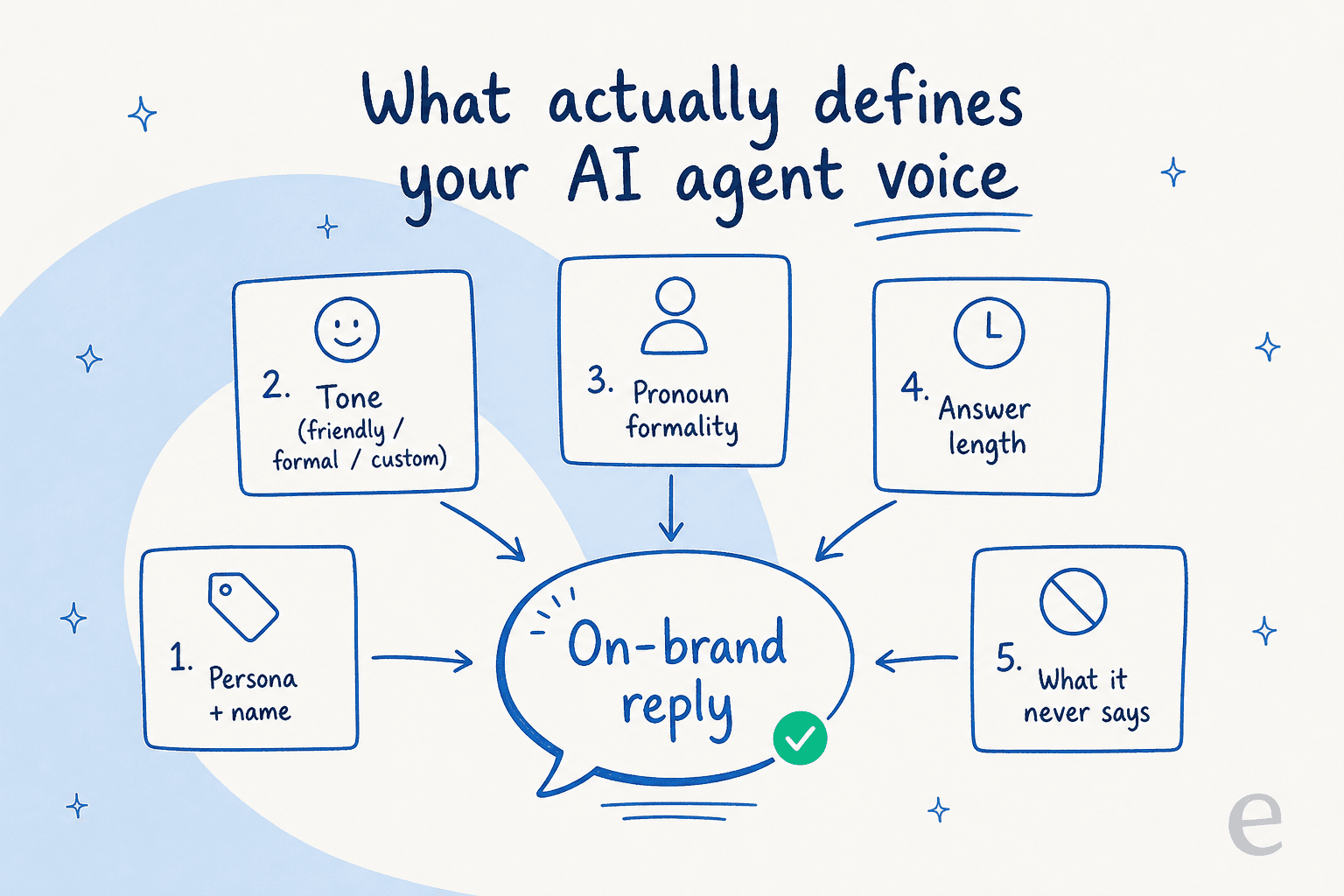
- Persona and name. Is the agent a named character ("Ada from Acme") or an unnamed extension of the team? This sets how personal the replies feel.
- Tone. The big one. Friendly, professional, playful, dry. Most tools ship presets plus a custom free-text field where you describe the tone in your own words.
- Pronoun formality. Whether the agent says "you" casually or keeps a formal register. This matters enormously across languages, and it's easy to get wrong.
- Answer length. A two-line reply and a six-line reply read as completely different brands, even with identical wording.
- What it never says. The guardrails. No fake apologies, no "as an AI," no promising refunds it can't authorize.
Get all five aligned and the agent stops sounding like a bot wearing your logo. A practitioner who rolled AI agents out to thousands of brands put the priority plainly:
"One thing I learned early on while building our AI Agent at Gorgias is how important is for brands to control what we call Tone of Voice."
- Gorgias CTO, via LinkedIn
The difference between an off-brand and an on-brand reply
The gap is easier to feel than to describe. A widely-shared breakdown on r/n8n laid out the exact contrast, and it maps perfectly onto support:
"Too many AI agents sound like they were written by a legal department. Overly formal, robotic, no personality... Bad: 'I am here to assist you with your inquiry.' Good: 'Happy to help! What can I answer for you?' ... Match your brand voice. If you're casual and friendly on social media, your AI agent should be too."
- u/DanielNkencho, r/n8n
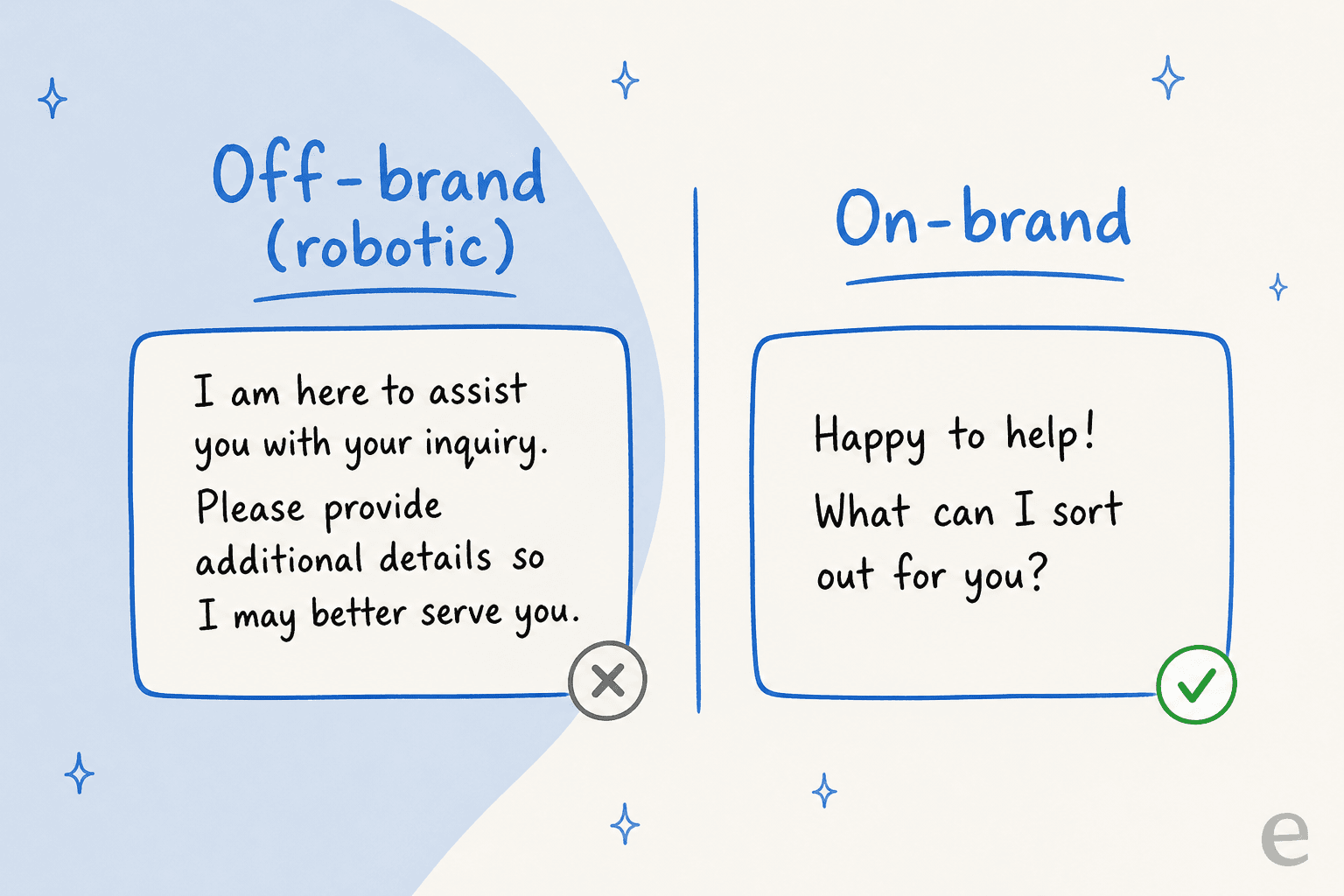
The point isn't to make the AI pretend to be human. It's to make it not exhausting to talk to. The same thread nailed why the legal-department voice fails even when the information is correct: there's no warmth, so the customer's guard goes up before they've read the answer. If you've ever felt your own eyes glaze at "I apologize for any inconvenience this may have caused," you already understand the problem.
How to actually give your AI agent your brand voice
So how do you get from the bad column to the good one? Five steps, in the order I'd do them.
1. Write the tone in plain English
Start with the custom tone field, not the presets. Presets like "professional" are a starting point, but they're shared by every other company using the same tool, which is exactly why outputs feel generic. Instead, describe your voice the way you'd brief a new hire: "Warm and direct. We use contractions, we skip corporate filler, we get to the answer fast, and we never over-apologize."
With eesel, you do this in plain language right in the dashboard, and you can keep refining it by chatting with the agent rather than digging through settings.

One caveat worth knowing: a tone description can be over-stuffed. Zendesk explicitly warns against cramming instructions into the business profile, "which might lead to unexpected errors." Keep the tone brief and let the examples in the next step do the heavy lifting.
2. Feed it your real replies
This is the step that separates a convincing voice from a costume, and it's the one most teams skip. A written tone description tells the AI about your voice. Your actual past tickets and saved macros show it. Training on real replies is the difference between "casual and friendly" and the specific way your team says "no worries, sorted that for you."
It also happens to be the single most-requested capability I hear on sales calls. As eesel's founder Amogh put it after one too many demos: "Past ticket training strikes again. Classic. People really, really, really want to train on past tickets." There's a reason. It's the fastest path to a voice that's recognizably yours rather than recognizably an AI's. If your knowledge is scattered, my guide on training AI on a knowledge base walks through getting it ready.
3. Set the guardrails for what it never says
Brand voice is as much about subtraction as addition. Gorgias frames tone partly around what the agent never says, and that's a useful lens. Write the banned list: no "as an AI language model," no inventing policy, no committing to a refund window you don't offer. This overlaps with hallucination prevention, because the most off-brand thing an agent can do is confidently say something untrue in a perfectly friendly voice.
4. Match the voice across languages
If you support customers in more than one language, "on-brand" has to survive translation. A casual English voice can land as rude in a language with strong formality norms, which loops right back to that pronoun-formality dial. This is where training on real, multilingual ticket history pays off, since the agent learns the register your customers actually expect. eesel handles 80+ languages and answers in the customer's language, and one of the things I'd flag for any global team is to test the tone per language, not just in English.
5. Test before a customer hears it
You wouldn't let a new agent reply to live tickets on day one without reading their drafts first. Treat the AI the same way. Run it against a batch of your real historical tickets and read the output as if you were the customer. This is where an off-brand habit surfaces while it's still cheap to fix.
Keeping the voice consistent without it going off the rails
Setting the voice once is the easy part. Keeping it consistent across thousands of tickets, and trusting it enough to let it reply on its own, is where most rollouts get nervous. The answer is a workflow, not a single setting.
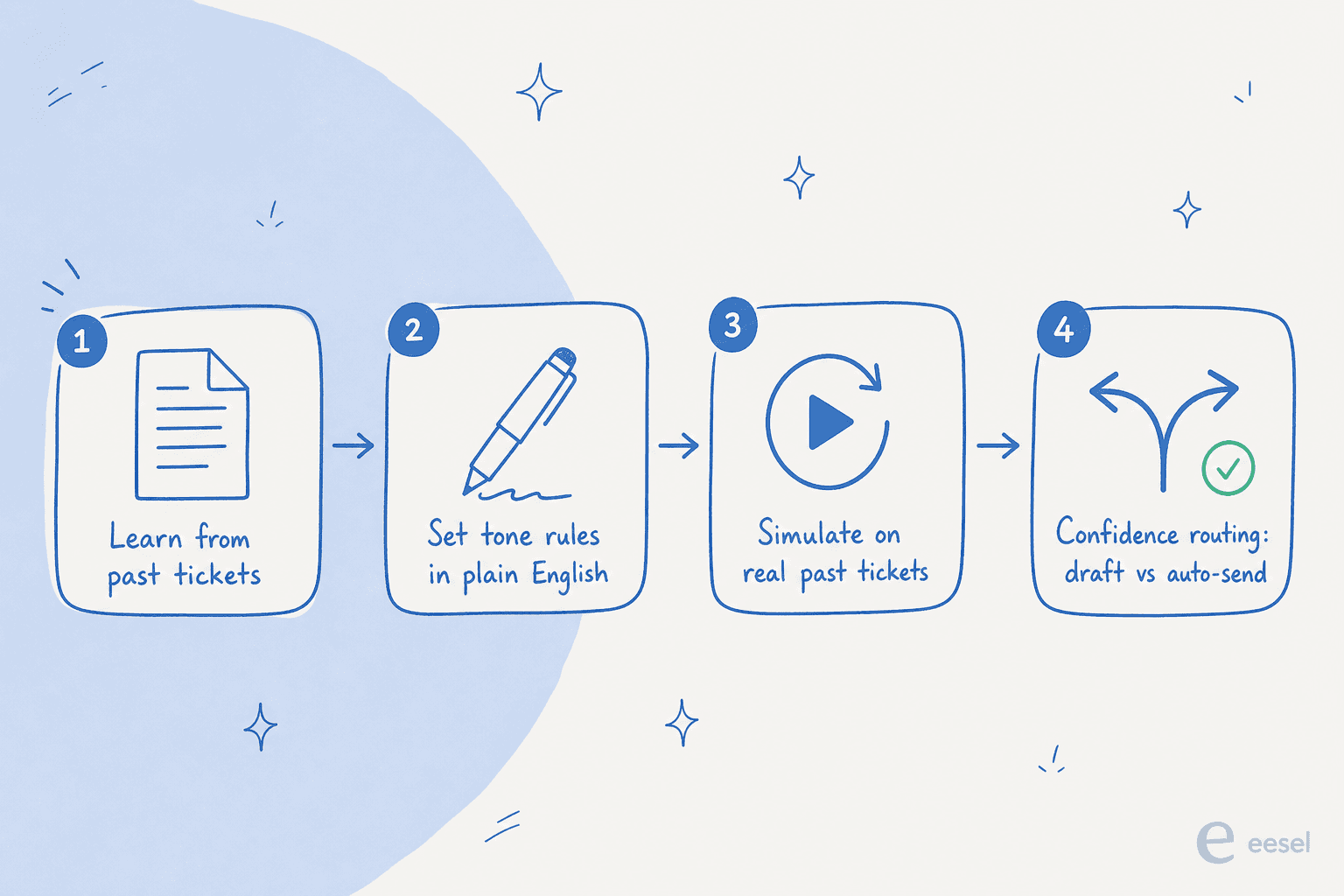
The two pieces that matter most:
Simulation. Before going live, run the configured agent across your real past tickets to see how it would have replied, in your voice, at volume. You catch the tone misses in a spreadsheet instead of a customer inbox. This is also the honest way to see your likely resolution rate before you commit.
Confidence-based routing. Not every ticket should get an auto-sent reply. With a confidence threshold, high-confidence answers go out automatically while anything uncertain becomes a draft for a human, or a clean handoff to an agent. This is the safety net that lets you start conservative and grant more autonomy as the voice proves itself. It's also the design pattern eesel lost a deal without once, early on, which is exactly why it's built in now.
A Reddit reply summed up the balance better than any vendor page:
"AI speeds up basic support, but bad implementations make things worse. The problem isn't AI, it's companies over-automating. If escalation is smooth, customers love it. If not, it's a nightmare."
- u/pulsereal_com, r/customerexperience
How the major helpdesks handle tone of voice
Tone control has quietly become table-stakes, but the depth varies a lot. Here's how the common options compare, focusing on what actually affects your brand voice.
| Tone presets | Custom tone | Learns from your past replies | Notable | |
|---|---|---|---|---|
| Zendesk | Professional, Informal, Enthusiastic | Yes (tone description) | Limited | Separate identity, tone, and pronoun-formality controls; configurable answer length |
| Gorgias | Friendly, Professional, Sophisticated | Yes (free-text) | Limited | Frames tone around "what it never says"; custom agent persona name |
| Freshdesk | Preset tones | Partial | Limited | Tone tied to the Freddy AI add-on |
| eesel | Fully custom | Yes (plain-English) | Yes, trains on tickets + macros | Layers on top of any of the above; simulation on past tickets; 80+ languages |
The pattern: native helpdesk AI gives you a tone dropdown and a custom field, which gets you 70% of the way. The last 30%, the part where the voice is unmistakably yours, comes from training on your own replies and testing before launch. That's the gap eesel is built to close, and because it sits on top of Zendesk, Gorgias, Freshdesk, Front and others, you don't have to switch helpdesks to get it. For the wider field, my roundup of AI helpdesk software and the best customer service AI goes deeper on each.
What an on-brand AI agent looks like in practice
When the voice is dialed in, the proof is that you stop thinking about it. Smava runs a fully automated, German-language agent through eesel that handles 100,000+ support tickets a month, in their voice, in a language with strict formality rules. That only works because the tone and register were trained and tested, not guessed.

The other proof point is speed of trust. Gridwise saw eesel resolve 73% of tier-1 requests in the first month, during a 7-day trial, which doesn't happen if the replies read as off-brand. Customers don't accept resolutions from an agent they don't trust to sound right. For more real examples, see companies using AI for customer service.
Try eesel for an on-brand support agent
If you want an AI support agent that actually sounds like your team, eesel is built for exactly this. It plugs into your existing helpdesk in minutes, trains on your past tickets, macros and help docs so it copies your real voice instead of a generic one, and lets you set tone in plain English. Then you can simulate it on your historical tickets to hear the voice before any customer does, and start in draft-only mode until you trust it. It's free to try with $50 of usage and no credit card.

Try eesel and see how close to your brand voice an AI agent can actually get.
Frequently Asked Questions
Can an AI support agent really match my brand's tone of voice?
How do I make my AI support agent sound less robotic?
Is brand voice control free in AI helpdesk tools?
What happens if my AI agent replies off-brand to a customer?
How is brand voice different across Zendesk, Gorgias, and other helpdesks?


Article by
Riellvriany Indriawan
Riell is a designer and writer at eesel AI with about two years of experience researching CX platforms, AI chatbots, and helpdesk software. She combines her design background with a sharp eye for how these tools actually look and feel in practice — making her comparisons unusually visual and user-focused.