Zendesk AI agent review (2026): features, pricing, and what users actually think
Stevia Putri
Katelin Teen
Last edited May 21, 2026

Zendesk has spent the last two years repositioning itself as an AI-first platform, and the current product - Zendesk AI agents - is a meaningful step forward from the chatbots the company was shipping in 2023. The pitch is compelling: an autonomous AI agent that resolves 80% of customer interactions, launches in three clicks, and pays for itself in two months. But there's a gap between that pitch and what most teams actually experience.
This is a ground-level review. It covers what Zendesk AI agents actually do, how the unusual automated resolution pricing model works in practice, what the platform's 4.3/5 G2 rating from 6,837 reviewers reflects, and what the r/Zendesk community says when not quoted in a marketing case study. There's also a real-world performance benchmark you should know about before signing anything.
What Zendesk AI agent is (and what it replaced)
The Zendesk AI agent is a customer-facing bot. It handles support conversations on messaging, email, and voice channels without a human agent in the loop. When it resolves the issue, the ticket closes. When it can't, it hands off to a human with the full conversation history attached.
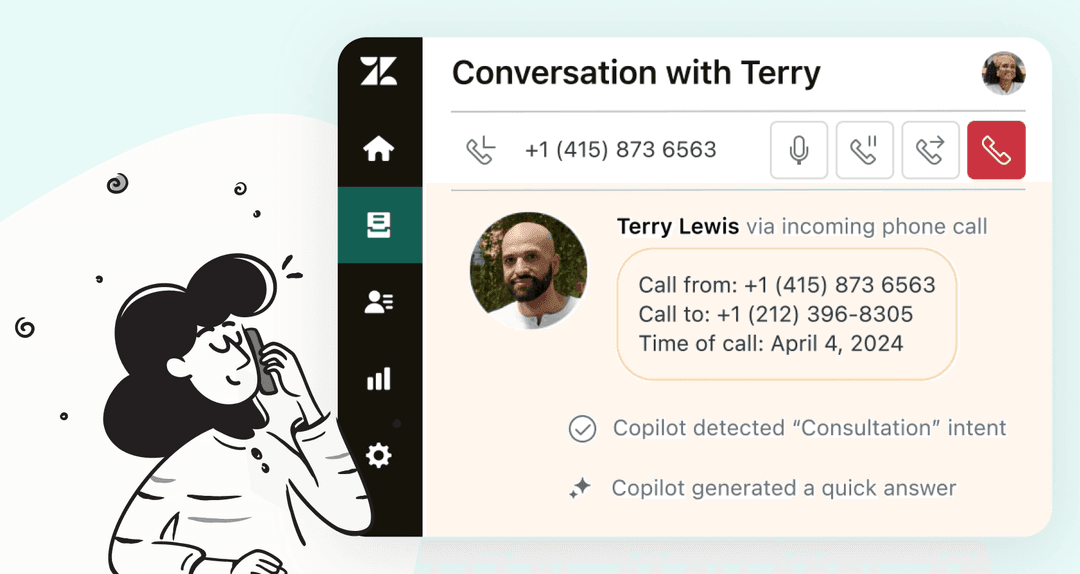
This is separate from Copilot, which is an AI assistant for your agents. Copilot suggests replies and surfaces information; the agent still sends the message. The AI agent operates fully independently. Both are add-ons layered on top of a base Zendesk plan.
One piece of context that matters right now: Zendesk has gone through several AI agent generations, and multiple legacy versions are currently being sunset:
| Generation | Status | End of life |
|---|---|---|
| Expression-based agents | Legacy (Dec 2024) | Dec 31, 2026 |
| Bot builder / answers / intents | Legacy (Feb 2025) | Dec 31, 2026 |
| Zero-training AI agents | Legacy (May 11, 2026) | Dec 31, 2026 |
| AI agents Essential | Legacy (May 11, 2026) | Dec 31, 2026 |
| Current agentic AI | Active | - |
If your team is running any of the legacy generations, December 31, 2026 is your migration deadline. After that date, those products are removed entirely. The current agentic AI generation is what this review covers.
How it works
Getting a Zendesk AI agent running is genuinely quick, at least for the baseline version. Connect a knowledge source (your Zendesk help center, Confluence, or a similar source), and the AI starts drawing on that content to answer questions. Zendesk's claim of "launch in 3 clicks, no scripting or training" is accurate for this initial state.
The architecture has two operational modes:
Generative knowledge answering draws on your connected content to respond to inbound questions. This is what Zendesk describes as automating "30% of requests from day one." It works well for predictable, well-documented topics - FAQ-style questions where the answer is in an article. It works less well for anything nuanced, multi-step, or that requires pulling data from systems beyond the knowledge base.
Generative procedures (the "agentic" part) let the AI handle multi-step tasks without you scripting every path. You describe the goal in natural language and the AI figures out the steps, adapts to the customer's responses, and can take authorized actions in connected systems - processing a return, resetting a password, updating a record. This is Zendesk's path to 50%+ automation and is the genuine technological differentiator of the current generation over its predecessors.
One hard constraint: Zendesk AI agents cannot browse external web pages or follow links. Everything the AI can reference must be pre-loaded into a connected knowledge source. This makes the quality of your knowledge base the single largest determinant of your automation rate.
Key features
Generative AI knowledge answering
The baseline layer. Connect your help center, Confluence, or other documentation sources and the AI drafts responses from that content. Zendesk notes that articles written in prose are easier for the AI to interpret accurately than tables - worth knowing when you're preparing your KB for AI use.
The limitation worth flagging upfront: AI agents are bounded by what's in your knowledge sources. A question the KB doesn't cover is a question the AI either answers incorrectly or escalates. This is why keeping your knowledge base current matters more after deploying AI, not less.
Agentic AI and generative procedures
This is the headline feature of the 2025-2026 generation. Rather than following a script, the AI reasons through the conversation dynamically - asking follow-up questions, choosing between available actions, and adapting as context changes. Zendesk describes this as the difference between "a bot that follows rules" and "an agent that solves problems."
Fully unlocking this capability requires the Advanced AI Agents add-on, which provides the AI agent builder, integrations and actions, reasoning controls, and advanced analytics. That add-on is contact-sales pricing - not listed on the pricing page.

Built-in QA scoring
100% of AI agent interactions are automatically scored for quality. This is the feature that separates Zendesk's offering from a generic AI chatbot: you get automated quality assurance without building a separate QA workflow. G2 reviewers rate Zendesk AI's response accuracy at 85% and its safety score at 91, with an overall AI performance benchmark score of 81 - 18 points above the category average.
Forethought self-improving AI
Zendesk acquired Forethought and the integration is labeled "NEW" across their site. The mechanism: a Resolution Learning Loop where each resolved ticket feeds back into the model, improving future performance. It's also deployable on non-Zendesk stacks, which matters if you're evaluating whether to consolidate on Zendesk or keep a mixed platform. Zendesk's coverage of how to configure Forethought AI triage is useful background if you're considering this path.
Voice AI agents
Handles phone calls end-to-end: user authentication, Q&A, and action execution without scripts, hold music, or handoffs. Still in Early Access Program; pricing not publicly disclosed. For teams where phone volume is the primary driver, this is worth requesting access to, but it's not yet a production-ready feature for most organizations.
Multi-channel and multilingual support
Web, mobile, social channels (Instagram, WhatsApp, Slack), email, and voice. 80+ languages handled automatically - the AI detects the customer's language and responds in kind. This is a genuine strength for global support teams who'd otherwise need to build separate routing logic for language detection.
Pricing
Zendesk AI agents use an Automated Resolution (AR) pricing model: you pay only when the AI fully resolves a conversation without escalating to a human. Each Zendesk plan includes a base AR allowance; beyond that, you pay per resolved interaction.
| Plan | Annual price | Included ARs | Committed AR price | PAYG AR price |
|---|---|---|---|---|
| Support Team | $19/agent/month | 5/agent/month | $1.50 | $2.00 |
| Suite Team | $55/agent/month | 5/agent/month | $1.50 | $2.00 |
| Suite Professional | $115/agent/month | 10/agent/month | $1.50 | $2.00 |
| Suite Enterprise | $169/agent/month | 15/agent/month | $1.50 | $2.00 |
Add-ons on top of these base costs:
| Add-on | Price |
|---|---|
| Copilot | $50/agent/month (annual) |
| Suite Professional + Copilot (bundle) | $155/agent/month |
| Suite Enterprise + Copilot (bundle) | $209/agent/month |
| Zendesk Quality Assurance | $35/agent/month |
| Advanced AI Agents | Contact sales |
| Forethought | Contact sales |

The AR model sounds straightforward, but the included allowances are thin. A 10-agent team on Suite Professional gets 100 ARs included per month. If that team is handling 2,000 monthly tickets and achieves 50% automation, that's 1,000 resolved conversations - of which 900 are overage at $1.50 each, adding $1,350 in AR costs on top of $1,150 in seat costs. Total monthly spend: $2,500 for AI on a mid-market team.
There's also a documented measurement issue: the automated resolution tag is not removed when human agents subsequently reopen and handle a ticket. Reported automation rates may be higher than actual rates.
Two other line items to watch: the Support Team plan requires the Help Center add-on (not included by default) to use AI agents, and the most powerful AI features - the agent builder, integrations, and reasoning controls - are behind the "Advanced AI Agents" add-on whose price is listed as "talk to sales." For full pricing details see Zendesk's pricing page.
What real users say
G2 snapshot
Zendesk for Customer Service has a 4.3/5 rating from 6,837 reviews as of May 2026. The rating breakdown: 63% five-star, 29% four-star, with the remaining 8% spread across three-star through one-star. The AI performance score on G2 is 81/100 (+18 above category average), with 85% response accuracy and a 91 safety score.
Top pros (by mention count):
- Ease of use (532 mentions)
- Seamless usability and ticket tagging (402 mentions)
- Efficient organisation of customer queries (286 mentions)
- Helpful organisation enabling faster replies (280 mentions)
- Easy ticket management (257 mentions)
Top cons:
- Missing features and limited customisation for ticket statuses and reporting (217 mentions)
- Steep learning curve (183 mentions)
- Key features locked behind higher tiers (182 mentions)
- Limited customisation of agent capabilities (159 mentions)
- Complexity and integration issues (139 mentions)
The pros are largely about the platform's core UX; the cons map directly to the issues people hit with the AI product specifically - features locked behind expensive add-ons, complexity of setup, and limited flexibility once you're inside it.
"The generative AI service is a favorite of mine because it helps us create multi-level responses based on our knowledge base, addressing customer queries without needing a live agent and prioritizing issues based on severity." - Mudit T., Sr. Manager eCommerce Operations, Retail, G2
"I think Zendesk is adding a lot of new features, especially with all of the AI integrations and their copilot. I think that the way that they are set up is a little burdensome to actually onboard." - Paul S., Head of Customer Experience, Small Business, G2
What the r/Zendesk community says
G2 reviewers tend to write when things are going well. Reddit users tend to write when they're frustrated. That makes the r/Zendesk community a useful counter-weight.
In the thread "Zendesk & AI Agents - After thought?", the conversation is candid:
"The Co-Pilot stuff is decent, but we found its effectiveness really depends on having a perfectly curated Zendesk knowledge base, which... ours isn't, lol. If the answer isn't in a neat KB article, it tends to struggle, that's actually why we went with a third-party tool instead of the native ZD ai." - u/ToastBix, r/Zendesk
"No, it's just terrible and a rip off. You can't even export the data on like what people ask the bot so you can sort it or manipulate it how you want. We stopped using it because ARs are a rip off, and it's a rushed product to get into the AI hype." - u/OGShakey, r/Zendesk
A cross-platform discussion on r/SaaS described Zendesk's approach as "very much a copilot approach, making agents faster rather than replacing them. Not flashy, but sometimes boring and reliable wins."
The themes that recur across these threads: knowledge base dependency, AR pricing complexity, inability to export bot conversation data for custom analysis, and a perception that the native AI was rushed to market rather than built for long-term deployments.
The metric Zendesk didn't put in a press release
The most telling data point in the research comes from Zendesk's own team. At ProductLab Conference 2025, Zendesk AI Product Leader Mirza Beširović ran a live poll with attendees. The result: only around 10% of AI agents built in the prior six months were still in use.
That's abandonment, not adoption. And it explains the gap between Zendesk's headline numbers - 50–80% automation, 543% ROI - and what's actually happening in production: real-world deployments start at roughly 20% automation and reach ~70% only in mature, well-maintained implementations. Getting there requires months of sustained knowledge base work. Many teams either aren't willing to invest that, or don't realise the investment is required going in.
For a deeper look at how to track progress if you do deploy Zendesk AI, the guide to Zendesk AI agent metrics covers what the resolution rate reporting actually measures - and why the numbers can look better than they are.
Who it's right for
Zendesk AI agents are a solid choice if:
- You're already deep in the Zendesk ecosystem and want AI without adding a separate vendor
- Your help center is well-maintained and written in prose (not tables, not PDFs, not scattered docs)
- You have a support operation large enough that the per-AR costs scale favourably - high volume, high repetition, predictable inquiry types
- You want multi-channel AI (web, social, email, voice) through a single platform without integration work
- The enterprise QA scoring and analytics matter to your compliance or reporting needs
It's a harder sell if:
- Your knowledge base needs significant work before AI can operate on it - you'll spend more time rebuilding the KB than you will on the AI
- You're an SMB: the included AR allowances (5–15 per agent per month) aren't meaningful at small team sizes, and the per-AR cost model becomes expensive quickly once you exceed them
- You need data export from bot conversations for custom analytics - the native tooling doesn't support this well
- You want transparent, predictable pricing - between seat costs, AR overages, and contact-sales add-ons, the total cost of AI on Zendesk is hard to model upfront
If the native product's constraints are a blocker, the roundup of Zendesk AI alternatives and the guide to Zendesk AI capabilities are useful context before you decide.
eesel AI for Zendesk
If you're a Zendesk user who wants AI ticket handling without the pricing complexity or knowledge base dependency of the native product, eesel AI installs as a Zendesk app and works inside your existing setup.
A few concrete differences from the native Zendesk AI:
eesel learns from actual solved tickets - the historical record your team has already built - not just from published help center articles. That means it starts with real institutional knowledge rather than only what you've formatted into official documentation. It also pulls context from any platform you're already using: Google Docs, Confluence, Shopify, Notion, Slack, and 100+ others. No reformatting required.
Pricing is straightforward: $0.40 per ticket resolved, no platform fee, no per-seat charges, no AR commitment tiers. A team handling 1,000 tickets per month pays $400 in AI costs. There's a $50 free usage credit to start; no credit card required. Compare that to the AR model above for your team's actual volumes.
You control the trust level progressively. Most teams start with eesel drafting responses for human review, then expand autonomy as confidence builds on specific ticket types. Low-confidence responses stay as drafts rather than going live. Gridwise resolved 73% of their tier 1 Zendesk requests in the first month using this approach; Smava runs 100,000+ tickets per month in German fully automated.

For teams that want to understand what AI-powered support looks like in their actual ticket queue before committing to a platform expansion, the eesel Zendesk integration is a practical place to start.
Frequently Asked Questions
Share this article

Article by
Stevia Putri
Stevia Putri is a marketing generalist at eesel AI, where she helps turn powerful AI tools into stories that resonate. She’s driven by curiosity, clarity, and the human side of technology.