AI for help centers: what it actually does and how to get started (2026)

Stevia Putri

Katelin Teen
Last edited May 21, 2026
Eighty-eight percent of contact centers say they're using some form of AI. But only 25% have fully integrated it into daily workflows. That gap tells you something: most teams have tried AI, but most AI hasn't actually worked.
The reason is usually one of two things. Either the team deployed a rule-based bot that routes by keyword and calls it "AI" - or they tried something real but underestimated what it takes to make the transition from draft mode to autonomous. Either way, the result is a help center that's technically "using AI" but still drowning in the same tickets.
This guide covers what AI for help centers actually does when it's working, how it works under the hood, and the practical steps to get there without wrecking customer experience along the way.
What is AI for help centers?
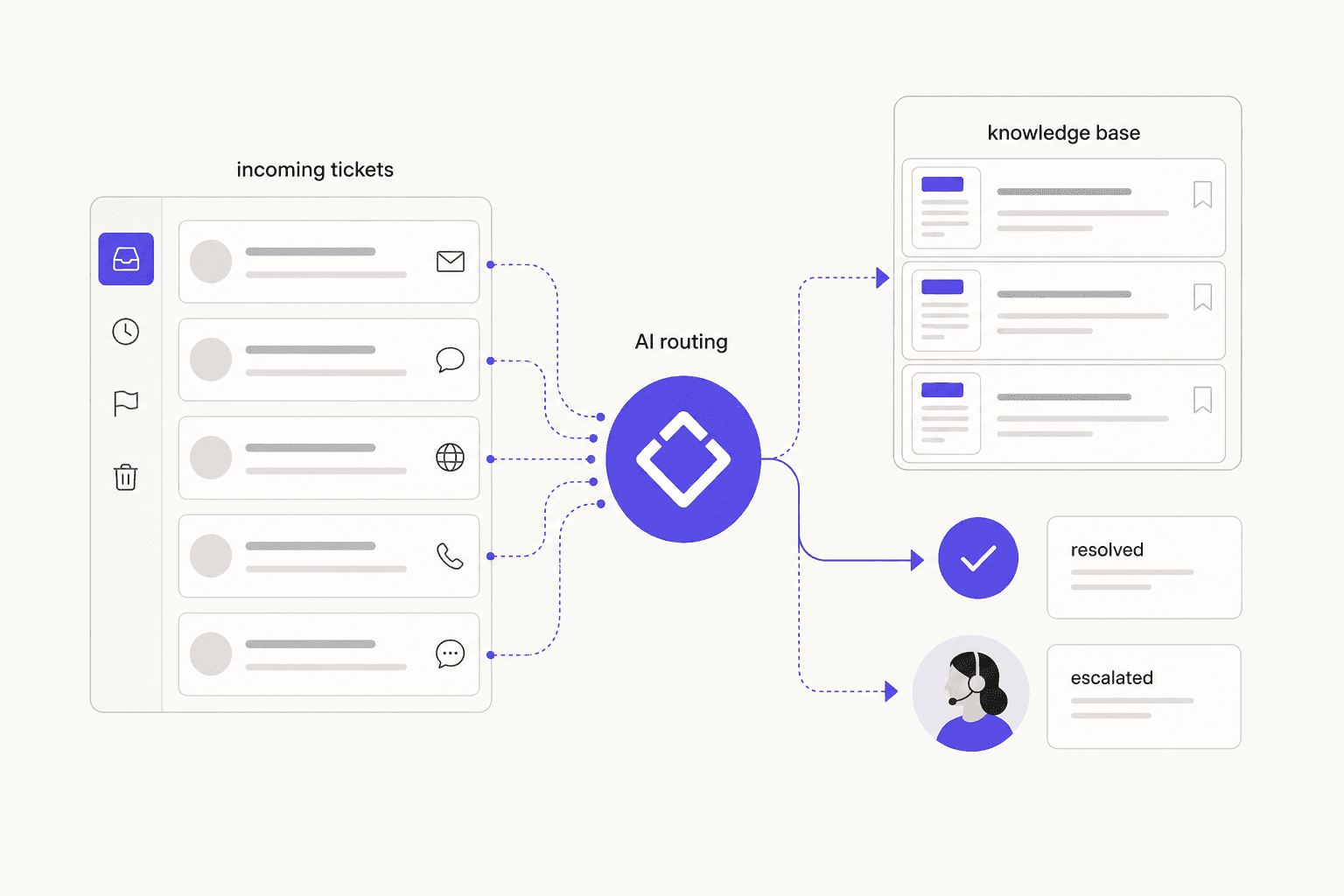
The short version: AI for help centers means software that reads incoming support tickets, searches your knowledge base and past resolved tickets, reasons about the right answer, and either sends a reply or drafts one for human approval - all without a human agent doing any of that work.
The longer version is that this is a different category from the chatbot your company might have put on its website in 2019. Rule-based bots match keywords to pre-written responses. They work for 20 questions on a FAQ page and fall apart on everything else. They achieve about 65–70% accuracy in understanding customer intent. Modern AI agents understand natural language, handle phrasing variations, connect to your backend systems to look up actual customer data, and learn from every ticket they see. They reach 92% accuracy in understanding intent and generate 45% fewer escalations than rule-based chatbots.
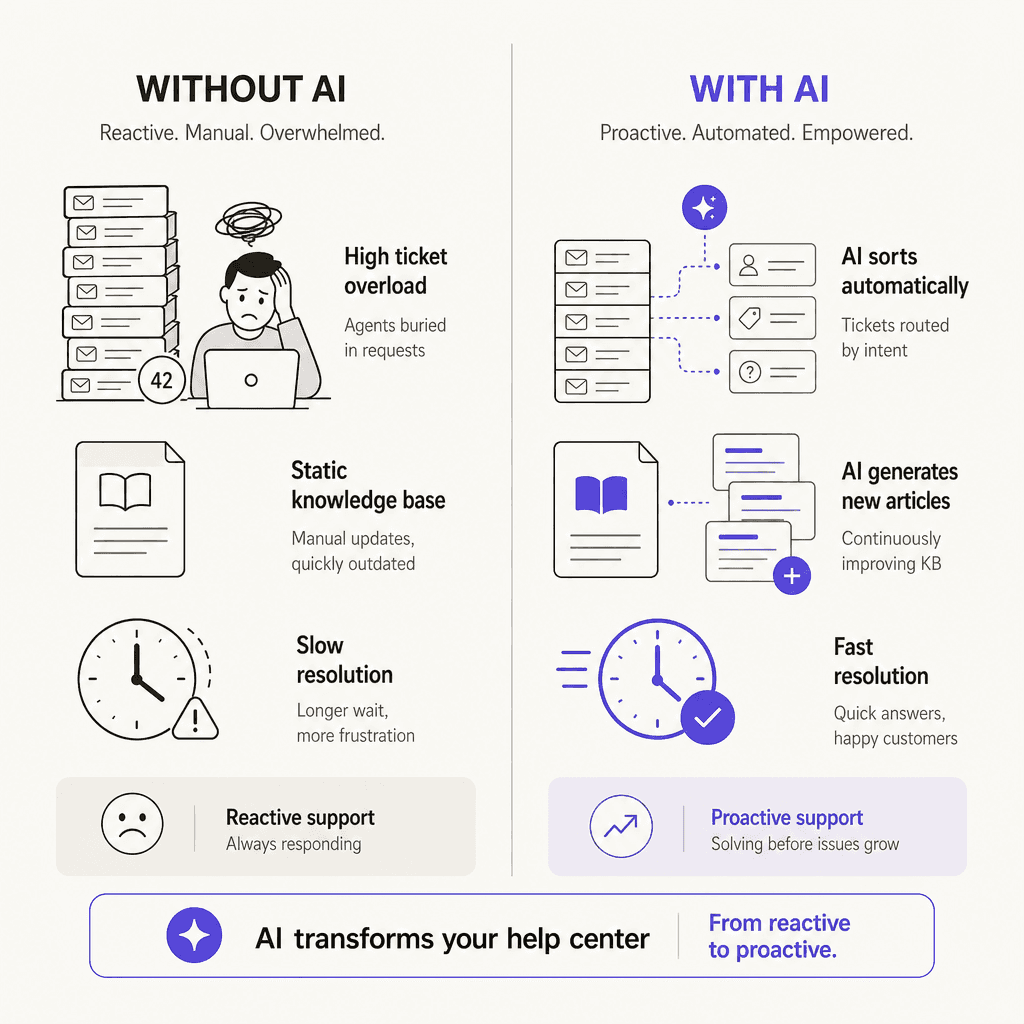
The most important implication: traditional self-service fully resolves only 14% of customer issues. AI-native platforms resolve 55–70%. That's not a marginal improvement - it's the difference between a system that mostly deflects customers into frustration and one that actually closes tickets.
Deflection vs. resolution: the metric that matters
Before going any further, this distinction is worth stating plainly because a lot of AI vendor marketing confuses it: deflecting a ticket is not the same as resolving one.
Deflection means the customer didn't file a formal ticket. Resolution means the customer's problem got solved. Traditional self-service deflects plenty of tickets - customers find the FAQ page, read it, and still email support with the same question because the article didn't actually answer their specific situation.
A SaaS founder building a support AI shared their real breakdown on Reddit: 39.5% deflection, split into 40% truly resolved, 19% invoices served automatically, 19% tickets created anyway, and 16% still in information-gathering mode. That's an honest picture. Not every "deflected" inquiry is a win.
When evaluating AI for help centers - or measuring your own implementation - track first contact resolution rate, not just deflection. AI-native platforms achieve 55–70% first contact resolution. The industry average for traditional self-service is 14%. Those numbers tell the real story.
What AI does in a help center
Automated ticket responses
The core function: when a ticket arrives, the AI reads it, searches the knowledge base and past resolved tickets, looks up any relevant customer data (order status, billing history, account details) from connected systems, composes a reply in the customer's language, and either sends it directly or creates a draft for a human to approve.
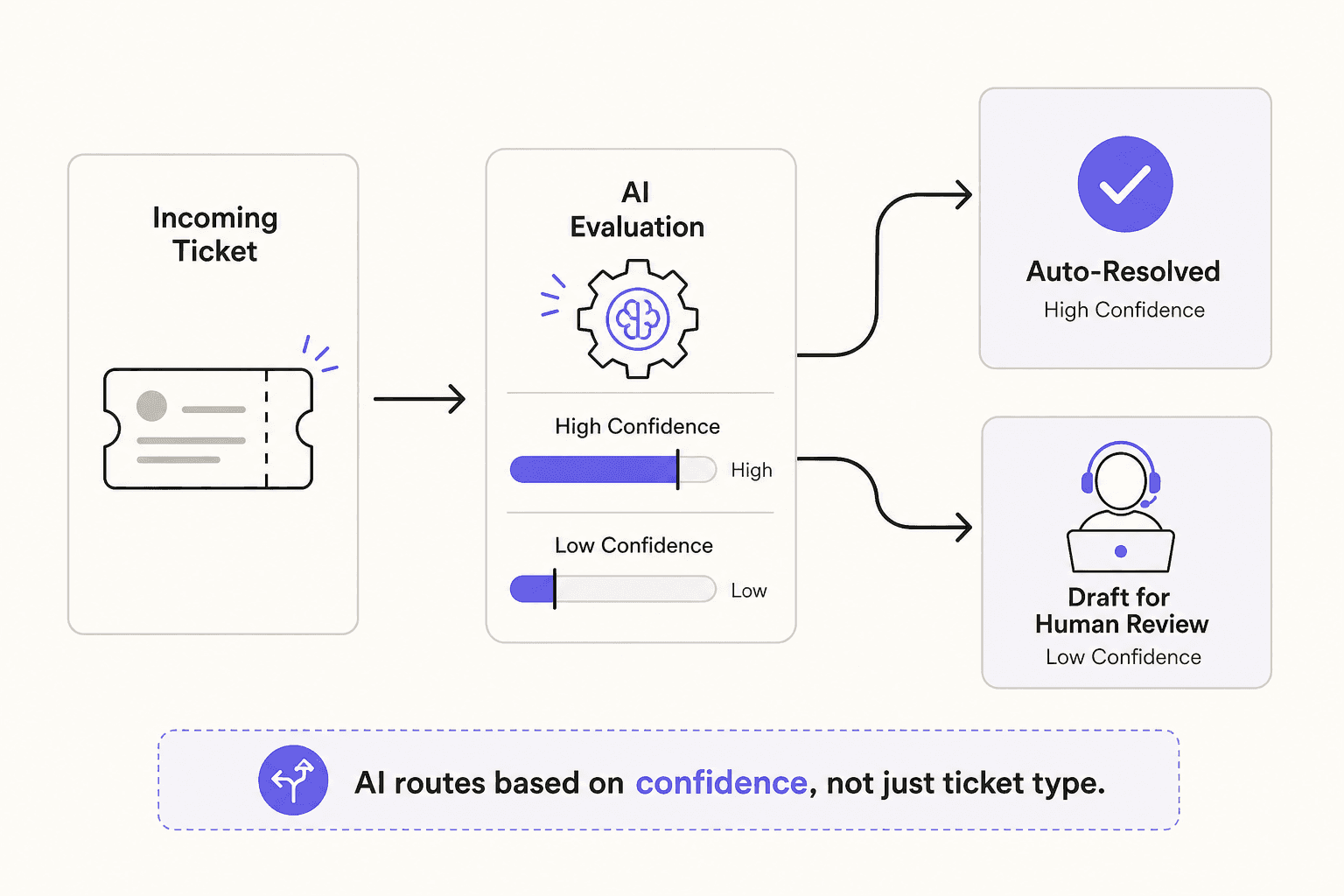
Teams configure where on that spectrum the AI operates. For a high-confidence ticket type like "what's my refund policy?" with a clear documented answer, the AI sends autonomously. For a billing dispute involving a large amount, it creates an internal draft for an agent to review before anything goes out.
GenAI-enabled agents resolve 14% more issues per hour and reduce handle time by 9%. At scale, that compounds. Klarna's AI assistant reduced resolution time from 11 minutes to under 2 minutes and contributed to a $40 million profit improvement in 2024.
Knowledge base gap detection and article generation
One of the less-discussed but high-value capabilities: AI that analyzes recent tickets and automatically identifies topics your knowledge base doesn't cover yet.
The typical workflow: the AI groups recent tickets by theme, surfaces the topics generating the most volume that have no corresponding KB article, and drafts new articles for those gaps. A support lead reviews the drafts and publishes. No starting from a blank page.
70% of organizations are actively investing in tools that automatically capture and analyze intent signals from customer interactions. KB gap detection is the practical version of that - turning your ticket queue into a content roadmap automatically.
The compounding benefit: a better knowledge base makes the AI more accurate, which reduces the need for human drafts, which frees up agents to do other things. It's a loop rather than a one-time improvement. See how to build a knowledge base for more on structuring content that AI can actually use effectively.
Triage and routing
AI can classify every incoming ticket - by topic, urgency, complexity, required expertise, and the appropriate team or individual - without manual intervention. Intelligent routing reduces customer "hunting time" in IVR systems by 54% and ensures high-urgency tickets reach the right person immediately rather than sitting in a general queue.
For more on setting this up, see how to automate ticket triage.
Multilingual support
AI agents handle customers in their own language automatically. 80+ languages out of the box means a German customer writes in German, gets a reply in German, and the support team never has to think about it. The AI is trained on multilingual ticket history, so it handles language-specific phrasing and idioms rather than just translating literally.
For teams serving global customers, this is one of the fastest ROI cases - the alternative is either hiring bilingual agents for each language or using slower manual translation. See AI for multilingual support for more on how teams set this up.
Theme analysis and ticket insights
AI surfaces patterns in your ticket queue that would take hours to find manually. When 47 billing tickets and 31 login tickets come in over the same 7-day window, you want to know about it before it becomes a flood.
The practical output: a breakdown of ticket themes by volume, flagging which categories are spiking. Support managers use this to adjust staffing, prioritize knowledge base improvements, and catch product issues before they escalate. Some tools (like eesel's upcoming Analyst mode) will proactively alert teams to emerging issues - "payment gateway timeouts affecting 14 customers since 2am" - before anyone's gone looking.
How help center AI actually works
Three layers run underneath the capabilities above.
Data layer. The AI is trained on your historical tickets, resolved conversations, help docs, knowledge base articles, and team macros. This is what it knows when it answers. The more relevant material you feed it, the better it performs on edge cases. Crucially, it keeps learning: every time a human agent edits a draft reply, that correction becomes a training signal. The AI learns your team's tone, your policies, and your preferred phrasing over time.
Integration layer. This is what separates "tell the customer to check the FAQ" from actually resolving their problem. An AI connected to your CRM, billing system, order management platform, and shipping provider can look up the customer's actual order status, verify whether they were billed correctly, and include the real answer - not a generic redirect. Without backend integration, AI remains a sophisticated FAQ tool.
Resolution layer. Confidence-based routing governs what the AI does with its answer. High confidence plus a straightforward ticket type: send autonomously. Lower confidence or a sensitive situation: create a draft for human review. This design prevents hallucinations from reaching customers - the AI doesn't guess at edge cases, it escalates them. Teams configure the thresholds, and they can always check the AI's reasoning for any draft before approving.
Getting started: the practical path
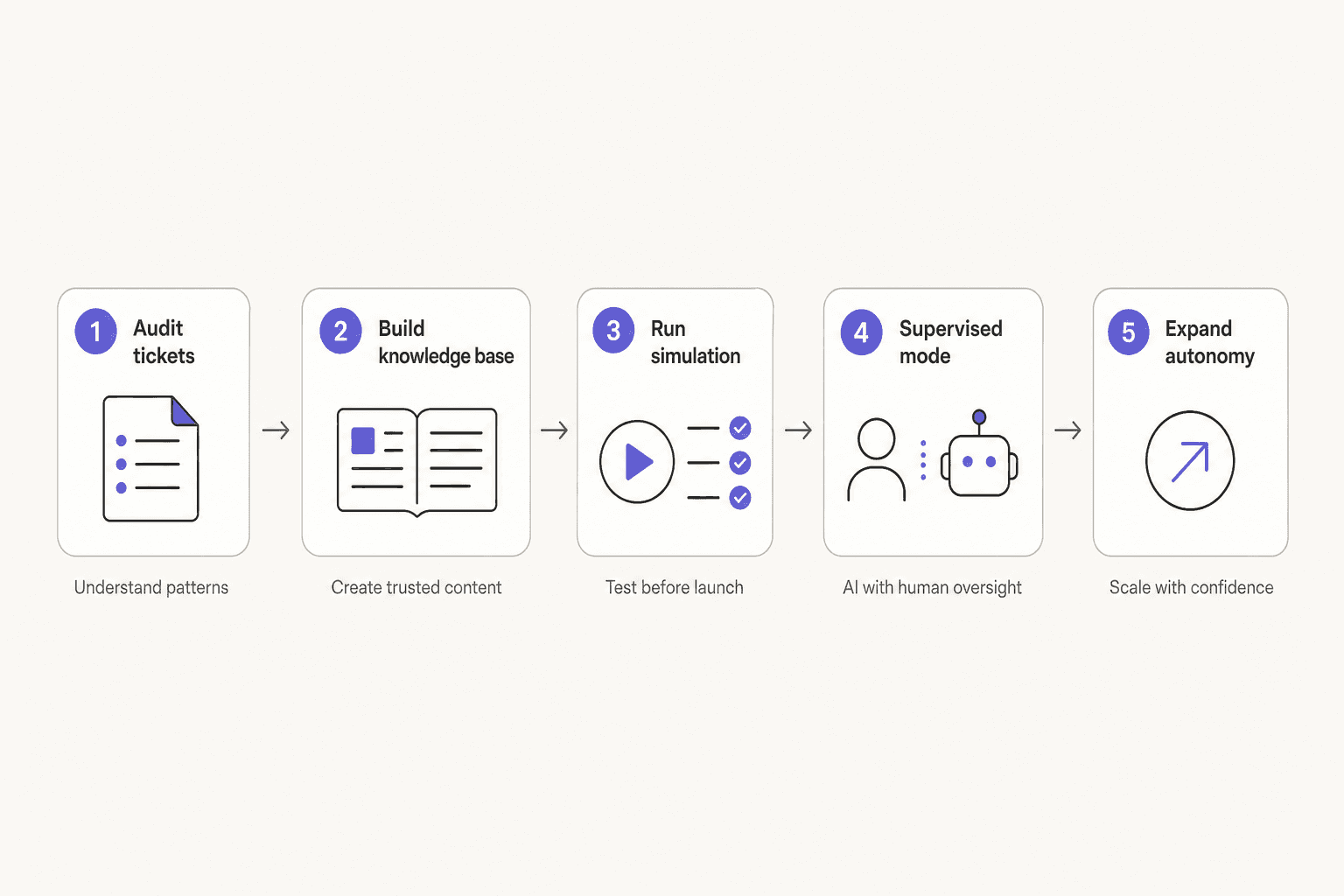
AI implementations that go wrong usually skip one of these steps.
Step 1: Audit your tickets. Pull your last 90 days of tickets and identify the five to ten categories that repeat most often with similar answers. These are your first automation targets - high volume, low complexity, clear documented resolution. Password resets, order status, refund policy questions, billing confirmations.
Step 2: Get your knowledge base in shape first. AI is only as good as what it can search. A sparse or disorganized knowledge base produces unreliable AI answers regardless of how good the model is. Before deploying AI, make sure your most common ticket topics have clear, accurate articles. See the how to build a knowledge base guide for a practical approach.
Step 3: Run simulations before going live. Most modern AI helpdesk tools let you run the AI against a batch of historical tickets before it sends a single live reply. This surfaces coverage gaps by category - "refund policy: 28% coverage, SSO login errors: 35% coverage" - and lets you fill those gaps before any customer sees an AI reply. Re-run after adding content and only go live when the simulation results satisfy you.
Step 4: Start in supervised mode. The AI creates drafts. Humans approve them before anything sends. You see exactly what the AI would say on every ticket type, catch anything that needs adjustment, and give feedback that improves future drafts. Most teams find they can identify within two weeks which ticket types the AI handles confidently and which ones need more training.
Step 5: Expand autonomy gradually. Once you've seen the AI's drafts on a given ticket type and trust them, you can let it send those autonomously. Keep supervised mode on for anything complex, high-stakes, or new. The transition isn't binary - you can have full autonomy on order status questions and supervised mode on refund disputes simultaneously.
For a more detailed walkthrough, see the AI helpdesk implementation guide and how to add AI to your helpdesk.
What to measure
Four numbers tell you whether AI is actually working in your help center:
| Metric | What it measures | Benchmark |
|---|---|---|
| First contact resolution rate | % of tickets fully resolved without follow-up | 55–70% on AI-native platforms |
| Ticket deflection rate | % of inquiries that don't become tickets | 40–60% with AI (23% industry average without) |
| Cost per resolved ticket | Total cost / number of resolutions | AI-native platforms: $1–3 per resolution |
| CSAT | Customer satisfaction with support experience | 92% of businesses report improvement after AI implementation |
The one to watch most closely is first contact resolution, not deflection. If your deflection rate goes up but CSAT goes down, you're deflecting customers into dead ends rather than resolving their issues. See how to calculate your ticket deflection rate and the chatbot analytics guide for tracking these metrics in practice.
Three mistakes that kill AI implementations
Going autonomous too fast. The appeal of skipping supervised mode is obvious - you want the time savings immediately. But shipping autonomous replies before you've seen the AI's drafts across your ticket mix is how you send wrong answers at scale. Start supervised for at least two weeks. It costs very little in setup time and tells you everything you need to know about which ticket types are safe to automate.
Starting with a thin knowledge base. AI can't answer questions about policies you haven't written down. Teams that deploy AI before building out their KB end up with an agent that confidently escalates everything - which is safe but defeats the purpose. Traditional self-service resolves only 14% of issues; AI closes that gap by searching better, but only if there's something to search. Build the KB first.
Treating deflection as the goal. 81% of customers believe companies use AI primarily to save money, not to help them. They're often right - and they feel it when AI routes them in circles rather than solving their problem. 73% say they'd switch to a competitor if a company offered only AI with no human option. The teams that get this right optimize for resolution, not deflection, and always keep a clear path to a human for the cases AI can't handle. See AI support ticket deflection guide for the right framing on what deflection should actually accomplish.
eesel AI for help centers
eesel AI is an autonomous AI helpdesk agent that works inside your existing platforms - Zendesk, Freshdesk, Intercom, HubSpot, Gorgias, Jira, and more - without requiring a new dashboard or workflow.
It learns from your past tickets and docs on day one, runs simulations against historical ticket batches before going live, and configures via plain conversation rather than a complex settings UI. Teams at Gridwise resolved 73% of tier-1 requests autonomously in their first month. Smava processes 100,000+ support tickets per month fully automated in German. Design.com handles 50,000+ tickets per month across Freshdesk with 1,000+ help articles powering instant answers.
"In the first month, eesel is resolving 73% of our tier 1 requests. eesel offers easy Zendesk implementation and setup. Our team implemented and achieved results quickly during our 7-day trial."
- Kim Simpson, Gridwise
Pricing is $0.40 per resolved ticket. No platform fee, no monthly minimum, no per-seat charges. Free trial with $50 in credits, no credit card required.

Frequently Asked Questions
Share this article

Article by
Stevia Putri
Stevia Putri is a marketing generalist at eesel AI, where she helps turn powerful AI tools into stories that resonate. She’s driven by curiosity, clarity, and the human side of technology.