


Every IT help desk tool on this list now sells AI. Almost none of them will tell you what percentage of tickets it resolves without a human, because deflection is a self-certifying metric that counts the user who gave up exactly the same as the user who got helped. The buyer's test that actually works, from a practitioner who wrote it down: how much volume does the system resolve without human assignment? For a mature deployment that number should sit in the 25-40% band. Below 10% you bought a chatbot.
On price, the seat rate is the part vendors publish and the part that misleads. Freshservice runs $19-$99/agent/month with Freddy Copilot another $29 on top. Jira Service Management is $25-$57.30/agent/month at small-team scale, and then bills AI a second time by assisted conversation. SolarWinds gates its whole generative set to the $124 tier. ServiceNow publishes nothing and, per a six-year platform owner on r/sysadmin, starts around a million a year in licensing alone once you want the good parts.
I build integrations at eesel, so the pattern I keep seeing is teams paying a migration tax they never needed to pay. You do not have to replace your ITSM platform to get AI into your IT queue. eesel joins Jira Service Management, Freshservice or Zendesk as an agent, trains on the requests you have already resolved, and gets simulated against your ticket history before it touches anything live, from $299 a month for 500 credits (1 credit per ticket or chat) with no seat fee. Jason Loyola, Head of IT at InDebted, put it plainly in his case study: "We use it to be the first responder to our Helpdesk tickets in Jira. It essentially acts just like an agent would."
What IT help desk software actually means in 2026
An IT help desk is where your employees go when something at work has stopped working. The software behind it does three jobs: take the request in from wherever it arrives, get it to whoever can fix it, and keep a record.
Most products sold under this name have grown past that into full IT service management. That means incident management, problem management, change management, a service catalogue, and a configuration database describing every laptop, server and licence you own. The ITIL vocabulary comes bundled. If your actual need is "a queue and a portal for forty employees", a full ITSM suite will sell you nine modules you will never open.
Worth being clear on the words, because vendors use them interchangeably and buyers do not. A help desk fixes what broke. A service desk owns the whole relationship, requests and incidents and problems and changes, usually against ITIL. Almost every product here markets itself as both, so judge the modules rather than the noun on the homepage. We go deeper on the split in our AI help desk explainer.
The thing that changed in 2026 is that every vendor added an AI layer, and every vendor priced that layer separately from the seat. That second meter is where the real cost lives, and it is why this comparison spends more time on plan tables than on feature lists. If you want the wider category view rather than a shortlist, our roundup of helpdesk software and the notes on automated IT ticketing cover the ground this post assumes.

How I picked these ten
I work on eesel's integrations, which means I spend a lot of time inside other people's help desks, reading their API docs and watching where their AI hands off. That is also where the IT help desk AI claims stop being abstract: you can see in the API exactly which actions an agent is allowed to take. For this roundup I went back through each vendor's own pricing page and plan-comparison table on 30 July 2026, pulled their published docs for what each named AI feature literally does, and then cross-checked the buying experience against what working sysadmins say on r/sysadmin, r/msp, r/servicenow, G2 and Capterra.
Three rules I held to. Every price here is one the vendor published, at the billing cycle stated. Where a number is quote-gated I say so rather than repeating a third-party estimate as fact. And where a plan comparison hides a cap, the cap gets more space than the feature.
The tools are ordered by who I think should shortlist them first, not by score.
The 10 best IT help desk software tools in 2026, compared
| Tool | Best for | Entry price | AI-capable tier | AI billing unit | Free tier | Asset management | On-prem | Notable compliance | Published uptime SLA |
|---|---|---|---|---|---|---|---|---|---|
| eesel AI | AI on the desk you already run | From $299/mo (500 credits) | Same, no tier | 1 credit per ticket or chat | 100 free credits | Via your helpdesk | No | SOC 2, HIPAA (talk to us) | Talk to us |
| Freshservice | All-round mid-market ITSM | $19/agent/mo | Pro $99 + $29 Copilot | Session (24h window) | No, 14-day trial | Asset Units, packs of 500 | No | SOC 2, ISO 27001, GDPR | Not published on pricing page |
| Jira Service Management | Teams already on Atlassian | $0 (3 agents) | Premium $57.30 | Assisted conversation | Yes, 3 agents | Assets, 5k objects | Data Center | SOC 2, ISO 27001, GDPR | 99.9% Premium, 99.95% Enterprise |
| ServiceNow | Enterprises that can staff it | Not published | Quote only | Assist packs, unpublished | No | Full CMDB | No | FedRAMP, SOC 2, ISO 27001 | Contractual, quote-only |
| SolarWinds Service Desk | Deep asset discovery | $39/agent/mo | Premier $124 | Capped by plan | No, 30-day trial | Separate purchase | No | SOC 2, ISO 27001, HIPAA BAA at Advanced | Not published |
| Atera | IT teams that also manage devices | $149/tech/mo | All plans (Copilot) | Metered add-ons | No, 30-day trial | Unlimited endpoints | No | HIPAA BAA on Enterprise | 99.9% on Enterprise |
| SysAid | Agentic automation at a published price | $89/agent/mo | Professional | Not published | No, free trial | 250 assets included | Yes, without the AI | SOC 2 Type II, ISO 27001/27017/27018 | 100% claimed on FAQ |
| HaloITSM | ITIL depth without tier gates | Quote under 250 agents | All-inclusive | Included, no meter | No | Included | Not published | Gartner MQ named 2025 | Not published |
| Atomicwork | AI-native replacement or overlay | From $25,000/yr | All plans | Credit or outcome | No | ITAM included | No | SOC 2, ISO 42001, HIPAA | Not published |
| Spiceworks | Free, 1-5 admins | Free | None, no AI at all | None | Yes, 5 seats | Separate free tool | No | No HIPAA BAA | Not published |
A note on that table: seven of the ten publish a seat price, and only two publish a per-unit rate for what the AI costs once you go past the included allowance. That asymmetry is the story of this category in 2026.
What the AI actually costs per month
The seat price scales with your headcount. The AI meter scales with your ticket volume, which is the number that grows when the AI works. Pick a monthly volume and see which vendors will actually tell you the bill.
The second meter, by monthly AI-handled ticket volume
Published rates only, on top of whatever you pay for seats. "Not published" means the vendor does not print an overage rate anywhere on its site.
| Tool | Billing unit | AI cost at 500/mo |
|---|---|---|
| eesel AI | 500 credits at $299/mo, no seats | $299 |
| Jira Service Management | 1,000 assisted conversations included on Premium, then $0.30 | $0 |
| Freshservice | 1,200 Freddy sessions per licence per year on Enterprise | Overage not published |
| SolarWinds Service Desk | 250 generated summaries/mo per account on Advanced | Capped, no overage rate |
| ServiceNow | Assist packs bundled into Pro Plus | Not published |
| SysAid | Included in the seat, no meter published | Not published |
| Tool | Billing unit | AI cost at 2,000/mo |
|---|---|---|
| eesel AI | 2,500 credits at $999/mo, no seats | $999 |
| Jira Service Management | 1,000 included, then $0.30 per assisted conversation | $300 |
| Freshservice | 1,200 sessions per licence per year (~100/licence/mo) | Overage not published |
| SolarWinds Service Desk | Unlimited only on Premier at $124/agent/mo | Forces the top tier |
| ServiceNow | Assist packs, priced per negotiation | Not published |
| SysAid | Included in the seat, no meter published | Not published |
| Tool | Billing unit | AI cost at 5,000/mo |
|---|---|---|
| eesel AI | 5,000 credits at $1,899/mo, no seats | $1,899 |
| Jira Service Management | 1,000 included, then $0.30, volume discounts apply | $1,200 |
| Freshservice | Well past the bundled allowance at any seat count | Overage not published |
| SolarWinds Service Desk | Premier tier only, priced by seats not volume | Forces the top tier |
| ServiceNow | Assist packs, priced per negotiation | Not published |
| SysAid | Included in the seat, no meter published | Not published |
Jira's $0 at 500 assumes you are already paying Premium seats, which is where the Virtual Service Agent lives. Rovo Customer Service, the external-facing agent, bills separately at $1 per resolution. Every row except eesel also carries a per-agent seat charge that this table excludes.
1. eesel AI
Best for: putting a working AI agent on the IT queue you already have, without a migration.

I should say the obvious thing: I work here. So treat the verdict below as one you should check, and check it against the two things I can actually point you at, the published pricing and the case studies.
eesel is not an ITSM platform and does not want to be one. It joins the help desk you run as an agent, reads the requests and knowledge you already have, and works the queue. On Jira Service Management it reads requests, drafts and sends replies, adds internal notes, updates request fields, sets priority and SLAs, and routes to teams. It does the same on Freshdesk and inside Slack, which is where a lot of IT questions actually land before anyone opens a ticket.
The routine work it takes off the queue is the usual suspects, the ones that are pure lookup and form-filling rather than judgement: password resets, joiner access requests, and the hardware requests that just need the right fields populated and the right approver tagged.
The part I would push hardest on if I were buying rather than building: simulation. You run the agent against your own historical requests before it touches a live one, see per-theme coverage, and find the gaps. "23 tickets last week asked about pro-rated refunds, but your docs only cover full cancellations" is the kind of output that tells you where your knowledge base is thin, which is the real blocker in most IT deployments. Then you go live in draft mode and switch to autopilot on the categories where you trust it.

Pricing. One fixed monthly price, published on the pricing page: 1 credit per ticket or chat, from $299/month for 500 credits (1,000 is $499, 2,500 is $999, 5,000 is $1,899). There is a free plan with 100 credits and no card, no seat fee and no platform fee, and paying a year upfront gets you two months free. SSO and MFA are add-ons from $199/month, and HIPAA is available on request. A ticket is one credit regardless of how many messages it takes, which is a different unit from the per-message and per-session meters elsewhere on this list.
Pros
- Nothing to migrate, and the setup is measured in a session rather than a quarter
- Simulation against your real request history before go-live
- Cost tracks resolved volume, not headcount, so hiring does not raise the bill
- 100+ integrations and 80+ languages out of the box
Cons
- It is a layer, not a system of record. If you have no help desk yet, you need one of the others first
- No CMDB, no change management, no asset discovery of its own
- SSO and MFA (from $199/month) and HIPAA (talk to us) are add-ons rather than included
Verdict: if your problem is ticket volume, pick this and keep your platform. If your problem is that you have no platform, come back after you have picked one from the rest of this list.
2. Freshservice
Best for: a mid-market IT team that wants ITSM, asset management and AI from one vendor.
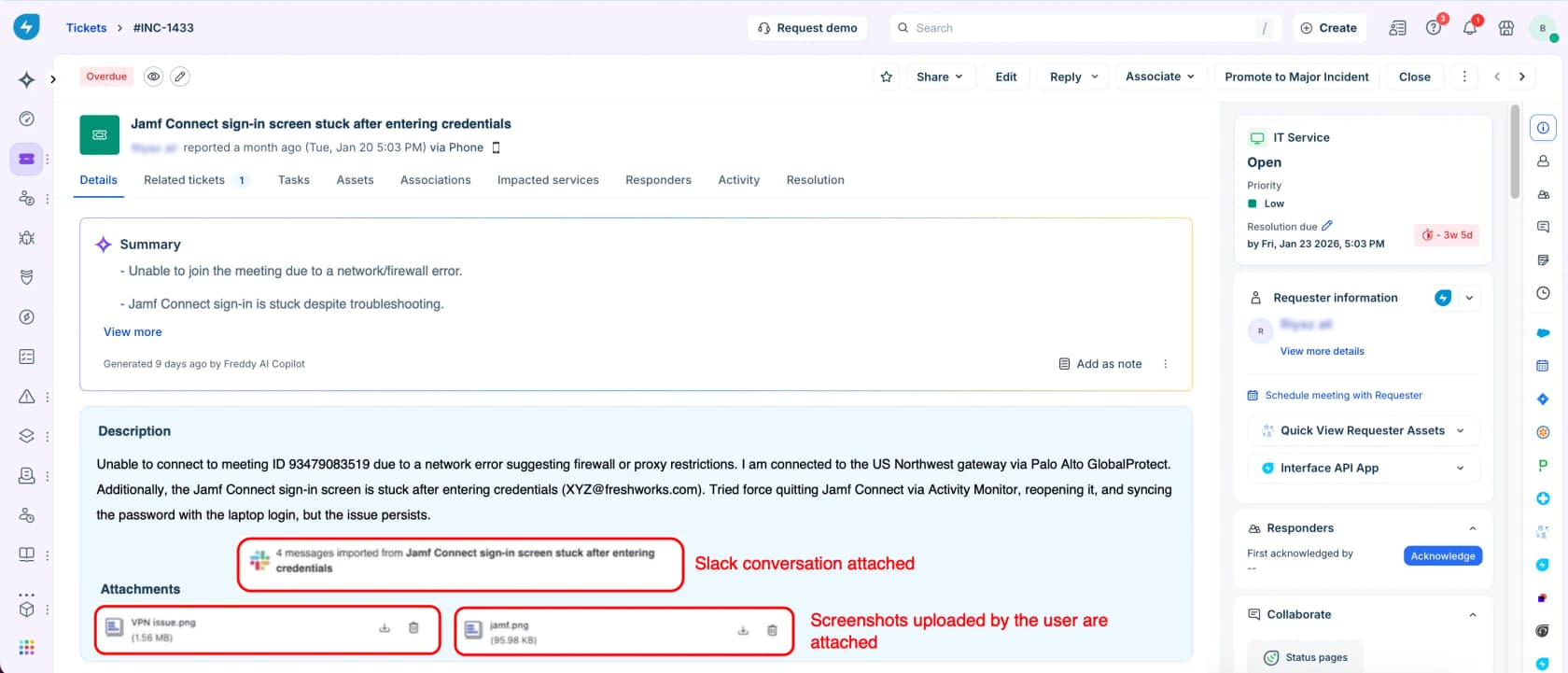
Freshservice is the tool I recommend most often to teams leaving a shared inbox, because the on-ramp is gentle and the ITIL depth is there when you grow into it. Incident, problem, change and release management, plus IT asset management and enterprise service management for HR and facilities, all in one place.
The AI is branded Freddy and splits three ways. Freddy AI Copilot sits with the agent and does summaries, reply suggestions, tone rewriting, resolution notes and post-incident reports. Freddy AI Agent is the employee-facing deflection bot, available in Slack, Teams, the portal and email. Freddy AI Insights does root-cause analytics. Freshworks cites up to 66% ticket deflection with AI self-service, which is a vendor number and should be read as a ceiling rather than a forecast.
Pricing (pricing page, checked 30 July 2026):
| Plan | Annual, per agent/mo | Monthly, per agent/mo |
|---|---|---|
| Starter | $19 | $29 |
| Growth | $49 | $59 |
| Pro | $99 | $119 |
| Enterprise | Custom, not published | Custom, not published |
| Freddy AI Copilot add-on | $29 | $35 |
There is no free tier, only a 14-day trial. Freddy AI Agent (Classic) ships on Enterprise with 1,200 sessions per licence per year, where a session is any interaction one user has inside a 24-hour window. The overage rate is set by your account manager and is not published anywhere. Occasional agents can use Day Passes from $3, and asset management is metered in Asset Units sold in packs of 500.
The gating is the recurring complaint even from people who like it. A five-star G2 reviewer wrote:
"The main drawback is how some of the coolest features, especially the advanced Freddy AI capabilities, are gated behind the higher-tier enterprise plans or require paid add-ons. When you are on a budget, seeing those features locked can be a bit frustrating."

Worth knowing before you sign: one r/Freshservice deployment at a roughly 600-person org reported tier-1 MTTR going up about five months after enabling Freddy, because agents had to read through the AI's context on every handoff. That is a real failure mode, and it is why I would not skip a handoff design conversation during the trial, or a look at where Freddy's limits sit before you scope the rollout.
Pros
- Strongest price-to-capability ratio in mainstream ITSM
- Genuine ITIL coverage plus ITAM and ESM in one subscription
- Freddy reaches Slack, Teams, portal and email without extra tooling
Cons
- Freddy Copilot is a $29/agent/month surcharge on top of a $99 plan
- The deflection bot is Enterprise-only, and its overage price is invisible until you are inside a contract
- Assets are billed in separate units, which surprises people mid-contract
Verdict: the default answer for 10-200 agent IT teams. Budget for Pro plus Copilot from day one, not Starter, or you will be pricing an upgrade within a quarter. Our Freddy AI review and the Freshservice and ServiceNow comparison go a layer deeper if it makes your shortlist.
3. Jira Service Management
Best for: IT teams whose engineering org already lives in Atlassian.

If your developers already file everything in Jira, JSM removes an entire category of argument. The same issue links, the same automation engine, the same permissions model, and a change request that can gate a deployment. That coherence is the product.
One structural change to know about: JSM is no longer sold standalone. Atlassian now sells the Service Collection, bundling JSM, Customer Service Management, Assets and Rovo into a single SKU, and existing customers were migrated in. Any comparison treating it as a standalone purchase is out of date.
Pricing (pricing page). Watch this carefully, because the page is a calculator that defaults to 75 agents and shows blended rates. The real small-team list prices are higher:
| Plan | List, 1-15 agents, monthly | Agent cap | AI included |
|---|---|---|---|
| Free | $0 | 3 agents | None |
| Standard | $25/agent | 100,000 | Rovo Search, Chat, Agents; 25 credits/user/mo |
| Premium | $57.30/agent | 100,000 | Adds Virtual Service Agent; 70 credits/user/mo |
| Enterprise | Contact sales, annual only | 100,000 | 150 credits/user/mo |
Annual billing saves up to 17%. Then the second and third meters start. The Virtual Service Agent, the employee-facing bot that actually deflects, is Premium and up, includes 1,000 assisted conversations a month, and charges $0.30 per assisted conversation beyond that. A conversation that merely matches an intent and then escalates to a human still counts. Rovo Customer Service, the external-facing resolver, bills $1 per resolution. Assets objects run $0.02/object/month above the included allowance.
The complaints cluster around exactly that shape:
"Compared to the other Atlassian products this is on the much more expensive side as you require more-and-more agents."

And the administrative weight is real. A G2 reviewer's summary is the fairest version I found: "Jira Service Management is highly flexible, but configuring and maintaining it often takes more effort than expected." If you want the AI without the Premium jump, an AI agent for Jira that sits on top of Standard is a legitimate alternative path.
Pros
- Unmatched fit if engineering already runs Jira and Confluence
- Free tier for three agents is a real free tier, not a trial
- Change management and AIOps depth most mid-market tools do not attempt
Cons
- Three separate AI meters stacked on the seat price
- Virtual Service Agent locked behind the $57.30 tier
- Admin overhead is the single most-cited drawback across G2 and Capterra
Verdict: the right call when Atlassian is already the centre of gravity. If it is not, you are buying a configuration project you did not need. Our Zendesk and JSM comparison covers the other direction.
4. ServiceNow
Best for: enterprises with the budget and the headcount to run a platform, not a tool.

ServiceNow is the most capable thing in this category, and it is not close. It claims 85% of the Fortune 500, it is a Gartner Magic Quadrant leader in AI ITSM, and its customer numbers are the sort competitors do not have: EY cites a 75% reduction in service ticket volume, Lion a 77% cut in resolution time. The 2026 pitch is Now Assist plus an "autonomous workforce of AI specialists" resolving routine requests end to end.
The catch is not capability. It is that ServiceNow is a development platform wearing a ticketing system's clothes, and the licence is the smaller of the two bills. A self-identified six-year platform owner was blunt:
All the bells and whistles are going to cost you at least a million a year in licensing alone.
Source: ServiceNow platform owner for last 6 years.

The most useful testimony in the whole sweep is actually the positive one, because it quantifies the second bill. An admin defending a "fantastic" implementation noted they run "no less than ten people whose full time job revolves around managing it", across three separate teams, and that "it has taken us years to get the cmdb to a useful state." Another team of five reported a two-year backlog of 200 enhancement requests.
Pricing. ServiceNow publishes nothing. Every figure in circulation is a third-party estimate or a customer-reported number: roughly $100/fulfiller/month at Standard, $160+ at Pro, and a Now Assist premium reported at upwards of 60% on top of the underlying licence. The ITSM pricing page now shows three packages, Foundation, Advanced and Prime, all quote-gated. Partner implementation can amplify spend by up to 2.5x, per an r/servicenow migration thread.
Pros
- The deepest CMDB, change and workflow engine available anywhere
- Now Assist and AI agents are backed by real named-customer outcomes
- Nobody gets fired for picking it, which matters in enterprise procurement
Cons
- No published pricing at all, and renewal leverage is weak once you depend on it
- Needs dedicated platform staff, and the community estimate is not one person
- Overkill and expensive if you only want ticketing
Verdict: correct for large regulated enterprises with a platform team. If you are under 1,000 employees and your CMDB does not exist yet, this will not fix that, it will bill you for it. Before committing, read whether ServiceNow's AI holds up, and how it stacks against Zendesk's AI.
5. SolarWinds Service Desk
Best for: IT teams where knowing what hardware you own is the actual problem.

SolarWinds Service Desk is the ITSM product built out of the Samanage acquisition, and its discovery layer is better than anything else at this price. The Discovery Agent pulls over 200 data points from every host device covering hardware, BIOS and installed software, an agentless Discovery Scanner picks up whatever cannot host an agent, and third-party connectors pull software inventory from SCCM, JAMF and Intune straight into the CMDB.
The AI story is where I would slow down. SolarWinds' own docs state the generative feature set is "Available for Premier plan customers", and none of it works in the mobile app. The features themselves are honest agent-assist: guided incident solutions, draft responses, ticket summarization, intelligent problem correlation, and the one item nobody else on this list has, AI-generated runbooks, where you upload a PDF or Word doc and it drafts a structured runbook you can edit and link to tickets.
Pricing (pricing page, annual billing only, no monthly rate published anywhere):
| Plan | Per technician/mo | AI included |
|---|---|---|
| Essentials | $39 | None. Every AI row is blank |
| Advanced | $99 | Category recommendations, smart suggestions, sentiment, virtual agent (portal only), 250 generated summaries/month per account |
| Premier | $124 | The full generative set, unlimited summaries, virtual agent in Teams and Slack, sandbox |
Read that middle row twice. The 250-summary cap on Advanced is per account, not per agent. On a 25-technician desk that is 10 summaries per person per month. Asset management is a separate purchase with no published per-device price, and you cannot buy any of it self-serve. The 30-day trial defaults to Premier, so everything you evaluate disappears if you then buy Essentials.
Reporting is the consistent gripe:
"Reporting could be more flexible. The built in reports cover the basics well enough but if you want something more tailored or specific you hit a wall fairly quickly. We have had situations where we needed a particular view of data that just was not possible without exporting and manipulating it elsewhere…"
G2 has it at 4.3/5 from 786 reviews and Capterra at 4.6/5 from 577, with the caveat that many recent entries on both are marked incentivized or seller-invited.
Pros
- Best-in-class discovery for the money, agent and agentless together
- Unlimited requestors on every plan, so you pay only for technicians
- SOC 2, ISO 27001 and selectable US, EU or Australia data residency on all tiers
Cons
- AI is entirely absent at $39 and only complete at $124
- The 250-summary monthly account cap on Advanced is easy to miss and easy to blow
- Asset pricing is quote-only, so no published plan total is a real bill
Verdict: buy it for the asset management, not the AI. If discovery is your pain, it is excellent value at Advanced. If AI is your pain, the $85/agent/month gap between Essentials and Premier is a hard sell.
6. Atera
Best for: small IT teams and MSPs who fix the device and the ticket in the same session.

Atera is a different shape from everything else here. It bundles remote monitoring and management, ticketing and remote access into one subscription priced per technician with unlimited endpoints. Cost scales with how many people you employ, not how many machines you manage, which is why MSPs keep switching to it from Kaseya and ConnectWise.
The AI comes in two parts. AI Copilot is included on every plan and helps the technician with ticket summaries, script generation and troubleshooting. Robin, the patented autonomous agent, does smart intake, takes approved actions on devices, network and cloud, then verifies and closes the ticket, with audit trails. Robin is sold separately from the base seat.
Pricing (IT department plans, annual first, monthly in brackets): Professional $149 ($169), Expert $189 ($229), Master $219 ($269), Enterprise custom. MSP plans run Pro $129 ($139), Growth $159 ($189), Power $209 ($249). AI and endpoint add-ons are metered on top, with line items around $29/month per technician plus per-device and per-user charges. Free 30-day trial, no card.
Reviewers are direct about the trade. One G2 reviewer complained the vendor "is busy chasing the AI hype by adding 'copilot' features while real issues remain unresolved", and the same theme runs through Atera reviews on Capterra: advanced reporting and the autonomous agent are paid add-ons rather than included, which stings when the seat price is already the highest on this list.
Pros
- Unlimited endpoints per technician seat is the best deal in the category if you manage many devices
- RMM, patch management and remote control included, not bolted on
- Copilot ships on every plan rather than the top one
Cons
- $149/technician/month is a steep entry for a one or two person shop
- Robin, the actual autonomous agent, is a separate paid capability
- It is a device-management tool first, so ITIL change and problem depth is thinner
Verdict: if your team touches laptops as often as tickets, Atera collapses three subscriptions into one and wins on maths alone. If you never touch hardware, you are paying for RMM you will not use, and a plain queue plus IT automation software gets you there cheaper.
7. SysAid
Best for: IT teams that want agentic automation with a published per-agent price.

SysAid is the most underrated tool on this list, and the reason is that it does the agentic thing concretely rather than conceptually. Its AI Agents page lists over 100 prebuilt agents you can actually name: Azure AD create user, reset password, get locked accounts, Microsoft 365 assign licence, identify licence shortage, Intune reboot or retire device, BitLocker recovery key retrieval, find duplicate service requests, detect recurring issues, scan for inactive PCs. Agents run on a schedule as well as on demand.
It is also unusually honest about its stack. SysAid's security and governance page names the models: OpenAI's GPT-5 for the conversational chatbot, Anthropic's Claude Opus 4.6 for code generation in the AI Agent Builder, with customer data never used to train them and a choice of OpenAI or Azure OpenAI plus your data-residency region. Almost nobody else in this category will tell you that.
Pricing (pricing page): Professional $89/agent/month published, Enterprise custom starting at 20 agents. Both CTAs route to sales rather than checkout, and the real quote depends on managed assets as well as seats. 250 assets are included; more are a paid pack. Free trial with no card. Tailor-made AI agents are Enterprise-only (three of them), as are the private AWS instance, live chat support and a 1-hour P1 response.
SysAid also publishes the single most useful stat in this entire piece, from its own 718-respondent State of Service Management 2026 survey: 61% of IT organisations now use AI in service management, but only 3.3% have reached full autonomous execution, and 33% of those using AI-powered self-service are not measuring ticket reduction at all.
The recurring complaint is reporting, same as SolarWinds:
"Creation of advanced reports are nearly impossible making one resort to the use of Power BI for such reports…"
G2 has SysAid at 4.5/5 across 752 reviews, Capterra at 4.5/5 across 521.
Pros
- 100+ named prebuilt agents that do identity, licence and device work, not just chat
- A published $89 list price in a category that mostly refuses to publish
- On-prem exists, and the AI model choice and data residency are disclosed
Cons
- The AI Service Desk does not run on-prem, per SysAid's own FAQ, and on-prem gets 1-2 releases a quarter versus biweekly on cloud
- Reporting needs Power BI to be useful
- The Classic to Spaces UI migration is visibly mid-flight
Verdict: the best pick if you want agentic automation on identity and device tasks without an enterprise negotiation. Ask for the asset-pack pricing in writing before you sign.
8. HaloITSM
Best for: ITIL depth without hunting for which tier unlocks what.
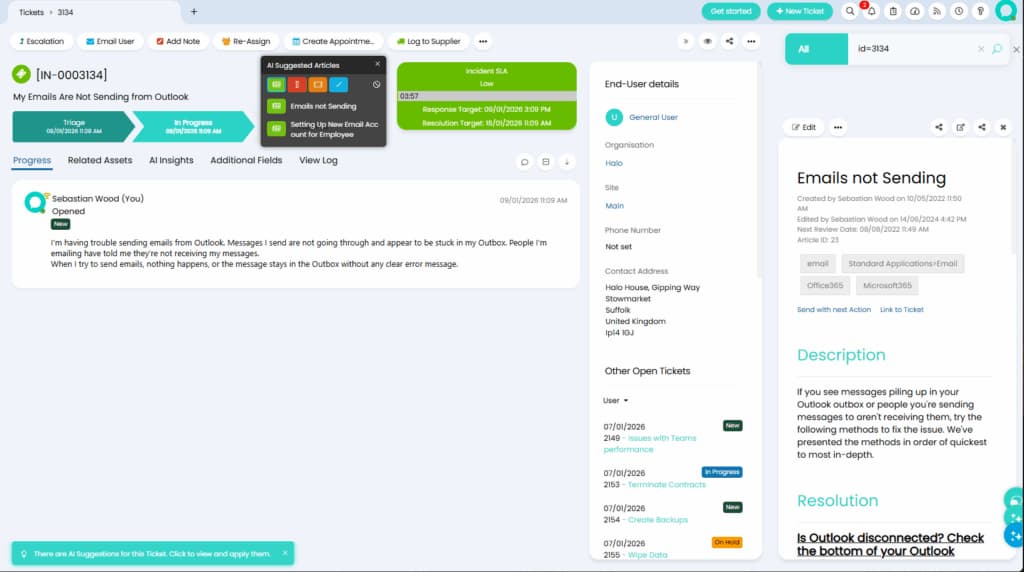
Halo sells one all-inclusive platform with three faces: HaloITSM for enterprise IT, HaloPSA for MSPs, and HaloCRM for customer-facing teams. The pitch that matters is the packaging: no tiers, and AI included as standard rather than as an add-on. After reading five other comparison tables full of blank cells, that is refreshing.
The AI covers auto-triage with urgency, impact and sentiment scoring; AI summaries of long threads and calls; similar-case suggestions; RAG-based knowledge-article drafting from resolved tickets; a virtual agent across web, Teams and Slack; and sentiment scoring feeding the triage layer. Halo was named in the 2025 Gartner Magic Quadrant for AI Applications in ITSM. It partners with 5,000+ organisations across 100+ countries, with Cardiff City Council running 250 agents across 50 teams on 3,500+ enquiries a week.
Pricing (pricing page): billed per agent per month, annually, in GBP. The public slider starts at a 250-agent minimum and shows roughly £55/agent/month at that floor, with the rate tapering at higher agent counts. HaloCRM starts from £65/agent/month. Under 250 agents the HaloITSM pricing page is a quote form with no public number at all.
Community sentiment splits sharply. The UI and ticket speed get real praise. The AI is where the bugs cluster, with owners reporting demoed features that did not work reliably in production, and the recurring value gripe is a roughly $4,000 mandatory onboarding fee that undercuts the month-to-month pitch. The most balanced verdict came from someone who migrated off ServiceNow purely on price:
Pretty much the price exclusively.
Company is going for HaloITSM and HaloCRM instead. We're almost deployed and it's... just OK. Automation is nowhere as capable or easy to program as ServiceNow.
Pros
- One inclusive plan, AI included, no feature hunting across tiers
- Serious ITIL and ESM depth across IT, MSP and CRM
- Strong UI and ticket-handling speed by community consensus
Cons
- The published price only starts at 250 agents; smaller teams get a quote form
- Mandatory onboarding fee lands outside the advertised subscription
- AI reliability is the most-reported bug area, and a Halo implementer publicly warns one-person shops off it
Verdict: the strongest ServiceNow alternative for organisations that want ITIL rigour and can absorb an implementation. Go in expecting configuration work, and get the onboarding fee quoted before you fall for the per-agent number.
9. Atomicwork
Best for: teams that want AI-native service management, either over their ITSM or instead of it.
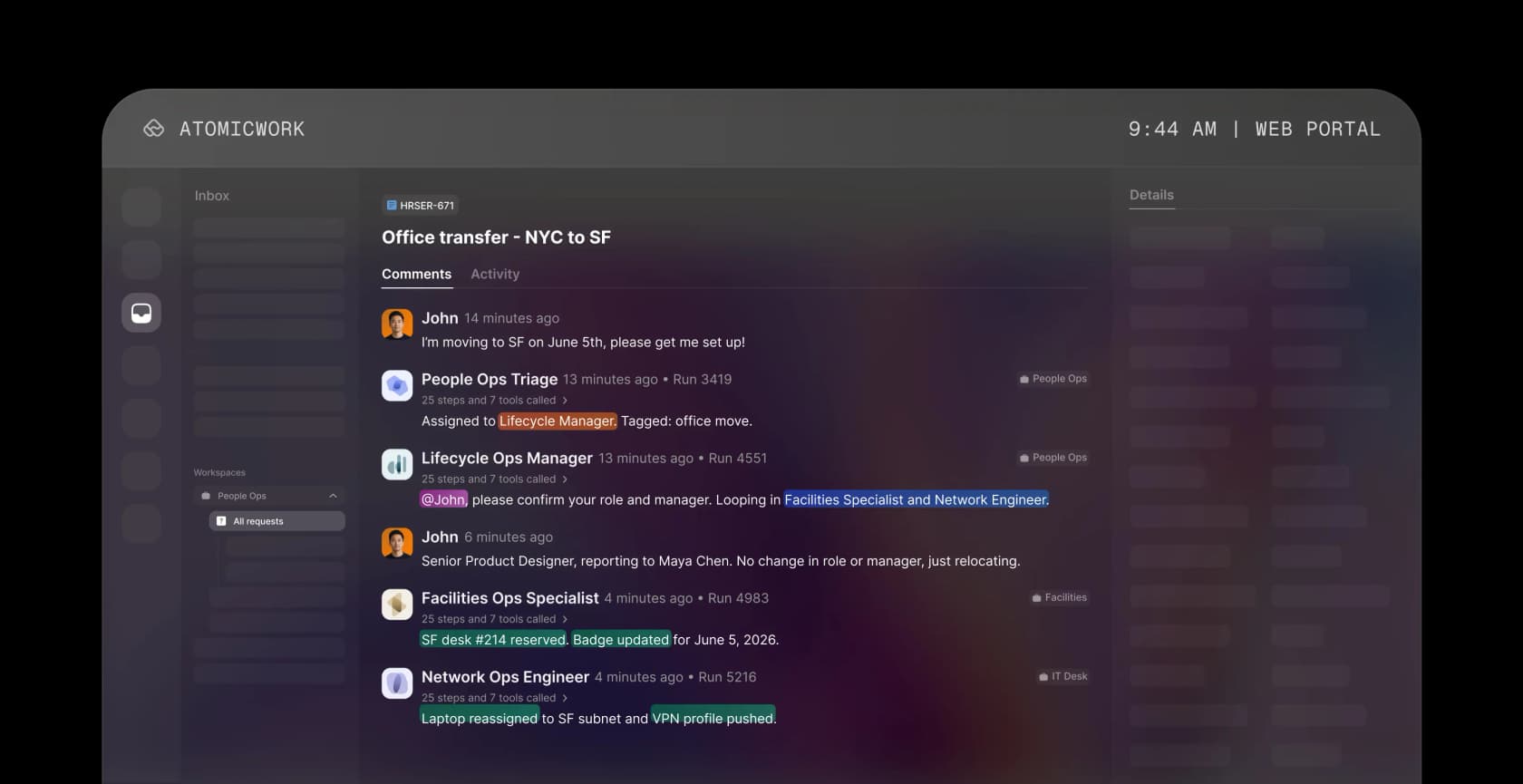
Atomicwork is the most interesting new entrant, partly because of who built it: the founding team spans three ITSM eras, with ManageEngine and Freshworks behind them. It raised a $25M Series A led by Khosla Ventures in January 2025, taking total funding to roughly $40M.
The product is two layers. Atom is a universal AI coworker living in Slack, Teams, browser, email, the portal, and inside Claude and ChatGPT for enterprise, handling requests by chat, voice and vision in 25+ languages. AI Workforce is a set of role-scoped coworkers, an Incident Manager, an Access Manager, an Onboarding Manager, each with its own skills, tools and access controls, governed through a control plane with RBAC, spend guardrails and pre-production testing.
The clever commercial move is that you do not have to migrate to try it. Under "Bring Your Own ITSM Platform", the AI Workforce runs on top of ServiceNow or JSM with no migration and no platform fee. Then the case studies make the endgame obvious: Pepper Money replaced ServiceNow in six weeks, Zuora replaced JSM across 15 offices with a 50% ticket-volume reduction.
Pricing (pricing page): enterprise and quote-led. Professional starts at $25,000/year for 25,000 credits, 5 coworkers and up to 250 users, with extra coworkers at $249/month. There is also an outcome-based option at $1 per knowledge outcome, $2 per access outcome and from $3 per service-resolution outcome, each with an annual minimum. No free tier and no public per-seat price.
Pros
- Agentic architecture with governance built in, including ISO 42001
- Runs on your existing ServiceNow or JSM, so evaluation does not require migration
- Outcome-based pricing option is rare and aligns cost with results
Cons
- $25,000/year floor puts it out of reach for most mid-market IT teams
- Independent review base is thin: G2 and Capterra sit around 4.0 on a handful of reviews, with no Reddit footprint
- Homepage dashboard numbers like 80% deflection are illustrative marketing, not audited
Verdict: worth a look if you are already unhappy with ServiceNow and have real budget, and a reasonable stop on any ServiceNow alternatives list. For everyone else the floor price is the answer. If you like the overlay idea but not the price tag, that is the same architecture eesel sells from $299 a month.
10. Spiceworks Cloud Help Desk
Best for: a one-to-five person IT team with no budget at all.

First, the fact everybody gets wrong: Spiceworks Cloud Help Desk is not dead. Release notes shipped on 27 July 2026, three days before I wrote this, and SpiceWorld 2026 is running. The product people remember dying is the legacy on-prem Spiceworks Desktop, which the vendor stopped developing in 2018.
What did change is the deal. In May 2025 Spiceworks put a hard five-seat cap on the free Core plan, and it is a lockout rather than a nag. Past five active employee seats, admins can reach only the billing and employee-administration pages, techs lose access entirely, end users cannot submit tickets through the portal or by email, and the support email address goes inactive. Premium is $5/seat/month annually or $6 monthly, and you pay for every seat including the first five.
Nineteen years of goodwill met that change on Spiceworks' own community forum:
"We originally joined Spiceworks as it was free, with the promise of free for ever since it has been packed with ads since day 1, 6 dollars per month per person for no support or any additional capabilities is insane. We also had what less than 2 months notice for this change, no one is giving props, no one is saying thanks…"
For balance, one user made the fair counter-argument: $6 per tech per month is easy to justify, and "I don't think there is a better product on the market for less."
You get email-to-ticket, a custom portal, ticket rules, custom queues and views, canned responses, a knowledge base, and native iOS and Android apps. Asset scanning is a separate free product, Inventory Online. What you do not get is AI: not one feature. The 14-row plan comparison has no AI row, and the entire January to July 2026 release run is regex ticket rules, advanced search, bulk internal-note updates, XLSX export speed and bug fixes. Reporting is a basic Reports tab plus a Power BI connector that bypasses MFA. Tickets are not encrypted at rest, Spiceworks says staff can read them, and there is no HIPAA BAA.
Pros
- Free for up to five admins, with unlimited end users
- Actively developed in 2026, with native mobile apps
- Nineteen years of ticketing polish and a large IT community behind it
Cons
- Zero AI, and no sign of any coming
- Ad-supported, unencrypted at rest, and no HIPAA BAA
- The six-seat lockout is abrupt, and the first five seats stop being free the moment you upgrade
Verdict: still the right answer below five admins with no budget. Above that, the free plan stops being free and the missing AI stops being a rounding error. If free is the requirement, GLPI and osTicket are the two names working sysadmins keep recommending alongside it. If AI is the requirement, note that an AI agent layered on a cheap queue costs less than most of the paid tiers above.
The question every vendor demo avoids
Here is the thing that changed how I evaluate this category. Deflection and resolution are not the same number, and only one of them is worth paying for.
Deflection counts tickets that were never filed. That bucket includes the employee who got a good answer and the employee who fought a bot for four minutes, gave up, and walked to your desk instead. The metric cannot tell them apart, and it reports both as a win.
The scary part is how easy it is for these products to bullshit metrics for the executives.
Like, put a chatbot in front of the support portal? Wow, it handled 5000 issues this month! 5000 tickets that didn't hit our EXPENSIVE human help desk staff!
Now, only 1 of those interactions was useful and the other 4999 times people had to circumvent the bot to open a ticket, or just gave up and fucked off, but hard to track that, eh?
An ITIL practitioner arrived at the same conclusion from the opposite direction and gave it a better name. Naresh Selvarasu wrote on LinkedIn that a user giving up because the bot is frustrating is not deflection, it is service denial, and that optimising purely for deflection pushes people toward shadow IT. His fix is to measure user effort score and first contact resolution instead.
The most usable buyer's test came from Jeff Orr on LinkedIn, and I would put it in your RFP verbatim: what percentage of ticket volume can the system resolve without human assignment? Not deflect to a knowledge article, actually resolve. His benchmark for mature deployments with real classification and automated fulfilment is 25-40%. Below 10%, he says, that is a chatbot.
Hold that against the only honest production number I found on Reddit: roughly 20% ticket reduction on password resets and basic account work, with triage and routing still "hit or miss". And against SysAid's own survey finding that only 3.3% of IT organisations have reached full autonomous execution. The gap between the demo and the deployment is the whole game, which is why measuring resolution rate honestly beats celebrating ticket reduction you cannot attribute.

There is also a ceiling nobody markets. A dead laptop, a cable swap, a new-starter kit: no AI closes those, and in most IT queues they are a real share of volume. Any vendor promising 80% end-to-end resolution on an internal IT desk is either counting deflection or has not looked at your ticket mix.
And the failure most teams hit comes before the AI does. As one sysadmin put it in the same thread: you cannot automate on top of data and processes that do not exist outside of people's memories. This is why I keep pointing people at simulation against their own ticket history first. It tells you whether your knowledge base can support automation before you have paid for a year of it, and it is the same discipline behind avoiding AI hallucinations and designing a sane escalation path.
Three ways IT help desk pricing catches teams out
The AI is metered on a different unit than the seat. Your seat bill grows when you hire. Your AI bill grows when the AI works. Freshservice counts sessions in 24-hour windows. Jira counts assisted conversations, including ones that escalate to a human anyway. SolarWinds counts generated summaries per account. eesel counts resolved tickets. These are not comparable numbers, and any spreadsheet that treats them as one column is wrong.
The cap is per account more often than you expect. SolarWinds' 250 generated summaries a month on the $99 Advanced plan is an account-level cap, not per agent. Freshservice's 1,200 Freddy sessions are per licence per year. Read the comparison table, not the pricing card.
Asset management is usually a second purchase. SolarWinds prices assets on request with no published rate. Freshservice sells Asset Units in packs of 500. Jira bills Assets objects at $0.02 each above the allowance. SysAid includes 250 and sells packs beyond. If your CMDB is the reason you are buying, get that quote before you compare seat prices at all.
None of which is an argument against these tools. It is an argument for asking three questions in the demo: which tier unlocks what you just showed me, what unit is it metered in, and what is the rate when we exceed it. A vendor that cannot answer the third one is telling you something.
If you are running this evaluation because the queue is already underwater rather than because a contract is up, the cheaper first move is usually to clear the backlog with what you have. Our deflection guide covers the sequencing, and AI for ITSM is the broader map if you are early in the process.
Try eesel for your IT queue

If you read this far looking for permission to not run a migration, here it is. Most IT teams shopping for new help desk software do not have a platform problem, they have a volume problem, and those need different purchases.
eesel joins Jira Service Management, Freshdesk, Zendesk or Slack as an AI agent on the desk you already run. It learns from your past requests and docs, drafts and sends replies, updates request fields, sets priority and SLAs, and routes to the right team. Before any of that touches a live ticket, you simulate it against your own request history and see exactly where it is strong and where your documentation is thin. It runs on a fixed monthly plan from $299/month for 500 credits (1 credit per ticket or chat) with no seat fee, so the bill tracks ticket volume rather than headcount, and setup takes about half an hour rather than a quarter.
That is what InDebted's Head of IT did on Jira: made it the first responder on the helpdesk queue and let it work like an agent would. Start free with 100 free credits, no card, or book a demo if you want someone to look at your ticket mix with you first.