What "AI tech support" actually means
"Tech support" has always meant two different jobs that happen to share a name. There's customer-facing product support (a user can't log in, an integration broke, a charge looks wrong) and there's internal IT support (an employee needs access to a tool, a laptop won't join the VPN, someone fat-fingered a permission). AI tech support is the same idea applied to both: software that resolves technical questions using your own knowledge, instead of a person typing the same answer for the four-hundredth time.
The important word is resolves, not deflects. An old-school rule-based chatbot matched keywords and pushed people toward a help article, which is why customers learned to hammer "talk to a human" the second they saw a chat bubble. A modern AI agent reads the actual question, retrieves the actual answer from your documentation and ticket history, and writes a real reply, or takes a real action like looking up an order. That shift, from deflection to resolution, is the whole reason the category got interesting again.
Working the support queue myself, the tell is simple: with the old bots, a "resolved" ticket usually meant the customer gave up. With a good AI agent, resolved means the customer got their answer and didn't come back. That's also what makes AI tech support the practical route to 24/7 coverage and lower first response times without hiring a night shift.
How AI tech support actually works
Under the hood, every credible AI tech support tool does four things in order, and it's worth understanding them because the weak tools skip one.
First, it ingests your knowledge. Help center articles, internal wikis, past resolved tickets, macros, PDFs, Slack threads, whatever holds the answers. Training on your own past tickets is the step most buyers underrate and it's the one that matters most, because that's where the tone, the edge cases, and the answers your docs never wrote down actually live.
Second, it retrieves the relevant piece of that knowledge for the specific question, rather than generating an answer from thin air. This retrieval step is what keeps a well-built agent grounded in your material instead of hallucinating a confident-sounding wrong answer.
Third, it decides whether to act. It scores how confident it is, and either drafts and sends a reply, takes an action, or steps back. Fourth, it escalates cleanly when it isn't sure, handing the ticket to a human with context attached rather than dumping a cold conversation on an agent.
That third step is where the good tools and the demo-ware separate, so it gets its own section.
The one setting that matters: confidence and scope
I'll say the quiet part out loud, because a customer said it better than any vendor deck ever could. A CX lead at a direct-to-consumer supplements brand made the point plainly: the AI will never answer 100% of questions, so they wanted one that only handled the tickets it was confident about and left every other one alone. That is not a limitation to apologize for, it's the correct design. An AI tech support tool that tries to answer everything will be wrong often enough to erode trust faster than it saves time, and once your team stops trusting the drafts, the whole thing quietly dies.
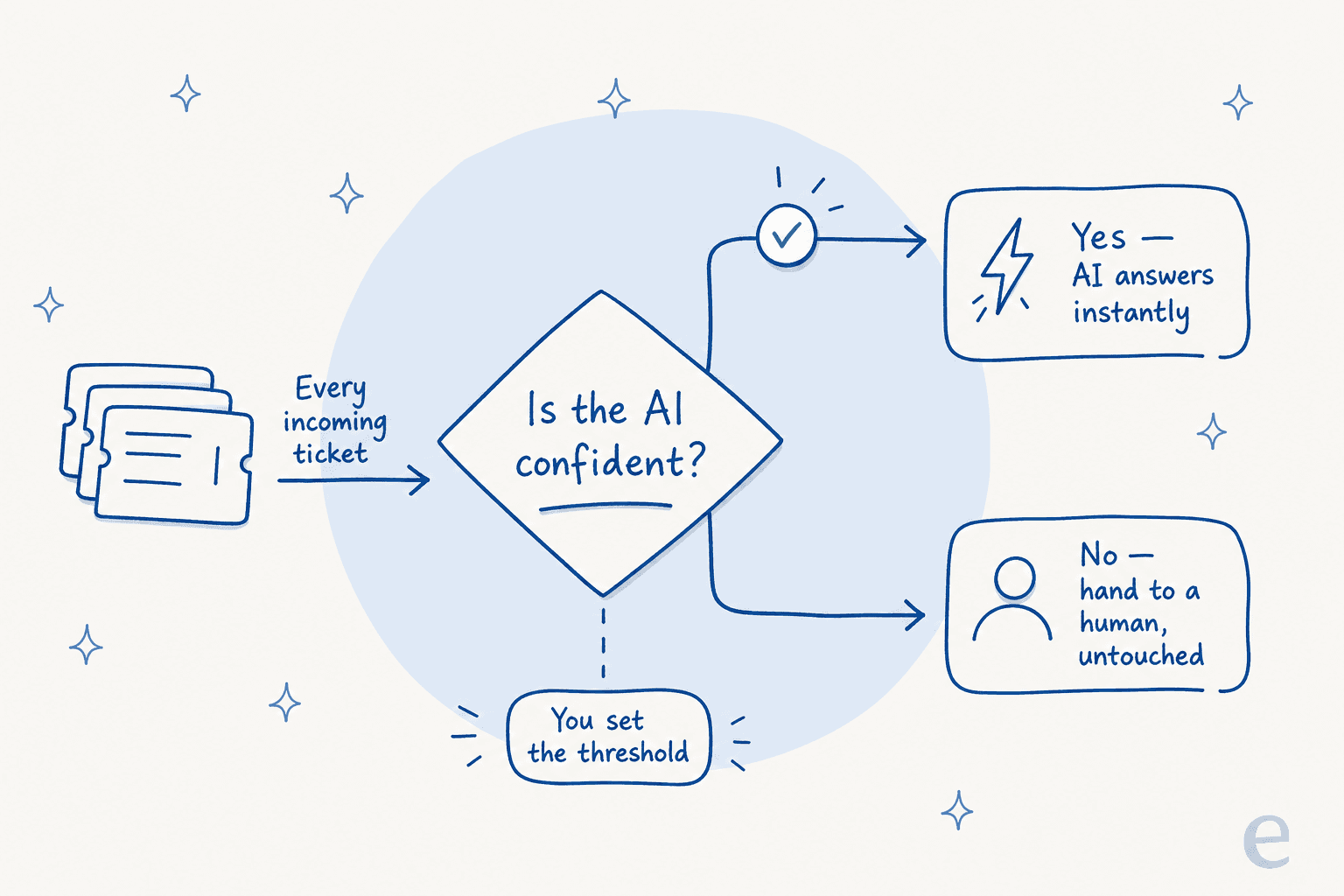
The trust-and-control problem is the biggest single objection I hear, and the answer is always the same shape: you should be able to decide, per ticket type and per confidence level, what the AI is allowed to do. Auto-reply to shipping questions, sure. Draft-only on refunds. Never touch anything mentioning "legal" or "chargeback". A tool that only offers an on/off switch is asking you to gamble your customer relationships on its average case.
What it can realistically handle today
Enough theory. Here's what the numbers look like on real traffic, not in a pitch.
On a busy internal IT helpdesk running on Jira Service Management, the team at InDebted put eesel in as an AI first responder on employee tickets and reached 15% deflection on the way to a 55% target, per Jason Loyola, their Head of IT. Fifteen percent might sound modest until you remember internal IT queues are a grab-bag of one-off requests with almost no repetition, and that number climbs steadily as the AI learns the environment. On the customer-support side, where volume is more repetitive, the ceiling is much higher. One gig-economy driver-analytics company running on Zendesk (~1,300 monthly interactions) saw eesel resolve 73% of tier-1 requests in the first month, after a seven-day trial.
And the honest limit: a German online jewelry retailer running roughly 1,000 tickets a month on Zendesk and Shopify ran a real-traffic trial where the AI hit 93% triage accuracy and caught 100% of spam with zero false positives, but only about 12% of its drafts were good enough to send as-is, with a 7% factual error rate on the rest. Read that as: the AI was a superb triage-and-research assistant, and a mediocre autonomous sender for that particular catalogue. Both facts are true at once, and a vendor who only tells you the first one is selling you the demo.
| Support type | What AI resolves well today | Where a human still wins |
|---|---|---|
| Customer product support | Password/login, how-to, order status, returns, shipping, plan questions | Angry escalations, edge-case bugs, anything with legal or billing risk |
| Internal IT helpdesk | Access requests, resets, device FAQs, software provisioning | Novel incidents, security events, hardware failures |
| Tier-1 triage | Tagging, routing, spam detection, drafting a first reply | Judgement calls, multi-system investigations |
The pattern across all of it: AI tech support is excellent at the high-volume, well-documented, repetitive slice, and the size of that slice depends almost entirely on how good your knowledge and history are going in. That's also where the real support cost savings come from, not from replacing your team but from taking the repetitive slice off their plate. For internal teams, the same logic drives employee IT support and HR helpdesks.
How to roll out AI tech support without breaking things
Most failed rollouts I see aren't a technology problem, they're a sequencing problem. Teams flip the AI on for everything on day one, it gets a few answers wrong in front of customers, and trust never recovers. Here's the order that actually works.
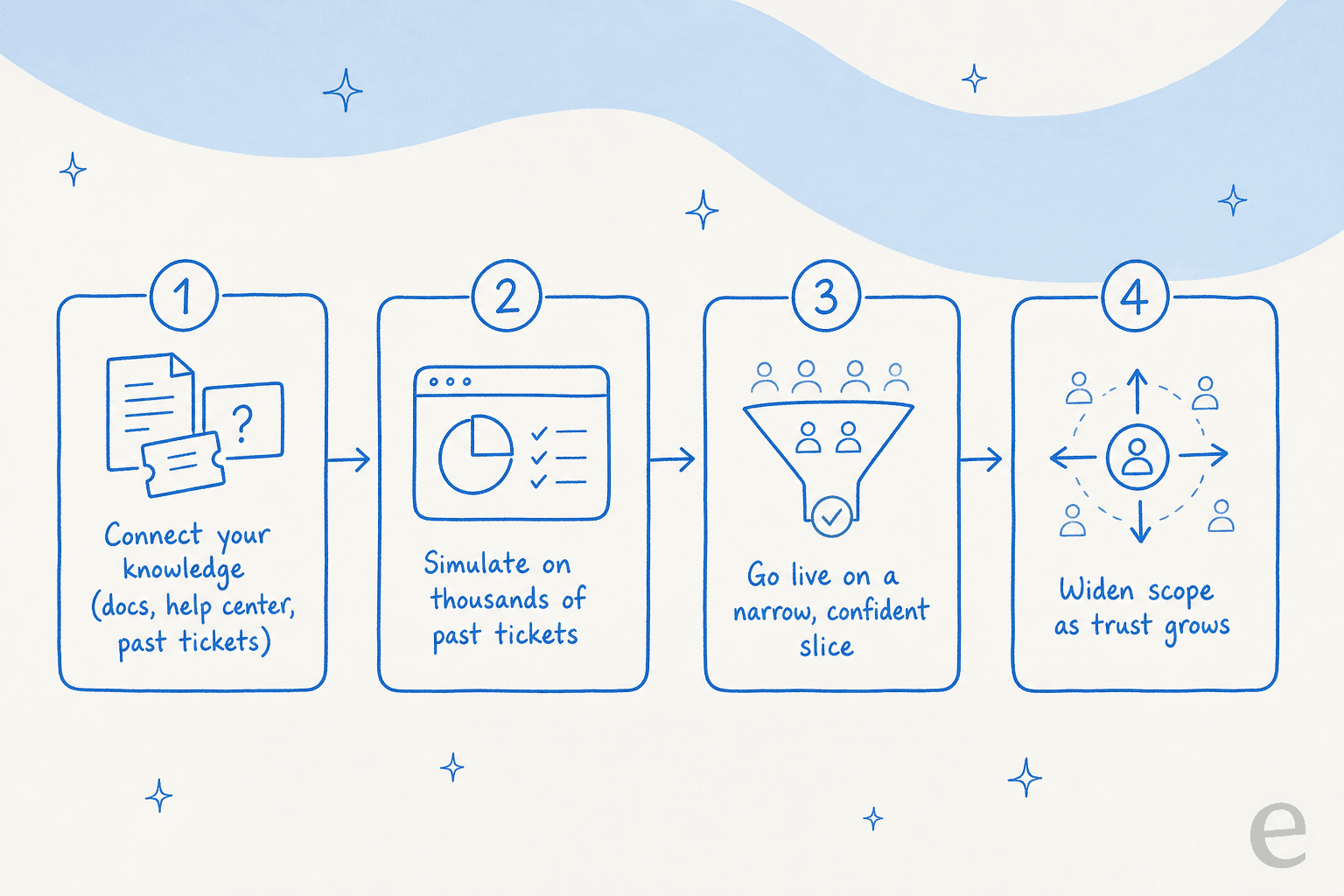
1. Connect your knowledge, all of it. Point the tool at your help center, your internal docs, and especially your resolved ticket history. The more of your real answers it can read, the less it has to guess. If a tool can't ingest your knowledge base and your past tickets together, it's starting half-blind.
2. Simulate before you go live. This is the step nobody wants to skip once they've been burned. A proper AI tech support tool lets you run the agent against thousands of your historical tickets and shows you exactly what it would have replied, with a resolution-rate estimate, before a single customer is involved. We built simulation into eesel specifically because I've watched confident-sounding bots quietly give wrong answers, and seeing the answers on your own history is the only way to catch that ahead of time.
3. Go live on a narrow, confident slice. Turn the AI loose only on the ticket types it nailed in simulation, and only at a confidence threshold you set. Everything else stays with your team. This is the confidence-and-scope principle from earlier, applied in production.
4. Widen scope as trust grows. As the numbers hold up, add ticket types and raise autonomy. This is how InDebted goes from 15% toward 55% rather than betting the whole queue on week one.
Done in that order, the worst case is "the AI helped less than we hoped," not "the AI told a customer something wrong." That's the trade you want.
What to look for in a tool
If you're shopping, the differences that actually matter are boring and specific, not the ones on the feature grid. I'd weigh four things.
Does it train on your own tickets, or just your docs? Docs-only tools miss everything your team learned the hard way and never wrote down.
Can you simulate on real history? If you can't see what it would have said before go-live, you're testing in production on your customers.
How granular is the control? Per-ticket-type, per-confidence-level control is the difference between safe and reckless. An on/off switch isn't control, and it's the difference between healthy ticket deflection and a bot that annoys people into rage-quitting to a human.
Does it fit your existing stack, or demand a migration? The best AI tech support tools sit on top of the helpdesk you already run, whether that's Zendesk, Freshdesk, Help Scout, or Jira Service Management. A tool that makes you rip out your helpdesk to add AI is solving its own problem, not yours.
One more, on pricing: watch how the unit is defined. Per-resolution pricing sounds fair until a busy month punishes you for the AI doing its job. I'd rather see predictable fixed pricing that doesn't tax success.
Should you build it yourself?
A tempting alternative, especially for engineering-heavy teams: just wire up the Claude or OpenAI API yourself. It's a real option, and for a genuinely narrow use case it can be the right one. But the honest version of that build includes retrieval, confidence scoring, helpdesk integrations, a simulation harness, ongoing tuning, and someone owning it forever. A customer who'd weighed exactly that, Karel at GENERAL BYTES, summed up why they bought instead:
"We could try to write our own LLM application but we didn't want to invest our time into that. We wanted something that we would not have to maintain."
Karel, GENERAL BYTES
The build-versus-buy math usually lands there once you price in the maintenance, not just the first prototype.
Try eesel for AI tech support
If you run support or an internal IT helpdesk and want AI that resolves the repetitive slice without going rogue on the rest, eesel is built for exactly that. It plugs into Zendesk, Freshdesk, Jira Service Management, Slack, and more in minutes, trains on your help docs and past tickets, and lets you simulate the whole thing on your historical tickets before it ever touches a live conversation. You set the confidence threshold and the scope, so the AI only answers what it's sure about and hands everything else to your team.

It's free to try, with 100 free credits and no card needed, and because you can simulate on your own past tickets, you'll know your real resolution rate before you commit to anything. That beats taking any vendor's word for it, including mine.
Frequently Asked Questions
What is AI tech support?
Can AI actually resolve technical support tickets, or just deflect them?
How much does AI tech support cost?
Is AI tech support safe to put in front of customers?
Can AI tech support work for internal IT helpdesks, not just customer support?
What should I look for in an AI tech support tool?
What happens if the AI tech support agent gets an answer wrong?


Article by
Riellvriany Indriawan
Riell is a designer and writer at eesel AI with about two years of experience researching CX platforms, AI chatbots, and helpdesk software. She combines her design background with a sharp eye for how these tools actually look and feel in practice — making her comparisons unusually visual and user-focused.