
Alloy Software pricing in 2026, at a glance
I have spent the last three-plus years putting AI agents on live support and IT queues, which in practice means I read rate cards for a living, and most of them hide the number somewhere behind a form. Alloy publishes it. That deserves saying up front, before I start pulling the thing apart.
So, verbatim, here is what Alloy Software publishes for Alloy Navigator:
| Explorer | Express | Enterprise | |
|---|---|---|---|
| Price | $19 /tech/month | $49 /tech/month | $89 /tech/month |
| Billing term | Billed annually | Billed annually | Billed annually |
| Technician band | Up to 3 technicians | 4+ technicians | 4+ technicians |
| Requesters | Unlimited | Unlimited | Unlimited |
| Help desk + ticketing | Yes | Yes | Yes |
| IT asset management | Yes | Yes | Yes |
| Knowledge base | Yes | Yes | Yes |
| Self-service portal | Single | Single | Unlimited |
| Network discovery | Yes | Yes | Yes |
| Automation | Basic | + Approvals | + Advanced workflow |
| Change management | No | Yes | Yes |
| Software licensing (SAM) | No | Yes | Yes |
| Named or concurrent licensing | No | Yes | Yes |
| ITIL process library | No | No | Yes |
| CMDB | No | No | Yes |
| Service catalog | No | No | Yes |
| Project management | No | No | Yes |
| SLA management | Basic | Basic | Full |
| Email-to-ticket mailboxes | 1 | 1 | Multiple |
| Deployment | Cloud or on-premise | Cloud or on-premise | Cloud or on-premise |
| AI features | Bring your own key | Bring your own key | Bring your own key |
| Audit license (per node) | $0.17 /month | $0.17 /month | $0.17 /month |
Two things in that table deserve more attention than the prices do.
The first is unlimited requesters on every tier. Alloy's own licensing documentation says it flatly: self-service portal accounts carry no license restrictions at all. Plenty of vendors in this category quietly meter end users, so that is a real structural advantage, and it is why a big self-service portal rollout on Alloy costs nothing extra.
The second is that AI is not on the rate card. Not gated, not priced as an add-on. Just absent. I will come back to it, because the reason turns out to be more interesting than the gap.
The three meters on an Alloy bill
Every published Alloy price belongs to one of three separate meters. Only two of them ever arrive on an Alloy invoice.
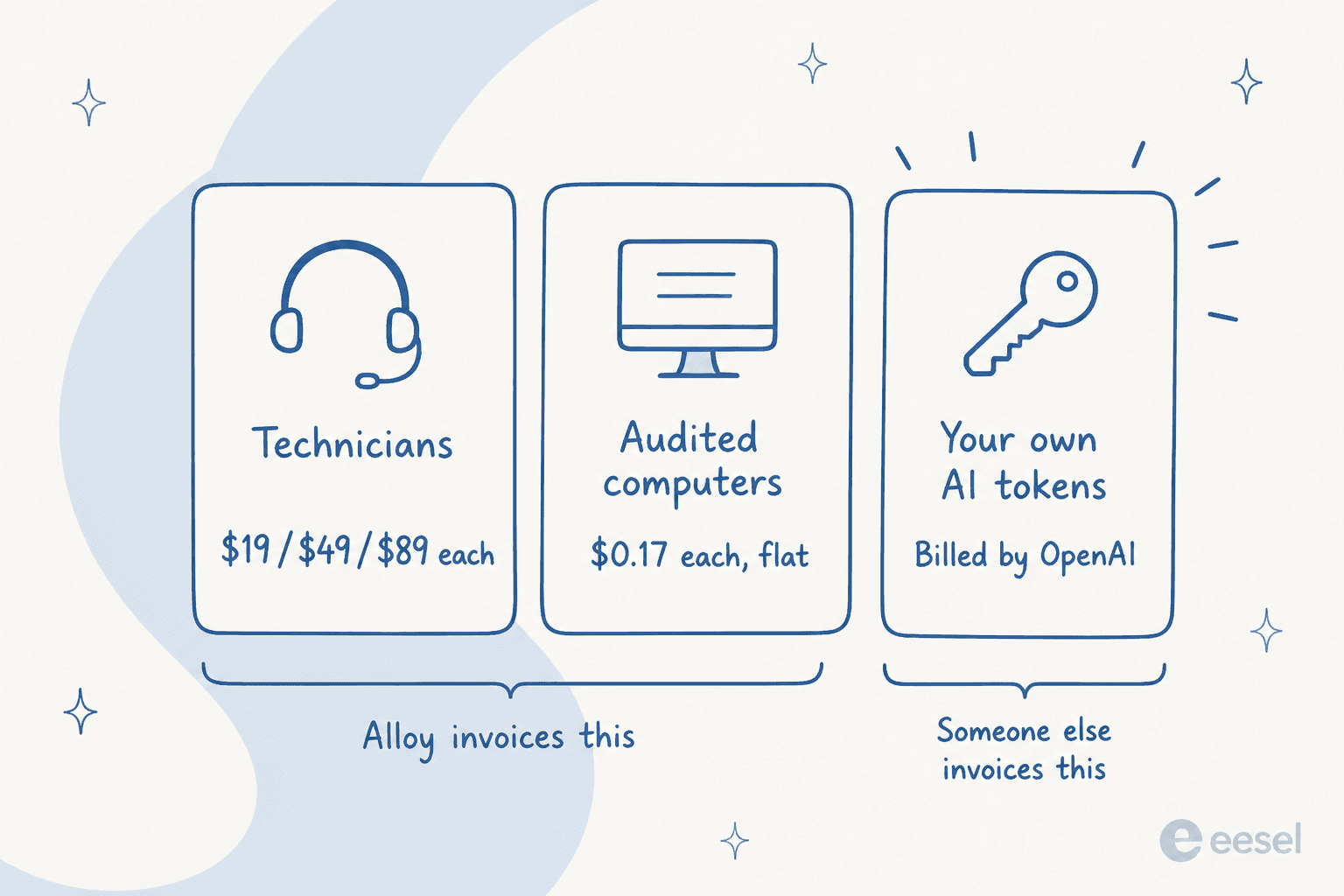
- Technician seats. The headline number, $19 to $89 each per month, billed annually.
- Audited computers. A flat $0.17 per auto-discovered computer per month, sold in bundles starting at 500 nodes.
- AI tokens. Paid straight to OpenAI or Microsoft, since the model call comes out of your own account rather than Alloy's.
Most pricing coverage of Alloy stops at meter one. Which is the mistake: for a small team, meter two can end up the bigger line item.
Build your own Alloy Navigator bill
Punch in your real numbers. The calculator applies Alloy's actual band structure, technician cap on Explorer included, so it tells you when your headcount forces a tier change instead of quietly letting you price a plan you cannot buy.
Here is where that lands for three shapes of team. The first two rows use the cheapest tier Alloy will actually sell you at that headcount. The third one assumes Enterprise, since that is the only tier carrying the ITIL processes and the CMDB a team that size usually came for in the first place.
| Team | Seats | Audit licenses | Monthly | Annual |
|---|---|---|---|---|
| 3 techs, 200 computers | 3 x $19 = $57 | 500-node bundle, $85 | $142 | $1,704 |
| 10 techs, 1,000 computers | 10 x $49 = $490 | 1,000-node bundle, $170 | $660 | $7,920 |
| 25 techs, 5,000 computers, full ITIL | 25 x $89 = $2,225 | 5,000-node bundle, $850 | $3,075 | $36,900 |
Look at the first row. A three-person IT team pays more for its audit licenses than for its help desk seats. Nothing is buried in a contract there. It is just what happens when a per-node meter meets a very small team, and it is the single most common surprise on an Alloy quote.
Meter one: technicians, and the cliff at number four
You do not grow out of Explorer gradually, the way you would a cheaper edition of the same product. It carries a hard ceiling of three technicians, and Express and Enterprise both start at four. Nothing sits in between.
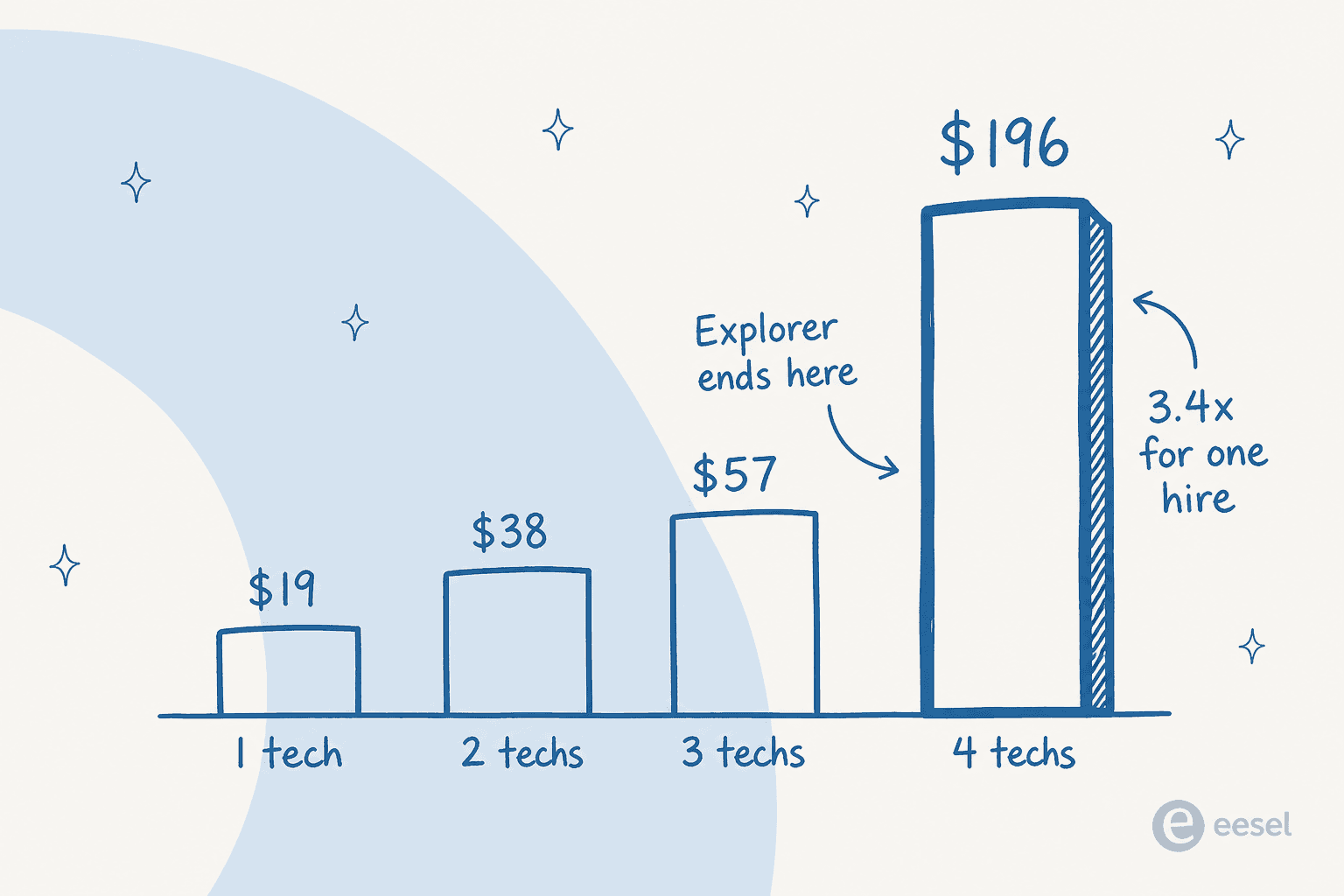
So the fourth hire does not add $19 to the bill, or even $49. It reprices every existing seat:
- 3 technicians on Explorer: $57/month
- 4 technicians on Express: $196/month
One hire, a 3.4x seat bill. So if you are three people planning to be four inside the annual term, price Express from day one, and treat Explorer as a number you never actually get to pay.
The upside of the same structure is that it is honest about direction. Alloy's pricing FAQ says contracts are annual but "you can change your plan at any time," and that adding technicians or increasing computer licenses mid-term is allowed. So the cliff hurts your budget. It does not lock you in.
What each tier actually buys
The tier names tell you almost nothing. Here is the practical read.
Explorer is a complete little help desk: tickets, assets, a knowledge base, a portal, and network discovery. Missing from it are change management and software license tracking, which is fine right up until the first time an auditor asks for either.
Express adds change management, automated approvals, consumables, and software asset management. It also unlocks concurrent licensing, which is the sleeper feature in the whole rate card and gets its own section below.
Enterprise is where the ITSM half of the product actually lives. Per Alloy's own product comparison, the ITIL process library, the CMDB, the service catalog, project management, and unlimited self-service portals are all Enterprise-only.
So if you came to Alloy for structured ITIL process instead of a ticket queue, your real starting price is $89. Not $19. Our ITIL and AI guide covers which of those processes are worth formalising first, and if you are not sure which of the two you are actually buying, read our explainer on help desk versus service desk.
One thing to check on your own quote: the comparison table and the pricing page disagree about change management. The table shows it on all three editions; the pricing page sells it as the headline Express upgrade. Get it in writing.
Meter two: audited computers, flat at $0.17
Every Alloy tier includes network discovery as a feature. The capacity to discover things gets sold separately, as an "audit license." This is the part of the rate card a plain reading of the page will miss, because the slider that prices it calls a live store, and that store was throwing an error both times I loaded it.
The full band table ships inside the pricing page itself, though, so here it is:
| Audited computers | Per month | Effective per node | Per year |
|---|---|---|---|
| 500 | $85 | $0.17 | $1,020 |
| 1,000 | $170 | $0.17 | $2,040 |
| 2,000 | $340 | $0.17 | $4,080 |
| 3,000 | $510 | $0.17 | $6,120 |
| 4,000 | $680 | $0.17 | $8,160 |
| 5,000 | $850 | $0.17 | $10,200 |
| 10,000 | $1,700 | $0.17 | $20,400 |
| 20,000 | $3,400 | $0.17 | $40,800 |
The rate is $0.17 per node at every single band, so there is no volume discount whatsoever. A 20,000-machine estate pays exactly the same per-computer rate as a 500-machine one. Which cuts both ways. Forecasting is unusually easy. At scale it is unusually unrewarding, since most vendors would hand you a break by then.
What you do not pay for matters just as much, and Alloy states the scope cleanly: the audit license covers "auto-discovered physical or virtual computers," while manually created or imported computers, and all non-computer hardware assets, are free. Alloy's install guide confirms discovered network devices are uncapped too. So the meter sits on automated computer discovery specifically. Inventory itself is not what it counts. A team that imports its asset list from a CSV pays nothing here, which is a legitimate lever if your estate is stable and you do not need continuous scanning. Our AI asset management roundup covers when continuous discovery earns the meter, and our guide to AI for asset management covers what to do with the data once you have it.
The cheaper door to the same 500 computers
Here is the thing I did not expect to find, and it is worth actual money.
Alloy Discovery Express is sold as its own product, with its own separate rate card in its own separate order form. Its bands look nothing like the Navigator audit license:
| Audited computers | Discovery Express, per year | Same nodes as a Navigator audit license |
|---|---|---|
| 50 | Free | $1,020 (500-node minimum) |
| 100 | $60 | $1,020 (500-node minimum) |
| 500 | $200 | $1,020 |
| 1,000 | $275 | $2,040 |
| 2,000 | $390 | $4,080 |
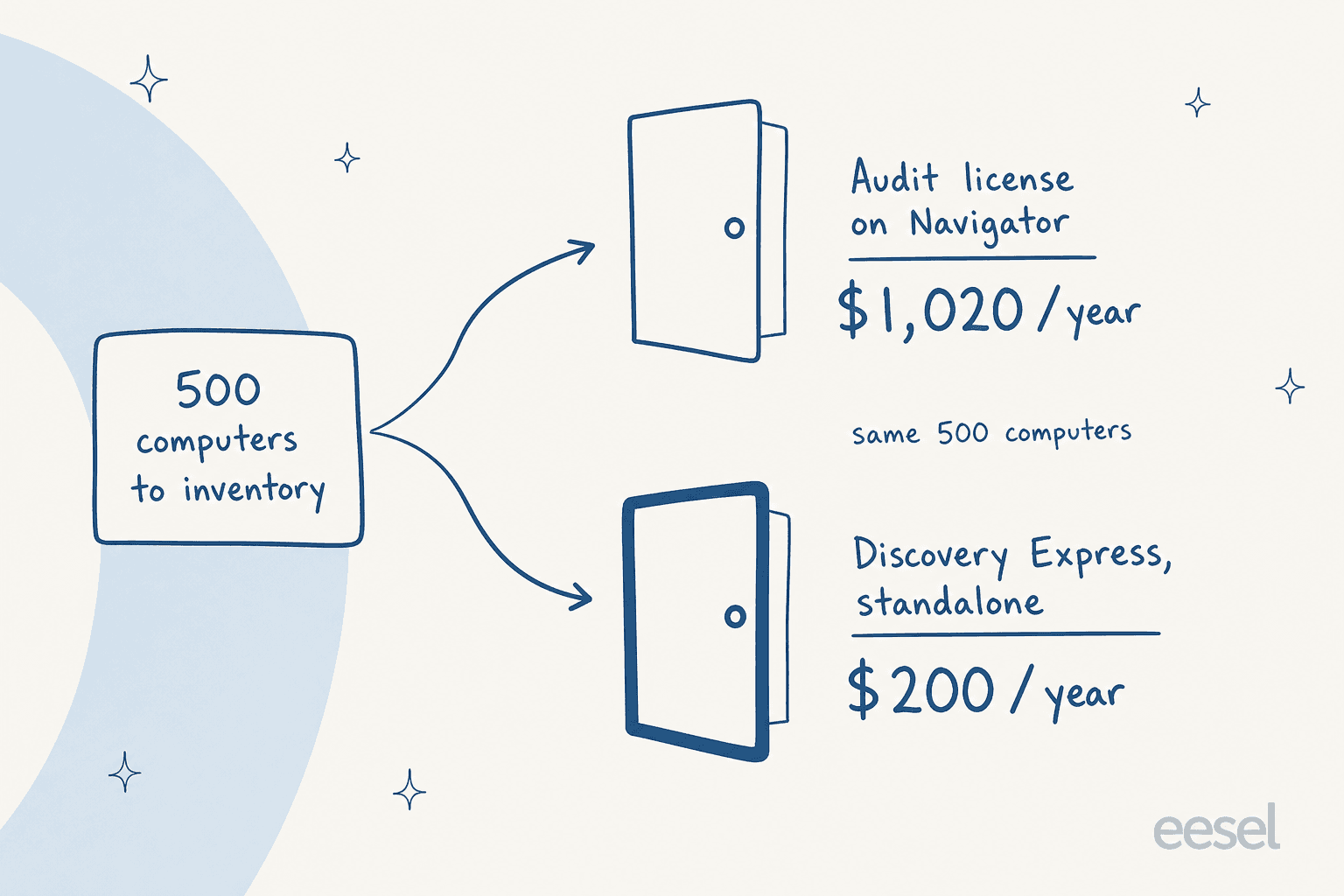
The same 500 computers cost $200 a year through Discovery Express and $1,020 a year as a Navigator audit license. That is 5.1x for the same scanning job. And Discovery Express, unlike the Navigator meter, actually does slide with volume: the per-node rate drops roughly threefold between 100 and 2,000 nodes.
The honest caveat: these are not interchangeable purchases. Discovery Express is a standalone inventory tool, so its data does not land inside your Navigator tickets and CMDB the way audit-licensed discovery does. Need assets linked to tickets? Then you are buying the audit license, and that premium is what integration costs. But if what you actually want is a machine inventory, and the ticketing tool is a separate decision, the cheap door exists, and nobody is going to point you at it.
One flag before you build a three-year plan on Discovery Express. The URL for it now redirects to Alloy's network inventory page, and Alloy's own announcement says AlloyScan "is poised to gradually replace our trusty Alloy Discovery." AlloyScan's licensing adds meters Navigator's does not have, too, including a monthly quota for audits and another for API transactions, with the hard per-second limits deliberately unpublished. Ask where Discovery Express sits on the roadmap before you commit.
Meter three: the AI bill Alloy doesn't send you
I went looking for the AI line item on Alloy's rate card, expecting the usual: an AI seat and a per-resolution charge, maybe a credit bundle. There is nothing. No AI row on the pricing page, none in the edition comparison either, and the pricing FAQ answers the add-on question with a flat "they're all included."
That is because what Alloy sells here is the socket, not the electricity. From Alloy's AI configuration docs:
"Alloy Navigator integrates with AI services from supported vendors, including OpenAI and Azure OpenAI. Alloy Navigator does not operate its own AI service, nor does it transmit any data to these AI services except what users submit themselves."
You paste in your own key, pick your own model, and the invoice for it arrives from them.
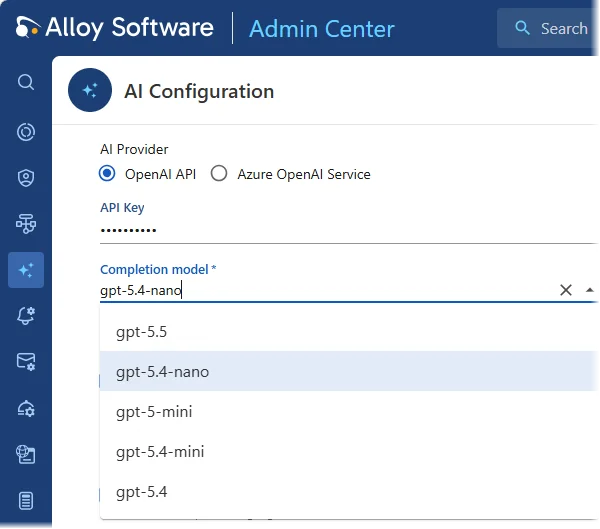
I want to be fair about what this is. "Bring your own key" gets used as a euphemism for a thin wrapper, and that is not what is happening here. Alloy built a real retrieval pipeline: a scheduled task maintains a vector index over your incidents and knowledge base articles, and the default completion model in the 2026 Spring release is gpt-5.4-nano. Four model slots, too: completion, embedding, text-to-speech, transcription. That is real retrieval-augmented generation, a long way from a rules engine wearing an AI badge, and the difference between the two is worth understanding before you buy anything in this category.
What ships today, per Alloy's AI capabilities docs:
- AI-powered actions for technicians: Summarize Ticket, Suggest Category (which is ticket classification by another name), Suggest Solution, and Analyze Risks on change requests.
- AI writing assistance in every rich-text field: summarize, improve, translate, read aloud, and speech-to-text.
- An AI assistant on the self-service portal that troubleshoots conversationally against your knowledge base, and can file a ticket or a service request at the end of it.
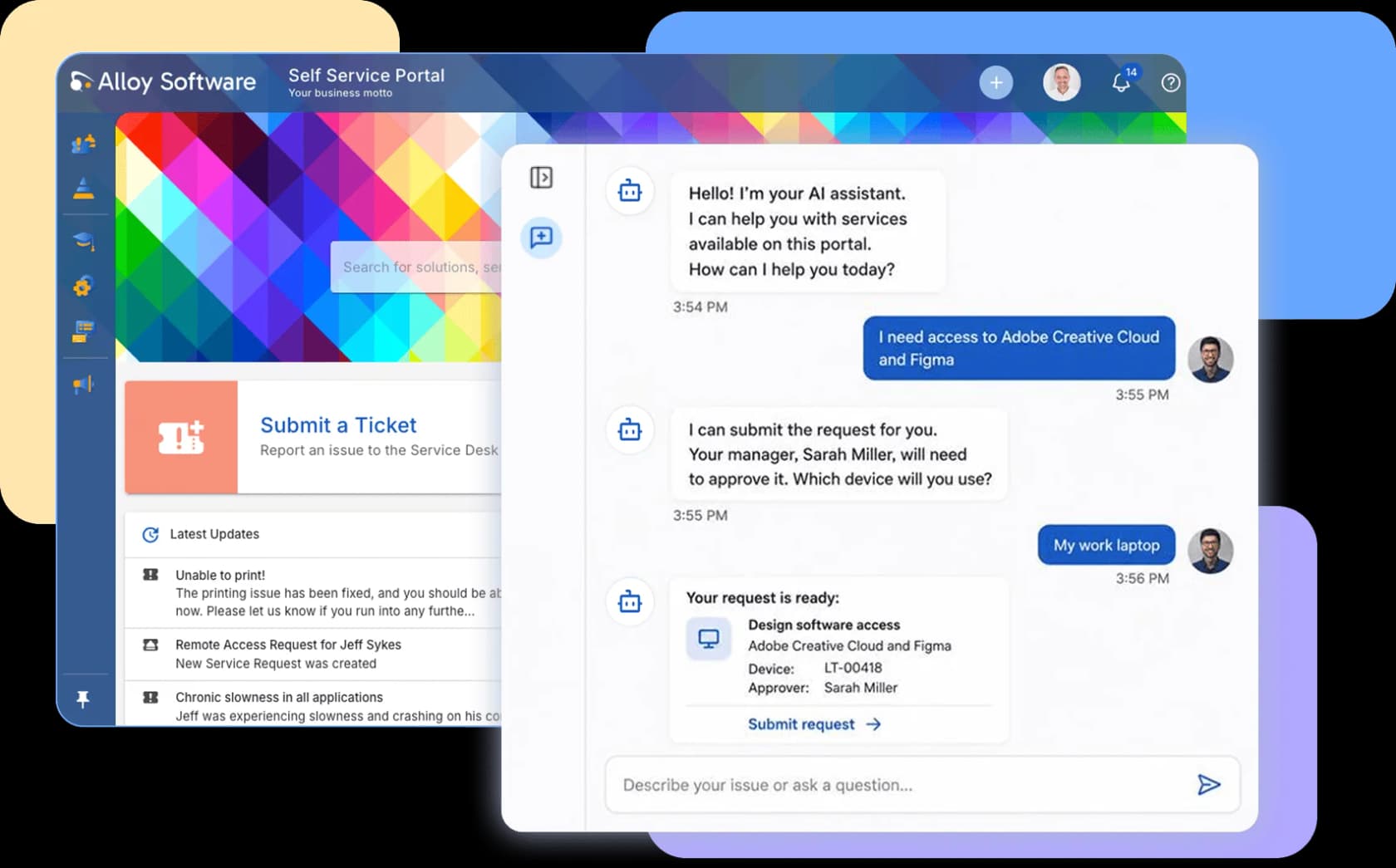
What does not ship yet is the part most buyers assume they are getting. The agent-side "Alloy AI Assistant" is marked coming in Fall 2026. ITAM-aware AI is "Upcoming." AI ticket assignment and AI SLA-breach prediction both sit on the not-yet list, which means the auto-assignment and SLA machinery running today is deterministic rules. The technician-facing AI in 2026 is buttons in a panel, not a teammate. A sysadmin recommending Alloy on Reddit put it about as precisely as Alloy's own docs do:
"Check out Alloy Navigator. Basic AI integration, massive customization and automation possibilities with integrated Powershell, Intune…"

What the bring-your-own-key model costs you in practice
Three consequences worth pricing before you sign.
A third invoice, and it is variable. Alloy frames this as control, and it is: you pick a cheap nano model or an expensive frontier one, and you can cap spend at the provider. But it also means the one part of your ITSM bill that scales with usage is the part with no forecast attached, and the portal assistant serves an unlimited, unlicensed requester population. Free end users plus per-token AI is a combination worth modelling before you switch the assistant on.
Somebody has to own an OpenAI or Azure account. Not hard. It is still a procurement conversation and a second vendor security review, plus a key somebody has to rotate. Alloy routes AI data-protection questions to OpenAI and Microsoft rather than answering them itself.
No dry run. There is a Test Connection button to validate the key, and an assistant log you can read conversations out of after the fact. Nothing replays the AI against your historical tickets before it faces a real user, though. This is the thing I would push hardest on, because I have watched a confident-sounding bot quietly hand out wrong answers, and the only reliable way to catch that is to test it on tickets you already know the answers to. If simulation matters to you, our AI IT help desk roundup flags which tools have it.
What the rate card leaves uncosted
Alloy titles its pricing page "Simple and Transparent Pricing," and on the seat and node meters it earns that. Four things carry no number at all, though, and the footnote under the plan cards is where the first one lives:
"Please note: Cloud hosting is subject to additional fees that are not included in the base product price. Actual hosting costs may vary depending on the compute capacity of the virtual machine and the edition or configuration of the SQL Server used."
So the $19/$49/$89 rates are license prices. Take the cloud deployment and you additionally pay a hosting fee, which varies with your VM size and your SQL Server edition. That is the one quote-only component of an Alloy deal, and it is not a rounding error, because SQL Server licensing is famously not a rounding error.
None of that is unusual for on-premise-capable software, and Alloy is at least upfront that the fees exist. It does mean you should read the sticker as a floor, which is the same trap most ITSM automation budgets fall into.
The other three:
| Uncosted item | What Alloy says | Why it matters |
|---|---|---|
| Cloud hosting | "Additional fees," varies by VM compute and SQL Server edition | The largest unknown, and unavoidable on cloud |
| Cloud setup | "A nominal cloud setup" fee | One-off, but nominal is doing a lot of work |
| Training | "Training is an extra cost" | Reviewers consistently say you need it |
| Discounts | Non-profit, education, government, volume, multi-year | Real money, but you have to ask |
The training line is not a nickel-and-dime complaint. Alloy is a deeply configurable product, and reviewers keep saying so in the same breath as recommending it:
"There is a big learning curve with Alloy if you have not worked with a similar system. If you are new to Asset tracking systems, I highly recommend taking advantage of the training sessions. They are very in-depth and will prepare you well."

G2's own user data puts Alloy's implementation time at about a month. So budget the internal hours, then add the paid training on top. And there is a fifth cost that only shows up later:
"If you want custom features added it is going to cost a decent chunk of money."
One procedural note that will annoy you on day one. There is no self-serve signup: every "Try for free" button on the pricing page routes to a demo request form, and the trial length is never stated anywhere. A reviewer flagged exactly this:
"You must register on alloy navigator web site if you want to get a price or a trial of the software."
Which is a slightly odd look for the most transparent rate card in its category.
Named versus concurrent licensing
This is the lever most Alloy buyers never ask about, and it can change the seat count you need.
Alloy licenses technician accounts two ways, and its licensing docs are precise about the difference:
- Named users cap the number of accounts created. An account that exists and is enabled burns a seat even if nobody has logged in for six months. The documented fix for hitting the limit is literally to disable accounts not in use.
- Concurrent users make account creation unlimited and cap simultaneous connections instead. Three hundred accounts can sit against a twenty-seat concurrent license, as long as no more than twenty are logged in at once.
Run a shift-based IT team, or a help desk with a lot of occasional escalation contacts, and concurrent licensing comes out dramatically cheaper than named. Same for an enterprise service management rollout where HR and facilities staff dip in weekly, and for an employee self-service portal a whole company touches now and then. Two details worth knowing: the same user logged into two clients counts as one connection, and a combined license carries both limits independently.
The catch: concurrent licensing is an Express-and-up feature. It does not exist on Explorer. So if your team is four or more people with uneven login patterns, the Express upgrade may partly pay for itself in seats you no longer need to buy. That is an arithmetic worth doing before you accept a named-user quote.
Where Alloy's own pages disagree about its price
I want to flag this plainly, because it is the practical reason to get any Alloy number in writing rather than off a webpage.
The same Enterprise tier is published at three different prices. Alloy's own pricing page says $89. Its G2 listing says $89. Capterra says $86. Crozdesk and SourceForge, both of which carry vendor-supplied data, say $79. Alloy's own small-business blog quotes a "$79 to $86" range and works an example at $86. That is a 12.7% spread on one SKU, and the low numbers are sitting in profiles Alloy itself submitted.
The node rate has the same problem. The live pricing page resolves to $0.17 per computer per month. The vendor-supplied SourceForge and Slashdot listings both say 14 cents. Both cannot be current.
And Alloy's own cost comparison does not match its own rate card. Alloy's SolarWinds comparison page puts its estimated monthly total at about $876 for "a team of 10 technicians managing ~1,000 devices." Try rebuilding that from the published rates: Enterprise is 10 x $89 plus $170 of audit licenses, or $1,060. Express is 10 x $49 plus $170, or $660. Neither is $876. The page carries an honest disclaimer that "actual pricing may vary based on your specific requirements and configuration," and the estimate excludes the hosting, setup, and training fees Alloy itself discloses elsewhere. Treat it as illustrative, not as a quote.
None of this reads as bad faith. It reads like a twenty-plus-year-old company sitting on a lot of listings it has not swept in a while. But it does mean the only Alloy price worth planning against is the one on a document with your name on it.
What buyers say about the cost
Alloy is well-reviewed and not much discussed, which is an unusual combination. It holds 4.8 out of 5 from 119 reviews on G2, and 4.6 from 67 on Capterra. On Reddit it barely registers: no dedicated thread exists, and it turns up only as a one-line recommendation inside broader "what should I buy" posts, usually from people who know they are in the minority.
"Im the outlier using Alloy Navigator. Weird name, awesome product. Super customizable."
Worth noting what is absent from that thin footprint. There is no billing-surprise thread and no renewal-shock post, and no churn story either. For a per-seat, per-node, annual-contract vendor, that silence is a mild endorsement.
On the price itself, the most useful review in the whole corpus is from someone who actually ran the bake-off:
"The price was a huge factor. Way more than Track-It! but less than the other competitors. The on-prem option as another primary factor. some of the options we considered were strictly cloud based. Demos showed that Alloy configuration was going to be simpler to learn as well."
That is the position exactly. Not the cheapest thing on the shelf, but materially below the enterprise suites, and one of very few options left that will still run on your own hardware. Another long-timer frames the value the same way:
"The feature set for the price is impressive. It's a perfect fit us as a SME. We've used Alloy Navigator for over 20 years and new releases come out on a regular basis."
The consistent complaint lands on the admin surface instead. Reviewers describe a configuration layer deep enough that it takes weeks to feel natural, and an interface several of them call dated, though the ones who have moved to the newer web app say it addresses that.
So is Alloy Navigator good value?
My honest read, having priced a lot of these:
Buy it if you are a mid-market IT team of four to twenty-five technicians, you need asset management and ticketing in one system, you want on-premise as a real option rather than a legacy footnote, and you have somebody who enjoys configuring things. At $49 to $89 a seat with unlimited requesters and a predictable node rate, it is priced well below the enterprise suites for a feature set that overlaps them more than the price suggests. Alloy has been shipping this since 2002 and says 1,500-plus organisations run it. Neither that nor the SOC 2 Type II it completed in November 2025 is an enterprise-scale credential. This is not a weekend project either.
Think harder if you are a three-person team. The audit license will likely cost more than your seats, and the moment you hire a fourth person the seat bill more than triples. Price Express from the start, or look at small-team ticketing options instead.
Look elsewhere if what you actually want in 2026 is AI doing the first pass on your queue. Alloy's AI is real and competently built, and it is pointed mostly at helping a human write faster. The autonomous agent-side assistant is a Fall 2026 promise, ITAM-aware AI is "Upcoming," and there is no way to test any of it against your own ticket history before it goes live. If AI resolution rate is the number you are buying, this is not the tool that optimises for it. Our roundup of AI IT support tools and our list of the best AI service desks cover what does.
And a broader point about the pricing model itself. Per-seat plus per-node is a 2010s shape, pricing the capacity to do work rather than the work. You pay the same $89 for a technician who closes 400 tickets a month and one who closes 40. Same $0.17 for a laptop that generates a ticket a year and one that generates twenty.
When AI starts absorbing the easy half of the queue, that shape stops rewarding you for it: support ticket automation that removes 300 tickets from a technician's month does not remove a cent from your bill. Our comparison of AI versus human agent cost walks the arithmetic.
For a fuller picture of the field, our ITSM guide for smaller teams is the most useful next read. After that, the ITSM automation tools roundup.
To put Alloy's numbers next to the alternatives, the closest comparison on price is Freshservice. After that, Jira Service Management.
One tier up sits ServiceNow AI, and on the MSP side there is Atera.
And if you are escaping Spiceworks, which is where a good share of Alloy's user base came from, that is the comparison that actually matters. Plenty of those teams end up looking at Freshservice alternatives inside the same evaluation.
Try eesel
If the thing you actually want is AI clearing the repetitive half of your queue, the meter matters more than the seat count does. eesel charges one fixed monthly price from $299 for 500 credits, 1 credit per ticket your AI handles, and nothing per seat, so the bill is sized to ticket volume instead of headcount. No platform fee, no annual commitment, and no API key of your own to bring. You start with 100 free credits rather than a demo form.
The part that matters most for an ITSM team, though, is the bit Alloy has no answer for. eesel runs a simulation against your own historical tickets before anything touches a live queue, so you see the projected resolution rate and read the actual drafted replies first. Roll it out to 200 of your 1,000 monthly tickets, and you pay for 200. That is the difference between buying an AI feature and buying a measured outcome.

It sits on the AI service desk or helpdesk you already run rather than replacing it. One digital-media company handling about 4,000 tickets a month on Zendesk routes AI troubleshooting into Jira escalations for around $400 a month, on no contract. And Jason Loyola, Head of IT at InDebted, describes the Jira Service Management setup the way most IT teams end up using it:
"We use it to be the first responder to our Helpdesk tickets in Jira. It essentially acts just like an agent would."
You can try eesel free. Or read how it plugs into an internal knowledge base first. There is a walkthrough for a Teams IT support bot too.

Frequently Asked Questions
How much does Alloy Software cost?
What is Alloy Software's pricing for small teams?
Is Alloy Software pricing cheaper than Freshservice or Jira Service Management?
Does Alloy Software have a free plan or a free trial?
What is not included in Alloy Software's published prices?
How is Alloy Software licensed, per user or per device?


Article by
Kurnia Kharisma
Kurnia is a software engineer and writer at eesel AI with two years of SEO experience, writing about AI tools, helpdesk software, and customer support. He pairs a developer's understanding of how these products are built with search-driven research into what actually ranks and resonates with the people searching for them.