9 best Automation Anywhere alternatives in 2026 (real prices)

Kurnia Kharisma

Katelin Teen
Last edited August 24, 2026
Why teams start looking for Automation Anywhere alternatives
I spend most of my week looking at what buyers type into Google before they ever type a vendor name, and "automation anywhere alternatives" is a strange one in terms of intent. It is not really a churn query. Most of the people running that search are not unhappy with what their bots do. They are just stuck at the part where they have to find out what the thing costs.
It is worth to be fair about what the platform does well first, because the depth is real. Twenty-plus years of RPA is not nothing. It handles legacy desktop applications that have no API and never will have one, the sort of green-screen ERP that a modern ticketing system or integration platform simply cannot see. The AWS listing carries a 4.5 rating across 5,863 ratings, with ISO 27001 and SOC 2 both recorded under Vendor Insights, and the company also claims to be among the first hundred worldwide to earn ISO/IEC 42001:2023, which is the AI management standard. For a regulated enterprise that needs an audit trail on every automated action, that matters quite a lot.
Four things push people out, and only one of them is about features.
The price is a conversation, not a page
There is no pricing page at all. The closest thing to a published number is that AWS Marketplace listing, and the listing does something unusual, which is that it publishes a figure and then invalidates the figure in the same breath. The pricing table has exactly one row: a 12-month contract for "Automation 360", described as an "Agentic Process Automation System Sample Solution", at $126,000.00. Directly above the table, the vendor's own copy reads "The pricing is quoted based on software customization. Pricing stated in this listing is for reference only."
Two more details on that same page are worth to know before you open a procurement cycle. The listing carries no free trial, and the vendor refund policy renders as disabled. AWS also generates its own summary panel which tries to explain what you are buying, and it ends up circular, defining a Unit as "the measured quantity of automation capacity you consume against the platform". Which means the $126,000 has a term attached but no denominator.
One historical list price does exist, and it is six years old now. A 2020 press release put the Cloud Starter Pack at $750 a month, which bought one bot creator, one control room and one unattended bot runner. Extra unattended runners were $500 a month each, attended ones $125. Treat all of that as a museum piece rather than a quote, since the platform it priced has been renamed and repackaged twice since then. Still, it tells you one useful thing about how the company thinks: an unattended runner was valued at four times an attended one.
One quote, four meters
The Automation 360 licensing docs were last edited in July 2026, and they are refreshingly clear on structure, even while containing no prices whatsoever. Every line item falls into one of four categories. A real deployment normally touches all four of them at once.
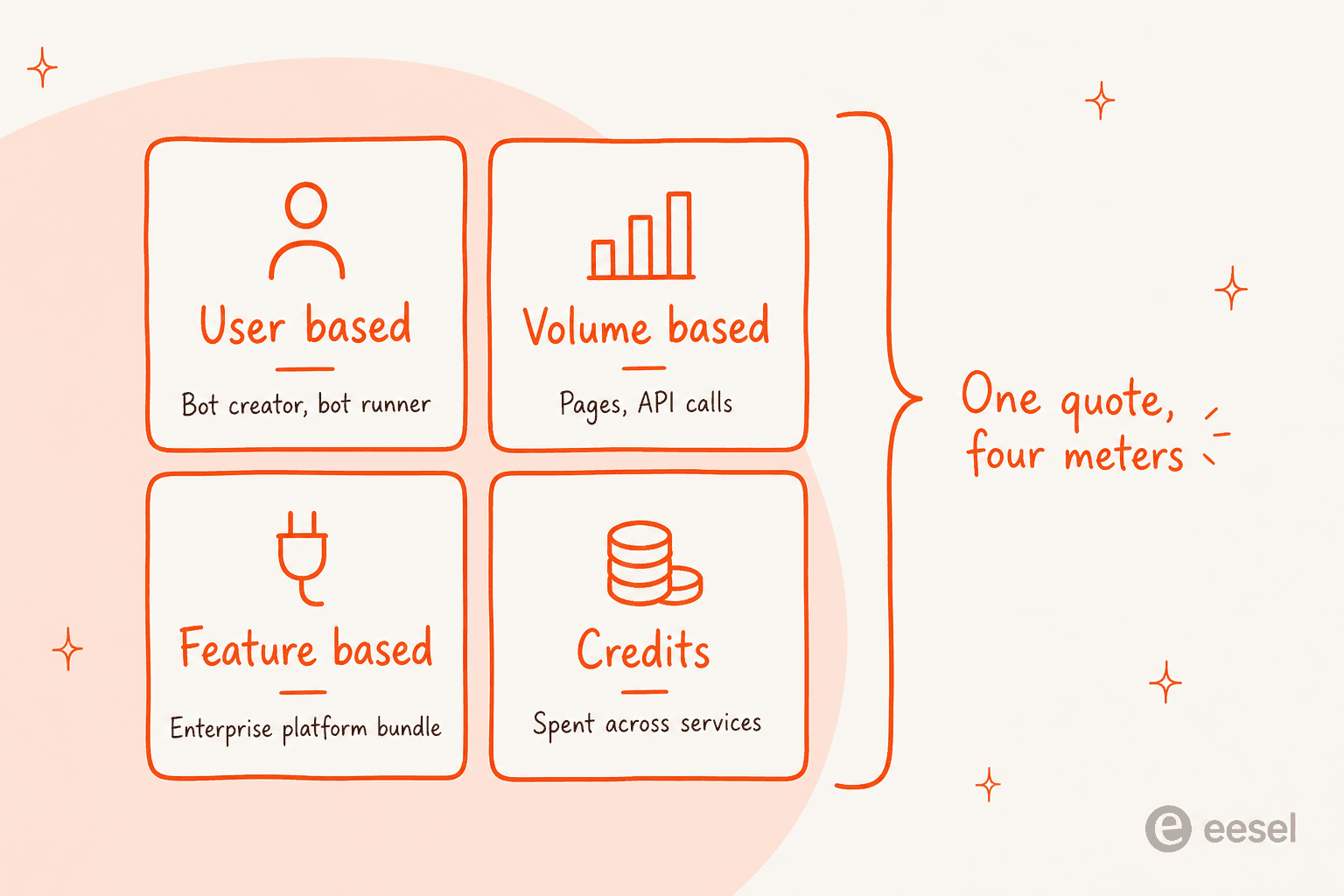
User-based licences cover the bot creators and citizen developers, plus attended and unattended bot runners. Volume-based licences are consumables, measured in pages processed or in API calls made. Feature-based licences are bundles, and the docs name two of them that have to be bought separately, being Enterprise Platform and the Automator AI Base entitlement that keeps generative AI features switched on. Then, separately again, automation credits, which is one currency spent across services.
The API Task line shows most clearly how these interact with each other. Every cloud customer gets 100 API Task executions per Control Room for free, and two concurrent executions with it. Go past 100% of the entitlement and the docs say the user gets notified and the exhausted licences expire within 24 hours. Higher limits then require the separately-purchased Enterprise Platform licence. None of this is unreasonable in itself. It is four negotiations though, not one, and every one of them is somewhere a quote can grow between the demo and the signature.
You supply the model
This is the fact which surprises people the most, and to be fair the company states it plainly. Asked "Does AI Agent Studio provide foundational models directly?", the product page FAQ answers: "No, AI Agent Studio doesn't host its own models. Instead, it lets you securely connect to leading foundational models from vendors like Amazon Bedrock, Google Vertex AI, Azure OpenAI, and OpenAI."
As architecture that is defensible. Bringing your own model means the data governance rules follow your own cloud account, which is exactly the thing some security teams are asking for. It also means the Automation Anywhere subscription is buying you the wiring, while the inference shows up later as a second bill from a second vendor. One thing worth to check during evaluation: as read in August 2026, the newest models named anywhere on the page are Claude 3.5 Sonnet, GPT-4o and Gemini 1.5 Flash, which is a roster that was current in mid-2024. Connectors get certified per model, so the certified list trails whatever those providers ship today.
The separate Enterprise Knowledge Base product does publish a meter, and honestly it is the most transparent pricing document the company has anywhere. The credits page prices a chat message at 1 credit and a tool call at 1 credit, then document upload at 10 credits per 10,000 words, where 1,000 credits equals $1. Their worked example is the instructive part. A single question asked against an attached document comes to 177 credits, and 175 of those are LLM tokens, and 161 of those are the retrieved context and not the answer. The page is honest on the consequence too, noting that "LLM credits are consumption-based and cannot be flat-rated."
The agentic push arrives before the RPA gaps close
The most useful outside read on all this came from a developer with seven years on the platform, who posted in January 2026.
"The bigger issue for us right now: the company is pushing hard for everyone to adopt agents / agentic workflows, even in scenarios where classic RPA is still more than enough and much more predictable/cost-effective... With the recent price increases (which seem quite aggressive), we're seriously considering migrating away."

The replies underneath are not a pile-on, which is the interesting bit. The r/rpa moderator pushed back with a point that applies to every single vendor in this roundup: "RPA will still be better for high volume, low variation processes, AI agents in these processes will increase cost and increase processing time." That is the honest version of the trade-off. It is also why the next section matters more than the rankings do.
First, decide which half you are replacing
Almost every bad shortlist I see in this category comes from skipping over this step. The Aisera acquisition put two very different products under one logo, and the problems they solve have close to nothing to do with each other.
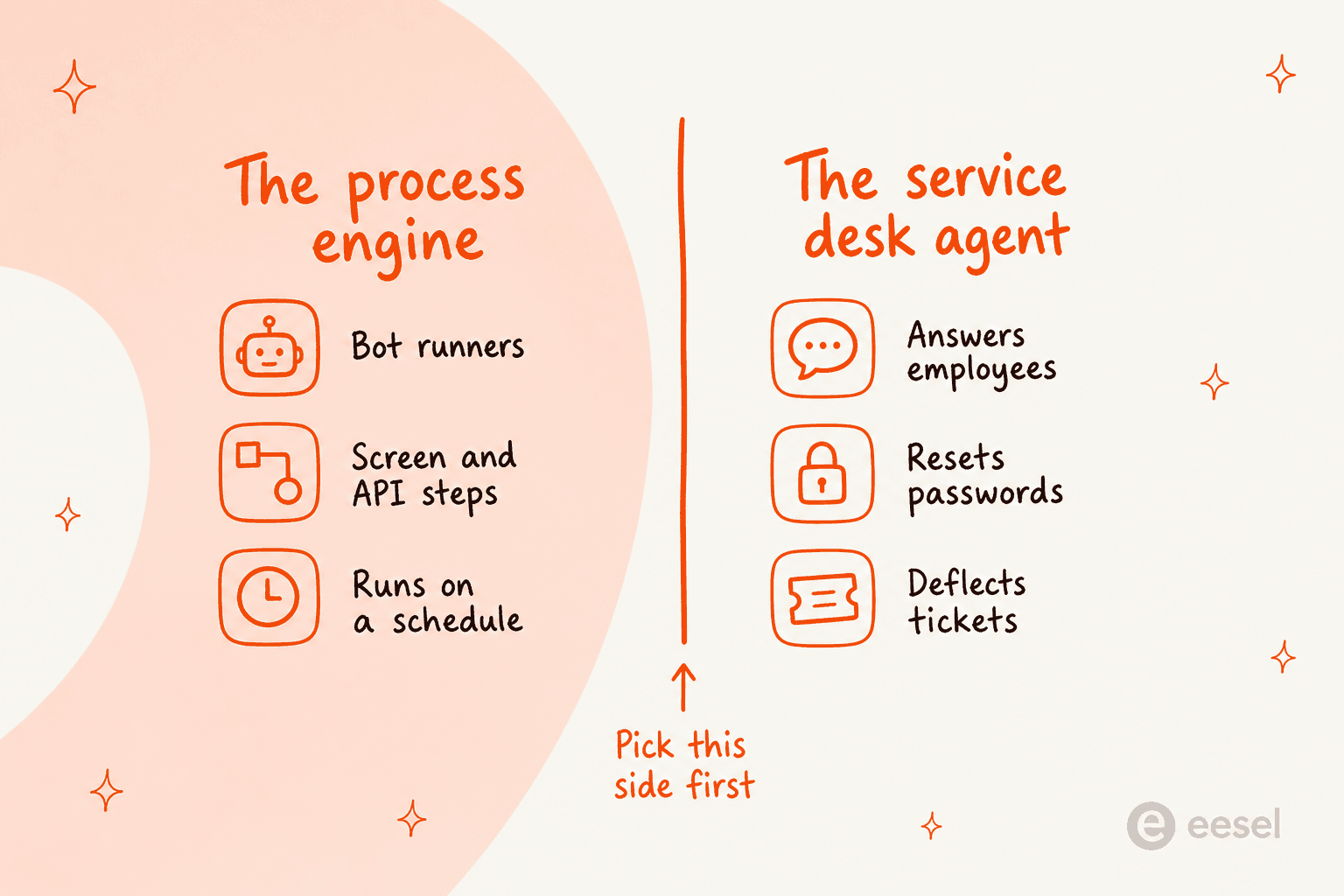
The process engine runs deterministic work, on a schedule. It reconciles invoices, it moves files between systems, it keys data into some application that has no API. Nobody ever talks to it. Success gets measured in runs completed and exceptions raised, which is a completely different scorecard from the one an AI ticketing system is judged on.
The service desk agent answers people instead. It resets a password, it explains a policy, it tells somebody where their laptop order has got to. The measure here is resolution rate, plus how often it escalates to a human. Automation Anywhere's own AI service desk page cites NJ Transit at an 80% auto-resolution rate and the City and County of Denver at 81%, and both of those are Aisera deployments.
Buy the wrong half and the numbers you were promised just do not arrive, and then the post-mortem blames the AI instead of blaming the shortlist.
Shortlist picker
Which half are you actually replacing?
Pick the sentence that sounds most like your week.
You want the answering layer
Your bottleneck is inbound volume, not throughput. An RPA licence will not help here, because the hard part is understanding a hundred phrasings of the same question, not clicking the button afterwards.
- Look at eesel AI, Freshservice and ServiceNow first.
- The meter to compare is per ticket or per session, not per seat.
- Ask every vendor whether it learns from your solved tickets or only your docs.
Start at item 1
You want the process engine
Deterministic beats clever here. You need reliable screen and desktop automation, a scheduler, and an audit trail, and you probably need it to survive a legacy application with no API.
- Look at UiPath, Power Automate and SS&C Blue Prism first.
- The meter to compare is per bot or per runner, plus developer seats.
- Ask what happens to unattended runs when a screen layout changes.
Start at item 2
You want orchestration, not screen-scraping
If the systems involved have APIs, screen automation is the expensive way to do it. An integration platform will be cheaper to run and far less brittle than a bot driving a browser.
- Look at Workato, n8n and Zapier first.
- The meter to compare is per execution, per task or per recipe.
- Ask whether AI steps are billed separately from workflow runs.
Start at item 7
How I compared them
Four rules, applied identically to all nine.
Only published numbers count as prices. Where a vendor will not put a figure on a public page, the pricing row says quote-only, and I do not fill that gap in with some third-party estimate. Half of this category is quote-only anyway, and pretending otherwise is how buyers end up shocked on the second call.
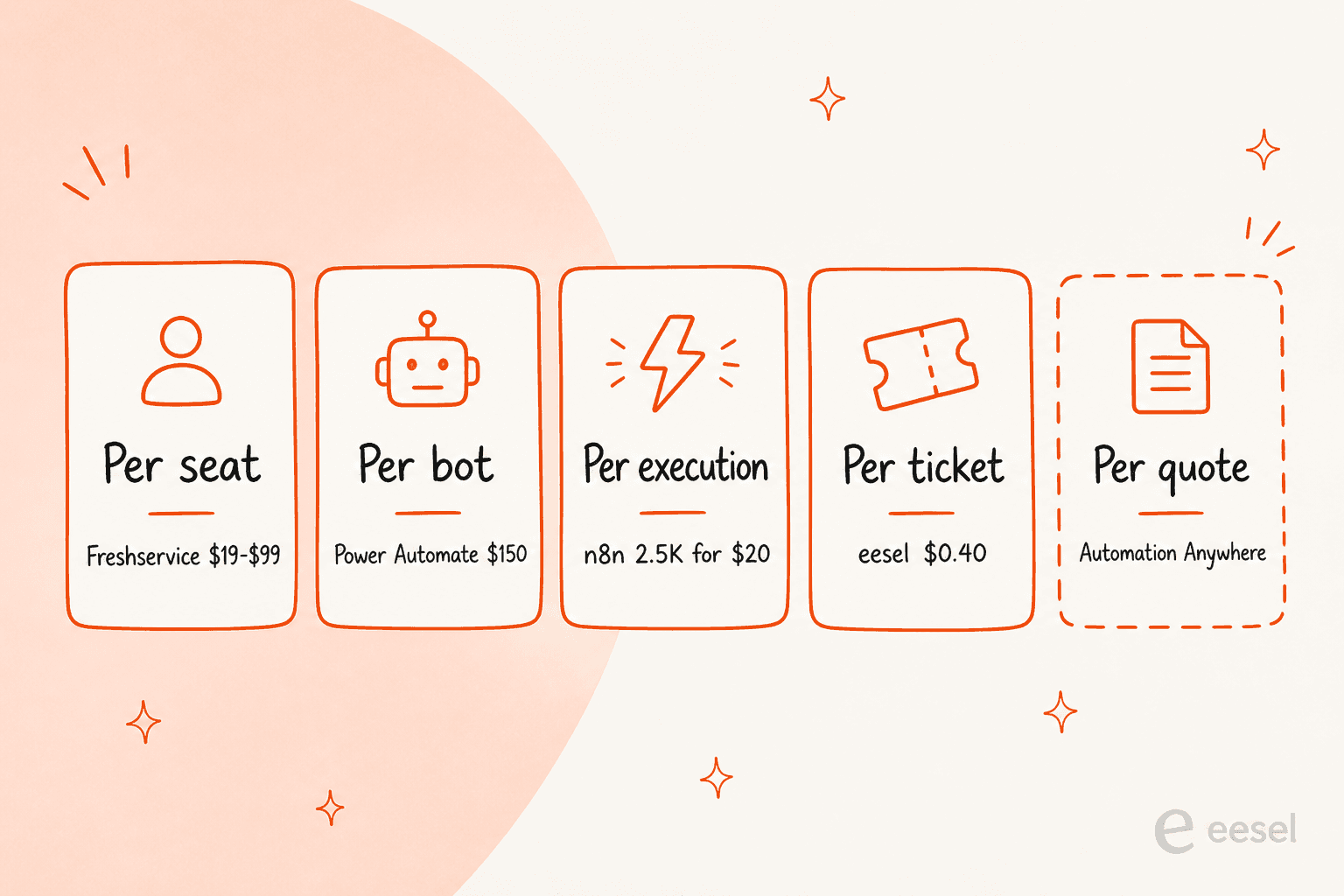
The unit matters more than the number. A seat, a bot, an execution and a ticket are simply not comparable things, and my breakdown of AI customer service cost goes deeper on why a cheap unit you consume constantly can lose to an expensive one you barely touch. Every item below names its unit explicitly.
Where the model comes from is a cost line. A platform which connects to your own OpenAI or Bedrock account is not actually cheaper. It has moved a line item onto a different invoice, that is all.
Limits are stated, not implied. Where I could not verify a gap against the vendor's own documentation, it did not go in the post.
The 9 best Automation Anywhere alternatives in 2026 at a glance
| # | Tool | Best for | Billable unit | Published entry price | Free tier | AI model included | Self-host option | Published rate card |
|---|---|---|---|---|---|---|---|---|
| 1 | eesel AI | AI on the service desk you already run | Ticket or chat handled | From $299/mo (500 credits) | 100 free credits | Yes | No | Yes, full |
| 2 | UiPath | Like-for-like RPA platform swap | Users and robots | $25/month Basic | Free trial | Bring your own | Yes | Entry tier only |
| 3 | Power Automate | Microsoft-first shops | Users and bots | $15/user/month | 30-day trial | Copilot Studio, priced separately | Via hosted bots | Yes, full |
| 4 | SS&C Blue Prism | Regulated, control-heavy RPA | Digital workers | Quote-only | No | Bring your own | Yes | No |
| 5 | ServiceNow | Desks already standardised on ServiceNow | Platform subscription | Quote-only | Developer instance | Yes | No | No |
| 6 | Freshservice | Mid-market ITSM with priced AI | Agent seat | $19/agent/month | Free trial | Freddy, add-on priced | No | Yes, full |
| 7 | Workato | API-first enterprise orchestration | Workspace and recipes | Quote-only | Free trial | Bring your own | Yes | No |
| 8 | n8n | Self-hosting and BYO model | Workflow execution | $20/month Starter | Self-hosted community | Bring your own | Yes | Yes, full |
| 9 | Zapier | Small teams who need it this week | Task | $19.99/month | 100 tasks/month | Included in Zaps | No | Yes, full |
1. eesel AI
Best for: putting an AI agent on the ticket queue without replacing the helpdesk underneath it.

I work at eesel, so read this section with that in the mind, and go check the pricing page yourself. What I can give you is what the last three years of putting agents onto live queues taught the team here, because that shaped the product in ways which are relevant to anybody leaving an RPA platform.
On nearly every rollout the pattern repeats. Teams want copilot mode first, and then full automation later, once the trust is there. Nobody flips an AI agent into auto-reply on day one and then sleeps well that night. Which is the reason simulation exists in the product at all, and why it works how it works: it replays your own past tickets, scores the answers against what your team really sent, and hands the gaps back to you.
What it does
It connects to the helpdesk you already run, reads your past tickets alongside your docs, and answers or drafts. Integrations include Zendesk, Freshdesk, Gorgias, Front, Help Scout, HubSpot, Salesforce and Jira Service Management.
It also answers in Slack and Microsoft Teams, which is where most questions to an internal desk actually arrive.
Where it beats Automation Anywhere
Three things, mainly. The model ships inside the price, so there is no second inference bill and no Bedrock account to go provision. The rate card is public, which means you can budget before the first call happens. And answers are grounded in solved tickets and not in documentation alone, which is the whole difference between an agent that recites your knowledge base back at people and one that sounds like your best agent.
Limits
It is not an RPA platform, to be clear. No screen recorder, no unattended bot runner, and no desktop automation for a legacy ERP that has no API. If the problem you have is a nightly reconciliation job then items 2 through 4 are your list, not this one. There is also no on-premise deployment, and HIPAA sits on the Enterprise plan.
Pricing
eesel has one fixed monthly price sized to volume: 500 credits for $299, 1,000 for $499, 2,500 for $999 and 5,000 for $1,899. One credit covers a ticket or chat session, however many replies it takes, with dashboard questions mostly free and blog generation at $4. There is no platform fee and no per-seat charge. The free plan is 100 credits with no card required. Paying a year upfront gets two months free, and SSO and MFA are add-ons from $199 a month.
Verdict
If the reason you are shopping is that inbound question queue, this is the shortest path from evaluation to something that actually answers. If it is the back office you care about, keep reading.
2. UiPath
Best for: a like-for-like platform swap when you still need real RPA.
What it does
The other twenty-year RPA incumbent, positioned now as agentic automation. Studio is for building and Orchestrator is for running, and then there is a large component library which is the single most-cited reason people pick it. Process mining and test automation get sold alongside as separate clouds, and the product lands on most ITSM automation tools shortlists.
Where it beats Automation Anywhere
Two things kept coming up in the r/rpa threads I read while researching this. Library depth was one. Stability on legacy desktop applications was the other. A developer who had moved the other direction put it bluntly:
"I had a number of years experience with uipath but then I took a role as an in-house lead dev using A360 during COVID. I quit after 8 months... You really had to put in twice the effort to get anything done that wasn't just a simple workflow."
UiPath also does something Automation Anywhere does not: it publishes an entry price and lets you buy it with a card.
Limits
Only the entry tier carries a price. Standard and Enterprise are both "Contact Sales for pricing", and the footnotes underneath the comparison table are where the real cost hides: users and robots get purchased separately across all three tiers, and the page also notes that some capabilities are included but "usage may require additional purchase". Cost was the most common complaint in those same threads, with one commenter putting an unattended licence at around 10k a year. That figure is a practitioner's estimate and not a UiPath number, so hold it loosely.
Pricing
Basic starts from $25 per month, aimed at individuals and small teams, hosted in the European region, with limited scale on the users and robots. Standard and Enterprise stay quote-only. Cold data retention scales across the three tiers at 6 months, then 2 years, then 5.
Verdict
The safe swap, assuming the picker above sent you to "process engine". There is still a negotiation coming, but at least you start from a published floor and not from nothing at all.
3. Microsoft Power Automate
Best for: a Microsoft-heavy shop that wants a rate card it can read without a call.
What it does
Cloud flows for API-level workflow automation, desktop flows for RPA in attended or unattended mode, plus process and task mining. It is a common first stop for smaller teams comparing ITSM for SMBs. Copilot Studio sits next to it for the conversational layer.
Where it beats Automation Anywhere
The whole rate card sits on one public page, which after a week spent inside Automation Anywhere's licensing docs felt like a luxury to me. Premium is $15 per user per month paid yearly, and that includes attended desktop flows. Unattended runs $150 per bot per month, or $215 if you would rather Microsoft hosted the virtual machine for you. Where your automations mostly touch Microsoft 365, Dataverse and Azure, the connector story is solved already.
Limits
The premium connector model is where the trap is, and practitioners are pretty direct about it. One r/rpa contributor warned that outside the Microsoft ecosystem the product "relies heavily on premium connectors", and that a single enterprise-wide process can end up costing more than a competitor's unattended licence would. Process mining is then a $5,000 per tenant per month add-on, and it is only available alongside Premium. Copilot Studio is separate again at $200 per month for 25,000 Copilot Credits, so the conversational half is not inside the automation price.
Pricing
Premium $15 per user per month. Process $150 per bot per month. Hosted Process $215 per bot per month. Process Mining add-on $5,000 per tenant per month. Copilot Studio $200 per month for 25,000 credits. All paid yearly, with a 30-day free trial.
Verdict
The cheapest honest entry into RPA, provided you are already a Microsoft shop. Price out the connectors before committing, since that is where the surprise lives.
4. SS&C Blue Prism
Best for: regulated environments that want control and governance over convenience.
What it does
The third one of the classic RPA trio. It sits inside SS&C Technologies now, and got relaunched during 2026 around WorkHQ, which is the company's agentic platform. The heritage here is the "digital worker" model, centrally governed and unattended by default, built originally for banks and insurers.
Where it beats Automation Anywhere
Governance is the pitch here, and the parent company doubles as the proof point. SS&C runs its own automation at scale and then publishes the results, one of which is a case where credit agreements got processed 95% faster using Blue Prism alongside generative AI. For a compliance team that needs every automated decision attributable, that lineage is worth something, and it maps onto the governance advice in my ITSM best practices guide. It also came up in that January 2026 migration thread as the option which "appears more reasonable in some comparisons" on cost, although that was one buyer's read and not a published rate.
Limits
No published pricing whatsoever, and unlike Automation Anywhere there is not even a marketplace reference figure you can anchor to. The attended and citizen-developer story has historically been thinner than UiPath's, and that matters where the plan is a decentralised rollout. The WorkHQ relaunch is also recent enough that agentic features want evaluating on what ships today, not on the roadmap.
Pricing
Quote-only. No public price, no self-serve purchase path, no free tier.
Verdict
Worth a call where you are regulated and the audit trail basically is the product. Skip it where you need to budget before you can even get a meeting.
5. ServiceNow
Best for: desks where ServiceNow is already the system of record.
What it does
The enterprise ITSM platform, with AI agents layered over the top of the workflows and the CMDB it already owns. Moveworks now sits inside the same company as well, which puts a mature employee-facing agent right alongside the platform.
Where it beats Automation Anywhere
Context, mostly. An agent that can already see your CMDB, your change records and your catalogue items is starting from a position no bolt-on will match, and it acts inside the same platform instead of reaching across an API boundary to do it. Where ServiceNow is where the tickets live, the shortest path to ITSM automation normally runs straight through it. I have written more on AI features in ServiceNow and on how the ServiceNow AI compares to Freshservice.
Limits
Pricing is quote-only, and the platform is famously not cheap, which is exactly the pattern people are trying to get away from when they leave Automation Anywhere. Implementation effort is real too. And it is the wrong tool entirely where your tickets live somewhere else, because all the value comes from the platform underneath it.
Pricing
Quote-only. Free developer instances are available for building and testing.
Verdict
The strongest option on this list where you are already standardised on it. One of the weakest where you are not.
6. Freshservice
Best for: a mid-market IT desk that wants ITSM and AI priced on the same page.
What it does
Cloud ITSM covering incident, problem, change and release management, plus a service catalogue, an employee self-service portal, and orchestration out into third-party apps. Freddy is the AI layer on top.
Where it beats Automation Anywhere
Everything sits on the pricing page, the AI included. Starter is $19 per agent per month billed annually, then Growth $49 and Pro $99, with Enterprise as a custom quote. Freddy AI Copilot is a clearly-labelled add-on at $29 per agent per month. Orchestration transactions come included at between 1,000 and 20,000 a month depending on the tier, and overflow packs run $250 per 1,000. So you can model a whole year's bill in a spreadsheet before speaking to anybody, which in this category is not a small thing.
Limits
The customer-facing agent is gated, which is the catch. Freddy AI Agent (Classic) appears on the Enterprise plan, and Freshworks' own FAQ states that each Enterprise licence includes 1,200 sessions of it per year, a session being any interaction a unique user has inside a 24-hour period. Meaning the AI most buyers actually want is behind the one tier with no published price. More on this in my writeup of Freshservice AI pricing and its known limitations.
Pricing
$19, $49 and $99 per agent per month billed annually for Starter, Growth and Pro. Enterprise is custom. Freddy AI Copilot adds $29 per agent per month. Connector app tasks come with 500 free, then $80 per 5,000.
Verdict
The best-documented rate card in the ITSM half of this list, easily. Just be sure you price the tier which carries the agent and not the tier which carries the copilot.
7. Workato
Best for: enterprise orchestration when the systems involved actually have APIs.
What it does
An enterprise integration and automation platform built around recipes, with a large connector library, and an agentic layer that got added over the last two years. It sits somewhere between the RPA platforms and the lighter tools in items 8 and 9.
Where it beats Automation Anywhere
API-first by design, which means it does not care at all what a screen looks like. For the substantial share of automations that are really only "move this record from system A to system B when X happens", that is cheaper to run and far less brittle than a bot driving a browser around. Governance and environment management are built for enterprise use here, not bolted on afterwards.
Limits
Pricing is a quote, with the plans page routing you to "Get a quote" instead of a rate card, so it shares Automation Anywhere's main weakness. The API-first design is also inherited as a genuine gap: where your ERP has no API, an integration platform cannot see it, and that is precisely the case RPA got invented for.
Pricing
Quote-only, structured around workspaces and recipes. A free trial is available.
Verdict
A strong swap where the honest answer is that you never needed screen automation to begin with. Not a swap where you did.
8. n8n
Best for: teams that want to self-host and keep their own model keys.
What it does
A source-available workflow automation tool, node-based builder, deep AI and LLM nodes, plus the option of running the whole thing on your own infrastructure. It has become the default answer whenever an r/rpa thread turns towards cheaper agentic options, and it turns up regularly in support automation tools roundups.
Where it beats Automation Anywhere
Price transparency, and control. Starter is $20 a month billed annually and gives 2,500 workflow executions with 2,300 AI credits, Pro is $50 for 10,000 executions, Business is $800 for 40,000. Executions bill per full workflow and not per step, so a 40-node workflow costs you the same as a 3-node one does. And because self-hosting is on the table, the compliance conversation which usually forces an enterprise RPA quote can sometimes get answered by where the server lives instead. Companies under 20 employees can also apply for a startup plan at 50% off Business.
Limits
You bring your own model, and your own operational burden with it. Self-hosting means the upgrades are yours, the scaling is yours, and so is the incident at 2am. It is not a desktop RPA tool either: for a legacy Windows application with no API this is simply the wrong shape of software. One r/rpa commenter who had tried both was clear that lightweight tools like this one "might not be suitable for enterprise use" at RPA scale.
Pricing
$20 per month Starter, $50 Pro, $800 Business, all billed annually, with Enterprise quoted. Self-hosted community edition carries no licence fee. Concurrency scales 5, 20 and 200-plus across the tiers.
Verdict
The best value on the list, assuming you have engineers and API-shaped problems. Compare it against AgentKit and n8n before you commit.
9. Zapier
Best for: a small team that needs something running this week.
What it does
The most widely-used no-code automation tool there is, thousands of app connections, and then Tables, Forms and an agents product layered on during the last two years. My longer take sits in Zapier AI and in the Make comparison.
Where it beats Automation Anywhere
Time to first automation, by an enormous margin. A free tier gives 100 tasks a month, Professional starts from $19.99 a month, and Team is $69 a month covering up to 25 users with SAML SSO. Nobody needs a procurement cycle just to try it. The connector breadth also means whatever app you need is almost certainly supported already.
Limits
Billing is per task, and a task is per step rather than per workflow, so a multi-step automation multiplies fast once volume arrives. Premium apps are gated above the free tier as well, and the governance story is thinner than anything else on this list, which is the honest reason it rarely survives an enterprise security review as a core automation platform.
Pricing
Free for 100 tasks a month. Professional from $19.99 a month, Team from $69 a month for 25 users, Enterprise quote-only. Paying yearly saves 33%.
Verdict
Not an Automation Anywhere replacement at enterprise scale, and it makes no pretence of being one. It is an excellent way of finding out whether the process you were about to spend six figures automating is even worth automating.
What this actually costs at 2,000 tickets a month
Rate cards in the abstract are hard to compare against each other, so here is one scenario priced across the whole list. Take an internal IT desk, eight agents, roughly 2,000 tickets a month, of which about half are password resets and access requests and the same twelve policy questions, which is the classic profile for tier-1 deflection.
| Option | What you buy | Monthly cost | What it does not cover |
|---|---|---|---|
| Freshservice Pro + Copilot | 8 agents at $99, plus $29 Copilot each | $1,024 | The customer-facing agent needs Enterprise |
| eesel AI | 2,500-credit plan (covers 2,000 tickets) | $999 | No RPA, no desktop automation |
| Power Automate | 8 Premium users at $15, plus one unattended bot at $150 | $270 | Does not answer tickets |
| n8n Pro | 10,000 executions | $50 | Model and inference billed separately |
| Automation Anywhere | Not published | Unknown | The only public anchor is $126,000 a year, labelled reference only |
Three things fall out of that table. Seat-based pricing stays flat whether your volume doubles or halves. Volume-based pricing tracks the work instead, and that cuts both ways, since a quiet month leaves credits unused and a bad one can run past the plan, so a cap on overage matters. Then the last row, which is the real point of this whole post. Every other option here can be modelled before a sales call, and that is why so many of these evaluations quietly end before the demo.
One more caveat worth to state, since the r/rpa moderator said it better than I can: on high-volume, low-variation work, classic RPA is still cheaper and faster than an AI agent doing the same job. For a lot of desks the right answer is both of them, bought separately, on meters you are able to read.
Try eesel for your service desk
If you landed here because the questions in your queue keep repeating and the Automation Anywhere quote process stalled somewhere, that is the exact problem eesel got built for. It plugs into Zendesk, Freshdesk, Jira Service Management, Front, Slack or Teams. It reads the tickets your team already solved instead of only your help centre, and it starts drafting the same day. That is the approach I argued for in my guide to self-service with AI. Most teams have a first agent live inside about half an hour.
The part I would test first is the simulation. Point it at your last few hundred tickets, let it answer all of them, then read the score against what your team really sent, before anything at all goes near a customer. That step is the one which decides whether an AI agent is worth switching on. It costs nothing to run.
Pricing is from $299 a month for 500 credits, one credit per ticket or chat, with 100 free credits to start, no seats and no platform fee. If you want to see it against your own queue, try eesel or book a demo.
Frequently Asked Questions
What are the best Automation Anywhere alternatives in 2026?
How much does Automation Anywhere cost?
Is there a free Automation Anywhere alternative for a small team?
Does Automation Anywhere include an AI model, or do I bring my own?
What happened to Aisera after the Automation Anywhere acquisition?
Which Automation Anywhere alternative trains its AI on my past tickets?
Is an RPA platform or an AI agent the better fit for an IT service desk?


Article by
Kurnia Kharisma
Kurnia is a software engineer and writer at eesel AI with two years of SEO experience, writing about AI tools, helpdesk software, and customer support. He pairs a developer's understanding of how these products are built with search-driven research into what actually ranks and resonates with the people searching for them.