Sistava alternatives: the 10 best AI employee tools in 2026

Kira

Katelin Teen
Last edited August 18, 2026

What Sistava actually is
Sistava is an AI workforce platform where you "hire" named AI employees that work inside the tools you already use. That phrasing is not mine, it is the entire H1: "Hire AI Employees", with no subheadline under it. The unit is an "employee", the platform is a "workforce", and the words "AI agent" and "AI teammate" appear nowhere on the homepage.
It is worth knowing who built it, because it shapes everything else. Sistava is a product of SISTA AI, an Amsterdam company registered as KvK 90724933, and it is the work of Mahmoud Zalt, who describes himself on his own page as a "Solo founder" and "AI Engineer · Software Architect" with 16 years building products. He is not new: his Laradock project has, by his own account, "crossed 5 million downloads worldwide". The company page says it took "three and a half years and four different AI products to get here", and Sistava itself has been live since 15 April 2026. Human headcount is one. There is no disclosed funding.
I want to be fair about what that means. A bootstrapped solo founder shipping a multi-agent platform in four months is genuinely impressive engineering, and some of Sistava's product decisions are better than those of much larger vendors. Its documented default is draft-only, in language most enterprise tools would not dare use: "a draft written in your voice is still a draft until you say yes". Its Activity Inspector exposes model choice, token count and per-fee credit breakdown at a level of transparency that is rare anywhere.
What it does not have is scale, third-party validation, or a finished surface. And the specific gaps matter differently depending on what you were going to hire it for.
The roster is one row deep
Sistava markets eleven departments. Four of them have real capability documentation: sales, marketing, customer support and HR. The other seven, covering operations, finance, legal, data, design, product and e-commerce, are marketing copy with no capability pages behind them. And each documented function has exactly one named agent. No function has a bench.
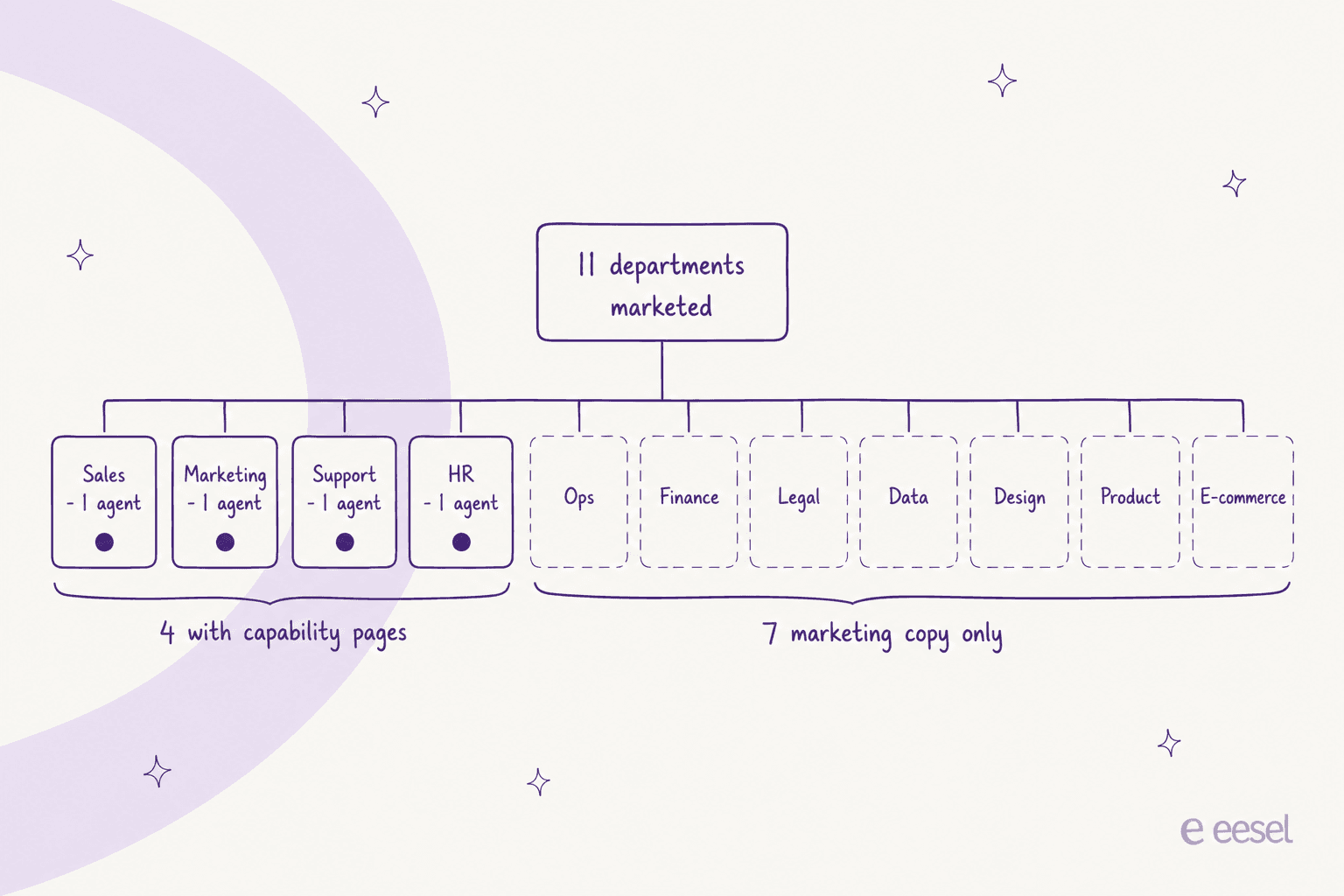
The roster itself is also in two places that disagree. The /en/agents page lists two agents, Bob and Alice. The real twelve-name roster lives on /en/market, and ten of those twelve names have no URL anywhere in Sistava's own 3,054-URL English sitemap. Bob is missing from the marketplace; Aisha, who fronts the support team, is missing from the agents page.
Credit where it is due on integrations, because this surprised me: the helpdesk connectors are real and they are the strongest part of the product. Zendesk, Freshdesk, Freshservice, Gorgias, HubSpot, Salesforce Service Cloud, ServiceNow, Jira, Re:amaze, HelpDesk.com and SupportBee all have live integration pages, and the Zendesk integration describes one-click OAuth with read and write both. Help Scout is named in Sistava's own support FAQ but has no integration page. Front and Zoho Desk are absent entirely.
The integration count is harder to pin down, because Sistava publishes four of them. The pricing page says "1,000+". The support FAQ says "50+". The Zendesk page says "thousands", twice. Per-employee connections are described as having "no limit". The number I could actually verify from its own sitemap is 869.
Why people look for Sistava alternatives
Five reasons come up, and only two of them are about features.
1. Nobody else has used it yet
This is the honest headline finding of my research, and I looked hard. There are zero independent user reviews of Sistava on any credible platform. Not thin, zero. No Reddit thread, no Capterra listing, no Trustpilot listing, no Hacker News submission, no operator post on X or LinkedIn.
The G2 listing does exist, with exactly one review, five stars, dated 15 July 2024, posted by "Mahmoud Z., Founder". G2 says so itself on the page: there are not enough reviews of Sistava for G2 to provide buying insight. Even that self-review flags cost in the dislikes box:
"Feels a bit expensive, even though it's the cheapest I could find so far."

I am not holding that against a four-month-old product. I am saying you will be the reference customer, and you should price that risk in. Practitioners in the category are blunt about the dependency that creates:
"Depending on a single, or few vendors for full-AI employees is the concrete equivalent of unionizing their workforce. If the vendor decides on a price hike […] or their full-AI employee gets dumber or lazier […] then your whole AI-powered company is at risk. Our current human-based organizations are much more resilient to single point of failures."

Also worth knowing: the parent site still labels the platform "Alpha Release • Exclusive Access" while sistava.com presents it as live, and the pricing bundle ships an active client-side access-code gate for a private beta. Prices are published; self-serve purchase appears partly gated.
2. The credit meter has no price list
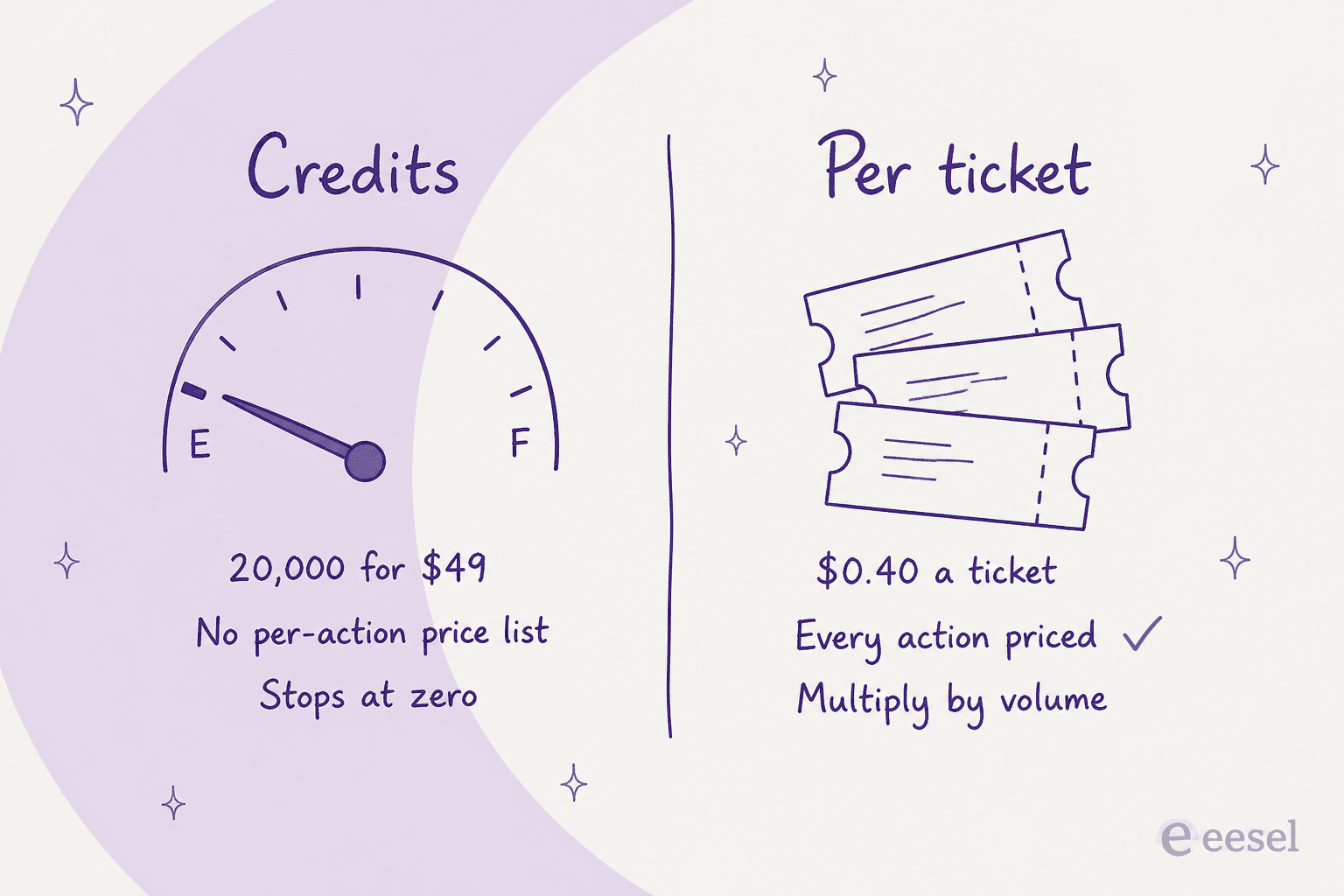
Sistava's unit is the Credit. One meter, which is genuinely simpler than most. The problem is that there is no per-action cost table anywhere. The entire published definition of what a credit buys is "based on model + complexity", and the credit-terms page that promises the full rules sits behind a login.
Here is the tier structure, from Sistava's own pricing data:
| Plan | Monthly price | Credits | AI employees | Extra seats |
|---|---|---|---|---|
| Free | $0 | 2,000 lifetime | 2 | 0 |
| Starter | $49 ($24.50 first month) | 20,000/mo | 3 | 0 |
| Builder | $99 ($49.50 first month) | 40,000/mo | 4 | 2 |
| Founder | $199 | 80,000/mo | 6 | 3 |
| Leader | $399 | 160,000/mo | 10 | 5 |
| Custom | Quote only | Unlimited | Unlimited | Unlimited |
Note the shape. There is no annual plan at all, and the only discount is 50% off the first month on Starter and Builder. The in-plan rate is flat at roughly $2.45 per 1,000 credits across all four paid tiers, so eight times the price buys exactly eight times the credits and nothing else. Top-ups run $6 for 1,000, $11 for 2,000 and $15 for 3,000, which is two to two-and-a-half times the in-plan rate. Run out and it stops; there is no published overage or auto-charge. And "unlimited AI employees", which the parent site advertises, is a Custom-tier property. The self-serve caps are hard.
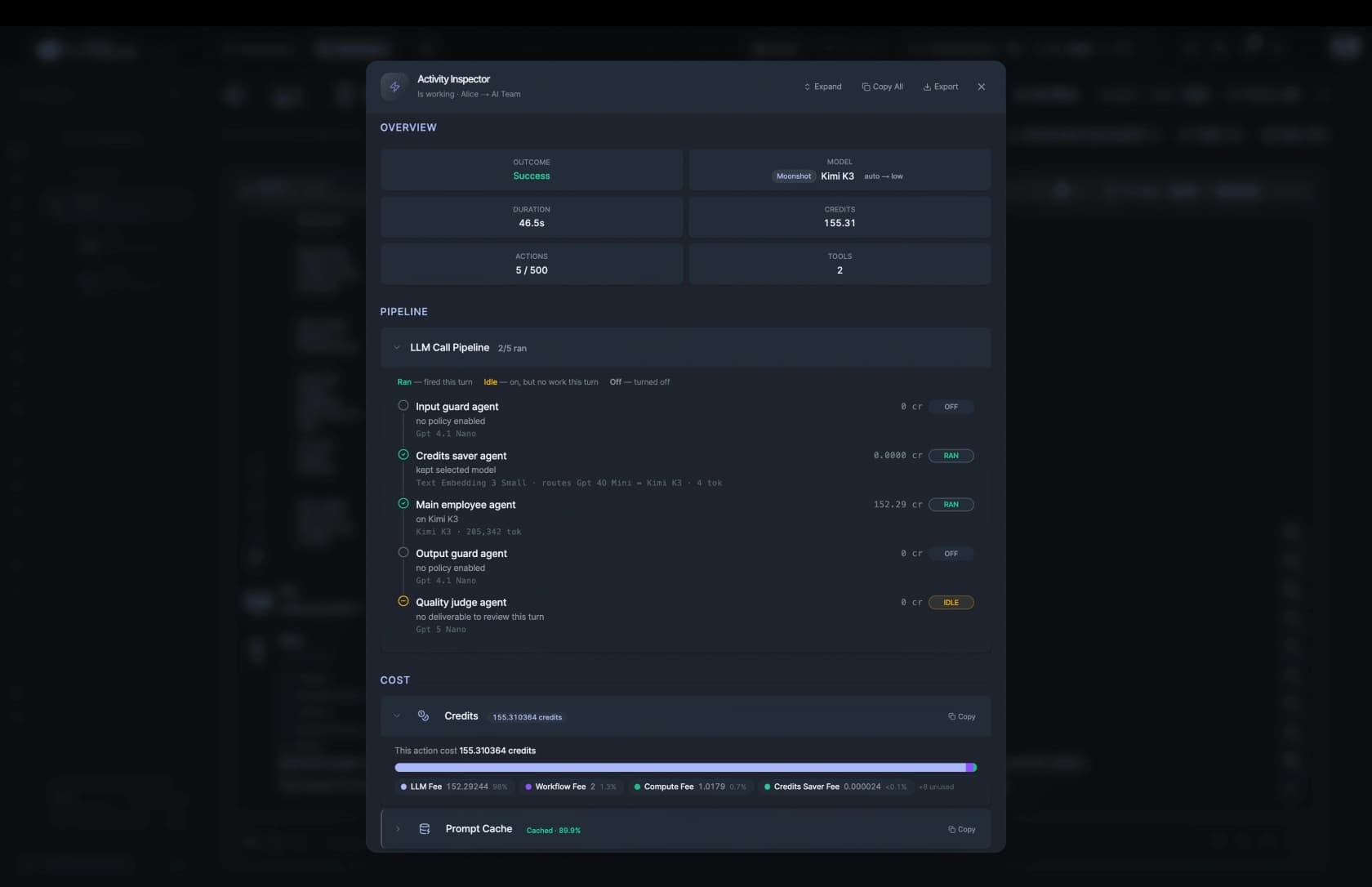
The reason this matters is arithmetic you cannot do in advance, and Sistava's own marketing screenshots let you do it after the fact. Its Activity Inspector shows a single successful action costing 155.31 credits, running on Moonshot's Kimi K3, of which 98% is the raw LLM fee. At Starter's $0.00245 a credit, that one action is about 38 cents, and the $49 plan buys roughly 129 of them.
The company dashboard is starker. In its own screenshot, one three-employee team shows 12 tasks delivered this week against 15.9K credits spent, with spend up 1,447% week over week. That is about 1,325 credits, or $3.25, per task, which on a Starter plan is roughly fifteen tasks a month.
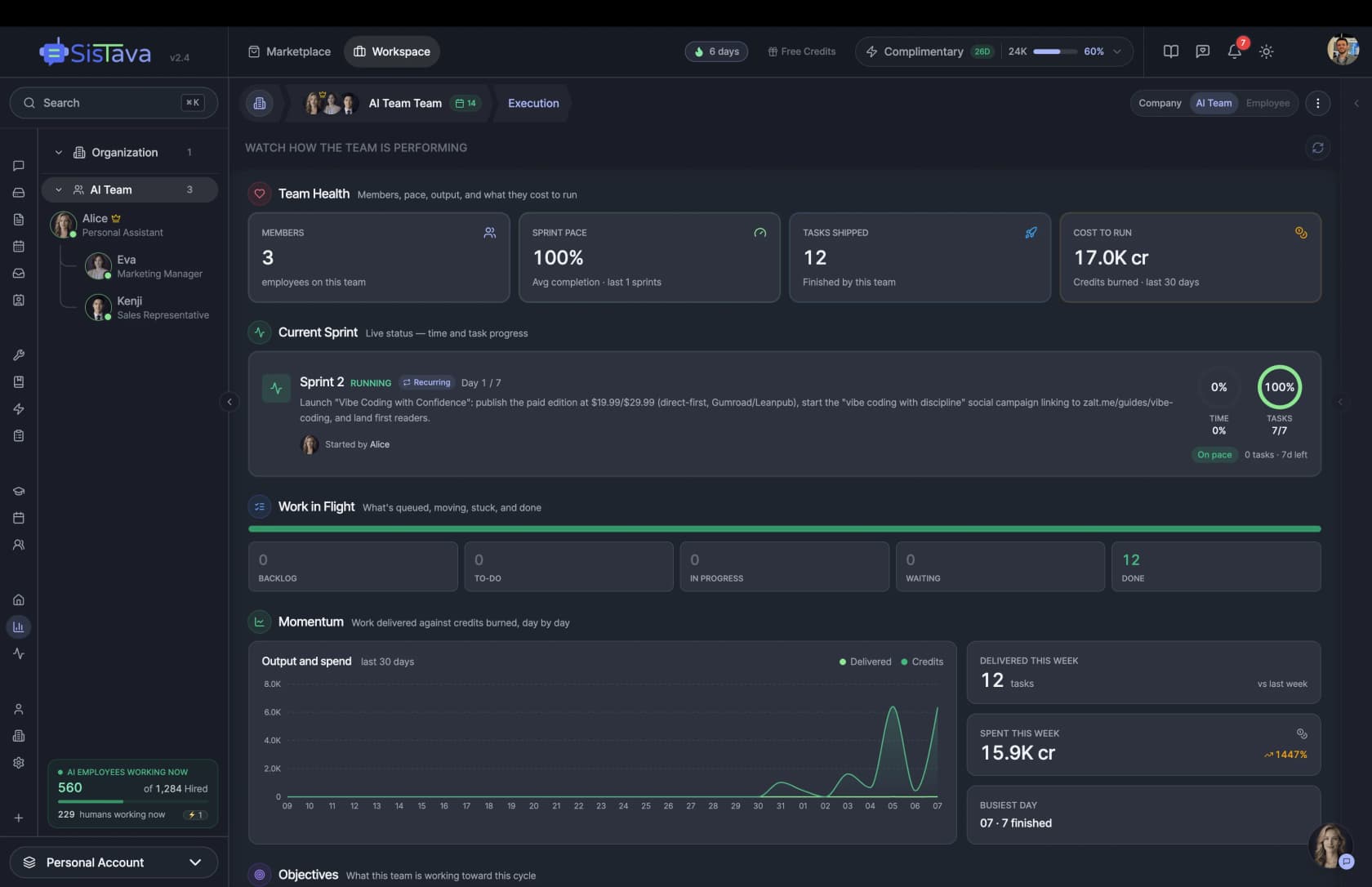
Be fair to that number: it is one team's week in a promotional screenshot, the sample is twelve tasks, and the sprint on screen involves research and publishing work that is heavier than a support reply. It is not a benchmark. But it is Sistava's own data, and it tells you the ratio between credits and finished work is not something you can forecast from the pricing page. Operators on credit meters describe exactly that problem:
"I don't know how many credits I'll need, so I'm less likely to test things, not more. […] I can't with a straight face say 'that gets us 60,000 credits' as I've no idea what we get FROM that 60,000 credits."

And the mechanism underneath every surprise bill:
"cost per step isn't flat. Every tool result stays in the context, so a 30 step run is paying for a way bigger prompt at step 30 than at step 5."
There is also a straightforward contradiction to know about before you budget. Sistava's pricing page says "Plans start at $49/mo". The parent company's AI Workforce page says "Plans start at $19/month. You get unlimited AI employees, with usage billed by the work they do." There is no $19 tier on the pricing page and no annual discount that reconciles the two. Treat the pricing page as the live card.
3. You can approve, but you cannot rehearse
This is the gap I would care about most, and it is the one that generalises to every tool below.
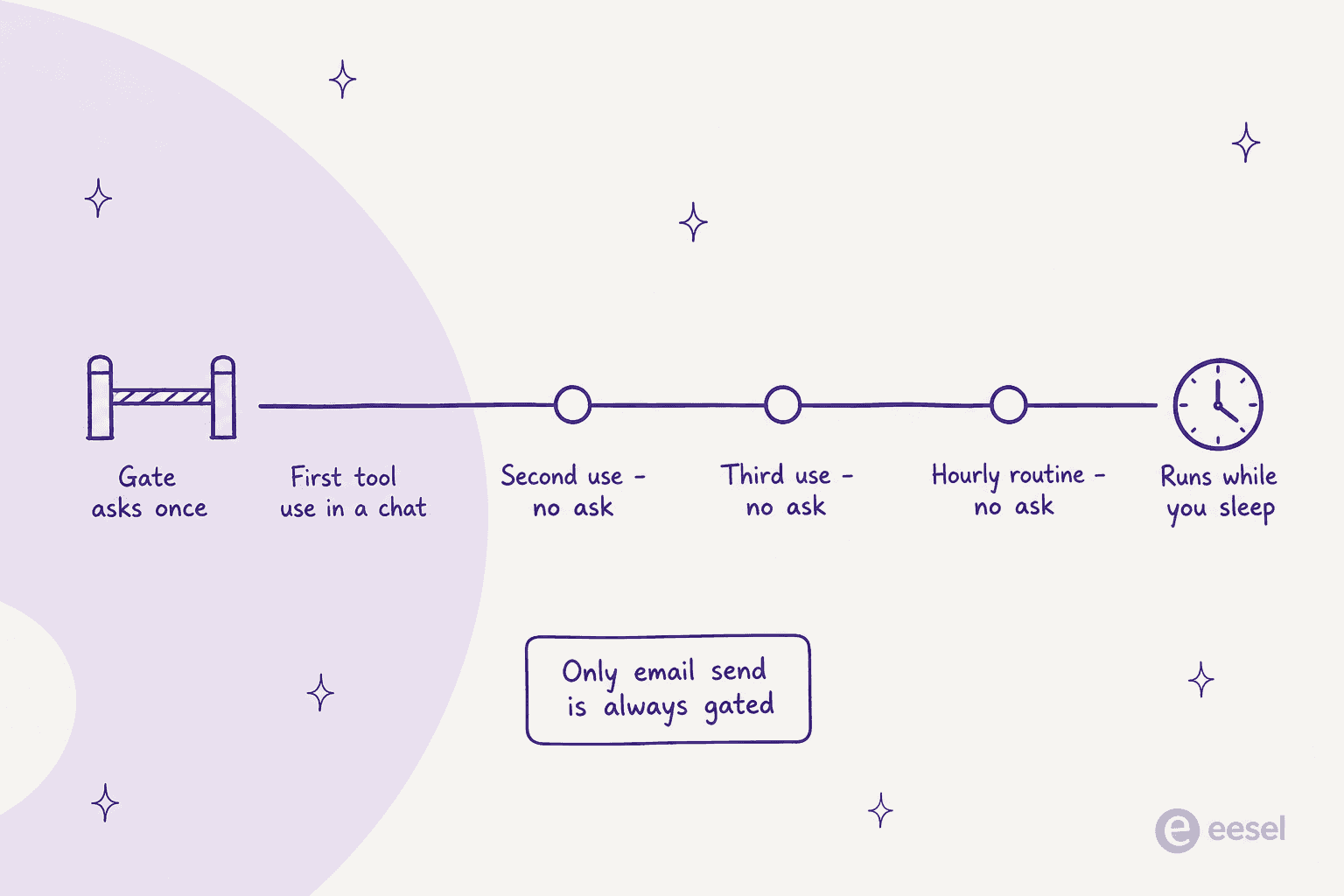
Sistava's controls are real and they are runtime controls. There is an approval gate, guardrails and a spend brake. What there is not, anywhere in the documentation I read across seventeen guide pages, is a pre-flight check: no sandbox, no dry run, no simulation, no shadow mode, no test mode. I searched for all of those words. Three things came back and none of them is a customer dry run. "Tool execution is sandboxed and capped" is infrastructure containment, and the tool still fires at your live systems. "Staging" refers to Sistava's own engineering clone. And the closest substitute is a manual loop Sistava itself recommends: "Review the evidence, then reject the change request to confirm that the live store stays untouched."
Then look at where the gate actually sits. It is opt-in per tool, and it asks once per conversation. The only hard-coded exception, the one action that is always gated, is a Gmail or Outlook send. Meanwhile scheduled routines run unattended on an hourly default heartbeat.
The Activity Inspector screenshot above makes the same point from the other side. Both the input guard agent and the output guard agent read "no policy enabled" and ship switched off. The quality judge sits idle. The safety layer exists; it is not on by default, and Sistava's AI Guardrails feature is gated to the $199 tier.
I have watched what that combination costs. Working on eesel's own agents, the failure mode is never a model that is stupid, it is a model that is confidently plausible. We have had paying customers whose bot fabricated solar-cell subscription claims to real customers, and another where the answer to a product question came back as "Oxygen", straight off the periodic table, because knowledge retrieval returned nothing and the model filled the gap. One of our own eCommerce support managers put the shape of the problem better than any framework:
"stop telling customers that we will get them sorted. You dont know that" / "stop promising customer things we cant do. we cannot guarantee this customer's order to them by friday"
That was an eCommerce support manager watching an agent over-promise delivery dates in customer-facing replies, and it is why we now simulate every rollout against historical tickets before it goes anywhere near a live queue. An approval button does not catch that class of error, because the reply looks fine. Only replaying it against what your team actually sent does. Operators reach the same conclusion from experience:
"A sent message can't be unsent, and the cost of one hallucinated commitment to a customer is not symmetric with the time saved on the other 200."
And the specific reason a multi-role platform is riskier here than a single-purpose one:
"let the agent do everything reversible on its own (read, navigate, pull context across apps, draft) and force a human only at the irreversible edge, send, submit, pay, delete. […] and it gets worse once a model has MCP reach into many apps and not just the inbox, because one bad action has a bigger blast radius, so the checkpoint has to be per irreversible action, not per task."
There is one more thing to square. Sistava's own /en/ai-customer-support page claims "80% tickets resolved without humans". That sits in direct tension with a documented draft-only default and an auto-resolve that covers, in its own words, only the simplest repeat questions. The claim carries no source. Ask for the methodology before you plan around it.
4. Nothing is certified yet
If you are past about twenty people, this is where the evaluation ends rather than begins. Sistava's trust pages are honest and entirely future-tense. On SOC 2: "actively building toward", plus "we have not yet completed a formal audit" and a plan to engage an auditor "as we scale", with no date and no Type I on the way to Type II. ISO 27001 is "On The Roadmap". HIPAA is "preparing", and Business Associate Agreements are being "evaluated", so there is no BAA available today. GDPR and CCPA are presented as current.
Three specifics worth knowing beyond the headline. The sub-processor list does not exist: the trust hub claims it is public and updated within 30 days of any change, and the expected URL soft-404s. The referenced Data Retention Schedule is also absent, so the only published retention figure is 14-day backups. And the trust hub contradicts its own child pages twice, once on TLS version and once on uptime, where the hub says a 99.5% target and a child page states a 99.95% monthly SLA, which is a tenfold difference in allowed downtime.
There is no SAML and no SCIM. SSO is Google and Microsoft only. SOC 2, RBAC, audit logging and the 99.9% SLA are all Custom-tier, quote-only. One more thing that is documented in the product guide but never on the trust site: Composio is the custodian of all your connected OAuth tokens.
5. It is a roster of personas when you needed one job done
This is the structural reason, and it is the one the whole category argues about. Buying eleven shallow roles feels like buying capacity. It usually buys you attention cost, because each persona needs configuring, watching and correcting, and none of them is deep enough to hand a real queue to. The strongest version of this argument came from a builder with three years on agents:
"There's scientific papers written on modular agent architecture that I just mentioned. It has shown significant performance instead of building one giant agent thats a jack of all trades.. but a master at none"
Someone who actually bought several of these platforms, and stopped:
"I tried the first three and am no longer using them if that tells you anything."
And the test I would apply to any of them, from the operator who mapped the vendor landscape himself:
"'AI employee' only works if the job is bounded: clear inputs, outputs, integrations, and ROI. Otherwise it's just workflow automation with a more aggressive name."
How I compared these
Three questions, applied identically to every tool below. They are deliberately not "which model does it use", because that has stopped being the differentiator.
Where does the work stop? There are four gates, and only the last removes work from a person: it drafts a reply, it queues the reply for you, it sends the reply itself, or it closes the item. Most tools marketed as AI employees sit at gate one or two.
What is the meter, and can you multiply it? A per-ticket or per-execution price you can multiply by your volume is a budget. A credit with no published per-action cost is a hope.
What can you rehearse before go-live? This is the column no competitor comparison table carries, and it splits the field roughly in half. An approval button is not a rehearsal, it is a manual step you now perform forever.
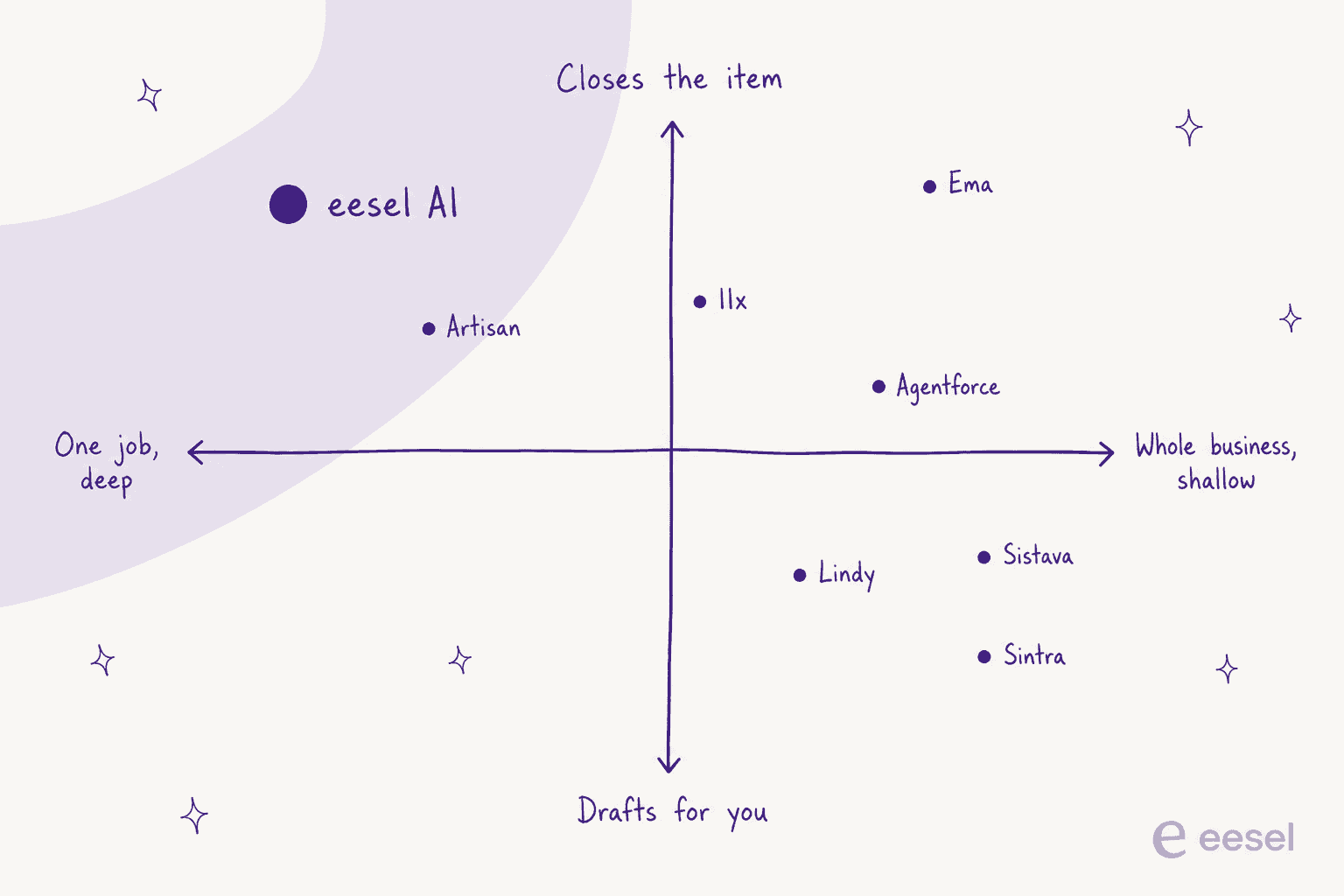
I lead with the third question because of a number from our own trials that I find hard to argue with. On a cross-validated trial over real Zendesk traffic, 284 chats plus a 100-ticket cross-validation for a German online jewellery retailer running about 1,000 tickets a month, the AI hit 93% triage accuracy and 100% spam detection with zero false positives. Draft quality was 88% directionally correct. And only 12% of those drafts were sent as-is, against a 7% factual error rate. Mostly right, and a human still touched almost every reply. That gap is what "AI employee" marketing papers over, and the only way to find your own version of that number is to replay your own history.
Sistava alternatives compared
| Tool | Best for | Entry price | Billable unit | Rehearse before go-live? | Where work stops | Helpdesk connectors | Free tier | Compliance | Published customers |
|---|---|---|---|---|---|---|---|---|---|
| Sistava | A solo founder who wants a back office | $49/mo | Credit, no published per-action price | No pre-flight anywhere | Draft by default, rule-gated auto-send | Zendesk, Freshdesk, Gorgias, HubSpot, ServiceNow +6 | Free plan, 2,000 lifetime credits | SOC 2 and ISO 27001 both future-tense, no BAA | None named |
| eesel AI | Customer and internal tickets | From $299/mo (500 credits) | 1 credit per ticket or chat | Yes, simulation over your past tickets | Closes the ticket or hands back | Zendesk, Freshdesk, Gorgias, Front, Help Scout, JSM, Kustomer | 100 free credits, no card | SOC 2, HIPAA available as an add-on | Named case studies |
| Lindy | Cross-app personal automation | $29.99/user/mo | Credit, ~$0.01 each | No dry run found across nine pages | Mostly drafts and queues | Via general connectors | Free tier | Not published in detail | Yes |
| Relevance AI | A published action meter | $29/mo Pro | Action, one tool run, failures bill | Limited, no historical replay | Completes scoped tasks | Via general connectors | $0 tier, 200 actions/mo | SOC 2 published | Yes |
| Sintra AI | The nearest role-persona twin | $54 to $97/mo | Credit, 250 per tier | 3-day, 50-credit plan | Produces drafts and assets | None | $0 3-day plan, hidden page | Not published in detail | Yes |
| Cassidy AI | Internal staff questions | $79/mo in-app | Credit | Test against your own docs | Drafts; Auto-Responder drafts only | Via general connectors | Free tier | SOC 2, SSO, RBAC | Case studies |
| Artisan | Outbound meetings | $250/mo annual | Credit, ~$0.025 each | 30-day, 10K-credit full trial | Sends and books | N/A, it is sales | Free, 300 credits/mo | Not published in detail | Yes |
| 11x | Enterprise outbound | ~$3,750/mo, billed annually | Contact volume and channels | Scoped implementation | Sends and books | N/A, it is sales | None | SOC 2 | Yes |
| Ema | Enterprise generalist | Quote only, nothing published | Not published | Scoped implementation | Completes work in scope | Enterprise connectors | None | Enterprise-grade | Yes |
| Agentforce | You already run Salesforce | $175/user/mo edition floor | Flex Credit at $0.005 | Sandbox, Salesforce-native | Closes cases in scope | Salesforce Service Cloud | Developer edition | Full enterprise stack | Yes |
| n8n | Work only your company does | $20/mo | Workflow execution | Yes, real dev/staging/prod | Wherever you build it to | Zendesk and others via nodes | Community edition | SOC 2, SSO on Business | Yes |
Compliance rows describe what each vendor publishes, not an audit I performed. Where a tier is quote-gated I have said so rather than estimated it.
Which one fits your job?
The table above is the specification. This is the decision.
1. eesel AI
Best for: teams whose one job is customer or internal tickets, and who want the accuracy number before go-live rather than after.
I should say plainly that I work on this one, so weigh the claims accordingly and check the pricing page yourself. Here is the honest comparison. Sistava sells you eleven job titles. eesel sells you one, and goes all the way down inside it.
What it actually does
It connects to the helpdesk you already run rather than asking you to work somewhere new: Zendesk, Freshdesk, Gorgias, Front, Help Scout and Jira Service Management among them. It trains on the tickets, macros and help-centre articles you already have, which is different from a website crawl. Then it drafts, sends or closes depending on how much rope you have given it, and it hands back the ones it is not confident about.

Where the work stops
At closing the ticket, or at a handback. That handback is the part I would actually shop for. The most quotable objection I have heard from a buyer, a CX lead at a DTC supplements brand on Gorgias and Shopify running about 7,000 tickets a month, was not about intelligence at all:
"The AI will never be able to answer 100% of the questions, but if it tries and just answers 'sorry I don't know this,' I cannot go and check all my 7,000 tickets to see if the AI actually made a good answer. I need an AI who is only handling the tickets that it's confident to handle and all the other ones, leave them alone."
We probably lost that deal over the gap between those two behaviours, which is exactly why it is worth publishing.
Simulation is the other half. It is a shipped default skill, not a roadmap item: run the agent over past tickets, compare its responses to what your team actually sent, and score the accuracy by theme before anything goes live. Amogh, one of eesel's founders, keeps noticing the same thing on sales calls: "past ticket training strikes again. Classic. People really, really, really want to train on past tickets."
Pricing
One fixed monthly price sized to volume. 1 credit is one ticket or helpdesk conversation handled, not per reply, and one ticket stays one credit no matter how many messages go back and forth. No platform fee, no per-seat charge. Dashboard questions are mostly free, and a blog draft is $4.00. You start with 100 free credits and no card. Pay a year upfront and get two months free. SSO, HIPAA and priority support are add-ons rather than a separate tier.
| Monthly credits | Price |
|---|---|
| 500 | $299/mo |
| 1,000 | $499/mo |
| 2,500 | $999/mo |
| 5,000 | $1,899/mo |
If you route only 200 of your 1,000 monthly tickets to the AI, only those 200 count. Worth being straight about one nuance: credits are used when the agent works a ticket, not when it resolves it well, so this is a per-ticket meter and not pay-per-resolution. If you run out, agents pause until credits reset, or you can turn on overage at $0.80 per extra credit with a monthly cap you set.
Pros
- Simulation over your own ticket history before go-live, as a default skill.
- A per-ticket meter you can multiply by volume, with no seats and no platform fee.
- Real helpdesk depth rather than a generic connector, plus Slack and Teams for internal support.
- Named, published case studies with real numbers.
Cons
- One job. If you wanted a marketing persona and a paralegal, this is not that.
- The entry price is $299 a month for 500 credits, and HIPAA is an add-on you talk to the team about.
- Billing on handled tasks rather than successful resolutions will not suit everyone.
Our take: if the job is tickets, this is the swap I would make from Sistava, and the deciding factor is not the model, it is that you can see the number before a customer does. If the job is not tickets, keep reading, because there is a better specialist below for whatever it actually is.
2. Lindy
Best for: the reader who liked Sistava's breadth and wants the same shape from a product with real usage behind it.
What it actually does
Lindy is the closest like-for-like swap. Its H1 is now "Your next hire is AI" and the noun it uses is "AI teammate", with "AI employee" appearing zero times. You build teammates that live across your inbox, calendar, CRM and Slack. It is the most polished version of cross-app personal automation I have used.
Where the work stops
Mostly at drafting and queuing. It will act on plenty of reversible things by itself, and it does not offer a dry run: I searched nine of its pages for a sandbox, simulation or test mode and found none. Its old no-code builder is now explicitly labelled legacy, and the public changelog has not moved since October 2025.
Pricing
$29.99 per user per month for Plus, $99.99 for Pro, $199.99 for Max, carrying 3,000, 15,000 and 35,000 credits respectively at roughly a cent each, with top-ups at $10 per 1,000. Two things to watch. Every Slack @mention creates a billable seat, which catches people. And the economics reward concentration oddly: one Max seat gets you 35,000 credits for $199.99, while ten Plus seats get 30,000 for $299.90.
On integrations, the hero says 1,000+ and the filter says "Showing 100 out of 1400+". The countable number is 100.
Pros
- The best-built product of the general-purpose group, and it shows in daily use.
- Genuinely wide app reach for personal and cross-team automation.
- A cheaper entry point than most, at $29.99.
Cons
- No dry run or simulation anywhere, so trust has to be earned in production.
- Per-user pricing plus the Slack-mention seat rule makes the bill hard to predict.
- The legacy-builder label and a stale changelog make roadmap direction unclear.
Our take: pick Lindy if you want Sistava's breadth from something with real adoption and you are comfortable earning trust live. If you are wiring it to a customer-facing queue, the missing rehearsal is the thing I would not accept. There are Lindy alternatives worth a look if the credit model puts you off.
3. Relevance AI
Best for: buyers who need a per-action price they can actually put in a spreadsheet.
What it actually does
Relevance AI uses the phrase "AI Workforce" too, but its H1 is "Specialist agents for every task", and that is the honest description. You compose agents from tools, and the agents are job titles rather than personalities.
Where the work stops
At completing scoped tasks. There is no replay over your own history, but the accounting is unusually clear about what happened and what it cost.
Pricing
Look in the docs, not on /pricing: the real rate card is at relevanceai.com/docs/get-started/pricing, while the public pricing page is Enterprise-only with no dollar figures. The meter changed in September 2025 from credits to Actions, where one action is one tool run and a failed run still bills, plus Vendor Credits passed through at $0.002. Free is $0 with 200 actions, Pro is $29 with 2,500, Team is $349 with 7,000, then Enterprise. The old Business tier is gone.
Two sharp edges. Action top-ups are $80 per 1,000, about seven times the roughly $0.0116 in-plan Pro rate, with an $80 minimum. And there is no per-seat charge because seats are hard caps instead, so going from two builders to three moves you from $29 to $349.
Pros
- A published per-action price, which almost nobody else in this group offers.
- A permanent $0 tier at 200 actions is a real evaluation, not a teaser.
- Honest framing: specialist agents, not simulated staff.
Cons
- The pricing you need is in the docs, not on the pricing page.
- Failed runs still bill, which punishes exactly the experimentation you need early.
- The two-to-three-builder cliff from $29 to $349 is brutal for a growing team.
Our take: the best-instrumented meter here, and I would happily budget against it. Take the $0 tier for a fortnight before you commit, and count your builders carefully before you sign, because that seat cliff is where the real money is. Relevance AI pricing rewards reading twice.
4. Sintra AI
Best for: a solo founder who specifically wants the named-persona back office and wants it from a product with a longer track record.
What it actually does
This is Sistava's nearest twin, and if the roster idea is what drew you in, Sintra is the mature version of it. Named helpers across marketing, sales, support and admin, sold to founders who want a team rather than a tool.
Where the work stops
At drafts and assets you place yourself. It is a production tool more than an autonomy tool, and it does not pretend otherwise.
Pricing
$97, $59 or $54 a month depending on the package, currently discounted to $48.50, $23.60 and $15.60. The thing to notice is that every tier includes the same 250 credits, and work stops when they run out. Top-ups are published now at a flat $0.25 a credit with no volume discount, from $37.50 for 150 up to $1,200 for 4,800. Some tasks are heavy: a 15-second video clip runs about 40 credits.
Do the arithmetic and the 250 included credits are worth $62.50 against a $97 list price. A $0 plan does exist, 3 days and 50 credits, but only via the build page rather than the pricing page.
Pros
- The most polished version of the role-persona idea, with real usage behind it.
- Published top-up pricing at a flat, predictable rate.
- 24 integrations, all documented.
Cons
- Zero helpdesk connectors, verified three ways, so customer tickets are out.
- The same 250 credits on every tier makes the ladder about features, not capacity.
- The free plan is hidden on a page most buyers never see.
Our take: if you like the roster shape, buy this rather than Sistava today, purely on maturity. But go in knowing 250 credits is the real ceiling and it is the same ceiling at $54 and at $97. If any part of your job is support, look at Sintra alternatives instead, because there is nothing to connect a helpdesk to.
5. Cassidy AI
Best for: internal staff questions, where the answer already exists in your documents and nobody can find it.
What it actually does
Cassidy builds around a company knowledge base with real permissions and roles, then puts assistants and workflows on top. Its solution library now runs to 100 templates. For employee support and onboarding questions it is a well-shaped product.
Where the work stops
At drafts. Worth being precise, because the naming invites the wrong assumption: the template called Auto-Responder still only "generates drafts". No support template auto-sends.
Pricing
The pricing page publishes zero dollar figures, which I verified against 323KB of raw HTML. The in-app picker tells a different story: Starter at $79 a month with 5 meeting hours and 30,000 pages of storage, and there is no Business tier in the app at all, only Starter and Enterprise. Its own billing docs still carry a $79 Starter Stripe screenshot while marketing shows Starter as free. If you saw a "Trusted by 20,000+ teams" line quoted anywhere, that claim has since been removed from the site.
Pros
- Permissions and roles done properly, which is what internal knowledge actually needs.
- 100 solution templates gets you to something useful quickly.
- SOC 2, SSO and RBAC published, unusual at this size.
Cons
- Public pricing with no prices on it, and marketing that contradicts the app.
- Starter to Enterprise with nothing between is a hard jump.
- Draft-only on support, so it will not clear a queue.
Our take: the best pick here if the questions come from your own staff over Slack rather than from customers. Ask for the tier list in writing before you commit, because the published page will not give it to you. Cassidy alternatives are worth comparing if pricing opacity is a dealbreaker.
6. Artisan
Best for: outbound, where the AI-employee framing has actually shipped something that works.
What it actually does
Ava is an AI sales rep that does sourcing, enrichment, sequencing and reply handling as one continuous job. It ships with 250M+ verified B2B contacts and syncs to Salesforce and HubSpot. If you were going to use Sistava's Kenji for lead generation, this is the specialist version.
Where the work stops
At sending and booking. It is one of the few tools in this roundup that genuinely completes its unit of work.
Pricing
Worth knowing the pricing page defaults to a quote-only tab, so most crawlers report Artisan as having no public pricing. Click Startups and the real numbers appear: Free at $0 with 300 credits a month, Intern at $250 a month billed annually or $280 monthly for 10,000 credits and roughly 500 leads contacted, Employee at $600 annually or $660 monthly for 25,000 credits and roughly 1,250 leads. The human power dialer is the one true per-seat line, $67 a seat monthly on annual or $75 on monthly.
The trial terms are unusually generous and unusually specific: 10,000 credits over 30 days, every feature, no card, new customers only and one per company, auto-downgrading to Free and pausing campaigns if you do not add a card.
Pros
- A real 30-day trial with everything unlocked, which is the rehearsal in this category.
- Completes the job: sends, handles replies, books the meeting.
- Self-serve pricing published for small teams rather than quote-gated.
Cons
- The default pricing tab hides the self-serve numbers.
- Credit-based, so the arithmetic is Artisan's own estimate of leads per credit.
- The dialer add-on reintroduces per-seat pricing.
Our take: if outbound is the job, buy this and skip the generalists entirely. Be sceptical of the category as a whole though. Operators who have run these are consistent that AI sales assistants work best in a lane:
"waaay overhyped but can be pretty useful when you use it for what it's actually good at - account mapping and suggestions, top level research, email drafting/follow up suggestions, booking meetings. beyond that, it starts fumbling buying signals or looping the same response when someone pushes back, no matter how we tweaked it. overall, a decent instrument if it stays in its lane."
7. 11x
Best for: enterprise outbound with an annual budget and a named owner.
What it actually does
Alice runs outbound and Julian runs voice and chat. This is the enterprise end of the lead generation agent market, and 11x's old reputation as fully quote-gated is now out of date, because it publishes a Growth starting price.
Where the work stops
At sending and booking, same as Artisan, with a heavier implementation around it.
Pricing
Growth starts at $3,750 a month billed annually, so $45,000 a year. Growth with voice is $5,333 a month, Growth chat is $2,417. Pro and Enterprise are custom-quoted.
There is a checkable inconsistency on its own page worth raising in the sales call: the plan card says $3,750 a month billed annually, which is $45,000 a year, while the FAQ directly beneath says twice that 11x starts at $36,000 a year. Both cannot be right. Its own comparison anchor is that "a fully loaded SDR costs $8,000 to $12,000 per month".
Pros
- Publishes a real starting figure, which the enterprise end of this market rarely does.
- Voice and chat as separate products rather than bolted on.
- Built for a scoped enterprise rollout with an owner.
Cons
- Two different annual figures on the same page.
- $45,000 a year is not a self-serve decision, and there is no free tier.
- Everything above Growth is quote-gated.
Our take: the right call only if outbound is a funded programme with a named owner rather than an experiment. Get the annual number in writing given its own page disagrees with itself, and pressure-test the reply quality, because that is where this category most consistently disappoints.
8. Ema
Best for: large companies that want one vendor across functions and have a procurement process to run.
What it actually does
Ema is the enterprise expression of the same idea Sistava is selling: a universal AI employee that takes on roles across support, operations and back office. It is the version with a security review, an implementation team and an audit trail attached.
Where the work stops
At completing work end to end within an agreed scope. That is a real difference from most of this list, and it is bought rather than switched on.
Pricing
Ema publishes no prices at all. Not a list price, not a starting-from figure, not a tier name, no free tier and no trial. Pricing is entirely quote-gated. I would rather tell you that than invent a range.
Pros
- Genuinely enterprise: security posture, scoped delivery, breadth across functions.
- Completes work within scope rather than stopping at a draft.
- Named customers and published case work.
Cons
- Zero published pricing, so you cannot compare it against anything without a call.
- No self-serve path, so no way to evaluate cheaply.
- Wrong shape entirely for a solo founder, which is Sistava's actual audience.
Our take: the correct answer if you are a large company that wants one vendor and can run the process. If you came here from Sistava's $49 tier, this is not your swap. Ema alternatives are the better starting point if the quote-only model rules it out.
9. Salesforce Agentforce
Best for: companies already standardised on Salesforce, where the political cost of a new vendor exceeds the licence cost.
What it actually does
Agentforce puts agents inside Salesforce for service, sales and employee support. Notably, Salesforce says "agents" and never "AI employees", which is the more accurate word. For customer service it can close cases within scope.
Where the work stops
At closing cases, inside Salesforce, with the platform's own sandbox and governance around it. On rehearsal it is the strongest of the enterprise group, because Salesforce sandboxes are a mature thing.
Pricing
The credit rate is the small number and the edition is the big one. Flex Credits run $0.005 each, so one standard action at 20 credits is $0.10 and a Help Agent resolution at 400 credits is $2.00. But Flex Credits require Salesforce Foundations, which requires Enterprise edition at $175 per user per month, and a realistic support seat lands nearer $325 once you add Knowledge Read-Write and Enhanced Messaging.
Two more things that make the bill bigger than an action count suggests. Data 360 unification draws on the same credit pool at $375 per million rows. And Advanced Prompts began metering on 21 July 2026 at 16 times the standard rate, $0.08 per 2,000 tokens. Two live usage types on the price card still read "TBA". The $2-per-conversation option still exists, but its PDF is stamped December 2024.
Pros
- Real sandboxes and governance, the best rehearsal story in the enterprise group.
- Native to Salesforce data, so no integration project.
- A published per-action rate at $0.005 a credit.
Cons
- The real floor is the edition, not the credit: $175 per user monthly before agents.
- Several meters draw on one pool, so an action budget understates the bill.
- Two usage types still unpriced on the official card.
Our take: buy it if you already live in Salesforce and the alternative is a procurement fight. Do not buy it on the credit rate, because the edition is the actual price. Agentforce pricing needs modelling at seat level before you commit, and Agentforce alternatives are worth a look if the edition floor kills it.
10. n8n
Best for: work that is specific to how your company runs, where no pre-built persona will ever fit.
What it actually does
n8n is not an AI employee and does not claim to be, which is why it belongs here. It is the plumbing: nodes, agent loops, and AI workflow automation you define yourself. When the marketer above said pre-built roles were "very limiting", this is the answer to that complaint.
Where the work stops
Wherever you build it to, which is both the appeal and the work.
Pricing
It bills on workflow executions, and its own definition is refreshingly clear: "An execution is a single run of your entire workflow. It doesn't matter how many steps are in the workflow or how much data it processes." Starter is $20 a month for 2,500 executions and 5 active workflows, Pro is $50 for 10,000 and 20 workflows, Business is $800 for 40,000 self-hosted with SSO, SAML, LDAP, dev/staging/prod environments and Git version control. Enterprise is quote-gated.
One thing to plan around: at $800 a month, support is still the community forum. Its own FAQ says the Business plan is self-serve and dedicated support is Enterprise only.
Pros
- The clearest meter in this entire roundup: one whole run, one execution.
- Real environments and version control, which is a genuine rehearsal story.
- Cheapest serious entry point at $20 a month, plus a community edition.
Cons
- You are the builder, so the total cost includes your time indefinitely.
- No dedicated support until Enterprise, even at $800 a month.
- Helpdesk nodes are thinner than they look: the Zendesk node cannot post a reply.
Our take: the right answer when the work is genuinely yours alone, and a good complement to a specialist rather than a replacement for one. Own the internal plumbing here, and buy the part that talks to customers, because building that layer yourself is where these projects usually come apart. If you are weighing Zapier AI too, the execution meter is the reason I would lean n8n.
What I would actually do
If you are a solo founder who found Sistava and liked the idea, my honest advice is to resist buying the org chart and buy the one job instead. The category's own practitioners have converged on the same test, and it is a good one: an AI employee only earns the name when the job is bounded, with clear inputs, outputs, integrations and a number attached. Eleven roles at 60% is not a workforce, it is eleven things to check.
So: name the single job you would fire a person for not doing. If it is customer tickets, take a tool that trains on the tickets you already answered and rehearse it against your own history before a customer sees anything. If it is outbound, buy Artisan. If it is staff questions, buy Cassidy. If it is something only your company does, build it on n8n and keep the plumbing.
And whatever you pick, ask the three questions from the top of this post before you sign: where does the work stop, what exactly is the billable unit, and what can you rehearse. Vendors will answer the first two readily. The third is the one that tells you whether you have bought an AI employee or an AI copilot with a job title, and it is the difference between an autonomous AI agent and a rule-based chatbot wearing a name badge.
Try eesel for the job Sistava leaves half-finished
Came here because you want AI answering your support queue rather than eleven personas needing supervision? That is the one job eesel does, and it does it inside the helpdesk you already run: Zendesk, Freshdesk, Gorgias, Front, Help Scout or Jira Service Management, connected in minutes rather than a quarter.
The part that matters against Sistava specifically is the rehearsal. Before anything goes live, eesel replays your past tickets, compares the AI's answers to what your team actually sent, and gives you the accuracy number by theme, so you find your own version of that 12%-sent-as-is gap in a simulation rather than in a customer's inbox. Then it counts 1 credit per ticket handled, from $299 a month for 500 credits, with no platform fee and no seats, so the meter is something you can multiply rather than guess at.

You get 100 free credits to try it, no credit card. Try eesel and run the simulation over your own tickets first. If the number is not good enough, you will know inside an afternoon, which is the whole point.