Choosing the right workflow automation platform can mean the difference between streamlined operations and endless frustration. Two tools consistently rise to the top of the conversation: Make (formerly Integromat) and n8n. Both help you connect apps and automate repetitive tasks, but they take fundamentally different approaches.
Make prioritizes visual simplicity with a drag-and-drop interface that non-technical teams can pick up quickly. n8n leans into flexibility and developer-friendly features, offering open-source code and self-hosting options. The question isn't which one is better overall. It's which one fits your team's skills, budget, and automation goals.
Let's break down how they compare across pricing, ease of use, AI capabilities, and more.
What is Make?
Make is a cloud-based visual automation platform founded in 2012 as Integromat. It rebranded to Make in 2022 and has since evolved to include AI-powered features alongside its core automation capabilities.
The platform centers around "Scenarios," which are visual workflows you build by dragging and dropping modules on a canvas. Each module represents an action, like reading data from Google Sheets or sending a Slack message. You connect these modules to create branching, multi-step automations without writing code.
Make targets business users, marketing teams, and operations professionals who need powerful automations but don't want to dive into technical configuration. Its 3,000+ pre-built app integrations mean you can connect most popular SaaS tools without touching an API.
Key strengths include:
- Visual drag-and-drop scenario builder with animated data flows
- 3,000+ pre-built integrations covering most business apps
- AI agent builder (currently in beta) for creating autonomous workflows
- Make Grid for orchestrating multi-agent systems
- Pre-configured MCP (Model Context Protocol) server integrations
What is n8n?
n8n (pronounced "n-eight-n," short for "nodemation") is an open-source workflow automation platform designed for technical teams. Founded in 2019, it has gained significant traction with over 181,500 GitHub stars and a community of 200,000+ members.
Unlike Make's scenario-based approach, n8n uses a node-based canvas where you connect "nodes" representing triggers, actions, and logic. While it has a visual interface, n8n assumes some technical fluency. You'll work with JavaScript expressions, webhooks, and API configurations more directly.
The platform's biggest differentiator is its execution-based pricing model and self-hosting option. You can run n8n's Community Edition on your own servers for free with unlimited executions, or use their cloud-hosted service with predictable per-workflow pricing.
Key strengths include:
- Open-source with full source code available on GitHub
- Self-hosted Community Edition with unlimited free executions
- Execution-based pricing (pay per workflow run, not per step)
- Native JavaScript and Python code nodes
- Built-in AI nodes and LangChain integration
- Git-based version control with environments (dev/staging/prod)
Make vs n8n pricing: credits vs executions
The pricing models for these platforms differ dramatically, and understanding this difference is crucial for estimating your actual costs.
Make pricing
Make uses a credit-based system. Each action your workflow performs consumes credits. Reading a row from a spreadsheet, sending a message, or processing data through a module all count as separate credits.
| Plan | Monthly Price | Annual Price | Credits/Month | Key Limits |
|---|---|---|---|---|
| Free | $0 | $0 | 1,000 | 2 active scenarios, 15-min interval |
| Core | $9 | ~$7.65 | 10,000 | Unlimited scenarios, 1-min interval |
| Pro | $16 | ~$13.60 | 10,000 | Priority execution, custom variables |
| Teams | $29 | ~$24.65 | 10,000 | Team roles, scenario templates |
| Enterprise | Custom | Custom | Custom | 24/7 support, advanced security |
Source: Make pricing
The credit system means costs scale with workflow complexity. A workflow that reads 100 rows, filters them, and writes to a CRM consumes 300+ credits (100 for reading, 100 for filtering, 100 for writing). Add conditional branches or loops, and credits multiply quickly.
n8n pricing
n8n uses an execution-based model. You pay for each complete workflow run, regardless of how many steps it contains.
| Plan | Monthly Price | Annual Price | Executions | Key Features |
|---|---|---|---|---|
| Community | Free | Free | Unlimited | Self-hosted, all core features |
| Starter | $24 | $20 | 2,500 | 1 shared project, 5 concurrent runs |
| Pro | $60 | $50 | Custom | 3 shared projects, 20 concurrent runs |
| Business | $960 | $800 | 40,000 | SSO, environments, Git version control |
| Enterprise | Custom | Custom | Custom | Unlimited projects, dedicated support |
Source: n8n pricing
The execution model favors complex workflows. A 50-step workflow that processes 1,000 records costs the same as a 2-step workflow: one execution. For data-heavy operations, this can mean significant savings.
Real-world cost example
Let's compare costs for a typical automation: processing 1,000 customer records daily through a 5-step workflow.
Make: 1,000 records × 5 steps = 5,000 credits/day = 150,000 credits/month. You would need the Teams plan ($29/month for 80,000 credits) plus overage charges, or upgrade to Enterprise.
n8n: 1,000 executions/day = 30,000 executions/month. The Starter plan ($20/month) covers this with 2,500 executions, so you would need Pro or Business depending on exact usage.
Bottom line? Make is often cheaper for simple, low-volume workflows. n8n becomes more cost-effective as workflows grow in complexity or handle large data volumes. And if you have technical resources to self-host, n8n's Community Edition eliminates usage costs entirely.
Ease of use and learning curve
Make: visual-first approach
Make's interface feels immediately approachable. The scenario builder uses colorful, animated modules that show data flowing between steps. You can see exactly what your automation does without reading code or technical documentation.
The platform excels at guiding non-technical users. Built-in templates cover common use cases, and the visual debugger lets you replay scenarios step-by-step to see where data transforms. Data mapping uses drag-and-drop fields rather than code expressions.
However, this visual approach has trade-offs. Complex logic with multiple branches can create "spaghetti" workflows that are hard to follow. And when you hit the limits of pre-built modules, adding custom code requires the Enterprise plan or third-party services.
n8n: technical flexibility
n8n's interface is cleaner but assumes more technical knowledge. You'll work with expressions like {{ $json.name }} to reference data, configure webhooks manually, and understand concepts like polling triggers versus instant triggers.
The learning curve is steeper, but the ceiling is higher. You can write JavaScript or Python code at any point in a workflow. You can import cURL commands directly. You can host your own instance and modify the source code if needed.
For developers, n8n feels liberating. For business users without technical backgrounds, it can feel overwhelming. The documentation is comprehensive, but you need to understand the concepts it explains.
AI and automation capabilities
Both platforms have embraced AI, but with different philosophies.
Make AI features
Make's AI capabilities focus on accessibility:
- AI Agent builder (beta): Create autonomous agents using Make's AI Provider or your own LLM key
- 350+ AI app integrations: Connect OpenAI, Perplexity, DeepSeek, and other AI services
- AI Content Extractor: Pull structured text and metadata from files within scenarios
- AI Web Search (beta): Bring live web data into automations
- MCP Server: Connect AI to Make scenarios from external platforms
- Make Grid: Visual orchestration of multi-agent systems
Make's approach emphasizes pre-built integrations and visual configuration. You can add AI capabilities without writing prompts or handling API calls directly.
n8n AI features
n8n takes a more developer-centric approach to AI:
- AI Workflow Builder: Describe what you want in plain English and get a working workflow
- AI Agent Chat: Build multi-step agents for summarization and Q&A
- LangChain integration: Create modular AI applications
- Self-hosted LLMs: Run models locally via Ollama for complete data control
- Human-in-the-loop: Add approval checkpoints before AI actions execute
- AI Guardrails: Set rule-based constraints on AI behavior
- MCP Support: Make workflows callable by external AI platforms like Claude
- AI Evaluation: Test AI reliability against defined metrics
n8n gives you more control over models, prompts, and data flow. But that control requires more technical setup and understanding.
Integrations and connectivity
| Platform | Pre-built Integrations | Custom API Support | Notable Strengths |
|---|---|---|---|
| Make | 3,000+ | HTTP module, Custom Apps | Extensive SaaS coverage |
| n8n | 400+ | HTTP Request node, Custom nodes | Technical/ developer tools |
Make's integration library is significantly larger, covering virtually every popular business app. If you need to connect niche SaaS tools without custom configuration, Make likely has a pre-built module.
n8n has fewer pre-built integrations but offers more flexibility for custom connections. The HTTP Request node handles any REST API, and you can build custom nodes for repeated use. The community also contributes nodes for less common tools.
Both platforms support webhooks for real-time triggers and offer API access for programmatic control (Make's API starts on the Core plan; n8n's API is available on Starter and above).
Who should choose Make?
Make fits teams that:
- Need visual, no-code workflow building
- Want extensive pre-built integrations without custom development
- Prefer managed cloud hosting without server maintenance
- Run simpler workflows with fewer data transformations
- Have business users building automations without engineering support
If your team lives in spreadsheets, CRMs, and marketing tools, and you want to automate without learning to code, Make's visual approach will get you productive faster.
Who should choose n8n?
n8n fits teams that:
- Have technical resources for setup and maintenance
- Need self-hosting for data control or compliance
- Build complex, multi-step workflows with heavy data processing
- Want predictable pricing for high-volume operations
- Prefer code-level control and customization
- Plan to build AI workflows with custom logic
If you have developers who can manage infrastructure, or if data residency and unlimited execution volume matter to your organization, n8n's flexibility pays off.
eesel AI: purpose-built for customer service automation
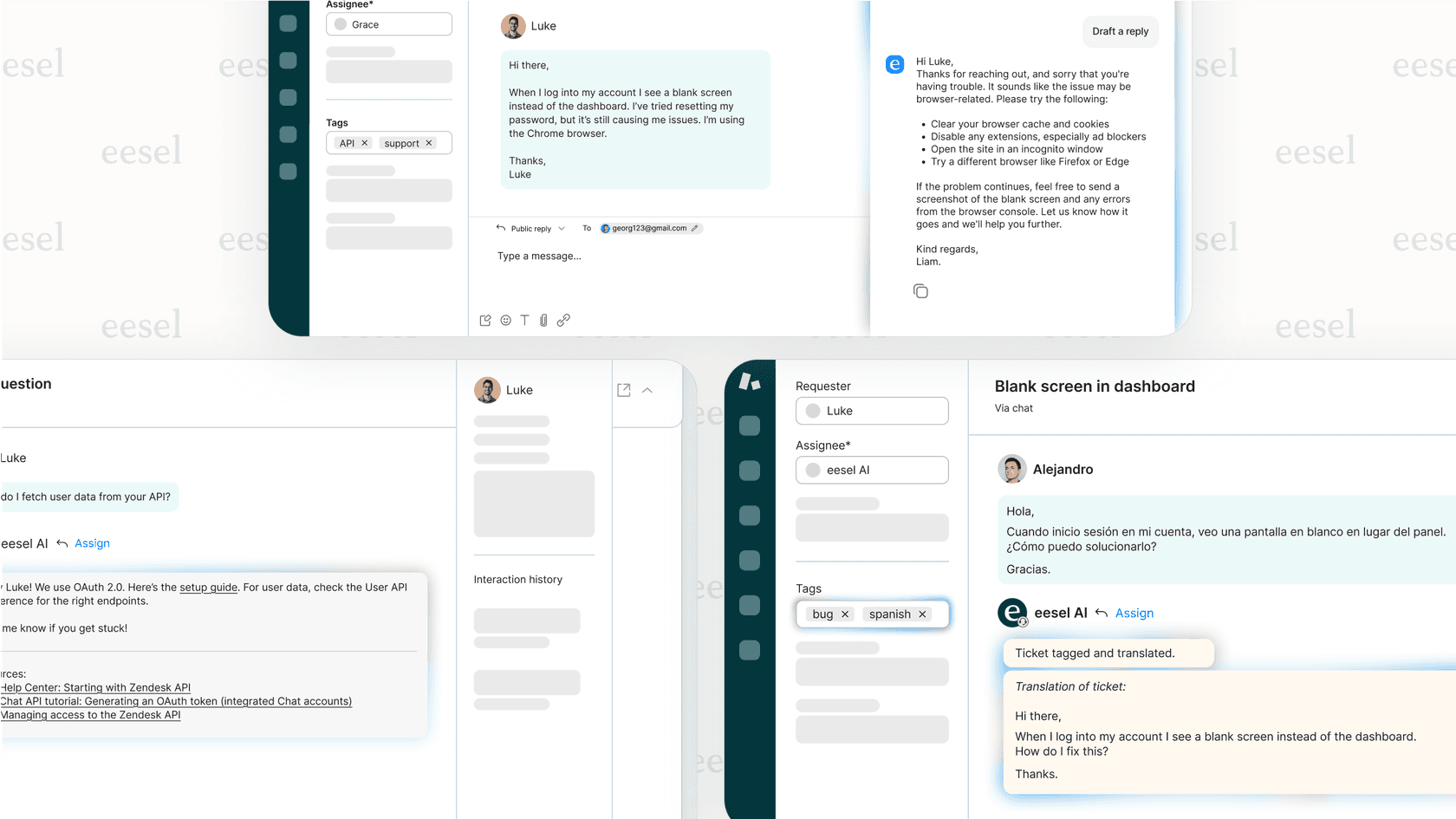
While Make and n8n are general-purpose automation platforms, some use cases benefit from specialized tools. For customer service teams specifically, we built eesel AI as an AI teammate that handles support workflows out of the box.
Instead of building automations from scratch, you connect eesel AI to your help desk (Zendesk, Freshdesk, Intercom, Gorgias) and it learns from your past tickets, help center, and internal docs. From there, it can:
- Handle frontline tickets autonomously with our AI Agent
- Draft replies for human review with AI Copilot
- Tag, route, and prioritize tickets automatically with AI Triage
The difference is focus. Make and n8n are general tools you configure for any workflow. eesel AI is purpose-built for support, with pre-trained understanding of customer service scenarios and native integrations with help desk platforms.
If your primary goal is automating customer service rather than general business workflows, a specialized tool often delivers faster results than building from scratch on a general platform.
Choosing the right workflow automation platform
The Make vs n8n decision comes down to your team's composition and priorities.
Choose Make if you want the fastest path to automation without technical overhead. Its visual builder, massive integration library, and managed hosting let business users build powerful workflows immediately. Just watch your credit usage as workflows grow complex.
Choose n8n if you have technical resources and value flexibility over convenience. The execution-based pricing rewards complex workflows, self-hosting gives you complete control, and the open-source nature means you're never locked into a vendor's roadmap.
Both platforms offer free tiers to test. Make's Free plan gives you 1,000 credits monthly to experiment. n8n offers a 14-day trial of cloud features, plus the Community Edition is free forever if you self-host.
Start with your most pressing automation need, build it on both platforms, and see which approach feels natural for your team. The best tool is the one your team actually uses.