The 9 best Cassidy AI alternatives in 2026

Rama Adi

Katelin Teen
Last edited October 14, 2026

Cassidy is a good no-code agent builder that is very hard to budget for. No dollar figure on its pricing page. Not one. Credits get burned by token volume, task count does not come into it, so an agent chat runs "between 1 and 30 credits" and a workflow "from 1 to 100". Then the docs add that when the balance hits zero, AI features "will be temporarily unavailable". If that is the thing which pushed you to look elsewhere, the fix is to pick a tool whose billing unit matches the work you actually do.
Second thing worth to know. Cassidy's support use case ends at a draft. Its workflow step is literally called "Draft Reply Message". And nowhere in the product is there a confidence threshold. So you came to Cassidy for automating a ticket queue? No amount of prompt tuning gets you past a human clicking send on everything.
My picks below split three ways. Support queue first: eesel AI resolves tickets from $299 a month for 500 credits, and it only answers what it is confident about. Company-wide knowledge search, that one is Glean. General-purpose builder: n8n when you want to self-host, Zapier when you want the reach. Everything else in this list is a narrower fit. I have said exactly who each one is for.
Why teams start looking for a Cassidy alternative
I build integrations for a living. Which means a lot of my time goes into other people's agent platforms, figuring out what happens once the demo is over. Cassidy demos beautifully. The homepage sells it as "Build AI Agents that operate like your team", and the thesis underneath it, "The people closest to the work should be the ones automating it", is one I agree with. Downstream of that is where all the problems people run into sit.
You cannot price it before you buy it
Not one dollar sign sits on Cassidy's pricing page. The Starter card lists 3 seats, 1 workspace, 10,000 AI credits a month and 30,000 pages of storage. Business just says "Custom" on every single row, with a "Book demo" button next to it. Enterprise is not even a column, it only shows up in the FAQ and inside the manage plans docs.
The one dollar figure anywhere in Cassidy's own material is an accident. A screenshot which is embedded in that same manage plans page shows a Stripe checkout reading "Subscribe to Cassidy Starter Plan, $79.00 per month". So a real number does exist, only it lives inside a support article and not on the page that was built for the question.
I have pulled on that thread all the way in a separate Cassidy AI pricing breakdown, so here I keep it short.
Cassidy is upfront about the why. Its credits explainer says: "Rather than charging per individual credit, our pricing model factors in seats, features, support, and other benefits." As a sales strategy that is defensible. It is a rough one for anybody who has to put a number on a budget line first, before they get the approval to buy.
Credits are metered by tokens, so the same task costs different amounts
This is the part which bites you later. Per Cassidy's manage credits docs: "Each call processes input tokens... and generates output tokens... The number of tokens determines how many credits are consumed." The published ranges: an agent chat at 1 to 30 credits, a workflow run at 1 to 100, then premium models at roughly 5x standard.
Notice what this does to your instincts. To spend less you feed the model less context, and Cassidy says it directly, advising teams to "limit the amount of Knowledge Base context pulled into each interaction". For a support agent though, context is the accuracy. So you are being nudged into making the answers worse just to make the bill smaller.
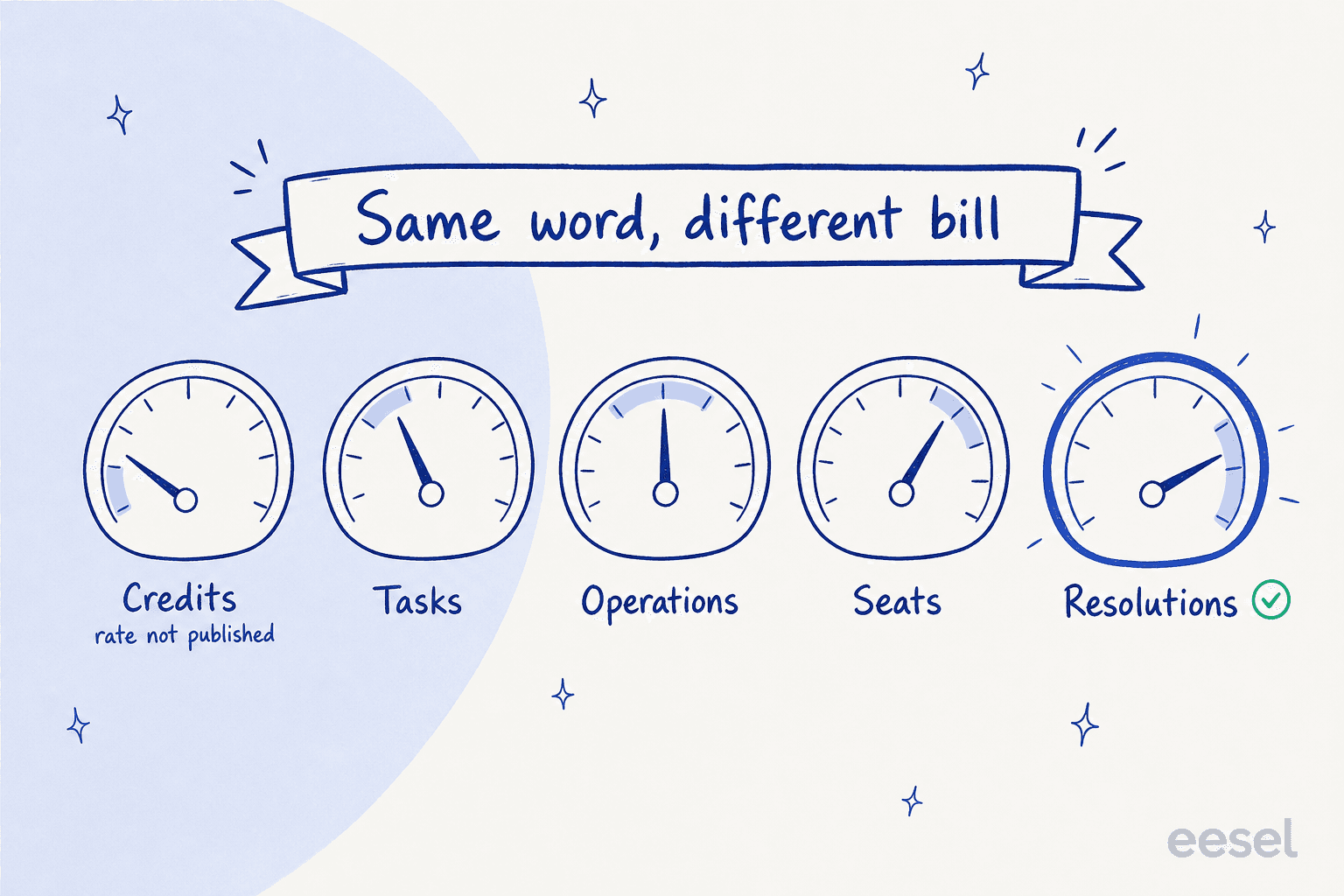
Every tool in this roundup uses some word like "credit" or "task" or "run", and none of them mean the same thing. Working out the unit before you compare any prices, that is most of the job.
Running out has teeth
The docs are clear on it: "When your credit balance is exhausted, AI-powered features (Agent chats, Workflow runs) will be temporarily unavailable until credits are replenished." The marketing FAQ on the pricing page says a different thing, that "You'll never be interrupted. Cassidy notifies you as you approach limits and offers seamless credit top-ups". Both of these statements sit on Cassidy's own website. Me, I would plan around the docs version.
There is also a per-user version of the same cap, and the admin screen spells this out plainly enough.
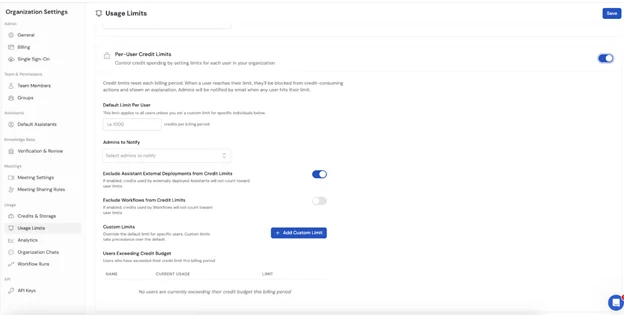
The on-screen warning reads: "When a user reaches their limit, they'll be blocked from credit-consuming actions." For an internal research assistant, fine. For anything that a customer is waiting on, less fine.
Support stops at a draft
Cassidy lists customer support as one of the twelve solution categories, and its Auto-Responder "generates on-brand reply drafts". In Cassidy's own product shot, the workflow step is named for exactly that.
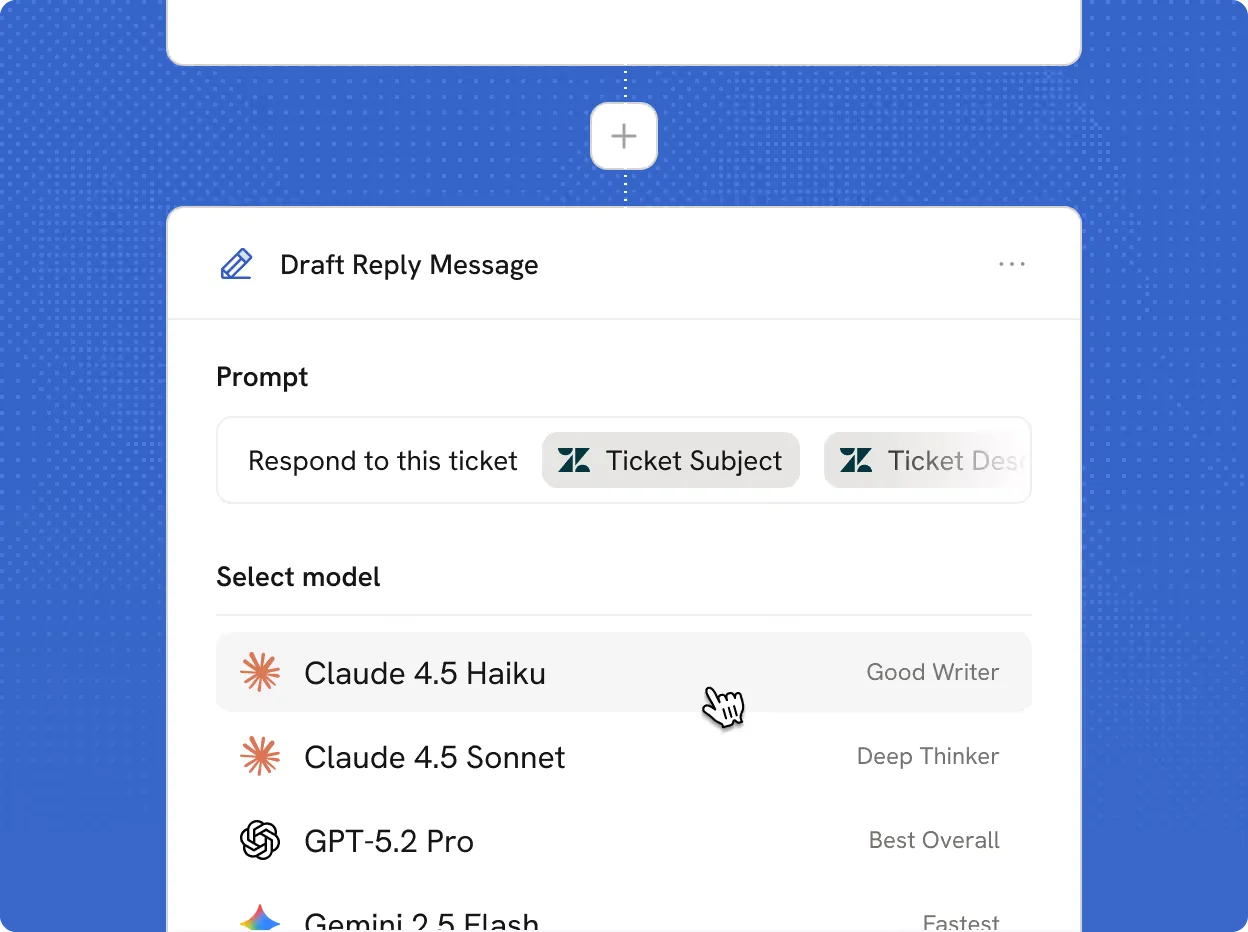
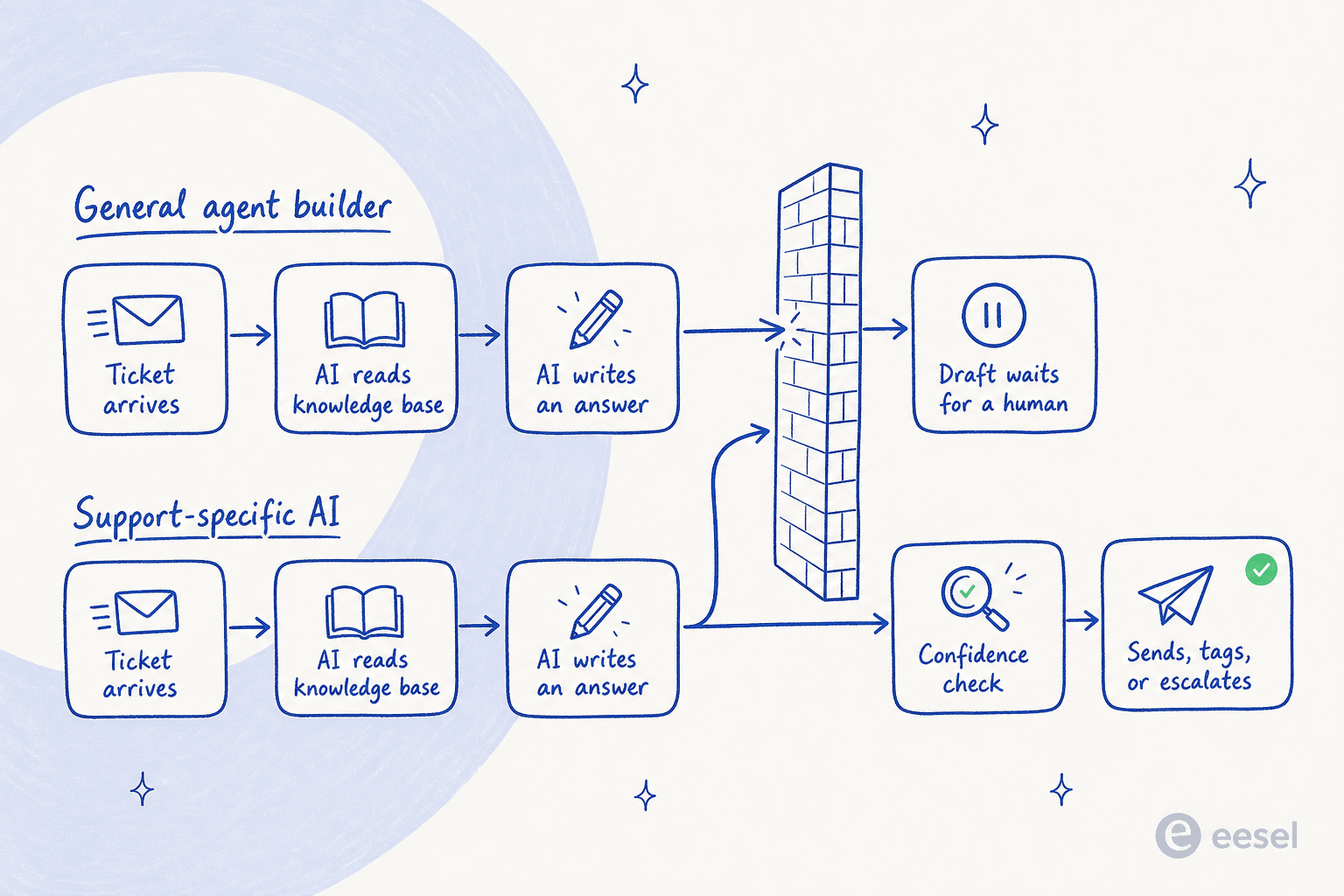
Draft, not send. And there is no confidence score you can tune anywhere in the product, which means no mechanism exists to say "handle the easy ones yourself and escalate the rest". The only handoff that Cassidy describes is a content rule about escalating the sensitive topics.
I have spent years watching what happens when you point an AI at a live support queue, and this specific gap here is the one that decides if a rollout works or not. A CX lead at a DTC supplements brand on Gorgias and Shopify, running about 7,000 tickets a month, put it better than I can:
"The AI will never be able to answer 100% of the questions, but if it tries and just answers 'sorry I don't know this,' I cannot go and check all my 7,000 tickets to see if the AI actually made a good answer, then the point is a little bit gone. I need an AI who is only handling the tickets that it's confident to handle and all the other ones, leave them alone."
That is the whole argument, in one paragraph. A tool which drafts everything hands you a second queue. A tool with a threshold hands you a smaller one.
The proof base is thin
Cassidy sits at 5.0 out of 5 on G2, from exactly five reviews, all of them from small businesses, and the newest one dated January 2025. No Capterra listing, nothing on Trustpilot. The reviews themselves read warm and specific, which counts for something, but five of them is not a track record that you can lean on for a company-wide rollout.
The most useful outside voice I found was over on LinkedIn, from somebody using it inside an accelerator cohort:
"We've been using Cassidy in Build Lab, and it has been relatively easy to pick up... But many in our cohort are using n8n, for its functionality and technical options."

And then on Reddit, from someone who is shopping the same category:
"I've been experimenting with Cassidy Ai, Dify and Langflow. Still not found the right tool though."

What Cassidy is good at
Being fair here matters, because if your job happens to be the thing Cassidy is good at, then you should just keep using it. There is a longer Cassidy AI review for the full walkthrough, and also a Cassidy AI overview if you are still working out what the thing even is.
It is easy for non-technical people to pick up, and that is the one praise theme repeating across every platform I looked at. It is model-agnostic too, with 35+ models selectable per agent, chat, or workflow step, and the model docs promise that "cost reductions from providers are automatically passed on to you". Then it is properly good at long-form document work. One marketer on Reddit described dropping in an 80-question procurement survey and getting it "auto-filled within 2 minutes", then spending 20 minutes on the review:
"...can drop in an 80-question survey from a procurement team and have it auto-filled within 2 minutes. Then I take 20 minutes to review and approve..."
That is a real and valuable outcome. RFPs and security questionnaires, those are exactly the shape of work Cassidy was built for. Tickets are not.
How I picked these nine
Four filters, and I applied them in this order:
- The billing unit has to be knowable. I went to each vendor's own pricing page and worked out what exactly one billable action is. Where a vendor publishes no rate at all, I say so instead of guessing it.
- It has to overlap with a real Cassidy job. Knowledge search and document workflows, ticket handling, cross-app automation. General LLM chat apps did not make the cut.
- I looked at the product, not the press release. Every screenshot below is the vendor's own UI, pulled from their docs or their product pages during the research.
- Community sentiment had to be verifiable. Every quote in here links out to a real permalink. Where a tool had no citable user voice, I said that plainly instead of paraphrasing some review site.
Worth to say plainly: I work at eesel, and eesel is number one on this list. Read that with the appropriate suspicion. I have also written down exactly where it is the wrong tool, and for most of what Cassidy does well, it is the wrong tool.
The 9 best Cassidy AI alternatives at a glance
| Tool | Best for | Billing unit | Entry price | Free tier | Public enterprise price | Helpdesk-native | Self-host | Confidence threshold | Compliance |
|---|---|---|---|---|---|---|---|---|---|
| eesel AI | Resolving support tickets | 1 credit per ticket or chat | $299/mo (500 credits) | 100 free credits | Add-ons (SSO from $199/mo) | Yes | No | Yes | SOC 2 Type II certified, GDPR, HIPAA on request |
| Glean | Company-wide knowledge search | Seat + FlexCredits | Quote only | No | Quote only | No | No | No | SOC 2 Type II, ISO 27001, ISO 42001, HIPAA |
| Relevance AI | Multi-agent GTM workforces | Credits | $199/mo (last published) | 100 credits/day | Quote only | No | Private cloud | No | SSO and audit logs on Enterprise |
| Lindy | A personal AI assistant | Credits | $49.99/mo | 7-day trial | Quote only | No | No | No | HIPAA and BAA on Enterprise |
| Stack AI | Regulated, VPC-bound builds | Runs | Quote only | 500 runs | Quote only | No | Yes | No | SOC 2, HIPAA, GDPR, ISO 27001 |
| Copilot Studio | Microsoft 365 shops | Copilot Credits | $200/25k credits | $200 Azure credit | Published | No | No | No | Microsoft enterprise stack |
| Zapier | Reach across 9,000+ apps | Tasks and activities | $19.99/mo | 100 tasks/mo | Quote only | No | No | No | SAML SSO from Team |
| n8n | Self-hosting and control | Workflow executions | $20/mo | Community Edition | Quote only | No | Yes | No | SSO on paid tiers |
| Gumloop | Ops teams needing cost guards | Credits | $37/mo | 14-day trial | Quote only | No | No | No | Guardrails, org-wide on Enterprise |
Two things jump out from that table. Only one row carries a published per-unit price that you can multiply by your own volume. And only one row has a confidence threshold, which is the single feature deciding whether an agent can work a queue unattended.
Which one actually fits your job?
Pick the sentence which sounds most like your week.
Which Cassidy alternative fits?
One click. No email required, unlike some pricing pages.
eesel AI
You want resolution, not drafts. This is the only tool here with a confidence threshold, so the agent answers what it knows and leaves the rest alone. It sits inside Zendesk, Freshdesk, Gorgias, Front or Help Scout rather than beside them.
From $299/mo for 500 credits, no seat fees
Glean
Permissions-aware search across Slack, Drive, Confluence, Jira, GitHub and Salesforce, with everyday queries unmetered. Budget for a quote, not a price, and read the weekly reasoning cap before you sign.
Seats plus FlexCredits, quote only
Relevance AI
Agents with job titles, built by ops people rather than engineers. The multi-agent piece is the actual differentiator and it is gated to the higher tier, so price it on that plan, not the entry one.
From $199/mo, credit-metered
Stack AI
On-prem, VPC, SOC 2, HIPAA with a BAA, and pull-request-style version control on your agents. The catch is there is no self-serve paid tier: you go from a 500-run free plan straight to a sales call.
Free tier, then quote only
Zapier or n8n
Zapier if breadth wins: 9,000+ apps and no connector to write. n8n if control wins: self-host it, and one execution costs the same whether the workflow has three nodes or fifty.
$19.99/mo tasks, or $20/mo executions
Microsoft Copilot Studio
Internal agents are free for anyone already on an M365 Copilot seat, which is a real saving. Learn the credit rate card first, because reasoning models get metered twice.
$200 per 25,000 credits
1. eesel AI
Best for: support teams who want their tickets closed and not drafted.

What it does
eesel AI is an AI helpdesk agent which lives inside the helpdesk you already run. It indexes your past tickets, your help center, Confluence, Notion, Google Docs and SharePoint, and then it works the queue: answering, tagging, escalating.
There are around 100 integrations. For this comparison the two that matter most are Zendesk and Freshdesk, though Gorgias, Front, Help Scout, HubSpot and Slack are all first-class as well.
Two features do the heavy lifting against Cassidy. Simulation mode runs the agent over your historical tickets before it goes live, so you see the coverage by theme and find your gaps while nothing is at stake. Confidence-based routing means a low-confidence answer gets drafted for review instead of sent, and this is the mechanism Cassidy has no equivalent for.
The screenshot above shows the other design choice which I like: you change the agent behaviour by telling it what to do in a plain language, no rebuilding of a canvas. In that shot someone is asking the agent to default to drafting via the zendesk_leave_draft_reply tool when tagged, and it goes and updates its own instructions.
Where it beats Cassidy
- A price you can multiply. One ticket or one chat session uses one credit, however many replies it ends up taking. 500 tickets is $299 a month. No seat fee, and no platform fee on the Teammate plan.
- A real threshold. The agent handles what it is confident about and leaves the rest alone, which is exactly the thing the CX lead quoted earlier was asking for.
- You can see it work before it works. Simulation against past tickets comes as standard here, not as a paid add-on. It exists because I have watched a confident-sounding bot tell customers "yes, we support your model" purely because the help center said "we support all models".
Pricing
| Item | Price | Notes |
|---|---|---|
| Free plan | 100 credits | No card |
| Teammate, 500 credits | $299/mo | 1 credit per ticket or one chat session |
| Teammate, 1,000 credits | $499/mo | Same, all integrations and channels included |
| Teammate, 2,500 credits | $999/mo | 1,500 credits $699, 3,500 credits $1,349 |
| Teammate, 5,000 credits | $1,899/mo | Above 5,000, talk to us |
| Blog post | $4 each | Blog draft generation |
| Overage | $0.80 per extra credit | Optional, with a monthly cap you set |
| Annual | Two months free | Pay a year upfront |
| Add-ons | SSO and MFA from $199/mo | Priority support from $299/mo, data residency $500/mo |
Pros
- Published monthly plans sized to ticket volume, so a forecast becomes arithmetic instead of a sales call.
- Confidence threshold, plus a human-in-the-loop ramp going from draft-for-review up to fully autonomous.
- Simulation on your own historical tickets, before the go-live.
- 80+ languages and around 100 integrations, and that includes every major helpdesk.
Cons
- It is not a general-purpose builder. If what you want is an agent that assembles RFP responses or fills the procurement questionnaires, Cassidy does that better and you should keep it.
- SOC 2 Type II is certified. HIPAA is handled as an add-on (talk to us), so please do not read it as a baseline.
- No self-hosting at all.
My take
Pick eesel when the job is a support queue and the metric is tickets closed. Gridwise got to 73% of tier-1 requests resolved in the first month, after a seven-day trial, which is the kind of number that a draft-only tool structurally cannot produce. Skip it if what you actually need is a horizontal automation canvas, since that is not what it is.
2. Glean
Best for: large companies where the answer exists already but nobody can find it.
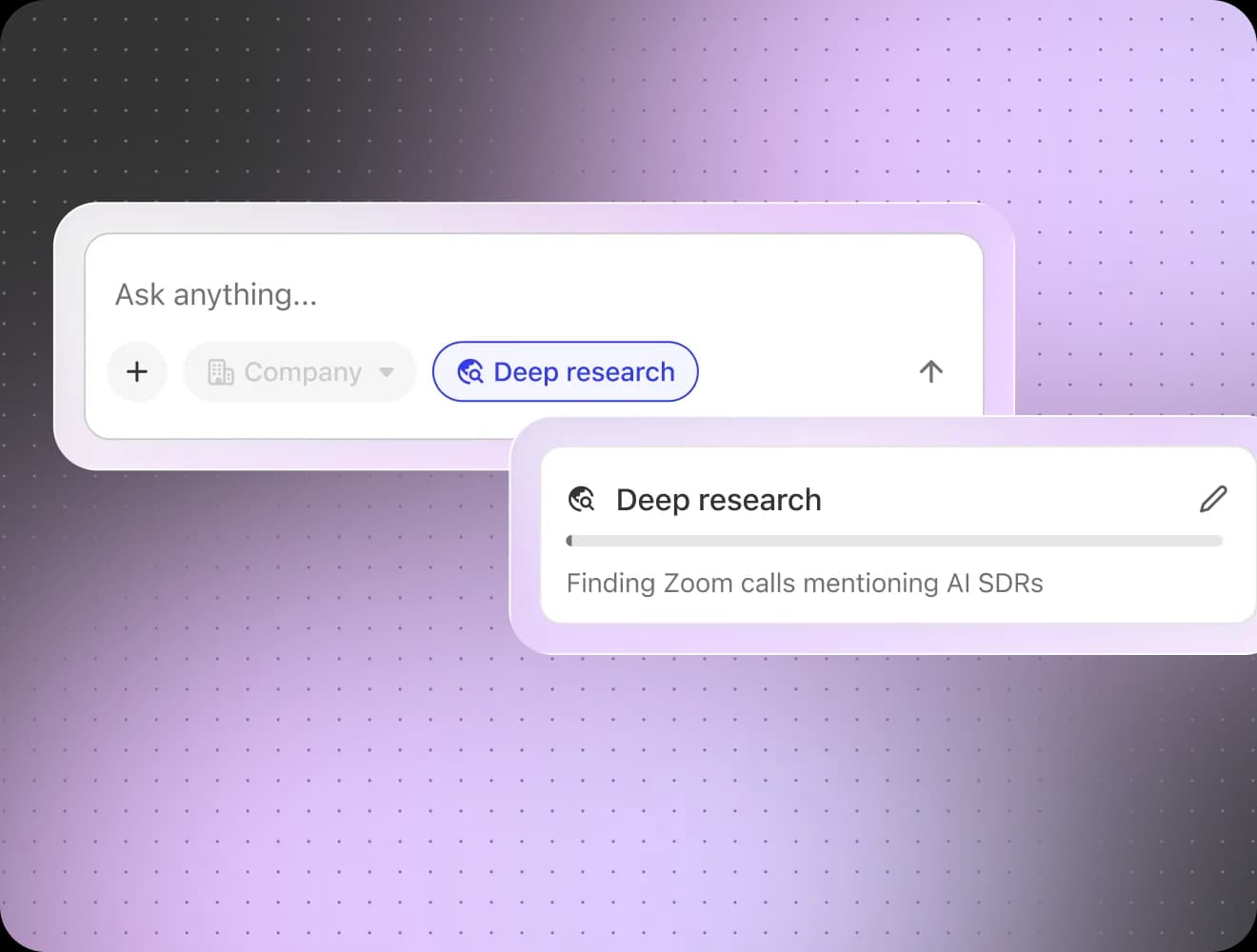
What it does
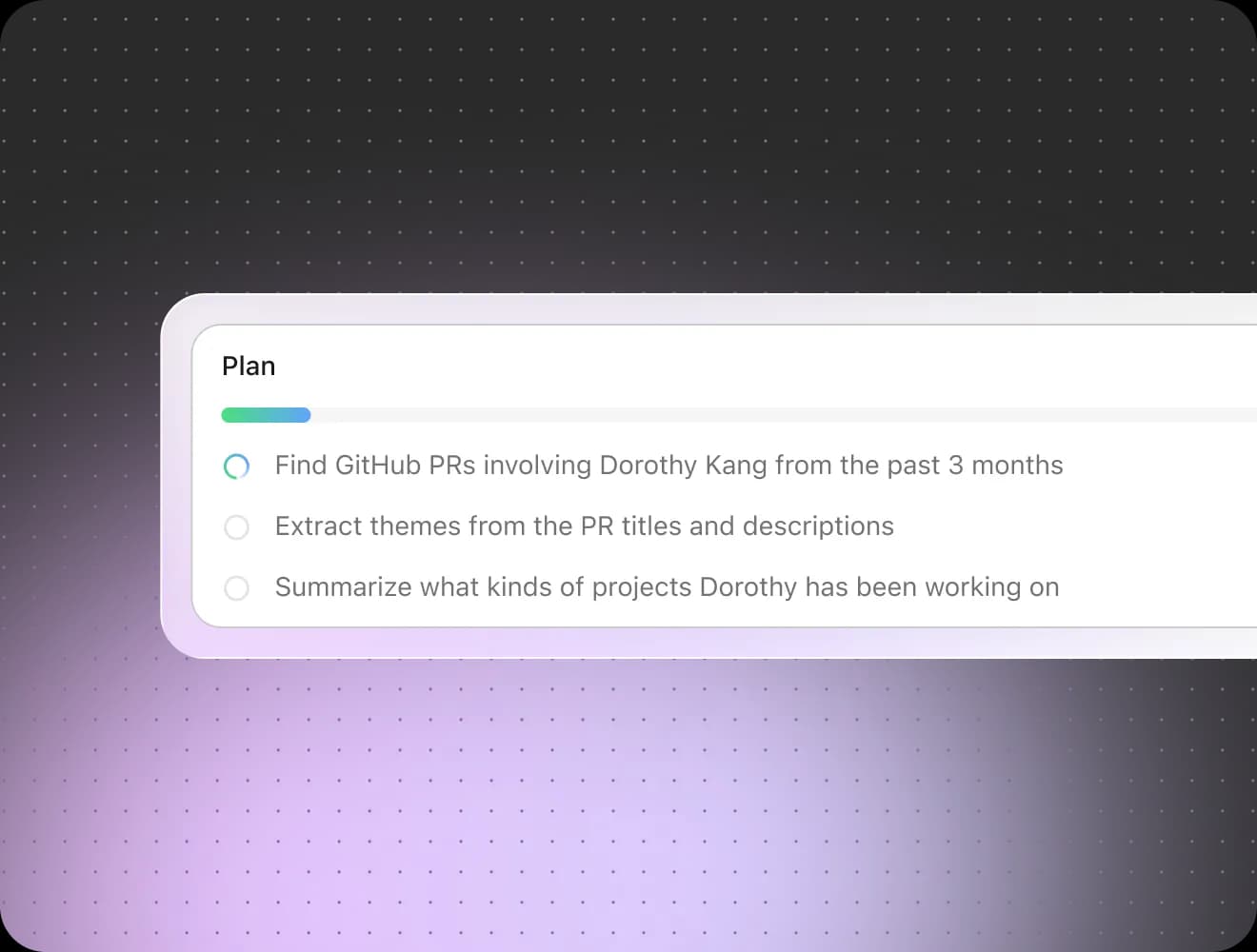
Glean pitches itself as "Work AI that understands your company", and for the knowledge half of what Cassidy does, it is the most credible enterprise answer. It indexes Slack, Google Drive, Confluence, Jira, GitHub and Salesforce, it inherits permissions from each source system, and it answers with citations. The agentic layer plans multi-step work, and the plan panel is worth a look because it shows you the reasoning instead of hiding it.
Pricing
There are no dollar figures on any Glean property. As of this month glean.com/pricing does not even serve a pricing page any more, what it serves is marketing content and a demo button. The only documented model is Enterprise Flex: per-user seats "designed to be deployed to every employee", plus a pooled FlexCredits balance which gets topped up in packs.
| Component | Price | Unit |
|---|---|---|
| Enterprise Flex Seats | Quote only | Per user, per month |
| FlexCredits | Quote only | Pooled, org-level, pay-per-use |
| Protect+ | Quote only | Annual site-wide fee |
| Premium Support | Quote only | Annual site-wide fee |
The credit rate card is published without any dollar conversion, which is an odd place to land on. Fast Mode is roughly 3 credits at p50, while a Glean Agent run is about 7 at p50 and around 114 at p90.
Pros
- Unlimited Fast Mode queries at 0 credits on every seat, so the everyday search never meters.
- Permissions get enforced from the source systems, so people only see what they already had access to.
- Certified on SOC 2 Type II, ISO 27001, ISO 42001, HIPAA, TX-RAMP Level 2, and also GDPR.
Cons
- Thinking Mode and Adaptive Reasoning on the standard models are capped at 100 queries per user per week, and any thinking query above 30 credits then counts as multiple queries against that same cap.
- That 7-to-114 credit swing on one agent run is a 16x variance with no published dollar rate, so the spend cannot be forecast before a quote.
My take
Glean is the right call for a 1,000-plus-employee company which wants one permissions-aware AI layer over everything, and the community read stays consistent about the trade:
"Glean's the pricey one aimed at big companies, but from what I've seen, the others are either still in development or not quite hitting the mark."

"It consumes all of our knowledge sources including Slack, Google docs, wiki, source code and provides answers to complex specific questions in a way that's downright magical."
Skip it if you sit under a few hundred seats. There is no self-serve path in, and the per-employee deployment model does not flex down. If knowledge search is really the job here, my roundup of Glean alternatives and the Glean pricing breakdown go deeper.
3. Relevance AI
Best for: GTM teams that want agents with job titles.
What it does
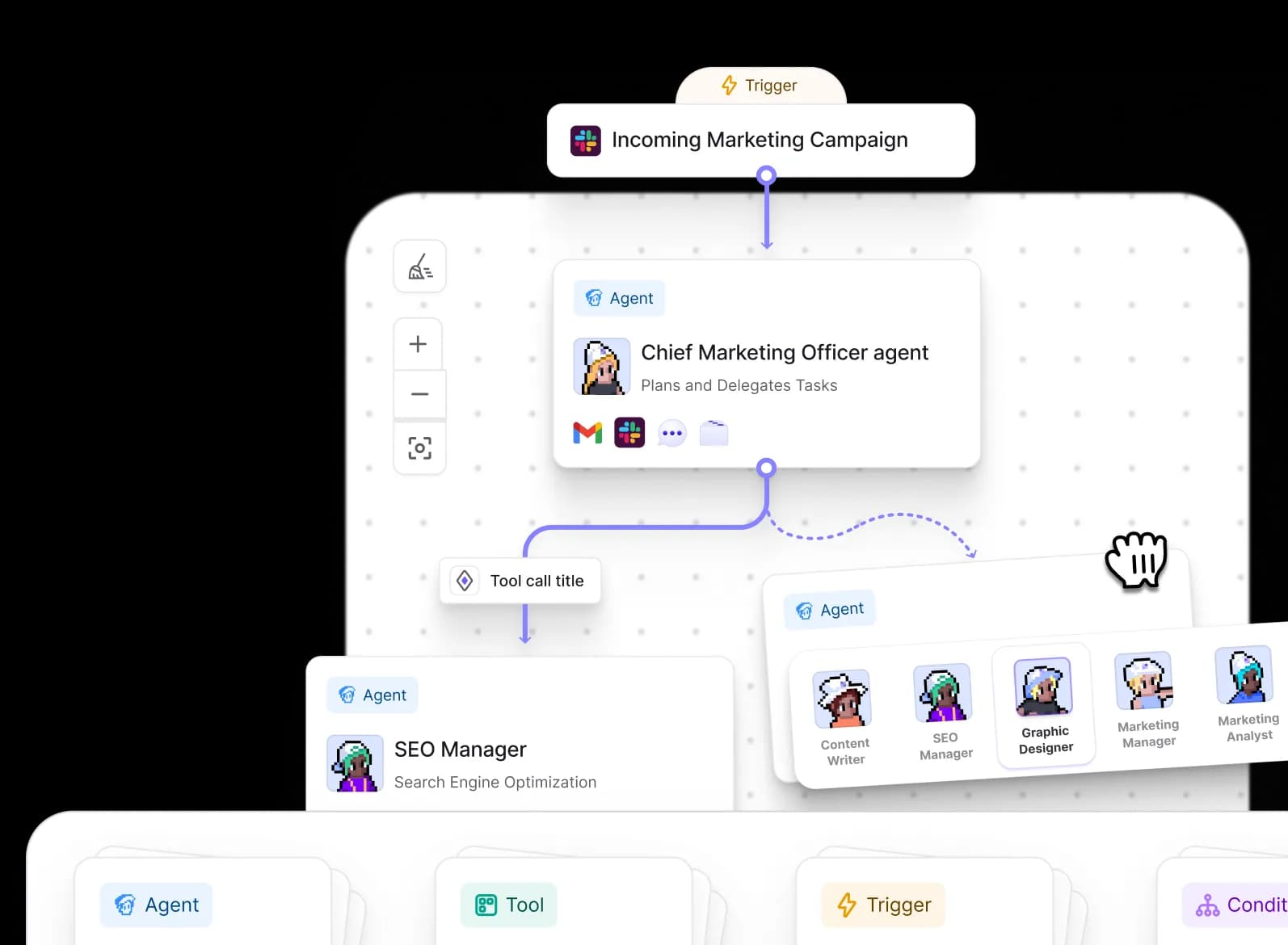
Relevance AI sells "Specialist agents for every task" and frames the whole product as an AI workforce, and the enterprise pitch is to "decouple growth from headcount". In the practice it is a canvas where one trigger fans out to named agents (a Chief Marketing Officer agent delegating to an SEO Manager, in the shot above), which is a nice mental model for non-engineers who are building CRM enrichment or pre-meeting research.
Pricing
The live pricing page is Enterprise-only now, with zero dollar figures on it. The self-serve tiers survive over on G2's listing, whose footer dates the pricing submission to October 2024, so treat these numbers as last-published and not as confirmed.
| Plan | Price | Credits | Per run | Users |
|---|---|---|---|---|
| Free | $0 | 100/day | 4 credits | 1 |
| Team | $199/mo | 100,000/mo | 3 credits | 10 |
| Business | $599/mo | 300,000/mo | 2 credits | Unlimited |
| Enterprise | Contact us | Custom | Custom | Custom |
Pros
- Per-run economics get better as you scale up a tier, which is unusual, and welcome.
- Bring your own model key with no markup, so the LLM spend sits outside of the credit pool.
Cons
- The multi-agent system, which is the actual reason for buying it, only unlocks on Business at $599/mo. Team at $199 does not include the thing.
- Governance is Enterprise-only here. SSO, RBAC and audit logs appear on no self-serve tier at all, and reviewers do hit that wall: one G2 reviewer wrote that they "would like more governance controls and admin configuration controls for the administration team."
My take
Buy it for a GTM ops team building enrichment and prospecting agents, and price it on the Business plan from the day one, because that is where the product you saw in the demo actually lives. Skip it for support work: no helpdesk-native surface, no confidence threshold, so you land in the same draft-review loop that Cassidy leaves you in. G2 has it at 4.3 out of 5 from 20 reviews. My Relevance AI pricing write-up carries the fuller cost picture.
4. Lindy
Best for: one person who wants their own inbox and their calendar handled.
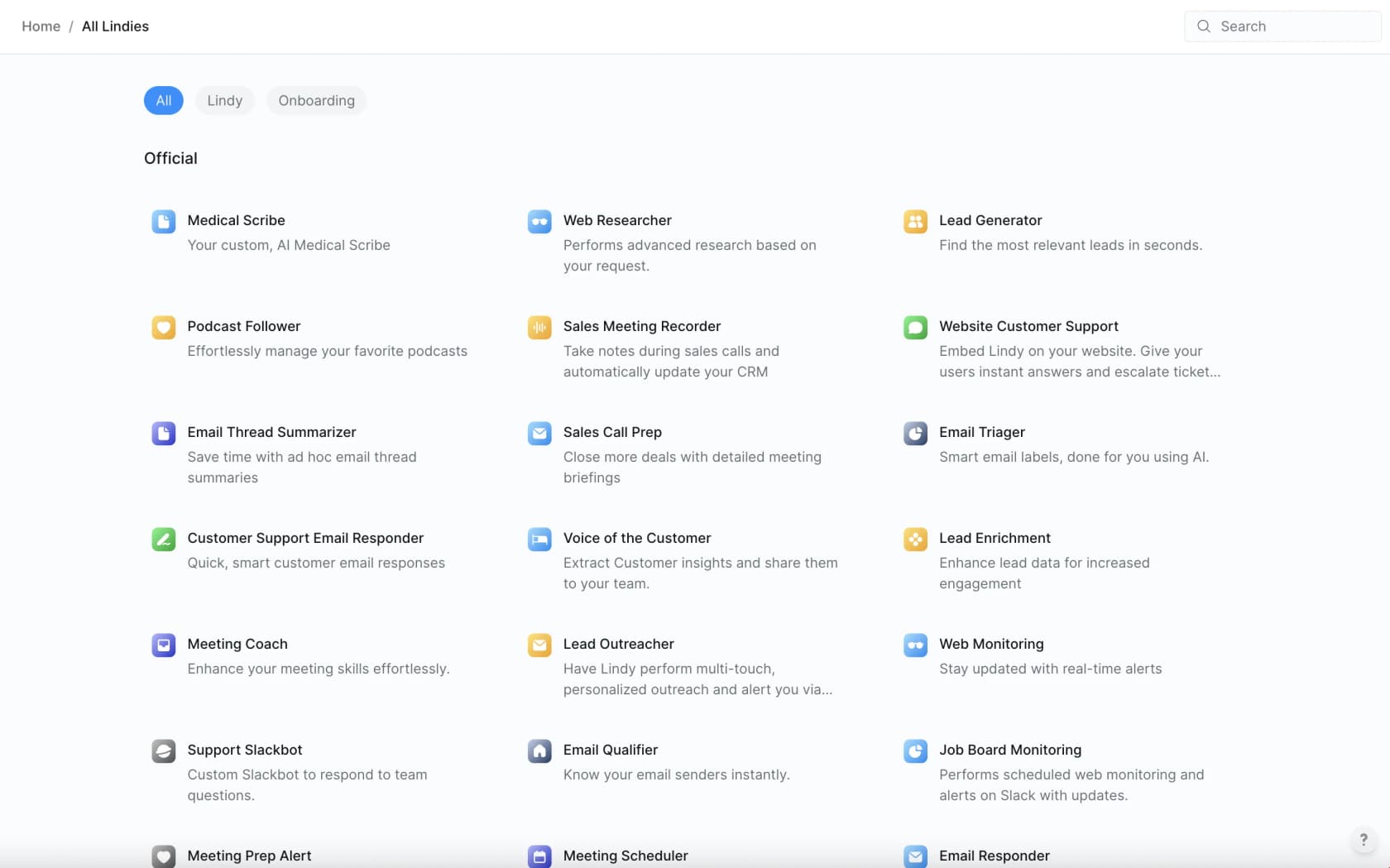
What it does
Lindy introduces itself in the first person: "hey, I'm Lindy. I take admin work off your plate." It runs your inbox and meetings, your calendar and the follow-ups, and pitches itself as "90% of the value of a human assistant, 1% of the price". The template gallery above is the fastest route to understanding the product, and underneath it there is a flow builder for anything the templates miss.
Pricing
| Plan | Price | Usage | Inboxes |
|---|---|---|---|
| Plus | $49.99/mo | "Standard usage" | Up to 2 |
| Pro | $99.99/mo | 3x Plus | Up to 3 |
| Max | $199.99/mo | 7x Plus | Up to 5 |
| Enterprise | Custom | Shared pool plus bonus credits | Custom |
A 7-day trial with the full Plus access, and no free-forever tier. The pricing page also lists "Human assistant" at $8,000/mo as a joke anchor, which tells you something about who the audience is.
Pros
- It drafts and it never auto-sends. Verbatim from the pricing FAQ: "Lindy drafts emails and messages for you to review. You're always in control of what gets sent." For a personal email that is the correct default.
- Ease of use is the standout in the reviews: tagged 125 times across 171 G2 reviews at 4.9 out of 5.
Cons
- Cost per task is simply undisclosed. No credit allotment and no credit price, no overage rate either, only the relative labels like "3x" and "7x".
- Cost is also the loudest complaint there. "Expensive" gets tagged 42 times and "High Subscription Cost" 35 times on G2, well ahead of the learning curve or accuracy issues.
My take
Lindy is the best tool here for a founder or a solo operator who wants their admin work to disappear, and I would happily run it on my own inbox. For a shared support queue it is the wrong shape: the inbox caps are per-plan, the draft-only default is a feature and not a limit, plus there is no threshold to change that. If you are comparing it against the similar assistants, Lindy alternatives covers the near neighbours.
5. Stack AI
Best for: enterprises where the security team owns the decision.
What it does
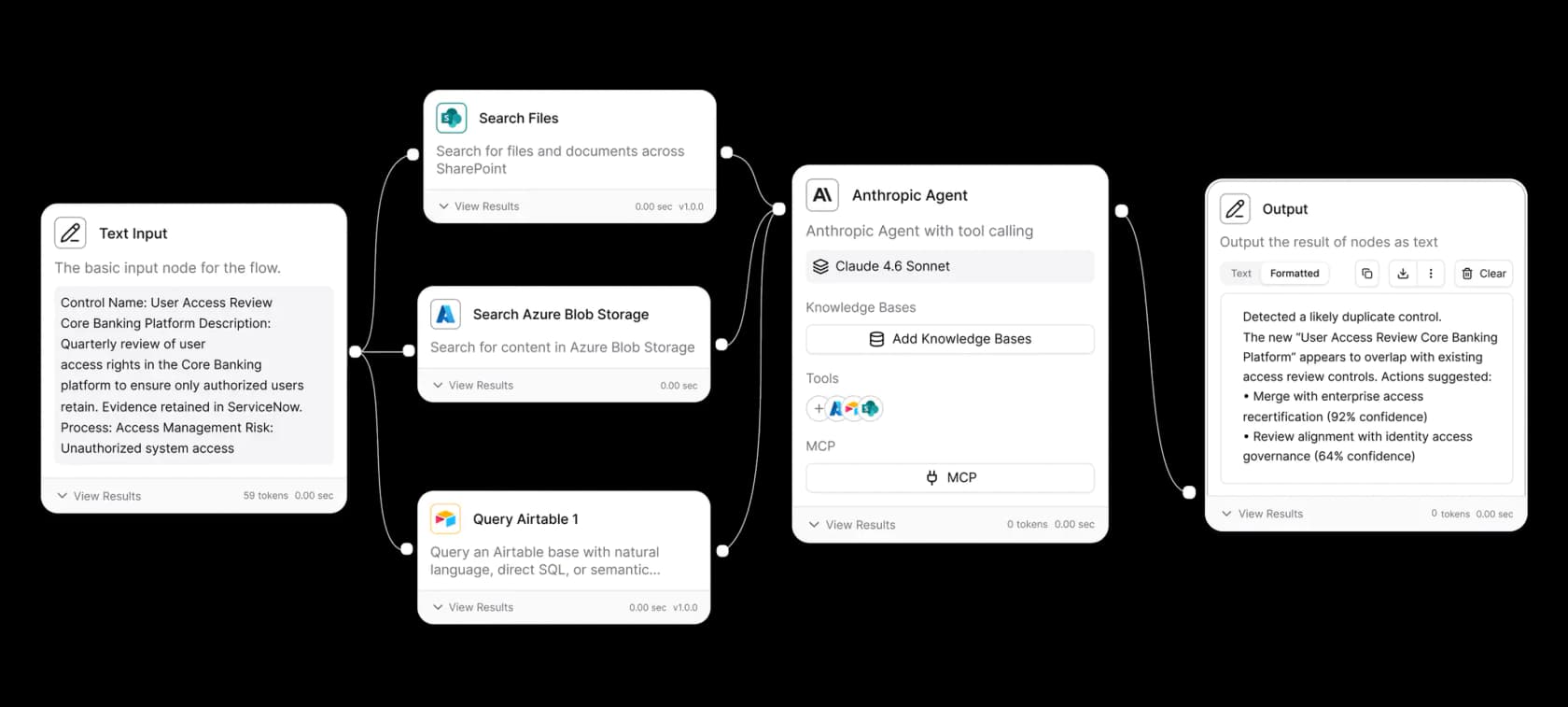
Stack AI is the closest structural match to Cassidy on this list: a no-code canvas for document-heavy agents, positioned as "Where IT teams bring secure AI to work". The difference sits in which end it optimises. Cassidy leads with the ease of building; Stack AI leads with where the thing runs and who has signed off on it.
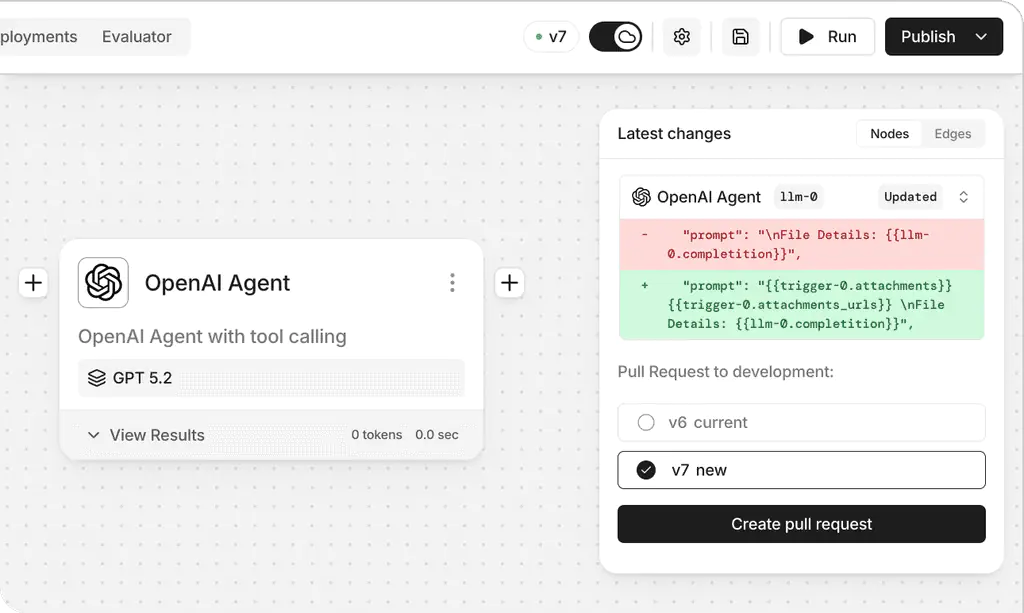
The version control is the detail which sold me on it as a serious tool. Agents get pull requests with prompt diffs, so a prompt change becomes reviewable like code, instead of someone quietly editing production at 4pm.
Pricing
| Plan | Price | Runs | Projects | Seats |
|---|---|---|---|---|
| Free | $0 | 500/mo | 2 | 1 |
| Enterprise | Quote only | Custom | Unlimited | Custom |
That is the entire table, yes. No self-serve paid tier exists, and there is no per-run rate published anywhere at all.
Pros
- Deployment options are itemised and they are real: on-premise, VPC, or the multi-tenant SaaS, with SOC 2, HIPAA, GDPR and ISO 27001, a trust center, and a BAA available. Note that the BAA is an Enterprise line item, not a baseline.
- Prompt-diff pull requests, plus an analytics view which surfaces the run and error counts per project.
Cons
- Free is 1 seat, 2 projects and 500 runs, so a second person, or any production traffic, forces a sales call. G2's cons tags are led by the usage limitations.
- Debugging gets opaque as the workflows grow, and reviewers say this directly:
"StackAI makes it genuinely easy to go from 'idea' to a working AI workflow in hours, not weeks... As workflows get more complex, debugging can feel a bit opaque and the UI can get busy... Pricing can be a stretch for very small teams."

My take
If you left Cassidy because your security review stalled on the data residency, Stack AI is the swap which solves that without giving up the canvas. If you left because you could not get a price, it does not solve this at all, it makes it worse. Skip it for pure ticket work, since the output is the same draft-shaped one and there is no threshold.
6. Microsoft Copilot Studio
Best for: teams who are already paying for Microsoft 365.
What it does
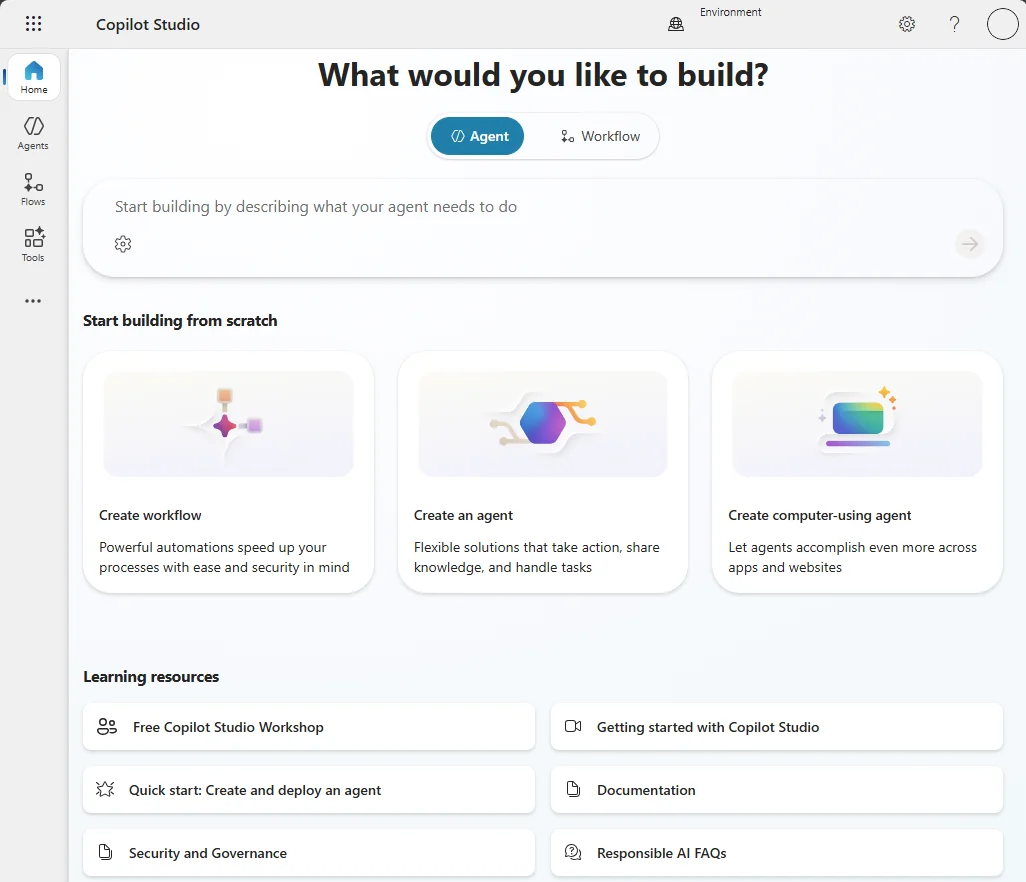
Microsoft describes it as "A graphical, low-code tool for building agents and agent flows", and it is the successor of Power Virtual Agents. Its real advantage is a gravitational one: your data already sits in SharePoint, your people already live in Teams, and the administration runs through the Power Platform admin center that your IT team already knows. If what you want is AI inside Microsoft Teams, this is the default path.
Pricing
Billing goes in Copilot Credits, pooled tenant-wide instead of per seat.
| Item | Price | Unit |
|---|---|---|
| Microsoft 365 Copilot | $30/user/mo, paid yearly | Per user |
| Copilot Credit pack | $200/mo per pack | 25,000 credits, so $0.008/credit |
| Pre-purchase commit | Save up to 20% | Prepaid credits |
| Pay-as-you-go | Usage-based | Requires a linked Azure subscription |
The per-feature rate card is published: a classic answer costs 1 credit, a generative answer 2, an agent action 5, tenant graph grounding 10, and the premium AI tools 100 per 10 responses. Voice then runs 10 to 75 credits a minute, depending on the tier.
Pros
- Internal agents are "No charge" for anybody already holding an M365 Copilot seat, and for a big Microsoft shop that is a large real saving.
- Capacity is pooled and reallocatable across the environments, and a pay-as-you-go environment stays exempt from the tenant overage.
Cons
- Hit 125% of the prepaid capacity and Microsoft disables your custom agents. Users then see "This agent is currently unavailable. It has reached its usage limit."
- Reasoning models get double-metered: the feature rate, plus 10 credits per 1,000 tokens for the premium AI tools. Microsoft ships an agent usage estimator precisely because nobody is doing this arithmetic in their head.
My take
If you are a Microsoft shop building the internal helpdesk or HR agents, this is the cheapest credible option on the list, and it is not even close. G2 has it at 4.4 out of 5 from 156 reviews. Skip it for external customer-facing support, where the credit stacking turns unpredictable exactly when your volume spikes, and where you still have no confidence threshold. See also my take on IT service management tooling.
7. Zapier
Best for: reaching some tool that nobody else has a connector for.
What it does
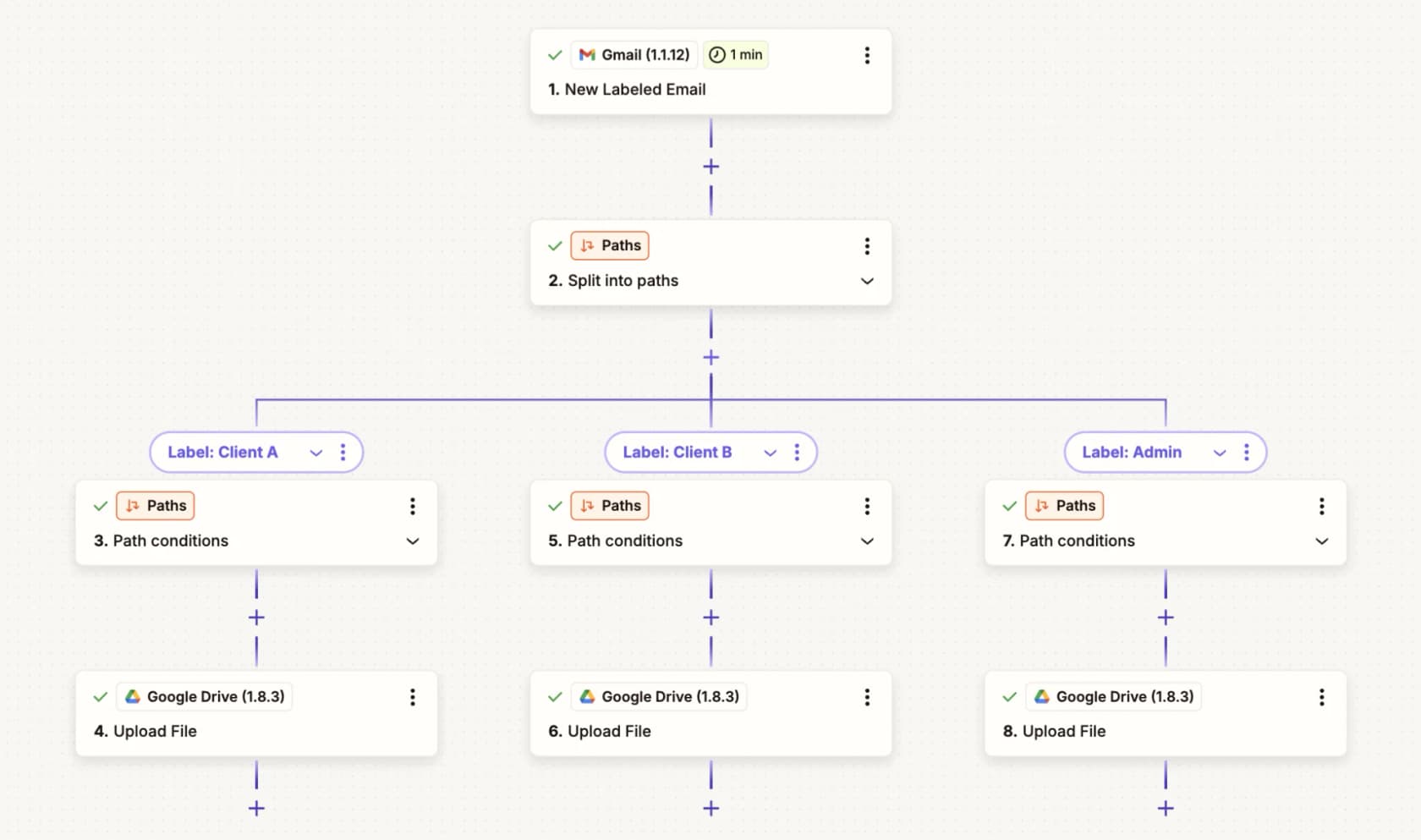
Zapier now sells agents as well as the automations: "Create your own superhuman teammates in minutes... have them do work across 9,000+ apps". That app count is the entire pitch, and it is a real moat. Whatever obscure SaaS tool your ops team depends on, Zapier probably talks to it already.
Pricing
Two separate meters here, and this is the thing people miss. The platform bills in tasks, where one task means one successfully completed action step. Agents bill in activities, on their own add-on plans.
| Plan | Price | Unit | Key limit |
|---|---|---|---|
| Free | $0 | Tasks | 100 tasks/mo, two-step Zaps, 15-min polling |
| Professional | From $19.99/mo | Tasks | 1 seat, multi-step, 2-min polling |
| Team | From $69/mo | Tasks | 25 users, SAML SSO, 1-min polling |
| Agents Free | $0 | Activities | 400 activities/mo |
| Agents Pro | $400/yr, so $33.33/mo | Activities | 1,500 activities/mo |
| Enterprise | Contact sales | Tasks | Unlimited users, BYO model |
Pros
- The utility steps are free. Formatter, Paths, Filters, Delay, Looping, Sub-Zaps, Digests, Tables and Forms all cost 0 tasks, and the triggers never bill.
- A standard-model AI step is 1 task, and bring-your-own-model is also 1 task per step, with the model spend going over to your own provider.
Cons
- Agentic work costs 5x. Premium models bill 5 tasks per AI step and 5 tasks per tool call, each call billed separately, while the agent is choosing its tools at runtime. Standard models cannot call tools at all.
- Multi-step workflows multiply fast, and people do notice it:
"Just got my Zapier invoice. $847 for the month. For automations that run maybe 15,000 tasks. [...] My lead capture workflow has 8 steps. One new lead = 8 tasks. [...] I caught myself removing steps from workflows just to save on task counts. That's insane."
The other recurring complaint is the silent failures:
"My least favorite part of Zapier is the auto protection shut off for those error tasks. [...] Some of them were shut down by Zapier for weeks before I even noticed it."
My take
Use Zapier as the connective tissue, not as the brain. For getting data out of an odd system and into a good one it is the best tool here. As the reasoning layer it is a poor choice, because per-step billing punishes exactly the multi-step agentic work that Cassidy users are trying to do. Worth reading alongside Make vs Zapier if you are choosing between the two canvases.
8. n8n
Best for: technical teams who want their workflow engine on their own infrastructure.
What it does
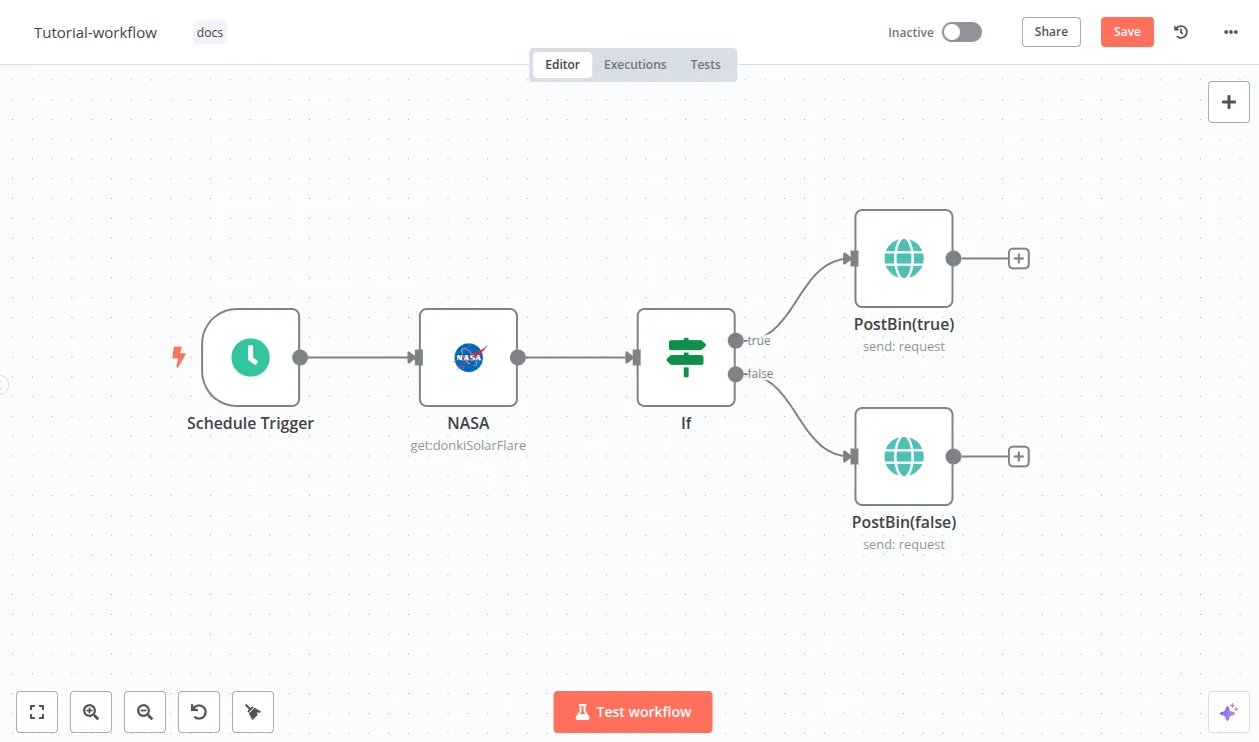
n8n calls itself "The world's most popular workflow automation platform for technical teams", with the tagline "Code when you need it, UI when you don't". It is open source and has around 198,000 GitHub stars, and it is the tool which the Reddit and LinkedIn crowd keeps naming once they outgrow a hosted builder, the cohort Brett Bouchard mentioned earlier included.
The billing model is the reason why it belongs on this list. One workflow execution means one full run, start to finish, regardless of step count. A 50-node AI agent flow costs exactly what a 3-node flow costs. After you read Zapier's per-step arithmetic, that lands differently.
Pricing
| Plan | Price | Executions/mo | Key limit |
|---|---|---|---|
| Community Edition | Free, self-hosted | Unmetered, your infra | No SSO, Git, or environments |
| Starter | $20/mo | 2,500 | 5 concurrent, 1 project, 2,300 AI credits |
| Pro | $50/mo | 10,000 | 20 concurrent, 3 projects, 5-day history |
| Business | $800/mo | 40,000 | 6 projects, forum support only |
| Enterprise | Contact sales | Custom | 200+ concurrent, only tier with an SLA |
Users and workflow steps stay unlimited on every plan. The prices shown are the annual rate, roughly 17% below the monthly.
Pros
- Overruns never stop your workflows. n8n's own wording: "If you exceed your quota, rest assured your workflows will continue running without interruption." The overage is billed at roughly €0.013 per execution on Business, and invoiced later. After Cassidy's hard stop and Microsoft's 125% cutoff, that is a meaningful difference in the temperament.
- One license key covers unlimited self-hosted instances, and the usage is counted against a single quota.
Cons
- The $800/mo Business gets forum support only. Verbatim: "The Business Plan is a self-serve option and dedicated support is supported only in our Enterprise plan."
- AI Assistant credits cannot be topped up and they do not roll over, the only fix being a plan upgrade. Self-hosted Business and Enterprise also require a daily license-server ping which reports your execution counts, and this surprises people who chose self-hosting for the privacy reasons.
My take
n8n is the strongest general-purpose replacement for Cassidy's workflow half, and for complex flows the per-execution model is the fairest billing unit in this entire roundup. You need somebody technical though. This is a build-it-yourself tool, and for a support queue you would be building the confidence-threshold logic yourself, the escalation rules, and the simulation harness too. See AgentKit vs n8n and Make vs n8n for how it stacks against the near neighbours.
9. Gumloop
Best for: ops teams who want a hard stop on the agent spend before it happens.
What it does
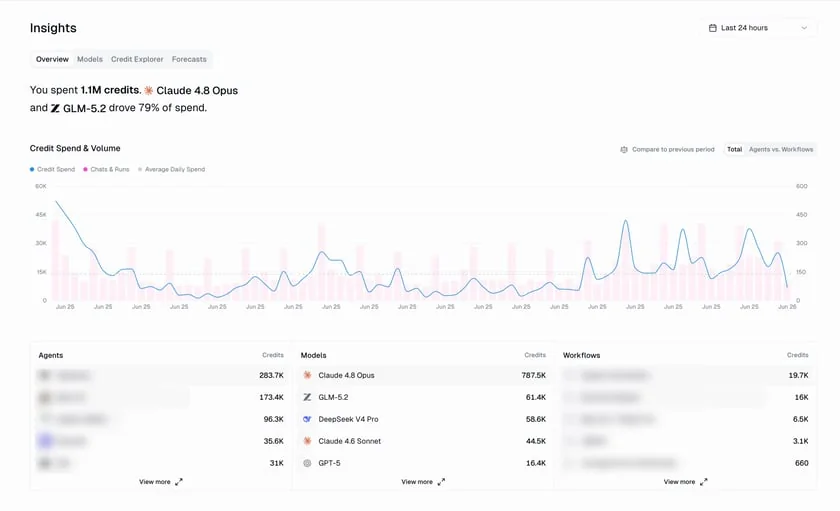
Gumloop's line is "AI agents built by your team", built on the belief that "understanding a task should be the only prerequisite to automating it". It is a drag-and-drop node canvas, and the agents run from Slack, Teams or Gmail. Functionally it sits very close to Cassidy, which makes the way it handles the cost into the most interesting thing about it.
Pricing
The free plan is gone as of this month. Entry is now a 14-day trial, and then two plans.
| Plan | Price | Credits | Key limit |
|---|---|---|---|
| Pro | From $37/mo | 20,000+/mo, slider to 1.5M | 5 concurrent runs, 25 concurrent chats, 1 hosted MCP server |
| Enterprise | Custom | Custom | Org-wide guardrails, 5 MCP servers, workflow queuing |
The credit slider steps through 20k, 105k, 140k, 250k, 330k, 625k, 1M and 1.5M, but for any step above the $37 entry point no dollar figure is published. There is one real per-credit number, and like Cassidy's, it is hiding inside a docs screenshot: the subscription screen in the credits documentation shows a credit overage toggle with the rate $0.005/credit sitting next to it.
This matters more once you see what a single chat actually costs.
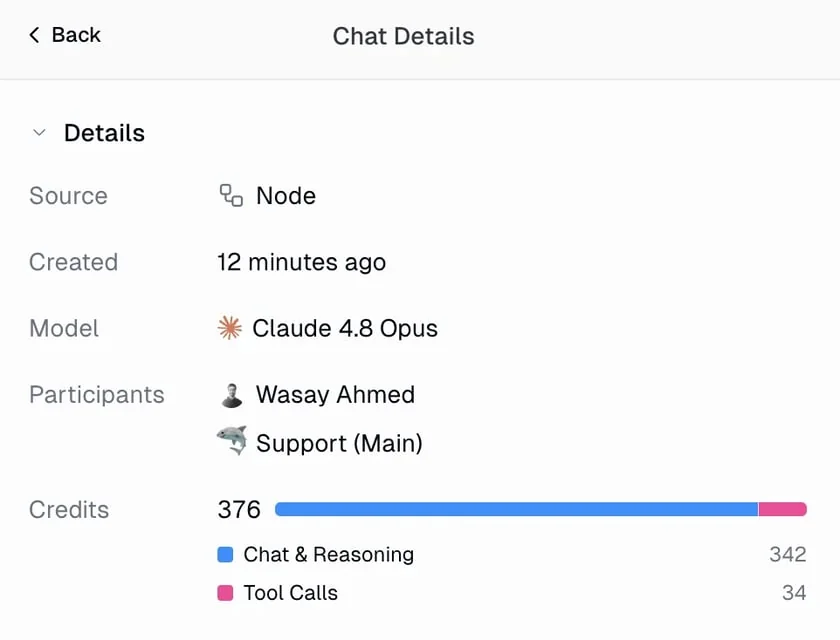
One chat turn in that panel bills 376 credits, split into 342 for chat and reasoning plus 34 for the tool calls. At the published overage rate that comes to about $1.88 for a single exchange, which makes a useful reality check against any tool which quotes you a monthly credit allowance and then leaves you guessing how far it goes.
Pros
- Bring your own model key and "your AI model calls consume 50% fewer credits", on Pro and above. That is a real quantified discount, not some vague promise.
- Proper spend guardrails: admins set a per-chat credit threshold, and hitting that one pauses the agent and raises an Action Request instead of quietly burning through the balance. Of every tool here, this is the most honest treatment of the runaway agent cost.
Cons
- The cost is unpredictable by design, and the docs do admit it: "The same agent might cost 2 credits for a quick question and 200 for a deep research task."
- Credits do not roll over except on Enterprise, and the Insights dashboard which shows spend by agent, model and workflow is Enterprise-only too. So Pro customers lose their unused credits and get the weakest visibility into the why.
My take
Take Gumloop over Cassidy if the specific thing which burned you was an agent quietly eating the balance, because the per-chat threshold is that guardrail Cassidy does not have. Do not take it expecting a price clarity, since it is the same credit model, only with better brakes. There is no citable user voice on it yet, and that is worth to know: no Reddit threads, no G2 reviews, and nothing on Trustpilot as of this month.
What actually decides this
After going through all the nine, the choice collapses onto one axis which nobody puts on a comparison page.
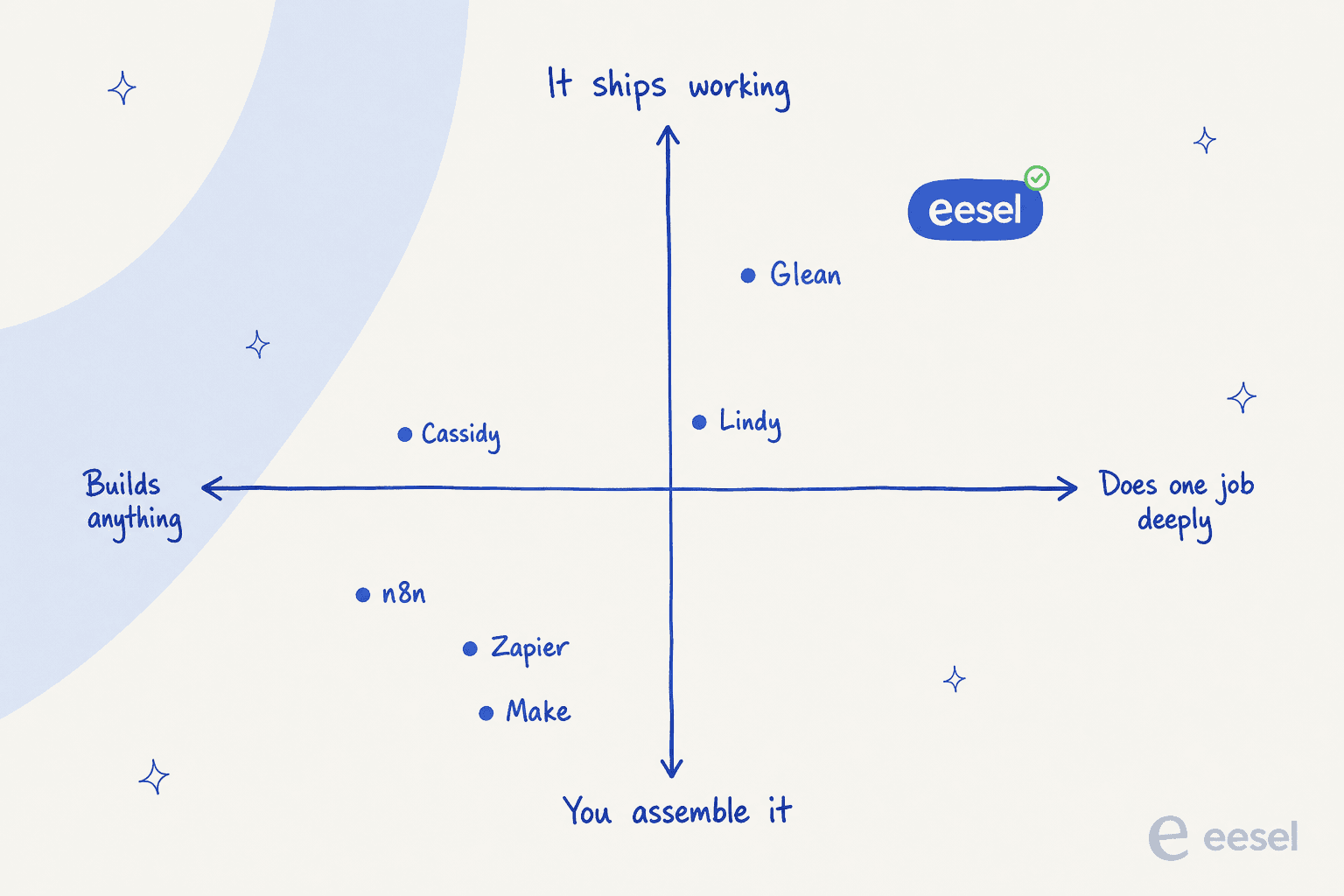
Make sits down in that bottom-left corner as well, and it deserves a mention even though I could not justify giving it a full slot: $12/mo is the cheapest real entry point in this category, AI agents are available on every tier including the free one, and one module action is one credit. It missed the list on the same grounds as Zapier, per-action billing and no support-specific surface, but when budget is the binding constraint it is worth a look.
Tools on the left build anything, which means you own the assembly and the edge cases, and the maintenance too. Tools on the right do one job and ship working, which means less flexibility for you and much less to build. Cassidy sits left of the centre. Most people who leave it are not looking for a better canvas, they are trying to move right.
An engineering lead at a crypto-hardware company with a 300-article Confluence knowledge base described this move about as directly as it can be described:
"We could try to write our own LLM application but we didn't want to invest our time into that. We wanted something that we would not have to maintain."
The second decision, when support is your use case, is the confidence threshold. It sounds like a small setting. What it determines is whether your AI produces closed tickets or a second inbox which is full of drafts, and only one tool in this roundup has one.
Try eesel AI
If you came to Cassidy hoping it would take the ticket queue off your team's hands, that is the one job which it structurally cannot do, and it is the job eesel AI was built for. It connects into your helpdesk in minutes, learns from the tickets you have already answered, then handles the ones it is confident about and leaves the rest for a human. Plans from $299 a month for 500 credits, no seat fees, plus a free plan with 100 credits and no card.

The part I would actually push you to use first is the simulation. Run it against your own historical tickets, look at the coverage by theme, and decide from data instead of a demo whether the thing is ready for your queue. You can start on the pricing page, or book a demo if you would rather have someone walk it with you.