The 9 best Creatio alternatives in 2026 (and what each really costs)

Rama Adi

Katelin Teen
Last edited August 24, 2026

What Creatio is good at, and why teams still leave
Let me start with the fair part, because a lot of Creatio criticism online is lazy.
Creatio is a real platform with real depth. It was named the only Visionary in the 2026 Gartner Magic Quadrant for CRM Sales Platforms, and the only Leader in the 2024 Forrester Wave for low-code platforms for citizen developers.
The customer numbers back that up. Howdens rolled it out to 7,000 users across 800 depots in twelve weeks, and BSN Sports runs 2,600 users with three administrators, per Creatio's own customer stories. Those are not marketing numbers, those are operational ones.
One caveat on the ratings, because I would rather flag it than quietly lean on it. Creatio holds 4.6 across 359 G2 reviews and 4.7 across 150 on Capterra. But G2 shows zero one-star, two-star, or three-star reviews at all, nearly every recent entry carries an "Incentivized" or G2 Gives Campaign tag clustered on two days in June 2026, and Capterra carries 1.0-overall reviews from the same period. Read the aggregate as a floor on sentiment, not a measurement of it.
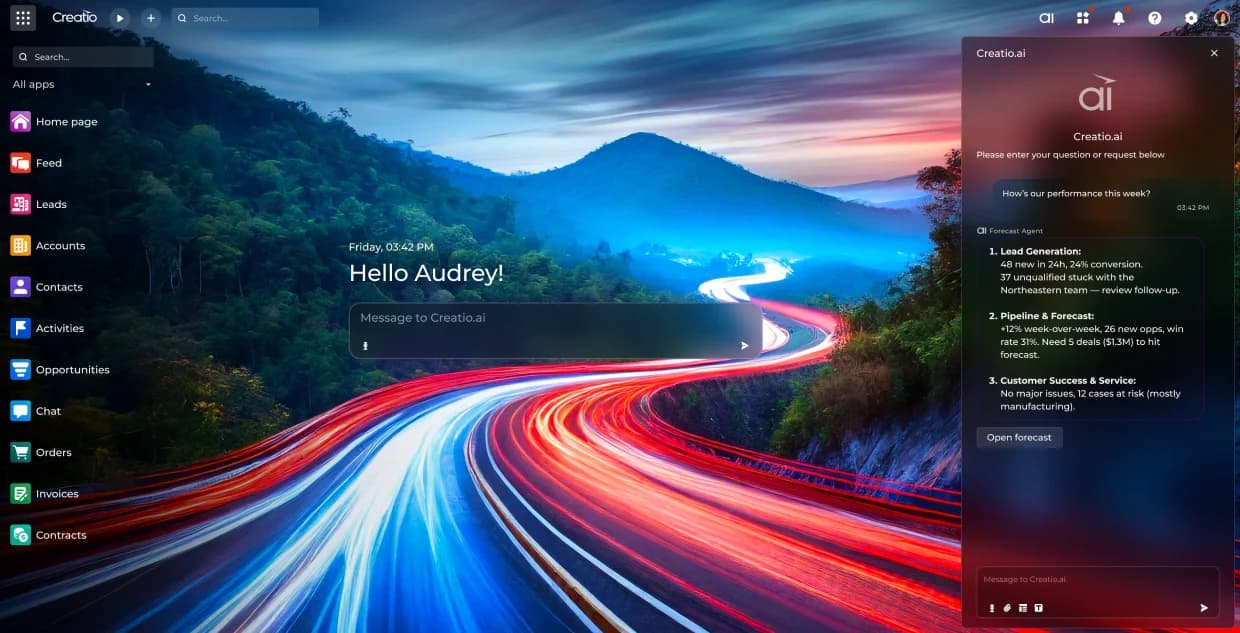
It also does something most vendors in this list refuse to do: it lets you bring your own model. The docs support OpenAI, Azure OpenAI, any LiteLLM provider, and custom JSON endpoints, with a stated 25,000-token context minimum for API sub-agents and 40,000 plus function calling for chat scenarios. If model sovereignty matters to your security review, that is a real advantage and it is worth naming before I get to the problems.
I have spent the last three-plus years shipping the integrations that put AI agents on live support queues, and the pattern I see over and over is not about capability. It is about proof. A buyer on a Gorgias trial ran twelve test chats, the agent handled all twelve well, and then they opened the billing page and immediately filed a cancellation request. The product worked. The bill was the surprise. That is the failure mode this whole comparison is built around, and Creatio walks straight into it in three specific ways.
One: the floor is $10,000 a year on a three-year term
Printed twice on the Creatio pricing page, in the desktop and mobile totals panels, verbatim: "The minimum purchase for new customers is $10,000 per year. The standard contract term is 3 years."
There is no seat minimum, so the gate is a dollar floor rather than a headcount. But the floor implies one. At the Growth rate of $40 per user per month, $10,000 a year is roughly 21 users' worth of spend. At Enterprise, roughly 12. And the standard term makes the smallest published commitment $30,000, which is a lot of money to commit before you have watched the thing answer a single one of your own tickets.
For comparison, the Zoho Desk free tier is permanent, Zendesk sells month to month, and eesel's floor is zero. It is the term, not the price, that buyers actually flag. Someone weighing exactly this trade-off on r/lowcode reduced it to one sentence:
"Creatio requires a 3 year commit, Zoho makes you buy modules plus users."

Two: the AI unit has a price but no exchange rate
This is the part that matters most, and it is worth being precise about because Creatio actually publishes more than several rivals.
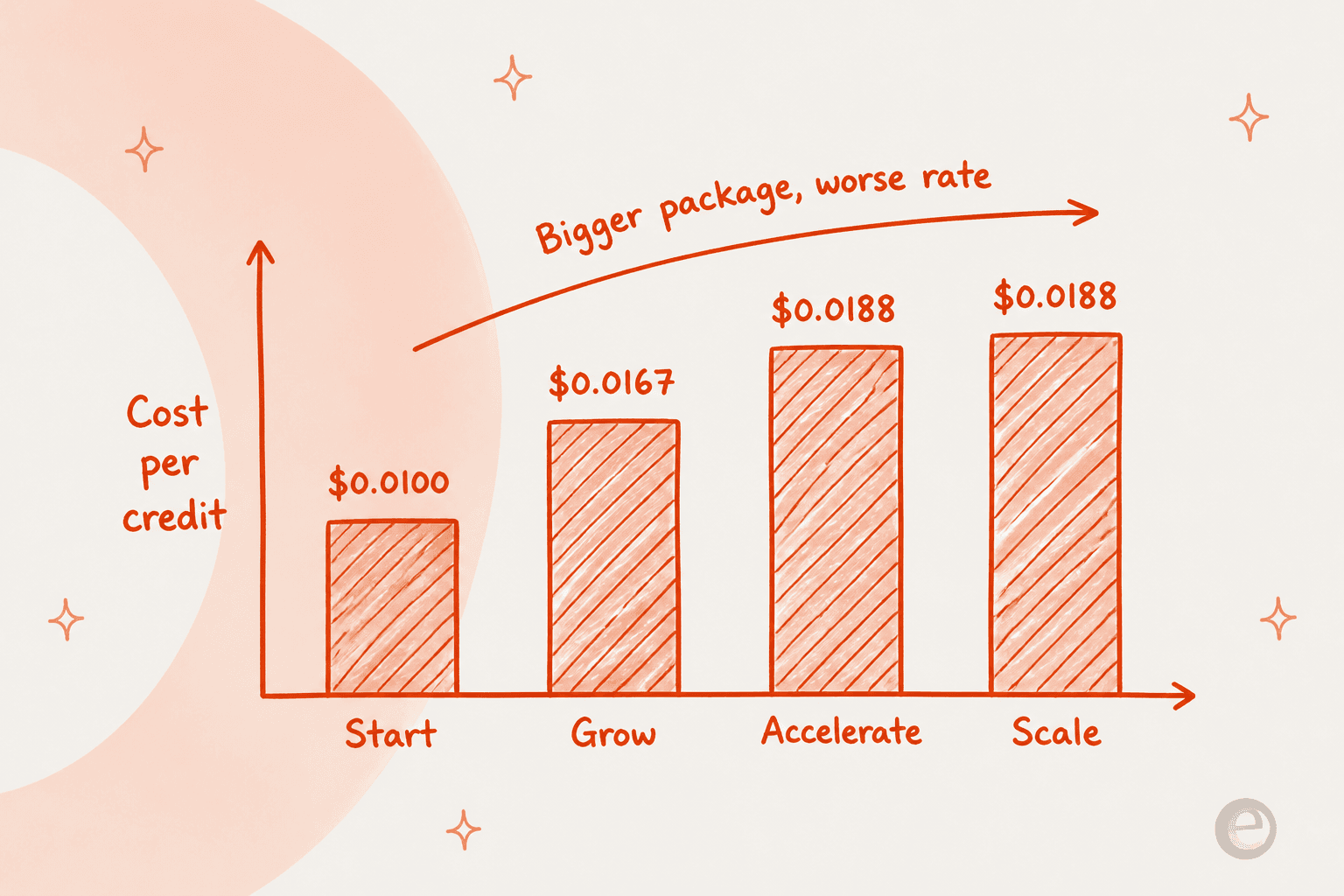
AI is sold in five annual packages. Start is $5,000 for 500,000 credits. Grow is $25,000 for 1.5 million. Accelerate is $75,000 for 4 million. Scale is $150,000 for 8 million. Freedom is custom. Those are exact figures on a public page, which is more than ServiceNow manages.
The problem is the definition. An AI Credit is described as "a single, universal unit for all AI consumption across every model, modality, and provider," and there is no table anywhere mapping credits to agent runs, resolved cases, actions, or tokens. So you can compute your annual AI invoice to the dollar and you cannot compute your cost per ticket at all.
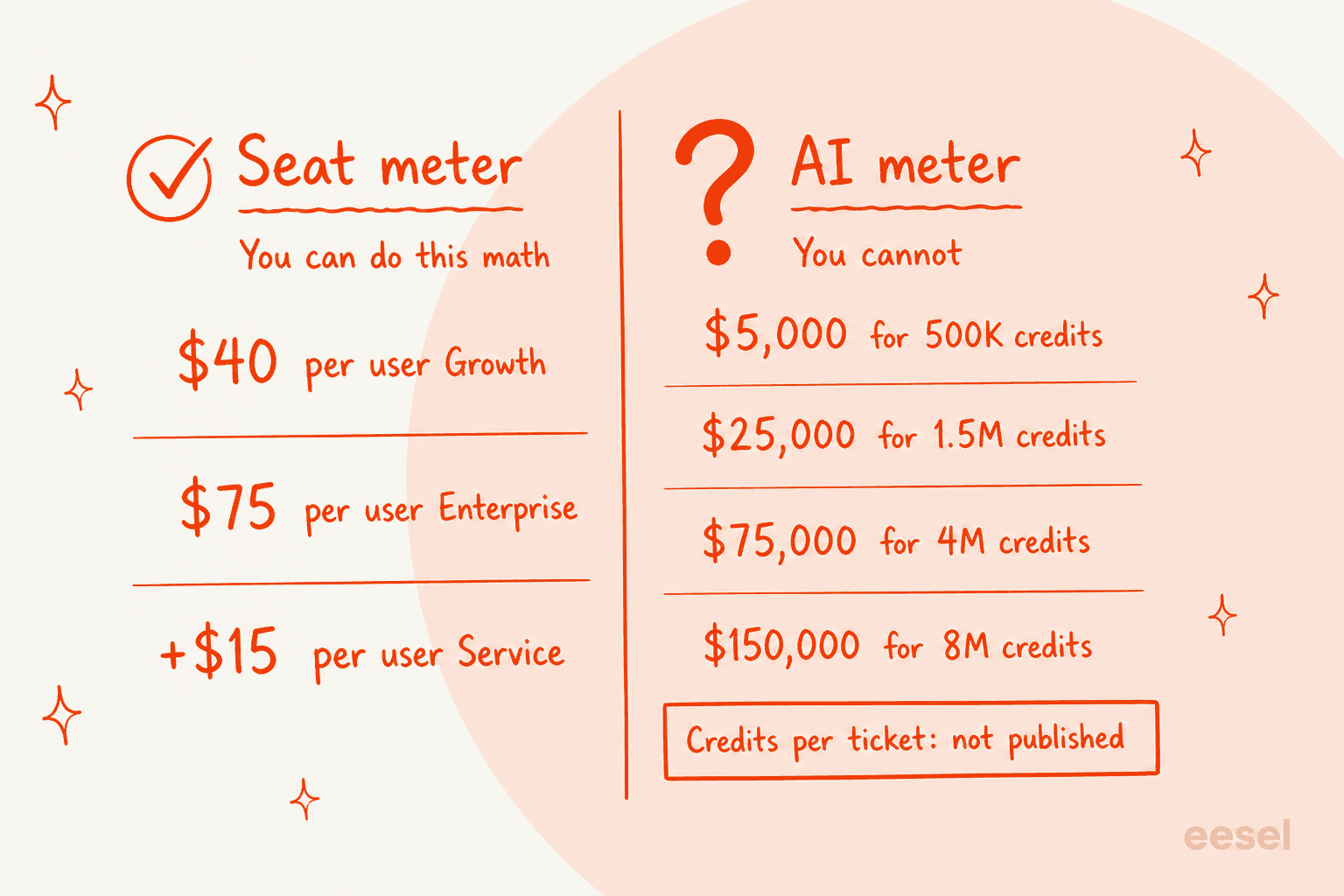
There is a second, stranger detail in that table. Divide each package price by its credit count and the effective rate goes the wrong way. Start works out to $0.0100 a credit. Grow is $0.0167. Accelerate and Scale both land at $0.01875, which is 87.5% above the smallest package. Buying volume does not buy a discount here, it buys a worse rate.
The Unlimited Enterprise landing page complicates it further. It promises unlimited users, agents, workflows, applications, custom objects, and API calls, with no price attached and a demo request as the only CTA. What it never says is that AI Credits are unlimited, and the pricing page keeps AI packages as a line item independent of platform tier. Read the two pages side by side and the honest conclusion is that Unlimited removes the seat meter, not the AI meter. Creatio does not state that either way, which makes it the single thing I would get in writing before signing.
Worth noting how thin the public evidence is on either side of this. Across 359 G2 reviews and 150 on Capterra I found no containment rate, no deflection rate, and no tickets-resolved figure for Creatio.ai at all. The one AI-specific complaint in the whole set is a single line in an otherwise 4.5-star review, and it is about exactly this:
"Lowering AI consumption costs"

Three: there is no way to dry-run the agent on your own cases
I went looking for this properly. Creatio's live documentation tree is at academy.creatio.com/guides, and its sitemap carries 3,856 URLs. Searching all of them for test, simulate, evaluate, sandbox, backtest, and replay turns up email A/B testing, a banking customer-evaluation process, and mobile app debugging. There is no agent evaluation, no batch replay, no regression suite.
What exists instead is a Preview panel in the Prompt Agent Designer where you pick an environment, type one message, read the response, and optionally toggle Show trace. It is a manual chat sandbox. Nothing feeds it a corpus, scores a batch, or reports a coverage number.
Creatio does have real governance around this, and I want to be accurate: there are tool confirmation policies with human approval gates, HITL policies, and an Observe mode that logs when a guardrail would have fired without blocking it. That is good engineering. But Observe mode runs on live traffic, after launch. Every safety net Creatio ships fires once the agent is already talking to real customers.
That gap is the one that loses deals in my experience, not price. A CX lead at a DTC supplements brand running about 7,000 Gorgias tickets a month put it about as clearly as anyone has:
"The AI will never be able to answer 100% of the questions, but if it tries and just answers 'sorry I don't know this,' I cannot go and check all my 7,000 tickets to see if the AI actually made a good answer. I need an AI who is only handling the tickets that it's confident to handle and all the other ones, leave them alone."
And there is a fourth thing worth knowing if ticket triage and service are your use case specifically. Creatio's marketing names five service agents; the docs ship two, the Case Resolution Agent and the Knowledge Agent. Case Classification, Service Playbook, and Next Best Action exist as cookbook scenarios where roughly a dozen sub-agents are tagged "(custom)", meaning you build them. And for the one truly autonomous path, the chat channel, the docs state the ceiling outright: the capability allowlist "currently includes only handoff and the default knowledge base sub-agent."
The question that actually sorts these nine
Here is the reframe I would hand anyone running this evaluation.
Every enterprise platform in 2026 publishes a seat price. That number is easy, it is competitive, and it is not where your AI support budget goes. The number that decides your bill is how many AI units a resolved ticket consumes, and that is the number most vendors have quietly stopped publishing.
Microsoft is the clearest case. It publishes $50, $105, and $195 per user per month for Dynamics 365 Customer Service. It publishes a Copilot Credit at $0.01 metered or $200 per 25,000 prepaid. And then it says, on its own page, that "a varying number of Copilot Credits will be billed depending on the specific usage," driven by agent type, knowledge sources, and answer complexity. There is no credits-per-response table anywhere. Microsoft even ships an AI Agent Credit Estimation feature on Enterprise and Premium, which is a fairly direct admission that a buyer cannot do this arithmetic from the rate card.
So the nine split into three groups:
- Publishes a unit you can multiply. eesel at $299 a month for 500 credits (1 credit per ticket or chat), Freshworks at 49c a session, HubSpot at 45c to 50c a resolution, Zendesk at $1.50 to $2.00 a verified resolution, Salesforce at 30c for its own published case-management example.
- Prices the AI into the seat, or does not meter it. Zoho includes Zia in the tier and only meters tokens on Zia Agents, with 30 million free a month. monday currently does not charge credits for AI on its service boards at all, though it labels that a limited-time offer.
- Publishes a rate with no exchange rate. Creatio's AI Credit, Microsoft's Copilot Credit, ServiceNow's Assist. ServiceNow does not publish a dollar figure for anything, though it does publish one unusually generous entitlement I will get to.
Play with the numbers yourself. This is list pricing at 25 support agents, with included allowances applied first, and it only shows the AI half of the bill because the seat half is the part everyone already publishes.
The three rows with a question mark are not an oversight on my part. They are the actual state of those vendors' public pricing.
Creatio alternatives at a glance
| Tool | Best for | Entry seat price (annual) | Service seat, realistic | AI billable unit | AI rate | Can you compute cost per ticket? | Minimum commitment | Test on past tickets before launch? | Free tier or trial | BYO model |
|---|---|---|---|---|---|---|---|---|---|---|
| eesel | Keeping your helpdesk, changing the AI | $0, no seats | $0 | Credit (1 per ticket or chat) | $299/mo for 500 credits | Yes | None | Yes, scored gap report | 100 free credits, no card | Talk to us |
| Creatio | No-code platform teams with a builder bench | $40 (Growth) | $55 to $90 | AI Credit | $5,000 to $150,000 a year | No | $10,000 a year, 3-year term | No, one message at a time | Trial, length unpublished | Yes, LiteLLM or custom |
| Salesforce Service Cloud | Teams already deep in Salesforce | $25 (Starter) | $175 plus $125 | Flex Credit, conversation, or resolution | $0.005 a credit, $2 a conversation | Yes, 20 credits an action | Annual contract from Pro up | Testing Center exists | 30-day trial | No |
| Microsoft Dynamics 365 | Microsoft-estate shops | $50 (Professional) | $105 to $195 | Copilot Credit | $0.008 to $0.01 | No, explicitly variable | Annual only | No | Free trial | Via Azure OpenAI |
| ServiceNow CSM | Enterprise workflow replatforms | Not published | Not published | Assist | Not published | No | Not published | AI Agent Advisor, pre-deploy | None, demo only | No |
| HubSpot Service Hub | Mid-market wanting one CRM and desk | $7 (Starter) | $90 (Professional) | Credit, 50 a resolution | $0.45 to $0.50 a resolution | Yes | $1,500 onboarding required | No | Free tools, 2 users | No |
| Zoho Desk | Lowest all-in suite price | $7 (Express) | $23 (Professional) | Token on Zia Agents | 30M free, then $1 per 1M | Yes, if you model tokens | None | No | Free forever, 3 users | Yes, BYOK |
| Freshworks | Service-first teams, CRM later | $19 (Growth) | $79 (Omni Pro) | Freddy session, 72h window | $0.49 a session | Yes | Annual pricing shown | No | 14-day trial | No |
| monday.com | No-code work platform replacement | $9 (Basic) | $31 (service Pro) | AI credit | $0.01 a credit | Yes, per-feature table | 3 seats min, 40 seat cap | No | Free, 2 seats | No |
| Zendesk | Service depth without the CRM | $19 (Support Team) | $115 (Suite Pro) | Verified automated resolution | $1.50 committed, $2.00 PAYG | Yes | Month to month available | No | 14-day trial | No |
Two columns in that table do most of the work. The "can you compute cost per ticket" column is the one I would sort on first, and the "test on past tickets" column is the one that decides whether your rollout is a project or a gamble.
How I picked and scored these
Nine tools, one selection rule: each had to be something a real Creatio evaluator would actually put on a shortlist. That means it either replaces the platform (Salesforce, Dynamics, ServiceNow, HubSpot, Zoho, monday) or replaces the part of it that was underperforming (eesel, Zendesk, Freshworks on the service side). If you are further up the funnel than that, our enterprise helpdesk roundup is the better starting point.
Every price in this post came off the vendor's own pricing page, docs, or legal catalog on 25 August 2026. Where a vendor published two contradictory numbers I said so rather than picking the flattering one. Where a number only exists behind a sales call I wrote "not published" rather than borrowing an estimate from a third-party blog, which is how most roundups in this category quietly manufacture a comparison.
I did not score on feature counts. Enterprise CRMs all have case management, a knowledge base, SLA rules and omnichannel routing. Checking those boxes tells you nothing. What separates them in 2026 is the commercial model around the AI and whether they will let you verify it works.
1. eesel
Best for: teams whose complaint is the service AI, not the platform.
What it is. eesel is the AI layer, not the desk. It connects to the helpdesk you already run, learns from your past tickets and knowledge sources, and handles tickets end to end or drafts for a human to approve. There is no migration, because there is nothing to migrate to. That is the whole design: if Creatio's CRM is fine and its service AI is the problem, replacing the CRM is the most expensive possible fix.
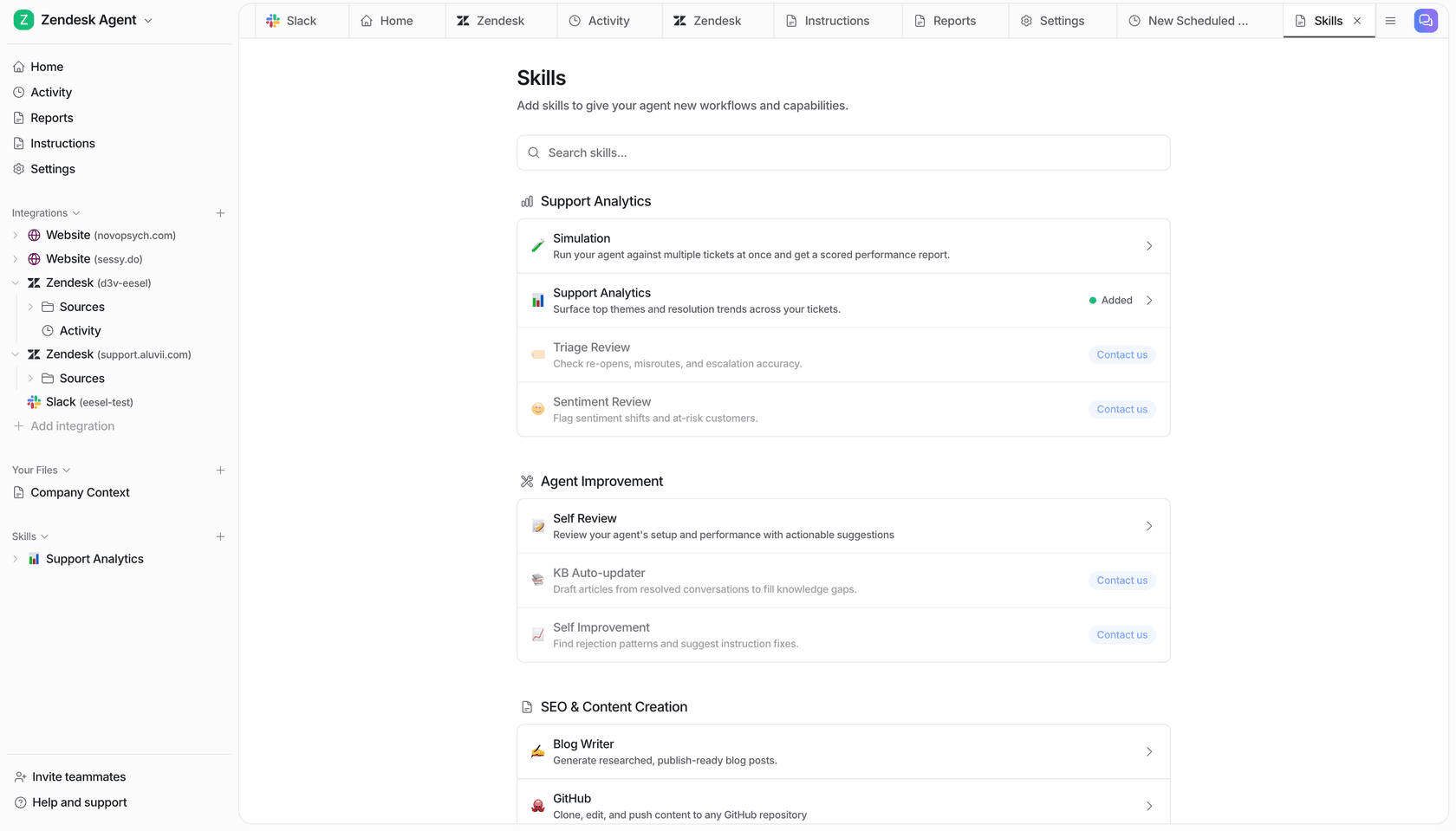
The AI meter. One unit: a credit, which is one ticket or chat on the eesel pricing page, counted per conversation rather than per reply. A ticket with fifteen messages in it is one credit. You pick a monthly batch and pay one fixed price. Blog drafts are $4 each, and questions asked in the dashboard are mostly free. No platform fee, no per-seat fee. Paying a year upfront gets two months free, and SSO, MFA and data residency are add-ons.
Pricing.
| Item | Price |
|---|---|
| Free plan | 100 credits, no card |
| 500 credits a month | $299/mo |
| 1,000 credits a month | $499/mo |
| 2,500 credits a month | $999/mo |
| 5,000 credits a month | $1,899/mo |
| More than 5,000 credits | Talk to us |
| Blog draft | $4.00 each |
| Seats | $0 |
| Pay a year upfront | Two months free |
| Add-ons | SSO and MFA from $199/mo, data residency $500/mo |
Pros. The unit is a ticket or chat, which is the unit you already budget in, so the arithmetic takes ten seconds. Simulation is a default skill rather than an add-on: it pulls your old conversations, generates responses, scores accuracy, and hands back a gap report before anything goes live. There are 39 named integrations across nine helpdesks, seven knowledge sources, and seven channels, which is the practical difference between an AI agent and a chatbot. Confidence-based routing means low confidence produces a draft for review rather than a live reply. If you run out of credits, agents pause until they reset, or you can turn on overage with a monthly cap you set, at $0.80 per extra credit.
Cons. SOC 2 Type II is underway rather than certified, monitored via Vanta, with the report available under NDA on completion. If your procurement gate is a signed SOC 2 report today, that is a real blocker and I have watched it kill deals. HIPAA is a talk-to-us add-on. And eesel is not a CRM: if you need pipeline management, quoting, and marketing automation in one system, this is the wrong shape of tool and one of the suites below is the right answer.
Verdict: the right pick when you are leaving Creatio for the service AI rather than the platform, and the wrong pick when you actually need a CRM. Gridwise resolved 73% of tier-1 requests in the first month after a seven-day trial, which is roughly the shape of rollout the per-ticket model makes possible. If you need a signed SOC 2 report before you can trial anything, start with Salesforce or Microsoft instead.
2. Salesforce Service Cloud
Best for: teams already committed to Salesforce, who can absorb a $300 per user per month floor for AI.
What it is. The category default, and the most transparent big vendor on AI pricing in this whole list. Five editions from Starter Suite to Agentforce 1 Service, with Agentforce as the agent layer on top.
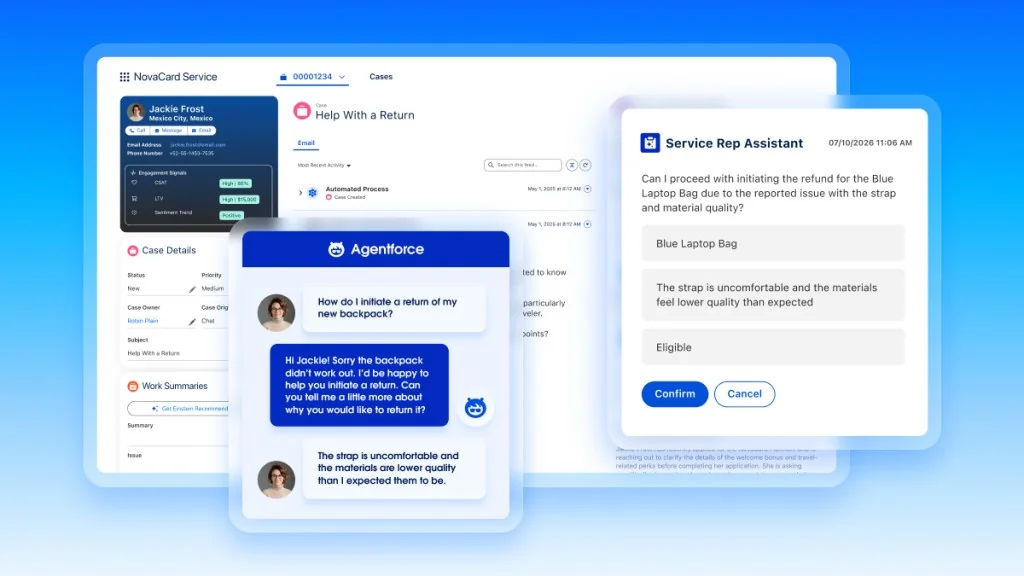
The AI meter. Three of them, running in parallel, which is the confusing part. Flex Credits at $500 per 100,000, so half a cent each. Conversations at $2 each for customer-facing agents. Help Agent Resolutions at $2 each. Flex Credits and Conversations cannot coexist in one org.
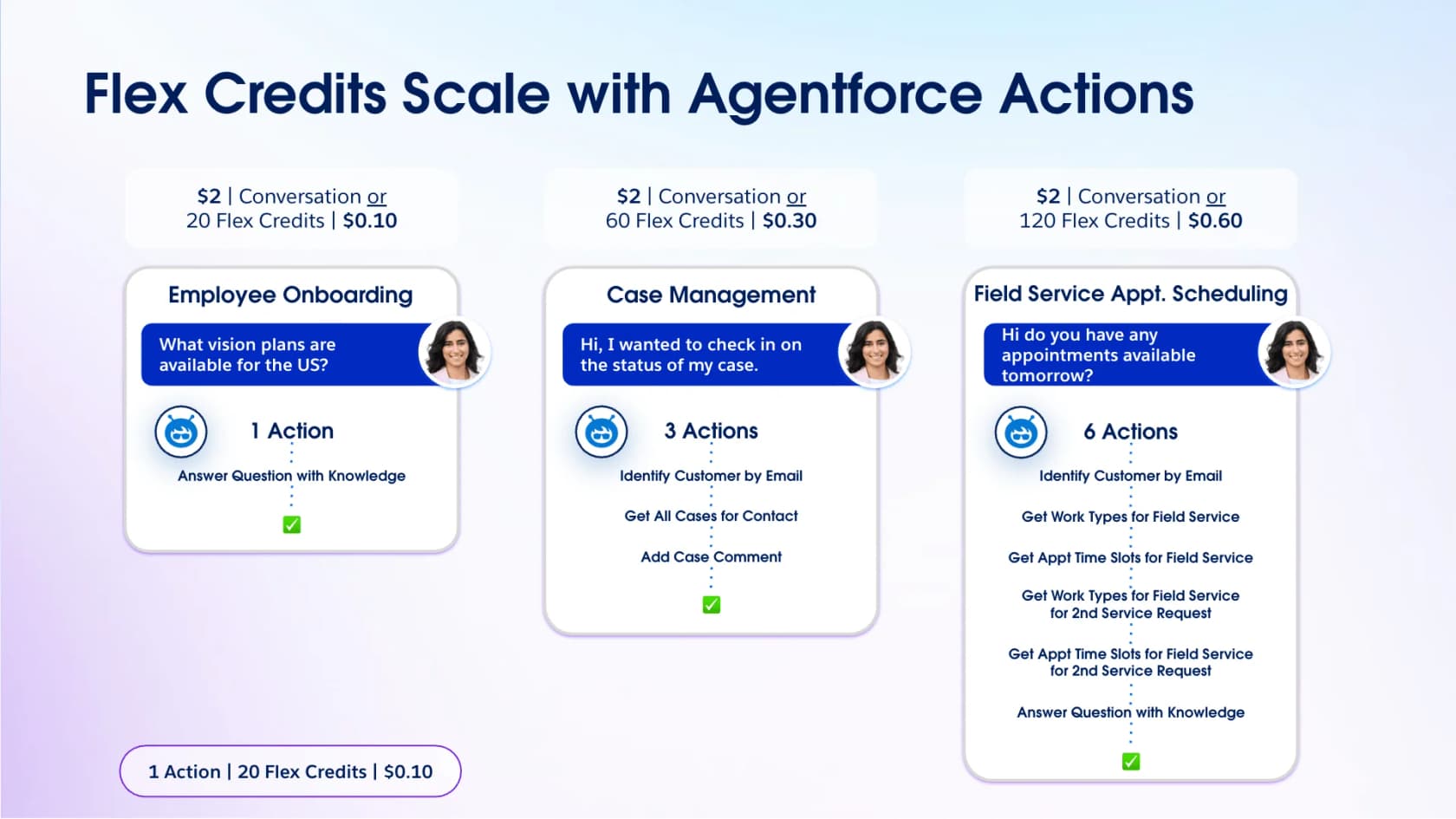
What redeems it is that Salesforce publishes the exchange rate, which almost nobody else does. The standard is 20 Flex Credits per action, and its own worked examples price a knowledge answer at 10c, a three-action case-management interaction at 30c, and a six-action field-service booking at 60c.
Pricing.
| Edition | Per user, per month | AI status |
|---|---|---|
| Starter Suite | $25 | No Agentforce |
| Pro Suite | $100 | No Agentforce |
| Enterprise | $175 | Agentforce purchasable, plus $125 |
| Unlimited | $350 | Agentforce purchasable |
| Agentforce 1 Service | $550 | Included, 2.5M credits a year per org |
Pros. The published per-action rate is the best pricing transparency in the enterprise tier, and the Digital Wallet consumption dashboard is free. Agentforce Testing Center gives you a pre-deployment validation path, which puts it ahead of most of this list on the proof question. Depth is unmatched if you are already on the platform, and our roundup of Salesforce AI assistants covers what sits alongside it.
Cons. The floor is brutal. Enterprise at $175 plus Agentforce for Service at $125 is $300 per user per month before a single conversation, which at 25 agents is $90,000 a year in seats. Knowledge read-write, Einstein Bots, and Enhanced Messaging each add $75 per user per month on Enterprise. The "unmetered" promise on Agentforce 1 covers employee-facing agents only; customer-facing conversations still draw down the credit pool. And there is a small arithmetic error on the page itself: the Voice row lists 120 credits at $0.15 while the same row's monthly math implies $0.60.
Verdict: if you are already on Salesforce, this is the obvious move and the transparency is real. If you are not, $300 per user per month to get an AI agent is a very expensive way to leave a $90 per user platform. Our comparison of AI for Service Cloud covers the cheaper layer option.
3. Microsoft Dynamics 365 Customer Service
Best for: organisations whose entire estate is already Microsoft.
What it is. Three editions plus a standalone Contact Center, all annual-only, all deeply wired into Microsoft 365, Teams, Power Automate, and Power BI. If your company runs on Microsoft, the integration story writes itself.
The AI meter. A Copilot Credit, at $200 per 25,000 prepaid (eight tenths of a cent) or $0.01 metered pay-as-you-go. Prepaid is exactly 20% cheaper, and overage on a prepaid pack silently reprices to the higher metered rate. Trigger plus resulting action counts as one billing event, not two, which is a fair detail.
The exchange rate is where it falls down, and Microsoft says so plainly: a varying number of credits gets billed depending on usage, driven by agent type, knowledge sources, and answer complexity. No credits-per-response table exists on any pricing page. The per-action multipliers live in a downloadable licensing guide.
Pricing.
| Edition | Per user, per month | AI status |
|---|---|---|
| Customer Service Professional | $50 | No Copilot; agents need credits |
| Customer Service Enterprise | $105 | Copilot included; agents need credits |
| Customer Service Premium | $195 | Copilot plus "base" credit capacity, quantity unstated |
| Contact Center standalone | $110 | Voice, digital, IVR |
Pros. Cheapest enterprise seat in this group at $50, unlimited named users on every edition, and the deepest Microsoft-estate integration available. The four named autonomous agents (Customer Intent, Knowledge Management, Case Management, Quality Evaluation) are real products, not roadmap items. Bring-your-own model works through Azure OpenAI.
Cons. Copilot assistance starts at Enterprise ($105) and autonomous agents only have included capacity at Premium ($195), where the footnote says "base" capacity and never gives the quantity. Annual billing is the only published option. An Azure subscription is a hard prerequisite for any agent. Voice runs on separately billed Azure Communication Services, embedded Power BI may need its own license, and digital-messaging capacity is bought through Copilot Studio rather than the Customer Service license. That is four separate meters before you count the seats.
Verdict: the right answer if Microsoft licensing is already a sunk cost and your security team prefers one vendor. The wrong answer if you need to forecast an AI budget, because Microsoft shipping a credit estimator is itself the proof that you cannot do it from the rate card. Compare against a customer service automation platform with a flat unit before committing.
4. ServiceNow Customer Service Management
Best for: enterprise replatforms where the workflow engine, not the CRM, is the point.
What it is. The closest structural rival to Creatio's actual pitch: a workflow platform with customer service built on top, rather than a CRM with workflows bolted on. As of April 2026 it ships as two packages, CSM Advanced and CSM Prime, replacing the older three-tier ladder.
The AI meter. An Assist, and that is all I can tell you. ServiceNow publishes no dollar figure for anything: not a seat rate, not a floor, not a range, not a per-Assist price. I checked three of its own pricing surfaces and every one is a lead-capture form. The only public explanation of what an Assist is comes from a member-authored post on ServiceNow's own community site, whose author openly says the exact formula "might remain somewhat not clear."
There is one exception worth naming, and it is the most interesting single line in this whole comparison. A footnote on the packages page reads: "All packages include unlimited Virtual Agent conversations." The least transparent vendor here is also the only one that explicitly does not meter the customer conversation. That is the exact axis Zendesk, HubSpot, Freshworks, and eesel all bill on.
Pricing.
| Field | CSM Advanced | CSM Prime |
|---|---|---|
| Per-seat list price | Not published | Not published |
| Minimum seats | Not published | Not published |
| Free tier or self-serve | None | None |
| AI included | Yes, agentic workflows | Yes, plus AI Specialists |
| AI unit | Assist, no rate | Assist, no rate |
| Virtual Agent conversations | Unlimited | Unlimited |
Pros. AI is bundled into both packages rather than sold as a separate Now Assist SKU, which is a real simplification over the old model. Unlimited Virtual Agent conversations is a strong entitlement on the axis that usually costs most. The platform depth (CMDB, CSDM, Process Mining, Native Voice with no third-party middleware) is beyond anything Creatio ships, and it is the reference point for serious workflow automation. AI Agent Advisor builds agents "proven to work before deployment," which is a genuine pre-deployment validation story. Our writeup of ServiceNow AI features goes deeper.
Cons. You cannot price it without a sales cycle, and for a team leaving Creatio partly because of a $10,000 floor and a three-year term, trading that for a fully quote-gated vendor is a lateral move at best. No free tier, no self-serve signup, no trial. Every path is a demo request.
Verdict: the strongest platform on this list and the hardest to buy. Pick it when the workflow engine is the reason you are moving and you have procurement patience. Skip it if your evaluation has a deadline. Teams weighing it against the Freshworks stack should read our Freshservice versus ServiceNow comparison.
5. HubSpot Service Hub
Best for: mid-market teams who want one system for CRM and the service desk, with published AI math.
What it is. The mid-market suite play. Same contact record for sales, marketing, and service, a real help desk, and a customer agent that resolves conversations on a published per-resolution rate.
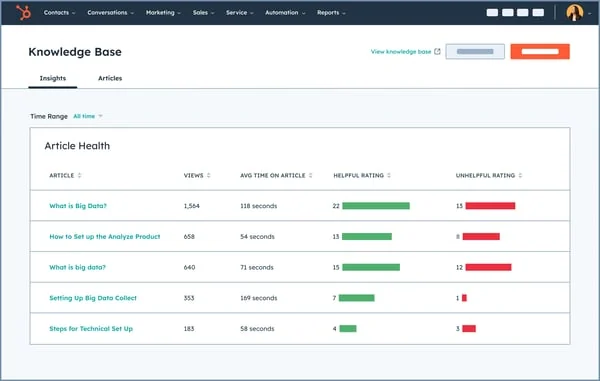
The AI meter. A HubSpot Credit, and the customer agent burns 50 credits to resolve one conversation, per HubSpot's product catalog. Credits cost 1c pay-as-you-go, $10 per 1,000 as a capacity pack, or $9 per 1,000 bought annually. So a resolution is 45c to 50c depending on how you buy. Included credits are 500 on Starter, 3,000 on Professional, and 5,000 on Enterprise, which works out to 60 AI resolutions a month on Professional before the meter starts. Credits reset monthly and do not roll over.
Pricing.
| Plan | Annual, per seat | Monthly | Included credits | Onboarding fee |
|---|---|---|---|---|
| Free tools | $0 | $0 | Not listed | None |
| Starter | $7 | $20 | 500 | None |
| Professional | $90 | $100 | 3,000 | $1,500, required |
| Enterprise | $150 | Not shown | 5,000 | $3,500, required |
Pros. The per-resolution rate is published and easy to multiply, which is the whole point of this post. No seat minimums. The free tools tier lets you get a feel for the CRM before spending anything. If the reason you are leaving Creatio is that you wanted one system rather than a platform plus a build project, this is the closest analogue that costs less, and worth weighing against the wider HubSpot alternatives field. Worth reading alongside our take on whether HubSpot Service Hub AI is worth it.
Cons. The onboarding fee is mandatory on both upper tiers, and $1,500 on Professional is the closest structural echo of a Creatio-style implementation cost in this list. The customer agent needs Professional, so the real entry point for AI support is $90 a seat plus $1,500. Sixty included resolutions a month is small: a team doing 2,000 a month buys 1,940 of them, which is another $873 to $970 a month on top of the seat bill. The Enterprise card shows no monthly option, which reads as annual-commit-only without saying so.
Verdict: the best mid-market suite pick, and the honest one on AI pricing. Just budget the onboarding fee and the credit overage as real line items rather than rounding errors, and read ticket deflection on Service Hub before you model your resolution volume.
6. Zoho Desk and CRM Plus
Best for: the lowest all-in cost, if you can live with gates instead of meters.
What it is. The suite that prices like a utility. Zoho Desk handles service, Zoho CRM Plus bundles sales, marketing, service, projects, and analytics at $20 per user per month, and Zoho One takes the same idea company-wide. It is the most direct answer to "Creatio but cheaper," and the cheapest route to a working CRM ticketing system.
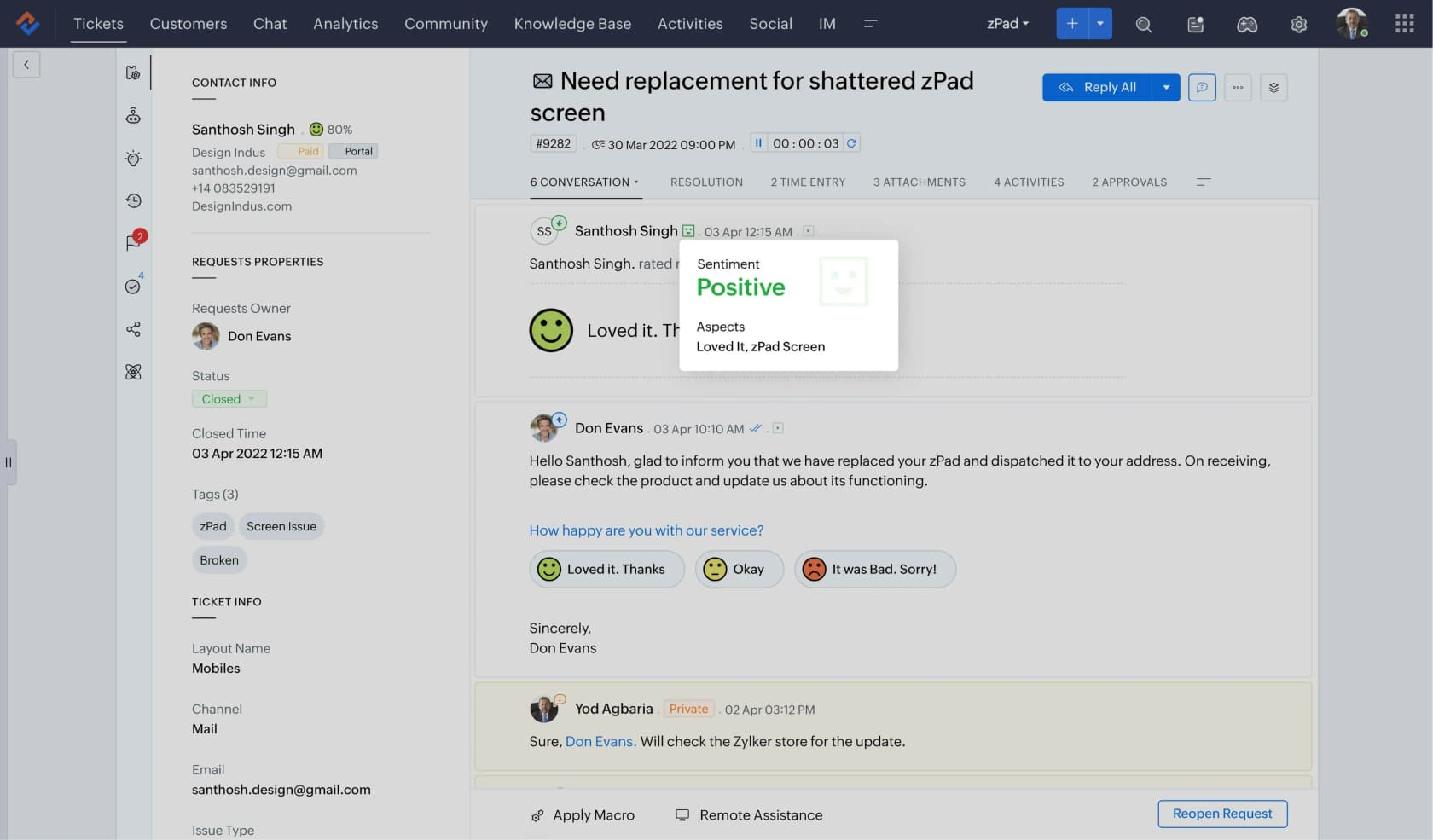
The AI meter. There barely is one, and that is the point. Zoho does not charge per resolution or per conversation. Zia is priced into whichever tier you buy. The only usage meter anywhere in the stack is tokens on Zia Agents, where 30 million tokens a month are free on the standard model tier and then it is $1 per million. Purchased credits roll over, which is the inverse of HubSpot's expiring ones. Bring your own key and Zoho adds no markup.
What replaces metering is gating. The answer bot needs Standard. Native generative AI needs Professional, so on Express and Standard you connect your own OpenAI or DeepSeek key and that vendor bills you. Pre-built Desk AI agents are Enterprise-only, and only in the US and India data centres.
Pricing.
| Zoho Desk plan | Annual, per agent | Monthly | Users |
|---|---|---|---|
| Free | $0 | $0 | 3 |
| Express | $7 | $9 | 5 |
| Standard | $14 | $20 | Unlimited |
| Professional | $23 | $35 | Unlimited |
| Enterprise | $40 | $50 | Unlimited |
Pros. Nothing else here comes close on price. A permanent free tier for three users, a 15-day trial with no card that downgrades to free rather than locking you out, and free migration help from Zoho's own team. No onboarding fees, no seat minimums on Desk, monthly billing available on every paid tier. Light agents at $6, with 50 free on Enterprise. See our Zoho Desk AI integrations roundup for what bolts on.
Cons. The gating means the cheap tiers are cheap partly because the AI is your problem: below Professional, generative features are bring-your-own-key, so your real AI cost is an OpenAI invoice you have to model separately. Zoho's own two pages contradict each other on user limits, with the comparison table saying Express caps at five and the pricing FAQ saying Standard does. Depth per feature is thinner than Salesforce or ServiceNow, and if you were on Creatio for complex process automation you will feel the ceiling. Zoho CRM Lite users require 25 regular licenses.
Verdict: the value pick, and the right call for most teams under 50 agents who want a suite. Just do the token arithmetic before you assume the AI is free, and check our AI for Zoho Desk guide for how far Zia actually goes.
7. Freshworks
Best for: service-first teams who want the desk working now and the CRM later.
What it is. Freshdesk for ticketing, Freshdesk Omni for omnichannel, Freshsales for CRM, sold as three separate rate cards. If you are leaving Creatio because service was the priority and the CRM was along for the ride, this inverts that order.

The AI meter. A Freddy AI Agent session at $49 per 100 sessions, so 49c each, identical across Freshdesk, Omni, and Freshsales. A session is well defined: for email it is a 72-hour window from the customer's first message, and every AI reply inside it counts once. That definition matters, because it means a long back-and-forth thread costs the same as a one-liner.
Agent-facing AI is separate. Freddy AI Copilot is $29 per agent per month, Pro and Enterprise only, and assignable to individual agents rather than the whole team.
Pricing.
| Product and plan | Annual, per agent | Freddy AI Agent | Copilot add-on |
|---|---|---|---|
| Freshdesk Growth | $19 | Included, 500 sessions once | Not offered |
| Freshdesk Pro | $55 | Included, 500 sessions once | $29 |
| Freshdesk Enterprise | $89 | Included, 500 sessions once | $29 |
| Omni Growth | $29 | Included | Not offered |
| Omni Pro | $79 | Included | $29 |
| Omni Enterprise | $119 | Included | $29 |
| Freshsales Growth | $9 | $49 per 100 sessions | n/a |
Pros. The AI agent is not tier-gated: it is included from $19 Growth up, which is unusual and generous. The session definition is the clearest in this list. Day passes at $2 to $15 let you cover holiday surges without buying permanent seats. Freshsales at $9 makes the CRM half cheap to add later. Our Freshdesk pricing breakdown has the full grid.
Cons. The 500 included sessions are once per account, not monthly, which is easy to misread as a recurring allowance. There is no free plan any more on any of the three products. Monthly per-seat rates are not rendered in the page source despite a monthly toggle existing, so the only prices you can actually verify are annual. Copilot is Pro-and-up only, so Growth teams get the customer-facing agent but no agent-facing assist.
Verdict: the best pick when service is the priority and budget is real. At 25 agents on Omni Pro handling 2,000 AI sessions a month, you are looking at roughly $23,700 in seats plus $11,515 in sessions. Compare against the Freshdesk alternatives list before committing.
8. monday.com
Best for: small teams who liked Creatio's no-code promise and want it without the enterprise floor.
What it is. The other no-code work platform, sold as four products: work management, CRM, service, and dev. Same "build your business apps without developers" pitch as Creatio, aimed at a much smaller company.
The AI meter. An AI credit, at $0.01 on yearly plans and $0.0125 monthly, a 25% premium the catalog states outright. And monday publishes the exchange rate, which puts it ahead of Creatio and Microsoft: an AI block is 8 credits, the notetaker is 120 credits an hour, a CRM lead agent run is 10 credits.
Two things to know. First, credits are a separate mandatory line item, not included in the seat price. monday's own pricing page shows the arithmetic: Standard at 10 seats is $120 in seats plus $20 in credits, minus a $20 promo, against a struck-through $140. The special offer is exactly the size of the minimum credit bucket, so the real Standard bill is about 17% above the sticker seat cost once the promo ends. Second, AI on the monday service boards currently does not consume credits at all, which monday labels a limited-time offer.
Pricing.
| Plan | Work management, per seat | monday service, per seat | Included credits |
|---|---|---|---|
| Free | $0, 2 seats | Not offered | None, no AI |
| Basic | $9 | Not offered | 1,000 |
| Standard | $12 | $31 | 2,000 |
| Pro | $19 | $45 | 3,000 |
| Enterprise | Quote | Quote | Custom |
Pros. Cheap to start, with a free tier and a 14-day Pro trial. The AI Feature Catalog is the most granular per-feature credit table anyone in this list publishes. Real SLA handling with a breach clock that pauses outside working hours. No per-credit overage: you move up a bucket instead, which makes the bill predictable. See our notes on monday.com AI for the feature detail.
Cons. The seat ceiling is the killer for a Creatio refugee: above 40 users you lose the self-serve rate card entirely and go to quote. Minimum three seats. The knowledge base is really the Customer Portal, and reader access is capped at 10, 100, or unlimited by plan, which is a hard constraint for external customers. And there is an asymmetry worth flagging: the product page claims an autonomous Customer Inquiry Agent, but the support docs cover agent-assist AI far more thoroughly than autonomous customer resolution. Free plan has no AI whatsoever.
Verdict: the right answer for a team under 40 people who wanted no-code without a $30,000 commitment. Wrong for anyone at Creatio's actual scale, since the rate card runs out before you get there. Worth reading monday alternatives if the seat cap is a dealbreaker.
9. Zendesk
Best for: teams who want service depth and no CRM at all.
What it is. The purest service product here. No sales pipeline, no marketing automation, just a very good help desk with the deepest AI-agent tooling of any dedicated desk.

The AI meter. An automated resolution, at $1.50 committed or $2.00 pay-as-you-go. The rate is identical across every priced tier; what changes with tier is the included allowance, not the price.
The interesting part is what counts. Since 18 May 2026, Zendesk splits outcomes into three tiers, and only one bills. An assisted escalation, where the AI gathered data but a human finished, does not draw down your allowance. A contained resolution that fails Zendesk's own LLM verification check does not either. Only a verified resolution, where an LLM confirms the customer's request was actually satisfied, counts. You pay for outcomes Zendesk's own model agrees were outcomes, which is the most buyer-friendly definition of an AI unit in this comparison.
Pricing.
| Plan | Annual, per agent | Monthly | Included resolutions |
|---|---|---|---|
| Support Team | $19 | $25 | 5 per agent per month |
| Suite Team | $55 | $69 | 5 per agent per month |
| Suite Professional | $115 | $149 | 10 per agent per month |
| Suite Enterprise + Copilot | Not published | Not published | 15 per agent per month |
Pros. AI agents are included from the $19 tier up, month-to-month billing is available on every priced plan, and the verified-resolution model means you are not billed for the AI's failures. Case management, self-service and reporting are all mature. Our Zendesk AI agents guide covers setup and costs in depth.
Cons. The headline rate is the highest per-unit price here by a wide margin: at $1.50 a resolution, 2,000 a month is $31,500 a year against $11,988 on eesel's 2,500-credit plan. The included allowance is capped at 10,000 resolutions a year regardless of how many seats you buy, so scale does not help. Copilot, the agent-facing AI, is a separate $50 per agent per month and Professional-and-up only, and without it most of Suite Professional's assist features are marked as add-ons. Suite Enterprise has no published price. And a healthcare support team I know of tested native Zendesk AI and came away calling it inadequate and overpriced, which is a common enough sentiment that it drives a real chunk of the Zendesk alternatives traffic.
Verdict: the best dedicated desk, with a fair unit definition and an expensive rate. If you like Zendesk but not the resolution price, keeping Zendesk and running the AI layer separately is the move most teams land on.
Replatform or layer? Decide this before you shortlist
Almost every "Creatio alternatives" list assumes you are replacing the platform. In my experience most of the people running this search are not, and answering the wrong question is what turns a two-week evaluation into a six-month project.
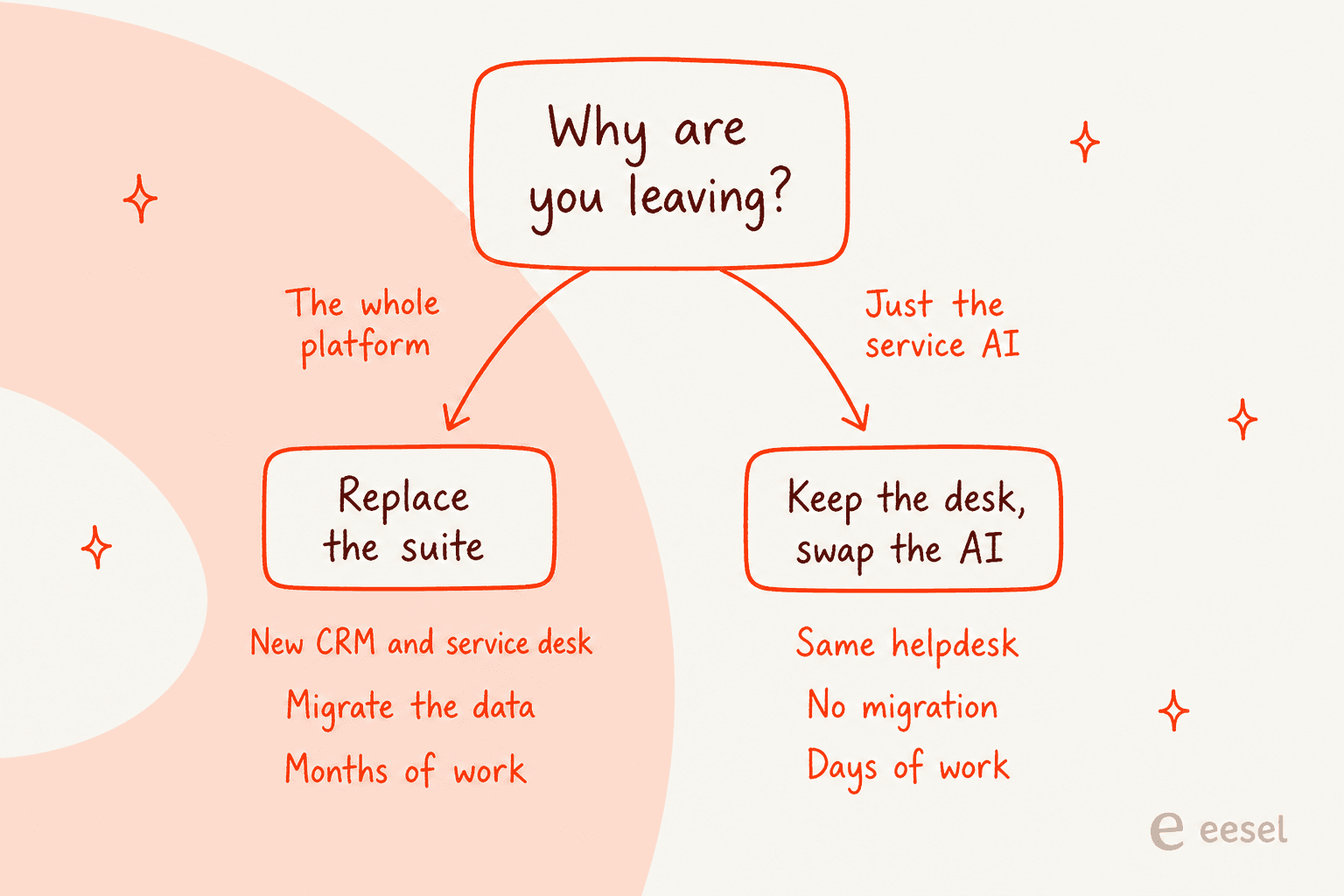
The distinction is simple. If your pipeline management, your quoting, your marketing automation, or your industry workflows are the problem, you need a new platform and you should be looking at Salesforce, Dynamics, ServiceNow, HubSpot, or Zoho. That is a real project with data migration and a change-management cost, and it is sometimes the right call. Budget for rebuilding your knowledge management alongside it.
If the problem is that the AI in your service queue is not resolving enough, or that you cannot forecast what it costs, or that you cannot prove it works before it talks to a customer, then replatforming solves none of that. You would be paying migration cost to buy a different vendor's version of the same two problems, because as the table above shows, most of them bill an unquantified AI unit too. A no-code AI support agent on the desk you already have gets you to the same place without the project plan.
This is also where Creatio's no-code pitch cuts both ways. Unlimited custom agents and a visual designer are a real capability if you have a platform team who wants to build. If you do not, "you can build it" is a cost, not a feature. Karel at GENERAL BYTES, running a 300-article knowledge base across Confluence and Telegram, put the build-versus-buy call about as plainly as I have heard it:
"We could try to write our own LLM application but we didn't want to invest our time into that. We wanted something that we would not have to maintain."
That is worth sitting with if the reason Creatio is on your shortlist to leave is that the platform capacity turned into a backlog nobody had time to work through. The staffing problem behind it comes up repeatedly in buyer threads, and this is the version I would send to anyone about to sign:
"Creatio looks good on paper but the partner ecosystem is thin and finding people who know it well is rough."
A G2 reviewer in education management put the same thing from the inside, in nine words: "You need to have a developer to fully utilize this system." That is not a knock on the product. It is a statement about who the product is for.
Try eesel
If you got here because Creatio's service AI was the problem rather than Creatio itself, that is the case eesel is built for. It connects to Zendesk, Freshdesk, HubSpot, Salesforce and Jira Service Management out of a list of 39 named integrations. It learns from the tickets you have already resolved, then answers or drafts inside the desk your team already lives in. No migration, no platform tier, no three-year term.

The two things that matter most against this particular shortlist: the unit is a credit per ticket or chat on a fixed monthly plan, so you can forecast the bill on the back of an envelope, and simulation runs across your own historical tickets and hands back a scored gap report before the agent replies to anyone. That second one is the gap nearly every platform on this list leaves open. Start with 100 free credits and no card, which is 100 real tickets of testing, and see what the resolution rate actually looks like on your own queue before you commit to anything. If you would rather read first, help desk automation covers how teams phase a rollout.
Frequently Asked Questions
How much does Creatio actually cost?
What is the best Creatio alternative for a support team?
Is there a free Creatio alternative?
Which Creatio alternatives let me test the AI before customers see it?
What is Creatio's pricing for a small support team?
Do I need to replace my helpdesk to get better AI?
How do Creatio alternatives compare on AI cost per ticket?


Article by
Rama Adi
Rama is a software engineer at eesel AI with two years of experience writing about B2B SaaS, AI tools, and customer support technology. Based in Bali, Indonesia, he brings a developer's perspective to product comparisons — cutting through marketing copy to what the integrations and APIs actually do.