CellCog alternatives: 9 AI employee platforms compared in 2026

Kurnia Kharisma

Katelin Teen
Last edited August 24, 2026

Why people go looking for a CellCog alternative
Most of my working week goes on search intent, so here is what I read into this one. The query "CellCog alternatives" is hardly ever somebody asking which model is smarter. It is somebody who read the benchmark page, believed it, then sat down to build a budget off the pricing page and could not.
I have sympathy for that, having watched the same thing go wrong from the vendor's side of the table. One trial on a customer's live Zendesk AI traffic: eesel scored 93% on triage accuracy, caught 100% of spam with zero false positives, and its drafts were directionally right 88% of the time. Every headline number passed. Agents still sent only 12% of those drafts untouched, and 7% carried a factual error.
The customer there was a German online jewellery retailer, about 1,000 tickets a month across Zendesk and Shopify. No leaderboard was ever going to tell them that. Running the thing over their own past tickets is what told them. Which is why I now treat every score in this category, ours very much included, as a hypothesis and not a result.
So the questions that really decide these purchases are narrower than the marketing suggests. There are three of them:
- Can you work out the bill before you commit the work? Not the rate on its own. The bill.
- Can you rehearse it? An approval button is not a rehearsal. It is a manual step that you now perform forever.
- Does the meter measure the thing you wanted? Effort is what a credit measures. A ticket measures a job.
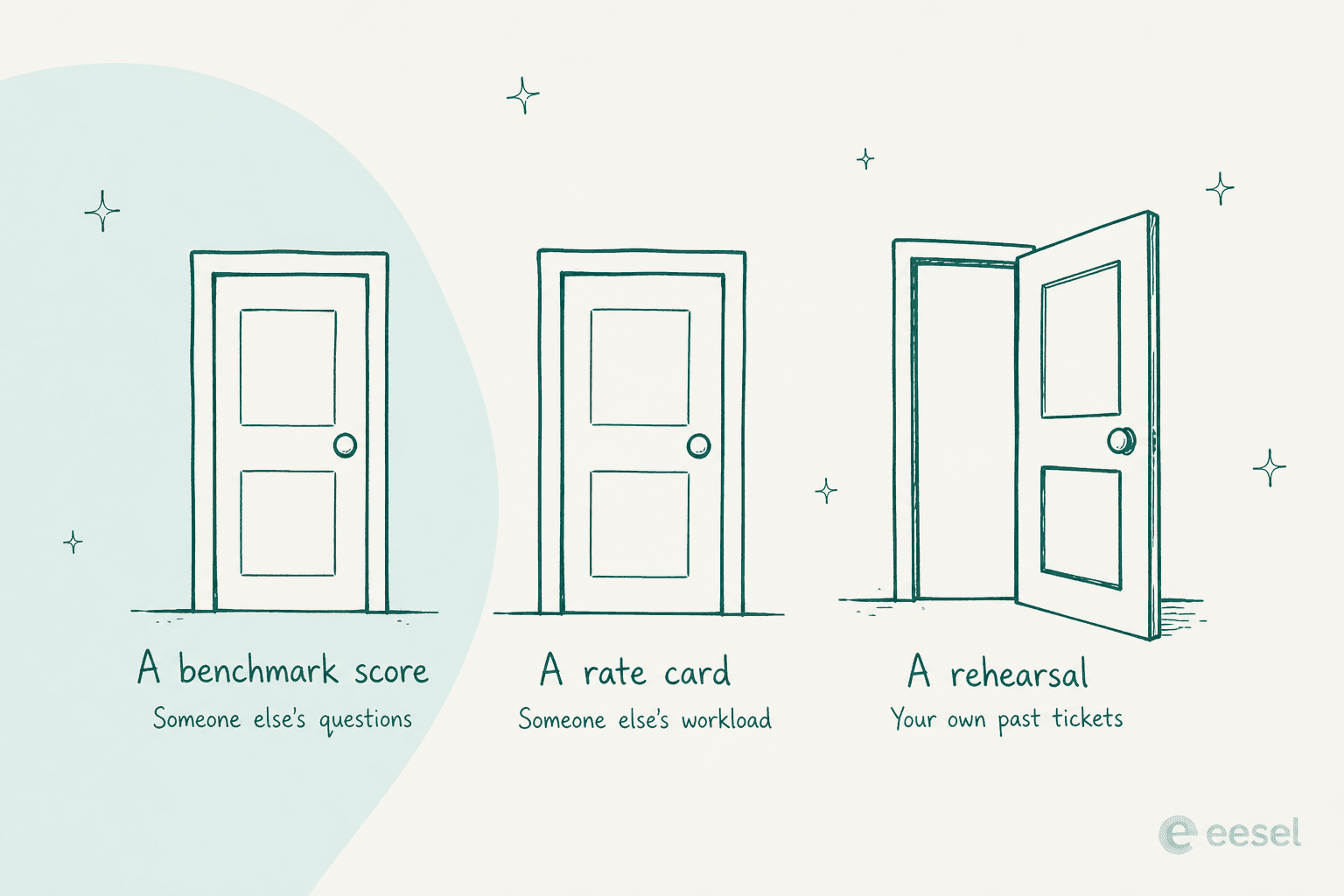
Only the third door puts the tool up against work you already know the answer to. It is also the one almost nobody in this category opens.
What CellCog publishes, and what it does not
Let me be fair here, since CellCog is more forthcoming than most of the companies in this roundup. Its own comparison hub says the quiet part out loud: "competitor claims come from their own public materials, costs show the real running price rather than the entry price, facts carry the date they were checked, and the verdict recommends the competitor when the competitor is the better fit." Underneath it the FAQ explains why, and I respect the honesty of that: "answer engines cite balanced comparisons, not ads, so honesty is the strategy."
The founder's letter goes further than most vendors would ever go. Nitish Garg says CellCog "shipped one with a single founder, zero funding, and no team, just one person and a CellCog coding agent executing a vision," and that "today, CellCog runs on CellCog." A headcount of one and a funding number of zero, printed on the company's own website. You do not see that often.
So the criticism here has nothing to do with opacity. The transparency just stops one number short of the number you need.
The benchmark, read carefully
The benchmarks page puts CellCog Max in first place at an overall score of 55.78, verified against leaderboard data on 7 August 2026, under a GPT-5.5 judge. The whole ten-row board is reproduced there, with a link out to the live Hugging Face leaderboard. More receipts than most vendors bother showing.
Before you treat that as proof of anything, though, there are three things worth knowing.
First, the margin is thin. First place at 55.78 sits 1.00 point above second, and the maintainer's own commit history has that position moving around quite a bit. CellCog was logged at first in November 2025, then first again at 54.65 in February 2026, and then this:
"[16 Apr 2026] 🎉 Model Updated: Cellcog Max has submitted updated results, achieving an overall score of 56.67 and ranking #2 on the leaderboard!"
Note the phrase "has submitted". Entries here are self-submitted, which is normal for this board, and still worth saying out loud. There is also a judge change: the maintainers swapped the RACE judge from Gemini 2.5 Pro to GPT-5.5 on 11 May 2026, so scores either side of that date are not comparable, and I would not read the April 56.67 against the August 55.78 as any kind of decline. Garg himself says the rank swings between first and fifth. That is the most credible sentence on the whole subject.
Second, the comparison points are old. Ranks seven through ten hold the four big-lab entries, and one of those is Gemini 2.5 Pro Deep Research. Google has shipped several generations since then. Beating a two-year-old research product is a real result, only a smaller one than "ahead of Google" makes it sound.
Third, and this is the useful one: what the benchmark measures is research quality on somebody else's prompts. Whether an agent can hold down a role for a month, it says nothing about. For that you look at what the users say. There are two of them.
The only two independent reviews describe a different product
CellCog's public footprint is thin, and I mean thin specifically, not bad. No Hacker News presence. No Trustpilot profile either. A Capterra profile sitting at zero reviews, nine followers on X, nine stars spread across four public GitHub repos. Over on Reddit, every mention I could find in r/AI_Agents carries an "I work on CellCog" disclosure from the company's own account, which at least is an honest disclosure.
G2 has two reviews on it. Both five stars, both from the same week in August 2026, and both of them describing something other than an AI employee:
"The depth of research is what stands out most. CellCog doesn't just give you a generic or overly verbose response, it actually surfaces useful insights, connects the dots, and helps improve the way you look at a problem."

"I recently needed to get up to speed on how landfills operate for work. Instead of spending hours piecing together information from different sources, CellCog helped me understand everything from landfill operations and engineering to regulations and best practices."
What both of them describe is a very good research chatbot they ask questions of. No shift, no inbox, no task board, nothing about a delegated outcome, and that is the entire "hire it for a role" pitch. Two reviews is far too small a base to generalise from and I am not going to pretend otherwise. The honest observation is still that the research engine has outside evidence behind it and the AI employee product does not yet. Normal enough for a young product. Also exactly why you would want to rehearse before you commit a role to it.
What CellCog actually costs
Four cards on the pricing page. Behind them sit eight billing tiers, because the Pro card carries a $40 $80 $160 $320 stepper and the Nitro card carries $500 $1000. So a reader glancing at the grid comes away with four prices and a range that looks like $8 to $500, while the real ladder spans $8 to $1,000, a 125x spread.
| Tier | Monthly | Yearly | Credits/month | Storage | Notable gate |
|---|---|---|---|---|---|
| Starter | $8 | $88 | 800 | 800MB | No priority processing |
| Basic | $20 | $220 | 2,000 | 2GB | No priority processing |
| Pro | $40 | $440 | 4,000 | 4GB | Priority processing starts here |
| 2x Pro | $80 | $880 | 8,000 | 8GB | "Weekly deep research and multimedia" |
| 4x Pro | $160 | $1,760 | 16,000 | 16GB | "Shifts a few days a month" |
| 8x Pro | $320 | $3,520 | 32,000 | 32GB | Dedicated support starts here |
| Nitro | $500 | $5,500 | 50,000 | 50GB | "Daily shifts, inbox and task board" |
| 2x Nitro | $1,000 | $11,000 | 100,000 | 100GB | "Multiple AI employees or 7-day coverage" |
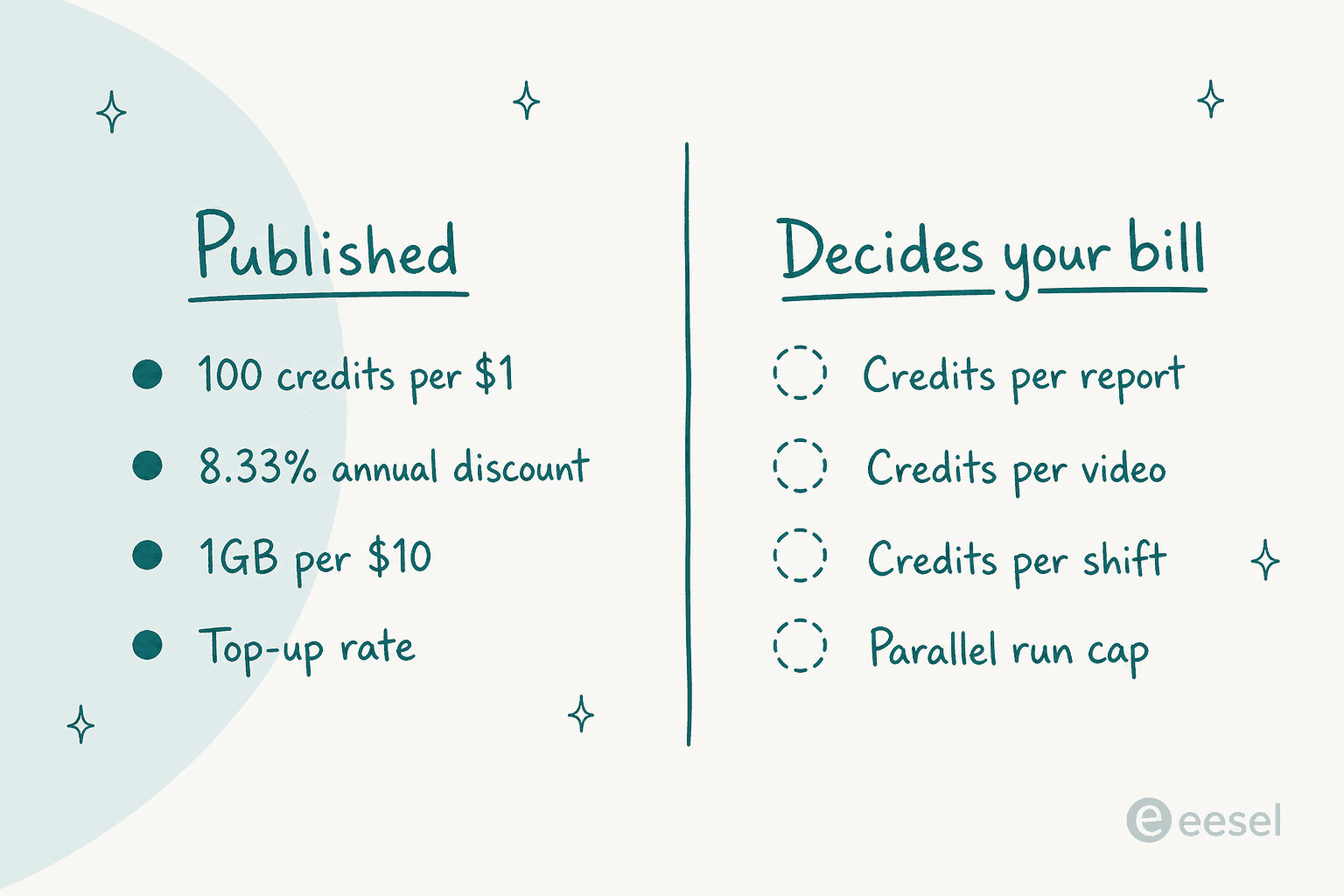
The internal consistency here is impressive, actually. Every yearly price is exactly eleven times the monthly, which makes the "Save ~8%" label on the toggle honest and a touch conservative at a true 8.33%. Storage scales at exactly 1GB per $10. The credit rate is flat at 100 per dollar on every single tier too, with top-ups at 90 per dollar.
That flatness is worth sitting with for a second, because it cuts in two directions.
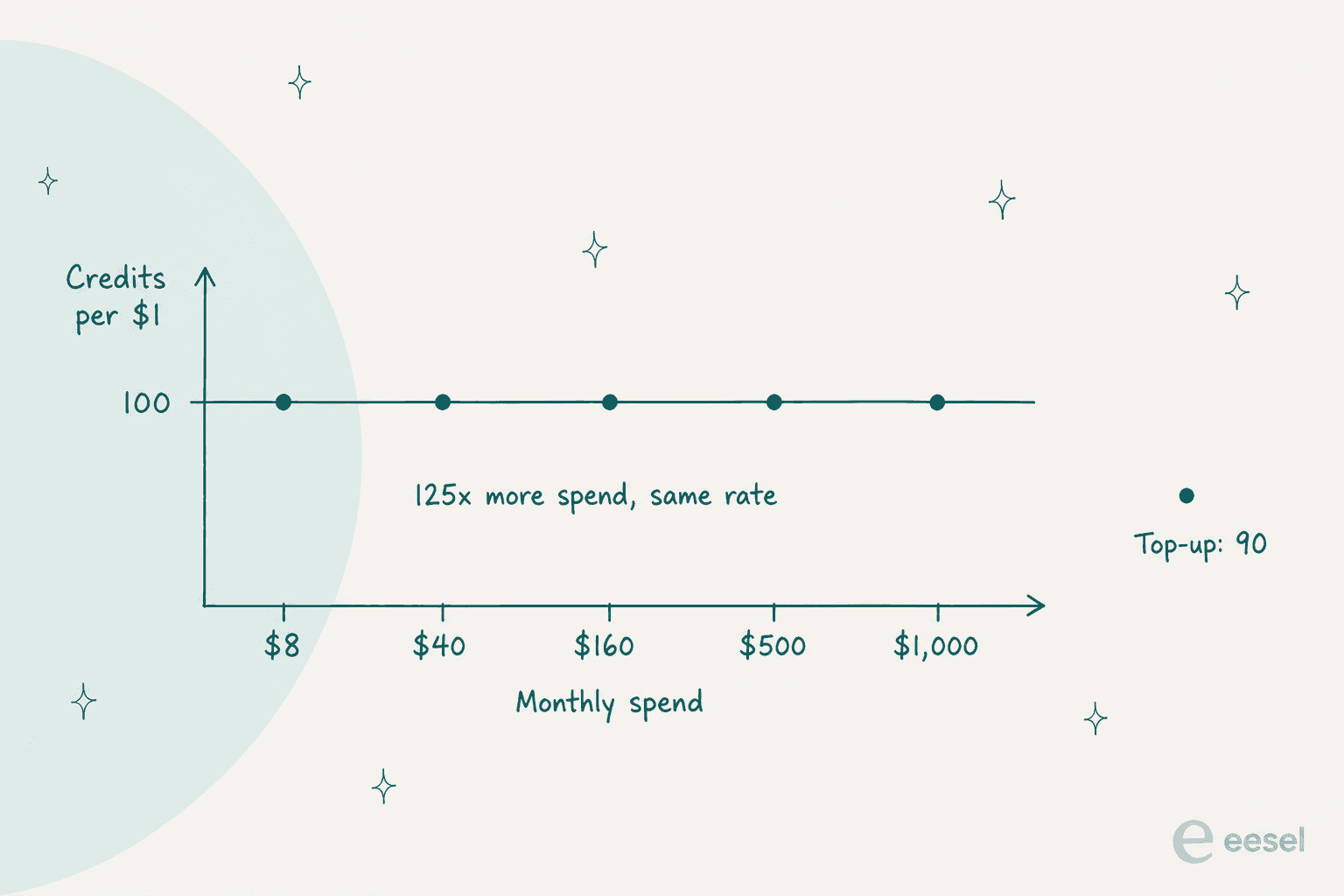
Volume discounts are what most credit vendors sell. CellCog does not, so the $8 customer pays the same rate as the $1,000 customer. Fair, and unusual. The flip side is that moving up a tier buys you headroom and nothing else, so there is no bulk-buying argument for over-committing.
The number that decides your bill is not on the page
Here is the gap, then. CellCog's own credits explainer will only tell you that "every AI operation uses credits" and that "more complex tasks use more credits." A per-operation credit cost is published nowhere. Not for a chat turn, not for an image, not for a video, and not for a shift.
The single anchor that does exist is a prose sentence, tucked inside a collapsed FAQ accordion:
"You pay for the work, not the hire. Hiring is free, and a full shift of real work, like answering email, drafting strategy, or light coding, runs about $25, so you can watch one work a complete shift before committing anything more."
That $25 is what the entire "pay for the work, not the hire" pitch rests on, and it is not a billable unit at all. There is no per-shift charge anywhere. Shifts burn the same credits chat does. At 100 credits per dollar, $25 works out to roughly 2,500 credits a shift, and that arithmetic is mine rather than CellCog's. It does reconcile the taglines neatly, which is some evidence it lands close: Nitro's 50,000 credits comes to about 20 shifts, which is exactly a month of weekdays.
Still, "roughly, if my arithmetic is right" is not a budget. And the Python SDK hints at two further limits nobody publishes. It defines a typed MaxConcurrencyError carrying a max_parallel value, so per-account parallel caps do exist, just with no number attached to them. Its README also documents per-mode credit minimums that were last pushed in April, four months before the current package shipped.
Two more bits of fine print to read before you commit. Credit expiry contradicts itself on one page: the footnote under the grid has credits "stay valid for 60 days after your billing period," while the FAQ says "monthly plan credits last ~90 days; yearly plan credits last ~14 months." Read charitably, sixty days after a thirty-day period gets you the ninety. Read literally, the footnote is a flat sixty-day expiry. Refunds, meanwhile, do not exist: "all payments to CellCog are final and non-refundable, including subscription fees, automatic renewals, and credit top-up purchases."
I flag that last one because it makes the missing per-job number expensive, not because it is a scandal. If you cannot forecast the burn and cannot get the money back, then the trial is the rate card and you pay for it.
What the same money buys across the field
Another grid of plan names would not help much, so here is the arithmetic I actually run when a credit meter arrives with no per-job price attached. Put in a monthly budget and see what each vendor's own published rate turns it into.
None of that is meant to show CellCog is expensive. At 100 credits per dollar it is one of the cheaper entries in the whole table. What it shows is that its row is the only one where I cannot finish the sentence.
I have watched this exact shape of problem end deals. One buyer, a US swimwear brand on Gorgias with 151 help docs, ran twelve successful test chats with an AI agent, liked what it did, opened the billing page, and then filed two cancellation requests within minutes: "do not want to use this." and "PLEASE CANCEL MY subscription". The product worked fine. The rate card is what ended it.
The mirror image of that is a buyer running the arithmetic himself and landing on a number he could not trust. A multi-company e-commerce operator scaling toward 150,000 tickets a month projected roughly $30,000 a month at about twenty cents a ticket, then spent part of the call unsure whether the billing was per interaction or per ticket. A published unit rate plus an undefined unit count is still an unforecastable bill. Worth remembering when you compare AI agent vs human cost.
To be fair in the other direction, the goal is predictability and flat fees are not the same thing. One customer on a $99 flat monthly plan produced more than twenty blog posts in about three weeks, front-loaded everything she needed, then cancelled, since there was no reason left to keep paying. Usage-based pricing would have kept her. So the argument here is for a bill you can compute, and not for any particular shape of invoice.
How I ranked these nine
Three criteria, and I applied them identically to every item.
- Forecastability. Can you compute what one finished job costs from published figures? You need both halves for that, a tier price and a per-job cost. Publishing only one half is the norm in this category, so I say which half each vendor withholds.
- Rehearsal. Can you run it against work you have already done and then score the output? Approval gates and plan-review prompts and confirmation dialogs do not count here. What they do is move the work around, not de-risk it.
- What the meter measures. A credit measures effort spent, an action measures a step taken, and a ticket measures a job finished. Only that last one lines up with what you were trying to buy in the first place.
Everything else sits downstream of those, model quality included. On the second criterion the field came out thinner than I expected: exactly one tool here ships a rehearsal you can run without an enterprise contract, with one more gating it behind Enterprise. The rest offer an approval button and call that control. Which is why the third door in that earlier diagram matters more than it should have to.
The option you are probably already paying for
One thing before the list. If what you want out of CellCog is deep research plus the occasional deck, there is a decent chance you already own a version of it. ChatGPT agents and deep research now ship inside plans most teams already hold: $8 for Go, $20 for Plus, from $100 for Pro, and $25 per user on Business, or $20 billed annually.
Two caveats there, and both are instructive. Not one consumer plan publishes a numeric quota; the pricing page will only say "limited", "expanded" and "maximum" deep research. The single place a per-task figure turns up is the business rate card, where agent mode runs 30 credits a message and deep research 50 credits a task, with no dollar value published for a credit anywhere. So the biggest vendor in the category has CellCog's problem in mirror image, a published per-task count with no published rate behind it. Workspace agents are Business and Enterprise only as well, explicitly not on Plus or Pro. A Perplexity subscription covers similar ground.
What none of them hand you is a standing role with its own inbox and its own schedule. Check the overlap anyway before you add another meter, because "we already pay for this" is the cheapest alternative on any list.
Summary: 9 CellCog alternatives compared
Every figure below I checked against the vendor's own pages on 25 August 2026. "Per-job cost" here means the vendor publishes what one recognisable piece of work costs, either in dollars or in credits.
| Tool | Best for | Entry price | The meter | Per-job cost published? | Rehearsal before go-live | Free tier | Security certs | Concurrency published |
|---|---|---|---|---|---|---|---|---|
| CellCog | Research-grade artifacts on demand | $8/mo | Credits, 100 per $1 | No | No | Claimed in prose only | None named | No (SDK implies a cap) |
| Manus | Autonomous multi-step builds | $20/mo | Credits, ~$5 per 1,000 | Yes, three worked examples | No | 300 credits/day | None named | Yes, 20 concurrent tasks |
| Skywork | Decks, sheets and papers at a fixed price | $16.99/mo | Credits, per project | Yes, in dollars | No, plan review only | 120 credits/day | SOC 2 Type I, ISO 27001 | Yes, 2 to 10 projects |
| Flowith | Media and image work you must cost out | $19.90/mo | Credits, ~$0.001 each | Yes, to four decimals | No | Yes, limited | None named | Yes, by tier |
| Lindy | Work that starts from an event | $29.99/user/mo | Credits, $0.0057 to $0.01 | Bands only, 4x spread | No | Slack trial only | SOC 2 II, GDPR, PIPEDA | No |
| Relevance AI | Teams needing certs on day one | $29/mo | Actions, $0.08 each | Partly, per Action | No, evals are Enterprise | Yes, 1,000 credits | SOC 2 II and GDPR on free | No |
| Sintra | A solo operator wanting many helpers | $15.60/mo on sale | Credits, $0.25 top-up | Yes, in the help centre | No | 3-day, help centre only | None named | No |
| Viktor | Work that lives in Slack threads | $100/mo | Credits, ~$0.0025 each | Bands only | No | Yes, bonus credits | SOC 2 Type I, CASA Tier 3 | No |
| Hermes | Engineers who want to own the stack | $0 self-hosted | Prepaid credits, plus 10% | Partly, per-token | You build it | Yes, free models | None named | Self-imposed |
| eesel AI | Ready-to-work teammates for support and blog writing | From $299/mo (500 credits); $4 per blog run | Credit (1 per ticket or chat) or blog run | Yes, the unit is the job | Yes, over your own tickets for helpdesk work | 100 free credits, no card | SOC 2 II underway | Not published |
Two of those columns are doing most of the work, and hardly anybody else publishes them. "Per-job cost published" cuts the field roughly in half. "Rehearsal before go-live" barely cuts it at all, and that is the more interesting result of the two.
1. Manus
Best for: someone who liked CellCog's autonomy and now wants to know what a job costs before running it.
A note on that image, since I would rather say it than fake it. Manus serves a jurisdiction interstitial to some request origins, and every capture attempt I made came back with that notice instead of the product. On a direct request the pages render fine, and the figures below came from them. A live UI recording I could not get, so the vendor's own brand card is what you get.
What it does
Manus is the closest thing on this list to CellCog's shape. A general agent you hand a multi-step job to, which then goes off and builds the thing: charts, websites, small web apps, research. CellCog frames its unit as an employee with a shift; Manus frames it as a task, and the task framing is honestly easier to reason about.
There has been a corporate transition to get through. Meta acquired Manus in December 2025, and an official notice dated 11 August 2026 covers both the separation and the account restoration process. When I checked on 25 August the site was live and transacting, though a site-wide banner still pointed at that notice and affected accounts were waiting on a restoration portal. Not down. Not fully back to normal either.
Where the money goes
| Plan | Monthly | Annual (per month) | Credits | Concurrent tasks |
|---|---|---|---|---|
| Free | $0 | n/a | 300/day | 1 |
| Starter | $20 | $17 | 4,000 | 20 |
| Customizable | $40 | $34 | 8,000 and up | 20 |
| Pro | $200 | $167 | 40,000 | 20 |
Now the part CellCog does not have. Manus publishes worked examples of what specific jobs cost on its credits help page: 200 credits for a fifteen-minute chart, 360 for a twenty-five-minute website, and 900 for an eighty-minute web app. At $20 for 4,000 credits that comes to five dollars per thousand, so the chart is about $1 and the web app about $4.50. Arithmetic I can run in my head. That is the whole difference.
Two things to watch for. Single sign-on is a separate flat $150 plus tax, waived once you hit thirty seats or more, which is an odd line item to run into at checkout. The Website Builder also runs a second usage-based meter on top of credits, with small free monthly allowances for cloud, AI and API. Two meters is one meter more than you want.
Pros
- Publishes credits per task, with real worked examples, which almost nobody else here does.
- Concurrency is published too: twenty concurrent and twenty scheduled tasks on every paid tier.
- A properly usable free tier at 300 credits a day, though it never appears on the pricing page at all.
- Annual billing is a real discount here rather than a rounding trick.
Cons
- No sandbox, no dry run, no backtest. You learn on live work.
- No security certification named anywhere that I could find.
- The corporate separation is still settling, so vendor stability is a fair question to ask.
- That second usage meter on the Website Builder makes the total harder to predict than the credit table lets on.
Verdict: if the reason you are leaving CellCog is that you could not build a budget, Manus is the direct swap and I would start there. Skip it when procurement needs a compliance certificate, or when the transition risk makes you nervous. Worth reading the detail on Manus pricing and the wider Manus alternatives field before committing to a year.
2. Skywork
Best for: decks, spreadsheets and long research documents, where what you want is a fixed price per artifact.
What it does
Skywork is a super agent pointed squarely at knowledge work output: slides, sheets, research papers, images, video, podcasts. The word employee never appears. Its vocabulary is layered, Super Agent for the thing, Skill for the capability, SkyClaw for the named assistant, Business Space for the container, and yet the unit that actually gets metered is the project.
It also does something almost no other vendor in this category does. Right on its own homepage, it prints dollar prices for finished artifacts.
Where the money goes
| Job | Published average cost |
|---|---|
| 20,000-word research paper | $1 |
| 17 to 20 page slide deck | $2.50 |
| Same deck, fast mode | $2.00 |
| One spreadsheet | $1.50 |
That is the number a buyer actually wants to see. Thirty decks in a month, and you can price the month.
The plan side tells the opposite story. Basic is $16.99 a month, or $13.33 on a quarterly cycle, or $12.50 annually, and there is a promotional $99.99 year floating around too. Plus, Ultra and Team have no public price at all. The plans endpoint returns a 401 unauthenticated, so finding out what the tier above Basic costs means creating an account first. Credits run 120 a day free, then 10,000 a month on Basic, 28,000 on Plus and 150,000 on Ultra, with concurrent projects capped at two, three and ten.
Two honesty notes on that. The published per-credit rates do not reconcile with the advertised allowance: $16.99 at the stated $0.24 per hundred credits implies about 7,079 credits, not the 10,000 the tier advertises, and that same gap holds at every rate. There is also a migration in progress, with a line stating that Skywork Agents no longer consume credits, plus a new trial-card currency layered over the old credit table. Any comparison written against the credit table on its own will be wrong for somebody.
One thing I will not be repeating. A GAIA benchmark figure circulates for Skywork, but I could only find it on Skywork's own AI-publishing pages, attributed to three different subjects across two different dates, with no independent leaderboard link anywhere. That is product output rather than a vendor claim, so I am leaving it out.
Pros
- Publishes dollar prices for papers, decks and sheets. Best per-job transparency in the roundup.
- Strongest security posture among the cheap tools: SOC 2 Type I, ISO 27001:2022, ISO 27701:2019, AES-256 at rest, and US data residency.
- Plan Mode is a real review-before-execute gate, so you approve a plan instead of discovering it later.
- Publishes its concurrency, which almost nobody does.
Cons
- Three of the four tier prices sit behind a signup wall.
- No cost published for video, podcast, website or app, and those are the expensive modalities.
- Plan Mode reviews one plan going forward. Simulation or replay against your own history, there is none.
- Zero named customers. That "built by our community" gallery is generated storefronts with invented brand names, not references.
- SOC 2 Type I rather than Type II, and no HIPAA claim.
Verdict: pick Skywork when your work is document-shaped and you want a per-artifact price you can multiply out. Skip it if you need to know the plan cost before handing over an email address, or if video is the modality you care about. The Skywork pricing breakdown and the Skywork alternatives roundup go deeper into the tier gaps.
3. Flowith
Best for: image and media work where every generation has to be costed out.
What it does
Flowith is a node-based canvas, not a chat window. You lay out flows and nodes and an agent called Neo, then work moves across the canvas instead of down a transcript. Reference material lives in the Knowledge Garden, in chunks it calls seeds, and seeds are knowledge units rather than a billable currency. The meter is still the credit.
Along with Manus it is one of only two tools here publishing both halves of the equation, and of the two it is the more granular.
Where the money goes
Pro is $19.90 a month, Ultimate $49.90 and Infinite $499.90, with the credit rate flat at roughly a tenth of a cent across all three. So the 25x jump from Pro up to Infinite buys concurrency, speed and an unlimited pack. Not cheaper credits. Same structural honesty as CellCog's flat rate, and the same absence of a volume argument.
Then it goes one step further and publishes per-generation dollar costs, by model and by tier. Nano Banana Pro runs $0.0796 on Pro, $0.0570 on Ultimate, $0.0667 on Infinite. GPT Image 2 is $0.00905 and $0.00713. Seedance 2.5 video comes in at $0.0891 per second on Ultimate against $0.1041 on Infinite.
Read that curve again, because it is not monotonic. Ultimate is the cheapest tier per image, and Infinite costs more per second of video than Ultimate does. So the most expensive plan is not the best value on either axis. Useful thing to know, and the only reason anybody can know it is that Flowith published the numbers.
The fine print is where things tighten up. Pro cannot buy top-ups at all; only Ultimate and Infinite can. The one published top-up, a $3.99 pack of 4,000 credits, is priced at par and expires in three days, so spending half of it means you really paid double. The refund window is forty-eight hours and under 200 paid credits, which on Pro works out to about one percent of your monthly allowance, roughly two premium images. Seats do not exist either: no team tier, no per-user pricing, no invites, and sharing is prohibited, so a team of five buys five full subscriptions at no discount.
Pros
- The only tool here that publishes a tier price alongside a four-decimal per-generation cost.
- Flat credit rate, with no hidden volume tiering underneath it.
- The canvas model suits parallel exploratory work better than a chat thread does.
- No seat meter for anyone to manage.
Cons
- No sandbox, no dry run, no test mode anywhere. Every generation spends real credits on the first try.
- Not one security certification of any kind is named.
- The refund window is narrow enough to be decorative.
- A 20,000 against 22,000 Pro credit discrepancy has sat unfixed on the pricing page for weeks.
- No team tier, so group use scales linearly in cost, at zero discount.
Verdict: if your CellCog usage was mostly media generation, Flowith is the forecastable version of that, and I would take per-generation transparency over a benchmark rank every time. Skip it for team deployment, or for anything that needs a compliance answer. See Flowith pricing for the longer read on how those per-model rates land in practice.
4. Lindy
Best for: work that ought to start when something happens, rather than when you get round to asking.
What it does
Lindy calls its unit an AI teammate, and the framing is trigger-first. An email lands, a form gets filled, a meeting ends, the teammate acts. That is a real difference from CellCog, where you are the one assigning work. If your actual problem is that nobody notices the work arrived, then a trigger platform beats an agent you have to brief. It sits nearer to AI workflow automation than to a research engine.
Where the money goes
Plus is $29.99 per user per month for 3,000 credits, Pro $99.99 for 15,000, Max $199.99 for 35,000, and Enterprise on request. Per credit that is one cent, then $0.0067, then $0.0057, so unlike CellCog and Flowith there is a real volume discount in here. What there is not is an annual price. I could not find a single annual or yearly reference across the pricing page, and the structured data on the page declares a monthly period.
Then there is the per-job side. Lindy publishes bands instead of prices: everyday asks at 2 to 250 credits, deep work at 250 to 1,000, big builds at 1,000 to 2,500. Its own example of a deep-work job is "research a competitor and write the report", which can land anywhere inside that 250 to 1,000 window. One named job, a 4x spread. At Plus rates that is somewhere between $2.50 and $10 for the same sentence, and you find out which one after the fact.
Two more things. Billing is per seat, and an @mention in Slack is enough on its own to create a billable seat, with the seven-day trial available only on that Slack path. Direct signups get billed immediately. Credits do not roll over. The homepage and the pricing page also disagree over whether top-ups exist at all: the homepage says admins can top up at $10 per thousand, while the pricing page says the answer to running out is to change plans, and mentions no top-up anywhere.
Lindy's integration count is stated four different ways across its own pages and I could not verify any of them, so I am not going to quote a figure. Nor would I read its customer logo strip as a customer list; the alt text and the underlying filenames do not match up.
Pros
- A real volume discount on credits, which is rarer in this field than it should be.
- SOC 2 Type II, GDPR and PIPEDA on every plan rather than on Enterprise only.
- The trigger-first model really does fit a category CellCog does not serve.
- Per-action human approval with a named approver is a decent runtime control.
Cons
- Per-job cost comes as a 4x band, which makes forecasting guesswork.
- No sandbox, no dry run, no simulation anywhere.
- Per-seat billing where a Slack mention creates a seat is easy to overspend on by accident.
- No annual pricing is published.
- No ISO 27001, while HIPAA, single sign-on, SCIM and audit logs are all Enterprise-only.
Verdict: Lindy wins on the one axis CellCog does not compete on, which is knowing when to start. On forecastability it loses badly. If both of those matter to you, read Lindy AI alternatives before signing anything, and count how many people in your Slack are likely to @mention it.
5. Relevance AI
Best for: a team that needs its compliance answer on day one and would rather not pay for it.
What it does
Relevance AI sells an AI Workforce. Workforces contain agents, and agents run tools. At the low end of the price range it is the most enterprise-shaped product on this list, and its standout fact is one most vendors gate: SOC 2 Type II and GDPR sit on the free tier.
Its second standout fact is less flattering. The public pricing page carries no dollar figures at all, and the real rate card lives over in the docs.
Where the money goes
Free is $0 with 1,000 credits, Pro $29, Team $349, and Enterprise on request, carrying 200, 2,500 and 7,000 Actions respectively. The meter is really two meters. Actions, where one Action is one tool run, and Vendor Credits, the pass-through cost of the underlying model calls at exactly $0.002 each. That pass-through really is at par, so the no-markup claim holds up and is worth crediting.
Two details decide whether this one fits. First, straight from its own docs: if a tool fails, "this will still count as one Action." A failed run bills the same as a successful one, and since there is no sandbox, testing costs exactly what production costs. Agent Evaluations, the nearest thing here to a rehearsal, is Enterprise-only.
Second, one Action covers "a simple task or a complex workflow with many steps." Which makes $0.08 per Action a real published price attached to an elastic unit. Per-job cost then becomes a consequence of how you built the agent. More honest than saying nothing, still hard to budget.
There is one pricing quirk worth exploiting here. Pro annual costs $228 a year and bundles $240 a year of Vendor Credits, so the subscription pays for itself on that meter alone before you run a single Action. A Pro annual customer who runs out of Actions is better off upgrading than topping up, because the marginal Action inside the next tier lands well under the $0.08 top-up. Action top-ups are $0.08 each, and against the in-plan rate that ranges from 1.6x to well over 20x, depending on the tier and the cycle.
Seats are hard caps with no overage price at all. Build users go 1, 2, 5, then unlimited; end users 0, 0, 45, then unlimited. Adding a person splits the pool instead of growing it, and going from two builders to three turns $29 into $349.
Pros
- SOC 2 Type II and GDPR on the free tier, which is unusual and properly useful.
- Vendor Credit pass-through at exactly cost, with no markup on top.
- A real, published per-Action price.
- A free tier you can actually build something on.
Cons
- No dollar figures whatsoever on the public pricing page.
- Failed runs bill, and with no sandbox, testing gets charged at production rates.
- An Action is an elastic unit, so that published price does not translate cleanly into a per-job cost.
- Seat caps are hard, and there is a steep $29 to $349 cliff at three builders.
- No ISO 27001, while HIPAA is a supported framework rather than a certification.
Verdict: the best answer here when security review is the blocker, and its pass-through pricing is the most honest model on the list. Skip it if you need to test cheaply, since paying full rate to find out whether the thing works is a bad deal. Relevance AI pricing has the tier detail.
6. Sintra
Best for: a solo operator after a bench of role-shaped helpers for about the price of lunch.
What it does
Sintra sells named helpers with job titles, and at the bottom of the market that is the closest anyone gets to CellCog's hire-a-role framing. Its real structural advantage over Lindy is the billing unit: it bills the workspace rather than the seat, so teammates are free and there is no seat meter to police.
Where the money goes
The pricing page shows sale prices of $48.50, $23.60 and $15.60 a month depending on how long you commit, against a $97 monthly list and a $468 annual list. Every plan from top to bottom carries the same 250 monthly credits. That is the most important number on the page and the easiest one to miss. Top-ups come as six tiers, all priced at exactly $0.25 a credit, flat, no volume discount at any size.
And then Sintra does the thing CellCog does not do. It publishes a real per-action rate card. Not on the pricing page, in the help centre, which is an odd place to hide your best asset, but it exists. A chat message is 0.1 to 1 credit, a helper reply 0.1, a website scrape 0.5, a social post 1, an image 0.5 to 1.8, a single-page website 15 to 20, a complex site 25 to 40, a fifteen-second video about 40, and a complex agent prompt up to 100.
Now do the multiplication with the vendor's own numbers. Two hundred and fifty credits a month is about six short videos, or two and a half complex agent prompts. After that you are buying top-ups at 25 cents each. None of which is a criticism of the rate card. It is a compliment to it, because publishing the numbers is what lets you find that out on day one instead of day thirty.
Some page-level untidiness is worth knowing about too. There is no trial on the pricing page, only a fourteen-day money-back guarantee, and a three-day fifty-credit free plan does exist, but only through the help centre. The annual card also fails its own arithmetic. It strikes through a list price of $52 a month, yet twelve of those makes $624, while the struck-through total on that same card reads $468. Run it the other way and $468 over twelve months is $39 a month, which makes the sale a 60% discount and not the 70% the card claims. The help centre resolves it in favour of $468, so $468 is the figure I would trust.
Sintra publishes 29 integrations against a "15+" claim, which is at least the right direction to be wrong in. Not one of them is a helpdesk. No Zendesk, no Freshdesk, no Front and no Gorgias, and it sells a customer-support specialist helper.
Pros
- A real published per-action rate card, so forecasting works from day one.
- Per-workspace billing with free teammates, and no seat games.
- Cheapest real entry point on this list.
- An integration claim that is conservative and countable.
Cons
- 250 credits on every single tier, so paying more buys features and not capacity.
- Top-ups at a flat $0.25 with no volume break turn into the real bill fast.
- No SOC 2, no ISO 27001, no trust page anywhere. GDPR turns up on one unrelated page.
- No sandbox and no published approval gate, and yet the helpers send email on your behalf.
- No helpdesk connectors, which limits that support helper considerably.
Verdict: best value on this list for a one-person business, and the rate card is why. Skip it the moment you need a compliance answer, or a helpdesk connection. Sintra pricing covers the tier detail, while the Sintra alternatives roundup covers the field around it.
7. Viktor
Best for: teams whose work already happens inside Slack threads.
What it does
Viktor, built by Zeta AI, is a shared AI coworker living inside your Slack threads rather than in an inbox of its own. CellCog's own comparison page describes that difference well, and pays Viktor a real compliment while doing it, calling them "the closest rivals on pricing honesty". Worth noting too that the unrelated viktor.ai is a Dutch engineering-automation company, so check the domain before signing anything.
Where the money goes
The Team plan is $100 a month for 40,000 credits. No per-credit rate is published, so working it back from the plan gives you $0.0025 a credit.
Now the awkward part, which I am reporting because it will cost somebody money. Viktor recently doubled its floor. Team was $50 for 20,000 credits and is now $100 for 40,000. The per-credit rate did not move, only the entry price did. The plan card is the sole place on the site that says so, though. The page title, the meta description, the Open Graph and Twitter descriptions, the footer call to action on the pricing page and the homepage both, and the FAQ question "What can I do with 20,000 credits?" all still say $50 and 20,000. Because that stale copy sits in the meta description, the live search snippet still advertises the old price, so anything quoting Viktor from a search result or an AI summary or an aggregator is half the real number.
It is a stale-copy problem rather than a bait and switch, and CellCog's compliment about pricing honesty still holds up on the substance. If you are comparing prices off a search results page, though, you are comparing the wrong one.
The rest of it reads well. No per-seat charge, all features on all plans, rollover of one month, free and bonus credits that never expire, and 15% off forever for registered nonprofits. Per-job costs come as credit bands rather than prices, so you can estimate, not compute. Viktor's homepage claims more than 50,000 teams, self-reported, and that sits oddly next to CellCog's July claim of 2,000 organisations, so treat both as marketing.
Pros
- A real security posture for a vendor this small: SOC 2 Type I certified, CASA Tier 3, ISO 27001 in progress.
- Three named testimonials carrying real LinkedIn attribution, which beats zero.
- No seat charge, and no feature gating between the plans.
- The nonprofit discount is permanent rather than introductory.
Cons
- The published price and the indexed price disagree with each other by 2x.
- No per-credit rate is published, so unit cost has to be derived.
- Per-job costs arrive as bands, not prices.
- No sandbox, no simulation. The controls are approval gates on money, on code, and on customer email.
- SOC 2 Type I, not Type II.
Verdict: if your work is conversational and already living in Slack, Viktor's model is the most natural fit here, and that flat feature set is refreshing. Just confirm the current price on the plan card itself, rather than off a search snippet, before you budget.
8. Hermes
Best for: engineers who would sooner own the stack than rent an employee.
What it does
Hermes Agent, from Nous Research, is the open option, and the one CellCog builds an integration for rather than against. MIT licensed, actively developed, and very much alive: the last commit when I checked was 24 August 2026, with three releases in the week before that. If you would rather sit alongside open source AI agents than inside a product, this is your entry point.
The trade is the obvious one. You get control, and you pick up the integration work, which is the same trade you make when you choose Claude Code subagents over a packaged product.
Where the money goes
Self-hosting is free. The managed portal publishes four tiers: Free at $0 with free models only and no Tool Gateway, then Plus $20 for $22 of credits, Super $100 for $110, Ultra $200 for $220. Every paid tier is literally prepay plus ten percent, and that is one of the cleanest models on this list, since there is no markup to reverse-engineer. Rollover caps out at $10, $50 and $100 respectively, and top-ups are self-serve.
Around 370 models are priced live per million tokens, every one of them at least twenty percent below list. Two things go unpublished: per-tool Tool Gateway rates, and Hermes Cloud instance rates. The only figure stated is the ten dollar credit minimum to deploy a cloud agent. So Hermes publishes the token half of the bill precisely and leaves the tooling half open. A different missing half from CellCog's, and a missing half all the same.
One practical note. The model table in the docs trails the live catalogue, listing older model generations than the catalogue actually carries. Cite the catalogue, not the docs.
Pros
- Free when you self-host, with no functional ceiling imposed by a plan.
- Prepay plus ten percent is the most legible pricing model in the whole roundup.
- Around 370 models at published per-token rates, all of them below list.
- Properly active development, MIT licensed, and no vendor lock.
Cons
- No named customers and no testimonials.
- Not a single security certification: no SOC 2, no ISO, no GDPR or CCPA claim.
- Per-tool rates and cloud instance rates are both unpublished.
- Rehearsal is whatever you build yourself, which means real work.
- The free tier has no Tool Gateway, so the free tier is not really the product.
Verdict: the right answer when you have engineering capacity and want the meter to be the model rather than a credit. The wrong answer when you wanted to hire something instead of assembling it, which describes most people reading a CellCog page.
9. eesel AI
Best for: hiring a ready-to-work teammate for support or blog writing.
I build eesel, so read this section with that in mind. Putting it last was deliberate: if you arrived here from CellCog you may want one general-purpose worker. eesel is the alternative when you want a teammate already prepared for a specific role.
What it does
eesel gives you ready-to-work AI teammates for defined jobs. Today that means an AI helpdesk teammate that joins the helpdesk and handles incoming work, plus an AI blog writer that researches and writes content. Each arrives with the skills, integrations and company context for its role. It is not a general-purpose research engine, so if your bottleneck is producing a deck, video or arbitrary one-off deliverable, one of the eight tools above will serve you better.
Where it does line up with this post's argument is on the two axes I have been using throughout.
If I were the buyer, this is the part I would actually shop for. Simulation runs the full agent pipeline in a sandbox against your real past tickets, or generated ones, sends nothing at all, and scores every response as Perfect, Acceptable or Fail with an LLM judge, side by side. Then it drafts instruction fixes for the gaps it found.
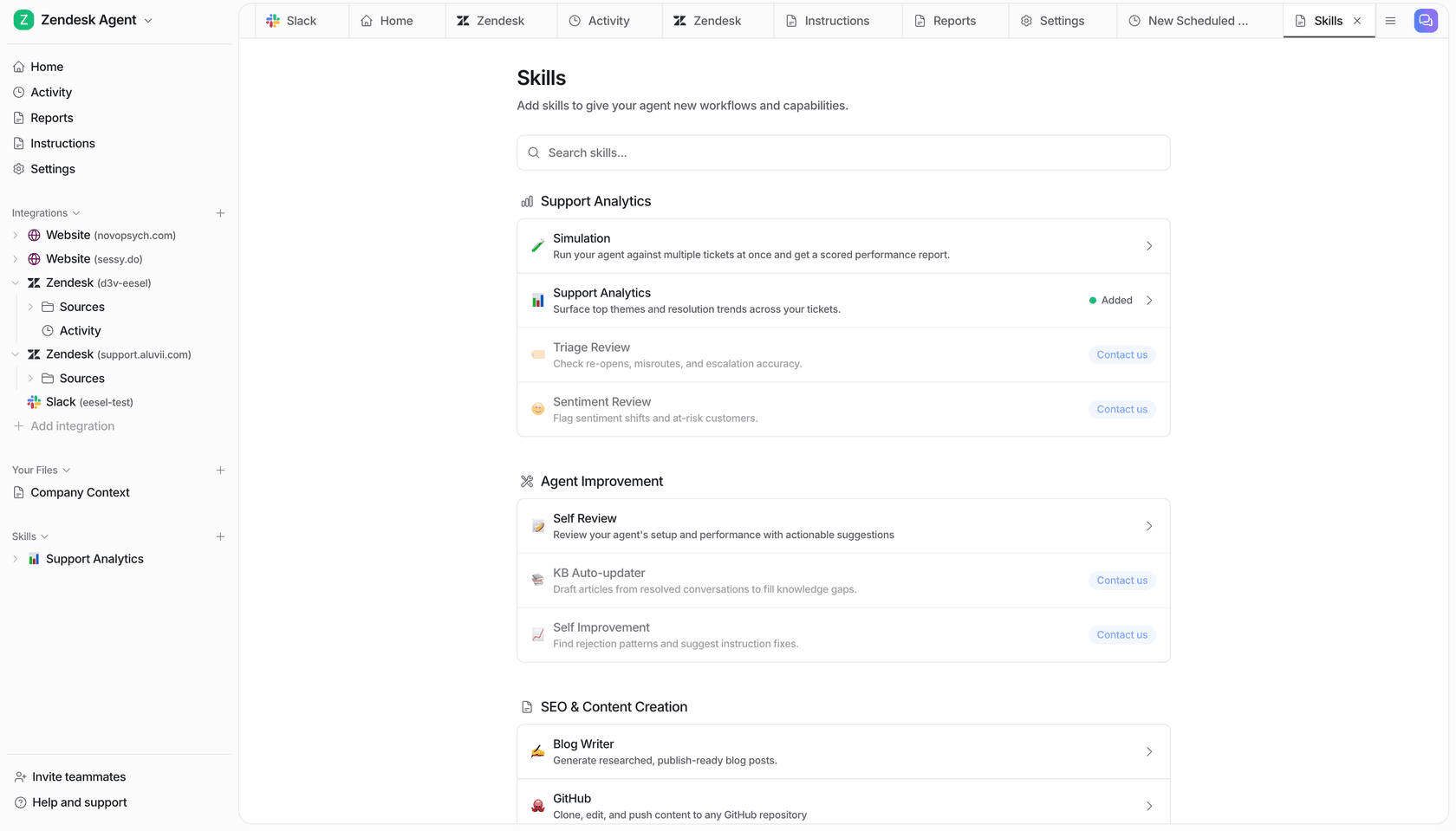
It is ungated, and the screenshot above shows why that matters: four sibling skills on that list carry a "Contact us" button, and Simulation does not. This is the demand I hear constantly from support leads, and one of eesel's own founders puts it more bluntly than any marketing line would: people really, really, really want to train on past tickets. Behind that sits a buyer we lost, a CX lead at a supplements brand running about 7,000 tickets a month, whose requirement ran to one sentence:
"I need an AI who is only handling the tickets that it's confident to handle and all the other ones, leave them alone."
At the time we did not meet that bar. It is the reason the rehearsal exists, and the reason I rate it above a leaderboard finish.
Where the money goes
| Item | Price | Unit |
|---|---|---|
| Free plan | 100 credits | No card required |
| Teammate, 500 credits | $299/mo | 1 credit per ticket or chat |
| Teammate, 1,000 credits | $499/mo | 1,500 credits $699 |
| Teammate, 2,500 credits | $999/mo | 3,500 credits $1,349 |
| Teammate, 5,000 credits | $1,899/mo | Above 5,000, talk to us |
| Blog draft | $4.00 | One draft |
| Overage | $0.80 per extra credit | Optional, with a monthly cap you set |
| Annual | Two months free | Pay a year upfront |
The unit here is the job. One ticket is one credit no matter how many messages it takes, so a chatty customer and a one-line customer cost you the same, and that property is what makes the bill computable. Five hundred tickets a month is $299. No token arithmetic needed to tell you that.
Two honest limits on that. Credits are used regardless of outcome, so a bad answer uses the same credit as a good one, which is exactly the criticism I made of Relevance AI's failed runs and it applies here too. Only tickets the agent actually works on count, and that is the mitigation. Spend controls are real as well: a fixed monthly plan, agents that pause when credits run out, and optional overage with a cap you set.

That screen is the whole pricing argument in one image. The product's own reporting counts the exact unit the invoice bills, so there is nothing to translate.
Pros
- The billed unit is a finished job, which makes the bill arithmetic rather than estimation.
- Simulation over your own historical tickets, ungated, and with scored output.
- Predictable spend: one fixed monthly plan covers ticket triage and replies alike, with automatic pause and optional overage with a cap you set.
- A free plan of 100 credits with no card, so the rehearsal costs you nothing.
- Questions asked in the eesel dashboard are mostly free.
Cons
- Narrow. Not a general-purpose worker, and it will not build you a slide deck or a video.
- The integration claim is inflated. The homepage says 1,000-plus while the directory it links to lists 39. Use the 39.
- SOC 2 Type II is underway rather than certified, and no ISO 27001 is claimed. HIPAA is talk-to-us, and single sign-on and MFA are add-ons from $199 a month.
- Credits are used whatever the outcome.
- No connector for Freshservice, ServiceNow, Zoho Desk, Ivanti, Crisp, LiveAgent or Helpshift. On ITSM the coverage is Jira Service Management only.
- No identity or HR system action connectors, so it will resolve and route a password-reset ticket, and will not reset the password itself.
Verdict: take eesel when you want a teammate already prepared to own support or blog-writing work. Do not take it as a CellCog replacement for arbitrary research, media or one-off deliverables, because it is not competing for that and pretending otherwise would only waste your trial. Weighing the helpdesk teammate against native helpdesk AI instead? The Zendesk AI write-up is the closer comparison.
So which CellCog alternative should you pick?
The honest summary: every vendor in this category publishes half the bill, and the half varies.
CellCog publishes the rate and withholds the job cost. Skywork publishes the job cost in dollars, then withholds three of four plan prices. Even OpenAI runs a version of the same move: agent mode at 30 credits a message and deep research at 50 credits a task on business plans, with no dollar value published for a credit anywhere. Manus and Flowith are the two publishing both halves, and that is why they top this list on forecastability rather than on capability.
So pick according to which half you can live without.
- Want CellCog's autonomy with a computable bill? Manus.
- Buying documents by the artifact? Skywork, and live with the signup wall.
- Buying images and video? Flowith, noting that the top tier is not the best rate.
- Need the work to start itself? Lindy, and count your Slack seats.
- Blocked by security review? Relevance AI, with certs on the free tier.
- One person, tight budget? Sintra, and read the help-centre rate card first.
- Everything happens in Slack? Viktor, and check the price on the card.
- Have engineers and want no lock-in? Hermes.
- Hiring for support or blog writing? eesel.
And whichever one you pick, do the thing almost none of these tools make easy. Run it over work you already finished, then compare its answer against the one you shipped. Every score in this post, ours included, is somebody's claim until you have done that.
Hire a ready-to-work AI teammate
If the role is support, eesel connects to your helpdesk, learns from the sources you already have, then lets you run a simulation over your real historical tickets before a single reply goes out. If the role is content, the blog writer arrives ready to research and write the post. Pricing is from $299 a month for 500 credits (1 credit per ticket or chat) or $4 per blog run, with a free plan of 100 credits and no card. The bill is something you can work out on the back of an envelope.

You brief the teammate in plain English, the way you would brief a new hire. Try eesel and hand over the first job.
Frequently Asked Questions
What are the best CellCog alternatives in 2026?
How much does CellCog cost?
Is CellCog really number one on DeepResearch Bench?
What is the cheapest CellCog alternative?
Can an AI employee platform replace a support team?
Does CellCog work with Zendesk, Freshdesk or Gorgias?
What should I test before paying for any AI employee?
Are CellCog alternatives better for teams than for solo users?


Article by
Kurnia Kharisma
Kurnia is a software engineer and writer at eesel AI with two years of SEO experience, writing about AI tools, helpdesk software, and customer support. He pairs a developer's understanding of how these products are built with search-driven research into what actually ranks and resonates with the people searching for them.