The 9 best Vellum AI alternatives in 2026 (tested and compared)

Kurnia Kharisma

Katelin Teen
Last edited August 16, 2026
Wait, which Vellum are you actually looking for?
Three different products share this name, and the search results mix all three. There's a Mac app for formatting books, there's the LLM development platform that launched on Hacker News back in 2023, and there's the thing at vellum.ai today.
That last one is a personal AI assistant. The homepage opens in the assistant's own voice, "Morning, I'm your Personal AI," and every button on the page says MEET YOUR AI. There is no workflow builder, no evaluation suite, no prompt playground in the navigation.
I checked the old URLs rather than taking the navigation's word for it. /products/workflows, /products/evaluations, /products/prompt-engineering, and /products/agents all return a 308 redirect to the homepage. The unprefixed variants hard-404. Meanwhile the Vellum developer docs still document workflow nodes, release tags, and Ragas-backed evaluation metrics in full detail, as though nothing happened.
So the confusion isn't yours. It's real, and it's still catching people out. Five months after the assistant launched, someone on X was still placing the company in the old category:
"for assistant work claude is still ahead imo. vellum is a dev/eval platform, different category entirely"
If you came here for the build-and-evaluate tooling, this post won't help much and I'd point you at LangChain or our comparison of LangChain and LangGraph instead. Everything below is about the assistant.
Why people are shopping for Vellum alternatives
Vellum does some things genuinely well. It's MIT licensed, you can self-host it for free, and the one thing users consistently credit is that it installs in minutes rather than an afternoon. That's not nothing in a category where the alternative is four hours of YAML.
But five specific things push people to look around.
You're renting a computer, not buying a seat
This is the strangest part of the pricing page, and it took me a second read to notice. Vellum's plans don't price users or tasks. They price vCPU, RAM, and disk.
| Plan | Price | Computer | Storage | Credits included | Assistant email + subdomain |
|---|---|---|---|---|---|
| Mighty | $30/month | 1 vCPU / 2 GiB | 10 GB | $25 | No |
| Super | $100/month | 2.5 vCPU / 5 GiB | 30 GB | $45 | Yes |
| Ultra | $200/month | 4 vCPU / 8 GiB | 60 GB | $115 | Yes |
| Custom | Not published | Configurable | Configurable | Configurable | Configurable |
| Self-hosted | Free | Your hardware | Yours | Bring your own keys | Self-managed |
Credits are the second meter stacked on top, and Vellum defines them plainly: "$1 = 1 credit, and you only pay for what you use." A $10/month base fee covering a custom subdomain, static IP, and priority support sits inside the Super and Ultra prices, and Mighty doesn't carry it.
Net the bundles out and Mighty is about $5 of compute for $30. The genuinely unbounded line is credits, because the page publishes no overage rate, no spend cap, and no rollover policy. One user put the complaint in a single line:
"I think cost is the downside for vellum, it has everything else going for it"

It bills while you're asleep
Vellum's own FAQ pre-empts this, which I respect: the heartbeat and memory system "performs work in the background even when you're not chatting." That's the feature working as designed, and it's also a meter running against a credit balance with no published ceiling.
The community has been chewing on this problem across the whole category, not just Vellum:
"OpenClaw's heartbeat burns tokens 48 times a day asking 'anything new?' on your most expensive model. Hermes has no heartbeat at all and its cron system is so locked down it breaks on the first two attempts. One approach wastes money. The other wastes time. Neither just works."
The track record is thin, and the reviews aren't what they look like
I went looking for user evidence and mostly found an empty room. There is no G2, Capterra, or Trustpilot listing for the assistant. The G2 page that ranks shows 4.8/5 from 12 reviews, but the newest of those reviews predates the assistant's launch, the profile is unclaimed, and at least one review is unmistakably about the book-formatting Mac app ("a game changer for indie authors").
There's also no Show HN, no Launch HN, and no Hacker News thread about the assistant at all. Of 58 HN comments mentioning "vellum" in 2026, three concern this product.
What's there instead is a set of Reddit posts whose Vellum sections read like a pitch. The same account posted both a "has anyone tried Vellum?" question and, three days later, the ranked answer, which used the phrase "Our testing on first-time users." A commenter clocked it:
"Nice ad 👌 saw your launch video on Twitter. All the best."
The widest-reach launch post on X, at 107 likes, is explicitly labelled Sponsored, and its thread offered a share of $3,000 in gift cards to early testers who gave feedback. None of that makes the product bad. It does mean anyone telling you Vellum has strong user consensus hasn't checked who wrote the posts.
Mac and iPhone only
The assistant ships for macOS and iPhone. Android and Windows are on the roadmap. If your team is on Windows, that's the end of the evaluation.
Nothing to hand your security reviewer
There are no compliance claims anywhere on the current property: no SOC 2, no ISO 27001, no GDPR statement, no HIPAA, no uptime SLA for the hosted plans. The only SLA mention on the pricing page is in the self-hosting blurb, where it says you control your own. There are also no named customers, no logo wall, and no case studies. Every person in the product demos is fictional.
For a tool you're about to give your calendar and inbox to, that's a real gap, and it's the kind of thing that ends a procurement conversation in about four minutes.
How I picked these nine
I ran the same three filters over everything the category threw up.
It has to be in the same job. An always-on assistant you can reach from a phone, that holds memory between sessions and can act on a schedule. That rules out most of what gets filed under AI teammates, and it rules out prompt playgrounds and eval harnesses, even though they're what Vellum used to be.
The pricing has to be checkable. Every price below comes from the vendor's own page on the day I looked. Where a vendor hides the number, I say so instead of guessing.
It has to survive contact with the vendor's own docs. Several claims I started with fell over on checking, including some in Vellum's marketing and two competitor sites that turned out not to be run by the projects they're named after. Those corrections are in the entries.
The one thing I want to put in front of the list, because it decides more than any feature comparison, is who the work belongs to.
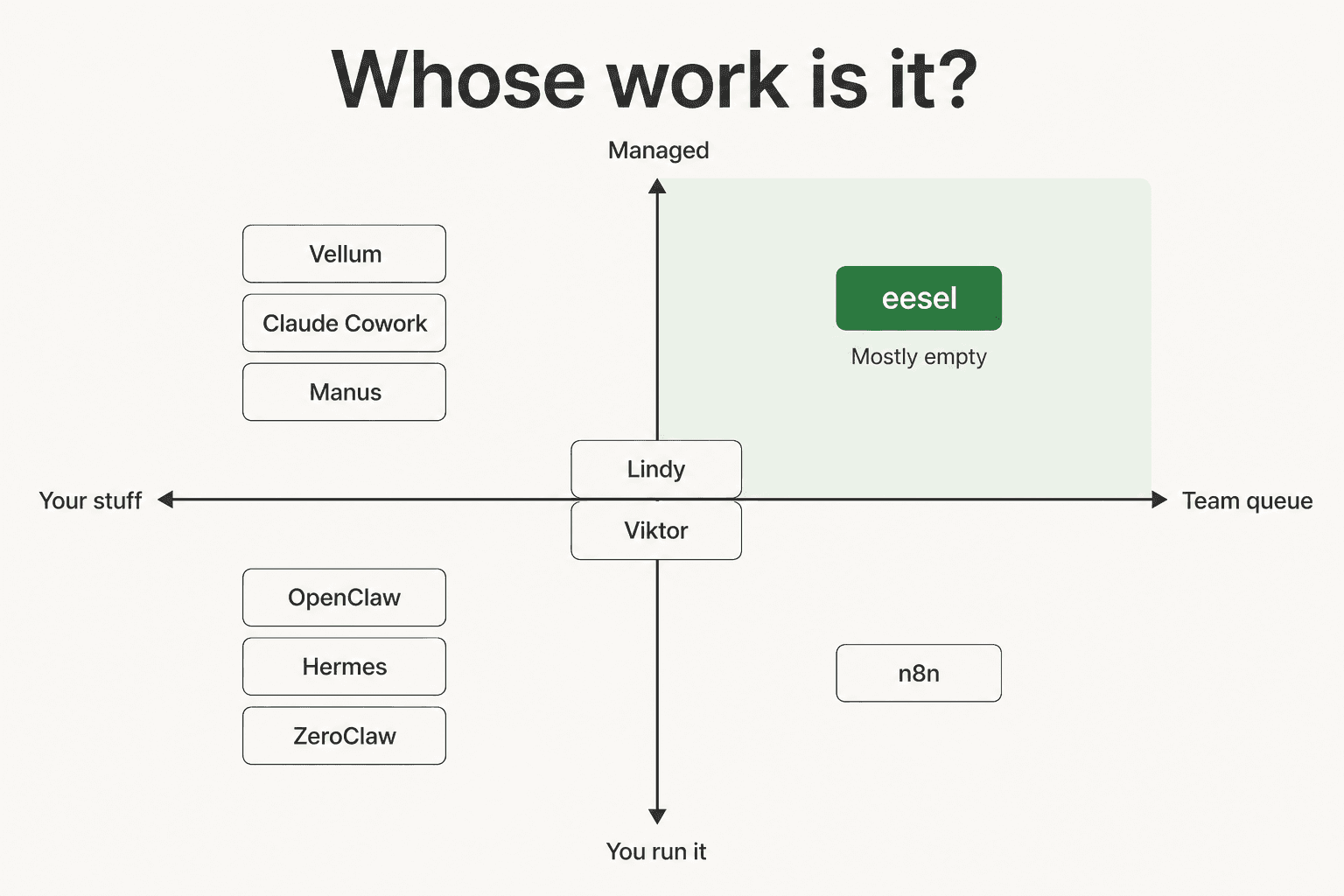
Almost everything in this category clusters on the left. These are tools for one person's inbox, one person's calendar, one person's notes. That's a real and useful job, and it's the one most AI agents are currently built for. It is not the same job as a queue that four people share and a customer is waiting on. The split is the same one we walked through in Agentforce vs personal AI.
30 seconds
Which lane are you actually in?
Pick the sentence that matches the work you're trying to hand off.
The 9 best Vellum AI alternatives in 2026
| Tool | Best for | Starting price | Billing unit | Hosting | Open source | Platforms | Scheduling | Team features | Compliance published |
|---|---|---|---|---|---|---|---|---|---|
| eesel | A shared support queue | $0.40 per ticket | Per resolution | Managed | No | Web, in helpdesk | Yes | Built for teams | SSO, HIPAA, BAA on Enterprise |
| OpenClaw | The biggest ecosystem | Free | Your infra + tokens | Self-host | MIT | 20+ chat channels, macOS, Windows | Cron | Single user | None published |
| Claude Cowork | Already paying Anthropic | $17/user/mo annual | Included in plan | Anthropic cloud | No | macOS, Windows, web, mobile | Fixed cadences | Team and Enterprise plans | Anthropic enterprise controls |
| Hermes | Leaving it running | Free self-host | Your infra + tokens | Self-host | MIT | 20+ channels, CLI | Cron | Single user | None published |
| ZeroClaw | A tiny footprint | Free | Your infra + tokens | Self-host only | MIT or Apache-2.0 | 30+ channels claimed | Cron | Single user | None published |
| Lindy | No-code, managed | $49.99/mo | Credits | Managed | No | Web, iMessage, SMS | Triggers | Enterprise tier | HIPAA, BAA, SSO on Enterprise |
| Viktor | An AI coworker in Slack | $50/mo | Credits | Managed | No | Slack, Teams | Crons | Shared workspace credits | SOC 2 Type 1, CASA Tier 3 |
| n8n | Deterministic workflows | Free self-host, $20/mo cloud | Workflow executions | Both | Source-available | Web | Triggers, cron | Unlimited users | SOC 2, GDPR |
| Manus | One-off deliverables | $20/mo | Credits | Managed | No | Web, desktop, mobile | 20 scheduled tasks | Team tier, quote-gated | None published |
Every price above is the vendor's published figure as of 17 August 2026. Where a vendor doesn't publish one, the cell says so.
1. eesel
Best for: teams whose "assistant" problem is actually a shared customer queue.

I'll put my own product first and then be honest about where it doesn't fit, because that's more useful than burying it at number nine.
I've spent the last three-plus years putting AI agents on live support queues, and the pattern that shows up over and over is a team who bought a personal assistant, wired it to a shared inbox, and discovered the thing has no idea what a ticket is. It can draft. It can't own, escalate, or hold a thread across three agents and a weekend.
Features. eesel connects to the helpdesk you already run and learns from your resolved tickets, not just your help centre, which is the difference between an AI that knows your policy and one that knows your marketing site. It drafts or replies autonomously depending on how much rope you've given it, routes on confidence rather than replying to everything, and works across 80+ languages. There are 100+ integrations, and it can write knowledge base articles for the gaps it finds.
The piece that matters most is simulation. You run the agent against your own ticket history before it ever touches a customer, see coverage by theme, fill the gaps, and re-run. I've watched a confident-sounding bot quietly give wrong answers, which is exactly why that step exists.

Pros. Priced per resolution, so cost tracks outcomes rather than headcount. No per-seat fee and no platform fee on the standard plan. Real deployments at scale: Smava runs 100,000+ German-language tickets a month through it, and Design.com handles 50,000+ a month on Freshdesk. Gridwise saw 73% of tier-1 requests resolved in the first month, with results landing inside a 7-day trial.
Cons. It is not a personal assistant, and I'd rather say that plainly than sell you something that doesn't fit. It's an AI ticketing system with an agent on top, so it won't book your flights, prep your board deck, or triage your personal Gmail. If you're one person trying to get your own life in order, buy something else on this list. It's also not self-hostable, and SOC 2 is in progress rather than certified, so a security team that needs the certificate today will need to wait.
Pricing. Usage-based from $0.40 per ticket, with $50 of free usage to start and no card required. Commit to $300/month or more annually and it's 25% cheaper. Enterprise adds a $1,000/month platform fee on top of usage, which buys SSO, HIPAA, a signed BAA, and a dedicated SE.
Our take: pick eesel when the work has a customer on the other end of it and a queue behind it. Skip it if the job is one person's calendar. The economics of AI support only work out when the unit you're billed on is the unit you actually care about, and for a support team that's a resolved ticket, not a rented vCPU.
2. OpenClaw
Best for: the maximalist self-hoster who wants every channel and every plugin.
OpenClaw is the project that defined this category, and its numbers are silly. As of July 2026 the repo carried 384k stars and 80.6k forks across nearly 71,000 commits, which Y Combinator described as going from a weekend project to the most-starred repo on GitHub in under five months.
Features. The core idea is a Gateway you run yourself that bridges your chat apps to an AI agent. Supported channels include WhatsApp, Telegram, Slack, Discord, Signal, iMessage, Microsoft Teams, and Matrix, among twenty-odd others. The ClawHub registry hosts community skills you install on demand, and there's a macOS companion app plus a Windows Hub. You bring your own model provider.
Pros. Nothing else here has this much surface area. If a channel exists, someone has probably written a plugin for it. It's MIT licensed, it runs entirely on your hardware, and the community is enormous, so obscure problems usually have an answer already written down.
Cons. Setup is the well-documented pain. In one developer's measured two-week test, OpenClaw took roughly four hours to set up and three to four hours of upkeep, against eight minutes and fifteen minutes for a managed option. The docs treat inbound DMs as untrusted input, which is the right call and also a hint at the threat surface. On Hacker News, one commenter was blunt about it:
"there's absolutely no way I'm letting that hot mess of a walking, talking CVE anywhere near my data. It's somehow both horribly insecure and extremely prone to locking me out because of several competing security/permission models fighting it out and gridlocking each other."

Pricing. Free. You pay for the server and the model tokens.
Our take: the best choice if tinkering is part of the appeal and you have a homelab already. If you want an assistant rather than a hobby, read our OpenClaw review first, and be honest with yourself about the upkeep. There's a fuller list of OpenClaw alternatives if the security posture puts you off.
3. Claude Cowork
Best for: anyone already paying Anthropic, because it costs nothing extra.
Anthropic's framing is neat: Claude Code is for software engineering, Cowork is the same agentic architecture pointed at non-coding knowledge work, minus the terminal.
Features. It runs as a macOS and Windows desktop app, with web and mobile in beta and a Chrome side panel on the higher tiers. MCP is the connection substrate, and connector calls run server-side so tokens never enter the sandbox. Scheduling is real: /schedule gives you hourly, daily, weekly, weekdays, or manual runs in the cloud with no device online. Memory is project-scoped.
Pros. The sandboxing is the most serious of anything here. Cloud sessions get a per-session ephemeral sandbox with a mandatory egress proxy and session tokens that expire in hours; local sessions run in a hypervisor VM. And if you're on a Claude plan already, there's no incremental cost.
Cons. Project-scoped memory means your chat history doesn't carry over, which trips people up. Usage runs against a 5-hour rolling window plus weekly caps, so heavy days hit a wall. The Auto approval mode is Pro and Max only, and computer use runs with no sandbox at all. You're also fully inside one vendor's ecosystem, which one user flagged as the tradeoff:
"Claude-based agents are strong but locked into one ecosystem."
Pricing. Pro is $17/month billed annually ($200 up front) or $20 monthly. Max 5x is $100/month and Max 20x is $200/month. Team standard is $20 per seat annually, Team premium is $100 per seat annually for 2 to 150 seats, and Enterprise is $20 per seat plus usage at API rates. The free plan doesn't include Cowork.
Our take: the highest floor on this list and the easiest yes if you're already a customer. Our Claude Cowork pricing breakdown has the full plan grid, and the Slack integration guide covers the team angle. If the ecosystem lock-in is the sticking point, the Cowork alternatives list is the next stop.
4. Hermes
Best for: people who want it stable enough to stop thinking about.
A correction worth flagging before anything else: hermes-agent.ai is not Nous Research's site. Its own hero strip labels it "Third Party Service" and its buttons route to a commercial hosting product. The official surfaces are the Hermes Agent docs and the GitHub repo, which carries 231.4k stars and 46k forks.
Features. The memory model is the most precisely documented thing in this whole roundup. MEMORY.md caps at 2,200 characters and USER.md at 1,375, roughly 1,300 tokens in every prompt, with a live usage counter in the header. It does not auto-compact: write past the cap and you get an error, and the agent has to consolidate. Behind that sits an unlimited SQLite FTS5 store with ~20ms queries. Scheduling is cron in four formats with a gateway that ticks every 60 seconds, plus a no-agent mode that runs plain scripts with no model call at all.
Pros. Stability is the recurring theme in what users say, and it's the reason people migrate from OpenClaw:
"I ran openclaw since day one and Reloaded and rebuilt it quite a few times. while I enjoyed it just wasn't anywhere near stable. I've now run a Hermes for three months and it has all the soul and all the flow that I would want but is incredibly stable it is incredibly useful It hardly ever breaks it's just better."
The no-agent cron mode is genuinely clever, and the fail-closed spend guard, which snapshots the provider and model rather than silently inheriting a switch to something expensive, is the kind of detail that only exists because someone got a nasty bill.
Cons. The channel count depends entirely on which page you read: the docs name 20 in prose and carry a 28-row capability table, the README says 6, and the hosted plan advertises 4. Setup measured around two hours in that same two-week test, with one to two hours of ongoing upkeep. The hard memory cap is a deliberate design choice, but it does mean you manage it.
Pricing. Free and self-hosted. The managed option, FlyHermes, is $49/month monthly or $39/month billed annually.
Our take: the pick if you'd rather have four channels that never break than twenty that sometimes do. Our Hermes Agent review goes deeper on the memory model, and the Hermes alternatives roundup covers what to do if the hard character caps put you off.
5. ZeroClaw
Best for: a minimal self-hosted runtime, if you're happy with no managed option at all.
Second correction, and this one matters more: there is no ZeroClaw cloud. The project's own FAQ says so in those words, and the README carries an explicit notice that any other repository, organisation, or domain claiming to be ZeroClaw is unauthorised. A site called zeroclaw.app does publish tiered pricing, but its own header reads "Powered by OpenClaw" and it never mentions the Rust runtime. Don't budget against those numbers.
Features. A Rust agent runtime, dual licensed MIT or Apache-2.0, at v0.8.4 published on 2 August 2026. It claims 30+ channels, though the default build bundles six and the full set needs a source build. Cold start is under 20ms, around 12ms on Apple Silicon.
Pros. It's fast and small in the way a Rust binary tends to be, and the trajectory is real: 32,592 GitHub stars and 4,894 forks as of 17 August 2026, from a repo created in February. Provider-agnostic, with hardware GPIO support if you're doing something physical with it.
Cons. Still pre-1.0, with v1.0 listed as a planned north star and 724 open issues. No SOC 2, ISO, GDPR, or HIPAA claim exists. The site publishes no product screenshots at all, which makes evaluating it a matter of reading source. And with no official managed tier, self-hosting isn't the cheap path, it's the only path.
Pricing. Free. Your server, your tokens, your time.
Our take: a good runtime and a poor product, which is a fine thing to be at v0.8.4. Read the ZeroClaw review if you're evaluating it seriously, and treat any third-party "ZeroClaw Cloud" as a different product wearing the name. If governance is what you're after from a self-hosted runtime, NemoClaw wraps this family in a sandbox layer.
6. Lindy
Best for: no-code agents, managed, with a real support track record behind them.
Lindy pivoted its marketing toward a personal executive assistant that texts you over iMessage, but the engine underneath is still the trigger-based agent builder it always was. You pick an event, describe the job in plain English, and the agent runs.
Features. Triggers plus natural-language instructions, 100+ integrations, email drafting, meeting scheduling and notes, and computer use on the Pro tier and above. Individual agents are called "Lindies," and you can run several.
Pros. It has the strongest review record of anything on this list by a wide margin: 4.9/5 from 171 reviews on G2, with 400K+ professionals claimed. Every paid plan starts with a 7-day free trial. It is the most polished managed experience here.
Cons. Credits, and the page no longer publishes the allotments, labelling tiers only as "standard usage," "3x more usage," and "7x more usage." That's a hard thing to budget against, and users say so:
"Lindy is more polished but cloud based and gets expensive with heavy use."
Inbox caps are tight, at 2 on Plus rising to 5 on Max, which bites if you run work and personal accounts.
Pricing. Plus is $49.99/month, Pro is $99.99/month, Max is $199.99/month, and Enterprise is quote-gated with HIPAA, a signed BAA, SSO, and SCIM.
Our take: the safest managed pick for a non-technical buyer, and the one I'd hand someone who has never configured anything. Our roundup of Lindy alternatives covers the credit-cost objection in more detail.
7. Viktor
Best for: an AI coworker that lives where your team already talks.
Viktor is the one product here that starts from the team rather than the individual. Its line is "Not a tool. A hire," and you interact with it by @-mentioning it in a Slack thread or Teams channel.
Features. It has its own cloud computer where it writes and runs code to finish real tasks, rather than only chatting. It claims 3,200+ tools, made up of 27 native integrations plus managed connectors. Scheduled crons are included.
Pros. The shared-workspace model is the right shape for team work: credits pool across the workspace, and there's no per-seat fee. It's the only product on this list besides eesel with meaningful compliance to show, holding SOC 2 Type 1 and CASA Tier 3, with ISO 27001 in progress. It rates 4.8/5 on G2 across 35 reviews, and it's backed by the Slack cofounders.
Cons. Credits again, and the dominant complaint even inside five-star reviews is that they burn faster than expected and the top-up flow is unforgiving. There's no published dollar-per-credit rate, so a heavy month is hard to forecast. And while it can triage a support queue, that's one advertised job among ops, finance, and light engineering, not the thing it's built around.
Pricing. $100 in free credits with no card, then Team at $50/month for 20,000 shared workspace credits, and Enterprise on request. Quick tasks run 100 to 300 credits, complex workflows 500 to 1,500, and full projects 2,000 to 5,000.
Our take: the best answer in this roundup for "our team needs an assistant," as distinct from "I need one." See the Viktor review for the credit-burn detail before you commit, and the Viktor pricing breakdown if you want to model a heavy month.
8. n8n
Best for: when what you actually want is a workflow, not an assistant.
Half the people shopping for a personal assistant would be better served by a deterministic workflow that does the same five steps every time. n8n is the strongest version of that, and it has AI agent nodes when you do want reasoning in the loop.
Features. A node-based visual canvas with 500+ integrations, and real JavaScript or Python inline anywhere in a flow. AI agent nodes, local model support, and native AI evaluation. Enterprise controls include SSO/SAML, RBAC, audit logs, log streaming to your SIEM, and Git-based version control.
Pros. It bills on workflow executions, not steps and not seats, so users are unlimited on every plan. It's self-hostable via Docker with the full source on GitHub, sits around 196.6k stars, and holds 4.7/5 on G2. Named enterprise users include Microsoft, NVIDIA, and Mercedes-Benz.
Cons. It isn't an assistant, and it isn't really a no-code bot builder either. There's no phone you can text, no persistent personal memory, and nothing proactive; it does what you wired it to do. The jump from Pro to Business is steep, going from $50 to $800 a month, which catches teams that outgrow Pro. And you're building, not buying, which is its own time cost.
Pricing. Community Edition is free and self-hosted. Cloud starts at $20/month for 2.5K executions on Starter, $50/month for 10K on Pro, and $800/month for 40K on Business, with Enterprise on request. Teams under 20 employees may qualify for 50% off Business.
Our take: reach for n8n when the job is repeatable and you want it to behave identically every single time. The clearest structural framing of where this whole category lands came from a Hacker News commenter, and it points at exactly this:
"Perhaps in the future, people's assistants will offer to 'solidify' frequently used workflows into software that minimizes or eliminates the LLM's role."
9. Manus
Best for: one-off deliverables rather than a standing assistant.
Manus, now part of Meta, is a different animal: you hand it an open-ended goal and it plans and executes the whole thing in the cloud, then hands back a finished artefact. A website, a deck, a research report.
Features. A web app builder, slide generation, image and music generation, and a browser operator that drives a real browser. Wide Research fans a task across parallel sub-agents. Every paid plan gets 20 concurrent tasks and 20 scheduled tasks.
Pros. It genuinely finishes things, which is rarer than it sounds. Running asynchronously on its own cloud VM means jobs keep going while you're away, and the 300 daily refresh credits on every paid plan soften the credit anxiety a little.
Cons. It's task-shaped, not assistant-shaped: it doesn't sit in your inbox noticing things. Credits scale with task complexity and there's no published per-task rate. One user testing several described it as "improving with local access but still feels early." No compliance claims are published.
Pricing. Standard is $20/month for 4,000 credits, Customizable is $40/month for 8,000 adjustable credits, and Extended is $200/month for 40,000 credits plus a dedicated cloud computer. Team and Enterprise are quote-gated. Annual billing saves about 17%.
Our take: great at producing a thing, not at remembering you. Pair it with something else rather than expecting it to be your assistant. Our Manus pricing breakdown has the credit maths, and the Manus alternatives piece covers the closest substitutes.
I checked Vellum's comparison table against the vendors' own docs
Vellum puts a head-to-head grid on its homepage, comparing itself to Hermes, OpenClaw, and Claude Cowork. It's a useful artefact and I'd encourage anyone evaluating to read it. It's also vendor-authored, and the competitor cells are Vellum's characterisation rather than those vendors' claims, so I spot-checked the Claude Cowork column against Anthropic's own documentation.
Three cells didn't hold up.
| Vellum's table says | Anthropic's own docs say |
|---|---|
| Native channels: "CLI, MacOS, Windows, Web" | Cowork ships macOS and Windows desktop, web and mobile in beta, and a Chrome side panel. There is no CLI; the terminal surface is Claude Code, a separate product. |
| Schedules: "Cron only" | Scheduling uses fixed cadences (hourly, daily, weekly, weekdays, manual) via /schedule. There is no cron syntax at all. |
| Security: "No sandboxing" | Cloud sessions run in a per-session ephemeral sandbox behind a mandatory egress proxy, with session tokens that expire in hours. Local sessions run in a hypervisor VM. |
To be fair to Vellum, the "Cron only" cell is arguably a fair criticism worded confusingly, since fixed cadences are less flexible than cron, not more. But "no sandboxing" is the opposite of what Anthropic documents, and the CLI row credits Cowork with a surface it doesn't have.
None of this makes Vellum a bad product. It makes the table marketing, which is what a vendor comparison grid always is. Check the cells that would change your decision against the other vendor's docs, on any of these products, including ours.
The maintenance tax nobody puts on the pricing page
Here's the line item that decides more budgets than any feature: the free options aren't free, and the vendors selling hosting will tell you so themselves.
The clearest admission comes from the Hermes ecosystem. Its own cost calculator lands on $535 a month for a VPS setup, and the phrasing on the page is unusually candid: "The software is free. Your time is not."
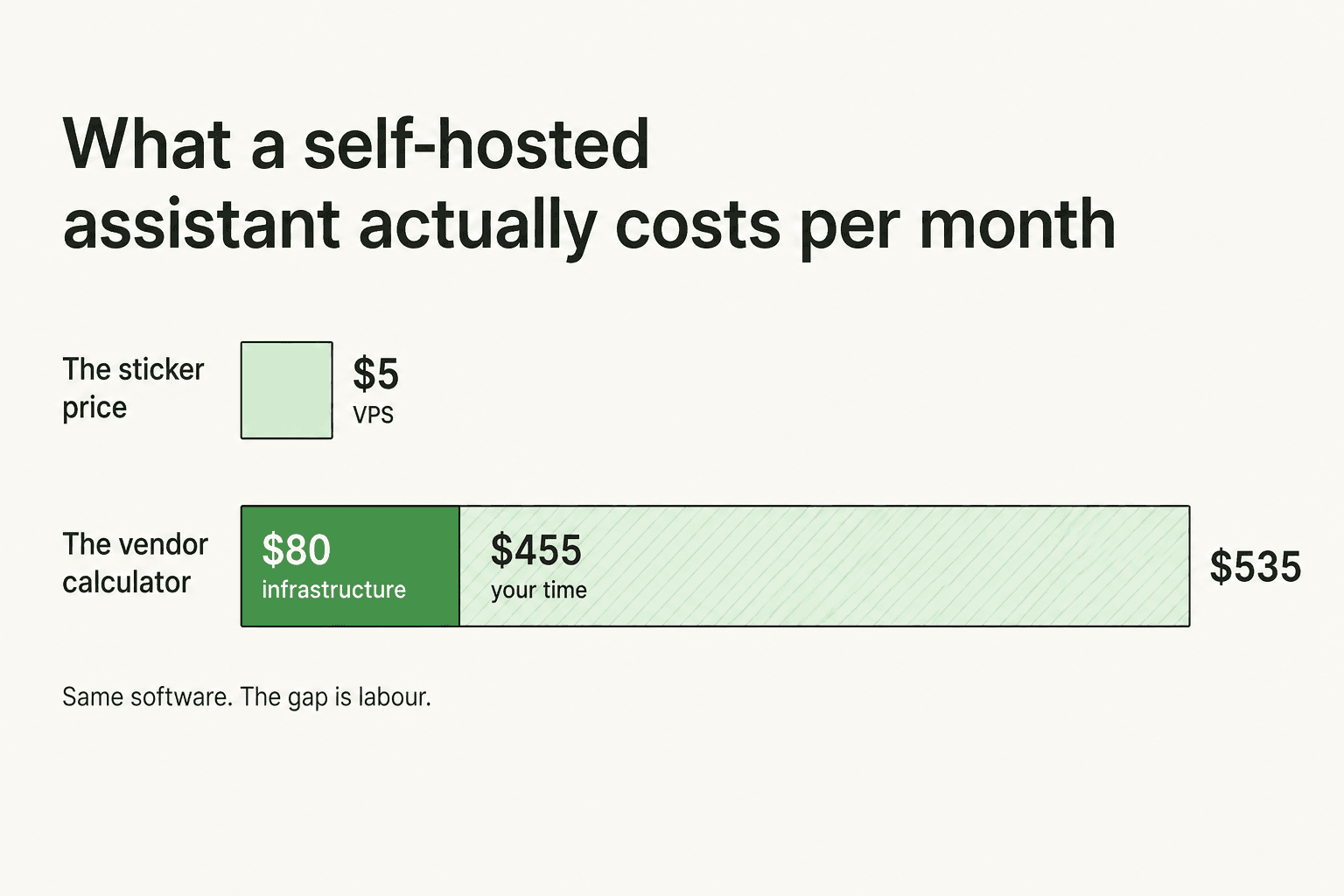
Strip the labour out and the actual infrastructure comes to roughly $80. The other $455 is your own hours, valued at $30 each. Meanwhile Nous Research's own README says you can run Hermes on a $5 VPS, and the affiliate's own hosting guide agrees that $5 to $6 is sufficient. Same software, a hundredfold spread, and the entire gap is who does the work.
That's not a gotcha, it's the honest shape of self-hosting, and it applies to every one of the open source AI agents on this list. In a two-week test running the same agent three ways, the measured cost looked like this.
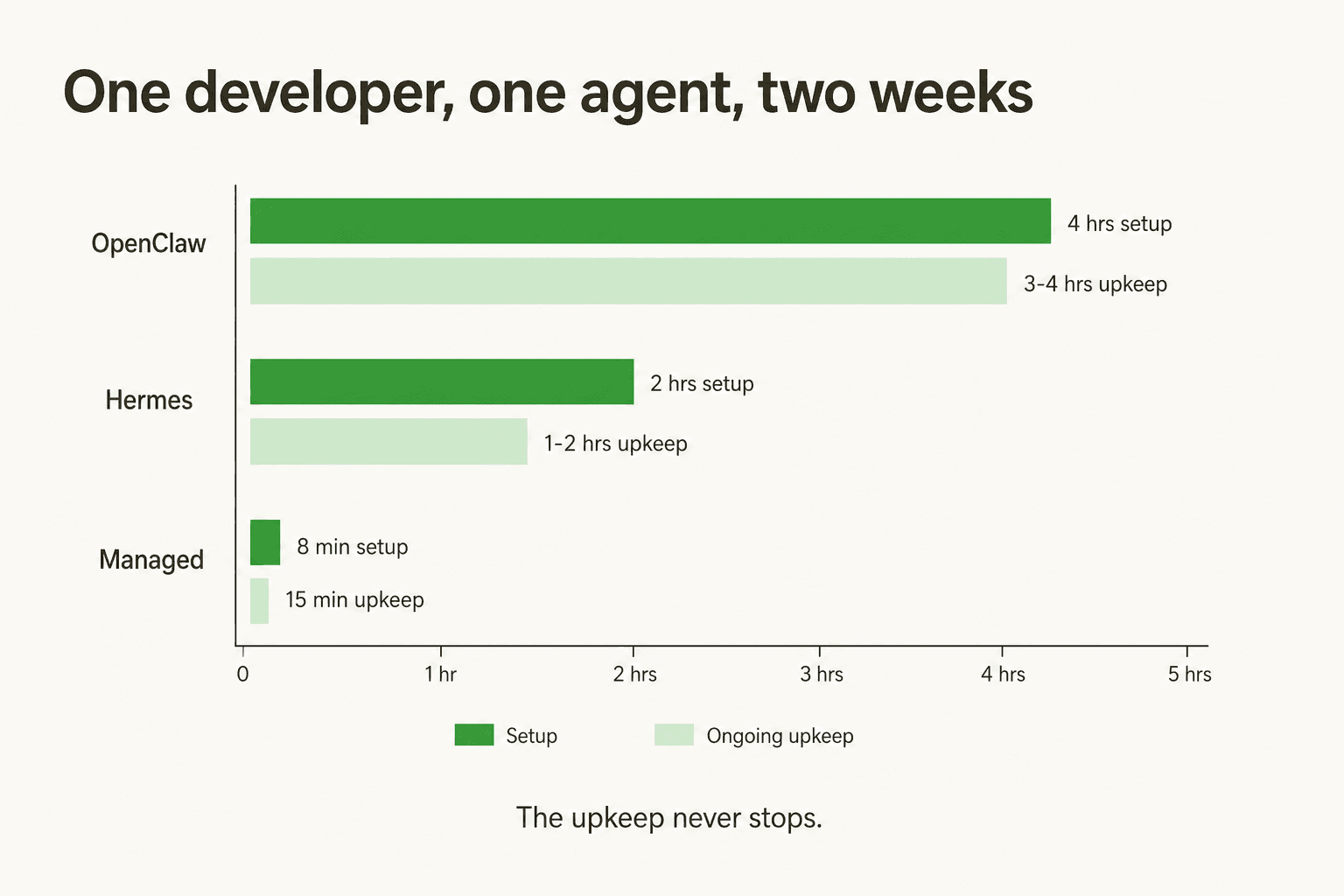
The person who ran it put the conclusion better than I could:
"The ugly: I was spending 30-40 minutes a week on maintenance. Checking logs. Pruning memory files. Restarting the gateway after DNS blips killed the Telegram listener. My agent was useful but I was slowly becoming its sysadmin."
There's a subtler tax underneath the visible one, and it's the sharpest technical criticism in the category. Agents that generate their own skills also grade their own work, and they grade generously:
"The agent completed a research task poorly (pulled outdated data) but rated its own work positively. The skill it generated from that 'successful' task was encoding a wrong approach. I had to manually find and delete it. If I hadn't checked, it would have silently produced bad research every time that skill triggered."
Silent wrong answers are the failure mode that matters, and it's why I'd never put an agent in front of customers without testing it against real history first. A wrong answer to yourself is an annoyance. A wrong answer to a customer is a refund and a review.
This is also the buy-versus-build conversation in miniature, and one of our customers framed it more crisply than any analysis I could write. Karel at GENERAL BYTES, who runs a 300+ article knowledge base across Confluence and Telegram, put it this way:
"We could try to write our own LLM application but we didn't want to invest our time into that. We wanted something that we would not have to maintain."
I'll be even-handed here, because we've lost customers to exactly the opposite decision: several technical teams have left us to build directly on the Claude API, and for some of them that was the right call. If that's the road you're on, our guide to building your own custom AI is a fair place to start. Build when the thing you're building is your product. Buy when it's plumbing.
Try eesel
If you got here because your support team is drowning and someone suggested an AI assistant, the assistants above are the wrong tool and I'd rather you knew that now than three months in. They're built around one person's accounts. A queue needs ticket ownership, escalation paths, confidence thresholds, and a way to prove the thing works before a customer sees it, which is closer to support ticket automation than to a personal assistant.
That's what an AI helpdesk agent is shaped for, and it's what eesel does. It plugs into the helpdesk you already run, learns from the tickets your team has already solved, and you can run it against your entire ticket history in simulation before it replies to anyone. You'll see coverage by theme, find the gaps, fill them, and re-run until the numbers look right. Then you turn it on for the easy stuff and widen from there. Billing is per resolution from $0.40, so what you pay tracks what it actually handled.

There's $50 of free usage waiting and no card required, so you can find out on your own tickets rather than on a demo dataset. Try eesel and point it at your real queue, or book a demo if you'd rather have someone walk the simulation with you. If you're weighing it against what your helpdesk already ships, we've written up eesel vs Zendesk AI too.
And if you're one person trying to get your own inbox under control, go back up to the list. Something on it will suit you better than we would.
Frequently Asked Questions
What are the best Vellum AI alternatives in 2026?
Is Vellum AI still an LLM development platform?
How much does Vellum AI cost?
Is there a free Vellum AI alternative?
Which Vellum AI alternative is best for a customer support team?
What happens if the AI assistant takes a wrong action?
Are Vellum AI reviews on G2 reliable?


Article by
Kurnia Kharisma
Kurnia is a software engineer and writer at eesel AI with two years of SEO experience, writing about AI tools, helpdesk software, and customer support. He pairs a developer's understanding of how these products are built with search-driven research into what actually ranks and resonates with the people searching for them.