DevRev alternatives: 9 better picks for support in 2026

Rama Adi

Katelin Teen
Last edited August 18, 2026

Why teams start looking for DevRev alternatives
I ship integrations and APIs on eesel's side of this market, so when I read a platform pitch I skip to what the connectors and the API surface actually do. That is where DevRev is both more interesting and more frustrating than its competitors.
Start with what it gets right. DevRev's three-object model, where a customer conversation, a support ticket, and an engineering issue are separate linked records in one system, is a real answer to a real problem. Most support teams paste a Jira link into a ticket comment and call it integration. DevRev makes the link a first-class object, so an engineer closing an issue can propagate that back to every ticket and every customer waiting on it.
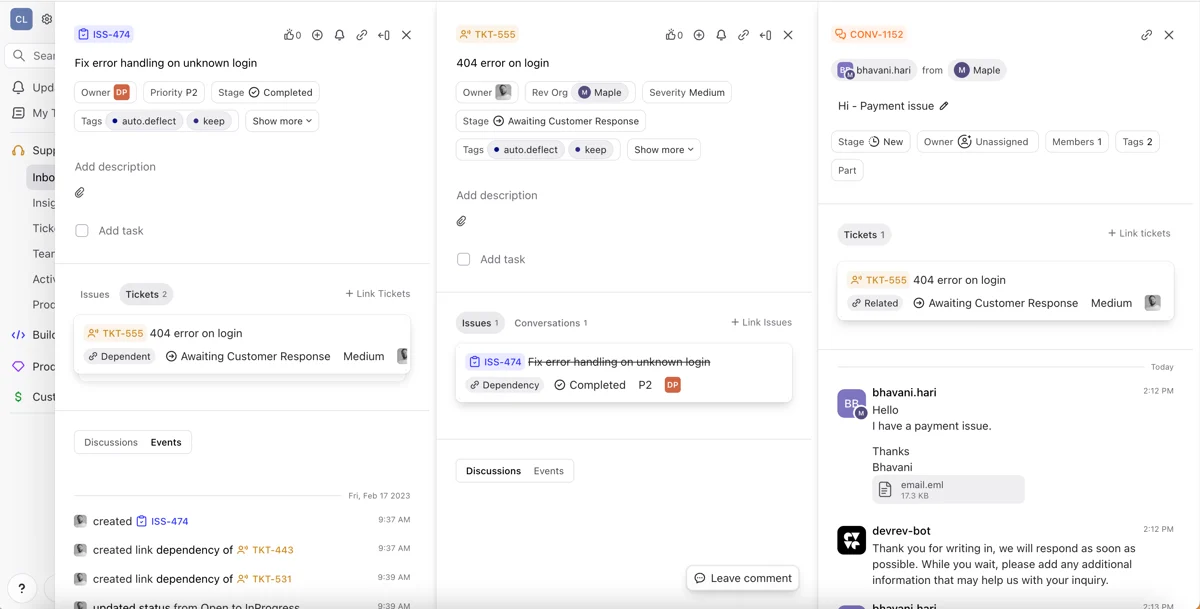
The company has the pedigree to back the ambition, too. DevRev was co-founded by Dheeraj Pandey, who previously co-founded Nutanix, and it announced a $100.8M Series A at a $1.15 billion valuation. It also published Enterprise-Bench, an open benchmark for enterprise AI agents with an evaluation harness validated by Professor Alexandros Dimakis at UC Berkeley. That is more rigour than most vendors in this category bother with.
So why the search traffic? Four reasons keep coming up.
The support product moved behind a sales call
This is the big one. DevRev's pricing page lists three tiers: Mini (free), Pro (Contact us), and Max (Contact us). The Support App, Build App, and Observe App are described as "Exclusive to Pro and Max plans". Consumption is metered in credits, and the unit is a support conversation, which DevRev defines as one full session where the agent handles an inquiry start to finish.
None of that is unreasonable on its own. What makes it hard for a buyer is the combination: no published rate, no published tier price, and the helpdesk behind an add-on. You cannot build a spreadsheet from it. Every other tool in this roundup except Pylon publishes tier prices you can model before you talk to anyone.
The API surface has gaps in the places support teams live
DevRev's own benchmark contains the most interesting finding I read all week. Enterprise-Bench measures agent accuracy against two kinds of tool surface, a curated one and what DevRev calls a protocol-realistic API surface, and reports an 18 to 19 point accuracy gap between them. In other words, the model is not the hard part. The tool surface is.
Users have hit the same wall from the outside. One support lead described losing a core workflow to it:
"One of the most common ways we share/reassign workloads is through "views" or, as referred to in Devrev, "Vistas". However, neither the API nor the CLI support this primary use case."

Ship speed cuts both ways
DevRev ships fast, which some users love and some feel. A Slack-heavy team that liked the product still flagged the tradeoff:
"(it seems) they're a newer startup that is constantly shipping features that are either buggy or even break their own workflows. This is both a blessing and a curse- you can get stuff built quickly and issues get handled quickly- but if 99.9% uptime/reliability is a key priority you might take that into consideration"
Six months later, the same person posted where they went:
"We use jira for eng tickets only, nothing customer facing. That being said we actually churned devrev and are standing up pylon as we speak. Devrev had constant outages and issues with slack creating tickets"
To be fair, that thread is not one-sided. Another user found it noticeably cheaper and more capable than what they left:
"First impressions is that it was confusing at first to set up, but now that we have it dialed in, I like it because it's noticeably cheaper (#1) and also more powerful (unexpected #2) than Zendesk."
The vendor changed under people who had already bought
This is the pattern I see most often on sales calls, and it is not specific to DevRev. Recently a B2B hardware support team came to us running roughly 250 tickets a month across four languages on Zendesk, and the only reason they were shopping at all was that their incumbent AI vendor had changed how it did business and forced them to move. Nothing about the product had broken. The commercial model shifted and they had to go.
A rename from DevRev to Computer, with support becoming one app among three, is that same shape of event. If you bought a support-and-product platform and now own a seat on an enterprise AI platform, shopping around is a reasonable response.
The thing most of these roundups get wrong
Every "DevRev alternatives" list I read hands you another platform to migrate onto. But look at what the migration actually costs. Here is what happened to one team moving between two DevRev instances:
"We migrated from one instance to another and half our customers didn't migrate and it took days with customer success managers to get it right."
That was a move between two instances of the same product. A move between vendors is worse: ticket history, macros, views, SLA policies, routing rules, integrations, and the muscle memory of every agent on your team.
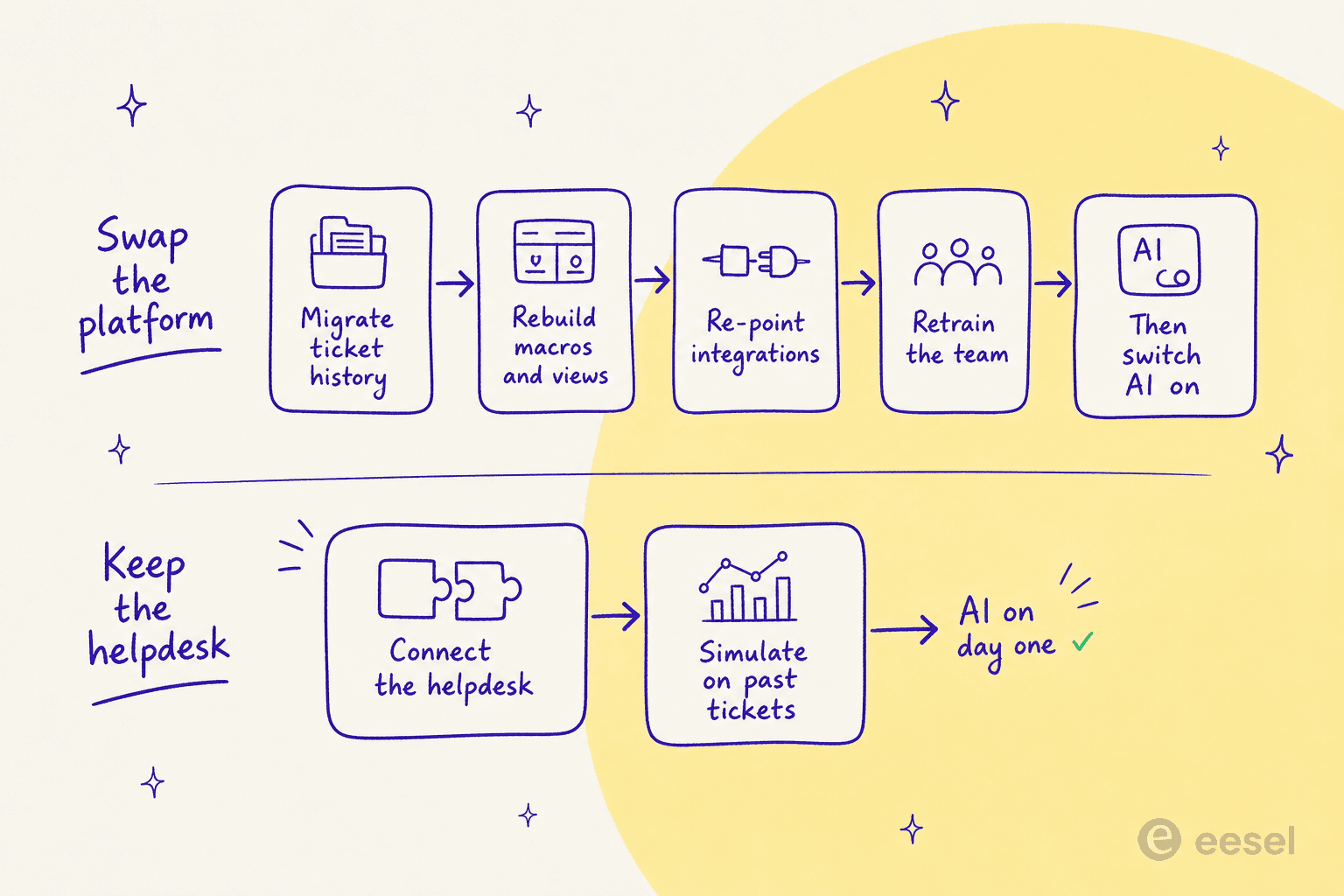
We have spent the last three-plus years putting AI agents on live support queues, and the pattern is consistent: the migration is usually more expensive than the AI. It is also the part nobody prices for you. So before you shortlist a replacement platform, it is worth asking whether the actual gap is your helpdesk or the AI running on it. If it is the AI, customer service automation on top of your current stack is a much shorter project.
How I picked these nine
Four filters, applied to every candidate:
- It has to close the support-to-engineering loop somehow. That is DevRev's whole promise, so a tool with no path to an issue tracker is not a replacement. Every option here either has a native Jira or Linear link, or is a tracker with a service desk bolted on.
- It has to publish something you can model. Seat price, per-unit rate, or both. Two tools on this list fail this partially and I say so in their entries.
- I read the vendor's own pricing page and docs, not a comparison site. Every figure below links to where I found it. Where a vendor gates a number, I say it is gated rather than guessing.
- No padding to hit ten. Nine tools earned a slot. Help Scout nearly made it and did not, because its Jira story is thinner than the rest and this is a post about the dev loop. It still appears in the cost estimator and the billing-unit chart below, since its $0.75 per-resolution rate is a useful reference point.
One caveat on the pricing figures: helpdesk vendors reprice a couple of times a year, and I captured these between July and August 2026. Click through before you sign anything.
The 9 best DevRev alternatives in 2026
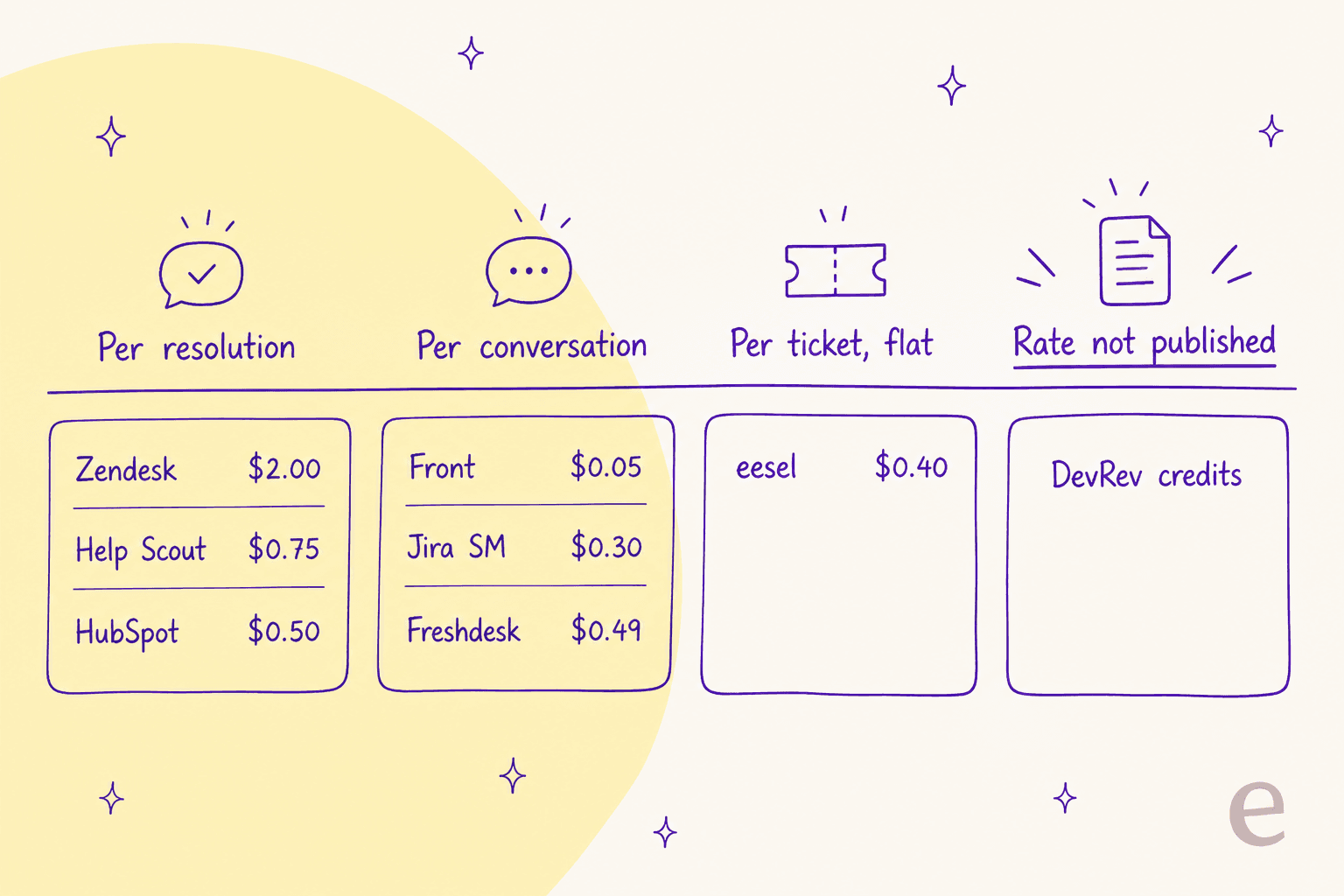
Read that image before the table, because it is the thing that trips up most buyers. The prices below look comparable and they are not. A resolution charge only fires when something gets fixed. A conversation or session charge fires whether or not the customer got an answer. Those two words differ by a lot at volume.
| Tool | Best for | Entry seat price | Top self-serve seat | AI billing unit | AI rate | Free tier | Issue-tracker link | Slack-native support | Simulate before go-live | SOC 2 / ISO | SSO / SCIM |
|---|---|---|---|---|---|---|---|---|---|---|---|
| eesel AI | Keeping your helpdesk and adding the AI | $0 (no seats) | $0 (no seats) | Credit (1 per ticket or chat) | From $299/mo (500 credits) | 100 free credits | Via helpdesk | Yes | Yes, on past tickets | SOC 2 | SSO add-on |
| Pylon | B2B support run in customer Slack channels | Not published | Not published | Not published | Not published | No | Linear, Jira | Native | Not published | SOC 2 | Yes |
| Plain | Engineering-led teams who live in Linear | $35/mo | $299/mo + $99/seat | Credits | Bundled allowance | 7-day trial | Linear, Jira | Native | No | Advanced on Frontier | Frontier only |
| Jira Service Management | Support inside the tracker engineering uses | $0 (3 agents) | $51.42 | Two meters | $0.30 + $1.00 | Yes, 3 agents | Native | Via app | No | SOC 2, ISO 27001 | Premium+ |
| Zendesk | Scale, breadth, and a mature app market | $19 | $115 | Resolution | $1.50 committed / $2.00 PAYG | No | App | Via app | Test environment only | SOC 2, ISO 27001 | Yes |
| Freshdesk | Tight budgets that still want an AI agent | $19 | $89 | Session | $0.49 (500 free) | Yes | App | Via app | No | SOC 2, ISO 27001 | Enterprise |
| Front | Account-based support in a shared inbox | $25 | $105 | Conversation | from $0.05 | No | App | Via app | Scenario-based | SOC 2 | Professional+ |
| Unthread | Slack ticketing with no AI meter at all | $50 (5-seat min) | $75 (5-seat min) | None published | Included in seat | No | Jira, Linear | Native | No | SOC 2 | Enterprise |
| HubSpot Service Hub | Support wired into the CRM you already sell from | $7 | $150 | Resolution | $0.50 (60 free/mo) | Yes, 2 users | App | Via app | No | SOC 2, ISO 27001 | Enterprise |
Now plug your own numbers in. This estimator uses the published rates above, so it stops at the two vendors that do not publish one.
1. eesel AI
Best for teams who want DevRev's AI argument without DevRev's migration.
I work on this one, so read the take with that in mind and check the numbers yourself.
eesel is not a helpdesk. It is an AI teammate that connects to the helpdesk you already run, reads your past tickets and help center, and starts drafting or resolving from there. The design bet is the same as DevRev's: an agent is only as good as the memory behind it. The difference is where we think that memory should live. DevRev asks you to move it into Computer Memory. We read it where it already sits.
That matters most at the point where these projects usually fail, which is trust. Before eesel touches a live ticket, you run it against your historical tickets and see what it would have said, theme by theme, with the gaps named. Our largest deployment runs a fully automated Zendesk agent through 100,000+ German-language tickets a month for Smava, and Gridwise saw 73% of tier-one requests resolved in the first month. Neither team replaced their helpdesk to get there.
Pros
- No seats and no platform fee. You pay one fixed monthly price sized to your volume, and you can move up or down any time.
- Simulation on your own historical tickets, not on scenarios you write yourself.
- Confidence-based routing, so low-confidence answers become drafts instead of live replies.
- Over 100 integrations and 80+ languages, covering Zendesk, Freshdesk, Front, Help Scout, and Jira Service Management.
Cons
- It is a layer, not a system of record. If you actually want to leave your helpdesk, this does not do that.
- No native issue tracker. The support-to-engineering link runs through your helpdesk's Jira or Linear app, not through eesel.
- HIPAA is available as an add-on, so you talk to eesel about it. SSO and MFA are paid add-ons from $199/month.
Pricing
| Plan | Price | What you get |
|---|---|---|
| Free | 100 credits | No card, includes simulation |
| 500 credits | $299/mo | 1 credit = 1 ticket or chat, no seats, no platform fee |
| 1,000 credits | $499/mo | Every integration and channel included |
| 2,500 credits | $999/mo | Unlimited agents and seats |
| 5,000 credits | $1,899/mo | More than 5,000: talk to us |
| Annual | Two months free | Pay a year upfront |
| Add-ons | From $199/mo | SSO and MFA, priority support from $299/mo, data residency $500/mo |
Questions asked in the eesel dashboard are mostly free and a blog post draft is $4 each, all on the pricing page.
My take: if your helpdesk is fine and the AI on it is not, this is the shortest path from here to working. If your helpdesk is the actual problem, pick one of the eight below and come back to this afterwards.
2. Pylon
Best for B2B support teams whose customers live in shared Slack channels.
Pylon earns the second slot on evidence rather than on my opinion: it is where the one user in that Reddit thread who churned off DevRev said they were headed. It is a B2B support platform built around the reality that enterprise customers do not open a ticket, they message you in a shared channel. Pylon turns those threads into tracked work with omnichannel coverage across Slack, Teams, email, chat, and ticket forms.
If DevRev appealed to you because your support and product teams are one conversation, Pylon covers the same instinct with a much narrower surface area. It links to Linear and Jira rather than trying to be them.
Pros
- Slack and Teams support is the native model, not an app bolted onto an email queue.
- Purpose-built for account-based B2B support, where one customer has many contacts and one contract.
- Deep integrations into the product stack, including PostHog, Mixpanel, and LaunchDarkly.
Cons
- Pricing is not published. The pricing page routes to a 30-minute demo booking, which puts it in the same bucket as DevRev on modelling.
- Narrower than a general helpdesk if you also run high-volume consumer email.
- No published simulation or dry-run capability for its AI agents.
Pricing
| Plan | Price | Notes |
|---|---|---|
| All tiers | Not published | Pricing page routes to a demo booking |
We keep a running note on what surfaces publicly in our Pylon pricing breakdown, and the wider field in Pylon alternatives.
My take: the strongest like-for-like swap on this list if your support really does happen in Slack. Just be ready for the same quote-only conversation that sent you looking in the first place.
3. Plain
Best for engineering-led teams who want support inside the developer toolchain.
Plain is the closest thing on this list to "DevRev, but you can read the price". It is built for teams that ship software, with Linear and Jira integrations on the entry tier, an AI agent called Ari included from $35, and an assistant called Sidekick that Plain describes as executing support work end to end.
Where DevRev asks you to adopt a platform, Plain starts at one seat and a self-serve trial. That is a meaningful difference in how fast you can find out whether it fits.
Pros
- Real published pricing, starting at $35/month for one seat with 2,000 credits included.
- Linear and Jira integrations on the cheapest paid plan, not gated to enterprise.
- Slack, email, and in-app channels from day one, with Discord on the top tier.
- 7-day trial with no card, and a startups program at 50% off.
Cons
- Credits are the billable unit for AI work and the per-conversation credit cost is documented separately, so the effective rate needs a read of the credits doc.
- SSO and SCIM are Frontier-tier only, which is the custom-priced plan.
- The jump from Foundation to Horizon is steep: $35 to $299 a month.
Pricing
| Plan | Price | Seats | Credits/mo |
|---|---|---|---|
| Foundation | $35/mo | 1, then $35 each | 2,000 |
| Horizon | $299/mo | 3, then $99 each | 15,000 |
| Frontier | Custom | Custom | Custom |
Rates are the annual figures from Plain's pricing page.
My take: the best value on this list for a small product team that wants a purpose-built support desk rather than a service desk. Jira Service Management undercuts it on price, free for three agents and $20 a seat after that, so pick Plain when you want the support experience to feel like a product and not a ticket form. Model the credits before you commit, because that is where the real cost hides.
4. Jira Service Management
Best for teams who want the support queue inside the tracker engineering already uses.
If DevRev's appeal was unifying support and engineering, Jira Service Management gets there from the opposite direction: it is a service desk built into the tracker your engineers already open every morning. No sync, no linked-object model, just the same issue database.
That is also the reason the DevRev user who had the worst experience in that Reddit thread named it as their preferred alternative, alongside ServiceNow, on the grounds that both "offer stable integrations and APIS". Given DevRev's own 18-point API-surface finding, that is a pointed compliment.
Pros
- Free for 3 agents, forever, which makes a real evaluation free.
- Native issue-tracker link because it is the issue tracker.
- SOC 2 and ISO 27001, plus a 99.9% uptime SLA from Premium up.
- A large ecosystem, covered in our notes on AI for IT service management.
Cons
- Two separate AI meters stack on top of the seat price, which makes the headline per-agent number misleading once the bot starts working.
- The Virtual Service Agent is Premium and above, so the $20 Standard tier does not get the chatbot.
- Built for internal IT first. Customer-facing support is real but less polished, as our Jira Service Management review goes into.
Pricing
| Plan | Per agent/mo | AI included | Overage |
|---|---|---|---|
| Free | $0 (3 agents) | None | n/a |
| Standard | $20 | Rovo Search and Chat | n/a |
| Premium | $51.42 | 1,000 assisted conversations/mo | $0.30 each |
| Rovo Customer Service | Included Standard+ | External ticket resolution | $1.00 per resolution |
Assets objects add $0.02 each above the allowance. Full detail sits in our Jira Service Management pricing guide and Atlassian's own Rovo pricing explainer.
My take: the default pick if your engineering org is already on Atlassian. Price the two AI meters at your real deflection volume first, because a $51 seat plus $1 a resolution adds up faster than the seat price suggests.
5. Zendesk
Best for scale, breadth, and an app market that already has whatever you need.
The user who liked DevRev best in that Reddit thread liked it because it was cheaper and more powerful than Zendesk. Both halves of that are fair. Zendesk is the most expensive per unit of AI work on this list and it is also the most complete helpdesk on it, with reporting, workforce management, and an app for essentially every tool you own.
For a team leaving DevRev because it was not stable enough, that maturity is the point.
Pros
- The deepest app market of anything here, including a first-party Jira integration.
- Enterprise-grade reporting and workforce management as add-ons rather than rebuilds.
- SOC 2 and ISO 27001, and a compliance story that clears most procurement reviews.
- A mature AI feature set, walked through in our Zendesk AI capabilities piece.
Cons
- $2.00 per pay-as-you-go automated resolution is four to five times what most of this list charges.
- The add-on stack compounds: Copilot is another $50 per agent per month on Professional and up.
- Zendesk's own AI FAQ now describes a tiered "Pay for Value" model without publishing the per-tier figures, so the $1.50 and $2.00 rates are the only numbers you can plan against.
Pricing
| Plan | Annual $/agent/mo | Monthly $/agent/mo |
|---|---|---|
| Support Team | $19 | $25 |
| Suite Team | $55 | $69 |
| Suite Professional | $115 | $149 |
| Automated resolutions | $1.50 committed / $2.00 PAYG | same |
| Copilot add-on | $50/agent/mo | same |
Action credits run $200 per 100,000 actions. Our full Zendesk pricing breakdown covers the allowances, and Zendesk alternatives covers the escape routes.
My take: the safe institutional choice, and the wrong one if per-resolution cost is what pushed you off DevRev. If you like the platform and hate the AI bill, running an AI helpdesk chatbot on top of Zendesk is cheaper than Zendesk's own.
6. Freshdesk
Best for tight budgets that still want a real AI agent included.
Freshdesk is the budget answer that does not feel like one. The Freddy AI Agent is included from the $19 Growth plan with the first 500 sessions free, which is unusual: most vendors put the chatbot two tiers up.
It is also the plainest contrast with DevRev on this list. Where DevRev asks you to buy a platform and then add a Support App, Freshdesk gives you a working helpdesk with an AI agent for less than the price of a Zendesk seat.
Pros
- Free plan exists, and the paid entry tier includes the AI agent with 500 sessions.
- Cheapest top self-serve tier here at $89, against $115 for Zendesk.
- Multilingual helpdesk from the Pro tier, useful if you run more than one market.
- Strong automation, covered in our roundup of the best AI for Freshdesk.
Cons
- The billable unit is a session, not a resolution. At $49 per 100 sessions you pay $0.49 for the attempt whether or not it worked.
- Freddy AI Copilot is a separate $29 per agent per month and is not offered on Growth.
- Connector app tasks are metered separately at $80 per 5,000.
Pricing
| Plan | $/agent/mo (annual) | AI Agent sessions | Copilot |
|---|---|---|---|
| Growth | $19 | First 500 included | Not offered |
| Pro | $55 | First 500 included | $29/agent/mo |
| Enterprise | $89 | First 500 included | $29/agent/mo |
| Extra sessions | $49 per 100 | = $0.49 each | n/a |
Day passes run $2 to $12 depending on tier. The full capture is in our Freshdesk pricing guide.
My take: the best value of the traditional helpdesks, with one caveat to hold onto. Paying per session rather than per resolution means a bot that answers badly still bills you, which is exactly the distinction the next section is about.
7. Front
Best for account-based support that reads like email rather than tickets.
Front keeps the shared-inbox feel while giving you ticketing underneath, which suits teams whose customers expect a named human on the other end. Its Autopilot agent is the cheapest published per-unit rate in this whole roundup at from $0.05 a conversation.
Front is also one of only two tools here besides us with a real dry-run capability, which matters more than most feature checklists suggest.
Pros
- From $0.05 per conversation for Autopilot, the lowest published unit rate here.
- Autopilot has a simulation step, though it runs against a scenario you write rather than your ticket history.
- Omnichannel from the Professional tier, including SMS, social, and WhatsApp.
- Well covered in our best AI for Front roundup.
Cons
- The add-on maths inverts: Professional at $65 plus Copilot, Smart QA, and Smart CSAT comes to $115 a seat, more than the $105 Enterprise tier where all three are included.
- Autopilot is a usage add-on on every plan, Enterprise included, and its rate needs a sales conversation past the "from".
- Starter is single-channel-type only, so the $25 tier is narrower than it looks.
Pricing
| Plan | $/seat/mo | Seat cap | AI included |
|---|---|---|---|
| Starter | $25 | 10 | AI Topics |
| Professional | $65 | 50 | Add-ons available |
| Enterprise | $105 | None | Copilot, Smart QA, Smart CSAT |
| Autopilot | from $0.05/conversation | n/a | Add-on on every plan |
Copilot alone is $20 a seat. The trap and the full grid are in our Front pricing breakdown, with the field in Front alternatives.
My take: price Enterprise first if you intend to use the assistive AI, because the à la carte route costs more for less. The $0.05 Autopilot rate is the most interesting number on this page if it holds at your volume.
8. Unthread
Best for Slack-native ticketing where you would rather not meter AI at all.
Unthread is the third Slack-first option here and the one with the most unusual commercial model: there is no published AI meter at all. No per-resolution rate, no credit pool, no monthly request allowance. The $75 Pro seat appears to be the whole stated price for the AI feature set.
For a team that just got burned by usage-based billing, that is a real feature. Our roundup of the best AI for Slack support puts it in context against the rest of that category.
Pros
- No published AI meter on Pro, which makes the bill predictable in a way nothing else here matches.
- Native Slack ticketing with Jira and Linear links.
- Built for B2B from the ground up, where one customer account spans many Slack users.
Cons
- 5-seat minimum on both paid tiers, so the real floor is $250 or $375 a month.
- Basic caps you at 100 conversations a month across all five seats, and no overage rate is published.
- No free plan at all, and the annual-versus-monthly split is not visible without toggling the pricing page.
Pricing
| Plan | $/agent/mo | Minimum | Conversation cap |
|---|---|---|---|
| Basic | $50 | 5 seats ($250/mo) | 100/mo |
| Pro | $75 | 5 seats ($375/mo) | Not stated |
| Enterprise | Not published | n/a | n/a |
My take: the predictability is worth paying for if your volume is steady. The 100-conversation cap on Basic makes that tier a trial rather than a plan, so budget for Pro from the start.
9. HubSpot Service Hub
Best for support that needs to sit next to the CRM your sales team already runs.
HubSpot Service Hub makes the DevRev trade in a different direction: instead of unifying support with engineering, it unifies support with revenue. If your churn conversations and your support conversations are the same conversations, that is the more useful join.
Breeze Customer Agent resolves at 50 credits, which works out to $0.50 a resolution, with 60 resolutions a month included on Professional.
Pros
- Support and CRM on one record, so an agent sees the deal alongside the ticket.
- $0.50 per resolution is mid-pack, and the first 60 a month are included on Professional.
- Free tier for up to 2 users, and a $7 Starter seat on a monthly commit.
- Deflection patterns covered in our HubSpot ticket deflection guide.
Cons
- The AI agent is Professional and above, so the real entry price is $90 a seat, not $7.
- A required one-time $1,500 onboarding fee on Professional, and $3,500 on Enterprise.
- Watch the commit toggle: Starter's $7 is a commit-monthly rate against $20 pay-monthly, a 65% gap.
Pricing
| Plan | $/seat/mo | Credits/mo | Free resolutions | Onboarding |
|---|---|---|---|---|
| Free | $0 | None | None | None |
| Starter | $7 (commit) / $20 | 500 | None (agent is Pro+) | None |
| Professional | $90 (annual) / $100 | 3,000 | 60 | $1,500 one-time |
| Enterprise | $150 | 5,000 | 100 | $3,500 one-time |
Extra credits run $9.00 per 1,000 annually. Our HubSpot Service Hub AI alternatives post covers who outgrows it and why.
My take: the right answer if you already run HubSpot and the wrong one if you do not, mostly because of the onboarding fee. A 10-seat Professional team is roughly $900 a month before AI credits and before that $1,500.
The one question to ask every vendor on this list
DevRev's flagship proof point is a good one. Working with BILL, the fintech behind payments for 500,000 small businesses and around 1.4 million support queries a year, it ran a proof of concept over 200,000 real customer queries. Customer Agent resolved 70%, drove more than $5M in annual savings, and held satisfaction steady. Full deployment took 15 weeks. As a leader at BILL put it, "Deflection only matters if it resolves the issue correctly."
That last line is the whole game, and it is why I would ask every vendor here, including us, the same question: what counted as a resolution?
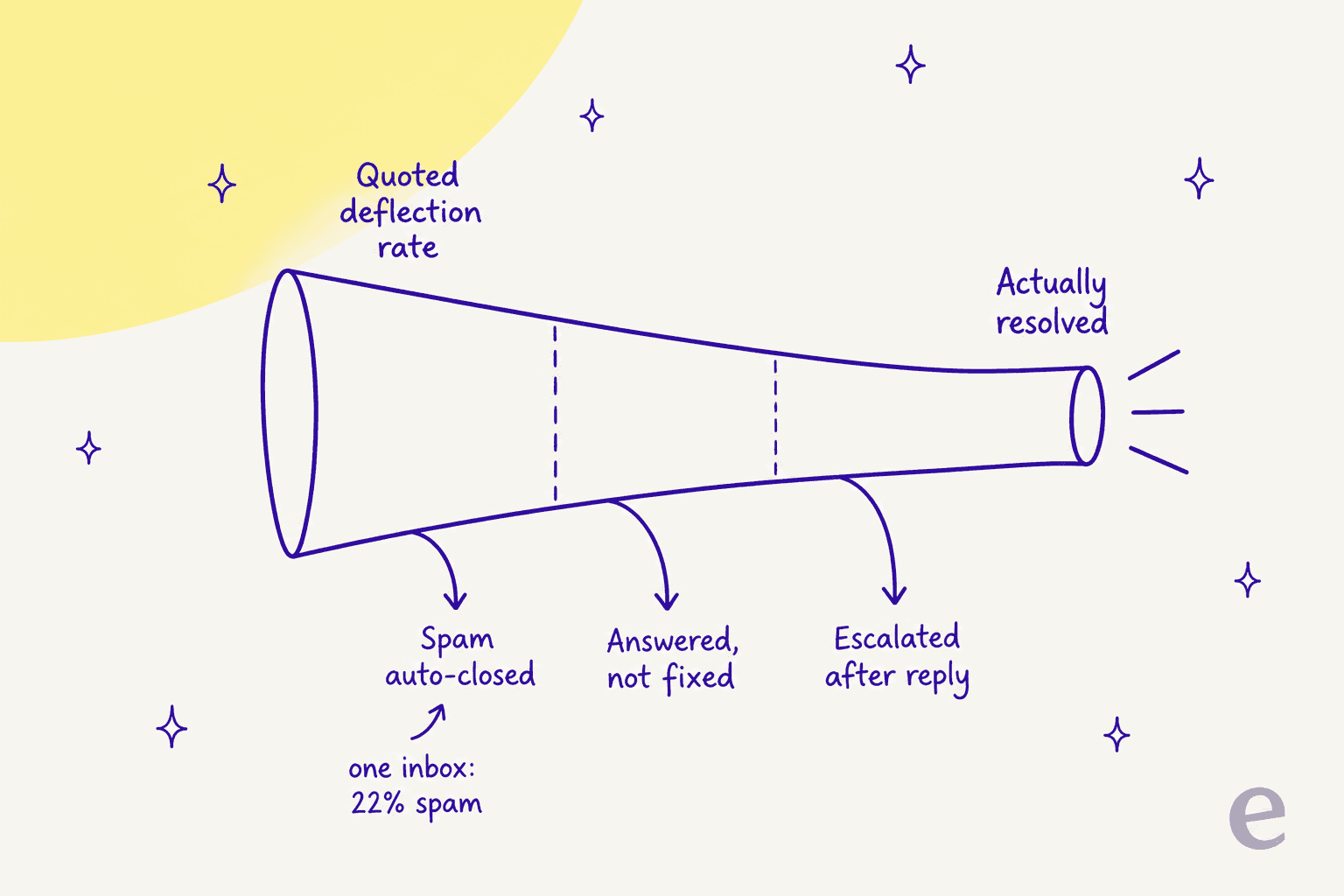
Three things routinely hide inside a quoted number. Spam and auto-closes, which cost nothing to handle and inflate everything. Tickets that got a reply but not a fix, which show as deflected and come back next week. And conversations that escalated after the bot answered, which consumed a billable unit and a human anyway.
We built a cost comparison for a prospect last year and found that 22% of their inbox was spam. Any vendor billing per resolution would have looked excellent on that inbox. That is not a knock on per-resolution pricing, it is an argument for auditing the denominator before you sign. The same report is where we landed on flat pricing, because per-resolution billing quietly penalises you twice: once for a higher resolution rate, and again for a volume spike you did not choose.
Two practical follow-ups worth putting in an email:
- Does your quoted rate count auto-closed spam, and can you show it excluded?
- Can I run your agent against my own historical tickets before it touches a live one?
The second question is the one that separates this list, and the honest answer is that almost nobody offers it. Front's Autopilot simulation runs against a scenario you write yourself. Zendesk's own testing guidance lists three paths and all three are forward-looking, the closest being a widget on a staging site routed to a test group. Both are useful, and both test the bot against your imagination rather than your inbox. A replay over your real ticket history is the version we build, which is not a neutral observation coming from me, so treat it as a question to put to every vendor here rather than a verdict. Our notes on AI ticket classification go deeper on separating those buckets before you sign. The routing side of the same problem sits in our guide to AI ticket routing for SaaS.
So which one should you pick
Short version, by the situation you are actually in:
- Your helpdesk is fine, the AI on it is not. Add a layer. That is the AI ticketing system route, and it is the cheapest and fastest project on this page.
- Your customers message you in Slack. Pylon if you can live with a quote, Plain if you want a price, Unthread if you want no AI meter.
- Your engineers live in Jira. Jira Service Management, with both AI meters priced at your real volume first.
- You need institutional breadth and can absorb the AI bill. Zendesk.
- You need it to cost as little as possible and still work. Freshdesk, watching the session-versus-resolution distinction.
- Your support and revenue conversations are the same conversations. HubSpot Service Hub, budget included for onboarding.
And if the honest answer is that DevRev's platform bet is right for you and you can get a number out of them, stay. A rebuilt system of record is a real asset. Just make sure the knowledge base and the ticket history come with you, because that is the part that is hard to replace.
Try eesel for AI support without the migration
If you got to the end of this page still not wanting to migrate anything, that is the case for eesel. It connects to Zendesk, Freshdesk, Front, Help Scout, Slack, or Jira Service Management in a few minutes, learns from the tickets and help docs you already have, and then shows you exactly what it would have replied to your last few thousand tickets before it answers a live one.
The differentiator against everything above is the billing unit. one fixed monthly price from $299 for 500 credits, no seats and no platform fee, so a better resolution rate does not cost you more. There are 100 free credits to start, no card, and the simulation runs inside the trial. Try eesel and see what it says to your own backlog first.
Then, if the tickets it cannot handle are the ones that need an engineer, our writing on AI teammates and the AI employee idea covers where the handoff should sit.
Frequently Asked Questions
How much does DevRev cost?
What are the best DevRev alternatives for a B2B SaaS support team?
Why did DevRev rename its product to Computer?
Can I keep my existing helpdesk instead of switching to a DevRev alternative?
Which DevRev alternative is cheapest for AI ticket handling?
What should I ask a vendor about their resolution rate?
Does DevRev have a free plan for support teams?
How long does it take to migrate off DevRev?


Article by
Rama Adi
Rama is a software engineer at eesel AI with two years of experience writing about B2B SaaS, AI tools, and customer support technology. Based in Bali, Indonesia, he brings a developer's perspective to product comparisons — cutting through marketing copy to what the integrations and APIs actually do.