The 9 best Invicta AI alternatives in 2026

Rama Adi

Katelin Teen
Last edited August 27, 2026
Why people are looking for Invicta AI alternatives
I want to be fair to Invicta here, because the product itself is likable. The homepage pitch is "Build Teams of AI Agents That Work," and the free tier is unusually generous: unlimited agents, access to all the models, and access to the full tool catalogue, with only a 25-credit-per-day cap on actual work. For a solo builder poking at multi-agent ideas, that is a nice sandbox.
The problem is continuity, and it shows up in three checkable places.
First, the product stopped visibly shipping. Invicta's own changelog carries 31 dated entries running from August 2024 to 22 May 2025, and then nothing. As of this writing that is roughly 15 months of silence. The Available LLMs table is a good tell: it tops out around Claude 3.7 Sonnet and GPT-4o and never picked up the newer models everyone else added through 2025 and 2026.
Second, the app has struggled to stay up. Invicta publishes its own uptime monitor, and its status repository records two incidents opened on 22 October 2025 that were never closed, with a self-published one-year uptime around 76% for both the site and the app. When I checked the app endpoint while writing this, it failed to complete a secure connection at all. The marketing site still loads.
Third, the company appears to have moved on. The founder's LinkedIn post announced that Invicta AI had been acquired, with his own tenure ending in September 2025, a month before those endpoints went dark. I could not independently corroborate the acquisition beyond that post, so treat it as reported-not-confirmed; the frozen changelog and the downed app are the parts you can verify yourself.
None of that makes Invicta a bad piece of software. It makes it a risky foundation for something you need to keep running. And there is one more structural gap worth naming for the biggest use case: Invicta's tool catalogue has exactly one support-desk action, and none of the major helpdesks (Zendesk, Freshdesk, Front, Gorgias, Salesforce) are connectable. If your goal is to put AI on a support queue, that alone is disqualifying.
How I picked these alternatives
I build integrations for a living, so I judge these tools less on the marketing and more on what happens when you actually wire one into a real system. Four questions guided the list, and they double as a checklist you can run on any agent platform before you commit:
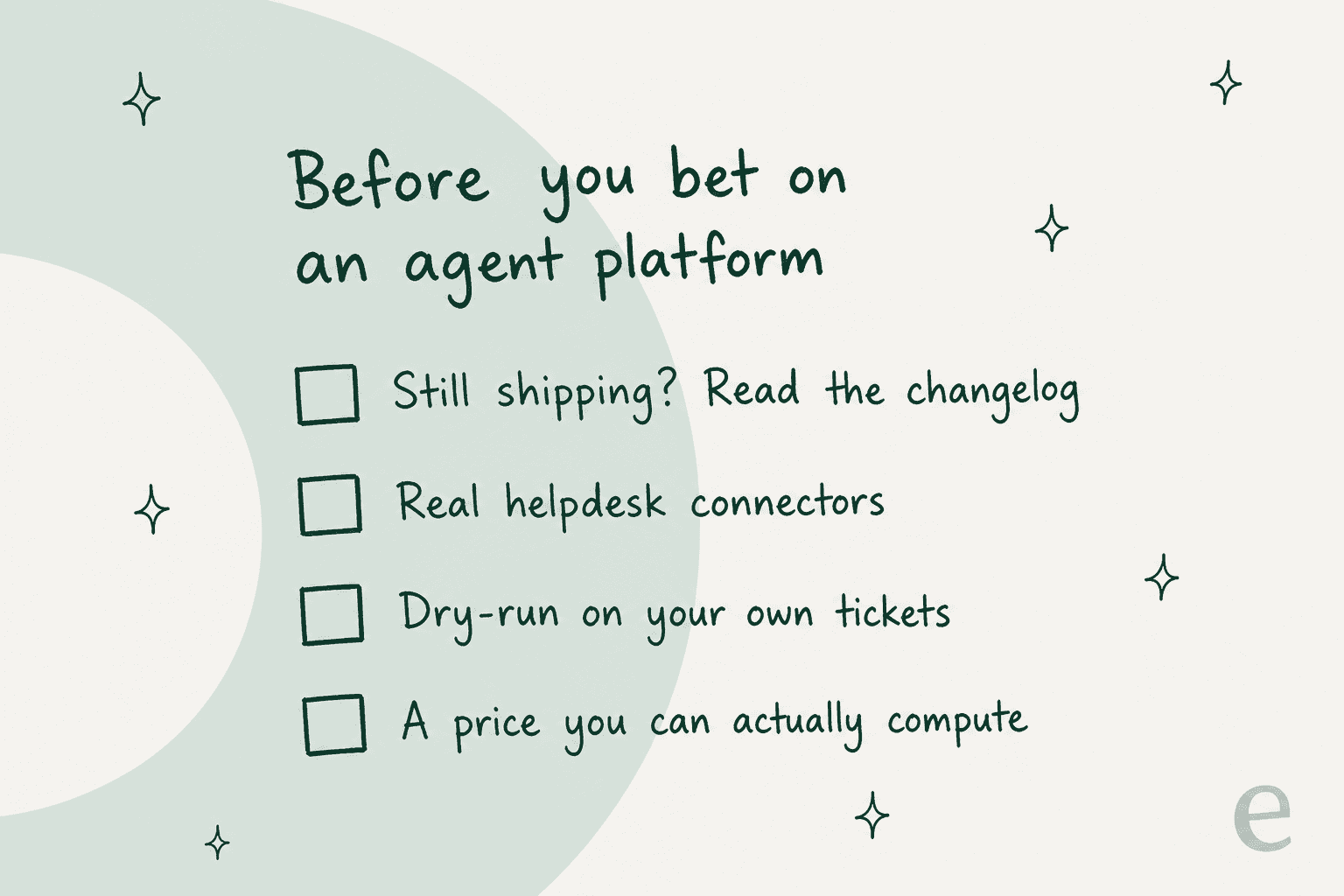
- Is it still being built? Read the changelog. A dated, recent one is the cheapest signal of whether a tool will still be here next year.
- Does it connect to the systems where the work lives? An agent that cannot reach your helpdesk, CRM or data warehouse is a demo, not a deployment.
- Can you test it before it goes live? For anything customer-facing, the ability to dry-run against your own history is the difference between a confident rollout and a public mistake.
- Can you compute the price? Credit meters that hide the per-task cost make budgeting a guess. I flag that everywhere it shows up, including on Invicta itself.
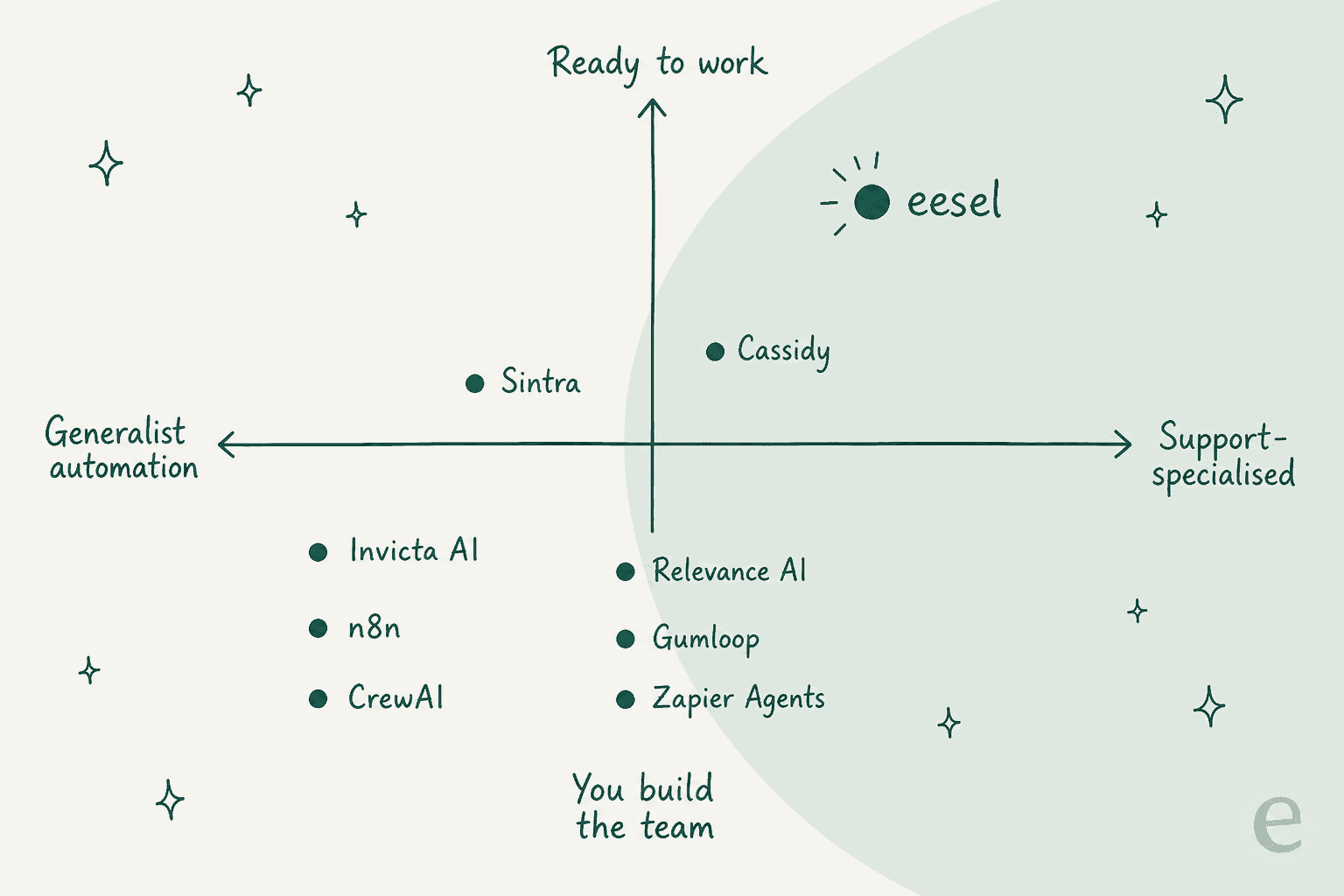
The nine tools below span the full range, from developer frameworks to ready-to-hire teammates. Here is roughly where each one sits.
The best Invicta AI alternatives at a glance
| Tool | Best for | Starting price | Free tier | Real helpdesk connectors | Dry-run testing |
|---|---|---|---|---|---|
| eesel | Customer support teams | From $299/mo (500 credits) | 100 free credits | Yes (Zendesk, Freshdesk, Gorgias, Front, more) | Yes, over past tickets |
| Relevance AI | GTM / ops AI workforce | $29 / mo | Yes ($2 model credit) | Via custom tools | Agent evals (Enterprise) |
| Lindy | Inbox / calendar agents | ~$50 / mo | 7-day trial | No | No |
| Gumloop | Visual-canvas builders | From $37 / mo | Yes (5k credits) | Zendesk node | No native simulation |
| n8n | Technical teams, self-host | ~$24 / mo (Starter) | Community edition | Via nodes | Test single steps |
| Zapier Agents | Widest app coverage | $19.99 / mo | Free forever (100 tasks) | Zendesk + more | No |
| CrewAI | Developers, multi-agent apps | Free (OSS) | MIT open source | Via code | Custom evals |
| Cassidy | Doc-heavy enterprise ops | Free tier + custom | Yes (3 users) | Internal triage only | No |
| Sintra | Solo founders | ~$16-$97 / mo | 14-day guarantee | No | No |
Prices are the entry points each vendor publishes; usage-based tools scale from there. Now the detail.
1. eesel - best for support teams that want an agent live in minutes
Invicta asks you to build a team of agents. eesel takes the opposite bet: you hire a teammate that already knows its job. The framing is employment, not configuration, and the current roster is an AI helpdesk agent and an AI blog writer, each arriving with the skills, integrations and company context for its role. That is the cleanest contrast with a generalist builder: instead of assembling a support workflow from primitives, you connect your helpdesk and the teammate starts drafting.
Features. The helpdesk teammate connects to real support tools, Zendesk, Freshdesk, Front, Gorgias, Help Scout, Jira Service Management and Slack, and it reads across all of your connected knowledge at once, so a single reply can pull from your help center, past tickets and an internal wiki together. The piece I would flag hardest, because it is the exact thing Invicta lacks, is simulation: eesel replays the AI against your own historical tickets and reports the resolution rate before a customer ever sees it. Having watched a confident-sounding bot quietly give wrong answers, this is the feature I would not deploy support without.
Pros. Live in minutes, not a build project; real helpdesk depth; a genuine dry-run; and pricing you can actually forecast. Named results are on the record too, Gridwise resolved 73% of tier-1 tickets in the first month, and Smava runs a fully-automated German-language agent handling over 100,000 tickets a month, per eesel.
Cons. It is deliberately narrow. If you want a general-purpose agent to research prospects, post to social and run CRM enrichment, eesel is the wrong tool, that is what Relevance AI or Gumloop below are for. eesel does support and content, and it does not pretend to be an everything-machine.
Pricing. From $299/month for 500 credits, with no platform fee and no per-seat charge. 1 credit is 1 ticket or chat, however long, and the free plan gives you 100 credits with no card. Crucially, you only use credits on tickets the agent actually works on, not tickets your human agents take, so a gradual rollout is priced honestly.
Verdict: If the job is the support queue, eesel is the pick, precisely because it is not a build-it-yourself platform. You trade Invicta's open-ended flexibility for a teammate that connects to your actual helpdesk and can prove its accuracy before go-live.
2. Relevance AI - best for a GTM and ops "AI workforce"
Relevance AI is the closest philosophical match to Invicta on this list: a no-code platform for building AI agents and multi-agent "teams," which it brands as an "AI Workforce." If you liked Invicta's idea of specialised agents handing work to each other, Relevance is the actively-developed version of that idea.
Features. You describe an agent in plain language and Relevance's "Invent" mode generates the prompt and suggests the tools, then you assemble teams of specialists (a research enricher, a pre-meeting prepper, an outbound prospector) that pass work between them. It is model-agnostic with a transparent bring-your-own-key setup, and the Enterprise tier adds real governance: RBAC, audit logs, SSO, agent evaluations and human-in-the-loop gates. Named customers include Canva, KPMG and Databricks.
Pros. Strong at sales, marketing and CS ops; a really good natural-language build experience; enterprise-grade controls when you need them.
Cons. It is a horizontal GTM platform, not a support tool, so for the ticket queue you are back to wiring custom tools yourself. The Free plan's model budget is small (about $2 of spend), so you will hit the ceiling fast on anything but the cheapest models.
Pricing. Free ($0, 200 actions, ~$2 model credit), Pro at $29/month (or $19 annual), Team at $349/month, and a custom Enterprise tier. Actions and "Vendor Credits" are metered separately.
Verdict: The natural home for anyone who wanted Invicta for go-to-market work rather than support. Pick it if your agents live in the sales and ops stack; skip it if you specifically need a helpdesk.
3. Lindy - best for inbox and calendar agents in plain English
Lindy builds trigger-based agents, "Lindies", that you set up by picking an event ("a new email lands in Gmail") and describing the job in plain English. Its marketing has pivoted hard toward a consumer-style executive assistant that manages your inbox and texts you over iMessage, but the underlying no-code builder is intact and is the reason it belongs here.
Features. Natural-language agent creation with no workflow mapping, hundreds of templates, and a heavy focus on email, scheduling and meeting notes. It holds a 4.9/5 from 171 reviews on G2 and claims 400K+ users.
Pros. The friendliest on-ramp for non-technical people; excellent for personal-productivity automations; strong reviews.
Cons. No helpdesk integration, and the current framing leans personal-assistant, so it is a poor fit for team-wide support automation. HIPAA, SSO and audit logs are Enterprise-only.
Pricing. Credit-based. The live pricing page no longer publishes exact allotments, labelling tiers as "standard," "3x" and "7x" usage; the Plus tier has historically been about 5,000 credits for ~$50 on its Plus tier, with a 7-day free trial. We keep a fuller list of Lindy AI alternatives if it is close but not quite right.
Verdict: Reach for Lindy if you want a personal AI assistant you configure in sentences. It is not the tool for putting agents on a shared support queue.
4. Gumloop - best for a visual canvas with enterprise controls
Gumloop is a no-code, AI-native automation platform built around a visual drag-and-drop canvas of nodes. Where Invicta's build surface is the agent config, Gumloop's is a node graph, which suits people who think in flows. It raised a $50M Series B led by Benchmark and leans hard into enterprise: SOC 2 Type II, VPC deployment, SSO and RBAC.
Features. A node canvas for multi-agent orchestration, prebuilt agent templates (including a Support Agent that triages bugs and spots patterns), model-agnostic execution, and agents you can summon by tagging @Gumloop inside Slack, Teams or Gmail. It connects broadly, including Zendesk, Salesforce, HubSpot and Snowflake.
Pros. Powerful and flexible; serious security posture for its stage; a real visual builder.
Cons. Credit consumption is the recurring complaint, real users on Reddit describe it as capable but pricey, and note that a stuck automation can burn credits.
"But Gumloop seems to freeze or have issues too frequently and then burns credits running faulty automation."

Pricing. Free ($0, 5,000 credits, 1 seat), Pro from $37/month with a slider that scales the credit allowance from 20k up to 1.5M, and a custom Enterprise tier. Unlimited agents and flows on every plan; the caps are on credits and concurrency.
Verdict: A strong Invicta replacement if you want a visual canvas and enterprise controls. Watch the credit meter, and model your real usage before committing to a tier.
5. n8n - best for technical teams that want code and self-hosting
n8n is the pick for teams that want real control. Its whole pitch is "code when you need it, UI when you don't", a node-based canvas where you can drop into JavaScript or Python anywhere, and it is open-source and self-hostable. It sits around 196k GitHub stars and is used by Microsoft, Meta and NVIDIA.
Features. 500+ integrations, inline code steps, native AI agent nodes and AI evaluation, and the ability to test single steps against real data before shipping. Self-hosting means your data never has to leave your perimeter, which is a genuine draw for security-sensitive teams.
Pros. Enormous flexibility, self-hosting, and pricing that rewards volume. One reviewer put the cost contrast bluntly:
"Basically, because of pricing. I paid 16$ monthly for 5000 workflow executions, while in Zapier, I have to pay 30$ per 750 tasks."

Cons. The learning curve is real and widely reported, this is a builder's tool, not a hire-and-go one. If nobody on your team is comfortable with logic and the occasional code node, it will fight you.
Pricing. Cloud plans start at a Starter tier (~$24/month annual) with 2,300 executions; the Community edition is free to self-host. Enterprise is quote-gated.
Verdict: The best home for a technical team that outgrew Invicta and wants to own the stack. For a non-technical support lead, it is more machine than you want to operate.
Before the back half of the list, here is a quick way to narrow it down.
6. Zapier Agents - best for the widest app coverage
If Invicta's 27 integrations felt limiting, Zapier Agents is the answer at the other extreme. Zapier connects 9,000+ apps, more than any dedicated agent startup, and Agents are AI "teammates" you build with Zapier Copilot that can act across that entire library on command or on a schedule.
Features. Natural-language agent building, a huge template library (including a Support Email Agent and a Zendesk auto-responder), a Chrome extension so agents can work on the web, and human-in-the-loop check-ins. Notably, Agents draw from the same task pool as your Zaps, so there is no separate agent budget to manage.
Pros. Unmatched breadth, if a business tool exists, Zapier probably connects to it. Failed actions and polling are free.
Cons. Task-based pricing gets expensive at volume compared to execution-based tools like n8n, and agents built on generic connectors lack the depth of a purpose-built support product. We have a deeper look at the Zapier AI side of the platform if you want it.
Pricing. Free forever (100 tasks/month), Professional at $19.99/month, Team at $69/month (25 users), and custom Enterprise. Task tiers scale from 100 up to 2M/month; higher tiers lower the per-task cost.
Verdict: The right pick when breadth of connections is the whole point. For a focused support or GTM job, a specialised tool will do it better and often cheaper.
7. CrewAI - best for developers building multi-agent apps
CrewAI is the developer-first option: an open-source Python framework (MIT-licensed) for building production multi-agent systems. Its two primitives are Crews (teams of role-based agents with autonomy) and Flows (event-driven, precisely-controlled workflows). This is the tool for people who found Invicta's no-code ceiling too low and would rather write the orchestration themselves.
Features. Role-based agent collaboration, fine-grained execution control, an extended tools library, agents exportable as an MCP server, and a commercial AMP/Enterprise control plane that adds tracing, RBAC, audit trails and human-in-the-loop gates on top of the OSS core.
Pros. Maximum control and transparency; a permissive licence; a real path from prototype to production for engineering teams.
Cons. It is code, not a product. There is no ready-made support agent, no dashboard your ops team can run, and the only paid tier is a quote-only Enterprise plan, the free tier caps at 50 executions a month.
Pricing. The framework is free (MIT open source). The managed Enterprise layer is custom-quoted and sales-gated.
Verdict: The best Invicta alternative for developers who want to own the agent logic in code. For everyone who wanted no-code, this is a step in the wrong direction, on purpose.
8. Cassidy - best for document-heavy enterprise operations
Cassidy is a no-code AI agent platform aimed squarely at "document-heavy, operationally complex enterprises", insurance, manufacturing, professional services. Its thesis is that the people closest to the work should be the ones automating it, within IT's guardrails. It is the enterprise-internal cousin of Invicta.
Features. Agents grounded in your actual rules and documents, with named plays like submission intake, policy comparison and RFP response drafting. Customer support appears as one internal use case (ticket triage and routing), but this is internal-facing triage, not customer-channel deflection.
Pros. Excellent at dense document workflows; strong knowledge grounding; a business-user build model with IT controls. Founder Justin Fineberg makes a point I think is right about how to budget for this category:
"The right comparison isn't your CRM seat license, it's the loaded cost of the headcount or the agency retainer or the BPO contract that the AI is actually displacing."
Cons. It is a horizontal internal-automation platform, so it is not the tool for customer-facing support at scale, and pricing above the free tier is not public.
Pricing. A free Starter tier (3 users, 5 agents, 5 workflows, 10K credits), then Business and Enterprise tiers that are quote-only. Credits burn faster on larger models.
Verdict: The pick when your "workflows" are really document pipelines inside a regulated enterprise. Not the choice for a public support queue.
9. Sintra - best for solo founders wanting cheap "AI employees"
Sintra sells "AI employees", a suite of 12 named helpers (Cassie for support, Seomi for SEO, Soshie for social) that run on a shared credit balance. It is the most consumer-friendly, small-business framing on this list, and the cheapest way to get an Invicta-style "team of specialists" if you are a team of one.
Features. All 12 helpers on every plan, unlimited workspaces, 15+ integrations, custom knowledge via "Brain AI," and one-click task templates. The helpers run on Claude 4.5 Sonnet under the hood.
Pros. Very affordable; friendly and approachable; broad role coverage for a solo operator juggling everything.
Cons. The 250-monthly-credit allowance is the real ceiling, when credits run out the helpers stop until you top up. No helpdesk integration, no dry-run, and it is built for individuals rather than support teams.
Pricing. A single Sintra X product billed by term: about $97/month monthly, down to ~$54/month annual on its term-based plans at standard rates, with frequent promotional discounts. Every plan ships the same 250 credits.
Verdict: A fun, cheap option for a solo founder who wants a grab-bag of AI helpers. For a real support operation, the credit ceiling and missing helpdesk connectors rule it out.
The one thing to check on credit pricing
Whichever way you lean, if the tool bills in credits, do this before you sign. On Invicta and several others here, a "team" of agents does not bill once, each teammate the lead agent delegates to bills its own tokens back into the same run. Invicta's own credits documentation says the token count "includes your request, the agent's output, and any tokens processed by AI teammates invoked."
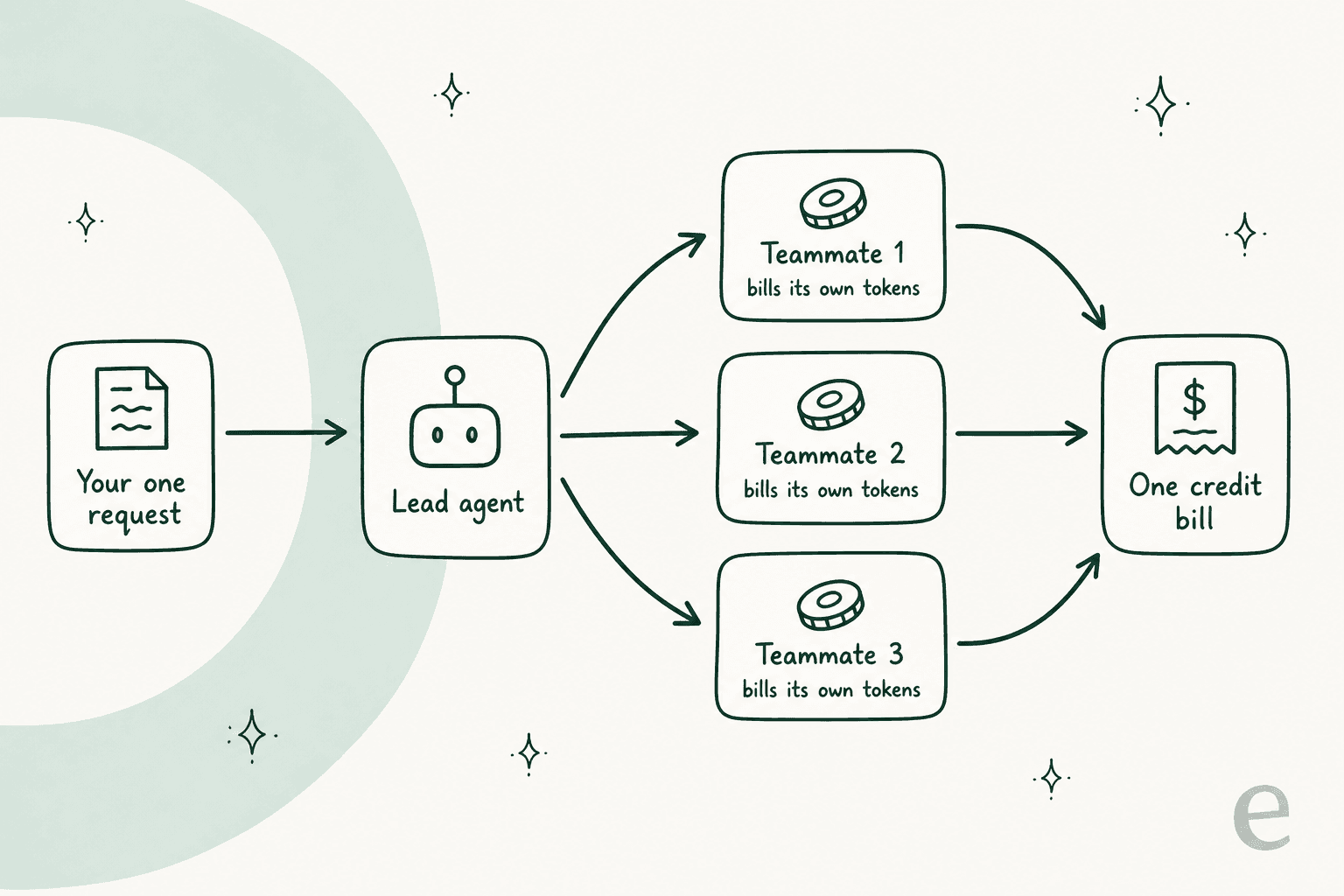
In practice that means the cost of your headline use case, the multi-agent team, scales with how many agents are in the chain, not just with what you asked. It is why I put "can you compute the price?" on the checklist. A per-ticket or per-execution price you can forecast beats a credit that quietly multiplies every time an agent hands off work.
eesel: a ready-to-work teammate, not another builder
If you came to Invicta AI to put automation on your support queue, the honest answer is that you want a different category of tool. Most options on this list, Invicta included, hand you a builder and a blank canvas. eesel hands you a teammate that already knows the job: an AI helpdesk agent that plugs into Zendesk, Freshdesk or Gorgias in a few minutes, learns your help center and past tickets on day one, and, unlike anything else here, lets you simulate the AI on your real ticket history so you can see the resolution rate before a customer does. There is also an AI blog writer teammate if content is your other bottleneck.
It is free to try, 100 free credits, no card, and paid plans start from $299/month for 500 credits (1 credit per ticket or chat) with no platform fee. If your job is the queue, that is the fastest path from "evaluating tools" to "the AI is answering tickets."
Frequently Asked Questions
What is Invicta AI and what does it do?
How much does Invicta AI cost?
What is the best free Invicta AI alternative?
Which Invicta AI alternative is best for customer support?
Is Invicta AI still being maintained in 2026?


Article by
Rama Adi
Rama is a software engineer at eesel AI with two years of experience writing about B2B SaaS, AI tools, and customer support technology. Based in Bali, Indonesia, he brings a developer's perspective to product comparisons — cutting through marketing copy to what the integrations and APIs actually do.