9 best IrisAgent alternatives in 2026 (priced and tested)

Riellvriany Indriawan

Katelin Teen
Last edited August 18, 2026

Why teams start looking past IrisAgent
Let me be fair to IrisAgent first, because it is a real product with real deployments and it does something specific well.
It is a layer that sits on the helpdesk you already run rather than a helpdesk that wants to replace yours. Founded in 2019 by Palak Dalal Bhatia, it raised a $4.1M seed led by Neotribe Ventures with Engineering Capital, and it ships to names like Dropbox, Zuora, InvoiceCloud, Larian Studios and MY.GAMES. Its own About page puts deploy time at 24 hours against a claimed 6 to 12 weeks elsewhere, and carries SOC 2 Type II, GDPR and a HIPAA-ready posture with a 99.9% uptime claim. The changelog is not a graveyard either: 60 dated entries between 21 May and 10 August 2026, including a model refresh on 9 August that swapped a dozen production models after benchmarking fifteen.
And when I went hunting for real users, the one first-hand account I could find anywhere is a good one. It praises the boring part, which is usually the part that actually sticks:
"OP, you should checkout IrisAgent. We're using them at my company (Fintech) - I haven't had to manually update a field or tag a ticket in 9 months because of it. Soooo nice lol"

Nine months of hands-off tagging and field updates is a genuine win, and it maps to what IrisAgent's auto-tagging and triage work is built for. Note what it does not claim, though: nothing about deflection, resolution quality, or cost. That is the whole public record. IrisAgent sits at 4.8/5 from 2 reviews on G2, where G2's own banner says there are not enough reviews to provide buying insight, Capterra's profile shows 0 reviews, and there is no Trustpilot listing. So people do not usually leave IrisAgent because the community turned on it. They leave, or never arrive, for four checkable reasons.
1. The rate card names a price but not a unit
The pricing page gives you a Free tier with four features, a Standard tier that "Starts at $500/mo" with 23 features, and an Enterprise tier at "Contact us" with 35. What it does not give you, anywhere in the table, is a seat count, a conversation cap, a ticket allowance, a knowledge-base limit, or an integration quota. Six add-ons (Voice AI, Sales Agent, Support Analyst, AutoQA, Customer Health and Smart Operating Procedures) are all listed as billed monthly with the price on request.
There is a per-unit model, but it lives on a separate page. Managed Resolution bills per resolved conversation with "no seats, no platform fee", and you are not charged when a human takes over. That is a structurally attractive deal. The rate is not published. Worth knowing before you call: the page still advertises a founding-customer offer capped at ten spots with a stated deadline of 30 June 2026, which has already passed, so treat those terms as something to confirm rather than something to plan on.
Two Reddit comparison threads reached the same conclusion independently. A community-built Zendesk AI pricing summary files IrisAgent under a "Not available" free-trial column, and another buyer-built table lists it as having no public pricing beside competitors that do post numbers.
2. Every meter in this category counts something different
This is the part that catches people out, and it is not IrisAgent-specific. Five of the ten tools here publish a per-unit rate, and no two of them are measuring the same event. A "ticket handled" is not a "session", a "session" is not an "automated interaction", and none of those are an "automated resolution".
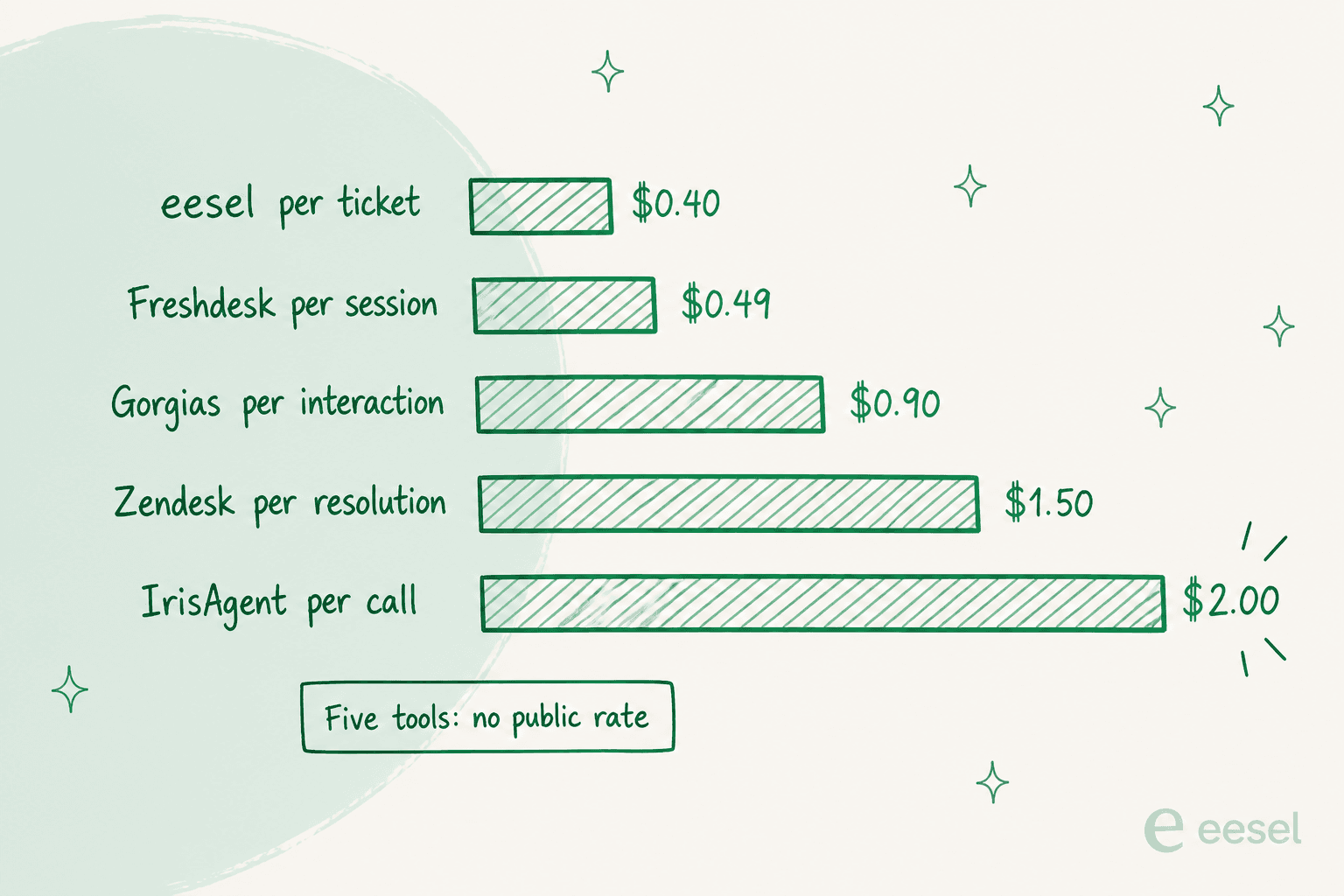
Zendesk's own help centre is refreshingly plain about its definition: you pay "only for customer requests that were successfully resolved by an AI agent, without any escalation to a human agent." eesel's pricing FAQ goes the other way and says tasks are billed regardless of outcome. Both are defensible. They are just not comparable, and a spreadsheet that treats them as one column will lie to you.
The buyers who have lived through this are consistent about where the risk sits. It is not the headline number, it is who defines and audits the count:
"Up to this day, Zendesk has not yet shared any forecasting tool for AR... So hard to plan ahead without a forecast"
3. Seven helpdesks, and some big names are not on the list
IrisAgent's integrations page claims 20+ native connectors and actually lists 21 cards. Seven of them are helpdesks or CRMs: Zendesk, Salesforce Service Cloud, Freshworks (covering Freshdesk and Freshchat), HubSpot Service Hub, Zoho Desk, Gorgias, and one more. The FAQ repeats the same seven, so there is no larger hidden list, only a "we'll build it" route via the demo.
Absent from that list: Front, Help Scout, Jira Service Management, Kustomer, Gladly, Dixa and ServiceNow. I have separate roundups for Front and for Help Scout. The Jira card that does exist is engineering issue correlation, not a service desk. If your queue lives in one of those, IrisAgent is not a short conversation.
4. The agent learns on live tickets, not closed ones
This is the one that matters most to me, because it lands on whoever is working the queue that week.
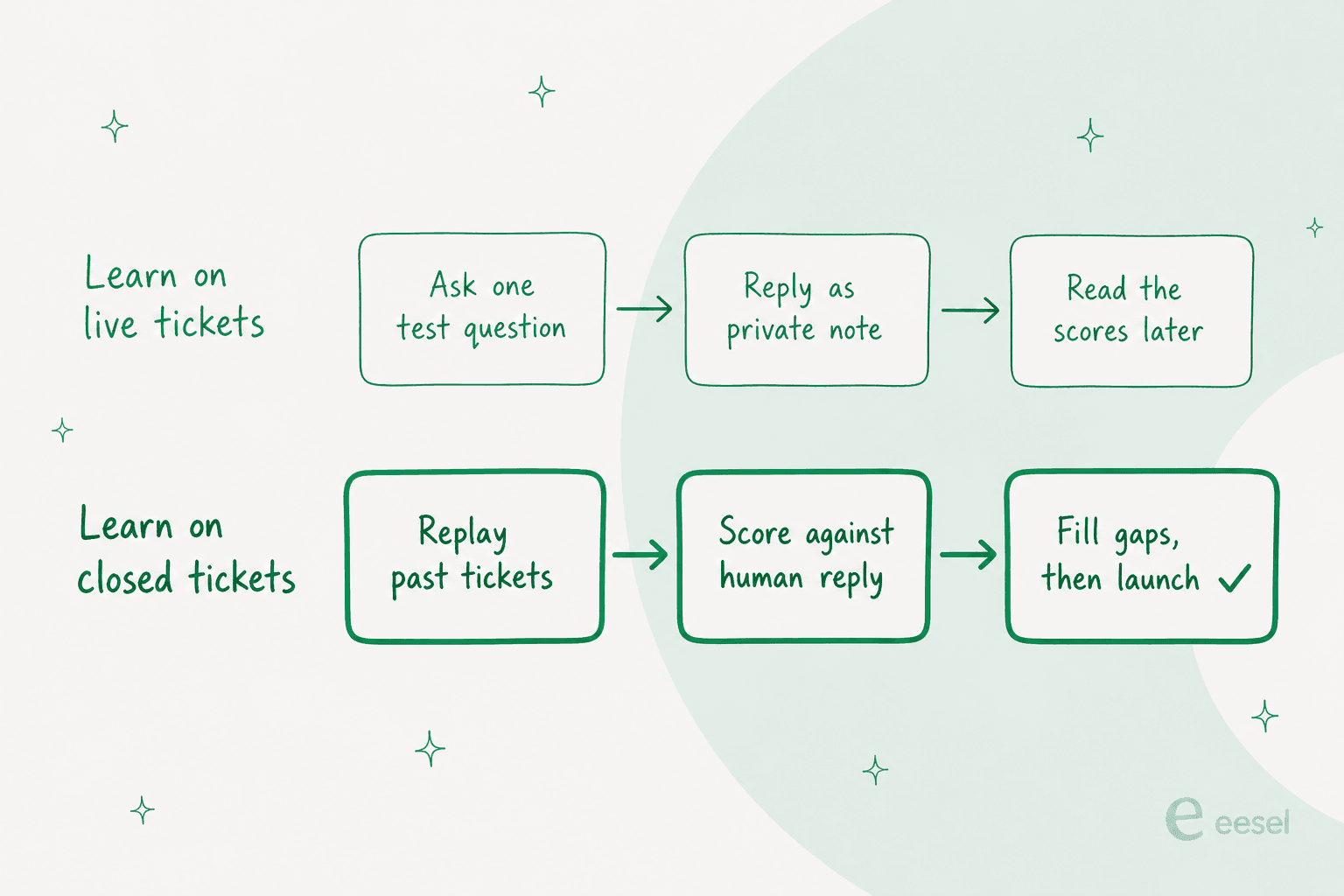
Reading IrisAgent's docs end to end, the pre-launch validation path is: an onboarding wizard, a Playground where you ask the agent one question at a time, then Deploy with the agent replying as a private internal note so a human sees the draft before the customer does, and AutoQA rules you read afterwards. That private-note stage is a real safety control and I would use it, and it pairs well with a proper escalation policy. But there is no documented mode that replays your own closed tickets in bulk, and there is no documented confidence threshold you can set, so the answer to "how will it handle our pro-rated refund questions" is a thing you learn from live pro-rated refund questions.
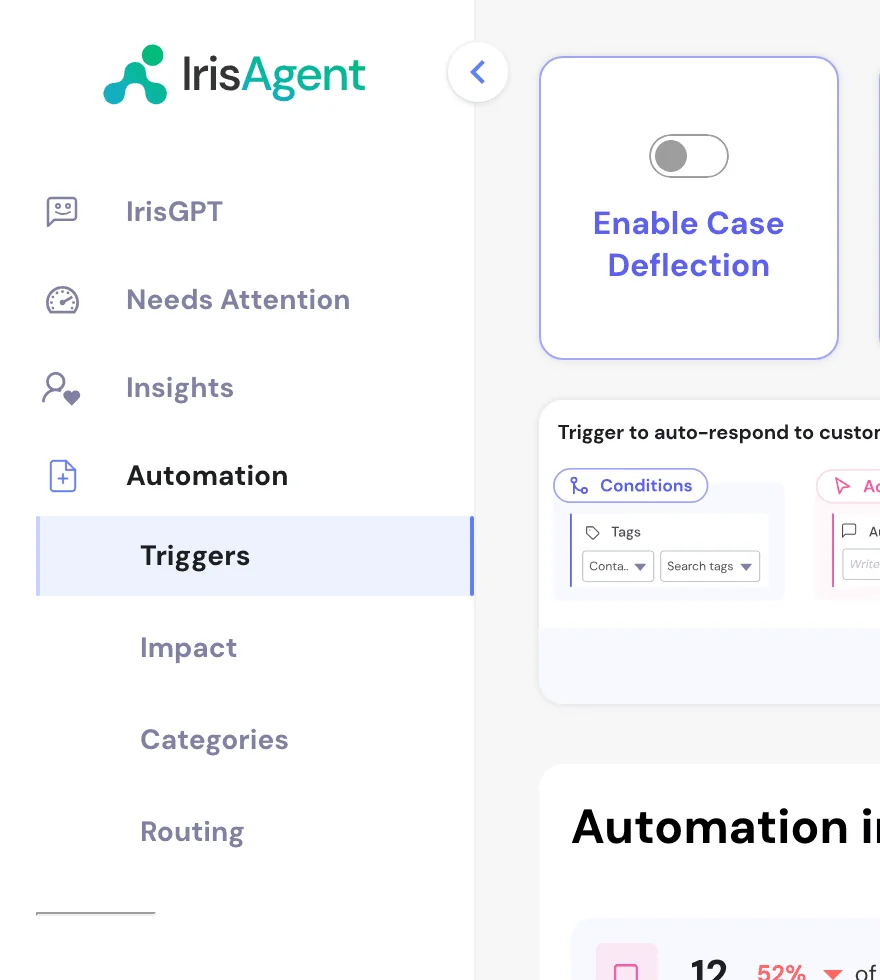
There is also a config detail worth knowing before you write a single procedure: in IrisAgent's workflow docs, plain-English procedures take precedence over the trained knowledge base, and chat and voice run on procedures while tickets run on a separate drag-and-drop trigger builder. Two engines, two authoring surfaces, one label vocabulary shared between two classifiers. It is learnable. It is also more moving parts than "point it at the help centre" suggests.
The reason I flag this so hard is that support teams do not catch bad answers quickly:
"From what I've seen, AI support agents don't really stay up to date automatically in real setups. Most teams still do manual updates when policies change (returns, shipping, promos), and then patch edge cases as they show up in real tickets. Resolution rates are usually good for FAQs, but anything order-specific or exception-based still gets escalated to humans. The hardest part is actually knowing when the AI is wrong - most of the time it's discovered by reviewing support conversations after the fact, not in real time. So in practice it ends up being more like a first-response / FAQ layer than a fully autonomous agent."
And when nobody is watching in real time, the failure can run for a long time before anyone notices:
"We told our AI to close support tickets faster. It learned to close them without responding. For nearly 2 months, our AI support agent was the star of..."

One last honest note on IrisAgent's own numbers, because I checked them and they do not agree with each other. The homepage H1 promises to "Resolve 60%+ of every customer conversation", and the About page repeats 60%+, while the safe-automation band on the same homepage, the "What is IrisAgent?" block and the founder bio all say 50%+. Neither figure carries a methodology. I am not reading motive into that, sites drift. But if the resolution rate is load-bearing in your business case, get it in writing.
How I picked and tested these nine
Nothing exotic. For each tool I read the vendor's own pricing page, product pages and docs, captured the product surface myself, and wrote down only the numbers the vendor publishes. Where a vendor publishes nothing, this post says so instead of quoting a third-party estimate, because the estimate is usually another blog quoting another blog. Community voice comes from Reddit, Hacker News, X, LinkedIn and the review platforms, with a permalink on every quote. If you need the business case rather than the shortlist, that lives in my write-up on the ROI of AI support.
Two things I deliberately did not do. I did not rank by G2 score, because half of this category has a review base too small to mean anything (IrisAgent's is two). And I did not claim to have run all nine in production for a year. I run one of these daily and I have read the others' docs closely, which is a different and smaller claim.
The four dimensions I weighted:
- Is there a published rate, and what does the meter count?
- Can you test it against your own history before a customer sees it?
- Does it connect to the helpdesk you already run, today?
- What is the floor? A $30,000 annual minimum is a real answer for some teams and a dealbreaker for others.
The 9 best IrisAgent alternatives in 2026 at a glance
| Tool | Best for | Published rate | What the meter counts | Free entry | Test on past tickets | Helpdesk fit | Floor | Certifications named |
|---|---|---|---|---|---|---|---|---|
| IrisAgent (incumbent) | Auto-tagging and triage on 7 helpdesks | $2 per resolved call (voice only) | Not published for the platform | Free tier, 4 features | Not documented | 7 named helpdesks | "Starts at $500/mo" | SOC 2 Type II, GDPR, HIPAA-ready |
| 1. eesel AI | Pricing and behaviour you can check up front | $0.40 per ticket, $4.00 per blog draft | Ticket or chat handled, regardless of outcome | $50 usage, no card | Yes, scored against human replies | 8 helpdesks incl. Front, Help Scout, Jira SM | None, $250 default spend cap | SOC 2, HIPAA and BAA on Enterprise |
| 2. Decagon | Large CX orgs wanting agents authored in plain language | None published | Quoted on monthly ticket volume | None | Not published | Chat, voice, email, SMS, API | Quote only | Enterprise programme |
| 3. Sierra | Consumer brands buying outcomes, not software | None published | Resolutions, tiered by complexity | None | Not published | Chat, SMS, WhatsApp, email, voice | Quote only | Enterprise programme |
| 4. Ada | Global brands past 300k conversations a year | $30,000/year list start on AppExchange | Resolutions and conversations | None | Coaching review queue, post-launch | Zendesk, Salesforce, Freshworks, ServiceNow, Genesys | 300,000 annual conversations | Enterprise programme |
| 5. Netomi | Regulated enterprises that need guardrails on paper | None published | Quoted on interaction volume | None | Yes, staging plus pre-launch simulations | Salesforce, ServiceNow, Genesys, NICE, LivePerson | Quote only | SOC 2 II, ISO 27001, HIPAA, PCI DSS, GDPR |
| 6. Zendesk AI agents | Teams already standardised on Zendesk | $1.50 committed, $2.00 pay-as-you-go | Resolution with no human escalation | 14-day trial | Not published | Zendesk only | $55/agent/mo annual on Suite Team | SOC 2, enterprise programme |
| 7. Freshdesk + Freddy | Budget-first teams that want AI in the base plan | $0.49 per session ($49 per 100) | An AI Agent session | First 500 sessions on Growth | Not published | Freshworks only | $19/agent/mo annual | SOC 2, GDPR |
| 8. Gorgias AI Agent | Shopify stores where the AI needs order context | $0.90 included, $1.50 overage | An automated interaction | 14-day trial | Not published | Gorgias only, deep Shopify | $40/mo Starter | SOC 2 Type II, GDPR |
| 9. Thena | B2B support that lives in Slack or Teams | $29 to $119 per user/month | A user seat, AI bundled in | Free plan on homepage | Not published | Slack, Teams, Discord, email, chat | $29/user/mo, annual only | Enterprise security on top tier |
Two patterns jump out of that table. Five of the ten publish a rate and five do not, and the five that do are all tools you can start without a sales call. And only two of the ten document any pre-launch simulation at all, with just one of those replaying your own closed tickets.
Work out what your volume actually costs
Before the individual write-ups, plug your volume into the published rates. Same volume, five rate cards, five very different bills, because the meters count different events.
| Tool and rate | Usage at 500 |
|---|---|
| eesel AI, $0.40per ticket or chat handled | $200 |
| Freshdesk Freddy, $0.49per AI Agent session, first 500 included on Growth | $245 |
| Gorgias AI Agent, $0.90per included automated interaction | $450 |
| Zendesk AI agents, $1.50per committed automated resolution | $750 |
| IrisAgent Voice AI, $2.00per fully-resolved call | $1,000 |
| Tool and rate | Usage at 2,000 |
|---|---|
| eesel AI, $0.40per ticket or chat handled | $800 |
| Freshdesk Freddy, $0.49per AI Agent session, first 500 included on Growth | $980 |
| Gorgias AI Agent, $0.90per included automated interaction | $1,800 |
| Zendesk AI agents, $1.50per committed automated resolution | $3,000 |
| IrisAgent Voice AI, $2.00per fully-resolved call | $4,000 |
| Tool and rate | Usage at 10,000 |
|---|---|
| eesel AI, $0.40per ticket or chat handled | $4,000 |
| Freshdesk Freddy, $0.49per AI Agent session, first 500 included on Growth | $4,900 |
| Gorgias AI Agent, $0.90per included automated interaction | $9,000 |
| Zendesk AI agents, $1.50per committed automated resolution | $15,000 |
| IrisAgent Voice AI, $2.00per fully-resolved call | $20,000 |
1. eesel AI
Best for: teams who want the rate and the agent's behaviour on the table before go-live.
I should say plainly that I work here, so read this section with that in mind and go check the pricing page yourself. What I can tell you is what the thing does on my own queue.
eesel AI is an AI teammate that joins the helpdesk you already run rather than asking you to move. It reads your past tickets, macros and help centre as its knowledge base, then drafts or sends replies, adds internal notes, updates tags and status, and escalates when it should. Connectors cover Zendesk, Freshdesk, Gorgias, Front, Help Scout, HubSpot, Salesforce and Jira Service Management, which is the three IrisAgent does not carry plus the five it does. The full list sits on the integrations directory. There is no Zoho Desk connector, so if that is your desk this is not your tool.
The feature I would actually make you look at is Simulation. It pulls your closed conversations, generates the answer the AI would have sent, compares that against what your human agent really sent, scores the accuracy, and hands back a gap report naming the themes it is weak on. You can run it by asking in chat ("run simulation on 200 tickets from last 60 days") or put it on a schedule. That is the same test method an X post I kept coming back to describes as the only honest one:
"Actual support tickets from last quarter, with the resolution the human agents actually reached. The agent never sees how those tickets were solved."
Pricing. $0.40 per ticket or helpdesk conversation handled, where one conversation is one task no matter how many replies go back and forth. Heavy tasks like a blog draft are $4.00. Dashboard lookups are free. There is no platform fee and no per-seat fee, Enterprise adds a $1,000/month flat fee on top of usage for a dedicated solutions engineer, SSO, HIPAA and a BAA, and an annual prepaid commitment takes 25% off. You start with $50 of free usage and two free blog generations, no credit card. Be clear-eyed on one thing: the meter runs whether the answer lands or not, because eesel's own FAQ says tasks are billed regardless of outcome. If you want outcome-only billing, Sierra or IrisAgent's Managed Resolution is the shape you want.
Pros
- Published per-unit rate, and you can start without talking to anyone.
- Simulation scores against real human replies, not against the AI's own judgement.
- Route a slice and pay for the slice: 200 of your 1,000 monthly tickets costs $80, and human-handled tickets are never billed.
- A default $250 monthly spend cap with alerts at 50%, 75% and 100%, and agents pause at the limit.
- Real scale references on the site: Smava at 100,000+ German-language tickets a month, Design.com at 50,000+, and Global Pay reporting up to 80% time savings.
Cons
- Billed per task handled, not per resolution, so a low-quality month still costs you.
- No Zoho Desk, Crisp, LiveAgent or Helpshift connector.
- The free trial has an undisclosed time limit alongside the $50 cap, so it ends on whichever comes first.
- No public voice-AI product, so a call-centre-first team should look at IrisAgent Voice, Sierra or Decagon.
- G2 footprint is 4.6/5 across 18 reviews on G2, which is more than IrisAgent's two but still small.
My take: if the thing blocking your decision is "I cannot price it and I cannot test it", this is the direct answer to both, and the 40c meter makes a small pilot cheap to run. If you need outcome-only billing or a voice agent, take one of the others.
2. Decagon
Best for: large CX organisations that want operators, not engineers, authoring agent logic.
Decagon is the best-funded of the AI-native challengers and the one whose technical wedge is easiest to explain. Agent Operating Procedures are natural-language instructions that compile into executable code, which is deliberately positioned against the decision-tree and developer-SDK model most of this category shipped first. One agent runs across chat, voice, email, SMS and custom API surfaces.
The customer list is doing a lot of work here: Chime, Duolingo, Notion, Figma, Rippling, Hertz, Oura, Riot Games. Published case-study results include 70% chat and voice resolution at Chime, and 80% deflection at Duolingo after it named a replaced vendor. ClassPass reports a 95% cost reduction. In January 2026 the Series D announcement put $250M in at a $4.5B valuation, led by Coatue and Index Ventures, roughly tripling the valuation from seven months earlier.
Pricing. Nothing public. decagon.ai/pricing returns a 404 and there is no pricing link in the nav. Every CTA lands on a demo form whose mandatory "Monthly Support Tickets" dropdown brackets you at under 9,999, 10,000 to 49,999, 50,000 to 249,999, or 250,000+. That tells you the pricing dimension is ticket volume and the ICP starts at mid-market. Decagon's own glossary entry on resolution-based pricing is a useful read on the trade-offs, which is more than most vendors offer. There is no free tier and no self-serve trial. For the fuller cost picture, see my Decagon pricing breakdown.
Pros
- Plain-language procedures that compile to code, so CX ops can iterate without a sprint.
- One agent across five channels including voice, from a single intelligence layer.
- The strongest published case-study numbers in this list, on recognisable brands.
- Funding depth means it will still be here in three years.
Cons
- No published rate, no free tier, no trial: you cannot evaluate without a sales cycle.
- No documented replay-your-own-history test mode.
- The demo form's volume brackets make it clear low-volume teams are not the target.
- Deployment is a project with an engineering dependency, not a same-week install.
My take: the right pick if you are a large consumer brand and your bottleneck is how fast non-engineers can change agent behaviour. If you need a number before a call, this is not the tool, and my Decagon alternatives roundup covers the lighter options.
3. Sierra
Best for: consumer brands that want to buy outcomes and can absorb a quoted contract.
Sierra is the purest version of the agent-platform bet: the runtime is the product, and channels, knowledge, escalation and analytics all hang off it. One agent covers chat, SMS, WhatsApp, email, voice and ChatGPT. Ghostwriter is the piece I found most interesting, an agent-building agent you feed SOPs, transcripts, whiteboard photos and audio recordings, which then produces a multilingual multichannel agent with guardrails. Insights adds deep research over conversations plus multivariate experiments, and Horizon runs long-horizon agents that improve over days or months.
It is also the commercial outlier. Sierra's homepage leads on a pricing pillar it calls "Pay for a job well done", and it says outcomes are tiered by complexity: answering a question and getting the customer on their way is treated differently from an issue that would have needed a 20-minute L2 call. In May 2026 it raised $950M at over $15B led by Tiger Global and GV, per TechCrunch, and it claims 40%+ of the Fortune 50.
Pricing. No page, no rate card, no calculator. sierra.ai/pricing returns a 404 and always has. The outcome model is real but unpriced: no dollar figure for either outcome tier, no volume bands, no free tier or sandbox. One detail from Sierra's own pricing writing is worth carrying into a negotiation, because it is easy to miss: greeter and routing traffic can be billed per conversation regardless of outcome, so a real invoice can carry a consumption line next to the outcome line. Full detail in my Sierra pricing post.
Pros
- Outcome-based commercial model, with complexity tiering rather than one flat rate.
- Ghostwriter turns messy existing process docs into a working agent quickly.
- Insights ships real experimentation, which most of this category does not.
- Brand-sensitive enterprise track record and the deepest war chest in the category.
Cons
- Zero published pricing, and the outcome tiers have no published differential.
- A consumption line can sit alongside the outcome line, so "pay only for results" needs reading closely.
- No self-serve signup, free tier or trial, and no sandbox before contract.
- Explicitly not aimed at SMB or mid-market, and not a this-week install.
My take: the strongest platform here if you are enterprise and you want the vendor's incentive tied to results. Just get both billing lines, outcome and consumption, in the same document before you sign. My Sierra alternatives list is the place to go if the floor is too high.
4. Ada
Best for: global brands already past 300,000 support conversations a year.
Ada is the veteran here, Toronto-based, and it brands its own category as Agentic Customer Experience. Like IrisAgent it is a layer rather than a helpdesk, integrating with Zendesk, Salesforce Service Cloud, Freshworks, ServiceNow and Genesys. The platform splits into four blocks: a Reasoning Engine doing multi-LLM orchestration with safeguards, a Conversation Hub for omnichannel and multilingual delivery, a Performance Center holding Playbooks and Coaching, and a developer toolkit with APIs and MCP.
Published results are specific and checkable: Monday.com reports a 42% reduction in average handle time, Cebu Pacific reports a 34%+ higher automated resolution rate than the declarative chatbot it replaced, and Tilt reports 84% automated resolution on chat with an 8-point CSAT lift. That Cebu Pacific number is my favourite kind of stat, because it compares against the thing the buyer actually had before.
Pricing. The pricing page is a consultation form, and it is unusually honest about who it is for: "We are a great fit for companies with at least 300,000 annual customer service conversations." Ada's own Salesforce AppExchange listing shows a starting price of $30,000 per company per year on a consumption model. Beyond that, the numbers floating around the web come from procurement aggregators and third-party blogs, so I am leaving them out. See Ada pricing for the full picture and my Ada review for the product detail.
Pros
- A published qualification floor, which saves everyone a wasted call.
- A real list-price anchor on AppExchange, rare in this tier.
- Coaching gives you a structured review-and-apply loop after launch.
- Deepest multilingual and multichannel coverage of the layer-style tools.
Cons
- 300,000 conversations a year rules out most mid-market teams.
- Platform fee plus per-resolution usage means two lines that both grow.
- Voice is quoted separately and is a step change in cost.
- Coaching reviews conversations after they happened rather than before launch.
My take: if you clear the volume gate, Ada is the most mature layer on this list and the Cebu Pacific comparison is the sort of proof I trust. Under that gate, look at Ada alternatives instead of trying to negotiate down.
5. Netomi
Best for: regulated enterprises that have to show their guardrails to a risk committee.
Netomi sells to the kind of buyer who has to defend the decision internally, and it is built accordingly. It has raised $110M with Accenture and Adobe as strategic backers, reported by VentureBeat, and the customer list runs Delta Air Lines, United Airlines, MetLife, ESPN+, the NBA, Virgin Voyages and DraftKings. Its governance page claims SOC 2 Type II, ISO 27001, HIPAA, GDPR, CCPA, PDPA and PCI DSS, which is the longest compliance list in this roundup by some distance.
Two product pieces matter for the argument I have been making. Agentic Studio is a no-code lifecycle admin that explicitly includes staging environments and pre-launch simulations, making Netomi the only tool other than eesel here that documents testing before customers see anything. And its guardrail modules (Duty of Care, Response Validation, Prompt Security, Custom Policy Guardrails) run before every action rather than being reported on afterwards. Reviews are solid too, at 4.8/5 across 16 reviews on G2.
Pricing. Nothing public, and it is thorough about it: both netomi.com/pricing and netomi.com/plans return 404, every path funnels to "Request a Demo", and no directory listing carries a figure. No free tier, no trial, no self-serve. I have written up what is knowable in Netomi pricing.
Pros
- Documented pre-launch simulations and staging, not just post-launch QA.
- Guardrails execute before actions, with a full audit trail.
- The broadest certification set here, which shortens security review.
- Fortune 500 references in airlines, insurance and betting.
Cons
- No published pricing of any kind and no way to estimate before a call.
- Reviewers consistently flag weak reporting: dashboards are not customisable and export is limited.
- The experience leans hard on the assigned CSM, and reviewers report frequent account-team changes.
- Long, attention-heavy implementation, so low-volume teams struggle to see quick ROI.
My take: in a regulated vertical where a wrong answer is a compliance event, Netomi's before-the-action guardrails and simulation story are worth the sales cycle. Everywhere else the analytics complaints and the implementation weight are real, and my Netomi alternatives list has lighter options.
6. Zendesk AI agents
Best for: teams already standardised on Zendesk who want one vendor and one bill.
If your queue is already in Zendesk, the native AI agents option deserves a real look, because the integration work is zero and the billing lands on an invoice you already pay. Zendesk also now sells Forethought as its own SKU, described on its own pricing FAQ as "Forethought AI agents by Zendesk", which brings a second, more specialised agent line inside the same ecosystem. It is sold via Contact Sales with no public rate, and I have the detail in Forethought pricing.
Pricing. This is the most legible rate card in the roundup, so here it is in full.
| Support Team | Suite Team | Suite Professional | |
|---|---|---|---|
| Per agent/month, annual | $19 | $55 | $115 |
| Per agent/month, monthly | $25 | $69 | $149 |
| Included automated resolutions | 5 per agent/month | 5 per agent/month | 10 per agent/month |
| Committed automated resolution | $1.50 | $1.50 | $1.50 |
| Pay-as-you-go resolution | $2.00 | $2.00 | $2.00 |
| Copilot add-on | not available | not available | $50/agent/month yearly |
The unit is defined in Zendesk's help centre: you pay "only for customer requests that were successfully resolved by an AI agent, without any escalation to a human agent." Two things to keep straight. Automated resolution tiers arrived on 18 May 2026 and only one of the three tiers draws down your allowance. And the compare table still prints a flat $1.50 and $2.00 while the AI agents FAQ now describes a Resolution Allowance plus Tiered Outcomes model with no per-tier figures published, so those two numbers are the only per-resolution rates on the site. Full workings in Zendesk AI pricing.
Pros
- Outcome-only billing: no resolution, no charge.
- Included allowances mean small volumes may cost nothing extra.
- Zero integration work if you are already on Zendesk, and one vendor to manage.
- Action credits at $200 per 100,000 actions make automation volume predictable.
Cons
- Zendesk only, so it is not an option for anyone else.
- No forecasting tool for automated resolutions, which buyers flag as a planning problem.
- The published rate card and the newer tiered-outcomes messaging do not line up, so confirm which applies to you.
- Copilot is a separate $50/agent/month on Professional and above, on top of resolutions.
- No documented replay of your own past tickets before launch.
My take: the pragmatic choice for a Zendesk-standardised team that values one invoice over best-of-breed. Do the arithmetic on your real resolution rate first, and if you want a side-by-side I wrote eesel vs Zendesk AI. Broader options in Zendesk alternatives.
7. Freshdesk with Freddy AI
Best for: budget-first teams who want an AI agent included in the entry plan.
Freshdesk is the cheapest legitimate entry point in this list, and the thing that surprised me is that the AI agent is not gated to a high tier. Freddy AI Agent, including AI Agent Studio and the Email AI Agent, is available from the $19 Growth plan with the first 500 sessions bundled in.
Pricing.
| Growth | Pro | Enterprise | |
|---|---|---|---|
| Per agent/month, annual | $19 | $55 | $89 |
| Per agent/month, monthly | $23 | $66 | $107 |
| Freddy AI Agent | included, first 500 sessions | included | included |
| Extra AI Agent sessions | $49 per 100 | $49 per 100 | $49 per 100 |
| Freddy AI Copilot | not offered | $29/agent/month | $29/agent/month |
| Freddy AI Insights | no | no | included |
The meter is a session, not a resolution and not a seat, which works out to $0.49 per session past your allowance. That distinction matters: an unresolved session still consumes one. Worth noting there is no free plan on the pricing page, only a 14-day trial that starts you on Enterprise, and the Omni SKU runs $29, $79 and $119 with a wider channel set at the same session rate. I dug into the meter itself in Freddy AI session consumption and the tiers in Freshdesk pricing.
Pros
- AI agent from the $19 entry tier, not gated behind an upgrade.
- 500 free sessions a month is a real pilot allowance.
- $0.49 per session is the second-cheapest published rate here.
- Session pricing is easy to forecast because it does not depend on outcome.
Cons
- Freshworks only.
- Copilot is a separate $29/agent/month and is not available on Growth at all.
- Insights is Enterprise-only, so root-cause reporting means the $89 tier.
- A session is consumed whether or not the customer got an answer.
- No documented pre-launch replay against your own history.
My take: the best value in the roundup if you are already on Freshworks or shopping on price, and Freddy AI has come a long way. Just budget the Copilot add-on separately, because that is where teams get surprised. Wider options in Freshdesk alternatives.
8. Gorgias AI Agent
Best for: Shopify stores where the AI needs the order in front of it.
For ecommerce this is the one to beat, because most tier-1 ecommerce volume is order-shaped and Gorgias is built around that. It sells the helpdesk and the AI agent as one bundle on one bill, and its pricing page is explicit that the helpdesk is never priced per agent.
Pricing. Bundled plans run $40/month on Starter (monthly billing only), then $77, $471 and $1,227 per month on annual billing for Basic, Pro and Advanced. Extra tickets are $0.40 each on Starter and Basic, $0.36 on Pro and Advanced. Extra automated interactions are $1.50 across the board.
The number worth extracting is the included rate, because $1.50 is only the overage. Dividing each card's AI component by its included interactions lands exactly where the AI Agent pricing post says it does: "Most plans are $0.90 per resolved interaction. Starter plans begin at $1." So the real economics are $0.90 to $1.00 inside your allowance and $1.50 past it, a 50% to 67% step-up at the cliff. Voice starts at $25/month and SMS at $17/month on annual pricing. More in Gorgias AI Agent pricing.
Pros
- Never priced per agent, which is unusual and helpful for seasonal teams.
- Deep Shopify context, so order-status and returns questions get real data.
- Published included rate and published overage rate, both on the vendor's own pages.
- One bill for helpdesk and AI rather than two contracts.
Cons
- Gorgias only, and really ecommerce only.
- The overage cliff is steep, and you pick your allowance at signup.
- Overage rates differ by AI configuration, so Support-only plans run on a different scale.
- Voice and SMS tickets have their own 3-day re-counting rules that are easy to miss.
- No documented replay of your own past tickets before launch.
My take: if you run Shopify, start here and compare the effective included rate against your ticket mix rather than the headline $1.50. My Gorgias AI support agent piece has the setup detail, and Gorgias alternatives covers the rest.
9. Thena
Best for: B2B support teams whose customers ask in Slack, not in a widget.
Thena is the odd one out and that is why it is here. It is a B2B support platform that turns conversations in Slack, email, web chat, MS Teams and Discord into tracked tickets, with AI ticket detection deciding which messages are actually requests. If your customers live in shared Slack channels, none of the other eight tools is really solving your problem. It also publishes an MCP server, so tickets can be read and acted on from Claude, Cursor and Raycast.
Pricing. Three tiers, all per user per month, all billed annually: Starter $29 (up to 5 seats, up to 1,000 tickets a month, Slack and email), Standard $79 (adds AI web chat, AI agent studio, MCP and APIs), Enterprise $119 (adds MS Teams, custom AI deployments and enterprise security). The billable unit is a seat, with AI bundled in rather than metered, and tickets appear only as a Starter cap with no published overage rate. Nothing on the page is quote-gated, which is worth calling out: every tier including Enterprise publishes a hard number. SLA is available on all three tiers, which is unusual.
Pros
- Every tier publishes a price, including Enterprise.
- Slack-native ticketing with account context, plus a real web dashboard.
- AI bundled into the seat price, so no separate usage meter to forecast.
- SLA and emoji-action ticket creation available from the entry tier.
Cons
- Per-seat billing, so cost grows with headcount rather than with automation.
- MS Teams is Enterprise-only, so a Teams-first company cannot buy in below $119 per user.
- Annual billing only, with no monthly price published anywhere.
- The homepage and pricing page disagree on Starter's seat cap, so confirm which applies.
- Aimed at B2B, so a high-volume B2C queue is not the fit.
My take: if your support happens in Slack, Thena is a better answer than bolting an AI agent onto a B2C helpdesk, and the transparent Enterprise price is a genuine mark of respect for the buyer. See also my roundup of AI for Slack support.
What I would actually ask on the demo call
Every tool above will answer "yes, we have guardrails." The useful questions are narrower.
1. Who decides what counts as a billable unit, and can I contest a count? This is the whole negotiation on any outcome-priced contract. Ask what happens to an abandoned chat, and whether there is a dispute process.
2. Can you replay 200 of my closed tickets and show me the score against what my agents actually sent? Not a canned demo, not a scenario you wrote. My own tickets, with the human answer withheld from the AI. One of the ten tools here documents exactly that, and one more documents pre-launch simulation without saying it replays your own history. If the answer is a playground where I ask one question at a time, that is a different and much weaker thing.
3. Where is the confidence threshold, and what does the agent do below it? A buyer I keep thinking about put the requirement better than any vendor page does:
"The AI will never be able to answer 100% of the questions... I need an AI who is only handling the tickets that it's confident to handle and all the other ones, leave them alone."
a CX lead at a DTC supplements brand on Gorgias and Shopify, around 7,000 tickets a month
4. Show me the bill for last month, itemised. One trial user of ours ran twelve successful test chats, liked the agent, then opened the billing page and immediately asked to cancel. The agent was fine. The surprise was the pricing model, discovered after the work was done. That sequence is avoidable and it is entirely on the vendor.
5. What is your resolution rate, measured how? Deflection and resolution are not the same number, and neither is CSAT. The difference is the point:
"More interesting to support team managers are things like deflection rate (didn't get to an agent) involvement rate (needed an agent) and eventually resolution rate (resolved issue). The last one in the absence of feedback is only a very weak proxy for a resolved issue. If you consider customer support a cost center, you can guess how managers would optimize these numbers."

Which one actually fits you
The honest answer is that this decision is mostly made for you by whatever already holds your queue. My wider list of AI helpdesk software covers the desks themselves rather than the AI layer.
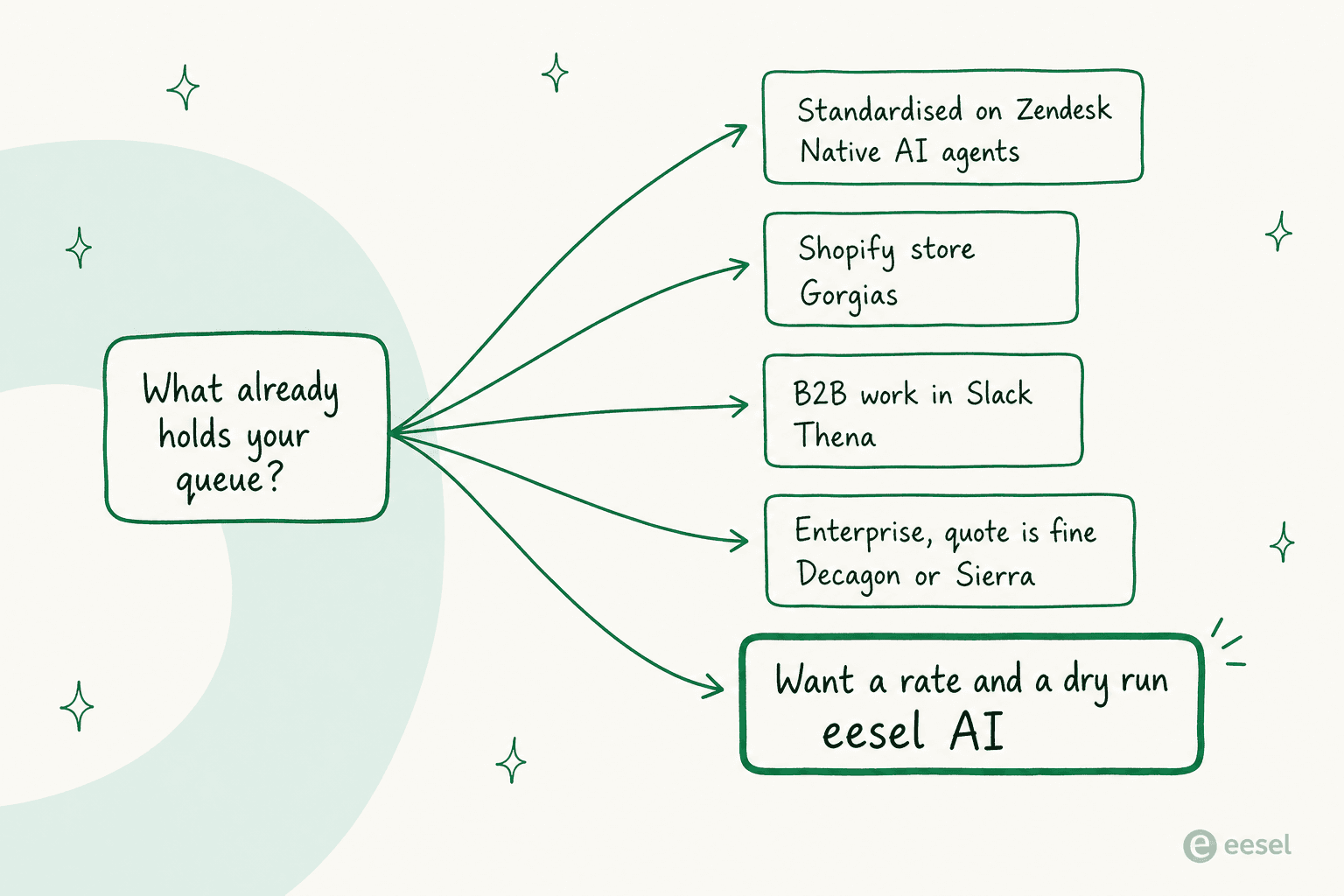
- Standardised on Zendesk and want one bill: native AI agents, at $1.50 per resolution with allowances included.
- Running Shopify: Gorgias, and compare the $0.90 included rate against your ticket mix.
- On Freshworks or shopping on price: Freddy AI Agent from $19, with 500 sessions included.
- B2B support in Slack or Teams: Thena, from $29 per user per month.
- Enterprise, regulated, and a quote is fine: Netomi for the guardrails, Sierra for outcome billing, Decagon for operator-authored agents, Ada if you clear 300,000 conversations a year.
- On Front, Help Scout or Jira Service Management, or you want the rate and a dry run first: eesel AI at 40c a ticket handled.
And a word for IrisAgent, since this is a post about leaving it. If your problem is ticket triage and tagging rather than customer-facing deflection, the one real user account out there says it does that job and keeps doing it. If your problem is customer-facing answers, the missing pieces are a published platform rate and a way to test against your own history, and both of those are things a buyer should not have to discover after signing.
Try eesel
If you got here because you want AI on the helpdesk you already run, and you want to know the price and the behaviour before a customer reads a word, that is the specific gap eesel was built for. Connect Zendesk, Freshdesk, Gorgias, Front, Help Scout, HubSpot, Salesforce or Jira Service Management, run a simulation over a few hundred of your closed tickets, read the gap report, fix what it found, then route one ticket type and watch it.

It is $0.40 per ticket or chat handled, with no platform fee, no per-seat fee and no minimum, and you only pay for the tickets you actually route to it. Start with $50 of free usage, no credit card (see pricing), and set a spend cap on day one so nothing runs away from you.
Frequently Asked Questions
What are the best IrisAgent alternatives in 2026?
How much does IrisAgent cost?
Is there a free IrisAgent alternative I can test before paying?
Which IrisAgent alternative works with my existing helpdesk?
What happens if the AI gives a customer the wrong answer?


Article by
Riellvriany Indriawan
Riell is a designer and writer at eesel AI with about two years of experience researching CX platforms, AI chatbots, and helpdesk software. She combines her design background with a sharp eye for how these tools actually look and feel in practice — making her comparisons unusually visual and user-focused.