8 best SiteGPT alternatives in 2026 (priced and tested)

Rama Adi

Katelin Teen
Last edited August 18, 2026

Why teams start looking past SiteGPT
Let me be fair to SiteGPT first, because the thing it is praised for is not marketing spin.
Setup speed is the single most repeated compliment in its reviews, and it shows up in almost every one. It holds a 4.8 out of 5 on G2 across 12 reviews, with 10 of those at five stars and not a single review below four. It is SOC 2 Type II examined, handles 95 languages, and is built by a two-person team that reviewers repeatedly say answers support requests personally. For a small site that needs a competent AI chatbot for a website running by Friday, that is a genuinely good trade.
"It's extremely easy to set up, and I was able to train a custom chatbot in minutes just by entering a website URL."

So the reasons people shop elsewhere are not "it's bad." They are four specific structural limits, and each one is checkable.
1. It can only know what you already published
This is the honest constraint at the centre of every website-scrape bot, and SiteGPT's founder named it himself on launch day.
"The chatbot can only be as good as the website content. But this is also a good thing. This is an opportunity for the chatbot owner to add more relevant content to the website."

He is right that it is an incentive to write better docs. He is also describing the ceiling. A four-star G2 reviewer puts the same mechanic from the buyer's side: "Sometimes siteGPT can give slightly generic answers if the website content is not very detailed."
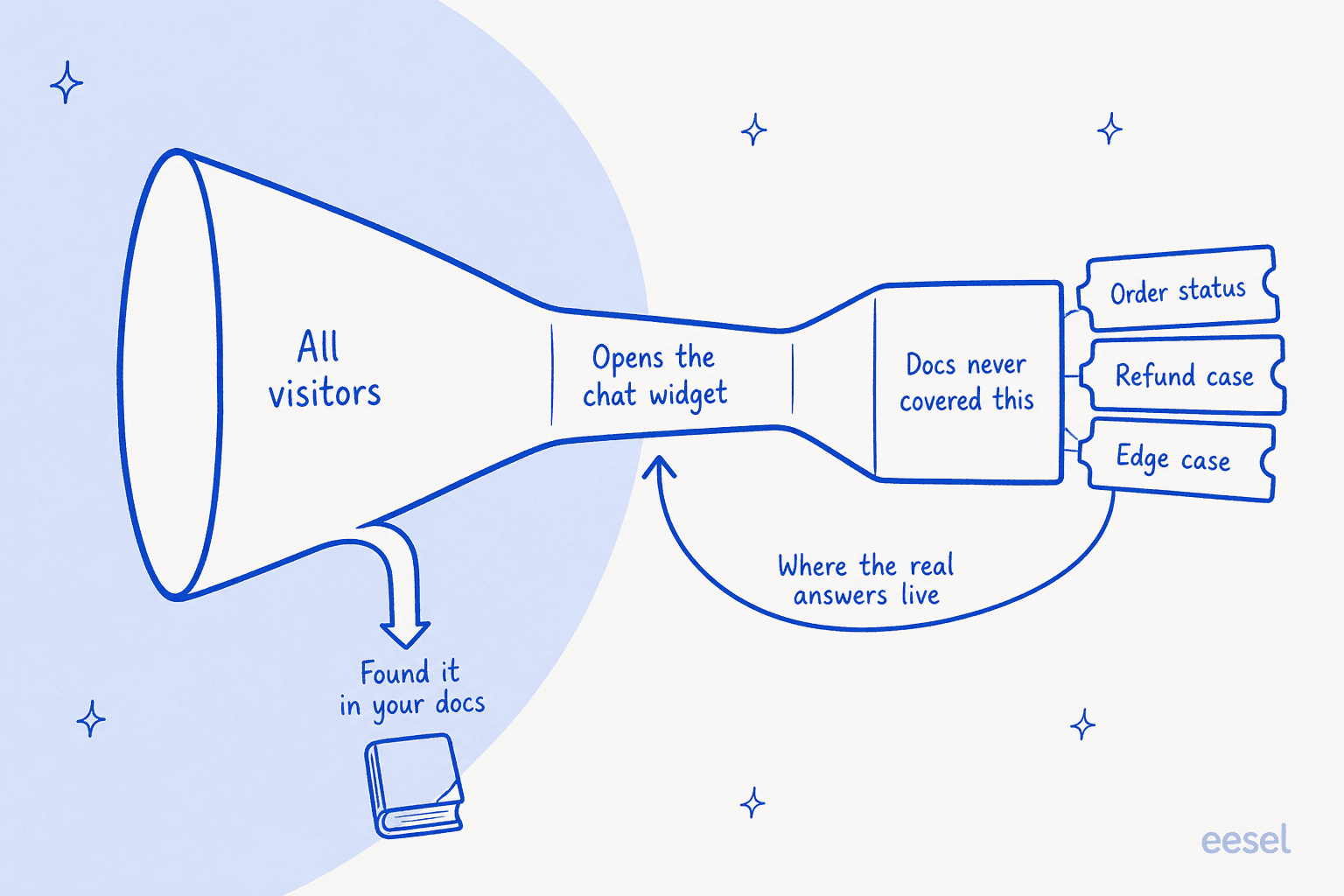
Worth sitting with, because it reframes the whole category. Your AI knowledge base is almost always thinner than your ticket archive. The refund edge case, the shipping exception, the workaround your senior agent has typed forty times but never wrote up: none of it is on the site, all of it is in the helpdesk. Tools that can read closed tickets get to answer those. Tools that can only crawl a sitemap do not.
I hear a version of this constantly. One DTC supplements team came to us wanting their Gorgias agent to auto-resolve half of 7,000 monthly email tickets, and when we mapped their knowledge it was scattered across ClickUp SOPs, untranscribed Loom videos and stale macros, with no website FAQ at all. A site-crawling bot would have had nothing to read.
2. Escalation is the visitor's job, not the AI's
SiteGPT's Escalate to a Human block describes exactly one mechanism: the visitor presses a button. The features page describes no confidence threshold, no automatic escalation rule and no routing logic.
That is fine for the case where a customer knows they are stuck. It does nothing for the more expensive case, which is the AI being confidently wrong about something the visitor has no way to check. Nobody presses a button on an answer they believe.
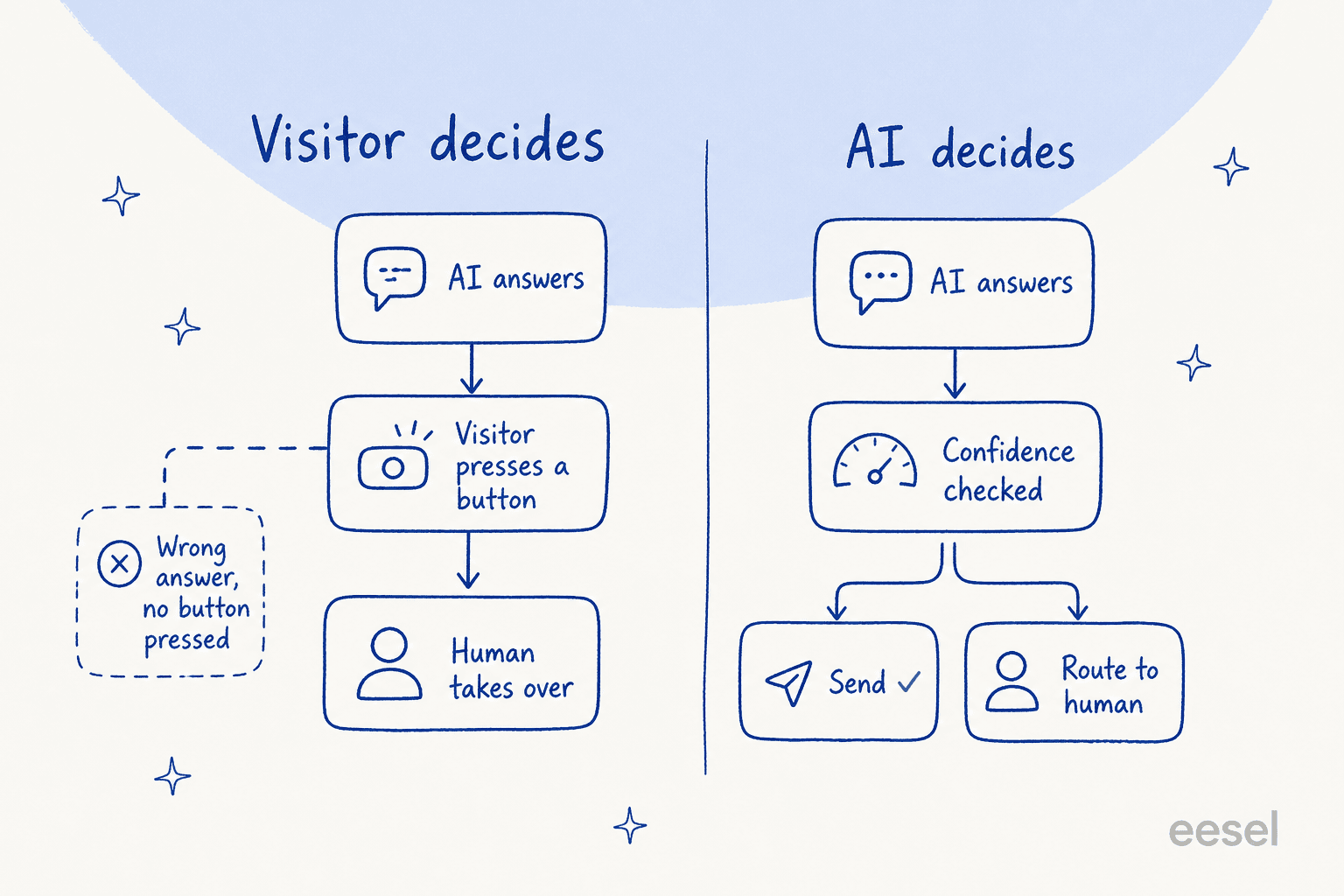
This is the single most common thing buyers push on when they talk to us, and it is why AI chat escalation design matters more than answer quality in a demo. A good handoff looks like the one I watched on an SEO tool's site chat: the agent answered two documentation questions cleanly, then handed straight over to a human the instant the visitor asked for one. The bar is that the AI knows when it is out of road, not just that the visitor does.
3. Corrections happen outside your helpdesk
The only Capterra review of SiteGPT is titled "Easy to train, use, and implement but lacks integrations", and its sharpest line is about the fix loop rather than the connector list.
"Currently the integration options are limited, so implementing may not be as smooth depending on your other platforms. Also, corrections currently need to be made directly on SiteGPT.ai and not through any integrated platform."

That is an operational cost, not a feature gap. An agent who spots a bad answer has to leave the tool they work in, open a second dashboard and fix it there. Multiply by every agent and every bad answer and the AI agent coaching loop quietly stops happening.
The connector list itself is genuinely short. SiteGPT ships Google Chat, Messenger, Crisp, Slack, Freshdesk Messaging, Zendesk and Zoho SalesIQ. WhatsApp and HubSpot are both still marked "Coming soon" on the integrations page. And the Zendesk AI Agent specifically is gated to the Scale plan, so a team on Growth wanting it jumps from $129 to $429 a month.
4. The message meter is not what the plan card says
SiteGPT defines a message as the visitor's question and the AI's reply together, one round trip. That part is clear. The part worth checking is that the headline quota assumes you run everything on the cheap model.
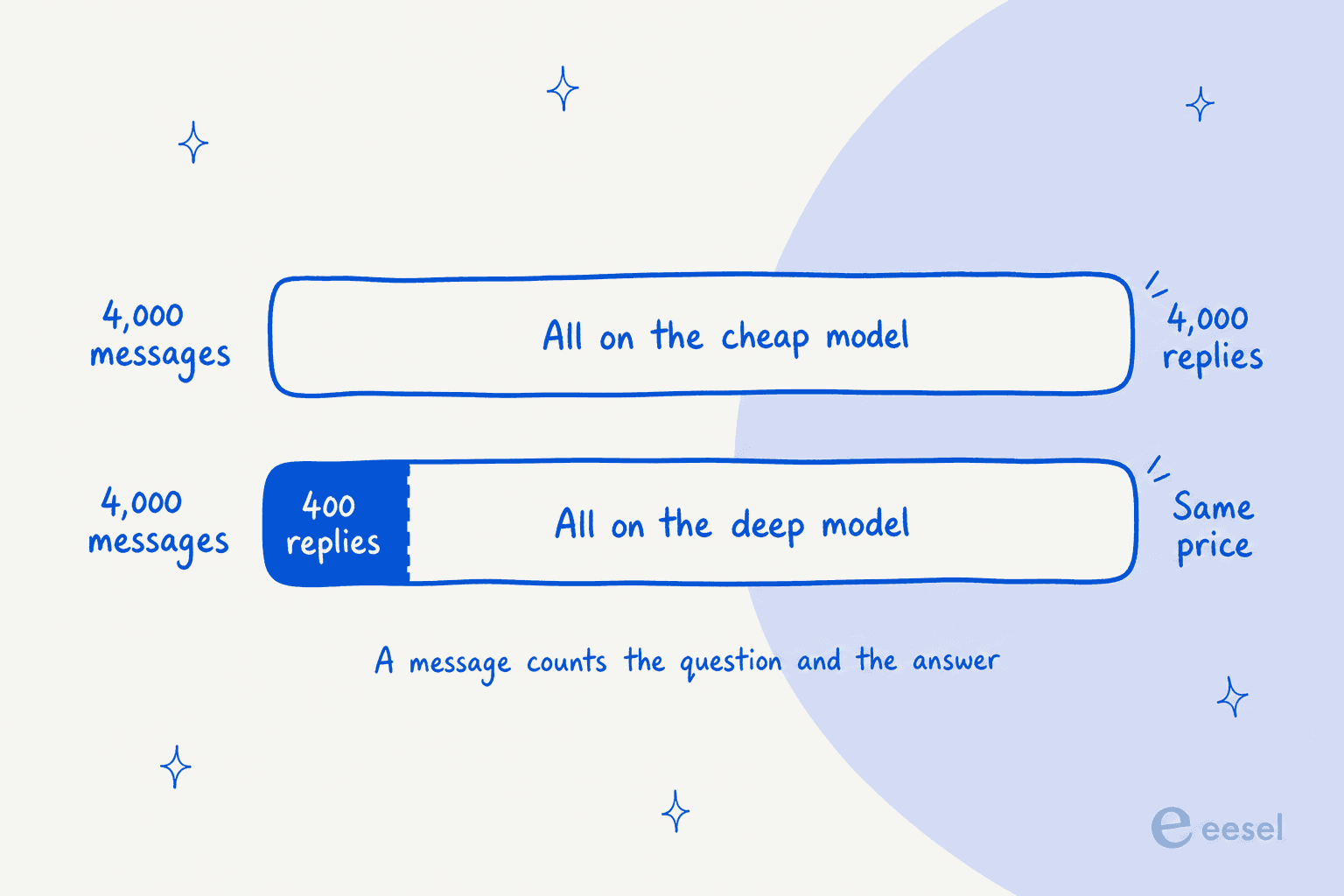
SiteGPT is upfront about this, to its credit: the pricing calculator is headed "How many messages do you actually get?" and answers "It depends on which model you pick." Starter's 4,000 messages is 4,000 on GPT-4.1-mini or 400 on GPT-4.1. Growth's 10,000 becomes 1,000. Scale's 40,000 becomes 4,000.
At Growth on yearly billing, 1,000 GPT-4.1 messages a month for $948 a year works out to roughly 7.9 cents a message. That is not outrageous, but it is a very different number from the one on the plan card, and it is the one you should be comparing against everything below.
How I picked these eight
I stuck to tools a SiteGPT user could actually switch to, which meant a real embeddable widget and published pricing. Anything quote-only got dropped, because the whole reason people buy in this category is that they can sign up on a Tuesday without a sales call.
Then I checked four things on each one, all of them from the vendor's own pages:
- What it trains on. Specifically whether resolved tickets are a first-class source or not.
- What the meter counts. A message, a conversation, a query, a credit and a ticket are five different units, and the difference is often 10x.
- Whether the AI can escalate on its own. Confidence threshold, or visitor button.
- Where corrections happen. Inside your helpdesk, or in a second dashboard.
One thing I deliberately did not weigh heavily is raw answer quality, and the fairest voice on that in the whole research came from a competing founder arguing against his own interest:
"retrieval quality is mostly about how clean your source docs are, not which vendor you pick. These are all RAG under the hood. Messy help center and they all answer badly, well-structured docs and most of them are fine... So don't choose on 'whose AI is smarter,' they're closer than the marketing implies."

He is right, and it is why the comparison below is about sources, meters and controls rather than adjectives.
SiteGPT alternatives compared
Prices are the vendor's own published monthly rates. Where a vendor advertises an annual-prepay figure more prominently, both are shown.
| Tool | From (monthly) | Billable unit | Free tier | Trains on tickets | AI-decided escalation | Model choice | Native helpdesks | Remove branding |
|---|---|---|---|---|---|---|---|---|
| SiteGPT | $59 ($39 yearly) | Message (Q + A) | No, 7-day trial | No | No, visitor button | 2 OpenAI models | Zendesk, Freshdesk Messaging, Crisp, Zoho SalesIQ | +$59/mo |
| eesel AI | Usage only, 40c/session | Chat session or ticket | $50 free usage | Yes | Yes, confidence routing | Managed | 100+ integrations | Included |
| Chatbase | $32 (annual rate) | Message credit | Yes, $0 | Pro plan only | Not documented | Broad, user-selectable | Zendesk, Freshdesk, Zoho Desk, HubSpot, Help Scout, Gorgias | Enterprise |
| My AskAI | $199 | Ticket resolved | No, 30-day trial | Yes | Not documented | Managed | Zendesk, Freshdesk, Gorgias, HubSpot | +$49/mo (Pro) |
| CustomGPT.ai | $99 ($89 annual) | Query | No, 7-day trial | No | Not documented | Enterprise only | Via API | Premium |
| Tidio (Lyro) | $24.17 + Lyro add-on | Lyro conversation | Yes, $0 | No | Not documented | Managed | Own helpdesk, plus standalone | +$16.67/mo |
| DocsBot AI | $49 | AI credit (model-weighted) | Yes, 30-day bot life | No | Not documented | Yes, weighted 1x to 24x | Via API and Zapier | Business plan |
| Chatling | $40 ($32 annual) | Message credit (0.5x to 25x) | Yes, $0 | No | Not documented | 34 models | Zendesk, Zoho, HubSpot (Plus) | +$35/mo |
| Botpress | $150 (billed annually) | Conversation | Yes, 100 convos | No | Not documented | Yes | Via integrations | Enterprise |
"Not documented" means exactly that: the vendor's public pages describe testing, analytics or handoff, but do not describe an automatic confidence threshold that routes an uncertain answer to a human without the visitor asking. It is not a claim that the feature is absent, it is a flag to ask on the demo.
Which one fits your setup?
Where do your best answers actually live?
Not where you wish they lived. Where an agent goes to look one up right now.
Pick an option above
Each answer maps to a different shortlist, because the constraint that decides this is the training source, not the feature grid.
eesel AI, or My AskAI
Both read resolved tickets as a first-class source, which is the one thing SiteGPT cannot do at any price. eesel bills 40c per session with no seat or platform fee; My AskAI starts at $199 a month for 1,000 tickets and guarantees 60% resolution or your money back.
Chatbase can also read tickets, but only on the $400 Pro plan and only via Zendesk or Salesforce.
Chatbase, or CustomGPT.ai
If your docs are genuinely good, retrieval quality is mostly a solved problem and you are buying on price and controls. Chatbase starts at $32 a month with broad model choice and an optional helpdesk module; CustomGPT.ai is $99 a month with a pooled query meter and an API on the cheapest tier.
This is the case where SiteGPT itself is still competitive. Compare on the meter, not the model.
Chatling, or DocsBot AI
Both have real $0 tiers you can deploy from, so you can find out what people actually ask before committing to a plan. Chatling gives 100 credits and 2 agents free; DocsBot gives 1 bot and 100 credits, though the free bot expires after 30 days.
Watch the model multiplier on both. The same credit buys wildly different amounts of answer.
Botpress
The only one here built primarily as a builder rather than a trained-on-your-content bot. You get a visual flow canvas and real branching logic, at $150 a month billed annually for 250 conversations, with extra packs at 65c each.
It is the most work of the eight. Pick it when the flow is the product, not when you want answers fast.
1. eesel AI
Best for: teams whose real answers are sitting in closed tickets rather than on the website.
I work on this one, so take the framing with the appropriate pinch of salt and check every number against the pricing page. The reason it leads this list is structural rather than promotional: it is the option here that changes what the AI is allowed to learn from.
What it does
The deployment story is the same one that makes SiteGPT easy: paste one script tag and the chat bubble is live. If you would rather it sat inside a docs page than floated in the corner, the inline embed is the same product placed in the page instead. Both work on anything that allows custom scripts, which covers WordPress, Webflow, Shopify, Squarespace, Wix and hand-built sites.
The difference is underneath. Alongside your help centre and website, it connects to the helpdesk itself, across 100+ integrations, and treats your resolved tickets as training data. Years of your team's actual answers become knowledge on day one, which is the material a site crawl cannot reach. It answers in 80+ languages, which makes it a workable multilingual support agent without a separate translation project.
Two controls matter more than the feature list. The first is confidence-based routing: low-certainty answers get drafted or escalated rather than sent, so a wrong answer does not depend on the visitor noticing. The second is simulation. Before it goes live, you replay it against your own historical tickets and see coverage by theme, then fill the gaps and re-run. It is the closest thing in this category to knowing what will happen before it happens.
Pricing
| Line | Price | Unit |
|---|---|---|
| Free start | $50 in free usage | No credit card, every feature unlocked |
| Chat session or ticket | $0.40 | Per session handled, not per reply |
| Light task | Free | Dashboard questions, simple lookups |
| Blog post draft | $4.00 | Per heavy task |
| Annual commit | 25% off | Commit to a year of usage upfront |
| Enterprise | $1,000/mo | Flat platform fee on top of usage, adds SSO, HIPAA, BAA |
No platform fee, no per-seat charge and no monthly minimum on the standard path. At $50 of free credit, that is roughly 125 sessions to test with before you pay anything.
Pros
- Reads resolved tickets, not just published pages
- Simulation against your own ticket history before go-live
- Confidence routing, so escalation does not depend on the visitor
- No seats and no platform fee, so cost tracks volume
- 100+ integrations, including every major helpdesk
Cons
- Usage billing means the invoice moves month to month, which some finance teams dislike
- Aimed at teams with an existing support operation, so it is more product than a five-page marketing site needs
- HIPAA and a signed BAA sit behind the $1,000/month Enterprise tier
Verdict
Our take: pick it when your helpdesk already holds the answers and you want the widget to use them, and when you want to see the AI's behaviour on your own tickets before a customer does. Skip it if you genuinely only need a five-page site FAQ answered, where a $32 tool will do the job. Gridwise saw eesel resolve 73% of tier-1 requests in the first month, with results visible during a 7-day trial, which is the shape of outcome to test for rather than take on faith.
2. Chatbase
Best for: teams with genuinely good docs who want model choice and an optional helpdesk in the same product.
What it does
Chatbase is the tool SiteGPT gets compared to most often, and it has grown well past the "chatbot on your docs" framing. Its own llm-info page lists eight named modules, including Actions for real API calls, a Helpdesk with human handoff, Backstage for debugging agent behaviour, and Analytics with resolution metrics. Channels run to chat, email, voice, WhatsApp, Slack, Messenger and Instagram.
Model choice is the standout against SiteGPT's two-model menu. The homepage Playground names Claude Fable 5, Gemini 3.5 Flash, the GPT-5.6 family, DeepSeek V4-Pro, Grok 4.5 and Kimi K2.7, and the pricing table breaks advanced access out by model family.
Training sources are Add Files, Add website, Add Text, Add Q&A's, Add Notion Pages and Add Tickets. That last one is the interesting entry and it is gated twice: tickets as a source is a Pro-plan row, and the data sources doc adds that it needs an active Salesforce or Zendesk OAuth connection. So training on your ticket history is possible, at $400 a month, if your history lives in one of two places.
Testing is the Playground rather than a historical replay: you preview the agent, type at it channel by channel, and share a preview URL for feedback. Useful, but it is a human at a keyboard, not a scored dry run over your archive.
Pricing
| Plan | Price (annual rate) | Billed annually | Message credits | Training content |
|---|---|---|---|---|
| Free | $0 | $0 | Limited | 1 MB |
| Hobby | $32/mo | $384/yr | 700/mo | 10 MB |
| Standard | $120/mo | $1,440/yr | Higher | 20 MB |
| Pro | $400/mo | $4,800/yr | Higher | 40 MB |
| Enterprise | Quote | Custom | Custom | Higher limits |
Every paid card carries a 7-day trial. The training-content ceiling is the meter to watch: it is extracted text, not file size, and 10 MB of extracted text is not a large help centre. Full breakdown in my Chatbase pricing post.
Pros
- Broad, user-selectable model choice across seven vendors
- Built-in helpdesk from Standard, or keep the one you have
- Backstage gives real visibility into why the agent said what it said
- Genuine $0 tier to evaluate on
Cons
- Ticket training is $400/month and requires Zendesk or Salesforce
- Training-content ceilings are small, and measured in extracted text
- No documented replay of historical tickets before go-live
Verdict
Our take: the strongest all-rounder here if your published content is already good, and the obvious first stop for anyone who found SiteGPT's two-model menu limiting. Skip it if your knowledge lives in tickets and you are not on Zendesk or Salesforce, because the one path to that data is closed. My Chatbase review goes deeper, and Chatbase alternatives covers the neighbours.
3. My AskAI
Best for: teams who want to keep their existing helpdesk and bolt an AI agent onto it at a published per-ticket rate.
What it does
My AskAI is positioned almost as an anti-SiteGPT: rather than a widget on your marketing site, it adds an AI agent to the helpdesk you already run. Its integrations page covers Zendesk, Zendesk Messaging, Freshdesk, Gorgias and HubSpot.
Crucially for this comparison, it trains on historic tickets and does automated self-learning from your agents' responses, which puts it in the small group here that can reach the answers a site crawl cannot. It also connects live user data for things like recent orders and can run AI Tasks such as refunds, so it plays in the ticket deflection space rather than pure FAQ answering.
The pricing page is unusually blunt about its own positioning, headlining "Pricing so good, we don't need to hide it behind a sales call" and, on the same pricing page, a "60% AI resolution. Or your money back" guarantee.
Pricing
| Plan | Price | Tickets included | Overage | Notable |
|---|---|---|---|---|
| Pro | $199/mo | 1,000/mo | ~$0.12/ticket, up to 5,000/mo | 5 seats, historic ticket training, AI Tasks, 95+ languages |
| Scale | $499/mo | 2,000/mo | $0.10/ticket | Unlimited seats, multi-agent, SOC 2 Type II, branding and API included |
| Enterprise | From $999/mo | Everything in Scale | Volume discount | White-glove setup, dedicated CSM, unlimited agents |
Annual billing takes 33% off, and there is a 30-day free trial with no card. On Pro, removing branding and adding API/Slack/Teams access are $49 a month each.
Pros
- Trains on historic tickets and self-learns from agent replies
- Published per-ticket rate with a resolution-rate money-back guarantee
- 30-day unlimited trial, which is the most generous evaluation window here
- Keeps your existing helpdesk rather than replacing it
Cons
- $199/month floor is the second-highest entry price on this list
- Only five helpdesks supported, so Help Scout, Front and Jira Service Management users are out
- SOC 2 Type II sits on Scale, not Pro
- Public review base is small at 19 reviews
Verdict
Our take: the closest philosophical match to eesel on this list, and a strong pick if you run one of its five helpdesks and want a flat included-ticket bundle rather than pure usage. Skip it if your helpdesk is not on the list, because the whole "keep your stack" promise only holds inside it. Worth reading alongside my roundup of AI chatbots for helpdesk automation.
4. CustomGPT.ai
Best for: teams pushing a lot of documents through one agent, where the corpus is bigger than the conversation volume.
What it does
CustomGPT.ai is built around scale of content rather than scale of chat. Standard gives you 10 agents, 5,000 documents per agent and 60 million words of storage; Premium takes that to 25 agents, 20,000 documents each and 300 million words. Against SiteGPT's Starter cap of 1,000 pages at 2,500 characters apiece, that is a different order of magnitude.
The RAG API ships on the cheapest tier, which is unusual and genuinely useful if you want to embed answers somewhere other than a widget. Auto-sync and white-labelling arrive on Premium. The AI model selector, RBAC, SSO and a DPA are all Enterprise-only, which is the main thing to know before you plan around them.
Pricing
| Plan | Monthly | Annual (per month) | Agents | Queries/mo | Docs per agent | Seats |
|---|---|---|---|---|---|---|
| Standard | $99 | $89 | 10 | 1,000 | 5,000 | 3 |
| Premium | $499 | $449 | 25 | 5,000 | 20,000 | 5 |
| Enterprise | Quote | Annual commit | Custom | Custom | Custom | Custom |
The unit is a query: one user question, pooled across the whole account rather than per agent. A five-turn conversation burns five queries. Both paid tiers work out around 10 cents a query in-plan, but the extra-queries add-on is $375 for 2,500, which is 15 cents, about 50% more than the in-plan rate. Hitting a limit hard-stops indexing or answering rather than quietly billing overage, so plan the ceiling deliberately.
Pros
- Far larger document and word ceilings than anything else here
- API included on the entry plan
- Pooled query meter is simple to reason about
- No surprise overage, because it stops rather than bills
Cons
- 1,000 queries a month on a $99 plan is thin for a public-facing widget
- Model selection is Enterprise-only
- Analytics retention on Standard is capped at 7 days
- 7-day trial requires a card and auto-converts
Verdict
Our take: buy it when your problem is corpus size, not conversation volume: an internal knowledge tool, a documentation search layer, a research assistant over thousands of files. Skip it as a front-of-site support widget, where 1,000 queries evaporates fast. See my CustomGPT.ai breakdown and the CustomGPT.ai reviews roundup.
5. Tidio (Lyro)
Best for: small ecommerce teams who want live chat, ticketing and an AI agent from one vendor.
What it does
Tidio is the only tool here that is a full live-chat and ticketing platform first, with the AI agent, Lyro, layered on top. That makes it a different shape of purchase: you are not adding a bot to your stack, you are replacing the front end of your support operation.
Lyro is also sold standalone and can be added to Zendesk, Salesforce or another helpdesk, so you can take the AI without the platform. It handles human handoff, customisable style and knowledge-based responses, and it is the natural pick if you are still weighing live chat against an AI agent rather than choosing one outright.
The most interesting commercial detail sits at the top of the range: Premium unlocks pay-per-resolution billing and a guaranteed 50% Lyro resolution rate, starting from 3,000 Lyro conversations a month. Very few vendors in this category will put a resolution number in a contract.
Pricing
| Plan | Price (annual rate) | Billable conversations | Notable |
|---|---|---|---|
| Free | $0 | 50 | 50 one-time Lyro conversations, live chat and ticketing |
| Starter | $24.17/mo | 100 | Live chat channels, basic analytics |
| Growth | From $49.17/mo | From 250 | Advanced analytics, permissions, auto-assignment, macros |
| Plus | From $749/mo | Custom | Departments, multiproject, custom branding, OpenAPI, CSM |
| Premium | Quote | Custom | From 3,000 Lyro conversations, 50% guaranteed resolution, pay-per-resolution |
Lyro is metered separately at $0.50 per conversation, with the add-on starting at $32.50 a month from 50 conversations. A Lyro conversation is one customer interaction with at least one AI reply; multiple AI replies, or the customer leaving and coming back, still count as one. Removing Tidio branding is $16.67 a month, and self-serve plans cap at 10 agents. Detail in my Tidio AI pricing post.
Pros
- Conversation-level metering, so a long chat costs the same as a short one
- Genuine free tier with live chat and ticketing included
- A contractual resolution-rate guarantee at the top tier
- Lyro sells standalone onto other helpdesks
Cons
- Two meters running at once, billable conversations and Lyro conversations, which is easy to misread
- The jump from Growth to Plus is steep at $749
- Lyro trains on published knowledge, not ticket history
- 10-agent cap on self-serve plans
Verdict
Our take: the right answer for a small ecommerce team that wants one vendor for chat, tickets and AI, especially if you are already shopping the best AI chatbots for Shopify. Skip it if you are happy with your helpdesk and only want the AI layer, because you would be paying for a platform you will not use. See also Tidio alternatives.
6. DocsBot AI
Best for: documentation-heavy products where you want explicit control over which model answers and what it costs.
What it does
DocsBot AI is the most transparent tool here about the economics of model choice, and it is the one that makes you feel them. Its meter is monthly AI credits, where one credit is a message on a 1x model and everything else is a multiplier: GPT-5.6 Sol costs 24x, Terra 8x, GPT-5.4 mini 3x, Luna 1x. Actions and skill runs consume credits too, and there is a separate Source Pages meter at roughly 5,000 characters per page.
The cost lever most people miss is that bringing your own OpenAI key resets every model to 1x. If you have API credit sitting around, that changes the arithmetic on this tool substantially.
There is no overage billing. Hit the credit cap and the bot goes offline with an error message, which is a design decision you should be deliberate about on a public-facing widget.
Pricing
| Plan | Price | Bots | Source pages | AI credits/mo | Seats |
|---|---|---|---|---|---|
| Free | $0 | 1 | 50 | 100 | 1 |
| Personal | $49/mo | 1 | 5,000 | 5,000 | 1 |
| Standard | $149/mo | 3 | 15,000 | 15,000 | 5 |
| Business | $499/mo | 10 | 100,000 | 60,000 | 10 |
| Enterprise | Quote | Custom | Custom | Custom | Custom |
Annual billing is ten months paid for twelve. Add-ons run $49 per 5,000 credits, $19 per extra bot, $29 per 10,000 pages and $19 per extra seat on Business and above. The free bot expires after 30 days, so treat Free as a demo rather than a deployment. SOC 2, GDPR and a DPA are Business-only; HIPAA and data residency are Enterprise-only.
Pros
- The clearest published model-cost multipliers of any tool here
- Bring-your-own-key resets every model to 1x
- Large page ceilings on the middle tiers
- Real $0 tier for a first look
Cons
- Bot goes offline at the credit cap rather than billing overage
- Free bot expires after 30 days
- Compliance certifications start at $499/month
- The vendor's own pages contradict each other on source count and refresh cadence
Verdict
Our take: the pick when you want to see and control exactly what each answer costs, especially with an OpenAI key already in hand. Skip it if an outage at the cap would be unacceptable on a customer-facing page, because that is the documented behaviour rather than an edge case.
7. Chatling
Best for: the cheapest credible paid deployment, and the widest model menu at the low end.
What it does
Chatling has repositioned since I last looked at it, and its homepage now reads "The AI support platform built for resolution, not deflection", a real shift away from the no-code chatbot-builder pitch. It undercuts SiteGPT's entry plan at $40 a month against $59, and gives you 34 selectable models against SiteGPT's two.
The credit model is where you need to concentrate. One credit meter is consumed only when the bot generates an AI response, not per chat or per conversation, and the cost varies 50x by model: 0.5 credits for Grok 4.1 Fast, DeepSeek V3.2, Mistral Small 4 or Gemini 2.5 Flash, up to 25 credits for Claude Opus 5 or GPT-5.6 Sol. Standard's 3,000 credits therefore buy 6,000 replies on the cheapest model or 120 on the most expensive. Three more monthly meters run alongside it for email credits, voice minutes and resync credits at 10,000 characters each.
Pricing
| Plan | Monthly | Annual (per month) | Agents | Credits/mo | KB characters | Seats |
|---|---|---|---|---|---|---|
| Free | $0 | $0 | 2 | 100 | 500K | 1 |
| Standard | $40 | $32 | 3 | 3,000 | 30M | 2 |
| Plus | $140 | $112 | 5 | 15,000 | 100M | 3 |
Chats are unlimited on all three tiers, which is a real distinction from a message meter. Add-ons are fixed monthly rather than overage: $10 per 1,000 extra credits, $2 per 1M knowledge-base characters, $3 per agent, $10 per seat, $10 per custom domain and $35 to remove branding. Channel access is gated: Free is web-only, WhatsApp, Instagram, Messenger, Telegram and the API start at Standard, and Zendesk, Zoho and HubSpot are Plus-only.
Pros
- Cheapest paid entry point here at $40, or $32 annual
- 34 models on both paid tiers, not just the top one
- Unlimited chats on every plan
- Free tier needs no card
Cons
- The 50x credit spread makes the plan card almost meaningless without picking a model first
- Helpdesk integrations are locked to the $140 Plus tier
- Four separate monthly meters to track
- The site contradicts itself on language count and refund window
Verdict
Our take: the best value on this list if you pin yourself to a cheap model and your helpdesk integration needs are light. Skip it if you need Zendesk or HubSpot, because that is a jump to $140 and puts it above Chatbase's Standard tier. Good starting point if you are surveying the best AI chatbot builder options generally.
8. Botpress
Best for: teams where the conversation flow is the product and you want to build it explicitly.
What it does
Botpress is the outlier here, and I have included it because a meaningful slice of people looking past SiteGPT are actually looking for something SiteGPT was never trying to be. It is a builder: a visual flow canvas, explicit branching, real developer surface area, and the freedom to construct a conversation rather than train one.
Its pricing page headline is worth repeating because it is the clearest positioning statement of the eight: "Priced for the work it does, not the seats it fills," with unlimited AI agents and AI spend included. So the model cost is not a meter you manage, unlike DocsBot and Chatling.
The tradeoff is time. This is the one on the list where you will spend days, not an afternoon, and where the gap between an AI agent and a chatbot is a design decision you make rather than a product you buy.
Pricing
| Plan | Price | Included conversations | Extra conversations | Seats |
|---|---|---|---|---|
| Free | $0 | 100 conversations | No top-ups or overages | 3 |
| Plus | $150/mo billed annually | 250/mo | Packs of 100 for $65 ($0.65 each) | Higher |
| Team | $750/mo billed annually | 1,500/mo | Packs of 100 for $50 ($0.50 each) | Higher |
| Enterprise | Custom | Custom volume | Custom | Custom |
Free is hard-capped with no add-ons, and caps at 3 AI agents. Note that the Free card says "100 conversations" without a period attached, and the comparison table shows Plus and Team as per-month while Free is just "100", so do not plan around it resetting monthly.
Pros
- AI model spend included rather than metered separately
- Real visual flow builder with genuine branching logic
- Conversation-level billing, so length does not cost you
- Free tier of 100 conversations to prototype on
Cons
- Most build effort of anything here, by a wide margin
- $150/month entry is the highest floor except My AskAI
- 250 conversations a month on Plus is tight for a public site
- Trains on what you give it, not on ticket history
Verdict
Our take: the right call when your use case has real branching logic that a retrieval bot cannot express, like a qualification flow or a multi-step troubleshooting tree. Skip it if you wanted a chatbot on your docs by Friday, because that is a category error. My Botpress review and Botpress pricing posts cover it in more detail, and Botpress alternatives covers the neighbours.
What SiteGPT still does better than most of this list
I would be doing you a disservice if I left this out, because there are cases where the incumbent is the right answer.
Setup speed is real and it is repeatedly verified by strangers, not just the marketing page. The Capterra reviewer who complained about integrations still got a branded bot live publicly within a week, trained by pasting a Zendesk help portal link and clicking go. Support responsiveness is the second-most-praised thing across reviews, which is what you get from a two-person team rather than a support queue.
And the founder's answer on Hacker News about content quality was the honest one. Most of this category is retrieval over your documents, so if your documents are good, the differences narrow fast. If you have a well-maintained help centre, a modest question volume and no helpdesk to integrate with, SiteGPT at $39 a month on annual billing is a perfectly sensible purchase, and the alternatives above are mostly buying you things you do not need yet.
What changes the calculus is any one of these being true: your answers live in tickets rather than docs, you need the AI to escalate on its own judgement, you need a helpdesk connector SiteGPT does not have, or your message volume makes the 10x model multiplier expensive. Any of those, and you are shopping.
Try eesel
If your support already runs through a helpdesk, the widget on your site should know what your agents know. That is the whole pitch. eesel AI drops in with one script tag like SiteGPT does, but it connects to the helpdesk as well as the website, so the AI answers from your resolved tickets and your docs together rather than from whatever your marketing site happens to say.
Two things you can check before spending anything. First, simulation: replay the agent against your own past tickets and see coverage by theme before a customer ever meets it. Second, the meter: 40c per chat session or ticket handled, no per-seat fee, no platform fee and no minimum, so the bill tracks the work. The $50 of free usage needs no credit card and covers roughly 125 sessions, which is enough to find out whether the answers are any good.
Start with the chat bubble if you want the classic corner widget, or the inline embed if you would rather it lived inside your docs pages. Both are the same agent, and both take about the same five minutes SiteGPT does.
Frequently Asked Questions
What are the best SiteGPT alternatives in 2026?
How much does SiteGPT cost per month?
Is there a free SiteGPT alternative I can test before paying?
Why do people look for a SiteGPT alternative?
Can a SiteGPT alternative train on my past support tickets?
What happens when the SiteGPT chatbot gives a wrong answer?
Which SiteGPT alternative is cheapest for a small site?


Article by
Rama Adi
Rama is a software engineer at eesel AI with two years of experience writing about B2B SaaS, AI tools, and customer support technology. Based in Bali, Indonesia, he brings a developer's perspective to product comparisons — cutting through marketing copy to what the integrations and APIs actually do.