The 9 best YourGPT alternatives in 2026, ranked by what they meter

Kurnia Kharisma

Katelin Teen
Last edited August 20, 2026

Why teams start looking for YourGPT alternatives
Here is a pattern I have watched over and over in eesel's own trial data, and it has almost nothing to do with answer quality. One trial user ran twelve test chats, the agent handled all of them well, and then they opened the billing page and immediately filed cancellation requests. Another burned through 200 interactions in a single day of testing and started doing panicked arithmetic on the 9,000 interactions a month they actually expected. A third ran a methodical 67-test evaluation, called the knowledge answers solid, and visited billing three times before walking.
The product was not the problem in any of those. The meter was. And that is exactly the position a lot of YourGPT buyers end up in, because YourGPT's meter is the hardest kind to reason about.
What a YourGPT credit actually is
YourGPT is unambiguous on the definition when you find the right page. The billing article states that an AI credit is "the product of tokens and the AI model's consumption rate," prices 1 million AI credits at roughly $3.50, and gives a worked example: GPT-4.1 costs more than that baseline, so it carries a 2.5x multiplier.
Read that twice, because the consequences are not obvious. The unit is a token, not a message. So the docs page lists the things that move your bill, and they are all the things you would otherwise call good engineering: agent persona length, knowledgebase nodes, response size, translation, and function execution. Add fifty articles to the help center and the retrieved context grows. Turn on multilingual and every reply pays for a translation. Give the agent a tool so it can look up an order, which is the entire "takes real action" pitch, and the function call bills too.
Then the optimisation guide tells you the fix in five steps: use cheaper models, add more scripted automated responses because those "do not consume AI credits," limit the knowledge base and previous messages, keep the persona short, and cap messages per session. The guide is honest enough to append its own warning to step three: "Lowering number too low can affect the quality of response."
The cheapest way to run YourGPT is to use less of the AI. That is a fine trade to make deliberately. It is a bad one to discover in month three.
The rate card does not cover the models on the homepage
This is the part I would want to know before signing. YourGPT publishes a real consumption-rate table in its docs, split into three tiers, and it is genuinely useful: Claude 4 Opus at 15x, GPT-5 at 2x, Kimi K2 at 1x, Gemini 2.5 Flash and GPT-5 Mini at 0.5x. It even flags that DeepSeek R1 and DeepSeek V3 answer No in the "Function & Studio" column, meaning the two cheapest reasoning options cannot take actions at all.
The trouble is which models are on it. YourGPT's homepage FAQ lists the roster it sells you on: GPT 5.6 Sol, Terra and Luna; Claude Opus 4.8, Sonnet 4.6 and Haiku 4.5; Gemini 3.1 Pro and 3.5 Flash; Grok 4.3; DeepSeek V4 Pro; Kimi K2.6; GLM 5.2; MiniMax M2.7. Of those thirteen, one (Claude Haiku 4.5) has a published consumption rate in the docs. The names drift between pages too, so the calculator's "Gemini 3.1 Pro Preview" and "Gemini 3.5 Flash Lite" are the same picks the FAQ shortens to "Gemini 3.1 Pro" and "Gemini 3.5 Flash".
And a third page disagrees with the second. The pricing-page FAQ still carries an older rate list where "GPT-4o takes 5x credits." The docs table prices GPT-4o at 2x. Same vendor, same model, two published rates, 2.5x apart.
I am not reading malice into this. It reads like a rate card that stopped getting updated while the model roster kept shipping, which is an easy thing to let slip. But for a buyer it has a hard consequence: pick any frontier model YourGPT advertises and there is no published number you can multiply to forecast your bill.
The calculator is the real price list
There is one page that does price the current roster, and it is worth bookmarking: the AI credits calculator. Pick a plan and it prints estimated monthly messages per model. On the default 30M-credit Professional plan, the spread is brutal.
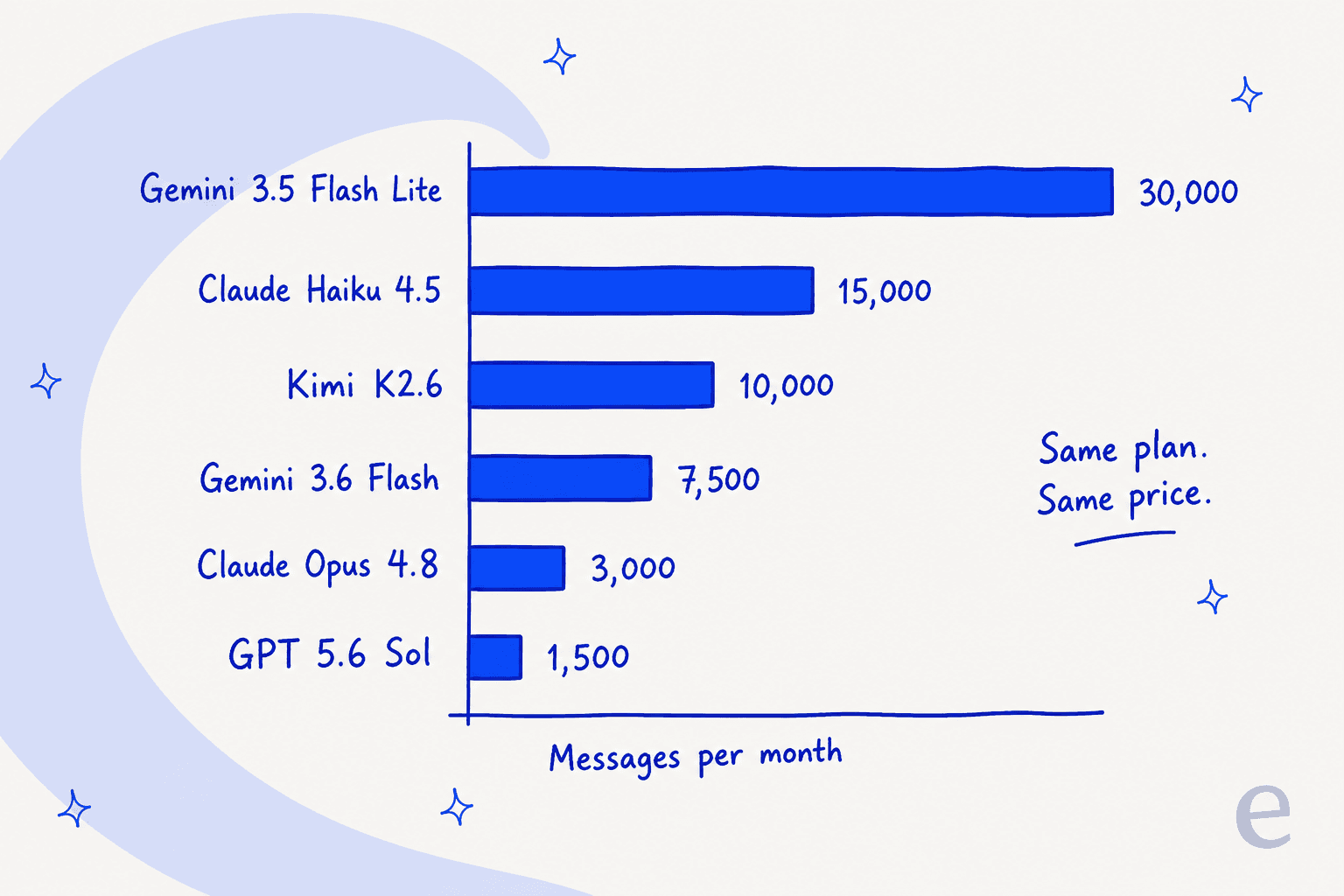
Divide 30M by each message count and you recover the implied rates the docs never published: about 1,000 credits per message at the bottom, 20,000 at the top. Which puts a 20x range on what one plan buys, set entirely by a dropdown.
Plug your own numbers in below. The Professional column is verbatim from YourGPT's calculator; Essential and Advanced scale it by their published credit allowances (10M and 100M against Professional's 30M).
What a YourGPT plan buys, by model
Pick a plan. The cost per message is the plan price divided by the messages that plan buys on that model.
| Model | Messages / mo | Cost / message |
|---|---|---|
| GPT 5.6 Sol | 500 | $0.078 |
| Claude Opus 4.8 | 1,000 | $0.039 |
| Claude Sonnet 4.6 | 1,667 | $0.023 |
| Gemini 3.1 Pro Preview | 2,500 | $0.016 |
| Kimi K2.6 | 3,333 | $0.012 |
| Claude Haiku 4.5 | 5,000 | $0.0078 |
| GPT 5.6 Luna | 5,000 | $0.0078 |
| Gemini 3.5 Flash Lite | 10,000 | $0.0039 |
| Model | Messages / mo | Cost / message |
|---|---|---|
| GPT 5.6 Sol | 1,500 | $0.053 |
| Claude Opus 4.8 | 3,000 | $0.026 |
| Claude Sonnet 4.6 | 5,000 | $0.016 |
| Gemini 3.1 Pro Preview | 7,500 | $0.011 |
| Kimi K2.6 | 10,000 | $0.0079 |
| Claude Haiku 4.5 | 15,000 | $0.0053 |
| GPT 5.6 Luna | 15,000 | $0.0053 |
| Gemini 3.5 Flash Lite | 30,000 | $0.0026 |
| Model | Messages / mo | Cost / message |
|---|---|---|
| GPT 5.6 Sol | 5,000 | $0.070 |
| Claude Opus 4.8 | 10,000 | $0.035 |
| Claude Sonnet 4.6 | 16,667 | $0.021 |
| Gemini 3.1 Pro Preview | 25,000 | $0.014 |
| Kimi K2.6 | 33,333 | $0.010 |
| Claude Haiku 4.5 | 50,000 | $0.0070 |
| GPT 5.6 Luna | 50,000 | $0.0070 |
| Gemini 3.5 Flash Lite | 100,000 | $0.0035 |
Prices are YourGPT's annual-billing rates. Message counts on Professional are taken directly from YourGPT's AI credits calculator; Essential and Advanced are the same figures scaled by their published credit allowances. Real burn also varies with persona length, knowledge base size, translation, and function calls, so treat every row as a ceiling rather than a forecast.
The ladder bends the wrong way
One more piece of arithmetic before we get to the alternatives, because it changes which tier you should buy.
Divide each plan's annual price by its credit allowance and you get the true unit rate. Essential is $39 for 10M credits, so $3.90 per million. Professional is $79 for 30M, so $2.63. Advanced is $349 for 100M, so $3.49.
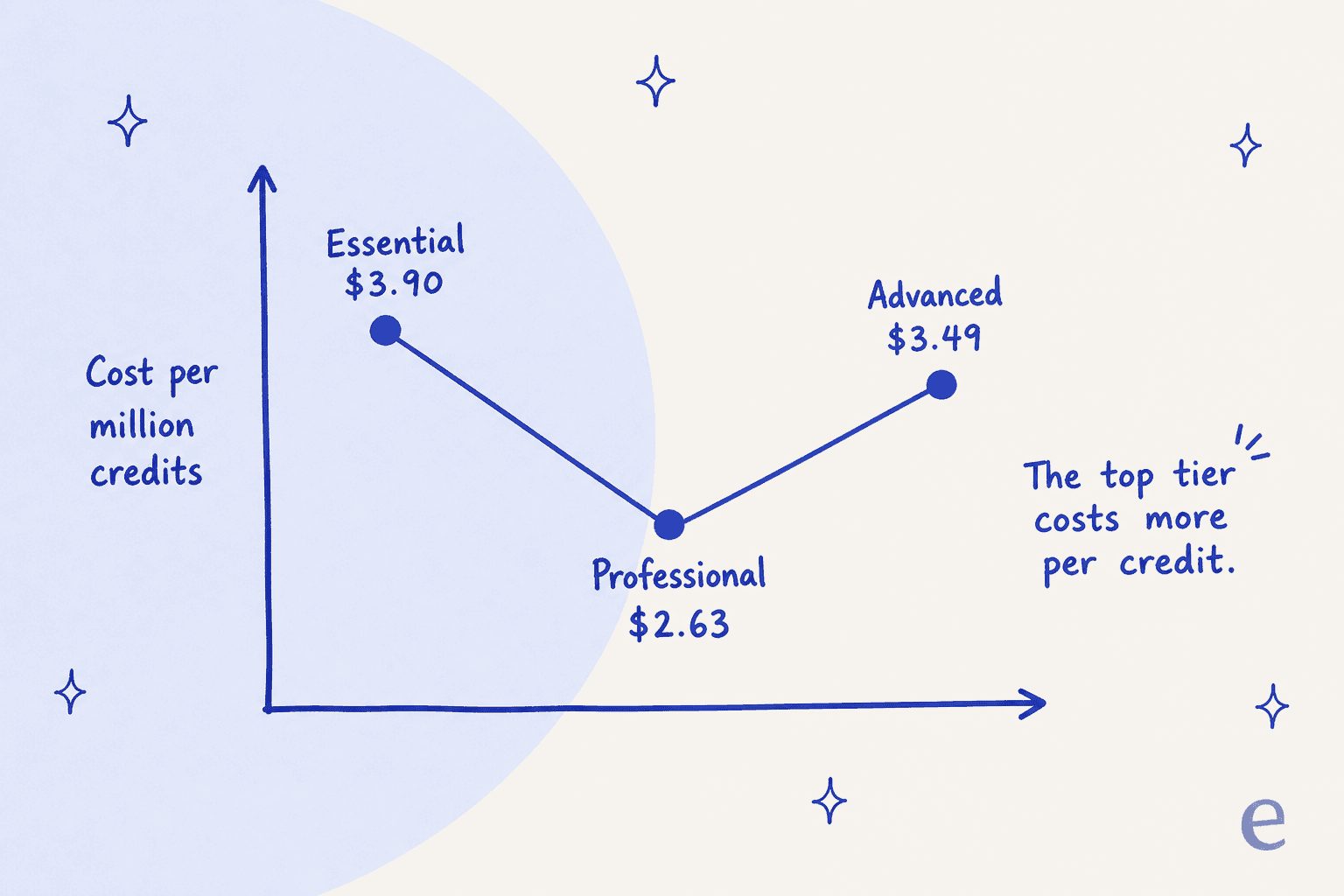
The discount curve goes the wrong way at the top. Advanced costs 33% more per credit than Professional, because you pay 4.4x the price for 3.3x the credits. Essential is worse still, at $3.90 against the platform's own stated $3.50 baseline for a million credits.
Two practical reads. If you are on Essential, moving to Professional is the single best-value move available on the price card. And if you are being sold Advanced for the volume, the volume is not what you are paying for. It is the 20 seats, the custom domain, and removal of the "Powered by YourGPT" badge, which is genuinely a $349-tier feature here where several competitors sell white-label branding as a $35 add-on.
It is not just me reading it this way
The credit question shows up in YourGPT's own reviews, in a product people otherwise rate highly. It holds a 4.7 out of 5 across 22 G2 reviews, with "Ease of Use" as the top-tagged strength and "AI Limitations," "Learning Curve" and "Cost" among the tagged weaknesses. G2's own review summary puts it plainly: some users note the pricing may be high for small businesses.
The two most on-point reviews say it better than a summary can. One is titled "Accelerate the sale, customizable, but challenges with credits":
"We are currently having some difficulties with the issue that we cannot quite understand or it is not entirely clear how the credits are being used. We need a lot of credits, even though we have very little sales."

The other is titled "Powerful Features and Clean UI, But Pricing Could Be Friendlier for Small Businesses":
"the pricing is a little high for some plans for small business who still need some pro features, since they dont use that many AI credits, twilo or studio would be good on the starter plan."
Both are five- and four-star reviews. Neither reviewer is complaining about the answers. They are complaining that the meter is hard to see, which is the specific failure this whole post is organised around.
The other reason people leave: where the connectors stop
Worth flagging separately, because it catches teams who already run a helpdesk. YourGPT's homepage shows integration chips for Zendesk and Salesforce, and it does have a real functions system that can call any API you point it at. But the docs list exactly two native helpdesk connectors: Crisp and Intercom.
If you run Zendesk, Freshdesk, Gorgias, Help Scout or Front, you are building and maintaining that bridge yourself as an API function. That is fine if you have an engineer. It is a real project if you do not, and it is the gap where a helpdesk-native AI helpdesk agent wins on setup time alone.
How I picked and compared these nine
Every tool below is a no-code platform you can point at your own content and put in front of customers, the same job YourGPT does. I skipped generic LLM wrappers with no support features and anything that only sells to enterprise procurement.
The dimensions I weighted, in order:
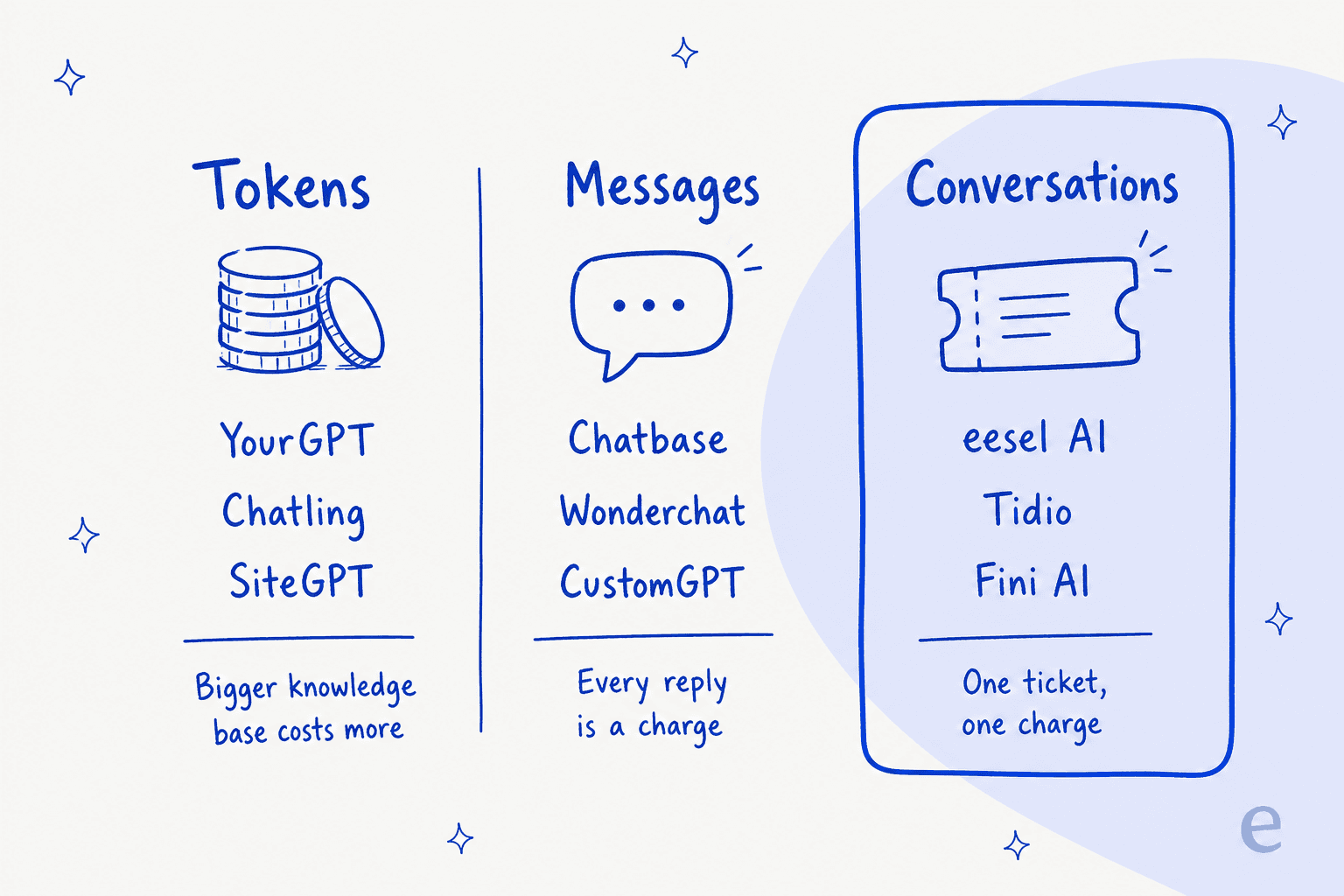
- What the meter actually counts. Tokens, messages, conversations, or resolutions. This is the number that decides your bill twelve months in, and it is the one buyers check last.
- Whether the rate card is published for the models on sale. A model-variable meter is not a problem. An unpublished one is.
- Whether context is free. Does adding fifty help articles, turning on a second language, or letting the agent call your order API raise the bill?
- Where it plugs in. Native helpdesk connectors versus a widget plus a DIY API bridge.
- Whether you can test before you ship. Simulation against your real history is the difference between a rollout and a gamble.
- The real floor. Free tier, trial length, and the plan where branding removal and API access actually unlock.
A note on the numbers: unless I say otherwise, every price is the vendor's annual-billing rate, because most of these pages load with the annual toggle already on and quote the discounted figure as the headline. Month-to-month is higher, sometimes by 60%.
The 9 best YourGPT alternatives in 2026, at a glance
| Tool | Best for | Billable unit | Entry price (annual) | Free tier | Model rate published? | Native helpdesk connectors | Simulation before launch | Branding removal at | G2 |
|---|---|---|---|---|---|---|---|---|---|
| eesel AI | Teams on a real helpdesk who want a fixed cost per ticket | Per ticket handled (1 credit) | From $299/mo for 500 credits, no platform fee | 100 free credits, no card | N/A, model cost absorbed | Zendesk, Freshdesk, Gorgias, Jira, Slack, Help Scout, Kustomer, Front | Yes, against past tickets | Included | 4.6 (19) |
| Tidio | Small ecommerce teams wanting live chat plus AI in one | Per Lyro conversation | $24.17/mo Starter; Lyro $0.50/conv | Yes, 50 Lyro convs one-off | N/A, flat per conversation | Sold standalone onto Zendesk, Salesforce | Premium tier only | Paid plans | 4.6 (1,959) |
| Chatbase | Buyers who want one flat rate per message | Per message credit | $40/mo Hobby | Yes, 50 credits | N/A, model-agnostic credit | Zendesk and more, from Standard | No | Enterprise | 4.8 (24) |
| Botpress | Builders who want full flow control | Conversations plus AI spend | $150/mo Plus | Yes, 100 convs, 3 seats | Yes, in dollars ($0.10/conv) | Via custom integrations | No | Plus | 4.5 (486) |
| Chatling | YourGPT's exact meter, printed on the price page | Per AI message credit | $32/mo Standard | Yes, 100 credits | Yes, all 34 models | Widget plus integrations | No | Plus, or $35/mo add-on | 4.7 (71) |
| SiteGPT | Docs-heavy sites wanting a visible model split | Per message, model-weighted | $39/mo Starter | No, 14-day trial | Yes, on the plan card | Zendesk, Freshdesk, Crisp | No | Higher tiers | 4.8 (12) |
| CustomGPT.ai | RAG-first teams with huge document sets | Per query | $89/mo Standard | No, 7-day trial | Enterprise-only model selector | API-first | No | Premium | 4.0 (thin) |
| Wonderchat | Teams wanting voice plus chat in one credit pool | Per message credit | $124/mo Basic | Yes, 20 credits | No | Zendesk, Freshdesk, from Scale | Sandbox testing | Paid plans | 4.9 (23) |
| Fini AI | Enterprise volume where only resolutions bill | Per resolution | $3,000/mo Growth | No | N/A, per resolution | Enterprise integrations | Nightly knowledge scan | Included | 4.9 (13) |
Three meters, nine tools. Which lane you pick matters more than which logo you pick.
1. eesel AI
Best for: teams already running a helpdesk who want one predictable charge per ticket and no penalty for feeding the agent more context.
I build eesel, so read this section with that in mind and check every number against the pricing page. I am including it first because it is the clearest structural answer to the problem the rest of this post is about, not because it wins every column in the table above. It does not.
How it works
eesel sells AI teammates rather than a builder canvas. You connect the tools you already use, and every integration is assembled from the same three parts: sources it can read, triggers that wake it up, and actions it can take. Sources are not walled off per integration, so one agent with Zendesk, Confluence and your website connected searches all three at once for a single reply.
The part that matters against YourGPT is what it learns from. Most bot builders train on your help center. eesel trains on your solved tickets as well, which is where the answers your help center never wrote down actually live. On top of that sit twelve out-of-the-box Skills, including Simulation, which replays the agent against your real ticket history before it ever touches a customer, and Update knowledge base, which finds the questions your help center does not answer and drafts the missing articles.
What it costs
A fixed monthly price, from $299/month for 500 credits, where 1 credit is one ticket or helpdesk conversation handled. The definition is the whole point: "Each task covers the entire interaction, one ticket or chat session equals one credit, no matter how many messages go back and forth." No platform fee and no per-seat fee, and every integration and channel is included. Questions asked in the eesel dashboard are mostly free. SSO and MFA are add-ons from $199/mo, and HIPAA is available on request.
| Tickets per month | Monthly plan |
|---|---|
| 100 | Free plan (100 credits) |
| 500 | $299 |
| 1,000 | $499 |
| 2,500 | $999 |
| 5,000 | $1,899 |
You start with 100 free credits, no credit card. If you run out, agents pause until credits reset, or you can turn on overage with a monthly cap you set ($0.80 per extra credit). Partial rollout is easy: route 200 of your 1,000 monthly tickets to the AI and the 500-credit plan covers it.
Where it stops
It bills per task handled, not per resolution, and the page says so directly: tasks are billed regardless of outcome because the compute runs either way. If you want the vendor to carry the deflection risk, Fini AI below is the honest comparison, and you will pay a lot more for that transfer.
It is also not the tool for a marketing site that wants a lead-capture bot and nothing else. There is no drag-and-drop flow canvas here, so if you want to hand-author conversational branches, Botpress is a better fit. And its G2 footprint (4.6 across 19 reviews) is thinner than Chatbase's or Tidio's, which is a fair thing to weigh.
Our take
Pick eesel if your support already lives in Zendesk, Freshdesk, Gorgias, Jira or Slack and your worry is the invoice moving under you. The structural difference from YourGPT is one sentence: a bigger knowledge base and a longer conversation cost eesel money, not you. Gridwise reported 73% of tier-1 requests resolved in the first month, and Smava runs over 100,000 tickets a month through it entirely in German, so multilingual volume is not the edge case here. Skip it if you want a visual flow builder, or if you want to pay only for outcomes.
2. Tidio
Best for: small ecommerce and SMB teams who want live chat, ticketing and an AI agent from one vendor at a low entry price.
How it works
Tidio is a full live chat and ticketing platform with Lyro, its AI agent, sold either inside the platform or standalone to bolt onto Zendesk, Salesforce or any other helpdesk. That standalone option is the underrated part: it is one of the few tools here that will happily sit on top of a helpdesk you already like.
Lyro trains on your knowledge base and hands off to a human with context. The Premium tier adds a guaranteed 50% resolution rate with money back if it misses, plus pay-per-resolution billing instead of pay-per-conversation.
What it costs
Starter is $24.17/mo annual for 100 billable conversations, Growth is $49.17/mo from 250, and Plus is $300/mo. Lyro is metered separately at $0.50 per AI conversation, the rate printed on the Lyro page. Worth checking the small print: the Lyro add-on starts around $32.50/mo for a bundle beginning at 50 conversations, which works out to 65c each, so the headline 50c is a volume rate rather than the price at the bottom of the ladder. Every account gets 50 free Lyro conversations.
The unit definition is clean, and it is the direct opposite of YourGPT's: one customer interaction with at least one AI reply is one conversation, no matter how many AI replies follow or whether the customer leaves and comes back.
Where it stops
Two meters running side by side (billable conversations for humans, Lyro conversations for AI) means two things to forecast rather than one. Simulation against your own history is a Premium feature, and Premium has no public price. And at 50c a conversation, Lyro costs more per conversation than eesel's bigger plans (about $0.40 a ticket on the 2,500-credit plan), which is a real gap once you are past a few thousand conversations a month.
Our take
Tidio is the best answer if you want one vendor for chat, tickets and AI, and the lowest entry price on this list gets you started for under $25 a month. Its 4.6 across 1,959 G2 reviews is by far the deepest review body in this roundup, which counts for something. Pick it for SMB ecommerce; skip it if you already have a helpdesk you are keeping, in which case you are paying for a live chat product you will not use. Our Lyro alternatives piece goes deeper on the resolution guarantee.
3. Chatbase
Best for: buyers who want the model question taken off the table entirely.
How it works
Chatbase is the closest thing to a like-for-like YourGPT swap in feel: point it at your website, docs and files, get an agent, embed it. Standard and above add a helpdesk module, voice, telephony, outbound campaigns, API access, auto-retraining and integrations including Zendesk and Stripe. Pro adds tickets as a knowledge source, which is the feature I would actually cross tiers for.
What it costs
Free gives 50 message credits a month. Hobby is $40/mo for 700 credits, Standard $150/mo for 4,000, Pro $500/mo for 15,000. Overage credits are $40 per 1,000 and do not expire. Extra agents are $25 each per month.
The important bit is what a credit is: one message, flat, regardless of model. Chatbase mentions "advanced models" as a tier feature but does not vary your credit burn by which one you pick. That makes forecasting trivial. Hobby is 5.7c a message, Standard 3.8c, Pro 3.3c.
Where it stops
That flat rate cuts both ways. Compare it to the YourGPT calculator: on a cheap model YourGPT gets you to 0.26c a message and Chatbase cannot go below 3.3c. So Chatbase is nearly 13x more expensive per message than a cost-tuned YourGPT setup. Even against YourGPT's priciest model on the same plan, 5.3c a message, Chatbase's 3.3c is cheaper. You are paying a premium for predictability at the bottom of the range, and getting a discount at the top of it.
There is also no simulation against your own history, agents on the free plan are deleted after 14 days of inactivity, and branding removal, SSO and zero data retention are all Enterprise-gated.
Our take
Chatbase is the right call when the thing you cannot tolerate is a surprise, and it is the cleanest rate card in this whole roundup. Buy it if your volume is modest and predictability is worth more than unit cost. Skip it above a few thousand conversations a month, where the flat per-message rate starts costing real money against a conversation-based meter. Full numbers in our Chatbase pricing breakdown and Chatbase alternatives roundup.
4. Botpress
Best for: teams with a developer who want to hand-author the conversation and still see the LLM bill in dollars.
How it works
Botpress is the builder's builder in this list: a real visual studio, granular flow control, an active Discord community and its own academy. Free includes three seats, three agents and a Help Center. Plus adds white-label webchat, a custom domain on the Help Center and live-chat support from Botpress engineers. Team adds unlimited seats, routing, RBAC, team analytics and real-time collaborative building.
What it costs
Free is 100 conversations with no top-ups. Plus is $150/mo annual for 250 conversations, with extra packs of 100 at $65. Team is $750/mo for 1,500 conversations, packs of 100 at $50.
Here is the design decision I genuinely admire: Botpress runs a second meter denominated in dollars. Every conversation includes $0.10 of LLM usage covered by Botpress, with $25 included on Plus and $150 on Team. Blow past it and you auto-recharge. It is the same underlying economics as YourGPT's credits, except you read the meter in dollars instead of decoding a multiplier.
Where it stops
The base rates are steep. Plus works out to $0.60 a conversation and Team to $0.50, which is above every conversation-priced tool here. And the overage ladder inverts: Plus top-up packs cost $0.65 a conversation, more than Team's included rate of $0.50, so a busy month on Plus is worse value than the tier above it.
There is no simulation against past tickets, and no native helpdesk connectors in the Chatbase or eesel sense; you build those.
Our take
Botpress is the pick when you need the agent to follow a specific script you control, and its 4.5 across 486 G2 reviews reflects a mature product with a real community. The dollar-denominated AI meter is the most honest version of YourGPT's model on this list. Skip it if nobody on your team wants to own a flow graph, and watch the Plus overage rate. Numbers in full in our Botpress pricing post, plus a wider Botpress alternatives comparison.
5. Chatling
Best for: anyone who likes YourGPT's model-variable pricing and just wants the rate card printed where they can see it.
How it works
Chatling is architecturally the closest cousin to YourGPT in this roundup: a no-code builder, a knowledge base you point at your content, 34 selectable models, AI actions, a visual flow builder, and channels for WhatsApp, Instagram, Messenger and Telegram from Standard up.
What it costs
Free is $0 with 100 AI credits. Standard is $32/mo annual ($40 monthly) with 3,000 credits. Plus is $112/mo annual ($140 monthly) with 15,000. Chats are unlimited on every plan, including Free, because only a generated AI reply burns a credit.
And this is why Chatling is on the list. It publishes the per-message credit cost for all 34 models, on the pricing page itself. Grok 4.1 Fast, DeepSeek V3.2, Mistral Small 4 and Gemini 2.5 Flash cost 0.5 credits a reply. Claude Haiku 4.5 and GPT-4.1 Mini cost 1. Claude Sonnet 4.6 and GPT-5.6 Luna cost 4. Claude Opus 4.8 costs 14. Claude Opus 5 and GPT-5.6 Sol cost 25.
Same meter as YourGPT, 50x spread instead of 20x, and every rate is on the page you were already reading. Standard's 3,000 credits buys 6,000 replies on Grok 4.1 Fast or 120 on Claude Opus 5, and you can work that out before you sign rather than after.
Where it stops
There are four separate monthly meters, not one: AI credits, email credits, voice-input minutes and resync credits (one resync credit equals 10,000 characters re-crawled). Branding removal is a $35/mo add-on on Standard, an 88% uplift on a $40 plan. And the Free plan's four models are the older OpenAI line, so nothing on the free tier touches a 2026 frontier model.
Our take
If you were happy with YourGPT's approach and only unhappy that you could not price it, Chatling is the swap. It holds 4.7 across 71 G2 reviews and 4.3 on Trustpilot. The catch is the same catch: a bigger knowledge base and a chattier customer still cost you more, because the unit is still an AI reply on a model-weighted rate. It fixes the transparency problem, not the structural one. Pick it for a marketing site or a lean website chatbot; skip it if you want the meter to stop moving.
6. SiteGPT
Best for: docs-heavy sites that want the model tradeoff stated as a message range on the plan card.
How it works
SiteGPT trains on your website, links and files, with a page defined precisely as 2,500 cleaned characters of source content, which is a refreshingly checkable unit. It connects to Zendesk, Freshdesk and Crisp, and Starter includes manual knowledge refresh with scheduled sync higher up.
What it costs
Starter is $39/mo effective on annual prepay ($59 month-to-month, $468/yr). Growth is $79/mo ($129 monthly, $948/yr). Scale is $259/mo ($429 monthly, $3,108/yr). Enterprise is quote-only.
SiteGPT's answer to the model problem is the most reader-friendly on this list. Starter's card reads: "Up to 4k GPT-4.1-mini messages or 400 GPT-4.1 messages per month, with any mix in between." A 10x range, stated on the card, with an on-page calculator to compute your exact split. Extra packs of 5,000 messages are $59/mo.
Where it stops
The page loads with the yearly toggle already on, so the $39/$79/$259 you see are prepay rates and the real month-to-month numbers are $59/$129/$429. The "Save 40%" badge is the best case (Scale); Starter's actual saving is 33.9%. Starter is one chatbot and one seat. And there is no simulation against your own ticket history.
Our take
SiteGPT is the pick for a documentation site or knowledge-heavy product where the source content is public and stable, and it is the best-executed version of "tell the buyer the model tradeoff up front." Its 4.8 across 12 G2 reviews is a thin but positive footprint. Skip it if your best answers live in solved tickets rather than published docs, which is the case for most support teams. More detail in our SiteGPT pricing analysis and SiteGPT alternatives comparison.
7. CustomGPT.ai
Best for: teams whose real problem is a very large document corpus rather than a support queue.
How it works
CustomGPT.ai is a retrieval-first platform, and its plan card reads like one. Standard gives 10 agents, 5,000 documents per agent, 60 million words of storage and 500 monthly image citations through AI Vision. Premium triples most of that and adds auto-sync of website content plus white-labelling. There is a RAG API on every tier.
What it costs
Standard is $89/mo annual ($99 monthly), Premium $449/mo annual ($499 monthly), Enterprise quote-only.
The unit is a query: one user question answered. Standard is 1,000 queries for $89, so 8.9c. Premium is 5,000 for $449, so 9c. The per-query rate is effectively flat between paid tiers, which means Premium buys headroom on agents, storage and seats rather than a cheaper query. A five-turn conversation burns five queries.
Where it stops
Four meters run at once: queries, words stored, documents processed, and image citations. Hit a limit and the system stops responding to queries or stops indexing rather than billing overage automatically. The extra-queries add-on is 15c a query against an in-plan rate of about 10c, so topping up costs 50% more than the tier you already bought, and CustomGPT's refund policy explicitly excludes overage charges.
The one that matters most for a support buyer: the AI model selector is Enterprise-only. On Standard and Premium you do not choose the model at all.
Our take
CustomGPT is a strong document-answering engine and a weak support platform, and the plan card is honest about which one it is. Pick it if you have a 300-million-word corpus and want a knowledge base chatbot with a real RAG API. Skip it for frontline support, where 9c a query on multi-turn conversations adds up fast and there is no helpdesk to plug into. Its G2 footprint is around 4.0 with very few reviews, so weigh that. More in our CustomGPT reviews writeup.
8. Wonderchat
Best for: teams who want chat, voice and a website AI search bar out of one credit pool.
How it works
Wonderchat's feature list is the broadest here for the money: chat history and support tickets as knowledge sources, scheduled sync, a voice agent, smart navigation, an AI search bar, sandbox testing, and integrations spanning Zendesk, Freshdesk, HubSpot, Salesforce, Shopify, SharePoint, Teams and Calendly. Helpdesk escalation and the voice agent land on the $417 tier.
What it costs
Free is $0 with 20 message credits. Basic is $124/mo billed yearly with 5,000 credits and 1,000 web pages per agent. The $417/mo tier gives 2,500 pages per agent and adds advanced analytics, voice and helpdesk integrations. Enterprise starts from $1,499 and adds SOC 2, HIPAA, SSO, SMS and phone agents.
Basic works out to 2.48c a credit. Extra credits are $29.99 for 1,000, so 3c, about 21% above the plan rate.
Where it stops
The pricing page contradicts itself on the $417 tier, and it is not a rounding error. The plan card calls it Scale with 25,000 credits. The comparison table below calls the same tier Turbo with 15,000. Two names, a 10,000-credit gap, one page. That is a $417/mo decision you cannot make from the page alone, and I would get it in writing before signing.
The page also loads on the yearly toggle with a "Save 17%" badge, so $124 and $417 are prepay rates. Basic's $124 entry is the third-highest floor here, behind Fini's $3,000 and Botpress Plus at $150.
Our take
Wonderchat has the best breadth-per-dollar in this roundup and a 4.9 across 23 G2 reviews with 95% five-star, which is a strong signal from a small sample. Pick it if you specifically want voice and chat under one meter. Skip it if you need the $417 tier, at least until the credit count is confirmed, and price the Wonderchat pricing tiers carefully first. Our Wonderchat alternatives piece has the full tier-by-tier read.
9. Fini AI
Best for: enterprise support orgs who want the vendor to carry the deflection risk.
How it works
Fini is the upmarket end of this list and it is priced accordingly. Growth includes the whole platform, implementation, Voice AI, shared customer success and priority email support. Scale adds white-glove onboarding, a dedicated AI engineer, a nightly Knowledge Atlas scan of your content, a Slack agent, SSO and multi-language support.
What it costs
Growth is $3,000/mo billed annually ($3,600 month-to-month) for 2,000 resolved tickets, with overage at $0.89 per resolution or $0.69 per conversation. Scale is $7,500/mo annually ($9,000 monthly) for 8,000 resolutions plus 500 answered voice calls, with overage at $0.69 per resolution or $0.49 per conversation.
The unit definition is the most buyer-friendly on this page, and Fini states it plainly: you pay only when Fini fully solves the issue with no human involved, and escalations to your team are free. No per-seat fees, and the human support team is never billed.
Where it stops
The floor. $3,000/mo annually is 94x Chatling's $32 Standard plan, and about 10x the $299/mo that 500 tickets a month costs on eesel. There is no free tier and no self-serve trial. At Growth's included allowance the blended rate is $1.50 per resolution, well above the $0.89 overage that follows it, so you only reach the advertised economics if you actually use the full allowance. Under 2,000 resolutions a month, this is the most expensive option here by a wide margin.
The pricing page also loads on the Yearly view, so $3,000 and $7,500 are annual-commit rates while the page's own structured data publishes $3,600 and $9,000 as canonical.
Our take
Fini is the right answer for a support org doing thousands of resolutions a month that wants the vendor exposed to whether the AI actually works. Its 4.9 across 13 G2 reviews is the best-rated small sample here. Skip it entirely below about 2,000 monthly resolutions, where you are paying a large minimum for an allowance you will not touch. Our Fini AI pricing breakdown covers the overage arithmetic, and Fini AI alternatives covers the wider field.
How to pick, in one pass
Skip the feature grids for a minute and answer three questions. They will narrow nine tools to one or two faster than any comparison table.
Do you already have a helpdesk you are keeping? If yes, you want something that lives inside it, because the connector gap is where projects die. eesel, Tidio's standalone Lyro, Wonderchat's Scale tier and SiteGPT all connect to real helpdesks. YourGPT's native helpdesk connectors stop at Crisp and Intercom, so anything else is an API function you build and maintain. If no, and you are putting a widget on a marketing site, Chatling and Chatbase are the cheapest good options.
Will your knowledge base and conversation length grow? This is the question almost nobody asks at signing, and it is the one that decides your bill in year two. On a token meter (YourGPT, Chatling, SiteGPT) every improvement you make raises the burn rate, so growth in content quality shows up as cost. On a conversation meter (eesel, Tidio, Fini) it does not. If your plan for the next twelve months involves writing more docs, adding a second language, or letting the agent call your order API, the conversation lane is the one that stays quiet.
How much volume do you actually have? Under a few hundred conversations a month, Chatling at $32 or Tidio at $24.17 are hard to beat and predictability matters more than unit economics. Between a few hundred and a few thousand, a per-conversation rate wins: eesel at about $0.60 a ticket on the 500-credit plan (less on bigger plans) or Lyro at $0.50 against Chatbase's 3.3c to 5.7c per message, which stops being cheap once conversations run five turns. Above a few thousand resolutions a month, Fini's model starts making sense because the minimum stops being a minimum.
One last thing, and it is the one I would not compromise on. Before any of these goes live, you should be able to run it against your own historical tickets and see what it would have said. Simulation is the difference between a rollout and a coin flip, it is how you catch hallucinations before a customer does, and on most of this list it either does not exist or sits behind the top tier.
Try eesel
If you came here because YourGPT's credit meter is hard to forecast, the thing worth trying is a tool where the meter has one number in it. eesel charges 1 credit per ticket handled, with plans from $299/month for 500 credits, and the ticket is the unit no matter how many replies it takes, how big your help center gets, or which language the customer writes in. Feeding the agent more context is our cost, not yours.
Two things make it worth the twenty minutes. It trains on your solved tickets, not just your published help center, so it answers the questions nobody got around to documenting. And it runs a simulation against your real ticket history before it talks to a single customer, so you see the resolution rate you would actually get instead of a number on a pricing page.
Connect Zendesk, Freshdesk, Gorgias, Jira or Slack, and you get 100 free credits with no credit card, which is 100 real tickets to judge it on. Try eesel.
Frequently Asked Questions
What are the best YourGPT alternatives in 2026?
How much does YourGPT cost per month?
What is an AI credit in YourGPT, and how many do I get?
Is there a free YourGPT alternative for a small website?
Which YourGPT alternative is best if I already use Zendesk or Freshdesk?


Article by
Kurnia Kharisma
Kurnia is a software engineer and writer at eesel AI with two years of SEO experience, writing about AI tools, helpdesk software, and customer support. He pairs a developer's understanding of how these products are built with search-driven research into what actually ranks and resonates with the people searching for them.