The 8 best Workhub alternatives in 2026

Riellvriany Indriawan

Katelin Teen
Last edited August 29, 2026

Why people are looking for a Workhub alternative
I work a support queue every day, so my first question about any AI support tool is boring but decisive: does it fit the way my team already works, and can I predict what it costs? Workhub is where those two questions get interesting.
First, a heads-up that trips people up. If you remember Workhub as an "umbrella of workplace apps", Tasks, Connect, Scheduling, an eStore, recognition, a knowledge base, that framing is out of date. As of this writing the homepage is built entirely around WorkBot, described in their own words as "a no-code AI chatbot software platform that powers customer service automation across live chat, voice, and email." The old help desk product, WorkHub Tasks, no longer has a live page. So a "Workhub alternative" in 2026 really means "a WorkBot alternative", an AI support chatbot alternative.
WorkBot itself is a reasonable product. It builds no-code agents in minutes, handles chat and voice, speaks 50+ languages, and claims 1,000+ companies use it. Fair credit where it's due. Here's where it stops fitting a support team.
It's a standalone chatbot, not a helpdesk teammate
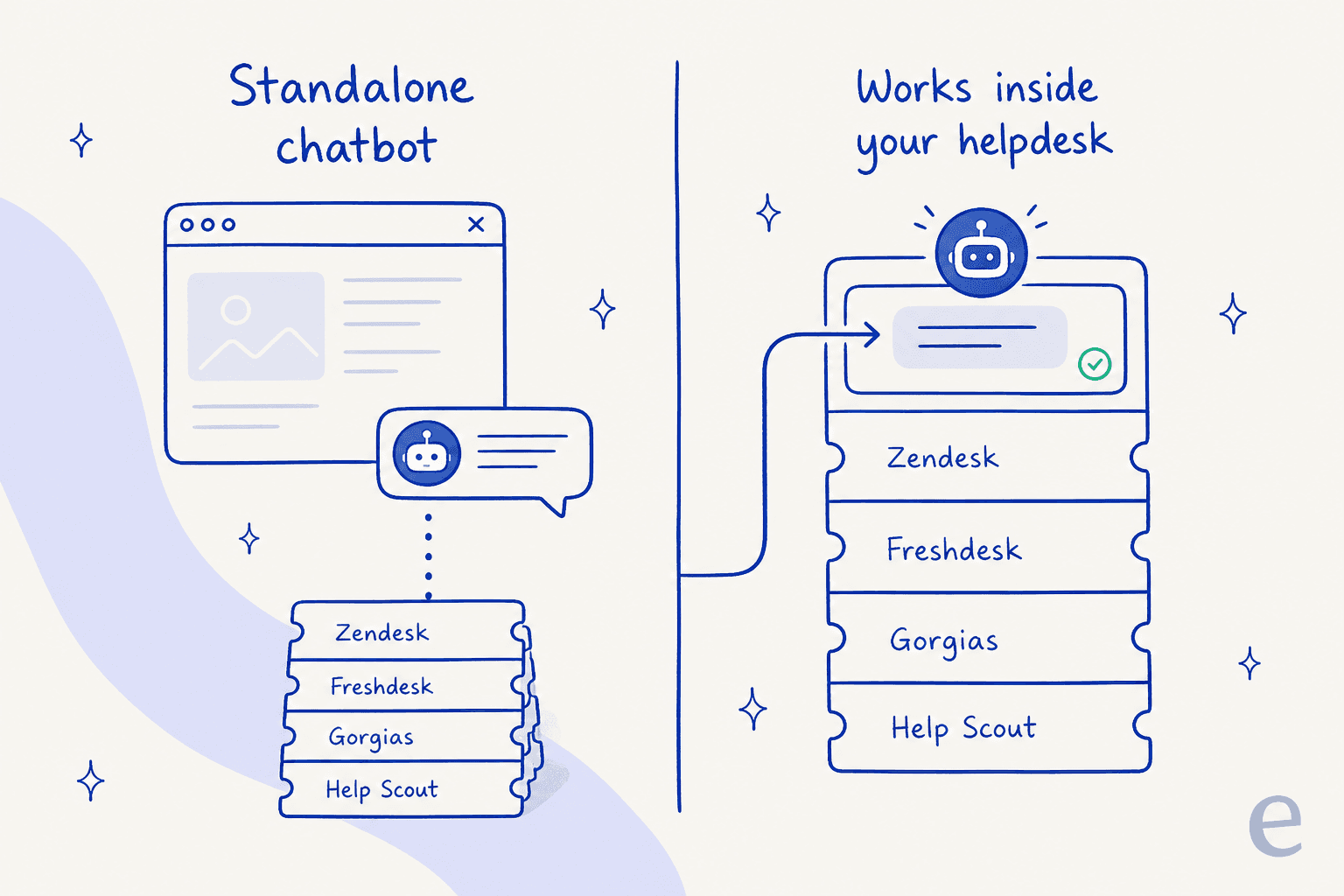
WorkBot is a bot you embed on your website and connect to a few data sources. It escalates to a human "with full context preserved", but it is not sitting inside the ticket queue your agents live in all day. If you already run Zendesk, Freshdesk, or Gorgias, you'd be bolting a second, separate tool on top of your support stack rather than automating the queue you have.
That distinction matters more than it sounds. A separate widget answers the website visitor, but your agents still triage, tag, and reply inside a different tool. An AI that joins your existing helpdesk instead answers in the same place your team already works, so the humans and the AI share one queue, one set of macros, and one history.
Token billing is hard to forecast
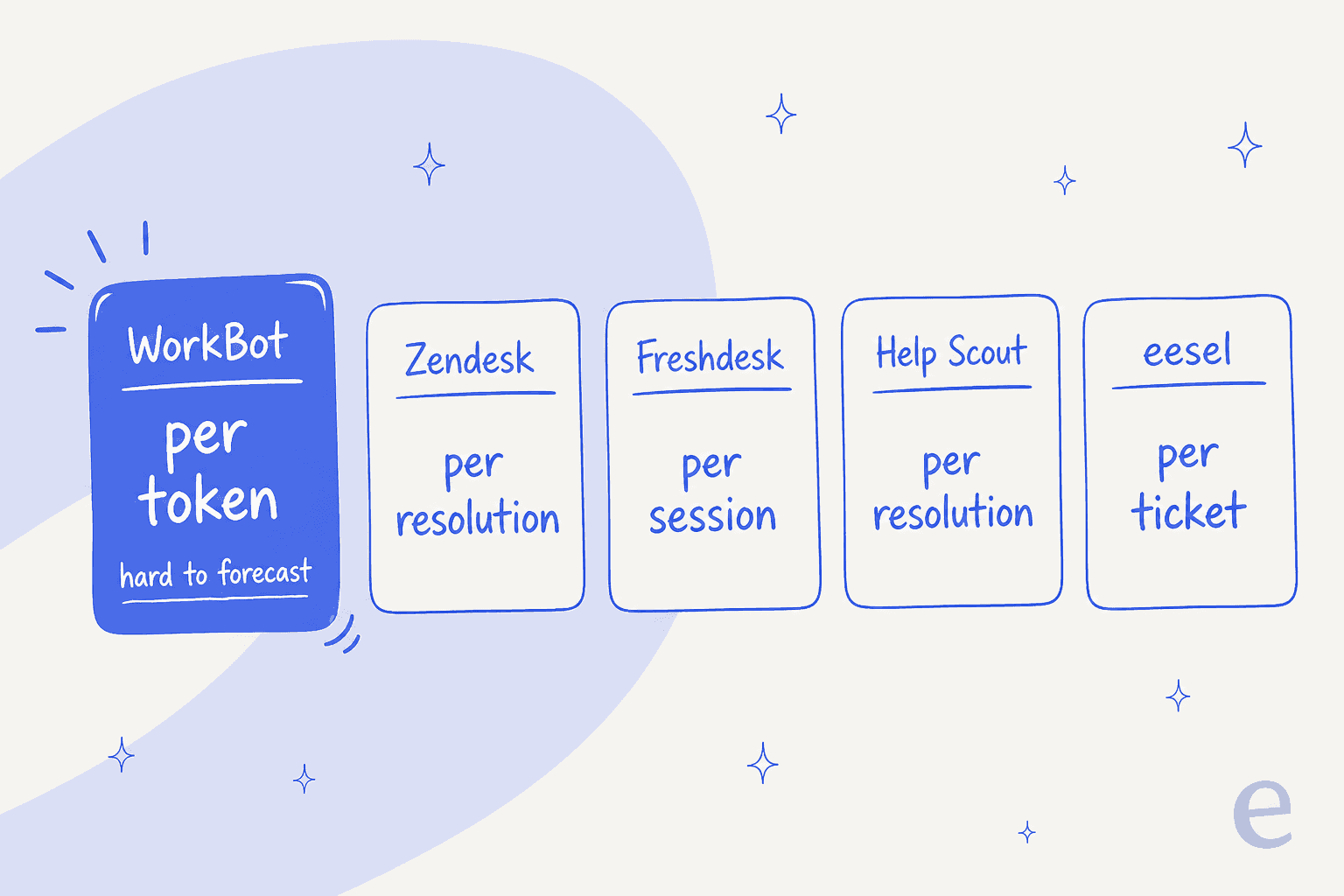
This is the one I'd flag hardest. WorkBot bills by tokens, not per ticket or per resolution. The Free plan includes 500,000 tokens a month, Pro ($100/month) includes 1,000,000, and extra tokens cost $5 per 50,000. Workhub defines a token as "roughly 3-4 characters of text", so the word "hello" is about one token.
The problem isn't the price, it's the unit. A support manager thinks in tickets: "we get 2,000 a month, we want AI to handle half." Nobody thinks in tokens. Every answer, every retrieval, every training pass eats a variable number of them, so you can't easily map your ticket volume to a monthly bill until the invoices start landing. Most support-native tools have moved to per-resolution or per-ticket pricing precisely because it maps to how teams plan.
The proof is thin, and there's no dry run
Workhub's headline numbers, up to 75% cost reduction, 60-70% of tickets resolved instantly, are all vendor self-reported, and the testimonials are attributed to generic titles ("Head of CX, Global E-commerce Giant") rather than named companies. That's normal marketing, but it means you're taking the results on faith.
More practically, there's no way to test WorkBot against your own historical tickets before it goes live. You get a voice "test call", but not a full dry run over the questions your customers actually ask. Having watched a confident-sounding bot quietly give wrong answers, this is the feature I'd never skip. The ability to simulate on real ticket history is what tells you whether an AI will help or embarrass you.
None of this makes WorkBot a bad tool. It makes it a specific tool: a fast, no-code website chatbot for SMBs. If that's you, great. If you're a support team that already runs a helpdesk and needs predictable costs and a safe rollout, here's where I'd look instead.
How I picked these alternatives
I weighted four things a support team actually feels, in this order:
- Fit with your existing helpdesk. Does it live in the queue you already run, or is it another separate tool?
- Predictable pricing. Can you map your ticket volume to a bill before you sign?
- Safe rollout. Can you test it on your own data before it touches a customer?
- Real depth. Reporting, integrations, multichannel, and security that hold up past the demo.
Here's the shortlist at a glance, then the detail on each.
| Tool | Best for | Starting price | How AI is billed | Lives in your existing helpdesk? |
|---|---|---|---|---|
| eesel AI | Automating the helpdesk you already run | From $299/mo (500 credits), 100 free credits | 1 credit per ticket or chat | Yes, plugs into Zendesk, Freshdesk, Gorgias, Help Scout |
| Workhub (WorkBot) | No-code website chatbot for SMBs | Free / $100 per month Pro | Per token ($5 / 50K overage) | No, standalone widget |
| Zendesk | Enterprise support at scale | $19/agent/mo (Suite Team $55 for AI) | Per resolution ($1.50-$2.00) | It is a helpdesk |
| Freshdesk | Multichannel helpdesk on a budget | $19/agent/mo | Per session ($0.49) | It is a helpdesk |
| Zoho Desk | Cheapest all-in-one suite | Free / $7 Express | Native bot on Enterprise ($40) | It is a helpdesk |
| Gorgias | Ecommerce and Shopify stores | $40/mo | Per interaction ($0.90-$1.50) | It is a helpdesk |
| Help Scout | Simple, human email support | Free / $25/user/mo | Per resolution ($0.75) | It is a helpdesk |
| Front | Shared-inbox and omnichannel teams | $25/seat/mo | Autopilot from $0.05/conversation | It is a helpdesk |
| HubSpot Service Hub | Teams already on HubSpot CRM | Free / $7 Starter | Per resolution ($0.50) | It is a helpdesk |
The 8 best Workhub alternatives in 2026
1. eesel AI

Best for: teams that already run a helpdesk and want AI in that queue, not a second tool bolted on.
If the two things that push you off Workhub are "it's separate" and "the pricing is hard to predict", eesel AI is the direct answer to both. It's an AI teammate platform: instead of buying a standalone bot, you hire a ready-to-work AI helpdesk teammate that joins the helpdesk you already use, looks up orders and records, tags tickets, and drafts or sends replies right there.
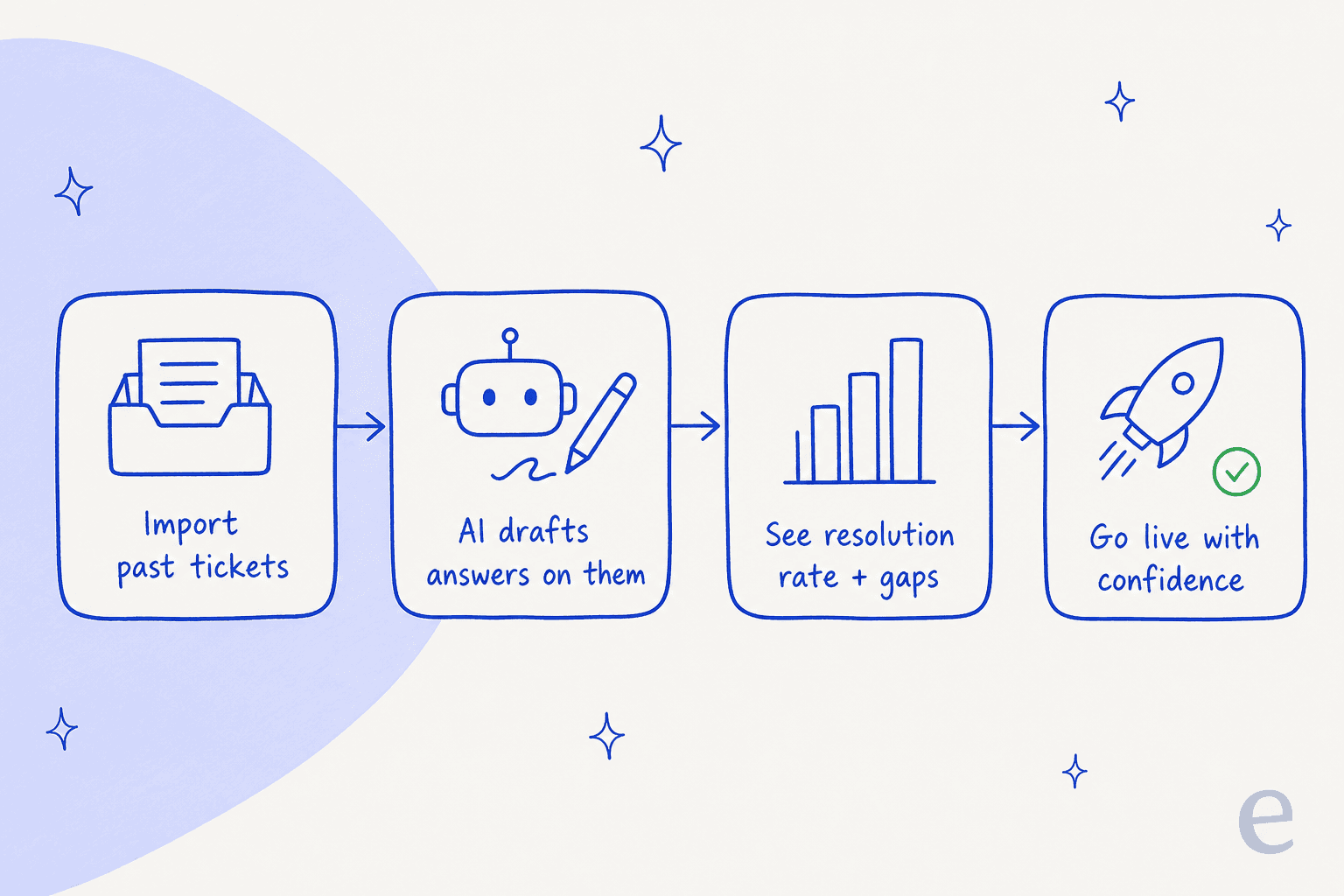
The rollout is the part I'd sell hardest to anyone who's been burned by a chatbot. eesel lets you simulate the AI on thousands of your past tickets before it answers a single live customer, so you see the resolution rate and the gaps up front instead of finding out in production.
On price, eesel is one fixed monthly price sized to your volume, with no per-seat fee and no platform fee, and you start with 100 free credits and no credit card. Crucially, the unit is a ticket or chat (one credit), not a token, so 1,000 tickets a month is a predictable $499, and only tickets the agent actually works on count.
- Pros: works inside Zendesk, Freshdesk, Gorgias, Help Scout and more; simulate on past tickets before go-live; fixed monthly pricing with one credit per ticket or chat; live in minutes, self-serve.
- Cons: it's an AI layer on top of a helpdesk, so if you don't have a helpdesk yet, you'll want one of the full platforms below too; HIPAA is talk-to-us and SSO is a paid add-on.
- Pricing: 100 free credits, then Teammate plans from $299/month for 500 credits (1,000 for $499, 2,500 for $999, 5,000 for $1,899). 1 credit = 1 ticket or chat. SSO and MFA add-on from $199/month.
Our take: if you already run a helpdesk, this is the closest thing to "fix the WorkBot problems and keep everything else." The simulation and the one-credit-per-ticket pricing are the two features I'd refuse to give up.
2. Zendesk
Best for: larger support orgs that want the most mature AI-agent platform and the deepest app ecosystem.
If you'd rather replace WorkBot with a full-blown helpdesk, Zendesk is the heavyweight. Its AI agents are the most battle-tested on this list, the integration marketplace is enormous, and its AI billing is refreshingly transparent: you pay per automated resolution, $1.50 committed or $2.00 pay-as-you-go, the same across every published tier.
The catch is cost creep. Support Team starts at $19/agent/month, but the first tier with AI agents is Suite Team at $55, and the assistive "Copilot" features are a separate $50/agent/month add-on on Professional and up. It adds up quickly for a bigger team.
- Pros: most mature AI-agent platform; transparent per-resolution pricing; huge integration ecosystem.
- Cons: real AI features push you up the tiers; Copilot is a costly add-on; anything above Suite Professional is quote-only.
- Pricing: from $19/agent/mo; Suite Team $55; AI resolutions $1.50-$2.00 each.
Our take: the safe enterprise choice if you're buying a helpdesk, not just an AI layer. Read the AI alternatives to Zendesk if the price ladder gives you pause, and note that eesel can sit on top of Zendesk rather than replace it.
3. Freshdesk
Best for: teams that want a mature multichannel helpdesk without Zendesk's price tag.
Freshdesk is the value all-rounder. The Growth plan is $19/agent/month, the multichannel support is solid, and new accounts get a one-time 500 free Freddy AI sessions to try the bot. It's an easy tool to like.
Watch the AI billing unit, though. Freddy AI Agent is billed per session at $49 per 100 sessions ($0.49 each), and a "session" is all the interactions with one end user in a 24-hour window, which means you pay for the attempt whether or not the bot actually solves it. The old free helpdesk plan is also gone; the only on-ramp now is a trial.
- Pros: low $19 entry; mature multichannel helpdesk; generous one-time 500-session AI trial.
- Cons: AI is billed per session (per attempt), not per resolution; no free plan anymore.
- Pricing: Growth $19, Pro $55, Enterprise $89 per agent/mo; Freddy $0.49/session.
Our take: the best-value full helpdesk here, especially if you're cost-sensitive. Just model the per-session AI cost against your volume, and see the Freddy AI reviews before you commit.
4. Zoho Desk
Best for: budget-conscious teams that want a real free plan and a cheap paid ladder.
Zoho Desk wins on price. There's a genuine free-forever plan for 3 users, Express is $7/agent/month, and Standard, the first tier with a knowledge base, is $14. If you live in the wider Zoho ecosystem, it's a natural fit.
The AI story is where it gets narrower. Generative AI (reply suggestions, summaries) starts on Standard but asks you to connect your own OpenAI key, and the native Zia answer bot is locked to the Enterprise tier at $40/agent/month. So the cheap plans are cheap partly because the real AI sits at the top.
- Pros: genuine free-forever plan; cheapest paid ladder; deep Zoho ecosystem.
- Cons: native AI answer bot is Enterprise-only; generative AI on lower tiers needs a bring-your-own OpenAI key.
- Pricing: Free (3 users); Express $7; Standard $14; Professional $23; Enterprise $40.
Our take: the budget pick, and a fine home base, but if AI is the point, factor in the jump to Enterprise. See the Zoho Desk AI review and the AI integrations for Zoho Desk for ways around that.
5. Gorgias
Best for: Shopify and ecommerce stores that want AI wired into orders and refunds.
If you sell online, Gorgias is built for you. The Shopify integration is the deepest in the category, pricing is per billable ticket rather than per seat (so cost tracks volume), and the AI Agent handles order-status and refund questions well.
Two things to model carefully. Plans start at $40/month but climb fast (Pro is $471/month), and a fully automated conversation can hit two meters, the ticket fee plus the automation fee of $0.90-$1.50 per interaction. There's no free tier either.
- Pros: best-in-class Shopify/ecommerce integration; usage-based ticket pricing; strong order-aware AI.
- Cons: two meters can bill the same conversation; plans climb steeply; no free tier.
- Pricing: Starter $40/mo; Basic $77; Pro $471; AI interactions $0.90-$1.50 each.
Our take: the clear ecommerce winner. If the double-metering worries you, eesel can run an AI agent inside Gorgias on a fixed monthly credit plan instead.
6. Help Scout
Best for: small teams that want clean, human email support without a heavy platform.
Help Scout is the antidote to enterprise bloat. It's a shared inbox and knowledge base that stays out of your way, there's a real free plan for 5 users, and its AI billing is the most honest here: AI Answers costs $0.75 per resolution and only bills when the bot actually resolves the conversation, with a 3-month free trial of unlimited answers.
The limits are mostly about scope. Paid plans start at $25/user/month, the AI Drafts and Summarize features need the $45 Plus tier, and the top Pro tier is sales-only with a 10-seat minimum. It's also lighter on automation than the big suites.
- Pros: clean, simple UX; real free plan; honest per-resolution AI that only bills on a true resolution.
- Cons: AI Drafts/Summarize gated to Plus ($45+); lighter automation than the enterprise tools.
- Pricing: Free (5 users); Standard $25; Plus $45; AI Answers $0.75/resolution.
Our take: the friendliest starting point for a small team. The Help Scout review has the detail, and eesel plugs into it if you outgrow the native AI.
7. Front
Best for: teams whose support is really collaboration across a shared inbox and many channels.
Front is the best shared-inbox experience in this roundup. If your support is half email, half internal coordination, its collaboration model is excellent, and notably its Autopilot AI agent does include pre-launch simulation, one of the few here besides eesel that lets you test before you ship (though against scenarios you write, not a replay of your own ticket history).
The cost math is where Front gets fiddly. It's $25/seat/month to start, and the AI is a stack of per-seat add-ons: Copilot ($20/seat), Smart QA ($20/seat), Smart CSAT ($10/seat), with Autopilot quoted from $0.05/conversation on top. Layer them all on Professional and you can end up paying more than the Enterprise plan.
- Pros: best-in-class shared inbox and collaboration; Autopilot includes pre-launch simulation.
- Cons: AI is a pile of per-seat add-ons that stack up; Autopilot is quote-only.
- Pricing: Starter $25, Professional $65, Enterprise $105 per seat/mo; Autopilot from $0.05/conversation.
Our take: pick Front for the inbox, not the AI pricing. The Front review covers where it shines.
8. HubSpot Service Hub
Best for: teams already living in HubSpot who want support on the same CRM record.
If your company already runs on HubSpot, Service Hub keeps support, sales, and marketing on one Smart CRM record, which makes for genuinely context-rich tickets. The Breeze Customer Agent resolves conversations at 50 HubSpot credits ($0.50 each), with credits sold at $9 per 1,000.
The honest limit is that the real product is expensive. The help desk workspace, knowledge base, and AI agent are Professional-only at $90/seat/month, plus a mandatory $1,500 one-time onboarding fee. The free and Starter tiers don't include the AI agent at all.
- Pros: AI runs on the full CRM record; unified support, sales, and marketing data.
- Cons: the help desk and AI agent are Professional-only ($90/seat) with a $1,500 onboarding fee; no AI on free/Starter.
- Pricing: Free (2 users); Starter $7; Professional $90 (+$1,500 onboarding); Breeze $0.50/resolution.
Our take: worth it only if you're committed to HubSpot. If you are, eesel can also run inside HubSpot rather than making you jump to the Professional tier for AI.
So which Workhub alternative should you pick?
Tell it your situation and it'll point you at the one I'd start with.
Which Workhub alternative fits you?
Here's the same thing written out, if you'd rather scan it.
- You already run a helpdesk and want AI in it, on predictable pricing: eesel AI. It's the one tool here that solves both of WorkBot's real problems at once.
- You're replacing WorkBot with a full helpdesk: Zendesk for scale, Freshdesk for value, Zoho Desk for budget.
- You sell online: Gorgias.
- You're a small team that wants simple: Help Scout.
- You live in a shared inbox or HubSpot: Front or HubSpot Service Hub respectively.
The pattern across all of them: almost every serious option bills AI in a unit you can plan around, per resolution, per ticket, per session, and almost every one lets the AI live where your team already works. Those are the two boxes WorkBot leaves unchecked, and the two I'd optimize for.
Try eesel AI

If the reason you're reading a Workhub alternatives post is "I want AI support that fits how my team actually works", that's exactly what eesel AI is built for. Instead of a separate chatbot, you hire an AI helpdesk teammate that plugs into Zendesk, Freshdesk, Gorgias, or Help Scout in a few minutes, already understands your help center and past tickets, and works right in the queue your agents use.
The two things WorkBot can't do, eesel makes the default: simulate on your real past tickets before going live so you know the resolution rate up front, and pay one fixed monthly price from $299 for 500 credits instead of guessing at tokens. You can start free with 100 credits and no credit card, and see how it does on your own tickets before you spend a cent.