The 9 best Wonderchat alternatives in 2026 (and what each bills for)

Kurnia Kharisma

Katelin Teen
Last edited August 19, 2026

What Wonderchat actually charges for
In its docs Wonderchat describes itself as "a no code AI Chatbot builder that lets you create a ChatGPT from your own website or files in under 5 minutes." As a summary of the product that is fair enough. You point it at a site, docs, PDFs, video and audio files, or a Zendesk help center, and you get an embeddable widget that answers from that content and cites its source, which is the standard defence against AI hallucinations.
The 2026 version has grown well past that description. There is a voice agent, a conversion agent that qualifies leads and books meetings, WhatsApp and SMS channels, a multilingual mode across 40+ languages, and an evaluation playground for picking between models from OpenAI, Anthropic, Google, DeepSeek, Perplexity, Meta and others. Wonderchat's G2 profile claims 1.7M+ conversations resolved for 1,000+ businesses, and SOC 2 Type II with EU hosting in Frankfurt plus a HIPAA BAA on request.
Below is the full rate card as published, with the yearly-billing toggle on by default. Wonderchat's own badge says yearly saves 17%, so the month-to-month numbers all run higher than what you see.
| Plan | Price (billed yearly) | Message credits / mo | Stated resolutions / mo | Web pages | AI agents | Team seats | Notable gates |
|---|---|---|---|---|---|---|---|
| Free | $0 | 20 | ~10 | 50 stored | 1 | 1 | Human handover, widget embed, file upload, email support |
| Basic | $124 | 5,000 | ~1,000 | 1,000 / agent | 2 | 3 | 2 chat workflows, self-improving agents, basic analytics |
| Scale (called "Turbo" in the compare table) | $417 | 25,000 on the plan card, 15,000 in the compare table | ~5,000 | 2,500 / agent | 4 | 5 | Voice agent, helpdesk integrations, advanced analytics, priority support |
| Enterprise | From $1,499 | Unlimited / custom | Custom | Custom | Unlimited | Unlimited | SOC 2 and HIPAA, SSO, SMS and phone agents, custom databases |
| Add-on | $29.99 one-time | +1,000 credits | - | - | - | - | Purchased in the dashboard |
Two things in that table are worth to slow down for.
First, the credit count for the $417 tier is printed twice on the same page and the two numbers disagree: the plan card says 25 000 credits, the compare table beneath it says 15,000. That is a 10,000-credit gap on the tier most growing teams would land on, and the tier is named "Scale" in one place and "Turbo" in the other. This is the kind of thing that happens when a pricing page gets rebuilt faster than its own comparison matrix, and it is worth an email to their team before you sign anything.
Second, the "Resolutions / month" figures all carry a tilde. They are derived, not billed. Wonderchat's credit guide is unambiguous about what actually gets metered:
"A message credit represents one AI-generated response from your chatbot. In simple terms: 1 AI response = 1 message credit."
Work backwards from the plan cards. Basic's 5,000 credits mapping to ~1,000 resolutions means Wonderchat is assuming about five AI replies per resolved conversation. If your product needs eight, the same plan resolves ~625 conversations, not 1,000, and nothing on the pricing page changes to tell you so. Wonderchat's own case study page prints the honest version of the rate: "Starts at $0.02/message."
Three more details from the same doc, all of which matter operationally:
- Credits do not roll over. They reset on your billing anniversary and unused ones expire.
- Test conversations burn credits too. The doc says credits are consumed "in a live or test conversation," so QA'ing your own bot eats the budget you bought for customers.
- At zero, the widget goes quiet. "The chatbot pauses and stops responding," you get an email, and you are prompted to upgrade or buy add-ons. The same page also says "Overage billing will apply," which reads as two different policies in one list.
Why teams go looking for Wonderchat alternatives
Wonderchat is not a bad product. Its reviewers like it a lot, and I quote them fairly further down. The reasons people shop around are specific, and mostly they are structural rather than about quality.
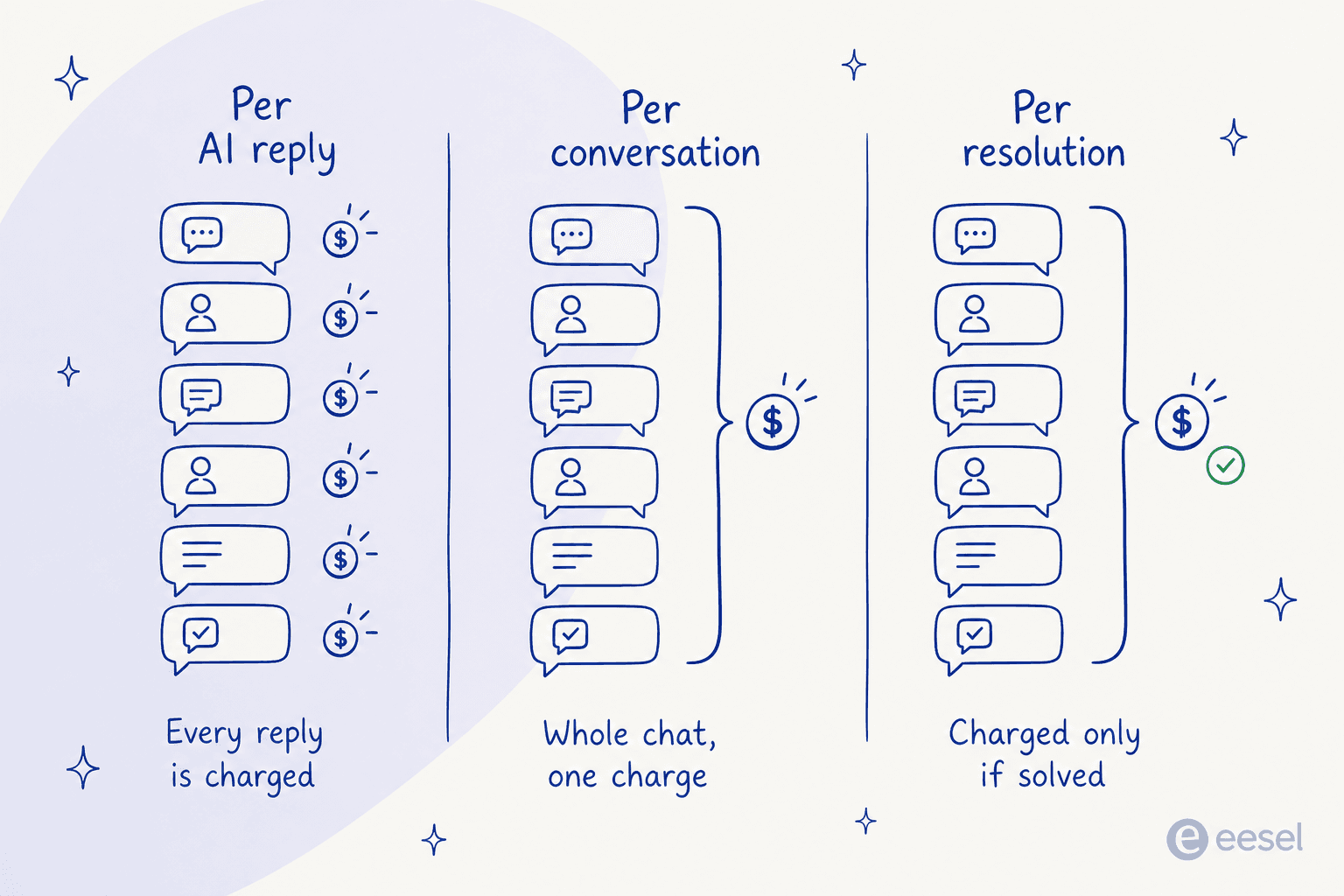
The unit punishes good conversations. A per-reply meter charges you more for the thread where the AI patiently walked someone through a returns policy than for the one where it fumbled and the customer left. That is backwards from how you want an AI customer service chatbot to behave, and it makes budgeting hard, because your bill tracks chattiness rather than the ticket deflection volume you are actually buying.
The mid-month cliff is real, and it arrives faster than you plan for. I have watched this happen from the inside. One self-serve customer of ours had a bot quietly handling real volume, peaking at over 1,500 messages in a single month, until it hit the interaction limit and he upgraded on the spot with, in his words, no hesitation. The upgrade was easy. The part nobody enjoys is the window between the meter hitting zero and someone noticing, when the widget on your pricing page is answering nothing.
Training on past tickets sits behind the $417 tier. This one stings, because Wonderchat actually does the thing properly. Its docs walk you through reconnecting Zendesk with extra permissions, then syncing "past Zendesk support ticket" data and help center articles, and they even advise syncing "tickets only" if your knowledge base training already works. That advice is correct, and it happens to be the single most-requested capability I hear on calls, over and over again. But helpdesk integrations appear on the Scale plan, so the cheapest way to get your ticket history in is $417/month billed yearly.
Setup takes longer than five minutes for most teams. The homepage says "Live in five minutes" and the docs say under five. G2's user-insights panel, computed from those same 23 reviews, reports an average implementation time of 2 months. Both can be true. One reviewer got to production in under a day after a free onboarding call. Still, the spread tells you the five-minute number is about creating a bot, and launching one you trust is a separate job.
There is not much outside signal to triangulate with. 23 G2 reviews is a small sample, and Wonderchat has almost no footprint on Reddit or Hacker News. Most of what you can read about it is written by Wonderchat. For a young product that is normal, and it is not a knock. It does mean the evaluation work falls on you rather than on someone else's writeup.
For balance, here is what its users actually say, unedited. The praise is consistent and it centres on support responsiveness and the correction loop:
"We've been using Wonderchat for about two years, and it has become an invaluable part of our customer support. From day one, our customers have appreciated the quality of its answers... One feature we especially value is the internal feedback loop, which not only helps improve the chatbot but also highlights gaps in our own knowledge base."

And the friction, from the same review page:
"Sometimes the corrections panel takes a while to load. The settings page can be hard to understand, and I think there was a learning curve when I first got to know the software."
How I compared these nine
I have spent the last three-plus years putting AI agents onto live support queues at eesel. Mostly what that means in practice is that I have watched a lot of confident-sounding bots give quietly wrong answers. Which is why the axes below are the ones I use, and why a feature checklist is not on the list at all.
- The billable unit, read off the vendor's own docs. Not the sticker price. Whether the meter counts replies, conversations or outcomes decides your bill more than the plan you pick.
- What happens at the limit. A hard stop on a customer-facing widget is an operational risk, not a billing detail.
- Whether you can train on your own ticket history, and what tier that costs. It is also the biggest lever on AI support agent costs.
- Who says it worked. A vendor-scored resolution rate, a contractual floor, and a pre-launch rehearsal against your real tickets are three very different levels of proof.
- Published numbers only. Every price below traces to the vendor's own pricing page or docs, checked in August 2026. Where a vendor does not publish something, I say so rather than guessing.
One thing I am not claiming. I have not run each of these nine in production for a year. I read every one of their pricing pages and docs, pulled the real rate cards, and captured their UI. Where I have first-hand operator experience it is with eesel, and I will flag it as mine.
The 9 best Wonderchat alternatives at a glance
| # | Tool | Best for | Billable unit | Entry paid price | What that buys | Free tier | At the limit | Published proof of results |
|---|---|---|---|---|---|---|---|---|
| 1 | eesel AI | One price per conversation, however long it runs | Ticket or chat handled | $0.40 per ticket, no platform fee | Any number of AI replies in one conversation | $50 free usage, no card | Spend cap you set, alerts at 50/75/100% | Simulation replays past tickets and scores answers against your team's |
| 2 | My AskAI | Cheapest per ticket, with a refund if it underperforms | Ticket handled | $199/mo Pro | 1,000 tickets, then ~$0.12 each | 30-day trial, no card | Overage to 5,000 tickets/mo | 60% AI resolution or your money back |
| 3 | Tidio Lyro | A widget plus a shared inbox in one tool | Lyro conversation | $32.50/mo add-on (annual) | Bundle from 50 conversations, $0.50 each | 50 Lyro conversations, one-time | Buy a larger bundle | Premium: guaranteed 50% resolution, pay-per-resolution |
| 4 | Chatbase | Actions, voice and telephony on one platform | Message credit | $32/mo Hobby (annual) | 700 credits, 2 seats | 50 credits/mo, agent deleted after 14 idle days | Auto-recharge $40 per 1,000 | None published |
| 5 | SiteGPT | The closest like-for-like docs widget | Message, split by model | $59/mo monthly ($39 annual) | 4k mini messages or 400 frontier messages | Free trial | Packs of 5k messages, $59/mo | None published |
| 6 | DocsBot AI | Huge documentation sets, and bring-your-own key | AI credit, 1x to 24x by model | $49/mo Personal | 5,000 credits, 5,000 source pages | 100 credits, bot expires in 30 days | Bot stops and shows an error | None published |
| 7 | CustomGPT.ai | Very large knowledge bases with governance | Query | $99/mo Standard | 1,000 queries, 10 agents, 60M words | 7-day trial, card required | Stops responding to queries | None published |
| 8 | Chatling | The cheapest paid entry point | AI credit, weighted by model | $40/mo Standard ($32 annual) | 3,000 credits, unlimited chats | 100 credits, 2 agents | Add-on credits, $10 per 1,000 | None published |
| 9 | Botpress | Building the agent yourself | Conversation | $150/mo Plus (annual) | 250 conversations, LLM cost included | 100 conversations, hard cap | Packs of 100 for $65 | None published |
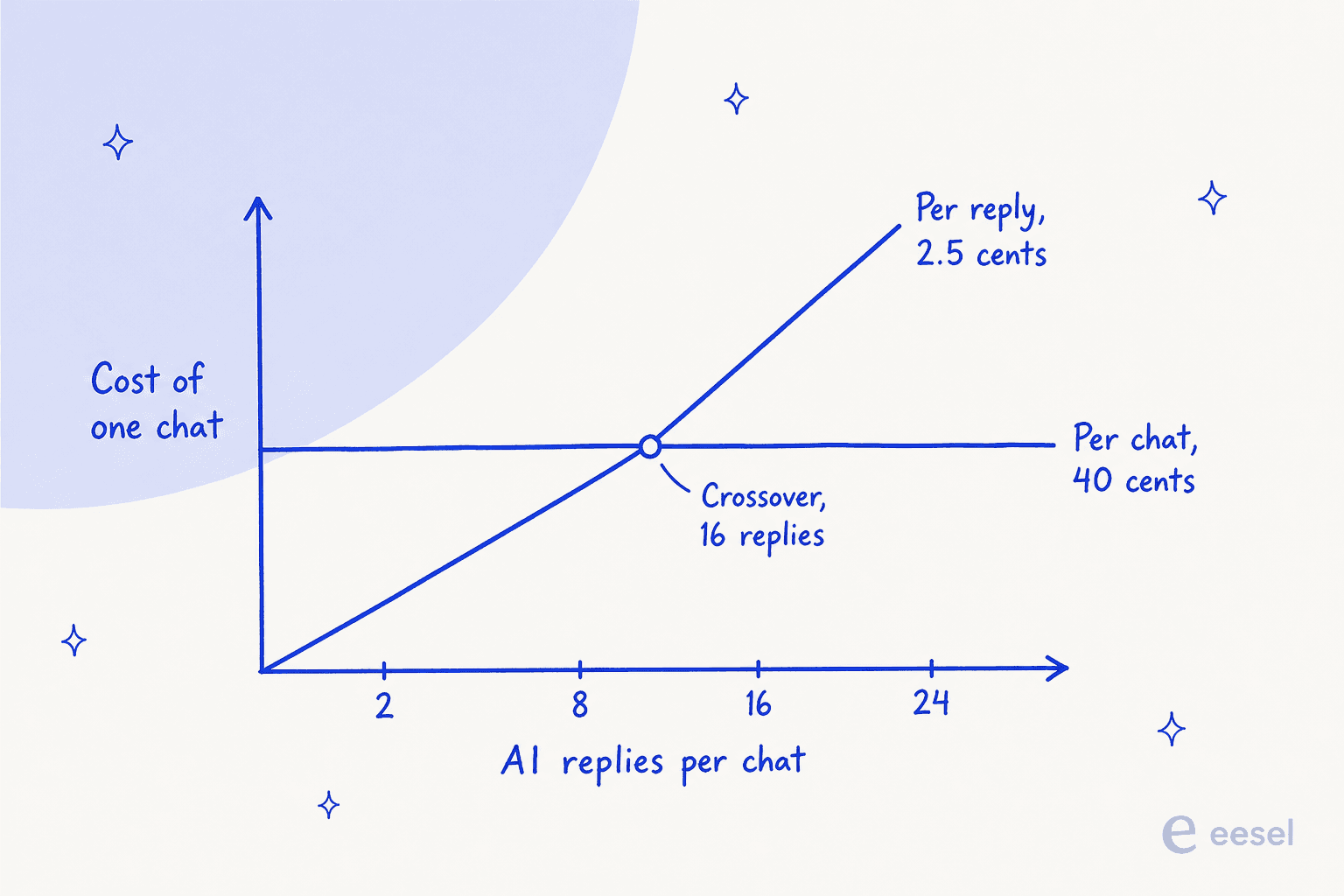
The two meters cross at a knowable point. At Wonderchat's Basic rate of 2.48 cents per reply against a flat 40 cents per conversation, the crossover sits at roughly 16 AI replies. Buy Wonderchat's top-up credits at 3 cents each and it drops to about 13. Short chats favour the per-reply meter; long ones do not.
If you want the wider field rather than just Wonderchat's peers, my roundup of the AI chatbot for customer service covers the helpdesk-native options too. Before the write-ups, plug your own numbers in. The point of this calculator is not the totals, it is watching how far apart the four meters drift as your conversations get longer.
1. eesel AI
Best for: teams that want one predictable price per conversation, and proof it works before it goes live.

Full disclosure, I work on this one. It goes first because it is the direct structural answer to the Wonderchat problem this post is about, and every number below is checkable on our own pricing page.
eesel connects to the helpdesk you already run rather than replacing it, with 39 listed integrations covering Zendesk, Freshdesk, Gorgias, Front, Help Scout, HubSpot, Salesforce and Jira Service Management, plus knowledge sources like Confluence, Notion, Google Drive and your public site.
It also ships its own chat widget, so you can drop it on a marketing site the way you would a docs bot. First agent live within 30 minutes, 80+ languages.
The part that matters here is the meter. One conversation is one task at $0.40, regardless of how many replies it takes. Light dashboard lookups are free. There is no platform fee, no per-seat charge and no monthly minimum, and you set a hard monthly spend cap with alerts at 50%, 75% and 100% so the bill cannot surprise you and the agent does not silently stop.
The second part is the rehearsal. eesel's simulation replays hundreds of your past tickets and scores the AI's answers against what your team actually sent, handing back the gaps and suggested instruction changes. It does not forecast a resolution rate or a dollar figure, and I would not trust a vendor that claimed it could. What it does give you is a read on where the agent is wrong while the stakes are still zero. If you have ever shipped a bot and found out from a customer, you know why that exists.
Pricing
| Item | Rate |
|---|---|
| Regular task (a ticket or chat handled) | $0.40 |
| Light task (dashboard lookups) | Free |
| Heavy task (a full blog draft) | $4.00 |
| Free trial | $50 of usage plus 2 blog generations, no card |
| Annual commit | 25% off at $300/mo or more for the year |
| Enterprise | $1,000/mo platform fee, adds SSO, HIPAA and a BAA |
| Default spend cap | $250/mo, adjustable |
Pros
- The unit is the conversation, so a long troubleshooting thread costs the same as a two-line FAQ answer.
- Simulation against your own ticket history is proof before launch, not after.
- Trains on past tickets on any plan, not behind a $417 gate, and you can tune its brand voice in plain language.
- Spend cap plus graded alerts instead of a widget that goes quiet.
- Sits on top of your existing helpdesk, so agents keep working where they already work, Freshdesk and Gorgias included.
Cons
- At $0.40 a conversation it is more expensive than a per-reply meter for short chats. Below roughly 16 AI replies per conversation, Wonderchat's Basic rate is cheaper per chat, and I would rather you knew that from me.
- SOC 2 Type II is underway, not yet certified, and HIPAA with a BAA is Enterprise-only at $1,000/mo. If you are a regulated buyer today, Wonderchat's existing SOC 2 Type II is a real advantage over us.
- No Zoho Desk, Crisp, LiveAgent or Helpshift integration. If that is your helpdesk, this is the wrong tool.
- Tasks are billed regardless of outcome. A ticket the AI could not solve still counts as a task.
My take: pick eesel if your conversations are long, if your budget needs to be predictable, or if you want a dry run over your real tickets before a customer sees the thing. Skip it if you need HIPAA on a small plan, if you run Zoho Desk, or if your entire use case is two-turn FAQ deflection, where a per-reply meter costs less.
2. My AskAI
Best for: the cheapest published per-ticket rate, with the only refund guarantee on this list.
My AskAI takes the same "keep your helpdesk" position that eesel does, then prices aggressively against the native helpdesk AI. Its pricing page opens with a line I respect: "Pricing so good, we don't need to hide it behind a sales call." It trains on help articles, docs, up to 3-10 websites, Google Drive and Notion, and on historic tickets, which is what separates a real agent from a website chatbot. It can run AI Tasks like order refunds, and it ships a Chrome extension copilot for agents.
What sets it apart is that it puts a number in writing. "60% AI resolution. Or your money back." Nobody else here does that, and a vendor willing to be measured against a floor is telling you something a marketing page cannot.
The tradeoff sits in the helpdesk list. My AskAI's native AI-agent integrations cover Zendesk, Zendesk Messaging, Freshdesk, Gorgias and HubSpot. Help Scout is not among them, so a Help Scout shop cannot bolt this on the way a Zendesk shop can.
Pricing
| Plan | Price | Tickets included | Overage | Notes |
|---|---|---|---|---|
| Pro | $199/mo | 1,000 | ~$0.12/ticket up to 5,000/mo | 5 seats, historic ticket training, AI Tasks, 95+ languages |
| Scale | $499/mo | 2,000 | $0.10/ticket | Unlimited seats, multi-agent, SOC 2 Type II, branding removed |
| Enterprise | From $999/mo | Custom | Volume discount | White-glove setup, dedicated CSM, whitelabel, custom integrations |
| Add-ons (Pro only) | $49/mo each | - | - | Remove branding; API, Slack and Teams access |
| Trial | Free | 30 days, unlimited | - | No credit card |
Pros
- Around $0.10 to $0.12 per ticket handled is the lowest published per-conversation rate here.
- A contractual 60% resolution floor with a refund attached.
- 30-day unlimited free trial with no card, which is enough runway to actually evaluate it.
- Trains on historic tickets on the entry plan.
Cons
- SOC 2 Type II is on Scale and Enterprise, not on the $199 Pro plan.
- The helpdesk list is short. No Help Scout, no Front, no Jira Service Management.
- Pro caps at 5,000 tickets/month even with overage, so growth means a tier change.
- 19 reviews across G2 and app stores by its own count, so the outside signal is thin, same as Wonderchat's.
My take: if you are on Zendesk, Freshdesk, Gorgias or HubSpot and the decision is mostly about cost per ticket, this is the strongest value on the list and the guarantee makes the pitch checkable. Skip it if your helpdesk is not one of its five, or if you need SOC 2 on the cheapest plan.
3. Tidio (Lyro)
Best for: teams that want the AI, a live chat widget and a shared inbox from one vendor.
Lyro is Tidio's AI agent, and Tidio is the rare vendor here that is a full support tool rather than a widget. You get live chat, ticketing, a visitors list, macros and analytics, and Lyro sits on top answering from your knowledge sources with human handoff. Lyro is also sold standalone, so you can bolt it onto Zendesk or Salesforce without moving your inbox. I compared it against its own field in my Tidio Lyro alternatives roundup.
Its billing definition is the clearest sentence on this entire page. A Lyro conversation is a customer interaction with at least one AI reply, and multiple AI replies still count as a single conversation. Customer leaves and comes back? Still one. That is exactly the unit Wonderchat does not use, printed at $0.50 per conversation.
Tidio also does something no other vendor here does at the top end: Premium unlocks pay-per-resolution billing and a guaranteed 50% Lyro resolution rate, starting from 3,000 conversations. You have to talk to sales and there is no public number, but a guaranteed rate written into a contract is a different animal from a dashboard metric.
Pricing
| Item | Price (annual, monthly equivalent) | What it covers |
|---|---|---|
| Free | $0 | 50 billable conversations, 50 Lyro conversations one-time, live chat and ticketing |
| Starter | $24.17/mo | 100 billable conversations, live chat channels, basic analytics |
| Growth | From $49.17/mo | From 250 conversations, advanced analytics, permissions, macros |
| Plus | From $749/mo | Departments, multiproject, custom branding, dedicated CSM, OpenAPI |
| Premium | Contact sales | From 3,000 Lyro conversations, guaranteed 50% resolution, pay-per-resolution |
| Lyro AI add-on | From $32.50/mo | Bundle from 50 conversations, $0.50 each |
| Remove branding | $16.67/mo | Starter and Growth only |
Pros
- The per-conversation definition is published and unambiguous, replies included.
- 50 free Lyro conversations on every account to sanity-check answer quality.
- Live chat, ticketing and AI from one vendor, so no second tool for the human half.
- Premium's guaranteed resolution rate and pay-per-resolution billing are rare.
Cons
- At $0.50 per conversation it is the priciest per-conversation rate here.
- Two meters run at once, billable conversations plus Lyro conversations, so the bill has more moving parts than it looks.
- The 50 free Lyro conversations are one-off on Free and Starter, not monthly.
- The Premium guarantee needs 3,000 conversations and a sales conversation, so small teams cannot buy the certainty.
My take: the best fit if you do not already own a helpdesk and want one tool for chat, tickets and AI. If you already run Zendesk or Freshdesk, you are paying for an inbox you have, and a bolt-on agent will cost less.
4. Chatbase
Best for: the most feature-dense per-credit platform, especially if you want actions, voice and telephony.
Chatbase is the best-known name in this category, and it has kept shipping. Beyond the docs widget you get AI Actions, voice and telephony with concurrent call limits, outbound campaigns, API access, auto-retrain and a long integration list including Stripe, Zendesk, Salesforce, HubSpot, Zoho Desk, Freshdesk, Help Scout, Zapier, Twilio, Shopify, Slack and WhatsApp. Models span OpenAI, Anthropic, Gemini, DeepSeek, Meta and MoonshotAI on paid tiers.
Its meter is the same shape as Wonderchat's: message credits, consumed per AI response. Its page headline says "Predictable pricing, scalable plans," and the plan grid is clear enough. The arithmetic still lands in the same place. And Chatbase has the harshest top-up rate on this list, which I unpack in a moment.
Worth knowing before you start on Free: agents are deleted after 14 days of inactivity on the free plan, and Free is ticked on only two cells in the entire comparison matrix.
Pricing
| Plan | Price (annual, per month) | Message credits / mo | Agents | Seats | Training size / agent |
|---|---|---|---|---|---|
| Free | $0 | 50 | 1 | 1 | 1 MB |
| Hobby | $32 | 700 | 1 | 2 | 10 MB |
| Standard | $120 | 4,000 | 2 | 3 | 20 MB |
| Pro | $400 | 15,000 | 4 | 5 | 40 MB |
| Enterprise | Contact sales | Higher limits | Custom | Custom | Higher limits |
| Auto-recharge credits | $40 per 1,000 | Non-expiring | - | - | - |
| Extra agent | $300 / agent / year | - | - | - | - |
| Remove branding | $1,188 / year | - | - | - | - |
Pros
- Voice, telephony and outbound campaigns from Standard up, which nothing else here bundles at that price.
- Tickets as a source arrives on Pro, so past-ticket training exists.
- Auto-recharge credits are non-expiring, unlike the plan allowance.
- The widest model roster on this list.
Cons
- Auto-recharge credits cost $40 per 1,000, about 33% more per credit than the Standard plan rate.
- $1,188 a year to remove branding is the steepest whitelabel fee here.
- Extra agents are $300 each per year on top of the plan.
- Free-plan agents are deleted after 14 idle days, which catches people mid-evaluation.
My take: the right pick if you want one platform for chat, voice and phone and you are comfortable managing a credit budget. Check Chatbase pricing against your reply-per-chat average first, because the auto-recharge rate is where this one gets expensive.
5. SiteGPT
Best for: the closest like-for-like swap if you like Wonderchat's shape and just want a different vendor.
SiteGPT does the same core job. Point it at your site, get a widget that answers from it. Its pricing page has one quirk you need to know about, because it will otherwise cost you 50% more than you budgeted. The page loads with the yearly toggle already switched on, so the $39, $79 and $259 you see are yearly-prepay effective monthly rates. Month to month, the same plans are $59, $129 and $429.
Its message meter is split by model, which is unusually honest: Starter is "up to 4k mini messages or 400 frontier messages per month, with any mix in between." It tells you the truth that most vendors bury, which is that a smarter model eats your allowance faster. A page is defined as 2,500 cleaned characters.
What it does not publish is what happens when you hit the cap. The only remedy on the page is the add-on, packs of 5k messages at $59/mo. Whether the bot hard-stops, degrades or auto-bills is not stated.
Pricing
| Plan | Monthly | Yearly total | Yearly effective /mo | Chatbots | Messages / mo | Pages |
|---|---|---|---|---|---|---|
| Starter | $59 | $468 | $39 | 1 | 4k mini or 400 frontier | 1,000 |
| Growth | $129 | $948 | $79 | More | Higher | Higher |
| Scale | $429 | $3,108 | $259 | More | Higher | Higher |
| Enterprise | Custom | Custom | - | Custom | Custom | Custom |
| Extra messages | $59/mo | - | - | - | +5,000 | - |
Pros
- The model-split message allowance is the most honest way I have seen this explained.
- Extra messages at $59 per 5,000 is about 1.18 cents each, cheaper per unit than the base plan.
- A pricing calculator on the page computes your own split.
- Enterprise covers HIPAA, a BAA and a custom DPA.
Cons
- The default yearly toggle makes the headline price look 34% to 40% lower than the month-to-month rate.
- Overage behaviour is not documented anywhere on the page.
- The "Save 40%" badge applies to Scale only. Starter's real saving is 33.9%.
- 1 chatbot on Starter, and 1 member.
My take: a fair swap if what you liked about Wonderchat was the widget and you want a clearer model story. Read SiteGPT pricing with the toggle flipped to monthly before you compare it to anything.
6. DocsBot AI
Best for: very large documentation sets, and the one escape hatch from model multipliers.
DocsBot runs two stacked meters plus a seat count: AI Credits for usage, and Source Pages for indexing, where a page is about 5,000 characters of cleaned text. It is worth noting that CJK content burns the page allowance faster, which DocsBot says out loud.
The interesting bit is the credit multipliers, which DocsBot publishes openly. A standard message starts at 1 credit on a 1x model, but the frontier tiers cost 8x and 24x. So Standard's 15,000 credits is 15,000 messages on the cheap model and about 625 on the expensive one. Every model is available on every plan, so the gate is burn rate, not entitlement.
Then there is the escape hatch. Connect your own OpenAI key and any model runs at 1x. A heavy frontier-model user paying OpenAI directly gets 24 times more messages out of the same DocsBot plan. I have not seen another vendor here offer that.
The downside is the same cliff Wonderchat has, stated just as plainly: at the credit limit your bot stops responding and shows visitors a friendly error message. There is an auto-add setting, and turning it on is the only way to avoid the stop.
Pricing
| Plan | Monthly | Annual | Bots | Source pages | AI credits / mo | Seats | Bot lifetime |
|---|---|---|---|---|---|---|---|
| Free | $0 | $0 | 1 | 50 | 100 | 1 | 30 days |
| Personal | $49 | $490 | 1 | 5,000 | 5,000 | 1 | Unlimited |
| Standard | $149 | $1,490 | 3 | 15,000 | 15,000 | 5 | Unlimited |
| Business | $499 | $4,990 | 10 | 100,000 | 60,000 | 10 | Unlimited |
| Enterprise | Quote | Quote | Custom | Custom | Custom | Custom | Unlimited |
| Extra credits | $49 per 5,000 | - | - | - | - | - | - |
| Extra pages | $29 per 10,000 | - | - | - | - | - | - |
Pros
- Bring your own key and every model drops to 1x, which is the single biggest cost lever on this list.
- Model multipliers are published, so you can do the arithmetic yourself.
- 100,000 source pages on Business handles documentation nobody else here will index.
- Add-on credits at 0.98 cents each carry no penalty versus the plan rate.
Cons
- Two meters plus seats means three ways to run out.
- The bot hard-stops and shows an error unless you enable auto-add credits.
- Free-plan bots expire after 30 days.
- No published resolution commitment of any kind.
My take: the best technical pick if your knowledge base is enormous or if you already pay OpenAI and want the 1x rate. Not the one I would hand to a support manager who does not want to think about credit multipliers.
7. CustomGPT.ai
Best for: very large knowledge bases where governance and access control matter more than price.
CustomGPT is the closest thing here to a hosted custom GPT chatbot, and it bills per query, which is a per-reply meter under a different name: a five-turn conversation burns five queries. The rate is flat and easy to hold in your head, roughly 10 cents a query on both paid tiers. Premium buys headroom on agents, storage and seats rather than a cheaper query.
Where it earns its place is on scale of knowledge, and on control. Standard gives you 5,000 documents per agent and 60 million words of storage; Premium takes that to 20,000 documents and 300 million words. Queries pool at the account level so all your bots share one limit, and there is a RAG API on every tier. Enterprise adds advanced RBAC, custom SSO, a DPA and forward-deployed engineers.
At the limit, CustomGPT says the system "will stop indexing new data (for 'word' limits) or stop responding to queries (for 'query' limits)." No automatic overage rate is published; you buy an add-on block instead.
Pricing
| Dimension | Standard | Premium | Enterprise |
|---|---|---|---|
| Monthly billing | $99 | $499 | Custom |
| Annual billing (per month) | $89 | $449 | Custom |
| Queries / month | 1,000 | 5,000 | As needed |
| Effective rate per query | ~9.9c | ~10.0c | Quote |
| Agents | 10 | 25 | As needed |
| Documents per agent | 5,000 | 20,000 | As needed |
| Word storage | 60M | 300M | As needed |
| Seats | 3 | 5 | As needed |
| Remove branding | No | Yes | Yes |
| Trial | 7 days, card required | 7 days, card required | POC package |
Pros
- A flat, legible ~10 cents per query with no model multipliers to model.
- 10 agents on the entry plan, far more than most tools here allow.
- Enormous word storage, plus AI Vision image citations.
- RAG API access on every tier, not gated to Enterprise.
Cons
- Four separate meters: queries, words stored, documents processed and image citations.
- $99 for 1,000 queries is the most expensive entry rate per unit on this list.
- Stops responding at the query limit, with no published overage rate.
- The 7-day trial requires a credit card.
My take: choose it when the knowledge base is the hard part and the query volume is modest. If your volume is high, the flat 10 cents per query stops being a feature.
8. Chatling
Best for: the cheapest paid entry point, and unlimited chats on every plan.
Chatling publishes three plans, and prices them lower than anyone else here. Its credit definition is narrow and clearly stated: credits are consumed when the chatbot generates an AI response, and the number of credits depends on which of 34 models produced it, from 0.5 credits for the cheap tiers up. Chats themselves are unlimited on every plan, including Free.
The knowledge-base allowances are unusually generous for the money: 30 million characters on Standard at $40/month, 100 million on Plus. There are also separate meters for email credits, voice input minutes and resync credits, so read the grid before you commit.
Its overage economics run the opposite way round to Wonderchat's. There is no automatic overage billing, but extra credits are $10 per 1,000, or one cent each. Standard's included credits work out to 1.33 cents each, so top-up credits are cheaper than the ones in your plan. That is the right way round.
Pricing
| Item | Free | Standard | Plus |
|---|---|---|---|
| Monthly | $0 | $40 | $140 |
| Annual (per month) | $0 | $32 | $112 |
| AI credits / mo | 100 | 3,000 | 15,000 |
| Chats | Unlimited | Unlimited | Unlimited |
| Agents | 2 | 3 | 5 |
| Knowledge base characters | 500,000 | 30M | 100M |
| Seats | 1 | 2 | 3 |
| Selectable models | 4 | 34 | 34 |
| Voice input | - | 400 min/mo | 2,000 min/mo |
| Extra credits | $10 per 1,000 | $10 per 1,000 | $10 per 1,000 |
Pros
- The lowest paid entry price here, and unlimited chats on every tier.
- Top-up credits at 1 cent each are cheaper per unit than the plan allowance.
- 34 selectable models with published per-message credit costs.
- 30 million knowledge-base characters on a $40 plan.
Cons
- Multiple parallel meters: AI credits, email credits, voice minutes, resync credits.
- No published Business or Enterprise tier, so custom plans mean asking.
- CSAT surveys and AI chat summary on handoff are Plus-only.
- Credit cost varies by model, so your effective rate moves when you switch models.
My take: the value pick for a small site that mostly needs FAQ deflection and wants a big knowledge base for very little money. Not where I would put a regulated or high-volume support queue.
9. Botpress
Best for: teams who want to build the agent themselves rather than configure one.
Botpress is the builder's option here, and its pricing tagline is a direct shot at seat-based tools: "priced for the work it does, not the seats it fills." The billing unit is the conversation, and unusually, Botpress absorbs the LLM cost rather than metering it on top: "Most tools mark up AI Spend. We pay it for you." Unlimited AI agents on every paid plan, no per-seat cost, seats unlimited from Team up.
Where it differs from everything else on this list is in the shape of the work. Botpress gives you Studio, an ADK, a Help Center and Botpress Desk. You are building a flow, not filling in a form, which is exactly right for some teams and exactly wrong for others.
Pricing
| Plan | Price (billed annually) | Conversations / mo | Extra conversations | Agents | Seats |
|---|---|---|---|---|---|
| Free | $0 | 100 | Not available, hard cap | 3 | 3 |
| Plus | $150/mo | 250 | Packs of 100 for $65 ($0.65 each) | Unlimited | 3 |
| Team | $750/mo | Higher | Packs or auto-recharge | Unlimited | Unlimited |
| Enterprise | Contact sales | Custom | Volume | Unlimited | Unlimited |
Pros
- Per-conversation billing, so reply count does not change the bill.
- LLM cost is included rather than marked up and metered separately.
- Unlimited AI agents and, from Team up, unlimited seats.
- A real development kit if you need custom logic a form cannot express.
Cons
- $0.65 per extra conversation is the highest per-conversation overage here.
- The Free plan is a hard cap with no top-ups at all.
- 250 conversations for $150/mo is a thin allowance for a support queue.
- You are building, which means engineering time is part of the price. Compare Botpress pricing against a configured tool before you commit a developer.
My take: the right call when your agent has to do something bespoke and you have someone to build it. For plain website chatbot deflection it is more machinery than the job needs.
The cost nobody prices: what a top-up actually costs
Every vendor here sells extra units when you run dry. Almost nobody compares those rates, and they diverge wildly once you do. Here is the marginal cost of one more unit versus the plan rate, all read off the published pages.
| Tool | Plan rate per unit | Top-up rate per unit | Penalty or discount |
|---|---|---|---|
| Chatbase (Standard) | 3.0c per credit | 4.0c per credit ($40 / 1,000) | ~33% more expensive |
| Wonderchat (Basic) | 2.48c per credit | 3.0c per credit ($29.99 / 1,000) | ~21% more expensive |
| DocsBot (Standard) | 0.99c per credit | 0.98c per credit ($49 / 5,000) | Roughly break-even |
| SiteGPT (Starter, monthly) | 1.48c per message | 1.18c per message ($59 / 5,000) | ~20% cheaper |
| Chatling (Standard) | 1.33c per credit | 1.0c per credit ($10 / 1,000) | ~25% cheaper |
| Botpress (Plus) | 60c per conversation | 65c per conversation ($65 / 100) | ~8% more expensive |
| My AskAI (Pro) | ~19.9c per ticket | ~12c per ticket | ~40% cheaper |
| eesel AI | 40c per conversation | 40c per conversation | No change |
Chatbase and Wonderchat are the only two tools here where running out costs you more per unit than staying inside your plan. For a customer-facing widget that is the wrong incentive. The month your traffic spikes is the month your unit cost goes up. Chatling, SiteGPT and My AskAI all price the marginal unit below the plan rate, which is the shape you want.
Who actually tells you it worked
This is the axis buyers skip, and it is the one that decides whether you can defend the spend in three months.
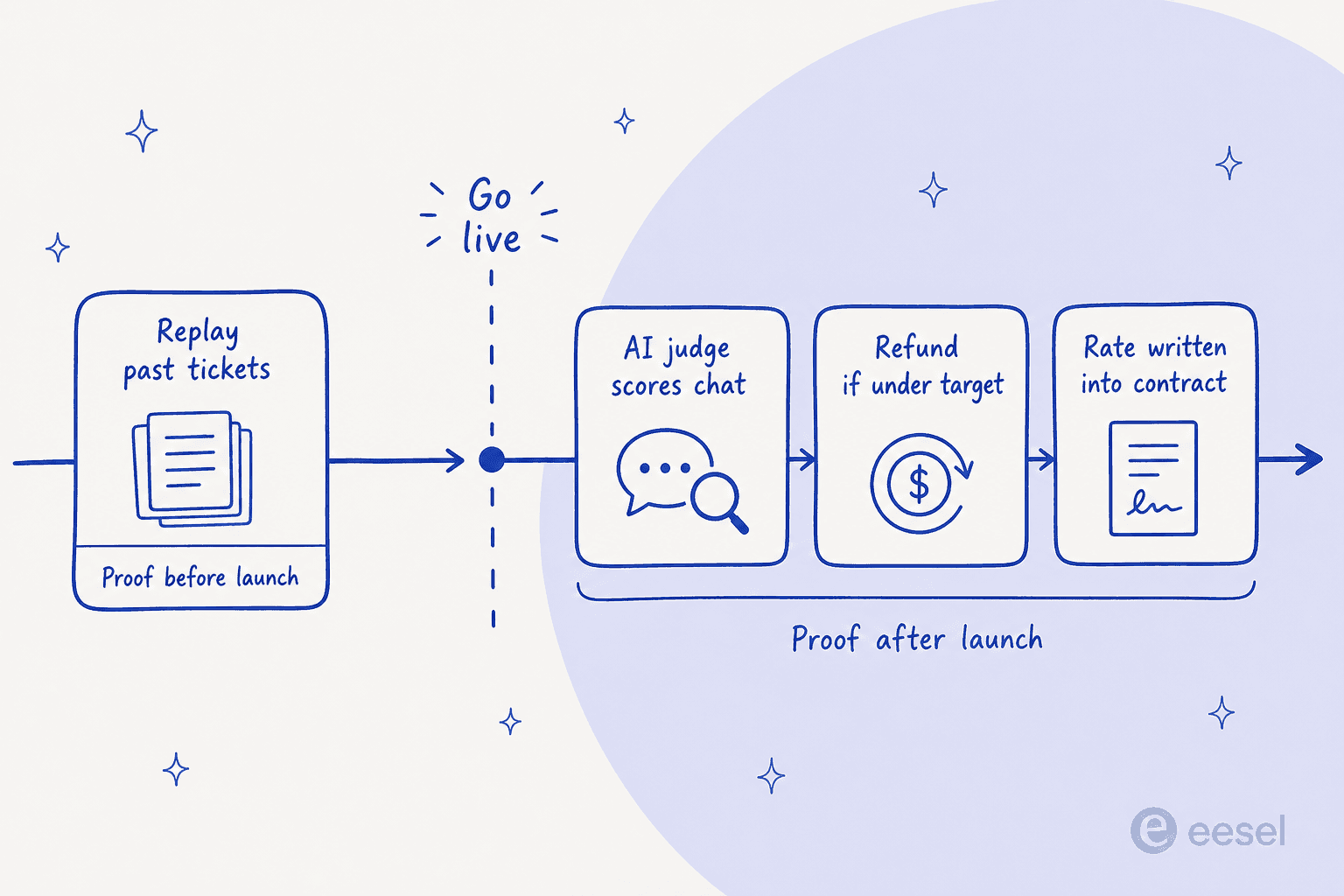
Wonderchat is more transparent about its method than most vendors are, so credit where it is due. Its resolution-rate documentation explains that every conversation is scored one of two ways: a customer thumbs-up or thumbs-down where one exists, and otherwise an AI judge that reads the transcript "about 15 minutes after it goes quiet," weighing the customer's tone and whether the chat reached a helpful conclusion. Resolution Rate is then resolved divided by resolved plus unresolved, with greetings and spam excluded as "unclear." Satisfaction is a separate 1-to-5 average, which is worth reading alongside my notes on AI CSAT.
As a design that is reasonable. It is also, for the majority of conversations where nobody clicks a thumb, the vendor's AI grading the vendor's AI. Wonderchat's G2 profile quotes ~76% resolution across customers in the last 30 days, and that number is largely produced by this method. The QA Agent is the strong half of this: it reads every chatlog, sorts problems into user-reported, knowledge gaps, quick fixes, conflicts and model issues, and proposes one-click fixes without changing anything automatically. Reviewers single it out, and they are right to.
All of it happens after a real customer already got a real answer, though. There are a few ways to move the proof earlier:
- A contractual floor. My AskAI's 60%-or-money-back, and Tidio Premium's guaranteed 50% Lyro resolution rate with pay-per-resolution billing. The vendor takes some of the risk.
- A rehearsal against your own history. eesel's simulation replays hundreds of your past tickets and scores the AI against what your team actually sent. You see the wrong answers before a customer does.
- Your own evaluation. Wonderchat's evaluation playground does single-prompt and multi-prompt model comparisons, which is real tooling. It answers "which model handles this prompt best," not "what will this do to my last quarter of tickets."
If you take one thing from this post, take this: ask a vendor to show you their AI being wrong on your data before you launch. The ones that can will show you. I have seen a buyer run a methodical 67-test evaluation, find the answers solid, and still walk because the widget itself was slow and got stuck. Answer quality is only half of what you are buying. Neither that half nor chat escalation quality shows up anywhere on a pricing page.
Try eesel for the conversations Wonderchat charges per reply for
If the thing that pushed you off Wonderchat was the meter, that is the specific thing eesel changes. One conversation is one $0.40 task no matter how many replies it takes, light lookups are free, and you set a hard monthly spend cap with alerts at 50%, 75% and 100%, so a traffic spike raises your volume rather than your unit cost and the widget never goes quiet on a customer.

It also plugs into the helpdesk you already run rather than sitting beside it, and it trains on your past tickets on any plan, not behind a $417 tier. Same for your website content. Before it answers a single live customer, ask it to run a simulation over your recent tickets and it will score its own answers against what your team actually sent, then hand you the gaps. That is the rehearsal I would want before letting anything loose on my own queue.
Try eesel free with $50 of usage and no credit card, or see the pricing and work out what your volume really costs.
Frequently Asked Questions
What are the best Wonderchat alternatives in 2026?
How much does Wonderchat cost?
What is a Wonderchat message credit?
Which Wonderchat alternative is best for a small team on a budget?
Can Wonderchat alternatives train on my past support tickets?
What happens when a Wonderchat chatbot runs out of credits?
Is Wonderchat's resolution rate reliable?


Article by
Kurnia Kharisma
Kurnia is a software engineer and writer at eesel AI with two years of SEO experience, writing about AI tools, helpdesk software, and customer support. He pairs a developer's understanding of how these products are built with search-driven research into what actually ranks and resonates with the people searching for them.