Why deflecting tickets on WhatsApp is its own problem
Email gives you cover. A customer who emails expects to wait. WhatsApp gives you none of that, because the channel feels like texting a person, and the patience window is measured in minutes. A "where's my order?" at 11pm wants an answer at 11pm, not a Monday-morning autoresponder. That speed expectation is exactly why deflection belongs here more than almost anywhere else: the questions are repetitive, high-volume, and time-sensitive, which is the sweet spot for an AI support agent.
WhatsApp also comes with rules email doesn't. To automate replies at any real scale you need the official WhatsApp Business API (the free Business app won't cut it for a team), Meta bills you per 24-hour conversation window, and message templates need approval. So "deflect tickets on WhatsApp" is really two decisions stacked: which platform connects you to WhatsApp, and which AI actually answers the questions. Most of the money and most of the pain live in the second one.
I've spent enough time on live queues to have watched a confident-sounding bot hand a customer the wrong returns policy on a channel where they screenshot everything. So when I judge a deflection setup now, I care less about the demo and more about two boring things: how the AI is grounded in your real knowledge, and what it does when it isn't sure. Hold those two questions in your head for the rest of this.
What "deflection" actually means on WhatsApp (and the gap nobody mentions)
Here's the definition worth being strict about. A ticket is deflected when the customer's problem is actually solved without a human touching it. It is not deflected when the bot simply closed the chat, buried the "talk to a human" button, or answered something adjacent and the customer gave up and emailed instead.
That distinction is the single most expensive thing teams get wrong. A WhatsApp bot will happily report a big deflection number while a chunk of those "deflected" chats are customers who came back angrier through another door. We track the metric that actually matters: the re-contact rate within 48 hours. If that's climbing while your deflection rate looks great, the bot is closing chats, not solving them.
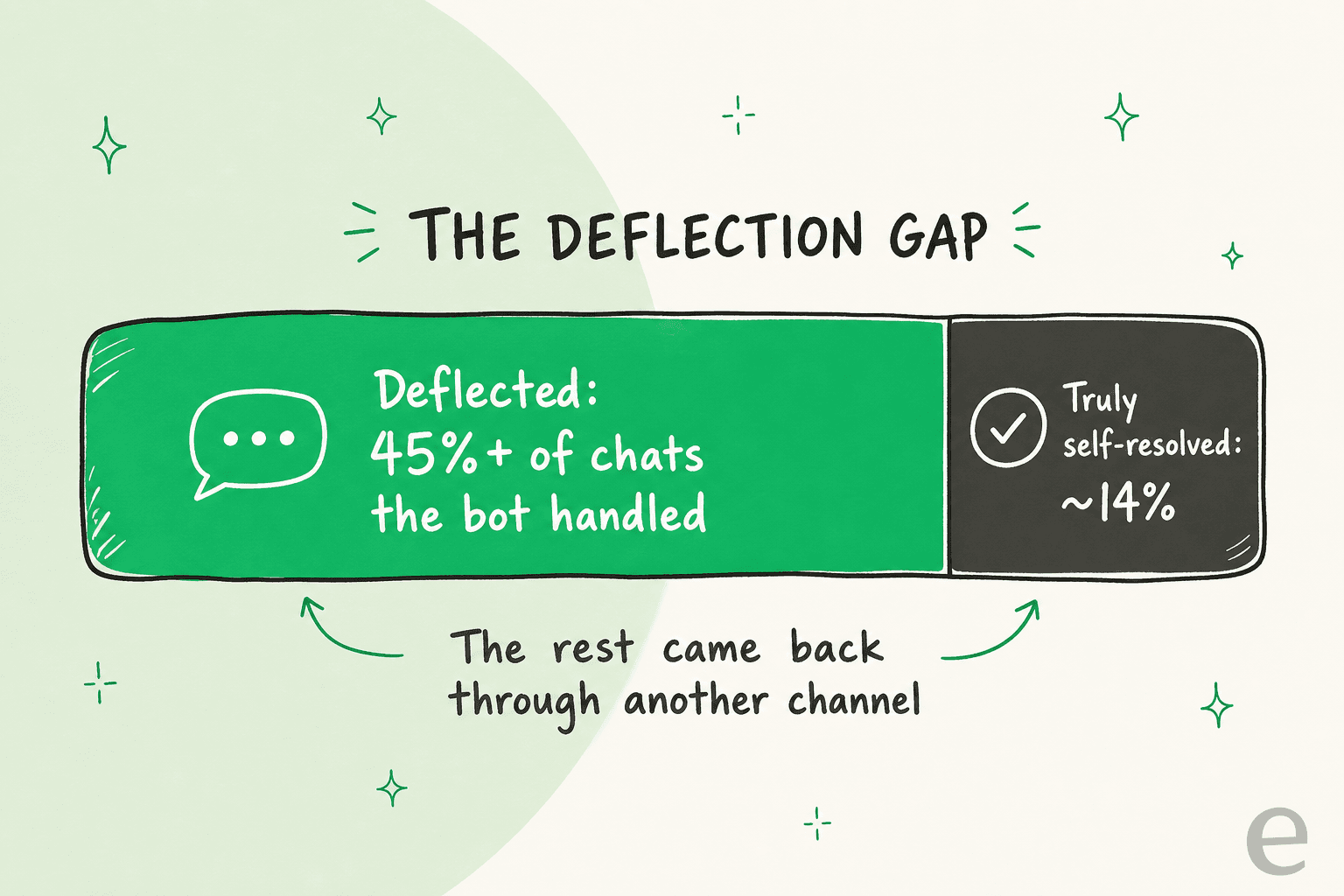
The lesson we keep relearning: chase the headline deflection percentage and you build perverse incentives, where the easiest way to "deflect" more is to make a human harder to reach. The best framing I've heard for the whole trap came from a CX lead we talked to, and it applies perfectly to WhatsApp:
"The AI will never be able to answer 100% of the questions... I need an AI who is only handling the tickets that it's confident to handle and all the other ones, leave them alone."
a DTC supplements CX lead, from our own customer calls
Leave the hard ones alone. That's not a limitation to apologize for, it's the design goal. A bot that knows its boundary and routes cleanly outperforms one that swings at everything, every time.
How AI deflects a WhatsApp ticket, step by step
Under the hood, modern deflection is nothing like the keyword bot of 2018. A real AI agent reasons over your actual knowledge instead of matching fixed flows. On a WhatsApp queue the flow runs like this:
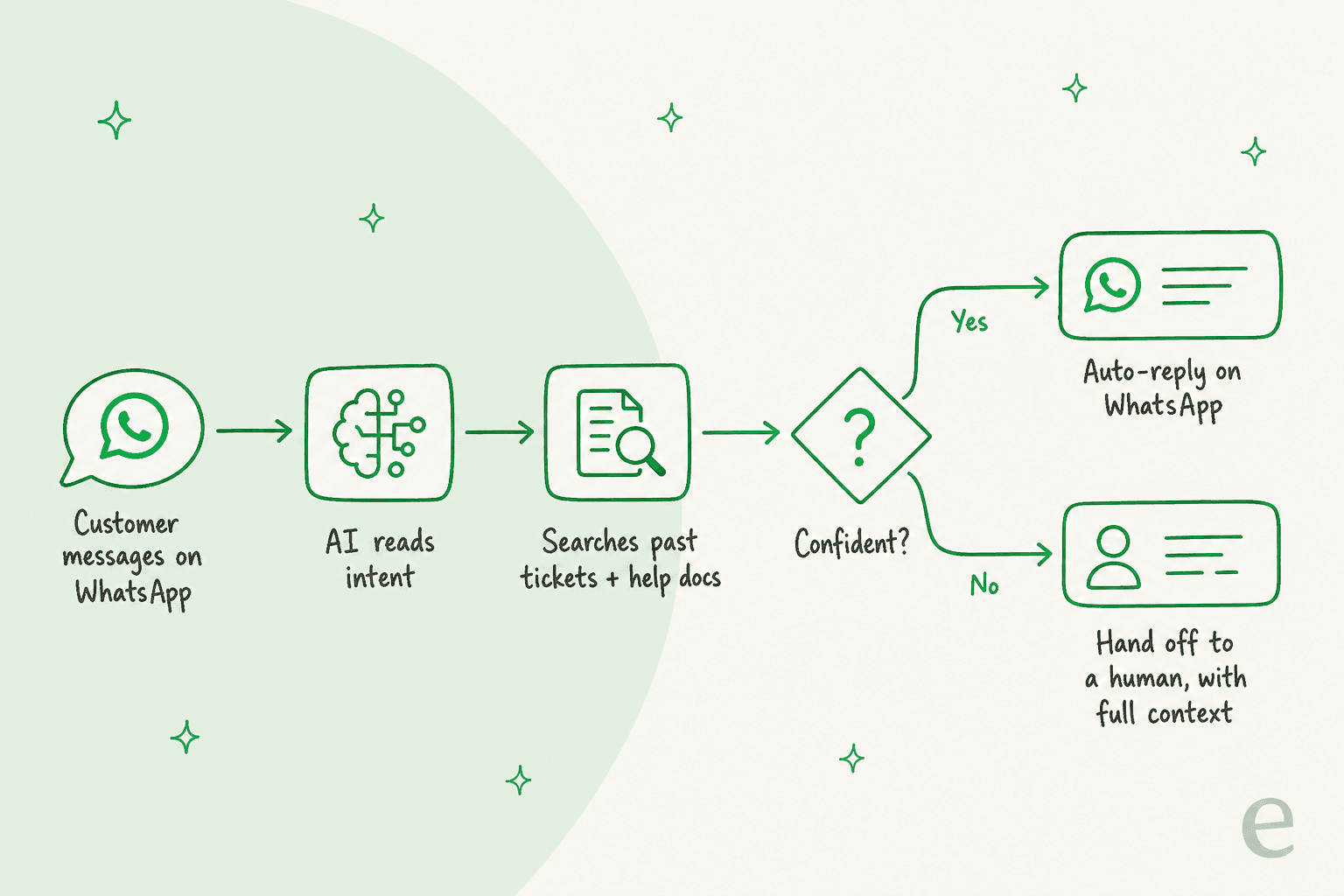
- The customer messages on WhatsApp. Same as texting, no portal, no form.
- The AI reads intent. It works out what they actually want (order status, refund, login help) and reads the tone, because an angry message is a signal to escalate, not to keep answering.
- It searches your knowledge. This is retrieval grounded in your help docs, your knowledge base, and crucially your solved past tickets, so the answer sounds like your team rather than a generic manual.
- It checks its own confidence. High confidence: reply and resolve. Low: don't guess.
- It either auto-replies or hands off. A confident answer goes straight back in the chat. Anything shaky becomes a clean handoff to a human, carrying the full transcript so the customer never has to repeat themselves.
Two of those steps do most of the heavy lifting, and they're the same two I told you to keep in your head: grounding (step 3) and the confidence gate (step 4). Get those right and the deflection takes care of itself. Get them wrong and you've automated a way to annoy people faster.
What actually deflects on WhatsApp (and what shouldn't)
Not every question deflects at the same rate, and the fastest way to wreck a launch is to point the AI at everything at once. The honest picture looks like a ladder:
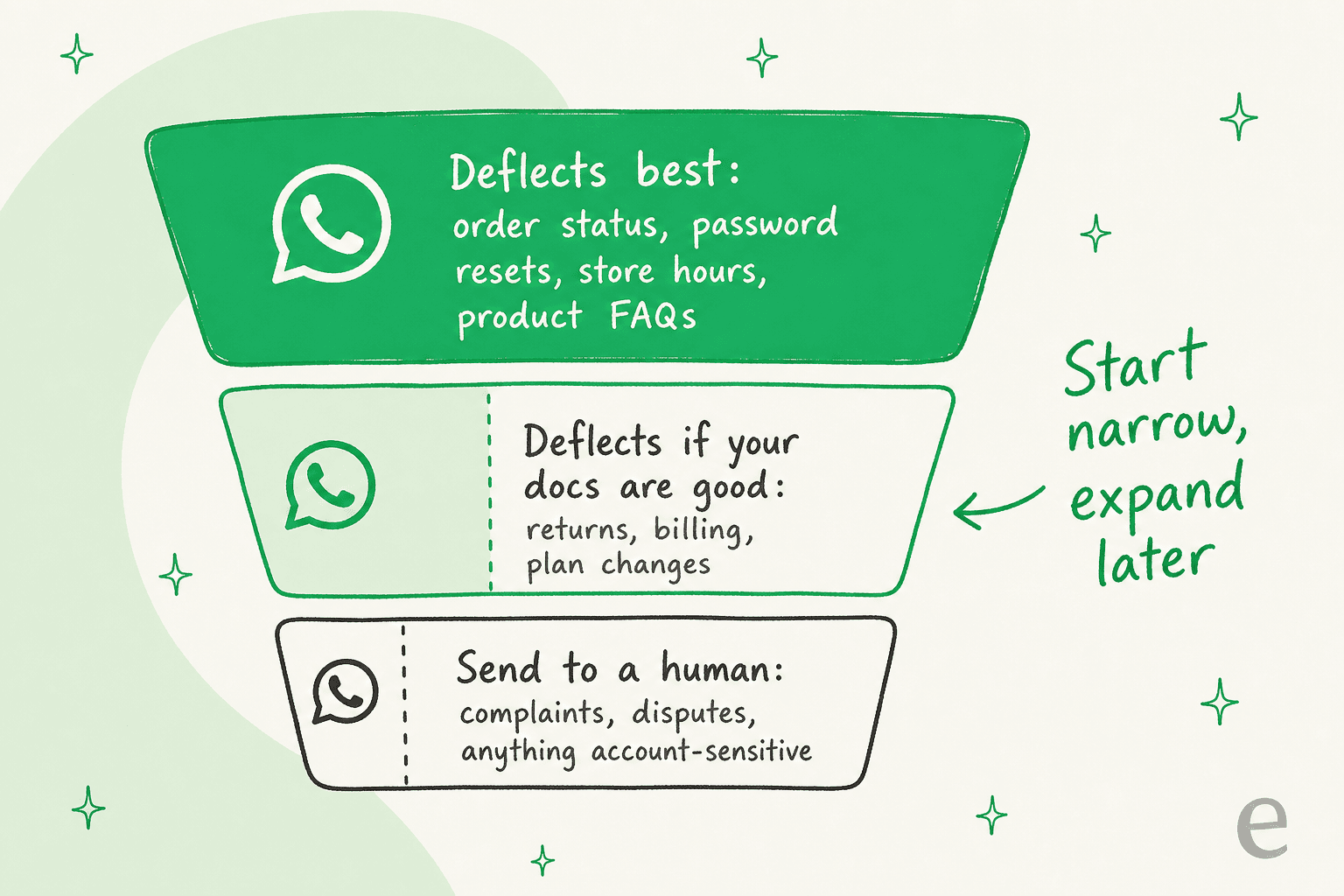
- Top of the ladder (deflects best): order status, "where is my order", password and account resets, store hours, shipping timelines, standard product questions. These are repetitive, fact-based, and have a single right answer. This is where you start.
- Middle (deflects if your docs are good enough): returns, billing questions, plan changes. The AI can handle these well, but only if your help center actually covers them clearly and the AI can look up account-specific context.
- Bottom (send to a human): complaints, billing disputes, cancellation threats, anything legal or account-sensitive. Trying to deflect these is how you turn a small problem into a churned customer.
Start with two or three high-volume question types you have great docs for, prove the deflection rate, then widen. A scope you can defend beats a scope that looks impressive in a deck. This is also why grounding matters so much: the AI's ceiling is set by your knowledge base, not the model. If the answer isn't written down somewhere the AI can read, no amount of clever prompting fixes it.
The two things that decide whether it works
Every WhatsApp deflection tool demos well. The ones that survive contact with a real queue share two traits.
It learns from your real history. An AI trained on your past tickets and help docs answers in your voice on day one, including the edge cases your team learned the hard way. The contrast that matters: a tool you feed twenty FAQs to will answer like a search box, while one grounded in thousands of solved conversations answers like the agent who's been there three years. When teams tell us they almost built this in-house on a raw model, it's usually this that stops them. As one customer put it, "we could try to write our own LLM application but we didn't want to invest our time into that. We wanted something that we would not have to maintain" (GENERAL BYTES).
It refuses to guess. Confidence-based routing is the safety feature that makes auto-reply on a screenshot-happy channel survivable. The AI answers when it's sure and turns a shaky answer into a draft or a handoff instead of a wrong reply sent live. Pair that with the ability to test on your actual chat history before launch, and you stop flying blind.

That simulation step is the thing I'd never give up again after watching a bot go live blind. Running the AI over your last few thousand WhatsApp chats tells you the real deflection rate, by topic, before a customer ever sees it, so launch day is a confirmation rather than an experiment. It's also where the false-deflection gap shows up early, while it's still cheap to fix.
How to set it up without blowing up your CSAT
If you already run a helpdesk, you don't need to migrate anything to put AI on WhatsApp. An AI layer connects to WhatsApp and to the Zendesk, Freshdesk, Gorgias, or Front setup you already have, so the WhatsApp connection and your ticket history stay where they are.
A rollout that doesn't backfire usually goes:
- Audit your docs first. List your top 20-30 WhatsApp questions and check that a clear, current answer exists for each. The ones without good answers are out of scope until you write them. This single step does more for your deflection rate than any model choice.
- Connect WhatsApp and your knowledge. Point the AI at your help center, past tickets, and any order or account systems it needs to look things up, so it can answer with real context instead of generic articles.
- Simulate before you launch. Run the agent over historical chats to see the projected deflection rate and catch wrong answers while they cost nothing.
- Start in draft or narrow auto-reply. Let it auto-handle the top-of-ladder questions, draft the rest for a human, and widen autonomy as the numbers earn it.
- Treat every escalation as a to-do. Each handoff is a gap in your docs or your scope. Feed it back, and the deflection rate climbs on its own.
The mistakes I see most: chasing the deflection number instead of the re-contact rate, launching on stale docs, and making the human handoff so hard that "deflection" is really just frustration. Avoid those three and the rest is tuning. If you're weighing this against hiring, our breakdown of AI agent vs human cost and the wider cost savings is a useful gut-check, since AI-handled chats run a fraction of a human-handled one.
Deflect WhatsApp tickets with eesel
If the goal is an AI agent that truly deflects WhatsApp chats (not just closes them), the fastest path usually isn't switching platforms, it's adding a better brain to the stack you already run. eesel AI connects to WhatsApp and your current helpdesk, learns from your past tickets and help docs, and starts drafting or auto-resolving in your voice within minutes.
The two things I told you never to launch WhatsApp AI without are the defaults here: it simulates against your real chat history so you see the deflection rate before going live, and it only auto-replies when it's confident, routing the rest to a human with full context. It answers in the customer's language across 80+ languages, which matters a lot on a global channel like WhatsApp, and on real queues the numbers hold up: eesel resolved 73% of tier-1 requests for Gridwise in the first month, and Smava runs a fully automated agent on over 100,000 tickets a month.
With transparent per-ticket pricing and $50 of free usage, you can prove the deflection rate on your own WhatsApp chats before paying anything. Try eesel and see your numbers on real conversations first.
Frequently Asked Questions
What is AI ticket deflection for WhatsApp?
How much can AI realistically deflect on WhatsApp?
Do I need the WhatsApp Business API for AI deflection?
Is it safe to let AI auto-reply to WhatsApp customers?
Can AI deflect WhatsApp tickets without replacing my helpdesk?


Article by
Riellvriany Indriawan
Riell is a designer and writer at eesel AI with about two years of experience researching CX platforms, AI chatbots, and helpdesk software. She combines her design background with a sharp eye for how these tools actually look and feel in practice — making her comparisons unusually visual and user-focused.