The 9 best HelpDesk.com alternatives in 2026

Kira

Katelin Teen
Last edited October 5, 2026
Why teams look for a HelpDesk.com alternative
I build AI agents at eesel, and eesel's own sales calls keep landing in the same place. Call after call, the most-requested capability is not a smarter model. It is not a prettier inbox either. It is this: train the AI on our own past tickets. eesel's founder put it bluntly in a note after one demo week:
Past ticket training strikes again. Classic. People really, really, really want to train on past tickets.
To HelpDesk.com's credit, it does exactly that. Its reply suggestions doc says drafts come from previous ticket conversations, and the similar tickets feature runs embeddings over your solved and closed tickets. Plenty of helpdesk AI reads nothing but help center articles, so that is a real head start. This is not a post about a bad product.
It is a post about three specific things that send people looking. All three turn up in real reviews, not in competitor marketing.
The AI allowance runs out faster than the seat price suggests
This is the big one. Tickets are explicitly unlimited on every plan, per the HelpDesk.com pricing page, and the FAQ says outright that you never pay per ticket or per visitor. It reads like flat pricing. It is not. The AI carries a meter of its own.
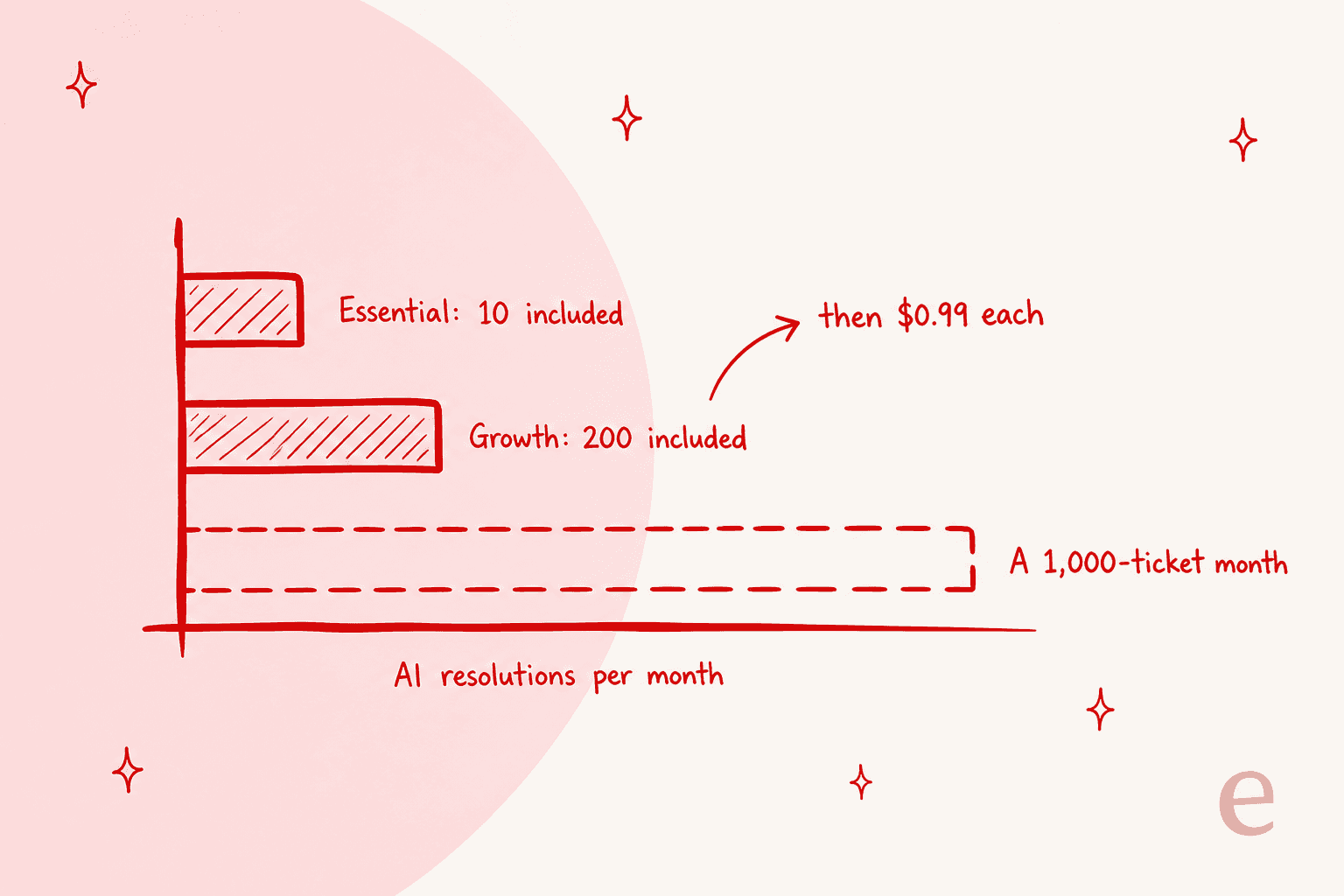
Essential includes 10 AI resolutions a month. Not per agent. Ten, total. Growth includes 200. Past that, the page spells the top-up out precisely: "When you hit your monthly limit, Text automatically adds 50 more resolutions for $49.50 so the AI keeps working. Anything used gets billed at your next renewal." That works out to $0.99 each, and it fires on its own rather than waiting for you to approve it.
A second, quieter meter sits underneath it. Reply suggestions are capped at 5 per user per month on Essential and 50 per user per month on Growth. AI text edits are 5 and 100. Run that for a five-person team on Growth and you get 250 AI-drafted replies a month across the whole team, a thin version of what a helpdesk copilot is supposed to be. If your queue does 1,200 conversations, the AI touches about a fifth of them.
Reviewers read this as a price change, not a feature limit. Many of them were moved here from LiveChat's old ticketing product when it hit end of life:
"Prior to HelpDesk, there were no additional costs for these features. It works great, so the biggest frustration is the added expense, as opposed to anything with functionality."

There is no way to test the AI before it goes live
I went through every HelpDesk.com help-center page that touches AI, hunting for a simulation or a dry run or any kind of backtest. There isn't one. The only feedback loop runs after the fact: Report, Regenerate and Rate reply buttons, all of them on drafts that have already been generated. Accuracy gets described qualitatively, as something that "improves as the system gathers more data." Every serious ticket triage tool I have looked at gives you some way to check first.
That matters more than it sounds, and I say it from a scar rather than a spec sheet. I have watched paying customers' bots invent answers when the knowledge base had nothing relevant to retrieve, then send those answers on to real people. It is why every eesel rollout now simulates against historical tickets first. The r/sysadmin thread on running AI service desks lands in the same place:
"The expensive misses are usually the ones that look confident and don't escalate. So I'd rather have a slightly annoying bot that hands off early than one that quietly invents an answer."

The marketing and the docs say different things here, so it is worth being precise about what this AI does. The homepage claims an AI Agent that resolves up to 73% of conversations. That figure is scoped to chat, in front of the ticket queue, and it is attributed to Text's AI agent rather than to HelpDesk.com specifically. Inside the product docs, every AI feature is assistive. The reply doc leaves no room for reading it another way: "The final copy will be placed in the message area, but will not be sent! The decision is up to you."
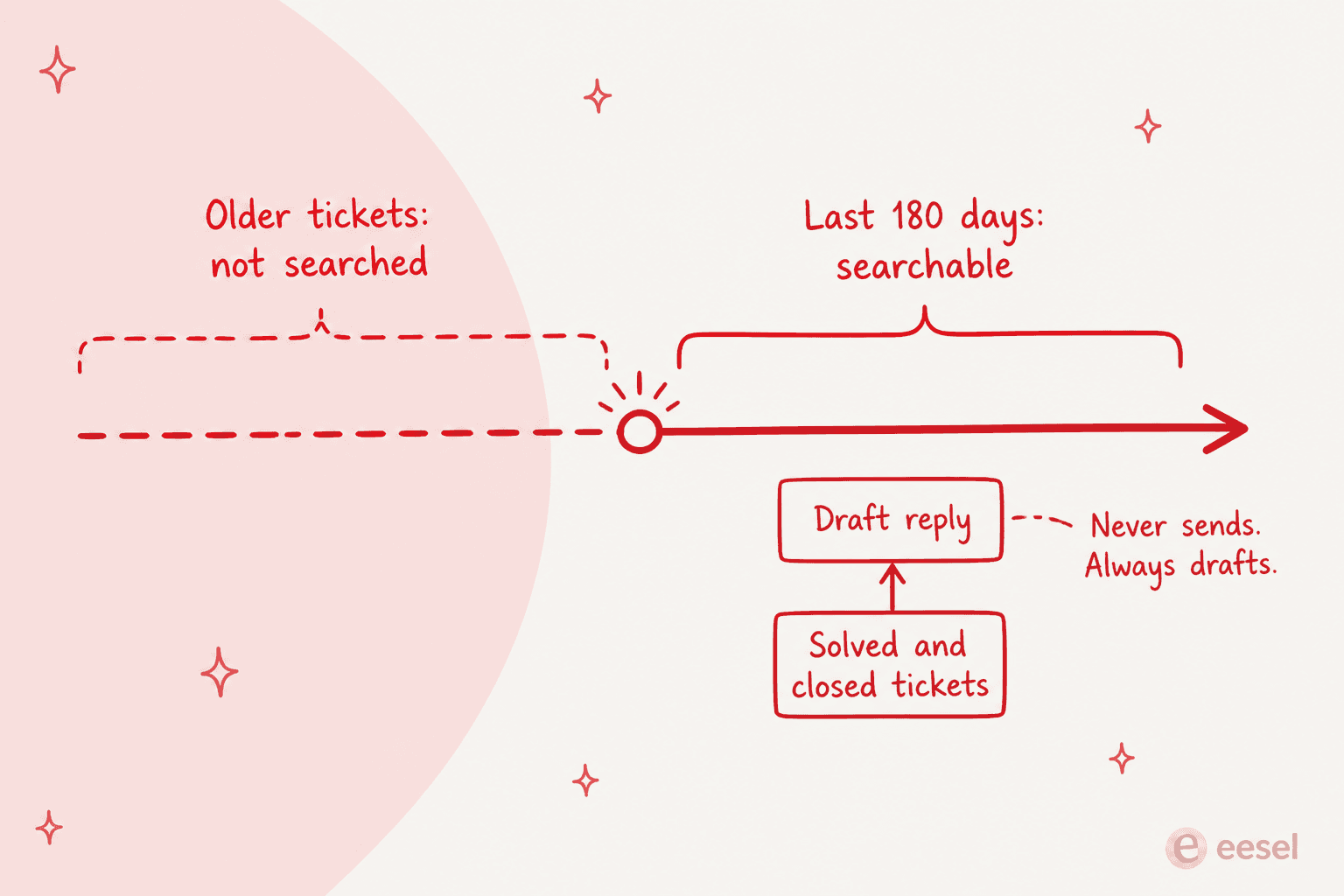
One more detail sits buried in the docs. The similar-tickets search only looks back 180 days. If your team solved its hardest edge cases 14 months ago, that institutional memory falls outside the window.
It only works if you move your whole queue
HelpDesk.com integrates with Shopify, WooCommerce, HubSpot, Salesforce, Klaviyo, WordPress and Webflow, plus Slack notifications through Workflows and webhooks for anything that exposes an API. What it does not integrate with is any other helpdesk. No Zendesk, no Freshdesk, no Front, no Gorgias.
So it becomes an all-or-nothing decision. Migration is where these projects actually die, especially for helpdesk tools for startups picked in a hurry. One Capterra reviewer moving from LiveChat found that out mid-migration:
"Coming from LiveChat tickets, HelpDesk failed to tell that spam folders in LiveChat cannot be imported, while migrating to HelpDesk, and then discover that to do that it would have cost thousands using a third-party service, unacceptable!"
The r/helpdesk regulars are blunt about the arithmetic at small headcount:
"If you only have a few agents you're going to be paying lots more for setting up a new system then using the current one even if the new system has cheaper license costs."
For the record, HelpDesk.com scores well where reviewers actually use it: 4.6/5 from 183 reviews on Capterra, with ease of use at 4.7. The parent company is real and profitable too, listed on the Warsaw Stock Exchange as TXT, with ARR above $89.5M and a dividend paid every year since 2014. The ticketing is fine. It is the AI economics that send people looking.
What actually separates these tools
Nine tools on one page, and a feature grid is an easy place to get lost. I went through all of their docs and rate cards, and the shortlist comes down to three questions.
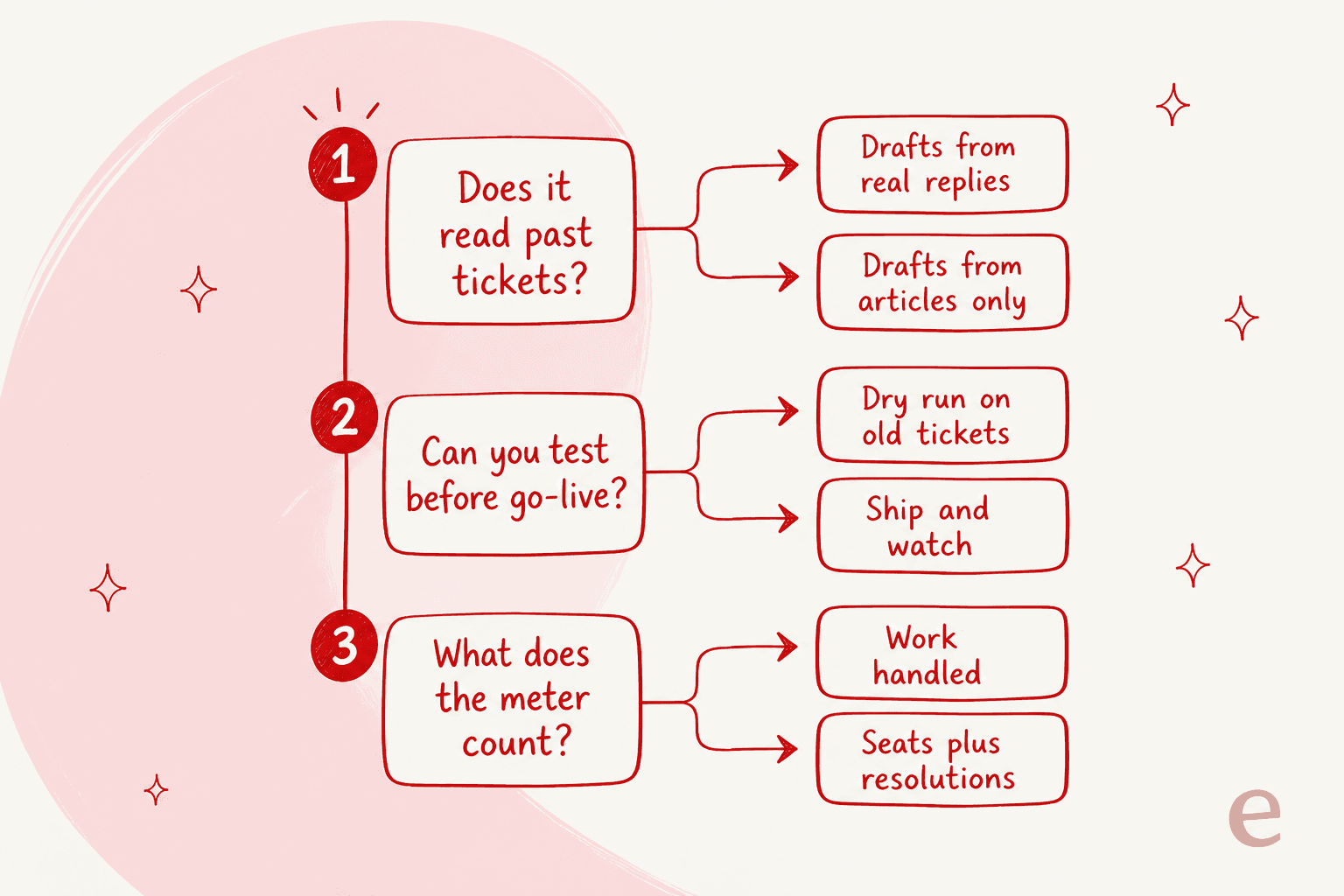
One: what does the AI read? A tool that drafts from your resolved tickets writes in your team's voice and knows your edge cases. A tool that reads only help center articles writes like your help center, and the help center is usually written for a different audience than the one filing tickets. One eesel customer had a knowledge base aimed entirely at administrators while every single ticket came from end users. No amount of retrieval quality fixes a mismatch like that.
Two: can you test it before go-live? Simulation against your own ticket history turns "we think it'll deflect 40%" into a number you can take to your manager. Without it, the first measurement happens in production, on real customers.
Three: what does the meter count? Per seat, per ticket, per resolution, per session, per credit. Same ticketing system market, and every vendor names its unit differently. A rate card only becomes comparable once you price the same month of work through each one. That is the job the calculator below does.
HelpDesk.com alternatives at a glance
Every price is the vendor's published 2026 list rate on the named plan, billed annually where an annual rate exists.
| Tool | Best for | Seat price / mo | AI meter and rate | AI included per month | Reads past tickets | Dry run before launch | Free tier | Sits on your existing helpdesk |
|---|---|---|---|---|---|---|---|---|
| eesel AI | Teams that want the AI tested before it ships | $0, no seats | From $299/mo (500 credits), 1 credit per ticket or chat | 500 to 5,000 credits, by plan | Yes | Yes, simulation on your history | Yes, 100 free credits | Yes |
| Zendesk | Large teams needing governance and reporting | $19 / $55 / $115 | $1.50 committed, $2.00 pay-as-you-go | 5 to 10 per agent | Yes, knowledge builder | Partial, no full backtest | No, 14-day trial | No |
| Freshdesk | The closest like-for-like at a lower AI rate | $19 / $55 / $89 | $49 per 100 sessions ($0.49) | 500 sessions, one time only | Partial | No | No, 14-day trial | No |
| Help Scout | Small teams who want it to feel like email | $25 / $45 / $75 | $0.75 per resolution | Pay as you go | No, docs and articles | No | Yes, 5 users | No |
| Gorgias | Shopify and ecommerce stores | No seats, $40 to $1,227 flat | $0.85 to $1.00 per automated interaction in plan, $1.50 extra | 30 to 530 | Yes | Yes, on past tickets | No, trial only | No |
| Front | Account-based support and shared inboxes | $25 / $65 / $105 | Autopilot $0.89 per resolution ($0.05 triage, $0.39 handoff) | Pay per outcome | Partial | No | No, trial only | No |
| Zoho Desk | The cheapest complete suite | $7 / $14 / $23 / $40 | Answer Bot included from Standard ($14) | Not published | No, knowledge base | No | Yes, 3 users | No |
| Tidio | Chat-first small ecommerce | $0 / $24.17 / $49.17 | $0.50 per Lyro conversation | 50, one time only | No, knowledge base | No | Yes, 50 conversations | Yes, Lyro standalone |
| HubSpot Service Hub | Teams already running HubSpot CRM | $7 / $90 / $150 | $0.50 per resolution (50 credits) | 500 / 3,000 / 5,000 credits | Partial | No | Yes, 2 users | No |
| HelpDesk.com (incumbent) | Text and LiveChat customers | $19 / $79 | $0.99 per resolution | 10 / 200 | Yes, 180-day window | No | No, 14-day trial | No |
Price the same month of work through every tool
A rate card tells you almost nothing until your own numbers run through it. Set your team size and the number of conversations you actually want the AI to handle each month. This then ranks every tool above by total monthly cost.
Two things jump out at the default of 5 agents and 500 AI-handled conversations. HelpDesk.com Growth lands at $692 a month, and $297 of that is pure overage on the resolution meter. The second: the cheapest option on the board is Zoho Desk Standard at $70, but it gets there by including an Answer Bot with no published volume ceiling, which is a different kind of risk. eesel lands at $299 on its 500-credit plan. Push the slider to 2,000 conversations and the ranking rearranges completely.
The 9 best HelpDesk.com alternatives in 2026
Every item below follows the same shape. What it is, what the AI reads, pricing, where it beats HelpDesk.com and where it doesn't, then a verdict.
1. eesel AI, best for teams that want the AI tested before it ships
Full disclosure, eesel is where I work. Treat the verdict accordingly and check the numbers yourself. eesel sells AI teammates, not a helpdesk. The AI helpdesk agent joins the queue you already run instead of replacing it, which is the structural opposite of the HelpDesk.com decision.
What the AI reads. Your resolved tickets, your help center, your macros, your wiki, your website, all at once. The docs are explicit that sources are not walled off per integration, so one reply can pull Zendesk history and Confluence into the same answer. It runs 80+ languages out of the box too, which is how Smava handles 100,000+ tickets a month entirely in German.
Testing before launch. This is the part I would actually shop on. Simulation runs the agent over your own historical tickets and reports the expected resolution rate before a customer sees anything. With confidence-based routing, a shaky answer becomes a draft for review instead of a live reply.
Pricing. One fixed monthly price sized to volume: 500 credits $299/month, 1,000 credits $499, 2,500 credits $999, 5,000 credits $1,899. 1 credit is one ticket or chat, however many messages it takes. There is no seat fee and no platform fee, and every integration and channel is included. Blog drafts are $4.00 each. SSO and MFA are add-ons from $199/month. The free plan includes 100 credits, no card.
Pros: trains on real ticket history with no lookback window; simulation before go-live; no per-seat cost, so adding a part-time helper is free; works on top of Zendesk, Freshdesk, Gorgias, Front and Slack. I have written head-to-head breakdowns for each, starting with eesel vs Zendesk AI. The Freshdesk one sits in eesel vs Freddy, the store-side comparison in eesel vs Gorgias AI.
Cons: it is not a ticketing system, so you still need a helpdesk underneath it. SOC 2 is in progress rather than certified, and HIPAA is available on request. Credits come in a fixed monthly batch, so a spike month can run past your allowance; overage is optional at $0.80 per extra credit, with a cap you set.
My take: pick eesel if the AI is the reason you are shopping and your ticketing is fine. Skip it if you need to replace the inbox itself. In that case one of the platforms below is the right purchase, and eesel becomes a later decision. The deciding factor is whether you want to change one thing or two.
2. Zendesk, best for large teams needing governance and reporting
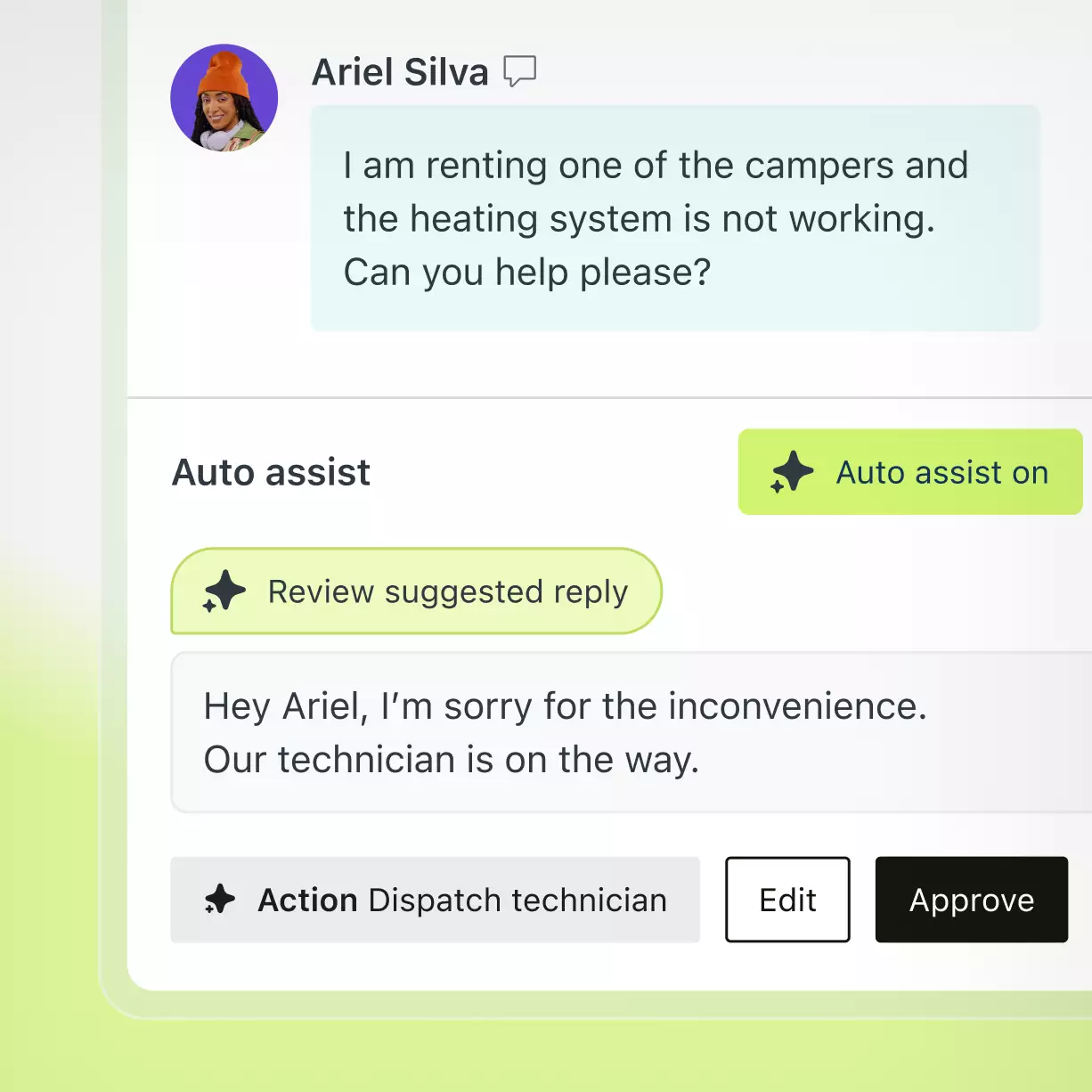
Zendesk is the category's default, and the one HelpDesk.com's own comparison pages target hardest. HelpDesk.com gives you three plans and a short feature matrix. Zendesk gives you a platform: 1,800+ marketplace apps, intelligent triage, AutoQA, and a knowledge builder that generates articles from ticket history.
What the AI reads. Help center content plus ticket history through Knowledge builder, which Zendesk describes as generating a ready-to-use knowledge base from your ticket history and business context. Knowledge connectors pull external sources in.
Testing before launch. Partial. Intent testing and reporting are there, but no full backtest over your own historical tickets, not the way simulation-first tools do it.
Pricing. Support Team $19, Suite Team $55, Suite Professional $115 per agent/month billed annually. Anything above Professional is quoted. Automated resolutions are $1.50 committed or $2.00 pay-as-you-go, with 5 to 10 included per agent per month. Copilot is a further $50/agent/month. One thing worth knowing. Since May 2026, only a verified resolution draws down your allowance, so a contained-but-unverified conversation is free.
Pros: the deepest reporting and governance in this list; enormous app ecosystem; the AI rate card is published rather than quoted; enterprise-grade compliance that passes procurement.
Cons: the most expensive per-resolution rate here at $2.00 pay-as-you-go. Setup complexity is the top complaint in the wild, and long-tenured customers say so plainly:
"Part of the issue is how difficult it is to set up 99% of the features in Zendesk. I don't have any bots set up, custom objects, or connections."
My take: pick Zendesk if you have a support ops function, compliance requirements and the headcount to run a configuration project. Skip it under about fifteen agents, where the platform tax outweighs the platform. My full breakdown of Zendesk pricing walks the whole ladder. Already decided to move? The Zendesk alternatives roundup is the next stop.
3. Freshdesk, best for the closest like-for-like at a lower AI rate
If HelpDesk.com's shape suits you, Freshdesk is the nearest substitute: multichannel inbox, tiered plans, a metered AI layer on top. The entry price is identical at $19. The AI rate is roughly half.
What the AI reads. Knowledge base articles and website content by default. Freddy is strong on agentic workflows for Shopify, Stripe, PayPal and Wix, which is more ground than HelpDesk.com's AI covers.
Pricing, and the trap. There are two separate SKUs, and they must not be mixed up. Standalone Freshdesk is $19 / $55 / $89 per agent/month annual, and its AI is email-only. Freshdesk Omni is $29 / $79 / $119 and unlocks the conversational agents. Freddy sessions cost $49 per 100, or $0.49 each. The 500 free sessions advertised on every tier are once per account, not monthly, which caught me out reading the plan cards. That is the difference between a free allowance and a trial.
Pros: half HelpDesk.com's per-unit AI rate; agentic workflows that call real ecommerce systems; a mature product with a large install base.
Cons: Copilot is a $29/agent/month add-on sitting on top of the seat, so assistive AI becomes a third purchase. The standalone-versus-Omni split is easy to misread at buying time. No simulation.
My take: pick Freshdesk if you want a familiar helpdesk shape with better AI unit economics, and you are willing to read the SKU table carefully. Skip it if email support is all you need, because the standalone tier's email-only AI will disappoint. The two SKUs get their own treatment in my Freshdesk pricing guide. For the surrounding field, try the Freshdesk alternatives roundup.
4. Help Scout, best for small teams who want it to feel like email
Help Scout is the anti-helpdesk helpdesk. No ticket numbers in the customer's face, no portal, just conversations that look like email. For a team of five that finds Zendesk oppressive, it is often the right answer.
What the AI reads. Docs sites and saved replies. AI Answers resolves from your knowledge base and not from your ticket archive, which is the one place HelpDesk.com is clearly ahead.
Pricing. Standard $25, Plus $45, Pro $75 per user/month annual, with a real free plan at 5 users, 1 inbox and 1 Docs site. AI Answers is $0.75 per resolution, billed independently of seats. Light users, who can view and collaborate without a full seat, are included on Plus and Pro.
Pros: the free tier is usable for real work rather than a demo; light users solve the "engineer who helps with tickets twice a week" problem that per-seat pricing punishes; a lower AI rate than HelpDesk.com.
Cons: the AI does not learn from past tickets. Reporting is lighter than Zendesk. At 8 seats it runs $200/month before any AI, which is the exact arithmetic one r/helpdesk commenter did:
"Help Scout is $25/user, so 8 seats is $200/mo before you add anything."
My take: pick Help Scout if your support is high-touch and low-volume and you care about tone. Skip it if the AI needs to learn your team's actual replies rather than your published docs. The tier-by-tier numbers live in my Help Scout pricing guide. If you want to keep the inbox and fix the routing instead, read AI triage for Help Scout, or browse the full Help Scout alternatives list.
5. Gorgias, best for Shopify and ecommerce stores
Gorgias is the only tool here that has never charged per agent. For a store where the whole team dips into the queue during a sale, that alone changes the maths.
What the AI reads. Your help center and your policies and your past tickets, plus live Shopify order data, so it can answer "where is my order" with a real tracking number instead of a link to a policy page.
Pricing. Bundled tiers that include both the helpdesk and an AI allowance: Starter $40/month, Basic $77, Pro $471, Advanced $1,227 on annual billing. Tickets included run 50 / 300 / 2,000 / 5,000, with automated interactions at 30 / 30 / 190 / 530. Overage is $0.36 to $0.40 per extra ticket and $1.50 per extra automated interaction, against $0.85 to $1.00 per interaction inside a plan. Seats are 3 on Starter and 500 everywhere above.
Pros: no per-seat cost; deep native Shopify, BigCommerce, Magento and WooCommerce integration; the AI can take real commerce actions, including order lookups, rather than only answering.
Cons: the $1.50 rate for extra automated interactions sits above HelpDesk.com's $0.99, although in-plan rates run $0.85 to $1.00. The jump from Basic at $77 to Pro at $471 is a cliff with nothing in between. Outside ecommerce helpdesk use cases it is a poor fit.
My take: pick Gorgias if you run a store and your queue is order-status heavy. Skip it if you are B2B or SaaS, where the commerce integrations you pay for do nothing at all. I break the bundled tiers down in Gorgias AI Agent pricing. The wider field is covered in my Gorgias alternatives roundup.
6. Front, best for account-based support and shared inboxes
Front sits between a shared inbox and a helpdesk. If your support is relationship-driven, named accounts and ongoing threads, with sales and support sharing one conversation, it fits better than a ticket queue does.
What the AI reads. Knowledge base content and conversation history, surfaced through Copilot for agents and Autopilot for customers.
Pricing. Starter $25 (up to 10 seats), Professional $65 (up to 50), Enterprise $105 per seat/month annual. AI is mostly add-ons: Autopilot is outcome-priced, $0.05 for triage, $0.39 for a handoff and $0.89 for a resolution, charged once at the highest level a conversation reaches, plus Copilot at $20/seat, Smart QA at $20/seat and Smart CSAT at $10/seat. There is a real trap here. Professional plus all three assistive add-ons comes to $115/seat, which is more than Enterprise at $105, where they are already included. Price Enterprise first.
Pros: you pay only for the outcome Autopilot reaches, and triage is $0.05; excellent collaboration primitives like comments and drafts; strong omnichannel coverage on Professional and above.
Cons: the $0.89 resolution rate sits below HelpDesk.com's $0.99 but above Help Scout's $0.75, and the headline $0.05 is the triage tier, not a resolution. The add-on stack takes a spreadsheet to price. No simulation.
My take: pick Front if conversations matter more than tickets and your team collaborates on replies. Skip it if a self-service portal and a public knowledge base sit at the centre of your support model. The add-on stack is priced out properly in my Front pricing guide. If Front is already off the shortlist, the Front alternatives roundup picks up from there.
7. Zoho Desk, best for the cheapest complete suite
Zoho Desk undercuts everything here on seat price, and it does not obviously feel cheap doing it. Express is $7, Standard $14, Professional $23, Enterprise $40 per user/month annual. There is a Free Forever tier for 3 users as well.
What the AI reads. Knowledge base articles. Generative AI on the Express tier requires you to connect your own OpenAI API key, which is either a feature or a chore depending on your team.
Pricing, and where the AI starts. Express ($7) includes AI agents with up to 30M free tokens a month and the bring-your-own-key generative features. The Answer Bot, the piece that answers customers from your articles, comes in at Standard ($14), and Zia AI is built in from Professional ($23). So the honest comparison price for a customer-facing bot is $14 and not $7. One Reddit commenter described the general pattern to watch for in this category:
"A lot of tools give you ticketing and routing cheaply and then put the KB two plans up, so the headline price you compared was never the price you'd pay."
Pros: the Answer Bot starts at $14/user with no separate resolution meter on the pricing page; light users at $6; a real free tier; the multi-brand help center on Enterprise.
Cons: with no published AI usage ceiling there is no way to model what heavy usage costs. Bring-your-own-API-key is an odd requirement in 2026. The UI is dense.
My take: pick Zoho Desk if budget is the binding constraint and you already live in the Zoho ecosystem. Skip it if you want AI trained on ticket history, or a modern and opinionated interface. Every tier gate is mapped in my Zoho Desk pricing breakdown. If the Enterprise jump kills it for you, see the Zoho Desk alternatives roundup.
8. Tidio, best for chat-first small ecommerce
Tidio is the closest thing here to what HelpDesk.com's marketing describes: chat in front of the queue, deflecting before a ticket ever exists. Its Lyro agent is sold standalone too, so you can bolt it onto a helpdesk you already run.
What the AI reads. Your knowledge base and uploaded content. Lyro handles the handoff to a human when it cannot answer.
Pricing. Free (50 conversations), Starter $24.17, Growth from $49.17, Plus from $300 plus monthly usage, Premium quoted. Billing is on billable conversations, not seats, with Lyro metered separately at $0.50 per conversation. One conversation is one unit no matter how many AI replies it takes. The 50 free Lyro conversations are one-off, not monthly. Self-serve plans cap at 10 agents.
The tier worth a second look. Premium unlocks pay-per-resolution billing with a guaranteed 50% Lyro resolution rate, from 3,000 conversations. A published guarantee on resolution rate is rare. It puts the vendor on the hook for the outcome rather than for the attempt.
Pros: cheap to start and free to try properly; Lyro works standalone on top of another helpdesk; the Premium resolution guarantee is a real commitment.
Cons: the ticketing is thin next to a proper helpdesk. The jump from Growth to Plus at $300 plus usage is steep. No simulation either, and no past-ticket training.
My take: pick Tidio if most of your volume arrives through website chat and you want deflection before a ticket gets created. Skip it if email is your main channel. The conversation meter is unpicked in my Tidio pricing guide. For the chat category more broadly, I ranked the best AI live chat software, and the Tidio alternatives roundup covers the direct swaps.
9. HubSpot Service Hub, best for teams already running HubSpot CRM
If your company already runs HubSpot for sales and marketing, then Service Hub is the only tool here where support tickets sit natively next to the deal record. On B2B accounts that context is worth real money.
What the AI reads. Knowledge base content and CRM records. Customer Agent, part of what HubSpot now calls Agent Hub, resolves conversations at 50 credits each, which HubSpot's customer agent page prices at $0.50 per resolution.
Pricing. Free (2 users), Starter $7/seat commit-monthly, Professional $90/seat annual, Enterprise $150/seat. The customer agent page quotes $0.50 per resolution, cheaper than HelpDesk.com, Zendesk or Gorgias. Included credits are 500 / 3,000 / 5,000 per month by tier. The sting: Professional carries a required one-time $1,500 onboarding fee, Enterprise $3,500.
Pros: a low published per-resolution rate at $0.50; the AI agent lives on Professional, not gated to Enterprise; unmatched CRM context on every ticket.
Cons: the $1,500 onboarding fee makes year one a lot more expensive than the seat price implies. Credits get consumed by more than just support, and the estimator factors in CRM contact count, so budgeting stays fuzzy. Starter has no AI agent and no knowledge base.
My take: pick Service Hub if HubSpot is already your system of record and the sales-to-support handoff matters. Skip it if support stands alone, because then you pay a CRM premium for context you never use. I put the two side by side in eesel vs HubSpot Breeze. If you are staying on Service Hub and only shopping the AI layer, start with the best AI for Service Hub.
How I would actually run this decision
The community consensus on evaluating helpdesks beats any feature grid, and it comes down to one instruction:
"And trial it with live email forwarded in for two solid weeks, whole team inside it. Test tickets tell you nothing. Check that someone non-technical can build a routing rule, and that you can get your data back out."
Add one step to that for anything doing automated ticketing. Before you commit, ask the vendor what the expected resolution rate is on your tickets, then see whether they can show you rather than tell you. A vendor who can only quote a category average is asking you to run the experiment in production.
Be honest about the deflection number you are chasing, too. The scepticism in r/sysadmin is well earned, and the sharpest version of it explains how a good-looking dashboard gets manufactured:
"Wow, it handled 5000 issues this month! 5000 tickets that didn't hit our EXPENSIVE human help desk staff! Now, only 1 of those interactions was useful and the other 4999 times people had to circumvent the bot to open a ticket, or just gave up and fucked off, but hard to track that, eh?"
The thread is not one-sided, which is why it is worth reading in full. In the same discussion, a team that had documented its knowledge base first reports a very different outcome: "our need for intervention has declined by 73%." The variable is not the model. It is whether the documentation and the ticket history the AI reads are any good, and whether anyone checked before shipping.
So the comparison lands back on those three questions. What does it read, can you test it, what does the meter count. HelpDesk.com answers the first one well, the second one not at all, and the third in a way that gets expensive quietly.
Try eesel for your helpdesk
If you landed here because HelpDesk.com's resolution meter is about to reprice your support budget, here is the useful part: you probably do not need to migrate your queue to fix it. eesel's AI helpdesk agent plugs into the helpdesk you already run, learns from your resolved tickets with no 180-day window, and starts at $299/month for 500 credits (1 credit per ticket or chat) with no seat fee. Bringing a second person into the queue during a spike costs nothing.
The part I would try first is the simulation. Point it at your ticket history and it reports back what it would have resolved, before a single customer sees an AI reply. Gridwise got to 73% of tier-1 requests resolved in month one that way, and started measuring during a seven-day trial.

Reports break down task volume and how often a proposed action was approved or rejected, so the resolution rate is a number you can audit rather than a claim.
New accounts get 100 free credits, no card, with every feature unlocked. That is 100 tickets or chats to find out whether it works on yours. Try eesel, or book a demo if you would rather someone walk your ticket history through it with you.
Frequently Asked Questions
How much does HelpDesk.com cost per user?
What are the best HelpDesk.com alternatives for a small team?
Does HelpDesk.com's AI train on your past tickets?
Can I keep my current helpdesk and just add AI?
How much does AI ticket deflection actually cost per resolution?
Is it worth switching helpdesks just to get better AI?
What happens if I run out of AI resolutions on HelpDesk.com?
Can you test an AI support agent before customers see it?


Article by
Kira
Kira is a writer at eesel AI with a Computer Science background and over a year of hands-on experience evaluating AI-powered customer service tools. She focuses on breaking down how helpdesk platforms and AI agents actually work so that support teams can make better buying decisions.