What SiteGPT actually costs in 2026
Here is the full plan grid with both billing columns side by side, which the page itself never shows at the same time.
| Starter | Growth | Scale | Enterprise | |
|---|---|---|---|---|
| Billed monthly | $59/mo | $129/mo | $429/mo | Custom |
| Billed yearly | $468/yr ($39/mo) | $948/yr ($79/mo) | $3,108/yr ($259/mo) | Custom |
| Real annual saving | 34% | 39% | 40% | - |
| Chatbots | 1 | 2 | 3 | 1,000 |
| Messages/mo (mini) | 4,000 | 10,000 | 40,000 | Custom |
| Messages/mo (GPT-4.1) | 400 | 1,000 | 4,000 | Custom |
| Pages | 1,000 | 10,000 | 50,000 | 500,000 |
| Team members | 1 | 4 | 10 | 1,000 |
| Auto refresh | Manual only | Monthly | Weekly | Daily |
| Auto scan (sitemap) | No | No | Daily | Daily |
| Integrations | No | Yes, no Zendesk | Yes, plus Zendesk | Yes |
| API access | No | Yes | Yes | Yes |
| Webhooks | No | No | Yes | Yes |
| Zendesk AI Agent | No | No | Yes | Yes |
| Signed DPA / HIPAA BAA | No | No | No | Yes |
Two things jump out of that grid before you get anywhere near the meter.
The first is that Scale costs 3.3x Growth and gives you exactly one more chatbot. What you are really buying at $429 is weekly refresh, daily sitemap scanning, webhooks and the Zendesk AI Agent. If none of those four matter, the jump is hard to justify.
The second is that Starter has no integrations at all. No Slack, no Crisp, no Freshdesk Messaging, no API. It is a website chat widget and nothing else, which is fine if that is all you wanted, and a surprise if you assumed the $39 tier connected to anything.
Work out your own number
The grid above is the sticker. What you actually pay depends on how many conversations you get, how long they run, and which model answers them. Plug your own numbers in, the same way you would size any AI customer service chatbot.
The three numbers between the sticker and your bill
Most write-ups of SiteGPT pricing stop at the plan grid. That grid is accurate and it is also not the price. Three separate multipliers sit between what the page shows you and what lands on your card, and each one is documented on SiteGPT's own page if you go looking.
The toggle is pre-flipped to yearly
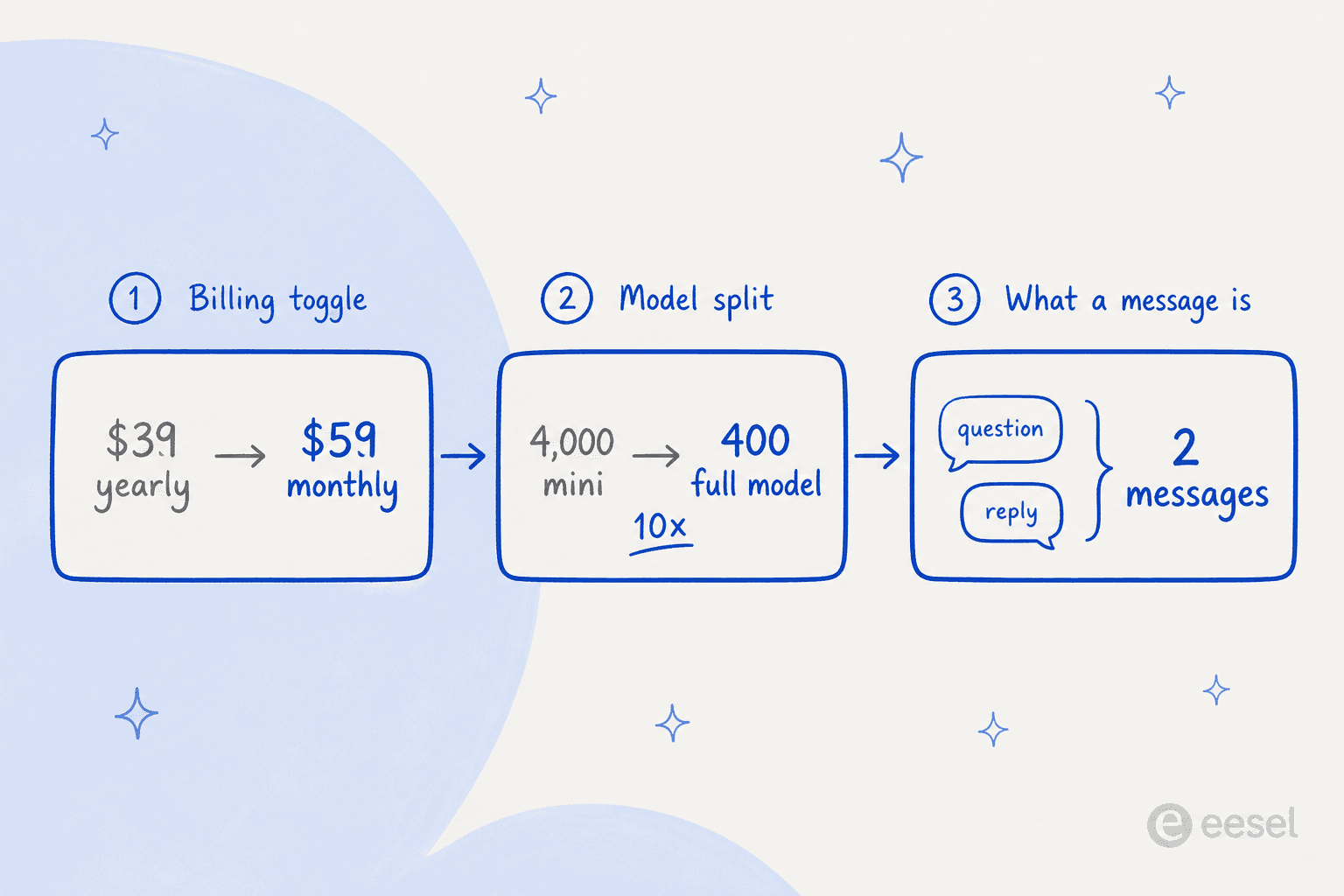
Load sitegpt.ai/pricing and the cards read $39, $79 and $259, each with a small "billed $468 yearly" line underneath. The Pay Yearly side of the toggle is already selected when the page renders. Flip it to Pay Monthly and the same three cards become $59, $129 and $429.
That is a completely normal SaaS pattern and I am not going to pretend otherwise. It matters here for one reason: almost every third-party page quoting SiteGPT pricing quotes the yearly rate as if it were the monthly rate, because that is what a scrape returns. If you have been comparing SiteGPT's "$39" against a rival's month-to-month number, say Chatbase pricing, you have been comparing an annual commitment against a monthly one.
Worth noting too that the toggle badge says "Save 40%". That is true on Scale. Starter's actual saving is 34%, and SiteGPT's own calculator prints 39% for Growth a few hundred pixels further down the same page.
The model split moves the cap by 10x
This is the one that changes the arithmetic, and to SiteGPT's credit the page states it plainly rather than hiding it. The calculator is headed "How many messages do you actually get?" and answers itself:
"It depends on which model you pick. GPT-4.1-mini is 10x cheaper than GPT-4.1, so your real message count can vary by 10x on the same plan."
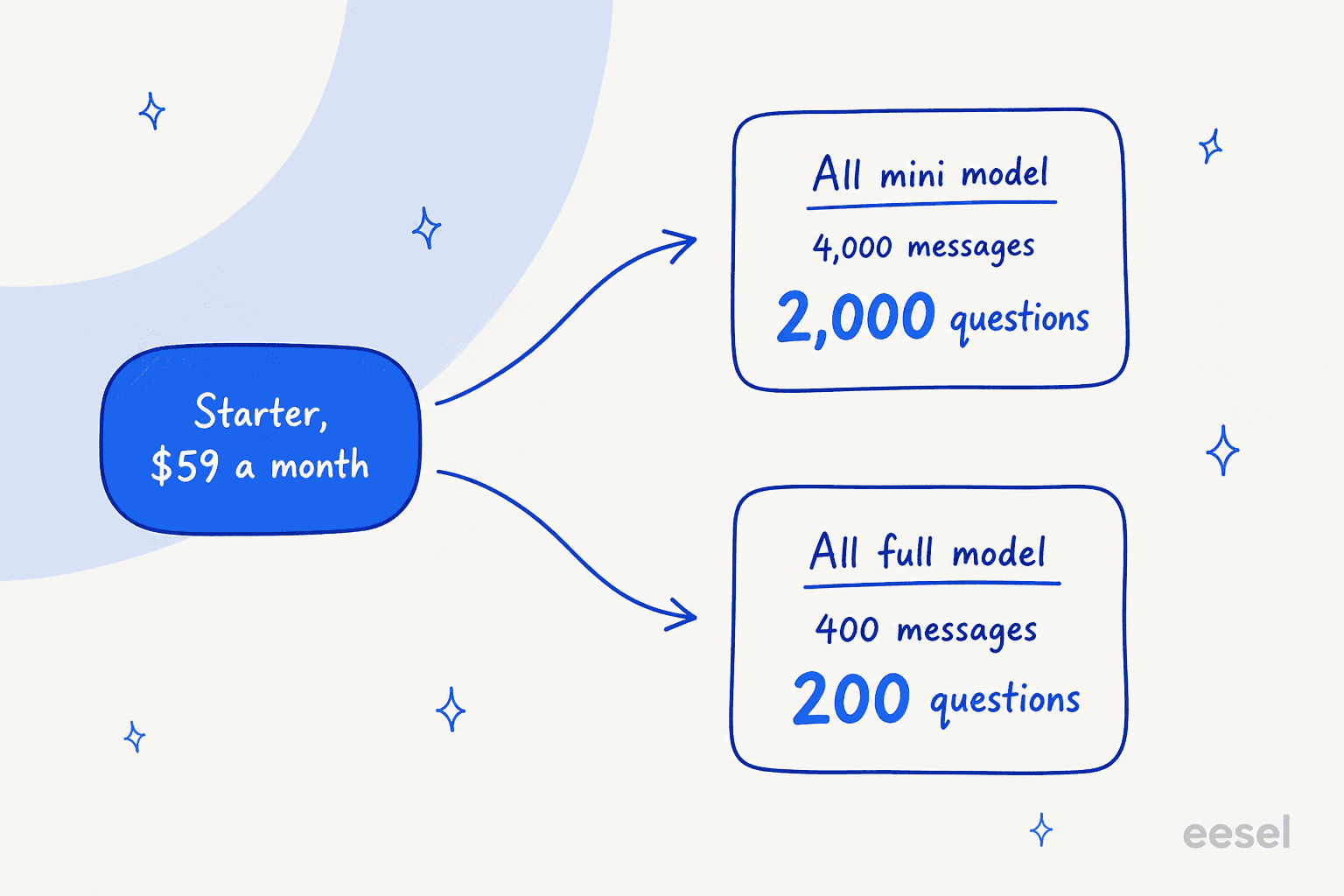
So the "up to 4k messages" on Starter is the all-mini ceiling. Answer everything with GPT-4.1 and you get 400. The same fold applies at every tier: Growth's 10,000 becomes 1,000, Scale's 40,000 becomes 4,000.
The practical read: your plan tier does not tell you your message budget until you have also decided your model split. Two teams on identical $129 Growth plans can have a tenfold difference in how many customers they can serve. And the split is a slider you can move from billing settings, so it is a decision you keep making, not one you make once.
One message is half a turn
Under the calculator slider sits a single line of small text that reframes every number above it: "Each 'message' counts both the user's question and the AI's reply."
Read the pricing bundle SiteGPT's own page runs on and you can see the math: each plan carries an internal exchange quota which the calculator doubles, because one exchange is two messages. Starter's internal quota is 200 exchanges. Growth's is 500. Scale's is 2,000.
Which means Starter's 400 GPT-4.1 messages is 200 customer questions a month, or roughly seven a day. Growth's is 500 questions. Scale's is 2,000. Those are much smaller numbers than "4k, 10k, 40k messages" implies, and they are the numbers you should be planning against if you care about the answer quality the bigger model buys you.
This is exactly the trap I have watched real buyers walk into. One eesel prospect, an ops lead at a payouts and money-transfer fintech running about 7,000 escalated tickets a month on Zendesk, did the arithmetic on a per-interaction plan mid-call: roughly 500 tickets a day at about four exchanges each is 2,000 interactions a day, which burns a 3,000-interaction monthly allowance in a day and a half. Per-interaction pricing was an instant non-starter for them, not because the rate was high but because the unit did not match the work. Anyone sizing SiteGPT against real ticket volume needs to run the same sum before they pick a tier. My notes on AI support cost savings walk the same arithmetic from the other end.
The add-ons are where the bill quietly triples
SiteGPT sells exactly two add-ons and they are priced identically: Remove SiteGPT Branding and Extra 5k Messages, each +$59 a month billed monthly, or +$39 a month prepaid yearly.
On Starter, each add-on costs the same as the entire plan.
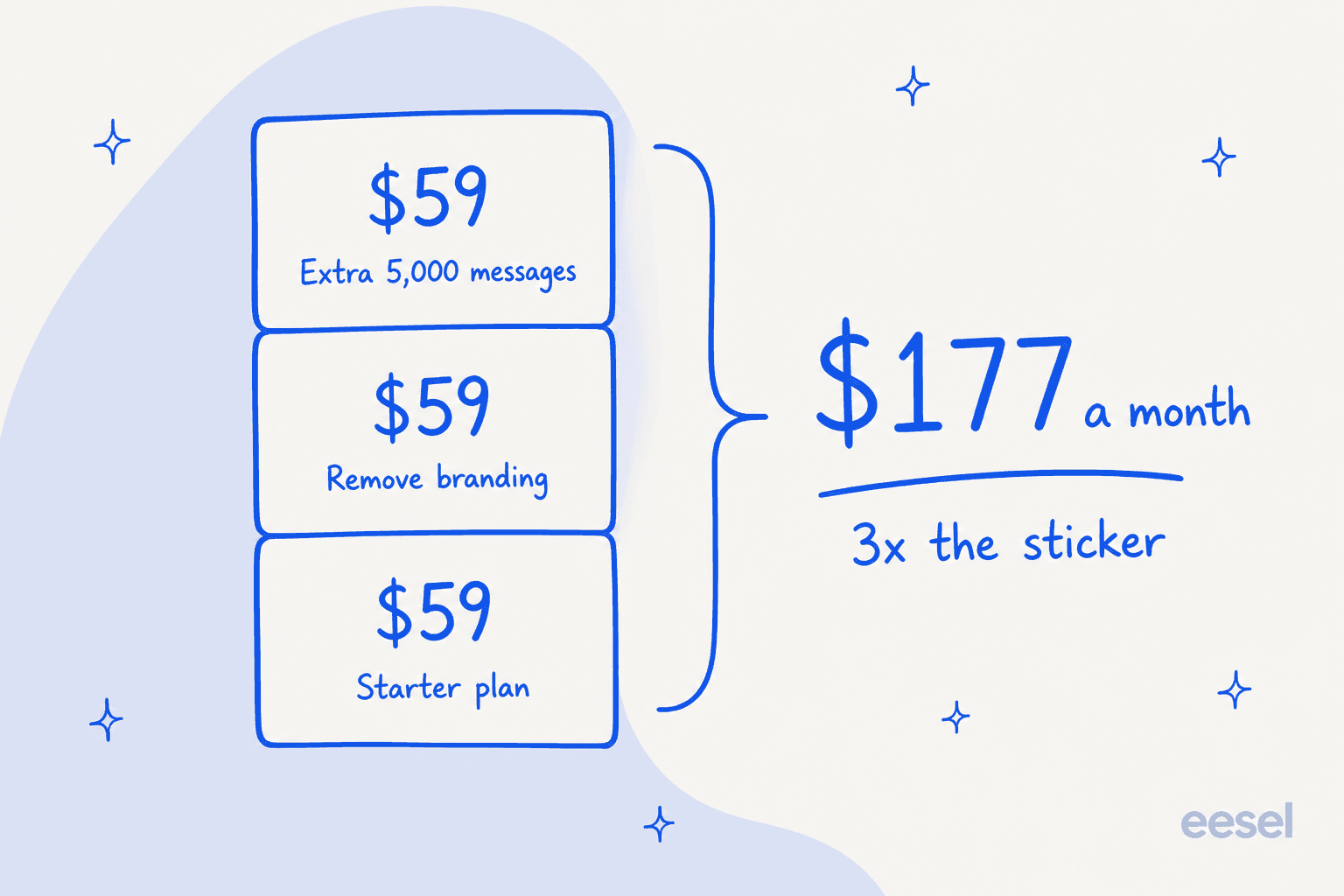
A white-labelled Starter deployment is $118 a month, not $59. Add one message pack because you underestimated volume and you are at $177 a month, three times the sticker, for a plan with one chatbot, one seat, no integrations and no API. At that point Growth at $129 with four seats and the whole integration list is both cheaper and larger, which is a useful thing to notice before you buy.
A shopper in r/nocode landed on the same two figures when working out whether to keep looking:
"SiteGPT - Decent for FAQ stuff and the support team is apparently responsive. But it caps your messages (40k/mo on the $259 plan) and retraining with large datasets takes forever according to reviews. Also $39/mo extra just to remove their branding."

Treat that post as a shopping note rather than an operator's account, since it hedges with "according to reviews" and ends by recommending a lesser-known tool. Both figures it cites do check out against the pricing page.
One genuine ambiguity worth flagging: the page never says whether the extra 5,000 messages in a top-up pack are mini messages, GPT-4.1 messages, or subject to the same 10:1 split. Given that the split is the single biggest variable in the whole price, that is the one number I would want confirmed in writing before buying a pack. It is the same category of small print I flag in my rundown of common AI chatbot problems.
What the pricing page does not tell you
I read a lot of AI chatbot platform pricing pages, and the absences are usually as informative as the tables. Four here.
There is no published overage policy. Nothing on the page says what happens when you hit your monthly cap. The caps read as hard stops with a paid top-up pack rather than metered overage. Notably, the page's own FAQ entry for this question is a button that fires "What happens if I exceed my monthly message limit?" into SiteGPT's site chatbot rather than answering in text.
There is no refund window, no uptime SLA and no security certification on the page. SiteGPT is SOC 2 Type II examined and says so on its security page, but none of that surfaces where a buyer is choosing a tier. GDPR DPA and HIPAA BAA are both explicitly Enterprise-only.
Enterprise is quote-only, and the page contradicts itself about it. The Enterprise card advertises "up to 10,000 chatbots" and "up to 10,000 team members", while its own tooltips for both bullets say 1,000. Its "Auto Refresh (Daily)" bullet also sits alongside a daily-sync flag that is switched off in the plan data. None of this is sinister, it reads like a page that has been edited more often than its underlying config, but it does mean the Enterprise bullets are not a reliable spec.
Checkout runs through Paddle, which is the merchant of record. That is the entity that will appear on your card statement and handle your tax.
Three worked examples
Sticker prices are useless without volume attached, so here are three real shapes of team, costed with SiteGPT's own quota math. All figures are month to month.
A small SaaS site, 300 conversations a month, three questions each. That is 900 exchanges. All on mini it uses 90 quota units, so Starter's 200 covers it comfortably at $59 a month, about 20c a conversation. Push everything to GPT-4.1 and you need 900 units, which blows past Growth's 500 and lands you on Scale at $429, or $1.43 a conversation. Same traffic, same product, seven times the bill.
A Shopify store, 1,500 conversations a month, four questions each. 6,000 exchanges. All on mini that is 600 units, over Growth and onto Scale at $429, about 29c a conversation. Run a 50/50 split and you need 3,300 units, which is past Scale entirely and into a sizing call. This is the size of team most likely to be surprised, because 1,500 conversations does not feel like an enterprise number.
A high-volume store, 5,000 conversations a month, four questions each. 20,000 exchanges, which on the mini model is exactly Scale's 2,000 units. That is $429 a month, or about 9c a conversation, and at that volume SiteGPT is one of the cheapest real deployments in the whole category. Nothing else on my chatbot shortlist gets close on a pure per-conversation rate. The catch is the same as before: any meaningful share on the full model tips you out of Scale and into a quote.
That last example is the honest headline of this whole post. SiteGPT on the small model at high volume is excellent value. The pricing only turns against you when you want the better model, and the switch between those two worlds is a slider, not a plan change.
What SiteGPT's price gets you, and what it does not
Price is only half of value, so it is worth being precise about what the meter buys.
SiteGPT trains on your website URL, your sitemap, YouTube videos, uploaded files and six cloud drives including Notion, Google Drive and GitHub. It handles 95 languages, holds 4.8 out of 5 across 12 reviews on G2, and the single Capterra reviewer scored it 5.0 for value for money. Reviewers consistently single out how fast it is to stand up.
"It's extremely easy to set up, and I was able to train a custom chatbot in minutes just by entering a website URL."

What it does not train on is your ticket history. Past support conversations appear nowhere in the source list on the features page, which matters for a pricing post because it changes what each message is worth. A bot trained only on published content is answering the visitor your published content already failed, so a higher share of those metered messages go to questions the source material cannot answer. That gap is the whole argument for an AI knowledge base chatbot that reads more than your site.
Escalation has the same shape. SiteGPT's own features page describes exactly one mechanism: the visitor "transition[s] the conversation to a live agent at the push of a button". There is no confidence threshold that routes a shaky answer to a person on its own, which is the control I would want most when every exchange costs quota. If you are weighing that trade, my notes on hallucination prevention and on AI agent handoff go deeper.
The one Capterra reviewer, who deployed it against a Zendesk help center, named the workflow cost rather than the sticker cost:
"Currently the integration options are limited, so implementing may not be as smooth depending on your other platforms. Also, corrections currently need to be made directly on SiteGPT.ai and not through any integrated platform."

And the fairest framing of the whole category came from a competing founder, arguing against his own interest:
"retrieval quality is mostly about how clean your source docs are, not which vendor you pick. These are all RAG under the hood."
He is right, and it is why the meter matters more than the model marketing. If everyone's retrieval is roughly comparable on the same knowledge base, then billing shape is one of the few real differentiators left. That is a very different world from the one where rule-based chatbots competed on how many branches you could draw.
SiteGPT's founder made a related admission publicly, which is more candour than most vendors offer:
"After growing SiteGPT to $150k+ ARR, I realized I built it completely wrong. Right now, SiteGPT is a horizontal AI chatbot platform. ... It works for everyone. But that also means it's not perfectly built for anyone."

How the price compares
Entry prices across the website-chatbot category, month to month where a monthly rate is published. I priced all of these in more depth in my roundup of SiteGPT alternatives.
| Tool | Entry price | What the meter counts | Free tier | Trains on past tickets |
|---|---|---|---|---|
| SiteGPT | $59/mo | Messages, question and reply counted separately | No, 7-day trial | No |
| eesel | No platform fee | Chat sessions, 40c each | $50 free usage | Yes |
| Chatbase | $32/mo Hobby | Message credits | Yes | Pro plan only |
| Chatling | $40/mo Standard | Credits, model-weighted | Yes | No |
| Botpress | Free tier | Conversations, 100 on Free | Yes | No |
| DocsBot AI | Free tier | Message credits | Yes, expires in 30 days | No |
The column that decides most of these is the second one. A per-message meter, a per-credit meter and a per-session meter are three different bets about how your traffic behaves, and the differences compound. A five-turn conversation costs SiteGPT ten messages off your quota; it costs eesel one session. A one-turn conversation is the reverse, and SiteGPT wins that comparison easily.
So the question is not which number is smaller. It is which unit matches your traffic. Short factual lookups on a documentation site favour a per-message meter. Longer back-and-forth support conversations, the kind that show up on an ecommerce store, favour a per-session one. Same goes for anything routed through a helpdesk chatbot or a live chat queue.
My verdict on SiteGPT's pricing
I like this pricing page more than most, and I would still check three things before I signed.
Buy it if your traffic is high, your questions are short, and your published documentation is good enough to run on the mini model. At 5,000 conversations a month that is roughly 9c a conversation, which is close to the best rate in the category. Two-person teams building a fast AI chatbot for a website get real value here, and the setup speed praise in every review is earned.
Think twice if you need the full model, you need Zendesk, or you need more than one seat on the cheap tier. Any of those three pushes you up a tier or two, and the tiers are steep. Scale at $429 for one extra chatbot is the least appealing step on the ladder.
Look elsewhere if you plan in conversations rather than messages, or if your best answers live in resolved tickets rather than published pages, which is the case for most teams doing live chat deflection at any real volume. Neither of those is a flaw in SiteGPT, they are just outside what it was built to do, which is the point its own founder made better than I could.
The three checks I would run before buying, in order: flip the toggle to Pay Monthly and re-read every number; ask support in writing whether a 5,000-message top-up pack is mini or full-model messages; and multiply your real conversation count by your real turns-per-conversation before you pick a tier, not after.
Try eesel for website chat that bills per conversation
If the thing that bothers you about the numbers above is the unit rather than the rate, that is the gap eesel is built for. It ships the same one-script-tag chat bubble you can paste into WordPress, Webflow, Shopify or Squarespace, and it bills 40c per chat session however many turns that session runs, with no platform fee, no seat fee and a monthly spend cap you set yourself.
The difference that matters for a pricing decision is what it learns from. eesel trains on your resolved tickets alongside your help center and your docs, so it is answering from how your team actually replied rather than only from what your marketing site published. It escalates on its own confidence rather than waiting for the visitor to press a button.
On the helpdesk side it plugs into Freshdesk, Gorgias and Front alongside Zendesk, Help Scout and HubSpot, none of it gated behind a top tier. There is $50 of free usage to test it, which is about 125 chat sessions, and no card required.
Frequently Asked Questions
How much does SiteGPT cost per month in 2026?
Why is SiteGPT's pricing page showing $39 when checkout says $59?
What counts as a message in SiteGPT pricing?
Does SiteGPT have a free plan or free trial?
How much does it cost to remove SiteGPT branding?
Is SiteGPT good value compared to other website chatbots?
What happens if I exceed my SiteGPT message limit?
Which SiteGPT plan do I need for Zendesk?


Article by
Kurnia Kharisma
Kurnia is a software engineer and writer at eesel AI with two years of SEO experience, writing about AI tools, helpdesk software, and customer support. He pairs a developer's understanding of how these products are built with search-driven research into what actually ranks and resonates with the people searching for them.