

Take any message in a channel, give it an owner and a status and somewhere the history lives. That is the whole idea. What differs is where the ticket ends up. Some tools keep it in Slack (Suptask, Unthread, Thena). Others treat Slack as a front door only, and the record goes to Atlassian Assist, Freshservice or Zendesk. Then there is the option nobody sells as ticketing at all: an AI layer that answers in the thread so the ticket never gets opened.
Prices first, since that is what most people scroll for. Suptask Growth, $38 per agent, annual, and no seat minimum. Thena Standard, $79 per user, also annual, no monthly option at all. Unthread Pro is $75 per agent but enforces five seats, so the real floor is $375 a month before anybody files anything. Assist has no licence of its own; it rides your Jira Service Management seats at $25 each. The published per-agent range in 2026 is $15 to $119, and honestly the spread says more about who the queue serves than about quality.
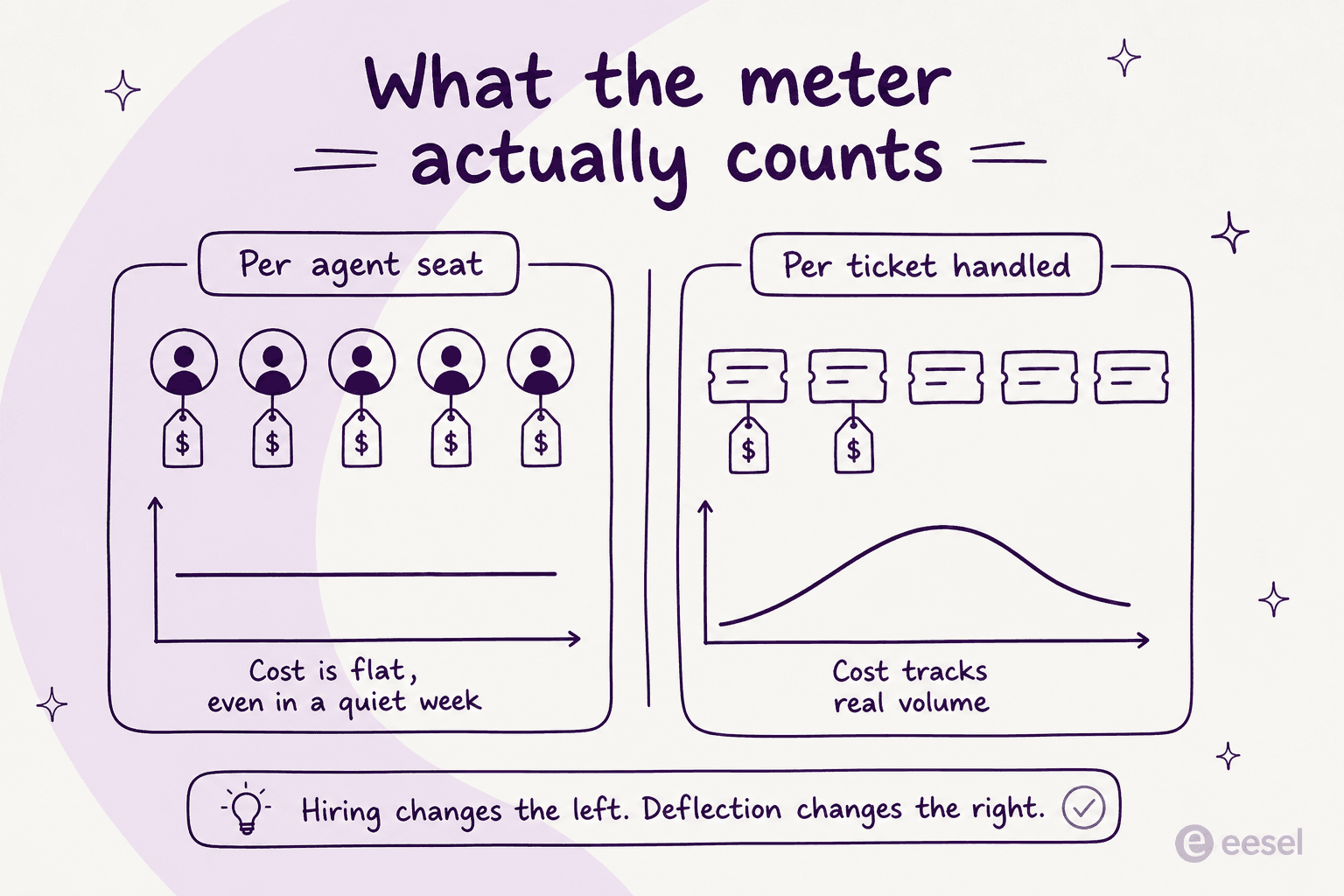
Now the part I would not skip. Every seat-priced tool bills the same whether your queue gets 40 tickets or 4,000. Headcount is the only lever you have. So if your Slack requests are mostly the same handful of already-answered questions, a queue tool organises the repetition. It does not remove it. Which is why I would put an answer layer in the channel before I bought a queue. eesel joins Slack as a real bot, answers out of your Google Drive, Confluence, Notion and whatever helpdesk you already run, escalates only the things that actually need a person, and charges one fixed monthly price by ticket volume (from $299/month for 500 credits) rather than per seat. 100 free credits, no card.
Why plain Slack falls apart as a queue
I work eesel's own support queue. So I have real sympathy for whoever decided requests should just come in over Slack, because it is faster for the person asking. That is also exactly the problem.
An operator posting to Hacker News in March 2026 put the failure mode better than any vendor page:
"We have Slack Connect channels with all of our customers ... and I've since grown to hate it. ... Because Slack is so frictionless, there was no barrier asking anything, including questions that were answered the day prior in the main channel or questions that are right in our searchable API docs."

The internal version of the same complaint shows up constantly:
"If I can believe what I've been seeing in our internal support channel, no one uses the slack search feature and keep asking the same questions over and over, I really see a space for [Stack Overflow] for Teams to fix this internal knowledge sharing issue."
Notice that neither of those is a complaint about missing statuses. Both are complaints about volume. That distinction decides which tool below is the right one for you, and it is the thing most roundups skip straight past.
There is a second, quieter problem, and a customer success practitioner on Reddit named the mechanism precisely:
"Slack makes every customer feel “close”, but it does not give you a queue by default. So the team thinks they are being responsive while important stuff is just buried three scrolls up. The fix I have seen work is boring: every channel needs a visible owner, one current next step, and a lightweight rule for what leaves Slack and becomes a tracked ticket/project."

A Slack thread has no owner. Three people react with 👀, nobody replies, and the request expires into scrollback. That is the gap a ticket record fills, and it is a real one, which is why the rest of this post exists. It is also why the harshest take on the internet, that Slack "just becomes a ticketing system, and it ends up being a not-particularly-good one", per trollbridge on Hacker News, is half right rather than wrong.
The three ways to build a Slack ticketing system
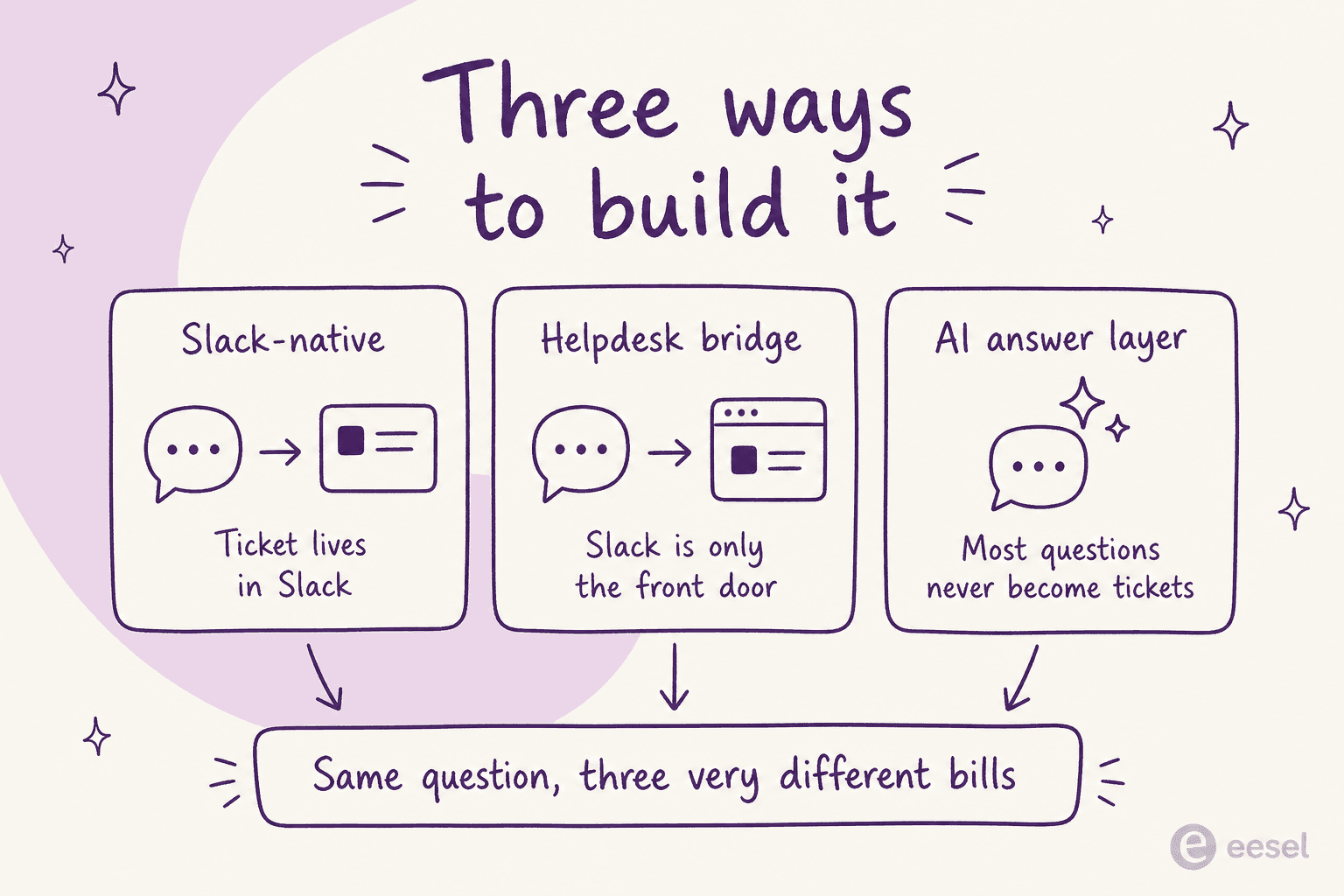
Slack-native. The ticket record lives in the vendor's system but the whole experience is Slack. A message becomes a ticket, agents pick it up with an emoji, statuses change in the thread. Suptask, Unthread and Thena all sit here. Best when the people answering already live in Slack all day.
Helpdesk bridge. Slack is intake and awareness only. The ticket lives in Jira, Freshservice or Zendesk, and the agent eventually opens that other tab. Best when you already pay for a real internal helpdesk and need its reporting, assets or email channel.
AI answer layer. The question gets answered in the thread from your existing documentation, and only the leftovers turn into tickets. This is the shape I would add first, because it changes the input to the other two rather than reorganising the output.
Most real setups end up as two of these at once. The mistake is buying the second one before you have tried the third.
How I compared these
I did not run a five-week bake-off across all eight of these, and honestly I would be sceptical of a post that claimed to. What I did was read every vendor's own pricing page and product documentation on 31 July 2026. Then I pulled out the four things that decide whether a tool works for your team in practice: exactly how a Slack message becomes a ticket, what an agent can and cannot do without leaving Slack, which plan tier unlocks the AI, and what the published price comes to at a real team size.
Where a vendor makes a claim I could not verify anywhere outside their own marketing, I have said so rather than repeating it as fact. Where a limit is written into the vendor's own docs, I have quoted it, because those are the lines that bite in month three rather than week one.
One warning that cost me an afternoon and will save you one. This category is unusually astroturfed. Several Reddit threads that read like genuine buyer questions turned out to be posted by vendor staff, including two separate "we did the pricing math" posts written from the same employee account. A Capterra page for one tool here has ten reviews, six of them tagged incentivised; another tool's G2 page is thirteen reviews at a straight 100% five stars. Every user quote below is from an account I could not tie to any vendor in this list.
The 8 options at a glance
| Tool | Best for | Where the ticket lives | Slack ticket creation | Fully resolvable in Slack? | Slack Connect | AI included | SLA timers | Published price |
|---|---|---|---|---|---|---|---|---|
| eesel | Cutting repeat questions | Your existing helpdesk | @mention, DM, per-channel rules | Answers and drafts in-thread, escalates out | Not stated | Yes, on every plan | Via your helpdesk | From $299/mo (500 credits), no seat fee |
| Suptask | A pure Slack service desk | Suptask | 🎫 emoji, /suptask, request channel, shortcut | Yes | Yes, from Professional | Growth tier, credits undisclosed | Growth tier | $15–$38 per agent/mo |
| Unthread | One queue for IT and customers | Unthread | Auto-tracked channels, DM the bot | Yes, via Slack Inbox | Yes | Pro only, none on Basic | Yes, from Basic | $50–$75 per agent/mo, 5-seat min |
| Thena | B2B support over shared channels | Thena | AI detection, emoji, forms | Yes, or in the dashboard | Yes, core use case | Yes, from Starter | Yes, all tiers | $29–$119 per user/mo, annual |
| Atlassian Assist | Teams already on Jira | Jira Service Management | :ticket:, message action, /assist | Assign, status, notes; 10 fields max | Not stated in docs | Virtual agent is Premium | Yes, in JSM | $25 per agent/mo (1–15) |
| Freshservice | IT with approvals and assets | Freshservice | @Servicebot DM, form, /freshservice-ticket | No, replies capped at 250 characters | Not documented | Freddy agent is Enterprise-only | Yes, in Freshservice | Enterprise price not published |
| Zendesk | Capture into an existing queue | Zendesk | /zendesk, message action, @zendesk | No, cannot close or edit fields | Yes, via @zendesk | Answer Bot, gated by account age | Yes, in Zendesk | No extra fee over your Suite plan |
| Slack lists | A first attempt with no new vendor | Slack | Message overflow menu, Add to list | Assignee and due date only | Restricted for workflows | No | No | Included on paid Slack |
What it actually costs at your team size
Every tool above except one bills by the seat, so the sticker price tells you almost nothing until you plug in your own numbers. Move the sliders and watch what happens to the cost-per-ticket column, because that is the number your finance team will eventually ask about.
Two things jump out once you play with it. At six agents and 400 tickets, the seat tools cost between $228 and $474 a month while eesel's 500-credit plan lands at $299, so it sits in the middle of the pack. Push volume up to 3,000 tickets with the same six agents and eesel steps up to the 3,500-credit plan at $1,349 while the seat prices do not move at all, because seat pricing does not care how hard those six people are working. The trade is that eesel also answers the repeats before they ever become tickets for those seats.
1. eesel AI
Best for: teams whose Slack channel is mostly the same questions on repeat.
I should be upfront: I work at eesel, so treat this section as the inside view rather than a neutral review. What I can tell you is why we built it this way. We have spent years putting AI agents on live support queues, and the thing that shows up in almost every rollout is that a big share of a Slack channel's traffic is questions the documentation already answers. Organising those into tickets does not reduce them.
How requests get handled in Slack. eesel joins the workspace as a real bot rather than a widget. It reads channels and DMs, answers on @mention, and you set different behaviour per channel, so it can handle support in #support, post digests in #ops, and answer questions in DMs. It works in public channels, private channels and DMs. Slack Connect is not stated on the integration page, so I would not promise it to a customer-facing team without checking first.
What the agent can do. It answers from connected knowledge, drafts replies for a human to approve, triages, and escalates into an existing helpdesk. The rollout is deliberately staged: week one it drafts for review, and you flip it to autonomous when you trust it. Low-confidence answers route to a draft rather than going out live, and you can simulate against historical tickets before anything is customer-facing. That last part exists because we have watched a confident-sounding bot quietly give wrong answers, and once was enough.
Knowledge sources. Google Drive, Confluence, Notion, Zendesk, Freshdesk, SharePoint, websites and PDFs, all indexed automatically. It is the same instinct a B2B SaaS team described on a call last March, wanting an AI helpdesk agent that could cross-reference the user guide, Slack, the internal KB and past tickets rather than one silo at a time.
Pricing. From $299/month for 500 credits, with 1 credit per ticket or helpdesk conversation, however long, so a fifteen-message back-and-forth still counts once. Blog drafts are $4 each, and questions asked in the eesel dashboard are mostly free. There are no seats and no per-seat fee. You get 100 free credits with no card, then paid plans run from $299/month for 500 credits up to $1,899/month for 5,000. If you run out, agents pause until credits reset, or you can turn on overage with a monthly cap you set at $0.80 per extra credit. Paying a year upfront gets two months free. SSO and MFA (from $199/month), data residency ($500/month) and priority support (from $299/month) are add-ons.
"We needed a turnkey solution for Confluence that met our GDPR requirements and could serve different teams through dedicated Slack bots. eesel AI delivered exactly that, with EU data residency included."
Flemming Ottosen, Development Director, Simployer
Pros: no seat maths, setup in under 30 minutes from the Slack App Directory with no developer, per-channel rules, 80+ languages, and it sits on your existing helpdesk rather than asking you to migrate.
Cons: it is not a ticket store. If you have no helpdesk at all and you want the record itself to live in Slack, you want Suptask or Unthread instead. Slack Connect support is not documented. And the price is sized to ticket volume, so a channel that outgrows its batch means moving up a plan or turning on capped overage at $0.80 per extra credit.
My take: pick eesel when the problem is volume, not organisation. If your #it-help channel is 60% password resets and shipping-policy questions, this removes them; a queue tool would have simply given them ticket numbers.
2. Suptask
Best for: a genuine service desk that never leaves Slack.
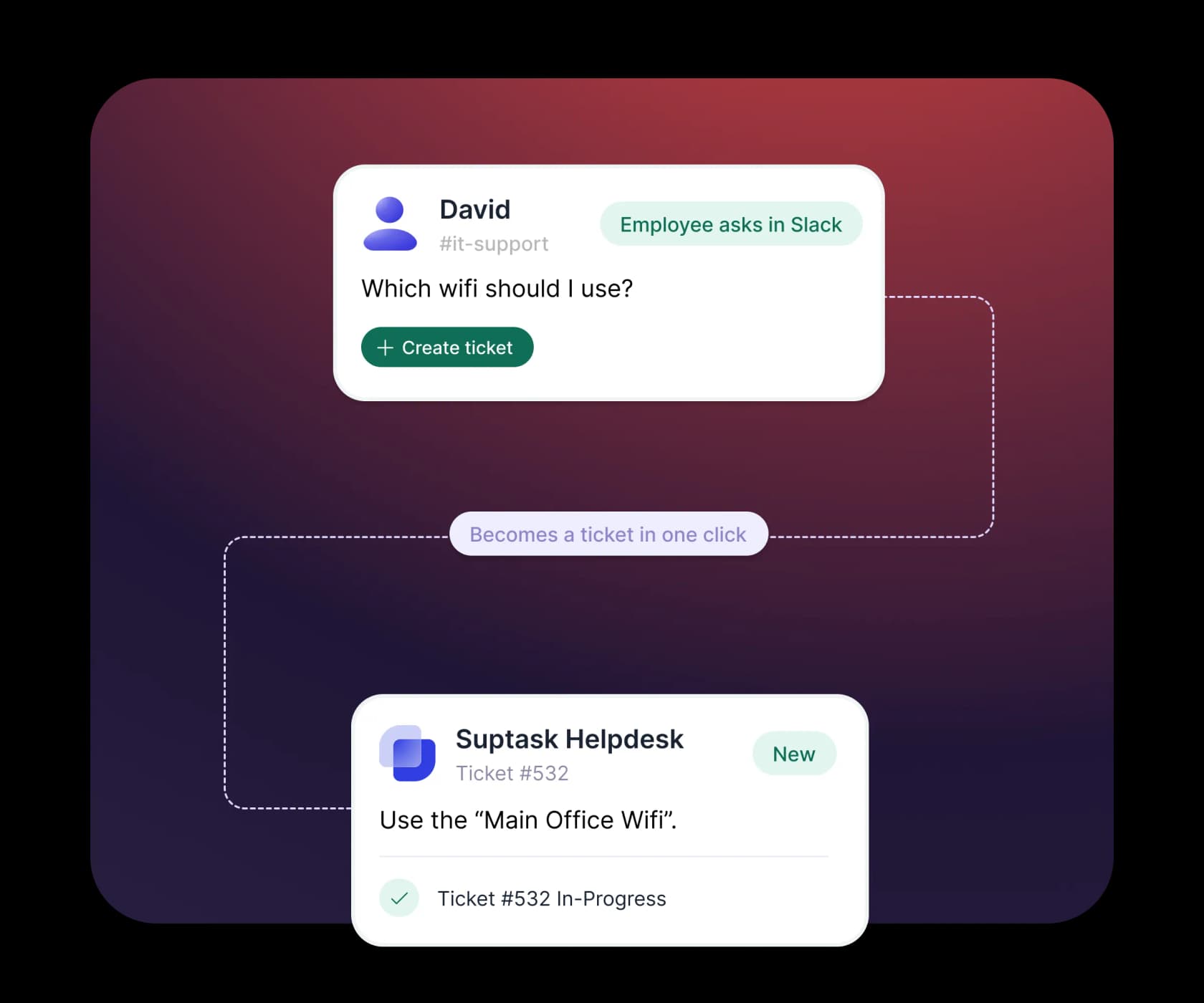
Suptask is the most single-minded tool here. Its own closing line is that it turns Slack into a help desk your team will actually use, and everything in the product follows from that.
How tickets get created. Four documented paths: post in a designated request channel, react with the 🎫 emoji, run /suptask or /helpdesk, or use the Create a ticket message shortcut. There is also a Suptask app surface in the Slack sidebar acting as the service desk hub. A ticket keeps a public thread for the requester and a private agent-side thread, which is the detail that makes it usable for IT work where half the conversation should not be visible.
What the agent can do. Everything, without leaving Slack. Routing supports round-robin, fewest-open-tickets and keyword rules, which covers most of what you would want from ticket triage in an IT queue. Per-team Inboxes, approval sequences, custom statuses and dashboards covering response time, resolution time, CSAT and SLA compliance round it out.
Pricing. Per agent, per month, with requesters unlimited and free. Starter is $15 annual and $18 monthly, Professional $24 and $29, Growth $38 and $45, and a Custom tier that is quote-gated. There is no seat minimum and no free forever plan, just a 14-day trial on the Growth plan with no card, after which the account is blocked. Starter is capped at a single Inbox; SLA management, dynamic forms and the AI assistants all sit on Growth.
| Plan | Annual, per agent/mo | Monthly | The gate that matters |
|---|---|---|---|
| Starter | $15 | $18 | One Inbox only |
| Professional | $24 | $29 | Adds unlimited Inboxes, email and Slack Connect intake |
| Growth | $38 | $45 | Adds SLA, automation suite, AI assistants |
| Custom | Contact us | Contact us | HIPAA, Enterprise Grid, volume discounts |
Pros: no seat minimum, so a two-person IT team really can pay $30 a month. Unlimited free requesters. SOC 2 Type II is listed on the security row. The public-plus-private thread model is the best-designed part of the product.
Cons: the AI meter is undisclosed. Growth's card carries a footnote reading "includes credits per agent" with no credit count, no per-credit price and no overage rate published anywhere. Suptask's headline stats (1,700+ teams, 76% faster response, 85% auto-resolved by AI) appear only on its own site with no methodology attached, so I would treat them as marketing rather than evidence.
The most useful outside verdict I found came from an IT manager on Reddit running a five-person team for around 500 users, who bought it precisely because management would not force people to a portal:
"We conceded that if we couldn't get management to enforce user behavior, then at least with suptask, any DM or message in a it-requests channel could easily get turned into ticket. It did help but suptask is not fully featured like a bigboy ITSM so it really depends on your needs."
My take: the strongest choice if you want the ticket to genuinely live in Slack and your volumes are steady. Ask the sales team for the AI credit numbers in writing before you sign, because that is the one line item you cannot forecast from the pricing page.
3. Unthread
Best for: one queue serving internal IT and external customers at the same time.
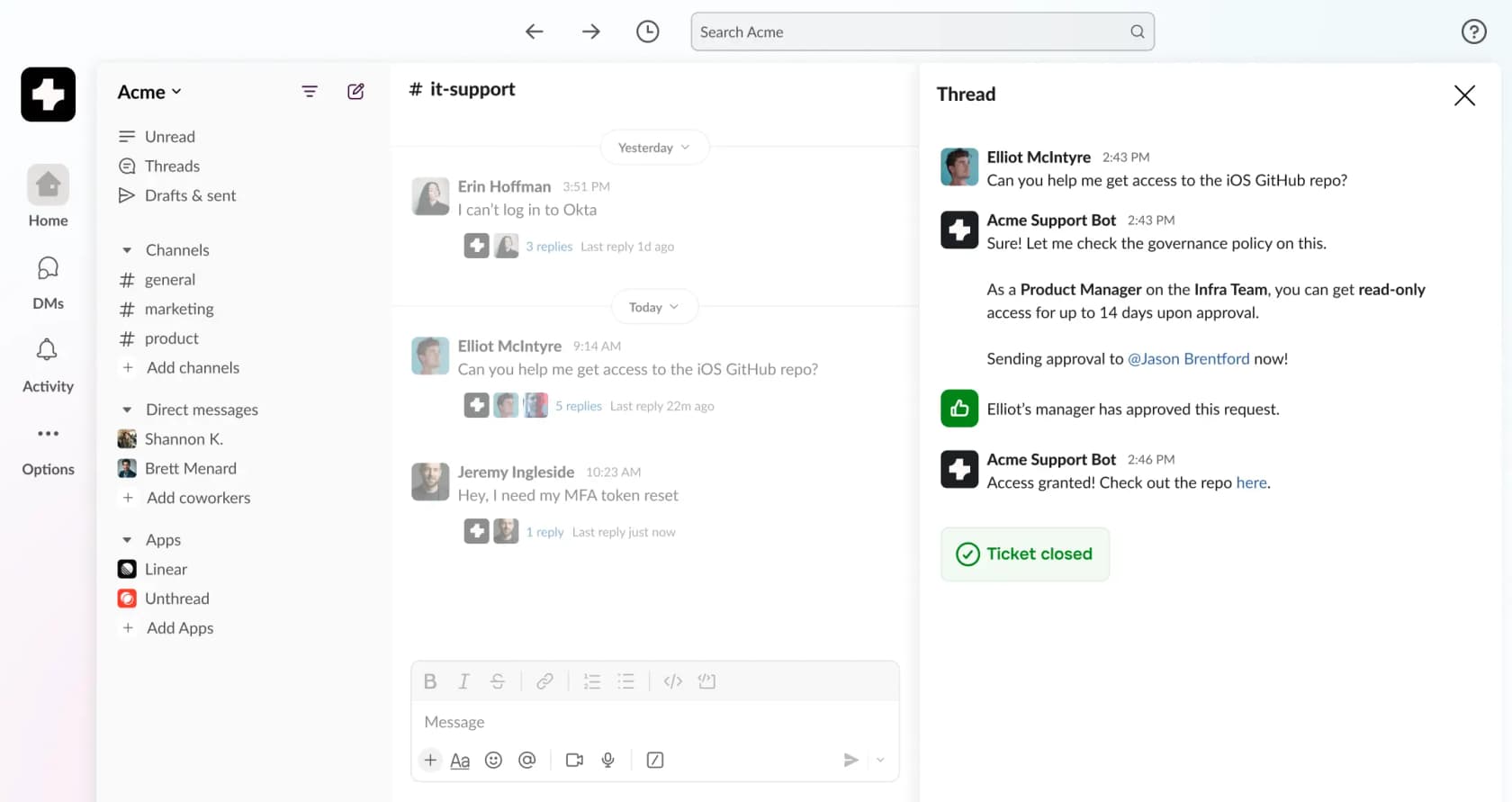
Unthread pitches itself as one helpdesk across IT, customer support, RevOps and HR, and its own customer list backs that up: the Lemonade testimonial comes from a Head of IT while thirdweb uses it for external users.
How tickets get created. Two routes. Unthread auto-tracks monitored channels and turns qualifying conversations into tickets, or a user DMs the support bot to open a private one. Agents work from a Slack Inbox, while reporting, the knowledge base and configuration live in a separate web dashboard, so this is Slack-first rather than Slack-only.
Pricing. This is where you need to read carefully. Basic is $50 per agent and Pro is $75, both marked "starting at", and both carry a minimum 5 seats. The real entry price is therefore $250 and $375 a month. Basic is capped at 100 conversations a month and includes no AI at all: the automation builder, self-learning docs and knowledge base sync are Pro and above. SSO, Slack Enterprise Grid support and HIPAA with a BAA are all Enterprise, which is quote-gated, so a large org already on Grid cannot buy this at list price.
Pros: the Slack UI is the most polished of the Slack-native group, approvals and escalations are built in, and it carries a 4.9/5 badge on G2. Bi-directional ticket sync with third-party trackers is a real advantage if engineering lives in Linear or Jira.
Cons: the 5-seat floor prices out small teams entirely. Basic having zero AI in 2026 is a strange line to hold. The homepage claim that it "deflects 40% on day one" matches the Lemonade case study's ~40% figure exactly, which reads like one account generalised into a headline. And the 14-day trial is demo-gated, not self-serve, so you cannot quietly evaluate it on a Friday afternoon.
Reporting is the recurring gripe from actual users. A December 2025 reviewer on G2 put it plainly:
"It does not have a proper customer centric dashboard to track and create reports. Need to click on few tabs to make it user friendly."

My take: worth the money at ten-plus agents where one team genuinely serves both employees and customers. Below five agents you are paying for seats you do not have, and a lighter AI IT help desk setup will do more for less.
4. Thena
Best for: B2B companies running support through shared Slack Connect channels.
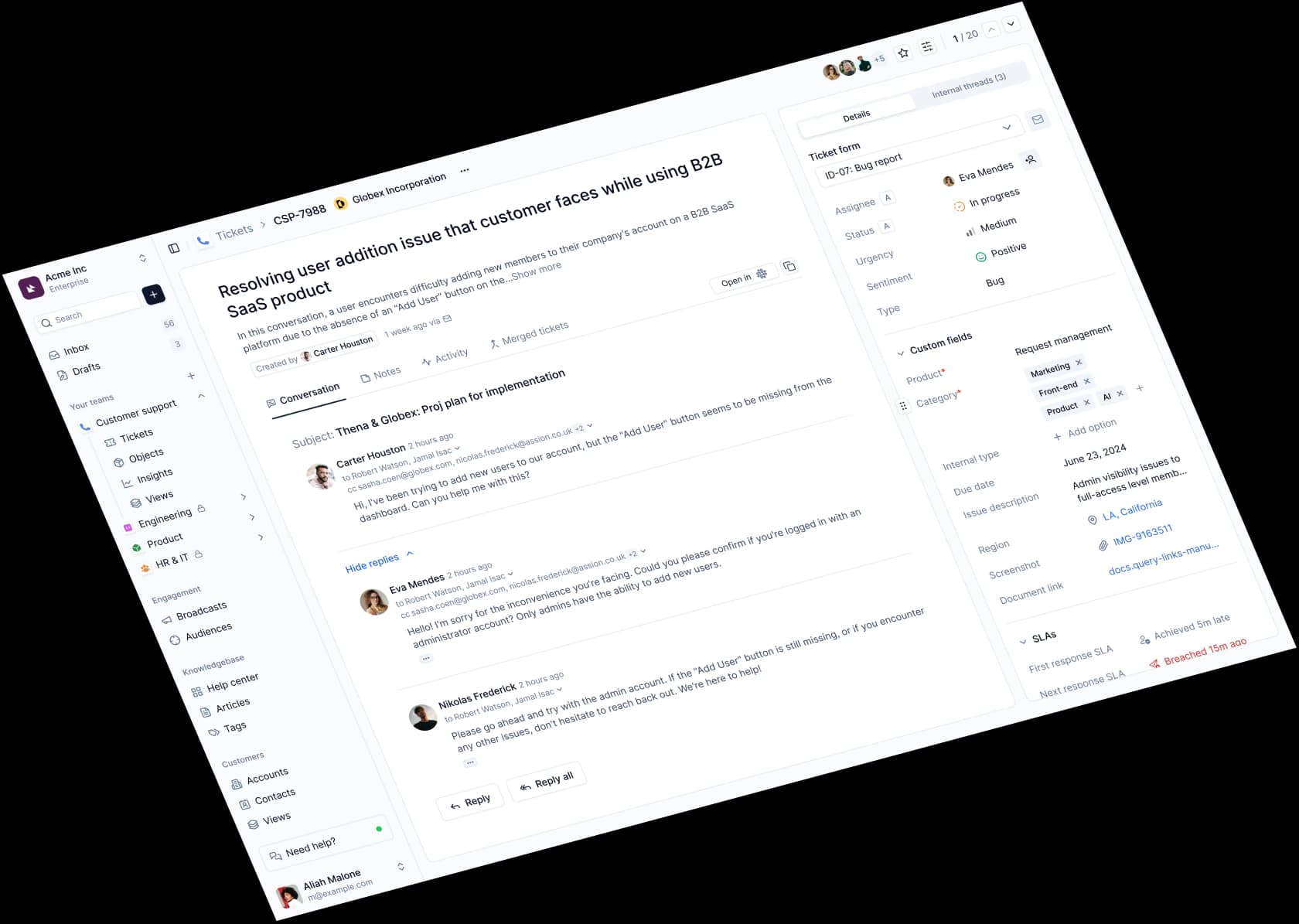
Thena does not hedge about who it is for. The site says "the support platform for B2B", and the whole product assumes your customers are already in a shared channel with you.
How tickets get created. Its headline mechanism is AI ticket detection, available at the entry tier: Thena watches connected channels and decides which messages are real requests, then opens tickets with AI summaries and tags applied. Emoji actions, structured forms and per-channel converters cover the manual paths, and internal threads let the team discuss a ticket without that leaking into the customer's channel.
Where agents work. Both surfaces, deliberately. Agents can manage tickets from Slack or from a full dashboard with boards, triage and views. Thena also publishes an MCP server, so tickets can be read and acted on from Claude, Cursor or Raycast, which is the most forward-looking feature in this roundup.
Pricing. Annual billing only, and unusually for this category, all three tiers publish a number. Starter is $29 per user per month, capped at 5 seats and 1,000 tickets a month, Slack and email only. Standard is $79 and Enterprise is $119. SLA, CSAT and Insights are on every tier, which is rare; most helpdesks gate SLA behind a middle plan. Microsoft Teams is Enterprise-only, and RBAC, API, webhooks and AI agents are described as "Limited" on Standard without Thena ever defining what the limit is.
Pros: genuinely transparent pricing, SLA on the entry tier, AI detection included from Starter, and the clearest B2B positioning of the group. The named Clarify reference says one support lead now covers what previously took a four-person team.
Cons: annual commitment only, so there is no way to try it month to month. The Starter seat cap contradicts itself between pages (the pricing page says 5, the homepage card says 10). The homepage advertises a free plan while the pricing page publishes no free-plan terms at all. And "Limited" as a feature-tier value is not something I would sign a year for without a number attached.
My take: if your customers file requests in Slack Connect channels, this is the most purpose-built tool here. If your queue is internal IT, you are paying for B2B account context you will never use.
5. Atlassian Assist with Jira Service Management
Best for: teams already paying for Jira who want Slack intake at no extra licence cost.
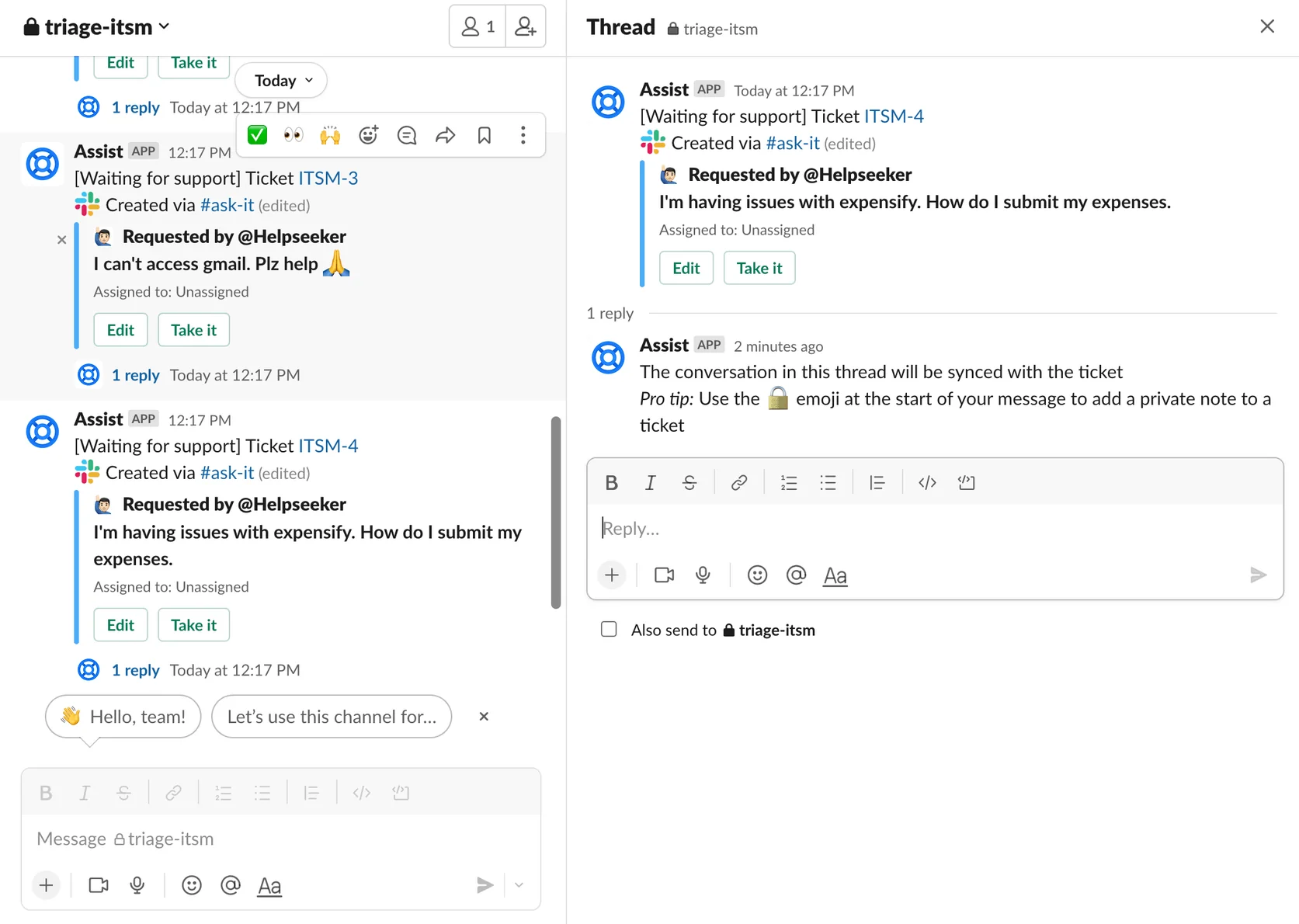
If you remember Halp, this is where it went. Atlassian ended sale on 9 May 2023 and shut down Halp web and Halp-Assist ticketing on 4 June 2024, folding the features into Jira Service Management Cloud across every plan tier including Free.
How tickets get created. Five documented paths, and the differences between them matter more than the count. React with :ticket:, which only works inside a configured request channel; use the Raise a request message action, which is the only route that works in private channels and DMs; type /assist anywhere; use the Assist Home tab, which requires you to be a Jira admin; or turn on automatic creation so every message in a request channel becomes a work item.
That emoji restriction catches people out often enough that Atlassian published a dedicated article about it. If you roll this out and half the team reports the emoji "not working", that is why.
What the agent can do. Take it or react with :eyes: to assign, change status from the thread, and prefix a message with :lock: for an internal note. The expand card shows a maximum of 10 fields, after which Assist tells you to view the request in Jira, and multi-line text fields are hidden by design.
Pricing. There is no separate Assist SKU. You pay normal Jira Service Management agent seats, now sold as Service Collection: Free covers 3 agents, Standard lists at $25 per agent per month for the first 15, and Premium at $57.30. The genuinely gated piece is the virtual service agent, which is Premium-only and works in Slack or Microsoft Teams, never both.
Pros: effectively free if you already run Jira, works on the Free tier for tiny teams, and the request ends up in the same system your engineers already use. Assist runs on all four plan tiers, which is unusually generous, and it pairs cleanly with wider Jira Slack automation you may already have.
Cons: the 10-field cap makes complex request forms unpleasant in Slack. Atlassian's own docs say nothing about Slack Connect support in either direction, so external channels are an unknown rather than a yes. And the AI is Premium, which more than doubles your per-agent cost.
My take: the obvious pick if Jira is already the system of record. If it is not, do not adopt Jira Service Management just to get Slack ticketing, because you are buying a whole ITSM platform to solve an intake problem. My Jira Service Management review goes deeper on whether the platform earns its seat cost, and there is a separate rundown of the best AI for JSM if Premium looks steep.
6. Freshservice
Best for: IT teams that need approvals, assets and a real ITSM record behind the Slack front end.
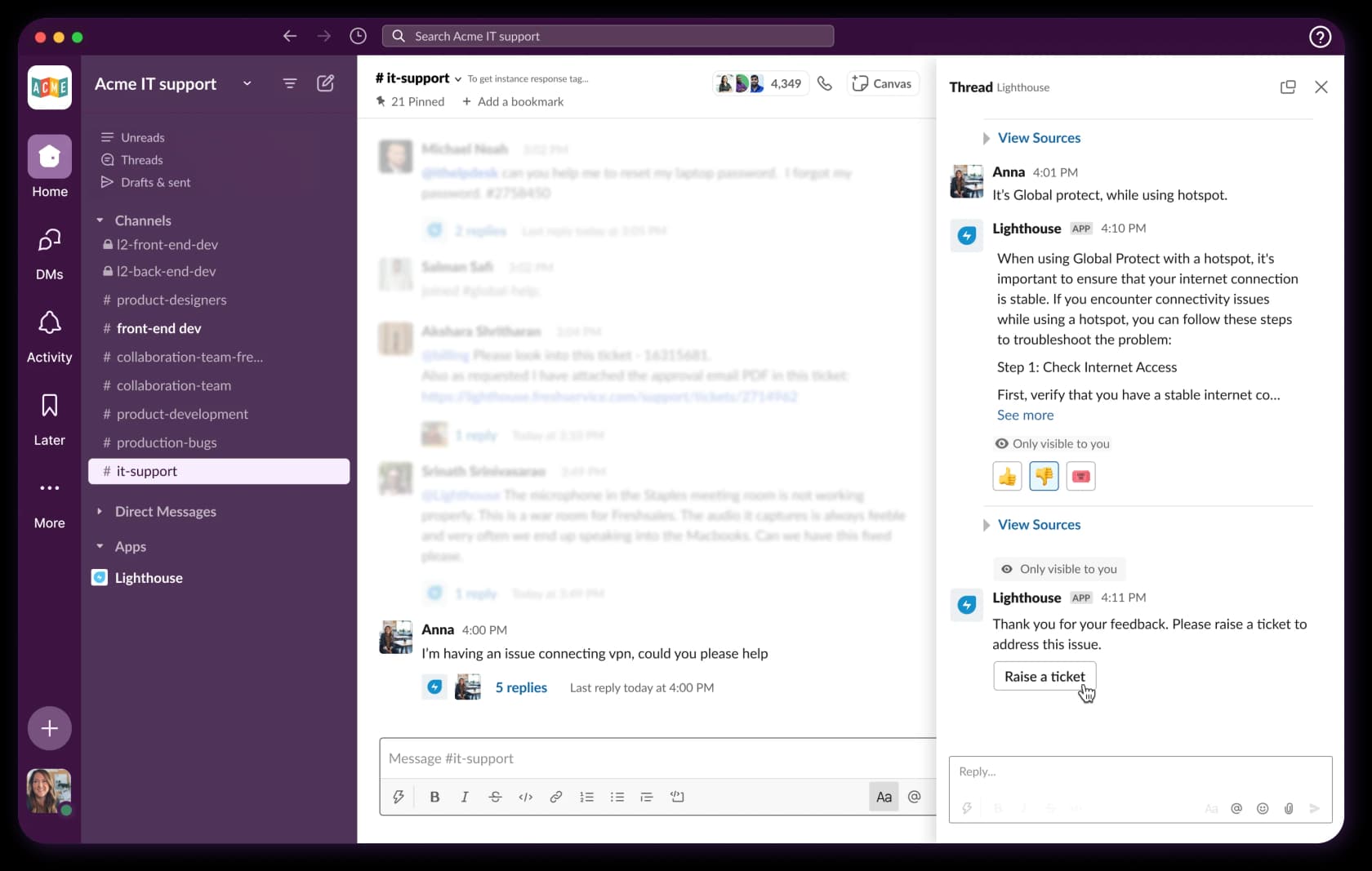
Freshservice's Slack presence is a bot called Servicebot, and it does more than intake. It attempts knowledge base deflection first, and a thumbs-down escalates into a ticket, which is the right shape.
How tickets get created. Four paths: DM @Servicebot and answer its prompts, use a Freddy-prefilled form, run the /freshservice-ticket slash command, or use Slack shortcuts and message actions. The slash command is worth knowing about: it only works in DMs, it must be enabled separately by an admin, every agent has to individually authorise Slack from their profile, and it captures the previous hour of messages into the ticket.
The limit you need to know about. Replies and private notes flowing from Freshservice into Slack are capped at 250 characters. A real IT answer rarely fits in 250 characters. Channel replies also land as private notes, so they never reach the requester. Attachments from Slack and asset association are both explicitly unsupported.
Pricing and the AI gate. Freddy AI Agent in Slack is Enterprise-only per Freshworks' own plan table, and the Enterprise price is not published. Each Enterprise licence bundles 1,200 Freddy sessions a year with no published overage rate. Freddy AI Copilot, the agent-side assistant, is a separate add-on at $29 per agent per month billed annually or $35 monthly. Our Freshservice AI pricing breakdown maps the full ladder.
Pros: approvals in Slack are properly documented, with one-click approve and mandatory comments on reject. Deflection-before-ticket is the right default, and it plugs into Freshservice's wider employee self-service story. The record itself is a full ITSM system with assets and change management behind it.
Cons: the 250-character cap is a hard functional ceiling. Form compatibility silently fails: forms with more than 8 fields, more than 100 choices or dynamic sections punt the user to the web portal instead. And the AI everyone wants is behind an unpublished Enterprise price.
My take: fine as an intake surface if Freshservice is already your ITSM. Not a reason to buy Freshservice. If the goal is deflection, an AI layer on Freshservice sidesteps the Enterprise gate entirely.
7. Zendesk's Slack app
Best for: capturing internal requests into a Zendesk queue you already run.
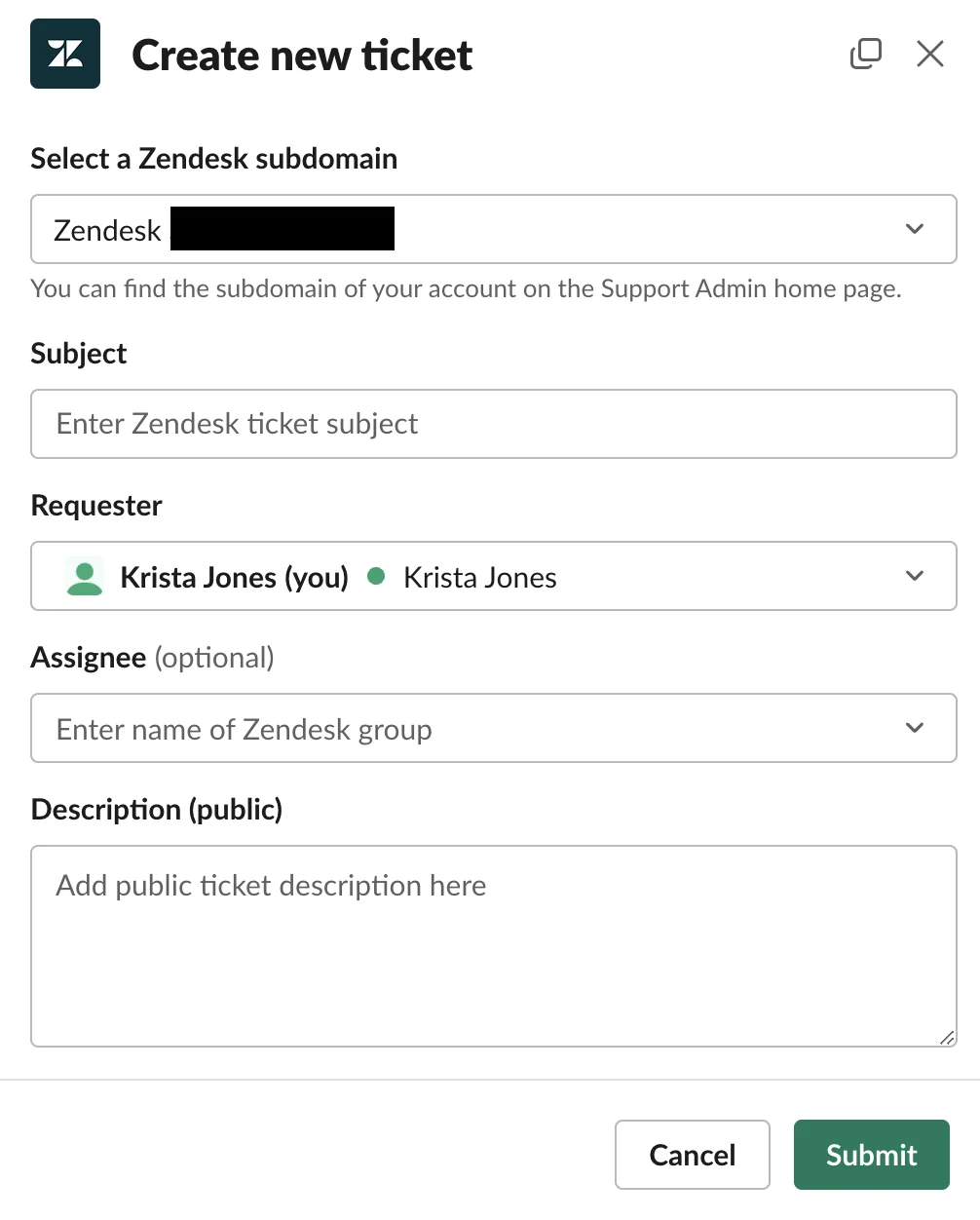
Zendesk ships two separate Slack products and its docs are firm that they are not interchangeable. Slack for Zendesk Support is the internal integration most people mean. The Slack Direct Messages channel is a distinct messaging channel where end users DM a handle and those DMs become tickets, limited to 1:1 conversations with threads explicitly unsupported.
How tickets get created. The /zendesk shortcut, the message action on an existing message (which pre-populates the description), the app Home tab, or an @zendesk mention in a Slack Connect channel, which is the only path available to external users. Tickets created via the first two get a created_from_slack tag you can build views on, though that tag is not applied on the Connect path. There is no emoji trigger.
What an agent cannot do. This is the sharpest set of limits in the roundup, and it comes straight from Zendesk's own FAQ. You cannot close tickets from Slack. You cannot edit ticket fields. You can only assign to a group, never to an individual. Public customer replies from Slack are not documented at all, only internal notes. Slack is a capture and awareness surface, and the Zendesk agent workspace remains mandatory.
Side conversations run the other direction, letting an agent start a Slack thread from inside a ticket. They are capped at 1,000 characters per comment, sync in 5 to 30 seconds or longer, do not support emoji reactions, DMs or typing indicators, and break entirely if the Slack Connect channel is owned by the external workspace rather than yours. They need Suite Professional or above, or the Collaboration add-on.
Pros: no additional fee over your existing Suite plan. Approvals work. Answer Bot for Slack is free where it is available, and channel notifications are fully trigger-driven, so they slot into whatever Zendesk routing automation you already run.
Cons: Answer Bot for Slack is gated to accounts that had a drafted or published AI agent as of 2 February 2025, so newer accounts get pointed at the paid AI agents add-on instead. It cannot suggest articles in Chinese, Korean, Japanese or Thai. And anyone in the channel can see tickets created there, which is a real problem for HR or anything sensitive.
My take: treat this as a capture tool, not a ticketing system. If you want Slack to genuinely resolve things against a Zendesk queue, you need a layer that can actually reply, which is the gap our Zendesk AI alternatives piece walks through.
8. Slack lists and Workflow Builder
Best for: finding out whether you have a real ticketing problem before you buy anything.
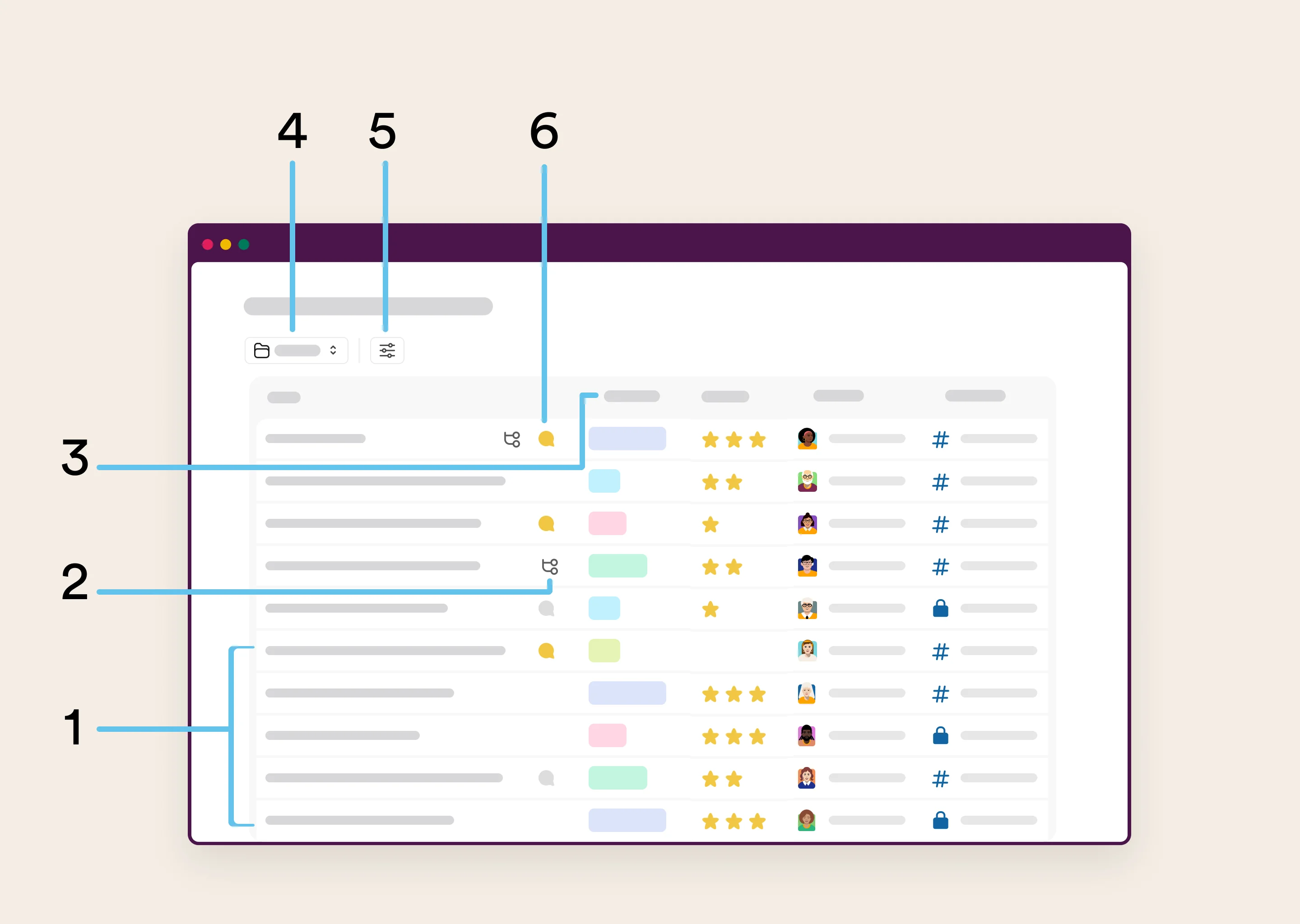
Slack markets this use case itself. There is a help article called "Slack lists: Collect and triage requests" whose worked example is, word for word, an IT help desk.
What you actually get. Any message can become a list item through the overflow menu. Lists ship with Completion, Name, Assignee and Due Date as default fields, and you add anything else, including status. The Help request tracker template pre-adds Request, Category and Priority. Two prebuilt automations chase due dates: one DMs the assignee, one posts a channel digest. A list item update can even trigger a workflow, which is the closest native thing to a status-change automation.
Where it stops. Workflow Builder is capped at 100 steps per workflow, and conditional branching, the feature you need to route by severity, is Business+ and above. Workflow activity logs only cover the last 90 days and cannot be exported, so there is no ticket-volume trend, no first-response time, no CSAT. The statuses in that log are workflow statuses (complete, in progress, workflow error, canceled, awaiting user action), which tell you whether the automation ran, not whether the request was resolved. There is no SLA clock, no ticket ID and no requester-versus-assignee distinction.
Pricing. Both lists and Workflow Builder are excluded from Slack Free. Slack Pro is $8.75 per user monthly or $7.25 annually, and Business+ is $18 or $15. Slack Connect on Free is limited to 1:1 external DMs, so shared customer channels require Pro at minimum, with a ceiling of 250 organisations.
Pros: no new vendor, no new login, no procurement. For a small team fielding a handful of requests a week, this plus a bit of Slack automation is honestly enough.
Cons: it is not free, it has no SLA or reporting layer, and Slack's own connector list quietly gives the game away. The connectors include Jira, ServiceNow and Zendesk, which means Slack's own answer to "where does the real ticket live" is someone else's product.
Plenty of teams skip lists entirely and run a pure emoji convention instead. An IT manager on Reddit described the whole system, then named its ceiling in the same breath:
"Eyes 👀 emoji to acknowledge you’ve read it. @ the person who will complete the request. Checkered flag 🏁 emoji when it is complete. This will get you organized at least somewhat. It won’t help you report on tickets per day or old incomplete tickets or anything else that a proper ticketing system would do."
My take: start here for two weeks. If the list stays short and people close things, you never needed a tool. If it becomes a graveyard, you now know exactly what shape of tool to buy.
The thing most teams get wrong
Look back at that HN quote about Slack Connect channels. The complaint was never "I cannot tell which requests are open". It was "the same questions keep arriving". A seat-priced ticketing tool answers the first problem beautifully and does nothing at all for the second.
Seat pricing means your bill is set by how many people you hire, not by how much work arrives. Deflection does not lower it by a cent. A per-ticket model is the mirror image: hiring changes nothing, and every question the AI answers before it becomes a ticket is money you keep. Neither is universally right, but they reward completely different behaviour, and most teams pick one without ever noticing which one they signed up for.
Set your expectations from users rather than vendor pages while you are at it. Vendors in this space advertise deflection in the 80% range; the most credible number I found from someone actually running one was a Reddit user reporting "maybe 35-40%" auto-resolved with the remainder still tracked. Another team that built its own Slack-to-Jira automation reported cutting ticket count "nearly 70%" over a year. Somewhere in that 35-70% band is what a real rollout looks like.
If you are trying to shrink a support workload rather than sort it, the honest advice is to fix the input first. That is the same logic behind ticket deflection generally, and it applies with more force in Slack than anywhere else, precisely because Slack is so frictionless to ask in.
What a good Slack setup actually looks like
A user on Hacker News described the pattern better than any architecture diagram:
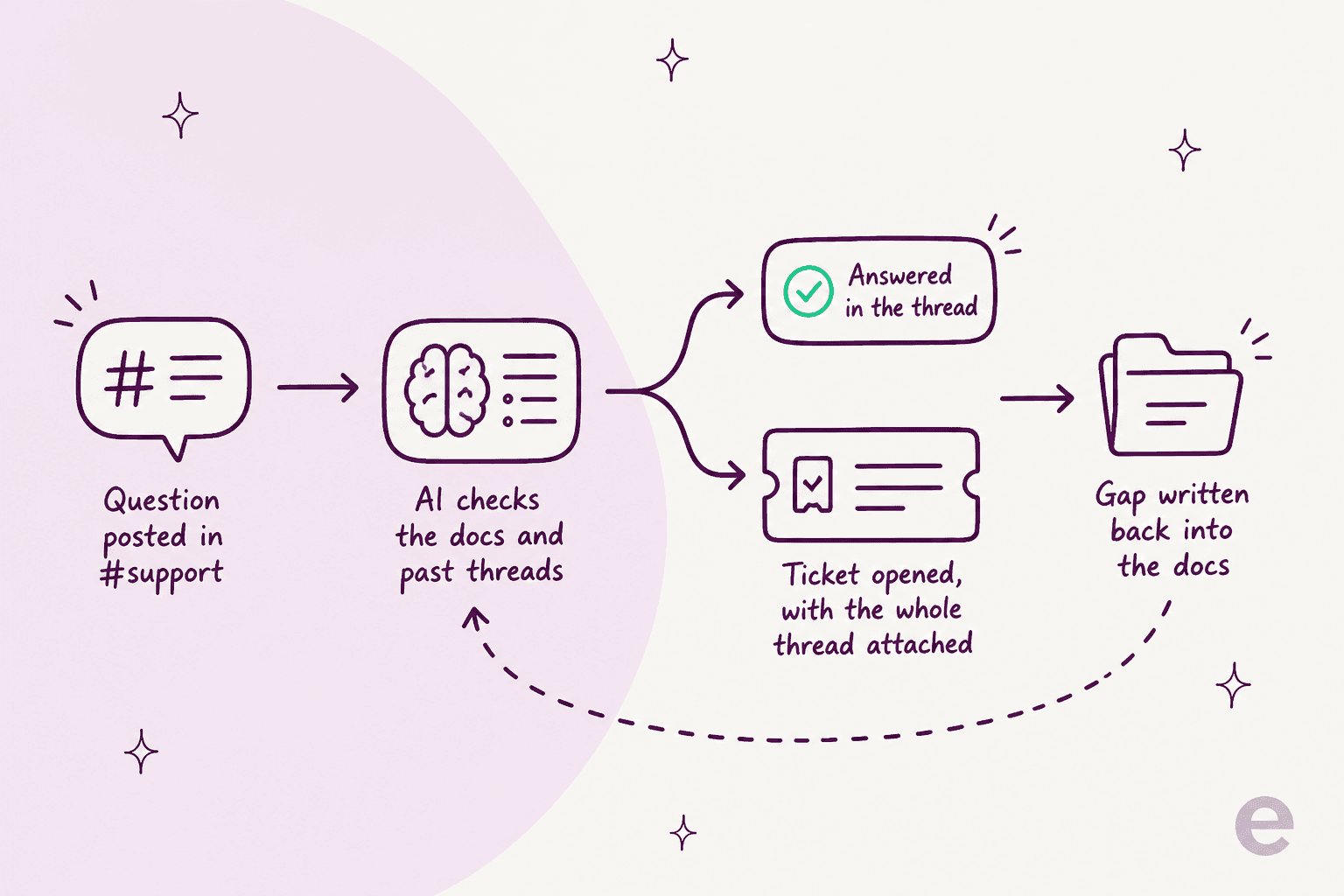
"My current employer has a slack helpbot where you dm the bot and it does a first pass at trying to find the right ticket/form etc to solve your problem. If it can't, it opens a regular helpdesk ticket with the info you have given it so far and the helpdesk sorts your problem out. It's great."
Three things are happening there. The bot tries first. When it cannot help, it escalates with the context already gathered, which is the whole point of good AI agent handoff and the reason the human is not asking the requester to repeat themselves. And the request lands in a real helpdesk with a real record. That is the whole design, and every tool in this post does one or two parts of it.
The fourth step is the one almost nobody builds: when a question could not be answered, that gap should get written back into the documentation so the next person's version of the question does get answered. Without that loop, deflection plateaus at whatever your docs happened to cover on day one. Our knowledge base training guide covers how to keep that side healthy.
Try eesel in Slack

Every tool above is about organising Slack requests. eesel for Slack is about there being fewer of them in the first place. One click from the Slack App Directory, then it indexes your Google Drive, Confluence, Notion and existing helpdesk on its own and starts answering in whichever channels you point it at, with separate rules per channel. It drafts for review to begin with. You flip it autonomous when you are ready. And it escalates into Zendesk, Freshdesk or whatever you already run, so nothing has to migrate.
For a Slack queue specifically, the bit that matters is the meter: you pay one fixed monthly price sized to ticket volume, not per agent. Only tickets the agent actually works on count, so the ones your humans take cost nothing at all. Start on 100 free credits, no card, and pick the monthly batch that fits your channel. Try eesel and see what the channel looks like once the repeats stop arriving.
Frequently Asked Questions
What is a Slack ticketing system?
Can Slack be used as a ticketing system on its own?
How much does a Slack ticketing system cost?
Is there a free Slack ticketing system?
What is the best Slack ticketing system for internal IT?
What happened to Halp for Slack?
Does a Slack ticketing system work with external customers?
@zendesk mention. Read our Slack review for where the platform itself draws the line.