Unthread alternatives: 9 Slack-first helpdesks compared (2026)

Rama Adi

Katelin Teen
Last edited August 19, 2026
Why teams look for Unthread alternatives
Let me start on what Unthread gets right, since the reviews are unusually consistent about this part.
Setup is fast and the Slack surface is good. But the price-to-value ratio is the single most repeated compliment in its review corpus. A Head of Support Engineering put it plainly on G2:
"What sets Unthread apart is its affordability, making it a perfect option for startups that need a reliable solution without breaking the bank. For the price, the value it offers is really great, enabling even small teams to maintain high levels of customer support efficiency."

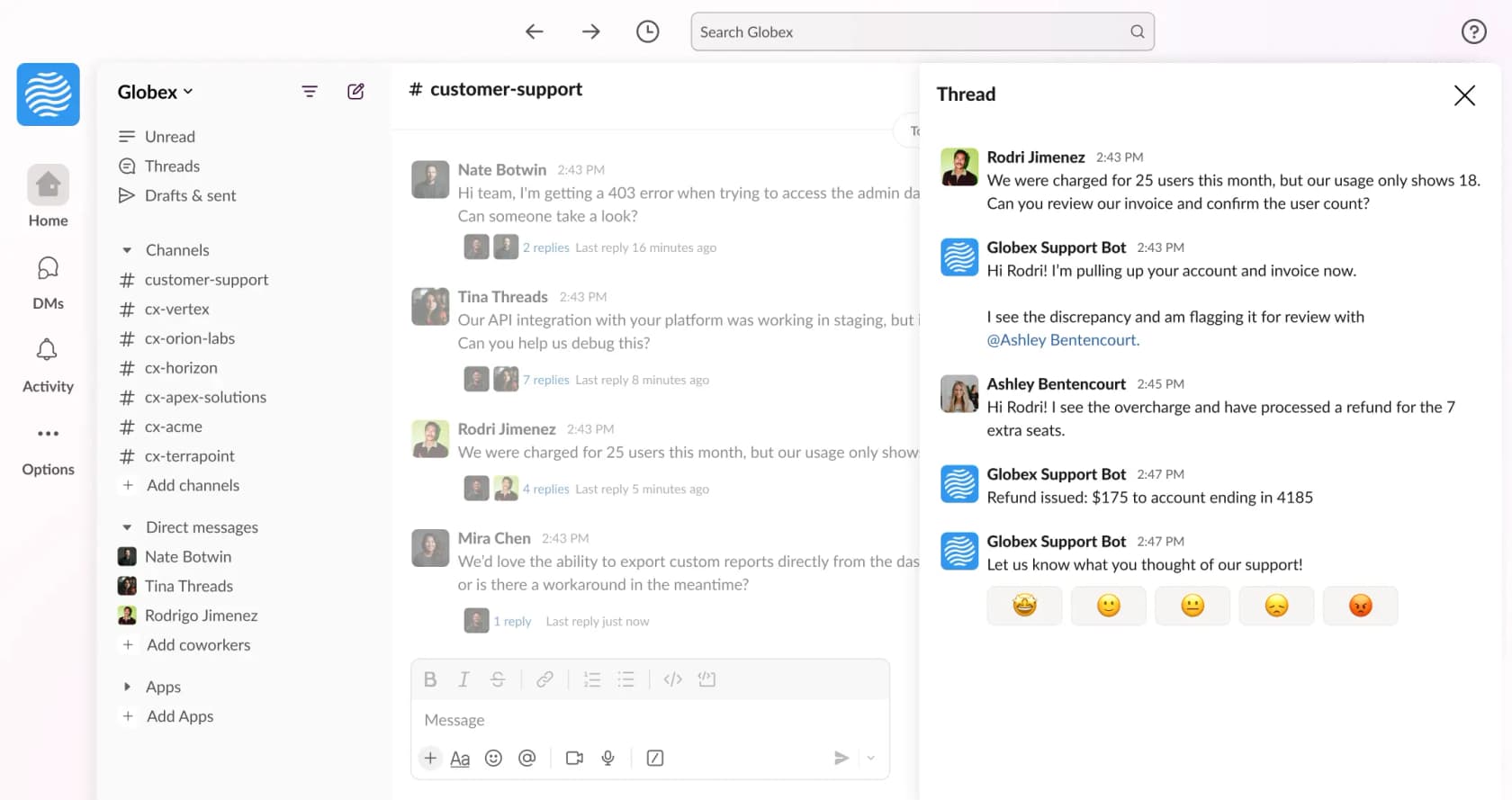
It is also more configurable than what the category average gives you. One Senior Product Manager described the wiring of emoji-triggered workflows into custom code, which most Slack ticketing tools will not let you do:
"We combine Unthread's emoji triggers with filters to create workflows directly from created tickets. We use specific tags and ticket types in combination with emojis, so when an agent reacts to a ticket with a certain emoji, custom TypeScript code is triggered."
So this is not a "the tool is bad" post. The reasons that people go looking are narrower than that, and more structural too.
The tier ladder hides the two things enterprises need
Here is the pricing page in one picture, re-checked on 19 August 2026 so it is current.
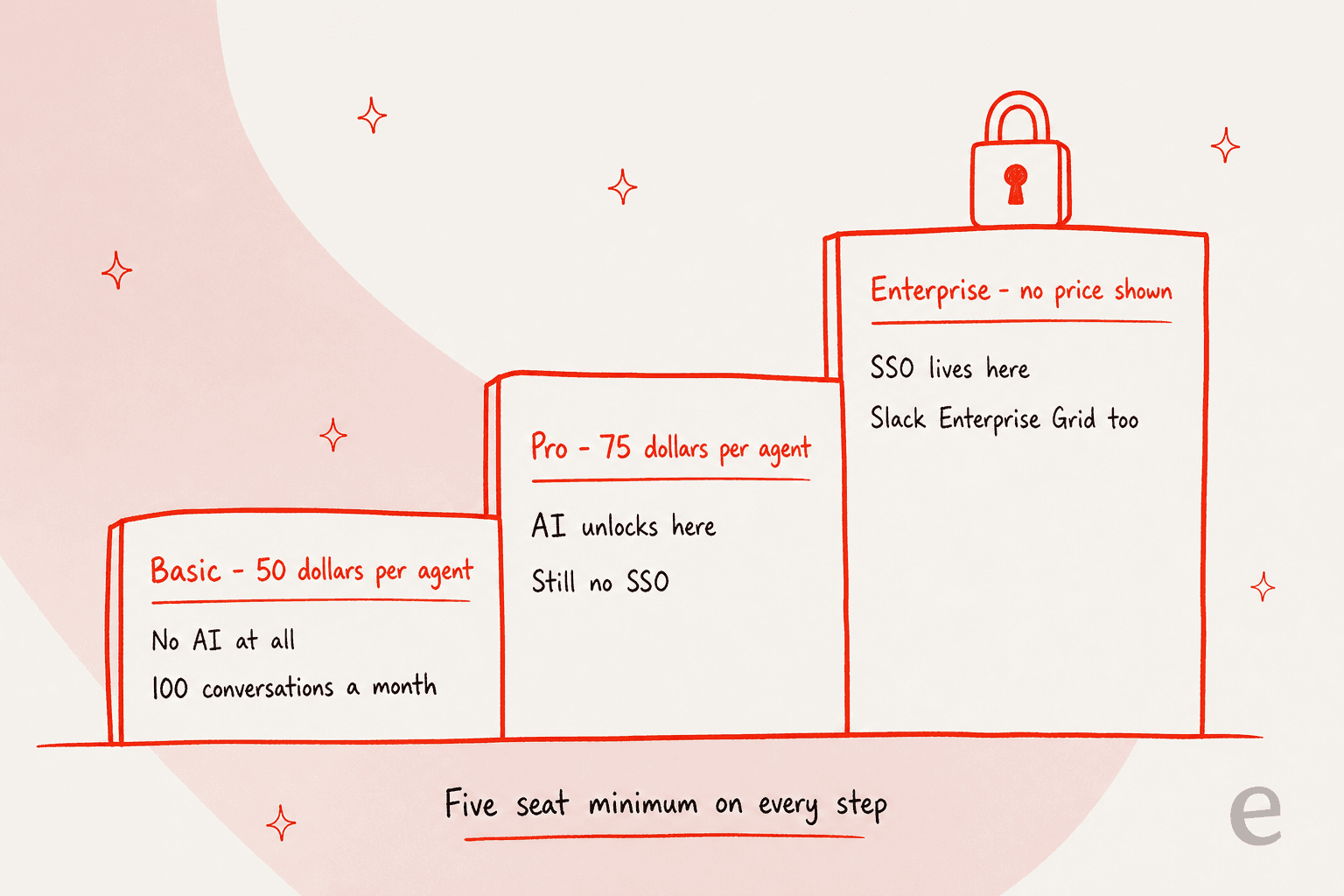
Two gates matter here more than the numbers do. SSO is Enterprise-only, and so is Slack Enterprise Grid support. Take a 2,000-person company on Grid whose security team mandates SSO: it cannot buy Unthread at $75 an agent. It can only buy a quote. Which is a legitimate commercial choice, only it means the list price is answering a question most large Slack orgs are not asking.
The other one: Basic has no AI whatsoever. The agentic AI starts at Pro, and so does the self-learning knowledge base and the automation builder. Basic also carries the only published usage cap on the page, "Up to 100 conversations/month", and that cap is sitting on the plan and not on each seat. So five agents on Basic share 100 conversations for $250 a month. No overage rate is published anywhere.
Reporting is the most repeated real complaint
Across the whole review set the criticisms are low-frequency, and mostly cosmetic, with the one exception. Reporting comes up more than anything else does:
"It does not have a proper customer centric dashboard to track and create reports. Need to click on few tabs to make it user friendly."
That one stings, because NPS and CSAT surveys and custom analytics dashboards are Pro-tier features while SLAs ship on Basic. So the entry plan gives you the SLAs and then withholds the reporting you would use for proving you hit them.
Worth knowing, before you weigh the 4.9 on G2 too heavily: it rests on 13 reviews, ten of them clustered into a single three-month burst in late 2024, and zero of them from Enterprise buyers. Two of the three Capterra reviewers are the same people, cross-posted over from G2 a day apart. Directionally positive. Statistically small.
The category objection, not the product objection
The sharpest criticism of Unthread is in reality a criticism of the whole premise, and it has been around since the Launch HN thread in 2022. Someone who had already run four support stacks wrote this:
"I think this is a good idea for very small teams but for someone who has used and set up: - Shared Gmail accounts - Front App - Zendesk - Streak for Gmail to handle customer support/customer success, I can tell you that Slack is probably not a tool that will allow you to scale!"

Four years on and the same tension shows up in the r/Slack threads that rank. An 800-person org, which had already tried one Slack-native ticketing tool, described the failure mode exactly:
"Tried Suptask and it felt like bolting a ticketing UI onto Slack which kind of defeats the purpose. People just went back to DMs. Is there something that actually keeps the conversational feel but tracks and routes stuff in the background?"

Hold that thought for a moment. It is the reason for why the shortlist below is organised the way it is.
The one question that decides this
I have watched a lot of teams shop this category, and almost all of them start out by comparing feature grids. Wrong first move, because the feature grids converge. A founder at AiSDR who evaluated three of these tools at once said so on X out loud:
"When we evaluated vendors few months ago, when we were around 100 customers, they all seemed alike. Thena, Unthread, Pylon - similar features, not enough value."
Worth to flag that he went on to pick and partner with Pylon in the same post, so treat this as a dated first-hand read and not a neutral verdict. The observation holds anyway: at the shortlist stage these products look interchangeable, because the thing which actually differs is not a feature at all.
The thing that differs is where the ticket record lives when the conversation is over. That one decision sets your reporting ceiling and your SLA evidence, your migration cost too, and then whether the system survives the org doubling in size.
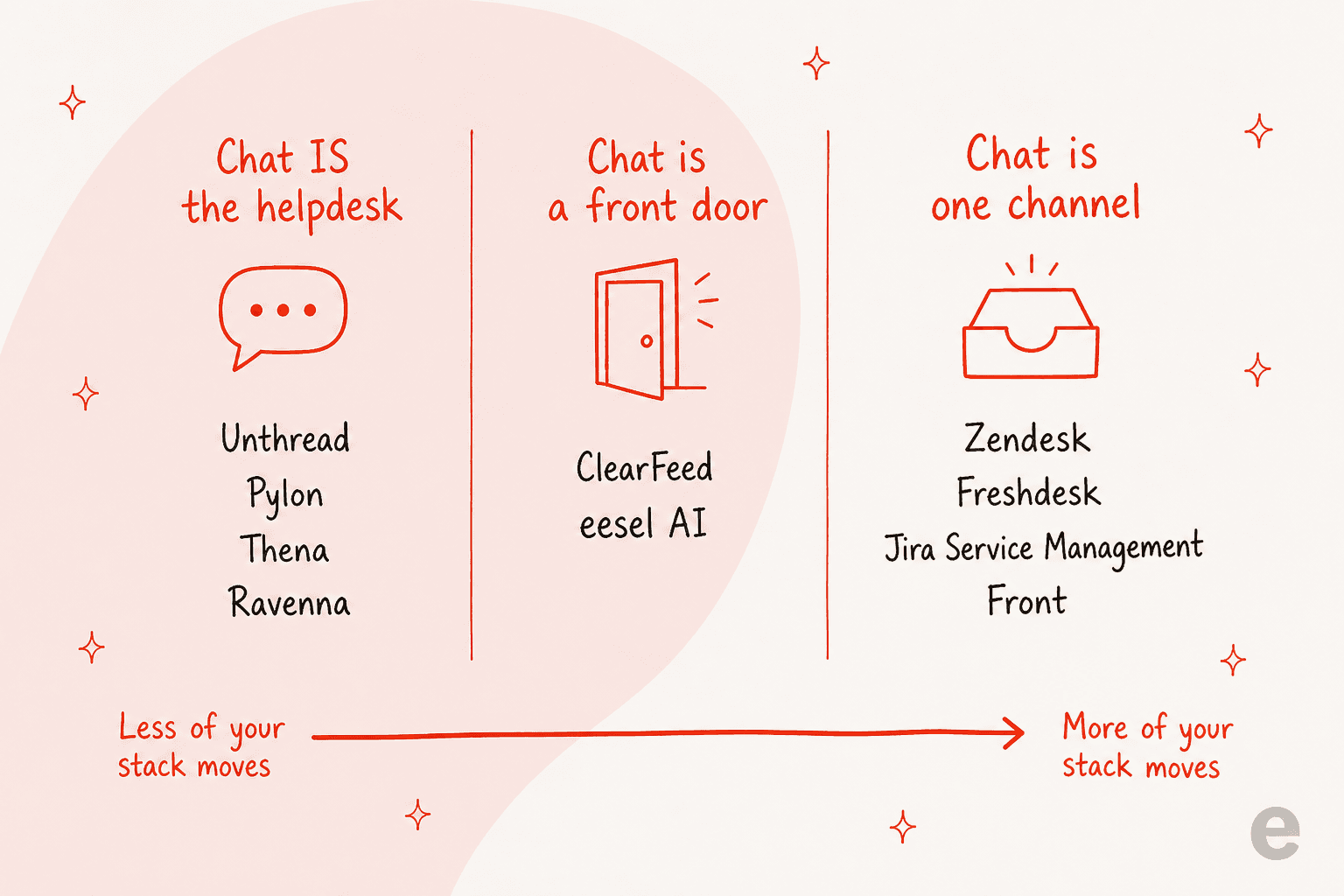
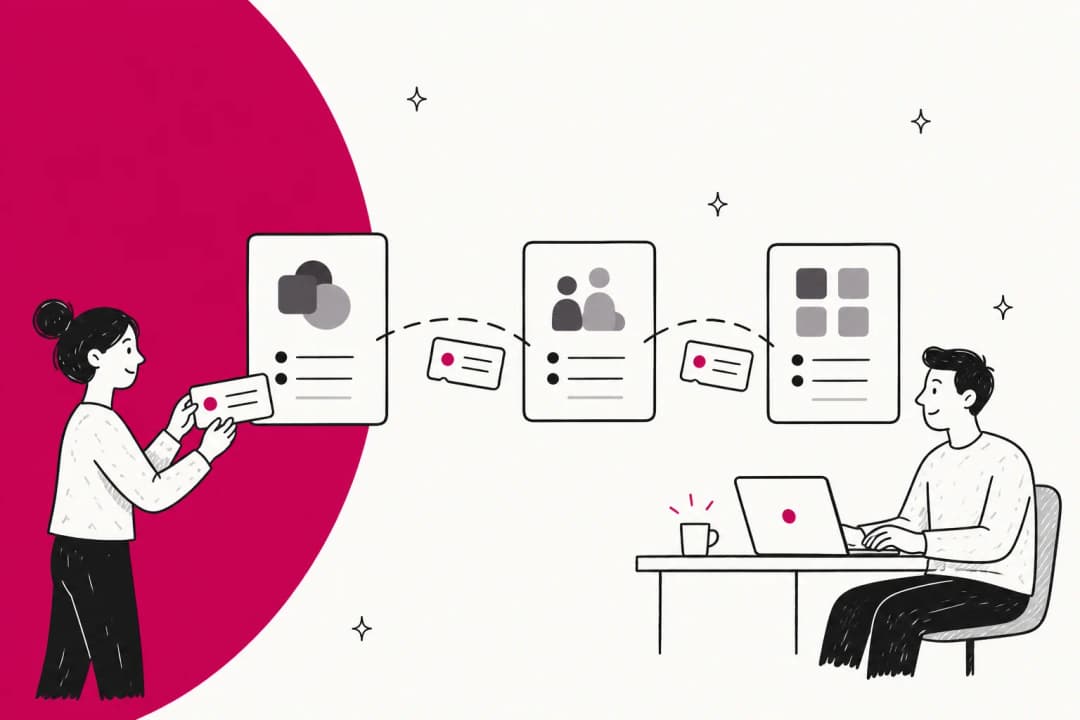
Read the arrow starting from where you are today. If you are on Unthread, the left column is the smallest move and the right column is the biggest one. The middle column is the one people tend to forget exists.
How I picked these nine
I work on integrations at eesel, so my instinct with this category is to ignore the marketing page and go read the docs and the pricing table instead. Which is what I did here. Everything below comes out of each vendor's own pricing page, product docs and help centre, re-checked in August 2026, plus review sites and the Reddit and Hacker News threads for what buyers actually report. Where a vendor does not publish a number, I say so, instead of estimating one.
The four things I weighted, in the order: the billing unit (what actually makes the invoice grow), where the ticket record lands, which tier unlocks AI, and then which tier unlocks SSO. Those four decide the total cost far more reliably than any feature checklist can.
The 9 best Unthread alternatives at a glance
| Tool | Best for | Billing unit | Entry price | Free tier / trial | AI on entry tier | Microsoft Teams | Where the ticket lives | SSO gate |
|---|---|---|---|---|---|---|---|---|
| eesel AI | Adding AI to the Slack and helpdesk you already run | 1 credit per ticket or chat | From $299/mo for 500 credits, no seats | 100 free credits, no card | Yes, it is the product | Yes | Your existing helpdesk | SSO and MFA add-on (from $199/mo) |
| Pylon | Account-based B2B support in shared channels | Not published | Demo-gated | Not published | Not published | Yes | Pylon | Not published |
| Thena | B2B Slack support with every tier priced in public | Per user seat | $29/user/mo annual | Not on the pricing page | Yes, detection + summaries + tagging | Enterprise only ($119) | Thena | Enterprise |
| ClearFeed | Bridging Slack into Zendesk, Jira or HubSpot | Agents, or channels, or tickets | $24/agent/mo | 14-day trial | Paid add-on | Professional tier | Your existing helpdesk | Custom tier |
| Ravenna | Slack-native internal IT and HR service desk | Per agent (unverified) | Not published | 2-week trial, no card | Yes | Early access | Ravenna | Not published |
| Jira Service Management | ITSM teams already inside Atlassian | Per agent | $0 up to 3 agents | Free forever tier | No, Rovo starts at Standard | Yes | Jira | Enterprise |
| Zendesk | Scaling past Slack into full omnichannel | Per agent + AI resolutions | $19/agent/mo annual | 14-day trial | Yes, 5 resolutions/agent | Yes | Zendesk | Enterprise |
| Freshdesk | The cheapest full helpdesk with AI on the entry tier | Per agent + AI sessions | $19/agent/mo annual | 14-day trial | Yes, 500 sessions | Yes | Freshdesk | Enterprise |
| Front | Teams whose real queue is email, with Slack alongside | Per seat + AI add-ons | $25/seat/mo annual | 7-day trial | Topics only | Yes | Front | Professional |
A note on the table above: Unthread itself sits at $50 to $75 per agent with a five-seat minimum, which puts it over every full helpdesk on this list on sticker price. On its own that is not damning, since Unthread bundles the AI into the seat where Zendesk and Freshdesk meter it separately. What it does mean is that the "affordable" framing in the reviews is relative to Pylon and Thena, and not to the wider market.
What each one actually charges you for
This is the part where I would spend an afternoon, before spending a quarter on a migration.
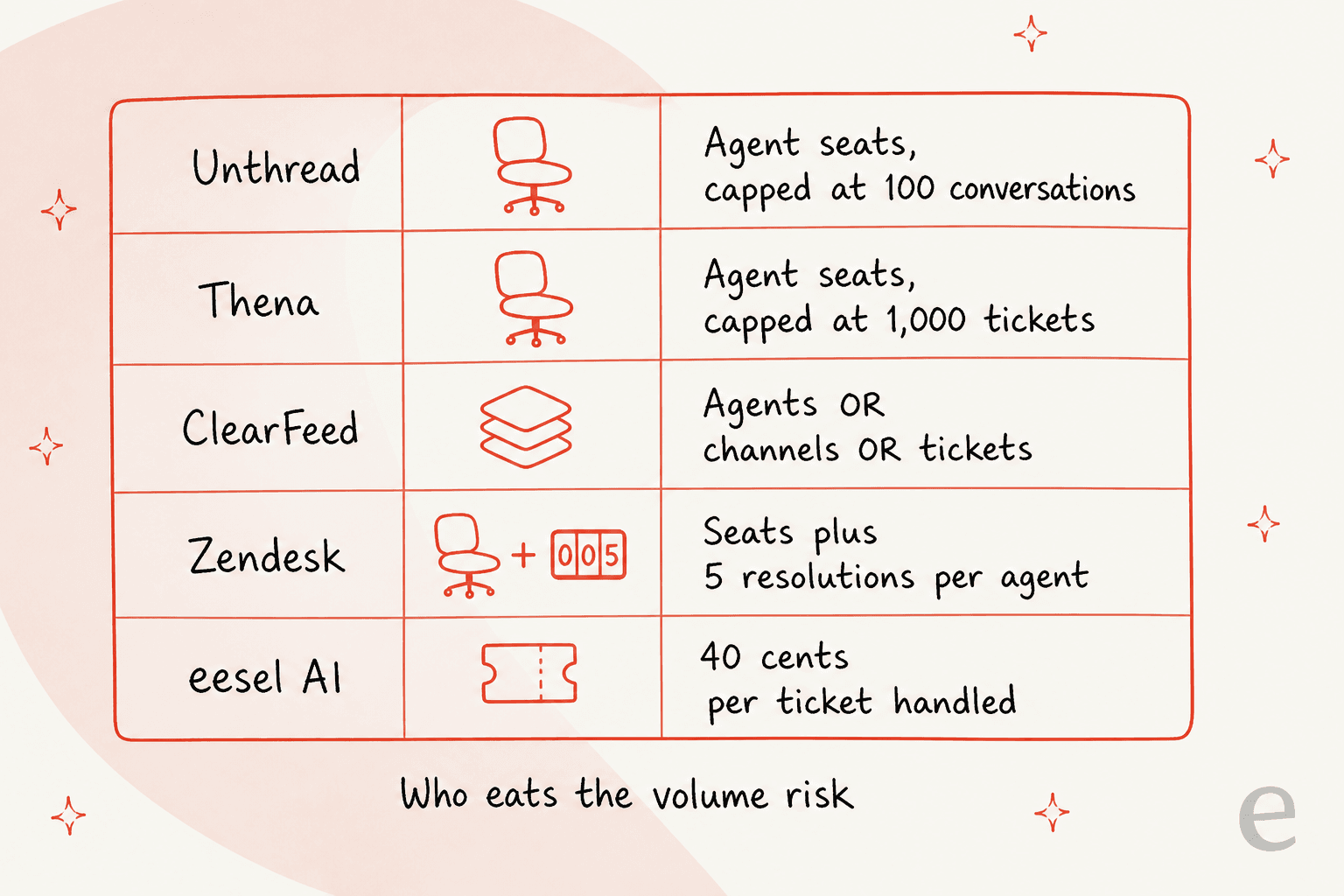
The pattern is simple once you have seen it. A seat plan is a bet that your volume grows faster than your headcount, and a good bet it is, right up until the month when it isn't. A per-ticket plan takes the opposite bet. In the abstract neither one of them is "cheaper", and any vendor who tells you otherwise is quoting your best month back at you.
Plug in your own numbers here:
Three caveats which the calculator cannot carry. On Pro, Unthread does not publish a conversation allowance at all, only Basic's 100, so a ceiling may exist there that nobody has told you about. ClearFeed's agent ladder stops at 15 agents, and everything above that goes to a quote. Zendesk and Freshdesk are excluded above because their AI is metered separately from the seat, and that makes a single-number comparison misleading more than helpful.
1. eesel AI
Best for: teams who want the AI and the reporting to be better, without moving the helpdesk.

Upfront, so you read this section knowing it: I build integrations at eesel. I have put it first because it is the option that the other eight do not cover, and not because it wins every comparison.
What it does
eesel is an AI layer, not a helpdesk. It joins Slack like a real bot which you @mention in channels and in DMs, and it connects into the ticketing system you already run, so the same agent can triage there, and draft, and resolve too. The screenshot above is the actual configuration surface, and the left rail is the point here: Website, two Zendesk instances and Slack, all of them feeding one agent.
Knowledge comes from wherever it already lives, so Google Drive, Confluence, Notion, SharePoint, past tickets, your help centre. That matters more than how it sounds. A B2B SaaS team I spoke with last year wanted the AI to cross-reference their user guide, their internal Slack history, their knowledge base and their past tickets, all on one single question, and then to flag the gaps it found so somebody could go and write the missing article. That is a research problem and not a ticketing one, and moving the queue into a different UI does not solve it.
Where it beats Unthread
Three things here. There are no seats at all, so the bill tracks the work and not the headcount. One agent covers Slack and Microsoft Teams and your helpdesk together, so you are not choosing which surface gets the AI. Then you can replay it over hundreds of your own past tickets before it answers a live human, scoring its drafts against what your team actually sent, which is about the closest thing to a dry run that this category offers.
The reason that replay step got built is unglamorous. I have watched confident-sounding bots quietly give wrong answers on live queues, and the only reliable way of catching it is to make the AI answer the questions where you already know the right answer.
Where it falls short
eesel is not a ticketing system. If you have no helpdesk and you do not want one, then this is the wrong tool for you, and one of the Slack-native platforms below is the right one. No on-call rotation manager here, no incident tooling and no CMDB either. SSO and MFA are a paid add-on (from $199/month), and HIPAA is handled on request.
Pricing
One fixed monthly price sized to volume: 500 credits for $299, 1,000 for $499, 2,500 for $999, 5,000 for $1,899. 1 credit is one ticket or chat, however long it runs, and it counts whether or not the outcome came out perfect. No platform fee and no per-seat fee, plus you can turn on overage with a monthly cap you set ($0.80 per extra credit). Pay a year upfront and you get two months free. The free plan gives you 100 credits with no card.
Verdict: pick eesel when your tickets already have a home and the problem is the AI and the analytics around them being thin. Skip it if what you need is the system of record itself.
2. Pylon
Best for: B2B teams where a single customer account spans many contacts and one contract.
What it does
Pylon is the best-funded product on this shortlist, and the one most people name first. It is omnichannel over Slack, Microsoft Teams, email, chat and ticket forms, and the build is account-first instead of ticket-first, which for B2B is the correct shape. Its integration list leans to the product stack more than the support stack, with Linear for issues, plus PostHog and Mixpanel and LaunchDarkly.
Where it beats Unthread
Account context. Pylon models the customer and not only the conversation, so a thread from one contact carries the whole account's history with it. It is also the option most likely to be on your buying committee's list already, which politically is worth something. Our fuller Pylon review has the deep version if you want it.
Where it falls short
The pricing page routes you into a 30-minute demo and shows no tiers, no billing unit, no rate. For modelling it against Unthread that is the single biggest obstacle, since with Unthread you can at least read $75 off a page. There is also no published simulation or dry-run for its AI agents, so your first real test is going to be a live customer.
Pricing
Not published. Pylon's pricing page is demo-gated end to end. Our Pylon pricing breakdown collects together what buyers have reported, while the Pylon alternatives post covers who typically ends up looking somewhere else.
Verdict: the default answer when you are B2B with a shared-channel motion and can absorb a sales cycle. If you need to model the cost before a call, Thena publishes what Pylon does not.
3. Thena
Best for: B2B Slack support from a vendor which prints a price on every tier, Enterprise included.
What it does
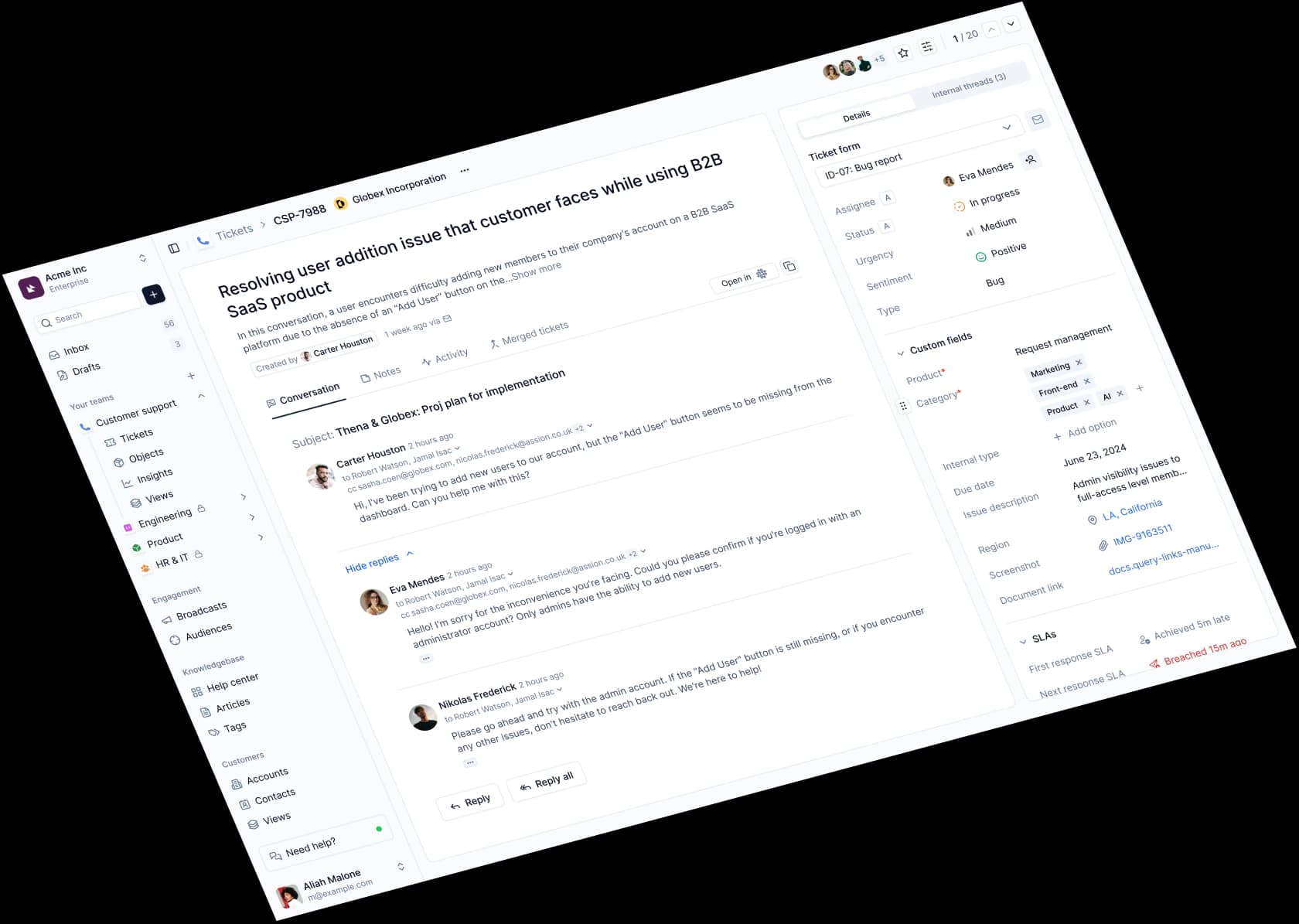
Thena takes the conversations in Slack, email, web chat, Teams and Discord and turns them into tracked tickets, then routes and resolves them from one layer. The intake is AI-first: Thena watches the connected channels and decides which messages are real requests, with emoji actions and forms sitting alongside as the manual paths. Agents can work out of Slack or the web dashboard, and Thena publishes an MCP server too, so tickets can be driven from Claude, Cursor or Raycast.
Where it beats Unthread
Two things, and the first one is unusual. Every tier on Thena's pricing page carries a real number, Enterprise included. Nothing here is quote-gated. Second thing, SLA ships on all three tiers, which is rarer than what it should be, and the AI starts on the entry tier instead of the middle one, so a $29 seat gets you ticket detection and summaries and tagging.
Where it falls short
Microsoft Teams is Enterprise-only at $119 per user per month, so at any lower tier a Teams-first company cannot buy Thena. The pricing page also contradicts the homepage on Starter's seat cap: "Up to 5 user seats" is printed on the one and "Up to 10 user seats" on the other, both of them scraped the same day. Cite the pricing page, then ask sales which one is real.
Pricing
| Plan | Price (billed annually) | Stated caps | What it adds |
|---|---|---|---|
| Starter | $29/user/mo | Up to 5 seats, up to 1,000 tickets/mo, Slack + email | AI detection, summaries, tagging, SLA, insights |
| Standard | $79/user/mo | None published | AI auto-responses, co-pilot, AI workflows, agent studio, MCP (limited), web chat, Discord |
| Enterprise | $119/user/mo | None published | Custom agent deployments, Microsoft Teams, unlimited MCP and RBAC, enterprise security |
No monthly-billing figure gets published for any of the tiers, and once Starter's 1,000 tickets are used up there is no overage rate either.
Verdict: the cleanest like-for-like swap out of Unthread when you want a Slack-native platform and you hate quote-gating. For Teams-first shops the Teams gate rules it out.
4. ClearFeed
Best for: keeping your Zendesk, Jira or HubSpot and running it from inside Slack.
What it does
ClearFeed is the clearest example of that middle column. Its Integrations Edition takes the Slack threads and turns them into tickets inside the system you already run, with two-way message and status sync, so replies in the helpdesk show back up in the Slack thread. It sells a standalone helpdesk as well, and a separate AI Agents product, and that is where the complexity comes in.
Where it beats Unthread
You do not move your system of record. For a team which has already invested years into Zendesk views, Jira workflows or HubSpot properties, that alone is the whole argument. ClearFeed also sells to the shape you actually are: 40 agents with low volume, you buy the usage ladder; 4 agents with heavy volume, then the agent ladder is the one.
Where it falls short
Three products, five rate ladders, plus an AI credit pack that is metered separately. The pricing hub is not really a price page, it is a directory of three price pages. One gotcha which is worth knowing early: the Integrations Edition is not available on Slack Connect channels, and that is precisely the surface most B2B teams need. Our ClearFeed pricing breakdown maps every ladder if the full grid is what you need.
Pricing
| Product | Plan | Price | Billing unit |
|---|---|---|---|
| Helpdesk, agent-based | Starter | $24/agent/mo | Per agent, 1-15 agents |
| Helpdesk, agent-based | Professional | $49/agent/mo | Per agent, includes 50 AI credits/agent |
| Helpdesk, usage-based | Starter → Professional | $40-$600/mo → $80-$1,200/mo | Channels or tickets, whichever slab is higher |
| Integrations Edition | Starter → Professional | $49-$899/mo → $89-$1,499/mo | Tickets per month, 250 to 25,000 |
| AI Agents | Professional | $50-$550/mo | Slack channels, 250 credits/mo at every slab |
Note the last row there. The AI credit allowance stays 250 a month whether you buy 20 channels or you buy 200. It does not scale together with the thing you are paying more for.
Verdict: the right call when the helpdesk is staying put and Slack is the intake problem. Model it carefully though, because which ladder you land on changes the bill by multiples.
5. Ravenna
Best for: internal IT, HR and Ops teams who want the agent to finish the task and not only route it.
What it does
Ravenna is a Slack-native internal service desk out of a Seattle team which has raised $15M from Madrona and Khosla, per its funding post. Any Slack message or a DM becomes a ticket, and a browser admin app mirrors the queue. The framing on its own Jira comparison page is the sharpest one-liner in the whole category: "Ravenna doesn't route the work. It finishes it."
It is backed up by an application catalogue with access policies and an entitlement lifecycle, so the agent can check the policy, then collect the manager's approval, then provision the Okta seat inside the thread itself.
Where it beats Unthread
Depth on the internal-IT side. Five ITSM-aligned ticket types, approvals with multi-stage rounds, private tickets for the HR and Legal cases, and a safety model which has clearly been thought about: every tool in an agent rule, per the changelog, is set either to auto-execute, or to require confirmation, or to require approval, with write and delete defaulting into confirmation. And when a response contains a password or an API key, it goes out as an ephemeral DM, with a placeholder left behind in the channel.
Where it falls short
It is early, and the reviewers are saying so:
"It's still early, waiting for it to mature for larger teams and workflows. Excited to see it progress!"
That is one out of only two G2 reviews. No case studies exist and no named paying customers either, only design partners. Microsoft Teams sits in early access behind a feature flag which a rep has to enable. And for the AI agent specifically a paid Slack plan is required, so budget for a second vendor's bill on the headline feature.
Pricing
Not published. ravenna.ai/pricing returns a 404, and no nav link exists for it. The only rate anywhere is a vendor-supplied line on G2 which says "plans starting at $50/agent/month" after a free two-week trial, and G2 stamps that data July 2025, so it is over a year stale. A Capterra listing showing $10 per user per year contradicts it, and should be ignored. One more thing worth flagging: SourceForge listings for a "Ravenna" at €39 per operator belong to a different company entirely.
Verdict: the most interesting product here for an internal IT helpdesk, and the one I would trial the hardest if I ran IT at a 200-person Slack shop. Not your pick when procurement needs a price before a call.
6. Jira Service Management
Best for: ITSM teams whose engineers are already living inside Jira.
What it does
Jira Service Management absorbed Halp, which was Atlassian's old Slack-native ticketing tool, and its Slack and Teams chat intake is now a native channel next to the portal, email and an embedded widget. Out of everything on this list, this is the option that Reddit's ITSM threads recommend organically more than any other.
Where it beats Unthread
The free tier is a real one: three agents and unlimited request submitters, forever. Unlicensed requesters stay unlimited on every paid tier as well, so your bill tracks the support staff and not the employee headcount. Change management, on-call, incident tooling and a CMDB all come in the box on the higher tiers, which no Slack-native tool here matches.
Where it falls short
The AI is tiered aggressively here. Free has none of it. Standard at $20 unlocks Rovo Search and Chat and Agents, with a 25-credit-per-user monthly allowance. The customer-facing Virtual Service Agent, which is the actual deflection engine, only shows up on Premium at $51.42 per agent. And Jira's configuration burden is famously not a small one. Our review of Jira Service Management's AI covers that side in detail.
Pricing
| Plan | Per agent / month | Agent limit | AI included |
|---|---|---|---|
| Free | $0 | 3 agents, unlimited customers | None |
| Standard | $20 | Up to 100,000 | Rovo Search, Chat, Agents (25 credits/user/mo) |
| Premium | $51.42 | Up to 100,000 | Adds Virtual Service Agent, advanced AIOps (70 credits/user/mo) |
| Enterprise | Contact sales, annual only | Up to 100,000 | Everything in Premium, multi-site, 99.95% SLA |
Verdict: the strongest free tier in this comparison, and the deepest ITSM feature set with it. If what you want is the ticketing without the setup tax, Jira Service Management alternatives is the honest counter-argument.
7. Zendesk
Best for: teams where the Slack volume is the smaller half of a much bigger support operation.

What it does
Zendesk is the incumbent, and on this shortlist it plays the "grow out of Slack" answer. Slack turns into one intake channel beside email, chat, voice and social, while the ticket lives inside a system that was built for reporting on ten thousand of them.
Where it beats Unthread
Reporting, the most-cited weak spot on Unthread, is the exact thing Zendesk is best at. Add on real omnichannel and a mature app marketplace, then the operational maturity which comes from being the default. AI agents for email are included even down on the $19 Support Team tier.
Where it falls short
Cost, then complexity, in that order. It is a heavier tool than anything Slack-native here, and the AI meter is an easy one to miss: the seat price includes only 5 automated resolutions per agent per month on Support Team and on Suite Team, 10 on Suite Professional. So a 10-agent Suite Team account gets 50 AI resolutions a month included. Everything past that becomes a separate line item. Our Zendesk pricing write-up has the full model. For the other side of the argument, Zendesk alternatives covers who typically bounces off it.
Pricing
| Plan | Annual (per agent/mo) | Monthly | Included AI resolutions |
|---|---|---|---|
| Support Team | $19 | $25 | 5 per agent/mo |
| Suite Team | $55 | $69 | 5 per agent/mo |
| Suite Professional | $115 | $149 | 10 per agent/mo |
| Suite Enterprise + Copilot | Talk to Sales | Talk to Sales | Not published |
Verdict: the right move when Slack is one channel and not the whole operation. An overkill if Slack Connect really is all that you do.
8. Freshdesk
Best for: the cheapest route into a full helpdesk which ships AI on the entry tier.

What it does
Freshdesk is the value pick among the full helpdesks, and unlike Zendesk it puts the Freddy AI Agent line-up onto the $19 Growth tier, with the first 500 sessions included instead of a per-agent trickle.
Where it beats Unthread
The price per agent, and for a strictly larger product. $19 a seat annually against Unthread's $50, and no five-seat minimum on it, plus a real knowledge base, a customer portal, omnichannel intake. And 500 AI sessions a month is a much larger allowance than 5 resolutions per agent is.
Where it falls short
Freddy AI Copilot, which is the agent-assist half, comes as a separate $29 per agent per month add-on and it is not offered at all on Growth. So a team who wants both the customer-facing agent and the agent-side copilot is really looking at $55 plus $29, which is $84 a seat. Additional AI Agent sessions run at $49 per 100. Our Freshdesk pricing breakdown has every add-on in it, and Freshdesk alternatives covers the common exits.
Pricing
| Plan | Annual (per agent/mo) | Monthly | AI included |
|---|---|---|---|
| Growth | $19 | $23 | Freddy AI Agent, first 500 sessions. No Copilot |
| Pro | $55 | $66 | Adds Copilot as a $29/agent/mo add-on |
| Enterprise | $89 | $107 | Adds Freddy AI Insights. Copilot still $29 extra |
Verdict: the best price-per-capability on this list, if you are willing to leave the Slack-native model behind. The Copilot add-on is the number that people forget.
9. Front
Best for: teams whose real queue is email, with Slack as the internal collaboration layer.
What it does
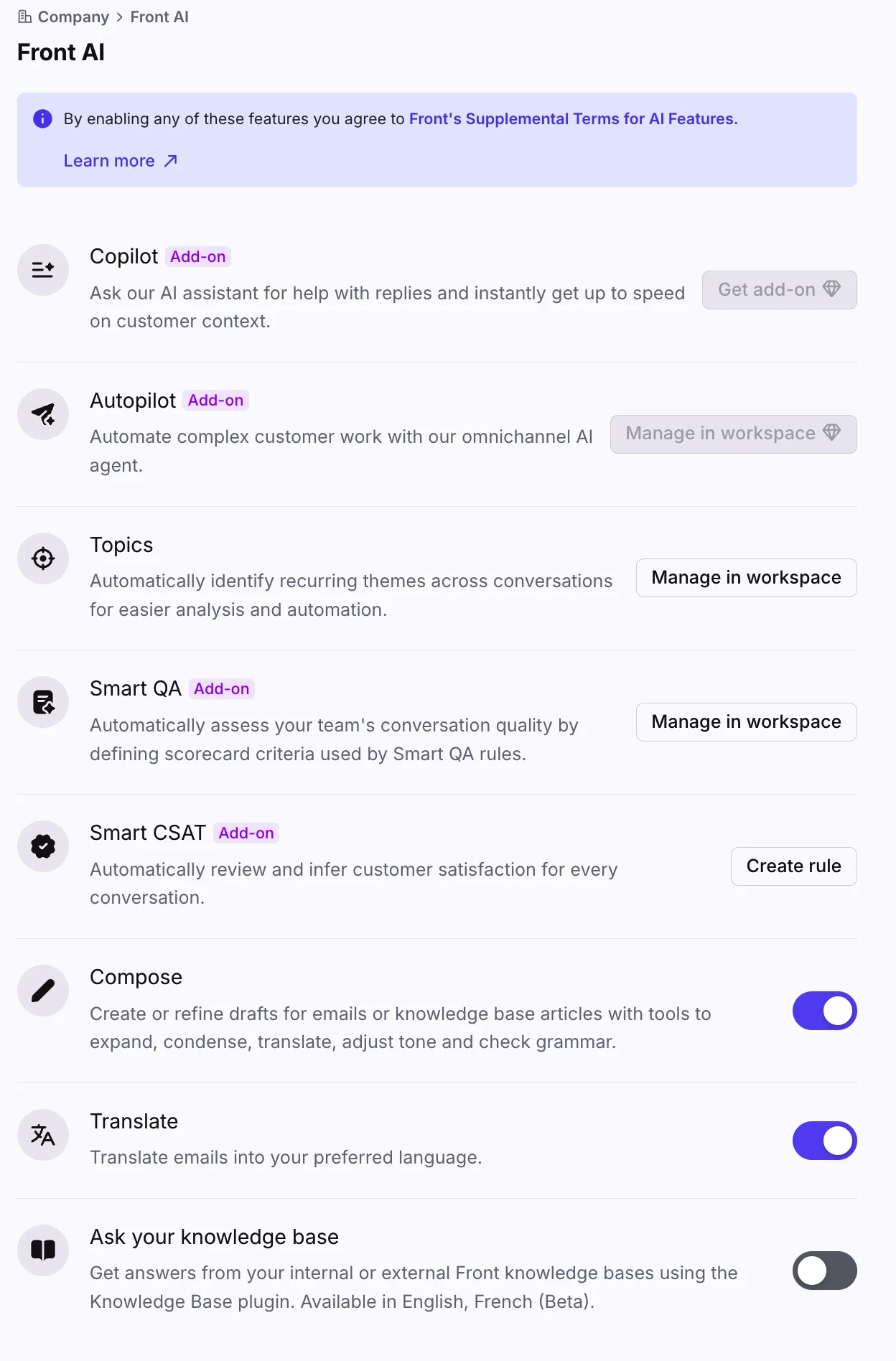
Front is a shared inbox which grew up into a helpdesk, and it is the right shape for teams whose customers send email instead of joining a Slack channel. Front AI is explicitly "human-in-control", where Autopilot is the autonomous agent and Copilot is the assist layer.
Where it beats Unthread
Front is the strongest option when your Slack usage is internal collaboration and not customer intake. Among the shared inboxes it also has one of the better AI dry-run stories, and its per-conversation Autopilot pricing at $0.05 is the closest thing here to Unthread-style bundling with a usage-style flexibility.
Where it falls short
There is a trap sitting in the add-on stack. Professional at $65, plus Copilot at $20, plus Smart QA at $20, plus Smart CSAT at $10 arrives on $115 a seat, and that is more than the $105 Enterprise tier where all three of them are already bundled. Price the Enterprise tier first if you are planning on full AI adoption. See Front alternatives for who typically outgrows it.
Pricing
| Plan | Per seat/mo (annual) | Seat cap | AI |
|---|---|---|---|
| Starter | $25 | Up to 10 | Topics only, add-ons available |
| Professional | $65 | Up to 50 | Add-ons available |
| Enterprise | $105 | Uncapped | Copilot, Smart QA and Smart CSAT included |
Autopilot stays a usage add-on from $0.05 per conversation on every plan, the Enterprise one included.
Verdict: the pick when email is your real queue. It is not a Slack ticketing tool, and it does not pretend that it is one.
The DM problem nobody on this list solves
Here is the thing which I would want somebody to tell me before I ran this project.
Every tool above assumes that requests arrive in a channel. In practice a large chunk of them arrive as a direct message, sent to whoever helped last time. The 800-person org in that r/Slack thread hit exactly this after they adopted a Slack ticketing tool, and the most useful reply in the thread was blunt about the why:
"As long as people have the option for a DM or even a direct line that gets answered they will gravitate towards that. Nothing is going to beat it unless you close down that line."
And then the structural version of it, from the same thread:
"If it's not working for you then you need more process, and it's natural that process get's in the way of that conversational feel. They are, essentially, diametrically opposed I'm afraid. Because structured processes aren't conversational, and conversations aren't structured."
That tension has no vendor-shaped solution to it. What it has is a partial one: put the AI where the DMs already go, so the private message gets answered instead of routed. Unthread supports DM-to-bot intake and Ravenna turns any DM into a ticket, while eesel answers DMs directly as a Slack bot. None of this stops somebody from DMing Priya in accounts payable. It does mean the most common request has a fast and correct answer waiting in the place where people already go.
The other half of it is boring and unavoidable: pick which requests must leave Slack and become tracked work, write the rule down, then hold the line on it. Our guide to ticket triage covers the mechanics of writing that rule down. And if the argument you are about to have internally is a bigger one, shared inbox vs ticketing system is the framing I would bring into it.
So which one should you pick?
The short version, by the situation:
- B2B SaaS with shared Slack Connect channels, budget for a sales cycle: Pylon, and Thena as the option which lets you model the cost first.
- B2B SaaS that wants a price before a call: Thena, unless you are Teams-first, and then the $119 gate probably rules it out.
- Internal IT or HR at a Slack-first company: Ravenna when you can accept an early product, or Jira Service Management when you need the ITSM depth and the free tier.
- You already have a helpdesk and only wanted better AI: ClearFeed for the bridge, eesel for the AI layer. Neither one of them asks you to migrate.
- Slack is a small part of a big operation: Zendesk or Freshdesk, then treat Slack as just one intake channel among several.
The honest summary: in this project the biggest cost is rarely the licence. It is the rebuilding of the workflows, views and reports you already have, and then the re-teaching of everybody where to click. If that is the part you are dreading, then the middle column is the one worth pricing before the left or the right one.
Try eesel for Slack support
If you got this far and were thinking "I do not actually want to move my helpdesk, I just want the AI in it to be better", then that gap is the one eesel fills.

eesel joins your Slack workspace as a bot which you @mention in channels and in DMs, it reads the knowledge you already have sitting in Drive, Confluence, Notion and your help centre, and it works your Zendesk, Freshdesk, Front or Jira Service Management queue out of the same brain. Before it answers one single live person, you can replay it over hundreds of your past tickets and score its drafts against what your team actually sent. So you find out where it is wrong on your own data, instead of on a customer's.
It runs on one fixed monthly price from $299 for 500 credits, with no seats on top, and there are 100 free credits waiting for you without a card. Try eesel on one channel and see what it gets right, before you shortlist anything bigger.
Frequently Asked Questions
What are the best Unthread alternatives in 2026?
How much does Unthread cost per agent?
Does Unthread have a free plan?
What is the best Slack ticketing system for a B2B SaaS team?
Can I use Unthread for internal IT support as well as customers?
Why is SSO not included in Unthread's Pro plan?
Do Slack ticketing tools handle direct messages, or only channels?
Is it cheaper to replace Unthread or to add AI to the helpdesk I already have?



Article by
Rama Adi
Rama is a software engineer at eesel AI with two years of experience writing about B2B SaaS, AI tools, and customer support technology. Based in Bali, Indonesia, he brings a developer's perspective to product comparisons — cutting through marketing copy to what the integrations and APIs actually do.