Pazi AI alternatives: 8 agent platforms compared for 2026

Kira

Katelin Teen
Last edited August 24, 2026

The one question that sorts every Pazi alternative
A while back I sat in on a call with a CX lead who was running about 7,000 tickets a month on Gorgias. The line that ended the conversation has stuck to me ever since:
"The AI will never be able to answer 100% of the questions, but if it tries and just answers 'sorry I don't know this,' I cannot go and check all my 7,000 tickets to see if the AI actually made a good answer, then the point is a little bit gone. I need an AI who is only handling the tickets that it's confident to handle and all the other ones, leave them alone."
a CX lead at a DTC supplements brand doing ~7K Gorgias tickets/mo, eesel sales call
In terms of specification that is a completely different thing from "build me a business plan and start executing it." One is about volume which arrives from outside, at times you cannot predict, from people you never met. The other one is about depth on work you already chose yourself. Almost every disappointing agent rollout I have seen came out of buying a tool built for the second problem, then pointing it at the first, which is a quieter version of the same mismatch covered in our piece on agents versus rule-based chatbots.
The mechanical version of that distinction comes straight out of Pazi's own email documentation. Pazi will start an agent run automatically for an authenticated reply to a thread one of its agents began, and also for a message from a known contact. It will not start one for a cold message from an unknown sender. That message just sits in the inbox and waits on a human.
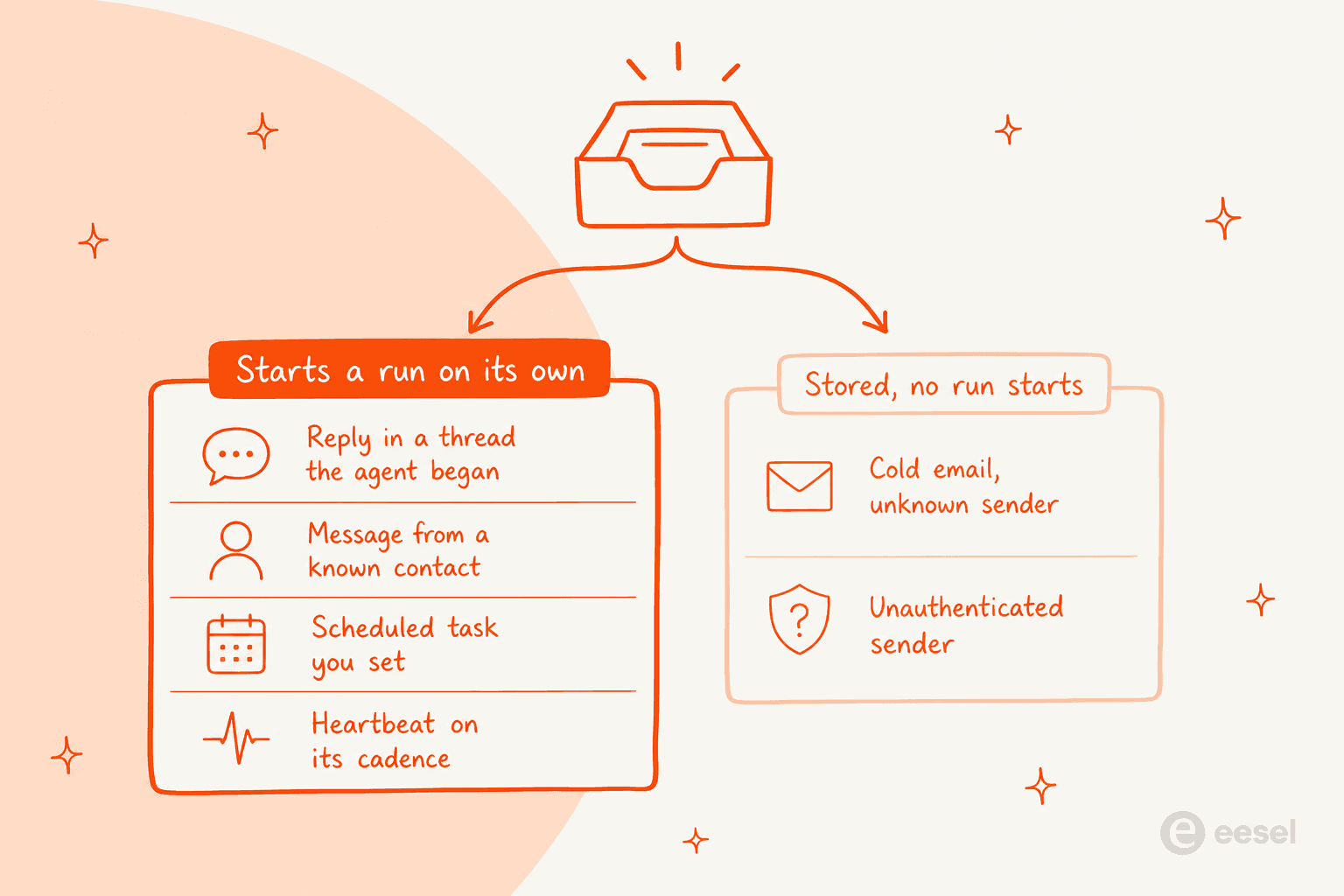
To be fair on Pazi, this is a sensible security posture and not an oversight. The same docs point out that email is untrusted input which can carry instructions aimed at the agent, so refusing to spend your credentials on a stranger's message is the safe default there. It is just also the exact behaviour you cannot have when the strangers are your customers.
So work out which side of that line your work sits on, before you shortlist anything at all.
The 8 best Pazi AI alternatives at a glance
Every number in this table came off the vendor's own pricing or docs page inside the last week. The two columns most people skip past are the ones I would look at first, who starts the work and concurrency, because those two decide whether the tool can physically keep up on your volume.
| Tool | Best for | Who starts the work | Billing unit | Entry price | Free tier | Published concurrency | Named certifications on site | Helpdesk connectors | Bring your own model key |
|---|---|---|---|---|---|---|---|---|---|
| eesel AI | Ready-to-work teammates for support and blog writing | A customer or a brief | A ticket, chat or blog run | From $299/mo for 500 credits (1 per ticket or chat); $4 per blog run | 100 free credits, no card | Optional overage with a cap you set | HIPAA via add-on, talk to us | Zendesk, Freshdesk, Gorgias, Front, HubSpot, Intercom | No |
| Lindy | A Slack-native teammate for a whole team | A person or an event | Credit, pooled per seat | $29.99/user/mo, 3k credits | 7-day free week, Slack joiners only | Not published | SOC 2, GDPR, HIPAA + BAA on Enterprise | Via generic integrations and MCP | No, model selection only |
| Tasklet | Cheap event-driven agents | An event or schedule | Credit | $25/mo, 10,000 credits | $0 plan, 300 bonus credits a day | Not published | SOC 2 | Via generic integrations and MCP | No |
| Gumloop | Ops workflows with audit controls | An event or schedule | Credit plus 8% orchestration fee | From $37/mo, 20k credits | 14-day trial | 5 workflow runs, 25 agent chats | SCIM/SAML and audit logs listed | Via connectors | Yes |
| n8n | Owning the whole meter yourself | A webhook, queue or schedule | One full workflow execution | $20/mo annual, 2.5K executions | Community Edition, self-hosted | 5, 20, then 200+ | EU hosting, SSO/SAML/LDAP on Business | Zendesk and Freshdesk nodes | Yes, self-hosted |
| Sintra AI | A named roster of twelve specialists | You | Credit | $48.50/mo on the live sale, $97 list | None, 14-day money back | Not published | Not stated on pricing page | No, consumer tools only | No |
| Cassidy | Document-heavy work with a knowledge layer | You or a trigger | Credit | Not published, contact sales | Starter, 3 seats, 10,000 credits/mo | Not published | SSO on higher tiers | Zendesk help centre sync and triggers | No |
| Fleece AI | A big catalogue of prebuilt flows | An event | One agent run | €49/mo, 2,000 credits | None, 4-day Starter trial | Not published | Not stated on pricing page | Zendesk and Freshdesk on Pro tier | No |
| Pazi (for reference) | An operating officer for a founder's plan | You | Credit, 500 per US dollar | $25/mo, 12,500 credits | 5,000 one-time credits | 2 opportunities at once | Not stated on security page | No published catalogue | Codex subscription only |
What Pazi actually is, and where it stops
Worth to get this right before comparing anything, because Pazi is an easy one to mis-file.
Pazi comes out of a team with a real track record behind it. The Y Combinator profile lists it as a Winter 2024 company with seven people, founded by Zvonimir Sabljić and Leon Ostrež, and it shares a GitHub org and Crunchbase entry with Pythagora, the team behind GPT Pilot. Sabljić previously co-founded A Web Whiteboard, which Miro acquired in 2021. Stronger pedigree than most tools in this category can claim, and it shows up in how carefully the docs are written.
The product itself is an operating officer plus specialist agents. Every new account gets a protected primary agent. You describe the business, it asks questions, then builds an ordered roadmap of "opportunities" and delegates out the substantial work. The docs name the target user plainly enough: entrepreneurs and small teams who need more execution capacity.
Four things I would want to know before signing up, and all of them come from Pazi's own pages:
- The concurrency ceiling is two. The quick start guide says at most two opportunities can be actively starting or running at once, and you have to finish one, pause it, or let it go inactive before you start another. For sequential project work, fine. For anything queue-shaped it becomes the binding constraint.
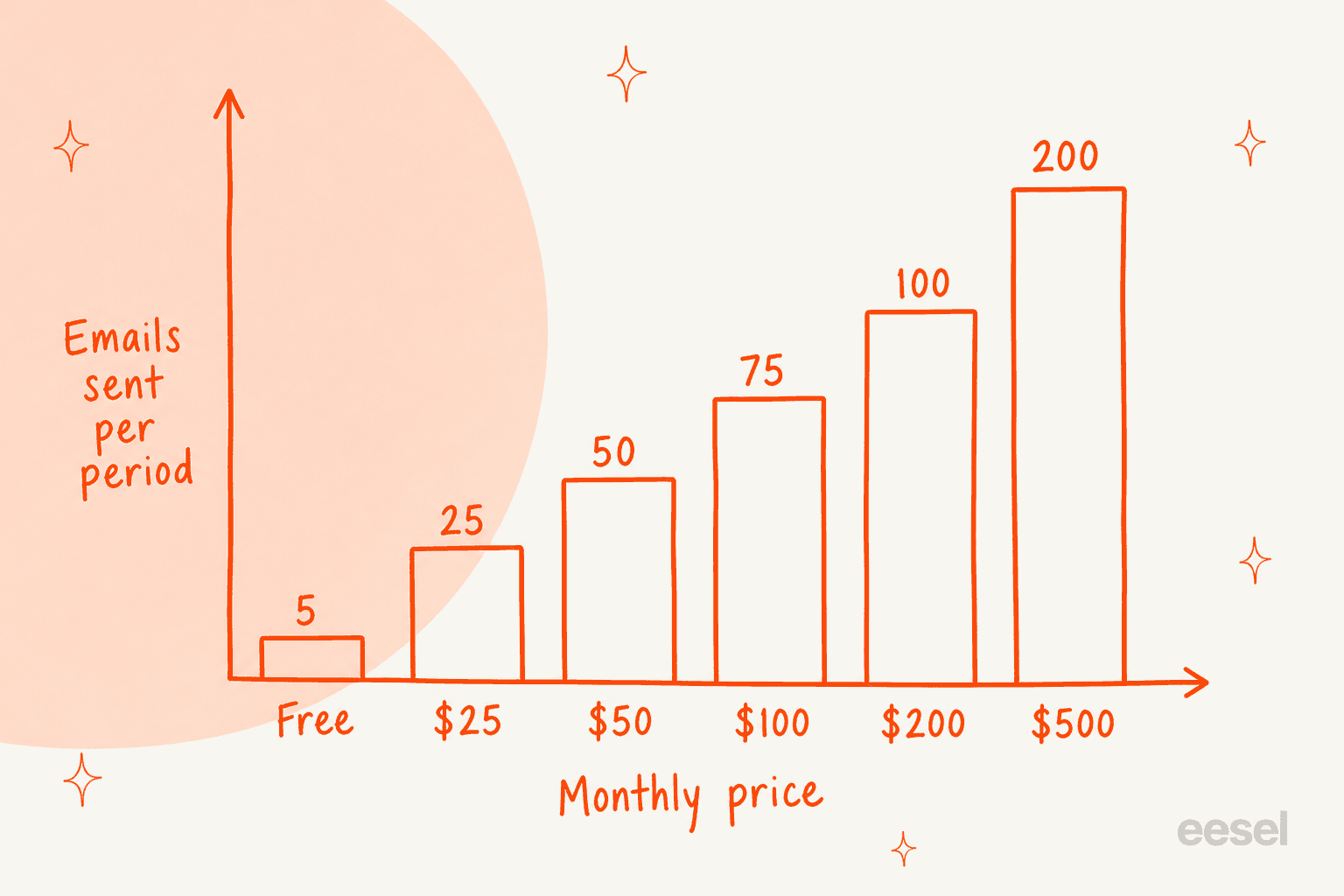
- Outbound email is capped hard, and the cap is a small one. Per plan, per period: 5 on Free, then 25, 50, 75, 100, and 200 at the top $500 tier. Heartbeat's own owner update does not count against it. Everything else an agent sends does.
- The From address is fixed. Every business gets one address on
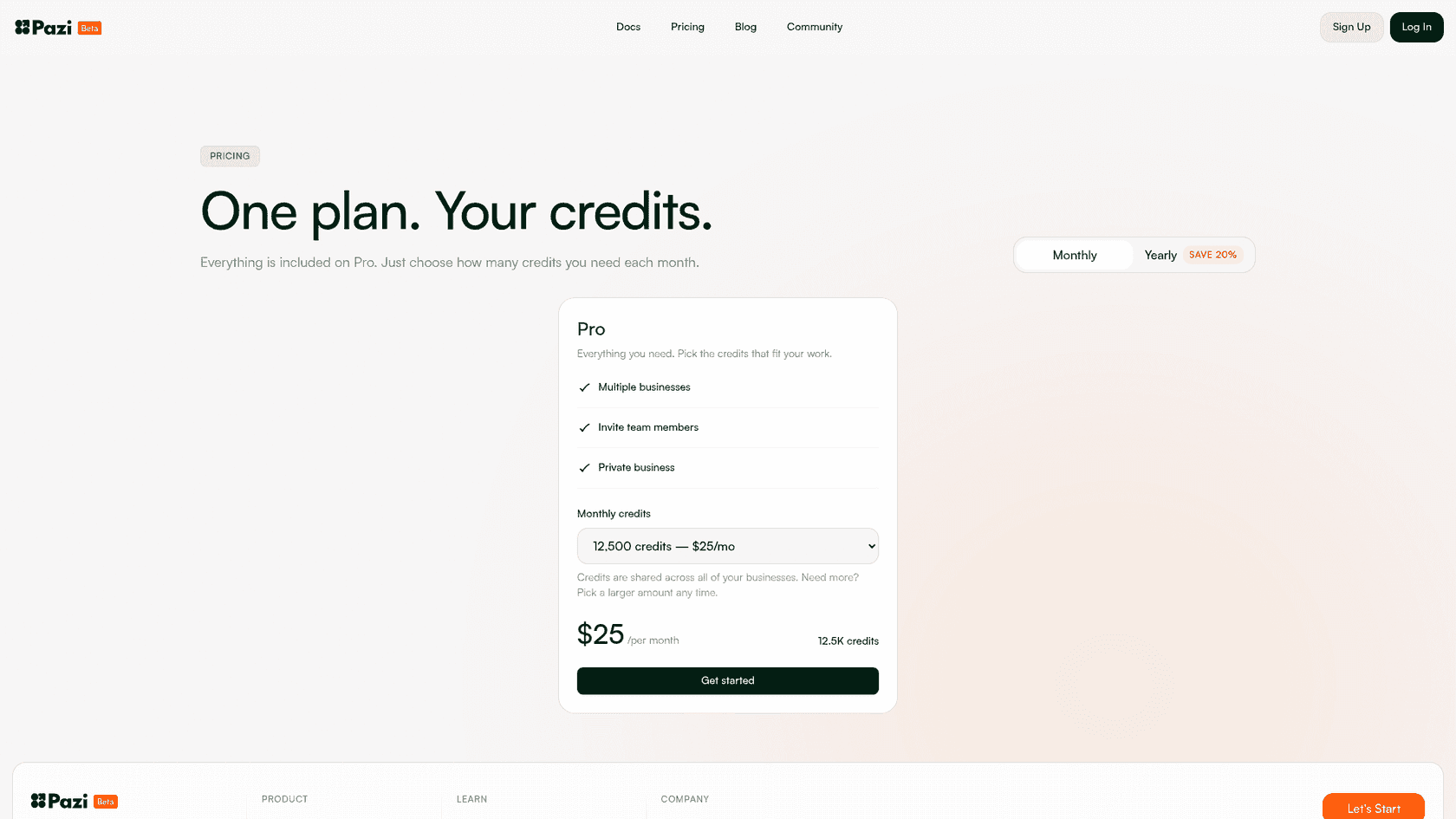
me.pazi.ai, and the docs state agents cannot replace the From address with an arbitrary domain. Fine for a founder who is emailing suppliers. Awkward if you wanted replies coming from your own support domain. - The credit rate is deliberately flat. Plans and credits spells it out, every amount is priced at 500 credits per US dollar, so $500 a month buys you no better rate than what $25 does. One-time top-ups are not sold any more, which means the only way past a cap is a bigger monthly tier. Yearly billing is 20% off and still grants the credits monthly.
There is one tension which is worth to flag, because it is the thing that sends people to a comparison post in the first place. Pazi's marketing blog runs a long piece describing it as "a platform for support teams" whose agents "own the full customer service resolution loop," and it says that wiring Zendesk to Shopify is configuration rather than code. The product documentation is narrower than this. Pazi's sitemap carries 40 URLs and not one of them is an integrations directory; the only integration page is Integrations and credentials, which describes a browsing switch plus an encrypted store for API keys that agents then receive as environment variables. So a helpdesk connection is a saved credential which your agent uses through its browser or over HTTP, and not a listed connector with documented ticket actions. Both statements can be true at the same time. They just describe very different amounts of work on your own side.
A few smaller signals, and I state them neutrally because a young product deserves that: the wordmark still carries a Beta badge, the community page reads "Coming soon," the "View report" button on how it works currently points at a placeholder URL, then the Capterra listing shows a rating based on 0 reviews. None of that makes the product a bad one. It does mean you are evaluating docs and a trial instead of a body of independent user experience, so budget the time for your own testing.
On the plus side, the security page is unusually candid for a company of this size. Each conversation runs inside an isolated cloud computer, agent runs never receive your browser session cookie, credentials are encrypted and injected only into fresh runs, model traffic goes to Anthropic, OpenAI or Amazon Bedrock with no training on your project data, and files are AES-256 encrypted at rest. It also tells you straight out that there is no one-click export of everything, and that web pages, files and emails are all untrusted input. I would much rather read that than a page of badges.
1. eesel AI

What it is. A place to hire ready-to-work AI teammates for specific jobs. Today that means an AI helpdesk teammate that works the queue and an AI blog writer that researches and writes content. Each arrives with the skills, integrations and company context for its role instead of asking you to turn a generalist agent into the employee yourself. Full disclosure, this is the product I work on, so read the specifics and not the adjectives. If you want the wider category framing first, our piece on AI teammates sets it up.
Where it beats Pazi. The work starts itself. A customer emails, chats, or files a ticket, and then the agent picks it up. No opportunity to take, no run to start, no unknown-sender gate. It connects to Zendesk as a real integration rather than a saved API key, along with Freshdesk, Gorgias, Front and HubSpot, and it trains on your past tickets as well as the help centre, which is the input deciding whether an answer sounds like your team or like a manual.
The part I care about most, as the person who builds it: you can run a simulation over your own historical tickets before anything goes live, so you get to see what the agent would have said and what your automation rate would actually have been. That is the direct answer on the objection in that sales call. You set a confidence threshold, the agent handles what it is sure about, everything else goes to a human untouched. The same machinery drives ticket classification and routing too.
Where it doesn't. It will not write your business plan, or build you a landing page, or launch you on Product Hunt. If the thing you want automated is a founder's project roadmap then this is the wrong tool and Pazi is the right one. It also has no roster of named generalist personas, plus there is no self-hosted option.
Pricing. One fixed monthly price sized to volume, starting at $299/month for 500 credits. 1 credit is one ticket or chat, counted once no matter how many replies go back and forth. Blog posts are $4 each; questions asked in the eesel dashboard are mostly free. No platform fee, no per-seat fee. The free plan is 100 credits with no credit card, and paying a year upfront gets you two months free. SSO and MFA (from $199/month), priority support (from $299/month) and data residency ($500/month) are optional add-ons, and HIPAA is a talk-to-us conversation. If you run out of credits, agents pause until they reset, or you can turn on overage with a monthly cap you set at $0.80 per extra credit, so a runaway agent cannot surprise you. One honest note about the unit: a credit is used whenever the agent works on a ticket, resolved or not, so you pay per ticket handled, not per ticket resolved.
Verdict. The right swap when you want a teammate already prepared for a defined role rather than a generalist you shape yourself. Hire the helpdesk teammate for incoming customer conversations or the blog writer for content work. On the support side, 1,000 tickets a month is the $499/month plan, and you can see the automation rate on your own history before committing to it. Worth to read alongside our roundup of AI for ticket automation.
Want the teammate instead of the toolkit? eesel gives you ready-to-work AI teammates for support and blog writing, already equipped for the job. Try eesel
2. Lindy
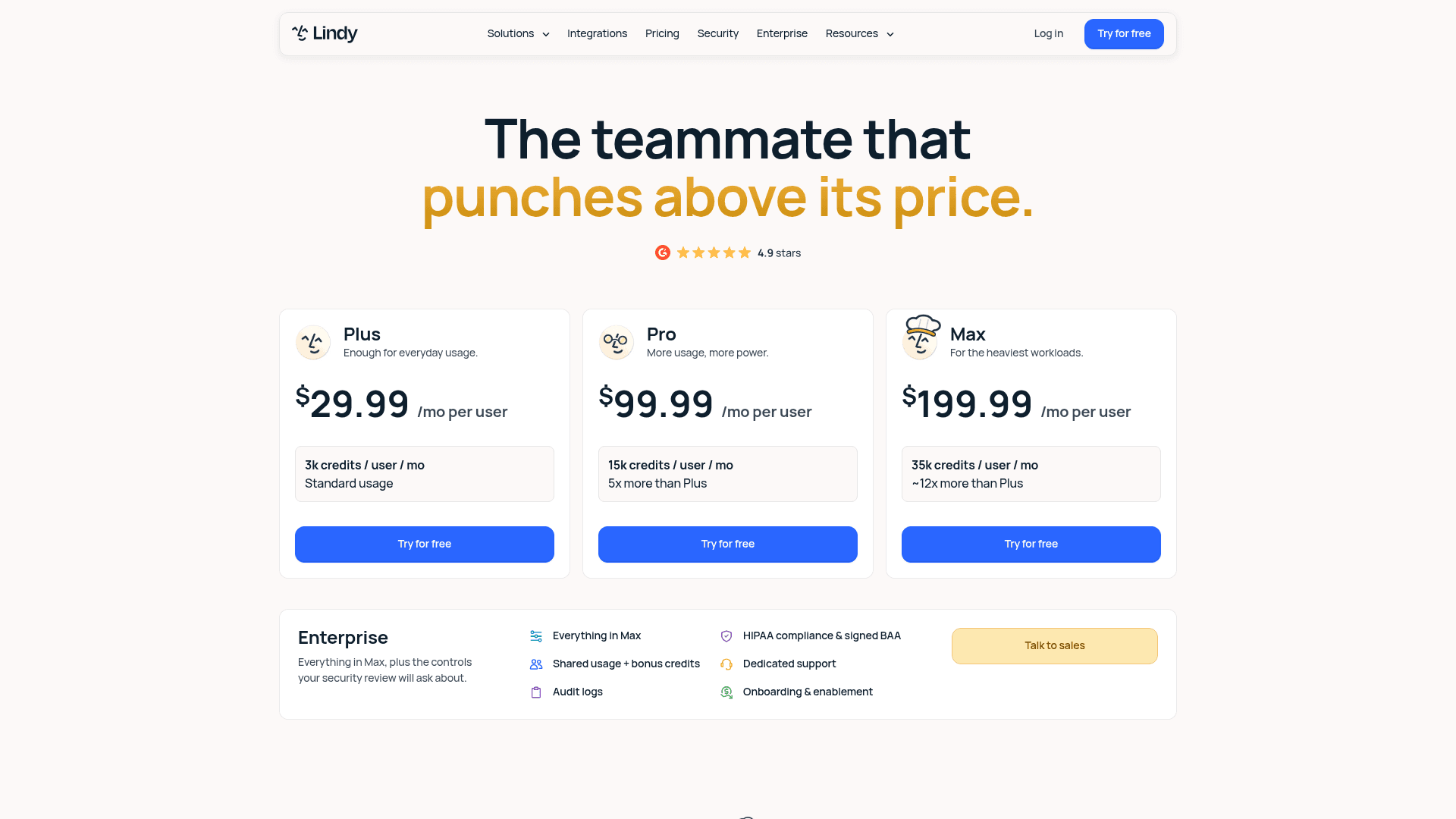
What it is. In spirit this is the closest thing to Pazi, only aimed at a team instead of a founder. A Slack-native assistant which handles inbox management, meetings, scheduled routines and ad-hoc asks, and there is a build-your-own layer sitting underneath. Fuller product walkthrough lives in our Lindy AI review.
Where it beats Pazi. Two things. First one, an event or a colleague can start the work: mention it inside a Slack thread and it picks up, which is a different trigger model from taking an opportunity in a dashboard. Second, the security paperwork actually exists. The pricing FAQ states SOC 2 and GDPR compliance, with SSO, audit logs and HIPAA with a signed BAA on Enterprise. When a security review is the thing standing between you and a purchase, that matters more than any feature.
Where it doesn't. It is per-seat, and the seat rules are strict ones: anyone who uses Lindy takes a paid seat, including people who only @mention it in Slack. Removing a seat does not prorate. The free week applies only to teammates joining through Slack, so a direct signup is billed immediately. Lindy also waits on approval for anything with outside impact, which is the right default but it does mean this is not an unattended queue worker.
Pricing. Plus at $29.99 per user per month with 3k credits per user, Pro at $99.99 with 15k, Max at $199.99 with 35k, then Enterprise. Credits pool across the workspace and they do not roll over, and Lindy pauses instead of overbilling when the pool runs dry. Their own bands are useful for estimating: everyday asks 2 to 250 credits, deep work 250 to 1,000, big builds 1,000 to 2,500.
Verdict. Best pick if you liked Pazi's idea but need several people sharing the agent, plus a compliance page you can point at. Note that "triage a day's support queue" sits inside Lindy's own 250 to 1,000 credit band, which tells you it is priced as a periodic deep-work job and not as a per-conversation meter. We compare it against the rest of the field in our Lindy alternatives roundup.
3. Tasklet
What it is. Tasklet bills itself as agents which own the work, so it sits closer to an event-driven automation layer than to an operating officer. Autonomous cloud agents in isolated sandboxes, browser automation, natural-language task creation, and also MCP support. Our longer take lives in the Tasklet review.
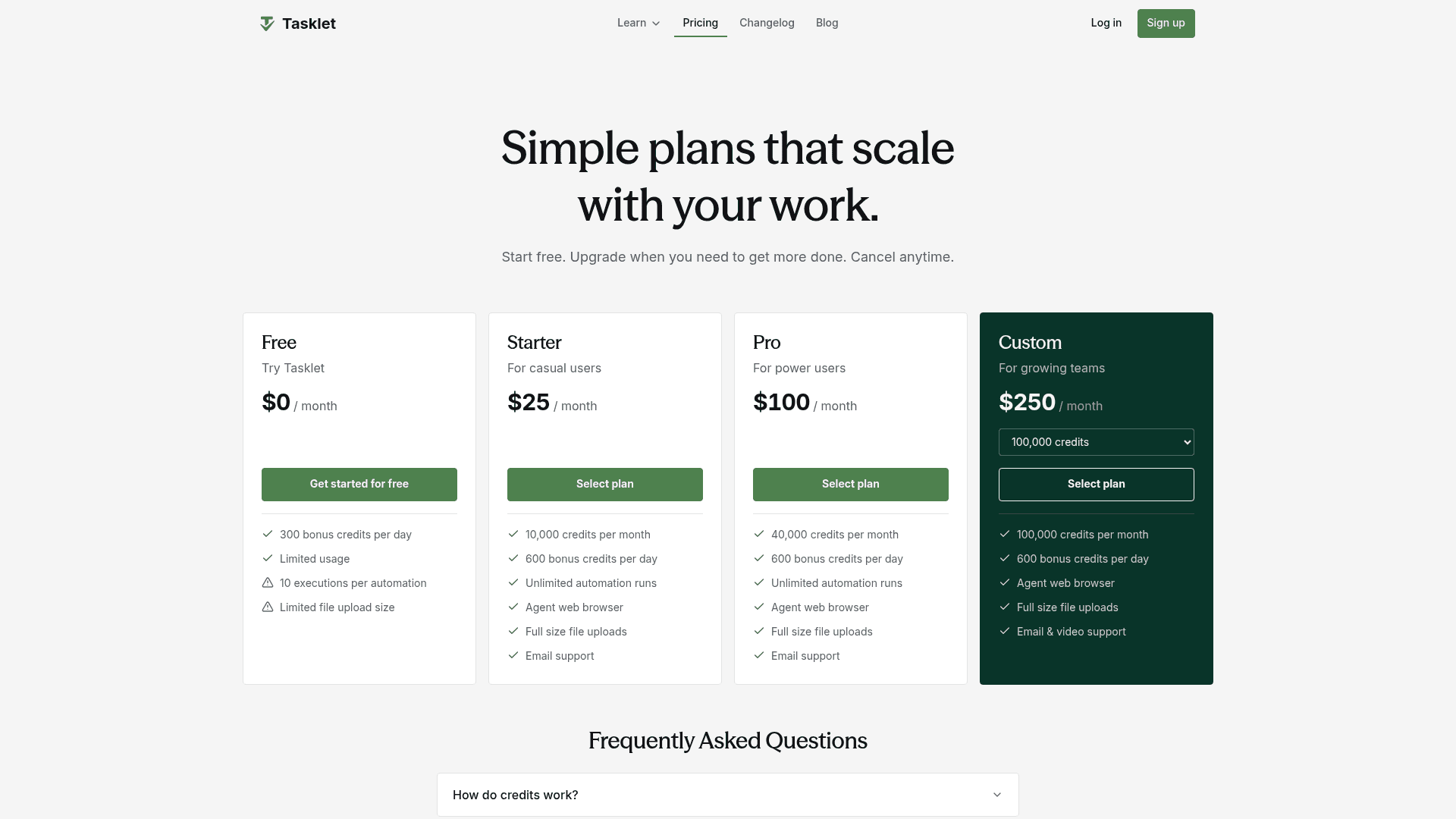
Where it beats Pazi. Automation runs are unlimited on every paid plan, so throughput becomes a function of credits and not of a hard two-at-a-time gate. Unlimited agents and unlimited service connections come on all the plans including Free, and there is a real $0 tier with 300 bonus credits a day, which makes a more useful trial than a one-time grant does. Top-ups still exist over here, from $25 up to $10,000, valid one year.
Where it doesn't. Same core limitation as Pazi, it is a horizontal platform and not a helpdesk resident. It publishes no credits-per-task rate, and its own FAQ lists out the variables which drive burn, including task complexity, context size, active tools, trigger frequency and the intelligence level you pick from Basic up to Genius. Browser use and the higher intelligence levels burn fastest. That makes the month-to-month cost hard to forecast, in exactly the way a per-conversation rate is not.
Pricing. Free at $0 with 300 bonus credits a day and a 10-execution cap per automation; Starter $25/mo for 10,000 credits; Pro $100/mo for 40,000; Custom from $250/mo for 100,000 and up. Monthly credits do not roll over. Custom plans can be dialled in $5 increments with each unit buying 2,000 credits, which works out at the same $0.0025 per credit on every level. Refunds within 14 days up to $250.
Verdict. The cheapest honest entry into event-driven agents, and a straight upgrade on Pazi's concurrency. Just build yourself a credit-burn estimate before committing, because the sticker and the bill get set by different things. The full field sits in our Tasklet alternatives comparison.
4. Gumloop
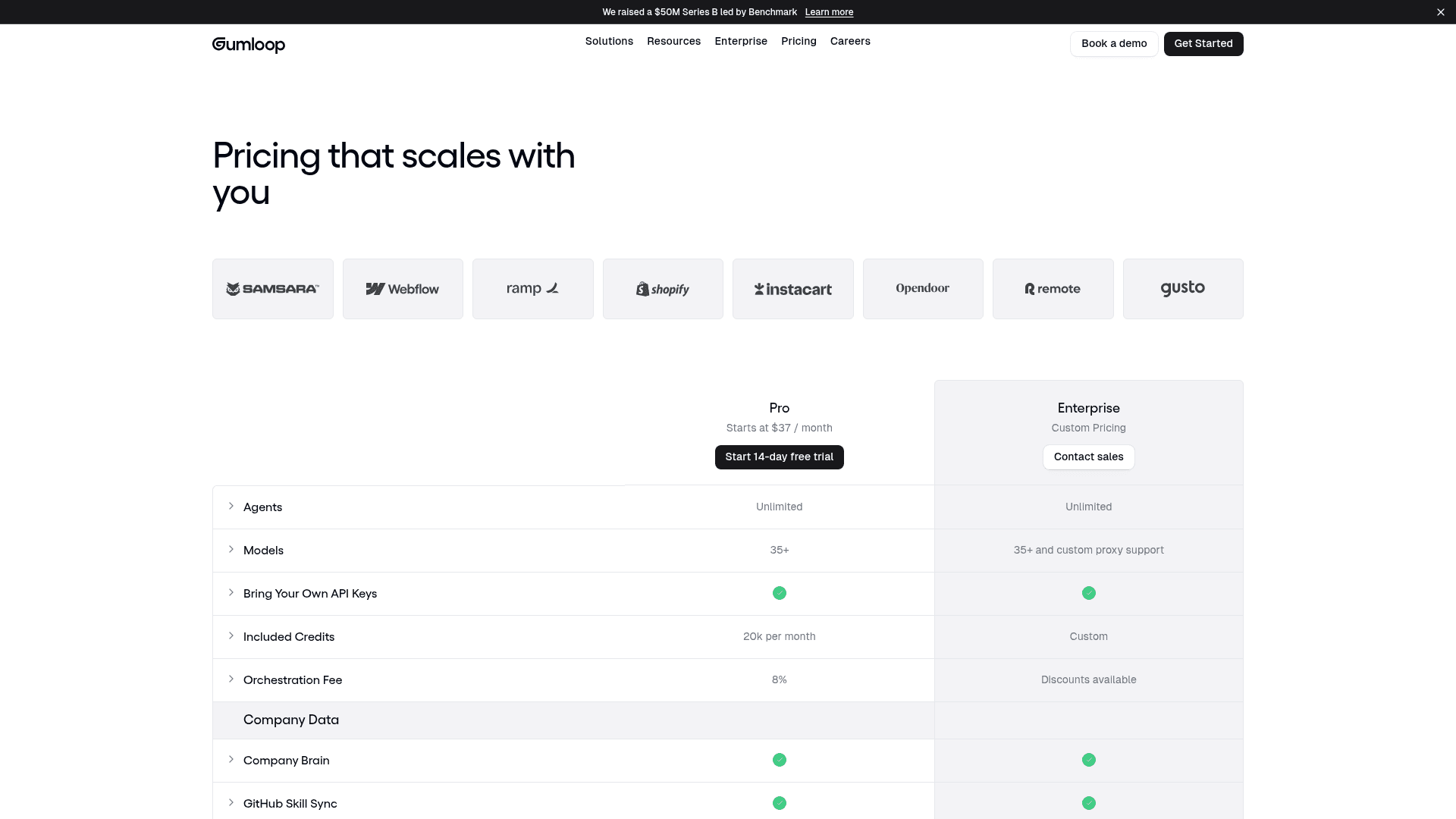
What it is. A no-code platform for AI workflows and agents, pitched at ops teams and now well funded, with a $50M Series B led by Benchmark which is announced on its own site. We went deeper on the field in our Gumloop alternatives roundup.
Where it beats Pazi. It publishes the numbers which most vendors hide. Concurrency is stated outright at 5 concurrent workflow runs and 25 concurrent agent chats on Pro, and workflow queuing is included. Seats and teams are unlimited on both tiers. It also supports bring your own API keys, which is the single most effective way of stopping a platform markup on model tokens. The admin surface is enterprise-grade too: RBAC, SCIM/SAML, audit logs, custom retention rules, AI spend insights, and an optional VPC on Enterprise.
Where it doesn't. The 8% orchestration fee sits on top of usage, so the real cost is credits plus a percentage, and Enterprise gets discounts which you will not. Included credits are 20k a month on Pro against Tasklet's 10,000 for $25, so the comparison depends very heavily on what a credit actually buys in each one. This is also a builder's tool, you assemble the workflow yourself, which is more control and more work than describing a goal to an operating officer.
Pricing. Pro starts at $37/month with 20k credits, unlimited agents, 35+ models, unlimited seats and teams, one hosted MCP server, plus a 14-day free trial. Enterprise is custom and it adds org-wide connector policies, MCP proxying and an optional VPC.
Verdict. Pick this one when the work is event-driven and somebody in the building will eventually have to answer a security questionnaire. Published concurrency plus BYO keys is a combination that almost nobody else on this list offers, and the meter mechanics get broken down further in our Gumloop pricing analysis.
5. n8n
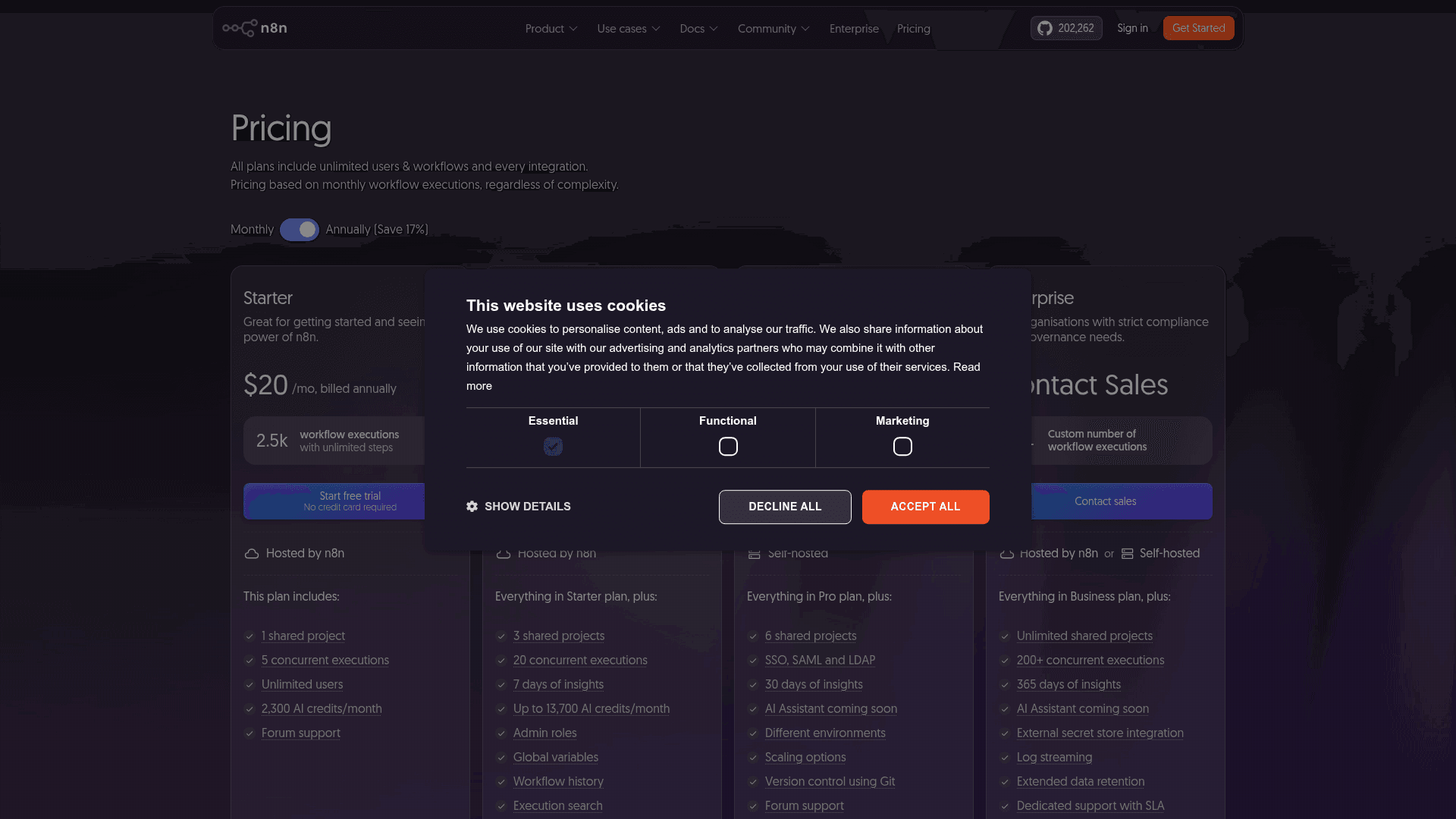
What it is. The open-core workflow automation platform for technical teams, with a self-hostable Community Edition which sits on more than 200,000 GitHub stars. For a head-to-head against the nearest agent platform, see Cassidy vs n8n.
Where it beats Pazi. Cost predictability, and it is not even close. n8n bills one full workflow execution regardless of how many steps it contains or how much data it moves, which means you get to price a job before you run it. Concurrency is published, and generous by comparison: 5 on Starter, 20 on Pro, 200+ on Enterprise. Triggers are real webhooks and queues, there are code steps in JS or Python, then there is a first-party Zendesk node if the destination is a helpdesk. Self-hosting means you own the meter completely, and that includes bringing your own model keys.
Where it doesn't. You build everything yourself. There is no operating officer, no roadmap, nobody who asks you focused questions about your business. That is the whole trade. The AI Assistant is still an early preview with its own credit allowance (2,300 a month on Starter, up to 13,700 on Pro) and you cannot buy more of it, only upgrade. The jump from Pro at $50 to Business at $800 is a steep one, and Business overages run 4,000 EUR per extra bucket of 300,000 executions. Dedicated support is Enterprise-only; Business is self-serve with forum support.
Pricing. Starter $20/mo billed annually for 2.5K executions, Pro $50/mo for 10K, Business $800/mo for 40K, Enterprise custom. Community Edition is free and self-hosted. Cloud data sits in Frankfurt. Free trials on Starter and Pro need no card. Teams under 20 people can apply for 50% off Business.
Verdict. The right answer for anybody whose real objection to Pazi is the credit meter and not the trigger model. If your team can maintain workflows then n8n is the cheapest predictable throughput in this roundup by a wide margin, and there is a ready-made Slack node for the notification half of the job.
6. Sintra AI
What it is. The most direct like-for-like on Pazi's pitch: a bundle of twelve named "AI employees" for solopreneurs and small teams, and each one gets a role, from Cassie on support to Seomi on SEO to Milli on sales. A shared knowledge layer called Brain AI sits underneath, and there is a full product walkthrough in our Sintra review.
Where it beats Pazi. The roster is a concrete thing. Instead of describing a business and then waiting for a roadmap, you pick the helper whose job matches your task, and that is a lower-friction mental model for people who just want a marketing draft or an outreach sequence today. It also comes cheaper at the entry point while a sale is running.
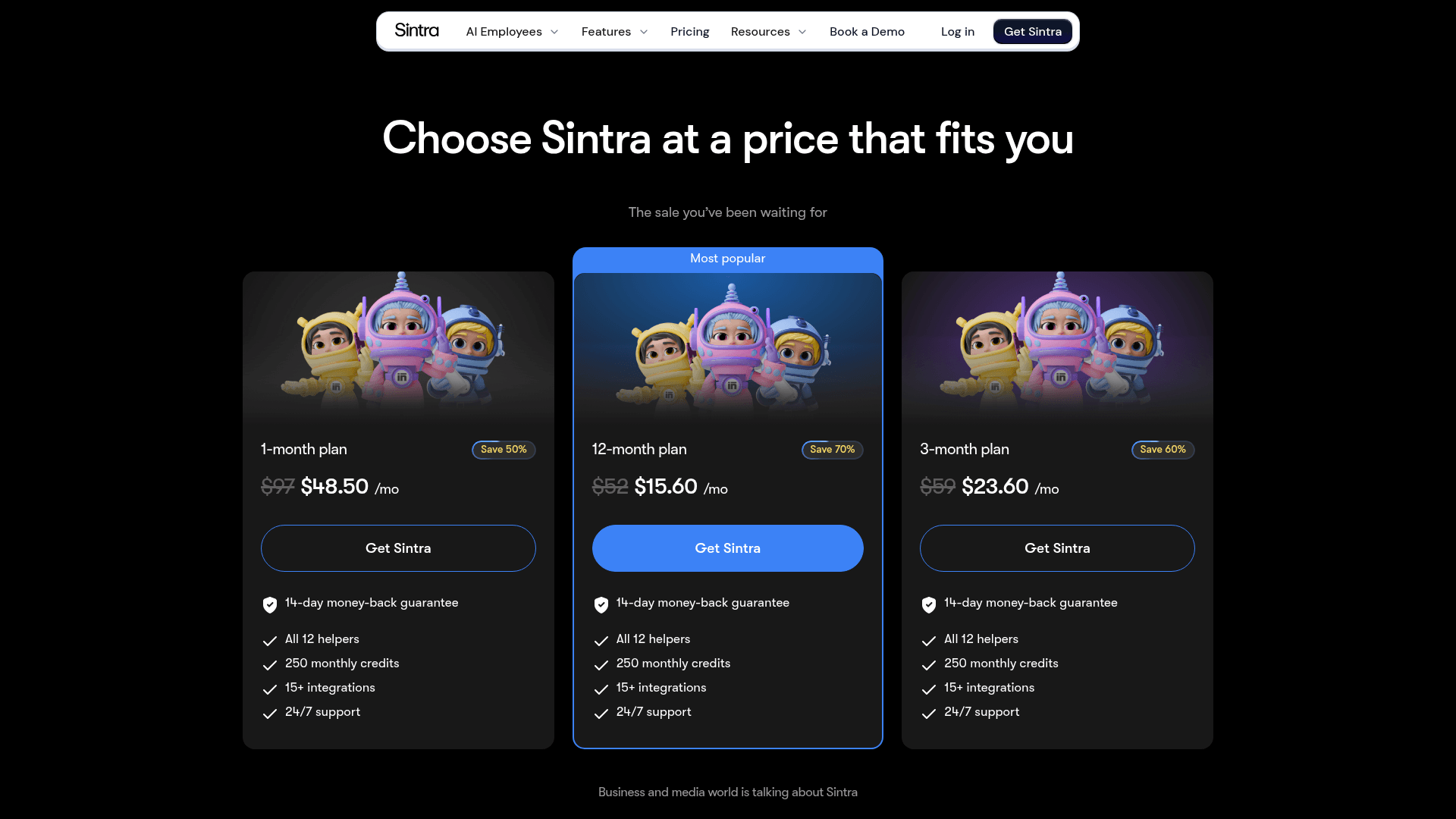
Where it doesn't. The credit allowance is the whole story here. Every plan, at every price, includes that same 250 monthly credits, and they reset instead of rolling over, as our Sintra pricing breakdown works through in detail. Higher tiers buy you a longer commitment at a lower monthly rate, not more capacity, so scaling means buying top-ups. Its integrations are consumer-grade tools like Gmail, Notion and QuickBooks rather than helpdesks, and there is no free trial at all, only a 14-day money-back window which you have to request. Set against Pazi's docs, there is also much less published detail on concurrency, on security posture, or on what a credit actually costs.
Pricing. List prices are $97 for one month, $59 a month on a three-month commit and $52 a month on twelve months, each of them billed upfront for the full term. A long-running sale currently cuts those down to $48.50, $23.60 and $15.60. Every tier gets 250 monthly credits with paid top-ups available.
Verdict. Good if you want Pazi's specialist-team feel with less setup and a smaller monthly number. Do the credit maths first though, because 250 credits a month is the real plan limit no matter which price you end up paying. Other options in the same bracket sit in our Sintra alternatives roundup.
7. Cassidy
What it is. A no-code agent and workflow platform which is built around a knowledge layer, aimed at document-heavy companies. Four products stack up here: Knowledge Base and Meetings supply the context, Agents and Workflows do the automation. See our Cassidy alternatives roundup for how it stacks up against the field.
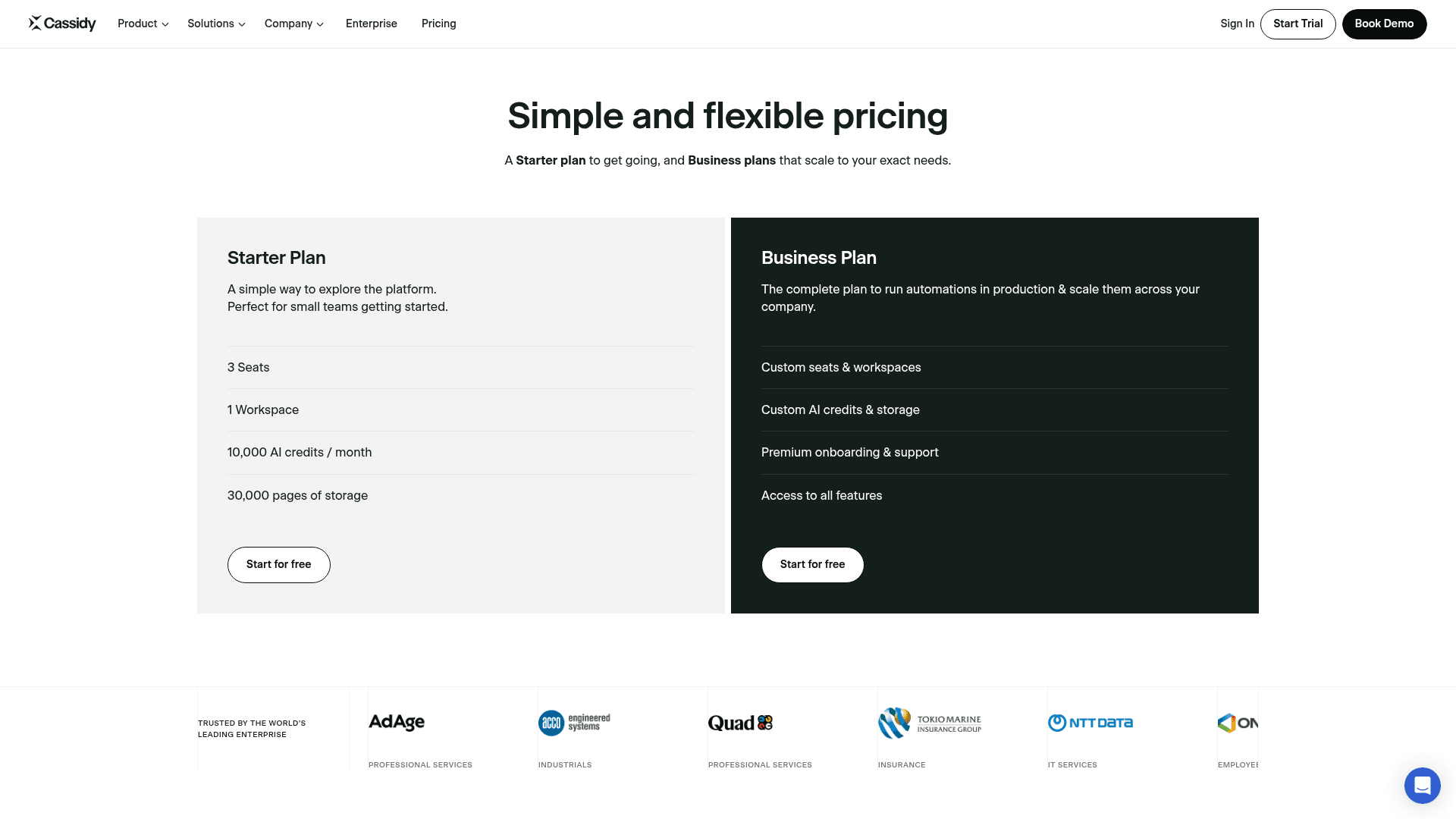
Where it beats Pazi. Grounding. Cassidy's whole design assumes your answers live inside documents, and it gives you a proper AI knowledge base layer with a large page allowance on the free tier, rather than a per-agent workspace. There is a usable free plan too: 3 seats, 1 workspace, 10,000 AI credits a month and 30,000 pages of storage, and no time limit on it. For triage and drafting over internal documents it makes a stronger starting point than a generalist agent team.
Where it doesn't. The pricing page carries no dollar figures on it at all, so Business becomes a sales conversation before you can model any cost, which our Cassidy pricing piece digs into. Credits are token-metered with no published rate and they multiply by model tier, and Cassidy's own cost-saving advice is to limit how much knowledge base context gets pulled into each interaction, which is an awkward trade when grounding was the reason you bought it. On support specifically, every published template stops at a reply draft: no confidence threshold, no auto-send, and no deflection figure anywhere. Its Zendesk connector covers help-centre sync, ticket triggers, adding a comment.
Pricing. Starter is free with 3 seats, 1 workspace, 10,000 AI credits a month and 30,000 pages of storage. Business is contact-sales on every single line. Enterprise appears only in FAQ prose.
Verdict. The best Pazi alternative when your work is reading and writing documents and you want a real knowledge layer sitting under the agents. Not the answer if you need something which closes a ticket on its own.
8. Fleece AI
What it is. An agent and flow platform whose selling point is the breadth of prebuilt integrations. We dug into where it fits over in our Fleece AI alternatives comparison.
Where it beats Pazi. The billing unit is a clean one. One credit equals one agent run, which is far easier to forecast than a variable model-cost conversion, and top-up packs come two to eight times cheaper per credit than the bundled plan credits, so a small plan plus top-ups is usually the better buy. Triggers are event-based, so the work can start without you.
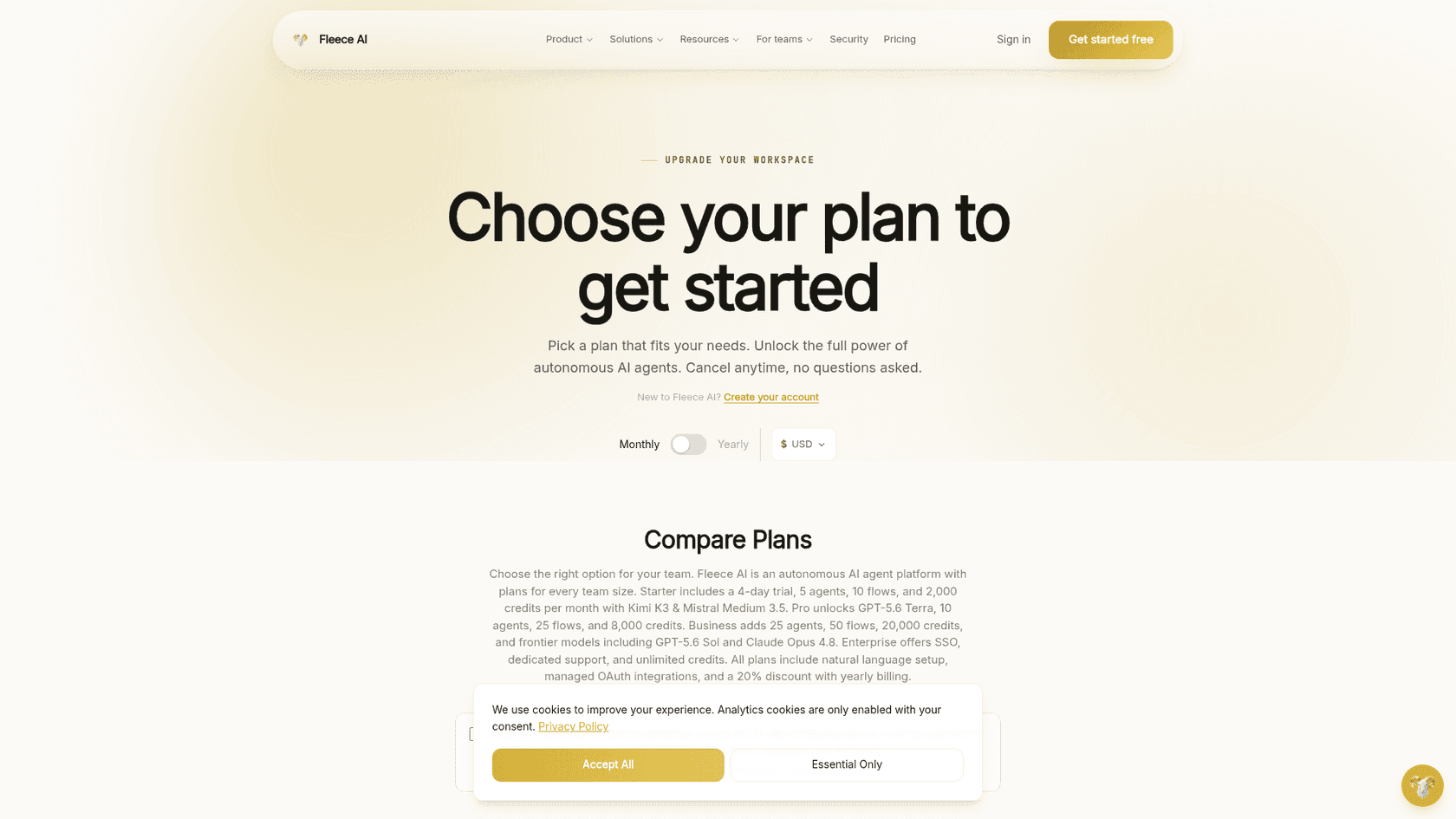
Where it doesn't. That headline "3,000+ app integrations" is a Business-tier number and not a floor. Starter gets 20+, Pro gets 1,000+, and the 3,000+ only arrives at €199. Only around 67 apps have real detail pages, the Support category holds three apps, and both support templates wire into Gmail, Notion and Slack rather than a helpdesk. Zendesk and Freshdesk sit up on the Pro tier. There is no free plan at all: the trial is 4 days, Starter only, 1,000 credits, card required, and the vendor says so plainly. Prices display in USD but they bill in EUR, so your actual charge moves along with the exchange rate. Review coverage across every major platform is essentially zero, which is the same evaluation problem that Pazi has.
Pricing. Starter €49/mo (€39 yearly) for 5 agents, 10 flows, 2,000 credits and 20+ integrations. Pro €99 (€79) for 10 agents, 25 flows, 8,000 credits, 1,000+ integrations. Business €199 (€159) for 25 agents, 50 flows, 20,000 credits, 3,000+ integrations. Enterprise custom. Setup Express is €89 one-time. Agents pause at the cap; there is no overage. The tier-gate detail gets mapped out in our Fleece AI pricing write-up.
Verdict. Reasonable when the integration you need is on the list at a tier you can afford, and when per-run billing suits you better than a token conversion. Check the tier gate on your own specific apps before buying, because it moves a lot between €49 and €199.
How I would actually choose
Four short rules, in the order that I apply them on a call.
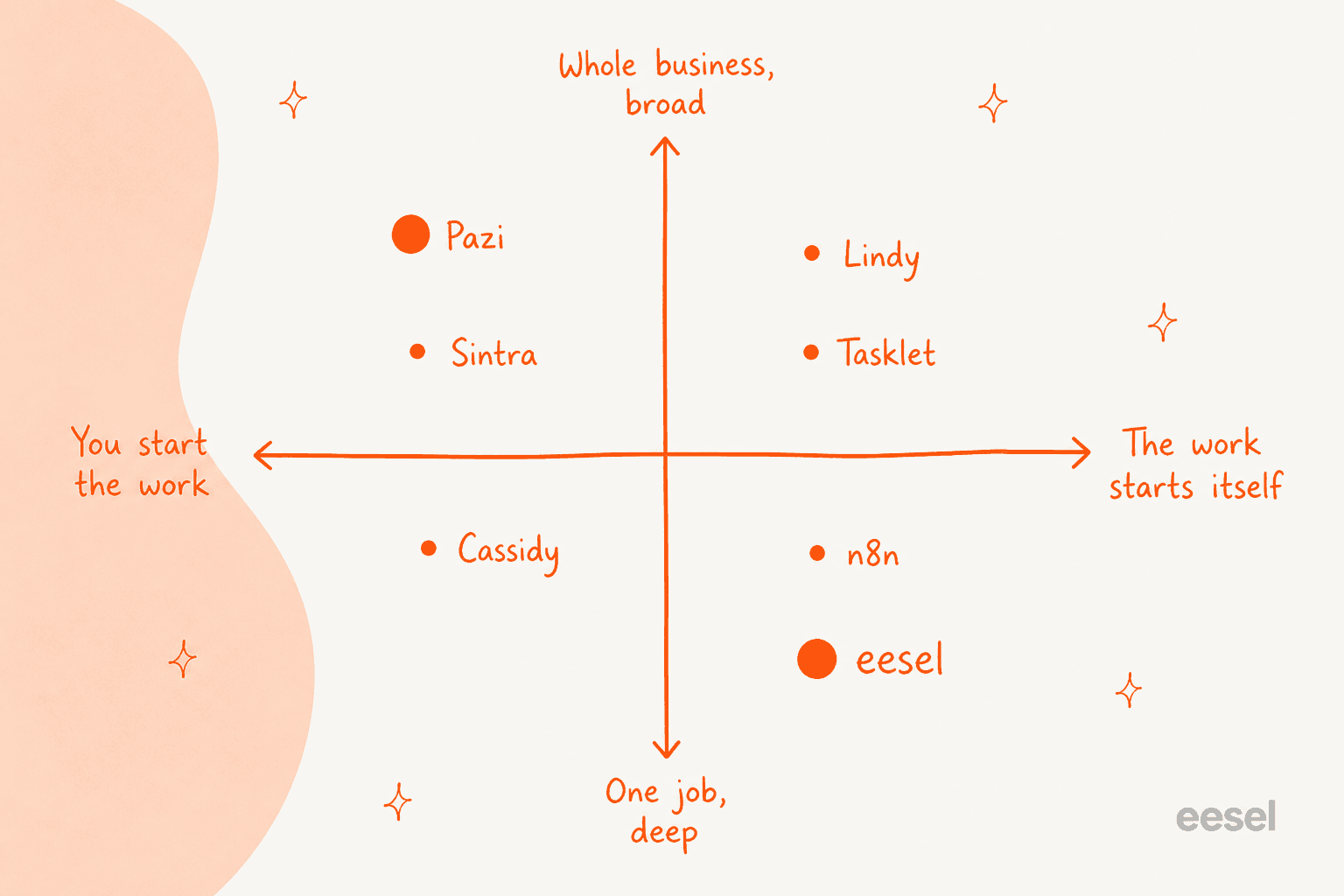
- Name the trigger first. Write down, in one sentence, which event should be causing the agent to start working. If that sentence contains the word "I," then a generalist agent team like Pazi, Sintra or Cassidy is probably fine. If it contains "a customer" or "a webhook," you need something over on the right half of that quadrant.
- Check concurrency against your volume. This is the number people skip past and then get bitten by. Pazi publishes two concurrent opportunities. Gumloop publishes 5 workflow runs and 25 agent chats. n8n publishes 5, 20 and 200+. Everybody else on this list publishes nothing at all, so ask before you commit.
- Price the unit, not the plan. A credit which converts model cost at a fixed rate, a credit which equals one run, a full workflow execution, and a ticket handled: four different products all wearing the same word. The only fair comparison is cost per unit of the work you actually care about.
- Insist on a dry run for anything customer-facing. I have watched a confident-sounding bot give wrong answers to real people, which is the reason every eesel rollout now simulates against historical tickets first. If a tool cannot show you what it would have said on work you have already done, then you are testing in production on your own customers.
If you are still mapping the category instead of shortlisting, our roundup of the best AI agents goes wider than this post does. Smaller teams might find AI agents for small business closer to their budget. And if you have not settled yet on what to hand over at all, start with AI agent examples.
Frequently asked questions
What is the best Pazi AI alternative? It depends entirely on what is starting the work. For ready-to-work teammates in support and blog writing, eesel is the specialist pick. For a broader roster of generalist specialists, Sintra AI is the closest match on Pazi's pitch. For event-driven automation, look at Lindy or n8n.
How much does Pazi AI cost, and how do its credits work? Pazi has one paid plan, Pro, priced at a flat 500 credits per US dollar: 12,500 credits for $25/mo, 25,000 for $50, 50,000 for $100, 100,000 for $200 and 250,000 for $500. Yearly billing is 20% off and it still grants the credits monthly. Credits convert the underlying model provider cost at that same rate, so the exact burn depends on model, input, output, tools, and task length. A Brave search request is a fixed 5 credits, and any LLM request needs at least 5 credits available before it starts. One-time top-ups are not sold any more. For a wider view on how these meters compare against headcount, agent versus human cost makes a useful companion read.
Does Pazi AI have a free plan? Yes, although it lives in the docs and not on the pricing page. Free gives you 5,000 one-time credits (not monthly), one active owned business, no team-member invites, 5 business email sends per period, and unlimited agents, with no payment method required. Free accounts can also start up to four heartbeat occurrences across the entire lifetime of the account, after which the heartbeats stop until you upgrade.
Can Pazi AI handle customer support tickets?
Partially, and the limits are worth to read before you plan around it. Pazi's own blog positions it for support teams, but its docs state that a cold message from an unknown sender is stored without starting an agent run, that at most two opportunities run concurrently, and that outbound email is capped at 200 sends per period on the top tier, from a fixed me.pazi.ai address. At real volume, a tool which lives inside the helpdesk and holds a confidence threshold is the better structural fit for support ticket automation. Our shortlist for the classification half of that job sits in the guide to support ticket triage.
Which Pazi alternative is cheapest? On sticker price, n8n's self-hosted Community Edition is free and its Starter cloud plan is $20/mo billed annually, while Tasklet has a real $0 tier with 300 bonus credits a day. On cost per unit of work, n8n's full-execution billing is the most predictable one, and for customer conversations specifically eesel's fixed plans mean 1,000 tickets a month costs $499 with no seat or platform fee. There is a support-side price comparison over in cheapest AI apps for helpdesk.
Is Pazi AI secure enough for business data? Its security documentation is more detailed than what most companies of this size publish: isolated cloud computers per conversation, scoped runtime identities which never receive your browser session cookie, encrypted business-scoped credentials injected only into fresh runs, AES-256 encryption at rest, plus an explicit statement that project data is not used for training models at Anthropic, OpenAI or Amazon Bedrock. What it does not name is any third-party certification such as SOC 2 or ISO 27001, and there is no one-click export of all your data. If a compliance review is part of your buying process, Lindy publishes SOC 2 and GDPR compliance and offers HIPAA with a BAA on Enterprise.
Do any Pazi alternatives let me bring my own model keys? Two on this list do. Gumloop supports bring-your-own API keys on both Pro and Enterprise, and self-hosted n8n lets you supply your own key with no credit limits applied to it. Pazi has a narrower version of the same idea: you can connect a ChatGPT/Codex subscription so that Codex-selected agent runs draw on your own quota instead of Pazi credits, but Claude-selected messages go back to the normal credit path.
How many tools do these platforms actually connect to? Be careful with the headline integration counts, because they are usually gated ones. Fleece AI advertises 3,000+ apps, but that figure belongs to its €199 Business tier while Starter gets 20+. Cassidy claims 100+ where a live count found 73. Pazi publishes no connector catalogue at all; connections are encrypted API credentials which the agent uses through its browser or over HTTP. If a specific tool is load-bearing for you then verify it on the tier you intend to buy, and not on the marketing page. The same test applies when you are picking from AI knowledge base tools or from the wider set of AI tools for support teams.
The short version
Pazi is a well-built tool for one specific job: turning a founder's idea into ordered, executed work, and with an unusually honest set of docs sitting behind it. If that is your job then the interesting comparison is Sintra or Cassidy on roster and price, and not a wholesale switch.
The reason most people land on a Pazi alternatives page is that their work does not wait around to be started. It arrives. It arrives from strangers, at volumes which a two-at-a-time execution model and a 200-email cap were never drawn for. When that is the situation, the tool has to be built around arrival: a real helpdesk connector, a confidence threshold, and some way to prove the automation rate on tickets you have already answered before any customer sees it.
That is one of the jobs eesel packages as a ready-to-work teammate: the helpdesk teammate can run against your ticket history before anything switches on. The other teammate live today is the AI blog writer, built for content work rather than the queue. Try eesel with 100 free credits, no credit card.


Article by
Kira
Kira is a writer at eesel AI with a Computer Science background and over a year of hands-on experience evaluating AI-powered customer service tools. She focuses on breaking down how helpdesk platforms and AI agents actually work so that support teams can make better buying decisions.