8 best Gumloop alternatives in 2026, picked by what breaks

Kira

Katelin Teen
Last edited September 17, 2026
What actually kills an automation
I have spent the last few years building integrations and agents at eesel, which means I have shipped the code that breaks at 3am and then read the ticket about it the next morning. So let me lead with an eesel scar rather than someone else's.
eesel lost a customer spending about $800 a month whose core data source was a daily-updated order-status Google Sheet. The Drive sync failed silently three times. Not loudly, not with an alert, just quietly stopped bringing in fresh rows while the agent kept confidently answering from stale ones. Here is what they wrote back to eesel's founder months later, in a win-back thread:
"We switched to a system that is working well at half the cost. But long term we will just build our own, which is so possible now with AI. I think you have a decent system for now, but we are probably too large of a customer for this. That being said, we probably would have stayed if support was faster and better."
a churned mid-market customer who left for a cheaper tool after a broken integration and slow support, internal win-back thread
Read that again, because the lesson generalizes well past eesel. The product built the automation fine. The automation ran fine. What killed it was the gap between "it broke" and "somebody noticed." That is the axis this entire post is organized around, and it is the axis every alternatives roundup skips in favour of comparing node counts.
Why people go looking for Gumloop alternatives
First, the fair part, because Gumloop is a genuinely good product and the complaints below are the complaints of a tool that people are actually using in production rather than a tool nobody adopted.
It raised a $50M Series B led by Benchmark, and it is one of the better no-code agent builders I have used. It is SOC 2 Type II certified with GDPR compliance, VPC deployment, SSO, RBAC and audit logging.
Seats are unlimited on the $37 plan, which is unusually generous next to Zapier's seat gates. And its billing is the most intellectually honest model in the category: tokens passed through at cost, compute passed through at cost, and an 8% orchestration fee on top, per its own transparent pricing post.
The canvas gets real praise too, including from people who had tried the incumbents first:
"The platform is much simpler than n8n and significantly more flexible than Zapier. The AI nodes for non-deterministic tasks are a great addition, and the MCP nodes that generate integrations on the fly are impressive."

If you are new to the category, the useful split is that these platforms sell AI agents rather than chatbots, which is exactly why the billing is harder to predict than a per-seat licence.
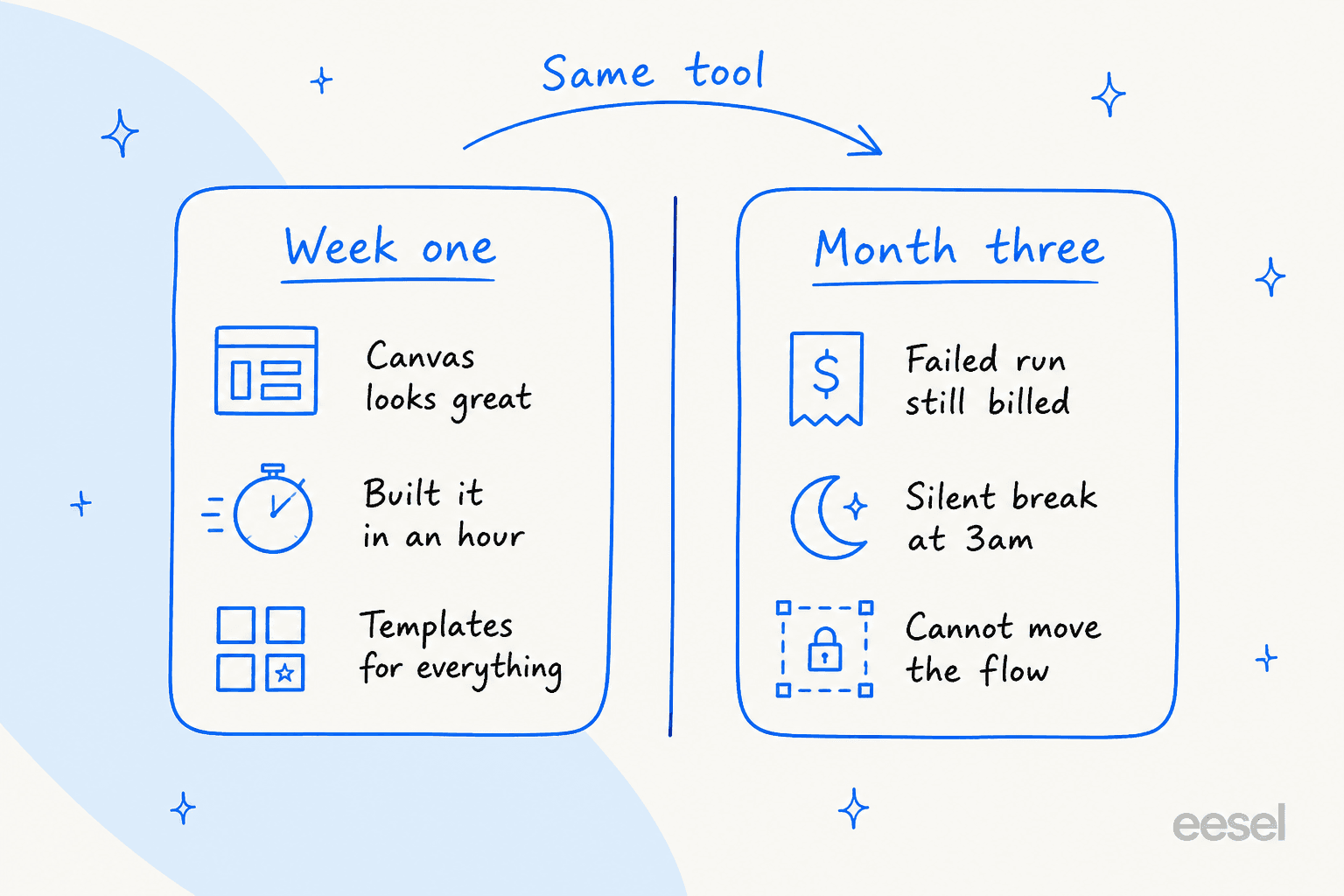
So what drives the search? Reading a year of public threads, the sentiment splits cleanly on one line, and it is not price and it is not features. It is how long the workflow has been in production. Week-one users describe the best-looking builder on the market. Month-three users start using four words: reliability, credits, ownership, and babysitting.
The single most-repeated complaint names both halves of the problem in one sentence:
"But Gumloop seems to freeze or have issues too frequently and then burns credits running faulty automation."

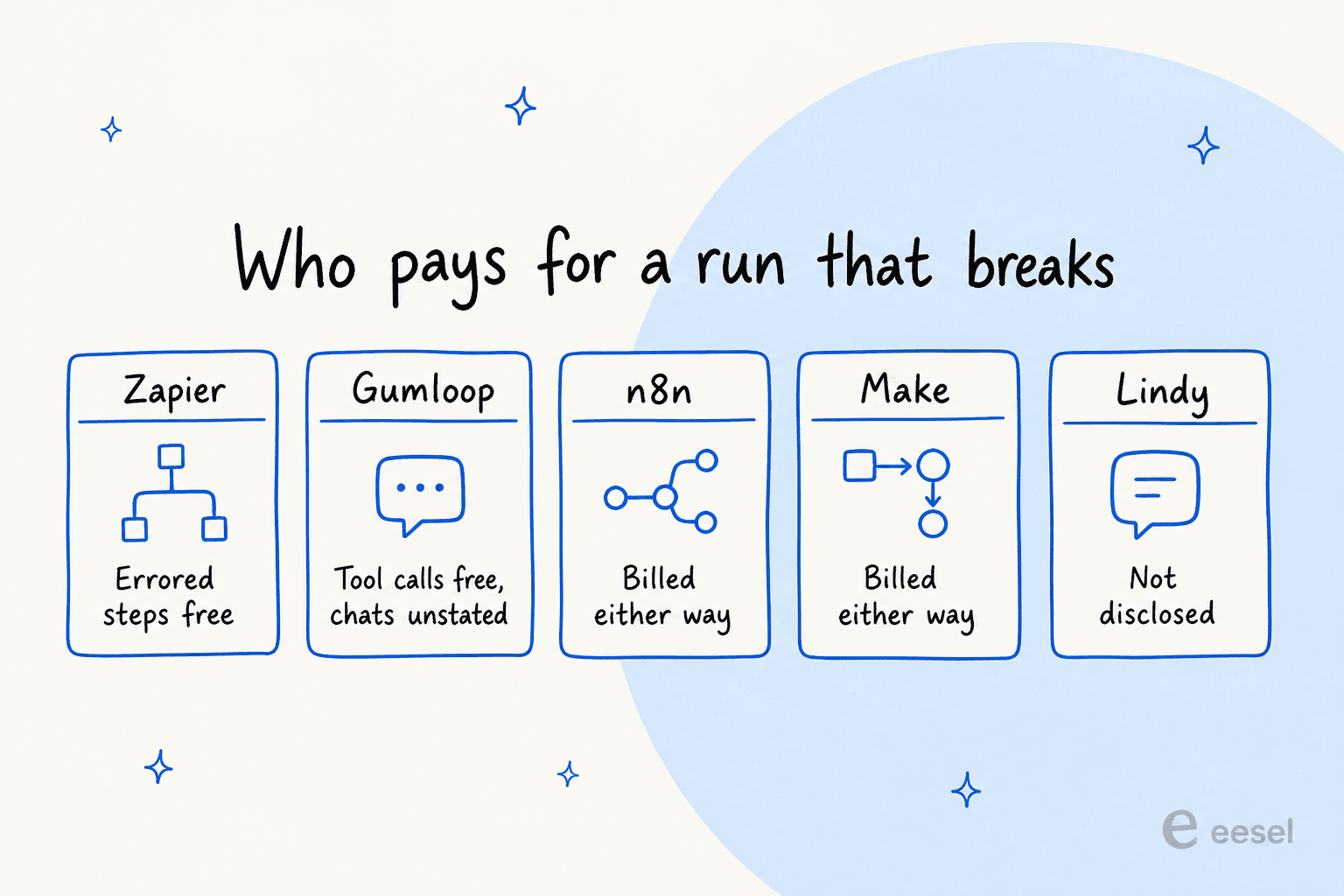
To be precise, because this is where most write-ups get sloppy: Gumloop's credits documentation states that failed tool calls are not charged, and that a workflow which stops partway only bills the nodes that ran before the failure. Those are good policies. What is not addressed anywhere public is the agent-chat case, where tokens and compute are already spent by the time the conversation errors out. That is the exact surface the thread above is describing, and it is the question I would put to their sales team before signing anything.
Then there is the ownership half, which is the more strategic worry:
"I think the biggest tradeoff with Gumloop is simplicity vs ownership. It's incredibly fast to prototype AI workflows, especially for non-devs, but once workflows become mission critical people start comparing reliability, hosting, and cost much more seriously."
And the fear underneath all of it, stated better by a commenter than by any vendor's docs:
"The operational constraint that usually surfaces first with agentic tools is debugging - when a workflow fails after running for 3 hours, you need to know exactly which step failed and why. Deterministic pipelines give you that traceability."
One honest caveat on the review scores you will see quoted elsewhere. G2 shows 4.8/5 across 7 reviews and Capterra shows 5.0 across 2, and six of the seven G2 reviews landed inside a two-week window in January 2026. Treat those as thin and recent rather than settled, in either direction.
How I picked these eight
I have built on or shipped integrations against most of this category, and I read every vendor's own docs rather than their pricing page, which is where the interesting sentences hide. Four screens I opened for each: the pricing page, the billing docs, the failure or error docs, and whatever the platform calls its run history. That last one is the tell. A platform that is proud of its observability puts it in the product tour; a platform that is not makes you dig.
The three questions I scored on:
- Who pays when a run fails? A flaky third-party API is a fact of life. Whether it costs you money is a vendor policy decision, and the answers vary more than you would expect.
- How fast do you find out? The gap between a break and a human noticing is where the actual damage lives, and it is a product feature, not a discipline problem.
- Can you leave? Self-hosting, an open licence, or a plain export. Month three is when this stops being theoretical.
Everything else, connector counts and template galleries and canvas ergonomics, is week-one criteria. It matters, it just does not decide anything. If you want the wider field rather than the Gumloop-shaped slice of it, my workflow automation roundup covers the tools that never come up in these threads.
The 8 Gumloop alternatives compared
Every unit in the second column is a different unit. They are not convertible, and the gap between them widens with workflow complexity rather than volume, which is the single most expensive mistake buyers make in this category.
| Tool | Best for | Billable unit | Failed run billed? | Free tier | Entry paid price | Self-host | Seats | Notable gate |
|---|---|---|---|---|---|---|---|---|
| eesel | The support queue | Ticket or chat session | No, only tickets worked on count | 100 credits, no card | From $299/mo (500 credits) | No | Unlimited | Not a general builder |
| n8n | Owning the runtime | Workflow execution | Yes | Community edition only | $20/mo annual, 2.5K runs | Yes, free | Unlimited | SSO and Git on Business |
| Zapier | Breadth, and error-free billing | Task (successful step) | No | 100 tasks/mo forever | From $19.99/mo | No | 1 until Team | Second seat is a plan jump |
| Make | Cheapest visual canvas | Credit, per module per bundle | Yes | 1,000 credits/mo forever | $12/mo at 10K credits | No | Unlimited | Hard stop at zero credits |
| Lindy | Agents that live in Slack | Credit, sold per seat | Not disclosed | None, 7-day trial | $29.99/user/mo | No | Priced per user | Slack mentions take a seat |
| Relevance AI | Multi-agent GTM teams | Action, plus Vendor Credits | Yes, stated | 200 Actions | $29/mo, 2.5K Actions | No | 2 builders on Pro | Top-ups at 7x in-plan rate |
| Cassidy | Knowledge-grounded internal work | Credit, 1-100 per run | Not published | 3 users, 10K credits | $79/mo | No | 3 on Starter | Helpdesks are paid-only |
| Dify | Building and hosting it yourself | Message credit | Not published | 200 credits, one-time | $59/mo | Yes, free | 1 on Sandbox | Multi-tenant SaaS is licensed |
| Gumloop, for reference | Prototyping agents fast | Credit at $0.005 | Tool calls no, chats unstated | None | $37/mo, 20K credits | Enterprise VPC | Unlimited | 5 concurrent runs on Pro |
Work out what the unit actually costs you
Here is the part that makes the table above concrete. Put in the shape of one of your real workflows and watch the same job produce wildly different unit counts on each platform. This is not a pricing gotcha, it is arithmetic that follows directly from each vendor's published definition of its unit.
The default numbers are worth sitting with. A workflow firing 2,000 times a month with ten steps over ten records each is 2,000 executions on n8n, 20,000 tasks on Zapier, and 182,000 credits on Make. n8n makes this argument on its own pricing page, claiming a single execution can replace what would be 10,000 operations elsewhere. My Make vs n8n breakdown works through the same arithmetic if you want the long version.
1. eesel, for automating the support queue
Best for: teams whose real job is the ticket queue, not general ops glue.
I work on eesel, so treat the take with the appropriate salt and check the numbers, which are all on the pricing page. I am putting it first for one reason: if your Gumloop workflow is fielding customer questions, every unit in the table above is measuring the wrong thing.

What it does well. The meter counts what your support lead already counts. 1 credit per ticket, and one ticket is one unit whether the customer replied twice or twelve times and however long the model reasoned about it. There is no platform fee and no per-seat fee, and the monthly price is fixed, so 1,000 tickets is $499 a month on a quiet month and a spiky one. That makes resolution rate the only number you have to move. Questions asked in the eesel dashboard are mostly free; a support ticket or chat session is one credit; a blog draft is $4.00.
The part that answers the 3am fear directly is simulation. Before an agent touches a live ticket, you run it over your own history, compare its answers to what your humans actually sent, and get a gap report back with specifics: the Jira Service Management integration shows per-theme coverage and flags things like "23 tickets last week asked about pro-rated refunds, but your docs only cover full cancellations." You can run that before spending anything. It is the closest thing in this roundup to a dry run over your real traffic, and it is why I now treat hallucination prevention as a rollout problem rather than a prompt problem.
Rollout is gradual by design. Route 200 of your 1,000 monthly tickets to the AI and you pay for 200, never for the ones your humans handled. The adoption pattern I see is draft-reply mode first, then full automation once trust is earned, which is also how most teams get to real first-response automation without a scary week.
Where it falls short. eesel is not a general automation platform and I would not pretend otherwise. If you want to enrich a CRM, scrape competitor pricing into a sheet, or wire twelve SaaS tools together on a canvas, this is the wrong tool and one of the seven below is the right one. Head-to-heads live in eesel vs Zendesk AI if that is the comparison you are actually running. It also does not self-host.
Pricing. Free plan with 100 credits, no credit card. Paid Teammate plans start at $299/month for 500 credits (1,000 for $499, 2,500 for $999, 5,000 for $1,899), with every integration and unlimited seats included. If you run out, agents pause until credits reset, or you can turn on overage at $0.80 per extra credit with a monthly cap you set.
My take: pick eesel when the automation is customer-facing and countable. The per-ticket unit and the simulation pass are the two things a credit-metered canvas genuinely cannot rebuild for you. Pick something else the moment the job stops looking like a queue.
2. n8n, for owning the runtime
Best for: teams with someone technical who wants the workflow to outlive the vendor relationship.
What it does well. The unit. n8n's pricing FAQ defines an execution as a single run of your entire workflow and says outright that it does not matter how many steps are in it or how much data it processes. The plan cards call this "workflow executions with unlimited steps." That means complexity is free, which is the exact opposite of the incentive Zapier's task model creates, and reviewers notice:
"N8N's pricing structure is more appealing than Zapier's. Unlike Zapier, where you are charged for every action or step your zap executes, N8N offers workflows that can include unlimited steps (as far as I know). In N8N, you are charged based on the number of workflows executed."

The second thing is the exit. The Community edition is the free edition, free indefinitely, with almost the complete feature set, and execution quotas apply to paid plans only. For anyone whose ownership worry is the real driver, this is the answer, and it is one operators reach for:
"The biggest benefit is data sovereignty: being able to self-host it in my own Azure tenant means our identity tokens never leave our perimeter. That helps us satisfy strict security audits, while also cutting our automation overhead by nearly 80% compared to Zapier."
Where it falls short. Failed runs are billed, and the execution docs are specific about it: a Schedule Trigger counts one execution every time it fires regardless of outcome, and a Webhook Trigger counts every inbound request that activates it, including requests with an empty body. A flaky upstream API quietly costs money here. There is also no cloud free plan, only a trial, and the technical bar is real:
"The biggest drawback of n8n is the technical barrier to entry. It's not a 'plug and play' tool; you need a solid grasp of JSON and logic to get the most out of it."
Pricing. Starter $20/month billed annually for 2.5K executions, 1 shared project, 5 concurrent executions, unlimited users and 2,300 AI credits. Pro $50/month for 10K executions, 3 projects, 20 concurrent and up to 13,700 AI credits. Business $800/month for 40K executions plus self-hosting, SSO/SAML/LDAP and Git version control. Business overage runs 4,000 EUR per extra bucket of 300,000 executions. Companies under 20 employees can get 50% off Business.
My take: the strongest pick in this roundup if you have technical help and complex workflows, because both of its structural advantages compound as the work gets harder. Skip it if the person maintaining the automation is a marketer, and read AgentKit vs n8n if you are weighing it against a model provider's own orchestration layer. The three-way AgentKit vs Make vs n8n piece is the version to send a committee.
3. Zapier, for breadth and error-free billing
Best for: teams who want the widest connector library and a bill that ignores failures.
What it does well. On my second question, Zapier has the best-documented answer in the category. Its help centre lists exactly what does not count: all trigger steps, any Filter or Paths step, all action steps that error or halt, and all steps that never run because of a previous filter or a Zap error. Polling is free at any frequency, so a Zap checking an app every two minutes completes over twenty thousand free polls a month. Failed MCP tool calls do not count either.
The built-in tools being free matters more than it sounds. Formatter, Paths, Filters, Delay, Looping, Sub-Zaps, Digests, Storage, Tables and Forms are all 0 tasks, which means the logic scaffolding of a workflow costs nothing and only the real actions bill. And the connector breadth is still the moat nobody has replicated, which is most of the story in my Zapier AI writeup.
Where it falls short. The per-step unit punishes good architecture, which is the loudest complaint in the category:
"The task-per-step model was always going to end up here. You're not paying for value, you're paying for graph traversal. Anyone building non-trivial workflows gets punished for good architecture. The switching cost is real though - Zapier's library is genuinely hard to replicate."
AI steps multiply too: an advanced model step is 3 tasks and a premium one is 5, per step and per tool call. Seats are the other gate, with Free and Professional at one seat each, so your second teammate is a plan upgrade rather than a line item. And Zapier is not immune to my second question either, just to a different version of it:
"My least favorite part of Zapier is the auto protection shut off for those error tasks. For example, for form submission, some people do not leave email/phone number, it becomes an error for the email step etc. Some of them were shut down by Zapier for weeks before I even noticed it."
Weeks before I even noticed it. That is the churn story from the top of this post, told by a different customer at a different vendor.
Pricing. Free forever at 100 tasks/month with two-step Zaps, 15-minute polling and 1 seat. Professional from $19.99/month unlocks multi-step Zaps, webhooks and 2-minute polling. Team from $69/month covers 25 users with shared connections and SAML SSO. Enterprise is quote-gated. Price scales with the task tier you pick, and the ladder runs from 100 all the way to 2M tasks a month. Annual billing saves 33%. One gotcha: replaying a whole Zap run re-bills previously successful steps.
My take: the safest pick for a non-technical team, and the right one if your workflows are wide but shallow. It gets expensive fast when they are deep. My Make vs Zapier and Zapier vs IFTTT comparisons go deeper on where the line sits.
4. Make, for the cheapest visual canvas
Best for: visual builders on a real budget who will do the arithmetic first.
What it does well. Nothing else here gets you an unlimited-scenario paid plan for $12 a month, and the free tier is a real perpetual one at 1,000 credits with no time limit. The canvas is the closest visual analogue to Gumloop's, so it is the shortest migration in the list for anyone whose objection is price rather than paradigm, and it handles ordinary AI workflows without much ceremony. Users are unlimited on every plan, so headcount does not move the bill.
It is also the switch some Gumloop users made in the other direction, which is worth being honest about:
"The tools were just too finicky and weren't working. The UI wasn't intuitive, and the pricing system was causing friction."
Where it falls short. The unit is the most expensive in the category once data volume enters the picture. An operation is a single module run to process or check data, and it multiplies by bundle. Make's own worked example: a scenario watching a Google Form that returns 10 new responses and runs three more modules costs 31 operations in a single run. Failed runs bill too. The error docs say Make auto-disables a scenario's schedule after repeated failures specifically to avoid unnecessary consumption of operations, which tells you what the default behaviour is. Only error handlers and the Router module are free.
Running out is a hard stop rather than an overage: scenarios stop until you add credits, with warnings at 75% and 90% and incoming webhooks queued in the meantime. Unused credits expire at the end of the term.
Pricing. Free at 1,000 credits/month with 2 active scenarios, a 15-minute minimum interval and a 5-minute execution ceiling. Core $12/month at the 10,000-credit tier unlocks unlimited scenarios and 1-minute scheduling. Pro $21 adds priority execution and full-text log search. Teams $38 adds team roles and shared templates. Enterprise is custom. The credit selector runs from 10K to 8M+, and annual billing saves 15% or more.
My take: the best value on this list if your workflows are step-light and record-light, and the worst if they fan out over rows. Run the calculator above with your real record count before you commit, then read Make pricing or the wider Make alternatives field if the number surprises you.
5. Lindy, for agents that live in Slack
Best for: small teams who want an agent they can @mention rather than a canvas they maintain.
What it does well. Lindy is the only tool here that prices the outcome of a job rather than the mechanics of it, and its pricing page publishes the bands honestly: everyday asks like a lookup or a drafted reply run 2 to 250 credits, deep work like researching a competitor or triaging a day's support queue runs 250 to 1,000, and big builds like a multi-source dashboard run 1,000 to 2,500. If your mental model is "I want a task done" rather than "I want to wire nine nodes together," that maps far better than an operation count. It is the closest thing here to buying AI teammates instead of software, and Lindy AI goes deeper on the product itself.
Running out is a pause rather than a surprise invoice. Credit-using actions stop until the cycle resets, admins can upgrade mid-cycle, and the page promises no surprise bills. HIPAA with a signed BAA is available on Enterprise.
Where it falls short. The seat rule is aggressive and worth reading twice. Anyone who uses Lindy takes a seat, whether they sign up directly, join your workspace, or merely @mention it in Slack. Seats and credits are coupled, so buying more capacity means buying more seats, and removing a seat leaves it active through the paid cycle with no mid-cycle proration. There is no free tier at all: the 7-day trial applies only to teammates who join through Slack, while direct signups are billed immediately.
On my first question, Lindy is the one platform here that publishes nothing. Neither the pricing page nor its FAQ says whether a failed or abandoned job consumes credits. The closest it comes is framing credits as used only when Lindy is working, which does not resolve it. I would treat that as unanswered rather than assume either way.
Pricing. Plus $29.99/user/month for 3,000 credits per user. Pro $99.99 for 15,000. Max $199.99 for 35,000. Enterprise adds shared usage, bonus credits, audit logs and onboarding. No annual pricing is published. Credits refresh each cycle and do not roll over.
My take: genuinely the nicest experience in this list for a two-to-five-person team, and the fastest to get expensive as headcount grows, because your bill scales with people rather than work. If per-seat credits are the thing that put you off, Lindy alternatives is the closer read.
6. Relevance AI, for a multi-agent GTM workforce
Best for: ops-led sales, CS and marketing teams who want role-shaped agents handing work to each other.
What it does well. Relevance AI is built around teams of specialist agents rather than a single flow, and its plain-language build path is the feature reviewers single out. Describe what you want and it drafts the agent and suggests the tools to wire in. It runs across 9,000+ tools, is model-agnostic with no markup on bring-your-own keys, and names Canva, KPMG, Databricks and Autodesk as customers. It holds 4.3/5 across 20 G2 reviews, which is a thicker sample than most tools in this category. My Relevance AI overview covers the agent-team model in detail.
"Incredibly versatile - you can build practically any type of agent you need from sales, marketing, research and more. The 'Invent' feature is a game-changer. Describe what you want, and it suggests tools and implementation steps."
Where it falls short. It gives the bluntest answer in this roundup to my first question, and the answer is not the one you want. From its own plans doc: "Actions are charged when you run a Tool, or when your Agent / Workforce runs a Tool. If the Tool fails, this will still count as one Action." Credit where due for publishing it, but the policy is what it is.
The overage gap is the number that actually bites. Pro's $29 buys 2,500 Actions, so an in-plan Action costs about $0.0116. A top-up Action costs $0.08, roughly seven times the in-plan rate, and the smallest purchase you can make is $80, which is nearly three months of Pro. The same reviewer who loved the build experience flagged the failure surface too:
"The onboarding experience can be a little confusing. I spent a bit of time just figuring out where things were... If a workflow step has an error, the agent will sit on loading for a period for the user."
Worth knowing before you go looking: the marketing pricing page is Enterprise-only with no dollar figure anywhere on it. The real rate card lives in the product docs.
Pricing. Free at 200 Actions and 1,000 one-time Vendor Credits. Pro $29/month ($19 billed annually) for 2,500 Actions, 10,000 Vendor Credits and 2 build users. Team $349/month ($234 annually) for 7,000 Actions, 35,000 Vendor Credits, 5 build users and 45 end users. Enterprise is quote-only. Vendor Credits sit at $0.002 each and roll over indefinitely while you stay subscribed; plan Actions reset every renewal.
My take: the right pick if your automations are role-shaped GTM work and you will live inside the Pro or Team allowance. Model the overage before you scale, because the 7x top-up cliff is steeper than anything else here. Relevance AI pricing has the full matrix.
7. Cassidy, for knowledge-grounded internal workflows
Best for: enterprise teams whose automations are only as good as the documents behind them.
What it does well. Cassidy splits its product into a context layer and an automation layer, and the context layer is the interesting half. Its Knowledge Base syncs company files with citations and permission awareness, and its Meetings product transcribes calls so agents and workflows can reference what was said. The strategic pitch is sharp: "The people closest to the work should be the ones automating it." It targets operationally complex verticals, insurance, industrials and professional services, where documents are dense and accuracy is expensive. That makes it the closest thing here to an internal knowledge base that also acts.
The specificity that sold me on it as a real pick came from a user rather than the site:
"I built an enterprise security assistant that is trained on our own company policies, added that assistant into a Cassidy Security questionnaire workflow template and can drop in an 80-question survey from a procurement team and have it auto-filled within 2 minutes. Then I take 20 minutes to review and approve and we are good to go. This would typically be several hours/a full day project to get through."
Where it falls short. The pricing page publishes no dollar figure at all. I checked it two ways: 16,935 characters of rendered text with zero $ characters, and 323,236 bytes of raw HTML with zero matches for a dollar sign followed by a digit. The one real number, $79/month for Starter, is legible inside a Stripe checkout screenshot on Cassidy's own billing docs. That is a strange way to sell software.
Two other gates matter. Helpdesk connectors, Zendesk and ServiceNow and Jira, are paid-plan only, so the free Starter cannot reach your ticket system at all. And every published support template stops at a draft, a triage or an internal summary rather than sending, which is fine as a design choice but means it is a copilot for support rather than ticket automation.
Pricing. Starter is free for 3 users, 5 agents, 5 workflows, 10,000 credits and a 24-hour sync interval; the paid Starter tier is $79/month. Credits run 1 to 30 per agent chat and 1 to 100 per workflow run, and premium models cost roughly 5x standard ones. Business tiers are quote-gated.
My take: the best pick here when the automation's quality depends on internal documents rather than API calls, and eesel's nearest neighbour in philosophy if not in market. Read Cassidy AI pricing before a procurement conversation, and Cassidy vs n8n if you are torn between context depth and raw control. There is a fuller Cassidy AI review too.
8. Dify, for building and hosting it yourself
Best for: teams with engineers who would rather own the whole stack than rent a canvas.
What it does well. Dify is the most complete answer to my third question. It is an open-source LLM app platform with a visual workflow studio, a proper RAG and knowledge pipeline, agent definitions via function calling or ReAct, and support for hundreds of models across dozens of providers. You self-host it with docker compose up -d. The project carries roughly 149,500 GitHub stars and 23,500 forks, which makes it one of the most-starred AI repos anywhere, and it lists Maersk, Adobe, Panasonic and Volvo as users.
For anyone whose Gumloop objection was ownership rather than price, this is the end of that argument. Nobody can reprice your unit, deprecate your node, or change how a credit converts.
Where it falls short. It is not plain Apache 2.0, and the difference matters if you plan to resell. The Dify Open Source License is Apache 2.0 plus two conditions: you may not operate a multi-tenant environment with the source without written authorization, and you may not remove the Dify logo or copyright from the console. Internal enterprise use and backend-only use are fine.
The bigger caveat is scope. Dify is a platform for building the thing, not the thing. There is no built-in ticketing, no first-class Zendesk or Freshdesk integration, no out-of-the-box deflection, and no simulation against your historical tickets. You can absolutely build a support bot on it, and the docs name that as a top RAG use case, but you are assembling and then maintaining every layer yourself. That is a different project from buying a no-code support agent. Neither its docs nor its pricing page publishes a position on whether a failed run consumes message credits.
Pricing. Sandbox is free with 200 one-time message credits, 1 workspace, 1 member, 5 apps, 50 knowledge documents and 30-day logs. Professional is $59/month for 5,000 message credits, 3 members, 50 apps, 500 documents, 5GB of knowledge storage and unlimited log history. Team is $159/month. Self-hosting is free, and you supply your own model keys once the credits run out.
My take: the correct choice if you have engineers and a compliance or sovereignty requirement, and the wrong one if the person maintaining this is in marketing. It is the only tool here where "can I leave" is answered by the licence rather than an export button.
What people actually say about switching
Two patterns show up over and over in these threads, and neither is the one vendors write landing pages about.
The first is that r/automation has largely settled the Gumloop-versus-n8n question by refusing to treat it as one question:
"GumLoop makes sense when you want faster, UI-driven workflows without managing logic too deeply. n8n is better when flows get complex, need control, or proper debugging. Think of GumLoop as quick build, n8n as long-term scalable different use cases, not a replacement."
That is the most useful sentence I found anywhere in this research, and it is why I stopped trying to rank these eight on a single axis.
The second pattern is the ops-concern cliff, and it lands at roughly the same point in the calendar for everyone:
"This matches my experience, agentic tools feel amazing in the first week, and then ops concerns (reliability, auditability, cost, ownership) become the whole game."
To Gumloop's credit, the pricing pressure got a public response rather than a shrug. Its founder announced the cheaper entry tier directly:
"We heard you. Gumloop is getting a more affordable pricing tier. $37/month for 10,000 credits"
That tier later merged into Pro at 20,000 credits for the same $37, which is where the current figure comes from. One honest note on that migration: below 200k credits users got more for the same money, while at the top of the ladder the 300k tier dropped to 250k and the 500k tier to 330k at unchanged prices. Heavy users took a real cut.
Pick by the shape of the work, not the canvas
Here is the framing I would give a colleague who asked me this over coffee. Stop comparing builders. Ask what shape the work is, because the shape tells you which meter you want, and the meter is the thing you live with.
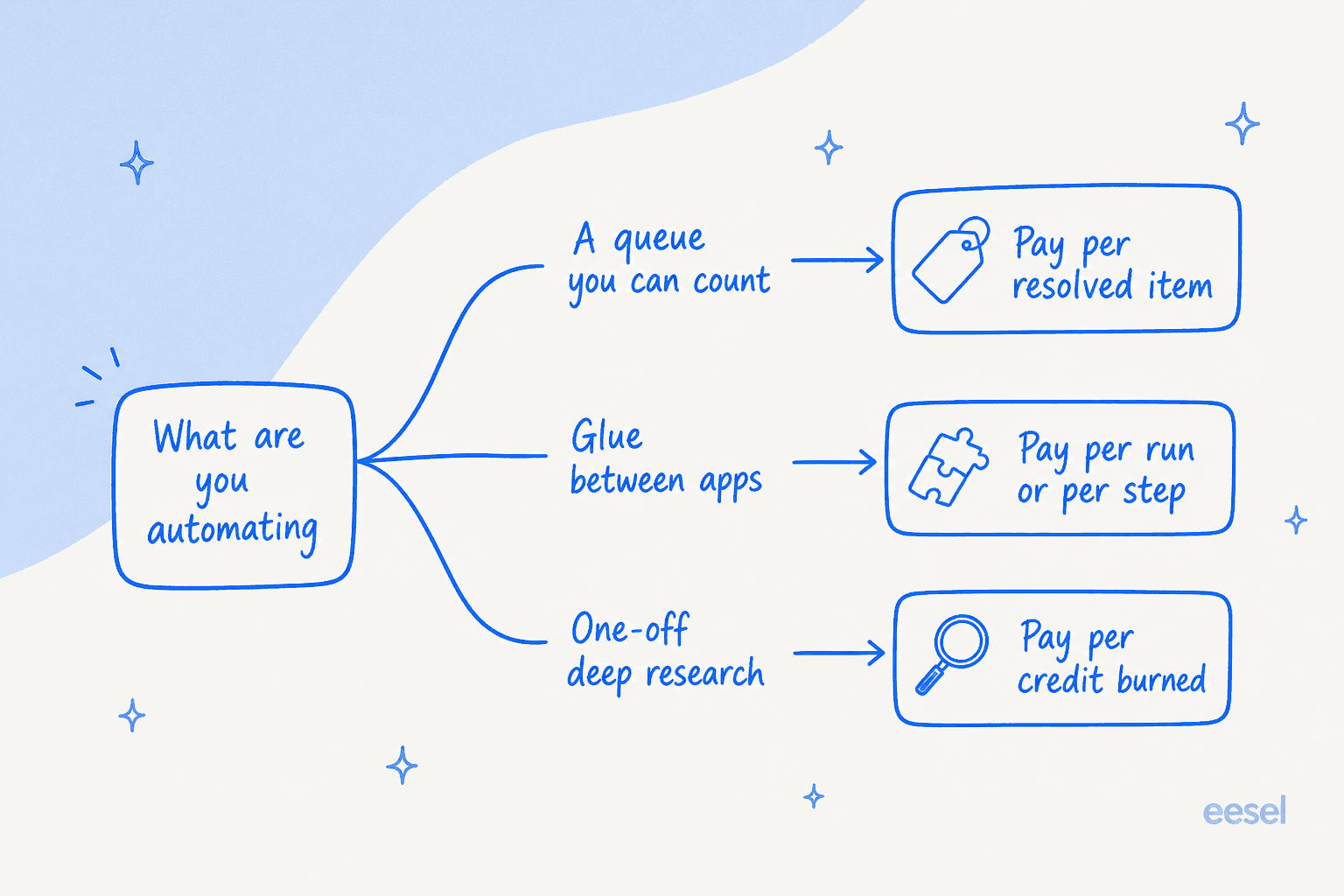
If the work is a queue you can count, tickets, chats, requests, tasks with a natural unit, pay per resolved item. A ticketing system billed per resolved ticket sidesteps the whole credit-forecasting problem, because the meter matches something your team already tracks. This is the case for eesel, and it is the only case where I would argue it is clearly the right answer. The wider field of AI tools for support mostly bills this way for the same reason.
If the work is glue between apps, recurring, deterministic, high-volume, pay per run or per step. n8n if the runs are complex or you need to self-host, Zapier if the connector breadth or the error-free billing matters more, Make if budget is the binding constraint and your workflows do not fan out over records.
If the work is one-off deep research, enrichment, competitor analysis, a report that would have cost someone an afternoon, pay per credit burned and be happy about it. Gumloop's passthrough model is genuinely well suited to this, as are Lindy's job bands. A $2 conversation that replaces twenty minutes of a specialist's time is a good trade and the forecasting problem barely matters at that volume.
Getting the handoff right matters as much as the meter, which is why escalation management is worth designing before launch rather than after.
The mistake is running the third shape's tool against the first shape's volume. That is where the surprise invoices come from, and support traffic spikes on exactly the days you can least afford one.
A last note on my second question, since it is the one that started this post. Whatever you pick, go find its run history before you go live, not after. Zapier's Zap history, n8n's execution log, Make's execution log search on Pro, Gumloop's credit logs and Chat Details panel. If you cannot answer "which step failed and why" from the product in under a minute, you have bought the churn story from the top of this post and just have not been billed for it yet.
Try eesel for the support queue
If the workflow you keep patching is the one answering customers, the honest recommendation is to stop building it on a general canvas. eesel plugs into Zendesk, Freshdesk, Gorgias, Front, Help Scout, Jira Service Management and Slack, learns from your help centre and your past tickets, and starts at $299/month for 500 credits (1 credit per ticket or chat) with no platform fee and no seat fee. It behaves like a helpdesk AI that already read your docs, not a canvas waiting for you to wire it up.
The differentiator worth the click is the one no credit-metered builder can hand you: before an agent replies to a single real customer, you run it over your own ticket history, see exactly where it is strong and where your docs have gaps, and launch only when the number is good enough for you.

Free plan with 100 credits, no credit card. Try eesel or book a demo if you would rather have someone walk your queue with you.
Frequently Asked Questions
What are the best Gumloop alternatives in 2026?
Why do teams look for a Gumloop alternative?
Is there a free Gumloop alternative?
Which Gumloop alternative is cheapest?
Do these platforms charge you for automations that fail?
What is the best Gumloop alternative for customer support?
Can I self-host a Gumloop alternative?


Article by
Kira
Kira is a writer at eesel AI with a Computer Science background and over a year of hands-on experience evaluating AI-powered customer service tools. She focuses on breaking down how helpdesk platforms and AI agents actually work so that support teams can make better buying decisions.