Gumloop pricing at a glance in 2026
Gumloop is a no-code AI agent platform: you assemble agents and workflows on a visual canvas, and they run against your Slack, Gmail, BigQuery, HubSpot and the rest. It raised a $50M Series B led by Benchmark, with Shopify, Ramp, Gusto, Samsara, Instacart and Opendoor named as customers.
If you're new to the category, the useful mental split is that these platforms sell AI agents rather than chatbots: the thing you're buying takes actions in other systems, which is exactly why the billing is harder to predict than a per-seat SaaS licence.
The plan lineup on Gumloop's pricing page is now two rungs, not three.
| Pro | Enterprise | |
|---|---|---|
| Price | $37/month (page says "starts at") | Custom, quote-gated |
| Included credits | 20,000/month | Custom |
| Credits roll over? | No | Yes |
| Seats | Unlimited | Unlimited |
| Teams | Unlimited | Unlimited |
| Concurrent workflow runs | 5 | 15, customizable |
| Concurrent agent chats | 25 | 100, customizable |
| Over the concurrency limit | HTTP 429, rejected | Queued, FIFO |
| Credit overage | Yes, capped at $5,000/period by default | Own cap, or uncapped |
| Bring your own API keys | Yes, personal and team | Yes, plus org-level |
| MCP server hosting | 1 | Custom |
| Connector policies | Agent-scoped | Org-wide |
| RBAC, SCIM/SAML, audit logs | No | Yes |
| Insights dashboard | No | Yes |
| VPC deployment | No | Yes |
Two things changed recently and a lot of write-ups haven't caught up.
There is no free plan. Gumloop's credits documentation says it flatly, and adds that accounts created on the old free tier keep whatever balance they had left, but that balance no longer renews each month. If you read a page telling you Gumloop gives you 5,000 free credits a month, that page is describing a tier that no longer exists. What you get instead is a 14-day Pro trial that requires a card, is one-time per customer, and rolls into a paid subscription when it ends unless you cancel.
The second change is bigger, and it's the whole subject of this post.
The one number that actually sets your bill
Gumloop rewrote its billing to a passthrough model. Its own announcement post is refreshingly blunt about the mechanics: "We pass through tokens at cost / We pass through compute at cost / We charge a base 8% orchestration fee on top of these costs."
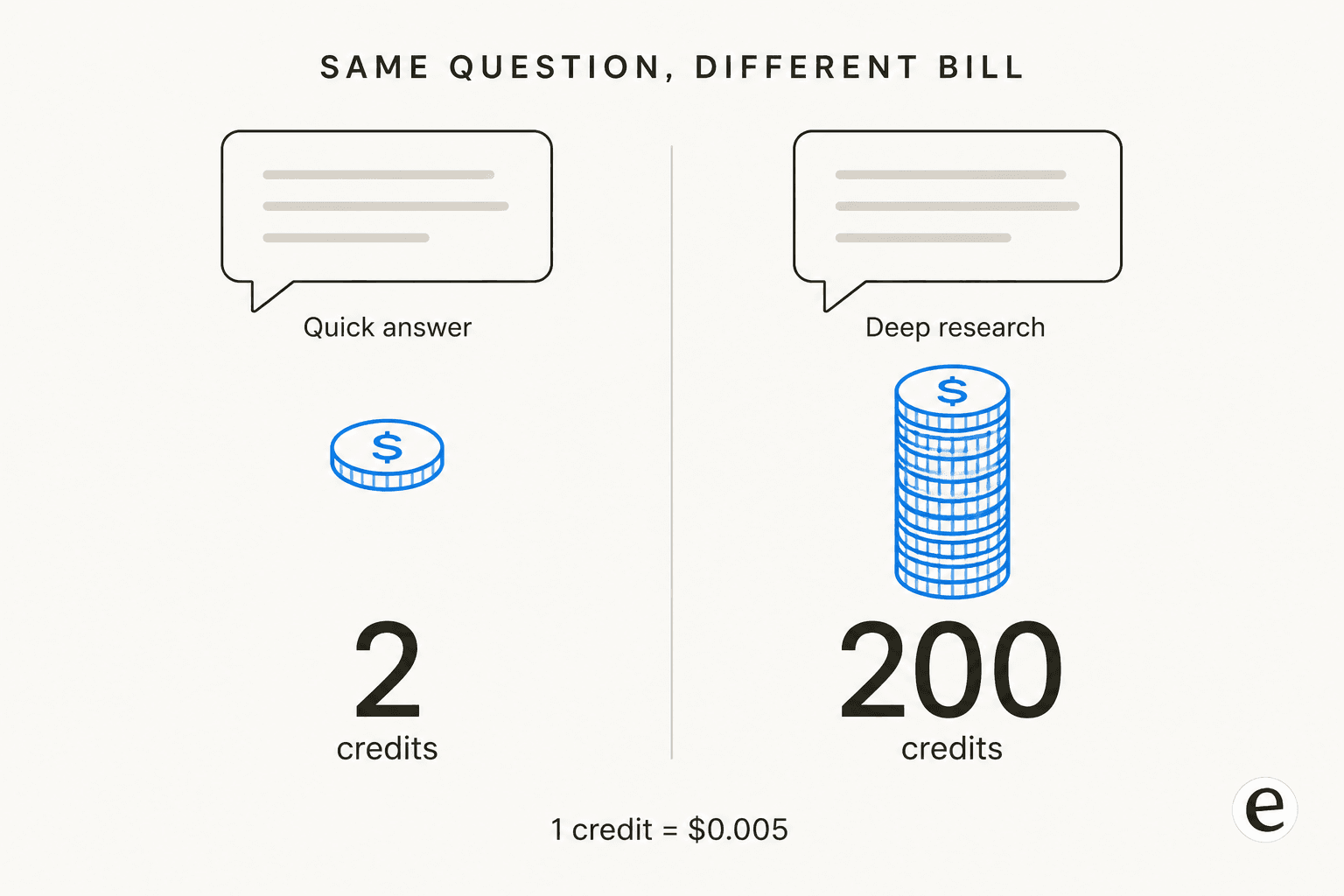
Which makes the credit a currency, not a coupon. The exchange rate is published: 1 credit = $0.005, so $1 buys 200 credits and a $0.03 model call is 6 credits, rounded up to whole credits.
I've spent enough time reading billing docs for the integrations I ship at eesel to know that this one sentence in the credits doc is the sentence that matters: "Agent credit costs are variable. The same agent might cost 2 credits for a quick question and 200 for a deep research task. You pay for what the agent actually does, not a fixed per-message price."
That is a fair way to bill. It's also a hard way to forecast, and the two facts sit right on top of each other. You are not buying 20,000 actions. You are buying $100 of underlying spend at list, and the exchange rate between "a thing I wanted done" and "credits" is set at runtime by the model the agent reaches for.
This is the recurring shape of the conversation on my side of the fence too. I watched a buyer hit 200 interactions in a single test day and immediately start worrying about what that meant at their real volume of roughly 9,000 a month. The anxiety wasn't the per-unit price. It was not knowing how many units a normal Tuesday produces.
The five meters on every agent chat
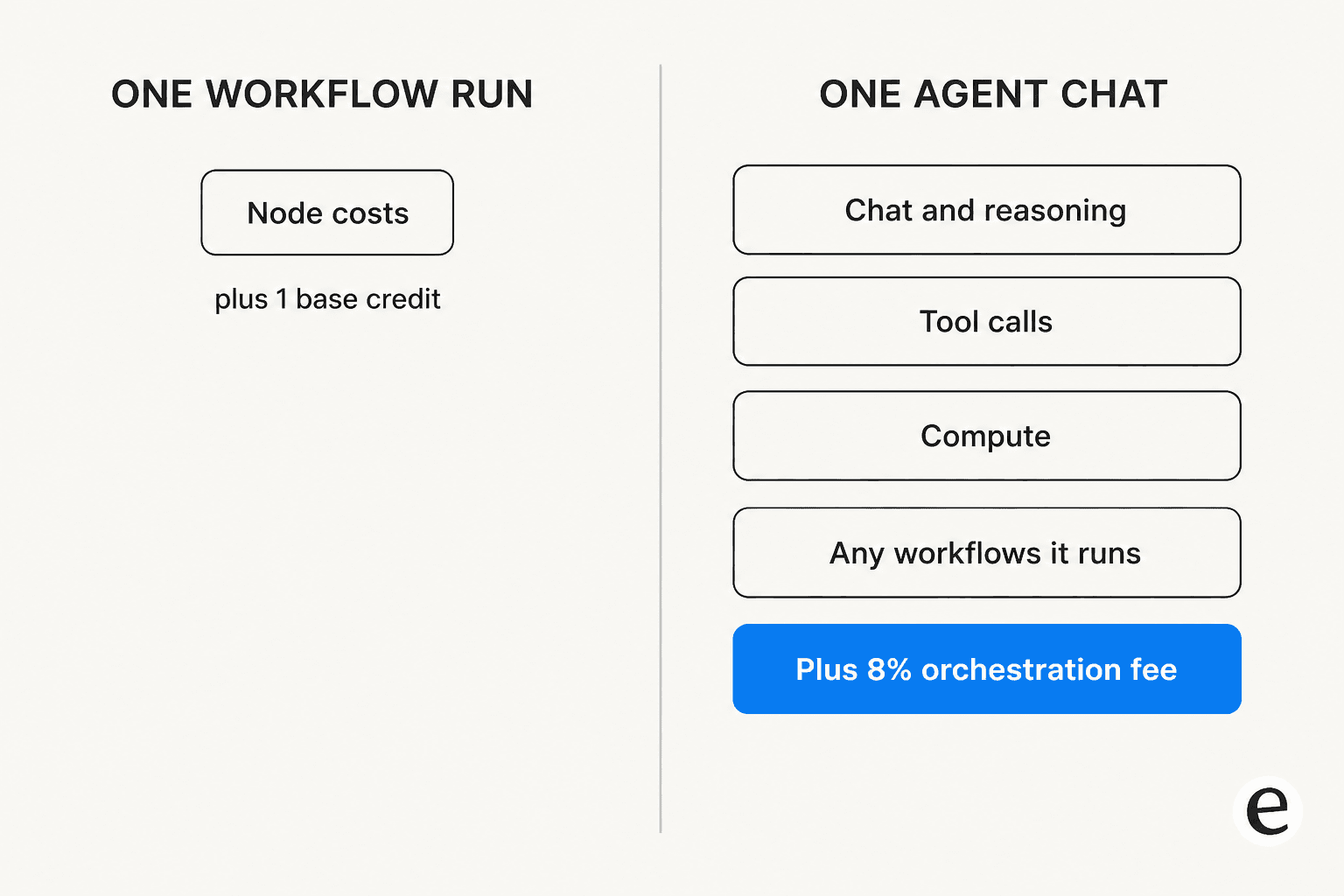
An agent conversation is billed as the sum of five separate things, per Gumloop's docs.
| Meter | What it covers | Rate |
|---|---|---|
| Chat & Reasoning | The model reading, thinking, writing | The model's real cost, at $0.005/credit |
| Tool Calls | Each tool the agent uses | 1 credit per successful call, plus that tool's own charge |
| Compute | Time the agent spends actively working | 5 credits per session-minute, minimum 1 credit per response |
| Orchestration fee | Running the agent loop itself | 8% of the three above |
| Workflows | Any workflow the agent runs | The workflow's full cost, added to the chat |
Gumloop publishes a worked example, which is a good sign: a chat spending 400 credits on Chat & Reasoning, 10 on Compute, and 15 on Tool Calls "pays a 34 credit fee (8% of 425, rounded up), for 459 credits in total." At $0.005 a credit, that single conversation is $2.30.
Three details in the fine print are worth pulling out, because they're the ones that quietly inflate the first meter:
- Every message re-sends the prior context, so a long conversation costs more per turn than a short one.
- Every connected tool adds its definition to the prompt. Attaching twenty integrations you rarely use makes every single message more expensive.
- One user message can trigger several AI steps, "and each step is billed separately."
Model choice is the biggest lever of the three, and it isn't close. Gumloop's Recommended preset is currently Grok 4.6, with Fastest and Smartest presets either side of it. Swapping a frontier model for a small one on a high-volume task changes the first meter by an order of magnitude, because you're paying the provider's real rate: my Claude pricing breakdown gives a sense of the spread you're passing through.
Compute has a nice edge case: waiting on the user costs nothing, and Enterprise customers running in their own VPC aren't charged compute at all.
Estimate your own monthly Gumloop bill
Rather than hand you a tier grid, here's the actual arithmetic. The defaults reproduce Gumloop's own published 459-credit example, so you can sanity-check the maths before you plug in your own numbers.
Play with the "minutes the agent works" slider for a second. Going from one minute to five adds 20 credits a chat, which sounds like nothing, until you multiply it by a few hundred conversations. Compute is the meter people forget, because it's the only one that bills for time rather than for output.
It's also the meter that punishes the thing agents are supposed to be good at. A rule-based bot has a fixed cost per run by construction. An agent that reasons for four minutes on a hard case costs four times an agent that answers in one, which is the trade-off worth understanding before you replace a rule-based chatbot with something smarter.
Workflow runs are billed on a completely different formula
This is the most useful distinction in Gumloop's pricing, and it's buried in the docs rather than on the pricing page.
Compute and the orchestration fee apply to agent chats only. Workflow runs are billed on node costs alone, whether the workflow runs on its own or gets called by an agent. The published formula is 1 credit (base) + the cost of each node that runs.
And most nodes are free. Gumloop lists text manipulation (Combine Text, Text Formatter, Find & Replace), logic (If/Else, Switch, Router), loops, data transformation, input/output, and "most integrations (Google Sheets, Slack, Gmail, Airtable, Salesforce, etc.)" at zero credits. Its own example: read a Google Sheet, filter the rows, send a Slack message, total cost 1 credit.
That free-integration list is worth reading closely, because it's where the platform is cheapest. The same connectors that cost nothing here are metered elsewhere, which is the sort of detail that decides a migration.
If you're weighing a move, I've mapped the equivalents on the n8n side connector by connector. Google Sheets is the one most teams check first. The Salesforce write-up covers the CRM case, where node counts climb fastest.
So the same job routed two ways produces two very different bills. If a task is deterministic enough to express as a scheduled workflow, expressing it as one is materially cheaper than asking an agent to do it conversationally. That's the single biggest cost lever in the product, and it's a design decision rather than a plan decision, which is the sort of thing worth settling before you build out a workflow rather than after.
There's a catch to that lever, and it's the reason I wouldn't build a five-year plan on it: the pricing page now labels this half of the product "Workflows (Legacy)". The centre of gravity has clearly moved to agents. The cheap path still works and is still documented, but you'd be leaning on the part of the platform the company is steering away from. That matches what one Reddit commenter said after talking to the team: they were steered toward building agent loops rather than using the workflow feature.
What actually costs credits
The paid nodes, from the credits doc:
| Node | Credits |
|---|---|
| Enrich Contact Information | 60 |
| Enrich Company Information | 60 |
| Search Companies | 30 |
| Image generation | 30 per image, flat |
| Email Validator | 10 |
| Web Agent Scraper | 10 |
| Website Crawler | 10 |
| Advanced Web Search | 5 |
| Custom and MCP nodes | 3 each |
| Advanced Website Scraper | 2 |
| Web Search | 2 |
| Website Scraper | 1 |
| Audio transcription | ~1-2 per minute of audio |
| PDF Reader, OCR mode | +5 per execution |
Gumloop flags the trap itself, which I'd rather credit than paraphrase around: "Enriching 100 contacts costs 6,001 credits (1 + 60 x 100)". That single loop is 30% of a month's Pro allowance, or $30 of your $37. Nodes in loop mode run once per item, so every node cost multiplies by the list length.
Third-party tool charges stack on top of the 1-credit tool call, and they're per result rather than per call. The Apollo integration bills People Search at 3 credits per result, so a search returning 50 people is 150 credits, not 3.
This is where credit models bite people running go-to-market automation rather than internal ops, since enrichment and search are the two nodes that scale with list length rather than with run count. If that's your use case, my roundup of AI marketing automation tools is worth a look alongside this.
The bonus-credit cliff nobody mentions
Here's the detail I didn't expect to find, and it's in Gumloop's own documentation.
The $37 Pro plan's 20,000 credits break down as "7,400 credits at the $0.005 list price, plus 12,600 bonus credits." Meanwhile, overage bills at the un-subsidised $0.005 list rate.
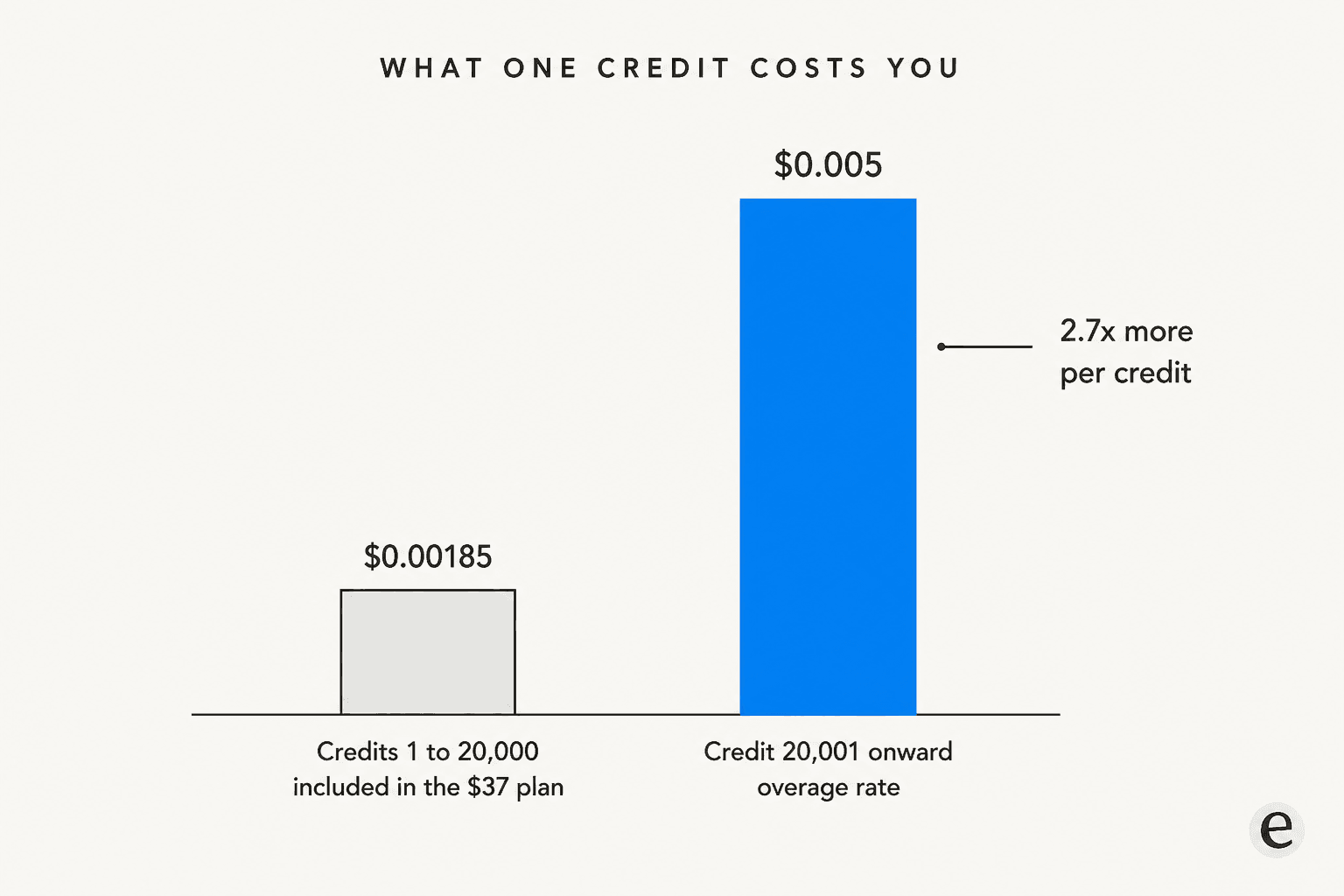
Run the division and your included credits cost you about $0.00185 each. Your overage credits cost $0.005. So the marginal credit past 20,000 buys roughly 2.7x less work per dollar than the average credit inside the plan.
None of that is hidden or dishonest, and generous included allowances are how most usage-priced software works. But it does mean the cost curve is not linear, and "we'll just pay a bit of overage" is a worse deal than the plan price implies. It's also why "starts at $37" is doing more work in that sentence than most people read into it.
Two guard rails soften the landing, and they're better than most. Pay-as-you-go is off by default, so hitting 20,000 credits stops your agents rather than quietly starting a second bill; you have to go and switch overage on. Once it is on, Pro overage is always capped, with a default ceiling of 1,000,000 overage credits ($5,000) per billing period and a lower cap settable on your subscription page. Credit usage emails fire at 75% and 90%.
Between those two, the worst-case Pro invoice is a knowable number: $37 plus whatever cap you set, or $5,037 if you leave the default alone. That's more than most usage-priced tools will tell you up front.
Bring your own key: 80% fewer credits, double the fee
If you already pay Anthropic or OpenAI directly, BYOK changes the maths a lot. Chat & Reasoning drops to 0 credits, and AI nodes, image generation and transcription in workflows drop to 0 too.
The catch is that the orchestration fee doubles from 8% to 16%, and it's calculated on what the run would have been worth rather than on what you actually get billed. Gumloop's own before-and-after on the same chat:
| Standard | With BYOK | |
|---|---|---|
| Chat & Reasoning | 400 | 0 |
| Compute + Tool Calls | 25 | 25 |
| Orchestration fee | 34 (8%) | 68 (16%) |
| Total credits | 459 | 93 |
That's an 80% cut in credits, but it is a shift of spend rather than a saving: you now pay your provider for the tokens. BYOK needs Pro or higher, each key only waives the models that provider serves, and Pro users can set personal or shared-team keys but not organization-level ones, which stays Enterprise-only. It also doesn't touch third-party tool charges, since those are passed straight through.
Whether it's worth it comes down to something simple: if your effective rate with your provider is better than list, BYOK wins. If you were relying on Gumloop's bonus-credit subsidy, it may not.
What Gumloop doesn't charge you for
It's easy to write a pricing post that only counts the meters, so it's worth being straight about where the model is on the buyer's side.
Failed tool calls are not charged, stated plainly: "Every successful tool call costs at least 1 credit. Failed calls are not charged." A workflow that stops partway only bills for the nodes that ran before the failure. Waiting on a human costs nothing. Seats and teams are unlimited on both plans, so unlike Zapier, the second teammate is not a plan upgrade.
The transparency tooling is also better than most, and worth naming because plenty of usage-priced tools ship nothing like it. There's a live coins badge in the chat header that updates as the agent works, a Chat Details panel breaking a conversation into per-meter rows, credit logs filterable to agent chats or workflow runs, and CSV export. If you've ever tried to reconcile an AI ticketing invoice against what the bot actually did, you'll appreciate the per-conversation breakdown. Waived credits under BYOK still show up struck through and labelled "Free," so you can see what a run would have cost. The Insights dashboard and the analytics agent that answers questions like "how many credits did we spend last month, by user" are Enterprise-only.
Enterprise also gets per-chat credit warnings: cross a configured threshold and the agent pauses and raises an Action Request for approval before continuing. That's a good design, and it's the sort of control any team running AI agents against production data should want. It's the budget version of the same pattern behind agent handoff: decide in advance where the machine stops and a human takes over.
The gap in all of this: there's no published statement on whether an agent chat that burns tokens and compute and then errors out is refunded. Failed tool calls are covered. Failed workflows are covered. Failed conversations aren't addressed either way, and given that tokens and session-minutes are already spent by then, the plain reading is that they cost you. That's the question I'd put to sales before signing.
What people actually say about the bill
The sentiment splits cleanly on one line: how long the workflow has been in production. Week-one users like the canvas. Month-three users start saying "credits."
"But Gumloop seems to freeze or have issues too frequently and then burns credits running faulty automation."

Worth being precise about that one, because it's the most-repeated complaint and the docs now partly answer it. Gumloop does not charge for failed tool calls, and a failed workflow only bills the nodes that already ran. What remains unaddressed is the agent-chat case, which is exactly the surface that thread is describing.
The "easier but pricier" read is remarkably consistent across a year of threads:
"-> Gumloop : Easy to build, easy to run but little more expensive."
"I think the biggest tradeoff with Gumloop is simplicity vs ownership. It's incredibly fast to prototype AI workflows, especially for non-devs, but once workflows become mission critical people start comparing reliability, hosting, and cost much more seriously."
To Gumloop's credit, the pricing pressure got a public response rather than a shrug. The $37 entry point exists because of it. Gumloop's own post put it as "making the starting point on Solo 10,000 credits for $37/mth down from $97/mth for 30,000 credits," and the founder announced it directly:
"We heard you. Gumloop is getting a more affordable pricing tier. $37/month for 10,000 credits"
Solo and Team were later merged into Pro, which is where the current 20,000-credits-for-$37 figure comes from. One honest note on that migration: below 200k credits, users got more for the same money. At the top of the ladder they got less, with the 300k tier dropping to 250k and the 500k tier to 330k at unchanged prices. Heavy users took a real cut.
One caveat on the review sites. G2 shows 4.8/5 across 7 reviews and Capterra shows 5.0 across 2, and six of the seven G2 reviews were posted inside a two-week window in January 2026. Treat those scores as thin and recent rather than as a settled verdict, in either direction.
Gumloop vs Zapier, n8n, Make and Lindy on the billable unit
The single most expensive mistake in this category is comparing prices without comparing units. They are not convertible.
| Platform | Billable unit | What one unit means | Free tier | Entry paid price | Failed runs billed? |
|---|---|---|---|---|---|
| Gumloop | Credit ($0.005) | A dollar of underlying spend, not a unit of work | None | $37/mo, 20k credits | Tool calls no, workflows partly, agent chats unstated |
| n8n | Workflow execution | One run of the whole workflow, any number of steps or records | Self-hosted Community only | $20/mo annual, 2.5K executions | Yes, schedule triggers count regardless of outcome |
| Zapier | Task | One successful action step; 3-5 tasks for advanced AI steps | 100 tasks/mo, forever | $19.99/mo | No, errored and halted steps are free |
| Make | Credit (was operation) | One module run per bundle of data | 1,000 credits/mo, forever | $12/mo at 10k credits | Yes |
| Lindy | Credit, per seat | Job-sized bands, 2-250 up to 1,000-2,500 | None, 7-day trial | $29.99/user/mo, 3k credits | Not disclosed |
The gap widens with complexity, not volume. One trigger through a ten-step workflow processing 10 records is roughly 1 execution on n8n, roughly 10 tasks on Zapier, and roughly 91 operations on Make. n8n makes the point on its own pricing page, claiming a single execution can replace what would be 10,000 operations elsewhere.
That unit problem is the thing worth studying before you compare a single dollar figure. My Make vs n8n comparison works through it in detail. For the agent-era version of the same question, AgentKit vs Zapier covers where a model provider's own orchestration lands against a task-metered incumbent.
If you've landed here mid-shortlist rather than mid-migration, the Make alternatives roundup covers the wider field. Lindy alternatives is the closer read if per-seat credits are what put you off.
Gumloop's unit is the odd one out in a specific way: it's the only one where the same action has no stable price. A Zapier task is a task whether the AI step was smart or dumb. A Gumloop credit tracks the model bill underneath, which is more honest and less forecastable at the same time.
Who Gumloop's pricing actually fits
Good fit: a small team where one or two people build a lot, running conversational agents where the value per run is high and the volume is moderate. Research, enrichment, reporting, internal knowledge lookups: jobs where a $2 conversation replaces twenty minutes of someone's afternoon. Unlimited seats on the $37 plan is unusually generous next to Zapier's seat gates, and if you're doing enrichment or research work where a single run is worth real money, paying the real model cost plus 8% is a fair deal. Teams that already have a provider contract and can turn on BYOK do best of all.
Bad fit: high-volume, low-value-per-run automation. If you're firing thousands of small deterministic jobs, the per-execution model at n8n or the free-node structure of a Gumloop workflow (not an agent) is where you want to be, not conversational agents carrying compute and an 8% surcharge. Also a poor fit if you need a hard, predictable monthly number for finance, or if 5 concurrent workflow runs is a real ceiling for you, because Pro gets a hard HTTP 429 rejection at the limit rather than a queue.
Customer-facing volume is the sharpest version of that bad fit. Support traffic spikes on the days you can least afford a surprise invoice, which is why I treat AI customer service cost as a volume question first and a rate question second.
My take: Gumloop's pricing is the most intellectually honest model in this category and the hardest to budget for, and those are the same property viewed from two sides. Passthrough billing means you're never paying a markup on a cheap model you didn't use. It also means your invoice is a function of decisions your agents make at runtime. Go in with the overage cap set deliberately, not left at the $5,000 default.
What this means if you're automating support
One caveat on all of the above: general automation platforms are priced for general automation. If the specific job is the support queue, the unit mismatch gets sharper, because a support ticket is a naturally-sized unit of work and a credit isn't. You can absolutely build customer service automation on a credit-metered canvas, and people do. The bill just stops tracking anything your support lead recognises.
That's the design decision behind eesel. eesel charges $0.40 per ticket, and one ticket is one task no matter how many messages go back and forth, how many times the customer replies, or how long the AI reasons about it. No platform fee, no per-seat fee, no minimum. 1,000 tickets a month is $400, and it's $400 whether each of those tickets took two turns or twelve. The meter matches the thing your team already counts, so the invoice reads like a support workflow report rather than a compute bill.

A few things I'd point at specifically, because they're the ones that come from having watched this go wrong:
- You can start with $50 of free usage and no credit card, which is a different proposition from a trial that needs a card and auto-converts.
- There's a monthly usage limit, defaulting to $250, with email alerts at 50%, 75% and 100%. Agents pause at the ceiling.
- You can roll out gradually. Route 200 of your 1,000 monthly tickets to the AI and you pay for 200, never for the tickets your humans handled.
- It trains on your existing knowledge base and your past tickets, rather than needing you to hand-build a canvas of nodes first.
- eesel simulates every rollout against your historical tickets before it touches a live queue, because I've watched confident-sounding bots give wrong answers and would rather find that out on last quarter's tickets than on this morning's.
It plugs into the helpdesk you already run, so a Zendesk team doesn't have to move anything to try it. Same for Freshdesk. Shopify stores on Gorgias are no different.
The wider case for support ticket automation is a separate read if you're still at the "is this worth doing at all" stage.
If your automation is ops glue across a dozen SaaS tools, Gumloop is the better-shaped tool and I'd tell you so. If it's the helpdesk and you want the bill to look like your ticket volume rather than your token spend, try eesel - it connects to your existing ticketing system and trains on your past tickets in a few minutes.
Frequently Asked Questions
How much does Gumloop cost per month?
What is a Gumloop credit worth in dollars?
Does Gumloop have a free plan?
What happens if I go over 20,000 credits on Gumloop?
Is Gumloop pricing cheaper than Zapier or n8n?
Does bringing my own API key reduce Gumloop pricing?
Does Gumloop charge for failed runs?


Article by
Rama Adi
Rama is a software engineer at eesel AI with two years of experience writing about B2B SaaS, AI tools, and customer support technology. Based in Bali, Indonesia, he brings a developer's perspective to product comparisons — cutting through marketing copy to what the integrations and APIs actually do.