


What "automate support from the command line" really means
I build product and AI agents at eesel, so I spend a lot of time in helpdesk APIs and other people's terminals. When a developer-leaning support team says "I want to automate this from the command line," they're almost never asking for a single magic binary that types support resolve #4821 and closes a ticket with a correct answer. That tool doesn't exist, and it's worth being upfront about that.
What they actually want is a ladder of autonomy: stop clicking through a UI, and start letting scripts do the repetitive work, first on demand, then on a schedule, then automatically on events. It's the same instinct behind searches for a customer support CLI. That instinct is completely right, and for the mechanical half of support it pays off immediately. The trap is assuming the terminal also hands you the hard half, the reply itself. It doesn't, and after years of putting AI agents on live queues, I know exactly where that line sits.
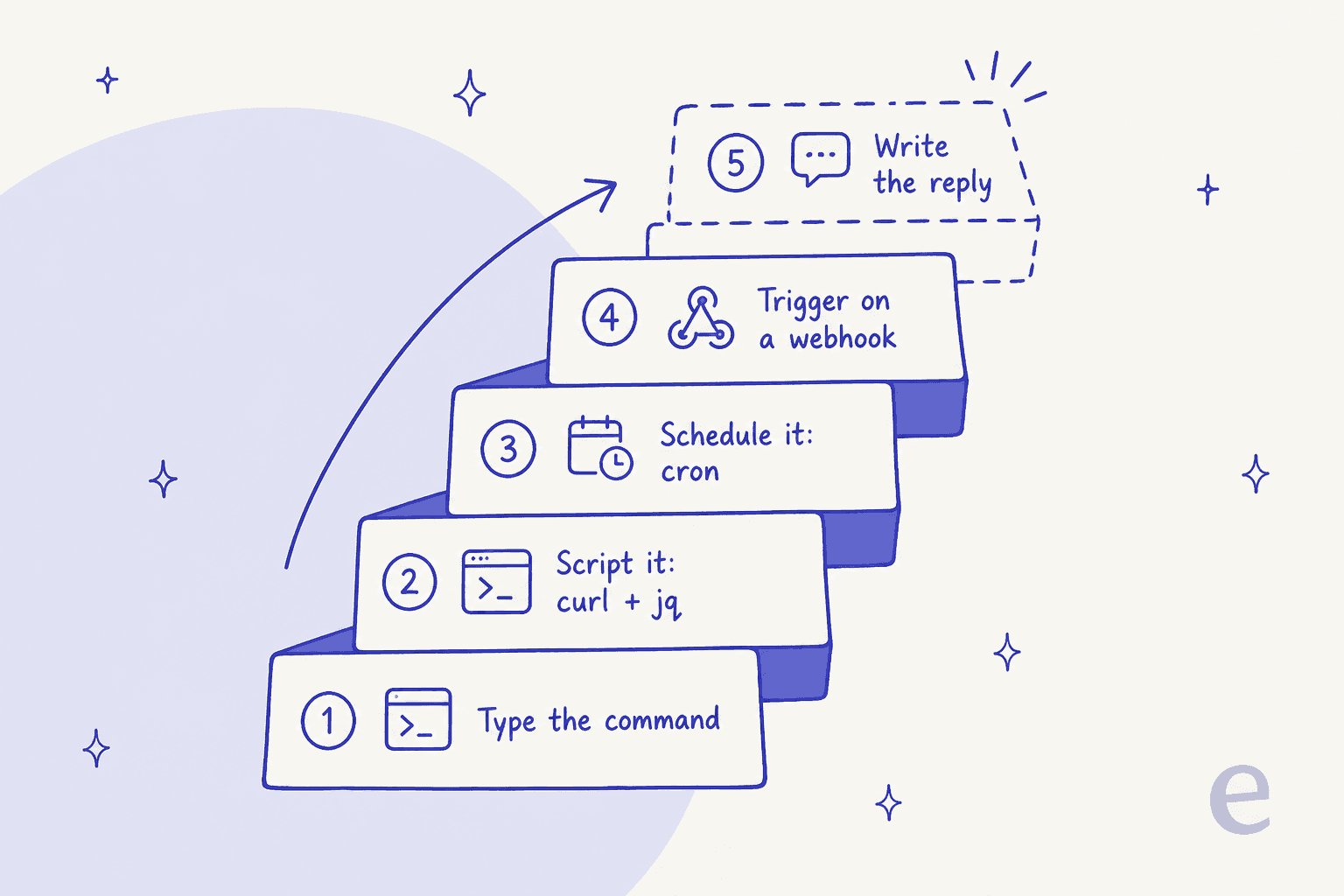
Every rung below the dashed one is real, buildable today, and the rest of this post walks up it.
Rung 1 and 2: script the mechanical work
Every major helpdesk exposes a REST API, so bash, curl, and jq can already drive a surprising amount of the day-to-day. This is where the command line earns its keep, because it turns an afternoon of clicking into one loop.

Bulk triage and routing. Reassign every ticket in a view, add a tag across a segment, or bump priority on a backlog. This is the same job as ticket routing automation, just driven from a shell instead of a rules builder. If you're on Zendesk specifically, it overlaps heavily with automating Zendesk tickets:
# Tag every unassigned ticket in a view, using the helpdesk REST API
curl -s -u "$AUTH" "$HELPDESK/api/v2/views/$VIEW/tickets.json" \
  | jq -r '.tickets[].id' \
  | while read -r id; do
      curl -s -u "$AUTH" -X PUT "$HELPDESK/api/v2/tickets/$id.json" \
        -H 'Content-Type: application/json' \
        -d '{"ticket":{"tags":["needs-review"]}}'
    done
Exports and analysis. Pull a month of conversations into JSON and pipe it into a spreadsheet, a notebook, or a quick word-frequency count of what customers actually complain about. This kind of support ticket analysis is far easier from the terminal than any reporting tab.
Knowledge sync. Push your help center, macros, or docs into a knowledge base so answers stay current. It's the connective tissue behind any real AI helpdesk workflow, whether you run Freshdesk, Gorgias, or Help Scout, and the Freshdesk knowledge base API is a good example of what these endpoints expose.
Everything here is scriptable, repeatable, and reviewable. The catch is that all of it moves data around. None of it decides what to say.
Rung 3: schedule it with cron
The moment a script exists, wrap it in a cron line and it runs itself. This is the first rung where support runs unattended, no human triggering anything.
# Every night at 2am, run the stale-ticket sweep and log the result
0 2 * * * /opt/support/close-stale.sh >> /var/log/support-cron.log 2>&1
A nightly job that closes stale tickets, a weekly export, an hourly knowledge sync, an SLA check that pings Slack when a ticket is about to breach, none of these need a person in the loop. This is the pattern behind most lightweight support ticket automation: you don't need a platform, you need a script and a schedule. If you want a concrete SLA angle, the same idea maps cleanly onto an SLA management workflow.
Here is a small but useful one, an SLA-breach alert that runs every 15 minutes:
# Alert on tickets within 30 min of an SLA breach (cron: */15 * * * *)
curl -s -u "$AUTH" "$HELPDESK/api/v2/search.json?query=type:ticket+status<solved" \
  | jq -r '.results[] | select(.sla_minutes_left < 30) | .id' \
  | while read -r id; do
      curl -s -X POST "$SLACK_WEBHOOK" \
        -d "{\"text\":\"Ticket $id is about to breach SLA\"}"
    done
That's real automation. It reads state, applies a rule, and takes an action, all without you. It still isn't answering anything.
Rung 4: trigger on a webhook
Cron runs on a clock. The top scriptable rung runs on events. Instead of polling every 15 minutes, you register a webhook so your helpdesk POSTs to your endpoint the instant a ticket is created, tagged, or updated, and your script reacts in real time.
This is how you get from automated tagging that runs on a schedule to tagging that fires the moment a ticket lands, and it's the on-ramp to real ticket classification. A tiny handler is enough:
# Minimal webhook handler: classify and route a new ticket on arrival
# (Ticket payload arrives as JSON on POST from the helpdesk)
read -r payload
id=$(echo "$payload" | jq -r '.ticket.id')
subject=$(echo "$payload" | jq -r '.ticket.subject')
case "$subject" in
  *refund*|*charge*) queue="billing" ;;
  *bug*|*error*)     queue="engineering" ;;
  *)                 queue="general" ;;
esac
curl -s -u "$AUTH" -X PUT "$HELPDESK/api/v2/tickets/$id.json" \
  -d "{\"ticket\":{\"group_id\":\"$queue\"}}"
Keyword routing like this is rule-based, not AI, and that's fine, plenty of routing really is just keyword matching. But notice what happens if you push it further: the more you want the handler to understand the ticket rather than pattern-match its subject line, the more you've quietly left the domain of case statements and entered the domain of a real AI system.
The rung you can't script: the answer
Here's the honest line. You can script the ticket, but you can't script the answer. The moment a task needs to read a customer's problem, find the right knowledge, and decide on a reply, curl and jq run out, and you're building an AI system, not a bash function.
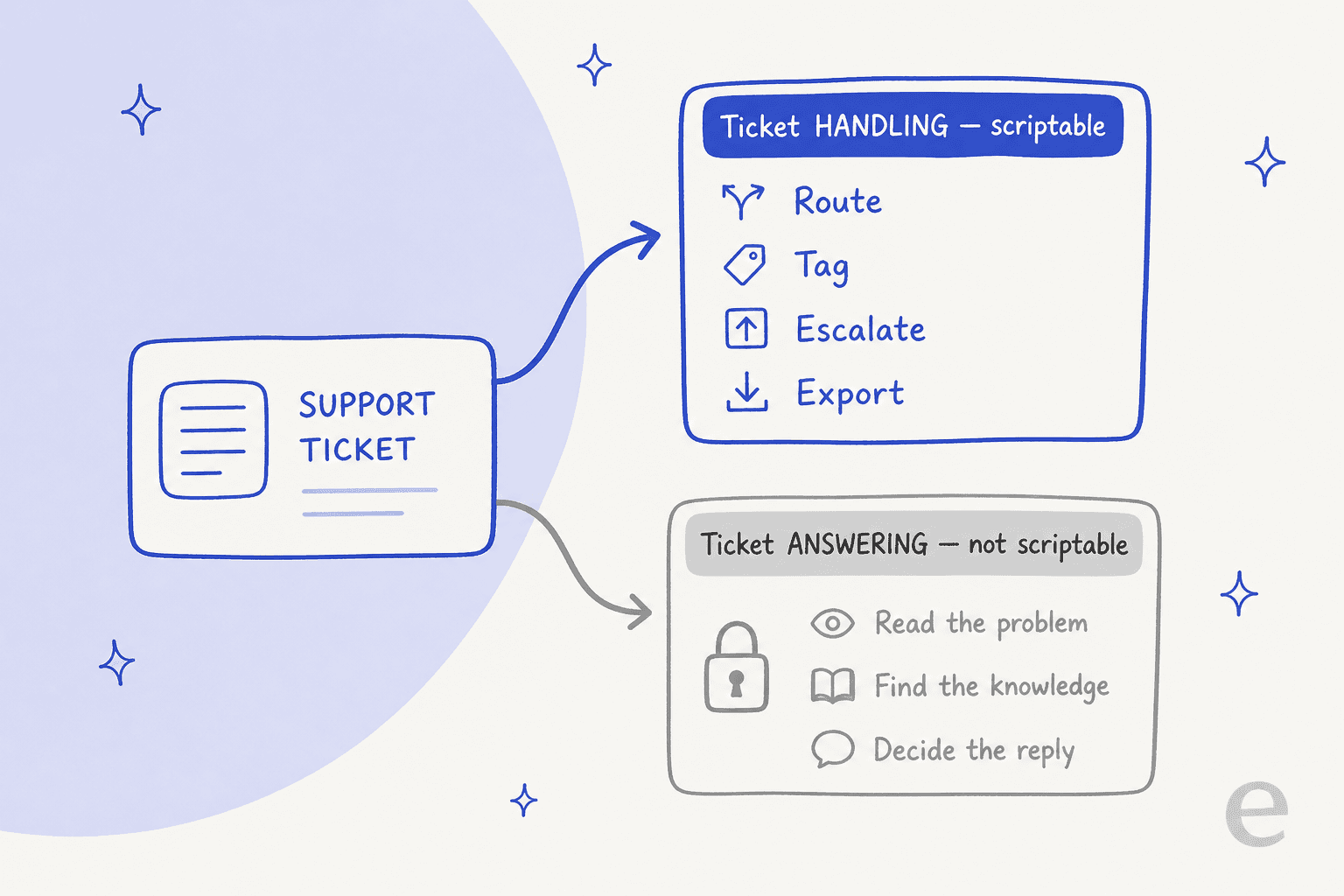
Ask anyone who's actually shipped one. The retrieval alone is a full stack, not a single search call:
"So few developers realize that you need more than just vector search for RAG, so I still spend many of my talks emphasizing the FULL retrieval stack for RAG."

And the moment the model can both decide and act on a ticket, you've taken on a control problem a cron line doesn't solve:
"The failure mode I keep seeing isn't hallucination per se... it's blurred responsibility between intent and execution. Once a model can both decide and act, you've already lost determinism."
So the real cost of an automated support agent isn't the endpoint. It's knowledge sync and retrieval, conversation state across turns, tool actions against the helpdesk, escalation rules, guardrails, and a way to test the whole thing. That's the same iceberg every team building a headless support setup hits: the head, your terminal and your channel, was never the hard part. The body under it is, and it's the exact thing an AI helpdesk API has to carry.
Test the automation before it answers a live ticket
If there's one habit worth stealing from software, it's this one, and it's the step scripted setups skip. You'd never ship code without tests. An automation that talks to your customers deserves the same bar, and the terminal instinct, "make it reproducible," is exactly what makes testing possible.
The problem is that most teams flip an agent on and hope. The support community keeps circling the same worry:
"How do you test that an AI agent won't do something catastrophic? Do people actually red-team their agents before they go live?"

You already have the test suite: your ticket history. The move is to replay thousands of your real past tickets against the agent and see what it would have said, where it would have escalated, and where it would have stayed quiet, all before a customer is involved. That's what eesel's simulation does, and it turns "go live and hope" into "go live with numbers." It's the closest thing support has to pytest, and it's why I simulate every rollout against historical tickets first.
What it costs to automate the answer
Cost is where the build-it-yourself instinct meets reality, and the two paths bill in very different shapes.
If you script an agent on a raw model API, you pay per token on every message, every retry, every retrieved chunk, whether or not the ticket ends up solved. One team in our dossier burned through 200 API calls in a single test day and got nervous about the bill at their expected 9,000 interactions a month. That's before you count the engineering time to build and maintain retrieval, state, guardrails, and evals.
Here's how the terminal-first options actually stack up:
| Approach | Autonomy level | You maintain | Billing shape | Best for |
|---|---|---|---|---|
| curl + jq scripts | On demand | Every script | Included in plan | Bulk edits, exports, routing |
| Cron jobs | Scheduled, unattended | Scripts + schedule | Included in plan | Nightly sweeps, syncs, SLA alerts |
| Webhook handlers | Event-driven | Endpoint + scripts | Included in plan | Real-time routing and tagging |
| Model API + MCP | Autonomous, DIY | The whole AI stack | Per token, solved or not | Full control, if you have the team |
| Ready-made teammate | Autonomous, managed | Nothing | Fixed monthly price (from $299/mo, 500 credits) | Resolved tickets without building the engine |
The bottom row is the one worth a second look if your goal is resolved tickets rather than a maintenance project. You still get a programmable surface to script against with curl and cron, you just don't rebuild the resolution intelligence underneath it.
Automating the answer with eesel
If you got here wanting to automate customer support from the command line, you're the kind of team that wants a programmable surface, not a locked-down dashboard. That's the exact middle ground eesel is built for.

eesel is an AI teammate that plugs into the helpdesk you already run, Zendesk, Freshdesk, Gorgias, Front, Help Scout, and it arrives already knowing how to sync your knowledge, look up orders, tag tickets, and draft or send replies. It ships the whole resolution engine, so you don't rebuild retrieval, state, and guardrails from scratch, and it keeps the programmable surface you came for: an API for actions, webhooks, and custom skills you can drive from a shell. Then the part that matters most, it simulates on past tickets before it goes live, so you deploy with numbers instead of hope. It's free to try (100 free credits), no credit card and no sales call, and billing is a fixed monthly price sized to ticket volume (1 credit per ticket or chat) rather than per token or per seat.
Keep your curl and cron jobs for the ticket handling they're great at. Let a teammate take the one rung the command line can't reach.