

What people actually mean by "customer support agent API"
Search "customer support agent API" and you will get results that have almost nothing to do with each other. That is because the phrase collapses three genuinely different jobs into one string, and the reader on the other side of each result wants a different thing.
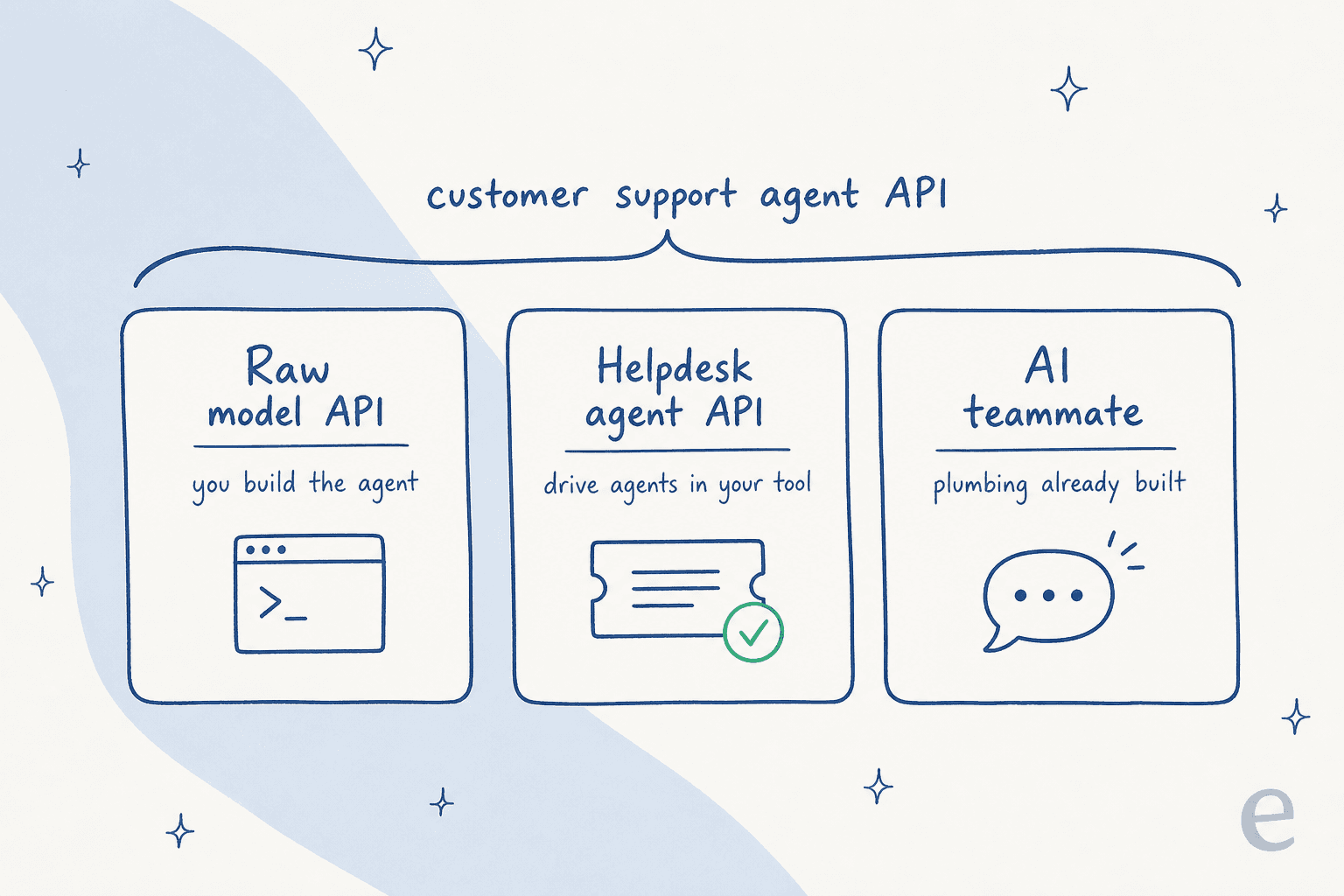
The three routes, in order of how much you build yourself:
- Build your own on a foundation-model API. You get a model and primitives; you assemble the agent.
- Drive your helpdesk through its agent, conversations, or MCP API. The vendor owns the support surface; you point an agent at it.
- Hire a ready-made teammate that already knows how to do support. The plumbing is built; you configure and go live.
I will walk each one, what it actually hands you, and where the hidden work lives. If you only take one thing from this piece: the API is never the agent. Let's get into why.
Route 1: build your own on a raw model API
This is the route most engineers picture first, and it is the one that quietly turns into a nine-month project. Both OpenAI and Anthropic sell model infrastructure, not a finished support agent. They are excellent at what they do. They just do a much smaller slice of "customer support agent" than the phrase implies.
Here is what you get. OpenAI's Responses API is the primary calling surface, and the open-source Agents SDK runs the agent loop in your own process. OpenAI's own docs are blunt about the split: you own "deployment, tool implementations, state storage, and approval decisions, while the SDK runs the agent loop." Anthropic's shape is the same. The Messages API plus tool use gives you a structured tool call; your code executes it. The Claude Agent SDK adds sessions, hooks, subagents, and permissions, but the loop still runs in your process and the persistence is your integration.
Both give you the same building blocks: a model, a way to define tools, an agent loop, hosted retrieval primitives (OpenAI's file search, server-side tool use on Anthropic), and, for voice support, OpenAI's Realtime API. What none of it gives you is the actual support agent.
What the API hands you vs what you build
The gap is bigger than it looks on a quickstart. A "look up the order and issue the refund" function is a tool call the model emits; the code that talks to Shopify and your billing system is entirely yours. The same is true of every other load-bearing piece of a support agent.
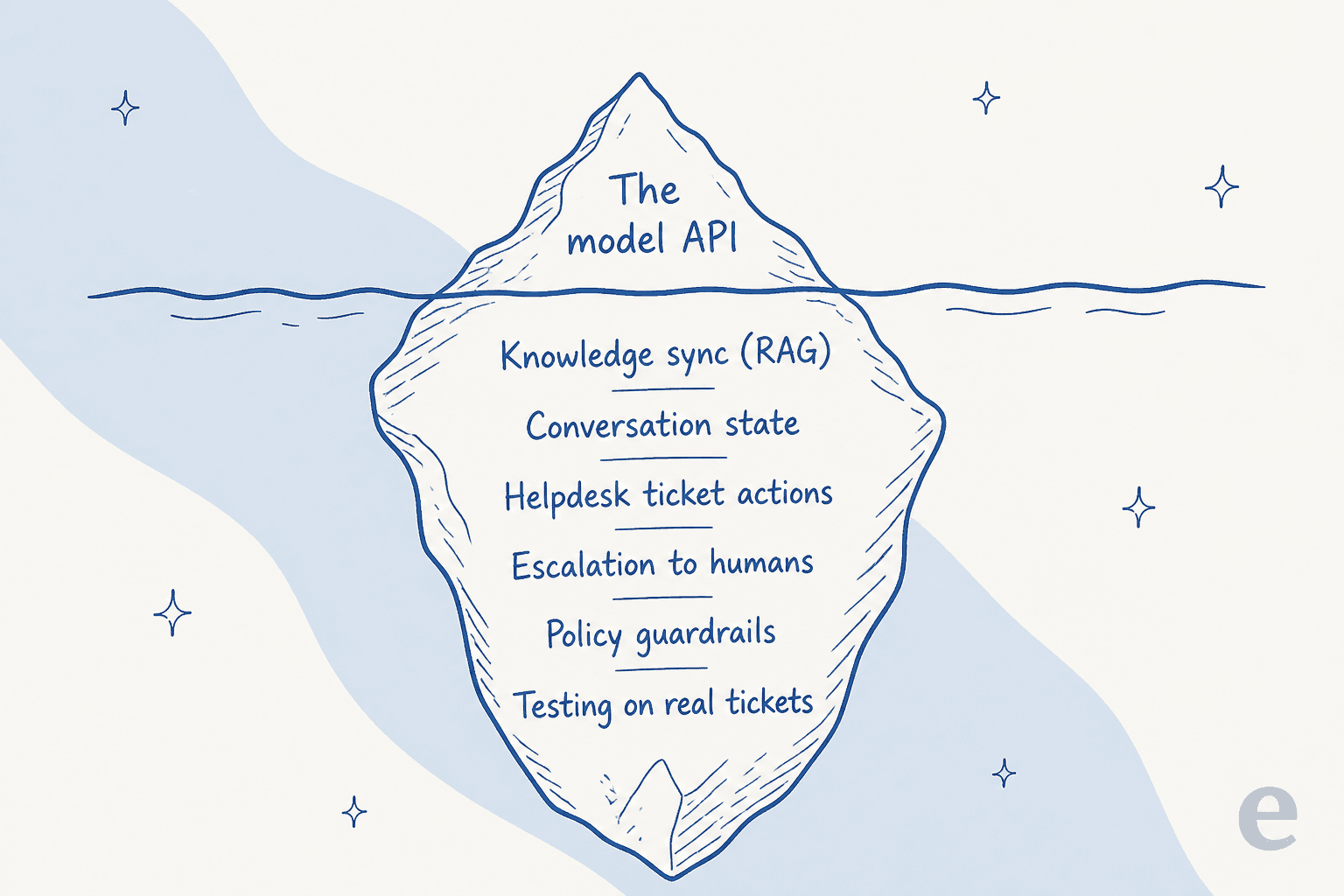
Everything under the waterline is your engineering:
- Knowledge sync and retrieval. File search and tool use give you a retrieval mechanism, but keeping it synced with your live help center, plus chunking, reranking, and access control, is yours.
- Conversation state. The base APIs are stateless per call. You store and re-send history yourself.
- Ticket actions. Updating a Zendesk ticket, escalating to tier 2, applying a tag: all function tools you implement.
- Guardrails and escalation. Both SDKs expose input, output, and tool guardrails plus human approval, but each is code you write per policy.
- Testing against real tickets. You get tracing and eval hooks. The suite that replays your history and scores answers is your build.
This is not a knock on the model providers. It is just the honest scope. If you want the deeper primitives comparison, our AgentKit vs Anthropic API breakdown goes tool by tool.
The per-token bill nobody forecasts
The cost model is the sharpest surprise. You pay per token on every single message, whether or not the ticket is ever resolved, for the system prompt, the retrieved knowledge chunks, the tool-call round trips, the model's reasoning, and every retry.
Rough first-party rates, per million tokens on the standard tier:
| Model | Input | Cached input / hit | Output |
|---|---|---|---|
| OpenAI gpt-6-astra | $10.00 | $1.00 | $50.00 |
| OpenAI gpt-5.6-terra | $2.00 | $0.20 | $12.00 |
| Anthropic Claude Opus 5 | $5.00 | $0.50 | $25.00 |
| Anthropic Claude Sonnet 5 | $2.00 | $0.20 | $10.00 |
| Anthropic Claude Haiku 4.5 | $1.00 | $0.10 | $5.00 |
Prompt caching helps a lot for support, since you resend the same help-center context every turn: a cache hit reads at about 10% of standard input price. But caching softens the number, it does not change the billing unit. A support conversation that goes ten turns, retrieves twelve chunks each turn, and retries twice bills all of it, even if the customer walks away unhappy.
Route 2: drive your helpdesk through its own agent API
The second route skips building the whole agent and instead points one at the helpdesk you already run. Every major helpdesk exposes a programmatic surface, and the shape of that surface has changed a lot in the last year.
The classic version is a REST API plus webhooks. Take Zendesk. You can wire an external model in through four routes: a first-party connector with your own key, a webhook out of a trigger to your own service and back via the REST API, a sidebar app calling the model through Zendesk's proxy, or an MCP server. It works, but the DIY pipeline (route two) means you own the auth, the polling, the retries, and, crucially, the rate limits. Those limits are the hard ceiling on any integration:
| Zendesk Suite plan | API requests / minute |
|---|---|
| Team | 200 |
| Growth | 400 |
| Professional | 400 |
| Enterprise | 700 |
| Enterprise Plus | 2,500 |
Every enrichment, every write-back, and every backfill of historical tickets spends from that same per-minute budget. It is easy to forget until a bulk reprocessing job trips it.
MCP is quietly changing this route
The bigger shift is that helpdesks have moved from "here is a REST API, go build" to shipping their own Model Context Protocol servers. MCP is an open standard, introduced by Anthropic, for connecting agents to external systems through one standardized protocol instead of a bespoke integration per tool. Zendesk's own framing of the old pain is telling: connecting real-time data to AI today "requires APIs, an experienced developer (or two), and lengthy lead times," and they now pitch a Zendesk MCP client where, "unlike APIs, MCP integrations only need to be set up once."
The list of first-party servers is growing fast:
- Gorgias ships a free MCP server at
mcp.gorgias.com/mcp, now in open beta, that plugs a workspace into any MCP-compatible client. - Front documents a server at
mcp.frontapp.com/mcpwith an unusually clean permission model: OAuth 2.1 with PKCE, per-user tokens, andread,write,sendscopes, so "the agent's effective permissions are exactly the authorizing teammate's permissions." - Atlassian runs an official remote MCP server that connects Jira, Confluence, and Jira Service Management to agents over OAuth. For an ITSM audience, that is the primary way to drive a service desk from an agent.
This is genuinely good news for the buy-vs-build calculus. The plumbing you used to hand-write, the vendor now maintains. What MCP does not solve is the agent itself: the server exposes tools, but the brains, the retrieval quality, and the guardrails deciding when to actually issue that refund are still yours to bring. If you want the no-code version of connecting a model to a helpdesk, our guide on integrating ChatGPT with Zendesk covers it.
Route 3: hire a teammate that ships the plumbing
The third route is the one that maps to what most people typing "customer support agent API" actually want: an agent that already knows how to do support, that they can point at their stack and configure, rather than assemble. This is where a tool like eesel sits, and it is worth being precise about why it is a different category from the first two routes rather than a nicer wrapper on them.
An AI helpdesk teammate arrives with the whole iceberg pre-built. It trains on your past tickets and help center, joins the queue inside the helpdesk you already run, looks up orders, tags and triages, and drafts or sends replies. The retrieval stack, the conversation state, the ticket actions, and the escalation logic are all handled. You are configuring behavior, not implementing infrastructure.
The part that matters most to a developer is that "ready-made" does not mean "closed box." eesel keeps a real programmable surface for the edges the defaults do not cover:
- Network Access lets the agent hit any REST API you allow, with GET, POST, PATCH, and DELETE, and per-domain auth headers. Credentials are stored as headers and never shown to the model.
- Webhooks give any tool a unique URL that wakes the agent with whatever it sends.
- A CLI and custom skills let you script the parts you want to own, and a single skill can span tools in one run: read the helpdesk, check Shopify, post to Slack.
The distinction I would hold onto: a raw model API is infrastructure and eesel is the employee. You still get to write code where code adds value; you just do not have to rebuild retrieval, state, and helpdesk connectors from scratch to get there.
The 90% the word "API" always hides
Here is where I would push back on the instinct to build. The consensus from developers who have actually shipped support agents is remarkably consistent, and it is not "never build." It is that the model call is the easy part, and the maintenance tail is where the cost lives.
Start with retrieval, which everyone underestimates. The highest-engagement RAG thread on Hacker News (551 points) is a post-mortem on processing 5M+ documents, and a Microsoft engineer who maintains a popular open-source RAG template pushed back hard on the "just add a vector DB" instinct:
"So few developers realize that you need more than just vector search for RAG, so I still spend many of my talks emphasizing the FULL retrieval stack for RAG."

The original poster's own takeaway was that single-shot retrieval is not enough; you end up needing an agentic loop that evaluates results and does follow-up queries. That is a real system, not a config flag.
Then there is the problem that a support agent can act, not just talk. On an Ask HN about preventing hallucinations in production, the sharpest framing was about exactly this:
"The failure mode I keep seeing isn't hallucination per se... it's blurred responsibility between intent and execution. Once a model can both decide and act, you've already lost determinism."
An agent that can issue refunds or change account state needs constrained action spaces and allow/deny lists, not just a better prompt. And you cannot tell whether your guardrails hold without testing, which almost nobody does properly. As one r/AI_Agents thread put it, "no error thrown" and "task completed" can both be true while the answer was wrong in a way that matters. This is the single strongest argument for simulation: replaying real past tickets and scoring the agent's answers against what your team actually sent, in a sandbox, before it touches a live queue. It is one of eesel's core skills for exactly this reason, and it is the thing a from-scratch build almost always ships without.
Finally, the maintenance tail, which is the real number. The most-cited reality check, from an r/AI_Agents thread with 460+ comments, names it directly:
"The hardest part wasn't the LLM or voice quality - it was keeping the agent's knowledge current as policies changed and edge cases emerged."

That is the maintenance most build-it-yourself plans never budget for. We have run AI on live support queues for years, and the edge cases are the whole job: the policy that changed last week, the product line that launched yesterday, the one weird refund flow that breaks every generic agent. It is exactly the work that does not show up in a quickstart and never stops.
Per-token vs per-outcome: the cost model that actually decides it
Zoom out and the three routes split cleanly on one axis: how you pay. Routes one and two put you on a per-token meter. A ready-made agent typically prices per unit of resolved work instead.
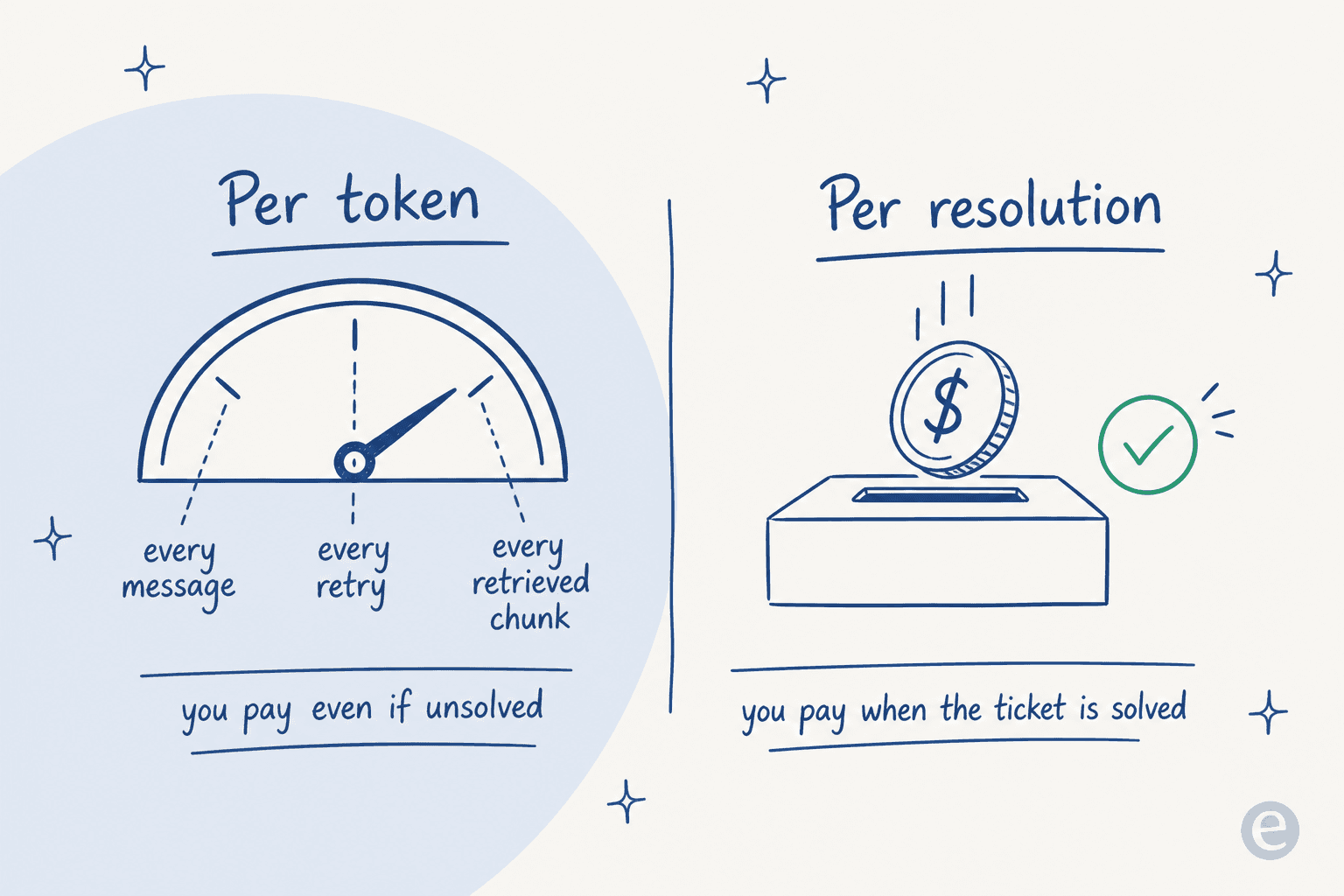
The difference is not academic. Per-token means an unbounded, usage-shaped bill you have to forecast and cap, and it climbs with every retry and every long conversation, resolved or not. Outcome pricing ties spend to work done. eesel, for instance, is one fixed monthly price from $299/month for 500 credits, 1 credit per ticket or helpdesk conversation rather than per reply, with no per-seat fee and no platform fee. Add the engineering salary behind a self-built agent and the maintenance hours it eats every week, and the "cheaper" DIY route often is not. As one developer put it, agents that "save 10 minutes a day but quietly cost hours a week in maintenance" are the trap; the real cost is never the build.
So which route should you actually pick?
None of these routes is wrong. They fit different teams. Here is the short version, then a quick way to place yourself.
And the same trade-offs as a table:
| Dimension | Raw model API | Helpdesk agent / MCP API | Ready-made teammate |
|---|---|---|---|
| You build the agent | Yes, all of it | The brains and guardrails | No, you configure it |
| Retrieval / knowledge sync | Yours | Yours | Built in |
| Helpdesk connectors | Yours | Vendor's (one platform) | Built in (1000+) |
| Test before go-live | You build the harness | You build the harness | Simulation on past tickets |
| Billing unit | Per token | Per token + plan limits | Per ticket handled |
| Time to first resolved ticket | Weeks to months | Days to weeks | Minutes to hours |
| Custom code still possible | Fully | Fully | Network Access, CLI, skills |
If you are still mapping the wider field, our roundups of the best AI agents and the best AI for ticket triage go tool by tool.
Try eesel
If you got to the end of this weighing "build on a model API" against "buy an agent," the honest answer for most support teams is that the build looks cheaper on a quickstart and costs more in year two. eesel is the third route done properly: an AI support teammate that plugs into the helpdesk you already run, trains on your past tickets and docs, and, the part a from-scratch build almost always skips, simulates on your real ticket history before it answers a live one.
You keep the programmable surface where it matters, Network Access for any REST API, webhooks, a CLI, and custom skills, without rebuilding retrieval, state, and connectors first. It is free to start with no credit card and no sales call, and pricing is a fixed monthly plan with 1 credit per ticket handled, so you pay for work done rather than tokens burned. If you would rather point an agent at your queue than spend a quarter building one, that is the fastest way to see it on your own tickets.